radiator MERCEDES-BENZ GLE 2017 Owners Manual
[x] Cancel search | Manufacturer: MERCEDES-BENZ, Model Year: 2017, Model line: GLE, Model: MERCEDES-BENZ GLE 2017Pages: 390, PDF Size: 11.63 MB
Page 15 of 390
Indicators
see Turn signals
Insect protection on the radiator .... 315
Instrument cluster
Overview .......................................... 34
Warning and indicator lamps .......... .3 4
Instrument cluster lighting .............. 223
Intelligent Light System
Activating/deactivating ................ .2 33
Overview ........................................ 109
Interior lighting
Automatic control .......................... 112
Emergency lighting ........................ 112
General notes ................................ 111
Manual control ............................... 111
Overview ........................................ 111
Reading lamp ................................. 111
iPod ®
see also Digital Operator's Man-
ual ................................................. .2 81
J Jack
Storage location ............................ 326
Using ............................................. 363
Jump starting (engine) ..................... .3 33
K
Key positions
KEYLESS-GO .................................. 132
SmartKey ....................................... 132
KEYLESS-GO
Activating ......................................... 75
Convenience closing feature ............ 88
Deactivation ..................................... 75
Display message ............................ 267
Locking ............................................ 75
Removing the Start/Stop button ... 133
Start function ................................... 76
Start/Stop button .......................... 132
Starting the engine ........................ 134
Unlocking ......................................... 75
Kickdown
Driving tips ................................... .1 43
Manual gearshifting ....................... 146
Knee bag .............................................. 47 L Lamps
see Warning and indicator lamps
Lane detection (automatic)
see Lane Keeping Assist
Lane Keeping Assist
Activating/deactivating ................. 232
Display message ............................ 258
Function/information .................... 203
see Active Lane Keeping Assist
Lap time (RACETIMER) ...................... 236
LATCH-type (ISOFIX) child seat
anchors ................................................ 59
Level control
AIRMATIC ...................................... 182
Level control (display message) ...... 255
Level control (vehicle with the Off-
Road Engineering package)
Basic settings ................................ 176
Function/notes ............................. 176
Important safety notes .................. 176
License plate lamp (display mes-
sage) ................................................... 250
Light function, active
Display message ............................ 250
Light sensor (display message) ....... 250
Lights
Activating/deactivating the Intel-
ligent Light System ........................ 233
Active light function ....................... 109
Adaptive Highbeam Assist ............. 110
Automatic headlamp mode ............ 107
Fog lamps (extended) .................... 110
Hazard warning lamps ................... 109
High beam flasher .......................... 108
High-beam headlamps ................... 108
Highway mode ............................... 110
Light switch ................................... 107
Low-beam headlamps .................... 108
Off-road lights ................................ 110
Parking lamps ................................ 108
Rear fog lamp ................................ 108
Standing lamps .............................. 108
Switching the daytime running
lamps on/off (on-board com-
puter) ............................................. 233
Turn signals ................................... 108 Index 13
Page 19 of 390
Sensor range ................................. 185
Towing a trailer .............................. 184
Warning display ............................. 186
Parking brake
Applying automatically ................... 155
Applying or releasing manually ...... 155
Display message ............................ 241
Electric parking brake .................... 154
Emergency braking ........................ 156
General notes ................................ 154
Releasing automatically ................. 155
Warning lamp ................................. 276
Parking lamps
Switching on/off ........................... 108
Parking Pilot
Display Message ............................ 259
Exiting a parking space .................. 190
Function/notes ............................. 187
Important safety notes .................. 187
Parking .......................................... 189
PASSENGER AIR BAG
Display message ............................ 248
Indicator lamps ................................ 42
Problem (malfunction) ................... 248
Pets in the vehicle ............................... 62
Phone book
see also Digital Operator's Man-
ual .................................................. 281
Plastic trim (cleaning instruc-
tions) .................................................. 324
Power locks ......................................... 81
Power washers .................................. 320
Power windows
see Side windows
PRE-SAFE ®
(anticipatory occupant
protection)
Display message ............................ 245
Operation ......................................... 55
PRE-SAFE ®
PLUS (anticipatory
occupant protection PLUS)
Display message ............................ 245
Operation ......................................... 56
Protection against theft
ATA (Anti-Theft Alarm system) ......... 72
Immobilizer ...................................... 72
Protection of the environment
General notes .................................. 25 Pulling away
Automatic transmission ................. 135
General notes ................................ 135
Hill start assist ............................... 136
Trailer ............................................ 135
Q QR code
Mercedes-Benz Guide App ................. 1
Rescue card ..................................... 30
Qualified specialist workshop ........... 29
R RACETIMER (on-board computer) .... 236
Radiator cover ................................... 315
Radio
Selecting a station ......................... 228
see separate operating instructions
Radio mode
see also Digital Operator's Man-
ual .................................................. 281
Radio-wave reception/transmis-
sion in the vehicle
Declaration of conformity ................ 28
Reading lamp ..................................... 111
Rear bench seat
Folding forwards/back .................. 292
Rear compartment
Setting the air vents ...................... 130
Setting the temperature ................ 125
Rear fog lamp
Display message ............................ 250
Switching on/off ........................... 108
Rear Seat Entertainment System
AUX jacks ...................................... 287
AUX jacks CD/DVD drive .............. 287
Rear seats
Adjusting ......................................... 98
Rear view camera
Cleaning instructions ..................... 323
Display in the multimedia system .. 192
Function/notes ............................. 191
Switching on/off ........................... 192
Rear window defroster
Problem (malfunction) ................... 128
Switching on/off ........................... 127 Index 17
Page 26 of 390
Video
Operating the DVD ......................... 229
see also Digital Operator's Man-
ual .................................................. 281
VIN ...................................................... 372
Seat ............................................... 373
Type plate ...................................... 372
WWarning and indicator lamps
ABS ................................................ 271
Brakes ........................................... 270
Check Engine ................................. 277
Coolant .......................................... 277
Distance Pilot DISTRONIC ............. 279
Distance warning ........................... 279
ESP ®
.............................................. 273
ESP ®
OFF ....................................... 274
Fuel tank ........................................ 277
Overview .......................................... 34
Parking brake ................................ 276
PASSENGER AIR BAG ...................... 42
Reserve fuel ................................... 277
Restraint system ............................ 276
Seat belt ........................................ 268
Tire pressure monitor .................... 280
Warranty .............................................. 26
Washer fluid
Display message ............................ 266
Weather display (COMAND)
see also Digital Operator's Man-
ual .................................................. 281
Wheel and tire combinations
Tires ............................................... 366
Wheel bolt tightening torque ........... 365
Wheel chock ...................................... 362
Wheels
Changing a wheel .......................... 361
Checking ........................................ 341
Cleaning ......................................... 321
Emergency spare wheel ................. 366
Important safety notes .................. 341
Information on driving .................... 341
Interchanging/changing ................ 361
Mounting a new wheel ................... 364
Mounting a wheel .......................... 362
Overview ........................................ 341 Removing a wheel .......................... 364
Snow chains .................................. 343
Storing ........................................... 362
Tightening torque ........................... 365
Wheel size/tire size ....................... 366
Window curtain air bag
Display message ............................ 247
Operation ......................................... 48
Windows
see Side windows
Windshield
Defrosting ...................................... 126
Windshield washer fluid
see Windshield washer system
Windshield washer system
Adding washer fluid ....................... 317
Important safety notes .................. 379
Windshield wipers
Problem (malfunction) ................... 118
Rear window wiper ........................ 115
Replacing the wiper blades ............ 115
Switching on/off ........................... 114
Winter driving
Sl ippery road surfaces ................... 161
Winter operation
Overview ........................................ 343
Radiator cover ............................... 315
Winter tires
M+S tires ....................................... 343
Wiper blades
Cleaning ......................................... 322
Replacing ....................................... 115
Replacing (rear window) ................ 117
Replacing (windshield) ................... 115
Wooden trim (cleaning instruc-
tions) .................................................. 325
Workshop
see Qualified specialist workshop
Z
ZONE function
Switching on/off ........................... 12624
Index
Page 163 of 390
Off-road fording
! Under no circumstances should you accel-
erate before entering the water. The bow
wave could cause water to enter and damage
the engine and other assemblies.
! Do not open any of the vehicle's doors while
fording. Otherwise, water could get into the
vehicle interior and damage the vehicle's
electronics and interior equipment. R
Establish how deep the water is and the char-
acteristics of the body of water before ford-
ing. R
Select the highest possible vehicle level. R
Shift to a lower gear using the left-hand steer-
ing wheel paddle shifter. R
Avoid high engine speeds. R
Enter and exit the water at a flat place and at
a steady walking pace. R
Drive slowly and at an even speed through the
water. R
Ensure that a bow wave does not form as you
drive. R
Do not stop and do not switch off the engine.
Water offers a high degree of resistance, and
the ground is slippery and in some cases
unstable. Therefore, it is difficult and danger-
ous to pull away in the water. R
Clean any mud from the tire tread after ford-
ing. R
Apply the brakes to dry them after fording.
Always observe the fording depth values
( Y
page 382).
Winter driving
G WARNING
If you shift down on a slippery road surface in
an attempt to increase the engine's braking
effect, the drive wheels could lose their grip.
There is an increased danger of skidding and
accidents.
Do not shift down for additional engine brak-
ing on a slippery road surface.
G DANGER
If the exhaust pipe is blocked or adequate
ventilation is not possible, poisonous gases such as carbon monoxide (CO) may enter the
vehicle. This is the case, e.g. if the vehicle
becomes trapped in snow. There is a risk of
fatal injury.
If you leave the engine or the auxiliary heating
running, make sure the exhaust pipe and area
around the vehicle are clear of snow. To
ensure an adequate supply of fresh air, open a
window on the side of the vehicle that is not
facing into the wind.
Have your vehicle winter-proofed at a qualified
specialist workshop at the onset of winter.
Drive particularly carefully on slippery road sur-
faces. Avoid sudden acceleration, steering and
braking maneuvers. Do not use cruise control or
Distance Pilot DISTRONIC.
If the vehicle threatens to skid or cannot be
stopped when moving at low speed: X
Shift the transmission to position N .
When driving in snow with or without snow
chains, select driving program Slippery
( Y
page 139).
i Vehicles with a diesel engine: do not
cover the radiator, e.g. with a protective
cover. The measuring function of the on-
board diagnosis system may otherwise pro-
vide inaccurate values. Some of these values
are required by law and must therefore always
be accurate.
The outside temperature indicator is not
designed to serve as an ice-warning device and
is therefore unsuitable for that purpose.
Changes in the outside temperature are dis-
played after a short delay.
Indicated temperatures just above the freezing
point do not guarantee that the road surface is
free of ice. The road may still be icy, especially in
wooded areas or on bridges. You should pay
special attention to road conditions when tem-
peratures are around the freezing point.
For more information on driving with snow
chains, see ( Y
page 343).
For more information on driving with summer
tires, see ( Y
page 343).
Observe the notes in the "Changing a wheel"
section ( Y
page 361).Driving tips 161
Driving and parking Z
Page 207 of 390
ranties, and is not permitted by the FCC. Do
not tamper with, alter, or use in any non-
approved way.
Any unauthorized modification to this device
could void the user's authority to operate the
equipment.
i Canada only: This device complies with
RSS-210 of Industry Canada. Operation is
subject to the following two conditions:
1. This device may not cause harmful inter-
ference, and
2. This device must accept any interference
received, including interference that may
cause undesired operation of the device.
Removal, tampering, or altering of the device
will void any warranties, and is not permitted.
Do not tamper with, alter, or use in any non-
approved way.
Any unauthorized modification to this device
could void the user's authority to operate the
equipment.
Radar sensors The Active Blind Spot Assist radar sensors are
integrated into the front and rear bumpers and
behind a cover in the radiator trim. Make sure
that the bumpers and the cover in the radiator
grill are free of dirt, ice or slush. The sensors
must not be covered, for example by cycle racks
or overhanging loads. Following an accident or
in the event of damage to the bumpers, have the
function of the radar sensors checked at a quali-
fied specialist workshop. Active Blind Spot
Assist may otherwise no longer work properly.
Monitoring area
G WARNING
Active Blind Spot Assist does not detect all
traffic situations and road users. There is a
risk of an accident.
Always make sure that there is sufficient dis-
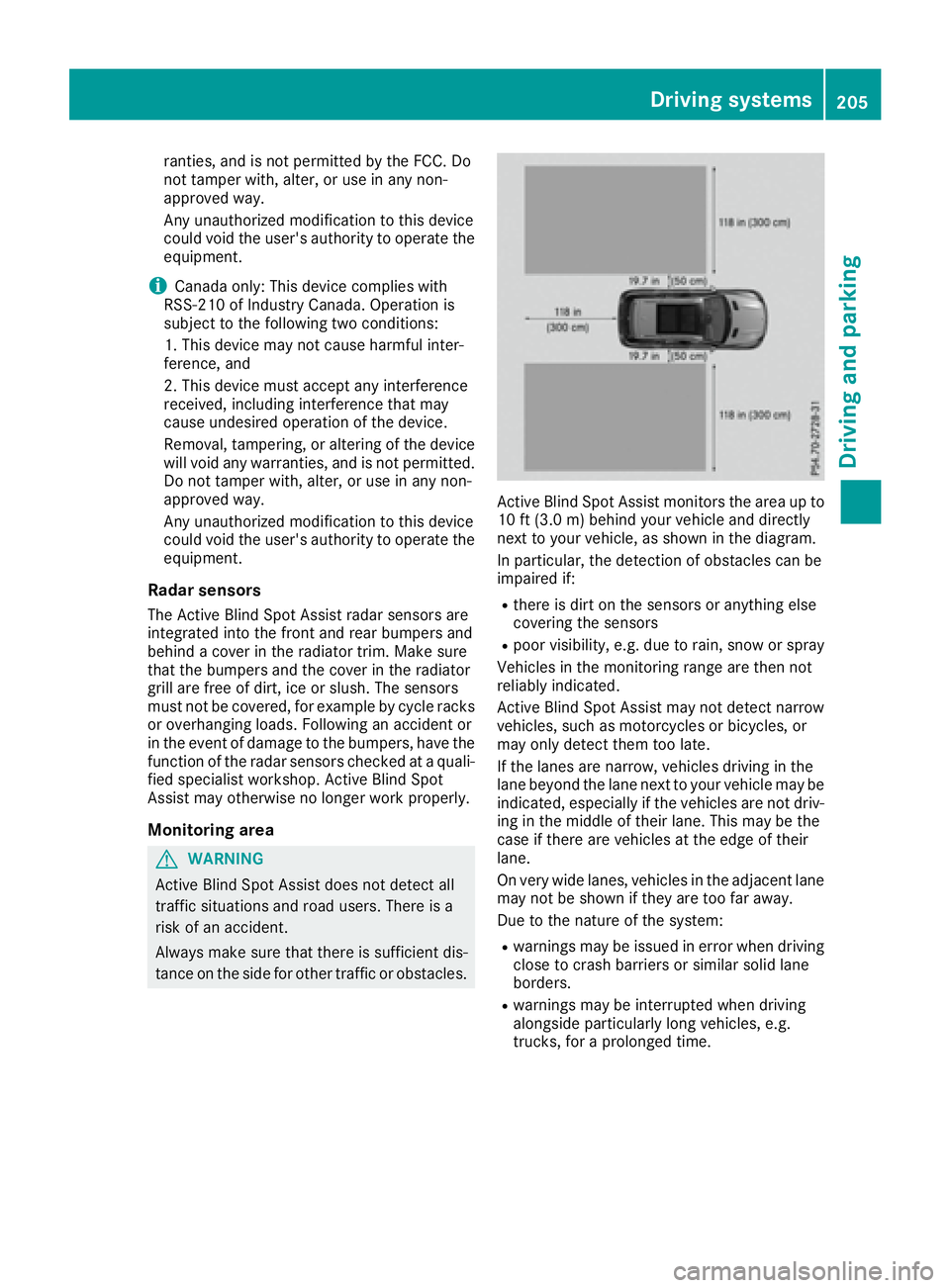
tance on the side for other traffic or obstacles. Active Blind Spot Assist monitors the area up to
10 ft (3.0 m) behind your vehicle and directly
next to your vehicle, as shown in the diagram.
In particular, the detection of obstacles can be
impaired if: R
there is dirt on the sensors or anything else
covering the sensors R
poor visibility, e.g. due to rain, snow or spray
Vehicles in the monitoring range are then not
reliably indicated.
Active Blind Spot Assist may not detect narrow
vehicles, such as motorcycles or bicycles, or
may only detect them too late.
If the lanes are narrow, vehicles driving in the
lane beyond the lane next to your vehicle may be
indicated, especially if the vehicles are not driv-
ing in the middle of their lane. This may be the
case if there are vehicles at the edge of their
lane.
On very wide lanes, vehicles in the adjacent lane
may not be shown if they are too far away.
Due to the nature of the system: R
warnings may be issued in error when driving
close to crash barriers or similar solid lane
borders. R
warnings may be interrupted when driving
alongside particularly long vehicles, e.g.
trucks, for a prolonged time.Driving systems 205
Driving and parking Z
Page 316 of 390
Engine compartment
Hood
Important safety notes
G WARNING
If the hood is unlatched, it may open up when
the vehicle is in motion and block your view.
There is a risk of an accident.
Never unlatch the hood while driving. Before
every trip, ensure that the hood is locked.
G WARNING
When opening and closing the hood, it may
suddenly fall into the closed position. There is
a risk of injury to persons within range of
movement of the hood.
Open and close the hood only when no one is
within its range of movement.
G WARNING
Opening the hood when the engine is over-
heated or when there is a fire in the engine
compartment could expose you to hot gases
or other service products. There is a risk of
injury.
Let an overheated engine cool down before
opening the hood. If there is a fire in the
engine compartment, keep the hood closed
and contact the fire department.
G WARNING
The engine compartment contains moving
components. Certain components, such as
the radiator fan, may continue to run or start
again suddenly when the ignition is off. There
is a risk of injury.
If you need to do any work inside the engine
compartment: R
switch off the ignition R
never reach into the area where there is a
risk of danger from moving components,
such as the fan rotation area R
remove jewelry and watches R
keep items of clothing and hair, for exam-
ple, away from moving parts
G WARNING
The ignition system and the fuel injection sys-
tem work under high voltage. If you touch
components which are under voltage, you
could get an electric shock. There is a risk of
injury.
Never touch components of the ignition sys-
tem or fuel injection system when the ignition
is switched on.
PLUG ‑ IN HYBRID vehicles: it is essential to
comply with the separate operating instruc-
tions. You could otherwise fail to recognize dan-
gers e.g. due to high voltage.
Opening the hood
G WARNING
Certain components in the engine compart-
ment, such as the engine, radiator and parts
of the exhaust system, can become very hot.
Working in the engine compartment poses a
risk of injury.
Where possible, let the engine cool down and
touch only the components described in the
following.
G WARNING
When the hood is open and the windshield
wipers are set in motion, you can be injured by
the wiper linkage. There is a risk of injury.
Always switch off the windshield wipers and
the ignition before opening the hood.
! Make sure that the windshield wipers are
not folded away from the windshield. You
could otherwise damage the windshield wip-
ers or the hood.314
Engine compartment
Maintenance and care
Page 317 of 390
X
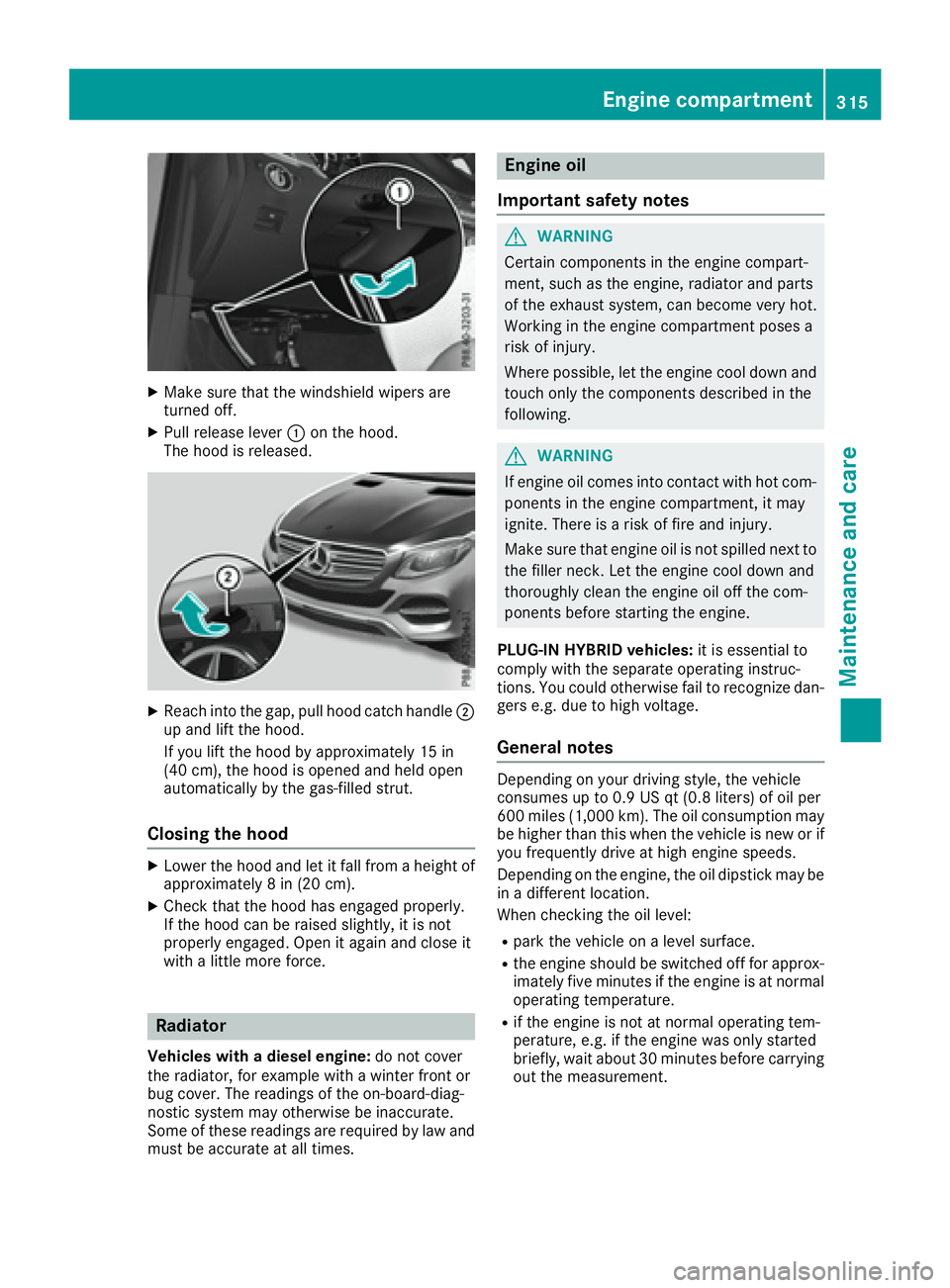
Make sure that the windshield wipers are
turned off. X
Pull release lever C on the hood.
The hood is released.
X
Reach into the gap, pull hood catch handle D
up and lift the hood.
If you lift the hood by approximately 15 in
(40 cm), the hood is opened and held open
automatically by the gas-filled strut.
Closing the hood X
Lower the hood and let it fall from a height of
approximately 8 in (20 cm). X
Check that the hood has engaged properly.
If the hood can be raised slightly, it is not
properly engaged. Open it again and close it
with a little more force.
Radiator
Vehicles with a diesel engine: do not cover
the radiator, for example with a winter front or
bug cover. The readings of the on-board-diag-
nostic system may otherwise be inaccurate.
Some of these readings are required by law and
must be accurate at all times. Engine oil
Important safety notes
G WARNING
Certain components in the engine compart-
ment, such as the engine, radiator and parts
of the exhaust system, can become very hot.
Working in the engine compartment poses a
risk of injury.
Where possible, let the engine cool down and
touch only the components described in the
following.
G WARNING
If engine oil comes into contact with hot com-
ponents in the engine compartment, it may
ignite. There is a risk of fire and injury.
Make sure that engine oil is not spilled next to
the filler neck. Let the engine cool down and
thoroughly clean the engine oil off the com-
ponents before starting the engine.
PLUG ‑ IN HYBRID vehicles: it is essential to
comply with the separate operating instruc-
tions. You could otherwise fail to recognize dan-
gers e.g. due to high voltage.
General notes Depending on your driving style, the vehicle
consumes up to 0.9 US qt (0.8 liters) of oil per
600 miles (1,000 km). The oil consumption may
be higher than this when the vehicle is new or if
you frequently drive at high engine speeds.
Depending on the engine, the oil dipstick may be
in a different location.
When checking the oil level: R
park the vehicle on a level surface. R
the engine should be switched off for approx-
imately five minutes if the engine is at normal
operating temperature. R
if the engine is not at normal operating tem-
perature, e.g. if the engine was only started
briefly, wait about 30 minutes before carrying
out the measurement.Engine compartment 315
Maintenance and care Z
Page 381 of 390
The antifreeze concentrate/corrosion inhibitor
concentration in the engine cooling system
should: R
be at least 50%. This will protect the engine
cooling system against freezing down to
approximately -35 ‡ (-37 †). R
not exceed 55% (antifreeze protection down
to -49 ‡[ -45 †]). Otherwise, heat will not be
dissipated as effectively.
Mercedes-Benz recommends an antifreeze/
corrosion inhibitor concentrate in accordance
with MB Specifications for Service Products
310.1.
i When the vehicle is first delivered, it is filled
with a coolant mixture that ensures adequate
antifreeze and anti-corrosion protection.
i The coolant is checked with every mainte-
nance interval at a qualified specialist work-
shop.
Filling capacities Missing values were not available at time of
going to print.
Model Capacity
Mercedes ‑ AMG
vehicles Approx. 11.9 US qt
(11.3 l)
GLE 300 d 4MATIC
Approx. 10.7 US qt
(10.1 l)
GLE 350
Approx. 11.1 US qt
(10.5 l)
GLE 350 4MATIC
Approx. 11.1 US qt
(10.5 l)
GLE 350 d 4MATIC
Approx. 12.2 US qt
(11.5 l)
GLE 400 4MATIC
Approx. 12.2 US qt
(11.5 l)
Mercedes-AMG
GLE 43
4MATIC Approx. 10.3 US qt
(9.7 l)
GLE 550 4MATIC
All other models
Approx. 10.3 US qt
(9.7 l) Windshield washer system
Important safety notes
G WARNING
Windshield washer concentrate could ignite if
it comes into contact with hot engine compo-
nents or the exhaust system. There is a risk of
fire and injury.
Make sure that no windshield washer con-
centrate is spilled next to the filler neck.
! Only MB SummerFit and MB WinterFit
washer fluid should be mixed together. The
spray nozzles may otherwise become
blocked.
Do not use distilled or de-ionized water. Other-
wise, the level sensor may give a false reading.
When handling washer fluid, observe the impor-
tant safety notes on service products
( Y
page 373).
At temperatures above freezing: X
Fill the washer fluid reservoir with a mixture of
water and windshield washer fluid, e.g. MB
SummerFit.
Add 1 part MB SummerFit to 100 parts water.
At temperatures below freezing: X
Fill the washer fluid reservoir with a mixture of
water and washer fluid, e.g. MB WinterFit.
For the correct mixing ratio refer to the infor-
mation on the antifreeze reservoir.
i Add windshield washer fluid, e.g. MB Sum-
merFit or MB WinterFit, to the washer fluid all
year round.
Climate control system refrigerant
Important safety notes The climate control system of your vehicle is fil-
led with refrigerant R ‑ 134a.
The instruction label regarding the refrigerant
type used can be found on the radiator cross
member.
! Only the refrigerant R ‑ 134a and the PAG oil
approved by Mercedes-Benz may be used.
The approved PAG oil may not be mixed with
any other PAG oil that is not approved forService products and filling capacities 379
Technical data Z