transmission oil MERCEDES-BENZ GLE 2017 Owners Manual
[x] Cancel search | Manufacturer: MERCEDES-BENZ, Model Year: 2017, Model line: GLE, Model: MERCEDES-BENZ GLE 2017Pages: 390, PDF Size: 11.63 MB
Page 7 of 390
Rear .............................................. .1 30
Setting .......................................... .1 29
Setting the center air vents ........... 129
Setting the side air vents .............. .1 29
Air-conditioning system
see Climate control
AIRMATIC package
ADS (Adaptive Damping System) ... 180
Function/notes ............................ .1 80
Alarm
ATA (Anti-Theft Alarm system) ......... 72
Switching off (ATA) .......................... 72
Switching the function on/off
(ATA) ................................................ 72
Alarm system
see ATA (Anti-Theft Alarm system)
AMG
Adaptive sport suspension sys-
tem ................................................ 184
AMG menu (on-board computer) ..... 235
Anti-lock braking system
see ABS (Anti-lock Braking System)
Anti-Theft Alarm system
see ATA (Anti-Theft Alarm system)
Approach/departure angle .............. 165
Ashtray ............................................... 300
Assistance display (on-board com-
puter) ................................................. .2 31
Assistance menu (on-board com-
puter) ................................................. .2 30
ASSYST PLUS
Displaying a service message ....... .3 18
Hiding a service message .............. 318
Resetting the service interval dis-
play ................................................ 318
Service message ............................ 318
Special service requirements ......... 318
ATA (Anti-Theft Alarm system)
Activating/deactivating ................... 72
Function .......................................... .7 2
Switching off the alarm .................... 72
ATTENTION ASSIST
Activating/deactivating ................. 231
Display message ............................ 255
Function/notes ............................. 199
Audio 20
Switching on/off ........................... 282 Audio menu (on-board computer) .... 228
Audio system
see separate operating instructions
Authorized Mercedes-Benz Center
see Qualified speci alist workshop
A
uthorized workshop
see Qualified specialist workshop
AUTO lights
Display message ............................ 250
see Lights
Automatic car wash (care) ............... 319
Automatic engine start (ECO start/
stop function) .................................... 137
Automatic engine switch-off (ECO
start/stop function) .......................... 136
Automatic headlamp mode .............. 107
Automatic transmission
Accelerator pedal position ............. 143
Changing gear ............................... 143
DIRECT SELECT lever ..................... 140
Display message ............................ 264
Drive program ................................ 143
Drive program display .................... 142
Driving tips .................................... 143
DYNAMIC SELECT controller ......... 139
Emergency running mode .............. 147
Engaging drive position .................. 142
Engaging neutral ............................ 141
Engaging park position automati-
cally ............................................... 141
Engaging reverse gear ................... 141
Engaging the park position ............ 140
Kickdown ....................................... 143
Manual shifting .............................. 144
Oil temperature (on-board com-
puter, Mercedes-AMG vehicles) ..... 235
Overview ........................................ 140
Problem (malfunction) ................... 147
Pulling away ................................... 135
Starting the engine ........................ 134
Steering wheel paddle shifters ...... 144
Trailer towing ................................. 143
Transmission position display ........ 142
Transmission positions .................. 142
Automatic transmission emer-
gency mode ....................................... 147 Index 5
Page 23 of 390
Technical data
Capacities ...................................... 373
Information .................................... 371
Tires/wheels ................................. 366
Trailer loads ................................... 384
Vehicle data ................................... 380
Telephone
Accepting a call (multifunction
steering wheel) .............................. 230
Authorizing a mobile phone (con-
necting) ......................................... 285
Connecting a mobile phone (gen-
eral information) ............................ 284
Display message ............................ 266
Menu (on-board computer) ............ 229
Number from the phone book ........ 230
Redialing ........................................ 230
Rejecting/ending a call ................. 230
see also Digital Operator's Man-
ual .................................................. 281
Switching between mobile
phones ........................................... 286
Temperature
Coolant (display in the instrument
cluster) .......................................... 224
Coolant (on-board computer,
Mercedes-AMG vehicles) ............... 235
Engine oil (on-board computer,
Mercedes-AMG vehicles) ............... 235
Outside temperature ...................... 223
Setting (climate control) ................ 125
Transmission oil (on-board com-
puter, Mercedes-AMG vehicles) ..... 235
Through-loading feature ................... 291
Time
see separate operating instructions
Timing (RACETIMER) ......................... 236
Tire pressure
Calling up (on-board computer) ..... 348
Checking manually ........................ 347
Display message ............................ 262
Maximum ....................................... 347
Not reached (TIREFIT) .................... 329
Notes ............................................. 346
Reached (TIREFIT) .......................... 330
Recommended ............................... 344
Tire pressure loss warning system
General notes ................................ 347 Important safety notes .................. 347
Restarting ...................................... 348
Tire pressure monitor
Checking the tire pressure elec-
tronically ........................................ 350
Function/notes ............................. 348
General notes ................................ 348
Impo rtant safety notes .................. 349
Radio type approval for the tire
pressure monitor ........................... 351
Restarting ...................................... 350
Warning lamp ................................. 280
Warning message .......................... 350
TIREFIT kit
Important safety notes .................. 328
Storage location ............................ 326
Tire pressure not reached .............. 329
Tire pressure reached .................... 330
Using ............................................. 328
Tires
Aspect ratio (definition) ................. 360
Average weight of the vehicle
occupants (definition) .................... 359
Bar (definition) ............................... 359
Changing a wheel .......................... 361
Characteristics .............................. 359
Checking ........................................ 341
Curb weight (definition) ................. 360
Definition of terms ......................... 359
Direction of rotation ...................... 362
Display message ............................ 262
Distribution of the vehicle occu-
pants (definition) ............................ 361
DOT (Department of Transporta-
tion) (definition) ............................. 359
DOT, Tire Identification Number
(TIN) ............................................... 358
GAWR (Gross Axle Weight Rating)
(definition) ..................................... 359
GTW (Gross Trailer Weight) (defi-
nition) ............................................ 360
GVW (Gross Vehicle Weight) (def-
inition) ........................................... 360
GVWR (Gross Vehicle Weight Rat-
ing) (definition) .............................. 360
Important safety notes .................. 341
Increased vehicle weight due to
optional equipment (definition) ...... 359 Index 21
Page 76 of 390
SmartKey
Important safety notes
G WARNING
If children are left unsupervised in the vehicle,
they could: R
open the doors, thus endangering other
people or road users. R
get out and disrupt traffic. R
operate the vehicle's equipment.
Additionally, children could set the vehicle in
motion if, for example, they: R
release the parking brake. R
shifting the automatic transmission out of
park position PR
Start the engine.
There is a risk of an accident and injury.
When leaving the vehicle, always take the
SmartKey with you and lock the vehicle. Never
leave children or animals unattended in the
vehicle. Always keep the SmartKey out of
reach of children.
G WARNING
If you attach heavy or large objects to the
SmartKey, the SmartKey could be uninten-
tionally turned in the ignition lock. This could
cause the engine to be switched off. There is a
risk of an accident.
Do not attach any heavy or large objects to the
SmartKey. Remove any bulky key rings before
inserting the SmartKey into the ignition lock.
! Keep the SmartKey away from strong mag-
netic fields. Otherwise, the remote control
function could be affected.
Strong magnetic fields can occur in the vicin-
ity of powerful electrical installations.
Do not keep the SmartKey: R
with electronic devices, e.g. a mobile phone
or another SmartKey. R
with metallic objects, e.g. coins or metal foil. R
inside metallic objects, e.g. a metal case.
This can affect the functionality of the Smart-
Key. Do not keep the KEYLESS-GO or KEYLESS-GO
Start function key in the temperature-controlled
cup holder. Otherwise, the KEYLESS-GO or KEY-
LESS-GO Start function key will not be detected.
Vehicles with KEYLESS-GO start function: do
not keep the SmartKey in the cargo compart-
ment. Otherwise, the SmartKey may not be
detected, e.g. when starting the engine using
the Start/Stop button.
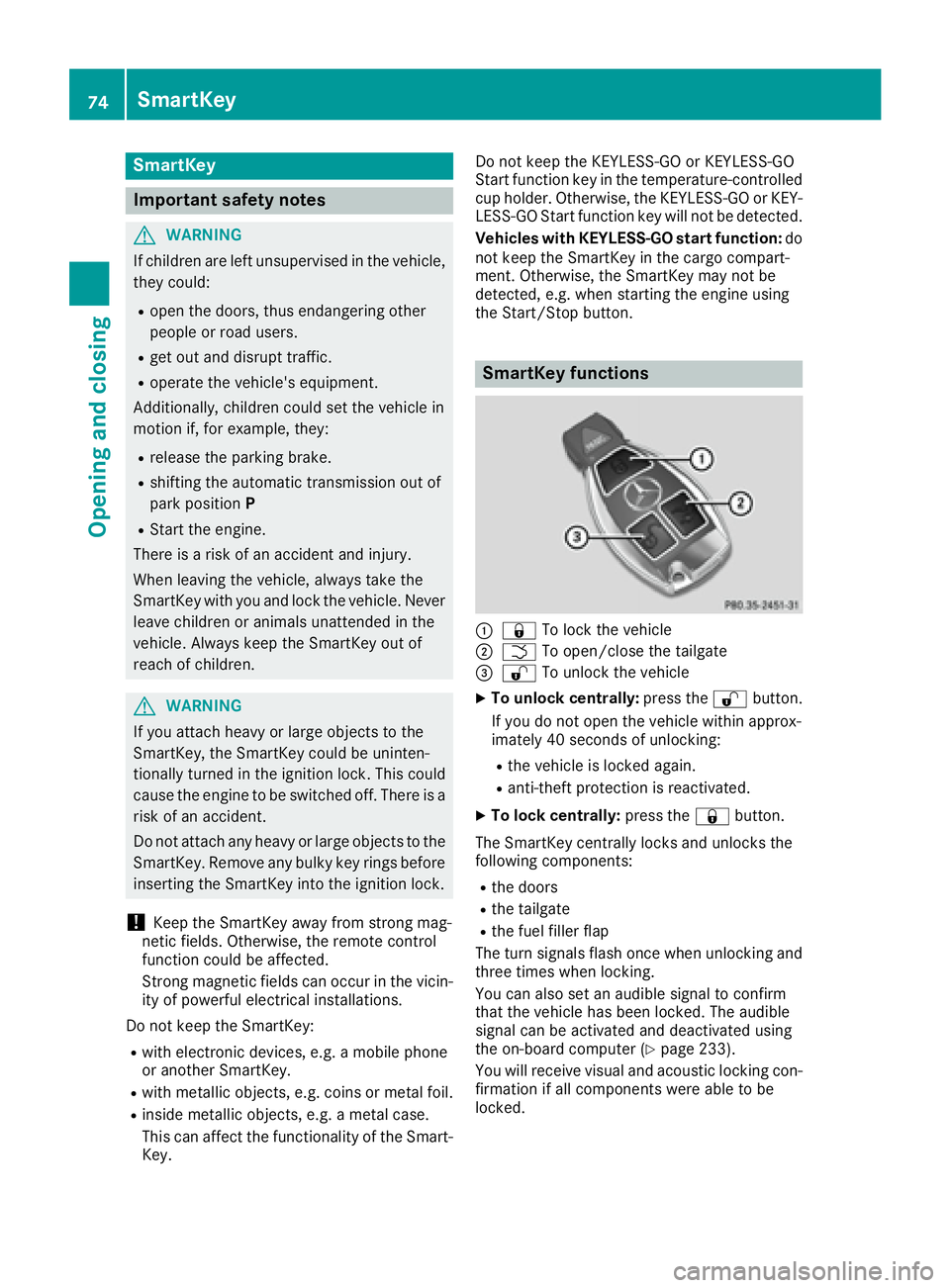
SmartKey functions
C
7 To lock the vehicleD
T To open/close the tailgate
Page 134 of 390
! Do not warm up the engine with the vehicle
stationary. Drive off immediately. Avoid high
engine speeds and driving at full throttle until
the engine has reached its operating temper-
ature.
Only shift the automatic transmission to the
desired drive position when the vehicle is sta-
tionary.
Where possible, avoid spinning the drive
wheels when pulling away on slippery roads.
You could otherwise damage the drive train.
! Mercedes-AMG vehicles: at low engine oil
temperatures below 68 ‡ (+20 †), the max-
imum engine speed is restricted in order to
protect the engine. To protect the engine and
maintain smooth engine operation, avoid driv-
ing at full throttle when the engine is cold.
PLUG ‑ IN HYBRID vehicles: please be sure to
read the separate operating instructions. Oth-
erwise, you may not recognize dangers.
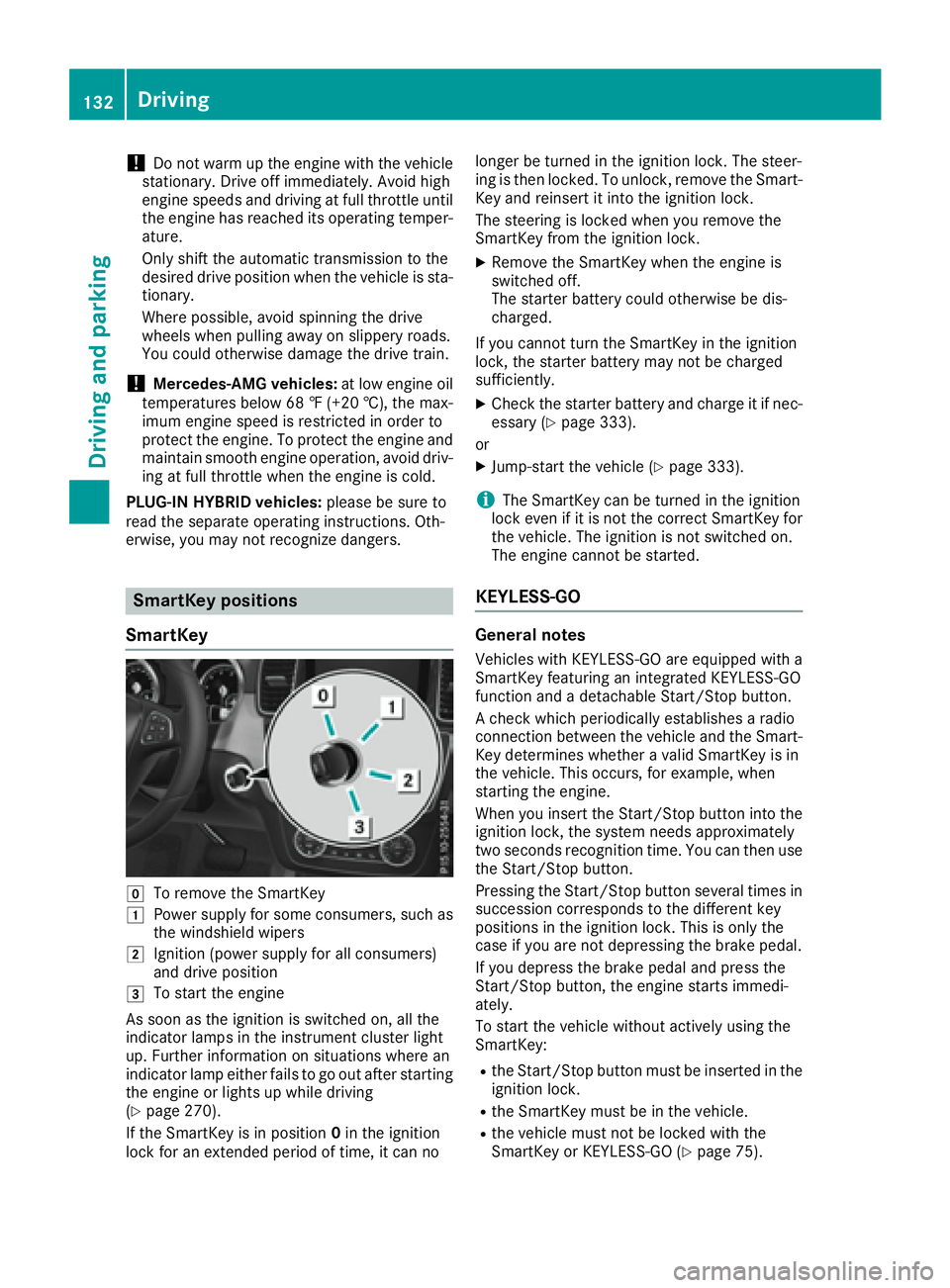
SmartKey positions
SmartKey
Z
To remove the SmartKeyG
Power supply for some consumers, such as
the windshield wipers
H
Ignition (power supply for all consumers)
and drive position
I
To start the engine
As soon as the ignition is switched on, all the
indicator lamps in the instrument cluster light
up. Further information on situations where an
indicator lamp either fails to go out after starting
the engine or lights up while driving
( Y
page 270).
If the SmartKey is in position 0 in the ignition
lock for an extended period of time, it can no longer be turned in the ignition lock. The steer-
ing is then locked. To unlock, remove the Smart-
Key and reinsert it into the ignition lock.
The steering is locked when you remove the
SmartKey from the ignition lock. X
Remove the SmartKey when the engine is
switched off.
The starter battery could otherwise be dis-
charged.
If you cannot turn the SmartKey in the ignition
lock, the starter battery may not be charged
sufficiently. X
Check the starter battery and charge it if nec-
essary ( Y
page 333).
or X
Jump-start the vehicle ( Y
page 333).
i The SmartKey can be turned in the ignition
lock even if it is not the correct SmartKey for
the vehicle. The ignition is not switched on.
The engine cannot be started.
KEYLESS-GO
General notes Vehicles with KEYLESS-GO are equipped with a
SmartKey featuring an integrated KEYLESS-GO
function and a detachable Start/Stop button.
A check which periodically establishes a radio
connection between the vehicle and the Smart-
Key determines whether a valid SmartKey is in
the vehicle. This occurs, for example, when
starting the engine.
When you insert the Start/Stop button into the
ignition lock, the system needs approximately
two seconds recognition time. You can then use
the Start/Stop button.
Pressing the Start/Stop button several times in
succession corresponds to the different key
positions in the ignition lock. This is only the
case if you are not depressing the brake pedal.
If you depress the brake pedal and press the
Start/Stop button, the engine starts immedi-
ately.
To start the vehicle without actively using the
SmartKey: R
the Start/Stop button must be inserted in the
ignition lock. R
the SmartKey must be in the vehicle. R
the vehicle must not be locked with the
SmartKey or KEYLESS-GO ( Y
page 75).132
Driving
Driving and parking
Page 135 of 390
Do not keep the SmartKey: R
with electronic devices, e.g. a mobile phone
or another SmartKey. R
with metallic objects, e.g. coins or metal foil. R
inside metallic objects, e.g. a metal case.
This can impair the functionality of the KEY-
LESS-GO key.
Do not keep the KEYLESS-GO key in the tem-
perature-controlled cup holder ( Y
page 298).
Otherwise, the KEYLESS-GO key will not be rec-
ognized.
If you lock the vehicle with the SmartKey's
remote control or with KEYLESS-GO, after a
short time: R
you will not be able to switch on the ignition
with the Start/Stop button. R
you will not be able to start the engine with the
Start/Stop button until the vehicle is
unlocked again.
If you lock the vehicle centrally using the button
on the front door ( Y
page 80), you can continue
to start the engine with the Start/Stop button.
The engine can be switched off while the vehicle
is in motion by pressing and holding the Start/
Stop button for three seconds. This function
operates independently of the ECO start/stop
automatic engine switch-off function.
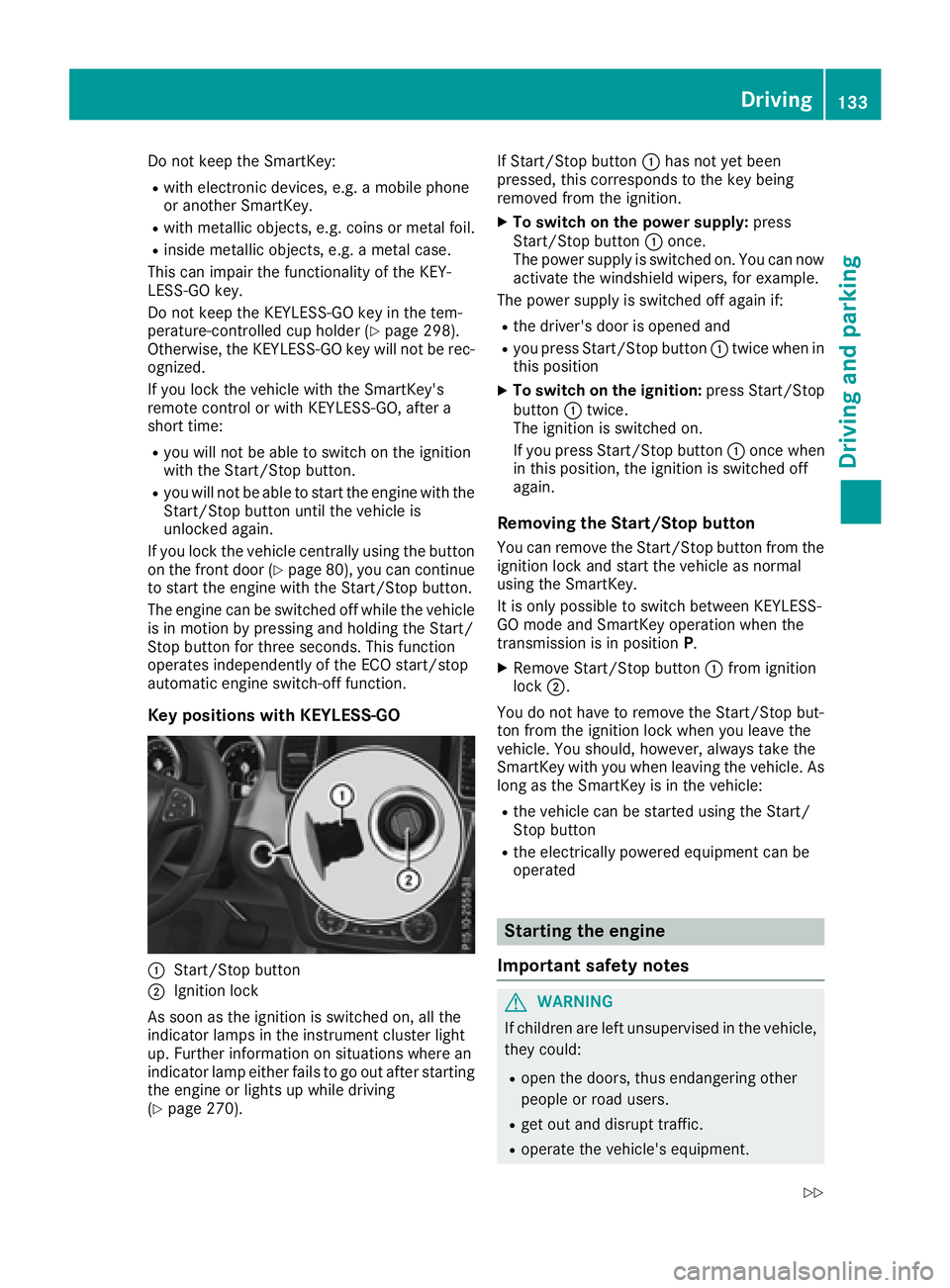
Key positions with KEYLESS-GO
C
Start/Stop button
D
Ignition lock
As soon as the ignition is switched on, all the
indicator lamps in the instrument cluster light
up. Further information on situations where an
indicator lamp either fails to go out after starting
the engine or lights up while driving
( Y
page 270). If Start/Stop button C has not yet been
pressed, this corresponds to the key being
removed from the ignition. X
To switch on the power supply: press
Start/Stop button C once.
The power supply is switched on. You can now
activate the windshield wipers, for example.
The power supply is switched off again if: R
the driver's door is opened and R
you press Start/Stop button C twice when in
this position X
To switch on the ignition: press Start/Stop
button C twice.
The ignition is switched on.
If you press Start/Stop button C once when
in this position, the ignition is switched off
again.
Removing the Start/Stop button You can remove the Start/Stop button from the
ignition lock and start the vehicle as normal
using the SmartKey.
It is only possible to switch between KEYLESS-
GO mode and SmartKey operation when the
transmission is in position P .X
Remove Start/Stop button C from ignition
lock D .
You d o not have to remove the Start/Stop but-
to
n from the ignition lock when you leave the
vehicle. You should, however, always take the
SmartKey with you when leaving the vehicle. As
long as the SmartKey is in the vehicle: R
the vehicle can be started using the Start/
Stop button R
the electrically powered equipment can be
operated
Starting the engine
Important safety notes
G WARNING
If children are left unsupervised in the vehicle,
they could: R
open the doors, thus endangering other
people or road users. R
get out and disrupt traffic. R
operate the vehicle's equipment. Driving 133
Dr ivi ng an d parking Z
Page 149 of 390
Problems with the transmission Problem
Possible causes/consequences and P Solutions
The transmission has
problems shifting gear. The transmission is losing oil. X
Have the transmission checked at a qualified specialist workshop
immediately.
7G-TRONIC:
The acceleration ability
is deteriorating.
The transmission no lon-
ger changes gear. The transmission is in emergency mode.
It is only possible to shift into second gear and reverse gear.X
Stop the vehicle. X
Shift the transmission to position P .X
Switch off the engine. X
Wait at least ten seconds before restarting the engine. X
Shift the transmission to position D or R .
If D is selected, the transmission shifts into second gear; if R is
selected, the transmission shifts into reverse gear. X
Have the transmission checked at a qualified specialist workshop
immediately.
9G-TRONIC:
The acceleration ability
is deteriorating.
The transmission no lon-
ger changes gear. The transmission is in emergency mode.
It is only partly possible to engage the gears or the transmission is in
position N . X
Stop the vehicle. X
Shift the transmission to position P .X
Switch off the engine. X
Wait at least ten seconds before restarting the engine. X
Shift the transmission to position D or R .X
Have the transmission checked at a qualified specialist workshop
immediately.
Transfer case This section is only valid for vehicles with 4-
wheel drive (4MATIC). Power is always trans-
mitted to both axles.
! Performance tests may only be carried out
on a 2-axle dynamometer. The brake system
or transfer case could otherwise be damaged.
Contact a qualified specialist workshop for a
performance test.
! Because ESP ®
is an automatic system, the
engine and ignition must be switched off
(SmartKey in position 0 or 1 or Start/Stop
button in position 0 or 1 ) when the electric
parking brake is being tested on a brake dyna-
mometer (maximum 10 seconds).
Braking triggered automatically by ESP ®
may
seriously damage the brake system. ! Vehicles with 4MATIC must not be towed
with either the front or the rear axle raised, as
doing so will damage the transmission.
Refueling
Important safety notes
G WARNING
Fuel is highly flammable. If you handle fuel
incorrectly, there is a risk of fire and explo-
sion.
You must avoid fire, open flames, creating
sparks and smoking. Switch off the engine
and, if applicable, the auxiliary heating before
refueling. Refueling 147
Driving and parking Z
Page 164 of 390
Off-road driving
Important safety notes
G WARNING
If you drive on a steep incline at an angle or
turn when driving on an incline, the vehicle
could slip sideways, tip and rollover. There is a
risk of an accident.
Always drive on a steep incline in the line of
fall (straight up or down) and do not turn the
vehicle.
G WARNING
Flammable material such as leaves, grass or
twigs may ignite if they come into contact with
hot parts of the exhaust system. There is a risk
of fire.
When driving off road or on unpaved roads,
check the vehicle's underside regularly. In
particular, remove parts of plants or other
flammable materials which have become
trapped. In the case of damage, contact a
qualified specialist workshop.
G WARNING
If the vehicle level is high, the vehicle center of
gravity is raised. This could cause the vehicle
to tip over more easily on uphill or downhill
gradients. There is a risk of an accident.
Select the lowest possible vehicle level.
! There is a risk of damage to the vehicle if: R
the vehicle becomes stuck, e.g. on a high
curb or an unpaved road R
you drive too fast over an obstacle, e.g. a
curb, speed bumps or a pothole in the road R
a heavy object strikes the underbody or
parts of the chassis
In situations like this, the body, the under-
body, chassis parts, wheels or tires could be
damaged without the damage being visible.
Components damaged in this way can unex-
pectedly fail or, in the case of an accident, no
longer withstand the strain they are designed
to.
If the underbody paneling is damaged, com-
bustible materials such as leaves, grass or twigs can gather between the underbody and
the underbody paneling. If these materials
come in contact with hot parts of the exhaust
system, they can catch fire.
In such situations, have the vehicle checked
and repaired immediately at a qualified spe-
cialist workshop. If on continuing your jour-
ney you notice that driving safety is impaired,
pull over and stop the vehicle immediately,
paying attention to road and traffic condi-
tions. In such cases, consult a qualified spe-
cialist workshop.
When driving off-road, substances such as sand,
mud and water or water mixed with oil may get
into the brakes. This could result in a reduced
braking effect or in total brake failure and also in
increased wear and tear. The braking charac-
teristics change depending on the material
ingressing the brakes. Clean the brakes after
driving off-road. If you detect a reduced braking
effect or grinding noises, have the brake system
checked in a qualified specialist workshop as
soon as possible. Adapt your driving style to the
different braking characteristics.
Driving off-road increases the likelihood of dam-
age to the vehicle, which, in turn, can lead to
failure of the mechanical assembly or syst ems.
A
dapt your driving style to suit the terrain con-
ditions. Drive carefully. Have damage to the
vehicle rectified immediately at a qualified spe-
cialist workshop.
Do not switch to transmission position N when
driving off-road. If you try to brake the vehicle
using the service brake, you could lose control
of the vehicle. If the gradient is too steep for your
vehicle, drive back down in reverse gear.
General notes Read this section carefully before driving your
vehicle off-road. Practice by driving over more
gentle off-road terrain first.
Familiarize yourself with the characteristics of
your vehicle and the gear shift operation before
driving through difficult terrain.
The following driving systems are specially
adapted to off-road driving: R
the Offroad drive program (vehicles without
Off-Road Engineering package)
( Y
page 211) R
Offroad and Offroad Plus drive programs
(vehicles with Off-Road Engineering package)
( Y
page 212)162
Driving tips
Driving and parking
Page 165 of 390
R
LOW RANGE offroad gear (vehicles with the
Offroad Engineering package) ( Y
page 213)R
Differential lock (vehicles with the Off-Road
Engineering package) ( Y
page 212)R
Off-road ABS ( Y
page 63)R
Off-road 4ETS ( Y
page 66)R
Off-road ESP ®
( Y
page 68)R
AIRMATIC package (vehicle level)
( Y
page 180) R
DSR (Downhill Speed Regulation)
( Y
page 210)
Observe the following notes: R
Stop the vehicle before starting to drive along
an off-road route. If necessary, select the off-
road program ( Y
page 212) or shift to the
LOW RANGE off-road gear ( Y
page 213).R
Select a vehicle level that is suitable for the
terrain. To avoid damaging the vehicle, make
sure there is always sufficient ground clear-
ance. R
Check that items of luggage and loads are
stowed safely and are well secured
( Y
page 292). R
Always keep the engine running and in gear
when driving on a downhill gradient. Activate
DSR ( Y
page 210).R
Always keep the engine running and in gear
when driving on a slope. R
Adapt your speed to the terrain. The rougher,
steeper or more ruts on the terrain, the slower
your speed should be. R
Do not jump with the vehicle as this will inter-
rupt the vehicle's propulsion. R
Drive with extreme care on unfamiliar off-road
routes where visibility is poor. For safety rea-
sons, get out of the vehicle first and survey
the off-road route. R
Look out for obstacles, such as rocks, holes,
tree stumps and furrows. R
Always keep the doors, the tailgate, the side
windows and the sliding sunroof closed while
the vehicle is in motion. R
Do not shift the automatic transmission to
transmission position N .R
Observe the notes on off-road fording
( Y
page 161).
i Do not use the HOLD function when driving
off-road, on steep uphill or downhill gradients
or on slippery or loose surfaces. The HOLD function cannot hold the vehicle on such sur-
faces.
Checklist before driving off-road
! If the engine oil warning lamp lights up while
the vehicle is in motion, stop the vehicle in a
safe place as soon as possible. Check the
engine oil level. The engine oil warning lamp
warning must not be ignored. Continuing the
journey while the symbol is displayed could
lead to engine damage. X
Engine oil level: check the engine oil level
and add oil if necessary.
When driving on steep gradients, the engine
oil level must be sufficiently high to ensure a
correct oil supply in the vehicle. X
DEF tank (BlueTEC vehicles): check the
level and add if necessary ( Y
page 150).X
Tire-changing tool kit: check that the jack is
working and make sure you have the lug
wrench, a robust tow cable and a folding
spade in the vehicle. X
Wheels and tires: check the tire tread depth
and tire pressure. X
Check for damage and remove any foreign
objects, e.g. small stones, from the wheels/
tires. X
Replace any missing valve caps. X
Replace dented or damaged wheels. X
Rims: dented or bent rims can result in a loss
of tire pressure and damage the tire bead.
Before driving off-road, check the wheels and
replace them if necessary.
Checklist after driving off-road
! If you detect damage to the vehicle after
driving off-road, have the vehicle checked
immediately at a qualified specialist work-
shop.
Driving over rough terrain places greater
demands on your vehicle than driving on normal
roads. After driving off-road, check the vehicle.
This allows you to detect damage promptly and
reduce the risk of an accident to yourself and
other road users. X
If the Offroad or Offroad Plus drive program
is selected: select the Individual , Sport ,Driving tips 163
Driving and parking Z
Page 364 of 390
be required earlier. Do not change the direction
of wheel rotation.
Clean the contact surfaces of the wheel and the
brake disc thoroughly every time a wheel is rota-
ted. Check the tire pressure and, if necessary,
restart the tire pressure loss warning system or
the tire pressure monitor ( Y
page 348).
Direction of rotation Tires with a specified direction of rotation have
additional benefits, e.g. if there is a risk of hydro-
planing. These advantages can only be gained if
the tires are installed corresponding to the
direction of rotation.
An arrow on the sidewall of the tire indicates its
correct direction of rotation.
Storing wheels Store wheels that are not being used in a cool,
dry and preferably dark place. Protect the tires
from oil, grease, gasoline and diesel.
Mounting a wheel
Preparing the vehicle X
Vehicle with emergency spare wheel:
when mounting the emergency spare wheel in
the event of a flat tire, follow the additional
notes on vehicle preparation under "Flat tire"
( Y
page 326).X
Stop the vehicle on solid, non-slippery and
level ground. X
Apply the electric parking brake manually. X
Bring the front wheels into the straight-ahead
position. X
Vehicles with automatic transmission:
shift the automatic transmission to position
P . X
Vehicles with the AIRMATIC package:
make sure that the normal vehicle level is
selected ( Y
page 182).X
Vehicles with the Off-Road Engineering
package: make sure that the normal vehicle
level is selected ( Y
page 176).X
Switch off the engine. X
Vehicles without KEYLESS-GO: remove the
SmartKey from the ignition lock. X
Vehicles with KEYLESS-GO: open the driv-
er's door.
The on-board electronics now have status 0 .
This is the same as the SmartKey having been
removed. X
Vehicles with KEYLESS-GO: remove the
Start/Stop button from the ignition lock
( Y
page 132). X
Make sure that the engine cannot be started
via your smartphone ( Y
page 134).X
If included in the vehicle equipment, remove
the tire-change tool kit from the vehicle. X
Safeguard the vehicle against rolling away.
i Apart from certain country-specific varia-
tions, vehicles are not equipped with a tire-
change tool kit. For information on which
tools are required to perform a wheel change
on your vehicle, consult an authorized
Mercedes-Benz Center.
Necessary tire-changing tools can include, for
example: R
Jack R
Wheel chock R
Lug wrench
Securing the vehicle to prevent it from
rolling away
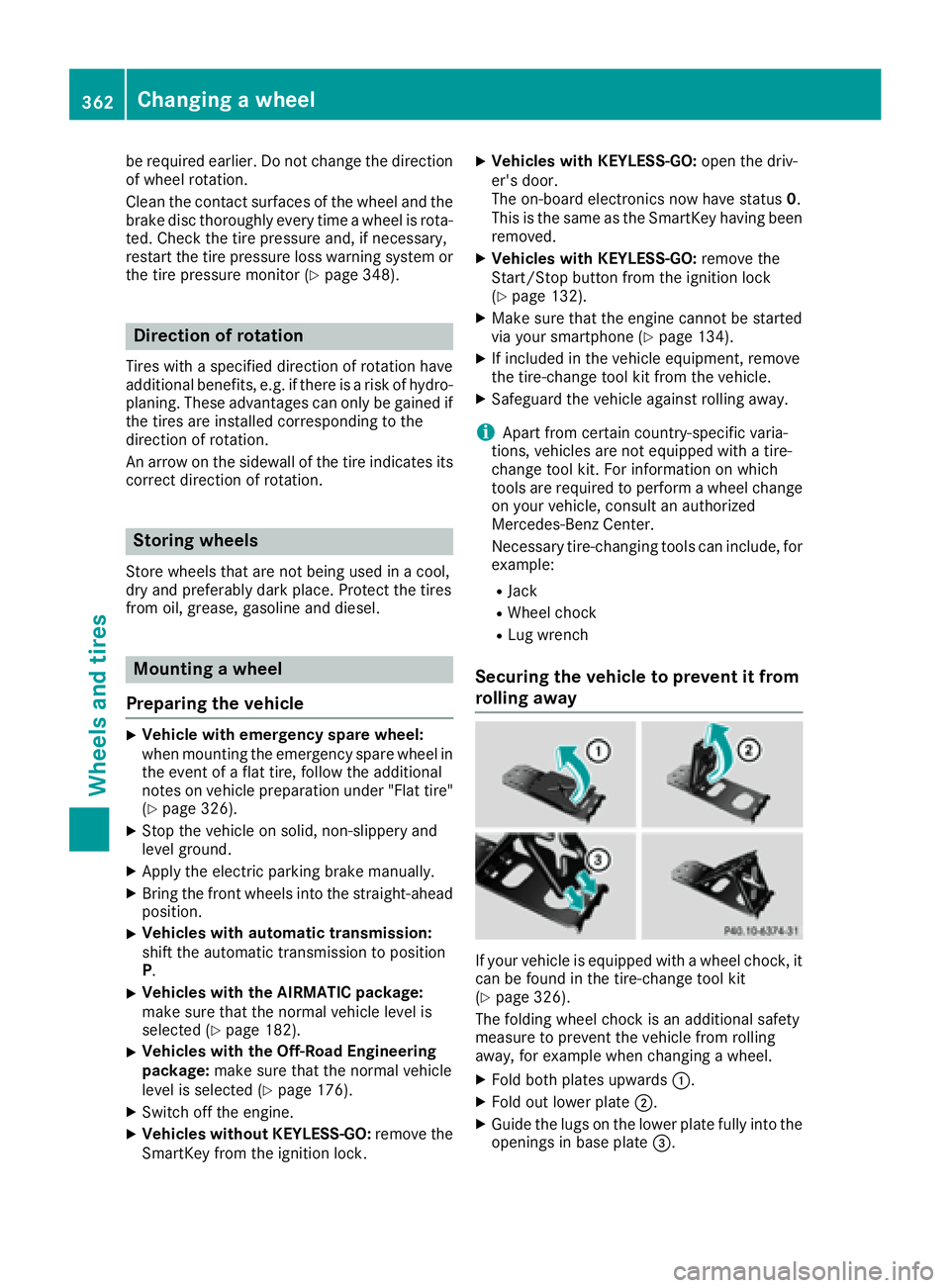
If your vehicle is equipped with a wheel chock, it
can be found in the tire-change tool kit
( Y
page 326).
The folding wheel chock is an additional safety
measure to prevent the vehicle from rolling
away, for example when changing a wheel. X
Fold both plates upwards C .X
Fold out lower plate D .X
Guide the lugs on the lower plate fully into the
openings in base plate