warning MERCEDES-BENZ GLE 2019 Owners Manual
[x] Cancel search | Manufacturer: MERCEDES-BENZ, Model Year: 2019, Model line: GLE, Model: MERCEDES-BENZ GLE 2019Pages: 398, PDF Size: 12.25 MB
Page 264 of 398
Display messages
Possible causes/consequences and
0050
0050Solutions 00C4
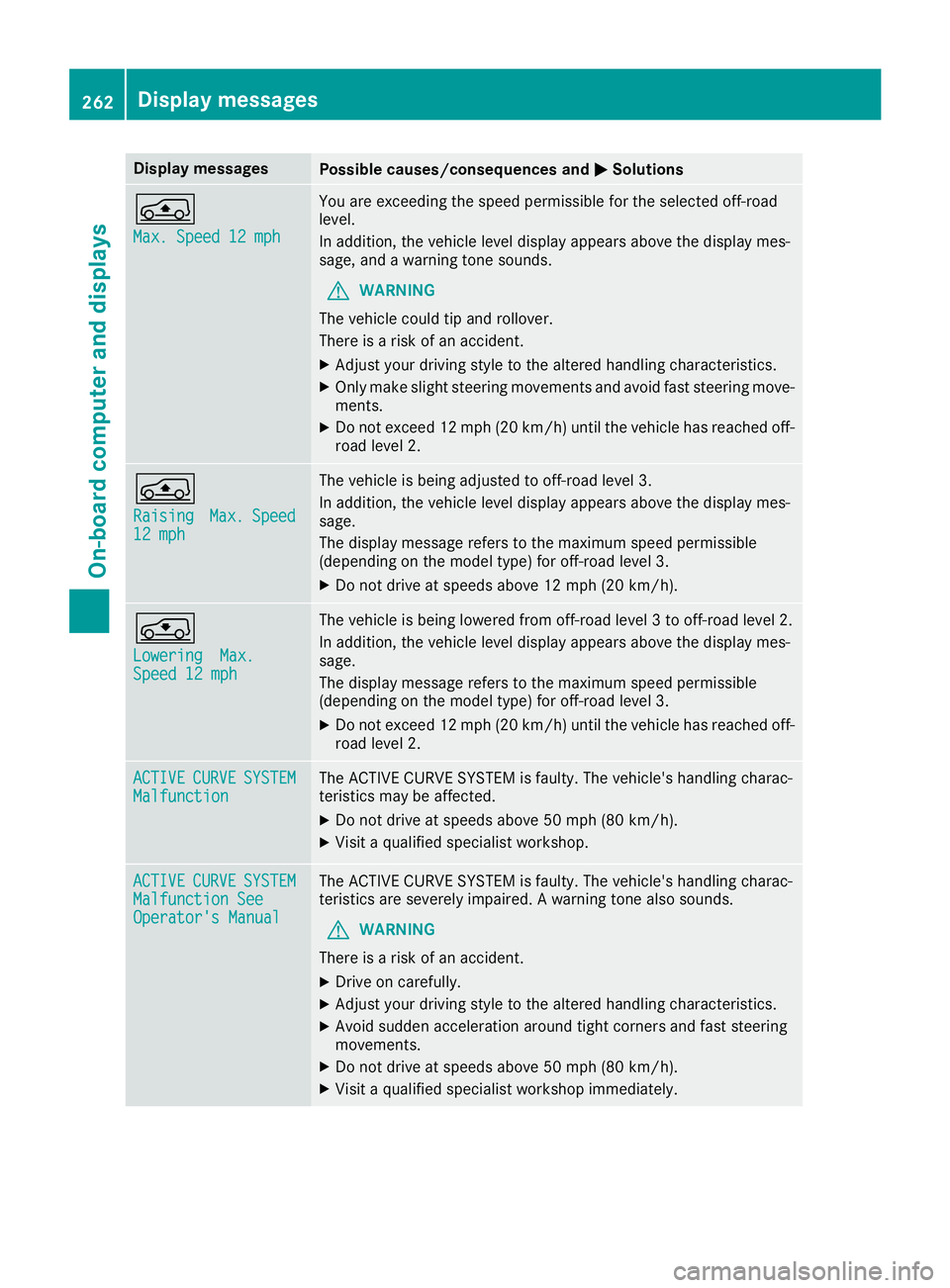
Max. Speed 12 mph Max. Speed 12 mph You are exceeding the speed permissible for the selected off-road
level.
In addition, the vehicle level display appears above the display mes-
sage, and a warning tone sounds.
G WARNING
The vehicle could tip and rollover.
There is a risk of an accident.
X Adjust your driving style to the altered handling characteristics.
X Only make slight steering movements and avoid fast steering move-
ments.
X Do not exceed 12 mph (20 km/h) until the vehicle has reached off-
road level 2. 00C4
Raising Raising
Max.
Max.Speed
Speed
12 mph
12 mph The vehicle is being adjusted to off-road level 3.
In addition, the vehicle level display appears above the display mes-
sage.
The display message refers to the maximum speed permissible
(depending on the model type) for off-road level 3.
X Do not drive at speeds above 12 mph (20 km/h). 0093
Lowering Lowering
Max.
Max.
Speed 12 mph
Speed 12 mph The vehicle is being lowered from off-road level 3 to off-road level 2.
In addition, the vehicle level display appears above the display mes-
sage.
The display message refers to the maximum speed permissible
(depending on the model type) for off-road level 3.
X Do not exceed 12 mph (20 km/h)until the vehicle has reached off-
road level 2. ACTIVE ACTIVE
CURVE
CURVE SYSTEM
SYSTEM
Malfunction
Malfunction The ACTIVE CURVE SYSTEM is faulty. The vehicle's handling charac-
teristics may be affected.
X Do not drive at speeds above 50 mph (80 km/h).
X Visit a qualified specialist workshop. ACTIVE ACTIVE
CURVE
CURVE SYSTEM
SYSTEM
Malfunction See
Malfunction See
Operator's Manual Operator's Manual The ACTIVE CURVE SYSTEM is faulty. The vehicle's handling charac-
teristics are severely impaired. A warning tone also sounds.
G WARNING
There is a risk of an accident.
X Drive on carefully.
X Adjust your driving style to the altered handling characteristics.
X Avoid sudden acceleration around tight corners and fast steering
movements.
X Do not drive at speeds above 50 mph (80 km/h).
X Visit a qualified specialist workshop immediately. 262
Display messagesOn-board computer and displays
Page 266 of 398
Display messages
Possible causes/consequences and
0050
0050Solutions Traffic
Traffic
Sign
Sign Assist
Assist
Currently Unavaila‐
Currently Unavaila‐
ble See Operator's ble See Operator's
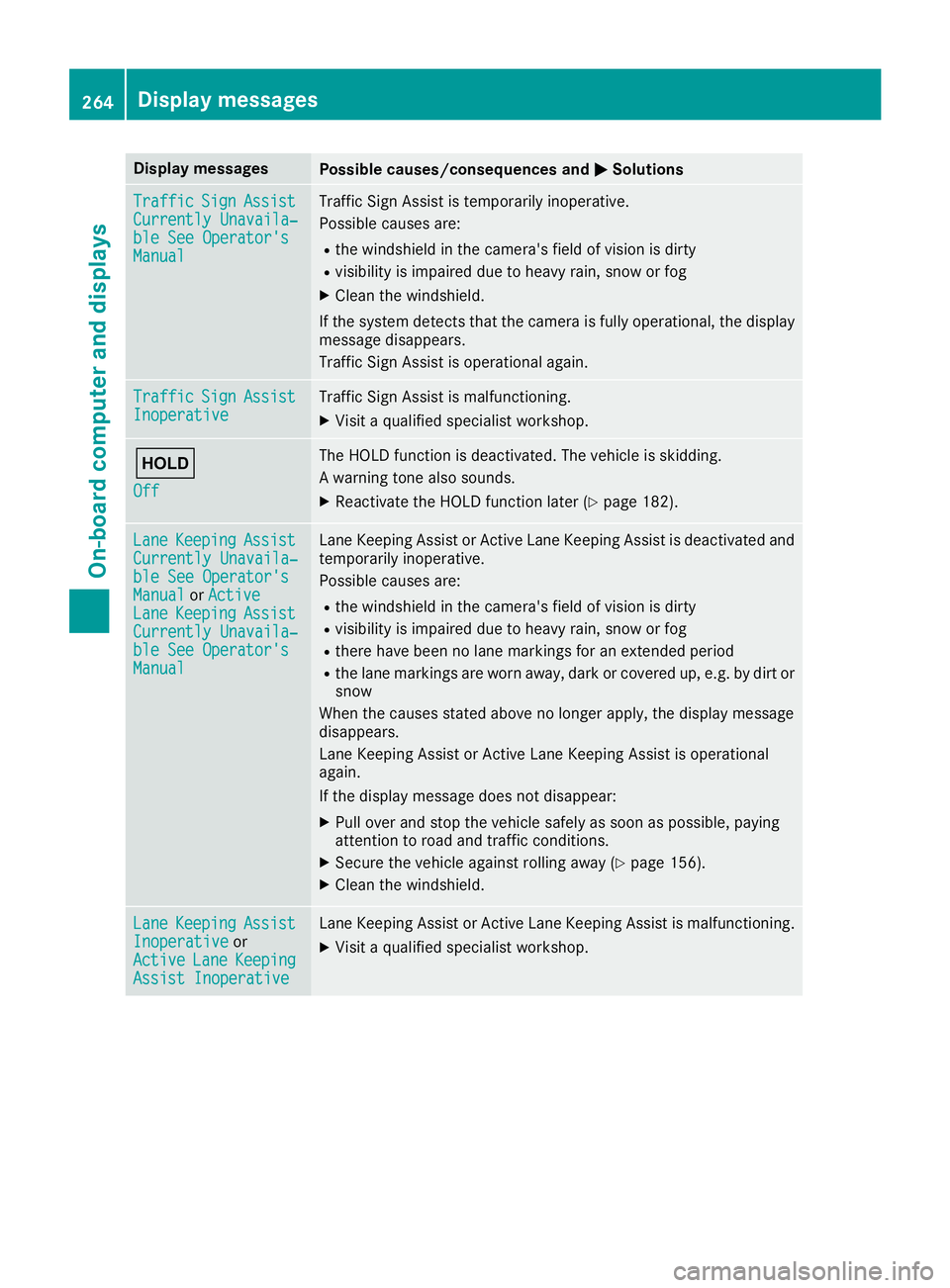
Manual Manual Traffic Sign Assist is temporarily inoperative.
Possible causes are:
R the windshield in the camera's field of vision is dirty
R visibility is impaired due to heavy rain, snow or fog
X Clean the windshield.
If the system detects that the camera is fully operational, the display message disappears.
Traffic Sign Assist is operational again. Traffic Traffic
Sign
Sign Assist
Assist
Inoperative
Inoperative Traffic Sign Assist is malfunctioning.
X Visit a qualified specialist workshop. 00D9
Off Off The HOLD function is deactivated. The vehicle is skidding.
A warning tone also sounds.
X Reactivate the HOLD function later (Y page 182).Lane Lane
Keeping
Keeping Assist
Assist
Currently Unavaila‐
Currently Unavaila‐
ble See Operator's ble See Operator's
Manual Manual orActive
Active
Lane
Lane Keeping
Keeping Assist
Assist
Currently Unavaila‐
Currently Unavaila‐
ble See Operator's ble See Operator's
Manual Manual Lane Keeping Assist or Active Lane Keeping Assist is deactivated and
temporarily inoperative.
Possible causes are:
R the windshield in the camera's field of vision is dirty
R visibility is impaired due to heavy rain, snow or fog
R there have been no lane markings for an extended period
R the lane markings are worn away, dark or covered up, e.g. by dirt or
snow
When the causes stated above no longer apply, the display message
disappears.
Lane Keeping Assist or Active Lane Keeping Assist is operational
again.
If the display message does not disappear:
X Pull over and stop the vehicle safely as soon as possible, paying
attention to road and traffic conditions.
X Secure the vehicle against rolling away (Y page 156).
X Clean the windshield. Lane Lane
Keeping
Keeping Assist
Assist
Inoperative
Inoperative or
Active
Active Lane
LaneKeeping
Keeping
Assist Inoperative
Assist Inoperative Lane Keeping Assist or Active Lane Keeping Assist is malfunctioning.
X Visit a qualified specialist workshop. 264
Display
messagesOn-board computer and displays
Page 268 of 398
Display messages
Possible causes/consequences and
0050
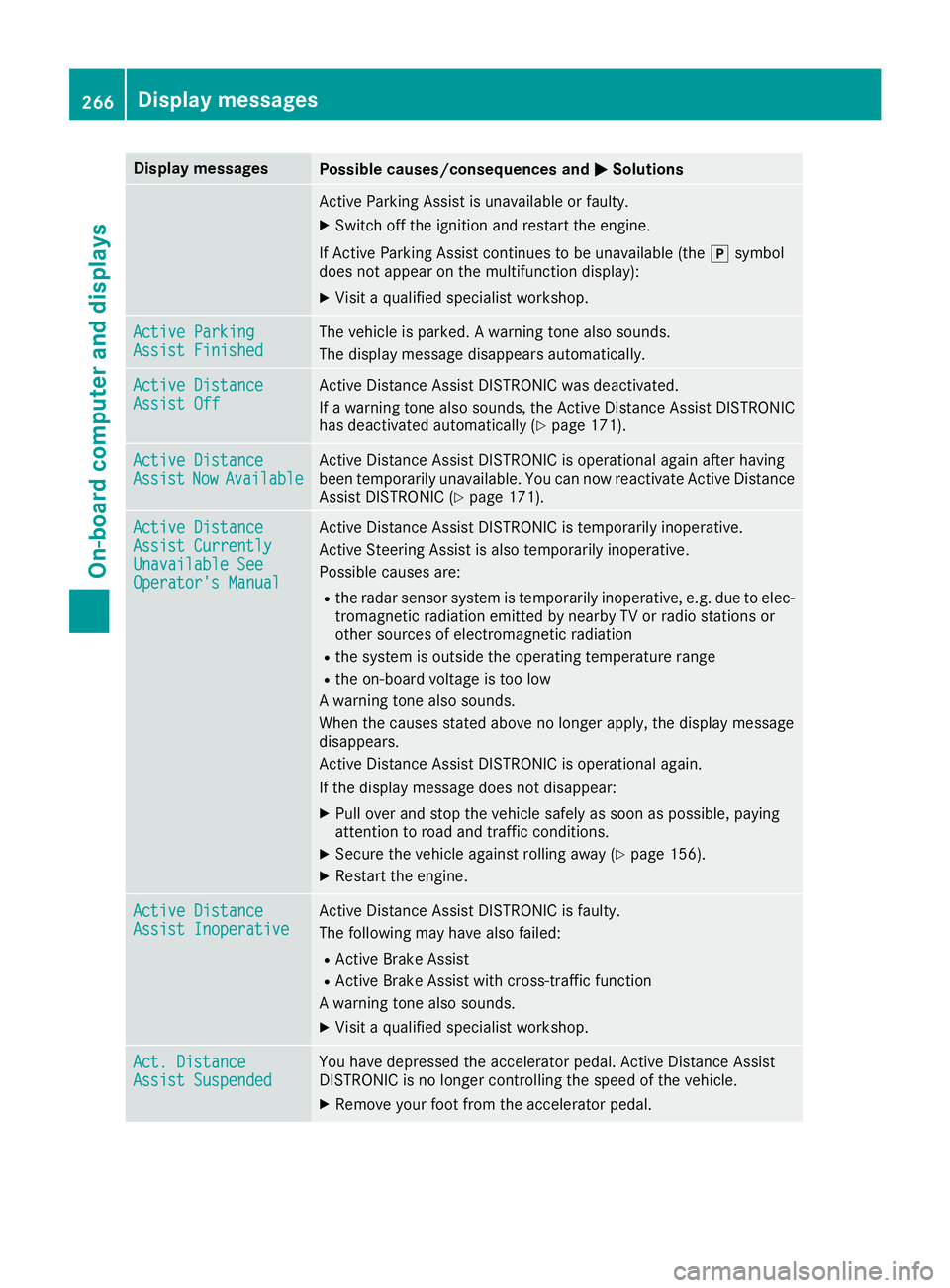
0050Solutions Active Parking Assist is unavailable or faulty.
X Switch off the ignition and restart the engine.
If Active Parking Assist continues to be unavailable (the 005Dsymbol
does not appear on the multifunction display):
X Visit a qualified specialist workshop. Active Parking
Active Parking
Assist Finished Assist Finished The vehicle is parked. A warning tone also sounds.
The display message disappears automatically. Active Distance
Active Distance
Assist Off Assist Off Active Distance Assist DISTRONIC was deactivated.
If a warning tone also sounds, the Active Distance Assist DISTRONIC
has deactivated automatically (Y page 171).Active Distance Active Distance
Assist Assist
Now
NowAvailable
Available Active Distance Assist DISTRONIC is operational again after having
been temporarily unavailable. You can now reactivate Active Distance
Assist DISTRONIC (Y page 171).Active Distance Active Distance
Assist Currently Assist Currently
Unavailable See Unavailable See
Operator's Manual Operator's Manual Active Distance Assist DISTRONIC is temporarily inoperative.
Active Steering Assist is also temporarily inoperative.
Possible causes are:
R the radar sensor system is temporarily inoperative, e.g. due to elec-
tromagnetic radiation emitted by nearby TV or radio stations or
other sources of electromagnetic radiation
R the system is outside the operating temperature range
R the on-board voltage is too low
A warning tone also sounds.
When the causes stated above no longer apply, the display message
disappears.
Active Distance Assist DISTRONIC is operational again.
If the display message does not disappear:
X Pull over and stop the vehicle safely as soon as possible, paying
attention to road and traffic conditions.
X Secure the vehicle against rolling away (Y page 156).
X Restart the engine. Active Distance Active Distance
Assist Inoperative Assist Inoperative Active Distance Assist DISTRONIC is faulty.
The following may have also failed:
R Active Brake Assist
R Active Brake Assist with cross-traffic function
A warning tone also sounds.
X Visit a qualified specialist workshop. Act. Distance Act. Distance
Assist Suspended Assist Suspended You have depressed the accelerator pedal. Active Distance Assist
DISTRONIC is no longer controlling the speed of the vehicle.
X Remove your foot from the accelerator pedal. 266
Display
messagesOn-board computer and displays
Page 269 of 398
Display messages
Possible causes/consequences and
0050
0050Solutions Act.
Act.
Distance
Distance Assist
Assist
- - - mph
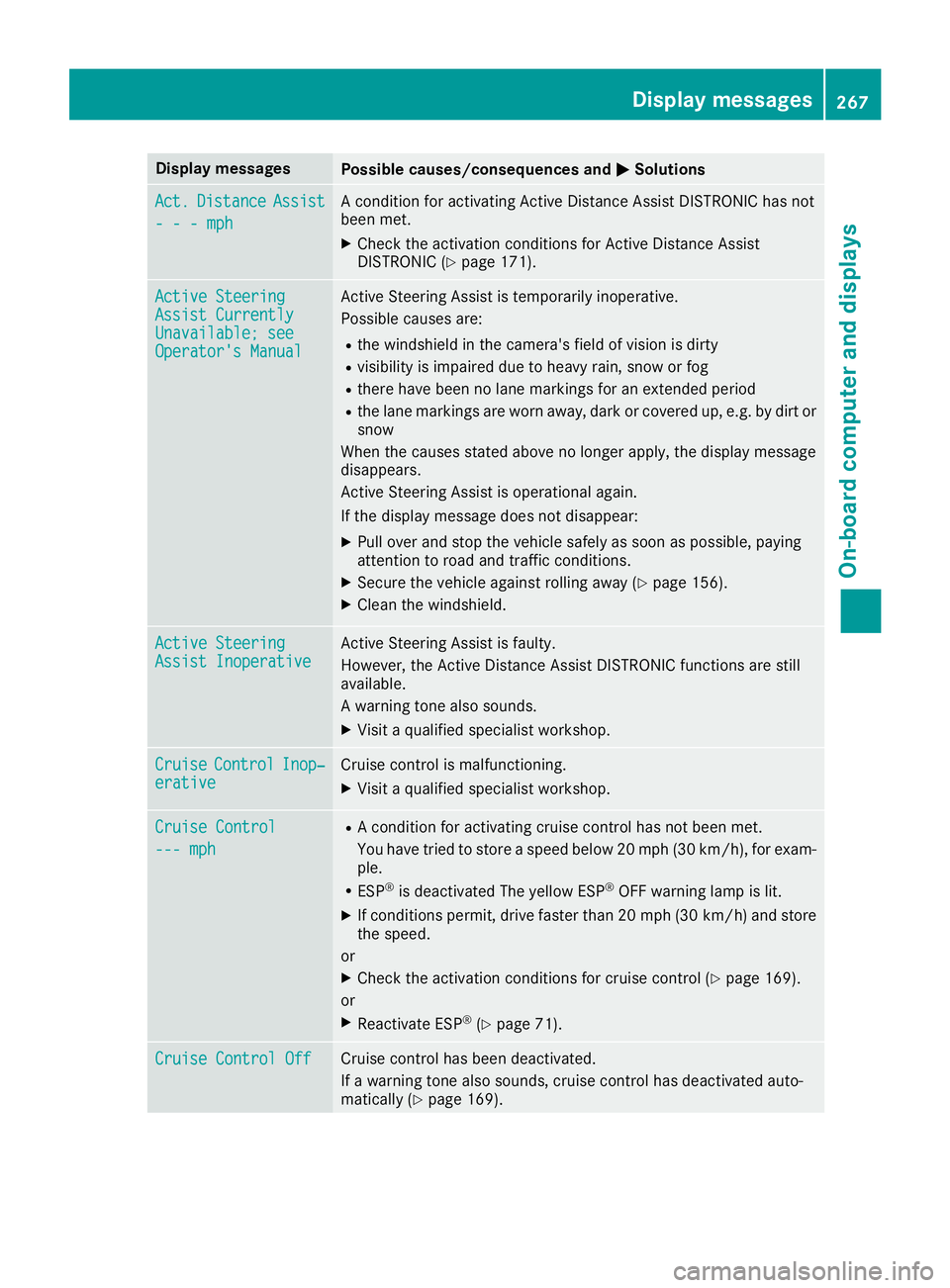
- - - mph A condition for activating Active Distance Assist DISTRONIC has not
been met.
X Check the activation conditions for Active Distance Assist
DISTRONIC (Y page 171). Active Steering Active Steering
Assist Currently Assist Currently
Unavailable; see Unavailable; see
Operator's Manual Operator's Manual Active Steering Assist is temporarily inoperative.
Possible causes are:
R the windshield in the camera's field of vision is dirty
R visibility is impaired due to heavy rain, snow or fog
R there have been no lane markings for an extended period
R the lane markings are worn away, dark or covered up, e.g. by dirt or
snow
When the causes stated above no longer apply, the display message
disappears.
Active Steering Assist is operational again.
If the display message does not disappear:
X Pull over and stop the vehicle safely as soon as possible, paying
attention to road and traffic conditions.
X Secure the vehicle against rolling away (Y page 156).
X Clean the windshield. Active Steering Active Steering
Assist Inoperative Assist Inoperative Active Steering Assist is faulty.
However, the Active Distance Assist DISTRONIC functions are still
available.
A warning tone also sounds.
X Visit a qualified specialist workshop. Cruise Cruise
Control
Control Inop‐
Inop‐
erative
erative Cruise control is malfunctioning.
X Visit a qualified specialist workshop. Cruise Control
Cruise Control
--- mph --- mph R
A condition for activating cruise control has not been met.
You have tried to store a speed below 20 mph (30 km/h), for exam-
ple.
R ESP ®
is deactivated The yellow ESP ®
OFF warning lamp is lit.
X If conditions permit, drive faster than 20 mph (30 km/h) and store
the speed.
or X Check the activation conditions for cruise control (Y page 169).
or
X Reactivate ESP ®
(Y page 71). Cruise Control Off Cruise Control Off Cruise control has been deactivated.
If a warning tone also sounds, cruise control has deactivated auto-
matically (Y page 169). Display
messages
267On-board computer and displays Z
Page 270 of 398
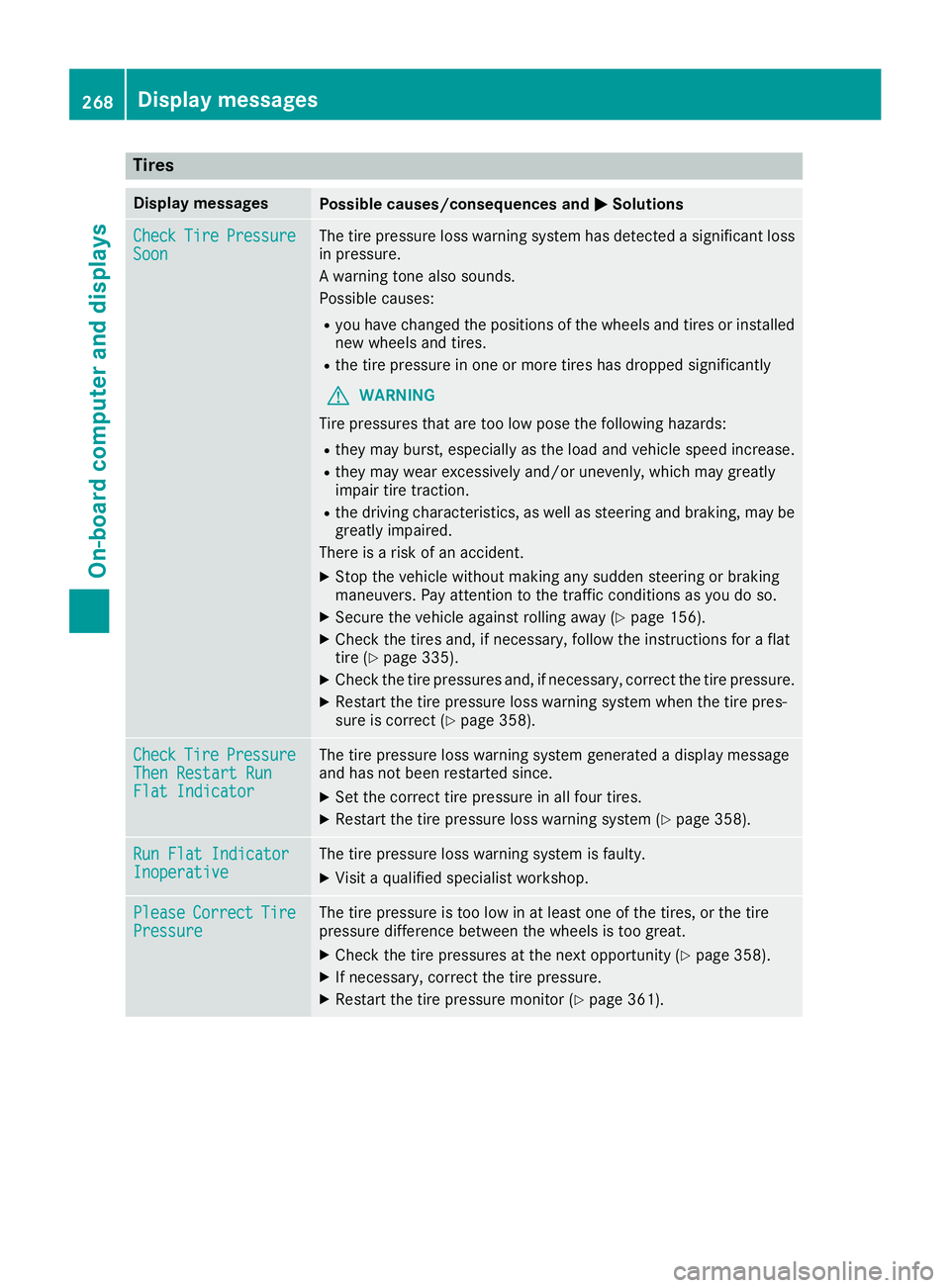
Tires
Display messages
Possible causes/consequences and
0050
0050Solutions Check
Check
Tire
TirePressure
Pressure
Soon
Soon The tire pressure loss warning system has detected a significant loss
in pressure.
A warning tone also sounds.
Possible causes:
R you have changed the positions of the wheels and tires or installed
new wheels and tires.
R the tire pressure in one or more tires has dropped significantly
G WARNING
Tire pressures that are too low pose the following hazards: R they may burst, especially as the load and vehicle speed increase.
R they may wear excessively and/or unevenly, which may greatly
impair tire traction.
R the driving characteristics, as well as steering and braking, may be
greatly impaired.
There is a risk of an accident.
X Stop the vehicle without making any sudden steering or braking
maneuvers. Pay attention to the traffic conditions as you do so.
X Secure the vehicle against rolling away (Y page 156).
X Check the tires and, if necessary, follow the instructions for a flat
tire (Y page 335).
X Check the tire pressures and, if necessary, correct the tire pressure.
X Restart the tire pressure loss warning system when the tire pres-
sure is correct (Y page 358). Check Check
Tire
TirePressure
Pressure
Then Restart Run
Then Restart Run
Flat Indicator Flat Indicator The tire pressure loss warning system generated a display message
and has not been restarted since.
X Set the correct tire pressure in all four tires.
X Restart the tire pressure loss warning system (Y page 358).Run Flat Indicator Run Flat Indicator
Inoperative Inoperative The tire pressure loss warning system is faulty.
X Visit a qualified specialist workshop. Please
Please
Correct
Correct Tire
Tire
Pressure
Pressure The tire pressure is too low in at least one of the tires, or the tire
pressure difference between the wheels is too great.
X Check the tire pressures at the next opportunity (Y page 358).
X If necessary, correct the tire pressure.
X Restart the tire pressure monitor (Y page 361).268
Display
messagesOn-board computer and displays
Page 271 of 398
Display messages
Possible causes/consequences and
0050
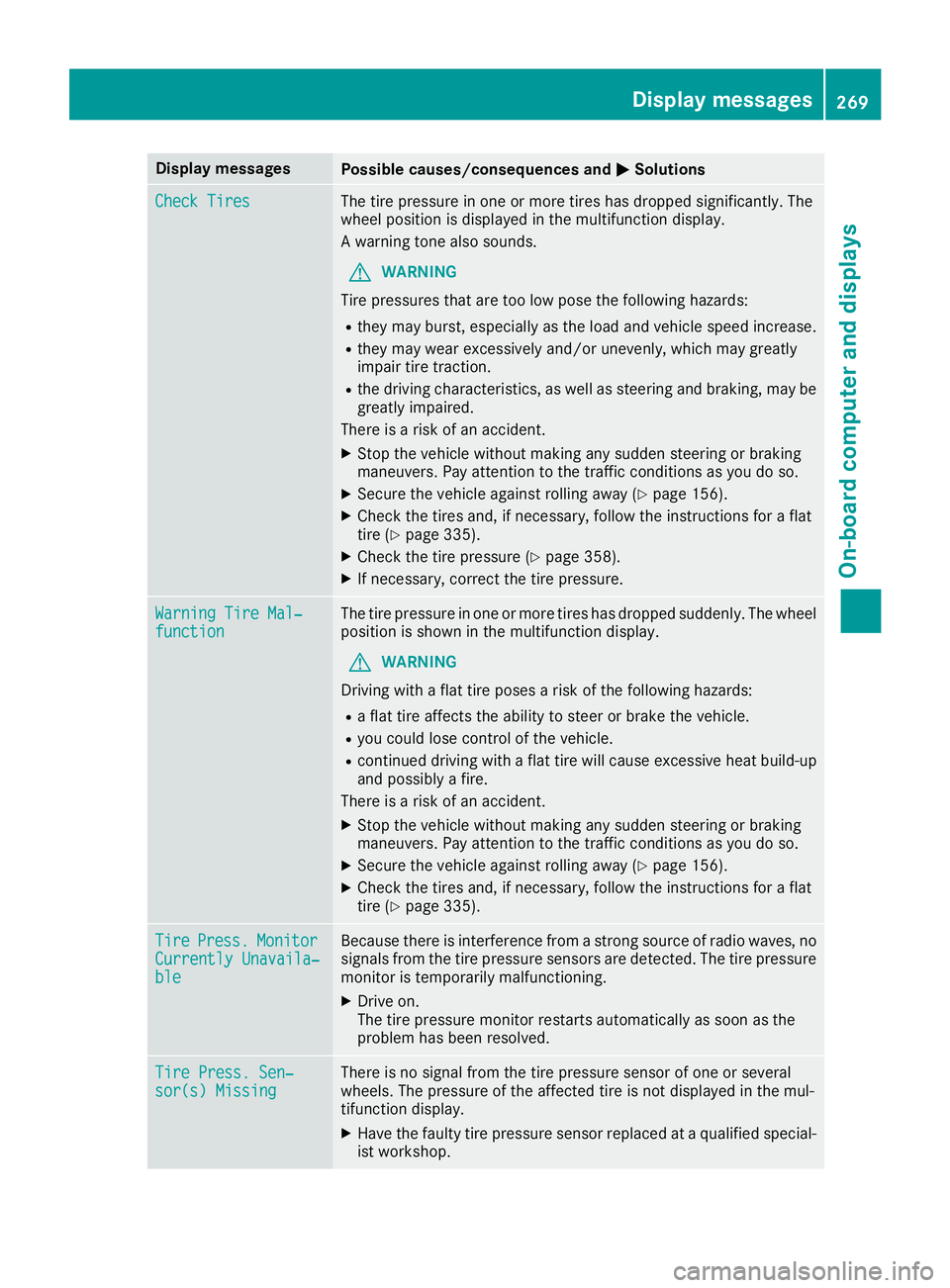
0050Solutions Check Tires
Check Tires The tire pressure in one or more tires has dropped significantly. The
wheel position is displayed in the multifunction display.
A warning tone also sounds.
G WARNING
Tire pressures that are too low pose the following hazards: R they may burst, especially as the load and vehicle speed increase.
R they may wear excessively and/or unevenly, which may greatly
impair tire traction.
R the driving characteristics, as well as steering and braking, may be
greatly impaired.
There is a risk of an accident.
X Stop the vehicle without making any sudden steering or braking
maneuvers. Pay attention to the traffic conditions as you do so.
X Secure the vehicle against rolling away (Y page 156).
X Check the tires and, if necessary, follow the instructions for a flat
tire (Y page 335).
X Check the tire pressure (Y page 358).
X If necessary, correct the tire pressure. Warning Tire Mal‐ Warning Tire Mal‐
function function The tire pressure in one or more tires has dropped suddenly. The wheel
position is shown in the multifunction display.
G WARNING
Driving with a flat tire poses a risk of the following hazards: R a flat tire affects the ability to steer or brake the vehicle.
R you could lose control of the vehicle.
R continued driving with a flat tire will cause excessive heat build-up
and possibly a fire.
There is a risk of an accident.
X Stop the vehicle without making any sudden steering or braking
maneuvers. Pay attention to the traffic conditions as you do so.
X Secure the vehicle against rolling away (Y page 156).
X Check the tires and, if necessary, follow the instructions for a flat
tire (Y page 335). Tire Tire
Press.
Press. Monitor
Monitor
Currently Unavaila‐
Currently Unavaila‐
ble ble Because there is interference from a strong source of radio waves, no
signals from the tire pressure sensors are detected. The tire pressure monitor is temporarily malfunctioning.
X Drive on.
The tire pressure monitor restarts automatically as soon as the
problem has been resolved. Tire Press. Sen‐ Tire Press. Sen‐
sor(s) Missing sor(s) Missing There is no signal from the tire pressure sensor of one or several
wheels. The pressure of the affected tire is not displayed in the mul-
tifunction display.
X
Have the faulty tire pressure sensor replaced at a qualified special-
ist workshop. Display
messages
269On-board computer and displays Z
Page 272 of 398
Display messages
Possible causes/consequences and
0050
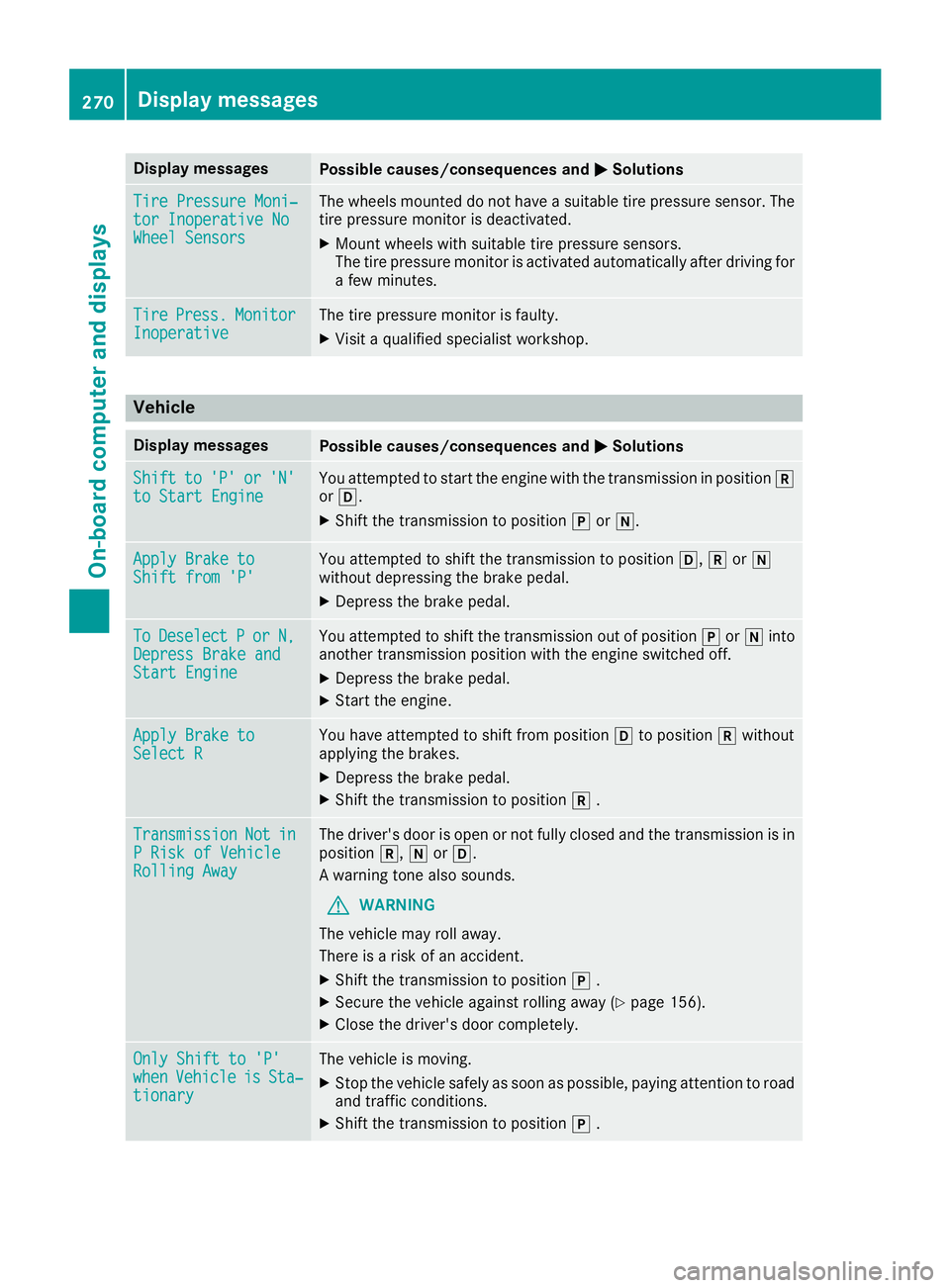
0050Solutions Tire Pressure Moni‐
Tire Pressure Moni‐
tor Inoperative No tor Inoperative No
Wheel Sensors Wheel Sensors The wheels mounted do not have a suitable tire pressure sensor. The
tire pressure monitor is deactivated.
X Mount wheels with suitable tire pressure sensors.
The tire pressure monitor is activated automatically after driving for a few minutes. Tire
Tire
Press.
Press. Monitor
Monitor
Inoperative
Inoperative The tire pressure monitor is faulty.
X Visit a qualified specialist workshop. Vehicle
Display messages
Possible causes/consequences and
0050
0050Solutions Shift
Shift
to
to'P'
'P' or
or'N'
'N'
to Start Engine
to Start Engine You attempted to start the engine with the transmission in position
005E
or 005B.
X Shift the transmission to position 005Dor005C. Apply Brake to
Apply Brake to
Shift from 'P' Shift from 'P' You attempted to shift the transmission to position
005B,005Eor005C
without depressing the brake pedal.
X Depress the brake pedal. To
To
Deselect
Deselect P
Por
or N,
N,
Depress Brake and
Depress Brake and
Start Engine Start Engine You attempted to shift the transmission out of position
005Dor005C into
another transmission position with the engine switched off.
X Depress the brake pedal.
X Start the engine. Apply Brake to
Apply Brake to
Select R Select R You have attempted to shift from position
005Bto position 005Ewithout
applying the brakes.
X Depress the brake pedal.
X Shift the transmission to position 005E. Transmission
Transmission
Not
Not in
in
P Risk of Vehicle
P Risk of Vehicle
Rolling Away Rolling Away The driver's door is open or not fully closed and the transmission is in
position 005E,005Cor005B.
A warning tone also sounds.
G WARNING
The vehicle may roll away.
There is a risk of an accident.
X Shift the transmission to position 005D.
X Secure the vehicle against rolling away (Y page 156).
X Close the driver's door completely. Only Shift to 'P' Only Shift to 'P'
when when
Vehicle
Vehicle is
isSta‐
Sta‐
tionary
tionary The vehicle is moving.
X
Stop the vehicle safely as soon as possible, paying attention to road
and traffic conditions.
X Shift the transmission to position 005D. 270
Display
messagesOn-board computer and displays
Page 273 of 398
Display messages
Possible causes/consequences and
0050
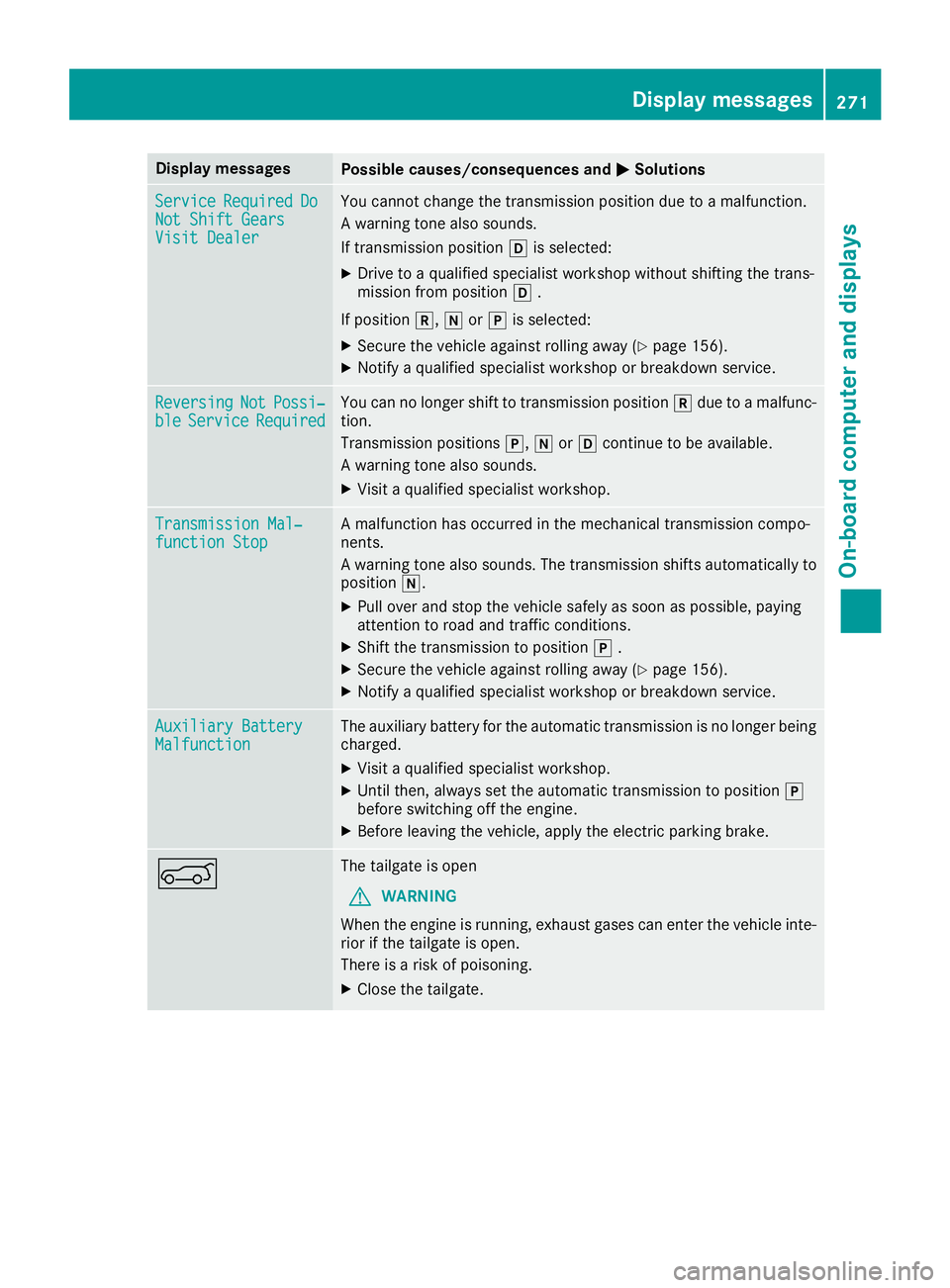
0050Solutions Service
Service
Required
Required Do
Do
Not Shift Gears
Not Shift Gears
Visit Dealer Visit Dealer You cannot change the transmission position due to a malfunction.
A warning tone also sounds.
If transmission position
005Bis selected:
X Drive to a qualified specialist workshop without shifting the trans-
mission from position 005B.
If position 005E,005Cor005D is selected:
X Secure the vehicle against rolling away (Y page 156).
X Notify a qualified specialist workshop or breakdown service. Reversing Reversing
Not
NotPossi‐
Possi‐
ble
ble Service
Service Required
Required You can no longer shift to transmission position
005Edue to a malfunc-
tion.
Transmission positions 005D,005Cor005B continue to be available.
A warning tone also sounds.
X Visit a qualified specialist workshop. Transmission Mal‐ Transmission Mal‐
function Stop function Stop A malfunction has occurred in the mechanical transmission compo-
nents.
A warning tone also sounds. The transmission shifts automatically to position 005C.
X Pull over and stop the vehicle safely as soon as possible, paying
attention to road and traffic conditions.
X Shift the transmission to position 005D.
X Secure the vehicle against rolling away (Y page 156).
X Notify a qualified specialist workshop or breakdown service. Auxiliary Battery Auxiliary Battery
Malfunction Malfunction The auxiliary battery for the automatic transmission is no longer being
charged.
X Visit a qualified specialist workshop.
X Until then, always set the automatic transmission to position 005D
before switching off the engine.
X Before leaving the vehicle, apply the electric parking brake. 0065 The tailgate is open
G WARNING
When the engine is running, exhaust gases can enter the vehicle inte- rior if the tailgate is open.
There is a risk of poisoning.
X Close the tailgate. Display
messages
271On-board computer and displays Z
Page 274 of 398
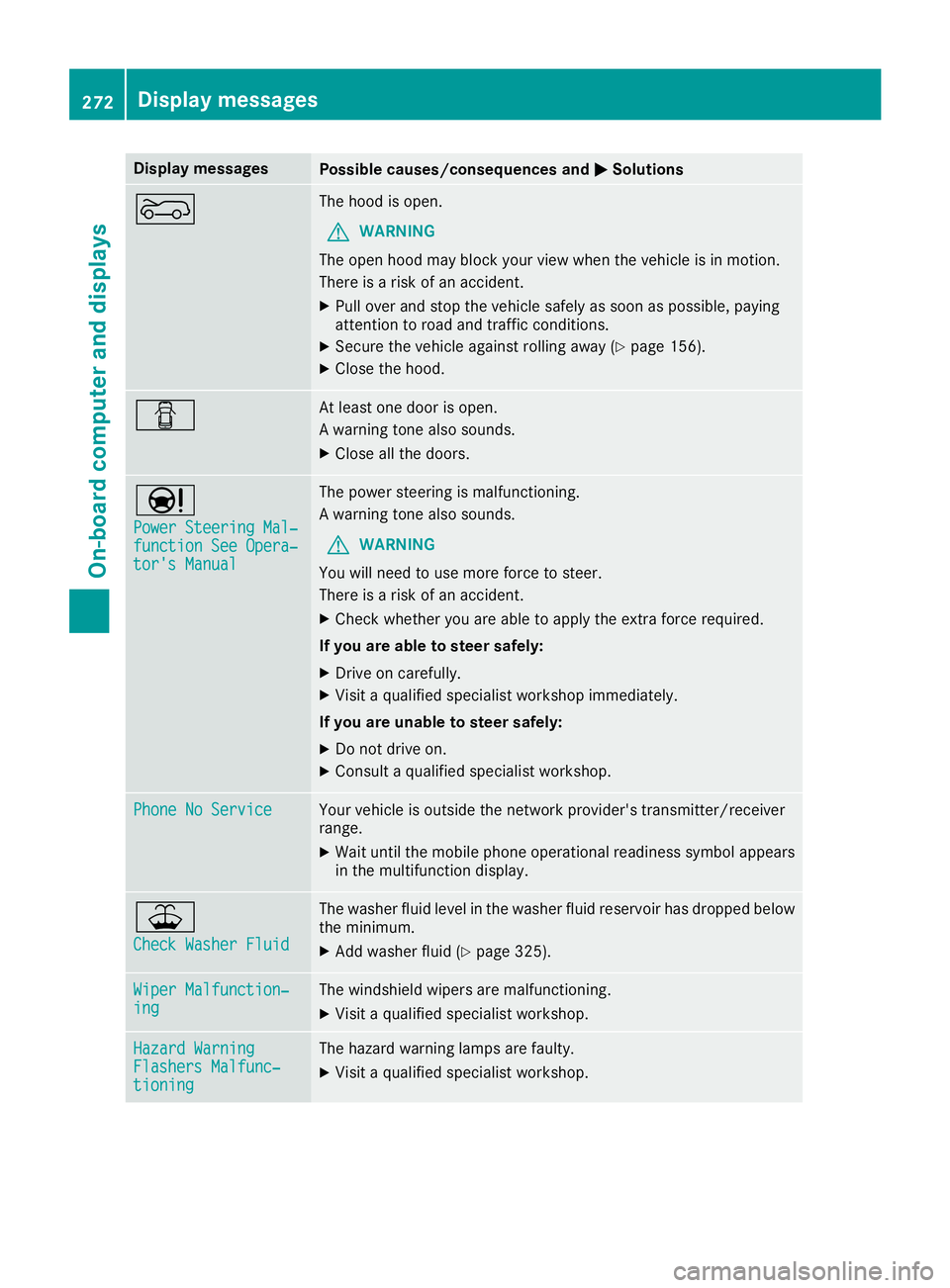
Display messages
Possible causes/consequences and
0050
0050Solutions 0066 The hood is open.
G WARNING
The open hood may block your view when the vehicle is in motion.
There is a risk of an accident.
X Pull over and stop the vehicle safely as soon as possible, paying
attention to road and traffic conditions.
X Secure the vehicle against rolling away (Y page 156).
X Close the hood. 0051 At least one door is open.
A warning tone also sounds.
X Close all the doors. 00CC
Power Steering Mal‐ Power Steering Mal‐
function See Opera‐ function See Opera‐
tor's Manual tor's Manual The power steering is malfunctioning.
A warning tone also sounds.
G WARNING
You will need to use more force to steer.
There is a risk of an accident.
X Check whether you are able to apply the extra force required.
If you are able to steer safely:
X Drive on carefully.
X Visit a qualified specialist workshop immediately.
If you are unable to steer safely:
X Do not drive on.
X Consult a qualified specialist workshop. Phone No Service Phone No Service Your vehicle is outside the network provider's transmitter/receiver
range.
X Wait until the mobile phone operational readiness symbol appears
in the multifunction display. 00B2
Check Washer Fluid Check Washer Fluid The washer fluid level in the washer fluid reservoir has dropped below
the minimum.
X Add washer fluid (Y page 325).Wiper Malfunction‐
Wiper Malfunction‐
ing ing The windshield wipers are malfunctioning.
X Visit a qualified specialist workshop. Hazard Warning
Hazard Warning
Flashers Malfunc‐ Flashers Malfunc‐
tioning tioning The hazard warning lamps are faulty.
X Visit a qualified specialist workshop. 272
Display
messagesOn-board computer and displays
Page 275 of 398
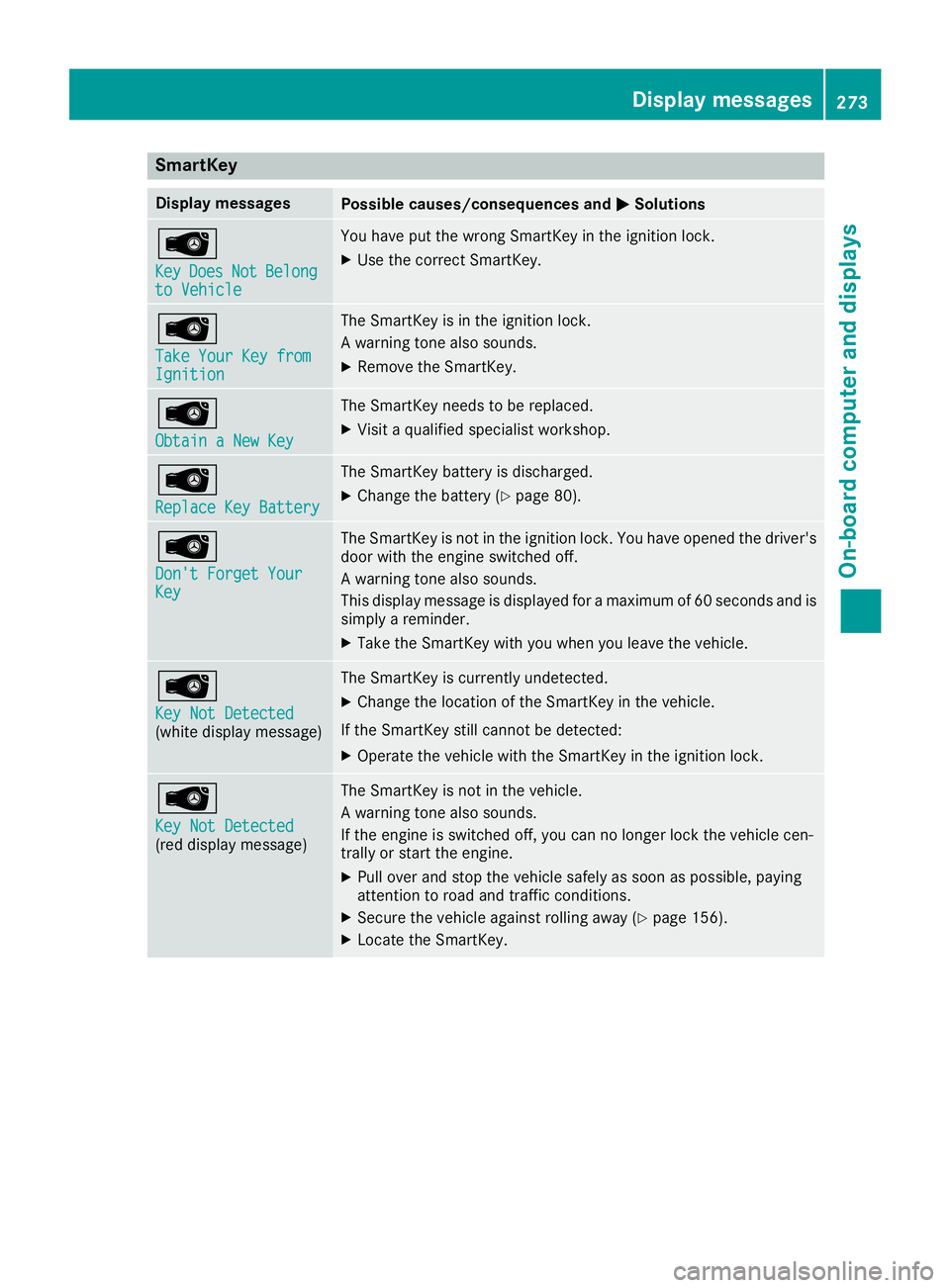
SmartKey
Display messages
Possible causes/consequences and
0050
0050Solutions 00AF
Key Key
Does
Does Not
NotBelong
Belong
to Vehicle
to Vehicle You have put the wrong SmartKey in the ignition lock.
X Use the correct SmartKey. 00AF
Take Your Key from Take Your Key from
Ignition Ignition The SmartKey is in the ignition lock.
A warning tone also sounds.
X Remove the SmartKey. 00AF
Obtain a New Key Obtain a New Key The SmartKey needs to be replaced.
X Visit a qualified specialist workshop. 00AF
Replace Key Battery Replace Key Battery The SmartKey battery is discharged.
X Change the battery (Y page 80).00AF
Don't Forget Your Don't Forget Your
Key Key The SmartKey is not in the ignition lock. You have opened the driver's
door with the engine switched off.
A warning tone also sounds.
This display message is displayed for a maximum of 60 seconds and is
simply a reminder.
X Take the SmartKey with you when you leave the vehicle. 00AF
Key Not Detected Key Not Detected
(white display message) The SmartKey is currently undetected.
X Change the location of the SmartKey in the vehicle.
If the SmartKey still cannot be detected:
X Operate the vehicle with the SmartKey in the ignition lock. 00AF
Key Not Detected Key Not Detected
(red display message) The SmartKey is not in the vehicle.
A warning tone also sounds.
If the engine is switched off, you can no longer lock the vehicle cen-
trally or start the engine.
X Pull over and stop the vehicle safely as soon as possible, paying
attention to road and traffic conditions.
X Secure the vehicle against rolling away (Y page 156).
X Locate the SmartKey. Display messages
273On-board computer and displays Z