keyless MERCEDES-BENZ GLE 2019 User Guide
[x] Cancel search | Manufacturer: MERCEDES-BENZ, Model Year: 2019, Model line: GLE, Model: MERCEDES-BENZ GLE 2019Pages: 398, PDF Size: 12.25 MB
Page 83 of 398
X
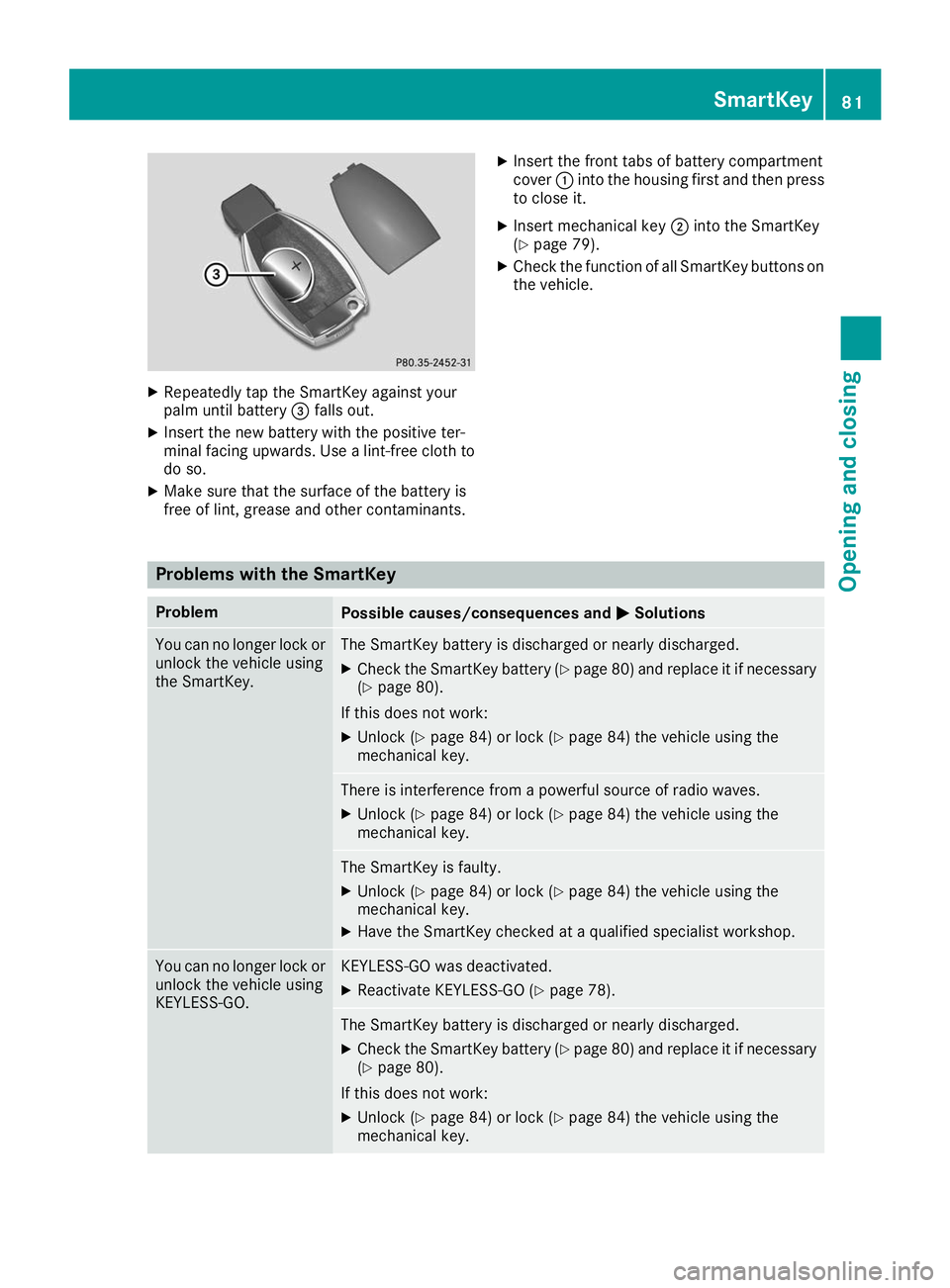
Repeatedly tap the SmartKey against your
palm until battery 0087falls out.
X Insert the new battery with the positive ter-
minal facing upwards. Use a lint-free cloth to do so.
X Make sure that the surface of the battery is
free of lint, grease and other contaminants. X
Insert the front tabs of battery compartment
cover 0043into the housing first and then press
to close it.
X Insert mechanical key 0044into the SmartKey
(Y page 79).
X Check the function of all SmartKey buttons on
the vehicle. Problems with the SmartKey
Problem
Possible causes/consequences and
0050 0050Solutions You can no longer lock or
unlock the vehicle using
the SmartKey. The SmartKey battery is discharged or nearly discharged.
X Check the SmartKey battery (Y page 80) and replace it if necessary
(Y page 80).
If this does not work: X Unlock (Y page 84) or lock (Y page 84) the vehicle using the
mechanical key. There is interference from a powerful source of radio waves.
X Unlock (Y page 84) or lock (Y page 84) the vehicle using the
mechanical key. The SmartKey is faulty.
X Unlock (Y page 84) or lock (Y page 84) the vehicle using the
mechanical key.
X Have the SmartKey checked at a qualified specialist workshop. You can no longer lock or
unlock the vehicle using
KEYLESS-GO. KEYLESS-GO was deactivated.
X Reactivate KEYLESS-GO (Y page 78). The SmartKey battery is discharged or nearly discharged.
X Check the SmartKey battery (Y page 80) and replace it if necessary
(Y page 80).
If this does not work: X Unlock (Y page 84) or lock (Y page 84) the vehicle using the
mechanical key. SmartKey
81Opening and closing Z
Page 84 of 398
Problem
Possible causes/consequences and
0050
0050Solutions There is interference from a powerful source of radio waves.
X Unlock (Y page 84) or lock (Y page 84) the vehicle using the
mechanical key. KEYLESS-GO is malfunctioning.
X Lock/unlock the vehicle using the remote control function of the
SmartKey.
X Have the vehicle and SmartKey checked at a qualified specialist
workshop.
If the vehicle can also not be locked/unlocked using the remote con-
trol function:
X Unlock (Y page 84) or lock (Y page 84) the vehicle using the
mechanical key.
X Have the vehicle and SmartKey checked at a qualified specialist
workshop. The engine cannot be
started using the Smart-
Key. The on-board voltage is too low.
X Switch off non-essential consumers, e.g. seat heating or interior
lighting, and try to start the engine again.
If this does not work:
X Check the starter battery and charge it if necessary (Y page 342).
or X Jump-start the vehicle (Y page 343).
or X Consult a qualified specialist workshop. The engine cannot be
started using the Start/
Stop button. The Smart-
Key is in the vehicle. The vehicle is locked.
X Unlock the vehicle and try to start the vehicle again. The SmartKey battery is discharged or nearly discharged.
X Check the SmartKey battery (Y page 80) and replace it if necessary
(Y page 80).
If this does not work: X Start your vehicle with the SmartKey in the ignition lock. There is interference from a powerful source of radio waves.
X Start your vehicle with the SmartKey in the ignition lock. You have lost a Smart-
Key. X
Have the SmartKey deactivated at a qualified specialist workshop.
X Report the loss immediately to the vehicle insurers.
X If necessary, have the locks changed as well. You have lost the
mechanical key. X
Report the loss immediately to the vehicle insurers.
X If necessary, have the locks changed as well. 82
SmartKeyOpening and closing
Page 88 of 398
Closing
X
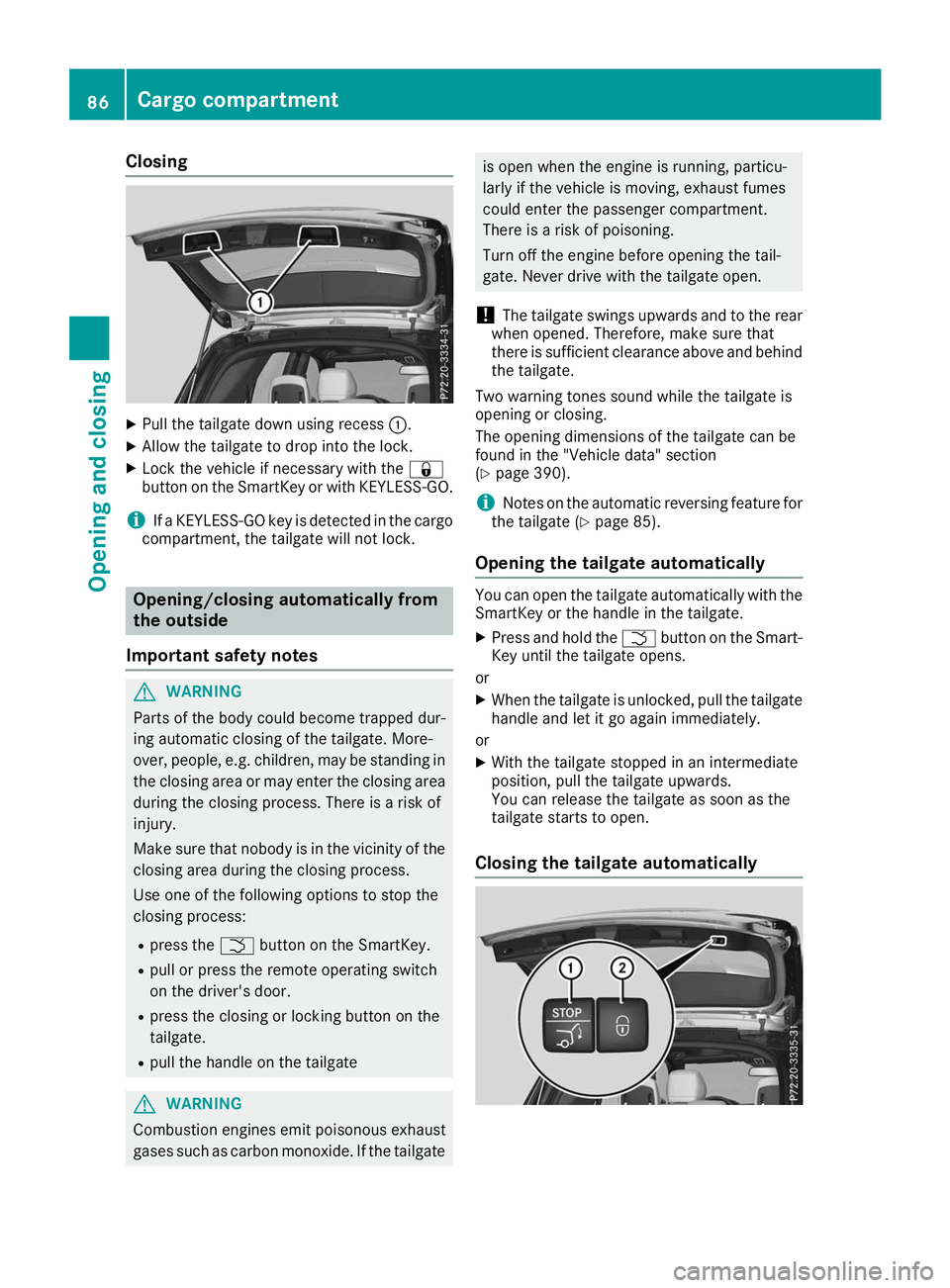
Pull the tailgate down using recess 0043.
X Allow the tailgate to drop into the lock.
X Lock the vehicle if necessary with the 0037
button on the SmartKey or with KEYLESS-GO.
i If a KEYLESS-GO key is detected in the cargo
compartment, the tailgate will not lock. Opening/closing automatically from
the outside
Important safety notes G
WARNING
Parts of the body could become trapped dur-
ing automatic closing of the tailgate. More-
over, people, e.g. children, may be standing in the closing area or may enter the closing area
during the closing process. There is a risk of
injury.
Make sure that nobody is in the vicinity of the closing area during the closing process.
Use one of the following options to stop the
closing process:
R press the 0054button on the SmartKey.
R pull or press the remote operating switch
on the driver's door.
R press the closing or locking button on the
tailgate.
R pull the handle on the tailgate G
WARNING
Combustion engines emit poisonous exhaust
gases such as carbon monoxide. If the tailgate is open when the engine is running, particu-
larly if the vehicle is moving, exhaust fumes
could enter the passenger compartment.
There is a risk of poisoning.
Turn off the engine before opening the tail-
gate. Never drive with the tailgate open.
! The tailgate swings upwards and to the rear
when opened. Therefore, make sure that
there is sufficient clearance above and behind
the tailgate.
Two warning tones sound while the tailgate is
opening or closing.
The opening dimensions of the tailgate can be
found in the "Vehicle data" section
(Y page 390).
i Notes on the automatic reversing feature for
the tailgate (Y page 85).
Opening the tailgate automatically You can open the tailgate automatically with the
SmartKey or the handle in the tailgate.
X Press and hold the 0054button on the Smart-
Key until the tailgate opens.
or X When the tailgate is unlocked, pull the tailgate
handle and let it go again immediately.
or
X With the tailgate stopped in an intermediate
position, pull the tailgate upwards.
You can release the tailgate as soon as the
tailgate starts to open.
Closing the tailgate automatically 86
Cargo compartmentOpening and closing
Page 89 of 398
X
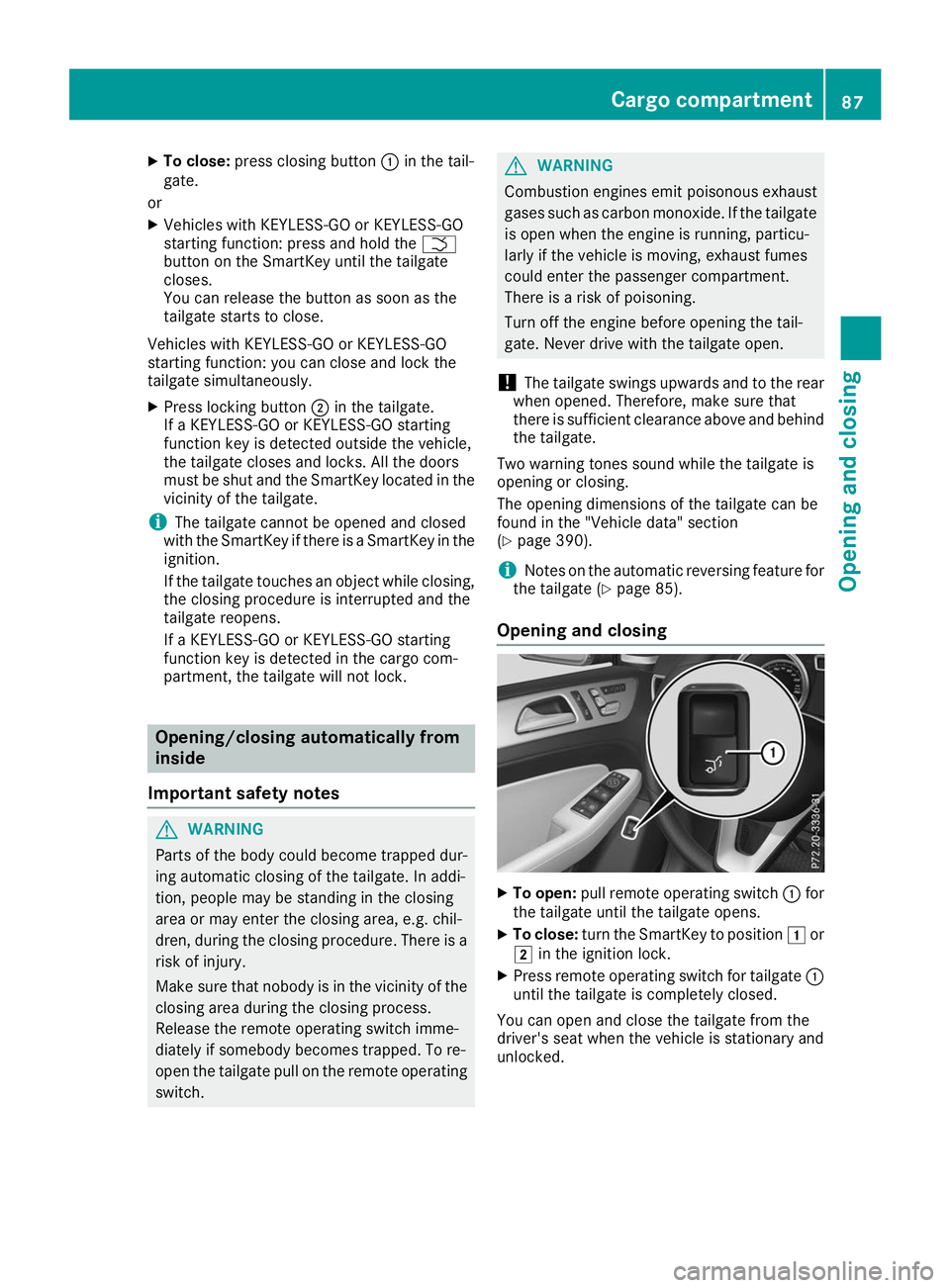
To close: press closing button 0043in the tail-
gate.
or X Vehicles with KEYLESS-GO or KEYLESS-GO
starting function: press and hold the 0054
button on the SmartKey until the tailgate
closes.
You can release the button as soon as the
tailgate starts to close.
Vehicles with KEYLESS-GO or KEYLESS-GO
starting function: you can close and lock the
tailgate simultaneously.
X Press locking button 0044in the tailgate.
If a KEYLESS-GO or KEYLESS-GO starting
function key is detected outside the vehicle,
the tailgate closes and locks. All the doors
must be shut and the SmartKey located in the vicinity of the tailgate.
i The tailgate cannot be opened and closed
with the SmartKey if there is a SmartKey in the
ignition.
If the tailgate touches an object while closing, the closing procedure is interrupted and the
tailgate reopens.
If a KEYLESS-GO or KEYLESS-GO starting
function key is detected in the cargo com-
partment, the tailgate will not lock. Opening/closing automatically from
inside
Important safety notes G
WARNING
Parts of the body could become trapped dur-
ing automatic closing of the tailgate. In addi-
tion, people may be standing in the closing
area or may enter the closing area, e.g. chil-
dren, during the closing procedure. There is a risk of injury.
Make sure that nobody is in the vicinity of theclosing area during the closing process.
Release the remote operating switch imme-
diately if somebody becomes trapped. To re-
open the tailgate pull on the remote operating
switch. G
WARNING
Combustion engines emit poisonous exhaust
gases such as carbon monoxide. If the tailgate is open when the engine is running, particu-
larly if the vehicle is moving, exhaust fumes
could enter the passenger compartment.
There is a risk of poisoning.
Turn off the engine before opening the tail-
gate. Never drive with the tailgate open.
! The tailgate swings upwards and to the rear
when opened. Therefore, make sure that
there is sufficient clearance above and behind
the tailgate.
Two warning tones sound while the tailgate is
opening or closing.
The opening dimensions of the tailgate can be
found in the "Vehicle data" section
(Y page 390).
i Notes on the automatic reversing feature for
the tailgate (Y page 85).
Opening and closing X
To open: pull remote operating switch 0043for
the tailgate until the tailgate opens.
X To close: turn the SmartKey to position 0047or
0048 in the ignition lock.
X Press remote operating switch for tailgate 0043
until the tailgate is completely closed.
You can open and close the tailgate from the
driver's seat when the vehicle is stationary and
unlocked. Cargo compartment
87Opening and closing Z
Page 91 of 398
G
WARNING
If children operate the side windows they
could become trapped, particularly if they are left unsupervised. There is a risk of injury.
Activate the override feature for the rear side
windows. When leaving the vehicle, always
take the SmartKey with you and lock the vehi-
cle. Never leave children unsupervised in the
vehicle. Side window reversing feature
The side windows are equipped with an auto-
matic reversing feature. If a solid object blocks
or restricts a side window during the closing
process, the side window opens again automat-
ically. However, the automatic reversing feature is only an aid and does not relieve you of the
responsibility of paying attention when closing a side window. G
WARNING
The reversing feature does not react:
R to soft, light and thin objects, e.g. small fin-
gers
R over the last 1/6 in(4 mm) of the closing
movement
R during resetting
R when closing the side window again man-
ually immediately after automatic reversing
This means that the reversing feature cannot
prevent someone being trapped in these sit-
uations. There is a risk of injury.
Make sure that no body parts are in close
proximity during the closing procedure. If
someone becomes trapped, press the switch to open the side window again. Opening and closing the side win-
dows
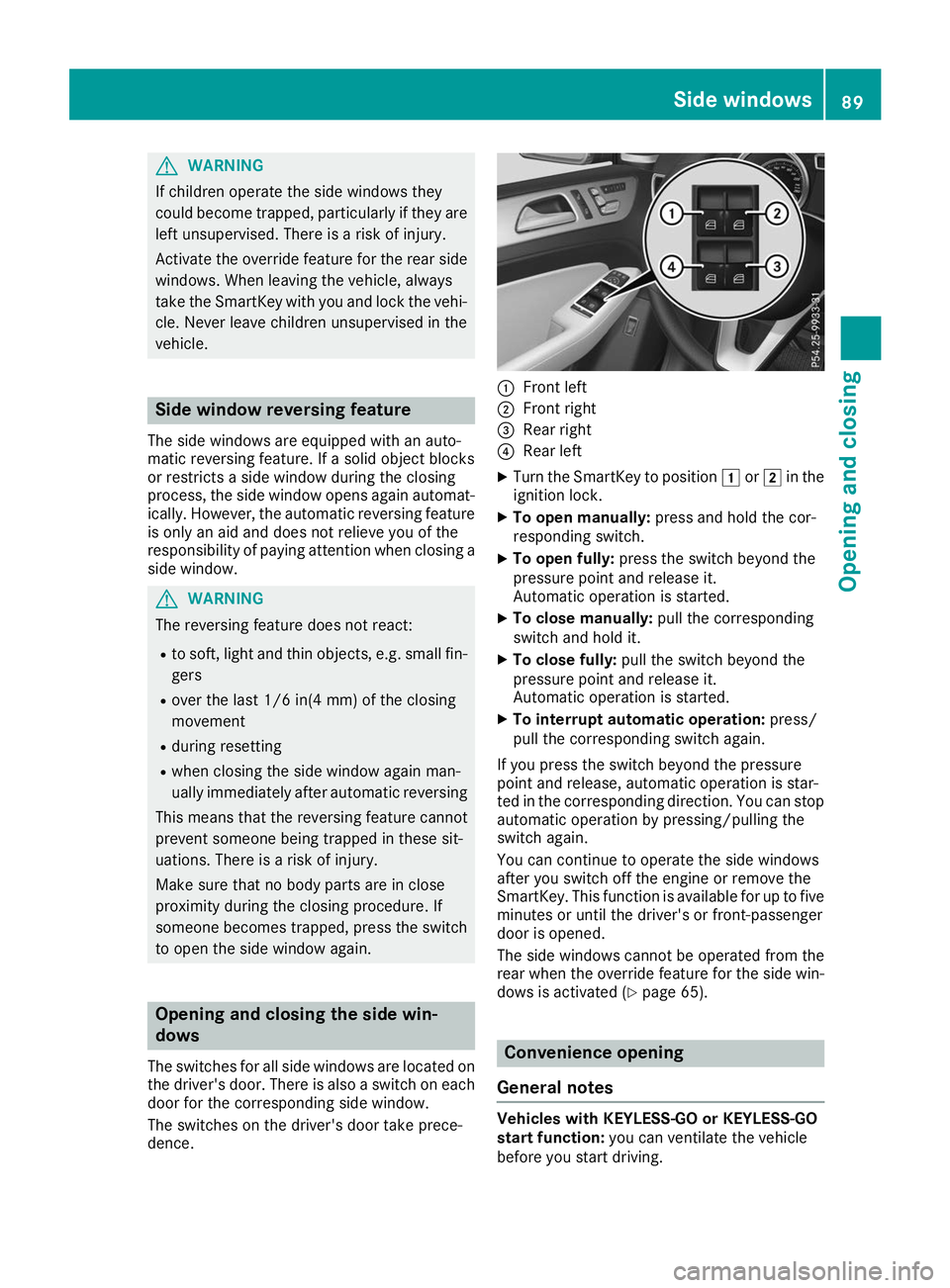
The switches for all side windows are located on
the driver's door. There is also a switch on each door for the corresponding side window.
The switches on the driver's door take prece-
dence. 0043
Front left
0044 Front right
0087 Rear right
0085 Rear left
X Turn the SmartKey to position 0047or0048 in the
ignition lock.
X To open manually: press and hold the cor-
responding switch.
X To open fully: press the switch beyond the
pressure point and release it.
Automatic operation is started.
X To close manually: pull the corresponding
switch and hold it.
X To close fully: pull the switch beyond the
pressure point and release it.
Automatic operation is started.
X To interrupt automatic operation: press/
pull the corresponding switch again.
If you press the switch beyond the pressure
point and release, automatic operation is star-
ted in the corresponding direction. You can stop automatic operation by pressing/pulling the
switch again.
You can continue to operate the side windows
after you switch off the engine or remove the
SmartKey. This function is available for up to five
minutes or until the driver's or front-passenger
door is opened.
The side windows cannot be operated from the
rear when the override feature for the side win- dows is activated (Y page 65). Convenience opening
General notes Vehicles with KEYLESS-GO or KEYLESS-GO
start function:
you can ventilate the vehicle
before you start driving. Side windows
89Opening and closing Z
Page 92 of 398
To do this, the SmartKey is used to carry out the
following functions simultaneously:
R unlock the vehicle
R open the side windows
R open the sliding sunroof or the panorama roof
with power tilt/sliding panel and the roller
sunblinds
R switch on the seat ventilation for the driver's
seat
The convenience opening feature can only be
operated using the SmartKey. The SmartKey
must be close to the vehicle. For vehicles with-
out KEYLESS-GO, the SmartKey must be near
the driver's door handle.
The "convenience opening" feature is also avail-
able when the vehicle is unlocked.
Convenience opening X
Vehicles without KEYLESS-GO: point the tip
of the SmartKey at the door handle on the
driver's door.
X Press and hold the 0036button until the side
windows and the sliding sunroof or panorama
roof with power tilt/sliding panel are in the
desired position.
If the roller sunblinds of the panorama roof
with power tilt/sliding panel are closed, the
roller sunblinds are opened first.
X Press and hold the 0036button again until the
panorama roof with power tilt/sliding panel is in the desired position.
X To interrupt convenience opening: release
the 0036 button. Convenience closing feature
Important safety notes G
WARNING
When the convenience closing feature is oper- ating, parts of the body could become trapped
in the closing area of the side window and the
sliding sunroof. There is a risk of injury.
Observe the complete closing procedure
when the convenience closing feature is oper-
ating. Make sure that no body parts are in
close proximity during the closing procedure. When you lock the vehicle, you can simultane-
ously:
R close the side windows
R close the sliding sunroof or the panorama roof
with power tilt/sliding panel
On vehicles with a panorama roof with power
tilt/sliding panel, you can then close the roller
sunblinds.
Proceed as follows if someone is trapped:
R Release the 0037button to interrupt the clos-
ing procedure.
R Press and hold the 0036button to open.
Vehicles with KEYLESS-GO:
R Release the sensor surfaces on the exterior
door handle to interrupt the closing proce-
dure.
R To open, pull the same door handle immedi-
ately and hold it firmly. The side windows and
the sliding sunroof will open for as long as the
door handle is held but the door is not
opened.
Notes on the automatic reversing feature for:
R The side window (Y page 89)
R The sliding sunroof (Y page 93)
R The panorama roof with power tilt/sliding
panel (Y page 93)
Using the SmartKey The SmartKey must be close to the vehicle. For
vehicles without KEYLESS-GO, the SmartKey
must be near the driver's door handle.
X Vehicles without KEYLESS-GO: point the tip
of the SmartKey at the door handle on the
driver's door.
X Press and hold the 0037button until the side
windows and the sliding sunroof or the pano-
rama roof with power tilt/sliding panel are
fully closed.
X Make sure that all the side windows and the
sliding sunroof or panorama roof with power
tilt/sliding panel are closed.
On vehicles with a panorama roof with power
tilt/sliding panel: X Press and hold the 0037button again until the
roller sunblinds of the panorama roof with
power tilt/sliding panel close.
X To interrupt convenience closing: release
the 0037 button. 90
Side windowsOpening and closing
Page 93 of 398
Using KEYLESS-GO
X
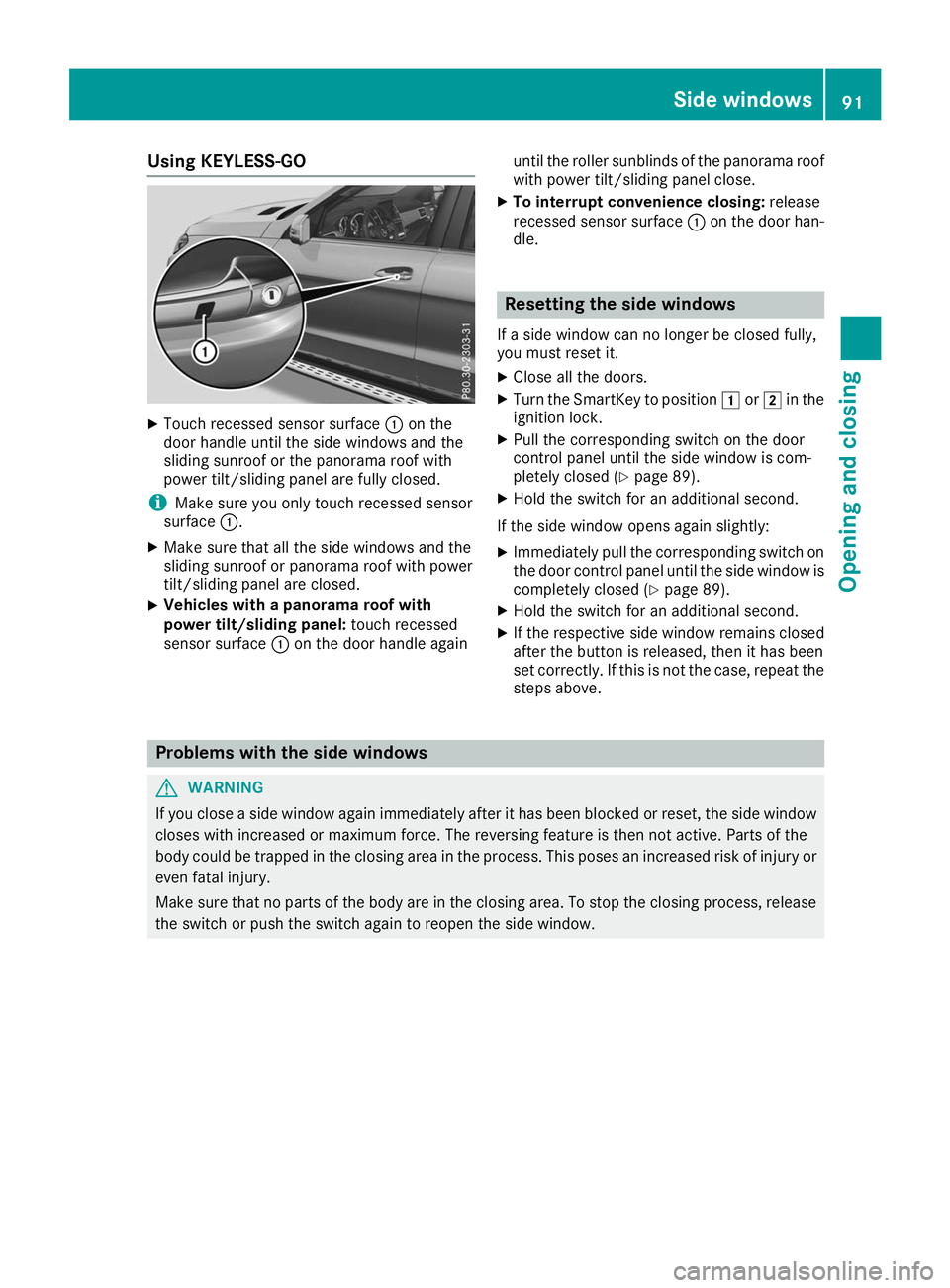
Touch recessed sensor surface 0043on the
door handle until the side windows and the
sliding sunroof or the panorama roof with
power tilt/sliding panel are fully closed.
i Make sure you only touch recessed sensor
surface 0043.
X Make sure that all the side windows and the
sliding sunroof or panorama roof with power
tilt/sliding panel are closed.
X Vehicles with a panorama roof with
power tilt/sliding panel:
touch recessed
sensor surface 0043on the door handle again until the roller sunblinds of the panorama roof
with power tilt/sliding panel close.
X To interrupt convenience closing: release
recessed sensor surface 0043on the door han-
dle. Resetting the side windows
If a side window can no longer be closed fully,
you must reset it.
X Close all the doors.
X Turn the SmartKey to position 0047or0048 in the
ignition lock.
X Pull the corresponding switch on the door
control panel until the side window is com-
pletely closed (Y page 89).
X Hold the switch for an additional second.
If the side window opens again slightly: X Immediately pull the corresponding switch on
the door control panel until the side window is completely closed (Y page 89).
X Hold the switch for an additional second.
X If the respective side window remains closed
after the button is released, then it has been
set correctly. If this is not the case, repeat the
steps above. Problems with the side windows
G
WARNING
If you close a side window again immediately after it has been blocked or reset, the side window
closes with increased or maximum force. The reversing feature is then not active. Parts of the
body could be trapped in the closing area in the process. This poses an increased risk of injury or even fatal injury.
Make sure that no parts of the body are in the closing area. To stop the closing process, releasethe switch or push the switch again to reopen the side window. Side windows
91Opening and closing Z
Page 106 of 398
Adjusting the steering wheel electri-
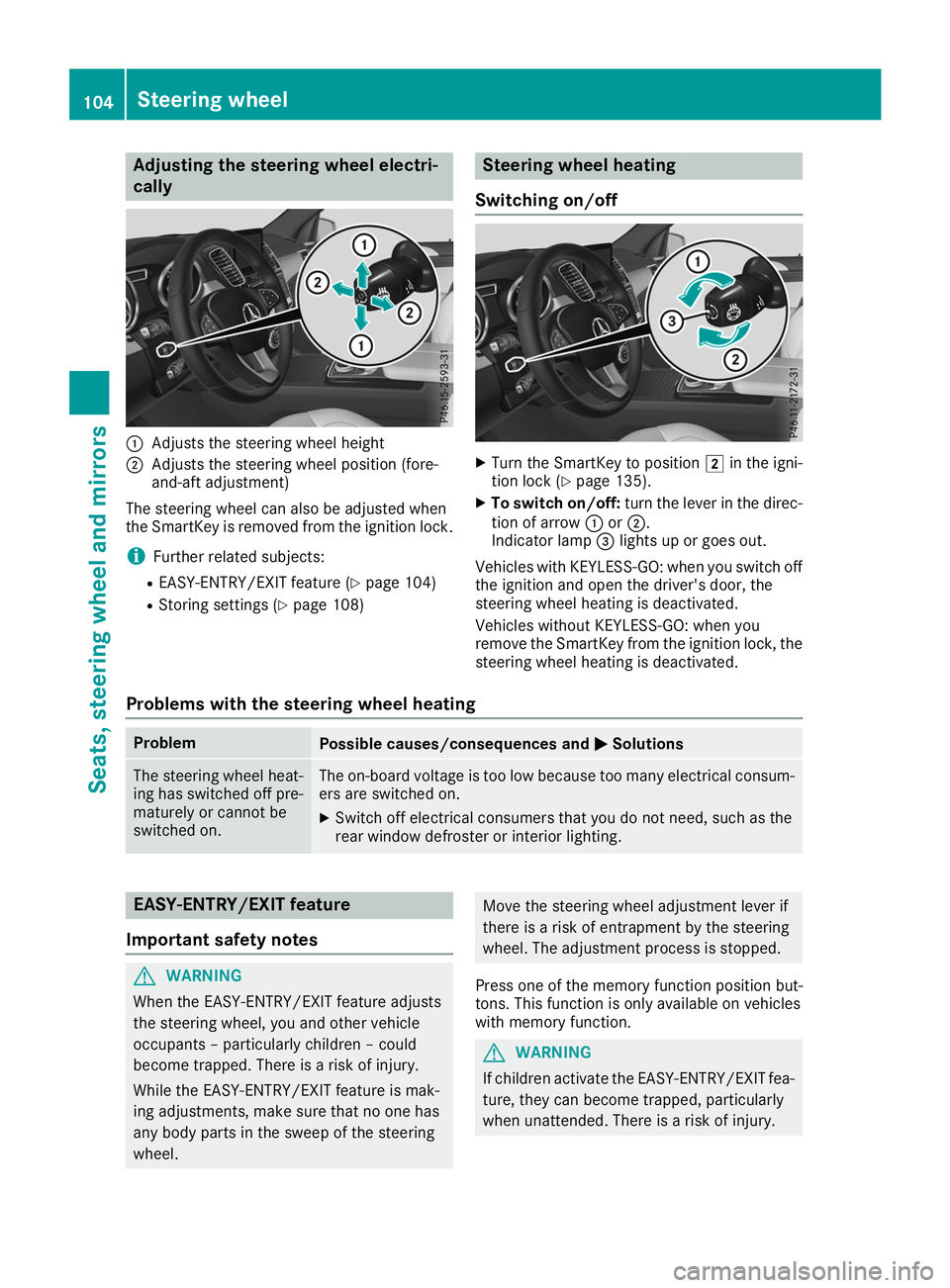
cally 0043
Adjusts the steering wheel height
0044 Adjusts the steering wheel position (fore-
and-aft adjustment)
The steering wheel can also be adjusted when
the SmartKey is removed from the ignition lock.
i Further related subjects:
R EASY-ENTRY/EXIT feature (Y page 104)
R Storing settings (Y page 108) Steering wheel heating
Switching on/off X
Turn the SmartKey to position 0048in the igni-
tion lock (Y page 135).
X To switch on/off: turn the lever in the direc-
tion of arrow 0043or0044.
Indicator lamp 0087lights up or goes out.
Vehicles with KEYLESS-GO: when you switch off the ignition and open the driver's door, the
steering wheel heating is deactivated.
Vehicles without KEYLESS-GO: when you
remove the SmartKey from the ignition lock, the
steering wheel heating is deactivated.
Problems with the steering wheel heating Problem
Possible causes/consequences and
0050 0050Solutions The steering wheel heat-
ing has switched off pre-
maturely or cannot be
switched on. The on-board voltage is too low because too many electrical consum-
ers are switched on.
X Switch off electrical consumers that you do not need, such as the
rear window defroster or interior lighting. EASY-ENTRY/EXIT feature
Important safety notes G
WARNING
When the EASY-ENTRY/EXIT feature adjusts
the steering wheel, you and other vehicle
occupants – particularly children – could
become trapped. There is a risk of injury.
While the EASY-ENTRY/EXIT feature is mak-
ing adjustments, make sure that no one has
any body parts in the sweep of the steering
wheel. Move the steering wheel adjustment lever if
there is a risk of entrapment by the steering
wheel. The adjustment process is stopped.
Press one of the memory function position but-
tons. This function is only available on vehicles
with memory function. G
WARNING
If children activate the EASY-ENTRY/EXIT fea- ture, they can become trapped, particularly
when unattended. There is a risk of injury. 104
Steering wheelSeats
, steering wheel and mirrors
Page 107 of 398
When leaving the vehicle, always take the
SmartKey with you and lock the vehicle. Never leave children unsupervised in the vehicle. G
WARNING
If you drive off while the EASY-ENTRY/EXIT
feature is making adjustments, you could lose
control of the vehicle. There is a risk of an
accident.
Always wait until the adjustment process is
complete before driving off.
The EASY-ENTRY/EXIT feature makes getting in
and out of your vehicle easier.
You can activate and deactivate the EASY-
ENTRY/EXIT feature in the on-board computer
(Y page 240).
Position of the steering wheel when the EASY-ENTRY/EXIT feature is active The steering wheel swings up when you:
R remove the SmartKey from the ignition lock.
R open the driver's door and KEYLESS-GO is in
position 0047.
R open the driver's door and the SmartKey is in
position 0092or0047 in the ignition lock.
i The steering wheel only moves up if it has
not already reached the upper stop.
Position of the steering wheel for driv-
ing The steering wheel is moved to the last selected
position when:
R the driver's door is closed
R you insert the SmartKey into the ignition lock
or
R you press the Start/Stop button once on vehi-
cles with KEYLESS-GO
When you close the driver's door with the igni-
tion switched on, the steering wheel is also
automatically moved to the previously set posi- tion.
The last position of the steering column is stored
when you:
R switch the ignition off
R save the setting with the memory function
(Y page 108). Crash-responsive EASY-EXIT feature If the crash-responsive EASY-EXIT feature is trig-
gered in an accident, the steering column will
move upwards when the driver's door is opened.
This occurs irrespective of the position of the
SmartKey in the ignition lock. This makes it eas- ier to exit the vehicle and rescue the occupants.
The crash-responsive EASY-EXIT feature is only
operational if the EASY-EXIT/ENTRY feature is
activated in the on-board computer
(Y page 240). Mirrors
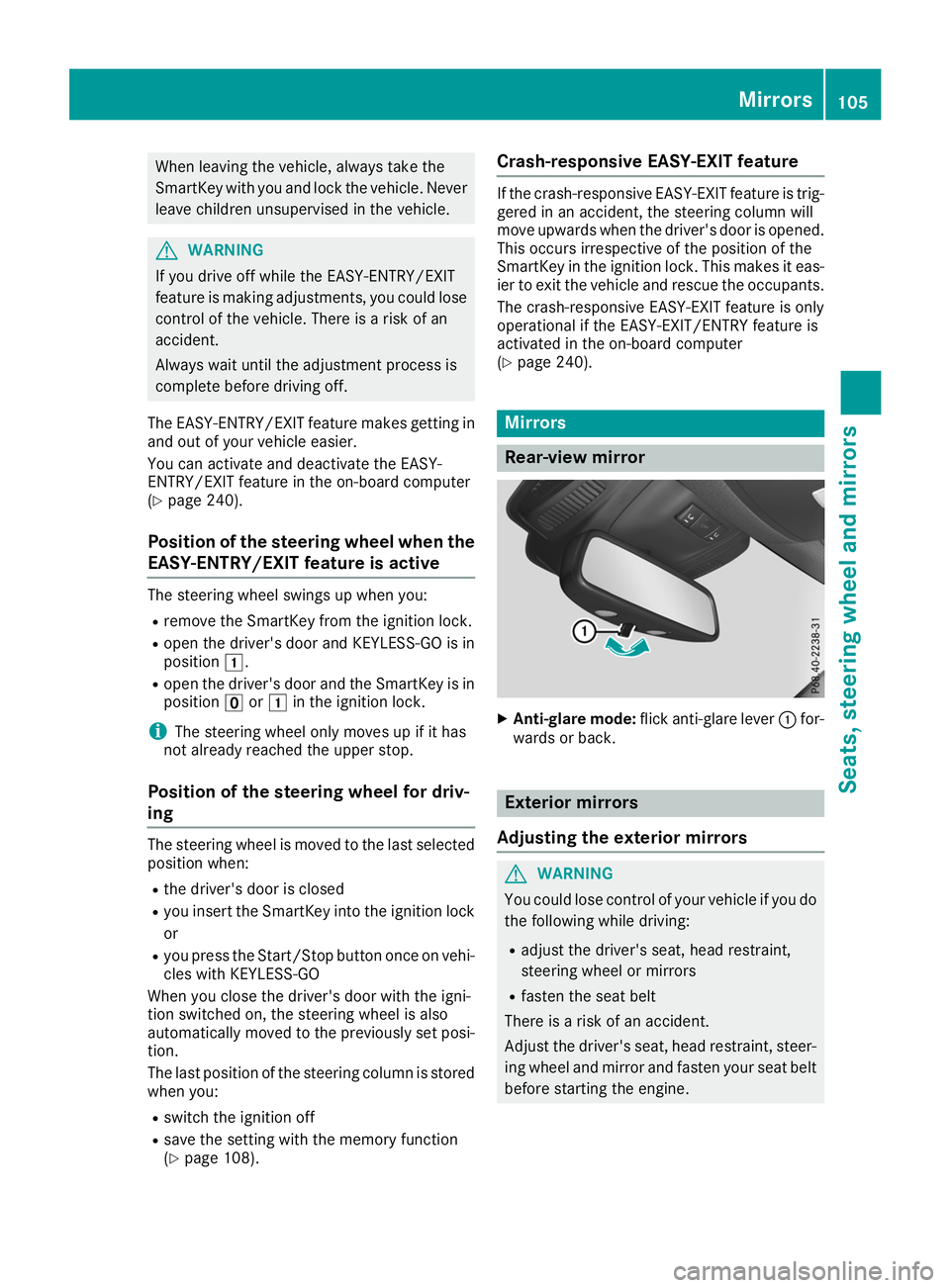
Rear-view mirror
X
Anti-glare mode: flick anti-glare lever 0043for-
wards or back. Exterior mirrors
Adjusting the exterior mirrors G
WARNING
You could lose control of your vehicle if you do the following while driving:
R adjust the driver's seat, head restraint,
steering wheel or mirrors
R fasten the seat belt
There is a risk of an accident.
Adjust the driver's seat, head restraint, steer-
ing wheel and mirror and fasten your seat belt before starting the engine. Mirrors
105Seats, steering wheel and mirrors Z
Page 120 of 398
If the wiper blades are worn, the windshield will
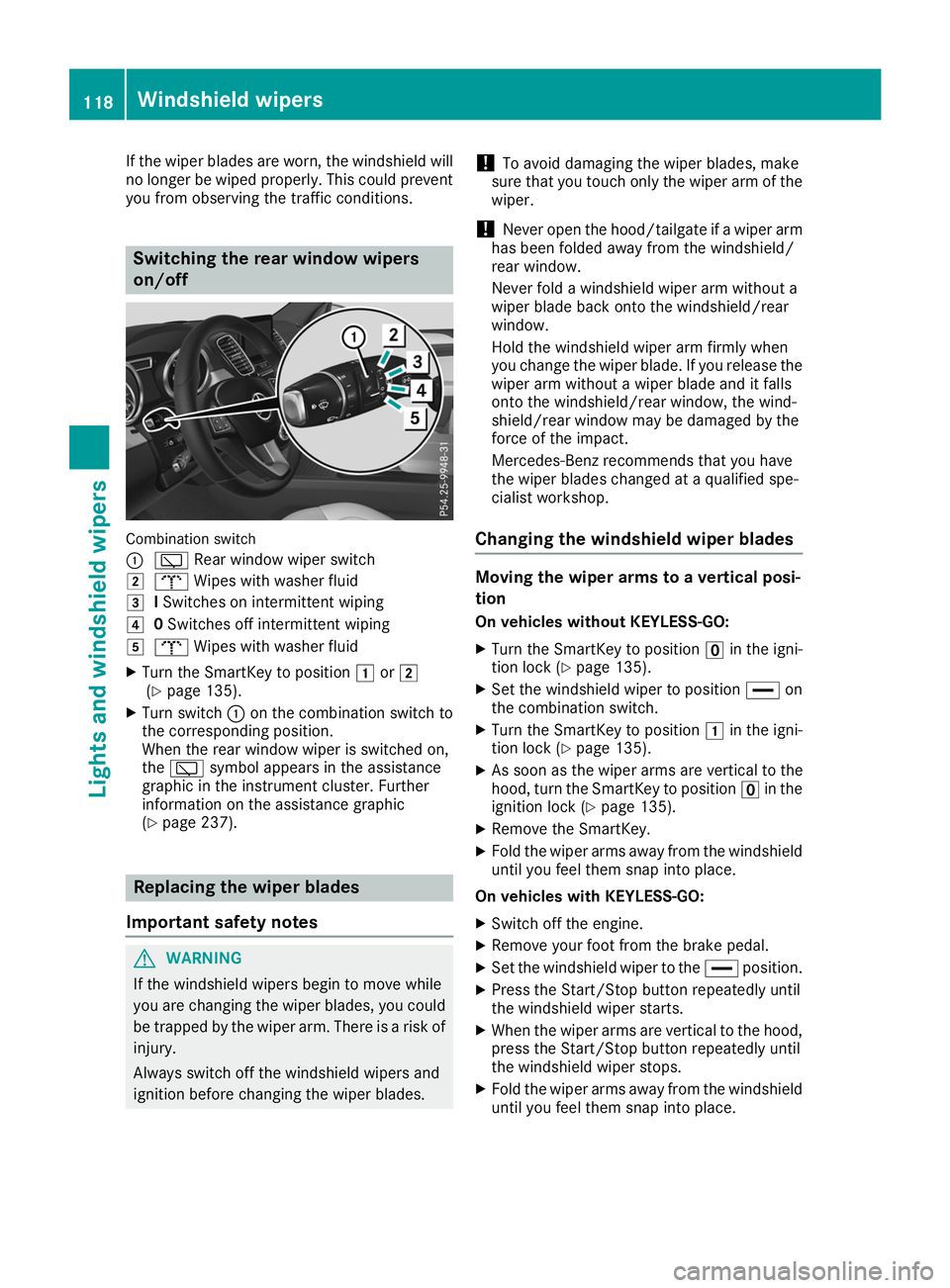
no longer be wiped properly. This could preventyou from observing the traffic conditions. Switching the rear window wipers
on/off
Combination switch
0043
00C5 Rear window wiper switch
0048 008E Wipes with washer fluid
0049 ISwitches on intermittent wiping
004A 0Switches off intermittent wiping
004B 008E Wipes with washer fluid
X Turn the SmartKey to position 0047or0048
(Y page 135).
X Turn switch 0043on the combination switch to
the corresponding position.
When the rear window wiper is switched on,
the 00C5 symbol appears in the assistance
graphic in the instrument cluster. Further
information on the assistance graphic
(Y page 237). Replacing the wiper blades
Important safety notes G
WARNING
If the windshield wipers begin to move while
you are changing the wiper blades, you could be trapped by the wiper arm. There is a risk of
injury.
Always switch off the windshield wipers and
ignition before changing the wiper blades. !
To avoid damaging the wiper blades, make
sure that you touch only the wiper arm of the
wiper.
! Never open the hood/tailgate if a wiper arm
has been folded away from the windshield/
rear window.
Never fold a windshield wiper arm without a
wiper blade back onto the windshield/rear
window.
Hold the windshield wiper arm firmly when
you change the wiper blade. If you release the
wiper arm without a wiper blade and it falls
onto the windshield/rear window, the wind-
shield/rear window may be damaged by the
force of the impact.
Mercedes-Benz recommends that you have
the wiper blades changed at a qualified spe-
cialist workshop.
Changing the windshield wiper blades Moving the wiper arms to a vertical posi-
tion
On vehicles without KEYLESS-GO:
X Turn the SmartKey to position 0092in the igni-
tion lock (Y page 135).
X Set the windshield wiper to position 00AAon
the combination switch.
X Turn the SmartKey to position 0047in the igni-
tion lock (Y page 135).
X As soon as the wiper arms are vertical to the
hood, turn the SmartKey to position 0092in the
ignition lock (Y page 135).
X Remove the SmartKey.
X Fold the wiper arms away from the windshield
until you feel them snap into place.
On vehicles with KEYLESS-GO:
X Switch off the engine.
X Remove your foot from the brake pedal.
X Set the windshield wiper to the 00AAposition.
X Press the Start/Stop button repeatedly until
the windshield wiper starts.
X When the wiper arms are vertical to the hood,
press the Start/Stop button repeatedly until
the windshield wiper stops.
X Fold the wiper arms away from the windshield
until you feel them snap into place. 118
Windshield wipersLights and windshield wipers