light MERCEDES-BENZ GLE 2019 User Guide
[x] Cancel search | Manufacturer: MERCEDES-BENZ, Model Year: 2019, Model line: GLE, Model: MERCEDES-BENZ GLE 2019Pages: 398, PDF Size: 12.25 MB
Page 25 of 398
Important safety notes .................. 345
Towing
Permitted towing methods ............ 347
Towing a trailer
Axle load, permissible .................... 394
Cleaning the trailer tow hitch .........3 31
Coupling up a trailer ..................... .223
Decoupling a trailer ....................... 225
Driving tips ................................... .221
Important safety notes .................. 220
Installing the ball coupling ............. 222
Lights display message .................. 256
Mounting dimensions .................... 394
Parking Assist PARKTRONIC .......... 188
Power supply ................................. 226
Pulling away with a trailer .............. 138
Removing the ball coupling ............ 225
Trailer loads ................................... 394
Towing away
Important safety guidelines ........... 345
Installing the towing eye ................ 347
Notes for 4MATIC vehicles ............ 348
Removing the towing eye .............. .347
Transporting the vehicle ................ 348
With both axles on the ground ....... 347
Towing eye ......................................... 335
Traffic reports
see also Digital Operator's Man-
ual ................................................. .287
Traffic Sign Assist
Activating/deactivating the warn-ing function ................................... .237
Display message ............................ 264
Function/notes ............................ .205
Important safety notes .................. 205
Instrument cluster display ............. 205
Trailer coupling
see Towing a trailer
Trailer loads and drawbar nose-
weights ............................................... 225
Trailer towing
Active Blind Spot Assist ................. 211
Active Lane Keeping Assist ............ 214
Blind Spot Assist ............................ 207
Permissible trailer loads and
drawbar noseweights ..................... 225
Transfer case ..................................... 150 Transmission
see Automatic transmission
Transmission position display ......... 145
Transporting the vehicle .................. 348
Traveling uphill
Brow of hill ..................................... 169
Driving downhill ............................ .169
Maximum gradient-climbing capa-
bility ............................................... 168
Trim pieces (cleaning instruc-
tions) ................................................. .332
Trip computer (on-board com-
puter) ................................................. .232
Trip odometer
Calling up ....................................... 232
Resetting (on-board computer) ...... 233
Trunk
see Tailgate
Turn signals
Display message ............................ 256
Replacing bulbs (front) ................... 117
Switching on/off ........................... 111
Two-way radio
Frequencies ................................... 381
Installation ..................................... 381
Transmission output (maximum ).... 381
TWR (Tongue Weight Rating) (defi-
nition) ................................................. 371
Type identification plate
see Vehicle identification plate U
Unlocking Emergency unlocking ....................... 84
From inside the vehicle (central
unlocking button) ............................. 83
Upshift indicator (on-board com-
puter, Mercedes-AMG vehicles) ....... 241
USB devices
Connecting to the Media Inter-
face ............................................... 294 V
Vanity mirror (in the sun visor) ........ 306
Vehicle
Correct use ...................................... 31 Index
23
Page 34 of 398
3 Mercedes Drive
Montvale, NJ 07645-0350
In Canada
Customer Relations Department
Mercedes-Benz Canada, Inc.
98 Vanderhoof Avenue
Toronto, Ontario M4G 4C9
Reporting safety defects
USA only:
The following text is reproduced as required of
all manufacturers under Title 49, Code of U.S.
Federal Regulations, Part 575 pursuant to the
National Traffic and Motor Vehicle Safety Act of
1966.
If you believe that your vehicle has a defect
which could cause a crash or could cause injury or death, you should immediately inform the
National Highway Traffic Safety Administration
(NHTSA) in addition to notifying Mercedes-Benz
USA, LLC.
If NHTSA receives similar complaints, it may
open an investigation, and if it finds that a safety
defect exists in a group of vehicles, it may order a recall and remedy campaign. However, NHTSA cannot become involved in individual problems
between you, your dealer, or Mercedes-Benz
USA, LLC.
To contact NHTSA, you may call the Vehicle
Safety Hotline toll-free at 1-888-327-4236
(TTY: 1-800-424-9153); go to http://
www.safercar.gov; or write to: Administrator,
NHTSA, 400 Seventh Street, SW., Washington,
DC 20590.
You can also obtain other information about
motor vehicle safety from
http://www.safercar.gov Limited Warranty
! Observe the notes in this Operator's Manual
regarding the correct operation of your vehi-
cle and possible damage to the vehicle. Dam- age to the vehicle which is caused by violation
of these notes is not covered by the
Mercedes-Benz implied warranty or the new
or used-vehicle warranty. QR code for rescue card
The QR codes are secured in the fuel filler flap
and on the opposite side on the B-pillar. In the
event of an accident, rescue services can use
the QR code to quickly find the appropriate res- cue card for your vehicle. The current rescue
card contains the most important information
about your vehicle in a compact form, e.g. the
routing of the electric cables.
You can find more information at
www.mercedes-benz.de/qr-code. Data stored in the vehicle
Electronic control units
There are electronic control units installed in
your vehicle. Some of these are necessary for
your vehicle to operate safely, while some offer
support during driving (driver assistance sys-
tems). In addition, your vehicle offers comfort
and entertainment functions that are also made possible by electronic control units.
Electronic control units contain data storage
systems that can temporarily or permanently
save technical information concerning the vehi-
cle's condition, component stress and mainte-
nance requirements as well as technical events
and malfunctions.
This information generally documents the con-
dition of a component, a module, a system or the surroundings, such as:
R operating states of system components (e.g.
fill levels, battery status, tire pressure)
R status messages concerning the vehicle or its
individual components (e.g. wheel rpm/
speed, deceleration, lateral acceleration, indi- cation of whether seat belts are fastened)
R malfunctions and defects in important system
components (e.g. lights, brakes)
R information about events leading to vehicle
damage
R system responses in special driving situations
(e.g. air bag deployment, intervention of sta-
bility control systems)
R ambient conditions (e.g. temperature, rain
sensor)
In addition to performing the actual control unit function, this data is used by manufacturers to
detect and rectify malfunctions and to optimizevehicle functions. Most of this data is volatile 32
Data stored in the vehicleIntroduction
Page 35 of 398
and processed only in the vehicle itself. Only a
small part of the data is stored in event or mal-
function memories.
When you use services, the technical data from
the vehicle can be read out by service network
employees (e.g. workshops, manufacturers) or
third parties (e.g. breakdown services). Services
can include repair services, maintenance pro-
cesses, warranty cases and quality assurance
measures. The data are read out via the con-
nection for the diagnostics connection in the
vehicle, which is required by law. The relevant
offices in the service network or third parties
collect, process and use the data. This data
documents the vehicle's technical states, is
used to help in finding malfunctions and improv-
ing quality and is sent to the manufacturer
where necessary. In addition, the manufacturer is subject to product liability. The manufacturerneeds technical data from vehicles for this pur-
pose.
Malfunction memories in the vehicle can be
reset by a service center during repair or service
work.
You can incorporate data into the vehicle's com- fort and infotainment functions yourself as part of the selected equipment.
These include, for example:
R multimedia data such as music, films or pho-
tos for playback in an integrated multimedia
system
R address book data for use in conjunction with
an integrated hands-free system or an inte-
grated navigation system
R navigation destinations that have been
entered
R data about using Internet services
This data can be saved locally in the vehicle or
located on a device that you have connected to
the vehicle (e.g. smartphone, USB memory stick or MP3 player). If this data is saved in the vehi-
cle, you can delete it at any time. This data is
sent to third parties only at your request, par-
ticularly when you use online services in accord- ance with the settings that you have selected.
You can save and change comfort settings/
customizations in the vehicle at any time.
Depending on the equipment in question, these
can include:
R seat and steering wheel position settings
R suspension and climate control settings
R custom settings such as interior lighting If your vehicle is equipped appropriately, you
can connect your smartphone or another mobile
end device to the vehicle. You can control this by
means of the control elements integrated in the vehicle. The smartphone's picture and sound
can be output via the multimedia system. Spe-
cific items of information are also sent to your
smartphone.
Depending on the type of integration, this can
include:
R general vehicle information
R position data
This allows the use of selected smartphone
apps, such as navigation or music player apps.
There is no additional interaction between the
smartphone and the vehicle, particularly active
access to vehicle data. The type of additional
data processing is determined by the provider of the app being used. Whether you can configure
settings for it and, if so, which ones, depends on
the app and your smartphone's operating sys-
tem. Online services
Wireless network connection If your vehicle has a wireless network connec-
tion, data can be exchanged between your vehi-
cle and other systems. The wireless network
connection is made possible by the vehicle's
own transmitter and receiver or by mobile devi- ces that you have brought into the vehicle (e.g.
smartphones). Online functions can be used via this wireless network connection. These include
online services and applications/apps provided by the manufacturer or other providers.
Services provided by the manufacturer In the case of the manufacturer's online serv-
ices, the manufacturer describes the functions
in a suitable place (e.g. operating instructions,
manufacturer's website) and provides the asso-
ciated information subject to data protection
legislation. Personal data can be used in order to provide online services. The exchange of data
for this purpose takes place via a secure con-
nection, e.g. with the manufacturer's IT systems
intended for the purpose. Collecting, processing
and using personal data beyond the provision of
services is permitted only on the basis of a stat-
utory permit or declaration of consent. Data stored in the vehicle
33Introduction Z
Page 38 of 398
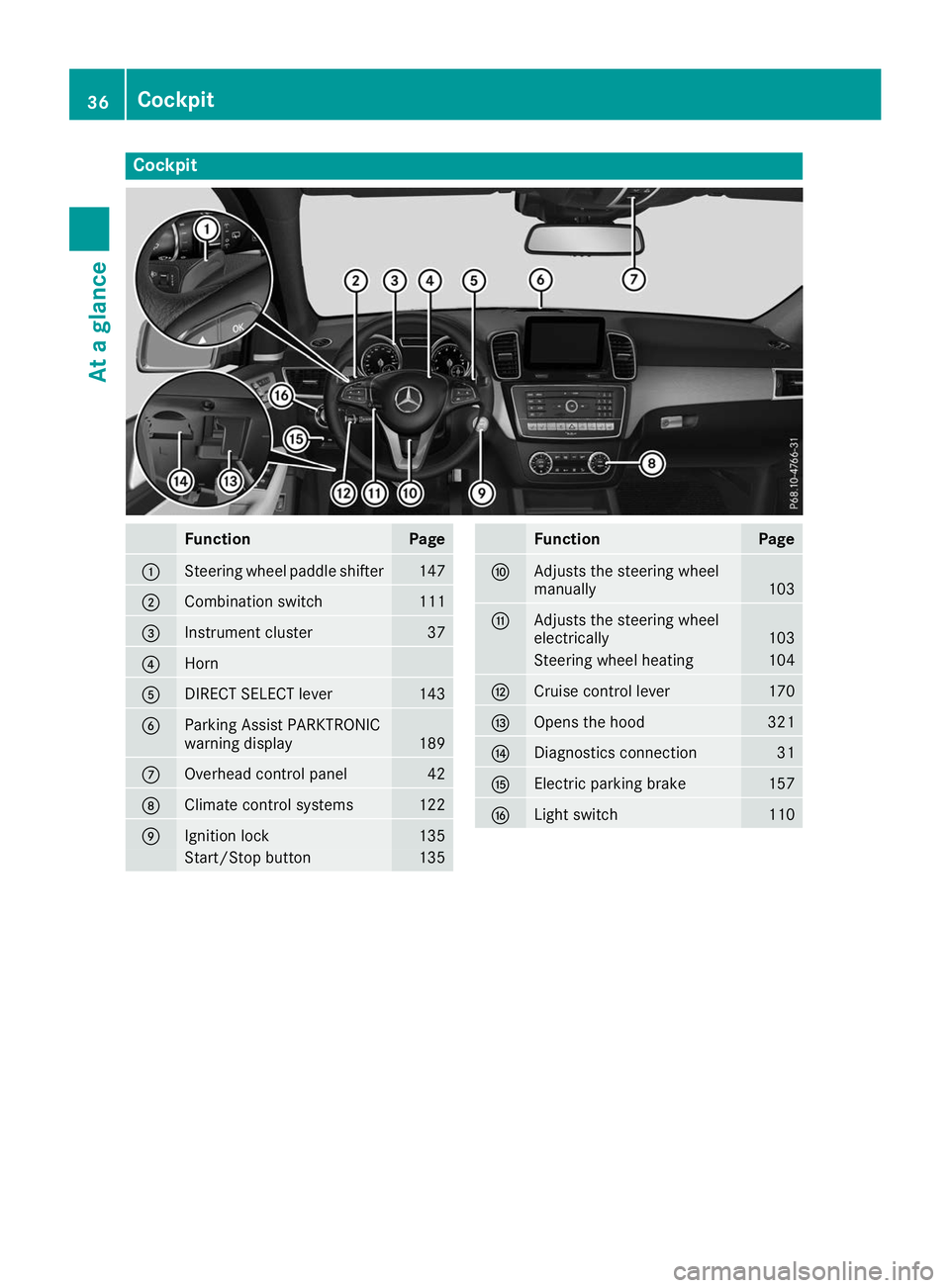
Cockpit
Function Page
0043
Steering wheel paddle shifter 147
0044
Combination switch 111
0087
Instrument cluster 37
0085
Horn
0083
DIRECT SELECT lever 143
0084
Parking Assist PARKTRONIC
warning display
189
006B
Overhead control panel 42
006C
Climate control systems 122
006D
Ignition lock 135
Start/Stop button 135 Function Page
006E
Adjusts the steering wheel
manually
103
006F
Adjusts the steering wheel
electrically
103
Steering wheel heating 104
0070
Cruise control lever 170
0071
Opens the hood 321
0072
Diagnostics connection 31
0073
Electric parking brake 157
0074
Light switch 11036
CockpitAt a glance
Page 39 of 398
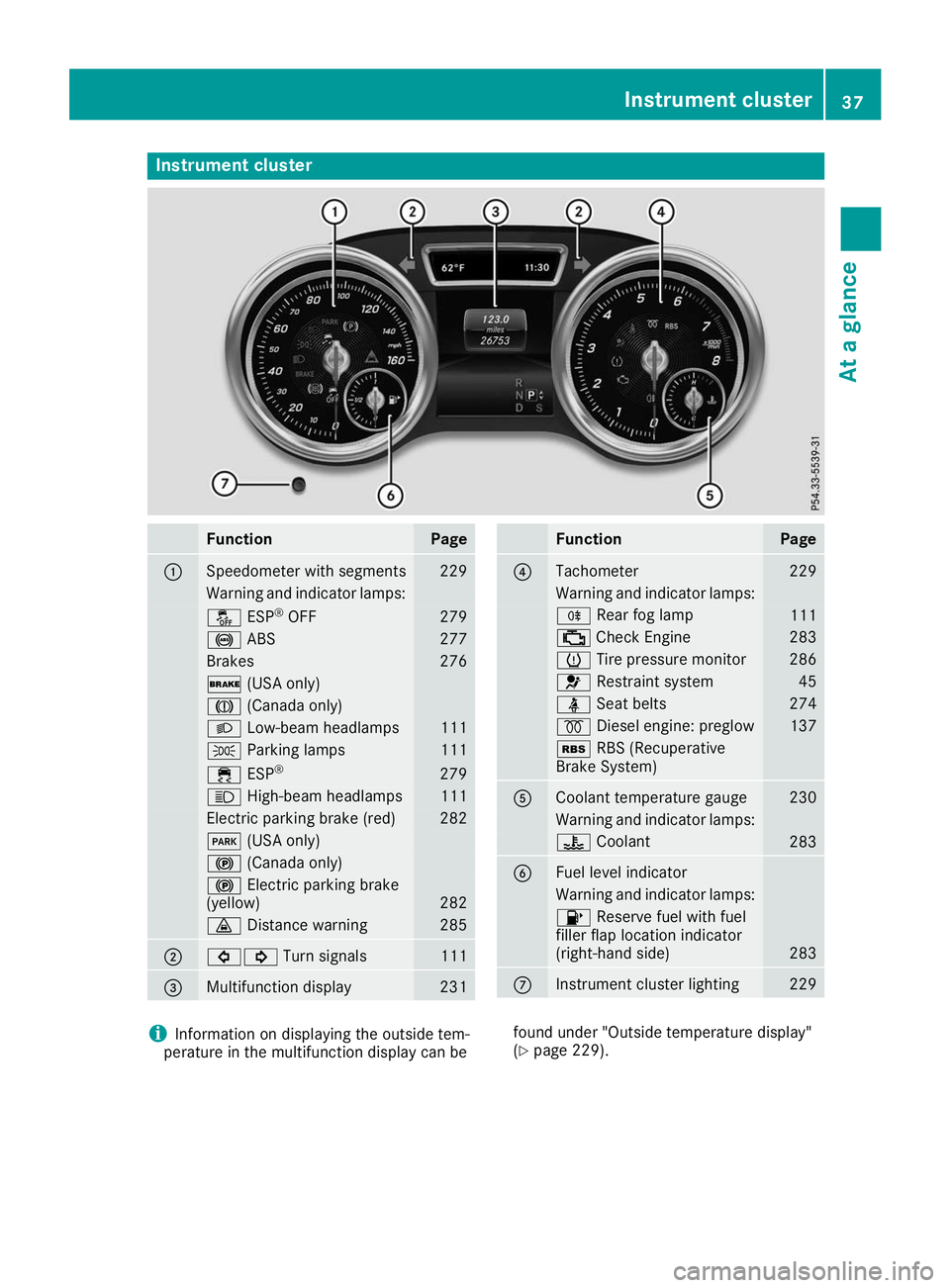
Instrument cluster
Function Page
0043
Speedometer with segments 229
Warning and indicator lamps:
00BB
ESP®
OFF 279
0025
ABS 277
Brakes 276
0027
(USA only) 004D
(Canada only) 0058
Low-beam headlamps 111
0060
Parking lamps 111
00E5
ESP® 279
0057
High-beam headlamps 111
Electric parking brake (red) 282
0049
(USA only) 0024
(Canada only) 0024
Electric parking brake
(yellow) 282
00BA
Distance warning 285
0044
003E003D
Turn signals 111
0087
Multifunction display 231 Function Page
0085
Tachometer 229
Warning and indicator lamps:
005E
Rear fog lamp 111
00B9
Check Engine 283
0077
Tire pressure monitor 286
0075
Restraint system 45
00E9
Seat belts 274
0028
Diesel engine: preglow 137
00C6
RBS (Recuperative
Brake System) 0083
Coolant temperature gauge 230
Warning and indicator lamps:
00AC
Coolant 283
0084
Fuel level indicator
Warning and indicator lamps:
00B6
Reserve fuel with fuel
filler flap location indicator
(right-hand side) 283
006B
Instrument cluster lighting 229
i
Information on displaying the outside tem-
perature in the multifunction display can be found under "Outside temperature display"
(Y
page 229). Instrument cluster
37At a glance
Page 42 of 398
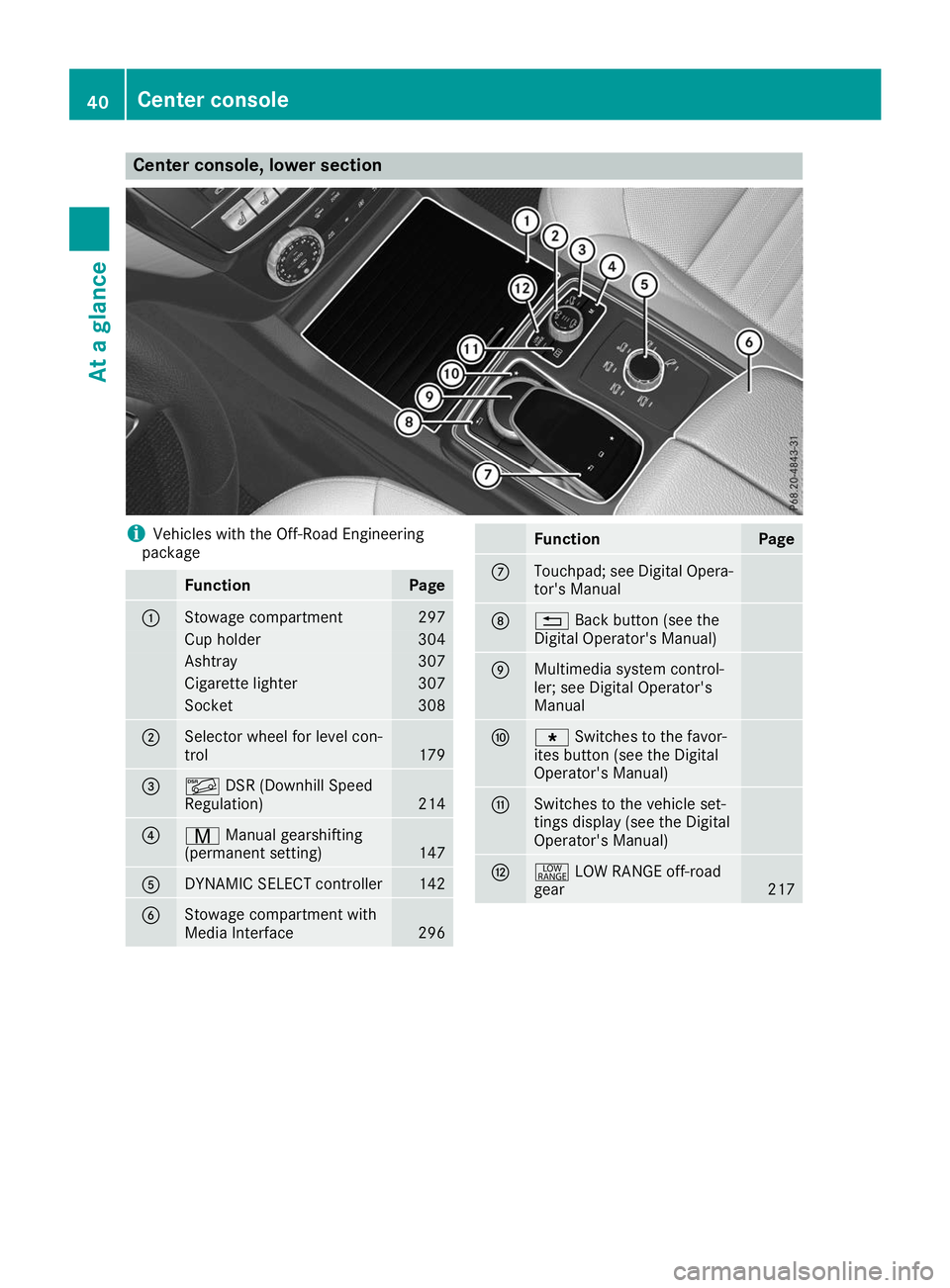
Center console, lower section
i
Vehicles with the Off-Road Engineering
package Function Page
0043
Stowage compartment 297
Cup holder 304
Ashtray 307
Cigarette lighter 307
Socket 308
0044
Selector wheel for level con-
trol
179
0087
00C6
DSR (Downhill Speed
Regulation) 214
0085
008D
Manual gearshifting
(permanent setting) 147
0083
DYNAMIC SELECT controller 142
0084
Stowage compartment with
Media Interface
296 Function Page
006B
Touchpad; see Digital Opera-
tor's Manual 006C
0038
Back button (see the
Digital Operator's Manual) 006D
Multimedia system control-
ler; see Digital Operator's
Manual 006E
007D
Switches to the favor-
ites button (see the Digital
Operator's Manual) 006F
Switches to the vehicle set-
tings display (see the Digital
Operator's Manual)
0070
002E
LOW RANGE off-road
gear 21740
Center consoleAt a glance
Page 43 of 398
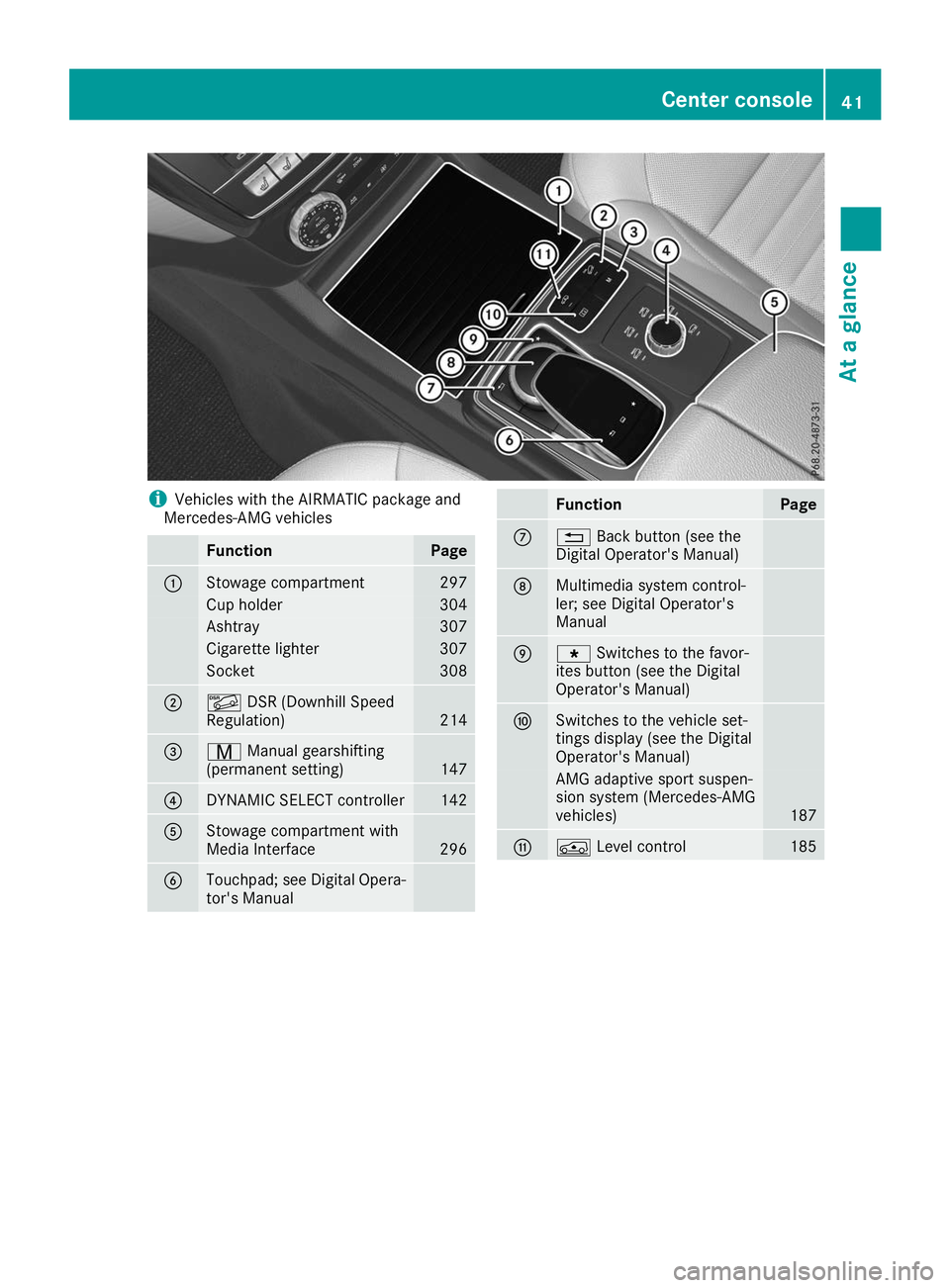
i
Vehicles with the AIRMATIC package and
Mercedes-AMG vehicles Function Page
0043
Stowage compartment 297
Cup holder 304
Ashtray 307
Cigarette lighter 307
Socket 308
0044
00C6
DSR (Downhill Speed
Regulation) 214
0087
008D
Manual gearshifting
(permanent setting) 147
0085
DYNAMIC SELECT controller 142
0083
Stowage compartment with
Media Interface
296
0084
Touchpad; see Digital Opera-
tor's Manual Function Page
006B
0038
Back button (see the
Digital Operator's Manual) 006C
Multimedia system control-
ler; see Digital Operator's
Manual
006D
007D
Switches to the favor-
ites button (see the Digital
Operator's Manual) 006E
Switches to the vehicle set-
tings display (see the Digital
Operator's Manual)
AMG adaptive sport suspen-
sion system (Mercedes-AMG
vehicles)
187
006F
00C4
Level control 185Center console
41At a glance
Page 44 of 398
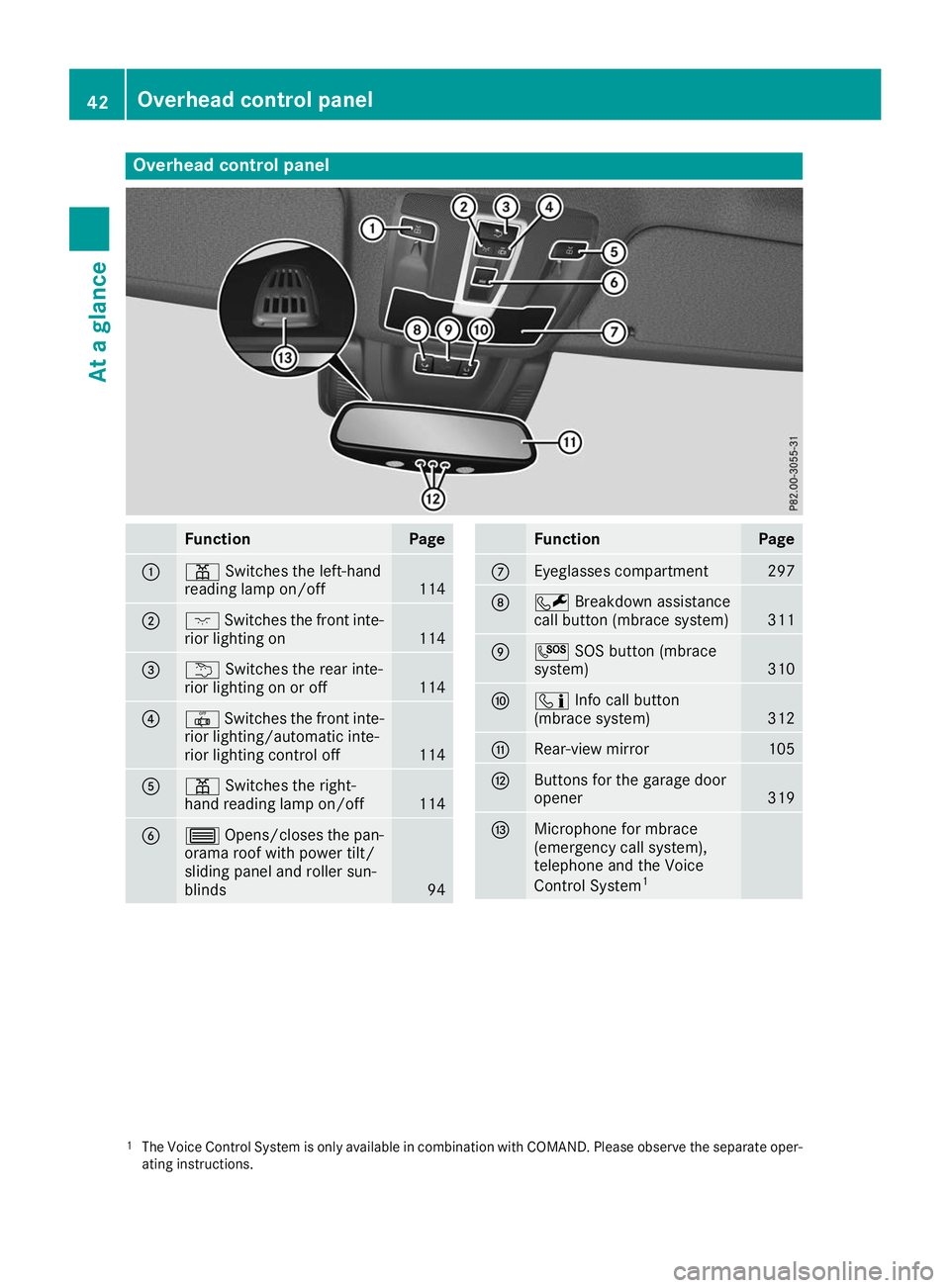
Overhead control panel
Function Page
0043
003D
Switches the left-hand
reading lamp on/off 114
0044
004A
Switches the front inte-
rior lighting on 114
0087
0042
Switches the rear inte-
rior lighting on or off 114
0085
0033
Switches the front inte-
rior lighting/automatic inte-
rior lighting control off 114
0083
003D
Switches the right-
hand reading lamp on/off 114
0084
0057
Opens/closes the pan-
orama roof with power tilt/
sliding panel and roller sun-
blinds 94 Function Page
006B
Eyeglasses compartment 297
006C
0052
Breakdown assistance
call button (mbrace system) 311
006D
0053
SOS button (mbrace
system) 310
006E
00D9
Info call button
(mbrace system) 312
006F
Rear-view mirror 105
0070
Buttons for the garage door
opener
319
0071
Microphone for mbrace
(emergency call system),
telephone and the Voice
Control System
1 1
The Voice Control System is only available in combination with COMAND. Please observe the separate oper-
ating instructions. 42
Overhead control panelAt a glance
Page 47 of 398
Restraint system warning lamp
The functions of the restraint system are
checked after the ignition is switched on and at
regular intervals while the engine is running.
Therefore, malfunctions can be detected in
good time.
The 0075 restraint system warning lamp on the
instrument cluster lights up when the ignition is switched on. It goes out no later than a few sec-
onds after the vehicle is started. The compo-
nents of the restraint system are in operational
readiness.
A malfunction has occurred if the 0075restraint
system warning lamp:
R does not light up after the ignition is switched
on
R does not go out after a few seconds with the
engine running
R lights up again while the engine is running G
WARNING
If the restraint system is malfunctioning,
restraint system components may be trig-
gered unintentionally or may not deploy as
intended during an accident. This can affect
for example the Emergency Tensioning
Device or the air bag. This poses an increased risk of injury or even fatal injury.
Have the restraint system checked and
repaired in a qualified specialist workshop as
soon as possible. PASSENGER AIR BAG indicator lamp
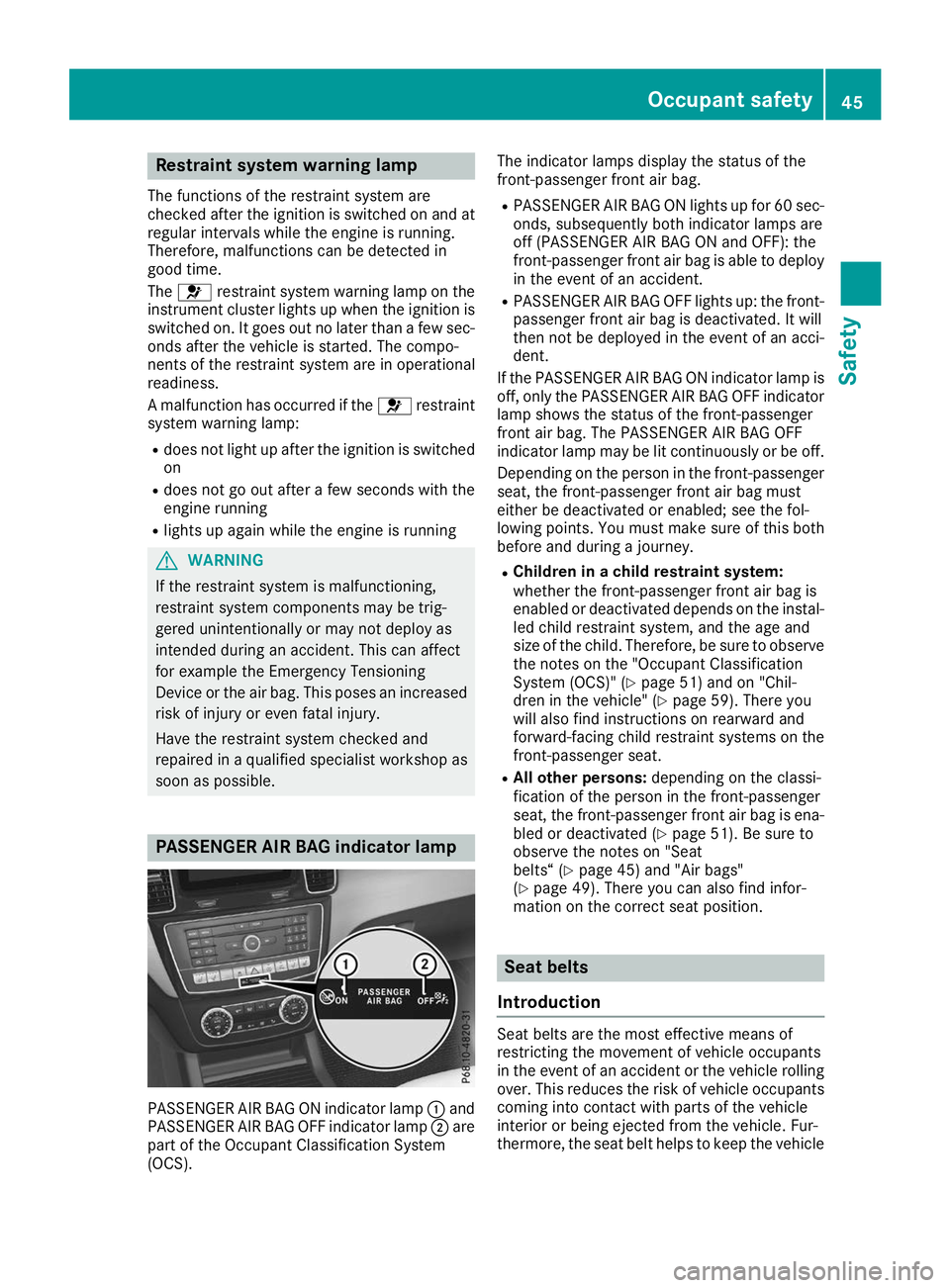
PASSENGER AIR BAG ON indicator lamp
0043and
PASSENGER AIR BAG OFF indicator lamp 0044are
part of the Occupant Classification System
(OCS). The indicator lamps display the status of the
front-passenger front air bag.
R PASSENGER AIR BAG ON lights up for 60 sec-
onds, subsequently both indicator lamps are
off (PASSENGER AIR BAG ON and OFF): the
front-passenger front air bag is able to deploy in the event of an accident.
R PASSENGER AIR BAG OFF lights up: the front-
passenger front air bag is deactivated. It will
then not be deployed in the event of an acci-
dent.
If the PASSENGER AIR BAG ON indicator lamp is
off, only the PASSENGER AIR BAG OFF indicator lamp shows the status of the front-passenger
front air bag. The PASSENGER AIR BAG OFF
indicator lamp may be lit continuously or be off.
Depending on the person in the front-passenger seat, the front-passenger front air bag must
either be deactivated or enabled; see the fol-
lowing points. You must make sure of this both
before and during a journey.
R Children in a child restraint system:
whether the front-passenger front air bag is
enabled or deactivated depends on the instal-
led child restraint system, and the age and
size of the child. Therefore, be sure to observe
the notes on the "Occupant Classification
System (OCS)" (Y page 51) and on "Chil-
dren in the vehicle" (Y page 59). There you
will also find instructions on rearward and
forward-facing child restraint systems on the
front-passenger seat.
R All other persons: depending on the classi-
fication of the person in the front-passenger
seat, the front-passenger front air bag is ena-
bled or deactivated (Y page 51). Be sure to
observe the notes on "Seat
belts“ (Y page 45) and "Air bags"
(Y page 49). There you can also find infor-
mation on the correct seat position. Seat belts
Introduction Seat belts are the most effective means of
restricting the movement of vehicle occupants
in the event of an accident or the vehicle rolling
over. This reduces the risk of vehicle occupants
coming into contact with parts of the vehicle
interior or being ejected from the vehicle. Fur-
thermore, the seat belt helps to keep the vehicle Occupant safety
45Safety Z
Page 50 of 398
Fastening and adjusting the seat belts
Observe the safety notes on the seat belt
(Y
page 46) and the notes on correct use of seat
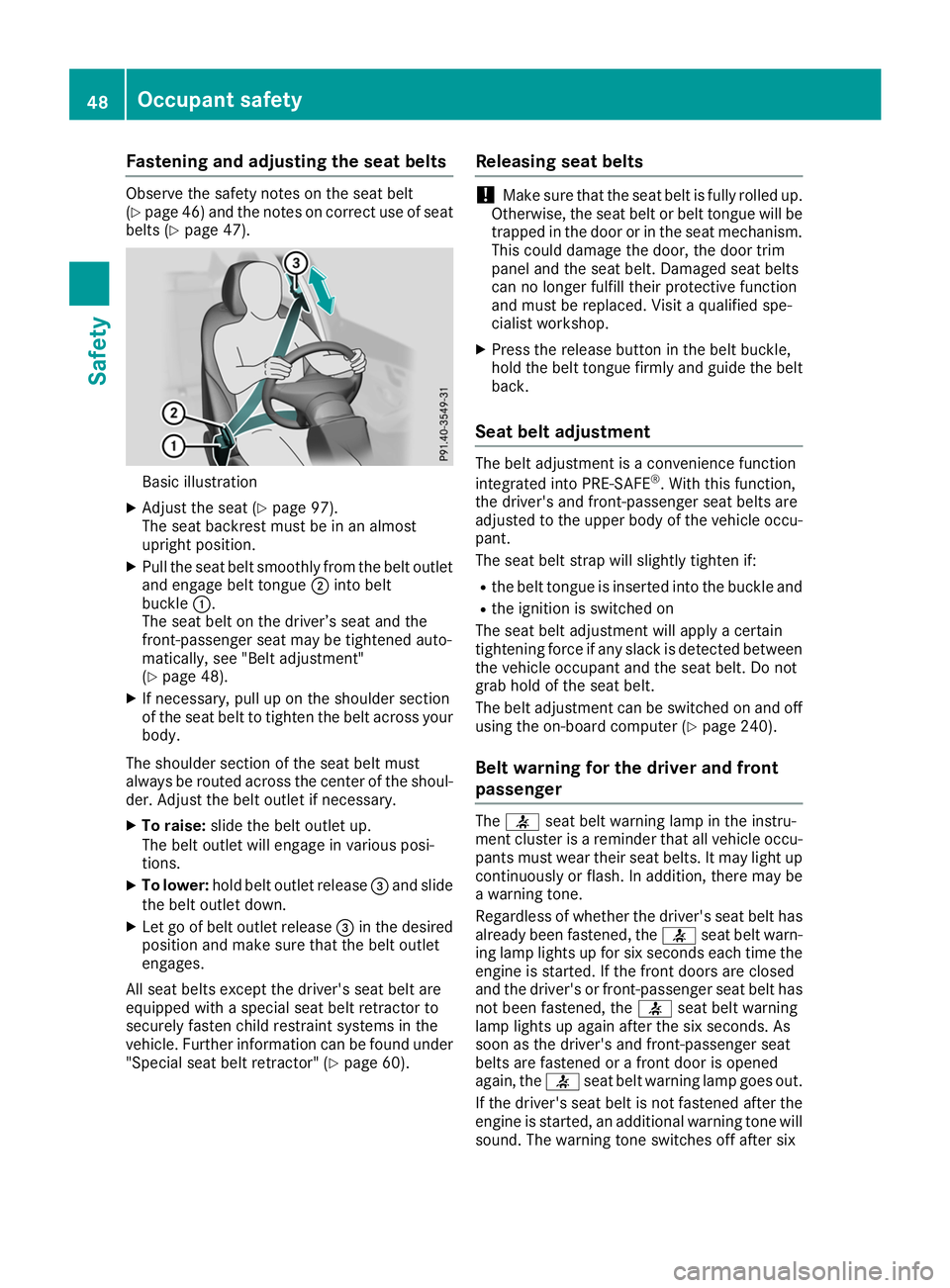
belts (Y page 47). Basic illustration
X Adjust the seat (Y page 97).
The seat backrest must be in an almost
upright position.
X Pull the seat belt smoothly from the belt outlet
and engage belt tongue 0044into belt
buckle 0043.
The seat belt on the driver’s seat and the
front-passenger seat may be tightened auto-
matically, see "Belt adjustment"
(Y page 48).
X If necessary, pull up on the shoulder section
of the seat belt to tighten the belt across your
body.
The shoulder section of the seat belt must
always be routed across the center of the shoul- der. Adjust the belt outlet if necessary.
X To raise: slide the belt outlet up.
The belt outlet will engage in various posi-
tions.
X To lower: hold belt outlet release 0087and slide
the belt outlet down.
X Let go of belt outlet release 0087in the desired
position and make sure that the belt outlet
engages.
All seat belts except the driver's seat belt are
equipped with a special seat belt retractor to
securely fasten child restraint systems in the
vehicle. Further information can be found under "Special seat belt retractor" (Y page 60).Releasing seat belts !
Make sure that the seat belt is fully rolled up.
Otherwise, the seat belt or belt tongue will be
trapped in the door or in the seat mechanism. This could damage the door, the door trim
panel and the seat belt. Damaged seat belts
can no longer fulfill their protective function
and must be replaced. Visit a qualified spe-
cialist workshop.
X Press the release button in the belt buckle,
hold the belt tongue firmly and guide the belt
back.
Seat belt adjustment The belt adjustment is a convenience function
integrated into PRE-SAFE
®
. With this function,
the driver's and front-passenger seat belts are
adjusted to the upper body of the vehicle occu-
pant.
The seat belt strap will slightly tighten if:
R the belt tongue is inserted into the buckle and
R the ignition is switched on
The seat belt adjustment will apply a certain
tightening force if any slack is detected between
the vehicle occupant and the seat belt. Do not
grab hold of the seat belt.
The belt adjustment can be switched on and off using the on-board computer (Y page 240).
Belt warning for the driver and front
passenger The
0076 seat belt warning lamp in the instru-
ment cluster is a reminder that all vehicle occu-
pants must wear their seat belts. It may light up
continuously or flash. In addition, there may be
a warning tone.
Regardless of whether the driver's seat belt has
already been fastened, the 0076seat belt warn-
ing lamp lights up for six seconds each time the
engine is started. If the front doors are closed
and the driver's or front-passenger seat belt has not been fastened, the 0076seat belt warning
lamp lights up again after the six seconds. As
soon as the driver's and front-passenger seat
belts are fastened or a front door is opened
again, the 0076seat belt warning lamp goes out.
If the driver's seat belt is not fastened after the engine is started, an additional warning tone will
sound. The warning tone switches off after six 48
Occupant safetySafety