cooling MERCEDES-BENZ GLE 2019 Owners Manual
[x] Cancel search | Manufacturer: MERCEDES-BENZ, Model Year: 2019, Model line: GLE, Model: MERCEDES-BENZ GLE 2019Pages: 398, PDF Size: 12.25 MB
Page 6 of 398
1, 2, 3 ...
4ETS (Electronic Traction System) see ETS/4ETS (Electronic Trac-
tion System)
4MATIC (permanent four-wheel
drive) .................................................. 214
12 V socket
see Sockets
115 V socket ...................................... 308
360° camera
Cleaning .........................................3 31
Display in the multimedia system .. 201
Function/notes ............................ .199 A
ABS (Anti-lock Braking System) Display message ............................ 245
Function/notes ................................ 66
Important safety notes .................... 66
Warning lamp ................................. 277
Accident
Automatic measures after an acci-
dent ................................................. 59
Activating media mode
General notes ................................ 293
Activating/deactivating cooling
with air dehumidification ................. 127
Active Blind Spot Assist
Activating/deactivating (on-
board computer) ............................ 238
Display message ............................ 265
Function/informatio n.................... 209
Trailer towing ................................. 211
Active Brake Assist
Activating or deactivating .............. 238
Display message ............................ 250
Function/note s................................ 67
Active Brake Assist with cross-
traffic function
Activating or deactivating .............. 238
Display message ............................ 251
Function/note s................................ 72
Important safety notes .................... 73
Warning lamp ................................. 285
Active Curve System
Display message ............................ 262 Function/note
s............................. 185
Active Distance Assist DISTRONIC
Activating ....................................... 173
Activation conditions ..................... 173
Cruise control lever ....................... 173
Deactivating ................................... 175
Display message ............................ 266
Displays on the instrument clus-
ter .................................................. 176
Driving tips .................................... 177
Function/note s............................. 171
Important safety notes .................. 172
Setting the specified minimum
distance ......................................... 175
Stopping ........................................ 174
Warning lamp ................................. 285
Active Lane Keeping Assist
Activating/deactivating (on-
board computer) ............................ 238
Display message ............................ 264
Function/information .................... 211
Trailer towing ................................. 214
Active light function ......................... 112
Active Parking Assist
Canceling ....................................... 195
Detecting parking spaces .............. 192
Display message ............................ 265
Exiting a parking space .................. 194
Function/note s............................. 191
Important safety notes .................. 191
Parking .......................................... 193
Active Steering Assist
Activating/deactivating ................. 237
Display message ............................ 267
ADAPTIVE BRAKE ................................. 72
Adaptive Damping System
see ADS (Adaptive Damping System)
Adaptive Highbeam Assist
Display message ............................ 257
Function/note s............................. 113
Switching on/of f........................... 114
Additives (engine oil) ........................ 388
Address book
see also Digital Operator's Man-
ual .................................................. 287
Adjusting the volume
Multimedia system ........................ 288 4
Index
Page 9 of 398
see Towing away
Brightness control (instrument
cluster lighting) ................................... 37
Bulbs
see Replacing bulbs C
California Important notice for retail cus-
tomers and lessees .......................... 28
Calling up a malfunction
see Display messages
Car
see Vehicle
Care
360° camera ................................. 331
Car wash ........................................3 26
Carpets .......................................... 333
Display .......................................... .332
Exhaust pipe .................................. 331
Exterior lights ................................ 330
Gear or selector lever .................... 332
Interior .......................................... .332
Matte finish ................................... 328
Notes ............................................. 326
Paint .............................................. 328
Plastic trim ................................... .332
Power washer ................................ 327
Rear view camera .......................... 331
Roof lining ...................................... 333
Seat belt ........................................ 333
Seat cover ..................................... 333
Sensors ......................................... 330
Side running board ........................ 330
Steering wheel ............................... 332
Trim pieces ................................... .332
Washing by hand ........................... 327
Wheels .......................................... .329
Windows ........................................ 330
Wiper blades .................................. 330
Wooden trim .................................. 332
Cargo compartment cover
Notes/how to use ......................... 300
Cargo compartment enlargement
Important safety notes .................. 298
Cargo compartment floor
Important safety notes .................. 302 Opening/closing ............................ 303
Stowage well (under) ..................... 302
Cargo net
Attaching ....................................... 301
Important safety information ......... 301
Cargo tie down rings ......................... 299
CD
see also Digital Operator's Man-
ual ................................................. .287
CD player (on-board computer) ........235
Center console
Lower section .................................. 40
Upper section .................................. 39
Central locking
Automatic locking (on-board com-puter) ............................................. 240
Locking/unlocking (SmartKey) ....... .77
Child
Restraint system .............................. 61
Child seat
Forward-facing restraint system ...... 64
LATCH-type (ISOFIX) child seat
anchors ............................................ 62
On the front-passenger seat ............ 63
Rearward-facing restraint system .... 64
Top Tether ...................................... .62
Child-proof locks
Important safety notes .................... 64
Rear door s....................................... 65
Children
Special seat belt retractor ............... 60
Children in the vehicle
Important safety notes .................... 59
Cigarette lighter ................................ 307
Cleaning
Mirror turn signal ........................... 330
Trailer tow hitch ............................. 331
Climate control
Automatic climate control (3-
zone) .............................................. 125
Controlling automaticall y............... 128
Cooling with air dehumidification .. 127
Defrosting the windows ................. 130
Defrosting the windshield .............. 129
Dual-zone automatic climate con-
trol ................................................. 123
General notes ................................ 122
Indicator lamp ................................ 128 Index
7
Page 10 of 398
Ionization ....................................... 131
Maximum cooling .......................... 130
Notes on using the automatic cli-
mate control .................................. 127
Overview of systems ...................... 122
Problem with the rear window
defroster ........................................ 131
Problems with cooling with air
dehumidification ............................ 128
Rear control panel .........................1 25
Refrigerant ..................................... 389
Refrigerant filling capacity ............. 390
Setting the air distribution ............. 129
Setting the air vents ..................... .132
Setting the airflow ......................... 129
Setting the climate mode (AIR
FLOW) ............................................ 128
Setting the temperature ................ 128
Switching air-recirculation mode
on/off ............................................ 131
Switching on/off ........................... 127
Switching residual heat on/off ...... 131
Switching the rear window
defroster on/off ............................ 130
Switching the ZONE function
on/off ............................................ 129
Coat hooks ......................................... 302
Cockpit
Overview .......................................... 36
see Instrument cluster
Collapsible spare wheel
Inflating ......................................... 379
see Emergency spare wheel
COMAND
Driving dynamics displa y............... 219
COMAND display
Cleaning ......................................... 332
Combination switch .......................... 111
Connecting a USB device
see also Digital Operator's Man-
ual .................................................. 287
Consumption statistics (on-board
computer) .......................................... 232
Controller ........................................... 288
Convenience closing feature .............. 90
Convenience opening feature ............ 89Coolant (engine)
Checking the level ......................... 324
Display message ............................ 257
Filling capacity ............................... 389
Important safety notes .................. 388
Temperature (on-board computer, Mercedes-AMG vehicles) ............... 241
Temperature gaug e........................ 230
Warning lamp ................................. 283
Cooling
see Climate control
Copyright ............................................. 35
Cornering light function
Display message ............................ 256
Crash-responsive emergency light-
ing ....................................................... 115
Crosswind Assist ................................. 72
Crosswind driving assistance ............ 72
Cruise control
Activating ....................................... 170
Activation conditions ..................... 170
Cruise control lever ....................... 170
Deactivating ................................... 171
Display message ............................ 267
Driving system ............................... 169
Function/note s............................. 169
Important safety notes .................. 169
Storing and maintaining current
speed ............................................. 170
Cup holder
Center console .............................. 305
Important safety notes .................. 304
Rear compartment ......................... 305
Temperature controlled ................. 305
Customer Assistance Center
(CAC) ..................................................... 31
Customer Relations Department ....... 31 D
Dashboard see Instrument cluster
Data
see Technical data
Data carrier
Selecting ........................................ 235
Daytime running lamps
Display message ............................ 256 8
Index
Page 124 of 398
Overview of climate control systems
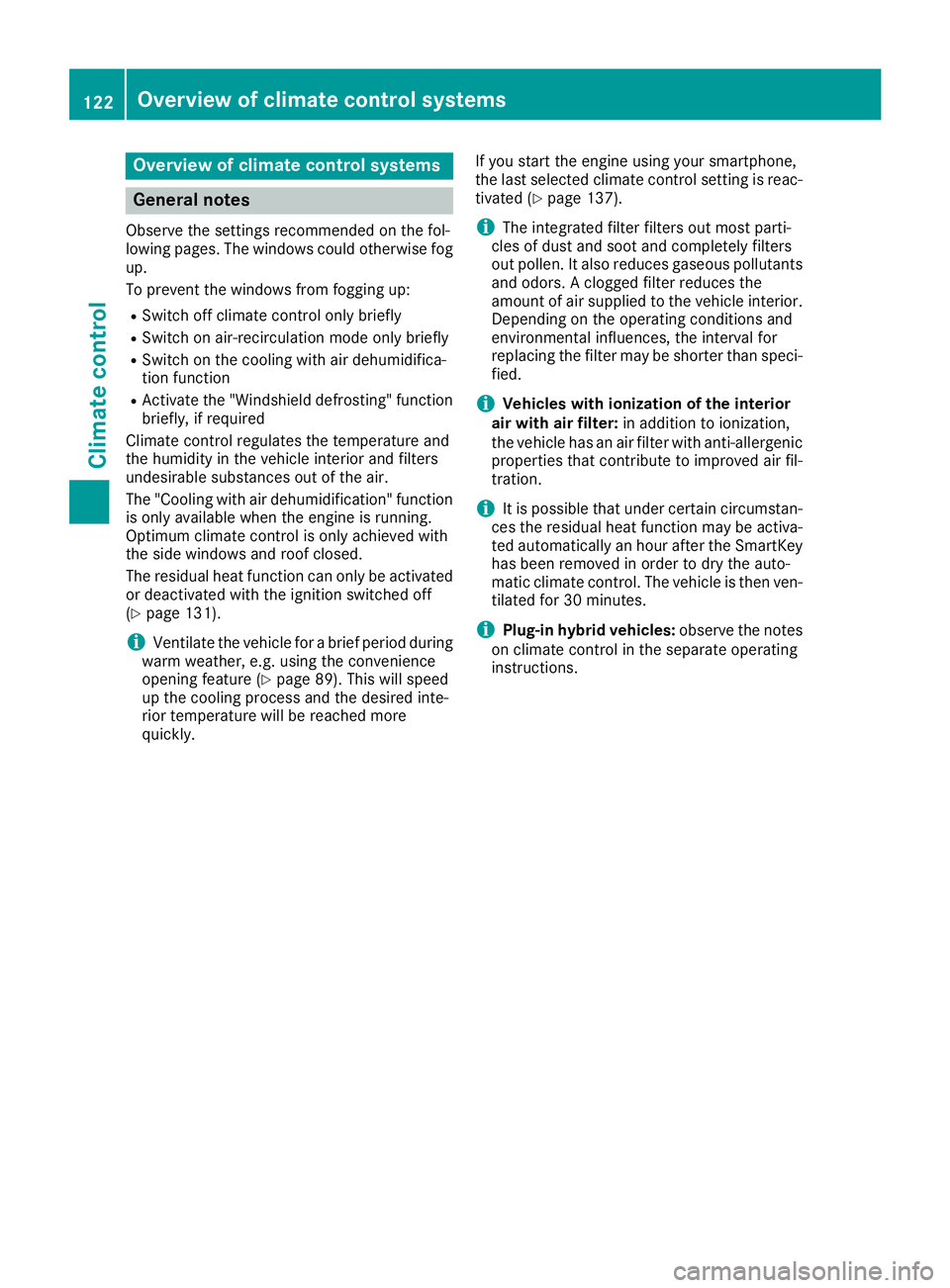
General notes
Observe the settings recommended on the fol-
lowing pages. The windows could otherwise fog up.
To prevent the windows from fogging up:
R Switch off climate control only briefly
R Switch on air-recirculation mode only briefly
R Switch on the cooling with air dehumidifica-
tion function
R Activate the "Windshield defrosting" function
briefly, if required
Climate control regulates the temperature and
the humidity in the vehicle interior and filters
undesirable substances out of the air.
The "Cooling with air dehumidification" function
is only available when the engine is running.
Optimum climate control is only achieved with
the side windows and roof closed.
The residual heat function can only be activated or deactivated with the ignition switched off
(Y page 131).
i Ventilate the vehicle for a brief period during
warm weather, e.g. using the convenience
opening feature (Y page 89). This will speed
up the cooling process and the desired inte-
rior temperature will be reached more
quickly. If you start the engine using your smartphone,
the last selected climate control setting is reac-
tivated (Y page 137).
i The integrated filter filters out most parti-
cles of dust and soot and completely filters
out pollen. It also reduces gaseous pollutants and odors. A clogged filter reduces the
amount of air supplied to the vehicle interior.
Depending on the operating conditions and
environmental influences, the interval for
replacing the filter may be shorter than speci- fied.
i Vehicles with ionization of the interior
air with air filter: in addition to ionization,
the vehicle has an air filter with anti-allergenic properties that contribute to improved air fil-
tration.
i It is possible that under certain circumstan-
ces the residual heat function may be activa-
ted automatically an hour after the SmartKey has been removed in order to dry the auto-
matic climate control. The vehicle is then ven-tilated for 30 minutes.
i Plug-in hybrid vehicles:
observe the notes
on climate control in the separate operating
instructions. 122
Overview of climate control systemsClimate control
Page 125 of 398
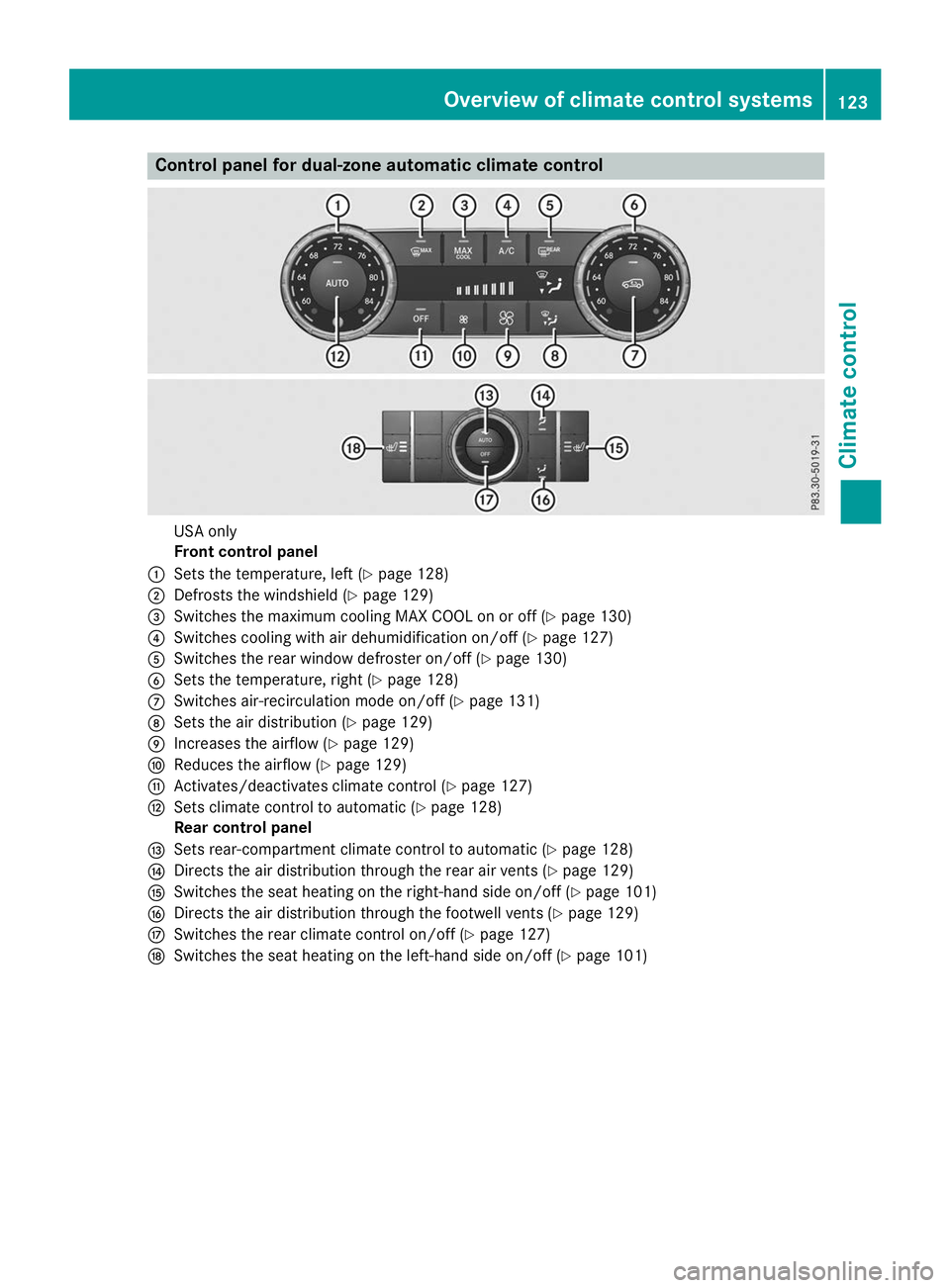
Control panel for dual-zone automatic climate control
USA only
Front control panel
0043 Sets the temperature, left (Y page 128)
0044 Defrosts the windshield (Y page 129)
0087 Switches the maximum cooling MAX COOL on or off (Y page 130)
0085 Switches cooling with air dehumidification on/off (Y page 127)
0083 Switches the rear window defroster on/off (Y page 130)
0084 Sets the temperature, right (Y page 128)
006B Switches air-recirculation mode on/off (Y page 131)
006C Sets the air distribution (Y page 129)
006D Increases the airflow (Y page 129)
006E Reduces the airflow (Y page 129)
006F Activates/deactivates climate control (Y page 127)
0070 Sets climate control to automatic (Y page 128)
Rear control panel
0071 Sets rear-compartment climate control to automatic (Y page 128)
0072 Directs the air distribution through the rear air vents (Y page 129)
0073 Switches the seat heating on the right-hand side on/off (Y page 101)
0074 Directs the air distribution through the footwell vents (Y page 129)
0075 Switches the rear climate control on/off (Y page 127)
0076 Switches the seat heating on the left-hand side on/off (Y page 101) Overview of climate control systems
123Climate control
Page 126 of 398
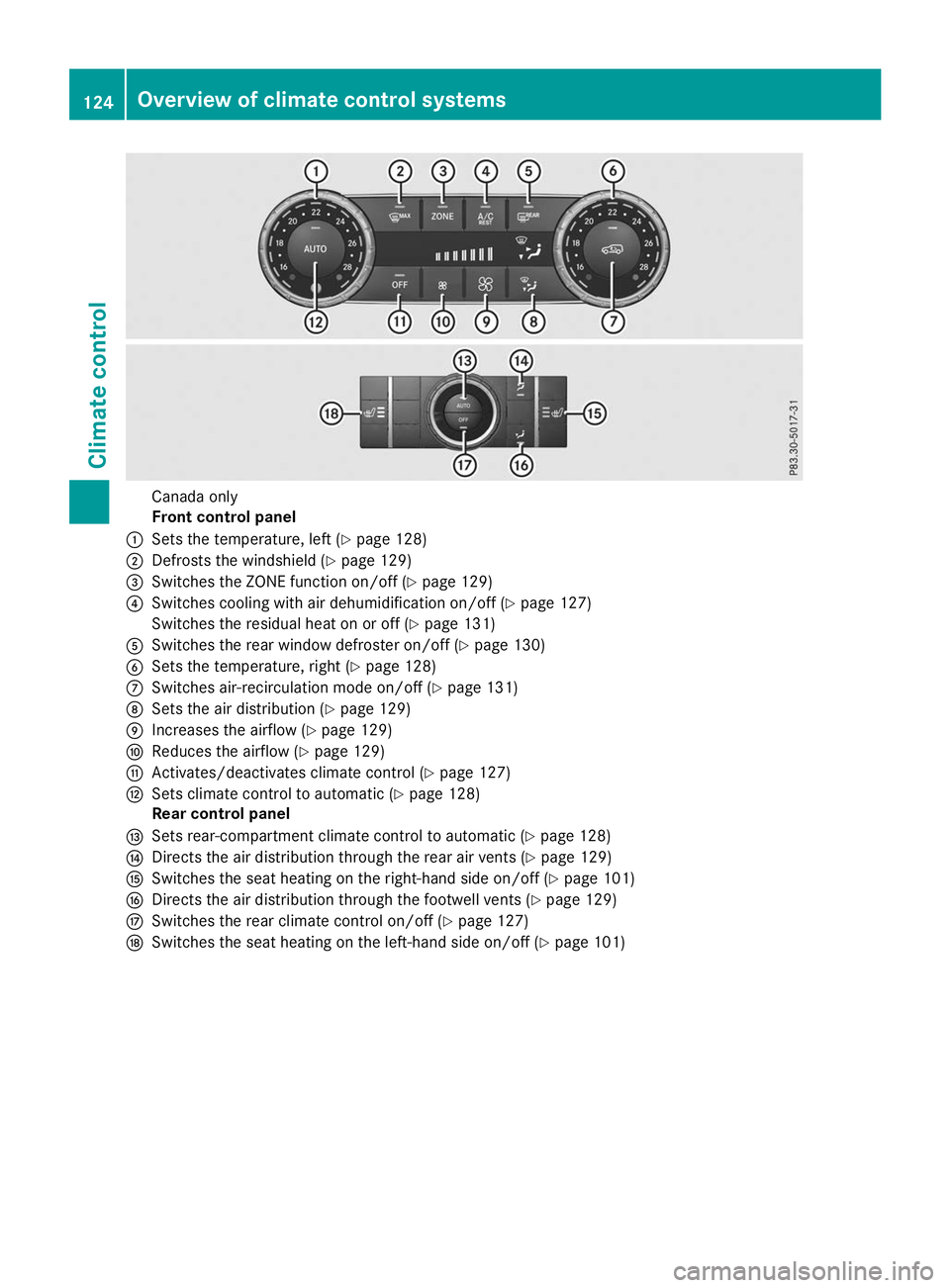
Canada only
Front control panel
0043 Sets the temperature, left (Y page 128)
0044 Defrosts the windshield (Y page 129)
0087 Switches the ZONE function on/off (Y page 129)
0085 Switches cooling with air dehumidification on/off (Y page 127)
Switches the residual heat on or off (Y page 131)
0083 Switches the rear window defroster on/off (Y page 130)
0084 Sets the temperature, right (Y page 128)
006B Switches air-recirculation mode on/off (Y page 131)
006C Sets the air distribution (Y page 129)
006D Increases the airflow (Y page 129)
006E Reduces the airflow (Y page 129)
006F Activates/deactivates climate control (Y page 127)
0070 Sets climate control to automatic (Y page 128)
Rear control panel
0071 Sets rear-compartment climate control to automatic (Y page 128)
0072 Directs the air distribution through the rear air vents (Y page 129)
0073 Switches the seat heating on the right-hand side on/off (Y page 101)
0074 Directs the air distribution through the footwell vents (Y page 129)
0075 Switches the rear climate control on/off (Y page 127)
0076 Switches the seat heating on the left-hand side on/off (Y page 101)124
Overview of climate control systemsClimate control
Page 127 of 398
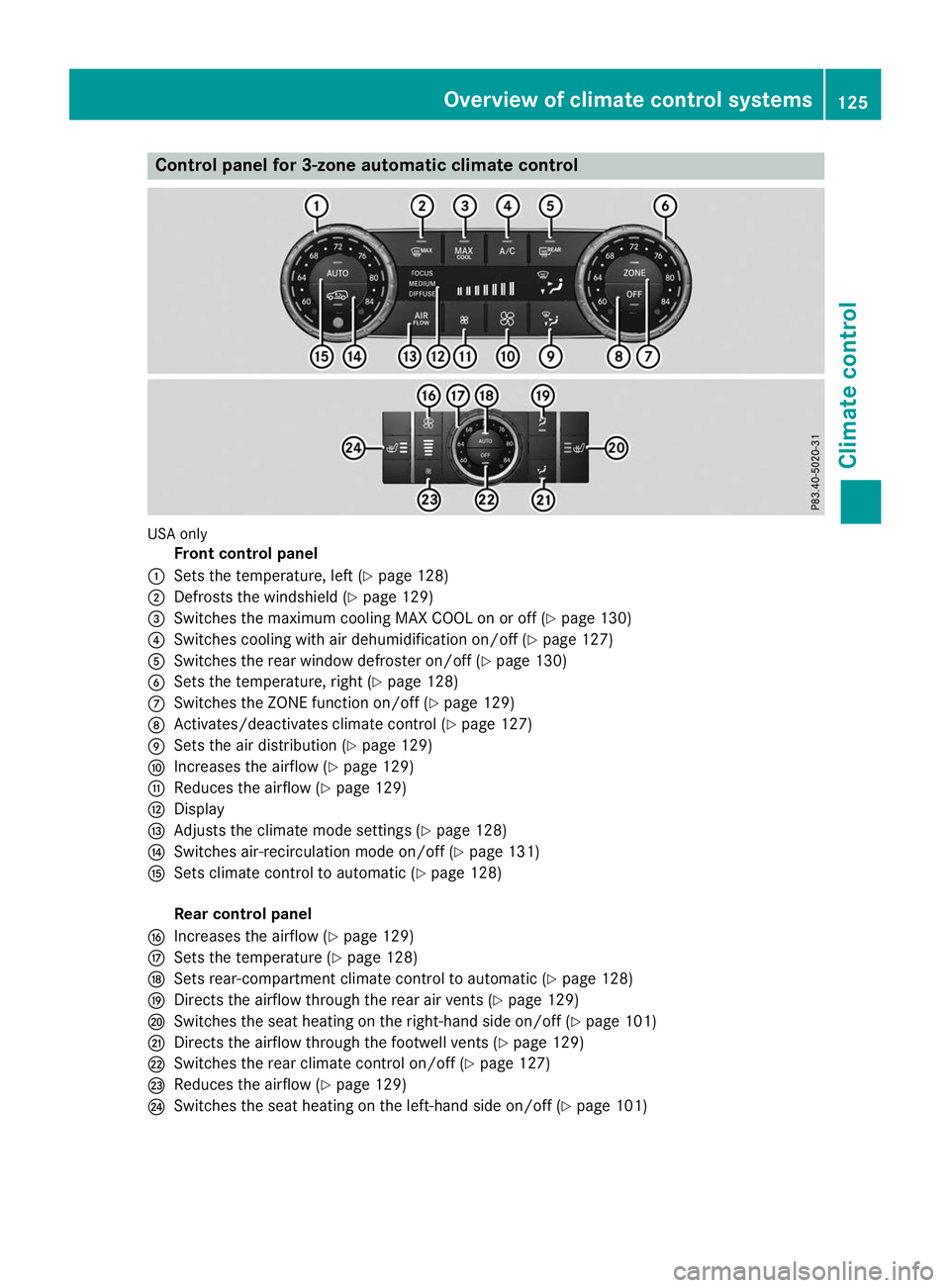
Control panel for 3-zone automatic climate control
USA only
Front control panel
0043 Sets the temperature, left (Y page 128)
0044 Defrosts the windshield (Y page 129)
0087 Switches the maximum cooling MAX COOL on or off (Y page 130)
0085 Switches cooling with air dehumidification on/off (Y page 127)
0083 Switches the rear window defroster on/off (Y page 130)
0084 Sets the temperature, right (Y page 128)
006B Switches the ZONE function on/off (Y page 129)
006C Activates/deactivates climate control (Y page 127)
006D Sets the air distribution (Y page 129)
006E Increases the airflow (Y page 129)
006F Reduces the airflow (Y page 129)
0070 Display
0071 Adjusts the climate mode settings (Y page 128)
0072 Switches air-recirculation mode on/off (Y page 131)
0073 Sets climate control to automatic (Y page 128)
Rear control panel
0074 Increases the airflow (Y page 129)
0075 Sets the temperature (Y page 128)
0076 Sets rear-compartment climate control to automatic (Y page 128)
0077 Directs the airflow through the rear air vents (Y page 129)
0078 Switches the seat heating on the right-hand side on/off (Y page 101)
0079 Directs the airflow through the footwell vents (Y page 129)
007A Switches the rear climate control on/off (Y page 127)
007B Reduces the airflow (Y page 129)
007C Switches the seat heating on the left-hand side on/off (Y page 101) Overview of climate control systems
125Climate control
Page 128 of 398
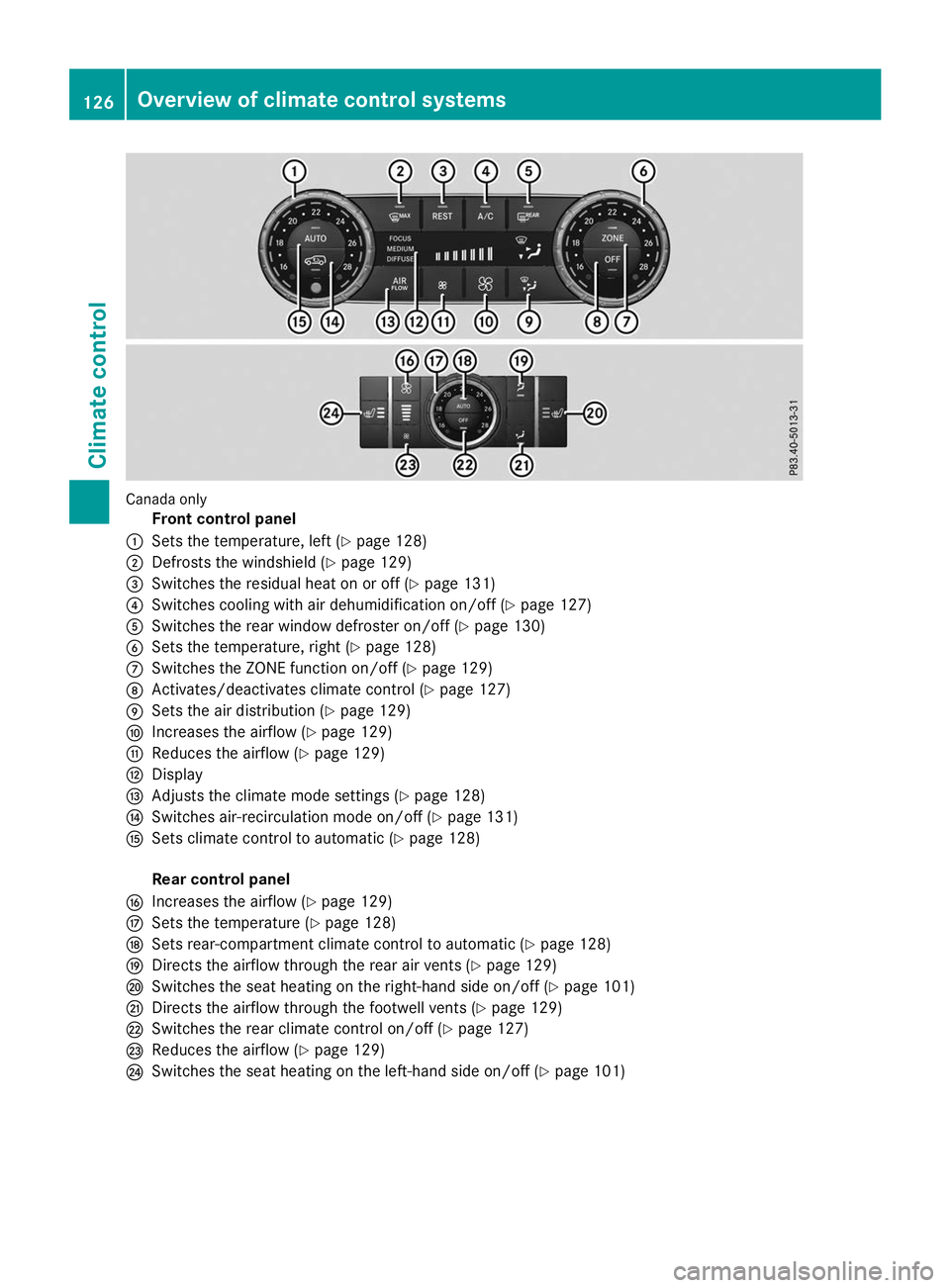
Canada only
Front control panel
0043 Sets the temperature, left (Y page 128)
0044 Defrosts the windshield (Y page 129)
0087 Switches the residual heat on or off (Y page 131)
0085 Switches cooling with air dehumidification on/off (Y page 127)
0083 Switches the rear window defroster on/off (Y page 130)
0084 Sets the temperature, right (Y page 128)
006B Switches the ZONE function on/off (Y page 129)
006C Activates/deactivates climate control (Y page 127)
006D Sets the air distribution (Y page 129)
006E Increases the airflow (Y page 129)
006F Reduces the airflow (Y page 129)
0070 Display
0071 Adjusts the climate mode settings (Y page 128)
0072 Switches air-recirculation mode on/off (Y page 131)
0073 Sets climate control to automatic (Y page 128)
Rear control panel
0074 Increases the airflow (Y page 129)
0075 Sets the temperature (Y page 128)
0076 Sets rear-compartment climate control to automatic (Y page 128)
0077 Directs the airflow through the rear air vents (Y page 129)
0078 Switches the seat heating on the right-hand side on/off (Y page 101)
0079 Directs the airflow through the footwell vents (Y page 129)
007A Switches the rear climate control on/off (Y page 127)
007B Reduces the airflow (Y page 129)
007C Switches the seat heating on the left-hand side on/off (Y page 101)126
Overview of climate control systemsClimate control
Page 129 of 398
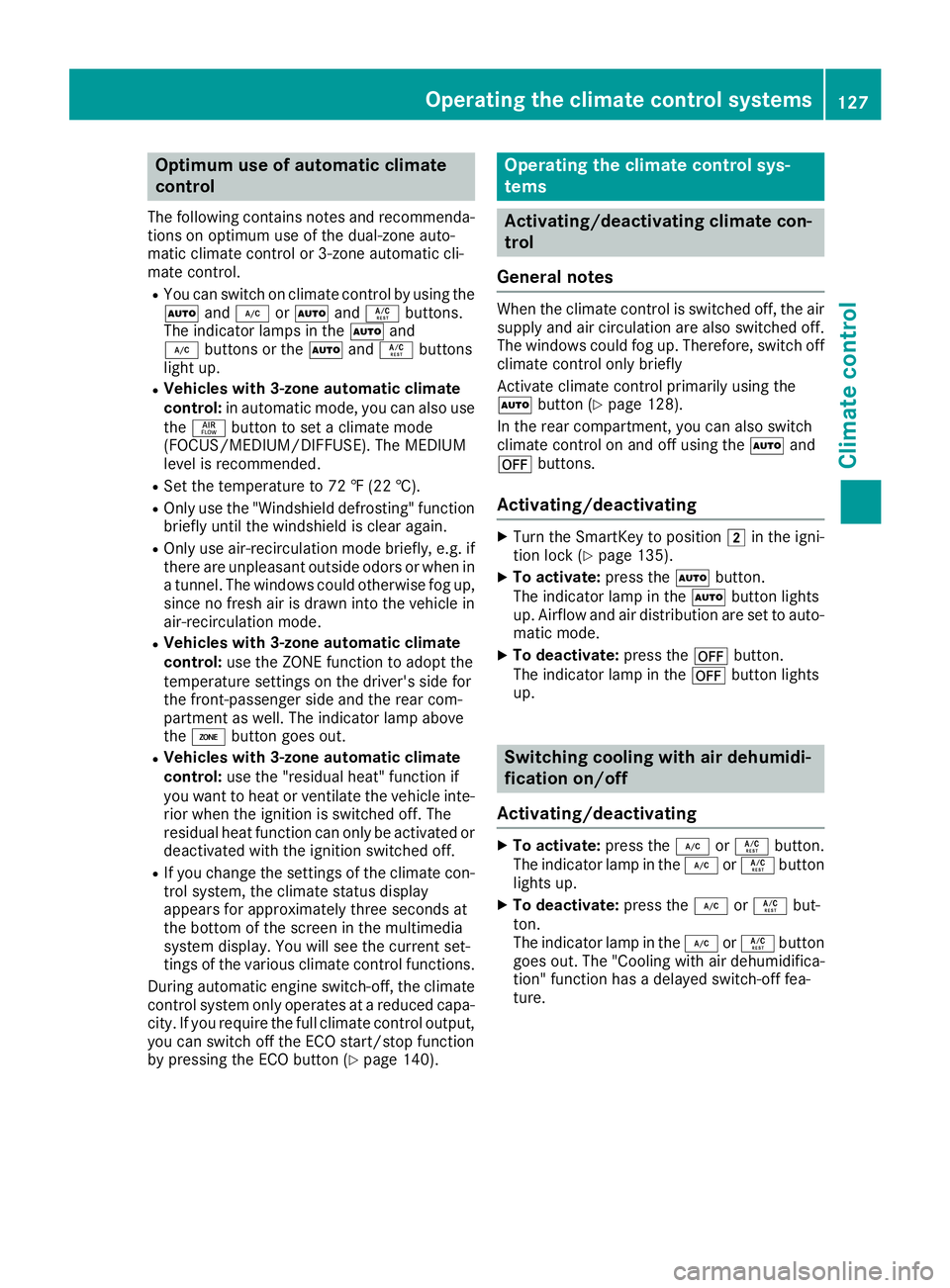
Optimum use of automatic climate
control
The following contains notes and recommenda-
tions on optimum use of the dual-zone auto-
matic climate control or 3-zone automatic cli-
mate control.
R You can switch on climate control by using the
0058 and005A or0058 and0056 buttons.
The indicator lamps in the 0058and
005A buttons or the 0058and0056 buttons
light up.
R Vehicles with 3-zone automatic climate
control: in automatic mode, you can also use
the 00F0 button to set a climate mode
(FOCUS/MEDIUM/DIFFUSE). The MEDIUM
level is recommended.
R Set the temperature to 72 ‡ (22 †).
R Only use the "Windshield defrosting" function
briefly until the windshield is clear again.
R Only use air-recirculation mode briefly, e.g. if
there are unpleasant outside odors or when in a tunnel. The windows could otherwise fog up,
since no fresh air is drawn into the vehicle in
air-recirculation mode.
R Vehicles with 3-zone automatic climate
control: use the ZONE function to adopt the
temperature settings on the driver's side for
the front-passenger side and the rear com-
partment as well. The indicator lamp above
the 00D6 button goes out.
R Vehicles with 3-zone automatic climate
control: use the "residual heat" function if
you want to heat or ventilate the vehicle inte- rior when the ignition is switched off. The
residual heat function can only be activated or
deactivated with the ignition switched off.
R If you change the settings of the climate con-
trol system, the climate status display
appears for approximately three seconds at
the bottom of the screen in the multimedia
system display. You will see the current set-
tings of the various climate control functions.
During automatic engine switch-off, the climate
control system only operates at a reduced capa-
city. If you require the full climate control output, you can switch off the ECO start/stop function
by pressing the ECO button (Y page 140). Operating the climate control sys-
tems
Activating/deactivating climate con-
trol
General notes When the climate control is switched off, the air
supply and air circulation are also switched off.
The windows could fog up. Therefore, switch off
climate control only briefly
Activate climate control primarily using the
0058 button (Y page 128).
In the rear compartment, you can also switch
climate control on and off using the 0058and
0078 buttons.
Activating/deactivating X
Turn the SmartKey to position 0048in the igni-
tion lock (Y page 135).
X To activate: press the0058button.
The indicator lamp in the 0058button lights
up. Airflow and air distribution are set to auto-
matic mode.
X To deactivate: press the0078button.
The indicator lamp in the 0078button lights
up. Switching cooling with air dehumidi-
fication on/off
Activating/deactivating X
To activate: press the005Aor0056 button.
The indicator lamp in the 005Aor0056 button
lights up.
X To deactivate: press the005Aor0056 but-
ton.
The indicator lamp in the 005Aor0056 button
goes out. The "Cooling with air dehumidifica-
tion" function has a delayed switch-off fea-
ture. Operating the climate control systems
127Climate control
Page 130 of 398
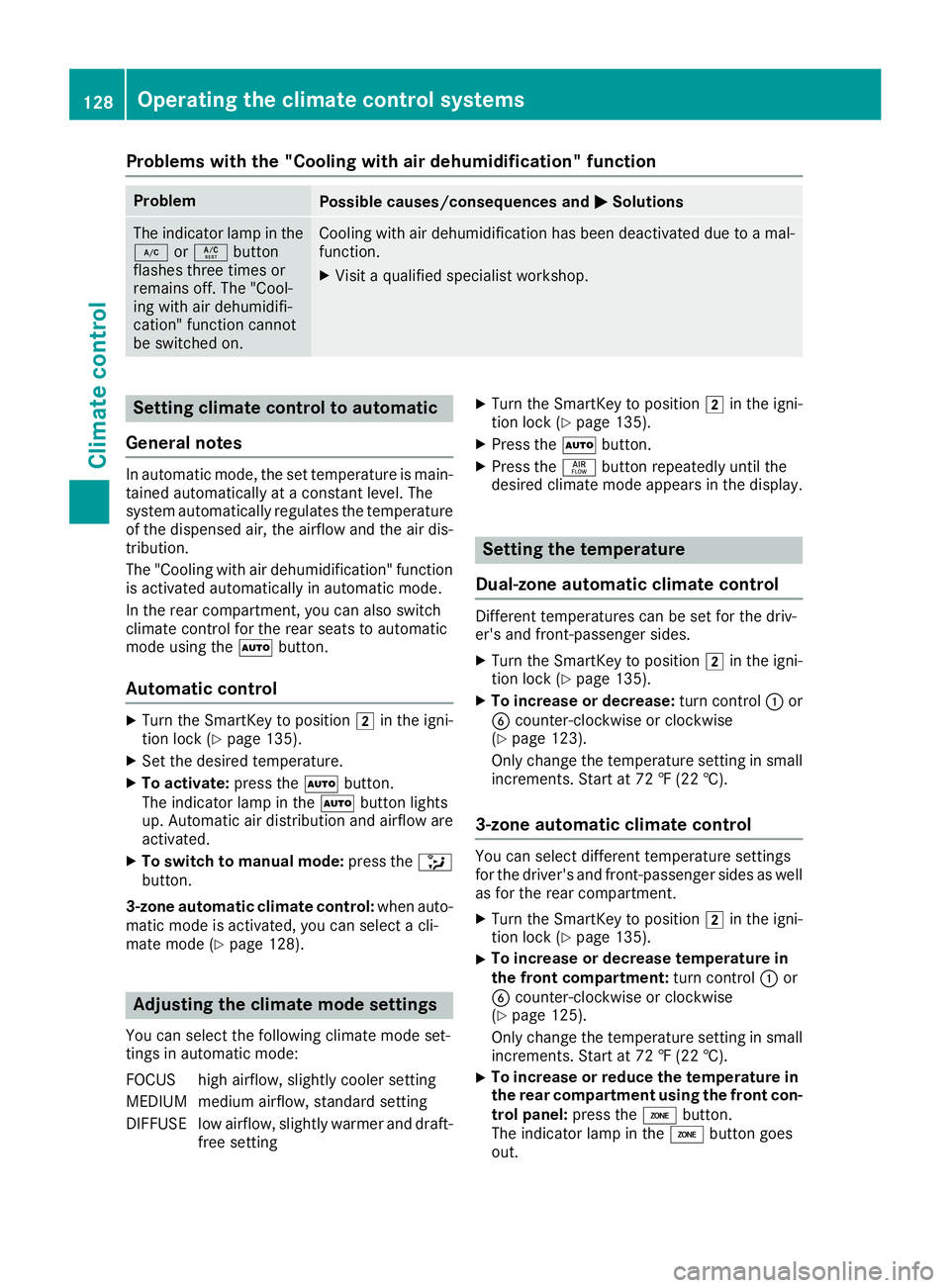
Problems with the "Cooling with air dehumidification" function
Problem
Possible causes/consequences and
0050
0050Solutions The indicator lamp in the
005A or0056 button
flashes three times or
remains off. The "Cool-
ing with air dehumidifi-
cation" function cannot
be switched on. Cooling with air dehumidification has been deactivated due to a mal-
function.
X Visit a qualified specialist workshop. Setting climate control to automatic
General notes In automatic mode, the set temperature is main-
tained automatically at a constant level. The
system automatically regulates the temperature of the dispensed air, the airflow and the air dis- tribution.
The "Cooling with air dehumidification" function
is activated automatically in automatic mode.
In the rear compartment, you can also switch
climate control for the rear seats to automatic
mode using the 0058button.
Automatic control X
Turn the SmartKey to position 0048in the igni-
tion lock (Y page 135).
X Set the desired temperature.
X To activate: press the0058button.
The indicator lamp in the 0058button lights
up. Automatic air distribution and airflow are
activated.
X To switch to manual mode: press the008F
button.
3-zone automatic climate control: when auto-
matic mode is activated, you can select a cli-
mate mode (Y page 128). Adjusting the climate mode settings
You can select the following climate mode set-
tings in automatic mode:
FOCUS high airflow, slightly cooler setting
MEDIUM medium airflow, standard setting
DIFFUSE low airflow, slightly warmer and draft- free setting X
Turn the SmartKey to position 0048in the igni-
tion lock (Y page 135).
X Press the 0058button.
X Press the 00F0button repeatedly until the
desired climate mode appears in the display. Setting the temperature
Dual-zone automatic climate control Different temperatures can be set for the driv-
er's and front-passenger sides.
X Turn the SmartKey to position 0048in the igni-
tion lock (Y page 135).
X To increase or decrease: turn control0043or
0084 counter-clockwise or clockwise
(Y page 123).
Only change the temperature setting in small
increments. Start at 72 ‡ (22 †).
3-zone automatic climate control You can select different temperature settings
for the driver's and front-passenger sides as well
as for the rear compartment.
X Turn the SmartKey to position 0048in the igni-
tion lock (Y page 135).
X To increase or decrease temperature in
the front compartment:
turn control0043or
0084 counter-clockwise or clockwise
(Y page 125).
Only change the temperature setting in small
increments. Start at 72 ‡ (22 †).
X To increase or reduce the temperature in
the rear compartment using the front con-
trol panel: press the00D6button.
The indicator lamp in the 00D6button goes
out. 128
Operating the climate control systemsClimate control