seat memory MERCEDES-BENZ GLE 2019 Owners Manual
[x] Cancel search | Manufacturer: MERCEDES-BENZ, Model Year: 2019, Model line: GLE, Model: MERCEDES-BENZ GLE 2019Pages: 398, PDF Size: 12.25 MB
Page 4 of 398
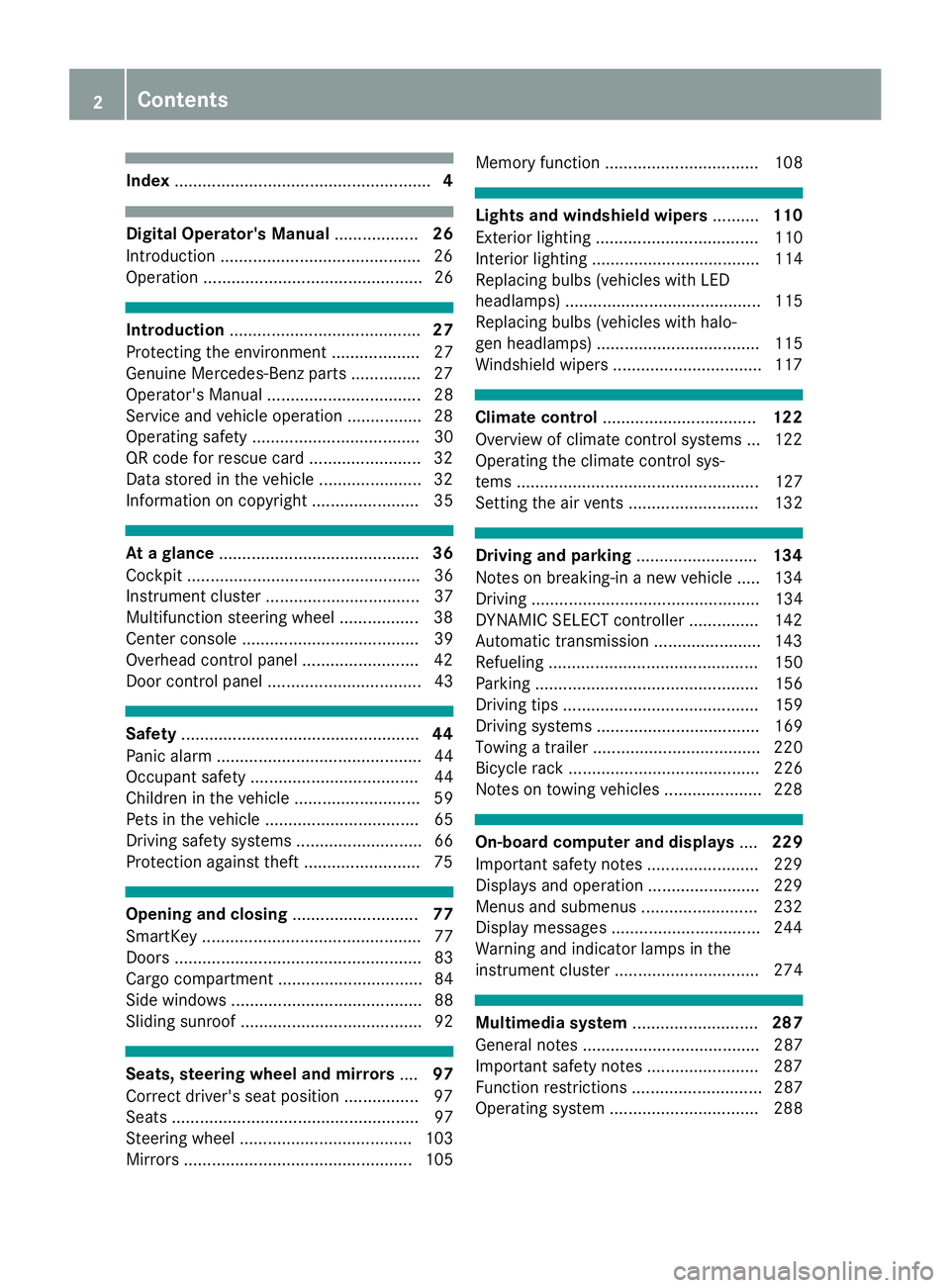
Index
....................................................... 4Digital Operator's Manual
..................26
Introduction .......................................... .26
Operation ............................................... 26 Introduction
......................................... 27
Protecting the environment ...................27
Genuine Mercedes-Benz parts .............. .27
Operator's Manual ................................. 28
Service and vehicle operation ................28
Operating safety .................................... 30
QR code for rescue card ........................ 32
Data stored in the vehicle ......................32
Information on copyright ....................... 35 At a glance
........................................... 36
Cockpit .................................................. 36
Instrument cluster .................................37
Multifunction steering wheel ................. 38
Center console ...................................... 39
Overhead control panel .........................42
Door control panel ................................. 43 Safety
................................................... 44
Panic alarm ............................................ 44
Occupant safety .................................... 44
Children in the vehicle ........................... 59
Pets in the vehicle ................................. 65
Driving safety systems ........................... 66
Protection against theft ........................ .75Opening and closing
...........................77
SmartKey ............................................... 77
Doors ..................................................... 83
Cargo compartment ...............................84
Side windows ......................................... 88
Sliding sunroof ....................................... 92 Seats, steering wheel and mirrors
....97
Correct driver's seat position ................ 97
Seats ..................................................... 97
Steering wheel ..................................... 103
Mirrors ................................................. 105 Memory function ................................. 108 Lights and windshield wipers
..........110
Exterior lighting ................................... 110
Interior lighting .................................... 114
Replacing bulbs (vehicles with LED
headlamps) .......................................... 115
Replacing bulbs (vehicles with halo-
gen headlamps) ................................... 115
Windshield wipers ................................ 117 Climate control
................................. 122
Overview of climate control systems ... 122
Operating the climate control sys-
tems .................................................... 127
Setting the air vents ............................ 132 Driving and parking
..........................134
Notes on breaking-in a new vehicle ..... 134
Driving ................................................. 134
DYNAMIC SELECT controller ............... 142
Automatic transmission ....................... 143
Refueling ............................................. 150
Parking ................................................ 156
Driving tips .......................................... 159
Driving systems ................................... 169
Towing a trailer .................................... 220
Bicycle rack ......................................... 226
Notes on towing vehicles ..................... 228 On-board computer and displays
....229
Important safety notes ........................ 229
Displays and operation ........................ 229
Menus and submenus ......................... 232
Display messages ................................ 244
Warning and indicator lamps in the
instrument cluster ............................... 274 Multimedia system
...........................287
General notes ...................................... 287
Important safety notes ........................ 287
Function restrictions ............................ 287
Operating system ................................ 288 2
Contents
Page 14 of 398
TIREFIT kit ...................................... 337
see Emergency spare wheel
Floormats ...........................................3 19
Fog lamps (extended range) ............. 113
Folding the rear bench seat for-
wards/back ....................................... 298
Fording
Off-road ......................................... 164
On flooded roads ........................... 163
Frequencies
Mobile phone ................................. 381
Two-way radio ................................ 381
Fuel
Additives ........................................ 385
Consumption statistics .................. 232
Displaying the current consump-
tion ................................................ 233
Displaying the range ..................... .233
Driving tips ................................... .159
Flexible fuel vehicles ..................... .386
Fuel gauge ....................................... 37
Grade (gasoline) ............................ 384
Important safety notes .................. 384
Low outside temperatures ............. 385
Problem (malfunction) ................... 153
Quality (diesel )............................... 385
Refueling ........................................ 150
Tank content/reserve fue l............. 384
Fuel filler flap
Opening ......................................... 152
Fuel filter (display message) ............ 260
Fuel level
Calling up the range (on-board
computer) ...................................... 233
Fuel tank
Capacity ........................................ 384
Problem (malfunction) ................... 153
Fuses
Allocation chart ............................. 349
Before changing ............................. 349
Dashboard fuse box ....................... 349
Fuse box in the engine compart-
ment .............................................. 350
Fuse box under rear bench sea t.... 350
Important safety notes .................. 349 G
Garage door opener Clearing the memory ..................... 319
General notes ................................ 316
Important safety notes .................. 317
Opening/closing the garage doo r..3 19
Problems when programming ....... .318
Programming (button in the rear-
view mirror) ................................... 317
Synchronizing the rolling code ....... 318
Gear indicator (on-board com-
puter, Mercedes-AMG vehicles) ....... 241
Genuine parts ...................................... 27
Glove box .......................................... .296
Google™ Local Search
see also Digital Operator's Man-
ual ................................................. .287
GTW (Gross Trailer Weight) (defini-
tion) .................................................... 370 H
Handbrake see Parking brake
Hazard warning lamps ......................112
Head restraints
Adjusting ......................................... 99
Adjusting (electrically) ................... 100
Adjusting (manually) ........................ 99
Adjusting (rear) .............................. 100
Installing/removing (rear) .............. 100
Luxury ............................................ 100
Headlamps
Fogging up ..................................... 114
see Automatic headlamp mode
Heating
see Climate control
High beam flasher .............................111
High-beam headlamps
Adaptive Highbeam Assist ............. 113
Display message ............................ 256
Replacing bulbs ............................ .116
Switching on/off ........................... 111
Highway mode ................................... 113
Hill start assist .................................. 139
HOLD function
Deactivating ................................... 183 12
Index
Page 16 of 398
Important safety notes .................. 179
License plate lamp (display mes-
sage) ................................................... 256
Light function, active
Display messag e............................ 256
Light sensor (display message) ....... 256
Light switch
Operation ....................................... 110
Lights
Activating/deactivating the Intel-
ligent Light System ........................ 239
Active light function ....................... 112
Adaptive Highbeam Assist ............. 113
Automatic headlamp mode ............ 110
Fog lamps (extended) .................... 113
Hazard warning lamps ................... 112
High beam flasher .......................... 111
High-beam headlamp s................... 111
Highway mod e............................... 113
Light switch ................................... 110
Low-beam headlamp s.................... 111
Off-road lights ................................ 113
Parking lamps ................................ 111
Rear fog lamp ................................ 111
Standing lamps .............................. 111
Switching the daytime running
lamps on/off (on-board com-
puter) ............................................. 239
Turn signals ................................... 111
see Interior lighting
see Replacing the bulbs
Loading guidelines ............................ 295
Locking
see Central locking
Locking (doors)
Automatic ........................................ 84
Emergency locking ........................... 84
From inside (central locking but-
ton) .................................................. 83
Locking centrally
see Central locking
Locking verification signal (on-
board computer) ............................... 240
LOW RANGE
Display message ............................ 263
Off-road gear ................................. 217
LOW RANGE off-road gear ................ 217Low-beam headlamps
Display message ............................ 256
Replacing bulb s............................. 116
Switching on/of f........................... 111
Lumbar support
Adjusting (on the seat) .................. 101
Luxury head restraints ..................... 100 M
M+S tires ............................................ 353
Malfunction message
see Display messages
Matte finish (cleaning instruc-
tions) .................................................. 328
mbrace
Call priority .................................... 313
Display message ............................ 250
Downloading destinations
(COMAND) ..................................... 313
Downloading routes ....................... 316
Emergency call .............................. 310
General notes ................................ 310
Geo fencing ................................... 316
Info call button .............................. 312
Locating a stolen vehicle ............... 315
Remote fault diagnosi s.................. 315
Remote vehicle locking .................. 314
Roadside assistance button ........... 311
Search & Send ............................... 313
Self-test ......................................... 310
Speed alert .................................... 316
System .......................................... 310
Triggering the vehicle alarm ........... 316
Vehicle remote unlocking .............. 314
Mechanical key
Function/note s................................ 79
General notes .................................. 79
Inserting .......................................... 79
Locking vehicle ................................ 84
Removing ......................................... 79
Unlocking the driver's door .............. 84
Media Interface
USB port in the armrest of the
center console ............................... 296
see Digital Operator's Manual
Memory card (audio) ......................... 235
Memory function ............................... 10814
Index
Page 18 of 398
Pets in the vehicle ........................... 65
PRE-SAFE ®
(anticipatory occu-
pant protection) ...............................58
PRE-SAFE ®
PLUS (anticipatory
occupant protection PLUS) .............. 59
Restraint system warning lamp ........ 45
Seat belt .......................................... 45
OCS
Conditions ....................................... 52
Faults ............................................... 55
Operation ......................................... 52
System self-test ...............................54
Odometer ...........................................2 32
Off-road driving
Approach/departure angle ............ 393
Checklist after driving off-roa d...... 167
Checklist before driving off-road .... 166
Fording depth ................................ 392
General information ....................... 165
Important safety notes .................. 165
Maximum gradient climbing abil-
ity .................................................. 393
Traveling uphill ............................... 168
Off-road lights .................................... 113
Off-Road program (vehicles with-
out Off-Road Engineering package)
Function/note s............................. 215
Off-road programs (vehicles with
Off-Road Engineering package)
Function/note s............................. 216
Off-road drive program .................. 216
Offroad Plus drive progra m............ 217
Off-road programs (vehicles with
the Off-Road Engineering package)
Displays in the COMAND display ... 219
Off-road system
4MATIC .......................................... 214
DSR ............................................... 214
LOW RANGE off-road gear ............. 217
Off-road 4ETS .................................. 70
Off-road ABS .................................... 67
Off-road ESP ®
.................................. 72
Off-Road program (vehicles with-
out Off-Road Engineering pack-
age) ............................................... 215
Off-road programs (vehicles with
Off-Road Engineering package) ...... 216 Oil
see Engine oil
On and Offroad menu (on-board
computer) .......................................... 241
On-board computer
Active Distance Assist
DISTRONIC .................................... 176
AMG menu ..................................... 241
Assistance menu ........................... 237
Audio menu ................................... 235
Convenience submenu .................. 240
Display messages .......................... 244
Displaying a service message ........ 325
Factory settings submenu ............. 241
Important safety notes .................. 229
Instrument cluster submenu .......... 239
Lighting submenu .......................... 239
Menu overview .............................. 232
Message memory .......................... 244
Navigation menu ............................ 233
On and Offroad menu .................... 241
Operation ....................................... 230
RACETIMER ................................... 242
Service menu ................................. 238
Settings menu ............................... 239
Standard display ............................ 232
Telephone menu ............................ 236
Trip menu ...................................... 232
Vehicle submenu ........................... 240
Video DVD operation ..................... 235
Operating safety
Declaration of conformity ................ 30
Important safety notes .................... 30
Operating system
see On-board computer
Operation
Digital Operator's Manua l................ 26
Operator's Manual
Overview .......................................... 28
Vehicle equipment ........................... 28
Outside temperature display ........... 229
Overhead control panel ...................... 42
Override feature
Rear side window s........................... 65 16
Index
Page 21 of 398
Route guidance active
...................... 234S
Safety Children in the vehicle ..................... 59
see Occupant safety
see Operating safety
Safety system
see Driving safety systems
SD card
Inserting ........................................ 293
Inserting/removing ........................ 293
Removing ....................................... 293
SD memory card
see also Digital Operator's Man-
ual .................................................. 287
Selecting ........................................ 235
Search & Send
see also Digital Operator's Man-
ual .................................................. 287
Seat
Correct driver's seat position ........... 97
Seat belts
Adjusting the driver's and front-
passenger seat bel t......................... 48
Adjusting the height ......................... 48
Cleaning ......................................... 333
Correct usage .................................. 47
Fastening ......................................... 48
Important safety guidelines ............. 46
Introduction ..................................... 45
Releasing ......................................... 48
Switching belt adjustment on/off
(on-board computer) ...................... 240
Warning lamp ................................. 274
Warning lamp (function) ................... 48
Seats
Adjusting (electrically) ..................... 98
Adjusting the 4-way lumbar sup-
port ................................................ 101
Adjusting the head restraint ............ 99
Calling up a stored setting (mem-
ory function) .................................. 109
Cleaning the cover ......................... 333
Folding the rear bench seat for-
wards/back ................................... 298
Important safety notes .................... 97 Overview .......................................... 97
Seat heating problem .................... 103
Seat ventilation problem ................ 103
Storing settings (memory func-
tion) ............................................... 108
Switching seat heating on/of
f....... 101
Switching seat ventilation on/of f.. 102
Section
Sliding sunroof ................................. 92
Securing hooks .................................. 300
Selector lever
Cleaning ......................................... 332
Sensors (cleaning instructions) ....... 330
Service menu (on-board com-
puter) .................................................. 238
Service message
see ASSYST PLUS
Service products
Brake fluid ..................................... 388
Coolant (engine) ............................ 388
DEF special additives ..................... 386
Engine oil ....................................... 387
Fuel ................................................ 384
Important safety notes .................. 383
Refrigerant (air-conditioning sys-
tem) ............................................... 389
Washer fluid ................................... 389
Setting the air distribution ............... 129
Setting the airflow ............................ 129
Setting the date/time format
see also Digital Operator's Man-
ual .................................................. 287
Setting the language
see also Digital Operator's Man-
ual .................................................. 287
Setting the time
see also Digital Operator's Man-
ual .................................................. 287
Settings
Factory (on-board computer) ......... 241
On-board compute r....................... 239
SETUP (on-board computer,
Mercedes-AMG vehicles) .................. 242
Side impact air bag ............................. 51
Side marker lamp (display mes-
sage) ................................................... 256 Index
19
Page 22 of 398
Side windows
Cleaning ......................................... 330
Convenience closing feature ............ 90
Convenience opening feature ..........89
Important safety information ........... 88
Opening/closing .............................. 89
Overview .......................................... 88
Problem (malfunction) .....................91
Resetting ........................................ .91
Reversing feature ............................ .89
SIRIUS services
see also Digital Operator's Man-
ual .................................................. 287
Sliding sunroof
Important safety notes .................... 92
Opening/closing .............................. 93
Problem (malfunction) ..................... 95
Resetting ......................................... 93
see Panorama roof with power
tilt/sliding panel
SmartKey
Changing the battery ....................... 80
Changing the programming .............79
Checking the battery ...................... .80
Convenience closing feature ............ 90
Convenience opening feature .......... 89
Display message ............................ 273
Door central locking/unlocking ...... .77
Important safety notes .................... 77
KEYLESS-GO start function .............. 79
Loss .................................................81
Mechanical key ................................ 79
Overview .......................................... 77
Positions (ignition lock) ................. 135
Problem (malfunction) ..................... 81
Starting the engine ........................ 137
Smartphone
Starting the engine ........................ 137
SMS
see also Digital Operator's Man-
ual .................................................. 287
Snow chains
Information .................................... 353
Sockets
Center console .............................. 308
General notes ................................ 308
Luggage compartment ...................3 08
Rear compartment ......................... 308 Sound
Switching on/off ........................... 288
Special seat belt retractor .................. 60
Specialist workshop ............................ 31
Speed, controlling
see Cruise control
Speedometer
Digital ............................................ 233
In the Instrument cluster ................. 37
Segments ...................................... 229
Selecting the display unit .............. .239
Standing lamps
Display message ............................ 256
Switching on/off ........................... 111
Start/Stop button
Starting the engine ........................ 137
Start/stop function
see ECO start/stop function
Starting (engine) ................................ 136
STEER CONTROL .................................. 75
Steering
Display message ............................ 272
Steering wheel
Adjusting (electrically) ................... 104
Adjusting (manually) ...................... 103
Button overview ............................... 38
Buttons (on-board computer) ......... 230
Cleaning ......................................... 332
Important safety notes .................. 103
Steering wheel heating .................. 104
Storing settings (memory func-
tion) ............................................... 108
Steering wheel heating
Problem (malfunction) ................... 104
Switching on/of f........................... 104
Steering wheel paddle shifters ........ 147
Stopwatch (RACETIMER) ................... 242
Stowage areas ................................... 295
Stowage compartments
Armrest (under) ............................. 296
Center console .............................. 297
Center console (rear) ..................... 297
Cup holders ................................... 304
Eyeglasses compartment ............... 297
Glove box ....................................... 296
Important safety information ......... 295
Stowage net ................................... 297 20
Index
Page 35 of 398
and processed only in the vehicle itself. Only a
small part of the data is stored in event or mal-
function memories.
When you use services, the technical data from
the vehicle can be read out by service network
employees (e.g. workshops, manufacturers) or
third parties (e.g. breakdown services). Services
can include repair services, maintenance pro-
cesses, warranty cases and quality assurance
measures. The data are read out via the con-
nection for the diagnostics connection in the
vehicle, which is required by law. The relevant
offices in the service network or third parties
collect, process and use the data. This data
documents the vehicle's technical states, is
used to help in finding malfunctions and improv-
ing quality and is sent to the manufacturer
where necessary. In addition, the manufacturer is subject to product liability. The manufacturerneeds technical data from vehicles for this pur-
pose.
Malfunction memories in the vehicle can be
reset by a service center during repair or service
work.
You can incorporate data into the vehicle's com- fort and infotainment functions yourself as part of the selected equipment.
These include, for example:
R multimedia data such as music, films or pho-
tos for playback in an integrated multimedia
system
R address book data for use in conjunction with
an integrated hands-free system or an inte-
grated navigation system
R navigation destinations that have been
entered
R data about using Internet services
This data can be saved locally in the vehicle or
located on a device that you have connected to
the vehicle (e.g. smartphone, USB memory stick or MP3 player). If this data is saved in the vehi-
cle, you can delete it at any time. This data is
sent to third parties only at your request, par-
ticularly when you use online services in accord- ance with the settings that you have selected.
You can save and change comfort settings/
customizations in the vehicle at any time.
Depending on the equipment in question, these
can include:
R seat and steering wheel position settings
R suspension and climate control settings
R custom settings such as interior lighting If your vehicle is equipped appropriately, you
can connect your smartphone or another mobile
end device to the vehicle. You can control this by
means of the control elements integrated in the vehicle. The smartphone's picture and sound
can be output via the multimedia system. Spe-
cific items of information are also sent to your
smartphone.
Depending on the type of integration, this can
include:
R general vehicle information
R position data
This allows the use of selected smartphone
apps, such as navigation or music player apps.
There is no additional interaction between the
smartphone and the vehicle, particularly active
access to vehicle data. The type of additional
data processing is determined by the provider of the app being used. Whether you can configure
settings for it and, if so, which ones, depends on
the app and your smartphone's operating sys-
tem. Online services
Wireless network connection If your vehicle has a wireless network connec-
tion, data can be exchanged between your vehi-
cle and other systems. The wireless network
connection is made possible by the vehicle's
own transmitter and receiver or by mobile devi- ces that you have brought into the vehicle (e.g.
smartphones). Online functions can be used via this wireless network connection. These include
online services and applications/apps provided by the manufacturer or other providers.
Services provided by the manufacturer In the case of the manufacturer's online serv-
ices, the manufacturer describes the functions
in a suitable place (e.g. operating instructions,
manufacturer's website) and provides the asso-
ciated information subject to data protection
legislation. Personal data can be used in order to provide online services. The exchange of data
for this purpose takes place via a secure con-
nection, e.g. with the manufacturer's IT systems
intended for the purpose. Collecting, processing
and using personal data beyond the provision of
services is permitted only on the basis of a stat-
utory permit or declaration of consent. Data stored in the vehicle
33Introduction Z
Page 45 of 398
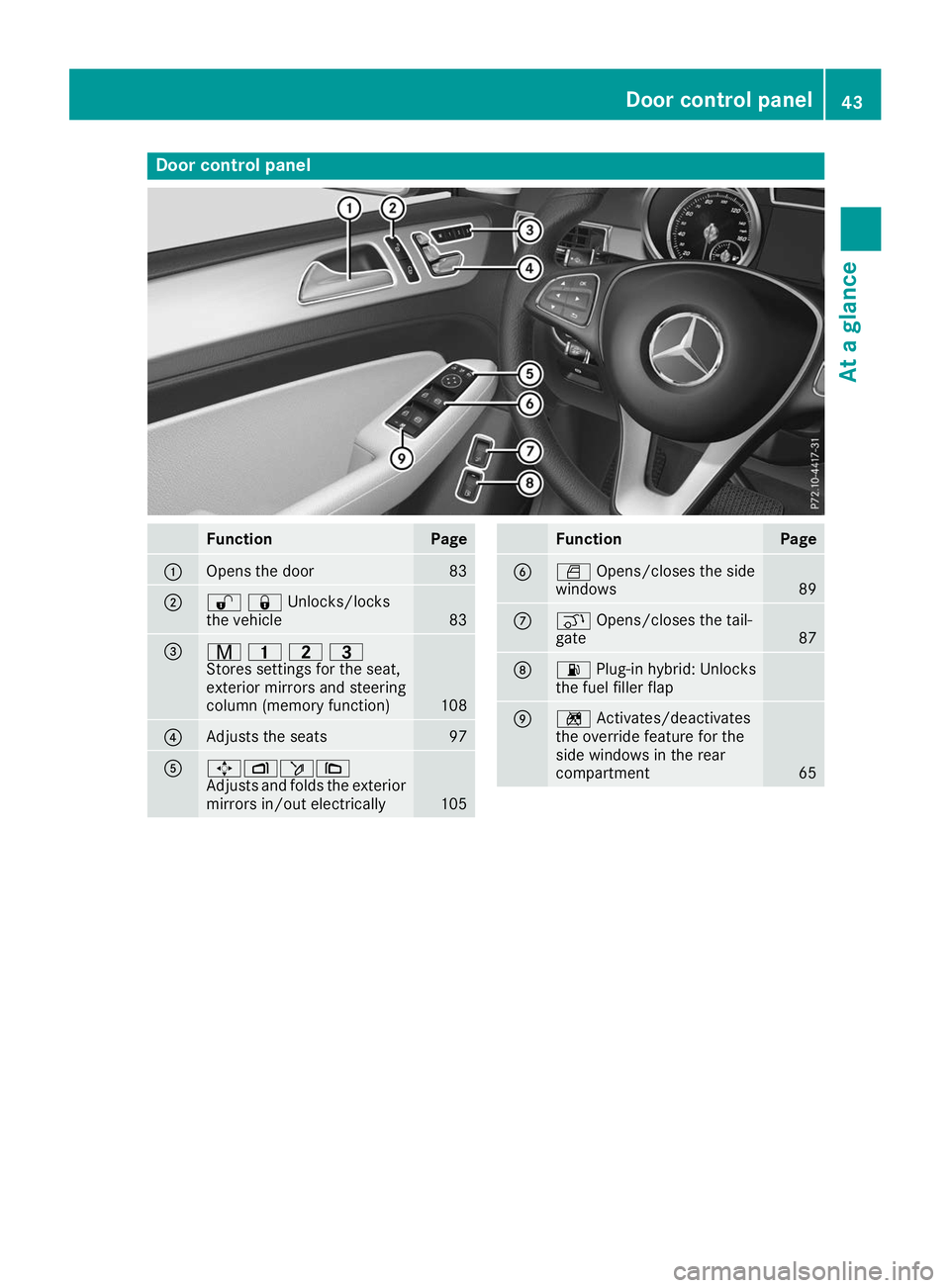
Door control panel
Function Page
0043
Opens the door 83
0044
00360037Unlocks/locks
the vehicle
83
0087
008D
003700380040
Stores settings for the seat,
exterior mirrors and steering
column (memory function) 108
0085
Adjusts the seats 97
0083
0062007000F50071
Adjusts and folds the exterior
mirrors in/out electrically 105 Function Page
0084
0062
Opens/closes the side
windows 89
006B
008C
Opens/closes the tail-
gate 87
006C
00B4
Plug-in hybrid: Unlocks
the fuel filler flap 006D
0089
Activates/deactivates
the override feature for the
side windows in the rear
compartment 65Door control panel
43At a glance
Page 60 of 398
they provide an indication of air bag deploy-
ment.
The vehicle can be deformed considerably, with-
out an air bag being deployed. This is the case if
only parts which are relatively easily deformed
are affected and the rate of deceleration is not
high. Conversely, air bags may be deployed even though the vehicle suffers only minor deforma-
tion. This is the case if, for example, very rigid
vehicle parts such as longitudinal body mem-
bers are hit, and sufficient deceleration occurs
as a result.
If the restraint system control unit detects a side
impact or if the vehicle rolls over, the applicable
components of the restraint system are
deployed independently of each other depend-
ing on the apparent type of accident.
R Side impact air bags on the side where the
impact takes place, independently of the
Emergency Tensioning Device and the use of the seat belt on the driver's seat and outer
seats in the second row
The side impact air bag on the front-
passenger side deploys under the following
conditions:
- the OCS system detects that the front-
passenger seat is occupied or
- the seat belt buckle tongue is engaged in
the belt buckle of the front-passenger seat
R Window curtain air bag on the side of impact,
independently of the use of the seat belt and
independently of whether the front-
passenger seat is occupied
R Emergency Tensioning Devices, if the system
determines that deployment can offer addi-
tional protection in this situation
R Window curtain air bags on the driver's and
front-passenger side in certain situations
when the vehicle rolls over, if the system
determines that deployment can offer addi-
tional protection to that provided by the seat
belt
i Not all air bags are deployed in an accident.
The different air bag systems work independ- ently of each other.
How the air bag system works is determined
by the severity of the accident detected,
especially the vehicle deceleration or accel-
eration and the apparent type of accident:
R Head-on collision
R Side impact
R Rollover PRE-SAFE
®
(anticipatory occupant
protection system)
Introduction In certain hazardous situations, PRE-SAFE
®
takes pre-emptive measures to protect the vehi- cle occupants.
Important safety notes !
Make sure that there are no objects in the
footwell or behind the seats. There is a danger that the seats and/or objects could be dam-
aged when PRE-SAFE ®
is activated.
Although your vehicle is equipped with PRE-
SAFE ®
, the possibility of injury in the event of an
accident cannot be ruled out. Always adapt your
driving style to suit the prevailing road and
weather conditions and maintain a safe distance from the vehicle in front. Drive carefully.
Function PRE-SAFE
®
intervenes:
R in emergency braking situations, e.g. when
BAS is activated
R in critical driving situations, e.g. when physi-
cal limits are exceeded and the vehicle under-
steers or oversteers severely
R on vehicles with the Driving Assistance PLUS
package: when Active Brake Assist intervenes
powerfully or the radar sensor system detects an imminent danger of collision in certain sit- uations
PRE-SAFE ®
takes the following measures
depending on the hazardous situation detected:
R the front seat belts are pre-tensioned.
R if the vehicle skids, the side windows and the
sliding sunroof are closed.
R vehicles with the memory function: the front-
passenger seat is adjusted if it is in an unfav-
orable position.
R vehicles with a multicontour seat: the air pres-
sure in the side bolsters of the seat backrest
is increased.
If the hazardous situation passes without result- ing in an accident, PRE-SAFE ®
slackens the belt
pre-tensioning. On vehicles with multicontour
seats, the air pressure in the side bolsters is
reduced again. All settings made by PRE-SAFE ®
can then be reversed. 58
Occupant safetySafety
Page 61 of 398
If the seat belt pre-tensioning is not reduced:
X Move the seat backrest or seat back slightly
when the vehicle is stationary.
The seat belt pre-tensioning is reduced and
the locking mechanism is released.
The seat-belt adjustment is an integral part of
the PRE-SAFE ®
convenience function. Informa-
tion about the convenience function can be
found under "Belt adjustment" (Y page 48).PRE-SAFE
®
PLUS (anticipatory occu-
pant protection system PLUS)
Introduction PRE-SAFE
®
PLUS is only available in vehicles
with the Driving Assistance PLUS package.
Using the radar sensor system, PRE-SAFE ®
PLUS is able to detect that a head-on or rear-end
collision is imminent. In certain hazardous sit-
uations, PRE-SAFE ®
PLUS takes pre-emptive
measures to protect the vehicle occupants.
Important safety notes The intervention of PRE-SAFE
®
PLUS cannot
prevent an imminent collision.
The driver is not warned about the intervention
of PRE-SAFE ®
PLUS.
PRE-SAFE ®
PLUS does not intervene if the vehi-
cle is backing up.
When driving, or when parking or exiting a park-
ing space using Active Parking Assist, PRE-
SAFE ®
PLUS will not apply the brakes.
Function PRE-SAFE
®
PLUS intervenes in certain situa-
tions if the radar sensor system detects an
imminent head-on or rear-end collision. PRE-SAFE
®
PLUS takes the following measures
depending on the hazardous situation detected:
R if the radar sensor system detects that a
head-on collision is imminent, the seat belts
are pre-tensioned.
R if the radar sensor system detects that a rear-
end collision is imminent:
- the brake pressure is increased if the driver
applies the brakes when the vehicle is sta- tionary.
- the seat belts are pre-tensioned.
The PRE-SAFE ®
PLUS braking application is can-
celed:
R if the accelerator pedal is depressed when a
gear is engaged
R if the risk of a collision passes or is no longer
detected
R if Active Distance Assist DISTRONIC indicates
an intention to intervene
If the hazardous situation passes without result- ing in an accident, the original settings are
restored. Automatic measures after an acci-
dent
Immediately after an accident, the following
measures are implemented, depending on the
type and severity of the impact:
R the hazard warning lamps are switched on
R the emergency lighting is activated
R the vehicle doors are unlocked
R the front side windows are lowered
R vehicles with a memory function: the electri-
cally adjustable steering wheel is raised when
the driver's door is opened
R the engine is switched off and the fuel supply
is cut off
R vehicles with Mercedes me connect: auto-
matic emergency call Children in the vehicle
Important safety notes
Accident statistics show that children secured
in the rear seats are safer than children secured
in the front-passenger seat. For this reason,
Mercedes-Benz strongly advises that you install Children in the vehicle
59Safety Z