display MERCEDES-BENZ GLE 2021 Owner's Manual
[x] Cancel search | Manufacturer: MERCEDES-BENZ, Model Year: 2021, Model line: GLE, Model: MERCEDES-BENZ GLE 2021Pages: 490, PDF Size: 17.58 MB
Page 187 of 490
R
Display messa ges(/ page38 7)
ET S/4ET S(Ele ctronic Tractio nSy stem)
ET S/ 4ETS tracti oncontr olispa rtof ESP ®
and
mak esitpossible topull away and accelerat eon
a slippe ryroad.
If yo usele cttheF orG drive pr og ram, a
specia lET Ssy stem specif icallysuit edtooff-r oad
te rrain isaut omat icallyact ivat ed.
ET S/ 4ETS can improve theve hicle's traction by
int erve ning inthefo llo wing ways:
R The drive wheels arebr ak ed individually if
th ey spin.
R Mor edr ive to rq ue istrans ferred tothewheel
or wheels withtraction .
ESP ®
modes
Depen dingontheselect eddrive pr ogr am, the
appr opriateES P®
mode willbeact ivat ed aut o‐
mat icall y.ESP ®
ad apts to differe nt we ather and
ro ad con dition sas wellas thedr iver's prefer red
dr iving style. Youcan selectthedr ive pr og rams
usi ng theDY NA MIC SELE CTswitc h
(/ page16 6). ES
P®
Com fort
R active in drive pr ograms A,;and
N
R balan cebetween tract ion and stabilit y
R recomme ndedforall road sur face condi tions
R suitab leforbo th dryand difficul tro ad con di‐
tio ns,suc has snow orice, orwhen thero ad
is we tfr om rain
ESP ®
Spor t
R active in drive pr ogr am C
R con tinues toofferst abilit ybut withaspor ty
se tup
R allowsthespor tydriver amor eactiv edr iving
st yle
R onlysuit able forgood road con dition s,adr y
ro ad sur face and acle arstre tchof road
ESP ®
Spo rt+
R active in drive pr ogram B
R emphasi zesth eve hicle's ownove rste er ing
and under steer ing charact eristic sfo ra mor e
activ edr iving style R
onlysuit able forgood road con dition s,adr y
ro ad sur face and acle arstre tchof road
ESP ®
of f-ro ad and ESP®
of f-r oad +
R activ ein drive pr ogr ams F andG
R interve nes late rif th er eis ove rste er ing or
under steer ing, thus improv ing tract ion
R ESP®
of f-ro ad (F): suitable foreasi ly
nego tiable of f-r oa dte rrain suchas dirt
tr ac ks,gr ave lor sandy surfaces
R ESP ®
of f-r oa d+ (G) :su itab leforro ugh
te rrain suchas steep and/or unevente rrain
or fordr iving onrock yte rrain Dr
ivin gand parking18
5
Page 194 of 490
R
Incom plextraf fic situ ations whereobject s
cann otalw aysbe clear lyidentif ied.
R Ifpedes trians orvehicles movequickl yint o
th esensor detection rang e.
R Ifpe destrians arehidde nby other object s.
R Ifth etypical outline ofapedes trian cann ot
be distinguished from thebac kground.
R Ifapedes trian isno tde tected assuch ,e.g.
due tospecial clothing orother object s.
R Onbends withatight radius.
% The ActiveBr ak eAssi stsensor sadjus taut o‐
matically whileacer tain dis tance isbe ing
dr iven afte rth eve hicle hasbeen delivered.
Ac tiveBr ak eAssi stisuna vailable oronl y
par tiall yav ailable during this teac h-in per iod. Se
tting Activ eBr ak eAs sist Re
quirement s:
R The ignit ionisswitc hedon. Multime
diasystem:
4 © 5
Set ting s5
Assist ance
5 Act ive Brak eAssist #
Select thedesir edsetting.
The setting isretained when theengine is
ne xt star ted.
Deactiv atingActiv eBr ak eAs sist
% Itis recomme ndedthat youalw ayslea ve
Ac tiveBr ak eAssi stact ivat ed. #
Select Off.
The distance warning func tion,th eaut ono‐
mous braking function andtheEv asiv eSt eer‐
ing Assis tar edeactiv ated.
When theve hicle isne xt star ted, themiddle
se tting isaut omaticall yselect ed.
% IfAc tiveBr ak eAssi stisdeact ivat ed, the
00D4 symbol appearsinthest atus barofthe
multifu nctiondisplay. Speed
controlcruise contr ol Fu
nction ofcruise contr ol
Plug-in hybrid: obser vetheno tesin theSupple‐
ment .Yo uco uld other wise failto recogni zedan‐
ge rs.
Cr uise contro lre gulat esthespeed totheva lue
selec tedby thedr iver .
If yo uacc elerat eto ove rtak e, forex am ple, the
st or ed speed isno tdele ted. Ifyo ure mo veyour
fo ot from theacceler ator pedal afte rove rtakin g,
cr uise control will resume speed regulation back
to thestor ed speed.
Cr uise controlis oper ated using thecor respond‐
ing steer ing wheel buttons. Youcan stor ean y
speed above15 mp h(2 0km/h) uptothemaxi‐
mum design speed.
Obser vetheno teson driving systems andyour
re sponsibili ty;yo uma yot her wise failto recog‐
nize dangers(/ page 181).
Mer cedes‑A MGvehicl es:Cruis econtr olis
av ailable uptoamax imum speedof 155mp h
(250 km/h). 19
2
Driving and parking
Page 195 of 490
Disp
lays on themu ltifunct iondisp lay
R h (gray):cr uise control isselect edbut
no tye tacti vated.
R h (green): cruise control isactiv e.
A stor ed speed appear salong withth eh dis‐
pla y.
% The segment sbe tween thestor ed speed and
th eend ofthesegment displaylight upin
th espeedome ter.
Sy stem limit s
Cr uise control ma ybe unable tomaint ainthe
st or ed speed onuphill gradients. Thestor ed
speed isresumed whenthegr adient evensout.
Ch ang eint oalowe rge ar ingood timeon long
and steep downhill gradients. Take par ticular
no te ofthis when drivin galaden vehicle. By
doing so,youwill mak euse ofthebr aking effect
of theengine. Thisrelie vesth eload onthebr ak e
sy stem and preve nts thebr ak es from overheat‐
ing and wearing tooqu ickl y. Do
notus ecr uise contr olinthefo llo wing situa‐
tion s:
R Intraf fic situ ations whichrequ ire freq uent
ch ang esofspee d,e.g .in hea vytraf fic, on
wi nding roads.
R Onslippe ryroads. Accel erati ng can cause
th edr ive wheels tolose tract ion and the
ve hicle could then skid.
R Ifyo uar edr ivin gwhen visibilit yis poor .
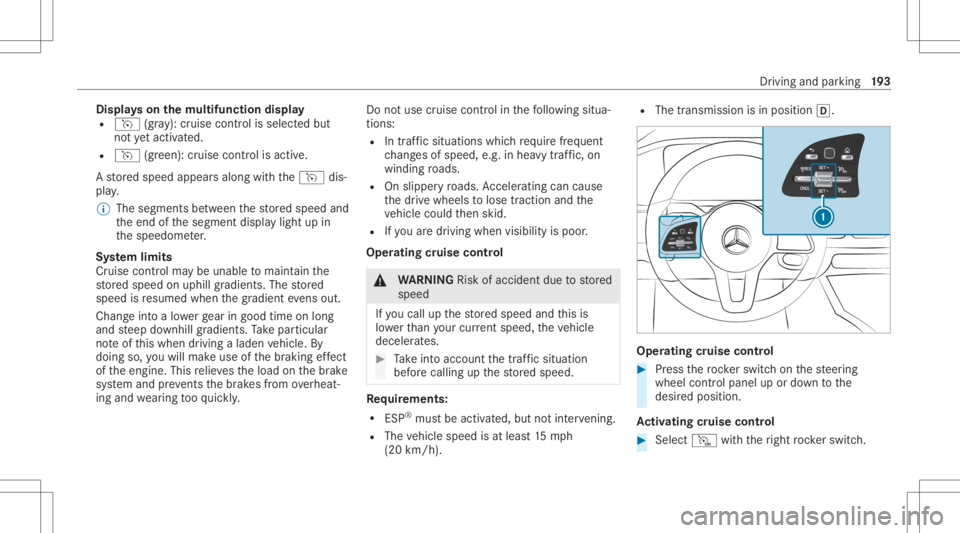
Ope ratin gcr uis eco ntr ol &
WARNIN GRisk ofacci dent dueto stor ed
speed
If yo ucall upthestor ed speed andthis is
lo we rth an your cur rent spe ed,th eve hicle
deceler ates. #
Take intoacc ount thetra ffic situat ion
bef orecallin gup thestor ed speed. Re
quirement s:
R ESP®
mus tbe act ivat ed, but notint erve ning .
R The vehicle speed isat leas t15 mp h
(20 km/ h). R
The transmis sionisin positio n005B. Oper
atingcr uise contr ol #
Press thero ck er switc hon thesteer ing
wheel control panel upordown tothe
desir edposition .
Ac tiv atin gcr uis eco ntr ol #
Select M with theright rock er switc h. Dr
iving andparking 19
3
Page 197 of 490
No
teson DSR &
WARNIN GRisk ofskid ding and accident
whe nDSR isacti vatedon slipper yro ad
sur faces
If th edr iven speed andtheta rget speed dif‐
fe r, th ewheels maylose traction . #
Take intoacc ount thero ad sur face and
th edif fere nce betwee nth edr iving
speed andtarget speed beforeactiv at‐
ing DSR. Obser
vetheno teson driving systems andyour
re sponsibili ty;yo uma yot her wise failto recog‐
nize dangers(/ page 181).
Yo uar ealw aysre sponsible forke eping control of
th eve hicle andforasse ssing whether thedo wn‐
hill gradient canbenego tiated. Depen dingon
ro ad sur face and tires, DSR mayno tal wa ys be
able tokeep tothetar getsp ee d. Sel ect ata rget
speed suitable forth een vironmen talcon dition s
and also applyth ebr ak es yourself ifre qu ired. Ac
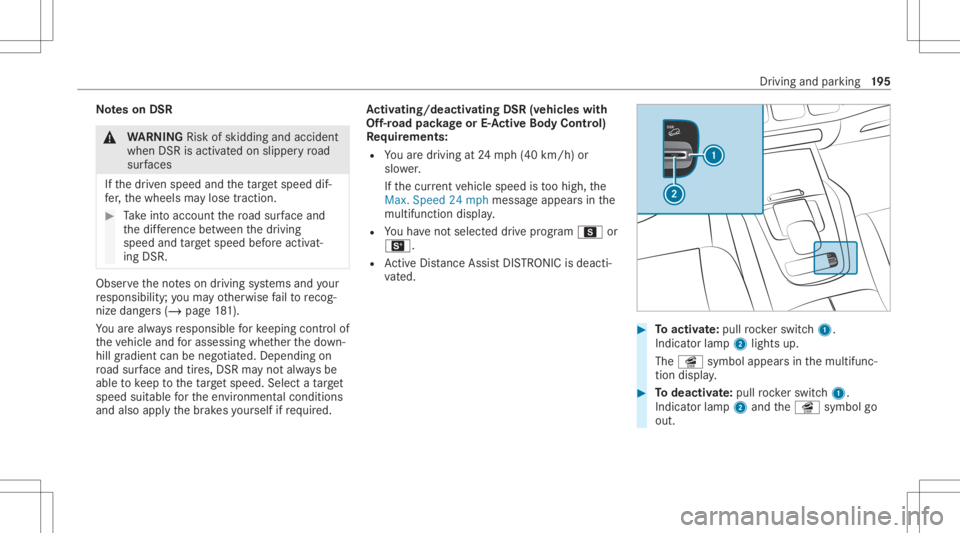
tiv atin g/deac tivatin gDS R(vehi cles with
Of f-road package orE-Ac tiv eBody Contr ol)
Re quirement s:
R Youar edr ivin gat 24 mp h(40 km/h) or
slo wer.
If th ecur rent vehicle speed istoohigh, the
Max. Speed 24mph messag eappear sin the
multifu nctiondisplay.
R Youha ve notsel ect eddrive pr ogr am C or
B.
R ActiveDis tance AssistDIS TRONI Cis de acti ‐
va ted. #
Toactiv ate: pul lro ck er switc h1.
Indic ator lam p2 lights up.
The î symbol appearsin themultifunc ‐
tion displa y. #
Todeac tivate: pullro ck er switc h1.
Indic ator lam p2 and theî symbol go
out. Dr
iving andparking 19
5
Page 198 of 490

Ac
tiv atin g/deac tivatin gDS R(D ow nhill Speed
Re gulat ion)(vehicles without Off-road pack‐
ag e)
Re quirement s:
R Youar edr ivin gat 24.8 mp h(4 0km/h) or
slo wer.
If th ecur rent vehicle speed istoohigh, the
Max. Speed 24mph messag eappear sin the
multifu nctiondisplay.
R ActiveDis tance AssistDIS TRONI Cis de acti ‐
va ted.
Multimedia system:
4 © 5
Set ting s
5 Sch nellzugrif f(Quic kaccess) #
Select îDSR.
The î DSRsymbol appearsin themulti‐
func tion displa ywhen thefunc tion isactiv a‐
te d. Changing
thetar getspe ed #
Toincr ease/r educethetar getspe ed:
pr ess rock er switc h1 upM ordown
N tothepoint ofresis tance.
The select edtarget speed increases or
decr eases by1mp h(1 km/h) andappea rs
alon gwit hth eî symbol inthemultifunc ‐
tion displa y. Ac
tiv eDi stance AssistDI ST RO NIC Fu
nction ofActiv eDi stance Assist
DI ST RO NIC
Ac tiveDis tance AssistDIS TRONI Cma intains the
se tspeed onfree-f lowing roads. Ifve hicles in
fr ont arede tected, these tdis tance isma in‐
ta ined, ifnec essar y,unt ilth eve hicle comes toa
halt. Thevehicle acceler ates orbrak es depend‐
ing onthedis tance totheve hicle infront and
th ese tspeed. Thespeed anddistance tothe
ve hicle infront arese tand save dusing the
st eer ing wheel.
Av ailable speedra ng e:
R Vehicl eswithout Drivin gAss istanc ePa ck‐
ag e:15 mp h(20 km/h) -12 0mp h
(200 km/h)
R Vehicl eswith Drivin gAss istanc ePa ck‐
ag e:15 mp h(2 0km/h) -13 0mp h
(2 10 km/h)
% Plug- inhybrid: theadjus table setspeed can
be reduced duetotheselect eddrive pr o‐
gr am. Obser vethere leva nt notesin theSup‐
plement . 19
6
Driving and parking
Page 203 of 490
Fu
nction ofActiv eSpe edLimit Assist If
speed limitch ang ebe tween 12mp h
(20 km/ h)and 80mph(1 30 km/h) isde tected
and theaut omatic adoptionofspeed limitsis
activ e,itwill beaut omaticall yadop tedas the
st or ed speed (/page24 3).
Th edr iven spee dis adj ustedwhen theve hicle is
le ve lwit hth etraf fic sig nat thelat est.In the
case ofsig ns indi cati ngentr yint oan urb anarea ,
th espeed isadap tedaccor dingtothespeed
per mitt edwithin theurban area. The speed limit
displa yin theIns trument Displayis alw aysupda ‐
te dwhen theve hicle isleve lwit hth etra ffic sign .
If th er eis no speed restriction onanunlimited
st re tchof road (e.g.on afree wa y), there com‐
mend edspe edisau tomatical lyadop tedas the
st or ed speed. Thesystem uses thespeed stor ed
on anunlimit edstre tchof road asthere com‐
mend edspe ed. Ifyo udo notalt er thestor ed
speed onanunlimit edstre tchof road, there c‐
omme ndedspeedis80 mph(1 30 km/h) .
If Ac tiveDis tance AssistDIS TRONI Cha sbe en
pu tint opa ssi ve mode bypressing theaccelera ‐to
rpeda l,onl yspee dlimi tswhi charehigh er
th an these tspeed areadop ted.
Obser vetheno teson driving systems andyour
re sponsibili ty;yo uma yot her wise failto recog‐
nize dangers(/ page 181).
Sy stem limit s
The system limits ofTraf fic Sign Assistappl yto
th ede tection oftraf fic sig ns (/ page 242).
Spee dlimits below 12mp h(2 0km/h) areno t
au tomatical lyadop tedby thesy stem asthe
st or ed speed. Temp orar yspeed restrictions (e.g.
fo ra cer tain tim eor due towe ather condition s)
can notbe proper lyde tected bythesy stem. The
maximum permissible speedapplying toave hi‐
cle withatrailer isno tde tected bythesy stem.
Ad jus tth espeed inthese situation s. &
WARNIN GRisk ofacci dent dueto Active
Spe edLimi tAssi stadap tingth eve hicle's
speed
The speed adoptedby ActiveSpe edLimi t
Assi stma ybe toohigh orincor rect insome
indi vidualcase s,su ch as: R
atspee dlimit sbelo w12 mp h(2 0km/h)
R inwe tcond itions orinfog
R when towing atrailer #
Ensur eth at thedr iven speed complies
wit htraf fic re gulations. #
Adjus tth edr iving speed tosuit current
tr af fic and weather condition s. Fu
nction ofrout e-base dspee dadap tation When
ActiveDis tance AssistDIS TRONI Cis acti ‐
va ted, theve hicle speed willbeadap tedaccor d‐
ing lyto thero uteev ent sahead. Dependingon
th edr ive pr og ram sele cted, theve hicle negoti‐
at es aro uteeve ntaheadin afue l-saving, com ‐
fo rtable ordynam icman ner.When thero ute
eve nthasbe en passe d,theve hicle acceler ates
ag ain tothestor ed speed. Thesetdis tance to
th eve hicle infront, vehicles detected aheadand
spe edrestrictions aheadar eta ke nint oacco unt.
Ro ute-based speedadap tatio ncan beconf ig‐
ur ed inthemultimedia system (/ page202). Dr
iving andparking 20
1
Page 205 of 490
R
ActiveDis tance AssistDIS TRONI Cis acti va‐
te d.
Multimedia system:
4 © 5
Set ting s5
Assist ance
5 Route-based Speed #
Activateor deacti vate thefunc tion.
When thefunc tion isactiv e,theve hicle
speed isadjus teddependin gon thero ute
eve nts ahead.
% Further information onthero ute-based
spee dadap tatio n(/ page 201). Ac
tiv eSte ering Assis t Fu
nction ofActiv eSte ering Assis t
Ac tiveSt eer ing Assis tis onl yav ailable uptoa
speed of130mp h(210 km/h) .The system helps
yo uto stay inthecent erofthelane bymeans of
moder atesteer ing interve ntio ns.Dep endingon
th espeed driven, ActiveSt eer ing Assis tuses the
ve hicles ahead andlane markings asare fer‐
ence.
% Dependi ngon thecount ry,in thelowe r
speed rang eAc tiveSt eer ing Assis tcan use th
esur round ingtraf fic as are fere nce. Ifnec‐
ess ary, Ac tiveSt eer ing Assis tcan then also
pr ov ide assis tance when drivi ng outsid eth e
cent erofthelane, forex am ple toform are s‐
cue lane.
If th ede tection oflane mar kings andvehicles
ahead isim pair ed,ActiveSt eer ing Assis t
switc hestopassiv emode. Thesystem prov ides
no suppor tin this case.
St atus displa yof Activ eSte ering Assis tin
th emu ltifunct iondisp lay
R Ø (gra y): act ivat ed and pass ive
R Ø (green ):act ivat ed and active
R Ø (red): system limits detected
R Ø (whit e,redhands): "handsonthesteer‐
ing wheel" prom pt
% During thetransition from activ eto passiv e
st atus ,th eØ symbol issho wnas
enlar gedand flashin g.On ce thesy stem is
passiv e,theØ symbol issho wnasgray in
th emultifunc tiondispla y.
% Dep endingontheselect edvehicle settin gs,
Ac tiveSt eer ing Assis tma ybe una vailable. Ste
ering and touc hde tection
The driver isrequ ired tokeep their hands onthe
st eer ing wheel atall times andbeable tointer‐
ve ne atanytime tocor rect thecour seofthe
ve hicle andkeep itin lane. Thedriver mus t
ex pect ach ang efrom active to passiv emode or
vice versaat anytim e. If
th esy stem detects that thedr iver has not
st eer edtheve hicle fora consider ableper iod of
time orhas remo vedth eir hands from thesteer‐
ing wheel, display1 appear s.Ifth edr iver still
does notst eer theve hicle, awa rning tone
sou nds inad ditio nto thevisual warning mes‐
sag e. Dr
ivin gand parking203
Page 208 of 490
&
WARNIN GRisk ofacci dent whench ang ‐
ing lane toan occ upied adjacentlane
Lan eChan geAssi stcanno tal wa ys cle arly
de tect ifth eadjacen tlane isfree.
The lane chang emigh tbe init iated although
th eadjacen tlane isno tfr ee. #
Beforech ang inglane s,mak esur eth at
th eneighbor inglane isfree and ther eis
no dang ertoother road user s. #
Mon itor thelane chang e. &
WARNIN GRisk ofacci dent ifLane
Ch ang eAssi stune xpectedl yst ops func‐
tionin g
If th esy stem limit ations forLane Change
Assis tha ve been reac hed, ther eis no guar‐
ant eethat thesy stem will remain active.
Lane ChangeAssis tcanno tth en assis tyo u
by appl ying steer ing torq ues . #
Alw aysmonit orthelane chang eand
ke ep your han dson thesteer ing wheel. Obser
vethetra ffic con dition sand steer
and/or brak eif neces sary. Sy
stem limit s
The system limit ations ofActiveSt eer ing Assis t
apply toActiveLa ne Chang eAssi st
( / pag e203).
The system mayalso beimpair edorma yno t
func tion inthefo llo wing situat ions:
R The sensorsin there ar bum peraredir ty,
damag edorcoveredby ast icke ror ice and
sno w,forex am ple.
R The exterior lighting showsadef ect.
% The ActiveLa ne Chang eAssi stsensor s
adjus taut omaticall ywhile acer tain dis tance
is be ing driven afte rth eve hicle hasbeen
deliv ered. ActiveLa ne Chang eAssi stis
una vailable oronl ypar tiall yav ailable during
th is teac h-in proce ss;noarro w appear sne xt
to theØ ActiveSt eer ing Assis tsymbol
when thetur nsignal indicat orisactiv ated. Ac
tiv atin g/deac tivatin gAc tiv eLan eCha nge
As sist Multimedia
system:
4 © 5
Set ting s5
Assist ance
5 Act ive Lane Change Assist #
Activateor deacti vate thefunc tion. Fu
nction ofActiv eEme rgency Stop Assis t If
th esy stem detects that thedr iver has not
st eer edtheve hicle fora consider ableper iod of
time orhas remo vedth eir hands from thesteer‐
ing wheel, display1 appear sin themultifunc ‐
tion displa y.Ifth edr iver still does notst eer the 206
Driving andparking
Page 230 of 490
Sy
stem limit s
The system limits forPa rking Assist
PA RK TRONI Cappl yto passiv eside impact pro‐
te ction.
The follo wing objectsar eno tde tected, forex am‐
ple:
R Pedes trians who approachth eve hicle from
th eside
R Objec tsplaced next to theve hicle
Ac tiv atin g/deac tivatin gPa rking Assis t
PA RK TRONI C
* NO
TERisk ofan acci dent from objects
at clo serang e Pa
rking AssistPA RK TRONI Cma yno tde tect
cer tain obje ctsat clos era ng e. #
Whe npa rking ormane uvering theve hi‐
cle, paypar ticular attention toany
obj ect swhic har eabo veorbelo wthe
sensor s,e.g. flowe rpo ts or draw bar s.
The vehicle orother object scould oth‐
er wise bedamag ed. Re
quirement s:
R The camera menuis open.
R Or:Ac tivePa rking Assistis act ive.
R Or:th ePA RK TRONI Cpop- upwin dow
appear s.
% Mak esur eth at ther ear eno per sons, ani‐
mals orobjec tsinthemaneuv ering area
while maneuv ering and parking in/exiting
par king spaces. #
Tapé inthemedia display.
% Ifth eé symbol issho wninthemultifunc ‐
tion displa y,Pa rking AssistPA RK TRONI Cis
no tact ive. Pa rking AssistPA RK TRONI Cis
aut omat icallyact ivat ed when theve hicle is
st ar ted.
Alt ernativ ely,Pa rking AssistPA RK TRONI Ccan be
act ivat ed ordeac tiva tedin thequ ick acc ess
men u. Ad
jus tingthe warning tones ofParking
Assis tPA RK TRONI C
Mu ltimed iasystem:
4 © 5
Set ting s5
Assist ance
5 Camera &Parkin g
Ad jus tingthe volum eof thewa rning tones #
Select Warning ToneVolume. #
Seta va lue.
Ad jus tingthe pitchof the warning tones #
Select Warning TonePitch. #
Seta va lue.
Specif yingthest ar ting pointfo rthe warning
to nes
Yo ucan spec ifywhe ther thePa rking Assist
PA RK TRONI Cwa rning tones should comm ence
wh en theve hicle isfur ther aw ay from anobs ta‐
cle . #
Sele ctWa rnEarl yAll Arou nd. #
Activateor deacti vate thefunc tion. 228
Driving andparking
Page 231 of 490
Ac
tiv atin g/deac tivatin gaudi ofa deo ut
Yo ucan spec ifywhe ther thevo lume ofamedia
sour ceinthemultimedia system isto be
re duced whenParking AssistPA RK TRONI C
soun dsawa rning tone. #
Select Aud ioFad eou tDuri ngWa rning Tones. #
Activateor deacti vate thefunc tion. Re
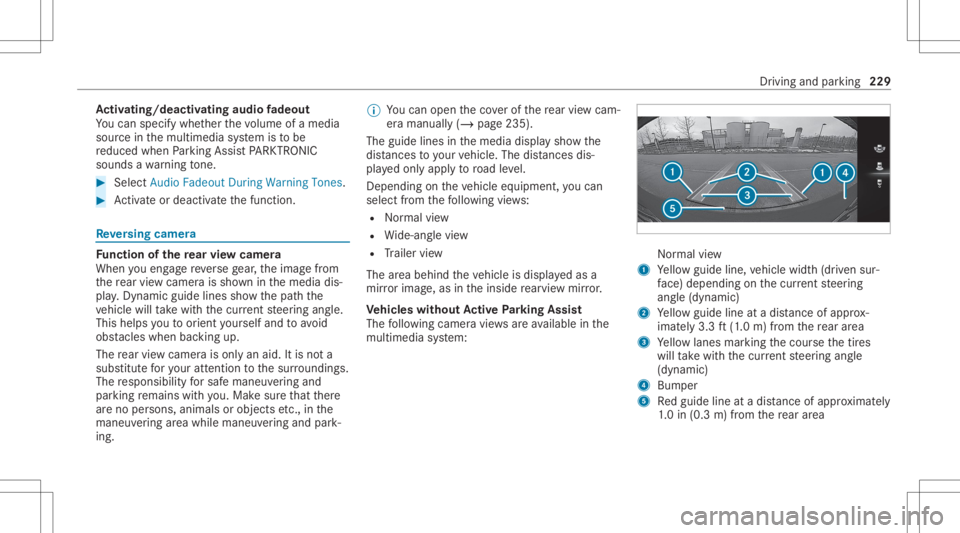
versing camer a Fu
nction ofthere ar vie wcamer a
When youen gage reve rsege ar,th eimag efrom
th ere ar vie wcam erais sho wninthemedia dis‐
pla y.Dyna micguide lines showthepat hth e
ve hicle willtake wit hth ecur rent steer ing ang le.
This helps youto orient yourself and toavoid
obs tacle swhe nba cking up.
The rear vie wcam erais on lyan aid. Itis no ta
subs titutefo ryo ur att entio nto thesur round ings.
The responsibili tyforsaf emaneu vering and
pa rking remains withyo u. Mak esur eth at ther e
ar eno per sons, animals orobjec tsetc., inthe
maneu vering area while ma neu vering and park‐
ing. %
Youcan open theco verof there ar vie wcam ‐
er aman ually(/ page23 5).
The guide linesin themedia displaysho wthe
dis tances toyour vehicle. Thedistances dis‐
pl aye donl yapply toroad leve l.
Depe ndingon theve hicle equipment, youcan
sele ctfrom thefo llo wing views:
R Normalvie w
R Wide-ang levie w
R Trailer view
The area behin dth eve hicle isdispla yedas a
mir rorimag e,as intheinside rear vie wmir ror.
Ve hicl eswithout Activ ePa rking Assis t
The follo wing camer avie ws areav ailable inthe
multime diasystem: Nor
mal view
1 Yello wguide line,vehicle width(dr iven sur‐
fa ce) dep endi ngon thecur rent steer ing
ang le(dynamic)
2 Yello wguide lineatadis tance ofapprox ‐
imat ely3. 3ft (1.0 m) from there ar area
3 Yello wlanes markingth ecour sethetir es
will take wit hth ecur rent steer ing ang le
(dynamic)
4 Bum per
5 Redguide lineatadis tance ofapprox imat ely
1. 0 in (0.3 m)from there ar area Dr
ivin gand parking229