manual transmission MERCEDES-BENZ GLE-Class 2016 W218 User Guide
[x] Cancel search | Manufacturer: MERCEDES-BENZ, Model Year: 2016, Model line: GLE-Class, Model: MERCEDES-BENZ GLE-Class 2016 W218Pages: 450, PDF Size: 10.52 MB
Page 220 of 450
The flap closes again when:
Ryou have finished the maneuvering process
Ryou switch off the engine
Ryou open the cargo compartment
Observe the notes on cleaning (
Ypage 365).
For technical reasons, the flap may remain
open briefly after the rear view camera has
been deactivated.
Activating/deactivating the rear view
camera
XTo activate: make sure that the SmartKey is
in position 2in the ignition lock.
XMake sure that the Activation by R gearfunction is selected in the multimedia system;
see the Digital Operator's Manual.
XEngage reverse gear.
The rear view camera flap opens. The multi-
media system shows the area behind the vehi-
cle with guide lines.
The image from the rear view camera is avail-
able throughout the maneuvering process.
To deactivate: the rear view camera deacti-
vates if you shift the transmission to Por after
driving forwards a short distance.
Displays in the multimedia system
The rear view camera may show a distorted view
of obstacles, show them incorrectly or not at all.
The rear view camera does not show objects in
the following positions:
Rvery close to the rear bumper
Runder the rear bumper
Rin the area immediately above the tailgate
handle
!Objects not at ground level may appear to
be further away than they actually are, e.g.:
Rthe bumper of a parked vehicle
Rthe drawbar of a trailer
Rthe ball coupling of a trailer tow hitch
Rthe rear section of an HGV
Ra slanted post
Use the guidelines only for orientation.
Approach objects no further than the bottom-
most guideline.
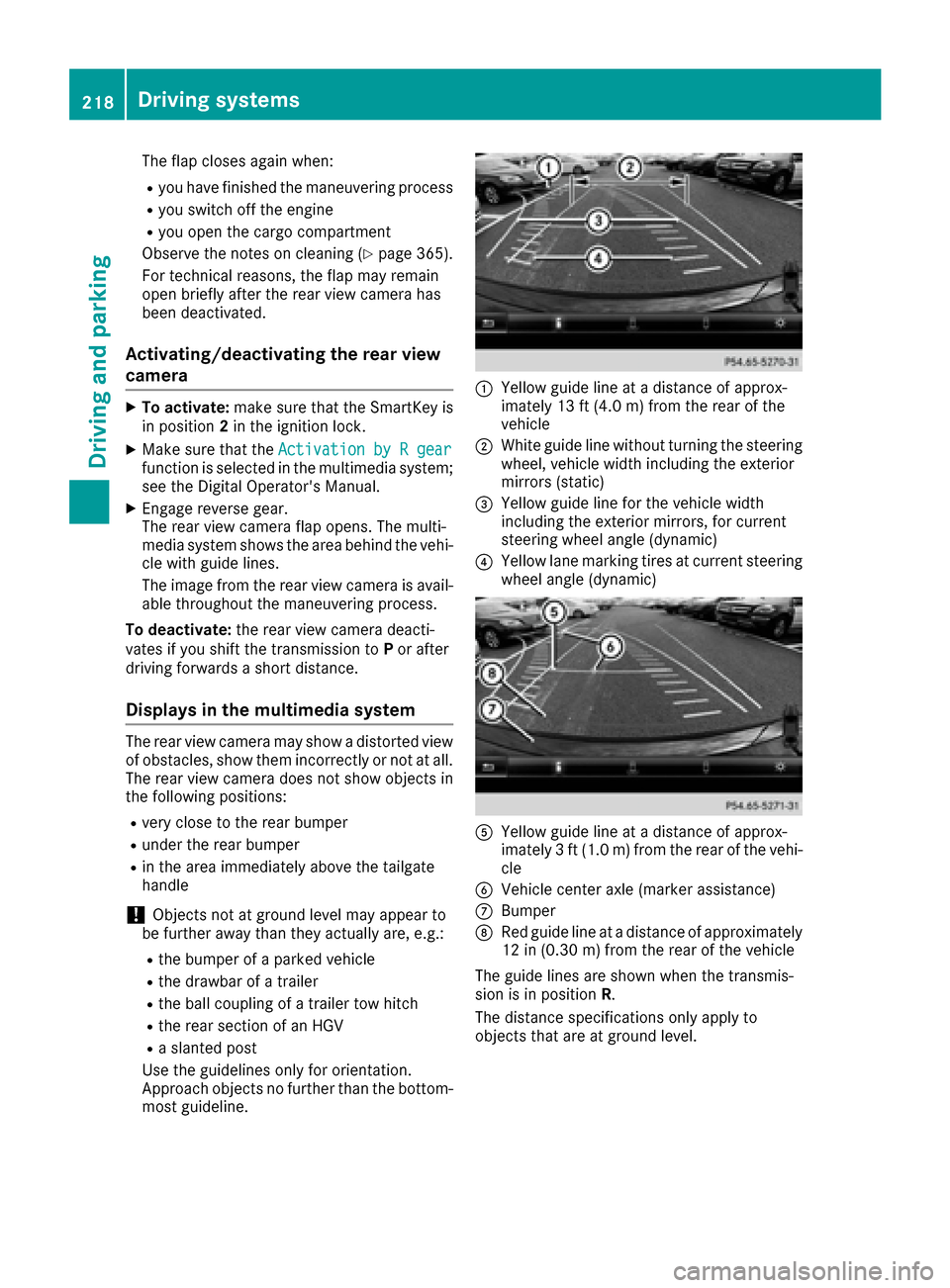
:Yellow guide line at a distance of approx-
imately 13 ft (4.0 m) from the rear of the
vehicle
;White guide line without turning the steering
wheel, vehicle width including the exterior
mirrors (static)
=Yellow guide line for the vehicle width
including the exterior mirrors, for current
steering wheel angle (dynamic)
?Yellow lane marking tires at current steering
wheel angle (dynamic)
AYellow guide line at a distance of approx-
imately 3 ft (1.0 m) from the rear of the vehi-
cle
BVehicle center axle (marker assistance)
CBumper
DRed guide line at a distance of approximately
12 in (0.30 m) from the rear of the vehicle
The guide lines are shown when the transmis-
sion is in position R.
The distance specifications only apply to
objects that are at ground level.
218Driving systems
Driving and parking
Page 238 of 450
the distance to the vehicle in front, for vehicle
speed, for braking in good time and for staying in
your lane.
!Never tow the vehicle with one axle raised.
This may damage the transfer case. Damage
of this sort is not covered by the Mercedes-
Benz Limited Warranty. All wheels must
remain either on the ground or be fully raised.
Observe the instructions for towing the vehi-
cle with all wheels in full contact with the
ground.
!A function or performance test should only
be carried out on a two-axle dynamometer.
Before you operate the vehicle on such a
dynamometer, please consult a qualified
workshop. You could otherwise damage the
drive train or the brake system.
iIn wintry driving conditions, the maximum
effect of 4MATIC can only be achieved if you
use winter tires (M+S tires), with snow chains
if necessary.
Further information about "Driving off-road"
(
Ypage 186).
DSR (Downhill Speed Regulation)
General notes
DSR is an aid to assist you when driving down-
hill. It keeps the speed of travel at the speed
selected on the on-board computer. The steeper
the downhill gradient, the greater the DSR brak-
ing effect on the vehicle. When driving on flat
stretches of road or on an uphill gradient, the
DSR braking effect is minimal or nonexistent.
DSR controls the vehicle’s speed when it is acti- vated and the transmission is in position D,R or
N. You can drive at a higher or a lower speed
than that set on the on-board computer at any
time by accelerating or braking.
Important safety notes
GWARNING
If the speed driven and the set speed deviate and you activate DSR on a slippery road sur-
face, the wheels may lose traction. There is an
increased danger of skidding and accidents.
Before switching DSR on, please take into
consideration the road surface and the differ- ence between driving speed and the set
speed. If you fail to adapt your driving style, DSR can
neither reduce the risk of accident nor override
the laws of physics. DSR cannot take account of
road, weather and traffic conditions. DSR is only
an aid. You are responsible for the distance to
the vehicle in front, for vehicle speed, for brak-
ing in good time and for staying in your lane.
You are always responsible for keeping control
of the vehicle and for assessing whether the
downhill gradient can be managed. DSR may not always be able to keep to the set speed, depend-
ing on road surface and tire conditions. Select a
set speed suitable for the prevailing conditions
and when necessary, apply the brakes manually.
Activating DSR
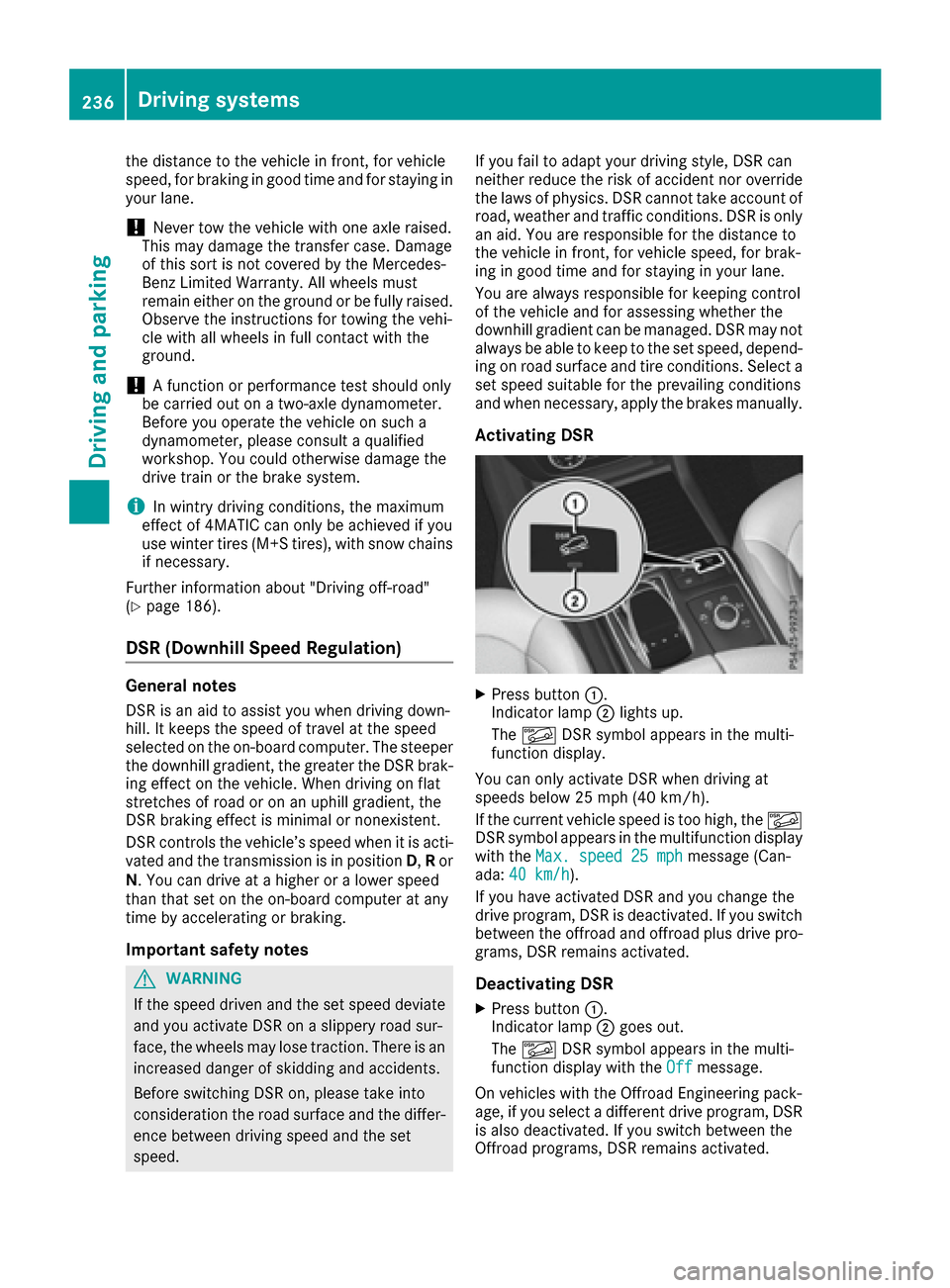
XPress button :.
Indicator lamp ;lights up.
The à DSR symbol appears in the multi-
function display.
You can only activate DSR when driving at
speeds below 25 mph (40 km/h).
If the current vehicle speed is too high, the Ã
DSR symbol appears in the multifunction display
with the Max. speed 25 mph
message (Can-
ada: 40 km/h).
If you have activated DSR and you change the
drive program, DSR is deactivated. If you switch
between the offroad and offroad plus drive pro-
grams, DSR remains activated.
Deactivating DSR
XPress button :.
Indicator lamp ;goes out.
The à DSR symbol appears in the multi-
function display with the Off
message.
On vehicles with the Offroad Engineering pack-
age, if you select a different drive program, DSR is also deactivated. If you switch between the
Offroad programs, DSR remains activated.
236Driving system s
Driving an d parking
Page 246 of 450
Hybrid system overview
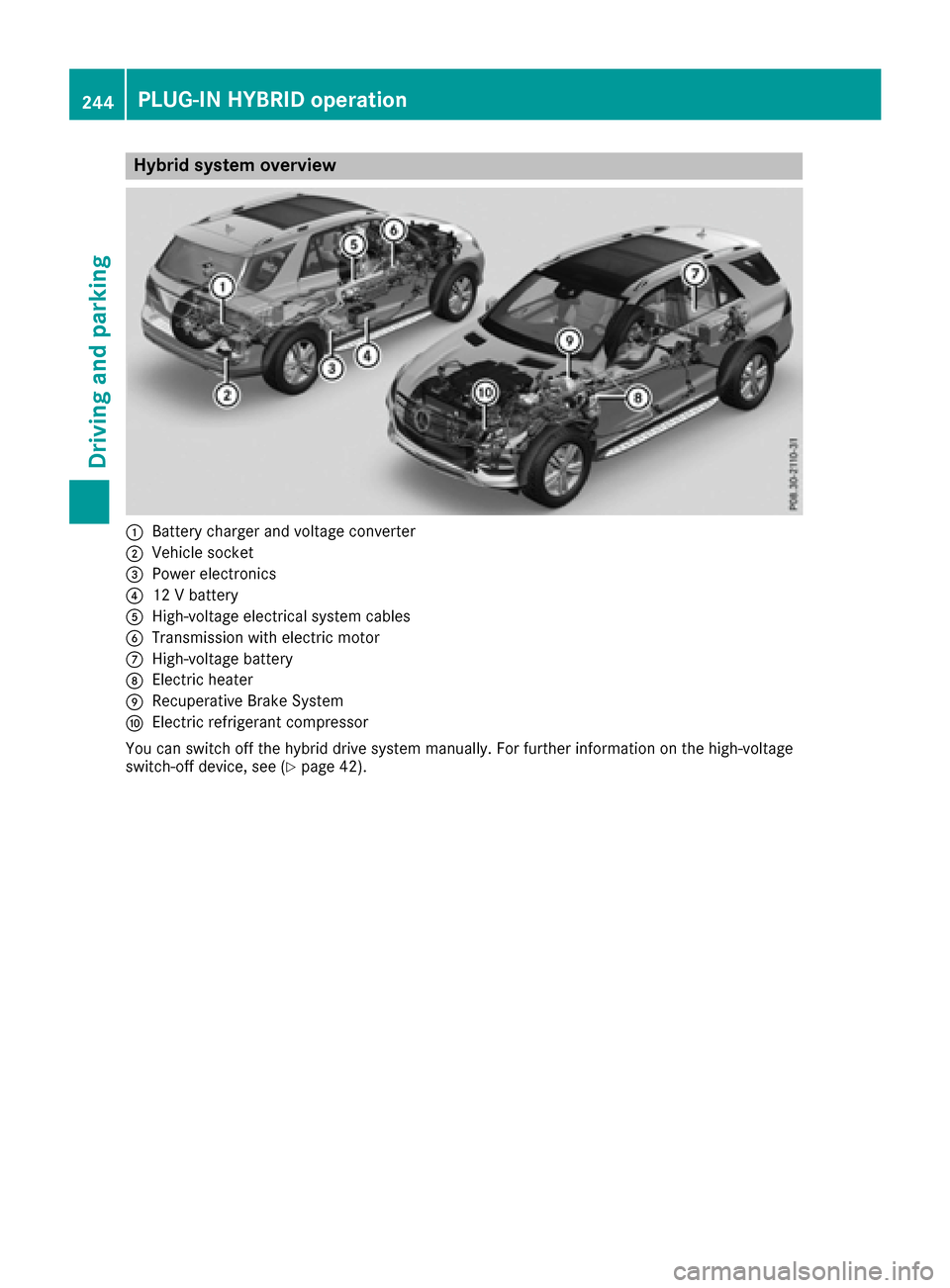
:Battery charger and voltage converter
;Vehicle socket
=Power electronics
?12 V battery
AHigh-voltage electrical system cables
BTransmission with electric motor
CHigh-voltage battery
DElectric heater
ERecuperative Brake System
FElectric refrigerant compressor
You can switch off the hybrid drive system manually. For further information on the high-voltage
switch-off device, see (
Ypage 42).
244PLUG-IN HYBRID operation
Driving and parking
Page 249 of 450
If manual gearshifting is deactivated, the auto-
matic transmission shifts:
Rinto the drive program that was last selected,
and
Rinto the driving mode that was last selected
If you change the drive program, the operating
mode that was last selected is stored for approx-
imately 60 seconds. After this time, the HYBRID
operating mode is automatically activated.
Operating the on-board computer
You can display the current operating condition
of the hybrid drive system in the multifunction
display and the multimedia system in the form of
an energy flow display (
Ypage 247).
In the multimedia system display, you can also
call up a graphic display of the fuel consumption
and generated electricity (
Ypage 250).
Menus and submenus
Selecting displays in the display of the
multimedia system
XPress the Øbutton on the multimedia sys-
tem.
The vehicle menu is displayed.
XTo select Energy flow: turn and press the
controller.
The energy flow is displayed.
or
XTo select Consumption: turn and press the
controller.
Fuel consumption and the generated electric
energy are displayed.
XTo exit the display: press the %button on
the controller.
Selecting the energy flow display in the
multifunction display
XPress the =or; button on the steering
wheel to select the Tripmenu.
XUse: or9 to select Energy flow.
XConfirm by pressing aon the steering
wheel.
The active components of the hybrid drive
system are highlighted in the energy flow dis- play.
Energy flow display
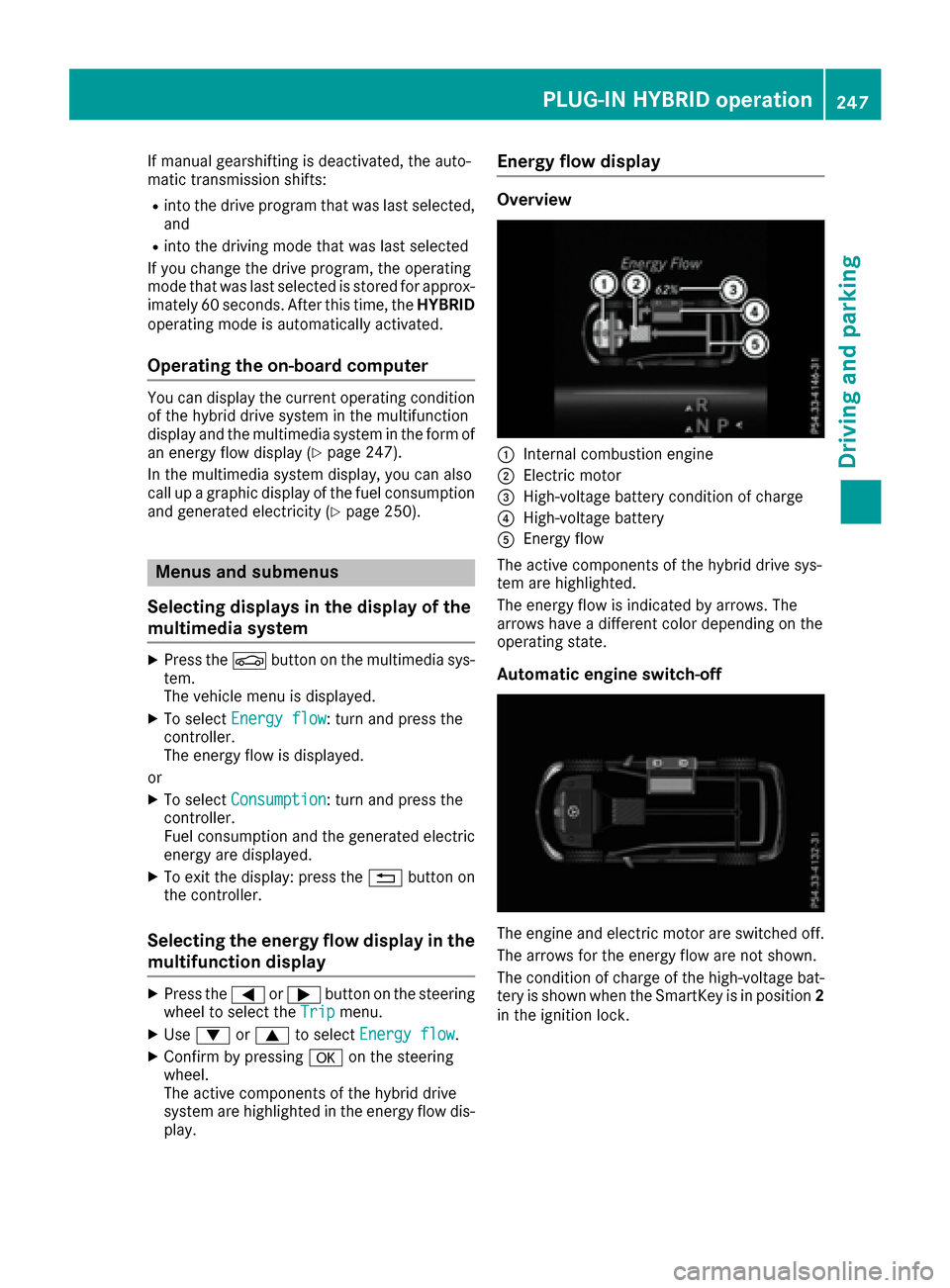
Overview
:Internal combustion engine
;Electric motor
=High-voltage battery condition of charge
?High-voltage battery
AEnergy flow
The active components of the hybrid drive sys-
tem are highlighted.
The energy flow is indicated by arrows. The
arrows have a different color depending on the
operating state.
Automatic engine switch-off
The engine and electric motor are switched off.
The arrows for the energy flow are not shown.
The condition of charge of the high-voltage bat-
tery is shown when the SmartKey is in position 2
in the ignition lock.
PLUG-IN HYBRID operation247
Driving and parking
Z
Page 253 of 450
XSwitch on the ignition.
XDepress the brake pedal.
XObserve the notes on starting the engine
(Ypage 147).
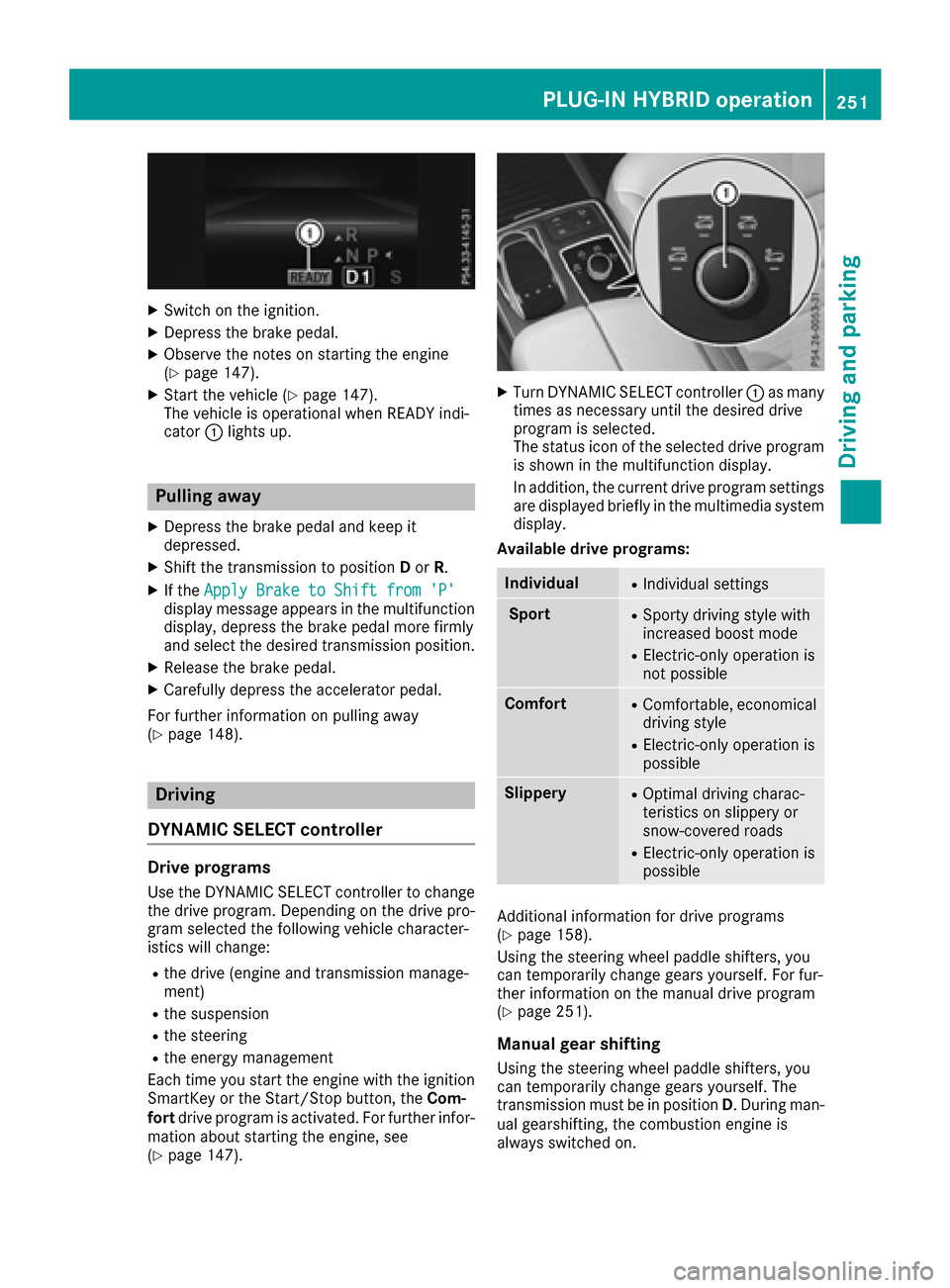
XStart the vehicle (Ypage 147).
The vehicle is operational when READY indi-
cator :lights up.
Pulling away
XDepress the brake pedal and keep it
depressed.
XShift the transmission to position Dor R.
XIf the Apply Brake to Shift from 'P'display message appears in the multifunction
display, depress the brake pedal more firmly
and select the desired transmission position.
XRelease the brake pedal.
XCarefully depress the accelerator pedal.
For further information on pulling away
(
Ypage 148).
Driving
DYNAMIC SELECT controller
Drive programs
Use the DYNAMIC SELECT controller to change
the drive program. Depending on the drive pro-
gram selected the following vehicle character-
istics will change:
Rthe drive (engine and transmission manage-
ment)
Rthe suspension
Rthe steering
Rthe energy management
Each time you start the engine with the ignition SmartKey or the Start/Stop button, the Com-
fort drive program is activated. For further infor-
mation about starting the engine, see
(
Ypage 147).
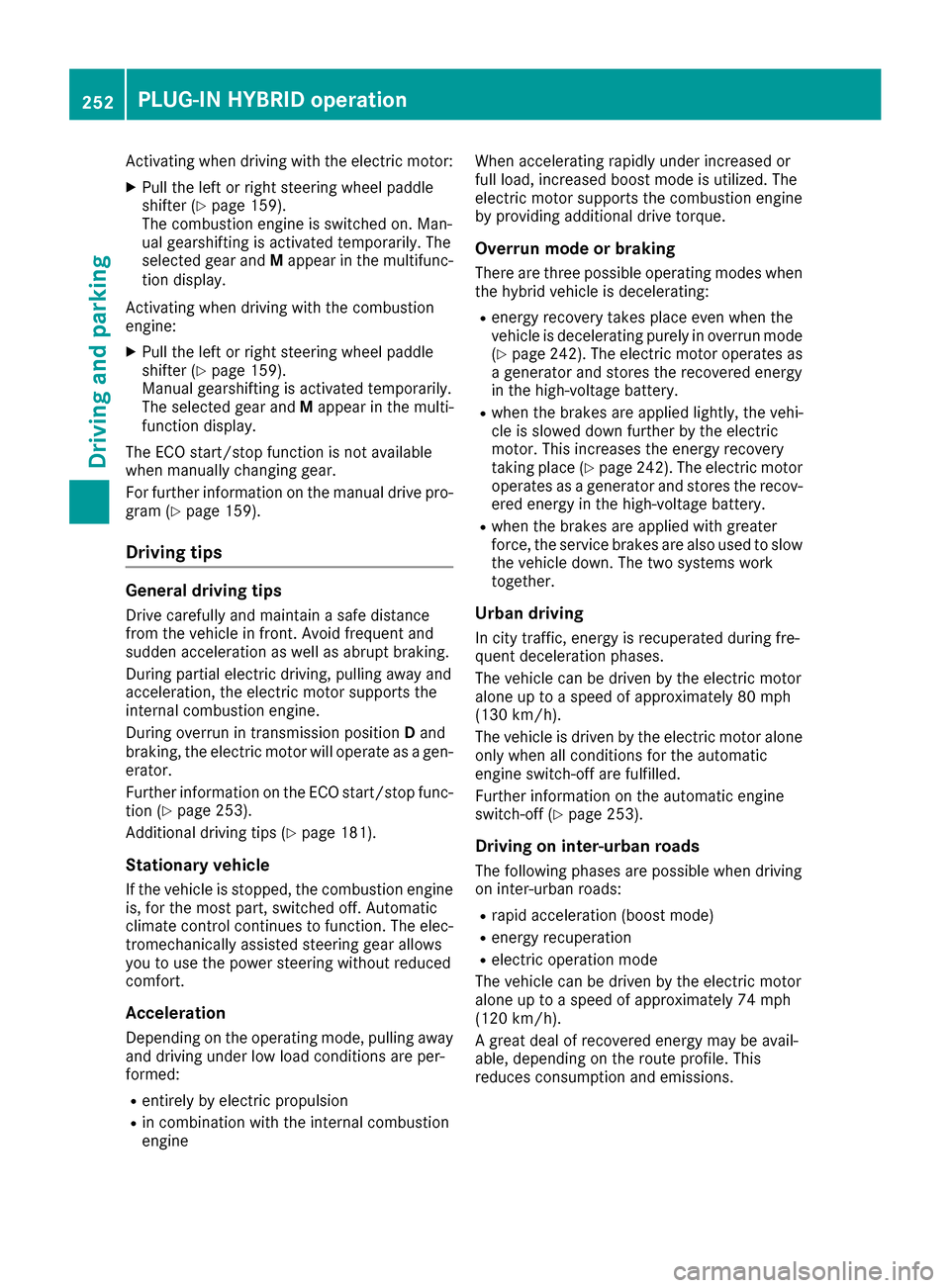
XTurn DYNAMIC SELECT controller :as many
times as necessary until the desired drive
program is selected.
The status icon of the selected drive program
is shown in the multifunction display.
In addition, the current drive program settings are displayed briefly in the multimedia system
display.
Available drive programs:
IndividualRIndividual settings
SportRSporty driving style with
increased boost mode
RElectric-only operation is
not possible
ComfortRComfortable, economical
driving style
RElectric-only operation is
possible
SlipperyROptimal driving charac-
teristics on slippery or
snow-covered roads
RElectric-only operation is
possible
Additional information for drive programs
(Ypage 158).
Using the steering wheel paddle shifters, you
can temporarily change gears yourself. For fur-
ther information on the manual drive program
(
Ypage 251).
Manual gear shifting
Using the steering wheel paddle shifters, you
can temporarily change gears yourself. The
transmission must be in position D. During man-
ual gearshifting, the combustion engine is
always switched on.
PLUG-IN HYBRID operation251
Driving and parking
Z
Page 254 of 450
Activating when driving with the electric motor:
XPull the left or right steering wheel paddle
shifter (Ypage 159).
The combustion engine is switched on. Man-
ual gearshifting is activated temporarily. The
selected gear and Mappear in the multifunc-
tion display.
Activating when driving with the combustion
engine:
XPull the left or right steering wheel paddle
shifter (Ypage 159).
Manual gearshifting is activated temporarily.
The selected gear and Mappear in the multi-
function display.
The ECO start/stop function is not available
when manually changing gear.
For further information on the manual drive pro-
gram (
Ypage 159).
Driving tips
General driving tips
Drive carefully and maintain a safe distance
from the vehicle in front. Avoid frequent and
sudden acceleration as well as abrupt braking.
During partial electric driving, pulling away and
acceleration, the electric motor supports the
internal combustion engine.
During overrun in transmission position Dand
braking, the electric motor will operate as a gen-
erator.
Further information on the ECO start/stop func-
tion (
Ypage 253).
Additional driving tips (
Ypage 181).
Stationary vehicle
If the vehicle is stopped, the combustion engine
is, for the most part, switched off. Automatic
climate control continues to function. The elec-
tromechanically assisted steering gear allows
you to use the power steering without reduced
comfort.
Acceleration
Depending on the operating mode, pulling away
and driving under low load conditions are per-
formed:
Rentirely by electric propulsion
Rin combination with the internal combustion
engine When accelerating rapidly under increased or
full load, increased boost mode is utilized. The
electric motor supports the combustion engine
by providing additional drive torque.
Overrun mode or braking
There are three possible operating modes when
the hybrid vehicle is decelerating:
Renergy recovery takes place even when the
vehicle is decelerating purely in overrun mode
(
Ypage 242). The electric motor operates as
a generator and stores the recovered energy
in the high-voltage battery.
Rwhen the brakes are applied lightly, the vehi-
cle is slowed down further by the electric
motor. This increases the energy recovery
taking place (
Ypage 242). The electric motor
operates as a generator and stores the recov- ered energy in the high-voltage battery.
Rwhen the brakes are applied with greater
force, the service brakes are also used to slow
the vehicle down. The two systems work
together.
Urban driving
In city traffic, energy is recuperated during fre-
quent deceleration phases.
The vehicle can be driven by the electric motor
alone up to a speed of approximately 80 mph
(130 km/h).
The vehicle is driven by the electric motor alone
only when all conditions for the automatic
engine switch-off are fulfilled.
Further information on the automatic engine
switch-off (
Ypage 253).
Driving on inter-urban roads
The following phases are possible when driving
on inter-urban roads:
Rrapid acceleration (boost mode)
Renergy recuperation
Relectric operation mode
The vehicle can be driven by the electric motor
alone up to a speed of approximately 74 mph
(120 km/h).
A great deal of recovered energy may be avail-
able, depending on the route profile. This
reduces consumption and emissions.
252PLUG-IN HYBRID operation
Driving an d parking
Page 279 of 450
You can view the current settings of the off-road
programs in theON&OFFROADmenu.
RVehicles with the Off-Road Engineering pack-
age (Ypage 237)
RVehicles without the Offroad Engineering
package (Ypage 237)
AMG menu (Mercedes-AMG vehicles)
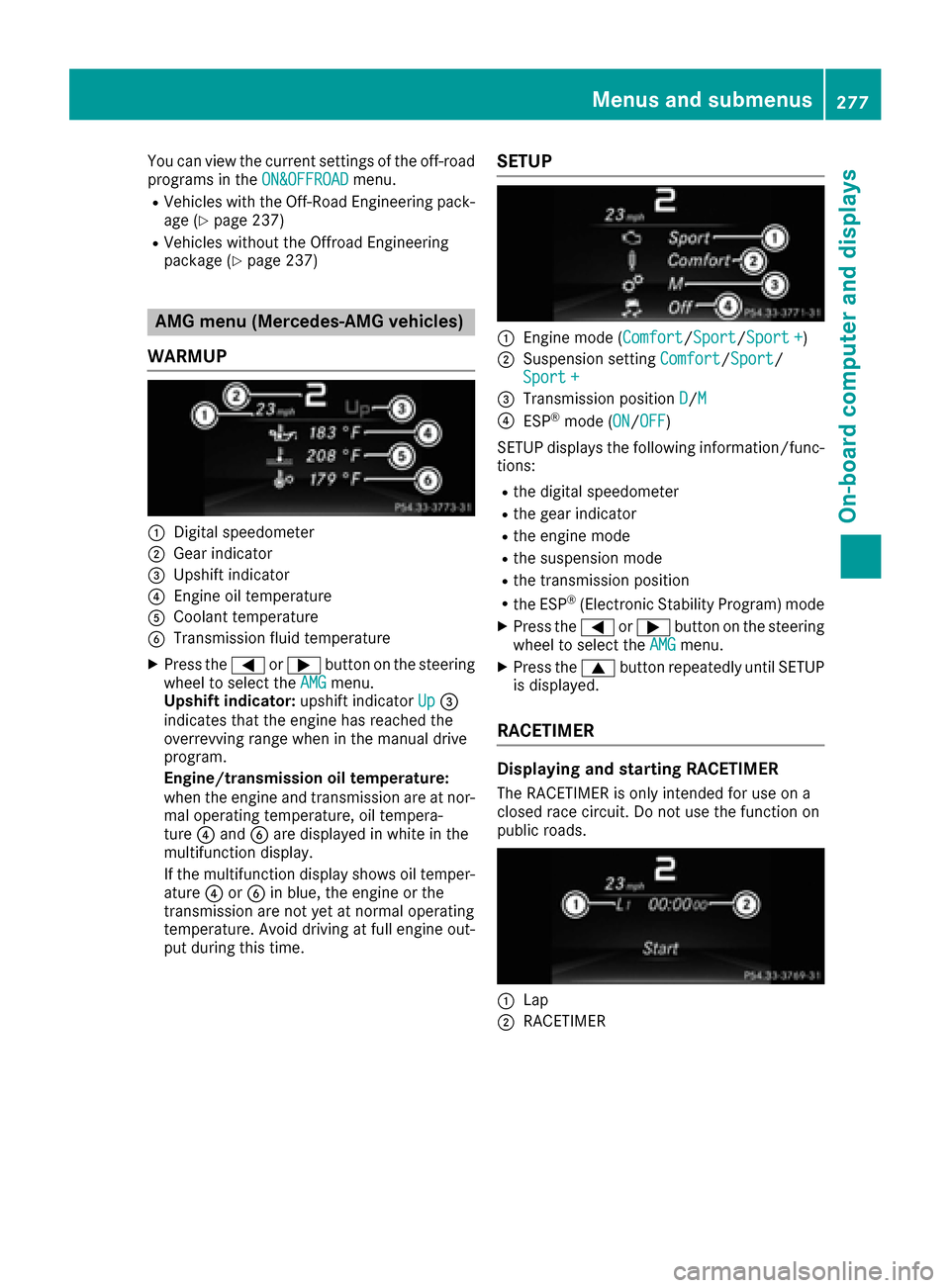
WARMUP
:Digital speedometer
;Gear indicator
=Upshift indicator
?Engine oil temperature
ACoolant temperature
BTransmission fluid temperature
XPress the =or; button on the steering
wheel to select the AMGmenu.
Upshift indicator: upshift indicatorUp=
indicates that the engine has reached the
overrevving range when in the manual drive
program.
Engine/transmission oil temperature:
when the engine and transmission are at nor- mal operating temperature, oil tempera-
ture ?and Bare displayed in white in the
multifunction display.
If the multifunction display shows oil temper-
ature ?orB in blue, the engine or the
transmission are not yet at normal operating
temperature. Avoid driving at full engine out-
put during this time.
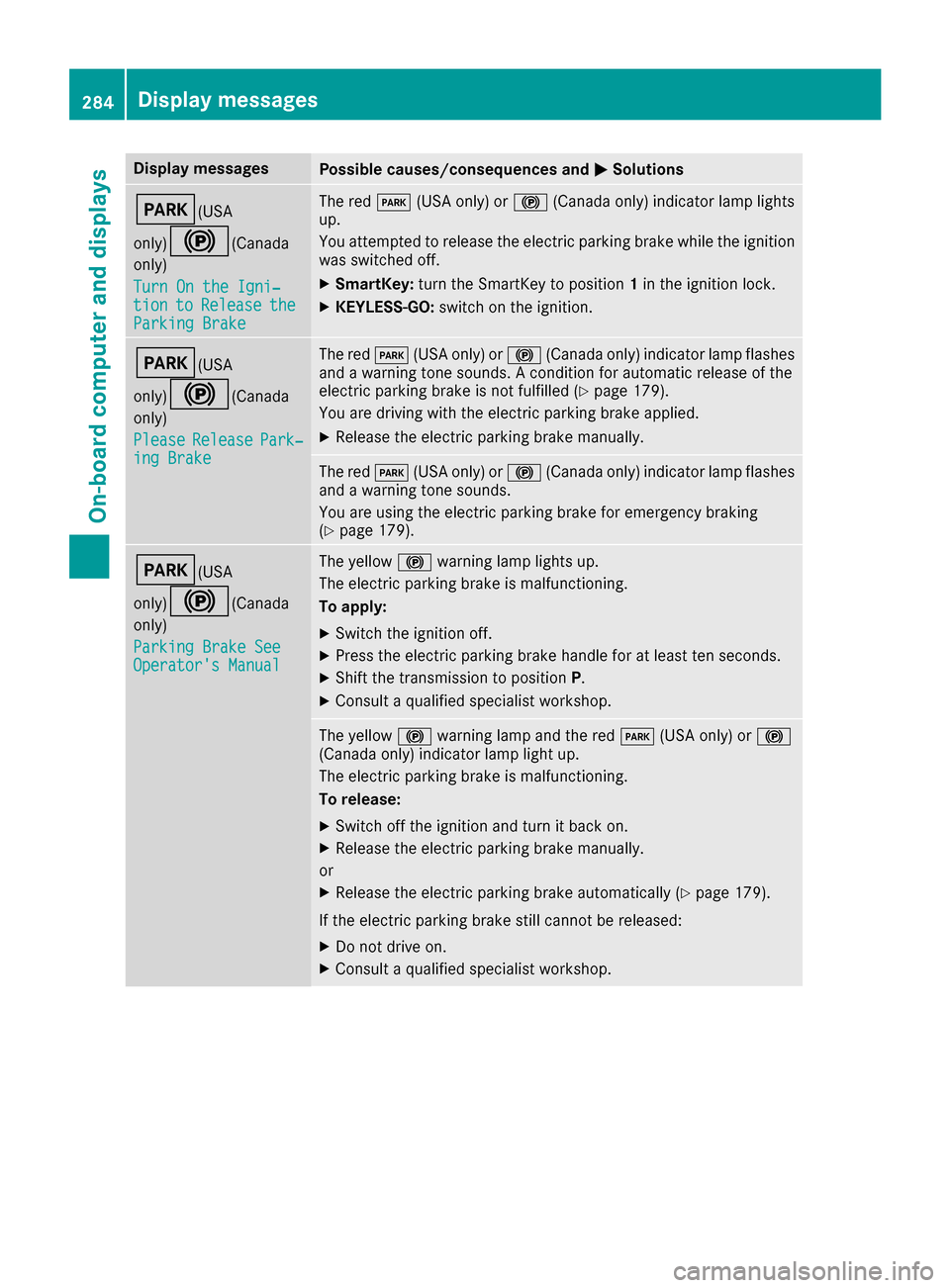
SETUP
:Engine mode (Comfort/ Sport/Sport +)
;Suspension setting Comfort/Sport/
Sport+
=Transmission position D/M
?ESP®mode (ON/OFF)
SETUP displays the following information/func- tions:
Rthe digital speedometer
Rthe gear indicator
Rthe engine mode
Rthe suspension mode
Rthe transmission position
Rthe ESP®(Electronic Stability Program) mode
XPress the =or; button on the steering
wheel to select the AMGmenu.
XPress the9button repeatedly until SETUP
is displayed.
RACETIMER
Displaying and starting RACETIMER
The RACETIMER is only intended for use on a
closed race circuit. Do not use the function on
public roads.
:Lap
;RACETIMER
Menus and submenus277
On-board computer and displays
Z
Page 286 of 450
Display messagesPossible causes/consequences andMSolutions
F(USA
only)
!( Canada
only)
Tur nOn the Igni‐
tio ntoReleas etheParkingBrake
The red F(USAonly) or !(Canada only) indicator lamp lights
up.
You attempte dto release th eelectric parking brak ewhile th eignition
was switched off .
XSmartKey:tur nth eSmartKey to position 1in th eignition lock.
XKEYLESS-GO: switch on theignition .
F(USA
only)
!( Canada
only)
Please
Releas ePark‐ing Brake
The red F(USAonly) or !(Canada only) indicator lamp flashes
and awarning tone sounds. Acondition for automatic release of th e
electric parking brak eis no tfulfilled (
Ypage 179).
You are drivin gwit hth eelectric parking brak eapplied.
XReleas eth eelectric parking brak emanually.
The red F(USAonly) or !(Canada only) indicator lamp flashes
and awarning tone sounds.
You are usin gth eelectric parking brak efor emergenc ybraking
(
Ypage 179).
F(USA
only)
!( Canada
only)
Parkin gBrake See
Operator' sManual
The yellow !warning lamp lights up.
The electric parking brak eis malfunctioning .
To apply :
XSwitchth eignition off .
XPress theelectric parking brak ehandle for at least te nseconds.
XShift th etransmission to position P.
XConsultaqualified specialist workshop .
The yellow!warning lamp and th ered F (USAonly) or !
(Canada only) indicator lamp ligh tup.
The electric parking brak eis malfunctioning .
To release:
XSwitc hoff th eignition and tur nit bac kon .
XReleas eth eelectric parking brak emanually.
or
XReleas eth eelectric parking brak eautomatically (Ypage 179).
If th eelectric parking brak estill canno tbe released:
XDo no tdrive on .
XConsult aqualified specialist workshop .
284Display messages
On-board computer and displays
Page 287 of 450
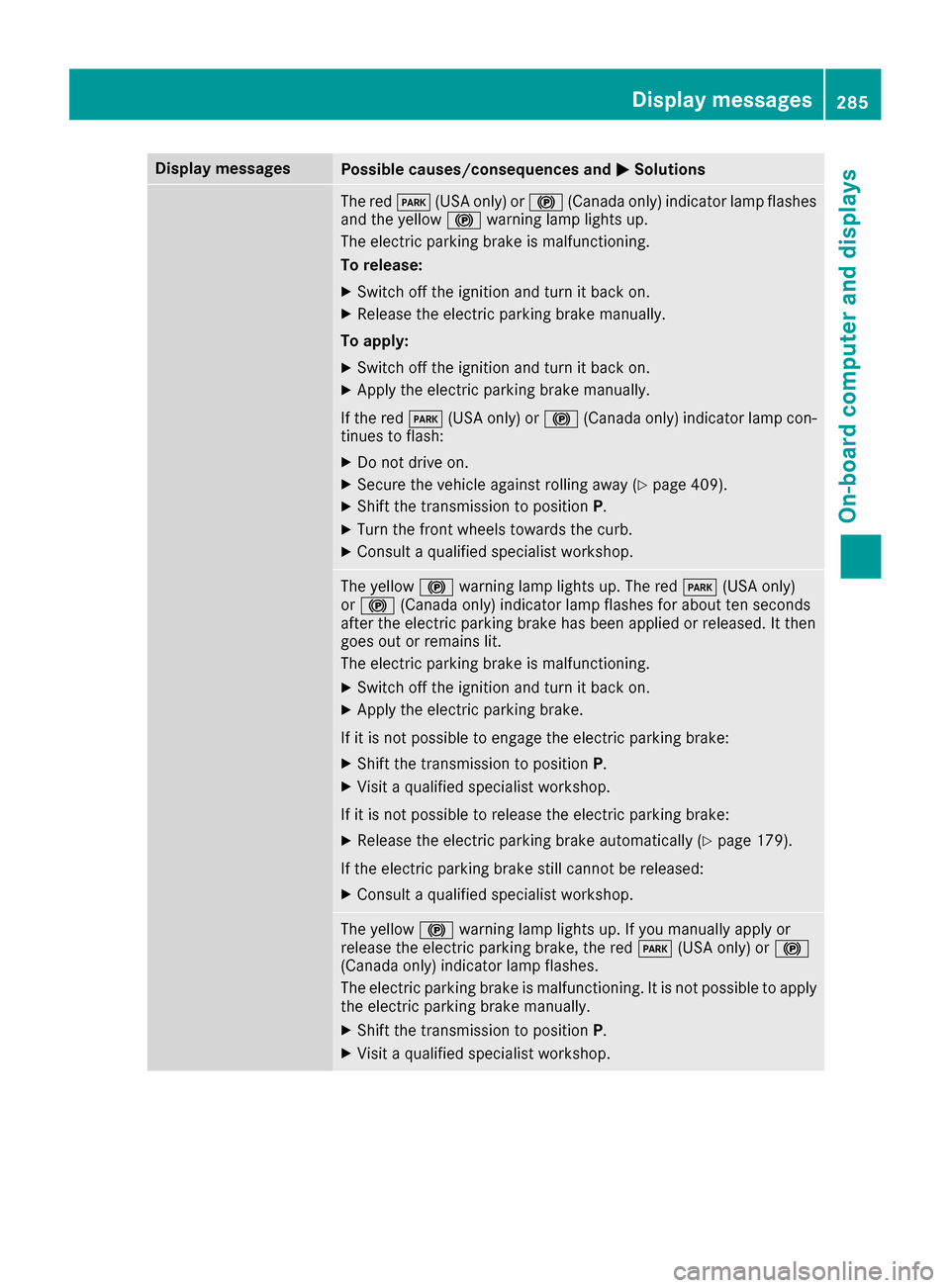
Display messagesPossible causes/consequences andMSolutions
The redF(USAonly) or !(Canada only) indicator lamp flashes
and th eyellow !warning lamp lights up.
The electric parking brak eis malfunctioning .
To release:
XSwitc hoff th eignition and tur nit bac kon .
XReleas eth eelectric parking brak emanually.
To apply :
XSwitchoff th eignition and tur nit bac kon .
XApply th eelectric parking brak emanually.
If th ered F (USAonly) or !(Canada only) indicator lamp con-
tinue sto flash:
XDo no tdrive on .
XSecureth evehicl eagainst rollin gaway (Ypage 409).
XShift th etransmission to position P.
XTurn thefron twheels toward sth ecurb.
XConsult aqualified specialist workshop .
The yellow!warning lamp lights up. The red F(USAonly)
or ! (Canada only) indicator lamp flashes for about te nseconds
after th eelectric parking brak ehas been applie dor released. It then
goe sout or remain slit .
The electric parking brak eis malfunctioning .
XSwitchoff th eignition and tur nit bac kon .
XApply th eelectric parking brake.
If it is no tpossibl eto engage th eelectric parking brake:
XShift th etransmission to position P.
XVisitaqualified specialist workshop .
If it is no tpossibl eto release th eelectric parking brake:
XReleas eth eelectric parking brak eautomatically (Ypage 179).
If th eelectric parking brak estill canno tbe released:
XConsult aqualified specialist workshop .
The yellow!warning lamp lights up. If you manually apply or
release th eelectric parking brake, th ered F (USAonly) or !
(Canada only) indicator lamp flashes .
The electric parking brak eis malfunctioning .It is no tpossibl eto apply
th eelectric parking brak emanually.
XShift th etransmission to position P.
XVisitaqualified specialist workshop .
Display messages285
On-board computer and displays
Z
Page 288 of 450
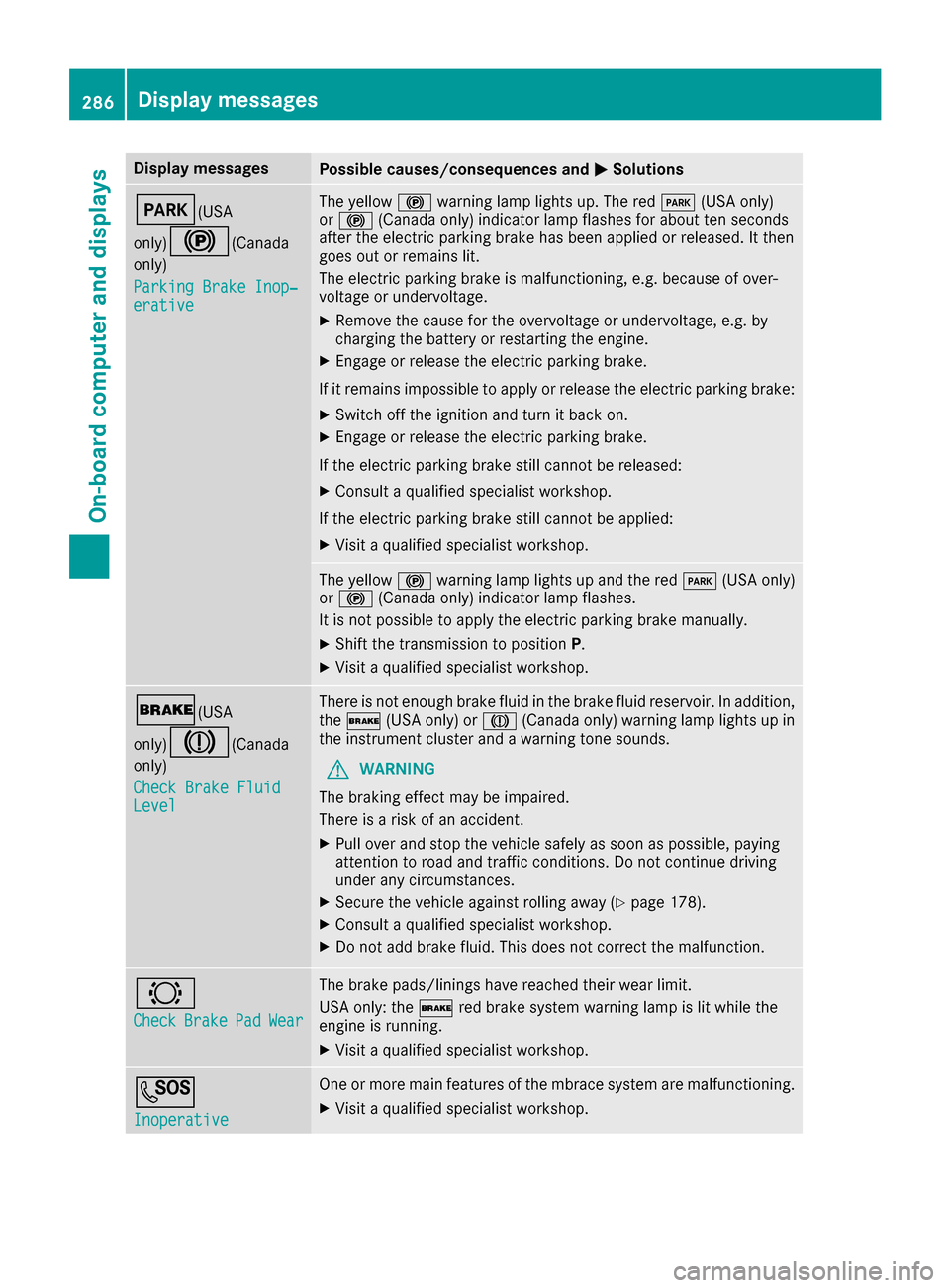
Display messagesPossible causes/consequences andMSolutions
F(USA
only)
!( Canada
only)
Parkin gBrake Inop‐
erativ e
The yellow !warning lamp lights up. The red F(USAonly)
or ! (Canada only) indicator lamp flashes for about te nseconds
after th eelectric parking brak ehas been applie dor released. It then
goe sout or remain slit .
The electric parking brak eis malfunctioning ,e.g. because of over-
voltag eor undervoltage.
XRemove th ecaus efor th eovervoltage or undervoltage, e.g. by
charging th ebattery or restarting th eengine.
XEngage or release th eelectric parking brake.
If it remain simpossible to apply or release th eelectric parking brake:
XSwitc hoff th eignition and tur nit bac kon .
XEngage or release th eelectric parking brake.
If th eelectric parking brak estill canno tbe released:
XConsult aqualified specialist workshop .
If th eelectric parking brak estill canno tbe applied:
XVisit aqualified specialist workshop .
The yellow!warning lamp lights up and th ered F (USAonly)
or ! (Canada only) indicator lamp flashes .
It is no tpossibl eto apply th eelectric parking brak emanually.
XShift th etransmission to position P.
XVisitaqualified specialist workshop .
$(USA
only)
J( Canada
only)
Check Brake Fluid
Level
There is no tenough brak eflui din th ebrak eflui dreservoir .In addition ,
th e$ (USAonly) or J(Canada only) warning lamp lights up in
th einstrumen tcluste rand awarning tone sounds.
GWARNIN G
The braking effec tmay be impaired.
There is aris kof an accident.
XPull ove rand stop th evehicl esafely as soo nas possible, payin g
attention to roa dand traffic conditions. Do no tcontinu edrivin g
under any circumstances.
XSecur eth evehicl eagainst rollin gaway (Ypage 178).
XConsult aqualified specialist workshop .
XDo notadd brak efluid .This does no tcorrec tth emalfunction .
#
CheckBrakePadWear
The brak epads/linings hav ereached their wear limit.
US Aonly: th e$ red brak esystem warning lamp is lit while th e
engin eis running.
XVisit aqualified specialist workshop .
G
Inoperative
Oneor mor emain features of th embrace system are malfunctioning .
XVisitaqualified specialist workshop .
286Display messages
On-board computer and displays