Dynamics MERCEDES-BENZ GLE-Class 2016 W218 Owner's Manual
[x] Cancel search | Manufacturer: MERCEDES-BENZ, Model Year: 2016, Model line: GLE-Class, Model: MERCEDES-BENZ GLE-Class 2016 W218Pages: 450, PDF Size: 10.52 MB
Page 9 of 450
CockpitOverview .......................................... 33
see Instrument cluster
Collapsible spare wheel
Inflating ........................................ .429
see Emergency spare wheel
COLLISION PREVENTION ASSIST
PLUS
Activating/deactivating ................. 272
Display message ............................ 287
Operation/notes .............................. 69
COMAND
Driving dynamics display ............... 241
COMAND display
Cleaning ......................................... 367
Combination switch .......................... 116
Combined cargo cover and net ........ 335
Consumption statistics (on-board
computer) .......................................... 266
Convenience closing feature .............. 92
Convenience opening feature ............ 92
Coolant (engine)
Checking the level ......................... 359
Display message ............................ 295
Displaying the temperature (on-
board computer) ............................ 273
Filling capacity ............................... 439
Important safety notes .................. 438
Temperature (on-board computer,
Mercedes-AMG vehicles) ............... 277
Temperature gauge ........................ 264
Warning lamp ................................. 325
Cooling
see Climate control
Copyright ............................................. 32
Cornering light function
Display message ............................ 292
Function/notes ............................. 117
Crash-responsive emergency light-
ing ....................................................... 119
Crosswind Assist ................................. 74
Crosswind driving assistance ............ 74
Cruise control
Activating ....................................... 192
Activation conditions ..................... 191
Cruise control lever ....................... 191
Deactivating ................................... 192 Display message ............................ 308
Driving system ............................... 191
Function/notes ............................. 191
Important safety notes
.................. 191
Sto
ring and maintaining current
speed ............................................. 192
Cup holder
Center console .............................. 339
Important safety notes .................. 339
Rear compartment ......................... 340
Temperature controlled ................. 340
Customer Assistance Center
(CAC) ..................................................... 29
Customer Relations Department ....... 29
D
Dashboard
see Instrument cluster
Data
see Technical data
Data carrier
Selecting ........................................ 269
Daytime running lamps
Display message ............................ 294
Function/notes ............................. 114
Switching on/off (on-board com-
puter) ............................................. 275
Declarations of conformity ................. 29
DEF
Adding ........................................... 167
Display message ............................ 298
Filling capacity ............................... 437
Important safety notes .................. 436
Diagnostics connection ...................... 29
Differential lock (display mes-
sage) ................................................... 303
Digital speedometer ......................... 267
DIRECT SELECT lever
Automatic transmission ................. 154
Display message
Hybrid drive system ....................... 299
Display messages
ASSYST PLUS ................................ 360
Calling up (on-board computer) ..... 280
Driving systems ............................. 301
Engine ............................................ 295
General notes ................................ 280
Index7
Page 33 of 450
Rvehicle reactions and operating conditions in
special driving situations, e.g. air bag deploy-
ment, intervention of stability control sys-
tems
Rambient conditions, e.g. outside temperature
This data is of an exclusively technical nature
and can be used to:
Rassist in recognizing and rectifying malfunc-
tions and defects
Ranalyze vehicle functions, e.g. after an acci-
dent
Roptimize vehicle function
The data cannot be used to trace the vehicle's
movements.
When your vehicle is serviced, technical infor-
mation can be read from the event data memory and malfunction data memory.
Services include, for example:
Rrepair services
Rservice processes
Rwarranties
Rquality assurance
The vehicle is read out by employees of the ser-
vice network (including the manufacturer) using special diagnostic testers. More detailed infor-
mation is obtained from it, if required.
After a malfunction has been rectified, the infor-
mation is deleted from the malfunction memory or is continually overwritten.
When operating the vehicle, situations are con-
ceivable in which this technical data, in connec-
tion with other information (if necessary, under
consultation with an authorized expert), could
be traced to a person.
Examples include:
Raccident reports
Rdamage to the vehicle
Rwitness statements
Further additional functions that have been con- tractually agreed upon with the customer allow
certain vehicle data to be conveyed by the vehi-
cle as well. The additional functions include, for
example, vehicle location in case of an emer-
gency.
COMAND/mbrace
If the vehicle is equipped with COMAND or
mbrace, additional data about the vehicle's operation, the use of the vehicle in certain sit-
uations, and the location of the vehicle may be
compiled through COMAND or the mbrace sys-
tem.
For additional information please refer to the
COMAND User Manual or the Digital Operator's
Manual and/or the mbrace Terms and Condi-
tions.
Event data recorders
This vehicle is equipped with an event data
recorder (EDR). This vehicle is equipped with an
event data recorder (EDR). The main purpose of
an EDR is to record, in certain crash or near
crash-like situations, such as an air bag deploy-
ment or hitting a road obstacle, data that will
assist in understanding how a vehicle's systems
performed. The EDR is designed to record data
related to vehicle dynamics and safety systems
for a short period of time, typically 30 seconds
or less.
The EDR in this vehicle is designed to record
such data as:
RHow various systems in your vehicle were
operating
RWhether or not the driver and passenger
safety belts were buckled/fastened
RHow far (if at all) the driver was depressing the accelerator and/or brake pedal and
RHow fast the vehicle was traveling.
These data can help provide a better under-
standing of the circumstances in which acci-
dents and injuries occur. NOTE: EDR data are
recorded by your vehicle only if a non-trivial
crash situation occurs; no data is recorded by
the EDR under normal driving conditions and no personal data (e.g. name, gender, age and acci-
dent location) are recorded. However, other par-ties, such as law enforcement could combine
EDR data with the type of personally identifying
data routinely acquired during a crash investi-
gation.
Access to the vehicle and/or the EDR is needed
to read data that is recorded by the EDR, and
special equipment is required. In addition to the
vehicle manufacturer, other parties that have
the special equipment, such as law enforce-
ment, can read the information by accessing the
vehicle or the EDR.
EDR data may be used in civil and criminal mat-ters as a tool in accident reconstruction, acci-
Introduction31
Z
Page 209 of 450
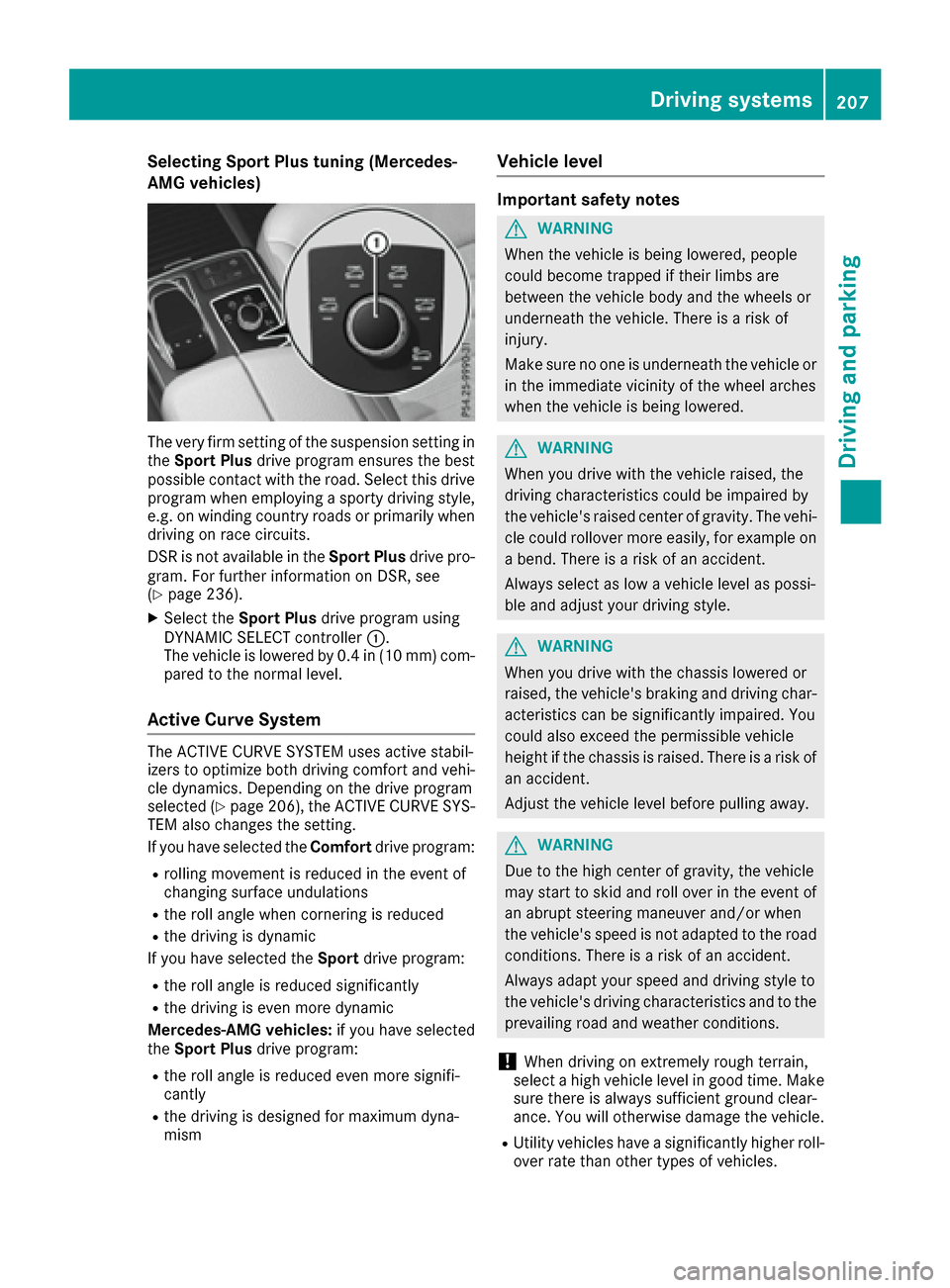
Selecting Sport Plus tuning (Mercedes-
AMG vehicles)
The very firm setting of the suspension setting in
theSport Plus drive program ensures the best
possible contact with the road. Select this drive
program when employing a sporty driving style, e.g. on winding country roads or primarily when
driving on race circuits.
DSR is not available in the Sport Plusdrive pro-
gram. For further information on DSR, see
(
Ypage 236).
XSelect the Sport Plus drive program using
DYNAMIC SELECT controller :.
The vehicle is lowered by 0.4 in (10 mm) com-
pared to the normal level.
Active Curve System
The ACTIVE CURVE SYSTEM uses active stabil-
izers to optimize both driving comfort and vehi-
cle dynamics. Depending on the drive program
selected (
Ypage 206), the ACTIVE CURVE SYS-
TEM also changes the setting.
If you have selected the Comfortdrive program:
Rrolling movement is reduced in the event of
changing surface undulations
Rthe roll angle when cornering is reduced
Rthe driving is dynamic
If you have selected the Sportdrive program:
Rthe roll angle is reduced significantly
Rthe driving is even more dynamic
Mercedes-AMG vehicles: if you have selected
the Sport Plus drive program:
Rthe roll angle is reduced even more signifi-
cantly
Rthe driving is designed for maximum dyna-
mism
Vehicle level
Important safety notes
GWARNING
When the vehicle is being lowered, people
could become trapped if their limbs are
between the vehicle body and the wheels or
underneath the vehicle. There is a risk of
injury.
Make sure no one is underneath the vehicle or
in the immediate vicinity of the wheel arches
when the vehicle is being lowered.
GWARNING
When you drive with the vehicle raised, the
driving characteristics could be impaired by
the vehicle's raised center of gravity. The vehi-
cle could rollover more easily, for example on
a bend. There is a risk of an accident.
Always select as low a vehicle level as possi-
ble and adjust your driving style.
GWARNING
When you drive with the chassis lowered or
raised, the vehicle's braking and driving char-
acteristics can be significantly impaired. You
could also exceed the permissible vehicle
height if the chassis is raised. There is a risk of an accident.
Adjust the vehicle level before pulling away.
GWARNING
Due to the high center of gravity, the vehicle
may start to skid and roll over in the event of
an abrupt steering maneuver and/or when
the vehicle's speed is not adapted to the road
conditions. There is a risk of an accident.
Always adapt your speed and driving style to
the vehicle's driving characteristics and to the
prevailing road and weather conditions.
!When driving on extremely rough terrain,
select a high vehicle level in good time. Make
sure there is always sufficient ground clear-
ance. You will otherwise damage the vehicle.
RUtility vehicles have a significantly higher roll- over rate than other types of vehicles.
Driving systems207
Driving and parking
Z
Page 243 of 450
Messages in the multifunction display
If a gear change process has not been successful, the following messages may be displayed in the
multifunction display:
Display messagesPossible causes/consequences andMSolutions
LOW RANGE Max.Speed 24 mphYou have been driving faster than 24 mph (40 km/h). Additionally, the
indicator lamp on the button in the center console is flashing.
XDrive more slowly to carry out the gear change process.
LOW RANGE Shift toPosition N BrieflyThe transmission is in positionDand you are driving at below
40 km/h.
XShift the transmission to Nto complete the gear change process.
LOW RANGE ShiftingCanceled PleaseReactivate
The gear change process was not carried out.
XEnsure that all gear change conditions are fulfilled and carry out the
gear change process again.
LOW RANGE StopApply Parking BrakeA warning tone also sounds. The gear change process has not been
completed. LOW RANGE is in the neutral position. There is no con-
nection between the engine and the drive wheels.
!Do not drive any further. You could otherwise damage the vehi-
cle's drive train.
XStop the vehicle. Take into account the road and traffic conditions
when doing this.
XDepress the electric parking brake (Ypage 179).
XCarry out the gear change process again.
If the gear change process has been carried out, the LOW RANGE
Stop Apply Parking Brakemessage disappears.
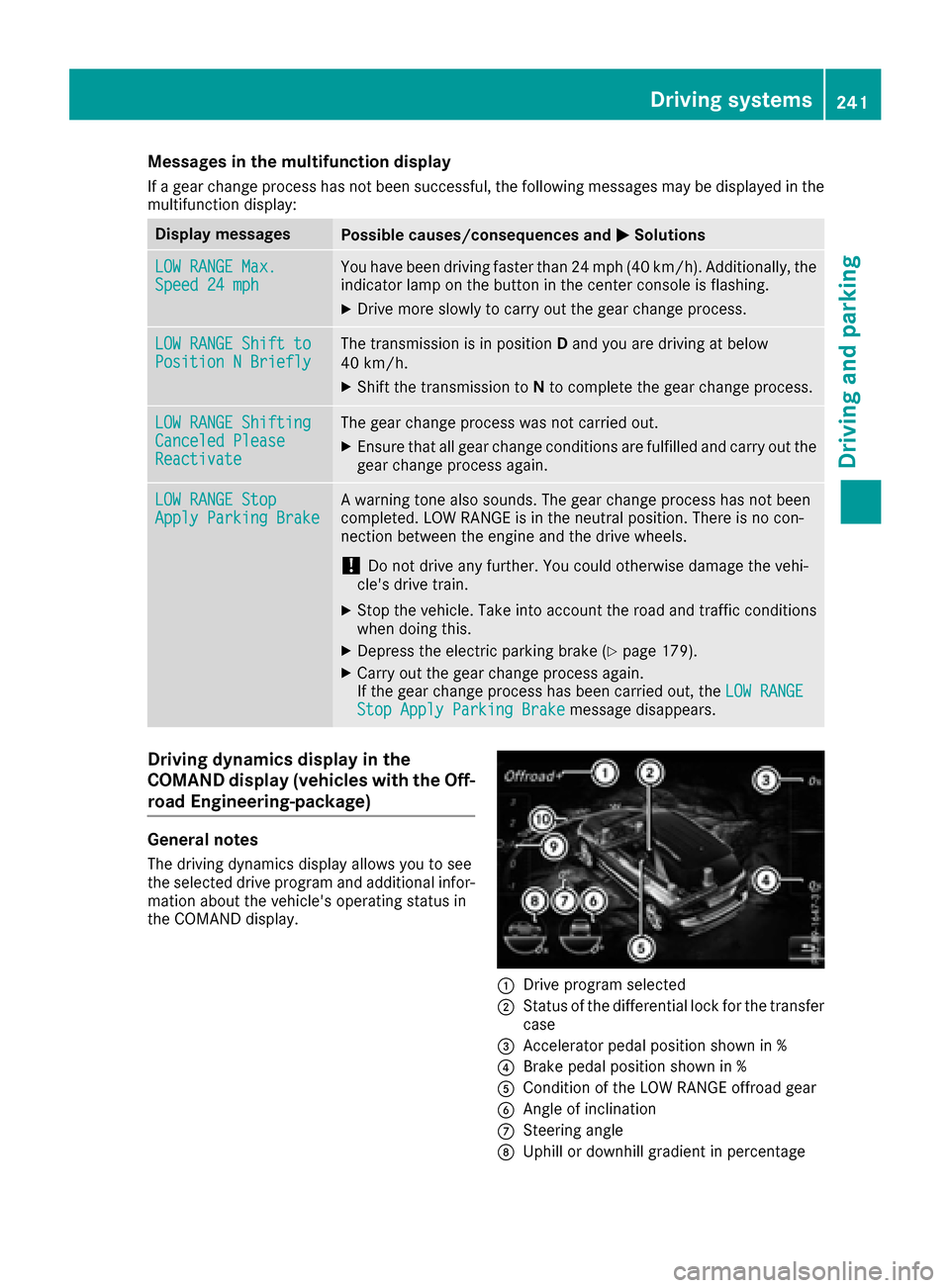
Driving dynamics display in the
COMAND display (vehicles with the Off-
road Engineering-package)
General notes
The driving dynamics display allows you to see
the selected drive program and additional infor-
mation about the vehicle's operating status in
the COMAND display.
:Drive program selected
;Status of the differential lock for the transfer
case
=Accelerator pedal position shown in %
?Brake pedal position shown in %
ACondition of the LOW RANGE offroad gear
BAngle of inclination
CSteering angle
DUphill or downhill gradient in percentage
Driving systems241
Driving and parking
Z
Page 244 of 450
ELevel control
FCompass with angle scale
Activating the driving dynamics display
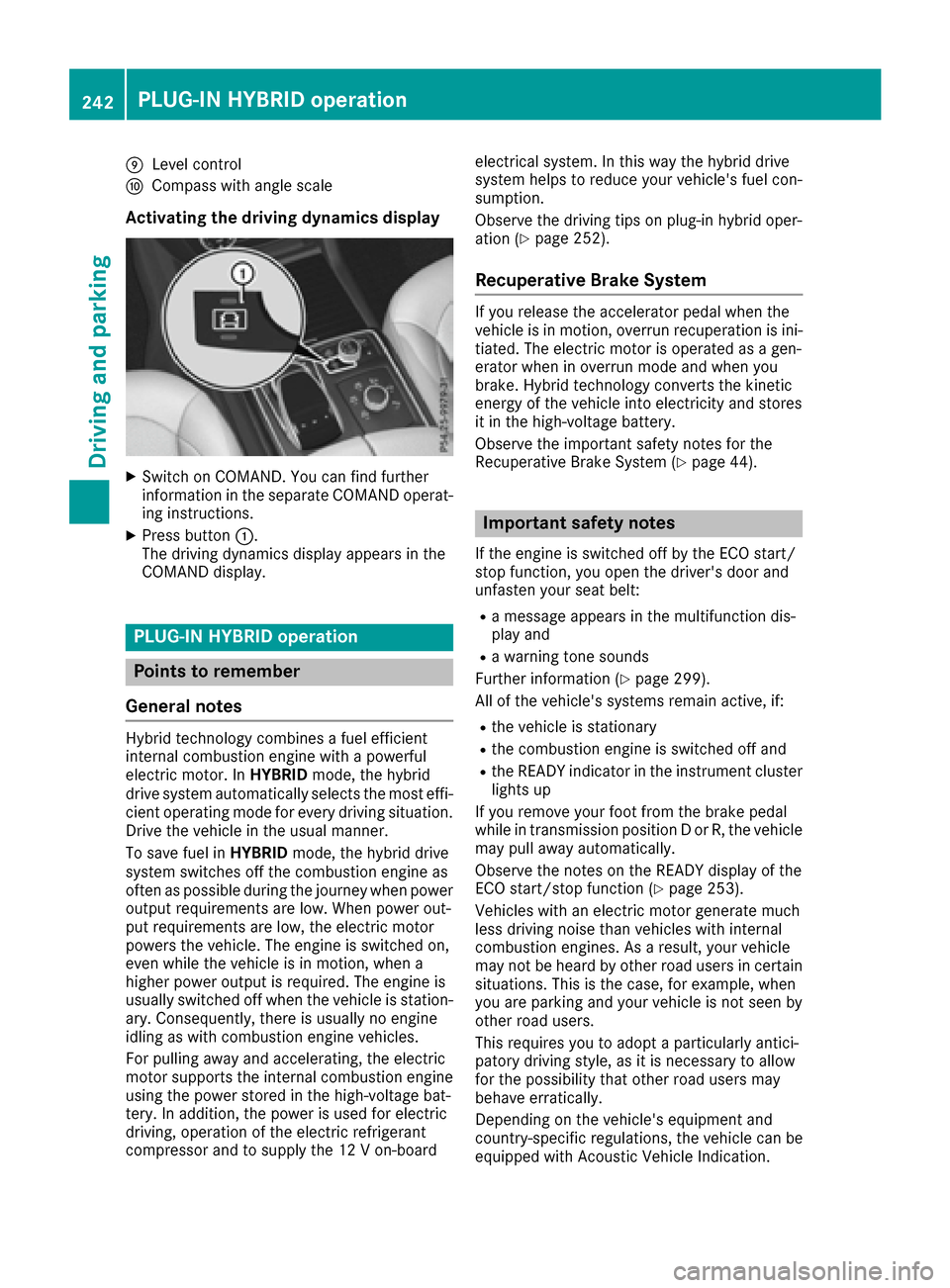
XSwitch on COMAND. You can find further
information in the separate COMAND operat-
ing instructions.
XPress button:.
The driving dynamics display appears in the
COMAND display.
PLUG-IN HYBRID operation
Points to remember
General notes
Hybrid technology combines a fuel efficient
internal combustion engine with a powerful
electric motor. In HYBRIDmode, the hybrid
drive system automatically selects the most effi-
cient operating mode for every driving situation. Drive the vehicle in the usual manner.
To save fuel in HYBRIDmode, the hybrid drive
system switches off the combustion engine as
often as possible during the journey when power
output requirements are low. When power out-
put requirements are low, the electric motor
powers the vehicle. The engine is switched on,
even while the vehicle is in motion, when a
higher power output is required. The engine is
usually switched off when the vehicle is station-
ary. Consequently, there is usually no engine
idling as with combustion engine vehicles.
For pulling away and accelerating, the electric
motor supports the internal combustion engine
using the power stored in the high-voltage bat-
tery. In addition, the power is used for electric
driving, operation of the electric refrigerant
compressor and to supply the 12 V on-board electrical system. In this way the hybrid drive
system helps to reduce your vehicle's fuel con-
sumption.
Observe the driving tips on plug-in hybrid oper-
ation (
Ypage 252).
Recuperative Brake System
If you release the accelerator pedal when the
vehicle is in motion, overrun recuperation is ini-
tiated. The electric motor is operated as a gen-
erator when in overrun mode and when you
brake. Hybrid technology converts the kinetic
energy of the vehicle into electricity and stores
it in the high-voltage battery.
Observe the important safety notes for the
Recuperative Brake System (
Ypage 44).
Important safety notes
If the engine is switched off by the ECO start/
stop function, you open the driver's door and
unfasten your seat belt:
Ra message appears in the multifunction dis-
play and
Ra warning tone sounds
Further information (
Ypage 299).
All of the vehicle's systems remain active, if:
Rthe vehicle is stationary
Rthe combustion engine is switched off and
Rthe READY indicator in the instrument cluster
lights up
If you remove your foot from the brake pedal
while in transmission position D or R, the vehicle
may pull away automatically.
Observe the notes on the READY display of the
ECO start/stop function (
Ypage 253).
Vehicles with an electric motor generate much
less driving noise than vehicles with internal
combustion engines. As a result, your vehicle
may not be heard by other road users in certain
situations. This is the case, for example, when
you are parking and your vehicle is not seen by
other road users.
This requires you to adopt a particularly antici-
patory driving style, as it is necessary to allow
for the possibility that other road users may
behave erratically.
Depending on the vehicle's equipment and
country-specific regulations, the vehicle can be
equipped with Acoustic Vehicle Indication.
242PLUG-IN HYBRID operation
Driving and parking