display MERCEDES-BENZ GLE-CLASS COUPE 2016 Owner's Manual
[x] Cancel search | Manufacturer: MERCEDES-BENZ, Model Year: 2016, Model line: GLE-CLASS COUPE, Model: MERCEDES-BENZ GLE-CLASS COUPE 2016Pages: 382, PDF Size: 8.83 MB
Page 33 of 382
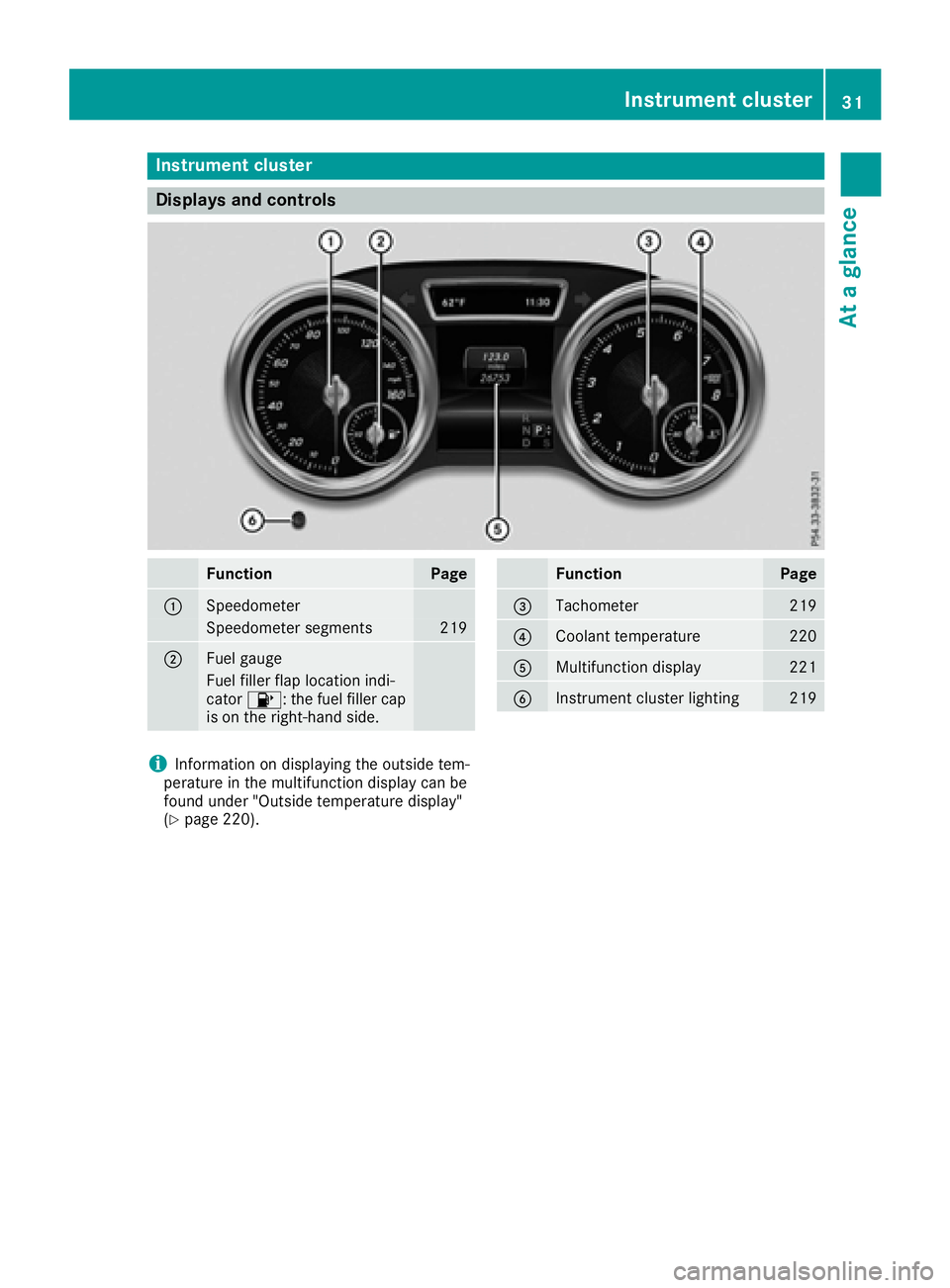
Instrument cluster
Displays and controls
FunctionPage
:Speedometer
Speedometer segments219
;Fue lgauge
Fue lfiller flap location indi-
cator 8: thefuel filler cap
is on th eright-hand side .
FunctionPage
=Tachometer219
?Coolan ttemperature22 0
AMultifunction display221
BInstrumen tcluste rlighting21 9
iInformation on displayin gth eoutside tem-
peratur ein th emultifunction display can be
foun dunder "Outside temperature display"
(
Ypage 220).
Instrument cluster31
At a glance
Page 35 of 382
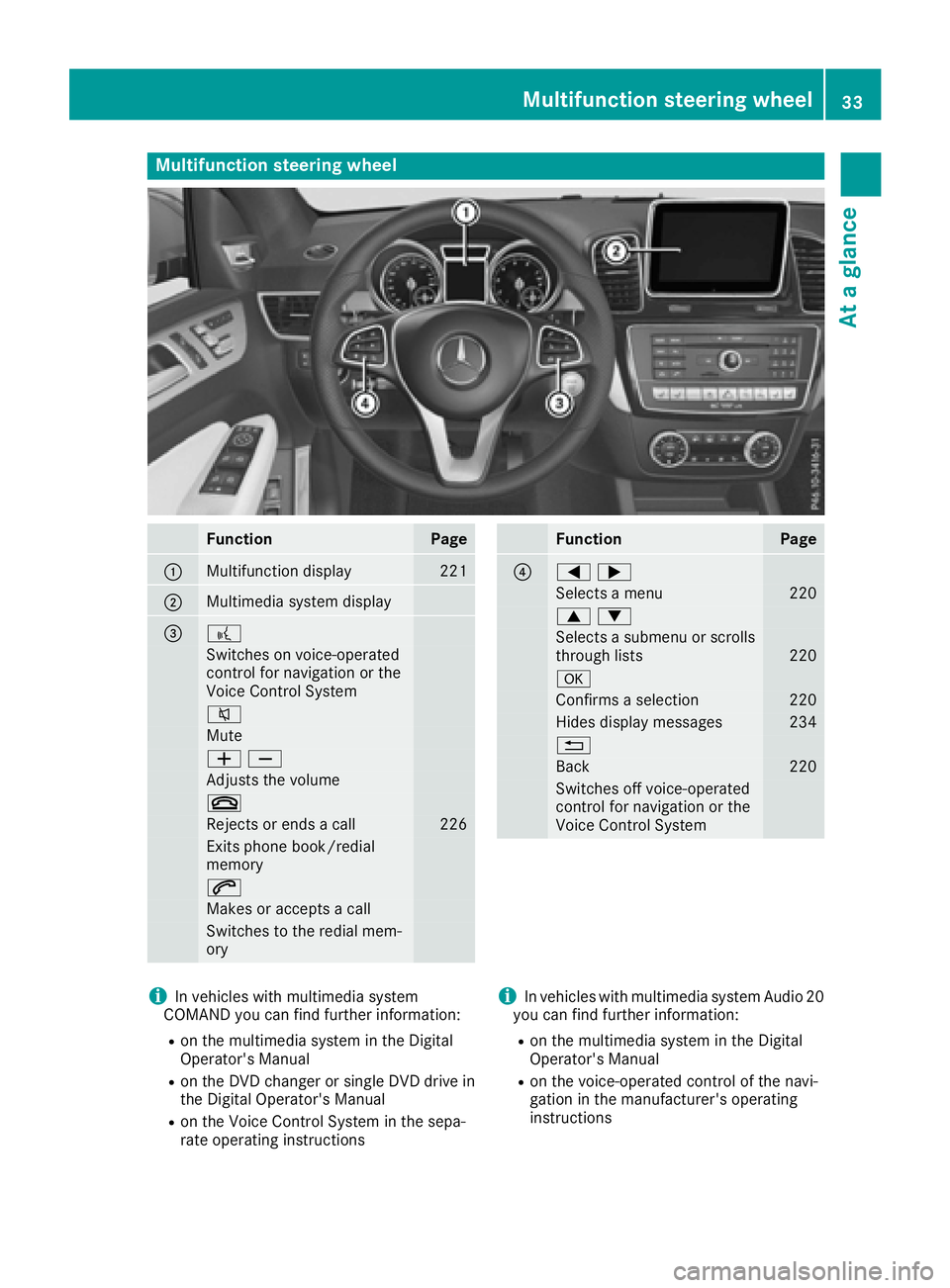
Multifunction steering wheel
FunctionPage
:Multifunction display221
;Multimedia system display
=?
Switches on voice-operated
control for navigation or the
Voice Control System
8
Mute
WX
Adjusts the volume
~
Rejects or ends a call226
Exits phone book/redial
memory
6
Makes or accepts a call
Switches to the redial mem-
ory
FunctionPage
?=;
Selects a menu220
9:
Selects a submenu or scrolls
through lists220
a
Confirms a selection220
Hides display messages234
%
Back220
Switches off voice-operated
control for navigation or the
Voice Control System
iIn vehicles with multimedia system
COMAND you can find further information:
Ron the multimedia system in the Digital
Operator's Manual
Ron the DVD changer or single DVD drive in
the Digital Operator's Manual
Ron the Voice Control System in the sepa-
rate operating instructions
iIn vehicles with multimedia system Audio 20
you can find further information:
Ron the multimedia system in the Digital
Operator's Manual
Ron the voice-operated control of the navi-
gation in the manufacturer's operating
instructions
Multifunction steering wheel33
At a glance
Page 37 of 382
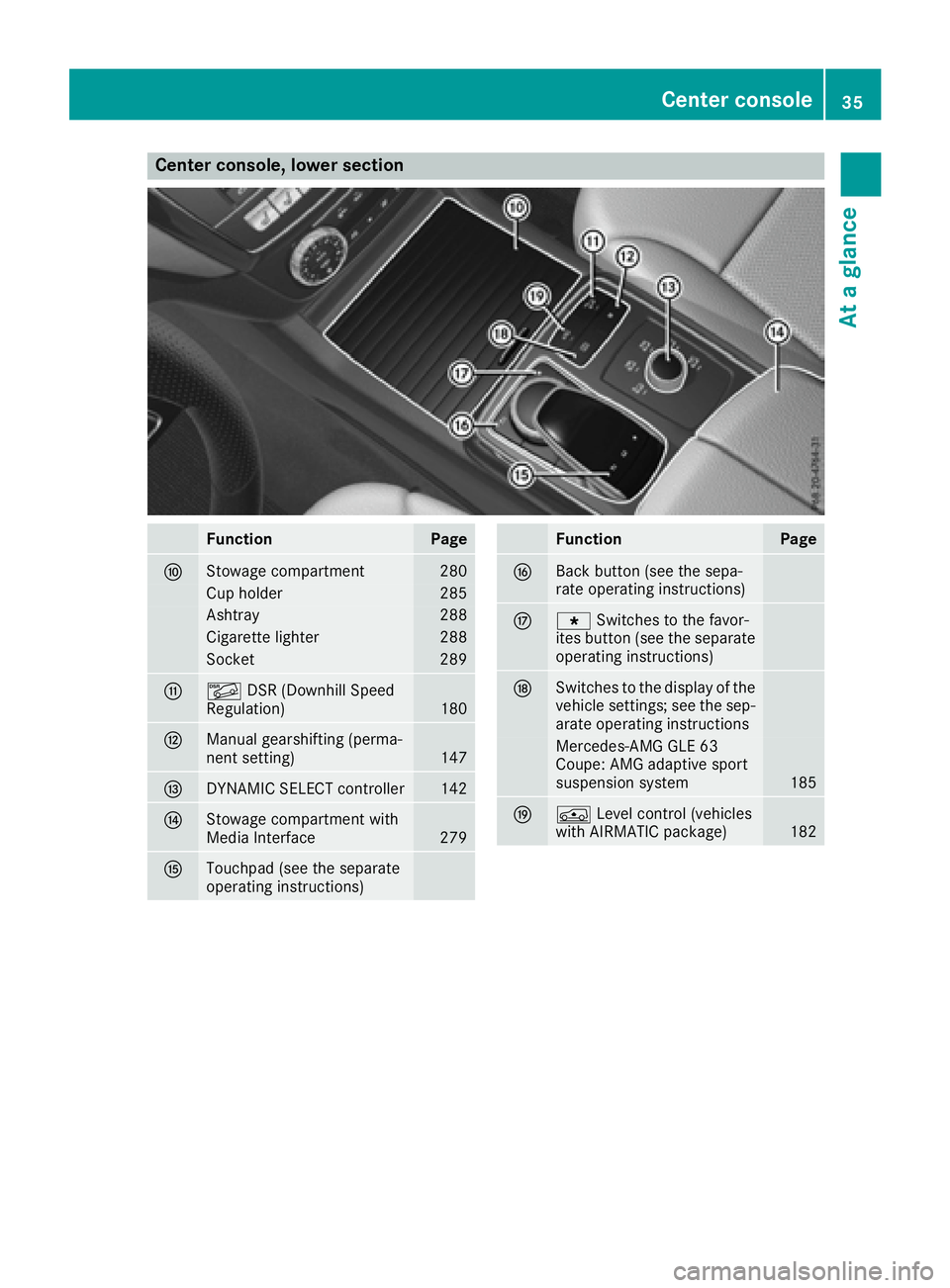
Center console, lower section
FunctionPage
FStowage compartment280
Cup holder285
Ashtray288
Cigarette lighter288
Socket289
GÃDSR (Downhill Speed
Regulation)180
HManual gearshifting (perma-
nent setting)147
IDYNAMIC SELECT controller142
JStowage compartment with
Media Interface279
KTouchpad (see the separate
operating instructions)
FunctionPage
LBack button (see the sepa-
rate operating instructions)
Mg Switches to the favor-
ites button (see the separate
operating instructions)
NSwitches to the display of the
vehicle settings; see the sep-
arate operating instructions
Mercedes-AMG GLE 63
Coupe: AMG adaptive sport
suspension system
185
OÁ Level control (vehicles
with AIRMATIC package)182
Center console35
At a glance
Page 41 of 382
Never modify parts of the restraint system.
Never tamper with the wiring, the electronic
components or their software.
If it is necessary to modify an air bag system to
accommodate a person with disabilities, con-
tact an authorized Mercedes-Benz Center for
details. USA only: for further information con-
tact our Customer Assistance Center at
1-800-FOR-MERCedes (1‑800‑367‑ 6372).
Restraint system warning lamp
The functions of the restraint system are
checked after the ignition is switched on and at
regular intervals while the engine is running.
Therefore, malfunctions can be detected in
good time.
The 6 restraint system warning lamp in the
instrument cluster lights up when the ignition is
switched on. It goes out no later than a few sec- onds after the vehicle is started. The compo-
nents of the restraint system are in operational
readiness.
A malfunction has occurred if the 6restraint
system warning lamp:
Rdoes not light up after the ignition is switched
on
Rdoes not go out after a few seconds with the
engine running
Rlights up again while the engine is running
GWARNING
If restraint system is malfunctioning, restraint
system components may be triggered unin-
tentionally or might not be triggered at all in
the event of an accident with a high rate of
vehicle deceleration. This can affect the Emer- gency Tensioning Device or air bag, for exam-
ple. This poses an increased risk of injury or
even fatal injury.
Have the restraint system checked and
repaired in a qualified specialist workshop as
soon as possible.
PASSENGER AIR BAG indicator lamp
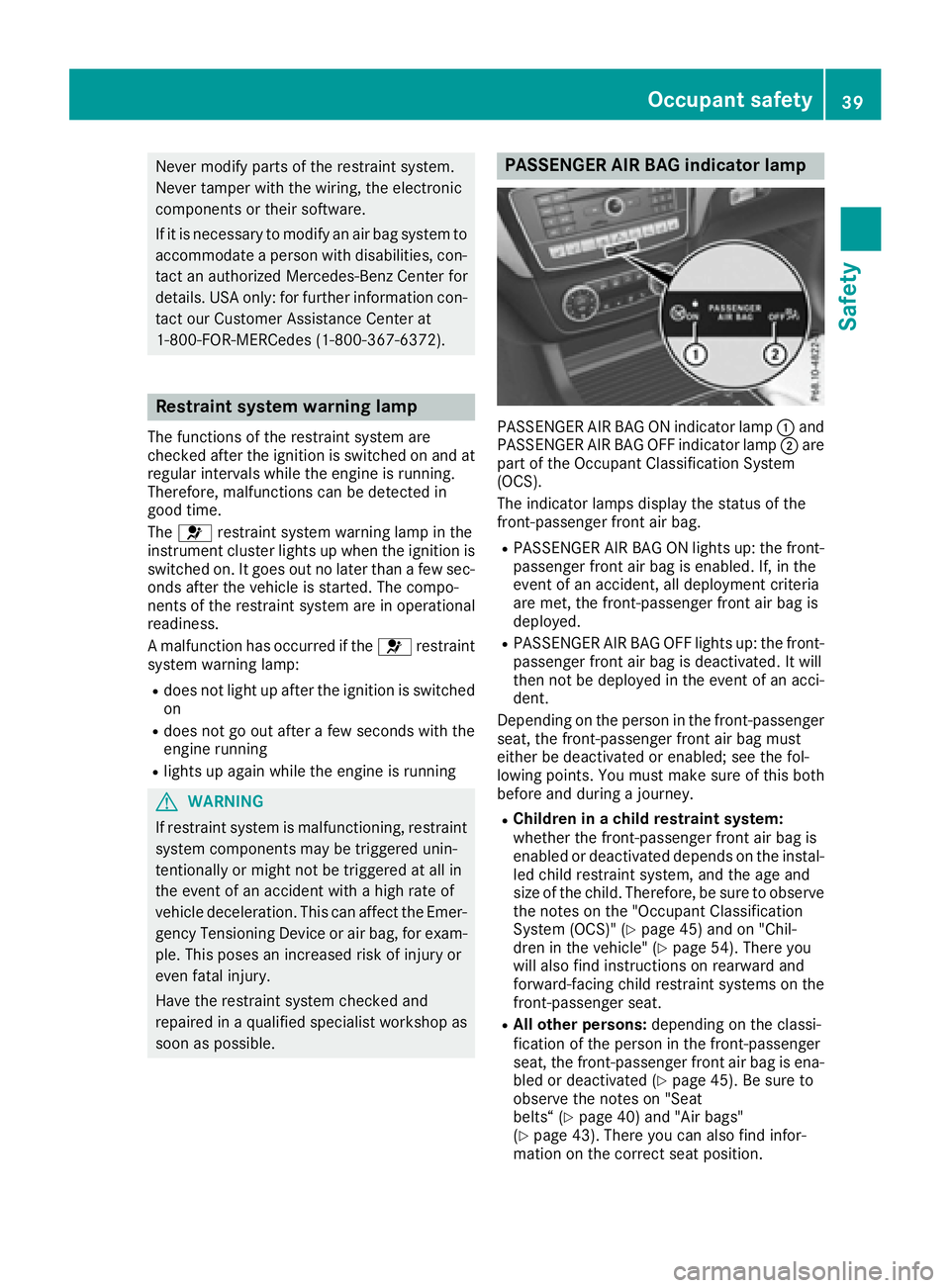
PASSENGER AIR BAG ON indicator lamp :and
PASSENGER AIR BAG OFF indicator lamp ;are
part of the Occupant Classification System
(OCS).
The indicator lamps display the status of the
front-passenger front air bag.
RPASSENGER AIR BAG ON lights up: the front-
passenger front air bag is enabled. If, in the
event of an accident, all deployment criteria
are met, the front-passenger front air bag is
deployed.
RPASSENGER AIR BAG OFF lights up: the front-
passenger front air bag is deactivated. It will
then not be deployed in the event of an acci-
dent.
Depending on the person in the front-passenger
seat, the front-passenger front air bag must
either be deactivated or enabled; see the fol-
lowing points. You must make sure of this both
before and during a journey.
RChildren in a child restraint system:
whether the front-passenger front air bag is
enabled or deactivated depends on the instal-
led child restraint system, and the age and
size of the child. Therefore, be sure to observe
the notes on the "Occupant Classification
System (OCS)" (
Ypage 45) and on "Chil-
dren in the vehicle" (Ypage 54). There you
will also find instructions on rearward and
forward-facing child restraint systems on the
front-passenger seat.
RAll other persons: depending on the classi-
fication of the person in the front-passenger
seat, the front-passenger front air bag is ena-
bled or deactivated (
Ypage 45). Be sure to
observe the notes on "Seat
belts“ (
Ypage 40) and "Air bags"
(Ypage 43). There you can also find infor-
mation on the correct seat position.
Occupant safety39
Safety
Z
Page 48 of 382
The system does not deactivate:
Rthe side impact air bag
Rthe window curtain air bag
Rthe Emergency Tensioning Devices
In the following situation, the side impact air bag and the Emergency Tensioning Device are deac-
tivated:
ROCS has not categorized the person on the
front-passenger seat as an adult or a person
of corresponding stature and
Rthe seat belt tongue of the seat belt is not
inserted into the front-passenger seat belt
buckle
Prerequisites
To be classified correctly, the front passenger
must sit:
Rwith the seat belt fastened correctly
Rin an almost upright position with their back
against the seat backrest
Rwith their feet resting on the floor, if possible
If the front passenger does not observe these
conditions, OCS may produce a false classifica-
tion, e.g. because the front passenger:
Rtransfers their weight by supporting them-
selves on a vehicle armrest
Rsits in such a way that their weight is raised
from the seat cushion
If it is absolutely necessary to install a child
restraint system on the front-passenger seat, be
sure to observe the correct positioning of the
child restraint system. Never place objects
under or behind the child restraint system, e.g.
cushions. The entire base of the child restraint
system must always rest on the seat cushion of the front-passenger seat. The backrest of the
forward-facing child restraint system must lie as
flat as possible against the backrest of the front-
passenger seat.
The child restraint system must not touch the
roof or be subjected to a load by the head
restraint. Adjust the angle of the seat backrest
and the head restraint position accordingly.
Only then can OCS be guaranteed to function
correctly. Always observe the child restraint sys-
tem manufacturer's installation instructions.
Occupant Classification System opera-
tion (OCS)
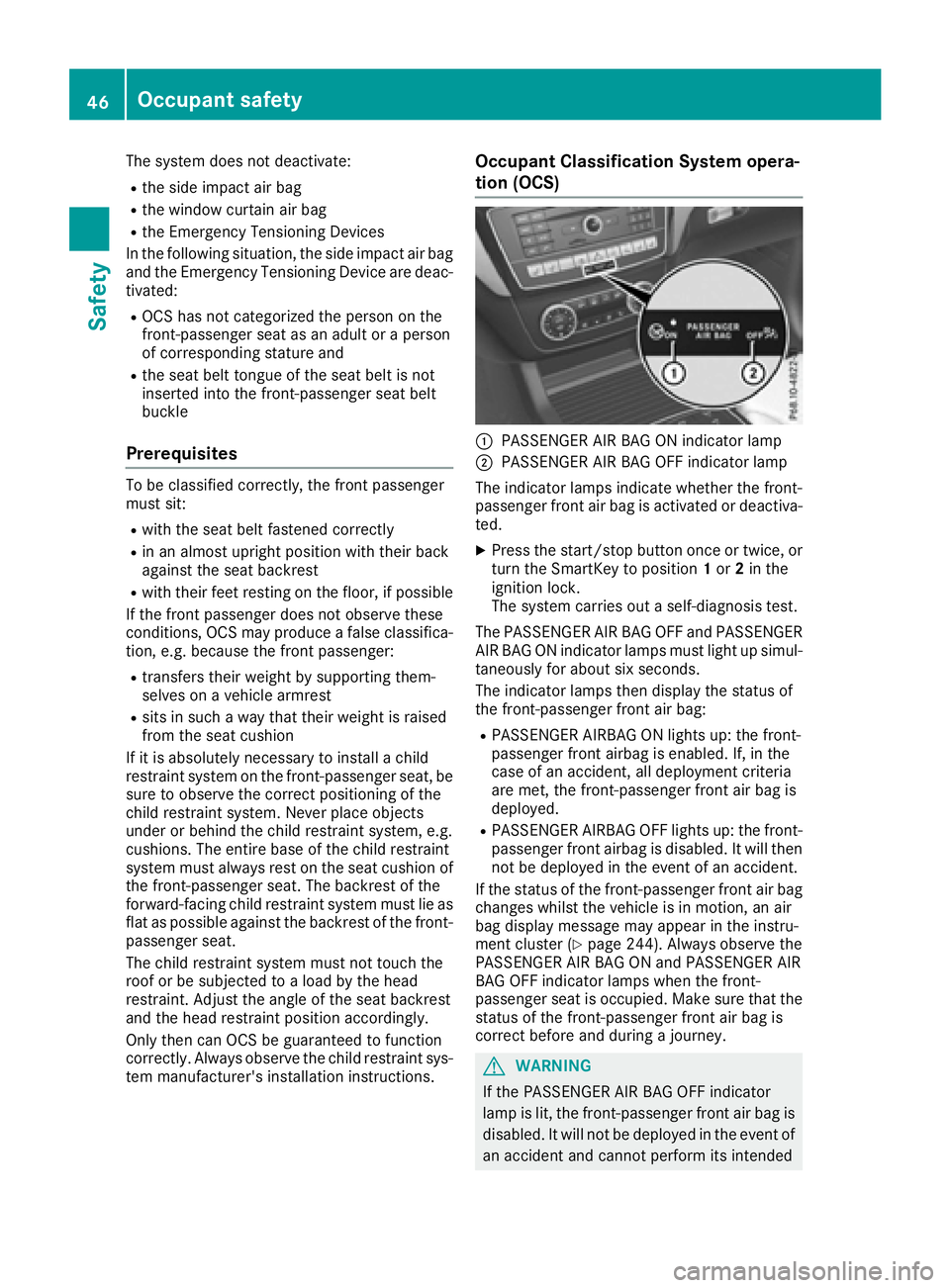
:PASSENGER AIR BAG ON indicator lamp
;PASSENGER AIR BAG OFF indicator lamp
The indicator lamps indicate whether the front-
passenger front air bag is activated or deactiva- ted.
XPress the start/stop button once or twice, or
turn the SmartKey to position 1or 2in the
ignition lock.
The system carries out a self-diagnosis test.
The PASSENGER AIR BAG OFF and PASSENGER
AIR BAG ON indicator lamps must light up simul-
taneously for about six seconds.
The indicator lamps then display the status of
the front-passenger front air bag:
RPASSENGER AIRBAG ON lights up: the front-
passenger front airbag is enabled. If, in the
case of an accident, all deployment criteria
are met, the front-passenger front air bag is
deployed.
RPASSENGER AIRBAG OFF lights up: the front-
passenger front airbag is disabled. It will then
not be deployed in the event of an accident.
If the status of the front-passenger front air bag changes whilst the vehicle is in motion, an air
bag display message may appear in the instru-
ment cluster (
Ypage 244). Always observe the
PASSENGER AIR BAG ON and PASSENGER AIR
BAG OFF indicator lamps when the front-
passenger seat is occupied. Make sure that the
status of the front-passenger front air bag is
correct before and during a journey.
GWARNING
If the PASSENGER AIR BAG OFF indicator
lamp is lit, the front-passenger front air bag is
disabled. It will not be deployed in the event of
an accident and cannot perform its intended
46Occupant safety
Safety
Page 51 of 382

passenger seat may not be used. Do not
install a child restraint system on the front-
passenger seat. Have the Occupant Classifi-
cation System (OCS) checked and repaired
immediately at a qualified specialist work-
shop.
GWARNING
Objects between the seat surface and the
child restraint system could affect OCS oper- ation. This could result in the front-passenger
air bag not functioning as intended during an
accident. This poses an increased risk of
injury or even fatal injury.
Do not place any objects between the seat
surface and the child restraint system. The
entire base of the child restraint system must
always rest on the seat cushion of the front-
passenger seat. The backrest of the forward-
facing child restraint system must, as far as
possible, be resting on the backrest of the
front-passenger seat. Always comply with the
child restraint system manufacturer's instal-
lation instructions.
After the system self-test, the PASSENGER AIR
BAG OFF or PASSENGER AIR BAG ON indicator
lamp displays the status of the front-passenger
front air bag (
Ypage 46).
For more information about the OCS, see "Prob-
lems with the Occupant Classification System"
(
Ypage 50).
Occupant safety49
Safety
Z
Page 65 of 382
COLLISION PREVENTION ASSIST
PLUS
General information
iObserve the "Important safety notes" sec-
tion (Ypage 60).
COLLISION PREVENTION ASSIST PLUS consists
of a distance warning function with an autono-
mous braking function and adaptive Brake
Assist.
COLLISION PREVENTION ASSIST PLUS can help
you to minimize the risk of a front-end collision
with a vehicle ahead or reduce the effects of
such a collision.
If COLLISION PREVENTION ASSIST PLUS
detects that there is a risk of a collision, you will
be warned visually and acoustically. If you do not
react to the visual and audible collision warning,
autonomous braking can be initiated in critical
situations. If you apply the brake yourself in a
critical situation, the COLLISION PREVENTION
ASSIST PLUS adaptive Brake Assist assists you.
Important safety notes
In particular, the detection of obstacles can be
impaired if:
Rthere is dirt on the sensors or anything else
covering the sensors
Rthere is snow or heavy rain
Rthere is interference by other radar sources
Rthere are strong radar reflections, for exam-
ple in parking garages
Ra narrow vehicle traveling in front, e.g. a
motorbike
Ra vehicle traveling in front on a different line
Rnew vehicles or after a service on the COLLI-
SION PREVENTION ASSIST PLUS system
Observe the notes in the section on breaking-
in (
Ypage 133).
Following damage to the front end of the vehicle,
have the configuration and operation of the
radar sensor checked at a qualified specialist
workshop. This also applies to collisions at slow
speeds where there is no visible damage to the
front of the vehicle.
Switching on/off
The COLLISION PREVENTION ASSIST PLUS is
automatically active after switching on the igni-
tion.
You can activate or deactivate COLLISION PRE-
VENTION ASSIST PLUS in the on-board com-
puter (
Ypage 228). When deactivated, the dis-
tance warning function and the autonomous
braking function are also deactivated.
If COLLISION PREVENTION ASSIST PLUS is
deactivated, the æsymbol appears in the
assistance graphics display.
Distance warning function
General information
The distance warning function can help you to
minimize the risk of a front-end collision with a
vehicle ahead or reduce the effects of such a
collision. If the distance warning function
detects that there is a risk of a collision, you will
be warned visually and acoustically.
Important safety notes
iObserve the "Important safety notes" sec-
tion for driving safety systems (Ypage 60).
GWARNING
The distance warning function does not react:
Rto people or animals
Rto oncoming vehicles
Rto crossing traffic
Rwhen cornering
Thus, the distance warning function cannot
provide a warning in all critical situations.
There is a risk of an accident.
Always pay careful attention to the traffic sit-
uation and be ready to brake.
GWARNING
The distance warning function cannot always
clearly identify objects and complex traffic
situations.
In such cases, the distance warning function
may:
Rgive an unnecessary warning
Rnot give a warning
Driving safety systems63
Safety
Z
Page 66 of 382
There is a risk of an accident.
Always pay careful attention to the traffic sit-uation and do not rely solely on the distance
warning function.
Function
Starting at a speed of around 4 mph (7 km/h),
the distance warning function warns you if you
rapidly approach a vehicle in front. An intermit-
tent warning tone will then sound, and the ·
distance warning lamp will light up in the instru-
ment cluster.
XBrake immediately in order to increase the
distance from the vehicle in front.
or
XTake evasive action, provided it is safe to do
so.
Due to the nature of the system, particularly
complicated but non-critical driving conditions
may also cause the system to display a warning.
With the help of the radar sensor system, the
distance warning function can detect obstacles
that are in the path of your vehicle for an exten-
ded period of time.
Up to a speed of around 44 mph (70 km/h), the
distance warning function can also react to sta-
tionary obstacles, such as stopped or parked
vehicles.
Autonomous braking function
If the driver does not react to the distance warn-
ing signal in a critical situation, COLLISION PRE-
VENTION ASSIST PLUS can assist with the
autonomous braking function.
The autonomous braking function:
Rgives the driver more time to react to critical
driving situations
Rcan help the driver to avoid an accident or
Rreduces the effects of an accident
Vehicles without DISTRONIC PLUS: the
autonomous braking function is available in the
following speed ranges:
R4 - 65 mph (7 - 105 km/h) for moving objects
R4 - 31 mph (7 - 50 km/h) for stationary
objects Vehicles with DISTRONIC PLUS:
the autono-
mous braking function is available in the follow-
ing speed ranges:
R4 - 124 mph (7 - 200 km/h) for moving
objects
R4 - 31 mph (7 - 50 km/h) for stationary
objects
Due to the nature of the system, particularly
complicated but non-critical driving conditions
may also cause the Autonomous Braking Func-
tion to intervene.
If the autonomous braking function requires a
particularly high braking force, preventative
passenger protection measures (PRE-SAFE
®)
are activated simultaneously (Ypage 52).
Adaptive Brake Assist
General information
iObserve the "Important safety notes" sec-
tion (Ypage 60).
With the help of adaptive Brake Assist, the dis-
tance warning signal can detect obstacles that
are in the path of your vehicle for an extended
period of time.
If adaptive Brake Assist detects a risk of colli-
sion with the vehicle in front, it calculates the
braking force necessary to avoid a collision. If
you apply the brakes forcefully, adaptive Brake
Assist will automatically increase the braking
force to a level suitable for the traffic conditions.
Adaptive Brake Assist provides braking assis-
tance in hazardous situations at speeds above
4 mph (7 km/h). It uses radar sensor technology
to assess the traffic situation.
Up to a speed of approximately 155 mph
(250 km/h), Adaptive Brake Assist is capable of
reacting to moving objects that have already
been detected as such at least once over the
period of observation.
Up to a speed of approximately 44 mph
(70 km/h), Adaptive Brake Assist reacts to sta-
tionary obstacles.
If adaptive Brake Assist demands particularly
high braking force, preventative passenger pro- tection measures (PRE-SAFE
®) are activated
simultaneously (Ypage 52).
XKeep the brake pedal depressed until the
emergency braking situation is over.
ABS prevents the wheels from locking.
64Driving safety systems
Safety
Page 68 of 382

!Do not tow vehicles with 4MATIC with the
front or rear axle raised.
ESP
®is only deactivated if the åwarning
lamp is lit continuously.
If the ÷ warning lamp and the åwarning
lamp are lit continuously, ESP
®is not available
due to a malfunction.
Observe the information on warning lamps
(
Ypage 270) and display messages which may
be shown in the instrument cluster
(
Ypage 235).
iOnly use wheels with the recommended tire
sizes. Only then will ESP®function properly.
Characteristics of ESP®
General information
If the ÷ ESP warning lamp goes out before
beginning the journey, ESP®is automatically
active.
If ESP
®intervenes, the ÷ESP®warning lamp
flashes in the instrument cluster.
If ESP
®intervenes:
XDo not deactivate ESP®under any circum-
stances.
XOnly depress the accelerator pedal as far as
necessary when pulling away.
XAdapt your driving style to suit the prevailing
road and weather conditions.
ECO start/stop function
The ECO start/stop function switches the
engine off automatically when the vehicle stops
moving. The engine starts automatically when
the driver wants to pull away again. ESP
®
remains in its previously selected status. Exam-
ple: if ESP®was deactivated before the engine
was switched off, ESP®remains deactivated
when the engine is switched on again.
Deactivating/activating ESP®
Important safety notes
iObserve the "Important safety notes" sec-
tion (Ypage 60). You can select between the following states of
ESP
®:
RESP®is activated.
RESP®is deactivated.
GWARNING
If you deactivate ESP
®, ESP®no longer sta-
bilizes the vehicle. There is an increased risk
of skidding and an accident.
Only deactivate ESP
®in the situations descri-
bed in the following.
It may be best to deactivate ESP
®in the follow-
ing situations:
Rwhen using snow chains
Rin deep snow
Ron sand or gravel
iActivate ESP®as soon as the situations
described above no longer apply. ESP®will
otherwise not be able to stabilize the vehicle if
the vehicle starts to skid or a wheel starts to
spin.
!Avoid spinning the driven wheels for an
extended period with ESP®deactivated. You
could otherwise damage the drivetrain.
!Avoid spinning the driven wheels for an
extended period with ESP®deactivated. You
could otherwise damage the drivetrain.
Deactivating/activating ESP®
ESP®OFF button (except Mercedes-AMG vehi-
cles)
66Driving safety systems
Safety
Page 96 of 382
Useful information
i
This Operator's Manual describes all models
and all standard and optional equipment of
your vehicle available at the time of publica-
tion of the Operator's Manual. Country-spe-
cific differences are possible. Please note
that your vehicle may not be equipped with all
features described. This also applies to
safety-related systems and functions.
iRead the information on qualified specialist
workshops (Ypage 26).
Correct driver's seat position
GWARNING
You could lose control of your vehicle if you do the following while driving:
Radjust the driver's seat, head restraint,
steering wheel or mirrors
Rfasten the seat belt
There is a risk of an accident.
Adjust the driver's seat, head restraint, steer-
ing wheel and mirror and fasten your seat belt before starting the engine.
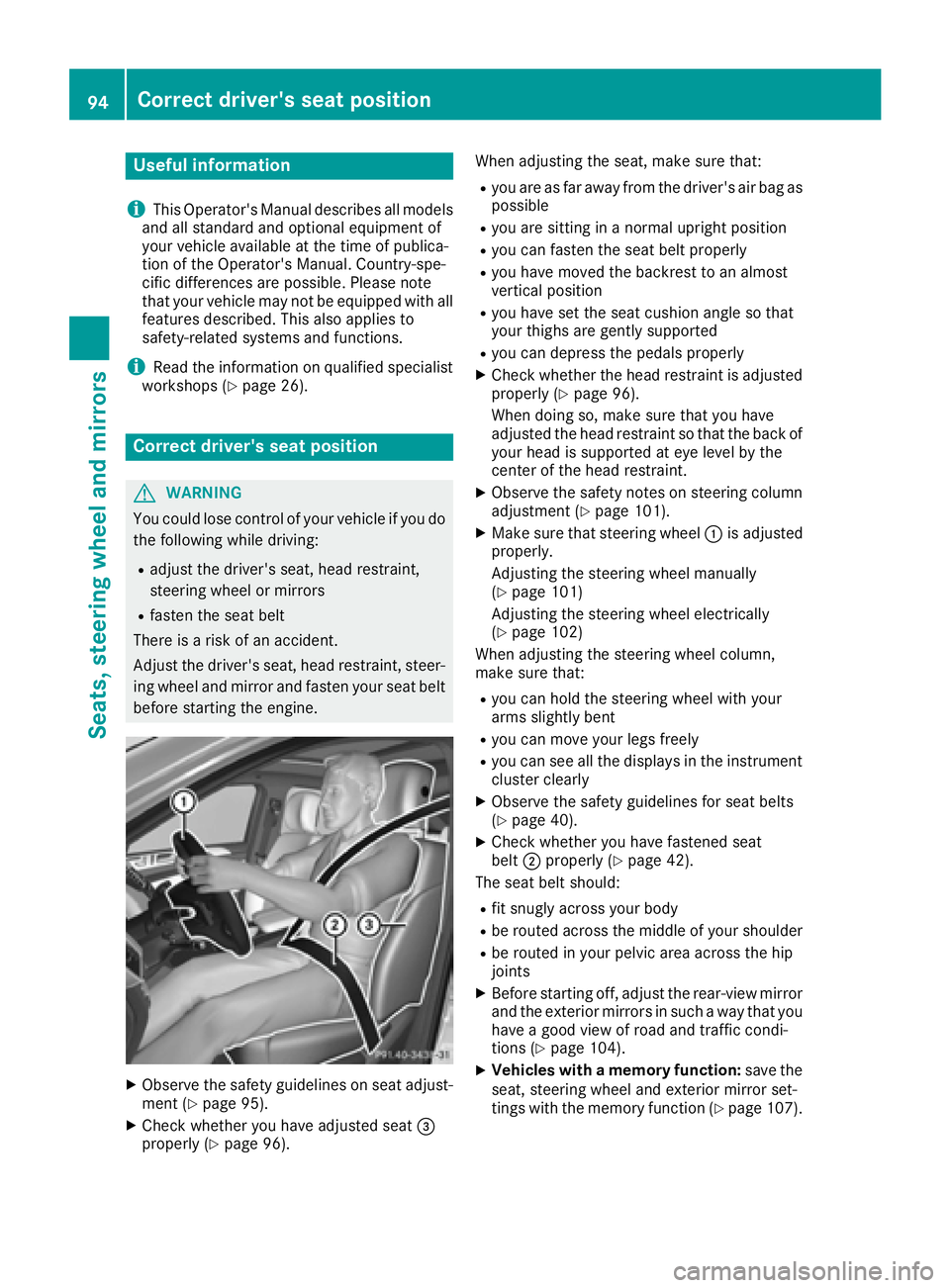
XObserve the safety guidelines on seat adjust-
ment (Ypage 95).
XCheck whether you have adjusted seat =
properly (Ypage 96). When adjusting the seat, make sure that:
Ryou are as far away from the driver's air bag as
possible
Ryou are sitting in a normal upright position
Ryou can fasten the seat belt properly
Ryou have moved the backrest to an almost
vertical position
Ryou have set the seat cushion angle so that
your thighs are gently supported
Ryou can depress the pedals properly
XCheck whether the head restraint is adjusted
properly (Ypage 96).
When doing so, make sure that you have
adjusted the head restraint so that the back of
your head is supported at eye level by the
center of the head restraint.
XObserve the safety notes on steering column
adjustment (Ypage 101).
XMake sure that steering wheel :is adjusted
properly.
Adjusting the steering wheel manually
(
Ypage 101)
Adjusting the steering wheel electrically
(
Ypage 102)
When adjusting the steering wheel column,
make sure that:
Ryou can hold the steering wheel with your
arms slightly bent
Ryou can move your legs freely
Ryou can see all the displays in the instrument cluster clearly
XObserve the safety guidelines for seat belts
(Ypage 40).
XCheck whether you have fastened seat
belt ;properly (Ypage 42).
The seat belt should:
Rfit snugly across your body
Rbe routed across the middle of your shoulder
Rbe routed in your pelvic area across the hip
joints
XBefore starting off, adjust the rear-view mirror
and the exterior mirrors in such a way that you
have a good view of road and traffic condi-
tions (
Ypage 104).
XVehicles with a memory function: save the
seat, steering wheel and exterior mirror set-
tings with the memory function (
Ypage 107).
94Correct driver's seat position
Seats, steering wheel and mirrors