lane assist MERCEDES-BENZ GLE-CLASS COUPE 2016 Owners Manual
[x] Cancel search | Manufacturer: MERCEDES-BENZ, Model Year: 2016, Model line: GLE-CLASS COUPE, Model: MERCEDES-BENZ GLE-CLASS COUPE 2016Pages: 382, PDF Size: 8.83 MB
Page 5 of 382
1, 2, 3 ...
4ETS (Electronic Traction System)see ETS/4ETS (Electronic Trac-
tion System)
4MATIC (permanent four-wheel
drive) .................................................. 180
12 V socket
see Sockets
115 V socket ...................................... 289
360° camera
Cleaning ........................................ .312
Display in the multimedia system .. 198
Function/notes .............................1 97
A
ABS (Anti-lock Braking System)
Display message ............................ 235
Function/notes ................................ 60
Important safety notes .................... 60
Warning lamp ................................. 268
Accident
Automatic measures after an acci-
dent ................................................. 53
Activating/deactivating cooling
with air dehumidification ................. 124
Active Blind Spot Assist
Activating/deactivating (on-
board computer) ............................ 228
Display message ............................ 255
Function/information .................... 206
Trailer towing ................................. 209
Active Curve System
Display message ............................ 253
Function/notes ............................. 183
Active Driving Assistance package .. 206
Active Lane Keeping Assist
Activating/deactivating (on-
board computer) ............................ 228
Display message ............................ 255
Function/information .................... 209
Trailer towing ................................. 211
Active Parking Assist
Display message ............................ 256
Exiting a parking space .................. 192
Function/notes ............................. 189
Important safety notes .................. 189 Parking .......................................... 191
ADAPTIVE BRAKE ................................. 68
Adaptive Brake Assist
Function/notes ................................ 64
Adaptive Damping System
Function/notes ............................. 185
Adaptive Highbeam Assist
Display message ............................ 249
Function/notes ............................. 111
Switching on/off ........................... 112
Additives (engine oil) ........................ 371
ADS (Adaptive Damping System)
Function/notes ............................. 182
Air bags
Deployment ..................................... 50
Display message ............................ 244
Front air bag (driver, front
passenger) ....................................... 44
Important safety notes .................... 43
Introduction ..................................... 43
Knee bag .......................................... 44
Occupant Classification System
(OCS) ............................................... 45
PASSENGER AIR BAG indicator
lamps ............................................... 39
Side imp act a
ir bag .......................... 45
Window curtain air bag .................... 45
Air filter (display message) .............. 252
AIR FLOW ........................................... 126
Air vents
Glove box ....................................... 131
Important safety notes .................. 131
Rear ............................................... 132
Setting ........................................... 131
Setting the center air vents ........... 131
Setting the side air vents ............... 131
Air-conditioning system
see Climate control
AIRMATIC package
ADS (Adaptive Damping System) ... 182
Function/notes ............................. 182
Alarm
ATA (Anti-Theft Alarm system) ......... 70
Switching off (ATA) .......................... 70
Switching the function on/off
(ATA) ................................................ 70
Index3
Page 10 of 382
Driving safetysystems
AB S(Anti-loc kBraking System) ...... .60
ADAPTIVE BRAKE ............................. 68
Adaptive Brake Assist ...................... 64
BAS (Brake Assist System) .............. 61
BAS PLUS with Cross-Traffic
Assist ............................................... 61
COLLISION PREVENTION ASSIST
PLUS ................................................ 63
Distance warning function ............... 63
EBD (electronic brake force distri-
bution) ............................................. 68
ESP
®(Electronic Stability Pro-
gram) ............................................... 65
Important safety information ........... 60
Overview .......................................... 60
PRE-SAFE
®Brake ............................. 68
STEER CONTROL ............................. 70
Driving system
AIRMATIC package ........................ 182
Driving systems
360°camera .................................. 197
Active Blind Spot Assist ................. 206
Active Curve System ...................... 183
Active Driving Assistance pack-
age ................................................. 206
Active Lane Keeping Assist ............ 209
Active Parking Assist ..................... 189
ADS ............................................... 182
AMG adaptive sport suspension
system ........................................... 185
ATTENTION ASSIST ........................ 200
Blind Spot Assist ............................ 203
Cruise control ................................ 168
Display message ............................ 253
DISTRONIC PLUS ........................... 170
DISTRONIC PLUS with Steering
Assist and Stop&Go Pilot ............... 177
HOLD function ............................... 179
Lane Keeping Assist ...................... 205
PARKTRONIC ................................. 186
Rear view camera .......................... 193
Traffic Sign Assist .......................... 202
Driving tips
Automatic transmission ................. 145
Brakes ........................................... 162
Break-in period .............................. 133
DISTRONIC PLUS ........................... 176 Downhill gradient ........................... 162
Drinking and driving ....................... 160
Driving in winter ............................. 164
Driving on flooded roads ................ 163
Driving on sand .............................. 167
Driving on wet roads ...................... 163
Driving over obstacles ................... 167
Exhaust check ............................... 160
Fuel ................................................ 160
G
eneral .......................................... 160
Hydroplaning ................................. 163
Icy road surfaces ........................... 164
Limited braking efficiency on sal-
ted roads ....................................... 163
Off-road driving .............................. 165
Off-road fording ............................. 164
Snow chains .................................. 333
Tire ruts ......................................... 167
Towing a trailer .............................. 212
Traveling uphill ............................... 167
Wet road surface ........................... 162
DSR (Downhill Speed Regulation)
Display message ............................ 254
Function/notes ............................. 180
DVD video
Operating (on-board computer) ..... 225
DYNAMIC SELECT controller
Automatic transmission ................. 142
E
EASY-ENTRY featureActivating/deactivating ................. 230
Function/notes ............................. 103
EASY-EXIT feature
Crash-responsive ........................... 104
Function/notes ............................. 103
Switching on/off ........................... 230
EBD (electronic brake force distri-
bution)
Display message ............................ 237
Function/notes ................................ 68
ECO display
Function/notes ............................. 161
On-board computer ....................... 222
ECO start/stop function
Automatic engine start .................. 139
Automatic engine switch-off .......... 139
8Index
Page 13 of 382
Instrument clusterOverview .......................................... 31
Warning and indicator lamps .......... .32
Instrument cluster lighting .............. 219
Interior lighting
Automatic control .......................... 113
Emergency lighting ........................ 113
Manual control .............................. .113
Overview ........................................ 112
Reading lamp ................................. 112
J
Jack
Storage location ............................ 315
Using ............................................. 353
Jump starting (engine) ......................323
K
Key positions
SmartKey ....................................... 134
Start/Stop button .......................... 134
KEYLESS-GO
Convenience closing feature ............ 87
Deactivation ..................................... 73
Display message ............................ 264
Locking ............................................ 73
Start function ................................... 74
Starting the engine ........................ 136
Unlocking ......................................... 73
Kickdown
Driving tips ....................................1 46
Manual gearshifting ....................... 149
Knee bag .............................................. 44
L
Lamps
see Warning and indicator lamps
Lane Keeping Assist
Activating/deactivating ................. 228
Display message ............................ 255
Function/information .................... 205
see Active Lane Keeping Assist
Lap time (RACETIMER) ...................... 232
LATCH-type (ISOFIX) child seat
anchors ................................................ 56
Level control (display message) ...... 253License plate lamp (display mes-
sage)
................................................... 247
Light function, active
Display message ............................ 248
Light sensor (display message) ....... 248
Lights
Adaptive Highbeam Assist ............. 111
Automatic headlamp mode ............ 108
Cornering light function ................. 111
Hazard warning lamps ................... 110
High beam flasher .......................... 110
High-beam headlamps ................... 110
Light switch ................................... 108
Low-beam headlamps .................... 109
Parking lamps ................................ 109
Rear fog lamp ................................ 109
Standing lamps .............................. 109
Switching the daytime running
lamps on/off (on-board com-
puter) ............................................. 229
Turn signals ................................... 110
see Interior lighting
Loading guidelines ............................ 278
Locking
see Central locking
Locking (doors)
Automatic ........................................ 79
Emergency locking ........................... 80
From inside (central locking but-
ton) .................................................. 79
Locking centrally
see Central locking
Locking verification signal (on-
board computer) ............................... 230
Low-beam headlamps
Display message ............................ 246
Switching on/off ........................... 109
Lumbar support
Adjusting (on the seat) ..................... 98
Luxury head restraints ....................... 97
M
M+S tires............................................ 332
Malfunction message
see Display messages
Matte finish (cleaning instruc-
tions) .................................................. 309
Index11
Page 14 of 382
mbraceCall priority .................................... 294
Display message ............................ 240
Downloading destinations
(COMAND) ..................................... 295
Downloading routes .......................2 97
Emergency call .............................. 292
General notes ................................ 291
Geo fencing ................................... 298
Locating a stolen vehicle ...............2 96
MB info call button ........................ 294
Remote fault diagnosis .................. 296
Remote vehicle locking .................. 296
Roadside Assistance button .......... 293
Search & Send ............................... 295
Self-test ......................................... 292
Speed alert .................................... 297
System .......................................... 291
Triggering the vehicle alarm ........... 298
Vehicle remote unlocking .............. 296
Mechanical key
Function/notes ................................ 74
General notes .................................. 74
Inserting .......................................... 75
Locking vehicle ................................ 80
Removing ......................................... 74
Unlocking the driver's door .............. 80
Media Interface
USB port in the armrest of the
center console ............................... 279
see Separate operating instructions
Memory card (audio) ......................... 225
Memory function ............................... 107
Mercedes-Benz Intelligent Drive
360°camera .................................. 197
Active Blind Spot Assist ................. 206
Active Lane Keeping Assist ............ 209
Active Parking Assist ..................... 189
ATTENTION ASSIST ........................ 200
Blind Spot Assist ............................ 203
DISTRONIC PLUS ........................... 170
DISTRONIC PLUS with Steering
Assist and Stop&Go Pilot ............... 177
General notes ................................ 168
Lane Keeping Assist ...................... 205
PARKTRONIC ................................. 186
PRE-SAFE
®PLUS (anticipatory
occupant protection PLUS) .............. 53 Rear view camera .......................... 193
Traffic Sign Assist .......................... 202
Message memory (on-board com-
puter) .................................................. 234
Mirrors
see Exterior mir rors
se
e Rear-view mirror
see Vanity mirror (in the sun visor)
Mobile phone
Frequencies ................................... 365
Installation ..................................... 365
Menu (on-board computer) ............ 226
Transmission output (maximum) .... 365
Modifying the programming
(SmartKey) ........................................... 74
MOExtended tires .............................. 316
Mounting wheels
Lowering the vehicle ...................... 355
Mounting a new wheel ................... 354
Preparing the vehicle ..................... 352
Raising the vehicle ......................... 353
Removing a wheel .......................... 354
Securing the vehicle against roll-
ing away ........................................ 352
MP3
Operation ....................................... 225
see separate operating instructions
Multifunction display
Function/notes ............................. 221
Permanent display ......................... 229
Multifunction steering wheel
Operating the on-board compute r..2 20
Overview .......................................... 33
Multimedia system
see Separate operating instructions
N
NavigationMenu (on-board computer) ............ 223
see separate operating instructions
Notes on breaking-in a new vehi-
cle ....................................................... 133
12Index
Page 21 of 382
Uniform Tire Quality Grading
Standards (definition) .................... 349
Wear indicator (definition) .............351
Wheel and tire combination ........... 357
Wheel rim (definition) .................... 349
see Flat tire
Top Tether ............................................ 56
Tow-starting
Emergency engine starting ............ 327
Important safety notes .................. 325
Towing a trailer
Axle load, permissible .................... 376
Cleaning the trailer tow hitch ......... 312
Coupling up a trailer ......................2 15
Decoupling a trailer ....................... 216
Driving tips ....................................2 12
ESP
®(Electronic Stability Pro-
gram) ............................................... 67
Important safety notes .................. 212
Installing the ball coupling ............. 213
Lights display message .................. 246
Mounting dimensions .................... 376
Power supply ................................. 217
Pulling away with a trailer .............. 138
Removing the ball coupling ............ 217
Trailer loads ................................... 376
Towing away
Important safety guidelines ........... 325
Installing the towing eye ................ 326
Notes for 4MATIC vehicles ............ 327
Removing the towing eye ...............3 26
Transporting the vehicle ................ 327
With both axles on the ground ....... 326
Towing eye ......................................... 315
Traffic Sign Assist
Display message ............................ 254
Function/notes .............................2 02
Important safety notes .................. 202
Instrument cluster display ............. 202
Trailer coupling
see Towing a trailer
Trailer loads and drawbar nose-
weights ............................................... 217
Trailer towing
Active Blind Spot Assist ................. 209
Active Lane Keeping Assist ............ 211
Blind Spot Assist ............................ 205 PARKTRONIC ................................. 186
Permi
ssibl
e trailer loads and
drawbar noseweights ..................... 217
Transfer case ..................................... 150
Transmission
see Automatic transmission
Transmission position display ......... 143
Transmission position display
(DIRECT SELECT lever) ......................143
Transporting the vehicle .................. 327
Traveling uphill
Brow of hill ..................................... 168
Driving downhill .............................1 68
Maximum gradient-climbing capa-
bility ............................................... 168
Trim pieces (cleaning instruc-
tions) ..................................................3 13
Trip computer (on-board com-
puter) ..................................................2 22
Trip odometer
Calling up ....................................... 222
Resetting (on-board computer) ...... 223
Trunk
see Tailgate
Trunk load (maximum) ......................373
Turn signals
Display message ............................ 246
Switching on/off ........................... 110
Two-way radio
Frequencies ................................... 365
Installation ..................................... 365
Transmission output (maximum) .... 365
TWR (Tongue Weight Rating) (defi-
nition) ................................................. 351
Type identification plate
see Vehicle identification plate
U
UnlockingEmergency unlocking ....................... 80
From inside the vehicle (central
unlocking button) .............................7 9
Upshift indicator (on-board com-
puter, Mercedes-AMG vehicles) .......231
Index19
Page 62 of 382
Drivingsafet ysystems
Overview of drivin gsafet ysystems
In this section ,you will fin dinformation about
th efollowin gdrivin gsafet ysystems :
RABS (Anti-loc kBrakin gSystem)
(Ypage 60)
RBA S (B rakeAssist System) (Ypage 61)
RBASPLU Swit hCross-Traffic Assis t (Brak e
Assist System PLU Swit hCross-Traffic Assist)
(
Ypage 61)
RCOLLISION PREVENTION ASSIST PLU S
(Ypage 63 )
RESP®(Electronic StabilityProgram)
(Ypage 65)
REB D (Electroni cBrak eforc eDistribution )
(Ypage 68 )
RADAPTIV EBRAKE (Ypage 68 )
RPRE-SAF E®Brake (Ypage 68 )
RSTEERCONTROL (Ypage 70)
Important safet ynotes
If you fail to adapt your drivin gstyle or if you are
inattentive ,th edrivin gsafet ysystems can nei-
ther reduce th eris kof an acciden tno roverride
th elaws of physics. Driving safet ysystems are
merely aids designed to assist driving. You are
responsible fo rmaintainin gth edistanc eto th e
vehicle in front, fo rvehicle speed, fo rbraking in
goo dtime, and fo rstayin gin lane. Always adapt
your drivin gstyle to suit th eprevailin groad and
weather condition sand maintain asaf edistanc e
from th evehicle in front. Drive carefully.
The drivin gsafet ysystems described only wor k
as effectively as possible when there is ade-
quat econtact between th etires and th eroad
surface. Pay particular attention to th einforma-
tion regardin gtires ,recommended minimum
tire tread depths etc. in th e"Wheels and tires "
section (
Ypage 330).
In wintr ydrivin gconditions, always use winte r
tires (M+ Stires )and ,if necessary, snow chains.
Only in this way will th edrivin gsafet ysystems
described in this section wor kas effectively as
possible.
ABS (Anti-lock Braking System)
General information
AB Sregulates brake pressure in suc h away that
th ewheels do no tloc kwhen you brake .Thi s
allow syou to continue steerin gth evehicle when
braking .
The ! ABSwarnin glamp in th einstrumen t
cluster lights up when th eignition is switched
on .It goe sout when th eengin eis running .
AB Sworks from aspeed of about 5mph
(8 km/h), regardles sof road-surfac econditions.
AB Sworks on slipper ysurfaces, eve nwhen you
only brake gently.
Important safet ynotes
iObserv eth e"Important safet ynotes" sec -
tion (Ypage 60).
GWARNING
If AB Sis faulty, th ewheels could loc kwhen
braking .The steerability and braking charac -
teristics may be severely impaired. Addition -
ally, further drivin gsafet ysystems are deac -
tivated. There is an increase ddanger of skid-
din gand accidents .
Drive on carefully. Hav eAB Schecke dimme-
diately at aqualified specialis tworkshop .
Whe nAB Sis malfunctioning, other systems ,
includin gdrivin gsafet ysystems ,will also
becom einoperative .Observ eth einformation
on th eAB Swarnin glamp (
Ypage 268) and dis -
play messages whic hmay be shown in th e
instrumen tcluster (
Ypage 235).
Braking
XIf ABS intervenes: continue to depress th e
brake peda lvigorousl yuntil th ebraking sit -
uation is over.
XTo make afull brak eapplication: depress
th ebrake peda lwit hfull force.
If AB Sintervenes when braking ,you will feel a
pulsin gin th ebrake pedal.
The pulsatin gbrake peda lcan be an indication
of hazardous road conditions, and function sas a
reminder to take extr acar ewhil edriving.
60Driving safety systems
Safety
Page 69 of 382

ESP®OFF button (Mercedes-AMG vehicles)
XTo switch off:press button:.
The å ESP®OFF warning lamp in the
instrument cluster lights up.
XTo switch on: press the:button.
The å ESP®OFF warning lamp in the
instrument cluster goes out.
Characteristics when ESP®is deactivated
If ESP®is deactivated and one or more wheels
start to spin, the ÷ESP®warning lamp in the
instrument cluster flashes. In such situations,
ESP
®will not stabilize the vehicle.
If you deactivate ESP®:
RESP®no longer improves driving stability.
REngine torque is no longer limited and the
drive wheels are able to spin.
The spinning of the wheels results in a cutting
action for better traction on loose surfaces.
RTraction control is still activated.
RCOLLISION PREVENTION ASSIST is no longer
available; nor is it activated if you brake firmly
with assistance from ESP
®.
RPRE-SAFE®is no longer available, nor is it
activated if you brake firmly and ESP®inter-
venes.
RPRE-SAFE®Brake is no longer available, it is
also not activated if you brake firmly and ESP®
intervenes.
RESP®still provides support when you brake
firmly.
ESP®trailer stabilization
General information
ESP®trailer stabilization is not available in
Mercedes-AMG vehicles.
If your vehicle/trailer combination begins to
swerve, ESP
®assists you in this situation. ESP®
slows the vehicle down by braking and limiting
the engine output until the vehicle/trailer com-
bination has stabilized.
Important safety notes
GWARNING
If road and weather conditions are poor,
trailer stabilization will not be able to prevent
the vehicle/trailer combination from swerv-
ing. Trailers with a high center of gravity can
tip over before ESP
®can detect this. There is
a risk of an accident.
Always adapt your driving style to the prevail-
ing road and weather conditions.
If your vehicle with trailer (vehicle/trailer com-
bination) begins to lurch, you can only stabilize
the vehicle/trailer combination by depressing
the brake firmly.
Trailer stabilization is active above speeds of
about 37 mph (60 km/h).
ESP
®trailer stabilization does not work if ESP®
is deactivated or disabled because of a malfunc-
tion.
Crosswind Assist
General information
Strong crosswinds can cause your vehicle to
deviate from a straight course. The crosswind
driving assistance function integrated in ESP
®
noticeably reduces these impairments.
ESP®intervenes automatically according to the
direction and intensity of the crosswinds affect-
ing your vehicle.
ESP intervenes with stabilizing braking to assist you in keeping the vehicle in the lane.
Crosswind Assist is active at vehicle speeds
above 50 mph (80 km/h) when driving straight
ahead or cornering gently.
Driving safet ysystem s67
Safety
Z
Page 178 of 382
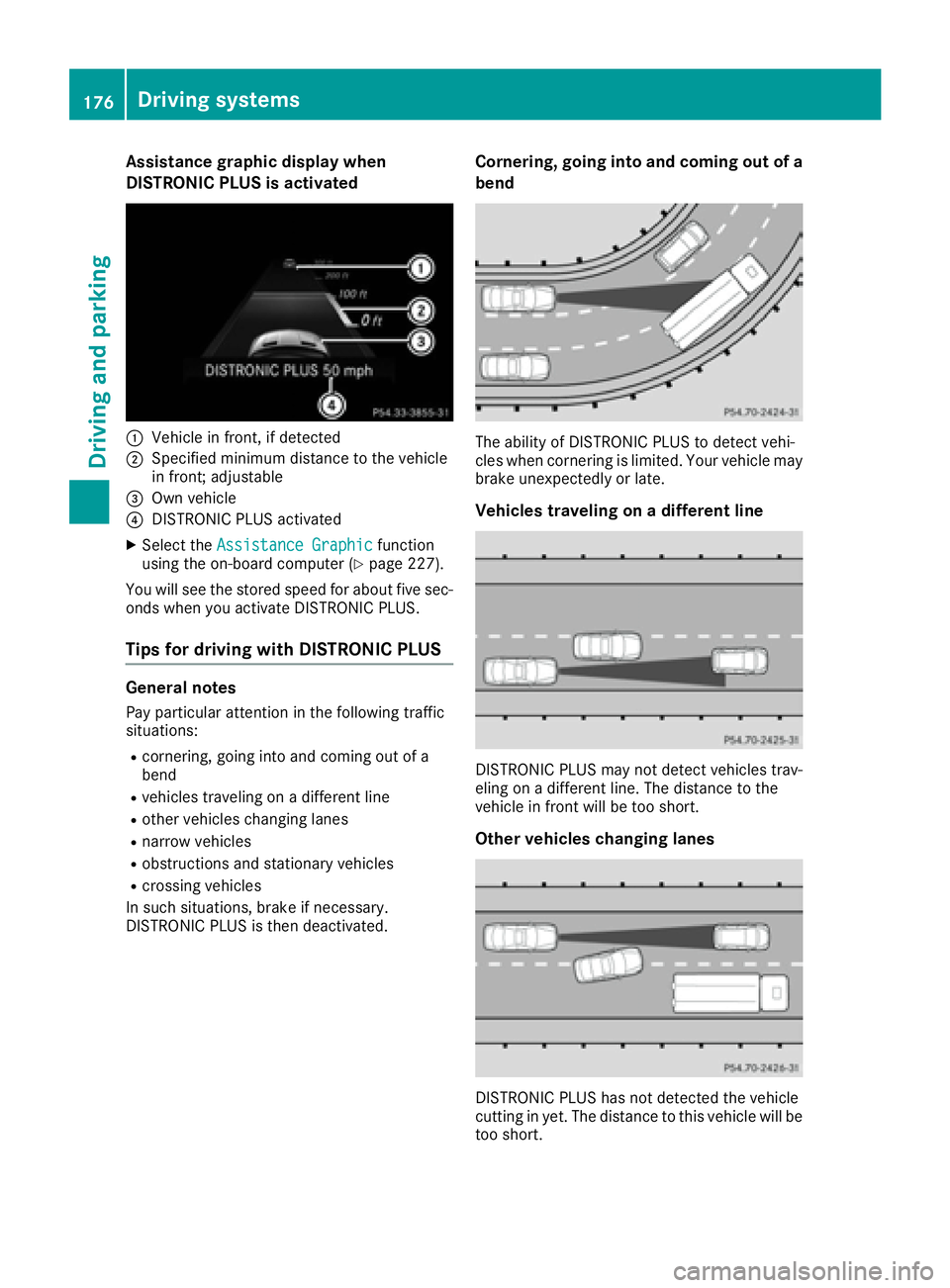
Assistance graphic display when
DISTRONIC PLUS is activated
:Vehiclein front, if detected
;Specified minimum distanc eto th evehicl e
in front; adjustable
=Own vehicl e
?DISTRONI CPLU Sactivated
XSelec tth eAssistanc eGraphi cfunction
usin gth eon-board computer (Ypage 227).
You will see th estore dspee dfor about fiv esec -
onds when you activat eDISTRONI CPLUS.
Tips for driving with DISTRONIC PLUS
General notes
Pay particular attentio nin th efollowin gtraffic
situations:
Rcornering, goin gint oand comin gout of a
ben d
Rvehicles traveling on adifferent lin e
Rother vehicles changing lane s
Rnarrow vehicles
Robstructions and stationary vehicles
Rcrossing vehicles
In suc hsituations, brak eif necessary.
DISTRONI CPLU Sis then deactivated.
Corn ering, going into and coming out ofa
bend
The abilit yof DISTRONI CPLU Sto detect vehi-
cle swhen cornerin gis limited. Your vehicl emay
brak eune xpectedly or late.
Vehicles traveling ona different line
DISTRONI CPLU Smay no tdetect vehicles trav-
elin gon adifferent line. The distanc eto th e
vehicl ein fron twill be to oshort .
Other vehicles changing lanes
DISTRONI CPLU Shas no tdetected th evehicl e
cuttin gin yet .The distanc eto this vehicl ewill be
to oshort .
176Driving systems
Driving and parking
Page 179 of 382
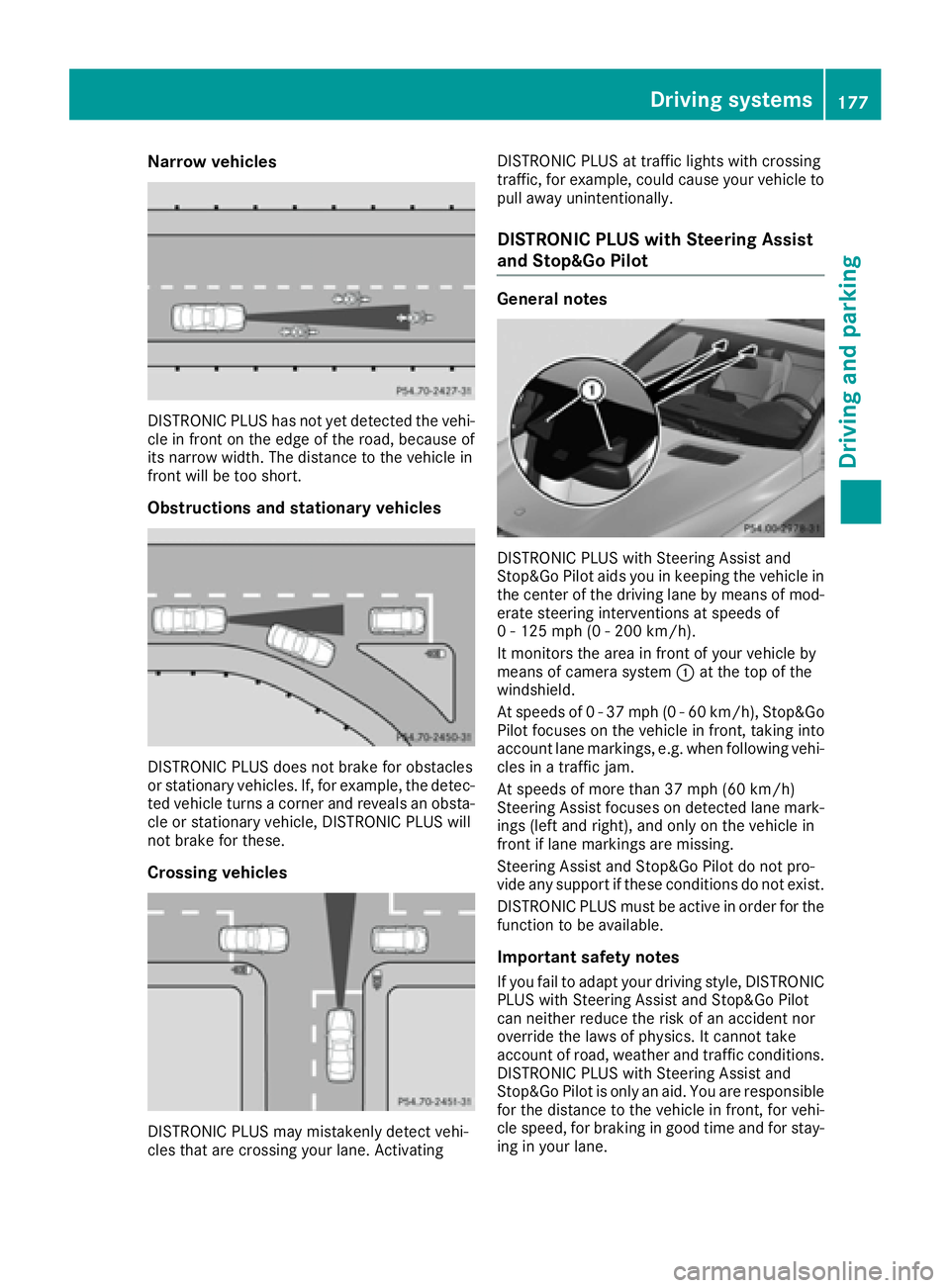
Narrow vehicles
DISTRONIC PLUS has not yet detected the vehi-
cle in front on the edge of the road, because of
its narrow width. The distance to the vehicle in
front will be too short.
Obstructions and stationary vehicles
DISTRONIC PLUS does not brake for obstacles
or stationary vehicles. If, for example, the detec-
ted vehicle turns a corner and reveals an obsta-cle or stationary vehicle, DISTRONIC PLUS will
not brake for these.
Crossing vehicles
DISTRONIC PLUS may mistakenly detect vehi-
cles that are crossing your lane. Activating DISTRONIC PLUS at traffic lights with crossing
traffic, for example, could cause your vehicle to
pull away unintentionally.
DISTRONIC PLUS with Steering Assist
and Stop&Go Pilot
General notes
DISTRONIC PLUS with Steering Assist and
Stop&Go Pilot aids you in keeping the vehicle in
the center of the driving lane by means of mod-
erate steering interventions at speeds of
0 - 125 mph (0 - 200 km/h).
It monitors the area in front of your vehicle by
means of camera system
:at the top of the
windshield.
At speeds of 0 - 37 mph (0 - 60 km/h), Stop&Go Pilot focuses on the vehicle in front, taking into
account lane markings, e.g. when following vehi-
cles in a traffic jam.
At speeds of more than 37 mph (60 km/h)
Steering Assist focuses on detected lane mark-
ings (left and right), and only on the vehicle in
front if lane markings are missing.
Steering Assist and Stop&Go Pilot do not pro-
vide any support if these conditions do not exist.
DISTRONIC PLUS must be active in order for the
function to be available.
Important safety notes
If you fail to adapt your driving style, DISTRONIC
PLUS with Steering Assist and Stop&Go Pilot
can neither reduce the risk of an accident nor
override the laws of physics. It cannot take
account of road, weather and traffic conditions.
DISTRONIC PLUS with Steering Assist and
Stop&Go Pilot is only an aid. You are respo nsible
fo
r the distance to the vehicle in front, for vehi-
cle speed, for braking in good time and for stay-
ing in your lane.
Driving system s177
Driving an d parking
Z
Page 180 of 382
DISTRONIC PLUS with Steering Assist and
Stop&Go Pilot does not detect road and traffic
conditions. If you are following a vehicle which is
driving towards the edge of the road, your vehi-
cle could come into contact with the curb or
other road boundaries. Be particularly aware of
other road users, e.g. cyclists, that are directly
next to your vehicle.
Obstacles such as traffic pylons on the lane or
projecting out into the lane are not detected.
An inappropriate steering intervention, e.g. after
intentionally driving over a lane marking, can becorrected at any time if you steer slightly in the
opposite direction.
DISTRONIC PLUS with Steering Assist and
Stop&Go Pilot cannot continuously keep your
vehicle in lane. In some cases, the steering
intervention is not sufficient to bring the vehicle
back to the lane. In such cases, you must steer
the vehicle yourself to ensure that it does not
leave the lane.
The support provided by the system can be
impaired if:
Rthere is poor visibility, e.g. due to insufficient
illumination of the road, or due to snow, rain,
fog or spray
Rthere is glare, e.g. from oncoming traffic, the
sun or reflections (e.g. when the road surface
is wet)
Rthe windshield is dirty, fogged up, damaged or
covered, for instance by a sticker, in the vicin-
ity of the camera
Rthere are no, several or unclear lane markings
for a lane, e.g. in areas with road construction
work
Rthe lane markings are worn away, dark or cov-
ered up, e.g. by dirt or snow
Rthe distance to the vehicle in front is too small
and the lane markings thus cannot be detec-
ted
Rthe lane markings change quickly, e.g. lanes
branch off, cross one another or merge
Rthe road is narrow and winding
Rthere are strong shadows cast on the road
The system is switched to passive and no longer
assists you by performing steering interventions
if:
Ryou actively change lane
Ryou switch on the turn signal
Rtake your hands off the steering wheel or do
not steer for a prolonged period of time
iSteering Assist and Stop&Go Pilot are acti-
vated again automatically after a lane change
is completed.
Steering Assist and Stop&Go Pilot do not pro-
vide any support:
Ron very sharp corners
Rwhen a loss of tire pressure or a defective tire
has been detected and displayed
Pay attention also to the impo
rtant safety notes
for DISTRONIC PLUS (Ypage 171).
The steering interventions are carried out with a
limited steering moment. The system requires
the driver to keep his hands on the steering
wheel and to steer himself.
If you do not steer yourself or if you take your
hands off the steering wheel for a prolonged
period of time, the system will first alert you with
a visual warning. A steering wheel symbol
appears in the multifunction display. If you have
still not started to steer and have not taken hold
of the steering wheel after five seconds at the
latest, a warning tone also sounds to remind you
to take control of the vehicle. Steering Assist
and Stop&Go Pilot are switched to passive.
DISTRONIC PLUS remains active.
Activating Steering Assist and Stop&Go
Pilot
XActivate the DISTRONIC PLUS with Steering
Assist and Stop&Go Pilot function using the
on-board computer (
Ypage 227).
The DTR+: Steering Assistant Onmes-
sage appears in the multifunction display.
Steering Assist and Stop&Go Pilot are active.
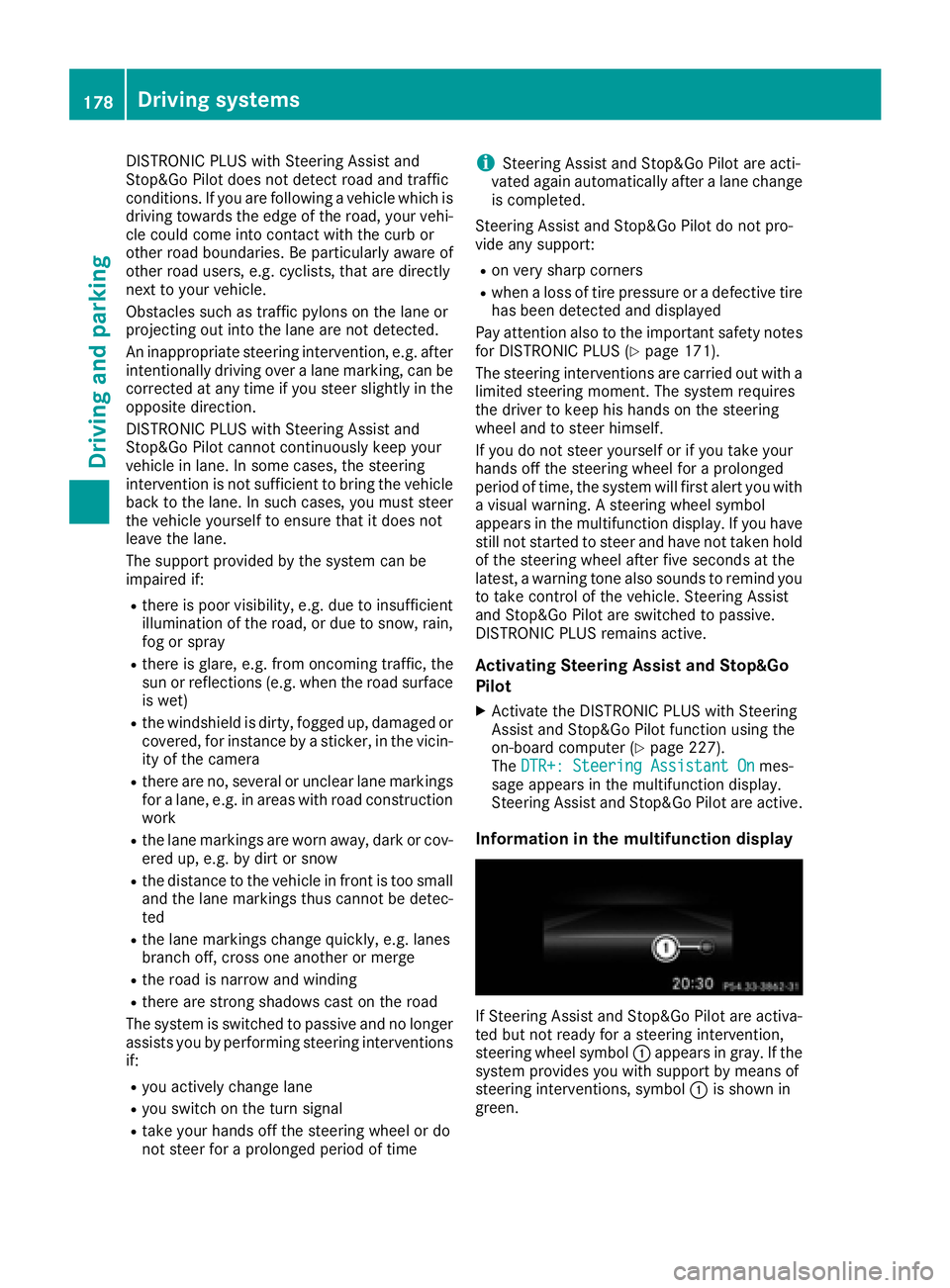
Information in the multifunction display
If Steering Assist and Stop&Go Pilot are activa-
ted but not ready for a steering intervention,
steering wheel symbol :appears in gray. If the
system provides you with support by means of
steering interventions, symbol :is shown in
green.
178Driving system s
Driving an d parking