charging MERCEDES-BENZ GLE-CLASS SUV 2016 User Guide
[x] Cancel search | Manufacturer: MERCEDES-BENZ, Model Year: 2016, Model line: GLE-CLASS SUV, Model: MERCEDES-BENZ GLE-CLASS SUV 2016Pages: 450, PDF Size: 10.52 MB
Page 172 of 450
GWARNING
In the event of a vehicle fire, the internal pres- sure of the high-voltage battery can exceed a
critical value. In this case flammable gas
escapes through a ventilation valve on the
underbody. The gas can ignite. There is a risk
of injury.
Leave the danger zone immediately. Secure
the danger area at a suitable distance, whilst
observing legal requirements.
GDANGER
If you use incorrectly installed mains sockets or adapters, extension cables or similar to
connect the charging cable to a mains socket,
this could lead to fires or an electric shock.
There is a risk of fatal injury.
To avoid hazardous situations, observe the
following:
ROnly connect the charging cable to mains
sockets that:
-are installed correctly and
-have been approved by an electrical spe-
cialist.
RFor safety reasons, only use the charging
cables supplied with the vehicle, or charg-
ing cables which have been approved for
use with this vehicle.
RNever use a damaged charging cable.
RDo not use:
-Extension cables
-Cable drums
-Multiple sockets
RDo not use a socket adapter to connect the
charging cable to the mains socket. The
only exception is if the adapter has been
tested and approved by the manufacturer
for charging the high-voltage battery in an
electric vehicle.
RAlways observe the safety notes in the
socket adapter's operating instructions.
GDANGER
Connecting the charging cable to the vehicle
via an incorrectly installed wallbox or by
means of adapters, extension cables or simi-
lar could cause a fire or an electric shock.
There is a risk of fatal injury.
To avoid hazardous situations, observe the
following:
ROnly connect the charging cable to a wall-
box if:
-the wallbox is installed correctly
-the wallbox has been inspected by a
qualified electrician and
-the charging cable is undamaged
RDo not extend the charging cable
RDo not use an adapter
RAlways observe the safety notes in the wall-
box's operating instructions
The vehicle's high voltage electrical system is
under high voltage.
RDo not tamper with the high-voltage compo-
nents or the orange cables of the high-voltage
electrical system.
RDo not touch high-voltage components or the
orange cables of the high-voltage electrical
system when a vehicle has been involved in a
crash.
RNever touch damaged components or the
damaged orange cables of the high-voltage
electrical system.
RDo not remove the covers of the high-voltage
electrical system components that are
marked with a warning sticker.
General notes
Method of operation
The vehicle is equipped with a high-voltage bat-
tery for driving. The high-voltage battery stores
the energy needed to operate the electric motor
and releases it again.
The electric motor uses energy that has been
stored in the high-voltage battery when pulling
away, accelerating and during the journey.
In overrun mode, kinetic energy is converted by
means of energy recuperation into electrical
170Charging the high-voltage battery
Driving and parking
Page 173 of 450
energy and stored in the high-voltage battery.
Information on overrun mode (Ypage 253).
The high-voltage battery can be charged as fol-
lows:
Rthrough energy recuperation while the vehicle
is in motion
Rthrough the combustion engine while driving
in CHARGE operating mode (Ypage 246)
Rwith the relevant charging cable at an electri-
cal outlet while the vehicle is stationary
Rat a wallbox while the vehicle is stationary
Rat a charging station while the vehicle is sta-
tionary
The high-voltage battery can be charged in a
nominal voltage range from 100 V to 240 V.
You can view the condition of charge of the high-
voltage battery in the multifunction display. You
can find information in "PLUG-IN HYBRID oper-
ation", section "Menus and submenus" under
"Energy flow display" (
Ypage 247).
High and low outside temperatures
Low outside temperatures
At very low outside temperatures the maximum
power output of the high-voltage battery may be
reduced. The high-voltage battery is then no
longer able to provide the normal electrical
power output.
High outside temperatures
To prevent damage to the high-voltage battery
due to very high outside temperatures, the max-
imum power output of the high-voltage battery
is reduced by the vehicle.
Energy consumption and electrical
range
The maximum electrical range is generally
reduced by:
Rhigh and low outside temperatures
Roperating the climate control system
Rswitching on consumers
The battery's physical characteristics are such
that leaving the vehicle parked for long periods
at low outdoor temperatures without charging it
can lead to:
Ra reduction in battery performance
Rlonger charge times
Notes on battery care
Avoid storing or transporting the vehicle at
excessively high or low temperatures over a long
period.
If you park the vehicle and leave it stationary for
long periods:
Rcheck the condition of charge of the high-
voltage battery more often
Rconnect the vehicle to a power supply
This prevents self-discharge and damage to the high-voltage battery.
Terms of use
Please note the information on exceptions and
limitations in warranty documentation and in
the Maintenance Booklet.
Handling the charging cable and charg-
ing cable controls
Do not leave the charging cable controls
(Ypage 172) hanging loose from an electrical
outlet. Otherwise, this could result in a poor
contact with the electrical outlet and malfunc-
tions when charging the vehicle.
To ensure that the brackets within the charging
cable controls are not subjected to incorrect
loads, observe the following:
RNever lift or carry the controls by the charging
cable connector or the mains plug.
RTo transport the charging cable, the charging cable can be:
-wrapped around the controls or
-secured to the housing of the controls
Heat generated by the charging cable
and charging cable connector
Pay attention to the "Important safety notes"
(Ypage 169).
During the charging process, the charging cable
and charging cable connector may heat up.
The charging cable and the charging cable con-
nector will only heat up within the permissible
limiting values, provided that:
Rthe power supply and the charging cable are
not damaged
Rthe instructions for handling the charging
cable and controls on the charging cable are
observed
Charging the high-voltage battery171
Driving and parking
Z
Page 174 of 450
If the charging cable or charging cable connec-
tor become too hot, have the mains power sup-
ply checked.
Protection device against overvoltage
!Overvoltage in the mains supply may dam-
age the vehicle. For this reason, the vehicle is equipped with a protection device against
overvoltage in the mains supply. This device
may be triggered during severe thunder-
storms, for example, and may lead to the buil-
ding's fuse being tripped and an interruption
in the power supply. These functions protect
the vehicle. After the building fuse is switched
on again, the charging process resumes auto-
matically. Following an interruption in the
power supply or tripping of the building's fuse,
it may take up to 10 minutes for charging to
resume automatically.
Switch on the building protection system again
after it has been triggered. Otherwise, the
charging process cannot be continued.
General information about the charging
procedure
Pay attention to the "Important safety notes"
(Ypage 169).
The vehicle socket is located in the rear bumper
on the right below the tail lamp.
The charge socket flap and the vehicle are cen-
trally locked or unlocked simultaneously.
Charging the high-voltage battery via
the electrical outlet
Charging cable for electrical outlets
Important safety notes
!Only use the charging cable to charge the
high-voltage battery. Do not use the charging
cable for other purposes. It may otherwise be
damaged.
The vehicle is supplied with a country-specific
charging cable for connection to a mains socket.
Only use the charging cable supplied with the
vehicle or a charging cable approved for the
vehicle.
iIf you use the supplied 12 A charging cable
to charge a high-voltage battery:
Rthe charge time increases considerably
Relectrical consumption increases consider-
ably
Where possible, charge the high-voltage bat-
tery at a charging station (
Ypage 175). Only
then can certified electrical energy consump-
tion levels be reached.
iThe charging process can vary depending on
the power supply. Therefore, always observe
the local information.
Information about charging from a wallbox
(
Ypage 175).
Information on charging at a charging station
(
Ypage 175).
Stowing the charging cable
The charging cable can be stowed and secured
in the bag provided in the cargo compartment of
the vehicle.
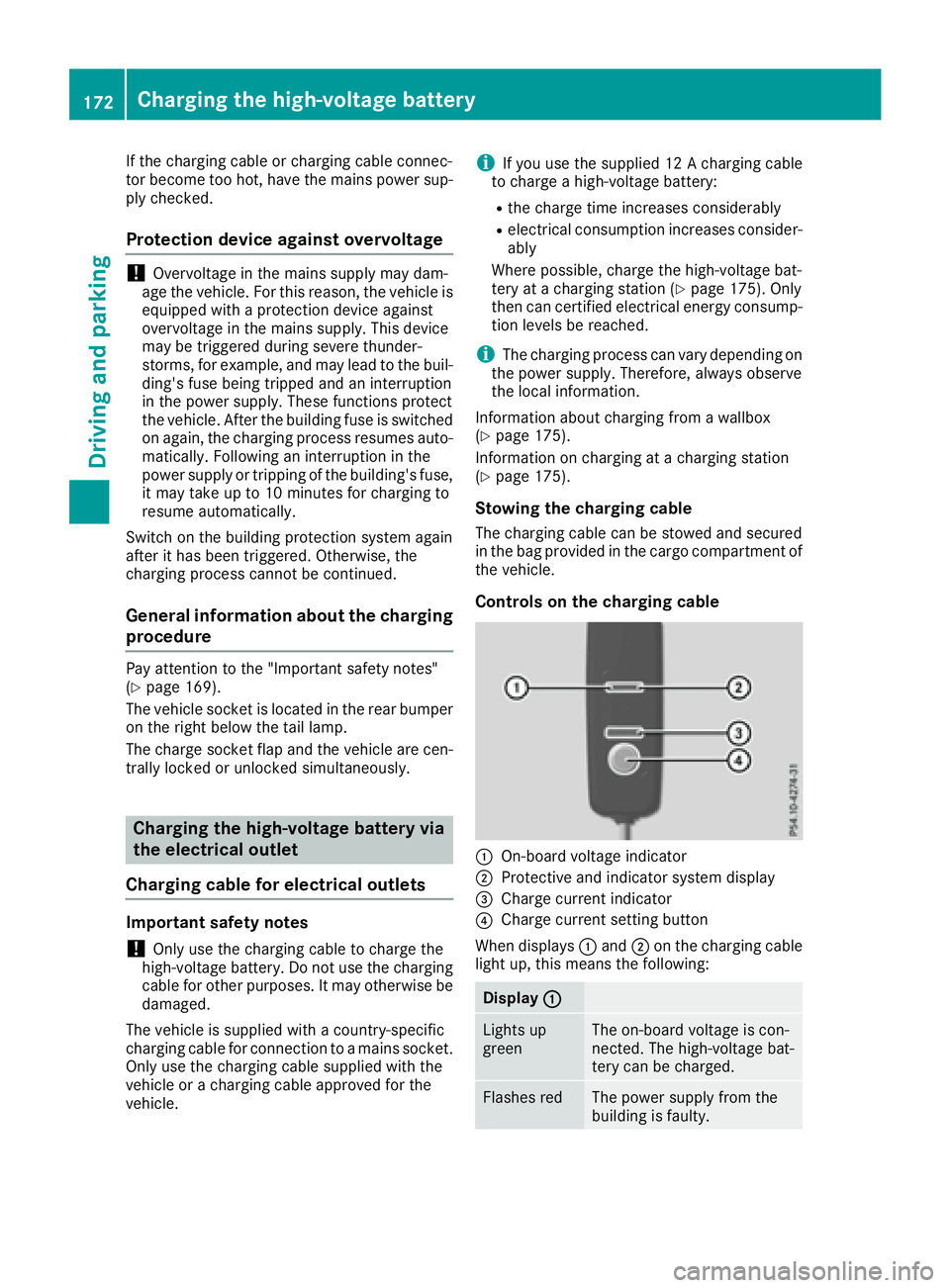
Controls on the charging cable
:On-board voltage indicator
;Protective and indicator system display
=Charge current indicator
?Charge current setting button
When displays :and ;on the charging cable
light up, this means the following:
Display :
Lights up
greenThe on-board voltage is con-
nected. The high-voltage bat-
tery can be charged.
Flashes redThe power supply from the
building is faulty.
172Charging the high-voltage battery
Driving and parking
Page 175 of 450
Display;
Lightsup
greenThere are no malfunctions.
The high-voltage battery can
be charged.
Flashes redThe protective and indicator
system has detecte d amal-
function due to an internal
malfunction .The high-voltage
battery canno tbe charged.
If th econtrol detects residual curren tor amal-
function ,th echarging process is halted. Once
th emalfunction has been rectifie dth echarging
process is resumed automatically.
Fo rinformation on problem srelating to th e
charging process, see (
Ypage 176).
Setting themaximum charg ecurren t
GWARNIN G
If th echarg ecurren tdraw via amain ssocke t
is to ohigh during th echarging process, th e
external electrical system may overheat.
There is aris kof fire.
Befor ebeginning th echarging process, chec k
th emaximum permissibl echarg ecurren t
locally. Consult aqualified exper tto do so
wher enecessary.
If necessary, adjust your vehicle's settings.
!An excessive charg ecurren tcan blow afus e
or lead to overheating of th eexternal powe r
supply. Chec kwhether th eexternal powe r
supply is compatible wit hth eset charg ecur -
rent. If necessary, lower th eset charg ecur -
ren tor use another powe rsocket.
Befor estarting th echarging process at apowe r
socket, chec kth emaximum permissibl echarg e
curren tfor th erelevan tpowe rsocke tor th e
building .
You can set th emaximum permissibl echarg e
current:
Ron th echarging cable control s
Rin theSettingsmen uof th eon-boar dcom-
puter (Ypage 273)
The lower value of th etwo charg ecurren tset -
ting s –on th echarg ecable control sand in th e
on-boar dcomputer –determine sth emaximum
charg ecurrent. If you canno tset th eprecis e maximum permitte
dcharg ecurrent, select th e
next lowes tavailable value .
Only set th emaximum permitte dcharg ecurren t
in th eon-boar dcomputer men uif:
Rit is no tpossibl eto set th echarg ecurren ton
th echarging cable
Rth eprecis emaximum permitte dcharg ecur -
ren tcan only be set via th eon-boar dcom-
puter
Setting th emaximum permitte dcharg ecurren t
on th echarging cable is described below.
XTo adjust th esetting: press butto n?
repeatedly until th edesire dsetting is selec-
te din display =.
RTwo LEDs are flashing: minimum setting
RAllLEDs are flashing: maximum setting
If ,after th echarging process, th echarging cable
is:
Rlef tconnecte dto th epowe rsocket, th ecur -
rentl yselected value swill be used for th enext
charging process.
Rremove dfrom th epowe rsocket, th evalue s
will be reset to th eminimum setting for th e
next charging process. You ma
y then need to
reset th evalue sof th emaximum charg ecur -
rent.
iIf th evehicl erequire smor etime than usual
when charging ,chec kth emaximum charg e
curren tsetting susin gth econtrol son th e
charging cable or in th eon-boar dcomputer' s
menu.
Indicator lam pon th evehicle socket
Whe nth eindicator lamp on th evehicl esocke t
lights up, this mean sth efollowing:
Indicator
lam p
Flashes
orang eThe connection between th e
vehicl eand th ecurren t
source is bein gestablished
before charging begins .
Flashes
greenThe high-voltage battery is
beingcharged.
Flashes redA malfunction has occurred
while charging .
The indicator lamp goe sout
after approximately
90 seconds.
Charging the high-voltage battery17 3
Driving an d parking
Z
Page 176 of 450
Indicator
lamp
Lights up
orangeA charging break for the high-
voltage battery is taking
place.
The indicator lamp goes out
after approximately
90 seconds.
Lights up
greenThe high-voltage battery is
fully charged.
The indicator lamp goes out
after approximately
90 seconds.
iIf the indicator lamp is off, lock or unlock the
vehicle. The indicator lamp then displays the
current status of the charging process again.
Connecting the charging cable
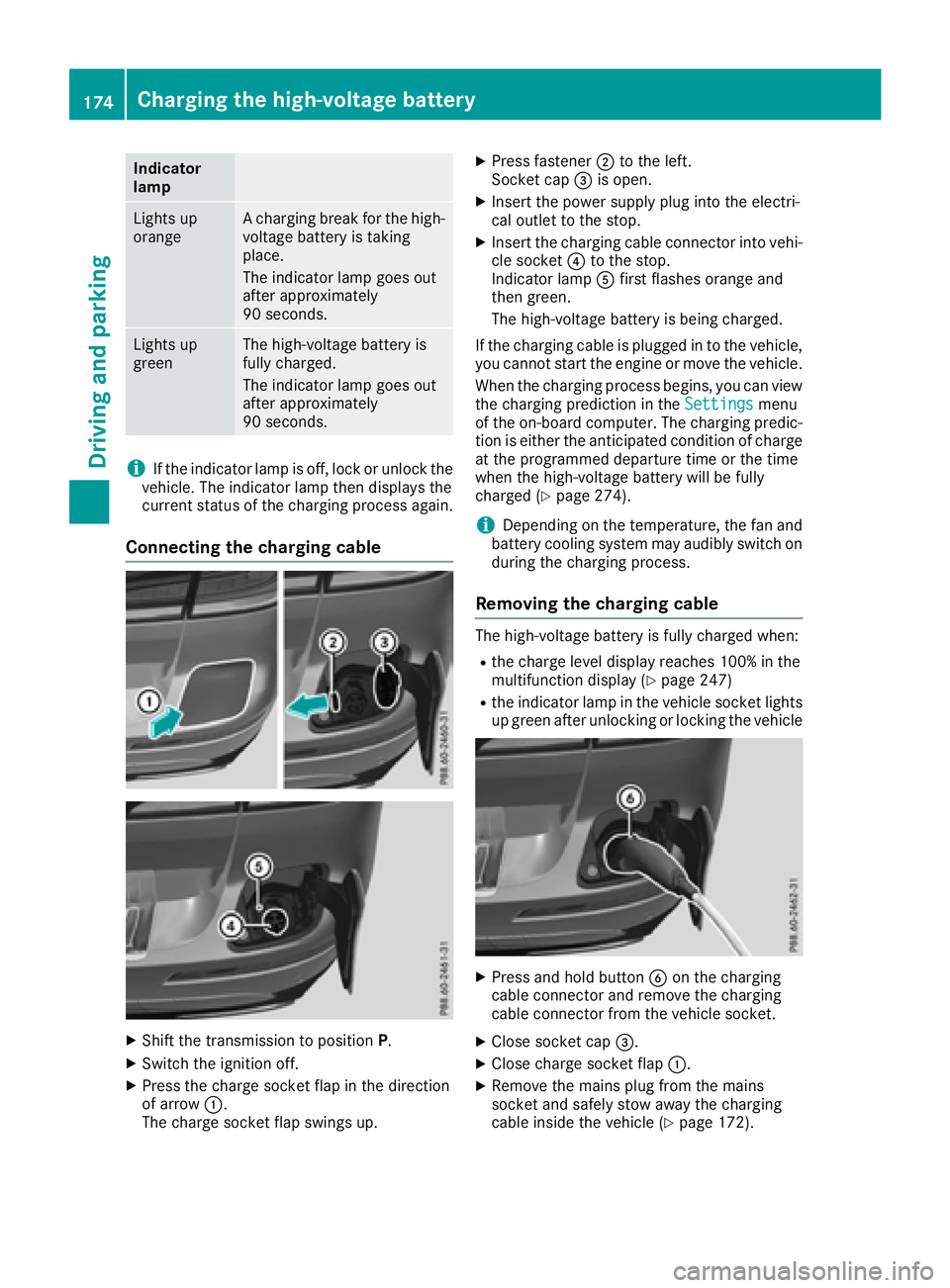
XShift the transmission to position P.
XSwitch the ignition off.
XPress the charge socket flap in the direction
of arrow:.
The charge socket flap swings up.
XPress fastener ;to the left.
Socket cap =is open.
XInsert the power supply plug into the electri-
cal outlet to the stop.
XInsert the charging cable connector into vehi-
cle socket ?to the stop.
Indicator lamp Afirst flashes orange and
then green.
The high-voltage battery is being charged.
If the charging cable is plugged in to the vehicle, you cannot start the engine or move the vehicle.
When the charging process begins, you can view
the charging prediction in the Settings
menu
of the on-board computer. The charging predic-
tion is either the anticipated condition of charge
at the programmed departure time or the time
when the high-voltage battery will be fully
charged (
Ypage 274).
iDepending on the temperature, the fan and
battery cooling system may audibly switch on
during the charging process.
Removing the charging cable
The high-voltage battery is fully charged when:
Rthe charge level display reaches 100% in the
multifunction display (Ypage 247)
Rthe indicator lamp in the vehicle socket lights up green after unlocking or locking the vehicle
XPress and hold button Bon the charging
cable connector and remove the charging
cable connector from the vehicle socket.
XClose socket cap =.
XClose charge socket flap :.
XRemove the mains plug from the mains
socket and safely stow away the charging
cable inside the vehicle (
Ypage 172).
174Charging the high-voltage battery
Driving and parking
Page 177 of 450
Charging the high-voltage battery
from the wallbox
General notes
It is recommended that you charge your vehicle
using a wallbox or at a charging station.
Make sure that the maximum charging current is
not limited in the Settings
menu of the on-
board computer. You must select the maximum
value if charging at a wallbox or a charging sta-
tion (
Ypage 273).
Pay attention to the "Important safety notes"
(
Ypage 169).
Connecting the charging cable
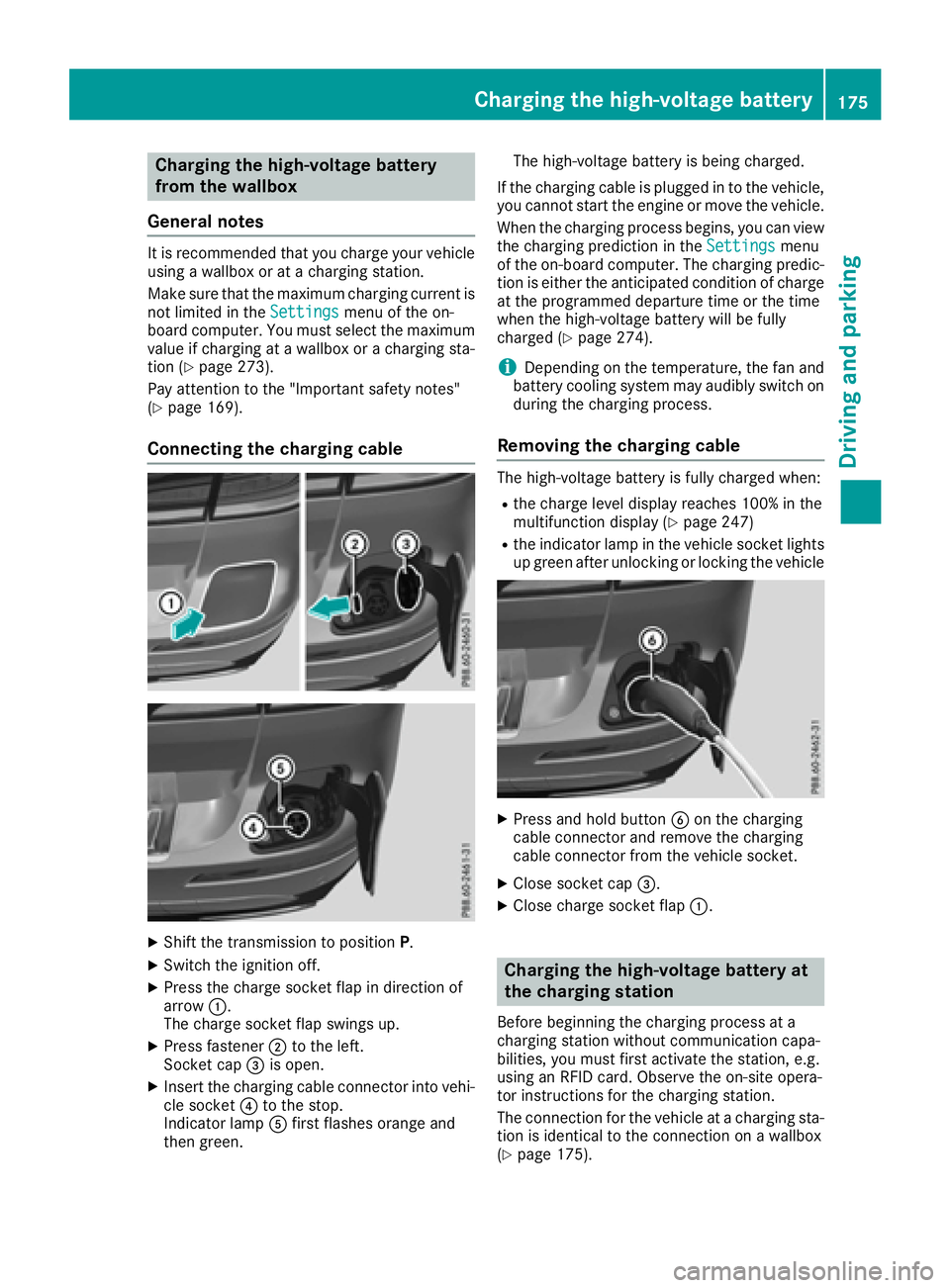
XShift the transmission to position P.
XSwitch the ignition off.
XPress the charge socket flap in direction of
arrow:.
The charge socket flap swings up.
XPress fastener ;to the left.
Socket cap =is open.
XInsert the charging cable connector into vehi-
cle socket ?to the stop.
Indicator lamp Afirst flashes orange and
then green. The high-voltage battery is being charged.
If the charging cable is plugged in to the vehicle, you cannot start the engine or move the vehicle.
When the charging process begins, you can view
the charging prediction in the Settings
menu
of the on-board computer. The charging predic-
tion is either the anticipated condition of charge at the programmed departure time or the time
when the high-voltage battery will be fully
charged (
Ypage 274).
iDepending on the temperature, the fan and
battery cooling system may audibly switch on
during the charging process.
Removing the charging cable
The high-voltage battery is fully charged when:
Rthe charge level display reaches 100% in the
multifunction display (Ypage 247)
Rthe indicator lamp in the vehicle socket lights up green after unlocking or locking the vehicle
XPress and hold button Bon the charging
cable connector and remove the charging
cable connector from the vehicle socket.
XClose socket cap =.
XClose charge socket flap :.
Charging the high-voltage battery at
the charging station
Before beginning the charging process at a
charging station without communication capa-
bilities, you must first activate the station, e.g.
using an RFID card. Observe the on-site opera-
tor instructions for the charging station.
The connection for the vehicle at a charging sta-
tion is identical to the connection on a wallbox
(
Ypage 175).
Charging the high-voltage battery175
Driving and parking
Z
Page 178 of 450
Problems with the charging process
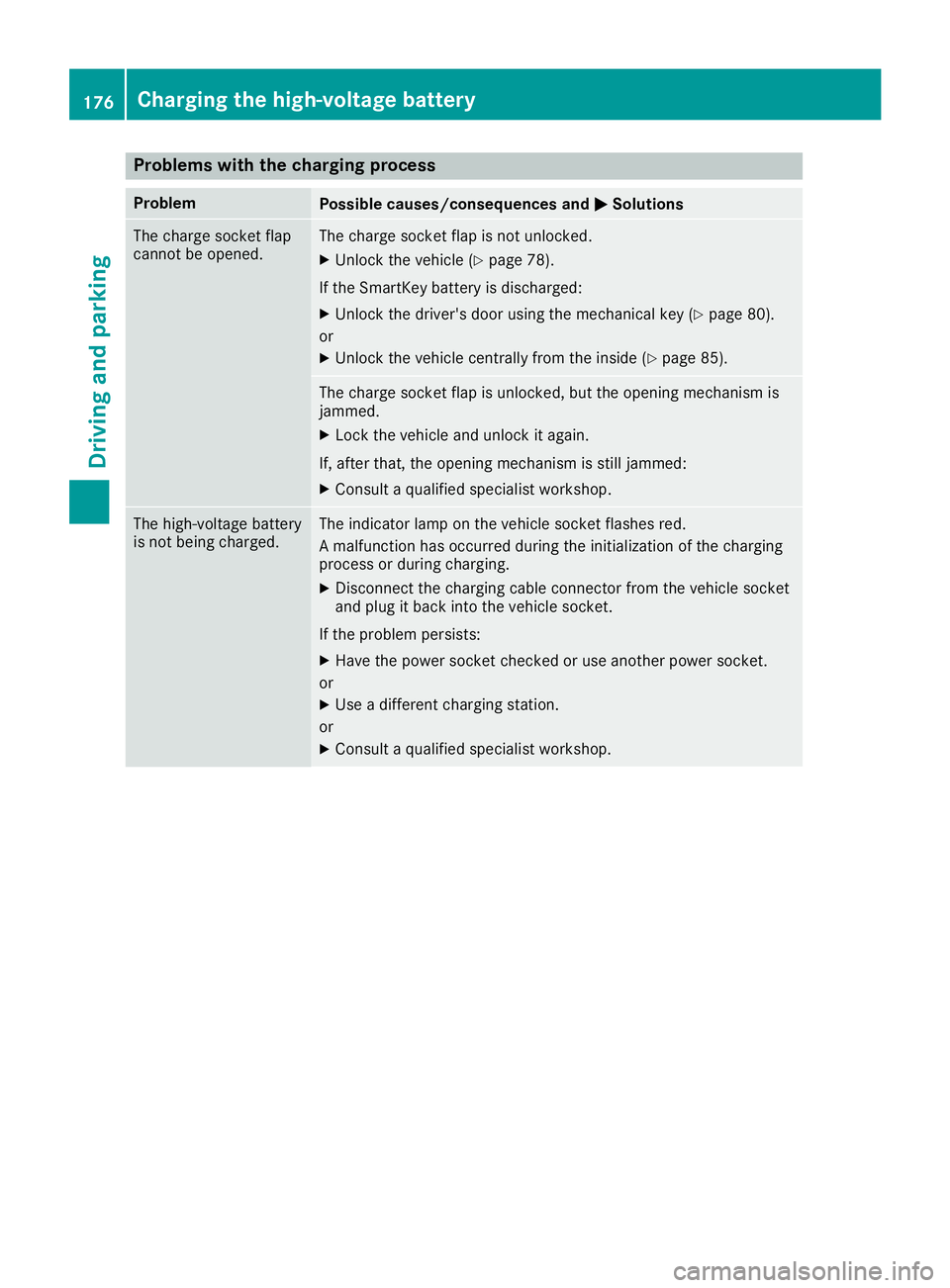
ProblemPossible causes/consequences andMSolutions
The charge socket flap
cannot be opened.The charge socket flap is not unlocked.
XUnlock the vehicle (Ypage 78).
If the SmartKey battery is discharged:
XUnlock the driver's door using the mechanical key (Ypage 80).
or
XUnlock the vehicle centrally from the inside (Ypage 85).
The charge socket flap is unlocked, but the opening mechanism is
jammed.
XLock the vehicle and unlock it again.
If, after that, the opening mechanism is still jammed:
XConsult a qualified specialist workshop.
The high-voltage battery
is not being charged.The indicator lamp on the vehicle socket flashes red.
A malfunction has occurred during the initialization of the charging
process or during charging.
XDisconnect the charging cable connector from the vehicle socket
and plug it back into the vehicle socket.
If the problem persists:
XHave the power socket checked or use another power socket.
or
XUse a different charging station.
or
XConsult a qualified specialist workshop.
176Charging the high-voltage battery
Driving and parking
Page 179 of 450
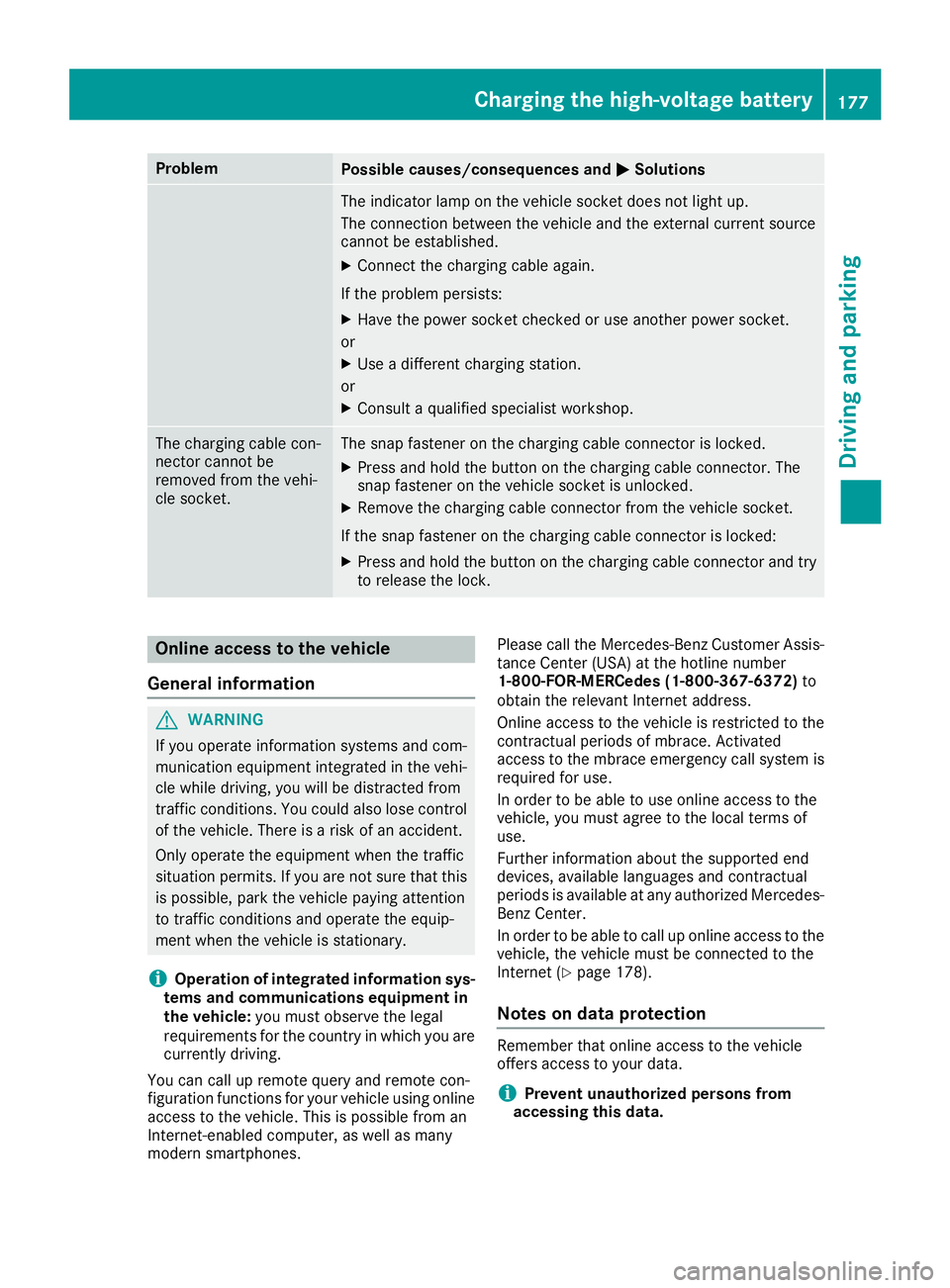
ProblemPossible causes/consequences andMSolutions
The indicator lamp on the vehicle socket does not light up.
The connection between the vehicle and the external current source
cannot be established.
XConnect the charging cable again.
If the problem persists:
XHave the power socket checked or use another power socket.
or
XUse a different charging station.
or
XConsult a qualified specialist workshop.
The charging cable con-
nector cannot be
removed from the vehi-
cle socket.The snap fastener on the charging cable connector is locked.
XPress and hold the button on the charging cable connector. The
snap fastener on the vehicle socket is unlocked.
XRemove the charging cable connector from the vehicle socket.
If the snap fastener on the charging cable connector is locked:
XPress and hold the button on the charging cable connector and try
to release the lock.
Online access to the vehicle
General information
GWARNING
If you operate information systems and com-
munication equipment integrated in the vehi-
cle while driving, you will be distracted from
traffic conditions. You could also lose control
of the vehicle. There is a risk of an accident.
Only operate the equipment when the traffic
situation permits. If you are not sure that this
is possible, park the vehicle paying attention
to traffic conditions and operate the equip-
ment when the vehicle is stationary.
iOperation of integrated information sys-
tems and communications equipment in
the vehicle: you must observe the legal
requirements for the country in which you are currently driving.
You can call up remote query and remote con-
figuration functions for your vehicle using online
access to the vehicle. This is possible from an
Internet-enabled computer, as well as many
modern smartphones. Please call the Mercedes-Benz Customer Assis-
tance Center (USA) at the hotline number
1-800-FOR-MERCedes (1-800-367-6372)
to
obtain the relevant Internet address.
Online access to the vehicle is restricted to the
contractual periods of mbrace. Activated
access to the mbrace emergency call system is
required for use.
In order to be able to use online access to the
vehicle, you must agree to the local terms of
use.
Further information about the supported end
devices, available languages and contractual
periods is available at any authorized Mercedes-
Benz Center.
In order to be able to call up online access to the
vehicle, the vehicle must be connected to the
Internet (Ypage 178).
Notes on data protection
Remember that online access to the vehicle
offers access to your data.
iPrevent unauthorized persons from
accessing this data.
Charging the high-voltage battery177
Driving and parking
Z
Page 183 of 450
If your seat belt is not fastened, the following
conditions must be fulfilled to automatically
release the electric parking brake:
Rthe driver's door is closed.
Ryou have shifted out of transmission position
Por you have previously driven faster than
2 mph (3 km/h).
iEnsure that you do not depress the accel-
erator pedal unintentionally. Otherwise the
parking brake will be released and the vehicle
will start to move.
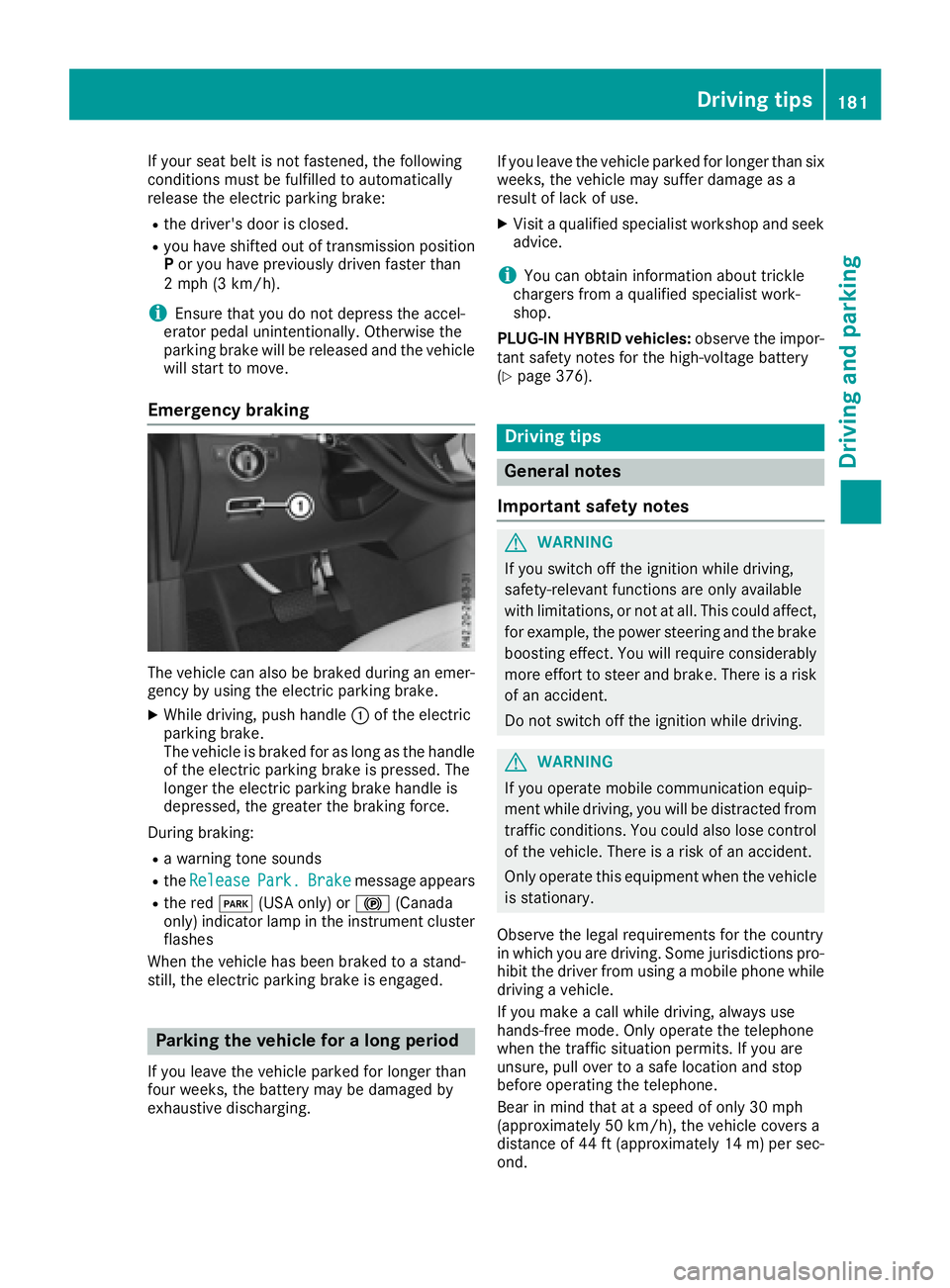
Emergency braking
The vehicle can also be braked during an emer-
gency by using the electric parking brake.
XWhile driving, push handle :of the electric
parking brake.
The vehicle is braked for as long as the handle
of the electric parking brake is pressed. The
longer the electric parking brake handle is
depressed, the greater the braking force.
During braking:
Ra warning tone sounds
Rthe ReleasePark.Brakemessage appears
Rthe red F(USA only) or !(Canada
only) indicator lamp in the instrument cluster flashes
When the vehicle has been braked to a stand-
still, the electric parking brake is engaged.
Parking the vehicle for a long period
If you leave the vehicle parked for longer than
four weeks, the battery may be damaged by
exhaustive discharging. If you leave the vehicle parked for longer than six
weeks, the vehicle may suffer damage as a
result of lack of use.
XVisit a qualified specialist workshop and seek
advice.
iYou can obtain information about trickle
chargers from a qualified specialist work-
shop.
PLUG-IN HYBRID vehicles: observe the impor-
tant safety notes for the high-voltage battery
(
Ypage 376).
Driving tips
General notes
Important safety notes
GWARNING
If you switch off the ignition while driving,
safety-relevant functions are only available
with limitations, or not at all. This could affect, for example, the power steering and the brake
boosting effect. You will require considerably
more effort to steer and brake. There is a risk
of an accident.
Do not switch off the ignition while driving.
GWARNING
If you operate mobile communication equip-
ment while driving, you will be distracted from traffic conditions. You could also lose control
of the vehicle. There is a risk of an accident.
Only operate this equipment when the vehicle
is stationary.
Observe the legal requirements for the country
in which you are driving. Some jurisdictions pro-
hibit the driver from using a mobile phone while
driving a vehicle.
If you make a call while driving, always use
hands-free mode. Only operate the telephone
when the traffic situation permits. If you are
unsure, pull over to a safe location and stop
before operating the telephone.
Bear in mind that at a speed of only 30 mph
(approximately 50 km/h), the vehicle covers a
distance of 44 ft (approximately 14 m)per sec-
ond.
Driving tips181
Driving and parking
Z
Page 248 of 450
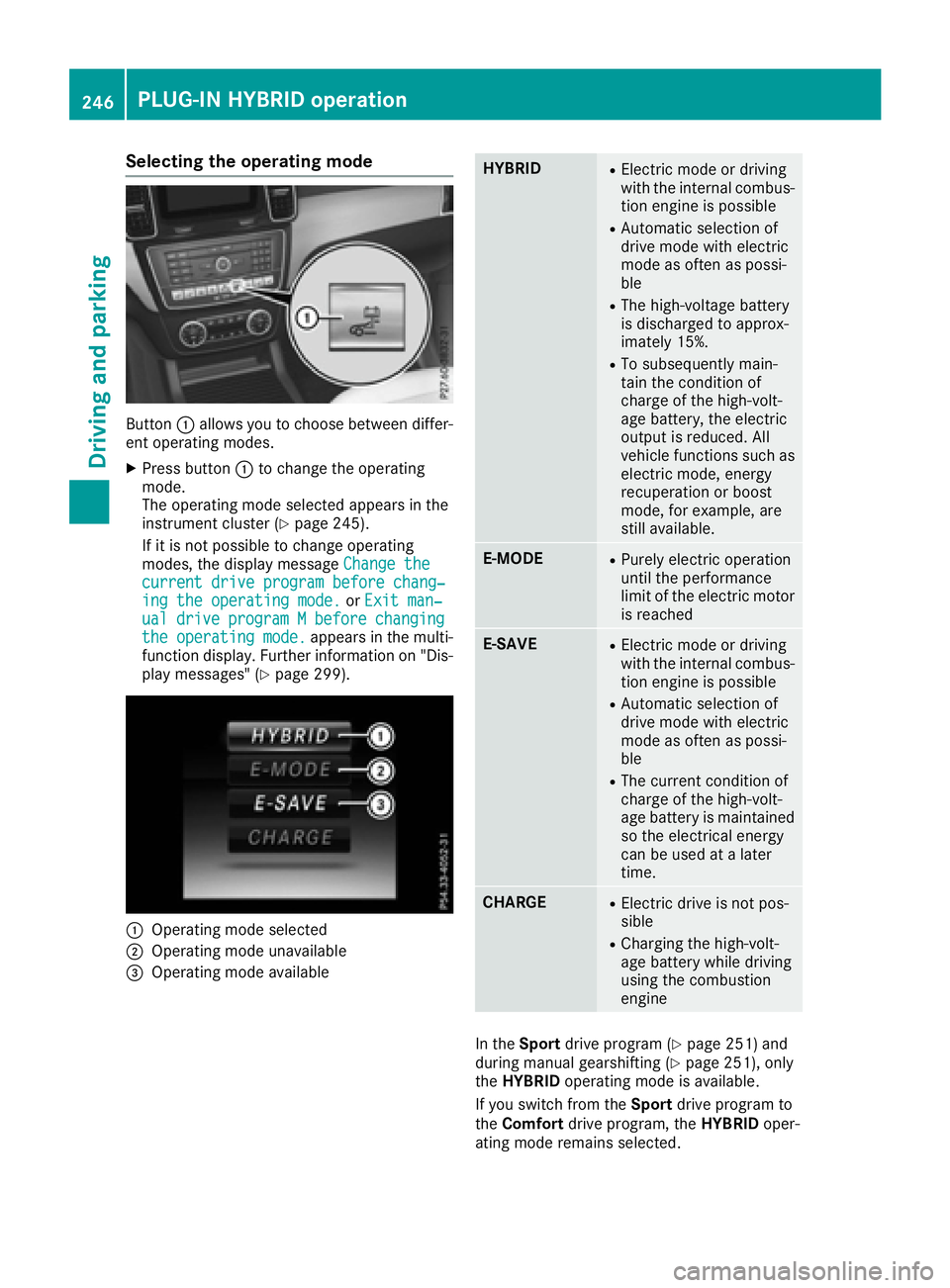
Selecting the operating mode
Button:allows you to choose between differ-
ent operating modes.
XPress button :to change the operating
mode.
The operating mode selected appears in the
instrument cluster (
Ypage 245).
If it is not possible to change operating
modes, the display message Change the
current drive program before chang‐ing the operating mode.orExit man‐ualdriveprogramMbeforechangingthe operating mode.appears in the multi-
function display. Further information on "Dis-
play messages" (
Ypage 299).
:Operating mode selected
;Operating mode unavailable
=Operating mode available
HYBRIDRElectric mode or driving
with the internal combus-
tion engine is possible
RAutomatic selection of
drive mode with electric
mode as often as possi-
ble
RThe high-voltage battery
is discharged to approx-
imately 15%.
RTo subsequently main-
tain the condition of
charge of the high-volt-
age battery, the electric
output is reduced. All
vehicle functions such as
electric mode, energy
recuperation or boost
mode, for example, are
still available.
E-MODERPurely electric operation
until the performance
limit of the electric motor is reached
E-SAVERElectric mode or driving
with the internal combus-
tion engine is possible
RAutomatic selection of
drive mode with electric
mode as often as possi-
ble
RThe current condition of
charge of the high-volt-
age battery is maintained
so the electrical energy
can be used at a later
time.
CHARGERElectric drive is not pos-
sible
RCharging the high-volt-
age battery while driving
using the combustion
engine
In the Sport drive program (Ypage 251) and
during manual gearshifting (Ypage 251), only
the HYBRID operating mode is available.
If you switch from the Sportdrive program to
the Comfort drive program, the HYBRIDoper-
ating mode remains selected.
246PLUG-IN HYBRID operation
Driving and parking