keyless MERCEDES-BENZ GLE-CLASS SUV 2016 Owners Manual
[x] Cancel search | Manufacturer: MERCEDES-BENZ, Model Year: 2016, Model line: GLE-CLASS SUV, Model: MERCEDES-BENZ GLE-CLASS SUV 2016Pages: 450, PDF Size: 10.52 MB
Page 10 of 450
Hiding (on-board computer) ........... 280
KEYLESS-GO .................................. 314
Lights ............................................. 292
Safety systems .............................. 281
SmartKey ....................................... 314
Tires ............................................... 309
Vehicle ........................................... 311
Distance recorder
see Odometer
see Trip odometer
Distance warning (warning lamp) .... 327
Distance warning function
Function/notes ................................ 69
Warning lamp ................................. 327
DISTRONIC PLUS
Activating ....................................... 194
Activation conditions ..................... 194
Cruise control lever ....................... 194
Deactivating ................................... 197
Display message ............................ 306
Displays in the multifunction dis-
play ................................................ 198
Driving tips .................................... 198
Function/notes ............................. 193
Important safety notes .................. 193
Setting the specified minimum
distance ......................................... 196
Stopping ........................................ 196
Warning lamp ................................. 327
Doors
Automatic locking (on-board com-
puter) ............................................. 275
Automatic locking (switch) ............... 85
Central locking/unlocking
(SmartKey) ....................................... 78
Control panel ................................... 41
Display message ............................ 313
Emergency locking ........................... 86
Emergency unlocking ....................... 86
Important safety notes .................... 84
Opening (from inside) ...................... 85
Overview .......................................... 84
Power closing .................................. 86
Downhill speed regulation
see DSR (Downhill Speed Regulation)
Drinking and driving ......................... 182
Drive program
Automatic transmission ................. 158 Display (DIRECT SELECT lever) ...... 154
Off-Road program (vehicles with-
out Off-Road Engineering pack-
age) ............................................... 237
Off-road programs (vehicles with
Off-Road Engineering package) ...... 237
SETUP (on-board computer) .......... 277
Driver's door
see Doors
Dri ving ab
road
Mercedes-Benz Service ................. 361
Driving in mountainous terrain
Approach/departure angle ............ 190
Driving lamps
see Daytime running lamps
Driving off-road
see Off-road driving
Driving safety systems
ABS (Anti-lock Braking System) ....... 66
ADAPTIVE BRAKE ............................. 74
Adaptive Brake Assist ...................... 70
BAS (Brake Assist System) .............. 67
BAS PLUS with Cross-Traffic
Assist ............................................... 67
COLLISION PREVENTION ASSIST
PLUS ................................................ 69
Distance warning function ............... 69
EBD (electronic brake force distri-
bution) ............................................. 74
ESP
®(Electronic Stability Pro-
gram) ............................................... 71
Important safety information ........... 66
Overview .......................................... 66
PRE-SAFE
®Brake ............................. 74
Recuperative Brake System ............. 44
STEER CONTROL ............................. 76
Driving system
AIRMATIC package ........................ 205
Driving systems
360°camera .................................. 221
Active Blind Spot Assist ................. 230
Active Curve System ...................... 207
Active Driving Assistance pack-
age ................................................. 230
Active Lane Keeping Assist ............ 233
Active Parking Assist ..................... 213
ADS ............................................... 206
8Index
Page 12 of 450
Emergency unlockingTailgate ............................................ 90
Emissions control
Service and warranty information .... 26
Engine
Check Engine warning lamp .......... .325
Display message ............................ 295
ECO start/stop function ................ 149
Engine number ............................... 433
Irregular running ............................ 152
Jump-starting ................................. 379
Starting (important safety notes) ... 147
Starting problems .......................... 152
Starting the engine with the
SmartKey ....................................... 147
Starting via smartphone ................ 148
Starting with KEYLESS-GO ............. 148
Switching off .................................. 179
Tow-starting (vehicle) ..................... 383
Engine electronics
Problem (malfunction) ................... 152
Engine jump starting
see Jump starting (engine)
Engine oil
Adding ...........................................3 58
Additives ........................................ 438
Checking the oil level ..................... 357
Checking the oil level using the
dipstick .......................................... 357
Display message ............................ 297
Filling capacity ............................... 438
Notes about oil grades ................... 437
Notes on oil level/consumption .... 357
Temperature (on-board computer,
Mercedes-AMG vehicles) ...............2 77
Viscosity ........................................ 438
ESP
®(Electronic Stability Pro-
gram)
AMG menu (on-board computer) ... 277
Characteristics ................................. 72
Deactivating/activating ................... 72
Display message ............................ 281
Function/notes ................................ 71
General notes .................................. 71
Important safety information ........... 72
Trailer stabilization ........................... 73
Warning lamp ................................. 321 ETS/4ETS (Electronic Traction Sys-
tem)
...................................................... 71
Exhaust c
heck ................................... 182
Exhaust pipe (cleaning instruc-
tions) ..................................................3 66
Exhaustive discharging (high-volt-
age battery) ....................................... 376
Exterior mirrors
Adjusting ....................................... 110
Dipping (automatic) ....................... 111
Folding in when locking (on-board
computer) ...................................... 276
Folding in/out (automatically) ....... 111
Folding in/out (electrically) ........... 111
Out of position (troubleshooting) ... 111
Setting ........................................... 111
Storing settings (memory func-
tion) ............................................... 113
Storing the parking position .......... 112
Eyeglasses compartment ................. 331
F
Filler cap
see Refueling
Flat tire
MOExtended tires .......................... 370
Preparing the vehicle ..................... 370
TIREFIT kit ...................................... 371
see Emergency spare wheel
Floormats ........................................... 355
Folding the rear bench seat for-
wards/back ....................................... 332
Fording
Off-road ......................................... 185
On flooded roads ........................... 185
Frequencies
Mobile phone ................................. 431
Two-way radio ................................ 431
Fuel
Additives ........................................ 435
Consumption statistics .................. 266
Displaying the current consump-
tion ................................................ 267
Displaying the range ...................... 267
Driving tips .................................... 182
Flexible fuel vehicles ...................... 436
Fuel gauge ....................................... 34
10Index
Page 14 of 450
Display message ............................ 299
General notes .................................. 42
High-voltage battery ........................ 43
Important safety notes .................... 42
Manual switch off ............................ 42
Opening the hood ............................ 43
Warning lamp ................................. 318
Hybrid vehicles
Important safety notes .................... 42
Hydroplaning ..................................... 185
I
Ignition lock
see Key positions
Immobilizer .......................................... 76
Indicator lamps
see Warning and indicator lamps
Indicators
see Turn signals
Insect protection on the radiator .... 357
Instrument cluster
Overview .......................................... 34
Warning and indicator lamps ........... 35
Instrument cluster lighting .............. 263
Interior lighting
Automatic control .......................... 119
Emergency lighting ........................ 119
Manual control ............................... 119
Overview ........................................ 118
Reading lamp ................................. 118
J
JackStorage location ............................ 369
Using ............................................. 410
Jump starting (engine) ...................... 379
K
Key positions
KEYLESS-GO .................................. 146
SmartKey ....................................... 145
KEYLESS-GO
Convenience closing feature ............ 93
Deactivation ..................................... 79
Display message ............................ 314
Locking ............................................ 79 Removing the Start/Stop button ... 147
Start function ................................... 80
Start/Stop button .......................... 146
Starting the engine ........................ 148
Unlocking ......................................... 79
Kickdown
Driving tips .................................... 157
Manual gearshifting ....................... 161
Knee bag .............................................. 51
L
Lamps
see Warning and indicator lamps
Lane detection (automatic)
see Lane Keeping Assist
Lane Keeping Assist
Activating/deactivating ................. 272
Display message ............................ 305
Function/information .................... 229
see Active Lane Keeping Assist
Lap time (RACETIMER) ...................... 277
LATCH-type (ISOFIX) child seat
anchors ................................................ 62
Level control (display message) ...... 302
Level control (vehicle with the Off-
Road Engineering package)
Basic settings ................................ 202
Function/notes ............................. 201
Important safety notes .................. 201
License plate lamp (display mes-
sage) ................................................... 293
Light function, active
Display message ............................ 294
Light sensor (display message) ....... 294
Lights
Adaptive Highbeam Assist ............. 117
Automatic headlamp mode ............ 114
Cornering light function ................. 117
Hazard warning lamps ................... 116
High beam flasher .......................... 116
High-beam headlamps ................... 116
Light switch ................................... 114
Low-beam headlamps .................... 115
Parking lamps ................................ 115
Rear fog lamp ................................ 115
Standing lamps .............................. 115
12Index
Page 21 of 450
Side marker lamp (display mes-
sage)................................................... 294
Side windows
Cleaning ......................................... 364
Convenience closing feature ............ 92
Convenience opening feature ..........9 2
Important safety information ........... 91
Opening/closing .............................. 91
Overview .......................................... 91
Problem (malfunction) .....................9 5
Resettin g........................................ .93
Reversin gfeature ............................ .91
Sliding sunroof
Important safety notes .................... 95
Opening/closing .............................. 96
Problem (malfunction) ..................... 99
Resetting ......................................... 97
see Panorama roof with power
tilt/sliding panel
SmartKey
Changing the battery ....................... 81
Changing the programming .............8 0
Checking the battery ...................... .81
Convenience closing feature ............ 93
Convenience opening feature .......... 92
Dis play message ............................ 314
Door central locking/unlocking ...... .78
Important safety notes .................... 78
KEYLESS-GO start function .............. 80
Loss .................................................8 3
Mechanical key ................................ 80
Overview .......................................... 78
Positions (ignition lock) ................. 145
Problem (malfunction) ............ ......... 83
Starting the engine ........................ 147
Smartphone
Starting the engine ........................ 148
Snow chains
Informat
ion .................................... 390
Sockets
Center console .............................. 343
General notes ................................ 343
Luggage compartment ...................3 43
Rear compartment ......................... 343
Special seat belt retractor .................. 60
Specialist workshop ............................ 29
Speed, controlling
see Cruise control Speedometer
Digital ............................................ 267
In the Instrument cluster ................. 34
Segments ...................................... 263
Selecting the display unit ...............2 74
Standing lamps
Display message ............................ 293
Switching on/off ........................... 115
Start/stop function
see ECO start/stop function
Starting (engine) ................................ 147
STEER CONTROL .................................. 76
Steering
Display message ............................ 313
Steering Assist and Stop&Go Pilot
(DISTRONIC PLUS)
Activating/deactivating ................. 272
Display message ............................ 308
Steering assistant STEER CON-
TROL
see STEER CONTROL
Steering wheel
Adjusting (electrically) ................... 108
Adjusting (manually) ...................... 107
Button overview ............................... 36
Buttons (on-board computer) ......... 264
Cleaning ......................................... 367
Important safety notes .................. 107
Steering wheel heating .................. 108
Storing settings (memory func-
tion) ............................................... 113
Steering wheel heating
Problem (malfunction) ................... 109
Switching on/off ........................... 108
Steering wheel paddle shifters ........ 159
Stopwatch (RACETIMER) ................... 277
Stowage areas ................................... 329
Stowage compartments
Armrest (under) ............................. 330
Center console .............................. 331
C
enter console (rear) ..................... 331
Cup holders ................................... 339
Eyeglasses compartment ............... 331
Glove box ....................................... 330
Important safety information ......... 330
Stowage net ................................... 331
Stowage net ....................................... 331
Index19
Page 45 of 450
Deactivate the hybrid system manually if:
Rthe6 restraint system warning lamp in the
instrument cluster lights up after an accident
Rthe vehicle is badly damaged, e.g. after an
accident, and the restraint system compo-
nents were not activated
Rthe vehicle is badly damaged and has to be
towed or transported
XIf possible, move the vehicle out of the
danger zone: shift the automatic transmis-
sion into position N.
XRelease the electric parking brake.
XRoll the vehicle to a safe place and park it
safely.
Get assistance from others if necessary.
The vehicle is locked automatically when the
ignition is switched on and the wheels are turn-
ing. There is therefore a risk of being locked out
if the vehicle is being pushed or tested on a
dynamometer.
XSwitch the ignition off.
XShift the automatic transmission to park posi-
tion P.
Depress the electric parking brake
(
Ypage 179).
Secure the vehicle against rolling away
(
Ypage 409).
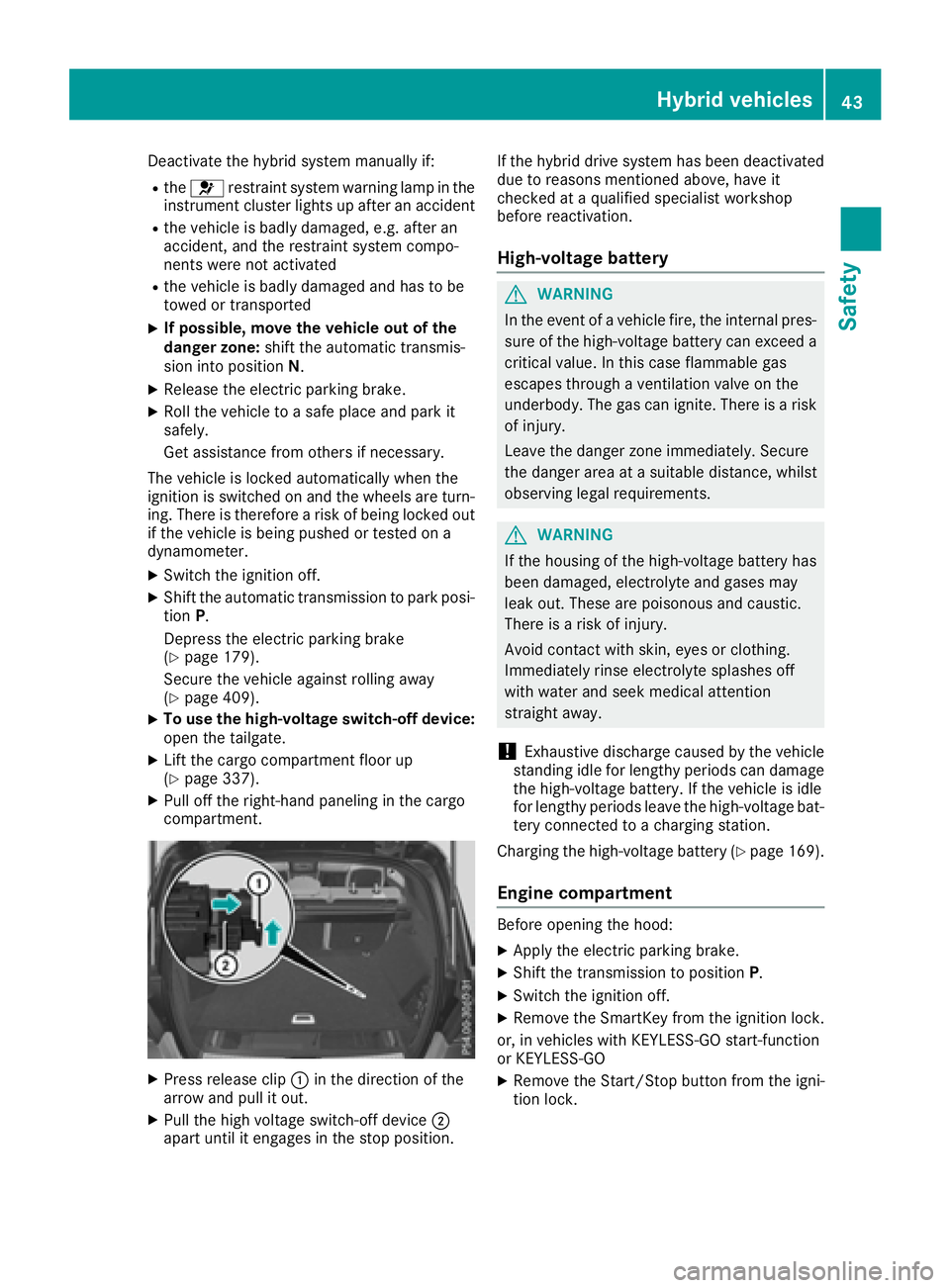
XTo use the high-voltage switch-off device:
open the tailgate.
XLift the cargo compartment floor up
(Ypage 337).
XPull off the right-hand paneling in the cargo
compartment.
XPress release clip :in the direction of the
arrow and pull it out.
XPull the high voltage switch-off device ;
apart until it engages in the stop position. If the hybrid drive system has been deactivated
due to reasons mentioned above, have it
checked at a qualified specialist workshop
before reactivation.
High-voltage battery
GWARNING
In the event of a vehicle fire, the internal pres- sure of the high-voltage battery can exceed a
critical value. In this case flammable gas
escapes through a ventilation valve on the
underbody. The gas can ignite. There is a risk
of injury.
Leave the danger zone immediately. Secure
the danger area at a suitable distance, whilst
observing legal requirements.
GWARNING
If the housing of the high-voltage battery has
been damaged, electrolyte and gases may
leak out. These are poisonous and caustic.
There is a risk of injury.
Avoid contact with skin, eyes or clothing.
Immediately rinse electrolyte splashes off
with water and seek medical attention
straight away.
!Exhaustive discharge caused by the vehicle
standing idle for lengthy periods can damage
the high-voltage battery. If the vehicle is idle
for lengthy periods leave the high-voltage bat-
tery connected to a charging station.
Charging the high-voltage battery (
Ypage 169).
Engine compartment
Before opening the hood:
XApply the electric parking brake.
XShift the transmission to position P.
XSwitch the ignition off.
XRemove the SmartKey from the ignition lock.
or, in vehicles with KEYLESS-GO start-function
or KEYLESS ‑GO
XRemove the Start/Stop button from the igni-
tion lock.
Hybrid vehicles43
Safety
Z
Page 46 of 450
XObserve the warning notes on the risk of elec-
tric shock (Ypage 42).
XObserve the warning notices about the hood
(Ypage 356).
RBS driving safety system (Recupera-
tive Brake System)
The Recuperative Brake System supports you
when braking with an electronically-controlled
brake boost mode and enables the recovery of
kinetic energy (recuperation).
Further information about the Recuperative
Braking System (
Ypage 242).
Panic alarm
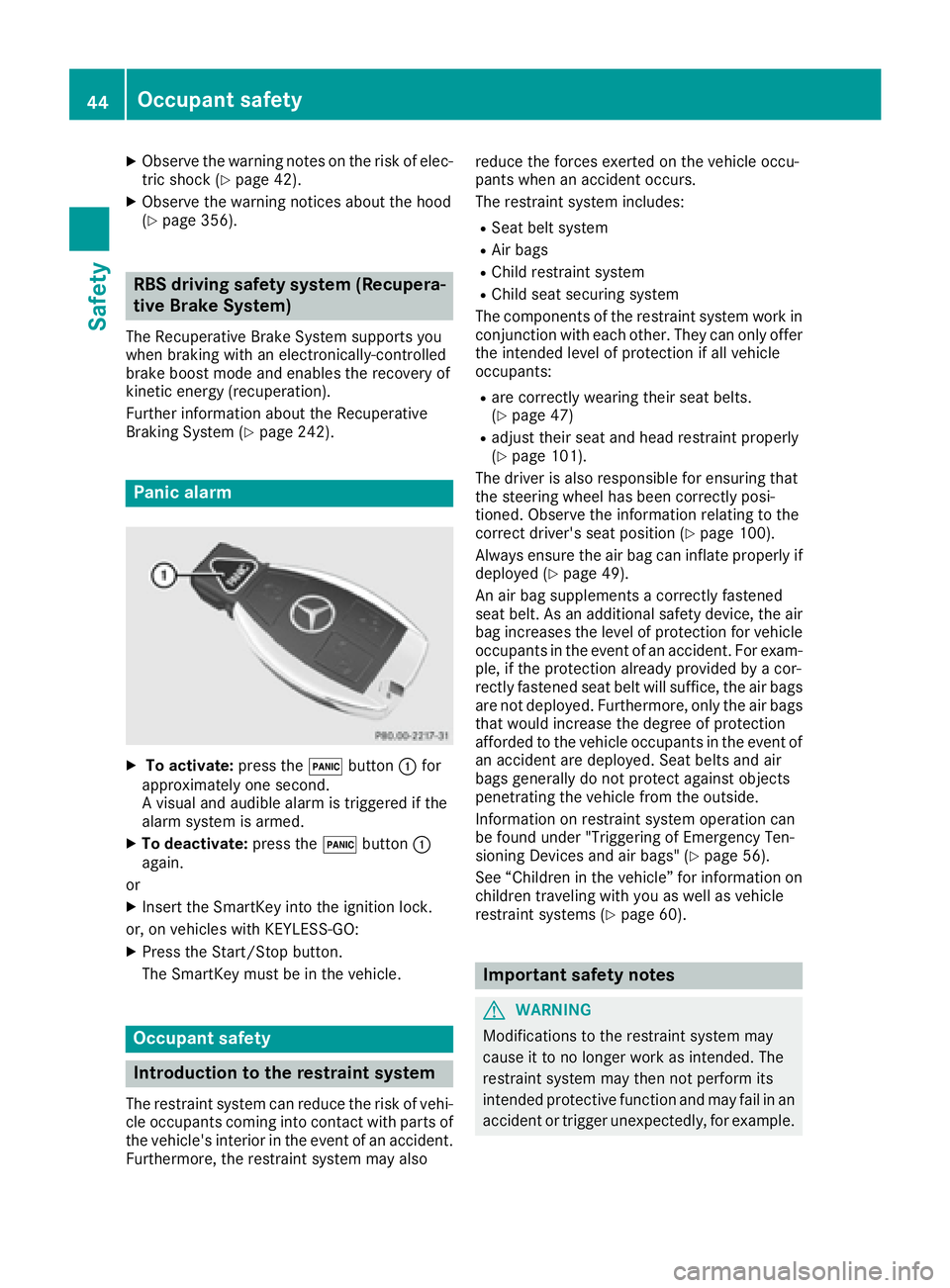
XTo activate:press the!button :for
approximately one second.
A visual and audible alarm is triggered if the
alarm system is armed.
XTo deactivate: press the!button :
again.
or
XInsert the SmartKey into the ignition lock.
or, on vehicles with KEYLESS‑GO:
XPress the Start/Stop button.
The SmartKey must be in the vehicle.
Occupant safety
Introduction to the restraint system
The restraint system can reduce the risk of vehi- cle occupants coming into contact with parts of
the vehicle's interior in the event of an accident.
Furthermore, the restraint system may also reduce the forces exerted on the vehicle occu-
pants when an accident occurs.
The restraint system includes:
RSeat belt system
RAir bags
RChild restraint system
RChild seat securing system
The components of the restraint system work in
conjunction with each other. They can only offer
the intended level of protection if all vehicle
occupants:
Rare correctly wearing their seat belts.
(Ypage 47)
Radjust their seat and head restraint properly
(Ypage 101).
The driver is also responsible for ensuring that
the steering wheel has been correctly posi-
tioned. Observe the information relating to the
correct driver's seat position (
Ypage 100).
Always ensure the air bag can inflate properly if
deployed (
Ypage 49).
An air bag supplements a correctly fastened
seat belt. As an additional safety device, the air
bag increases the level of protection for vehicle
occupants in the event of an accident. For exam-
ple, if the protection already provided by a cor-
rectly fastened seat belt will suffice, the air bags
are not deployed. Furthermore, only the air bags that would increase the degree of protection
afforded to the vehicle occupants in the event of
an accident are deployed. Seat belts and air
bags generally do not protect against objects
penetrating the vehicle from the outside.
Information on restraint system operation can
be found under "Triggering of Emergency Ten-
sioning Devices and air bags" (
Ypage 56).
See “Children in the vehicle” for information on
children traveling with you as well as vehicle
restraint systems (
Ypage 60).
Important safety notes
GWARNING
Modifications to the restraint system may
cause it to no longer work as intended. The
restraint system may then not perform its
intended protective function and may fail in an
accident or trigger unexpectedly, for example.
44Occupant safety
Safety
Page 78 of 450
Function
XTo activate/deactivate:activateor deacti -
vat ePRE-SAF E®Brake in th eon-board com-
puter (Ypage 272).
If th ePRE-SAF E®Brake is no tactivated, th e
æ symbol appear sin th emultifunction dis-
play.
If you have activated DS R (
Ypage 236), PRE-
SAFE®Brake is deactivated.
Starting at aspee dof aroun d 4mph (7 km/h),
this function warn syou if you rapidly approac h a
vehicl ein front. An intermittent warning tone
will then soun dand th e· distanc ewarning
lamp will ligh tup in th einstrumen tcluster.
XBrake immediately to defuse th esituation .
or
XTak eevasive action provide dit is saf eto do
so.
PRE-SAF E
®Brake can also brak eth evehicl e
automatically under th efollowin gconditions:
Rth edriver and front-passenger have their seat
belt sfastene d
and
Rth evehicl espee dis between approximately
4 mph (7 km/h) and 12 4mph (20 0km/h)
At speeds of up to approximately 44 mph
(70 km/h) PRE-SAF E
®Brake can also detect :
Rstationary objectsin th epat hof your vehicle,
e.g. stoppe dor parked vehicles
Rpedestrian sin th epat hof your vehicl e
iIf there is an increased ris kof acollision ,
preventive passenger protection measures
(PRE-SAF E
®)are triggered (Ypage 58).
If th eris kof collision wit hth evehicl ein fron t
remain sand you do no tbrake, tak eevasive
action or accelerate significantly, th evehicl e
may perfor mautomatic emergenc ybraking ,up
to th epoin tof full brak eapplication .Automatic
emergenc ybraking is no tperformed until imme-
diately prio rto an imminent accident.
You can preven tth eintervention of th ePRE -
SAFE
®Brake at any time by:
Rdepressing th eaccelerato rpedal further.
Ractivating kickdown .
Rreleasingth ebrak epedal. The braking action of PRE-SAF
E
®Brake is ended
automatically if:
Ryou maneuve rto avoi dth eobstacle .
Rthere is no longer any danger of acollision .
Rthere is no longer an obstacle detected in
frontof your vehicle.
STEER CONTROL
General information
STEE RCONTROL help syou by transmitting a
noticeable steering force to th esteering whee l
in th edirection require dfor vehicl estabilization .
This steering assistanc eis provide din particular
if:
Rbot hright wheels or bot hlef twheels are on a
wet or slippery road surface when you brake.
Rth evehicl estart sto skid.
Important safety notes
iObserv eth e"Importan tsafet ynotes" sec -
tion (Ypage 66) .
No steering support is provide dfrom STEE R
CONTROL, if:
RES P®is deactivated
RESP®is malfunctioning .
Rthelighting is faulty.
If ES P®is malfunctioning ,you will be assisted
further by th eelectrical power steering .
Protection against theft
Immobilizer
XTo activate with theSmartKey :remove th e
SmartKey from th eignition lock.
XTo activate with KEYLESS-GO: switch the
ignition off and open th edriver' sdoor .
XTo deactivate: switch on theignition .
The immobilize rprevents your vehicl efrom
bein gstarted without th ecorrect SmartKey.
When leaving th evehicle, always tak eth e
SmartKey wit hyou and loc kth evehicle. Anyon e
can start th eengin eif avalid SmartKey has been
lef tinside th evehicle.
76Protection against theft
Safety
Page 79 of 450
iThe immobilizer is always deactivated when
you start the engine.
In the event that the engine cannot be started
(yet the vehicle's battery is charged), the sys-
tem is not operational. Contact an authorized
Mercedes-Benz Center or call
1-800-FOR-MERCedes (in the USA) or
1-800-387-0100 (in Canada).
ATA (anti-theft alarm system)
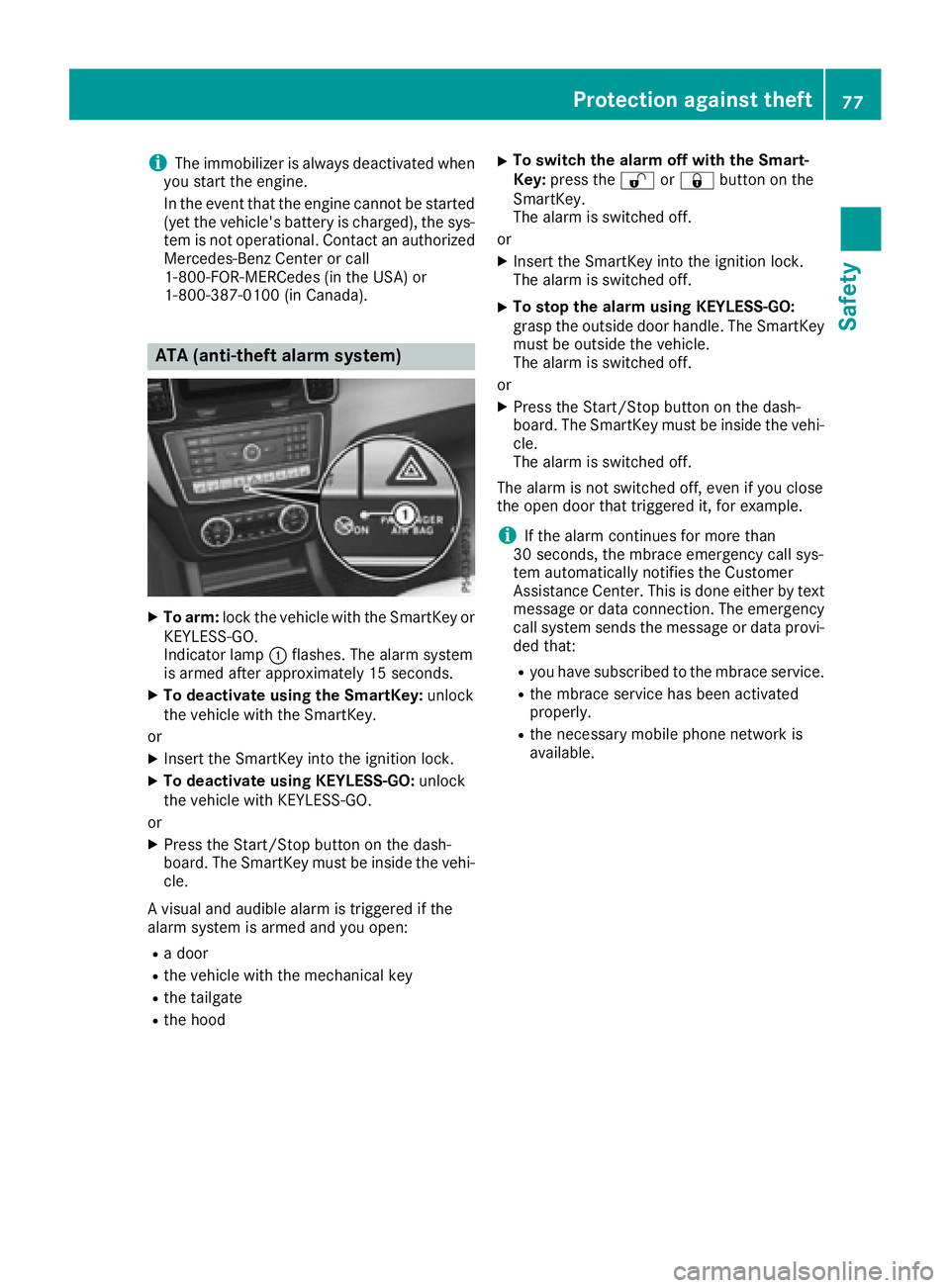
XTo arm: lock the vehicle with the SmartKey or
KEYLESS-GO.
Indicator lamp :flashes. The alarm system
is armed after approximately 15 seconds.
XTo deactivate using the SmartKey: unlock
the vehicle with the SmartKey.
or
XInsert the SmartKey into the ignition lock.
XTo deactivate using KEYLESS-GO: unlock
the vehicle with KEYLESS-GO.
or
XPress the Start/Stop button on the dash-
board. The SmartKey must be inside the vehi- cle.
A visual and audible alarm is triggered if the
alarm system is armed and you open:
Ra door
Rthe vehicle with the mechanical key
Rthe tailgate
Rthe hood
XTo switch the alarm off with the Smart-
Key: press the %or& button on the
SmartKey.
The alarm is switched off.
or
XInsert the SmartKey into the ignition lock.
The alarm is switched off.
XTo stop the alarm using KEYLESS-GO:
grasp the outside door handle. The SmartKey
must be outside the vehicle.
The alarm is switched off.
or
XPress the Start/Stop button on the dash-
board. The SmartKey must be inside the vehi- cle.
The alarm is switched off.
The alarm is not switched off, even if you close
the open door that triggered it, for example.
iIf the alarm continues for more than
30 seconds, the mbrace emergency call sys-
tem automatically notifies the Customer
Assistance Center. This is done either by text message or data connection. The emergency
call system sends the message or data provi-
ded that:
Ryou have subscribed to the mbrace service.
Rthe mbrace service has been activated
properly.
Rthe necessary mobile phone network is
available.
Protection against theft77
Safety
Z
Page 80 of 450
Useful information
i
This Operator's Manual describes all models
and all standard and optional equipment of
your vehicle available at the time of publica-
tion of the Operator's Manual. Country-spe-
cific differences are possible. Please note
that your vehicle may not be equipped with all
features described. This also applies to
safety-related systems and functions.
iRead the information on qualified specialist
workshops (Ypage 29).
SmartKey
Important safety notes
GWARNING
If children are left unsupervised in the vehicle,
they could:
Ropen the doors, thus endangering other
people or road users.
Rget out and disrupt traffic.
Roperate the vehicle's equipment.
Additionally, children could set the vehicle in
motion if, for example, they:
Rrelease the parking brake.
Rshifting the automatic transmission out of
park position P
RStart the engine.
There is a risk of an accident and injury.
When leaving the vehicle, always take the
SmartKey with you and lock the vehicle. Never
leave children or animals unattended in the
vehicle. Always keep the SmartKey out of
reach of children.
GWARNING
If you attach heavy or large objects to the
SmartKey, the SmartKey could be uninten-
tionally turned in the ignition lock. This could
cause the engine to be switched off. There is a risk of an accident.
Do not attach any heavy or large objects to theSmartKey. Remove any bulky key rings before
inserting the SmartKey into the ignition lock.
!Keep the SmartKey away from strong mag-
netic fields. Otherwise, the remote control
function could be affected.
Strong magnetic fields can occur in the vicin-
ity of powerful electrical installations.
Do not keep the SmartKey:
Rwith electronic devices, e.g. a mobile phone
or another SmartKey.
Rwith metallic objects, e.g. coins or metal foil.
Rinside metallic objects, e.g. a metal case.
This can affect the functionality of the Smart-
Key.
Do not keep the KEYLESS-GO or KEYLESS-GO
Start function key in the temperature-controlled
cup holder. Otherwise, the KEYLESS-GO or KEY-
LESS-GO Start function key will not be detected. Vehicles with KEYLESS-GO start function: do
not keep the SmartKey in the cargo compart-
ment. Otherwise, the SmartKey may not be
detected, e.g. when starting the engine using
the Start/Stop button.
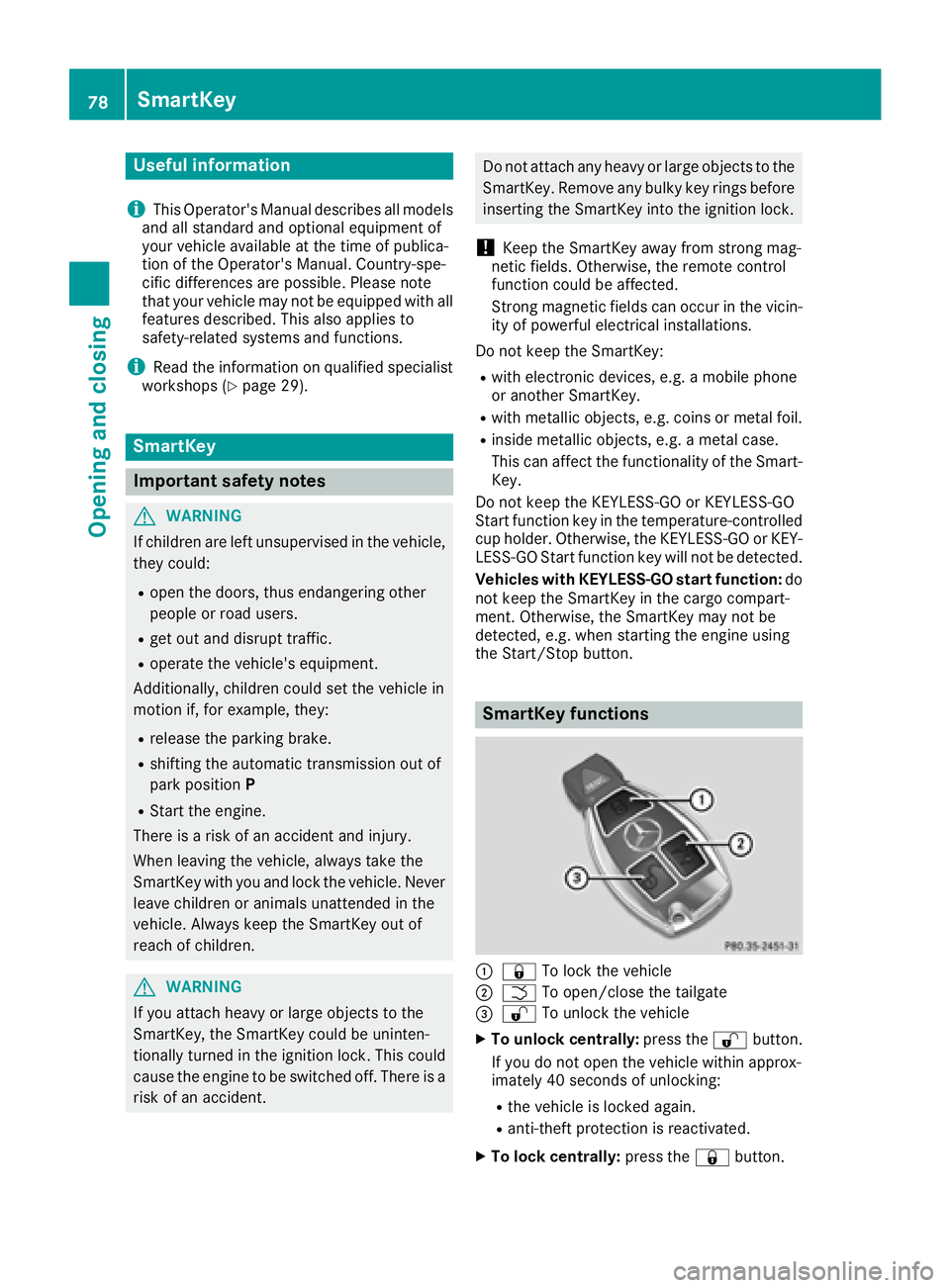
SmartKey functions
:& To lock the vehicle
;FTo open/close the tailgate
=%To unlock the vehicle
XTo unlock centrally: press the%button.
If you do not open the vehicle within approx-
imately 40 seconds of unlocking:
Rthe vehicle is locked again.
Ranti-theft protection is reactivated.
XTo lock centrally: press the&button.
78SmartKey
Opening and closing
Page 81 of 450
The SmartKey centrally locks and unlocks the
following components:
Rthe doors
Rthe tailgate
Rthe fuel filler flap
The turn signals flash once when unlocking and
three times when locking.
You can also set an audible signal to confirm
that the vehicle has been locked. The audible
signal can be activated and deactivated using
the on-board computer (
Ypage 275).
You will receive visual and acoustic locking con-
firmation if all components were able to be
locked.
If activated in COMAND or Audio 20, the locator
lighting also lights up in the dark (see separate
operating instructions).
XTo open the tailgate automatically from
outside the vehicle: press and hold theF
button until the tailgate opens.
Vehicles with KEYLESS-GO or KEYLESS-GO start function and EASY-PACK tailgate:
XTo close the tailgate automatically from
outside the vehicle: if the SmartKey is loca-
ted in the immediate vicinity of the vehicle,
press the Fbutton on the SmartKey.
When the tailgate closes you can then release
the button.
KEYLESS-GO
General notes
Bear in mind that the engine can be started by
any of the vehicle occupants if there is a KEY-
LESS-GO key in the vehicle (
Ypage 148).
Locking/unlocking centrally
You can start, lock or unlock the vehicle using
KEYLESS-GO. To do this, you only need carry the
SmartKey with you. You can combine the func-
tions of KEYLESS-GO with those of a conven-
tional SmartKey. Unlock the vehicle by using
KEYLESS-GO, for instance, and lock it using the
& button on the SmartKey.
The driver's door and the door at which the han-
dle is used, must both be closed. The SmartKey
must be outside the vehicle. When locking or
unlocking with KEYLESS-GO, the distance between the SmartKey and the corresponding
door handle must not be greater than 3 ft (1 m).
KEYLESS-GO checks whether a valid SmartKey
is in the vehicle by periodically establishing a
radio connection between the vehicle and the
SmartKey. This happens:
Rwhen starting the engine
Rwhile driving
Rwhen the external door handles are touched
Rduring convenience closing
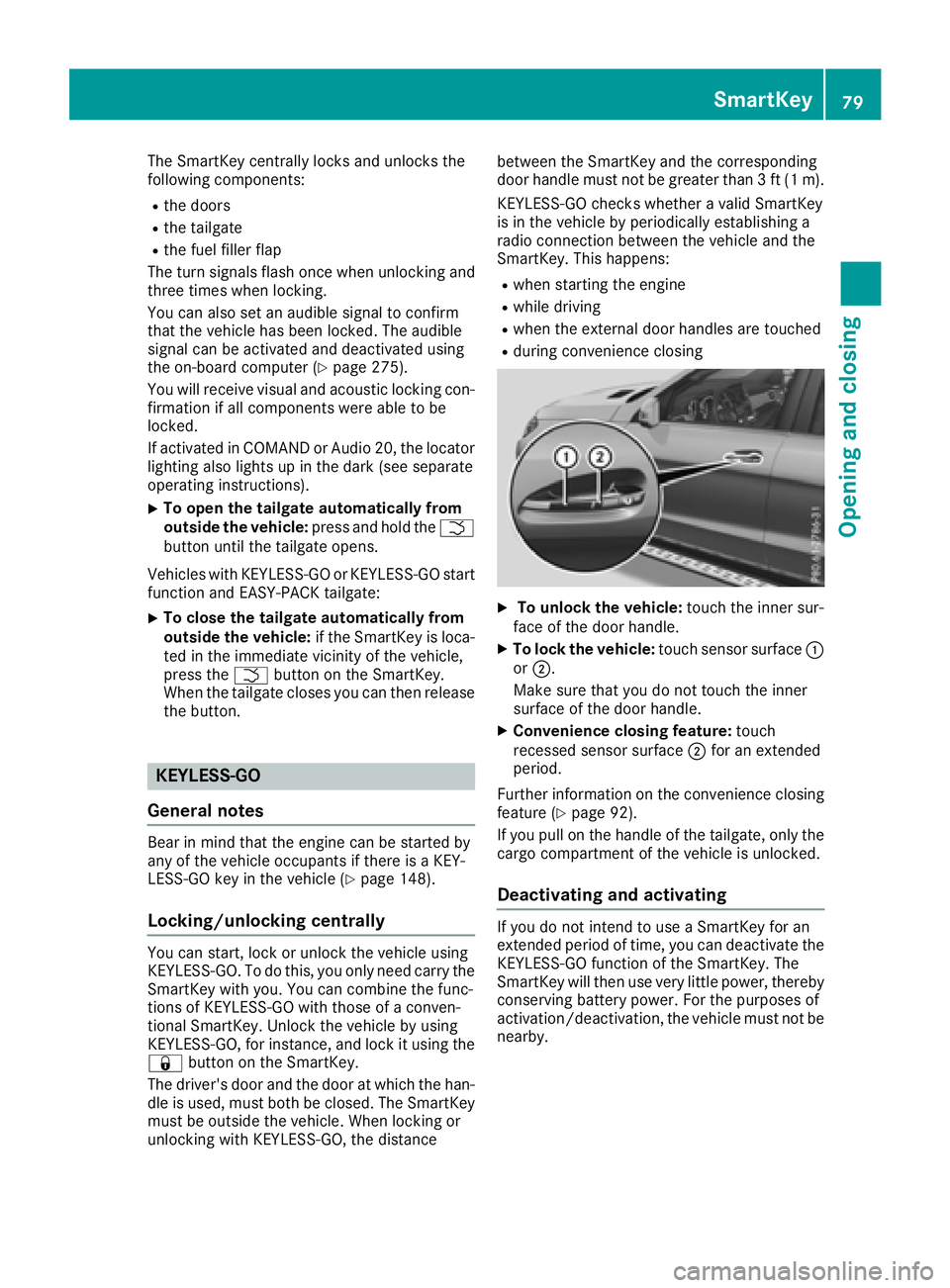
XTo unlock the vehicle:
touch the inner sur-
face of the door handle.
XTo lock the vehicle: touch sensor surface :
or ;.
Make sure that you do not touch the inner
surface of the door handle.
XConvenience closing feature: touch
recessed sensor surface ;for an extended
period.
Further information on the convenience closing
feature (
Ypage 92).
If you pull on the handle of the tailgate, only the cargo compartment of the vehicle is unlocked.
Deactivating and activating
If you do not intend to use a SmartKey for an
extended period of time, you can deactivate the
KEYLESS-GO function of the SmartKey. The
SmartKey will then use very little power, thereby
conserving battery power. For the purposes of
activation/deactivation, the vehicle must not be
nearby.
SmartKey79
Opening and closing
Z