phone MERCEDES-BENZ GLE-CLASS SUV 2016 Owners Manual
[x] Cancel search | Manufacturer: MERCEDES-BENZ, Model Year: 2016, Model line: GLE-CLASS SUV, Model: MERCEDES-BENZ GLE-CLASS SUV 2016Pages: 450, PDF Size: 10.52 MB
Page 12 of 450
Emergency unlockingTailgate ............................................ 90
Emissions control
Service and warranty information .... 26
Engine
Check Engine warning lamp .......... .325
Display message ............................ 295
ECO start/stop function ................ 149
Engine number ............................... 433
Irregular running ............................ 152
Jump-starting ................................. 379
Starting (important safety notes) ... 147
Starting problems .......................... 152
Starting the engine with the
SmartKey ....................................... 147
Starting via smartphone ................ 148
Starting with KEYLESS-GO ............. 148
Switching off .................................. 179
Tow-starting (vehicle) ..................... 383
Engine electronics
Problem (malfunction) ................... 152
Engine jump starting
see Jump starting (engine)
Engine oil
Adding ...........................................3 58
Additives ........................................ 438
Checking the oil level ..................... 357
Checking the oil level using the
dipstick .......................................... 357
Display message ............................ 297
Filling capacity ............................... 438
Notes about oil grades ................... 437
Notes on oil level/consumption .... 357
Temperature (on-board computer,
Mercedes-AMG vehicles) ...............2 77
Viscosity ........................................ 438
ESP
®(Electronic Stability Pro-
gram)
AMG menu (on-board computer) ... 277
Characteristics ................................. 72
Deactivating/activating ................... 72
Display message ............................ 281
Function/notes ................................ 71
General notes .................................. 71
Important safety information ........... 72
Trailer stabilization ........................... 73
Warning lamp ................................. 321 ETS/4ETS (Electronic Traction Sys-
tem)
...................................................... 71
Exhaust c
heck ................................... 182
Exhaust pipe (cleaning instruc-
tions) ..................................................3 66
Exhaustive discharging (high-volt-
age battery) ....................................... 376
Exterior mirrors
Adjusting ....................................... 110
Dipping (automatic) ....................... 111
Folding in when locking (on-board
computer) ...................................... 276
Folding in/out (automatically) ....... 111
Folding in/out (electrically) ........... 111
Out of position (troubleshooting) ... 111
Setting ........................................... 111
Storing settings (memory func-
tion) ............................................... 113
Storing the parking position .......... 112
Eyeglasses compartment ................. 331
F
Filler cap
see Refueling
Flat tire
MOExtended tires .......................... 370
Preparing the vehicle ..................... 370
TIREFIT kit ...................................... 371
see Emergency spare wheel
Floormats ........................................... 355
Folding the rear bench seat for-
wards/back ....................................... 332
Fording
Off-road ......................................... 185
On flooded roads ........................... 185
Frequencies
Mobile phone ................................. 431
Two-way radio ................................ 431
Fuel
Additives ........................................ 435
Consumption statistics .................. 266
Displaying the current consump-
tion ................................................ 267
Displaying the range ...................... 267
Driving tips .................................... 182
Flexible fuel vehicles ...................... 436
Fuel gauge ....................................... 34
10Index
Page 16 of 450
Mobile phoneFrequencies ................................... 431
Installation ..................................... 431
Menu (on-board computer) ............ 270
Transmission output (maximum) .... 431
Modifying the programming
(SmartKey) ........................................... 80
MOExtended tires .............................. 370
Mounting wheels
Lowering the vehicle ...................... 412
Mounting a new wheel ................... 411
Preparing the vehicle .....................4 09
Raising the vehicle ......................... 410
Removing a wheel .......................... 411
Securing the vehicle against roll-
ing away ........................................ 409
MP3
Operation ....................................... 269
see separate operating instructions
Multifunction display
Function/notes .............................2 65
Permanent display ......................... 274
Multifunction steering wheel
Operating the on-board computer .. 264
Overview .......................................... 36
Multimedia system
see Separate operating instructions
N
NavigationMenu (on-board computer) ............ 268
see separate operating instructions
Notes on breaking-in a new vehi-
cle ....................................................... 144
O
Occupant Classification System
(OCS)
Conditions ....................................... 52
Faults ............................................... 56
Operation ......................................... 52
System self-test ............................... 54
Occupant safety
Air bags ...........................................4 9
Automatic measures after an acci-
dent ................................................. 59 Children in the vehicle ..................... 60
Important safety notes .................... 44
Introduction to the restraint sys-
tem .................................................. 44
Occupant Classification System
(OCS) ............................................... 52
PASSENGER AIR BAG indicator
lamps ............................................... 45
Pets in the vehicle ........................... 65
PRE-SAFE
®(anticipatory occu-
pant protection) ............................... 58
PRE-SAFE
®PLUS (anticipatory
occupant protection PLUS) .............. 59
Restraint system warning lamp ........ 45
OCS
Conditions ....................................... 52
Faults ............................................... 56
Operation ......................................... 52
System self-test ............................... 54
Odometer ........................................... 266
Off-road driving
Approach/departure angle ............ 443
Checklist after driving off-road ...... 188
Checklist before driving off-road .... 188
Fording depth ................................ 442
General information ....................... 187
Important safety notes .................. 186
Maximum gradient climbing abil-
ity .................................................. 444
Traveling uphill ............................... 190
Off-Road program (vehicles with-
out Off-Road Engineering package)
Function/notes ............................. 237
Off-road programs (vehicles with
Off-Road Engineering package)
Function/notes ............................. 237
Off-road drive program .................. 238
Offroad Plus drive program ............ 238
Off-road programs (vehicles with
the Off-Road Engineering package)
Displays in the CO MAND d
isplay ... 241
Off-road system
4MATIC .......................................... 235
DSR ............................................... 236
LOW RANGE off-road gear ............. 239
Off-road 4ETS .................................. 72
Off-road ABS .................................... 67
14Index
Page 17 of 450
Off-road ESP®..................................73
Off-Road program (vehicles with-
out Off-Road Engineering pack-
age) ............................................... 237
Off-road programs (vehicles with
Off-Road Engineering package) ...... 237
Oil
see Engine oil
On and Offroad menu (on-board
computer) .......................................... 276
On-board computer
AMG menu .....................................2 77
Assistance menu ........................... 271
Audio menu ................................... 269
Convenience submenu .................. 275
Display messages .......................... 280
Displaying a service message ........3 60
DISTRONIC PLUS ........................... 198
Factory settings submenu ............. 276
HYBRID menu ................................ 273
Important safety notes .................. 263
Instrument cluster submenu .......... 274
Lighting submenu .......................... 275
Menu overview .............................. 266
Message memory .......................... 280
Navigation menu ............................ 268
On and Offroad menu .................... 276
Operation ....................................... 264
RACETIMER ................................... 277
Service menu ................................. 273
Settings menu ............................... 273
Standard display ............................ 266
Telephone menu ............................ 270
Trip menu ...................................... 266
Vehicle submenu ........................... 275
Video DVD operation ..................... 270
Online access to the vehicle
Data protection .............................. 177
Functions ....................................... 178
General information ....................... 177
Internet .......................................... 178
Opening the fuel filler flap
(PLUG-IN HYBRID vehicles) ............ 164
Operating safety
Declaration of conformity ................ 29
Important safety notes .................... 28
Operating system
see On-board computer Operator's Manual
Vehicle equipme nt ........................... 26
Outside te
mperature display ........... 264
Overhead control panel ......................40
Override feature
Rear side windows ........................... 65
P
Paddle shifterssee Steering wheel paddle shifters
Paint code number ............................432
Paintwork (cleaning instructions) ... 363
Panic alarm .......................................... 44
Panorama roof with power tilt/
sliding panel
Important safety notes .................... 95
Opening/closing the roller sun-
blind ................................................. 98
Operating ......................................... 97
Operating the roller sunblinds for
the sliding sunroof ........................... 97
Problem (malfunction) ..................... 99
Reversing feature .............................9 6
Parking
Important safety notes .................. 178
Parking brake ................................ 179
Position of exterior mirror, front-
passenger side ...............................1 12
Rear view camera .......................... 217
see PARKTRONIC
Parking aid
Active Parking Assist ..................... 213
see 360° camera
see Exterior mirrors
see PARKTRONIC
Parking assistance
see PARKTRONIC
Parking brake
Display message ............................ 284
Electric parking brake .................... 179
Warning lamp ................................. 324
Parking lamps
Switching on/off ........................... 115
PARKTRONIC
Deactivating/activating ................. 212
Driving system ............................... 210
Function/notes .............................2 10
Index15
Page 21 of 450
Side marker lamp (display mes-
sage)................................................... 294
Side windows
Cleaning ......................................... 364
Convenience closing feature ............ 92
Convenience opening feature ..........9 2
Important safety information ........... 91
Opening/closing .............................. 91
Overview .......................................... 91
Problem (malfunction) .....................9 5
Resettin g........................................ .93
Reversin gfeature ............................ .91
Sliding sunroof
Important safety notes .................... 95
Opening/closing .............................. 96
Problem (malfunction) ..................... 99
Resetting ......................................... 97
see Panorama roof with power
tilt/sliding panel
SmartKey
Changing the battery ....................... 81
Changing the programming .............8 0
Checking the battery ...................... .81
Convenience closing feature ............ 93
Convenience opening feature .......... 92
Dis play message ............................ 314
Door central locking/unlocking ...... .78
Important safety notes .................... 78
KEYLESS-GO start function .............. 80
Loss .................................................8 3
Mechanical key ................................ 80
Overview .......................................... 78
Positions (ignition lock) ................. 145
Problem (malfunction) ............ ......... 83
Starting the engine ........................ 147
Smartphone
Starting the engine ........................ 148
Snow chains
Informat
ion .................................... 390
Sockets
Center console .............................. 343
General notes ................................ 343
Luggage compartment ...................3 43
Rear compartment ......................... 343
Special seat belt retractor .................. 60
Specialist workshop ............................ 29
Speed, controlling
see Cruise control Speedometer
Digital ............................................ 267
In the Instrument cluster ................. 34
Segments ...................................... 263
Selecting the display unit ...............2 74
Standing lamps
Display message ............................ 293
Switching on/off ........................... 115
Start/stop function
see ECO start/stop function
Starting (engine) ................................ 147
STEER CONTROL .................................. 76
Steering
Display message ............................ 313
Steering Assist and Stop&Go Pilot
(DISTRONIC PLUS)
Activating/deactivating ................. 272
Display message ............................ 308
Steering assistant STEER CON-
TROL
see STEER CONTROL
Steering wheel
Adjusting (electrically) ................... 108
Adjusting (manually) ...................... 107
Button overview ............................... 36
Buttons (on-board computer) ......... 264
Cleaning ......................................... 367
Important safety notes .................. 107
Steering wheel heating .................. 108
Storing settings (memory func-
tion) ............................................... 113
Steering wheel heating
Problem (malfunction) ................... 109
Switching on/off ........................... 108
Steering wheel paddle shifters ........ 159
Stopwatch (RACETIMER) ................... 277
Stowage areas ................................... 329
Stowage compartments
Armrest (under) ............................. 330
Center console .............................. 331
C
enter console (rear) ..................... 331
Cup holders ................................... 339
Eyeglasses compartment ............... 331
Glove box ....................................... 330
Important safety information ......... 330
Stowage net ................................... 331
Stowage net ....................................... 331
Index19
Page 22 of 450
Summer tires.....................................3 89
Sun visor ............................................ 340
Suspension setting
AMG adaptive sport suspension
system ...........................................2 09
Suspension settings
SETUP (on-board computer) .......... 277
SUV
(Sport Utility Vehicle) ....................... 28
Switching air-recirculation mode
on/off ................................................. 138
T
Tachometer ........................................ 263
Tail lamps
Display message ............................ 293
Tailgate
Display message ............................ 312
Emergency unlocking ....................... 90
Important safety notes .................... 87
Limiting the opening angle ...............9 0
Opening dimensions ......................4 41
Opening/closing (automatically
from inside) ...................................... 89
Opening/closing (automatically
from outside) ................................... 88
Opening/closing (from outside) ....... 88
Power closing .................................. 86
Tank
see Fuel tank
Tank content
Fuel gauge ....................................... 34
Technical data
Capacities ...................................... 433
Emergency spare wheel ................. 430
Information ....................................4 31
Tires/wheels ................................. 413
Trailer loads ................................... 445
Vehicle data ................................... 441
Telephone
Accepting a call (multifunction
steering wheel) .............................. 270
Display message ............................ 314
Menu (on-board computer) ............ 270
Number from the phone book ........2 70
Redialing ........................................ 271
Rejecting/ending a call ................. 270 Temperature
Coolant (display in the instrument
cluster) .......................................... 264
Coolant (on-board computer,
Mercedes-AMG vehicles) ...............2 77
Coolant (on-board computer) ......... 273
Engine oil (on-board computer,
Mercedes-AMG vehicles) ...............2 77
Outside temperature ......................2 64
Setting (climate control) ................ 134
Transmission oil (on-board com-
puter, Mercedes-AMG vehicles) ..... 277
Through-loading feature ................... 332
Time
see separate operating instructions
Timing (RACETIMER) ......................... 277
Tire pressure
Calling up (on-board computer) ..... 394
Checking manually ........................ 393
Displ ay message ............................ 309
Ma
ximum ....................................... 393
Not reached (TIREFIT) .................... 373
Notes ............................................. 392
Reached (TIREFIT) .......................... 373
Recommended ............................... 390
Tire pressure loss warning system
General notes ................................ 393
Important safety notes .................. 394
Restarting ...................................... 394
Tire pressure monitor
Checking the tire pressure elec-
tronically ........................................ 396
Function/notes .............................3 94
General notes ................................ 394
Important safety notes .................. 395
Radio type approval for the tire
pressure monitor ........................... 397
Restarting ...................................... 397
Warning lamp ................................. 328
Warning message .......................... 396
TIREFIT kit .......................................... 371
Important safety notes .................. 371
Storage location ............................ 369
Tire pressure not reached .............. 373
Tire pressure reached .................... 373
Tires
Aspect ratio (definition) ................. 407
20Index
Page 38 of 450
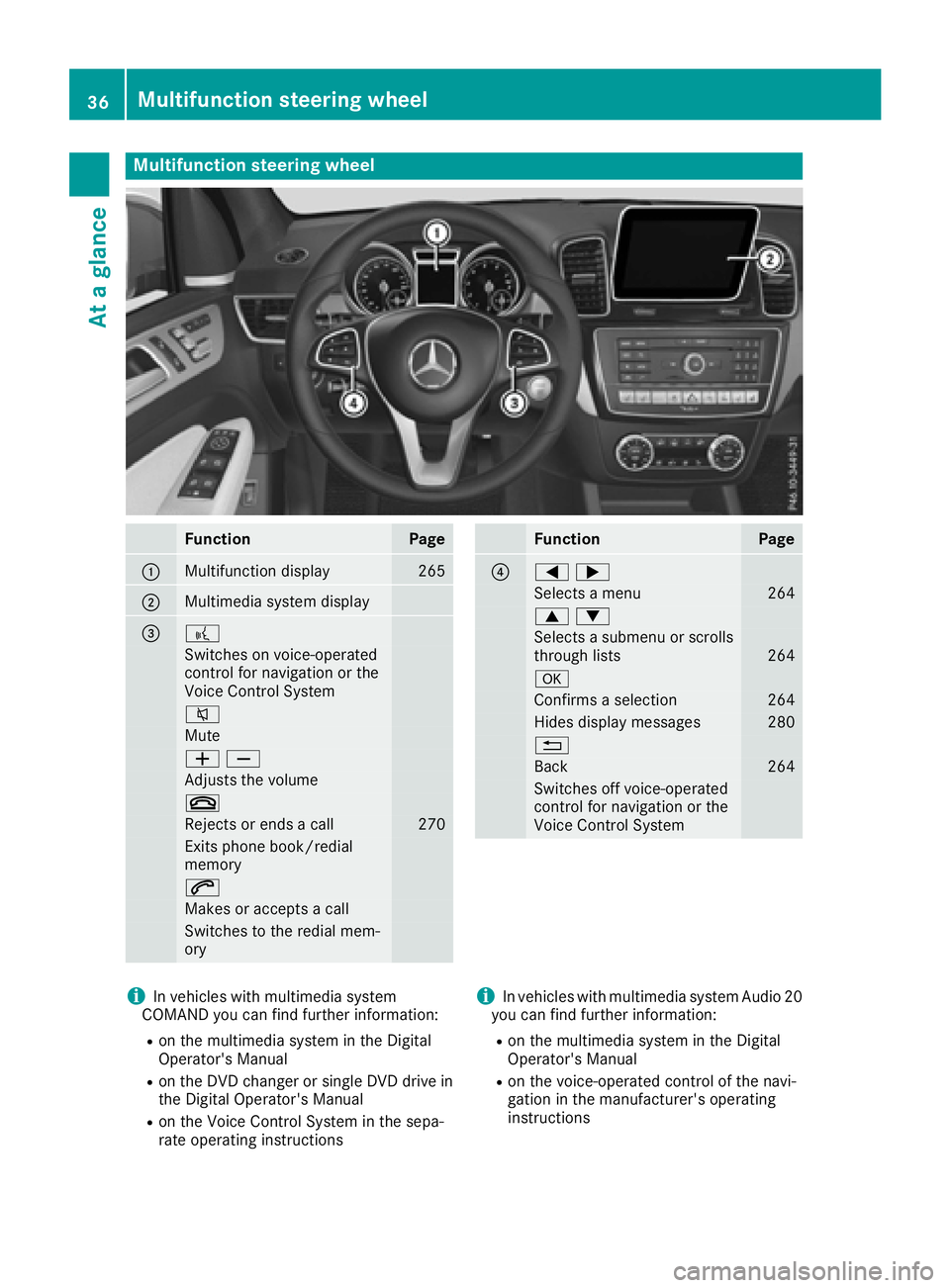
Multifunction steering wheel
FunctionPage
:Multifunction display265
;Multimedia system display
=?
Switches on voice-operated
control for navigation or the
Voice Control System
8
Mute
WX
Adjusts the volume
~
Rejects or ends a call270
Exits phone book/redial
memory
6
Makes or accepts a call
Switches to the redial mem-
ory
FunctionPage
?=;
Selects a menu264
9:
Selects a submenu or scrolls
through lists264
a
Confirms a selection264
Hides display messages280
%
Back264
Switches off voice-operated
control for navigation or the
Voice Control System
iIn vehicles with multimedia system
COMAND you can find further information:
Ron the multimedia system in the Digital
Operator's Manual
Ron the DVD changer or single DVD drive in
the Digital Operator's Manual
Ron the Voice Control System in the sepa-
rate operating instructions
iIn vehicles with multimedia system Audio 20
you can find further information:
Ron the multimedia system in the Digital
Operator's Manual
Ron the voice-operated control of the navi-
gation in the manufacturer's operating
instructions
36Multifunction steering wheel
At a glance
Page 42 of 450
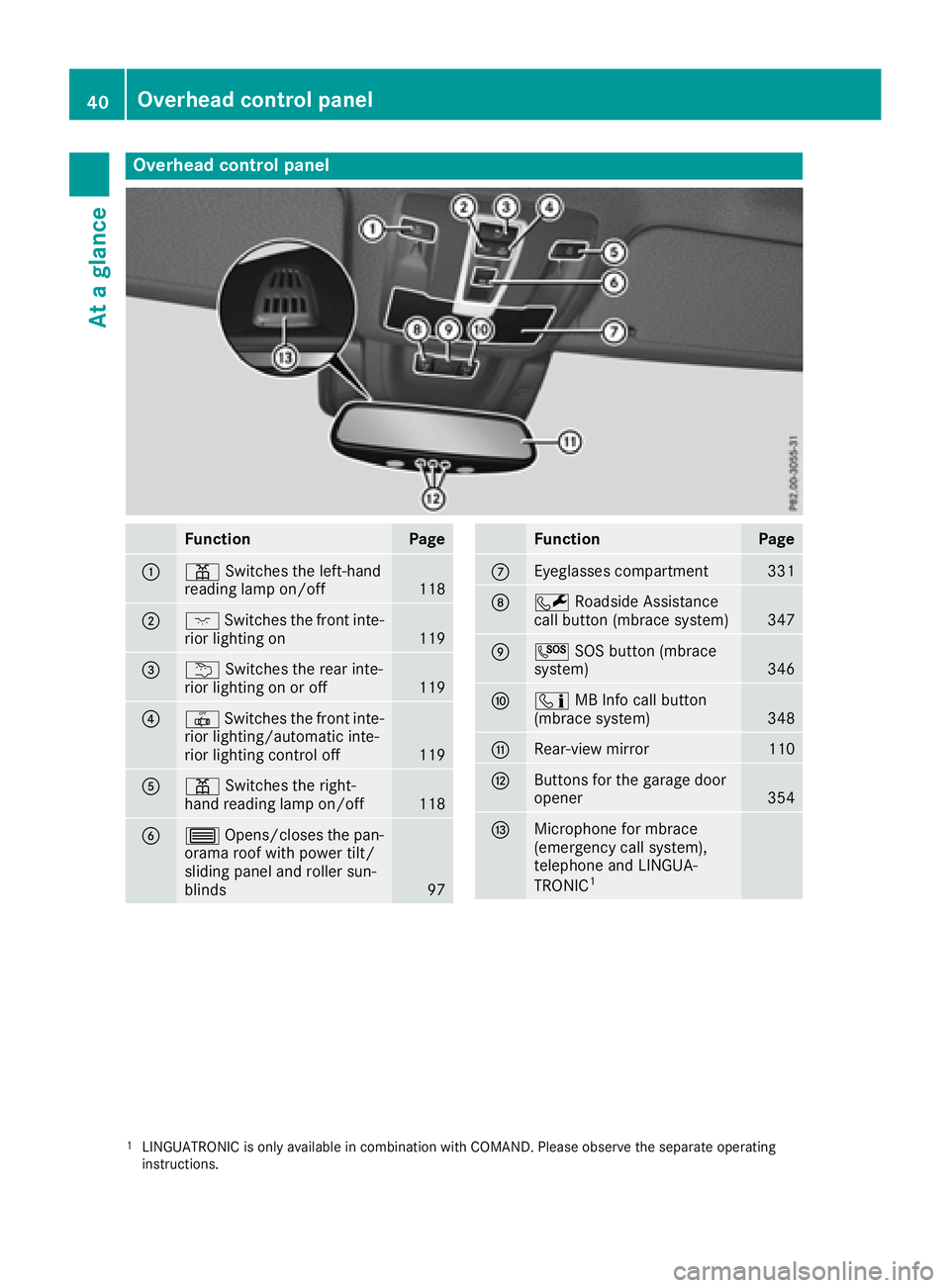
Overhead control panel
FunctionPage
:pSwitches the left-hand
reading lamp on/off118
;c Switches the front inte-
rior lighting on119
=u Switches the rear inte-
rior lighting on or off119
?| Switches the front inte-
rior lighting/automatic inte-
rior lighting control off
119
Ap Switches the right-
hand reading lamp on/off118
B3 Opens/closes the pan-
orama roof with power tilt/
sliding panel and roller sun-
blinds
97
FunctionPage
CEyeglasses compartment331
DF Roadside Assistance
call button (mbrace system)347
EG SOS button (mbrace
system)346
Fï MB Info call button
(mbrace system)348
GRear-view mirror110
HButtons for the garage door
opener354
IMicrophone for mbrace
(emergency call system),
telephone and LINGUA-
TRONIC
1
1LINGUATRONIC is only available in combination with COMAND. Please observe the separate operating
instructions.
40Overhead control panel
At a glance
Page 79 of 450
iThe immobilizer is always deactivated when
you start the engine.
In the event that the engine cannot be started
(yet the vehicle's battery is charged), the sys-
tem is not operational. Contact an authorized
Mercedes-Benz Center or call
1-800-FOR-MERCedes (in the USA) or
1-800-387-0100 (in Canada).
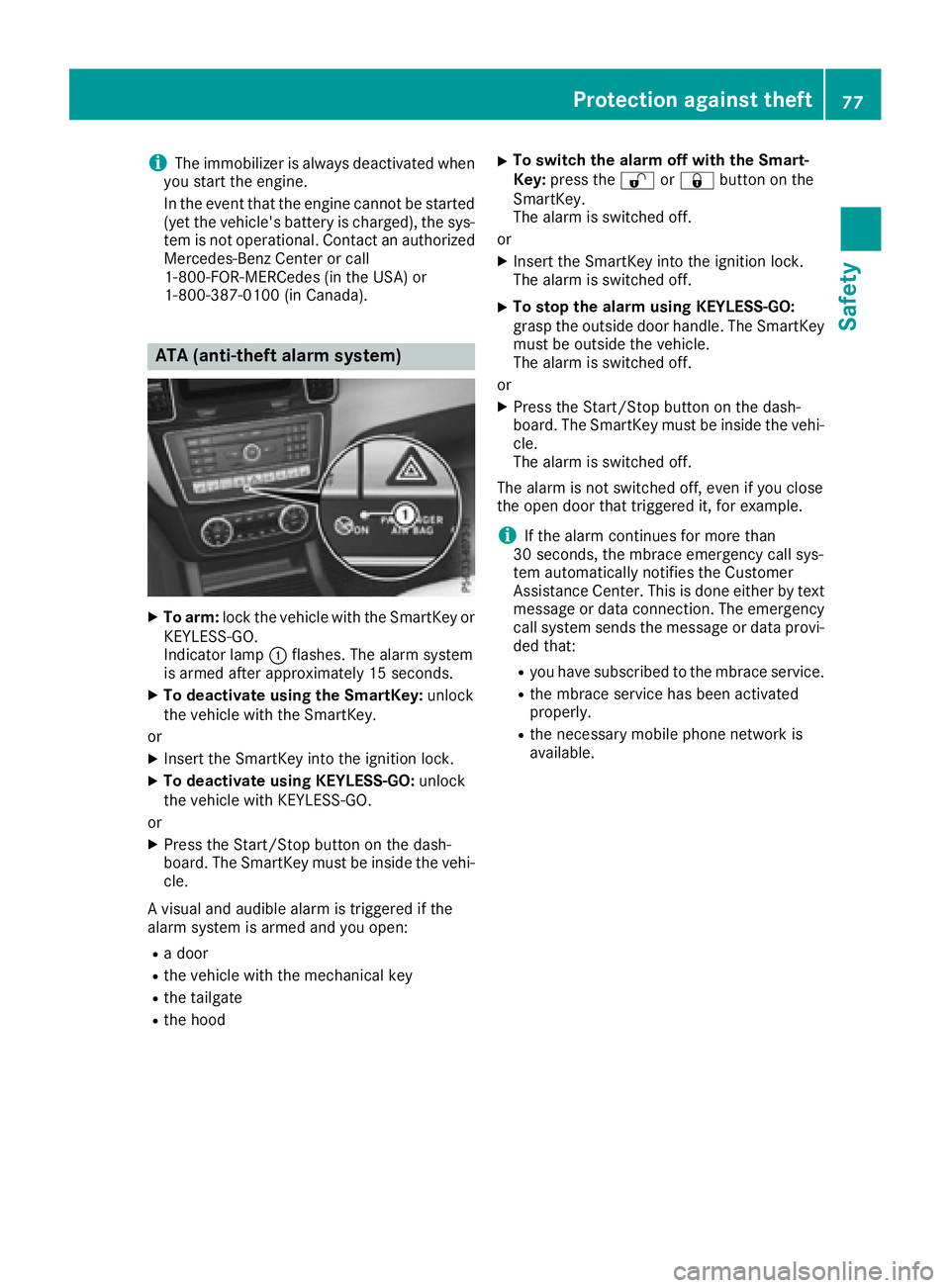
ATA (anti-theft alarm system)
XTo arm: lock the vehicle with the SmartKey or
KEYLESS-GO.
Indicator lamp :flashes. The alarm system
is armed after approximately 15 seconds.
XTo deactivate using the SmartKey: unlock
the vehicle with the SmartKey.
or
XInsert the SmartKey into the ignition lock.
XTo deactivate using KEYLESS-GO: unlock
the vehicle with KEYLESS-GO.
or
XPress the Start/Stop button on the dash-
board. The SmartKey must be inside the vehi- cle.
A visual and audible alarm is triggered if the
alarm system is armed and you open:
Ra door
Rthe vehicle with the mechanical key
Rthe tailgate
Rthe hood
XTo switch the alarm off with the Smart-
Key: press the %or& button on the
SmartKey.
The alarm is switched off.
or
XInsert the SmartKey into the ignition lock.
The alarm is switched off.
XTo stop the alarm using KEYLESS-GO:
grasp the outside door handle. The SmartKey
must be outside the vehicle.
The alarm is switched off.
or
XPress the Start/Stop button on the dash-
board. The SmartKey must be inside the vehi- cle.
The alarm is switched off.
The alarm is not switched off, even if you close
the open door that triggered it, for example.
iIf the alarm continues for more than
30 seconds, the mbrace emergency call sys-
tem automatically notifies the Customer
Assistance Center. This is done either by text message or data connection. The emergency
call system sends the message or data provi-
ded that:
Ryou have subscribed to the mbrace service.
Rthe mbrace service has been activated
properly.
Rthe necessary mobile phone network is
available.
Protection against theft77
Safety
Z
Page 80 of 450
Useful information
i
This Operator's Manual describes all models
and all standard and optional equipment of
your vehicle available at the time of publica-
tion of the Operator's Manual. Country-spe-
cific differences are possible. Please note
that your vehicle may not be equipped with all
features described. This also applies to
safety-related systems and functions.
iRead the information on qualified specialist
workshops (Ypage 29).
SmartKey
Important safety notes
GWARNING
If children are left unsupervised in the vehicle,
they could:
Ropen the doors, thus endangering other
people or road users.
Rget out and disrupt traffic.
Roperate the vehicle's equipment.
Additionally, children could set the vehicle in
motion if, for example, they:
Rrelease the parking brake.
Rshifting the automatic transmission out of
park position P
RStart the engine.
There is a risk of an accident and injury.
When leaving the vehicle, always take the
SmartKey with you and lock the vehicle. Never
leave children or animals unattended in the
vehicle. Always keep the SmartKey out of
reach of children.
GWARNING
If you attach heavy or large objects to the
SmartKey, the SmartKey could be uninten-
tionally turned in the ignition lock. This could
cause the engine to be switched off. There is a risk of an accident.
Do not attach any heavy or large objects to theSmartKey. Remove any bulky key rings before
inserting the SmartKey into the ignition lock.
!Keep the SmartKey away from strong mag-
netic fields. Otherwise, the remote control
function could be affected.
Strong magnetic fields can occur in the vicin-
ity of powerful electrical installations.
Do not keep the SmartKey:
Rwith electronic devices, e.g. a mobile phone
or another SmartKey.
Rwith metallic objects, e.g. coins or metal foil.
Rinside metallic objects, e.g. a metal case.
This can affect the functionality of the Smart-
Key.
Do not keep the KEYLESS-GO or KEYLESS-GO
Start function key in the temperature-controlled
cup holder. Otherwise, the KEYLESS-GO or KEY-
LESS-GO Start function key will not be detected. Vehicles with KEYLESS-GO start function: do
not keep the SmartKey in the cargo compart-
ment. Otherwise, the SmartKey may not be
detected, e.g. when starting the engine using
the Start/Stop button.
SmartKey functions
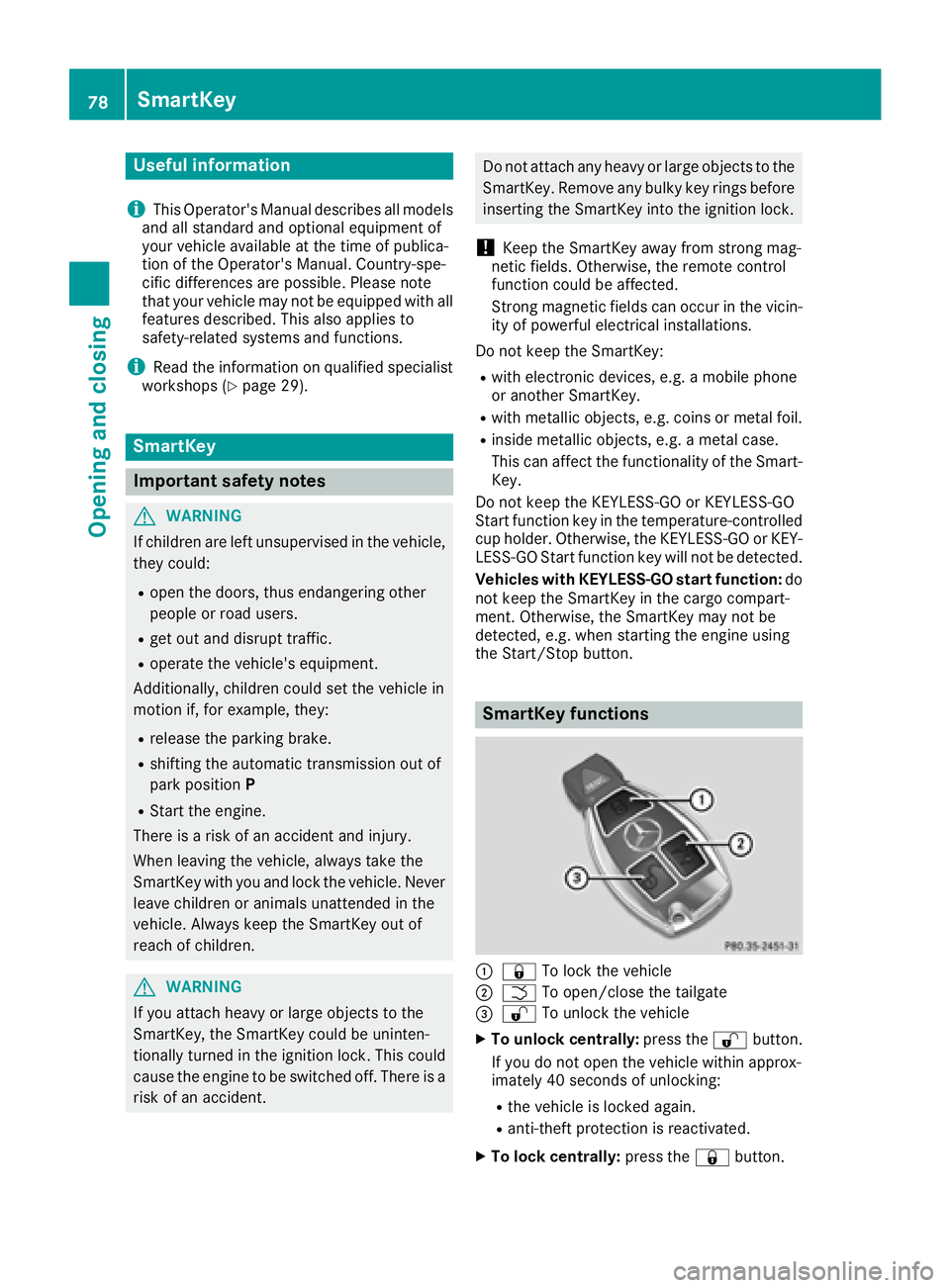
:& To lock the vehicle
;FTo open/close the tailgate
=%To unlock the vehicle
XTo unlock centrally: press the%button.
If you do not open the vehicle within approx-
imately 40 seconds of unlocking:
Rthe vehicle is locked again.
Ranti-theft protection is reactivated.
XTo lock centrally: press the&button.
78SmartKey
Opening and closing
Page 128 of 450
Useful information
i
This Operator's Manual describes all models
and all standard and optional equipment of
your vehicle available at the time of publica-
tion of the Operator's Manual. Country-spe-
cific differences are possible. Please note
that your vehicle may not be equipped with all
features described. This also applies to
safety-related systems and functions.
iRead the information on qualified specialist
workshops (Ypage 29).
Overview of climate control systems
General notes
Observe the settings recommended on the fol-
lowing pages. The windows could otherwise fog
up.
To prevent the windows from fogging up:
Rswitch off climate control only briefly
Rswitch on air-recirculation mode only briefly
Rswitch on the cooling with air dehumidifica-
tion function
Rswitch on the defrost windshield function
briefly, if required
Climate control regulates the temperature and
the humidity in the vehicle interior and filters
undesirable substances out of the air.
For vehicles with a combustion engine, the
"Cooling with air dehumidification" function is
only available when the engine is running. For
hybrid vehicles, the "Cooling with air dehumidi-
fication" function is also available via the elec-
tric refrigerant compressor when the engine is
not running. Optimum climate control is only
achieved with the side windows and roof closed.
The residual heat function can only be activated
or deactivated with the ignition switched off
(
Ypage 138).
iVentilate the vehicle for a brief period during
warm weather, e.g. using the convenience
opening feature (
Ypage 92).
This will speed up the cooling process and the
desired interior temperature will be reached
more quickly.
If you start the engine using your smartphone,
the last selected climate control setting is reac-
tivated (
Ypage 148).
iThe integrated filter filters out most parti-
cles of dust and soot and completely filters
out pollen. It also reduces gaseous pollutants
and odors. A clogged filter reduces the
amount of air supplied to the vehicle interior.
For this reason, you should always observe
the interval for replacing the filter, which is
specified in the Maintenance Booklet. As it
depends on environmental conditions, e.g.
heavy air pollution, the interval may be
shorter than stated in the Maintenance Book- let.
iVehicles with AIR-BALANCE package: in
addition to ioniz ation, the vehicle has an air
filter with anti-allergenic properties that con-
tribute to improved air filtration.
iIt is possible that under certain circumstan-
ces the residual heat function may be activa-
ted automatically an hour after the SmartKey
has been removed in order to dry the auto-
matic climate control. The vehicle is then ven-
tilated for 30 minutes.
126Overview of climate control systems
Climate control