radio MERCEDES-BENZ GLE-CLASS SUV 2016 Owners Manual
[x] Cancel search | Manufacturer: MERCEDES-BENZ, Model Year: 2016, Model line: GLE-CLASS SUV, Model: MERCEDES-BENZ GLE-CLASS SUV 2016Pages: 450, PDF Size: 10.52 MB
Page 2 of 450
Publication details
Internet
Further information about Mercedes-Benz vehi-
cles and about Daimler AG can be found on the
following websites:
http://www.mbusa.com (USA only)
http://www.mercedes-benz.ca (Canada only)
Editorial office
©Daimler AG: not to be reprinted, translated or
otherwise reproduced, in whole or in part, with- out written permission from Daimler AG.
Vehicle manufacturer
Daimler AG
Mercedesstraße 137
70327 Stuttgart
Germany
Symbols
Registered trademarks:
RBluetooth®is a registered trademark of Blue-
tooth SIG Inc.
RDTS™ is a registered trademark of DTS, Inc.
RDolby®and MLP™ are registered trademarks
of DOLBY Laboratories.
RBabySmart™, ESP®and PRE-SAFE®are reg-
istered trademarks of Daimler AG.
RHomeLink®is a registered trademark of John-
son Controls.
RiPod®and iTunes®are registered trademarks
of Apple Inc.
RLogic7®is a registered trademark of Harman
International Industries.
RMicrosoft®and Windows media®are regis-
tered trademarks of Microsoft Corporation.
RSIRIUS®is a registered trademark of Sirius
XM Radio Inc.
RHD Radio™ is a registered trademark of iBiq-
uity Digital Corporation.
RGracenote®is a registered trademark of
Gracenote, Inc.
RZAGAT Survey®and related brands are regis-
tered trademarks of Zagat Survey, LLC.
In this Operator's Manual you will find the fol-
lowing symbols:
GWARNING
Warning notes make you aware of dangers
which could pose a threat to your health or
life, or to the health and life of others.
HEnvironmental note
Environmental notes provide you with infor-
mation on environmentally aware actions or
disposal.
!Notes on material damage alert you to dan-
gers that could lead to damage to your vehi-
cle.
iPractical tips or further information that
could be helpful to you.
X This symbol indicates an instruction
that must be followed.
X Several of these symbols in succession
indicate an instruction with several
steps. (Y
page)
This symbol tells you where you can find
more information about a topic.
YY This symbol indicates a warning or an
instruction that is continued on the next
page.
Dis‐
playThis text indicates a message on the
multifunction display/multimedia dis-
play.
As at 09.03.2015
Page 12 of 450
Emergency unlockingTailgate ............................................ 90
Emissions control
Service and warranty information .... 26
Engine
Check Engine warning lamp .......... .325
Display message ............................ 295
ECO start/stop function ................ 149
Engine number ............................... 433
Irregular running ............................ 152
Jump-starting ................................. 379
Starting (important safety notes) ... 147
Starting problems .......................... 152
Starting the engine with the
SmartKey ....................................... 147
Starting via smartphone ................ 148
Starting with KEYLESS-GO ............. 148
Switching off .................................. 179
Tow-starting (vehicle) ..................... 383
Engine electronics
Problem (malfunction) ................... 152
Engine jump starting
see Jump starting (engine)
Engine oil
Adding ...........................................3 58
Additives ........................................ 438
Checking the oil level ..................... 357
Checking the oil level using the
dipstick .......................................... 357
Display message ............................ 297
Filling capacity ............................... 438
Notes about oil grades ................... 437
Notes on oil level/consumption .... 357
Temperature (on-board computer,
Mercedes-AMG vehicles) ...............2 77
Viscosity ........................................ 438
ESP
®(Electronic Stability Pro-
gram)
AMG menu (on-board computer) ... 277
Characteristics ................................. 72
Deactivating/activating ................... 72
Display message ............................ 281
Function/notes ................................ 71
General notes .................................. 71
Important safety information ........... 72
Trailer stabilization ........................... 73
Warning lamp ................................. 321 ETS/4ETS (Electronic Traction Sys-
tem)
...................................................... 71
Exhaust c
heck ................................... 182
Exhaust pipe (cleaning instruc-
tions) ..................................................3 66
Exhaustive discharging (high-volt-
age battery) ....................................... 376
Exterior mirrors
Adjusting ....................................... 110
Dipping (automatic) ....................... 111
Folding in when locking (on-board
computer) ...................................... 276
Folding in/out (automatically) ....... 111
Folding in/out (electrically) ........... 111
Out of position (troubleshooting) ... 111
Setting ........................................... 111
Storing settings (memory func-
tion) ............................................... 113
Storing the parking position .......... 112
Eyeglasses compartment ................. 331
F
Filler cap
see Refueling
Flat tire
MOExtended tires .......................... 370
Preparing the vehicle ..................... 370
TIREFIT kit ...................................... 371
see Emergency spare wheel
Floormats ........................................... 355
Folding the rear bench seat for-
wards/back ....................................... 332
Fording
Off-road ......................................... 185
On flooded roads ........................... 185
Frequencies
Mobile phone ................................. 431
Two-way radio ................................ 431
Fuel
Additives ........................................ 435
Consumption statistics .................. 266
Displaying the current consump-
tion ................................................ 267
Displaying the range ...................... 267
Driving tips .................................... 182
Flexible fuel vehicles ...................... 436
Fuel gauge ....................................... 34
10Index
Page 19 of 450
Warning lamp ................................. 327
PRE-SAFE®PLUS (anticipatory
occupant protection PLUS)
Display message ............................2 88
Operation ......................................... 59
Protection against theft
ATA (Anti-Theft Alarm system) ......... 77
Immobilizer ...................................... 76
Protection of the environment
General notes .................................. 25
Pulling away
General notes ................................ 148
Trailer ............................................ 149
Pulling away (automatic transmis-
sion) .................................................... 148
Q
QR code
Mercedes-Benz Guide App ................. 1
Rescue card ..................................... 30
Qualified specialist workshop ........... 29
R
RACETIMER (on-board computer) .... 277
Radiator cover ................................... 357
Radio
Selecting a station ......................... 269
see separate operating instructions
Radio-wave reception/transmis-
sion in the vehicle
Declaration of conformity ................ 29
RBS (Recuperative Brake System)
Warning lamp ................................. 318
Reading lamp ..................................... 118
Rear bench seat
Folding forwards/back .................. 333
Rear compartment
Setting the air vents ......................1 42
Setting the temperature ................ 134
Rear fog lamp
Display message ............................ 293
Switching on/off ........................... 115
Rear seats
Adjusting ....................................... 104
Rear view camera
Cleaning instructions ..................... 365 Display in the multimedia system .. 218
Function/notes .............................2
17
Switching on/off ........................... 218
Rear window defroster
Problem (malfunction) ................... 138
Switching on/off ........................... 137
Rear window wiper
Replacing the wiper blade .............. 124
Switching on/off ........................... 122
Rear-view mirror
Anti-glare (manual) ........................ 110
Dipping (automatic) ....................... 111
Recuperative Brake System
Driving safety systems ..................... 44
Important safety notes .................... 44
Refrigerant (air-conditioning sys-
tem)
Important safety notes .................. 440
Refueling
Fuel gauge ....................................... 34
Important safety notes .................. 162
Refueling process .......................... 163
Refueling process (PLUG-IN
HYBRID vehicles) ........................... 163
see Fuel
Remote control
Garage door opener ....................... 352
Programming (garage door
opener) .......................................... 353
Replacing bulbs
General notes ................................ 119
Important safety notes .................. 119
Overview of bulb types .................. 120
Removing/rep
lacing the cover
(front wheel arch) .......................... 120
Reporting safety defects .................... 30
Rescue card ......................................... 30
Reserve (fuel tank)
see Fuel
Reserve fuel
Display message ............................ 297
Warning lamp ................................. 325
Residual heat (climate control) ........ 138
Restraint system
Display message ............................ 288
Introduction ..................................... 44
Warning lamp ................................. 324
Warning lamp (function) ................... 45
Index17
Page 22 of 450
Summer tires.....................................3 89
Sun visor ............................................ 340
Suspension setting
AMG adaptive sport suspension
system ...........................................2 09
Suspension settings
SETUP (on-board computer) .......... 277
SUV
(Sport Utility Vehicle) ....................... 28
Switching air-recirculation mode
on/off ................................................. 138
T
Tachometer ........................................ 263
Tail lamps
Display message ............................ 293
Tailgate
Display message ............................ 312
Emergency unlocking ....................... 90
Important safety notes .................... 87
Limiting the opening angle ...............9 0
Opening dimensions ......................4 41
Opening/closing (automatically
from inside) ...................................... 89
Opening/closing (automatically
from outside) ................................... 88
Opening/closing (from outside) ....... 88
Power closing .................................. 86
Tank
see Fuel tank
Tank content
Fuel gauge ....................................... 34
Technical data
Capacities ...................................... 433
Emergency spare wheel ................. 430
Information ....................................4 31
Tires/wheels ................................. 413
Trailer loads ................................... 445
Vehicle data ................................... 441
Telephone
Accepting a call (multifunction
steering wheel) .............................. 270
Display message ............................ 314
Menu (on-board computer) ............ 270
Number from the phone book ........2 70
Redialing ........................................ 271
Rejecting/ending a call ................. 270 Temperature
Coolant (display in the instrument
cluster) .......................................... 264
Coolant (on-board computer,
Mercedes-AMG vehicles) ...............2 77
Coolant (on-board computer) ......... 273
Engine oil (on-board computer,
Mercedes-AMG vehicles) ...............2 77
Outside temperature ......................2 64
Setting (climate control) ................ 134
Transmission oil (on-board com-
puter, Mercedes-AMG vehicles) ..... 277
Through-loading feature ................... 332
Time
see separate operating instructions
Timing (RACETIMER) ......................... 277
Tire pressure
Calling up (on-board computer) ..... 394
Checking manually ........................ 393
Displ ay message ............................ 309
Ma
ximum ....................................... 393
Not reached (TIREFIT) .................... 373
Notes ............................................. 392
Reached (TIREFIT) .......................... 373
Recommended ............................... 390
Tire pressure loss warning system
General notes ................................ 393
Important safety notes .................. 394
Restarting ...................................... 394
Tire pressure monitor
Checking the tire pressure elec-
tronically ........................................ 396
Function/notes .............................3 94
General notes ................................ 394
Important safety notes .................. 395
Radio type approval for the tire
pressure monitor ........................... 397
Restarting ...................................... 397
Warning lamp ................................. 328
Warning message .......................... 396
TIREFIT kit .......................................... 371
Important safety notes .................. 371
Storage location ............................ 369
Tire pressure not reached .............. 373
Tire pressure reached .................... 373
Tires
Aspect ratio (definition) ................. 407
20Index
Page 24 of 450
Power supply ................................. 262
Pulling away with a trailer .............. 149
Removing the ball coupling ............ 262
Trailer loads ................................... 445
Towing away
Important safety guidelines ........... 381
Installing the towing eye ................3 82
Notes for 4MATIC vehicles ............ 383
Removing the towing eye ...............3 82
Transporting the vehicle ................ 383
With both axles on the ground ....... 382
Towing eye ......................................... 369
Traffic Sign Assist
Display message ............................ 304
Function/notes .............................2 26
Important safety notes .................. 226
Instrument cluster display ............. 226
Trailer coupling
see Towing a trailer
Trailer loads and drawbar nose-
weights ............................................... 261
Trailer towing
Active Blind Spot Assist ................. 233
Active Lane Keeping Assist ............ 235
Blind Spot Assist ............................ 229
PARKTRONIC ................................. 210
Permissible trailer loads and
drawbar noseweights ..................... 261
Transfer case ..................................... 162
Transmission
see Automatic transmission
Transmission position display ......... 154
Transmission position display
(DIRECT SELECT lever) ......................154
Transporting the vehicle .................. 383
Traveling uphill
Brow of hill ..................................... 190
Driving downhill .............................1 90
Maximum gradient-climbing capa-
bility ............................................... 190
Trim pieces (cleaning instruc-
tions) ..................................................3 67
Trip computer (on-board com-
puter) ..................................................2 66
Trip odometer
Calling up ....................................... 266
Resetting (on-board computer) ...... 267 Trunk
see Tailgate
Turn signals
Changing bul bs (front) ................... 121
Di
splay message ............................ 292
Switching on/off ........................... 116
Two-way radio
Frequencies ................................... 431
Installation ..................................... 431
Transmission output (maximum) .... 431
TWR (Tongue Weight Rating) (defi-
nition) ................................................. 408
Type identification plate
see Vehicle identification plate
U
UnlockingEmergency unlocking ....................... 86
From inside the vehicle (central
unlocking button) .............................8 5
Upshift indicator (on-board com-
puter, Mercedes-AMG vehicles) .......277
V
Vanity mirror (in the sun visor) ........341
Vehicle
Correct use ...................................... 29
Data acquisition ............................... 30
Display message ............................ 311
Equipment ....................................... 26
Individual settings .......................... 273
Limited Warranty .............................3 0
Loading .......................................... 397
Locking (in an emergency) ............... 86
Locking (SmartKey) .......................... 78
Lowering ........................................ 412
Maintenance .................................... 27
Parking for a long period ................ 181
Pulling away ................................... 148
Raising ........................................... 410
Reporting problems ......................... 29
Securing from rolling away ............ 409
Towing away .................................. 381
Transporting .................................. 383
Unlocking (in an emergency) ........... 86
Unlocking (SmartKey) ...................... 78
22Index
Page 81 of 450
The SmartKey centrally locks and unlocks the
following components:
Rthe doors
Rthe tailgate
Rthe fuel filler flap
The turn signals flash once when unlocking and
three times when locking.
You can also set an audible signal to confirm
that the vehicle has been locked. The audible
signal can be activated and deactivated using
the on-board computer (
Ypage 275).
You will receive visual and acoustic locking con-
firmation if all components were able to be
locked.
If activated in COMAND or Audio 20, the locator
lighting also lights up in the dark (see separate
operating instructions).
XTo open the tailgate automatically from
outside the vehicle: press and hold theF
button until the tailgate opens.
Vehicles with KEYLESS-GO or KEYLESS-GO start function and EASY-PACK tailgate:
XTo close the tailgate automatically from
outside the vehicle: if the SmartKey is loca-
ted in the immediate vicinity of the vehicle,
press the Fbutton on the SmartKey.
When the tailgate closes you can then release
the button.
KEYLESS-GO
General notes
Bear in mind that the engine can be started by
any of the vehicle occupants if there is a KEY-
LESS-GO key in the vehicle (
Ypage 148).
Locking/unlocking centrally
You can start, lock or unlock the vehicle using
KEYLESS-GO. To do this, you only need carry the
SmartKey with you. You can combine the func-
tions of KEYLESS-GO with those of a conven-
tional SmartKey. Unlock the vehicle by using
KEYLESS-GO, for instance, and lock it using the
& button on the SmartKey.
The driver's door and the door at which the han-
dle is used, must both be closed. The SmartKey
must be outside the vehicle. When locking or
unlocking with KEYLESS-GO, the distance between the SmartKey and the corresponding
door handle must not be greater than 3 ft (1 m).
KEYLESS-GO checks whether a valid SmartKey
is in the vehicle by periodically establishing a
radio connection between the vehicle and the
SmartKey. This happens:
Rwhen starting the engine
Rwhile driving
Rwhen the external door handles are touched
Rduring convenience closing
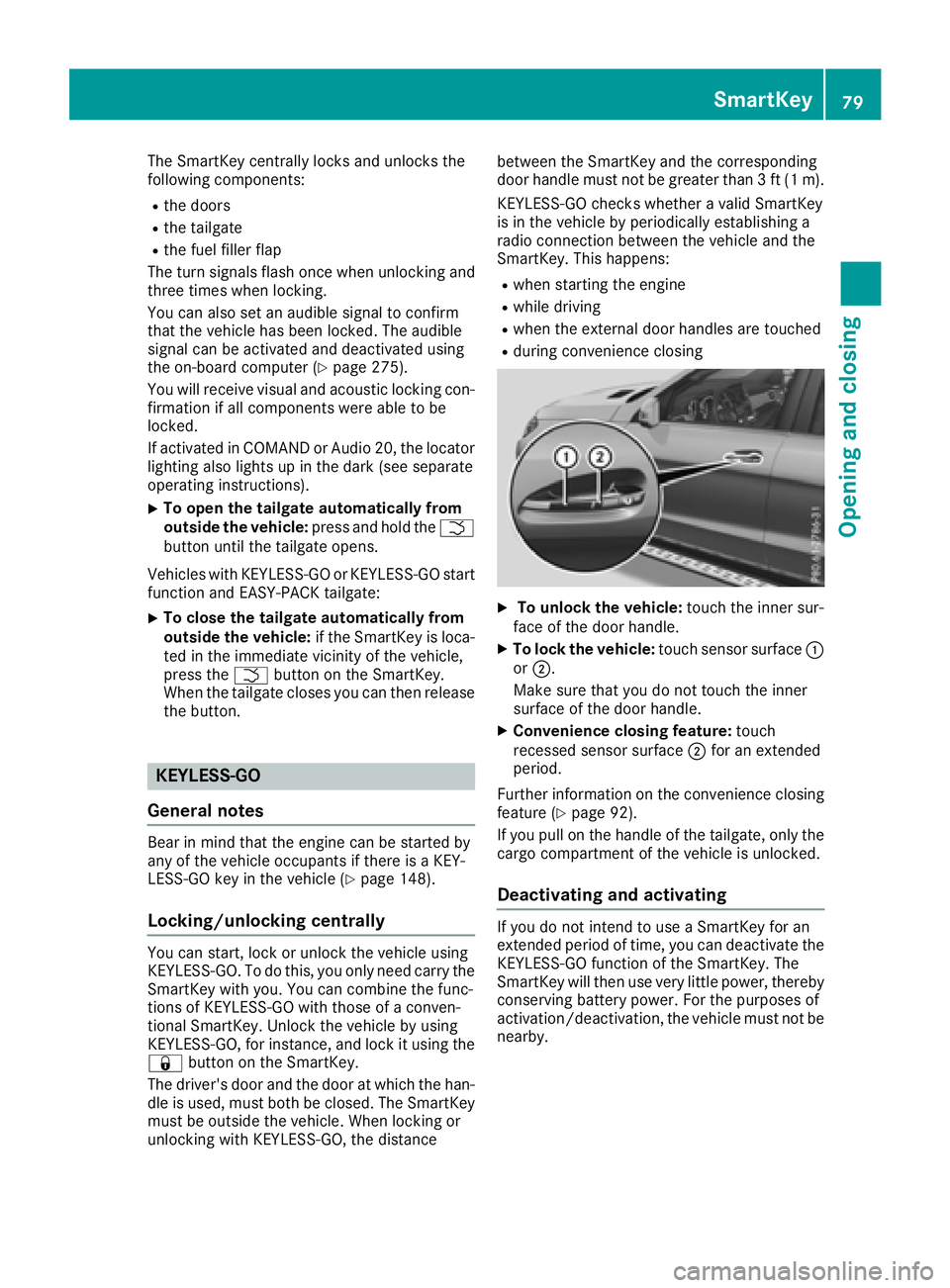
XTo unlock the vehicle:
touch the inner sur-
face of the door handle.
XTo lock the vehicle: touch sensor surface :
or ;.
Make sure that you do not touch the inner
surface of the door handle.
XConvenience closing feature: touch
recessed sensor surface ;for an extended
period.
Further information on the convenience closing
feature (
Ypage 92).
If you pull on the handle of the tailgate, only the cargo compartment of the vehicle is unlocked.
Deactivating and activating
If you do not intend to use a SmartKey for an
extended period of time, you can deactivate the
KEYLESS-GO function of the SmartKey. The
SmartKey will then use very little power, thereby
conserving battery power. For the purposes of
activation/deactivation, the vehicle must not be
nearby.
SmartKey79
Opening and closing
Z
Page 85 of 450
Problems with the SmartKey
ProblemPossible causes/consequences andMSolutions
You can no longer lock or
unlock the vehicle using
the SmartKey.The SmartKey battery is discharged or nearly discharged.
XCheck the SmartKey battery (Ypage 81) and replace it if necessary
(Ypage 81).
If this does not work:
XUnlock (Ypage 86) or lock (Ypage 86) the vehicle using the
mechanical key.
There is interference from a powerful source of radio waves.
XUnlock (Ypage 86) or lock (Ypage 86) the vehicle using the
mechanical key.
The SmartKey is faulty.
XUnlock (Ypage 86) or lock (Ypage 86) the vehicle using the
mechanical key.
XHave the SmartKey checked at a qualified specialist workshop.
You can no longer lock or
unlock the vehicle using
KEYLESS-GO.KEYLESS-GO was deactivated.
XReactivate KEYLESS-GO (Ypage 79).
The SmartKey battery is discharged or nearly discharged.
XCheck the SmartKey battery (Ypage 81) and replace it if necessary
(Ypage 81).
If this does not work:
XUnlock (Ypage 86) or lock (Ypage 86) the vehicle using the
mechanical key.
There is interference from a powerful source of radio waves.
XUnlock (Ypage 86) or lock (Ypage 86) the vehicle using the
mechanical key.
KEYLESS-GO is malfunctioning.
XLock/unlock the vehicle using the remote control function of the
SmartKey.
XHave the vehicle and SmartKey checked at a qualified specialist
workshop.
If the vehicle can also not be locked/unlocked using the remote con-
trol function:
XUnlock (Ypage 86) or lock (Ypage 86) the vehicle using the
mechanical key.
XHave the vehicle and SmartKey checked at a qualified specialist
workshop.
SmartKey83
Opening and closing
Z
Page 86 of 450
ProblemPossible causes/consequences andMSolutions
The engine cannot be
started using the Smart-
Key.The on-board voltage is too low.
XSwitch off non-essential consumers, e.g. seat heating or interior
lighting, and try to start the engine again.
If this does not work:
XCheck the starter battery and charge it if necessary (Ypage 377).
or
XJump-start the vehicle (Ypage 379).
or
XConsult a qualified specialist workshop.
The engine cannot be
started using the Start/
Stop button. The Smart-
Key is in the vehicle.The vehicle is locked.
XUnlock the vehicle and try to start the vehicle again.
The SmartKey battery is discharged or nearly discharged.
XCheck the SmartKey battery (Ypage 81) and replace it if necessary
(Ypage 81).
If this does not work:
XStart your vehicle with the SmartKey in the ignition lock.
There is interference from a powerful source of radio waves.
XStart your vehicle with the SmartKey in the ignition lock.
You have lost a Smart-
Key.XHave the SmartKey deactivated at a qualified specialist workshop.
XReport the loss immediately to the vehicle insurers.
XIf necessary, have the locks changed as well.
You have lost the
mechanical key.XReport the loss immediately to the vehicle insurers.
XIf necessary, have the locks changed as well.
Doors
Important safety notes
GWARNING
If children are left unsupervised in the vehicle,
they could:
Ropen the doors, thus endangering other
people or road users.
Rget out and disrupt traffic.
Roperate the vehicle's equipment.
Additionally, children could set the vehicle in
motion if, for example, they:
Rrelease the parking brake.
Rshifting the automatic transmission out of
park position P
RStart the engine.
There is a risk of an accident and injury.
When leaving the vehicle, always take the
SmartKey with you and lock the vehicle. Never
leave children or animals unattended in the
vehicle. Always keep the SmartKey out of
reach of children.
84Doors
Opening and closing
Page 180 of 450
Every person who has access to the informa-
tion stated can use the functions of the online
access to the vehicle.
iInformation when selling a vehicle or
buying a used vehicle:
RIf you sell your vehicle, you are obliged to
delete the vehicle from your personal area
on the online access to the vehicle.
RIf you have bought a used vehicle, it is pos-
sible that the previous owner still has
access to the online access to the vehicle.
Calling up functions
The online access to the vehicle allows you
access to your vehicle's information and func-
tions using remote query and remote configu-
ration.
The following functions can be accessed:
Rrequest the current condition of charge of the
high-voltage battery
Rprogram the departure time (Ypage 274)
Rset or activate the "Pre-entry climate control
at departure time" function (see the separate
COMAND operating instructions)
Information on additional functions and operat- ing instructions can be found within the online
access to the vehicle.
Connecting the vehicle to the Internet
iThis function is not available in all countries
and requires activated access to the mbrace
emergency call system.
You can use the online access to the vehicle if
the vehicle has a connection to the Internet via a mobile phone network. The necessary data is
transmitted by radio. The vehicle automatically
recognizes whether a connection to the Internet
is possible or not. No presets are necessary.
iRestrictions in reception are possible if the
vehicle is in an underground car park, for
example. Restrictions may also occur in areas with poor mobile network coverage.
Parking
Important safety notes
GWARNING
Flammable material such as leaves, grass or
twigs may ignite if they come into contact with
hot parts of the exhaust system or exhaust
gas flow. There is a risk of fire.
Park the vehicle so that no flammable mate-
rials come into contact with parts of the vehi-
cle which are hot. Take particular care not to
park on dry grassland or harvested grain
fields.
GWARNING
If you leave children unsupervised in the vehi-
cle, they could set it in motion by, for example:
Rrelease the parking brake.
Rshift the automatic transmission out of the
parking position P.
Rstart the engine.
In addition, they may operate vehicle equip-
ment and become trapped. There is a risk of
an accident and injury.
When leaving the vehicle, always take the
SmartKey with you and lock the vehicle. Never
leave children unsupervised in the vehicle.
!Always secure the vehicle correctly against
rolling away. Otherwise, the vehicle or its driv-
etrain could be damaged.
To ensure that the vehicle is secured against
rolling away unintentionally:
Rthe electric parking brake must be applied.
Rthe transmission must be in position Pand the
SmartKey must be removed from the ignition
lock.
Rthe front wheels must be turned towards the
curb on steep uphill or downhill gradients.
Rthe empty vehicle must be secured at the
front axle with a wheel chock or similar, for
example, on uphill or downhill gradients.
Ra laden vehicle must also be secured at the
rear axle with a wheel chock or similar, for
example, on uphill or downhill gradients.
178Parking
Driving an d parking
Page 215 of 450
Problems with PARKTRONIC
ProblemPossible causes/consequences andMSolutions
Only the red segments in
the PARKTRONIC warn-
ing displays are lit. You
also hear a warning tone
for approximately two
seconds.
PARKTRONIC is deacti-
vated after approx-
imately five seconds,
and the indicator lamp in
the PARKTRONIC button
lights up.PARKTRONIC has malfunctioned and has switched off.
XIf problems persist, have PARKTRONIC checked at a qualified spe-
cialist workshop.
Only the red segments in
the PARKTRONIC warn-
ing displays are lit.
PARKTRONIC is deacti-
vated after approx-
imately five seconds.The PARKTRONIC sensors are dirty or there is interference.
XClean the PARKTRONIC sensors (Ypage 365).
XSwitch the ignition back on.
The problem may be caused by an external source of radio or ultra-
sound waves.
XSee if PARKTRONIC functions in a different location.
Active Parking Assist
General notes
Active Parking Assist is an electronic parking aid
with ultrasound. It measures the road on both
sides of the vehicle. A parking symbol indicates a suitable parking space. Active steering inter-
vention and brake application can assist you
during parking. You may also use PARKTRONIC
(
Ypage 210).
Important safety notes
Active Parking Assist is merely an aid. It is not a
replacement for your attention to your immedi-
ate surroundings. You are always responsible
for safe maneuvering, parking and exiting a
parking space. Make sure that no persons, ani-
mals or objects are in the maneuvering range.
When PARKTRONIC is switched off, Active Park-
ing Assist is also unavailable.
GWARNING
While parking or pulling out of a parking
space, the vehicle swings out and can drive
onto areas of the oncoming lane. This could
result in a collision with another road user.
There is a risk of an accident.
Pay attention to other road users. Stop the
vehicle if necessary or cancel the Active Park- ing Assist parking procedure.
!If unavoidable, you should drive over obsta-
cles such as curbs slowly and not at a sharp
angle. Otherwise, you may damage the
wheels or tires.
Active Parking Assist may possibly indicate
parking spaces which are not suitable for park-
ing, for example:
Rwhere parking or stopping is prohibited
Rin front of driveways or entrances and exits
Ron unsuitable surfaces
Parking tips:
ROn narrow roads, drive as close to the parking
space as possible.
RParking spaces that are littered or overgrown
might be identified or measured incorrectly.
RParking spaces that are partially occupied by
trailer drawbars might not be identified as
such or be measured incorrectly.
Driving systems213
Driving and parking
Z