jump start MERCEDES-BENZ GLE COUPE 2018 Owner's Manual
[x] Cancel search | Manufacturer: MERCEDES-BENZ, Model Year: 2018, Model line: GLE COUPE, Model: MERCEDES-BENZ GLE COUPE 2018Pages: 398, PDF Size: 6.64 MB
Page 5 of 398
Features .............................................. 304
Maintenance and care......................321
Engine compartment ........................... 321
ASSYST PLUS ...................................... 325
Care ..................................................... 326
Breakdown assistance .....................334
Where will I find...? .............................. 334
Flat tire ................................................ 335
Battery (vehicle) .................................. 340
Jump-starting ....................................... 342
Towing and tow-starting ...................... 345
Fuses ................................................... 348
Wheels and tires ............................... 351
Important safety notes ........................ 351
Operation ............................................ 351
Winter operation .................................. 353
Tire pressure ....................................... 354
Loading the vehicle .............................. 361
All about wheels and tires ................... 364
Changing a wheel ................................ 371
Wheel and tire combinations ............... 376
Emergency spare wheel ....................... 376
Technical data ................................... 381
Information regarding technical data ... 381
Vehicle electronics .............................. 381
Identification plates ............................. 382
Service products and filling capaci-
ties ...................................................... 383
Vehicle data ......................................... 390
Vehicle data for off-road driving .......... 392
Trailer tow hitch ................................... 394
Contents3
Page 8 of 398
B
Back button....................................... 288
Bag hook ............................................ 300
Ball coupling
Installing ........................................ 221
Removing ....................................... 224
BAS (Brake Assist System) ................. 67
Battery (SmartKey)
Checking .......................................... 80
Important safety notes .................... 80
Replacing ......................................... 80
Battery (vehicle)
Charging ........................................ 342
Display message ............................ 257
Important safety notes .................. 340
Jump starting ................................. 342
Overview ........................................ 340
Belt
see Seat belts
Belt warning ......................................... 48
Bicycle rack ....................................... 225
Blind Spot Assist
Activating/deactivating ................. 237
Display message ............................ 264
Notes/function .............................. 204
Trailer towing ................................. 206
see Active Blind Spot Assist
BlueTEC
Adding DEF .................................... 153
BlueTEC (DEF) .................................... 386
Bluetooth
®
Searching for a mobile phone ........ 291
Searching for a mobile phone
(device manager) ........................... 292
see also Digital Operator's Man-
ual .................................................. 287
Telephony ...................................... 291
Brake Assist
see BAS (Brake Assist System)
Brake fluid
Display message ............................ 249
Notes ............................................. 388
Brake force distribution
see EBD (electronic brake force
distribution)
Brake lamps
Display message ............................ 255 Brake linings
Display message ............................ 249
Brakes
ABS .................................................. 66
BAS .................................................. 67
Brake fluid (notes) ......................... 388
Braking assistance appropriate to
the situation ..................................... 69
Display message ............................ 244
High-performance brake system .... 163
Hill start assist ............................... 139
Important safety notes .................. 161
Maintenance .................................. 162
Parking brake ................................ 157
Riding tips ...................................... 161
Warning lamp ................................. 276
Braking assistance appropriate to
the situatio n
Fu
nction/notes ................................ 69
Breakdown
Where will I find...? ........................ 334
see Flat tire
see Towing away
Brightness control (instrument
cluster lighting) ................................... 37
Bulbs
see Replacing bulbs
C
CaliforniaImportant notice for retail cus-
tomers and lessees .......................... 28
Calling up a malfunction
see Display messages
Car
see Vehicle
Care
360° camera ................................. 330
Car wash ........................................ 326
Carpets .......................................... 333
Display ........................................... 331
Exhaust pipe .................................. 330
Exterior lights ................................ 329
Gear or selector lever .................... 332
Interior ........................................... 331
Matte finish ................................... 328
Notes ............................................. 326
6Index
Page 13 of 398
Emissions controlService and warranty information .... 28
Engine
Check Engine warning lamp .......... .283
Display message ............................ 256
ECO start/stop function ................ 139
Engine number ............................... 383
Irregular running ............................ 141
Jump-starting ................................. 342
Starting (important safety notes) ... 136
Starting problems .......................... 141
Starting the engine with the
SmartKey ....................................... 137
Starting via smartphone ................ 137
Starting with KEYLESS-GO ............. 137
Switching off .................................. 157
Tow-starting (vehicle) ..................... 348
Engine electronics
Problem (malfunction) ................... 141
Engine jump starting
see Jump starting (engine)
Engine oil
Adding ...........................................3 23
Additives ........................................ 388
Checking the oil level ..................... 322
Checking the oil level using the
dipstick .......................................... 323
Display message ............................ 258
Filling capacity ............................... 387
Notes about oil grades ................... 387
Notes on oil level/consumption .... 322
Temperature (on-board computer,
Mercedes-AMG vehicles) ...............2 40
Engine switch-off
see ECO start/stop function
Entering an address
see also Digital Operator's Man-
ual ..................................................2 87
ESP
®(Electronic Stability Pro-
gram)
AMG menu (on-board computer) ... 241
Characteristics ................................. 70
Deactivating/activating ................... 71
Display message ............................ 244
Function/notes ................................ 70
General notes .................................. 70
Important safety information ........... 70
Warning lamp ................................. 279 ETS/4ETS (Electronic Traction Sys-
tem)
...................................................... 70
Exhaust check ................................... 160
Exhaust pipe (
cleaning instruc-
tions) ..................................................3 30
Exterior lighting
see Lights
Exterior mirrors
Adjusting ....................................... 105
Dipping (automatic) ....................... 107
Folding in when locking (on-board
computer) ...................................... 240
Folding in/out (automatically) ....... 106
Folding in/out (electrically) ........... 106
Out of position (troubleshooting) ... 107
Setting ........................................... 106
Storing settings (memory func-
tion) ............................................... 108
Storing the parking position .......... 107
Eyeglasses compartment ................. 297
F
Favorites
Overview ........................................ 289
Filler cap
see Refueling
Flat tire
MOExtended tires .......................... 336
Preparing the vehicle ..................... 335
TIREFIT kit ...................................... 337
see Emergency spare wheel
Floormats ........................................... 319
Fog lamps (extended range) ............. 113
Folding the rear bench seat for-
wards/back ....................................... 298
Fording
Off-road ......................................... 164
On flooded roads ........................... 163
Frequencies
Mobile phone ................................. 381
Two-way radio ................................ 381
Fuel
Additives ........................................ 385
Consumption statistics .................. 231
Displaying the current consump-
tion ................................................ 232
Displaying the range ...................... 232
Index11
Page 15 of 398
Indicatorssee Turn signals
Insect protection on the radiator .... 322
Instrument cluster
Overview .......................................... 37
Warning and indicator lamps .......... .37
Instrument cluster lighting .............. 228
Intelligent Light System
Activating/deactivating ................ .238
Display message ............................ 255
Overview ........................................ 112
Interior lighting
Automatic control .......................... 114
Emergency lighting ........................ 115
General notes ................................ 114
Manual control ............................... 114
Overview ........................................ 114
Reading lamp ................................. 114
iPod
®
see also Digital Operator's Man-
ual ..................................................2 87
J
Jack
Storage location ............................ 335
Using ............................................. 373
Jump starting (engine) ......................342
K
Key positions
KEYLESS-GO .................................. 135
SmartKey ....................................... 135
KEYLESS-GO
Activating ......................................... 78
Convenience closing feature ............ 91
Deactivation ..................................... 78
Display message ............................ 273
Locking ............................................ 78
Removing the Start/Stop button ... 136
Start function ................................... 79
Start/Stop button .......................... 135
Starting the engine ........................ 137
Unlocking ......................................... 78
Kickdown
Driving tips ....................................1 46
Manual gearshifting ....................... 149 Knee bag
.............................................. 50
L
Lamps
see Warning and indicator lamps
Lane detection (automatic)
see Lane Keeping Assist
Lane Keeping Assist
Activating/deactivating ................. 237
Display message ............................ 263
Function/information .................... 206
see Active Lane Keeping Assist
Lap time (RACETIMER) ...................... 241
LATCH-type (ISOFIX) child seat
anchors ................................................ 62
Level control
AIRMATIC ...................................... 185
Level control (display message) ...... 260
Level control (vehicle with the Off-
Road Engineering package)
Basic settings ................................ 179
Function/notes ............................. 179
Important safety notes .................. 179
License plate lamp (display mes-
sage) ................................................... 255
Light function, active
Display message ............................ 255
Light sensor (display message) ....... 255
Light switch
Operation ....................................... 110
Lights
Activating/deactivating the Intel-
ligent Light System ........................ 238
Active light function ....................... 112
Adaptive Highbeam Assist ............. 113
Automatic headlamp mode ............ 110
Fog lamps (extended) .................... 113
Hazard warning lamps ................... 112
High beam flasher .......................... 111
High-beam headlamps ................... 111
Highway mode ............................... 113
Light switch ................................... 110
Low-beam headlamps .................... 111
Off-road lights ................................ 113
Parking lamps ................................ 111
Rear fog lamp ................................ 111
Standing lamps .............................. 111
Index13
Page 84 of 398
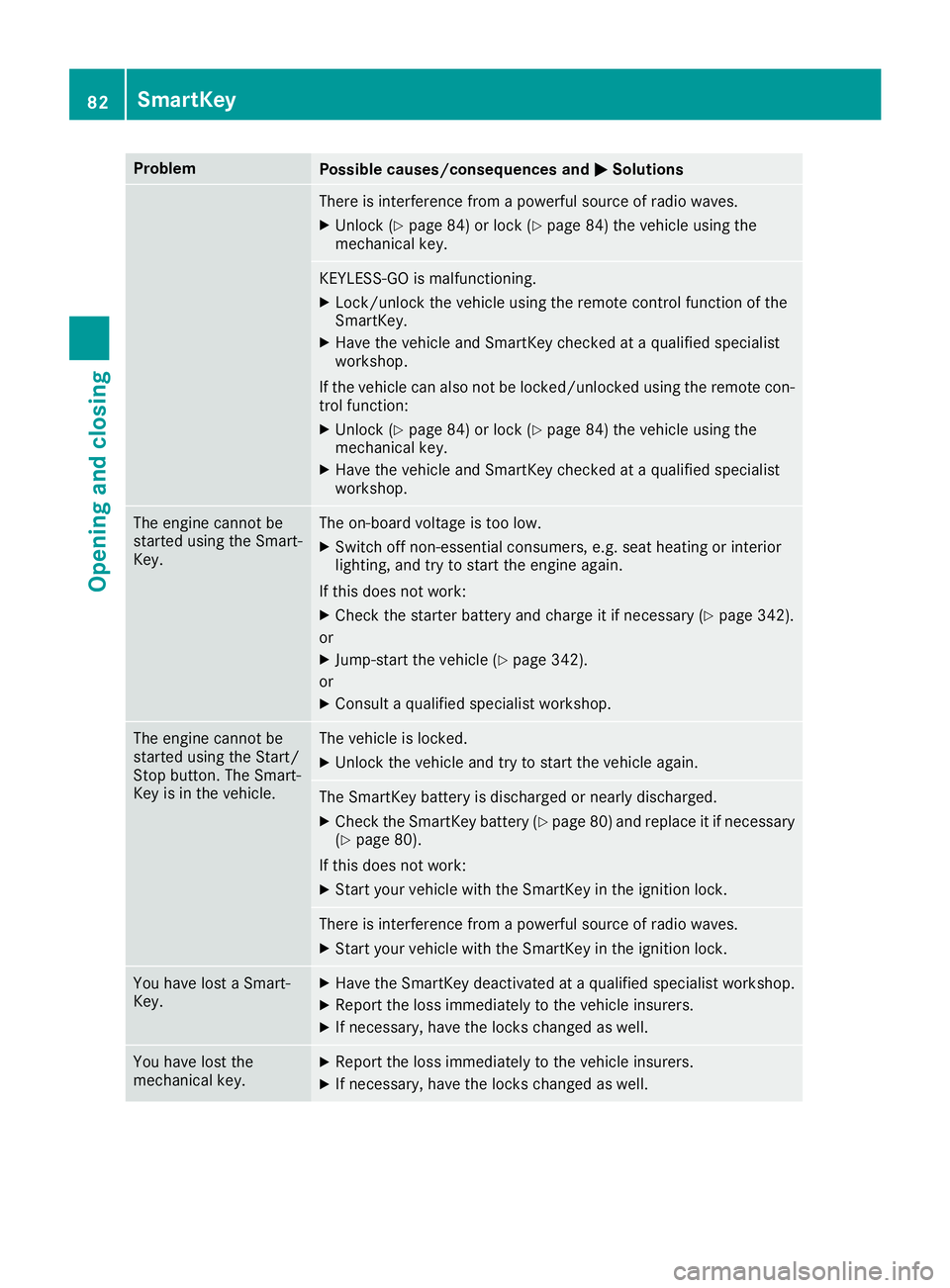
ProblemPossible causes/consequences andMSolutions
There is interference from a powerful source of radio waves.
XUnlock (Ypage 84) or lock (Ypage 84) the vehicle using the
mechanical key.
KEYLESS-GO is malfunctioning.
XLock/unlock the vehicle using the remote control function of the
SmartKey.
XHave the vehicle and SmartKey checked at a qualified specialist
workshop.
If the vehicle can also not be locked/unlocked using the remote con-
trol function:
XUnlock (Ypage 84) or lock (Ypage 84) the vehicle using the
mechanical key.
XHave the vehicle and SmartKey checked at a qualified specialist
workshop.
The engine cannot be
started using the Smart-
Key.The on-board voltage is too low.
XSwitch off non-essential consumers, e.g. seat heating or interior
lighting, and try to start the engine again.
If this does not work:
XCheck the starter battery and charge it if necessary (Ypage 342).
or
XJump-start the vehicle (Ypage 342).
or
XConsult a qualified specialist workshop.
The engine cannot be
started using the Start/
Stop button. The Smart-
Key is in the vehicle.The vehicle is locked.
XUnlock the vehicle and try to start the vehicle again.
The SmartKey battery is discharged or nearly discharged.
XCheck the SmartKey battery (Ypage 80) and replace it if necessary
(Ypage 80).
If this does not work:
XStart your vehicle with the SmartKey in the ignition lock.
There is interference from a powerful source of radio waves.
XStart your vehicle with the SmartKey in the ignition lock.
You have lost a Smart-
Key.XHave the SmartKey deactivated at a qualified specialist workshop.
XReport the loss immediately to the vehicle insurers.
XIf necessary, have the locks changed as well.
You have lost the
mechanical key.XReport the loss immediately to the vehicle insurers.
XIf necessary, have the locks changed as well.
82SmartKey
Opening and closing
Page 137 of 398
!Do not warm up the engine while stationary.
Pull away immediately. Avoid high engine
speeds and full throttle until the engine has
reached its operating temperature.
In vehicles with automatic transmission,
engage positions P and R only when the vehi-
cle is stationary.
Where possible, avoid spinning the drive
wheels when pulling away on slippery roads.
You could otherwise damage the drive train.
!Mercedes-AMG vehicles: at low engine oil
temperatures below 68 ‡ (+20 †), the max-
imum engine speed is restricted in order to
protect the engine. To protect the engine and
maintain smooth engine operation, avoid driv-
ing at full throttle when the engine is cold.
Plug-in hybrid: be sure to read the separate
Operator's Manual. Otherwise, you may not rec-
ognize dangers.
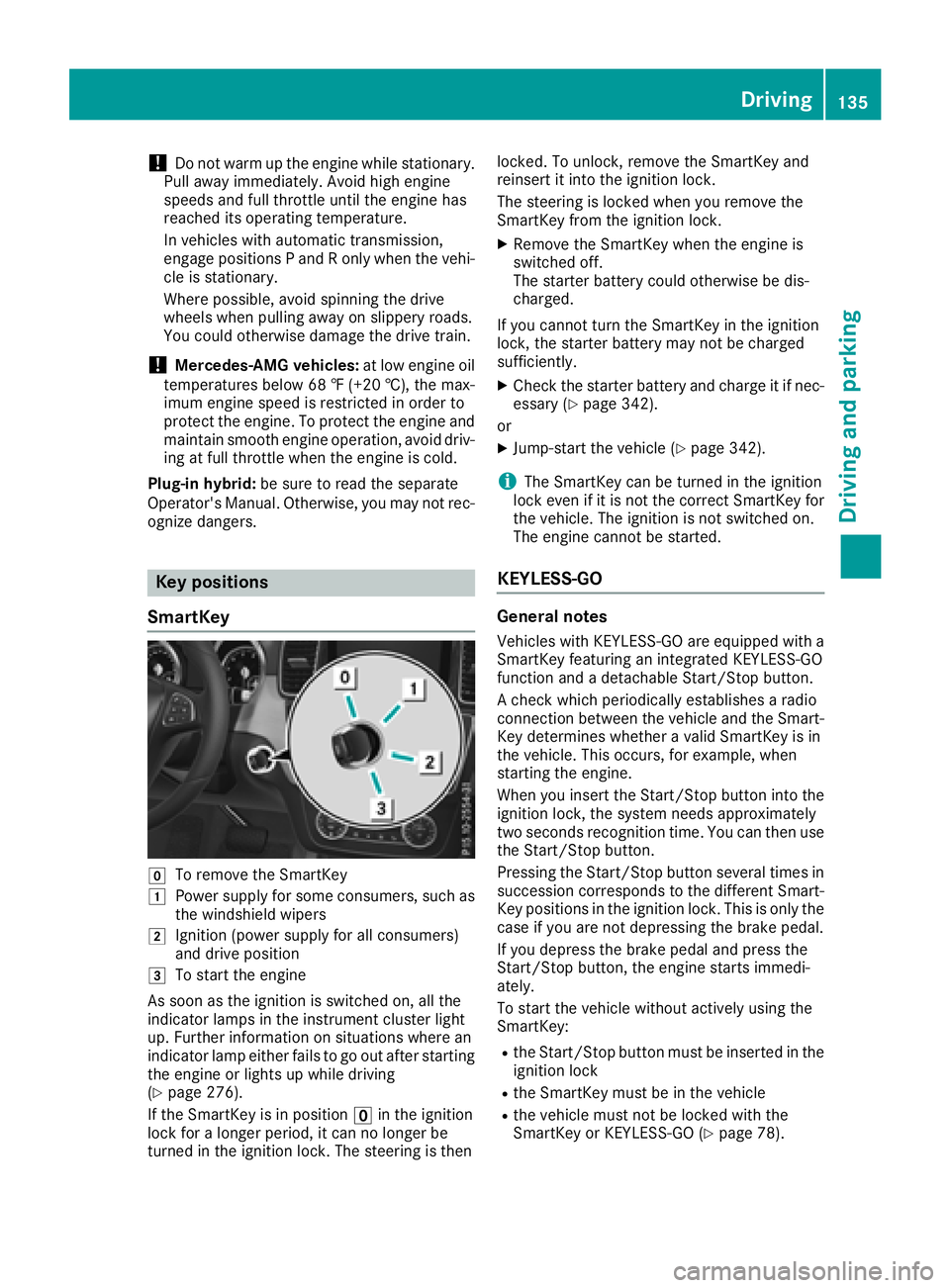
Key positions
SmartKey
gTo remove the SmartKey
1Power supply for some consumers, such as
the windshield wipers
2Ignition (power supply for all consumers)
and drive position
3To start the engine
As soon as the ignition is switched on, all the
indicator lamps in the instrument cluster light
up. Further information on situations where an
indicator lamp either fails to go out after starting
the engine or lights up while driving
(
Ypage 276).
If the SmartKey is in position uin the ignition
lock for a longer period, it can no longer be
turned in the ignition lock. The steering is then locked. To unlock, remove the SmartKey and
reinsert it into the ignition lock.
The steering is locked when you remove the
SmartKey from the ignition lock.
XRemove the SmartKey when the engine is
switched off.
The starter battery could otherwise be dis-
charged.
If you cannot turn the SmartKey in the ignition
lock, the starter battery may not be charged
sufficiently.
XCheck the starter battery and charge it if nec-
essary (Ypage 342).
or
XJump-start the vehicle (Ypage 342).
iThe SmartKey can be turned in the ignition
lock even if it is not the correct SmartKey for
the vehicle. The ignition is not switched on.
The engine cannot be started.
KEYLESS-GO
General notes
Vehicles with KEYLESS-GO are equipped with a
SmartKey featuring an integrated KEYLESS-GO
function and a detachable Start/Stop button.
A check which periodically establishes a radio
connection between the vehicle and the Smart-
Key determines whether a valid SmartKey is in
the vehicle. This occurs, for example, when
starting the engine.
When you insert the Start/Stop button into the
ignition lock, the system needs approximately
two seconds recognition time. You can then use
the Start/Stop button.
Pressing the Start/Stop button several times in
succession corresponds to the different Smart-
Key positions in the ignition lock. This is only the
case if you are not depressing the brake pedal.
If you depress the brake pedal and press the
Start/Stop button, the engine starts immedi-
ately.
To start the vehicle without actively using the
SmartKey:
Rthe Start/Stop button must be inserted in the
ignition lock
Rthe SmartKey must be in the vehicle
Rthe vehicle must not be locked with the
SmartKey or KEYLESS-GO (Ypage 78).
Driving135
Driving and parking
Z
Page 143 of 398
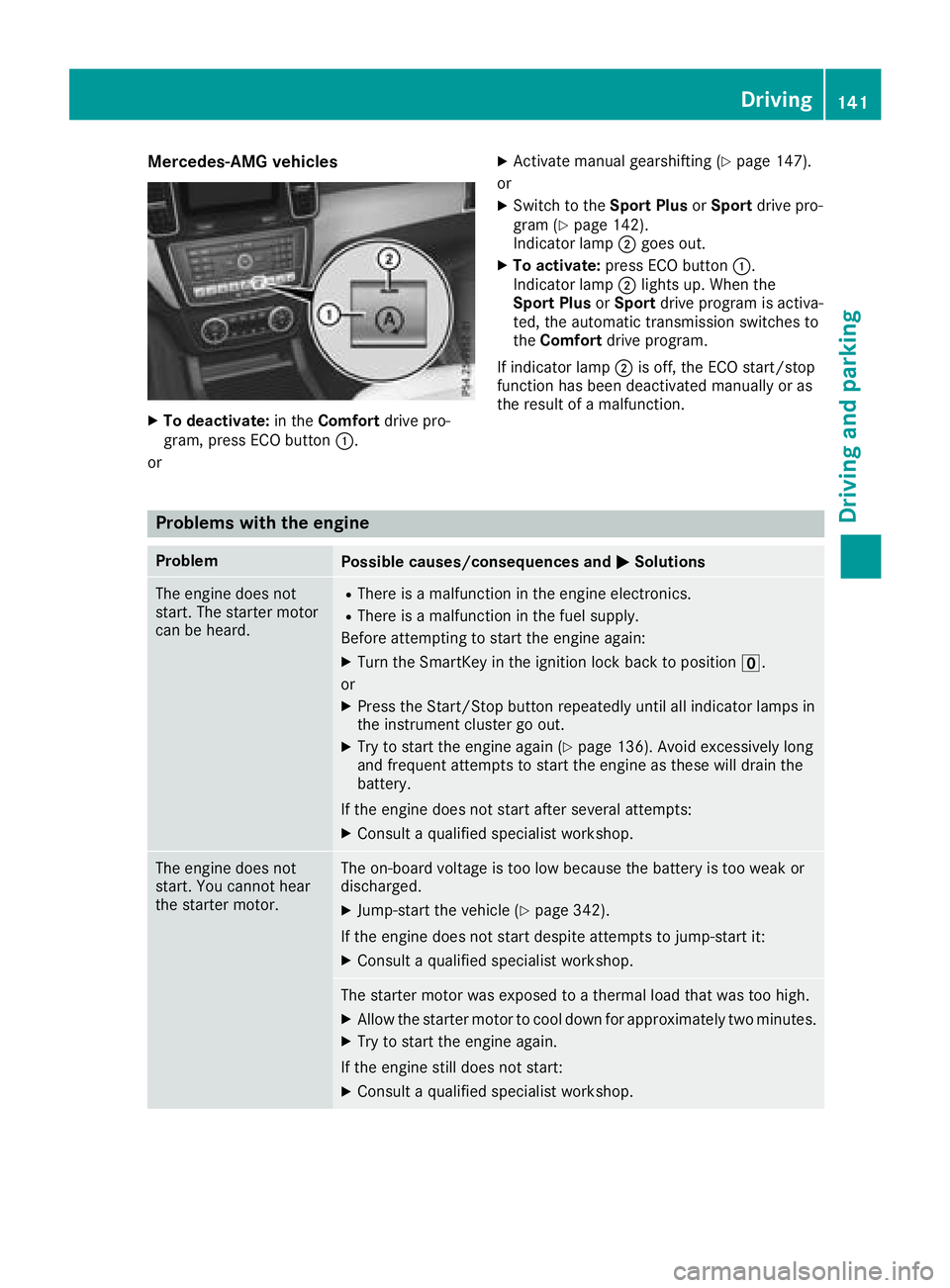
Mercedes-AMG vehicles
XTo deactivate:in theComfort drive pro-
gram, press ECO button :.
or
XActivate manual gearshifting (Ypage 147).
or
XSwitch to the Sport PlusorSport drive pro-
gram (Ypage 142).
Indicator lamp ;goes out.
XTo activate: press ECO button :.
Indicator lamp ;lights up. When the
Sport Plus orSport drive program is activa-
ted, the automatic transmission switches to
the Comfort drive program.
If indicator lamp ;is off, the ECO start/stop
function has been deactivated manually or as
the result of a malfunction.
Problems with the engine
ProblemPossible causes/consequences and MSolutions
The engine does not
start. The starter motor
can be heard.RThere is a malfunction in the engine electronics.
RThere is a malfunction in the fuel supply.
Before attempting to start the engine again:
XTurn the SmartKey in the ignition lock back to position u.
or
XPress the Start/Stop button repeatedly until all indicator lamps in
the instrument cluster go out.
XTry to start the engine again (Ypage 136). Avoid excessively long
and frequent attempts to start the engine as these will drain the
battery.
If the engine does not start after several attempts:
XConsult a qualified specialist workshop.
The engine does not
start. You cannot hear
the starter motor.The on-board voltage is too low because the battery is too weak or
discharged.
XJump-start the vehicle (Ypage 342).
If the engine does not start despite attempts to jump-start it:
XConsult a qualified specialist workshop.
The starter motor was exposed to a thermal load that was too high.
XAllow the starter motor to cool down for approximately two minutes.
XTry to start the engine again.
If the engine still does not start:
XConsult a qualified specialist workshop.
Driving141
Driving and parking
Z
Page 168 of 398
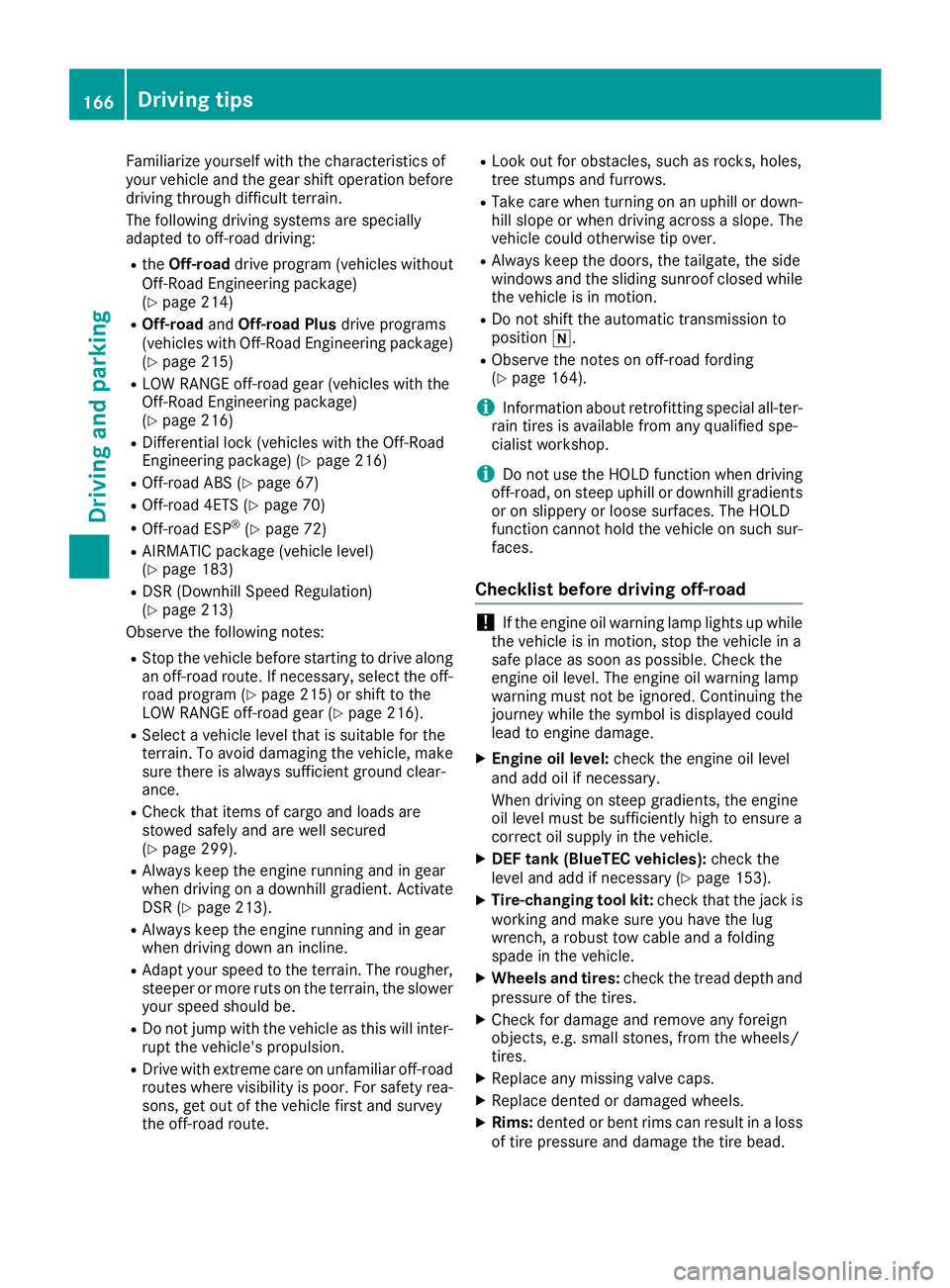
Familiarize yourself with the characteristics of
your vehicle and the gear shift operation before
driving through difficult terrain.
The following driving systems are specially
adapted to off-road driving:
RtheOff-road drive program (vehicles without
Off-Road Engineering package)
(
Ypage 214)
ROff-road andOff-road Plus drive programs
(vehicles with Off-Road Engineering package)
(
Ypage 215)
RLOW RANGE off-road gear (vehicles with the
Off-Road Engineering package)
(
Ypage 216)
RDifferential lock (vehicles with the Off-Road
Engineering package) (Ypage 216)
ROff-road ABS (Ypage 67)
ROff-road 4ETS (Ypage 70)
ROff-road ESP®(Ypage 72)
RAIRMATIC package (vehicle level)
(Ypage 183)
RDSR (Downhill Speed Regulation)
(Ypage 213)
Observe the following notes:
RStop the vehicle before starting to drive along
an off-road route. If necessary, select the off- road program (
Ypage 215) or shift to the
LOW RANGE off-road gear (Ypage 216).
RSelect a vehicle level that is suitable for the
terrain. To avoid damaging the vehicle, make
sure there is always sufficient ground clear-
ance.
RCheck that items of cargo and loads are
stowed safely and are well secured
(
Ypage 299).
RAlways keep the engine running and in gear
when driving on a downhill gradient. Activate
DSR (
Ypage 213).
RAlways keep the engine running and in gear
when driving down an incline.
RAdapt your speed to the terrain. The rougher,
steeper or more ruts on the terrain, the slower
your speed should be.
RDo not jump with the vehicle as this will inter- rupt the vehicle's propulsion.
RDrive with extreme care on unfamiliar off-road
routes where visibility is poor. For safety rea-
sons, get out of the vehicle first and survey
the off-road route.
RLook out for obstacles, such as rocks, holes,
tree stumps and furrows.
RTake care when turning on an uphill or down-hill slope or when driving across a slope. The
vehicle could otherwise tip over.
RAlways keep the doors, the tailgate, the side
windows and the sliding sunroof closed whilethe vehicle is in motion.
RDo not shift the automatic transmission to
position i.
RObserve the notes on off-road fording
(Ypage 164).
iInformation about retrofitting special all-ter-
rain tires is available from any qualified spe-
cialist workshop.
iDo not use the HOLD function when driving
off-road, on steep uphill or downhill gradients
or on slippery or loose surfaces. The HOLD
function cannot hold the vehicle on such sur-
faces.
Checklist before driving off-road
!If the engine oil warning lamp lights up while
the vehicle is in motion, stop the vehicle in a
safe place as soon as possible. Check the
engine oil level. The engine oil warning lamp
warning must not be ignored. Continuing the
journey while the symbol is displayed could
lead to engine damage.
XEngine oil level: check the engine oil level
and add oil if necessary.
When driving on steep gradients, the engine
oil level must be sufficiently high to ensure a
correct oil supply in the vehicle.
XDEF tank (BlueTEC vehicles): check the
level and add if necessary (Ypage 153).
XTire-changing tool kit: check that the jack is
working and make sure you have the lug
wrench, a robust tow cable and a folding
spade in the vehicle.
XWheels and tires: check the tread depth and
pressure of the tires.
XCheck for damage and remove any foreign
objects, e.g. small stones, from the wheels/
tires.
XReplace any missing valve caps.
XReplace dented or damaged wheels.
XRims: dented or bent rims can result in a loss
of tire pressure and damage the tire bead.
166Driving tips
Driving and parking
Page 342 of 398
Battery (vehicle)
12 V battery - important safety notes
Plug-in hybrid:be sure to read the separate
operating instructions. You could otherwise fail
to recognize dangers, e.g. due to high voltage.
Special tools and expert knowledge are required
when working on the battery, e.g. removal and
installation. You should therefore have all work
involving the battery carried out at a qualified
specialist workshop.
GWARNING
Work carried out incorrectly on the battery
can lead, for example, to a short circuit and
thus damage the vehicle electronics. This can
lead to function restrictions applying to
safety-relevant systems, e.g. the lighting sys-
tem, the ABS (anti-lock braking system) or the
ESP
®(Electronic Stability Program). The oper-
ating safety of your vehicle may be restricted.
You could lose control of the vehicle, for
example:
Rwhen braking
Rin the event of abrupt steering maneuvers
and/or when the vehicle's speed is not
adapted to the road conditions
There is a risk of an accident.
In the event of a short circuit or a similar inci-
dent, contact a qualified specialist workshop
immediately. Do not drive any further. You
should have all work involving the battery car- ried out at a qualified specialist workshop.
For further information about ABS and ESP
®,
see (Ypage 66) and (Ypage 70).
GWARNING
Electrostatic build-up can lead to the creation of sparks, which could ignite the highly explo-
sive gases of a battery. There is a risk of an
explosion.
Before handling the battery, touch the vehicle
body to remove any existing electrostatic
build-up. The highly flammable gas mixture forms when
charging the battery as well as when jump-start-
ing.
Always make sure that neither you nor the bat-
tery is electrostatically charged. A build-up of
electrostatic charge can be caused, for exam-
ple:
Rby wearing clothing made from synthetic
fibers
Rdue to friction between clothing and seats
Rif you push or pull the battery across the car-
pet or other synthetic materials
Rif you wipe the battery with a cloth
GWARNING
During the charging process, a battery produ-
ces hydrogen gas. If a short circuit occurs or
sparks are created, the hydrogen gas can
ignite. There is a risk of an explosion.
RMake sure that the positive terminal of a
connected battery does not come into con- tact with vehicle parts.
RNever place metal objects or tools on a bat-
tery.
RIt is important that you observe the descri-
bed order of the battery terminals when
connecting and disconnecting a battery.
RWhen jump-starting, make sure that the
battery poles with identical polarity are
connected.
RIt is particularly important to observe the
described order when connecting and dis-
connecting the jumper cables.
RNever connect or disconnect the battery
terminals while the engine is running.
GWARNING
Battery acid is caustic. There is a risk of injury.
Avoid contact with skin, eyes or clothing. Do
not inhale any battery gases. Do not lean over
the battery. Keep children away from batter-
ies. Wash away battery acid immediately with
plenty of clean water and seek medical atten-
tion.
340Battery (vehicle)
Breakdo wn assis tance
Page 344 of 398
On vehicles with a multimedia system and
navigation system, the clock is set automati-
cally.
Rreset the function for folding the exterior mir-
rors in/out automatically, by folding the mir-
rors out once (
Ypage 106)
Charging the 12 V battery
GWARNING
During charging and jump-starting, explosive
gases can escape from the battery. There is a risk of an explosion.
Particularly avoid fire, open flames, creating
sparks and smoking. Ensure there is sufficient
ventilation while charging and jump-starting.
Do not lean over a battery.
GWARNING
Battery acid is caustic. There is a risk of injury.
Avoid contact with skin, eyes or clothing. Do
not inhale any battery gases. Do not lean over
the battery. Keep children away from batter-
ies. Wash away battery acid immediately with
plenty of clean water and seek medical atten-
tion.
GWARNING
A discharged battery can freeze at tempera-
tures below freezing point. When jump-start-
ing the vehicle or charging the battery, gases can escape from the battery. There is a risk of
an explosion.
Allow the frozen battery to thaw out before
charging it or jump-starting.
!Only use battery chargers with a maximum
charging voltage of 14.8 V.
!Only charge the battery using the jump-
starting connection point.
The jump-starting connection point is in the
engine compartment (
Ypage 342).
XOpen the hood.
XConnect the battery charger to the positive
terminal and ground point in the same order
as when connecting the donor battery in the
jump-starting procedure (
Ypage 342).
Keep away from fire and open flames. Do not
lean over a battery. Never charge the battery if it
is still installed in the vehicle, unless you use a
battery charger which has been tested and
approved by Mercedes-Benz. A battery charger
unit specially adapted for Mercedes-Benz vehi-
cles and tested and approved by Mercedes-
Benz is available as an accessory. It permits the
charging of the battery in its installed position.
Contact an authorized Mercedes-Benz Center
for further information and availability. Read the
battery charger's operating instructions before
charging the battery.
If, at low temperatures, the indicator lamps/
warning lamps in the instrument cluster do not
light up, it is highly likely that the discharged
battery has frozen. In this case you may neither
jump-start the vehicle nor charge the battery.
The service life of a thawed-out battery may be
shorter. The starting characteristics can be
impaired, particularly at low temperatures. Have
the thawed-out battery checked at a qualified
specialist workshop.
Jump-starting
Plug-in hybrid: be sure to read the separate Operator's Manual. You could otherwise fail to rec-
ognize dangers, e.g. due to high voltage.
For the jump-starting procedure, use only the jump-starting connection point in the engine com-
partment, consisting of a positive terminal and a ground point.
GWARNING
Battery acid is caustic. There is a risk of injury.
Avoid contact with skin, eyes or clothing. Do not inhale any battery gases. Do not lean over the
battery. Keep children away from batteries. Wash away battery acid immediately with plenty of
clean water and seek medical attention.
342Jump-starting
Breakdown assistance