display MERCEDES-BENZ GLE COUPE 2020 Manual Online
[x] Cancel search | Manufacturer: MERCEDES-BENZ, Model Year: 2020, Model line: GLE COUPE, Model: MERCEDES-BENZ GLE COUPE 2020Pages: 757, PDF Size: 11.84 MB
Page 316 of 757
4
Right display area
Tr af fic Sign Assi st
Ve hicle le vel
Dif fere ntial
Assi stant display
5 Toadjust the position, brightness and lo wer
display area
6 Index points
7 Lowe r display area
Display areas 2to4 that are not requ ired can
be hidden.
% In audio mode, thest ation name or track will
be shown temp orarily when the audio source
is being actively operated. In addition, the
latest calls will be displa yed when thete le‐
phone list on the instrument display is
actively operated. #
Toselect a displa y:swipe upwards on the
left-hand Touch Control. #
Press the left-hand Touch Control. Head-up Display
Fu
nction of the head-up display The head-up display projects information abo
ve
th e cockpit into the driver's field of vision, e.g.
th e speed of theve hicle, information from the
navigation sy stem or driver assis tance sy stems
and some warning messages.
Depending on theve hicle's equipment, dif fere nt
content can be shown in theth re e display areas
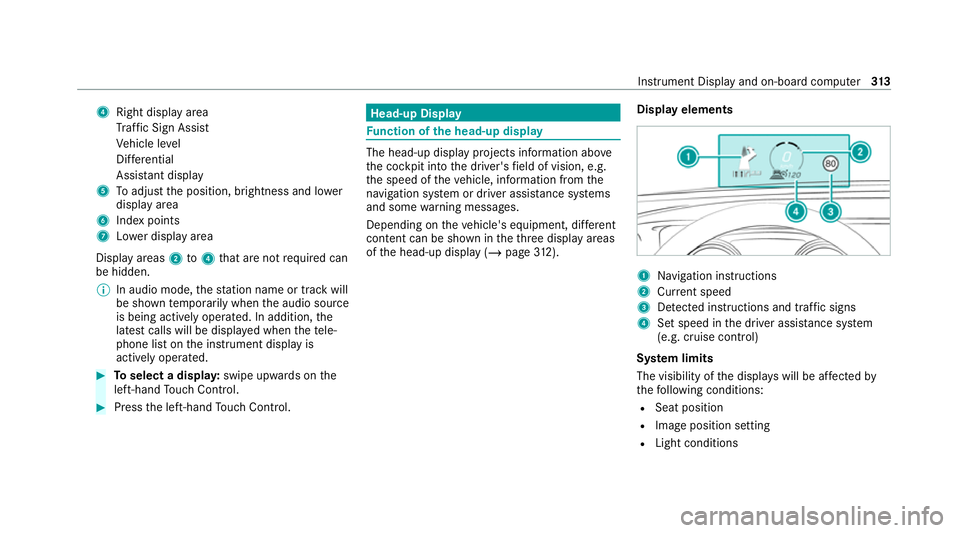
of the head-up display (/ page312). Display elements 1
Navigation instructions
2 Curr ent speed
3 Detected instructions and traf fic signs
4 Set speed in the driver assis tance sy stem
(e.g. cruise control)
Sy stem limits
The visibility of the displa yswill be af fected by
th efo llowing conditions:
R Seat position
R Image position setting
R Light conditions Instrument Display and on-board computer
313
Page 317 of 757
R
Wet car riag ewa ys
R Objects on the display co ver
R Polarisation in sunglasses
% Inextreme sunlight, sections of the display
may appear washed out. You can co rrect this
by switching the head-up display off and on
again. Switching
the head-up display on/off via the
mu ltimedia sy stem Multimedia sy
stem:
4 © 5
Settings 5
Quick access #
Select HUD.
The head-up-display is activated. 314
Instrument Display and on-board computer
Page 336 of 757
Vo
ice command Colloquialexample Function
Seat heating driver on I would like to switch on the seat
heating for the driver's seatSwitches on
the seat heating forth e driver's or front passenger seat.
Seat heating front passenger level
2 Seat heating front-passenger on
level 2Sets
the seat heating forth e driver's or front passenger seat toleve l 2.
Current speed limit I would like to hear the speed limitCalls up
the cur rent speed limit.
Outside temperature I would like to find out what the
temperature outside is likeCalls up
the outside temp erature.
Average consumption What is the current average con-
sumption?Calls up
average consu mption.
Vehicle data Can you please display the vehicle
data menu?Calls up
theve hicle data.
Range Tell me the current rangeCalls up
the cur rent range da ta.
Assistance menu Show me the driver assistance set-
tingsDispl
aysth e assis tance settings.
Climate control menu I would like to see the climate con-
trol menu Displa
ys the climate control settings. LINGU
ATRO NIC 333
Page 338 of 757
Overview and operation
Overview of
the MBUX multimedia sy stem &
WARNING Risk of di stra ction from infor‐
mation sy stems and communications
equipment
If yo u operate information and communica‐
tion equipment integ rated in theve hicle
when driving, you will be distracted from the
traf fic situation. This could also cause youto
lose control of theve hicle. #
Only operate this equipment when the
traf fic situation permits. #
Ifyo u cannot be sure of this, stop the
ve hicle whilst paying attention toroad
and traf fic conditions and ope rate the
equipment with theve hicle stationar y. Yo
u must obse rveth e legal requirements forthe
country in whi chyou are cur rently driving when
operating the multimedia sy stem.
MBUX stands for Mercedes-Benz User Experi‐
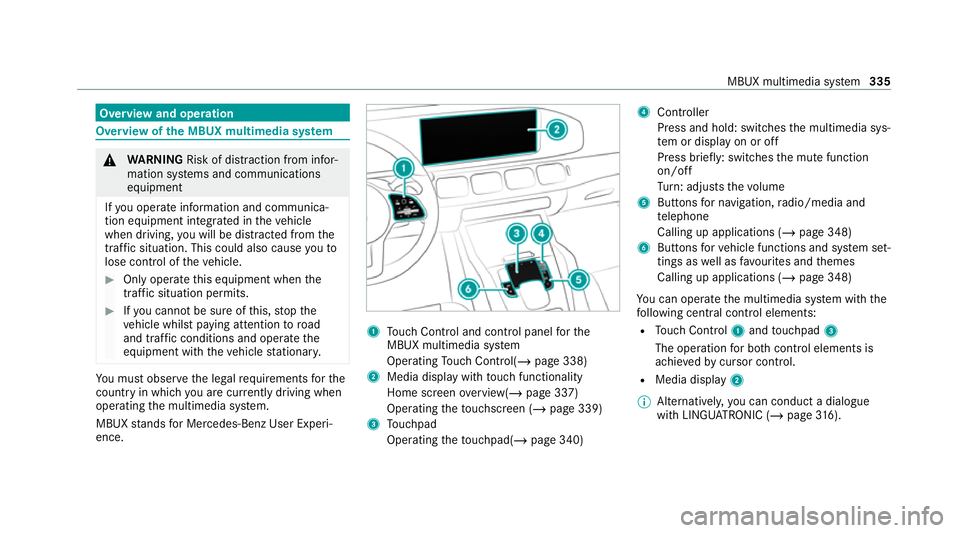
ence. 1
Touch Control and cont rol panel forthe
MBUX multimedia sy stem
Operating Touch Control(/ page 338)
2 Media displ aywith touch functionality
Home sc reen ove rview(/ page 337)
Operating theto uchsc reen (/ page 339)
3 Touchpad
Operating theto uchpad( /page 340) 4
Controller
Press and hold: swit ches the multimedia sys‐
te m or display on or off
Press brief ly: switches the mute function
on/off
Tu rn: adjusts thevo lume
5 Buttons for navigation, radio/media and
te lephone
Calling up applications (/ page 348)
6 Buttons forve hicle functions and sy stem set‐
tings as well as favo urites and themes
Calling up applications (/ page 348)
Yo u can operate the multimedia sy stem with the
fo llowing central control elements:
R Touch Control 1and touchpad 3
The operation for bo thcontrol elements is
achie vedby cursor control.
R Media displ ay2
% Alternati vely, you can conduct a dialogue
with LINGU ATRO NIC (/ page316). MBUX multimedia sy
stem 335
Page 339 of 757
%
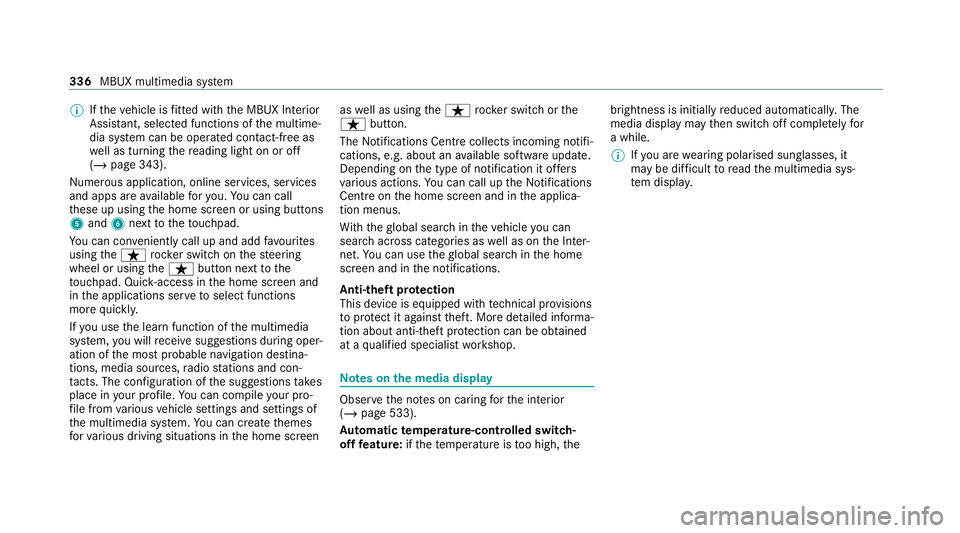
Ifth eve hicle is fitted wi th the MBUX Interior
Assis tant, selected functions of the multime‐
dia sy stem can be operated conta ct-free as
we ll as turning there ading light on or off
(/ page 343).
Nu merous application, online services, services
and apps are available foryo u. You can call
th ese up using the home screen or using buttons
5 and 6next totheto uchpad.
Yo u can co nveniently call up and add favo urites
using theß rocker switch on thesteering
wheel or using theß button next tothe
to uchpad. Quic k-access in the home screen and
in the applications ser vetoselect functions
more quickl y.
If yo u use the learn function of the multimedia
sy stem, you will recei vesuggestions during oper‐
ation of the most probable navigation destina‐
tions, media sources, radio stations and con‐
ta cts. The configu ration of the suggestions takes
place in your profile. You can co mpileyour pro‐
fi le from various vehicle settings and settings of
th e multimedia sy stem. You can create themes
fo rva rious driving situations in the home screen as
well as using theß rocker switch or the
ß button.
The Notifications Centre collects incoming notifi‐
cations, e.g. about an available software update.
Depending on the type of notification it of fers
va rious actions. You can call up the Notifications
Centre on the home screen and in the applica‐
tion menus.
Wi th th eglobal sear chintheve hicle you can
sear chacross categories as well as on the Inter‐
net. You can use theglobal sear chinthe home
screen and in the notifications.
Anti-theft pr otection
This device is equipped with tech nical pr ovisions
to protect it against theft. More de tailed informa‐
tion about anti-theft pr otection can be obtained
at a qualified specialist workshop. Note
s onthe media display Obser
vethe no tes on caring forth e interior
(/ page 533).
Au tomatic temperature-cont rolled switch-
off feature: ifth ete mp erature is too high, the brightness is initially
reduced automatically. The
media display may then switch off comple tely for
a while.
% Ifyo u are wearing polarised sun glasses, it
may be dif ficult toread the multimedia sys‐
te m displa y. 336
MBUX multimedia sy stem
Page 340 of 757
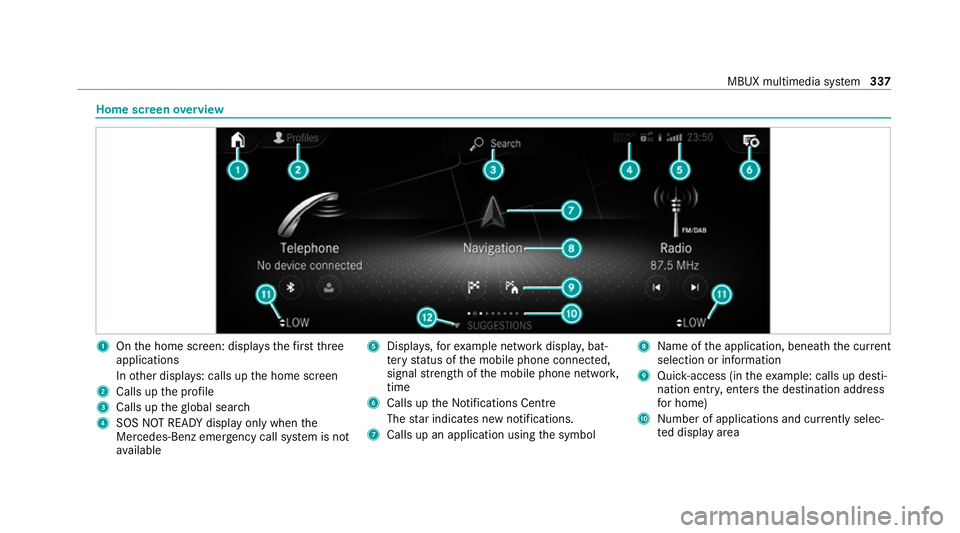
Home screen
overview 1
Onthe home screen: displa ys thefirs tth ree
applications
In other displa ys: calls up the home screen
2 Calls up the profile
3 Calls up theglobal sear ch
4 SOS NOT READY displ ayonly when the
Mercedes-Benz emer gency call sy stem is not
av ailable 5
Displa ys,fo rex ample network displa y,bat‐
te ry status of the mobile phone connected,
signal stre ngth of the mobile phone networ k,
time
6 Calls up the Notifications Centre
The star indicates new notifications.
7 Calls up an application using the symbol 8
Name of the application, beneath the cur rent
selection or information
9 Quick-access (in theex ample: calls up desti‐
nation ent ry, enters the destination address
fo r home)
A Number of applications and cur rently selec‐
te d display area MBUX multimedia sy
stem 337
Page 341 of 757
B
Calls up the air conditioning menu
(/ page 161)
C Calls up SUGGESTIONS ,THEMES and
FAVOURITES Central control elements
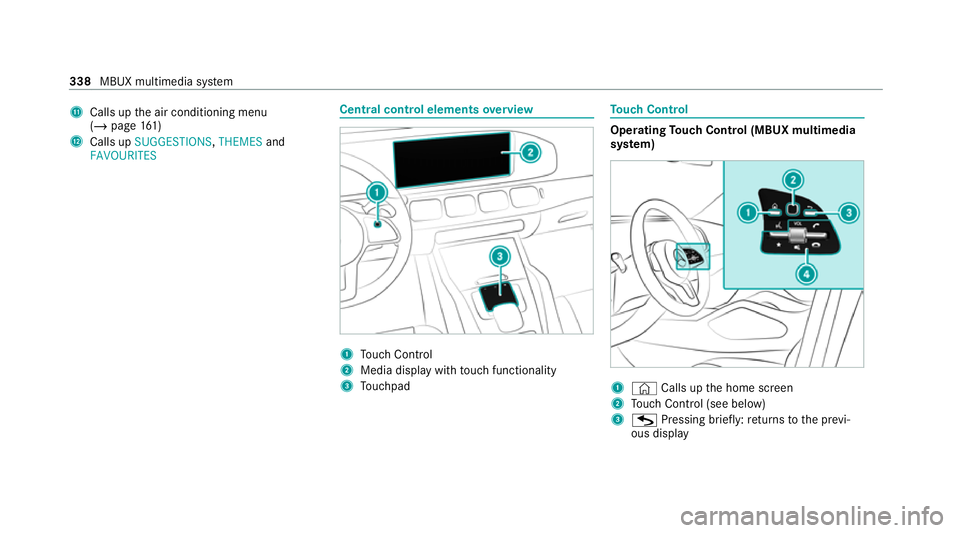
overview 1
Touch Control
2 Media displ aywith touch functionality
3 Touchpad To
uch Control Operating
Touch Control (MBUX multimedia
sy stem) 1
© Calls up the home screen
2 Touch Control (see below)
3 G Pressing brief ly:re turns tothe pr evi‐
ous display 338
MBUX multimedia sy stem
Page 346 of 757
beams can escape in an uncontrolled man‐
ner.
Laser radiation can damage your retina. #
Do not open the housing. #
Alw ays ha vemaintenance workand
re pairs car ried out byaqu alified spe‐
cialist workshop. This device is a class 1 laser product in accord‐
ance with DIN EN 60825-1:20
14&
WARNING Risk of di stra ction from infor‐
mation sy stems and communications
equipment
If yo u operate information and communica‐
tion equipment integ rated in theve hicle
when driving, you will be distracted from the
traf fic situation. This could also cause youto
lose control of theve hicle. #
Only operate this equipment when the
traf fic situation permits. #
Ifyo u cannot be sure of this, stop the
ve hicle whilst paying attention toroad and traf
fic conditions and ope rate the
equipment with theve hicle stationar y. Yo
u must obse rveth e legal requirements forthe
country in whi chyou are cur rently driving when
operating the multimedia sy stem.
Overview of the MBUX Interior Assistant
If th eve hicle is fitted wi th the MBUX Interior
Assis tant, selected functions of the multimedia
sy stem can be operated conta ct-free. In addi‐
tion, there ading light or sear chlight can be
switched on or off con tact-free.
The MBUX Interior Assi stant can dif fere ntia te
between driver and front passenger interactions.
The MBUX Interior Assis tant recognises cer tain
hand positions (poses).
Sy stem limits, display messages and no tes
fo rre ctification
The er ror messa ges are shown in the media dis‐
pla y. The sy
stem may be impaired or may not function
in thefo llowing situations:
R The camera is co vered or dirty, mis ted up or
scratched.
The The Interior Assistant is temporarily not
available see Owner's Manual message
appears.
Clean the outside of the camera lens with a
dry or damp cotton clo th. Do not use microfi‐
bre clo ths. Do notremo vethe co ver when
cleaning.
R Recognition can be impaired byreflective
clo thing, an adverse colour of clo thing or by
accesso ries, forex ample.
R Clothing being worn(hat, shawl, scarf) may
be limiting the de tection area of the camera.
Ke ep the camera's field of vision clear.
R The camera is too hot or is temp orarily
switched off.
The Interior Assistant is temporarily not avail-
able. You will be informed as soon as the
function is available again. MBUX multimedia sy
stem 343
Page 347 of 757
Wa
it until the camera has cooled down or is
av ailable again.
Yo ure cei vea message when the camera is
av ailable again. R
The camera or a cable is faulty.
TheThe MBUX Interior Assistant not availa-
ble. Please visit the workshop. message
appears.
Consult a Mercedes-Benz service centre.
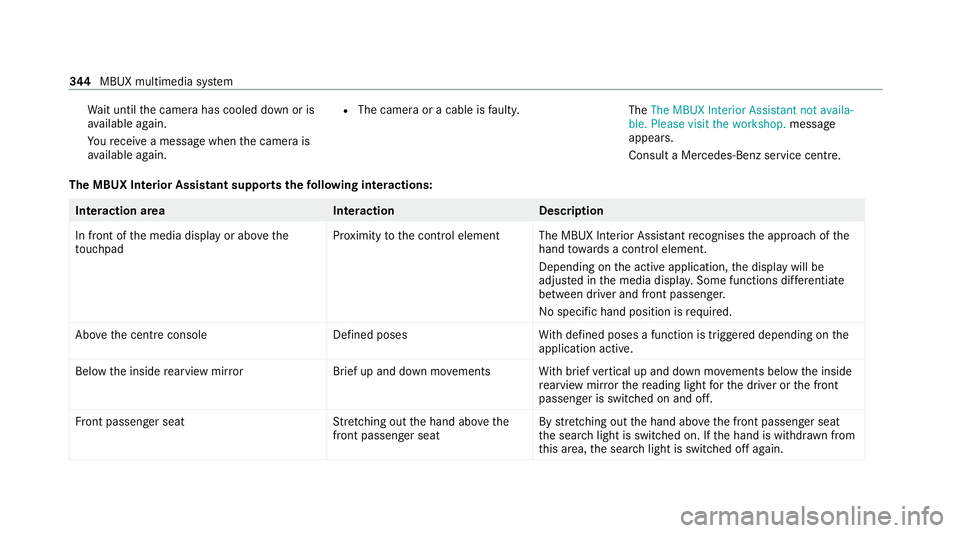
The MBUX Interior Assistant supports thefo llowing interactions: Interaction area
InteractionDescription
In front of the media display or abo vethe
to uchpad Pr
ox imity tothe control element The MBUX Interior Assis tant recognises the approach of the
hand towa rds a contro l element.
Depending on the active application, the display will be
adjus ted in the media displa y.Some functions di fferentiate
between driver and front passenger.
No specific hand position is requ ired.
Abo vethe cent reconsole Defined poses With defined poses a function is triggered depending on the
application active.
Below the inside rearview mir rorB rief up and down mo vements With brief vertical up and down mo vements below the inside
re arview mir rorth ere ading light forth e driver or the front
passenger is switched on and off.
Fr ont passenger seat Stretching out the hand abo vethe
front passenger seat By
stre tching out the hand abo vethe front passenger seat
th e sear chlight is switched on. If the hand is withdr awn from
th is area, the sear chlight is switched off again. 344
MBUX multimedia sy stem
Page 348 of 757
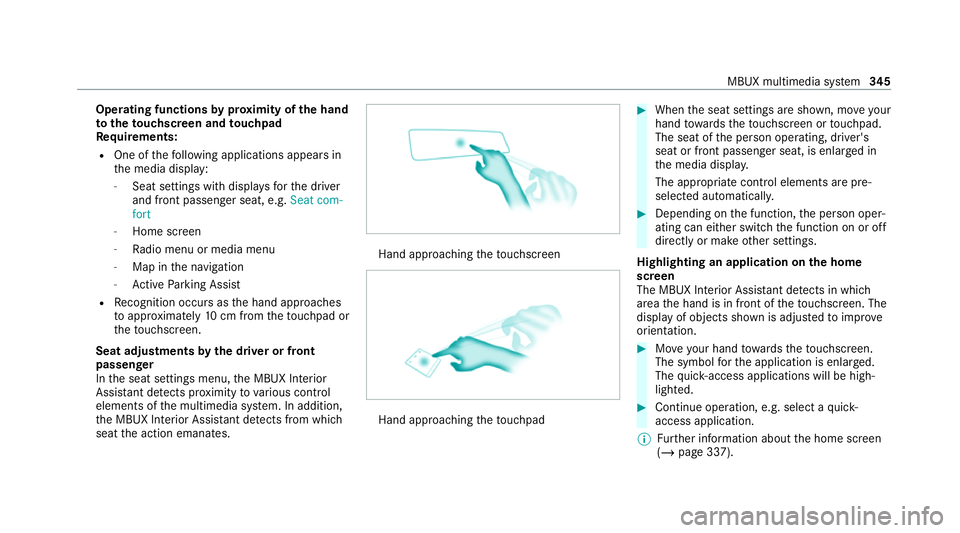
Operating functions
byprox imity of the hand
to theto uchscreen and touchpad
Re quirements:
R One of thefo llowing applications appears in
th e media display:
- Seat settings with displa ysforth e driver
and front passenger seat, e.g. Seat com-
fort
- Home screen
- Radio menu or media menu
- Map in the navigation
- Active Parking Assist
R Recognition occu rsas the hand approaches
to appr oximately 10cm from theto uchpad or
th eto uchsc reen.
Seat adjustments bythe driver or front
passenger
In the seat settings menu, the MBUX Interior
Assis tant de tects pr oximity tovarious control
elements of the multimedia sy stem. In addition,
th e MBUX Interior Assis tant de tects from whi ch
seat the action emanates. Hand approaching
theto uchsc reen Hand approaching
theto uchpad #
When the seat settings are shown, mo veyour
hand towa rdsth eto uchsc reen or touchpad.
The seat of the person operating, driver's
seat or front passenger seat, is enlar ged in
th e media displa y.
The appropriate contro l elements are pre-
selec ted automatically. #
Depending on the function, the person oper‐
ating can either switch the function on or off
directly or make other settings.
Highlighting an application on the home
screen
The MBUX In terior Assis tant de tects in whi ch
area the hand is in front of theto uchsc reen. The
display of objects shown is adjus tedto impr ove
orientation. #
Moveyour hand towa rdsth eto uchsc reen.
The symbol forth e application is enlar ged.
The quick- access applications will be high‐
lighted. #
Continue operation, e.g. select a quick-
access application.
% Further information about the home screen
(/ page 337). MBUX multimedia sy
stem 345