climate control MERCEDES-BENZ GLE COUPE 2020 Owners Manual
[x] Cancel search | Manufacturer: MERCEDES-BENZ, Model Year: 2020, Model line: GLE COUPE, Model: MERCEDES-BENZ GLE COUPE 2020Pages: 757, PDF Size: 11.84 MB
Page 6 of 757
Mir
rors ........................................................ 154
Operating the sun visors ............................. 157
Area pe rmeable toradio wav es on the
windscreen ................................................ .157
Infrared-reflective windscreen function ...... 15 8Climate control
........................................ 15 9
Overview of climate contro l systems ..........1 59
Operating the climate control sy stem ......... 161 Driving and pa
rking .................................. 17 3
Driving ........................................................ 173
DY NA MIC SELECT switch ........................... 189
Au tomatic transmission .............................. 19 2
Fu nction of the 4MATIC .............................. 197
Re fuelling .................................................... 197
Pa rking ...................................................... .203
Driving and driving saf ety sy stems .............. 212
Tr ailer hit ch................................................ 292
Bicycle rack function .................................. 297
Ve hicle towing instructions ........................ .299 Instrument Display and on-board
comp
uter.................................................. 300
Instrument display overview ...................... .300
Overview of the buttons on thesteering
wheel ..........................................................3 01
Operating the on-board computer .............. 301
Ad justing the design of the instrument
display ........................................................ 303
Showing display conte nt onthe instru‐
ment clus ter ............................................... 304
Overview of what is shown on the multi‐
function display .......................................... 305
Ad justing the instrument lighting ............... 306
Menus and submenus ................................ 306
Head-up Display .......................................... 313 LINGU
ATRO NIC ......................................... 315
No tes on operating saf ety .......................... .315
Operation ....................................................3 15
Using LINGU ATRO NIC ef fectively ................ 318
Essential voice commands .......................... 319 MBUX multimedia sy
stem ...................... 335
Overview and operation .............................. 335 Sy
stem settings .......................................... 370
Fit & Healt hy............................................... 381
Na vigation .................................................. 387
Te lephone .................................................. .432
Online and Internet functions ..................... .474
Media ......................................................... 484
Ra dio .......................................................... 493
TV ............................................................... 496
Sound ......................................................... 504
MBUX Rear En tertainment Sy stem .............5 08 Maintenance and care
..............................517
ASS YST PLUS service inter val display ........ .517
Engine compartment ................................... 51 8
Cleaning and care ...................................... .524 Breakdown assistance
............................535
Emergency .................................................. 535
Flat tyre ...................................................... 537
Battery (vehicle) ......................................... 543
To w- starting or towing away ....................... 549
Electrical fuses ........................................... 553 Contents
3
Page 10 of 757
1
Steering wheel gearshift paddles →
194
2 Combination swit ch →
14 2
3 Instrument display →
300
4 DIRECT SELECT le ver →
19 2
5 Media display →
338
6 Climate contro l systems →
161
7 Haza rdwa rning light sy stem →
14 3
8 PASSENGER AIR BAG indicator lamps →
47
9 Glovecompa rtment →
11 9
A Stow age compartment →
11 9
B Control knob forvo lume and switching sound
on/off →
335
C Calls up navigation →
387
D Calls up thera dio →
494
Calls up media →
487
E Calls up thete lephone →
433
F Cont rol panel for: Individual wheel control
→
257
Manual gearshifting →
194
AIRMATIC or →
24 6
E- AC TIVE BODY CONTROL →
252
Ac tivating/deactivating ESP ®
→
214
Downhill Speed Regulation →
230
G Calls up favo urites →
357
H Calls up vehicle functions →
348
I Active Parking Assist →
276
J DYNA MIC SELECT switch →
19 0
K Touchpad →
338
L Start/ stop button →
174
ECO start/ stop function →
187
M Control panel forth e MBUX multimedia sys‐
tem →
338
N Adjusts thesteering wheel mechanically →
11 3
O Adjusts thesteering wheel electrically →
11 4 At
aglance – Cockpit 7
Page 20 of 757
1
Rear climate control control panel →
16 0
2 Stow age compartment in the cent reconsole →
11 9
230 V soc ket →
13 4 3
Switches there ar seat heating on/off →
111
4 Cup holder →
13 2 At
aglance – Control settings in there ar passenger compartment 17
Page 37 of 757
eration, lateral acceleration, display of
fas‐
te ned seat belts)
R malfunctions or faults in impor tant sy stem
components (e.g. lights, brakes)
R information on events leading tovehicle
damage
R system reactions in special driving situations
(e.g. airbag deployment, inter vention of sta‐
bility control sy stems)
R ambient conditions (e.g. temp erature, rain
sensor)
In addition toprov iding the actual control unit
function, this data assists the manufacturer in
de tecting and rectifying faults and optimising
ve hicle functions. The majority of this data is
te mp orary and is only processed in theve hicle
itself. Only a small portion of the data is stored
in theev ent or fault memor y.
When your vehicle is serviced, tech nical da ta
from theve hicle can be read out byservice net‐
wo rkemplo yees (e.g. workshops, manufactur‐
ers) or third parties (e.g. breakdown services).
Services include repair services, maintenance
processes, warranty claims and quality assur‐ ance measures,
forex ample. The read out is per‐
fo rm ed via the legally prescribed port forthe
diagnostics connection in theve hicle. The
re spective service network locations or third
parties collect, process and use the data. They
document tech nical statuses of theve hicle,
assist in finding faults and impr oving quality and
are transmit tedto the manufacturer, if neces‐
sar y.Fu rthermore, the manufacturer is subject
to product liability. Forth is, the manufacturer
re qu ires tech nical da tafrom vehicles.
Fa ult memories in theve hicle can be reset by a
service outlet as part of repair or maintenance
wo rk.
Depending on the selected equipment, you can
import data into vehicle con venience and info‐
ta inment functions yourself.
This includes, forex ample:
R multimedia data such as music, films or pho‐
to sfo r playback in an integrated multimedia
sy stem
R address book data for use in connection with
an integrated hands-free sy stem or an inte‐
grated navigation sy stem R
entered navigation destinations
R data about the use of internet services
This data can be sa ved locally in theve hicle or it
is located on a device which you ha veconnected
to theve hicle (e.g. a smartphone, USB flash
drive or MP3 pla yer). If this data is stored in the
ve hicle, you can dele teit at any time. This data
is sent tothird parties only at your requ est, par‐
ticular lywhen you use online services in accord‐
ance with the settings that you ha veselected.
Yo u can store or change con venience settings/
individualisations in theve hicle at any time.
Depending on the equipment, this includes, for
ex ample:
R settings forth e seat and steering wheel posi‐
tions
R suspension and climate control settings
R customisations such as interior lighting
If yo ur vehicle is accordingly equipped, you can
connect your smartphone or ano ther mobile end
device totheve hicle. You can cont rolth is by
means of the control elements integrated in the
ve hicle. Images and audio from the smartphone 34
General no tes
Page 162 of 757
Overview of climate control sy
stems Note
s on climate control An interior air
filter in combination with the pre‐
fi lter in the engine compartment must alw ays be
used so that the air conditioning sy stem, pollu‐
tion le vel monitoring and the air filtration work
cor rectl y.Make sure that thefilter is ins talled
cor rectly and thefilter housing in the engine
compartment is closed cor rectly using the cap
and alw ays tightly sealed when in operation. Use
fi lters recommended and appr ovedby
Mercedes-Benz. Alw ays ha veservice workcar‐
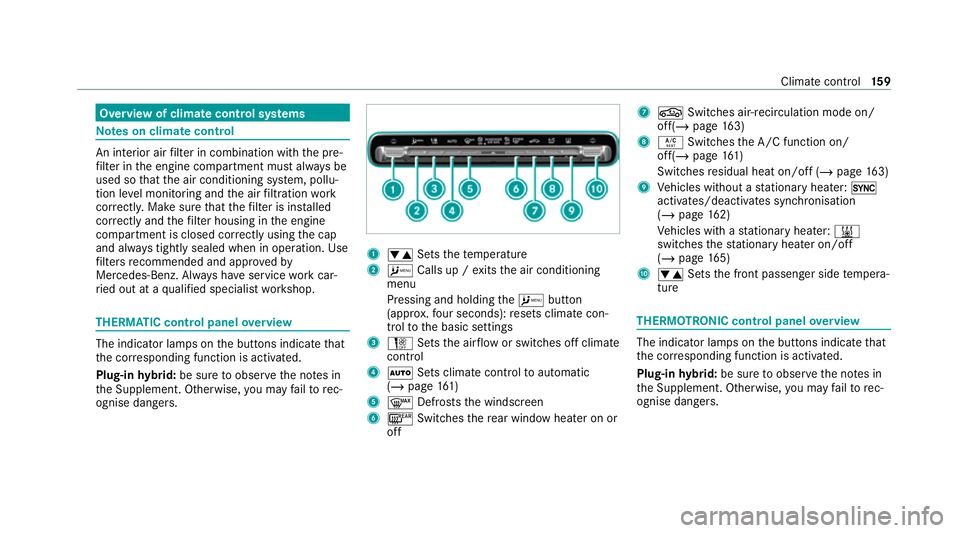
ri ed out at a qualified specialist workshop. THERMATIC control panel
overview The indicator lamps on
the buttons indicate that
th e cor responding function is activated.
Plug-in hybrid: be sure toobser vethe no tes in
th e Supplement. Otherwise, you may failto rec‐
ognise dangers. 1
0082 Setsthete mp erature
2 A Calls up / exits the air conditioning
menu
Pressing and holding theA button
(appr ox.fo ur seconds): resets climate con‐
trol tothe basic settings
3 H Setsthe air flow or switches off climate
control
4 0058 Sets climate control toautomatic
(/ page 161)
5 0064 Defrosts the windscreen
6 006C Switches there ar wind owheater on or
off 7
0072 Switches air-recirculation mode on/
off(/ page163)
8 0056 Switches the A/C function on/
off(/ page161)
Switches residual heat on/off (/ page163)
9 Vehicles without a stationary heater: 0
activates/deactivates syn chronisation
(/ page 162)
Ve hicles with a stationary heater: 003B
swit ches thest ationary heater on/off
(/ page 165)
A 0082 Setsthe front passenger side temp era‐
ture THERMOTRONIC control panel
overview The indicator lamps on
the buttons indicate that
th e cor responding function is activated.
Plug-in hybrid: be sure toobser vethe no tes in
th e Supplement. Otherwise, you may failto rec‐
ognise dangers. Clima
tecontrol 15 9
Page 163 of 757
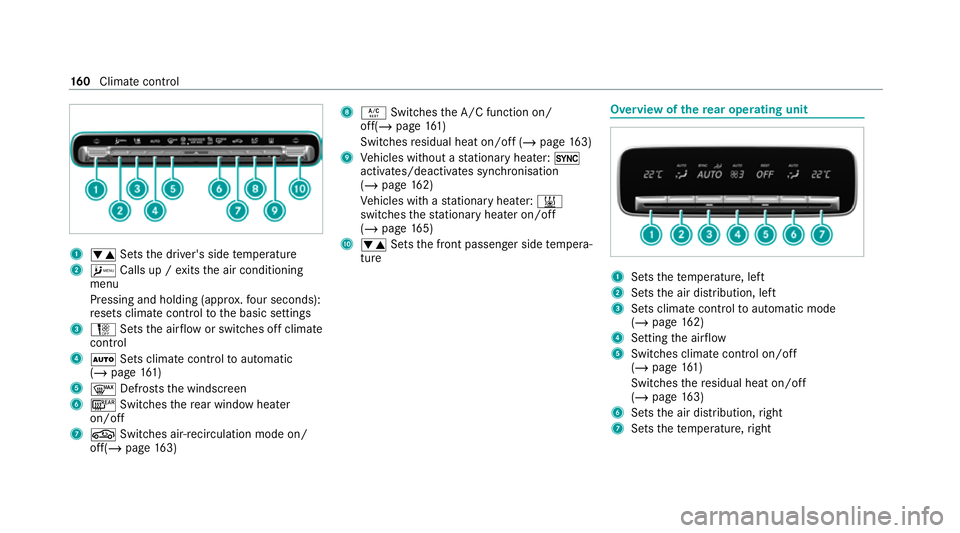
1
0082 Setsthe driver's side temp erature
2 A Calls up / exits the air conditioning
menu
Pressing and holding (appr ox.fo ur seconds):
re sets climate contro lto the basic settings
3 H Setsthe air flow or switches off climate
control
4 0058 Sets climate control toautomatic
(/ page 161)
5 0064 Defrosts the windscreen
6 006C Switches there ar wind owheater
on/off
7 0072 Switches air-recirculation mode on/
off(/ page163) 8
0056 Switches the A/C function on/
off(/ page161)
Switches residual heat on/off (/ page163)
9 Vehicles without a stationary heater: 0
activates/deactivates syn chronisation
(/ page 162)
Ve hicles with a stationary heater: 003B
swit ches thest ationary heater on/off
(/ page 165)
A 0082 Setsthe front passenger side temp era‐
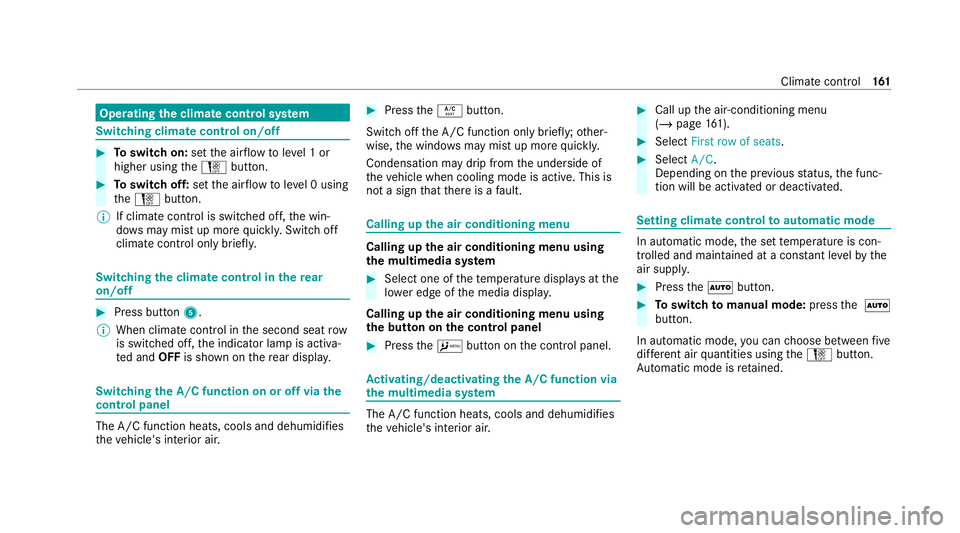
ture Overview of
there ar operating unit 1
Sets thete mp erature, left
2 Sets the air distribution, left
3 Sets climate control toautomatic mode
(/ page 162)
4 Setting the air flow
5 Switches climate control on/off
(/ page 161)
Switches there sidual heat on/off
(/ page 163)
6 Sets the air distribution, right
7 Sets thete mp erature, right 16 0
Climate cont rol
Page 164 of 757
Operating
the clima tecont rol sy stem Switching clima
tecont rol on/off #
Toswitch on: setthe air flow toleve l 1 or
higher using theH button. #
Toswitch off: setthe air flow toleve l 0 using
th eH button.
% If climate control is switched off, the win‐
do ws may mist up more quickl y.Switch off
climate control only brie fly. Switching
the clima tecont rol in there ar
on/off #
Press button 5.
% When clima tecontrol in the second seat row
is switched off, the indicator lamp is activa‐
te d and OFFis shown on there ar displa y. Switching
the A/C function on or off via the
cont rol panel The A/C function heats, cools and dehumidifies
th
eve hicle's interior air. #
Press the0056 button.
Switch off the A/C function only brief ly;ot her‐
wise, the windo wsmay mist up more quickl y.
Condensation may drip from the underside of
th eve hicle when cooling mode is active. This is
not a sign that there is a fault. Calling up
the air conditioning menu Calling up
the air conditioning menu using
th e multimedia sy stem #
Select one of thete mp erature displa ysatthe
lo we r edge of the media displa y.
Calling up the air conditioning menu using
th e but ton on the control panel #
Press theA button on the control panel. Ac
tivating/deactivating the A/C function via
the multimedia sy stem The A/C function heats, cools and dehumidifies
th
eve hicle's interior air. #
Call up the air-conditioning menu
(/ page 161). #
Select First row of seats . #
Select A/C.
Depending on the pr evious status, the func‐
tion will be activated or deactivated. Setting climate control
toautomatic mode In auto
matic mode, the set temp erature is con‐
trolled and maintained at a const ant levelby the
air suppl y. #
Press the0058 button. #
Toswitch tomanual mode: pressthe 0058
button.
In automatic mode, you can choose between five
dif fere nt air quantities using theH button.
Au tomatic mode is retained. Climate control
161
Page 165 of 757
Au
tomatically controlling the climate control
in the rear In auto
matic mode, the set temp erature is regu‐
lated bythete mp erature of the dispensed air
and the air flow. #
Press the0058 button (/ page160). Overvi
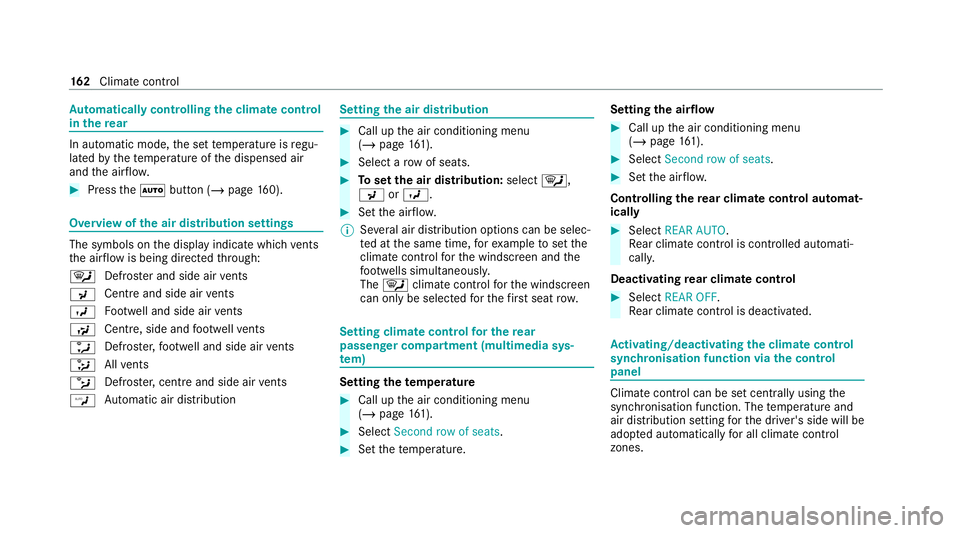
ewofthe air distribution settings The symbols on
the display indicate which vents
th e air flow is being directed thro ugh:
0061 Defros
ter and side air vents
009C Centre and side air
vents
009B Fo
otwe ll and side air vents
009F Centre, side and
foot we llve nts
0086 Defros
ter,fo ot we ll and side air vents
008F All
vents
0087 Defros
ter,centre and side air vents
00A2 Au
tomatic air distribution Setting
the air distribution #
Call up the air conditioning menu
(/ page 161). #
Select a rowof seats. #
Toset the air distribution: select0061,
009C or009B. #
Set the air flow.
% Several air distribution options can be selec‐
te d at the same time, forex ample toset the
climate control forth e windscreen and the
fo ot we lls simultaneousl y.
The 0061 climate contro lfo rth e windscreen
can only be selected forth efirs t seat row. Setting climate control
for the rear
passenger comp artment (multimedia sys‐
te m) Setting the
temperature #
Call up the air conditioning menu
(/ page 161). #
Select Second row of seats . #
Set thete mp erature. Setting
the airflow #
Call up the air conditioning menu
(/ page 161). #
Select Second row of seats . #
Set the air flow.
Controlling there ar climate control automat‐
ical ly #
Select REAR AUTO .
Re ar climate control is controlled automati‐
call y.
Deactivating rear climate control #
Select REAR OFF.
Re ar climate control is deactivated. Ac
tivating/deactivating the climate control
syn chro nisation function via the control
panel Climate control can be set centrally using
the
synchronisation function. The temp erature and
air distribution setting forth e driver's side will be
adop ted automatically for all clima tecontrol
zones. 16 2
Climate cont rol
Page 166 of 757
#
Press the 0 button.
The synchronisation function will be deactivated
if th e settings for one of theot her climate zones
are changed. Ac
tivating/deactivating the climate control
syn chro nisation function via the multimedia
sy stem Climate control can be set centrally using
the
synchronisation function. The driver's settings
fo rte mp erature, air flow and air distribution are
adop ted automatically for all clima tezones. #
Call up the air conditioning menu
(/ page 161). #
Select First row of seats . #
Select SYNC.
Depending on the pr evious status, the func‐
tion is activated or deactivated. Demisting
the windo ws Wi
ndo wsmis ted up on the inside #
Press the0058 button. #
Ifth e windo wscontinue tomist up: press the
0064 button.
Wi ndo wsmis ted up on the outside #
Switch on the windscreen wipers. #
Press the0058 button. Switching air-recirculation mode on/off
#
Press the0072 button.
The interior air will be recirculated.
Air-reci rculation mode automatically swit ches to
fresh air mode af ter some time.
% If air-recirculation mode is switched on, the
windo wsmay mist up more quickl y.Switch
on ai r-re circulation mode only brie fly. Switches
there sidual heat on/off Re
quirements: R
theve hicle is par ked.
It is possible tomake use of there sidual heat
from the engine tocontinue heating or ventilat‐
ing the front compartment of theve hicle for
appr oximately 30 minutes, depending on the
te mp erature set. #
Toactivate: press button 0056.
Re sidual heat will be switched off automaticall y. Switching
there sidual heat in there ar
on/off Re
quirements:
R The vehicle is par ked.
When there sidual heat of the engine is activated
in there ar compartment, you can heat or venti‐
la te there ar compartment for appro ximately
30 minutes. #
Press button 5(/ page 160). Clima
tecontrol 16 3
Page 167 of 757
Ac
tivating/deactivating ionisation Ionisation impr
oves thequ ality of theve hicle's
interior air. Ionisation of the interior air is odour‐
less. #
Call up the air conditioning menu
(/ page 161). #
Select Air quality. #
Select IONISATION .
Depending on the pr evious status, the func‐
tion is activated or deactivated. Fr
ag rance sy stem Setting
the frag rance sy stem
Re quirements:
R Automatic clima tecontrol is acti vated.
R The glove box is closed.
The fragrance sy stem distributes a pleasant fra‐
grance thro ughout theve hicle interior from a fla‐
con located in theglov e box. #
Call up the climate control menu
(/ page 161). #
Select Air quality. #
Select AIR FRESHENER .
The frag rance sy stem begins at the highest
intensit y. #
Keep pressing until the desired intensity is
re ached.
% The intensity le vels can be selec ted in the
fo llowing order: Strong - Medium - Weak -
Off
Inserting or removing the flacon ofthe fra‐
gr ance sy stem &
WARNING Risk of inju ryfrom liquid per‐
fume
If ch ildren open theflacon, they could drink
th e liquid perfume or it could come into con‐
ta ct wi th theireyes. #
Do not lea vechildren unat tended in the
ve hicle. #
Consult a doctor immediately if liquid
perfume has been drunk. #
If liquid perfume comes into contact
with your eyes or skin, rinse your eyes
with clean water. #
If sym ptoms continue, consult a doctor. +
ENVIRONMENTAL
NOTEEnvironmental
dama gedue toimproper disposal of full
fl acons Fu
llflacons must not be disposed
of with household waste. #
Fu
llflacons must be take nto
a harmful subs tance collection point. 16 4
Climate cont rol