reset MERCEDES-BENZ GLE SUV 2015 User Guide
[x] Cancel search | Manufacturer: MERCEDES-BENZ, Model Year: 2015, Model line: GLE SUV, Model: MERCEDES-BENZ GLE SUV 2015Pages: 453, PDF Size: 14.78 MB
Page 106 of 453
slightly. The rain-closing feature is then deacti-
vated.
The sliding sunroof does not close if:
R it is raised at the rear.
R it is blocked.
R no rain is falling on the area of the windscreen
being monitored by the rain sensor, e.g.
because the vehicle is under a bridge or in a
carport.
Resetting !
If the sliding sunroof still cannot be opened
or closed fully after resetting, contact a quali-
fied specialist workshop.
Reset the sliding sunroof if it does not operate
smoothly.
X Turn the key to position 1or 2in the ignition
lock.
X Raise the sliding sunroof fully at the rear
(Y page 102).
X Keep the 2switch pressed for another
second.
X Make sure that the sliding sunroof can be fully
opened and closed again (Y page 102).
X If this is not the case, repeat the steps above
again. Operating the panorama sliding sun-
roof
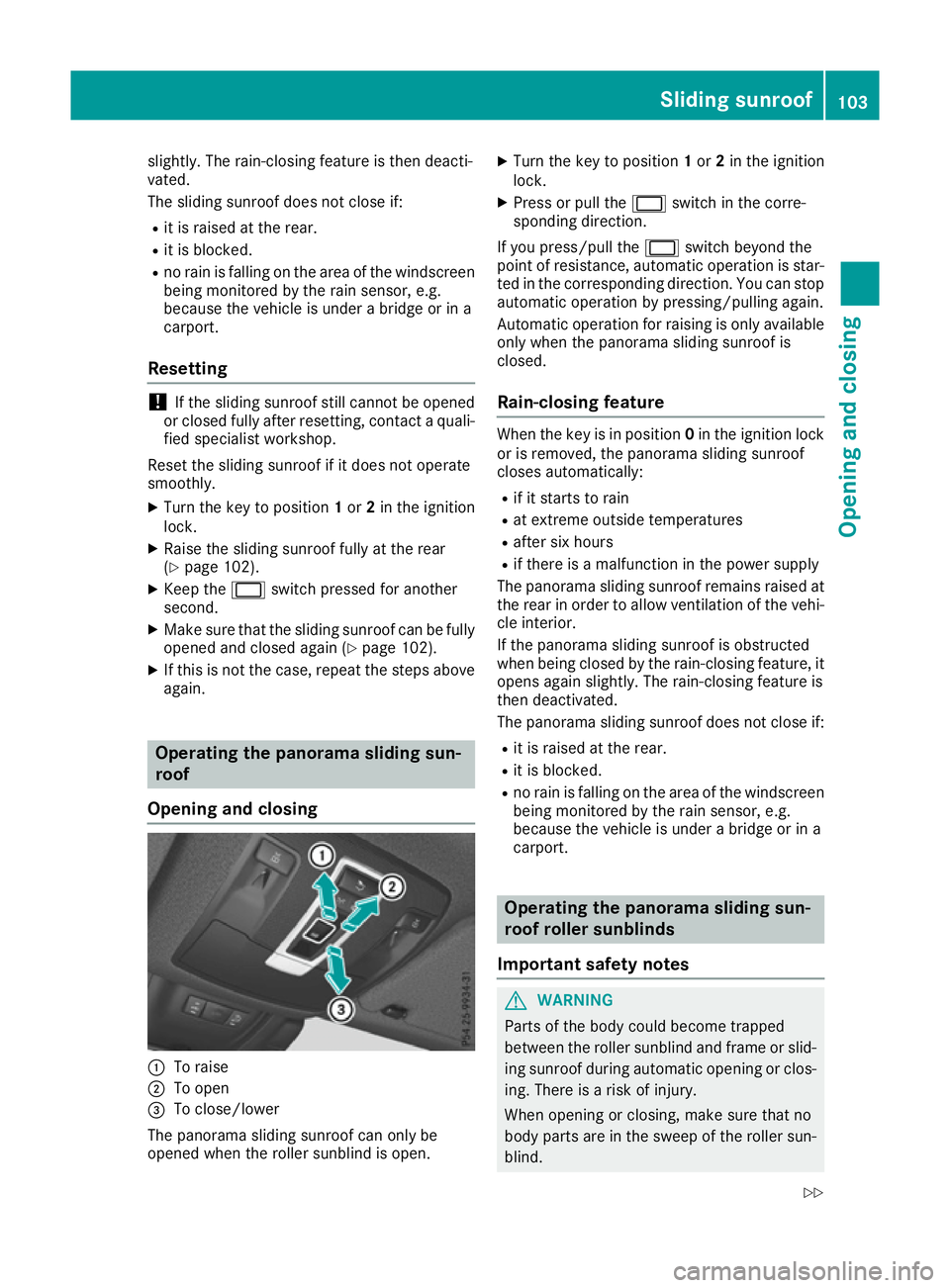
Opening and closing :
To raise
; To open
= To close/lower
The panorama sliding sunroof can only be
opened when the roller sunblind is open. X
Turn the key to position 1or 2in the ignition
lock.
X Press or pull the 2switch in the corre-
sponding direction.
If you press/pull the 2switch beyond the
point of resistance, automatic operation is star-
ted in the corresponding direction. You can stop automatic operation by pressing/pulling again.
Automatic operation for raising is only available
only when the panorama sliding sunroof is
closed.
Rain-closing feature When the key is in position
0in the ignition lock
or is removed, the panorama sliding sunroof
closes automatically:
R if it starts to rain
R at extreme outside temperatures
R after six hours
R if there is a malfunction in the power supply
The panorama sliding sunroof remains raised at
the rear in order to allow ventilation of the vehi-
cle interior.
If the panorama sliding sunroof is obstructed
when being closed by the rain-closing feature, it opens again slightly. The rain-closing feature is
then deactivated.
The panorama sliding sunroof does not close if:
R it is raised at the rear.
R it is blocked.
R no rain is falling on the area of the windscreen
being monitored by the rain sensor, e.g.
because the vehicle is under a bridge or in a
carport. Operating the panorama sliding sun-
roof roller sunblinds
Important safety notes G
WARNING
Parts of the body could become trapped
between the roller sunblind and frame or slid- ing sunroof during automatic opening or clos-
ing. There is a risk of injury.
When opening or closing, make sure that no
body parts are in the sweep of the roller sun- blind. Sliding sunroof
103Opening and closing
Z
Page 107 of 453
If someone is trapped:
R release the switch immediately or
R press the switch in any direction during the
automatic opening/closing process
The opening/closing process is stopped.
The roller sunblinds shield the vehicle interior
from sunlight. The roller sunblinds can only be
opened and closed together when the pano-
rama sliding sunroof is closed.
Roller sunblind reversing feature The roller sunblinds are equipped with an auto-
matic reversing feature. If a solid object blocks
or restricts the roller blind during the closing
process, the roller blind opens again automati-
cally. However, the automatic reversing feature
is only an aid, not a substitute for your attention when closing the roller sunblind. G
WARNING
The reversing function does not react in par-
ticular to soft, light and thin objects, e.g. small fingers. This means that the reversing featurecannot prevent someone being trapped in
these situations. There is a risk of injury.
When closing the roller sunblind, make sure
that no body parts are in the sweep.
If someone is trapped:
R release the switch immediately or
R press the switch in any direction during the
automatic closing process
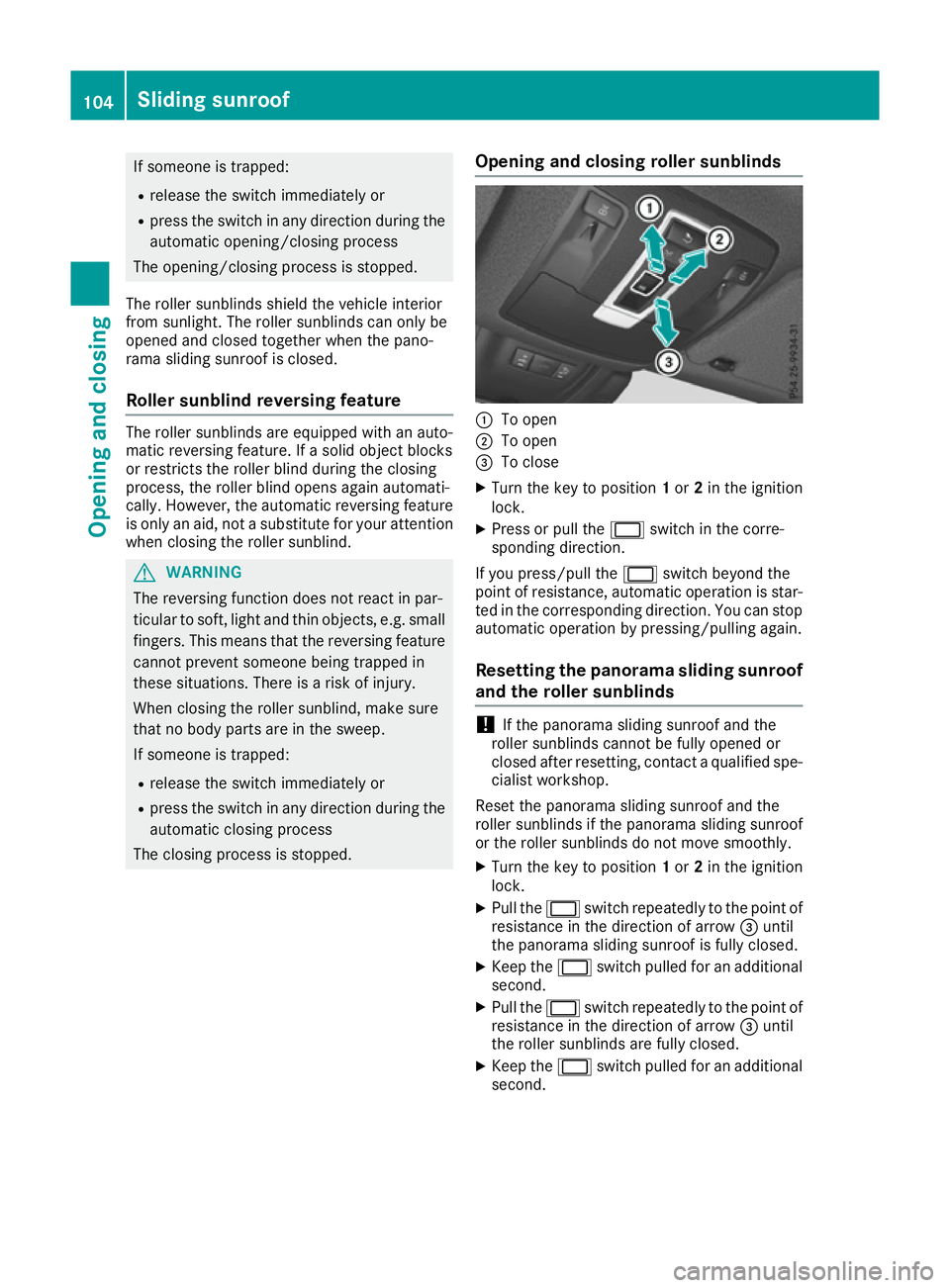
The closing process is stopped. Opening and closing roller sunblinds :
To open
; To open
= To close
X Turn the key to position 1or 2in the ignition
lock.
X Press or pull the 2switch in the corre-
sponding direction.
If you press/pull the 2switch beyond the
point of resistance, automatic operation is star- ted in the corresponding direction. You can stopautomatic operation by pressing/pulling again.
Resetting the panorama sliding sunroof
and the roller sunblinds !
If the panorama sliding sunroof and the
roller sunblinds cannot be fully opened or
closed after resetting, contact a qualified spe- cialist workshop.
Reset the panorama sliding sunroof and the
roller sunblinds if the panorama sliding sunroof
or the roller sunblinds do not move smoothly. X Turn the key to position 1or 2in the ignition
lock.
X Pull the 2switch repeatedly to the point of
resistance in the direction of arrow =until
the panorama sliding sunroof is fully closed.
X Keep the 2switch pulled for an additional
second.
X Pull the 2switch repeatedly to the point of
resistance in the direction of arrow =until
the roller sunblinds are fully closed.
X Keep the 2switch pulled for an additional
second. 104
Sliding sunroofOpening and closing
Page 109 of 453
Problems with the sliding sunroof
Your vehicle may be fitted with a sliding sunroof or a panorama sliding sunroof. In the following
section, the term "sliding sunroof" refers to both types of sliding sunroof. G
WARNING
If you close the sliding sunroof again immediately after it has been blocked or reset, the sliding
sunroof closes with increased or maximum force. The reversing feature is then not active. Parts of the body could be trapped in the closing area in the process. This poses an increased risk of
injury or even fatal injury.
Make sure that no parts of the body are in the closing area.
If someone is trapped:
R release the switch immediately or
R press the switch in any direction during the automatic closing process
The closing process is stopped. Problem
Possible causes/consequences and
M MSolutions The sliding sunroof can-
not be closed and you
cannot see the cause. If the sliding sunroof is obstructed during closing and reopens again
slightly:
X Immediately after the sliding sunroof blocks, pull the 2switch in
the overhead control panel down to the point of resistance and hold it until the sliding sunroof is closed.
The sliding sunroof is closed with increased force.
If the sliding sunroof is obstructed again during closing and reopens
again slightly:
X Immediately after the sliding sunroof blocks, pull the 2switch in
the overhead control panel down to the point of resistance and hold it until the sliding sunroof is closed.
The sliding sunroof is closed without the automatic reversing fea-
ture. 106
Sliding sunroofOpening and closing
Page 121 of 453
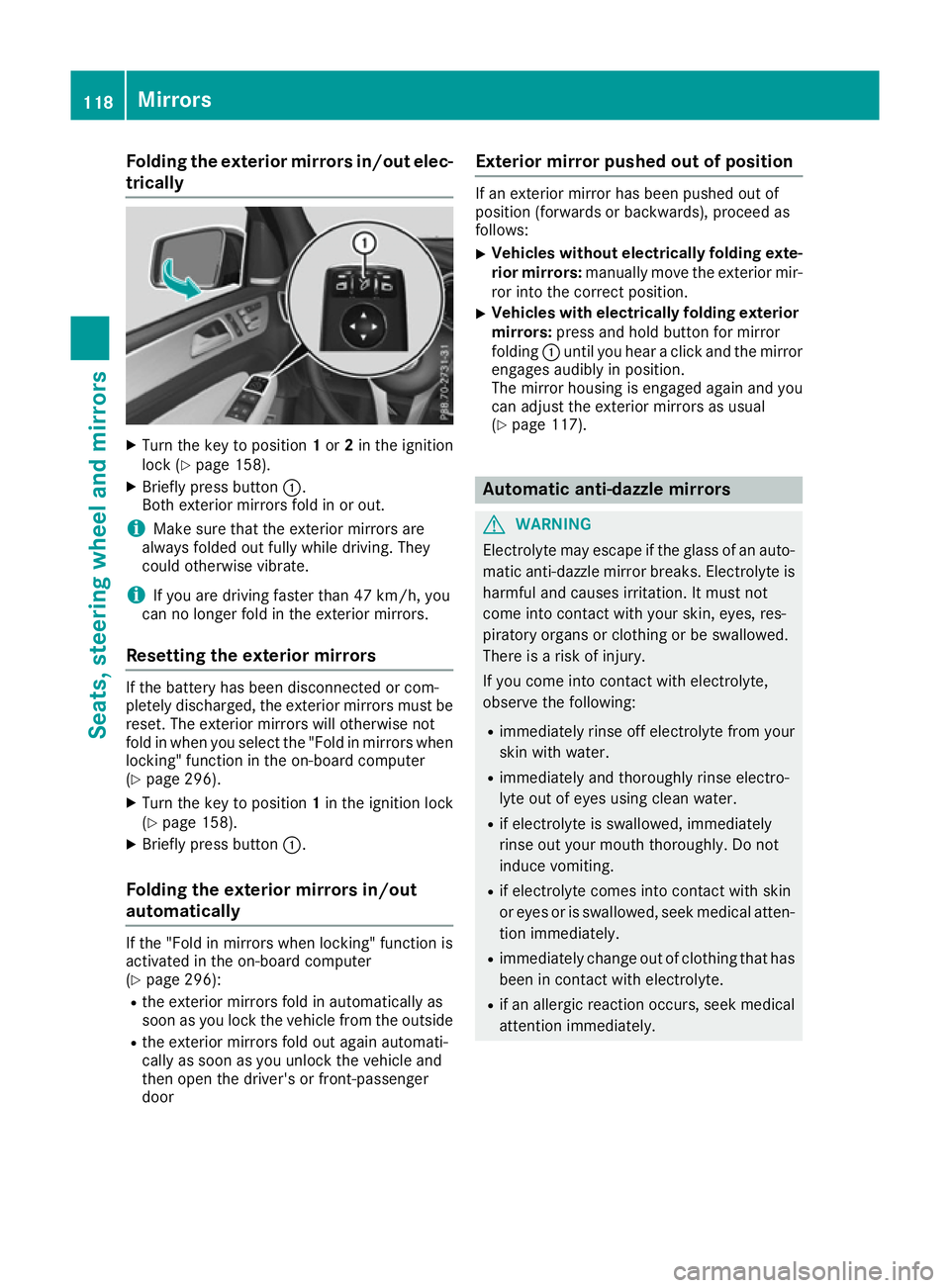
Folding the exterior mirrors in/out elec-
trically X
Turn the key to position 1or 2in the ignition
lock (Y page 158).
X Briefly press button :.
Both exterior mirrors fold in or out.
i Make sure that the exterior mirrors are
always folded out fully while driving. They
could otherwise vibrate.
i If you are driving faster than 47 km/h, you
can no longer fold in the exterior mirrors.
Resetting the exterior mirrors If the battery has been disconnected or com-
pletely discharged, the exterior mirrors must be
reset. The exterior mirrors will otherwise not
fold in when you select the "Fold in mirrors whenlocking" function in the on-board computer
(Y page 296).
X Turn the key to position 1in the ignition lock
(Y page 158).
X Briefly press button :.
Folding the exterior mirrors in/out
automatically If the "Fold in mirrors when locking" function is
activated in the on-board computer
(Y page 296):
R the exterior mirrors fold in automatically as
soon as you lock the vehicle from the outside
R the exterior mirrors fold out again automati-
cally as soon as you unlock the vehicle and
then open the driver's or front-passenger
door Exterior mirror pushed out of position If an exterior mirror has been pushed out of
position (forwards or backwards), proceed as
follows:
X Vehicles without electrically folding exte-
rior mirrors: manually move the exterior mir-
ror into the correct position.
X Vehicles with electrically folding exterior
mirrors: press and hold button for mirror
folding :until you hear a click and the mirror
engages audibly in position.
The mirror housing is engaged again and you can adjust the exterior mirrors as usual
(Y page 117). Automatic anti-dazzle mirrors
G
WARNING
Electrolyte may escape if the glass of an auto- matic anti-dazzle mirror breaks. Electrolyte is
harmful and causes irritation. It must not
come into contact with your skin, eyes, res-
piratory organs or clothing or be swallowed.
There is a risk of injury.
If you come into contact with electrolyte,
observe the following:
R immediately rinse off electrolyte from your
skin with water.
R immediately and thoroughly rinse electro-
lyte out of eyes using clean water.
R if electrolyte is swallowed, immediately
rinse out your mouth thoroughly. Do not
induce vomiting.
R if electrolyte comes into contact with skin
or eyes or is swallowed, seek medical atten-
tion immediately.
R immediately change out of clothing that has
been in contact with electrolyte.
R if an allergic reaction occurs, seek medical
attention immediately. 118
MirrorsSeats, steering wheel and
mirrors
Page 122 of 453
The rear-view mirror and the exterior mirror on
the driver's side automatically go into anti-daz-
zle mode if the following conditions are met
simultaneously:
R the ignition is switched on and
R incident light from headlamps strikes the sen-
sor in the rear-view mirror
The mirrors do not dip if reverse gear is engaged or if the interior lighting is switched on. Parking position of the exterior mirror
on the front-passenger side
Setting and storing the parking position You can set the front-passenger side exterior
mirror so that you can see the rear wheel on that side as soon as you engage reverse gear. You
can store this position.
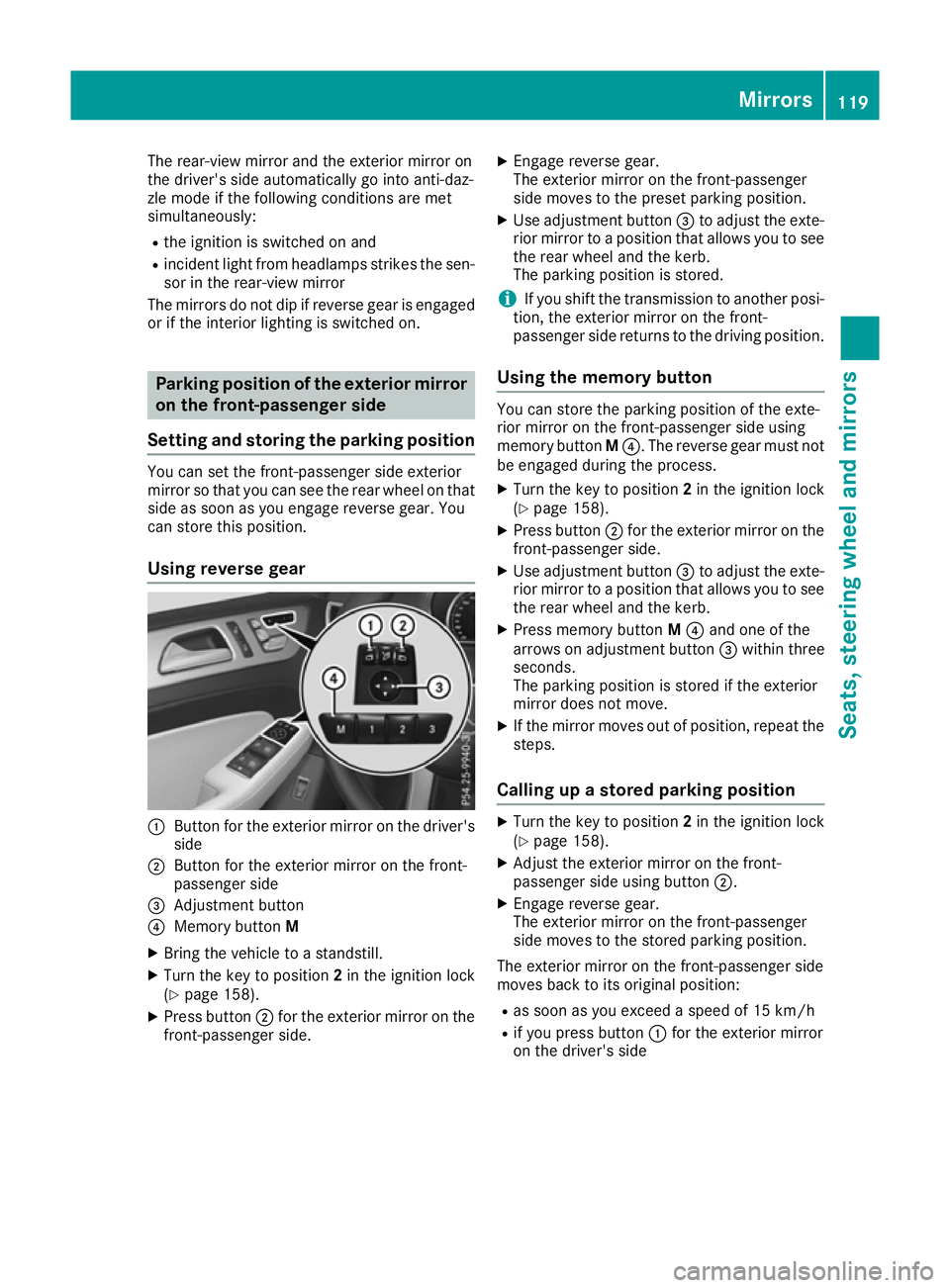
Using reverse gear :
Button for the exterior mirror on the driver's
side
; Button for the exterior mirror on the front-
passenger side
= Adjustment button
? Memory button M
X Bring the vehicle to a standstill.
X Turn the key to position 2in the ignition lock
(Y page 158).
X Press button ;for the exterior mirror on the
front-passenger side. X
Engage reverse gear.
The exterior mirror on the front-passenger
side moves to the preset parking position.
X Use adjustment button =to adjust the exte-
rior mirror to a position that allows you to see
the rear wheel and the kerb.
The parking position is stored.
i If you shift the transmission to another posi-
tion, the exterior mirror on the front-
passenger side returns to the driving position.
Using the memory button You can store the parking position of the exte-
rior mirror on the front-passenger side using
memory button
M?. The reverse gear must not
be engaged during the process.
X Turn the key to position 2in the ignition lock
(Y page 158).
X Press button ;for the exterior mirror on the
front-passenger side.
X Use adjustment button =to adjust the exte-
rior mirror to a position that allows you to see
the rear wheel and the kerb.
X Press memory button M? and one of the
arrows on adjustment button =within three
seconds.
The parking position is stored if the exterior
mirror does not move.
X If the mirror moves out of position, repeat the
steps.
Calling up a stored parking position X
Turn the key to position 2in the ignition lock
(Y page 158).
X Adjust the exterior mirror on the front-
passenger side using button ;.
X Engage reverse gear.
The exterior mirror on the front-passenger
side moves to the stored parking position.
The exterior mirror on the front-passenger side
moves back to its original position: R as soon as you exceed a speed of 15 km/h
R if you press button :for the exterior mirror
on the driver's side Mirrors
119Seats, steering wheel and mirrors Z
Page 123 of 453
Memory function
Storing settings
G
WARNING
If you use the memory function on the driver's side while driving, the adjustments could
cause you to lose control of the vehicle. There
is a risk of an accident.
Only use the memory function on the driver's
side while the vehicle is stationary. G
WARNING
When the memory function adjusts the seat or steering wheel, you and other vehicle occu-
pants – particularly children – could become
trapped. There is a risk of injury.
While the memory function is making adjust-
ments, make sure that no one has any body
parts in the sweep of the seat or steering
wheel. If somebody becomes trapped, imme-
diately release the memory function position
button. The adjustment process is stopped. G
WARNING
If children activate the memory function, they
could become trapped, especially if they are
unattended. There is a risk of injury.
When leaving the vehicle, always take the key with you and lock the vehicle. Never leave
children unattended in the vehicle.
The memory function can be used at any time,
e.g. even when the key is not in the ignition lock. With the memory function, you can store up to
three different settings, e.g. for three different
people.
The following settings are stored as a single
memory preset:
R position of the seat, backrest and head
restraint
R driver's side: steering wheel position
R driver's side: position of the exterior mirrors
on the driver's and front-passenger sides X
Adjust the seat (Y page 109).
X On the driver's side, adjust the steering wheel
(Y page 115) and the exterior mirrors
(Y page 117).
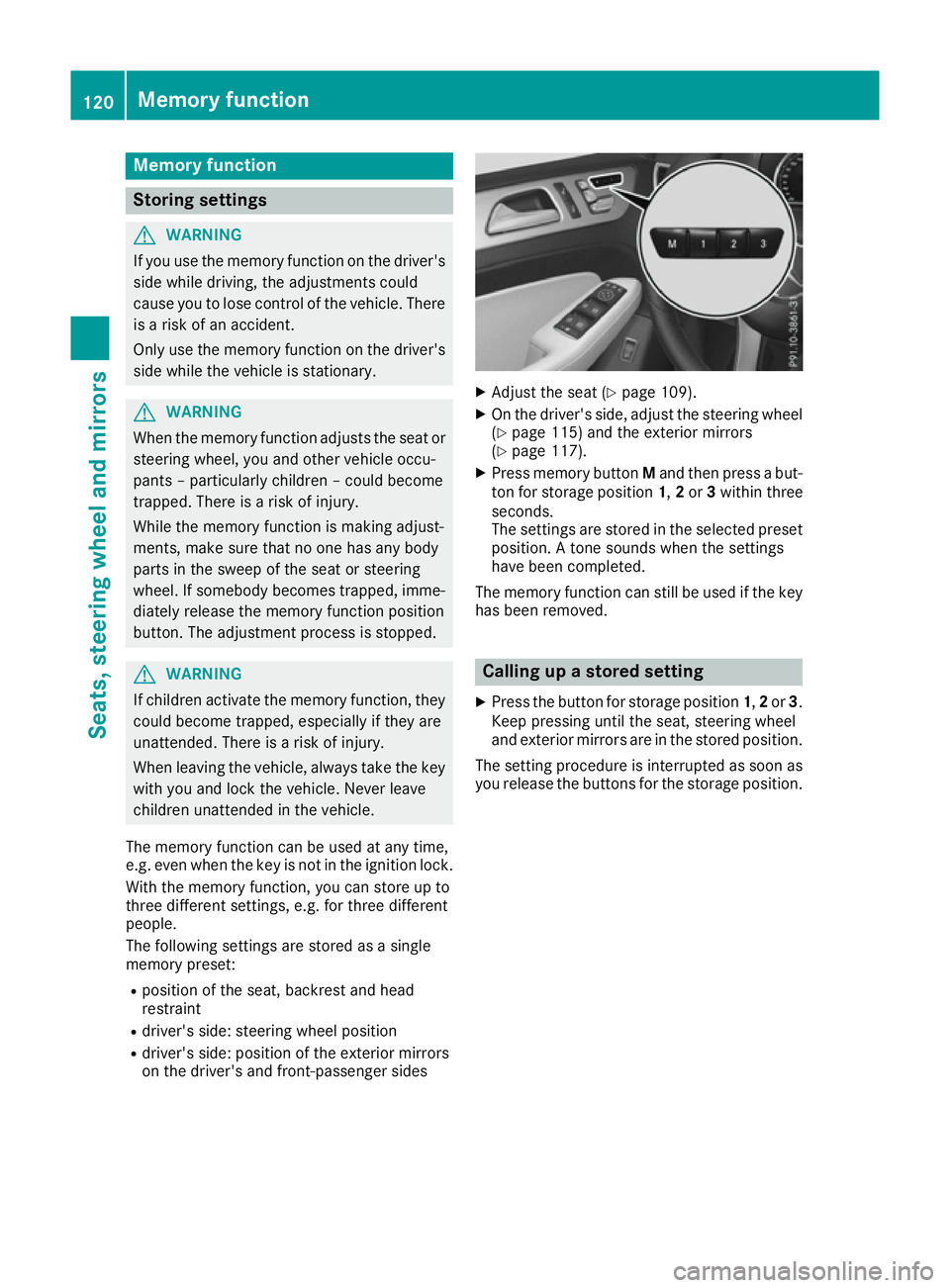
X Press memory button Mand then press a but-
ton for storage position 1,2or 3within three
seconds.
The settings are stored in the selected preset
position. A tone sounds when the settings
have been completed.
The memory function can still be used if the key has been removed. Calling up a stored setting
X Press the button for storage position 1,2or 3.
Keep pressing until the seat, steering wheel
and exterior mirrors are in the stored position.
The setting procedure is interrupted as soon as you release the buttons for the storage position. 120
Memory functionSeats, steering wheel and mirrors
Page 188 of 453
Heat generated by the charging cable
and charging cable connector Observe the "Important safety notes"
(Y
page 182).
During the charging process, the charging cable
and charging cable connector may heat up.
The charging cable and the charging cable con- nector will only heat up within the permissible
limiting values, provided that:
R the mains power supply and the charging
cable are not damaged
R the instructions for handling the charging
cable and controls on the charging cable are
observed
If the charging cable or charging cable connec-
tor become too hot, have the mains power sup- ply checked.
Protection against overvoltage !
Voltage surges in the mains supply can dam-
age the vehicle. The vehicle is therefore
equipped with a device which protects it from
voltage surges in the mains supply. This
device may be triggered during severe thun-
derstorms, for example, and may lead to the
building's fuse being tripped and an interrup-
tion in the power supply. These functions pro-
tect the vehicle. After the building fuse is
switched on again, the charging process
resumes automatically. Following an interrup-
tion in the power supply or tripping of the
building's fuse, it may take up to 10 minutes
for charging to resume automatically.
Reset the building's circuit breaker. Otherwise,
the charging process cannot be continued.
General information on the charging
process Observe the "Important safety notes"
(Y page 182).
The vehicle socket is located in the rear bumper on the right below the tail lamp.
The charge socket flap and the vehicle are cen-
trally locked or unlocked simultaneously. Charging the high-voltage battery via
the mains socket
Charging cable for mains sockets Important safety notes
! Only use the charging cable to charge the
high-voltage battery. Do not use the charging cable for other purposes. It may otherwise be damaged.
The vehicle is supplied with a country-specific
charging cable, variant 1 or variant 2, for con-
nection to a mains socket. The controls of the
two charging cable variants are different. Only
use the charging cable supplied with the vehicle
or a charging cable approved for the vehicle.
i The charging process can vary depending on
the mains power supply. Therefore, always
observe the local information.
i For short charge times (charging with 16
A),
connect the fast-charging cable to a wallbox
or charging station without a preinstalled
cable. You can also use the optionally availa-
ble charging cable with the CE plug.
Information about charging from a wallbox
(Y page 188).
Information about charging from a charging sta-
tion (Y page 189).
Stowing the charging cable The charging cable can be stowed and secured
in the bag provided in the luggage compartment
of the vehicle.
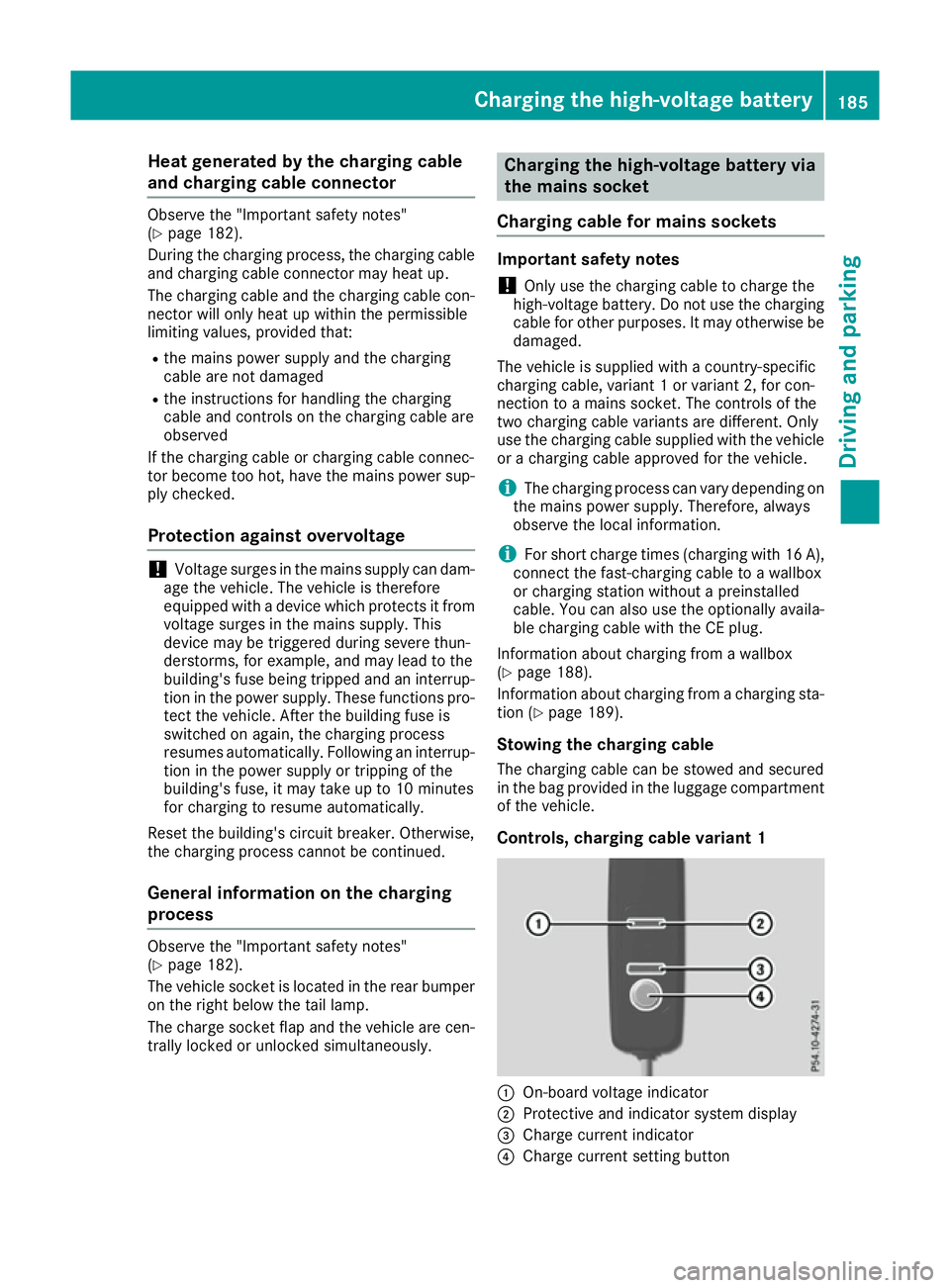
Controls, charging cable variant 1 :
On-board voltage indicator
; Protective and indicator system display
= Charge current indicator
? Charge current setting button Charging the high-voltage battery
185Driving and parking Z
Page 190 of 453
!
If the charge current is too high, the fuse
could be tripped or the external mains supply could overheat. Check if the external mains
supply is equipped to handle the programmed charge current. If necessary, reduce the pro-
grammed charge current or use a different
mains socket.
Before starting the charging process at a power
socket, check the maximum permissible charge current for the relevant power socket or the
building.
You can set the maximum permissible charge
current
R on the charging cable controls (only charging
cable variant 1)
R in the Settings Settings menu of the on-board com-
puter (Y page 292).
The lower value of the two charge current set-
tings – on the charge cable controls and in the
on-board computer – determines the maximum
charge current. If you cannot set the precise
maximum permitted charge current, select the
next lowest available value.
Only set the maximum permitted charge current
in the on-board computer menu if:
R it is not possible to set the charge current on
the charging cable
R the precise maximum permitted charge cur-
rent can only be set via the on-board com-
puter.
Setting the maximum permitted charge current on the charging cable of variant 1 is described
below.
X To adjust the setting: press button?
repeatedly until the desired setting is selec-
ted in display =.
R Two LEDs are flashing: minimum setting
R All LEDs are flashing: maximum setting
If, after the charging process, the charging cable is:
R left connected to the power socket, the cur-
rently selected values will be used for the next
charging process.
R removed from the power socket, the values
will be reset to the minimum setting for the
next charging process. You may then need to
reset the values of the maximum charge cur-
rent.
i If the vehicle requires more time than usual
when charging, check the maximum charge current settings using the controls on the
charging cable or in the on-board computer's
menu.
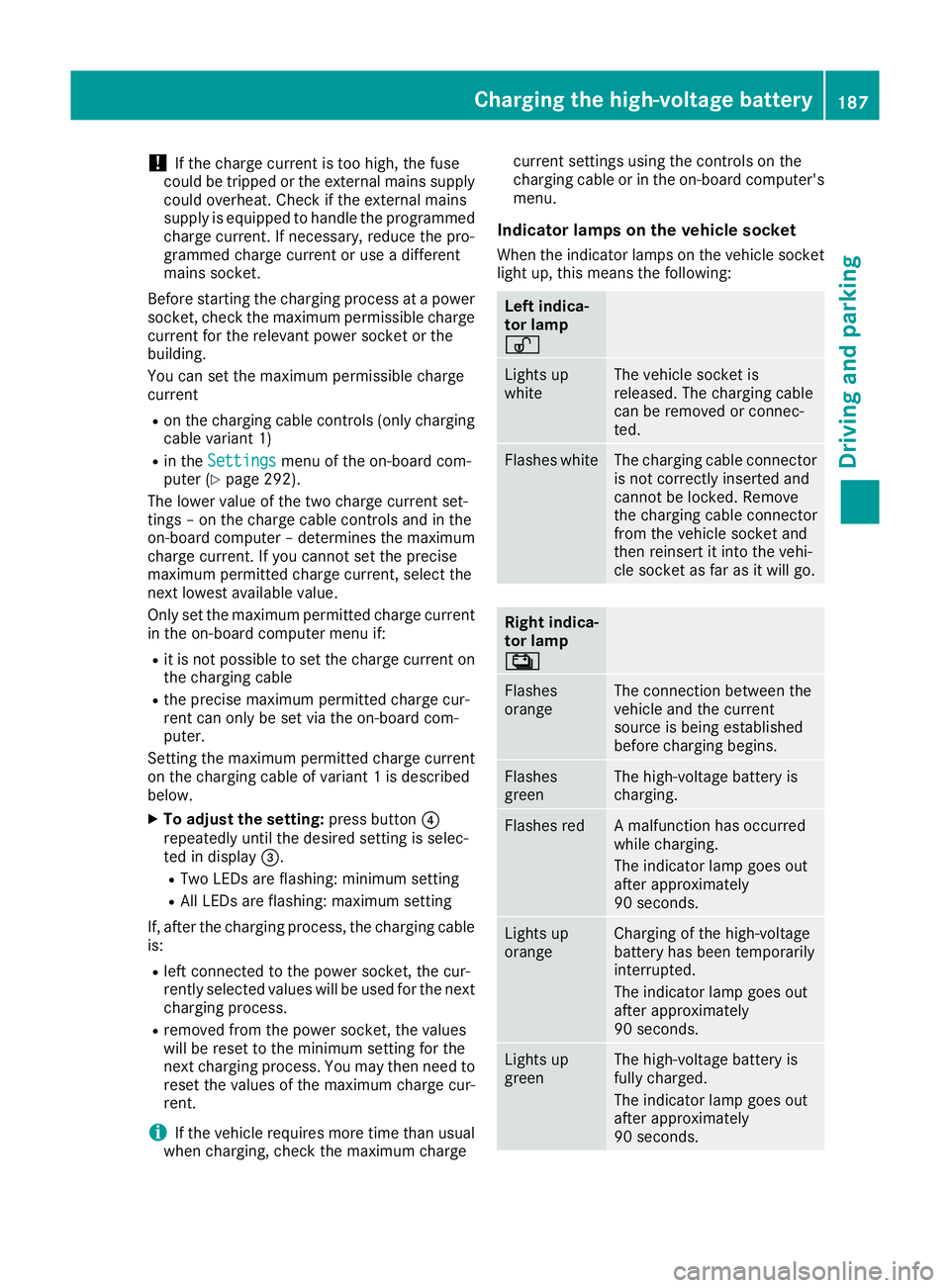
Indicator lamps on the vehicle socket
When the indicator lamps on the vehicle socket
light up, this means the following: Left indica-
tor lamp
Ì Ì
Lights up
white The vehicle socket is
released. The charging cable
can be removed or connec-
ted.
Flashes white The charging cable connector
is not correctly inserted and
cannot be locked. Remove
the charging cable connector
from the vehicle socket and
then reinsert it into the vehi-
cle socket as far as it will go. Right indica-
tor lamp
Ý Ý
Flashes
orange The connection between the
vehicle and the current
source is being established
before charging begins.
Flashes
green The high-voltage battery is
charging.
Flashes red A malfunction has occurred
while charging.
The indicator lamp goes out
after approximately
90 seconds.
Lights up
orange Charging of the high-voltage
battery has been temporarily
interrupted.
The indicator lamp goes out
after approximately
90 seconds.
Lights up
green The high-voltage battery is
fully charged.
The indicator lamp goes out
after approximately
90 seconds.Charging the high-voltage battery
187Driving and parking Z
Page 199 of 453
In addition to driving style, the actual consump-
tion is affected by other factors, such as:
R load
R tyre pressure
R cold start
R choice of route
R the use of electrical consumers
These factors are not included in the ECO dis-
play.
An economical driving style involves driving at a
moderate engine speed.
To achieve a higher value in the categories
"Acceleration" and "Constant":
R observe the gearshift recommendation
R drive the vehicle in the Comfortdrive pro-
gram.
On long journeys at a constant speed, e.g. on the motorway, only the outer area for "Constant"
will change.
The ECO display summarises the driving style
from the start of the journey to its completion.
Therefore, there are more marked changes in
the outer areas at the start of a journey. During
a prolonged driving time, these changes are
smaller. For more marked changes, perform a
manual reset (Y page 285).
Further information on the ECO display
(Y page 285). Braking
Important safety notes G
WARNING
If you shift down on a slippery road surface in an attempt to increase the engine's braking
effect, the drive wheels could lose their grip.
This increases the risk of skidding and having
an accident.
Do not shift down for additional engine brak-
ing on a slippery road surface.
Downhill gradients Do not depress the brake pedal continuously
while the vehicle is in motion, e.g. never cause
the brakes to rub by constantly applying light
pressure to the pedal. This results in excessive
and premature wear to the brake pads. Use the left-hand gearshift paddle to shift to a
lower gear on long and steep downhill gradients.
Take particular note of this when driving a laden vehicle.
i This also applies if you have activated cruise
control, SPEEDTRONIC or DISTRONIC PLUS.
This will use the braking effect of the engine, so
less braking will be required to maintain vehicle
speed. This relieves the load on the brake sys-
tem and prevents the brakes from overheating
and wearing too quickly.
Heavy and light loads G
WARNING
The braking system can overheat if you leave your foot on the brake pedal while driving.
This increases the braking distance and could
even cause the braking system to fail. There is
a risk of an accident.
Never use the brake pedal as a footrest. Do
not simultaneously depress both the brake
pedal and the accelerator pedal while driving.
! Depressing the brake pedal constantly
results in excessive and premature wear to
the brake pads.
If heavy demands are made on the brakes, do
not park the vehicle immediately. Drive on for a
short while. This allows the airflow to cool the
brakes more quickly.
If the brakes have been used only moderately,
you should occasionally test their effectiveness.
To do this, brake more firmly from a higher
speed. This improves the grip of the brakes.
Wet road surfaces If you have driven for a long time in heavy rain
without braking, there may be a delayed reac-
tion from the brakes when braking for the first
time. This may also occur after a car wash or
after driving through deep water.
You will have to depress the brake pedal more
firmly. Maintain a greater distance to the vehicle in front.
After driving on a wet road or having the vehicle
washed, brake firmly while paying attention to
the traffic conditions. This will warm up the
brake discs, thereby drying them more quickly
and protecting them against corrosion. 196
Driving tipsDriving and parking
Page 269 of 453
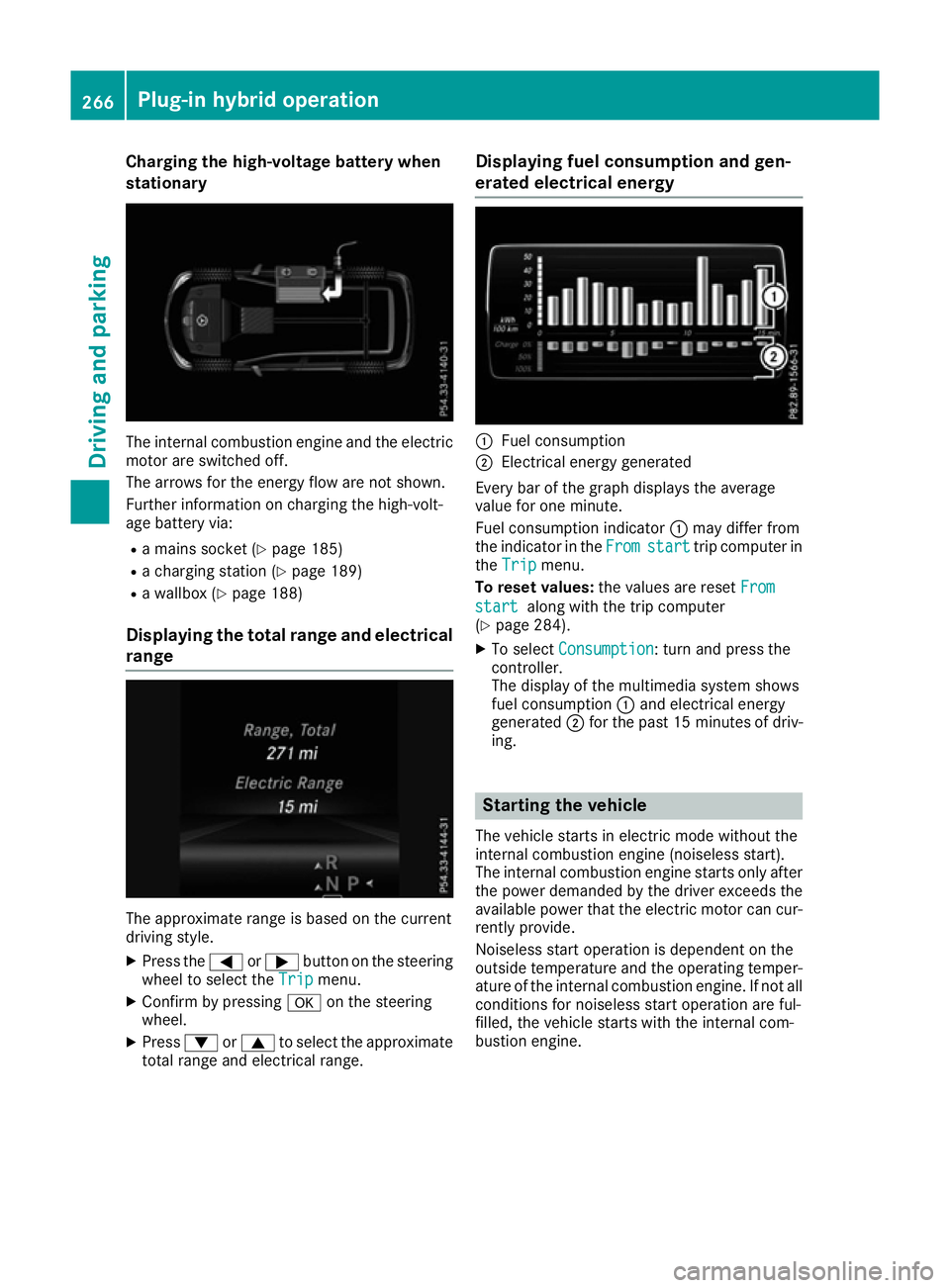
Charging the high-voltage battery when
stationary The internal combustion engine and the electric
motor are switched off.
The arrows for the energy flow are not shown.
Further information on charging the high-volt-
age battery via:
R a mains socket (Y page 185)
R a charging station (Y page 189)
R a wallbox (Y page 188)
Displaying the total range and electrical range The approximate range is based on the current
driving style.
X Press the =or; button on the steering
wheel to select the Trip
Trip menu.
X Confirm by pressing aon the steering
wheel.
X Press :or9 to select the approximate
total range and electrical range. Displaying fuel consumption and gen-
erated electrical energy :
Fuel consumption
; Electrical energy generated
Every bar of the graph displays the average
value for one minute.
Fuel consumption indicator :may differ from
the indicator in the From
From start start trip computer in
the Trip
Trip menu.
To reset values: the values are reset From
From
start start along with the trip computer
(Y page 284).
X To select Consumption Consumption: turn and press the
controller.
The display of the multimedia system shows
fuel consumption :and electrical energy
generated ;for the past 15 minute sof driv-
ing. Starting the vehicle
The vehicle starts in electric mode without the
internal combustion engine (noiseless start).
The internal combustion engine starts only after
the power demanded by the driver exceeds the
available power that the electric motor can cur- rently provide.
Noiseless start operation is dependent on the
outside temperature and the operating temper-
ature of the internal combustion engine. If not all
conditions for noiseless start operation are ful-
filled, the vehicle starts with the internal com-
bustion engine. 266
Plug-in hybrid operationDriving and parking