bulb MERCEDES-BENZ GLE SUV 2017 W166 Owner's Manual
[x] Cancel search | Manufacturer: MERCEDES-BENZ, Model Year: 2017, Model line: GLE SUV, Model: MERCEDES-BENZ GLE SUV 2017 W166Pages: 390, PDF Size: 9.43 MB
Page 4 of 390
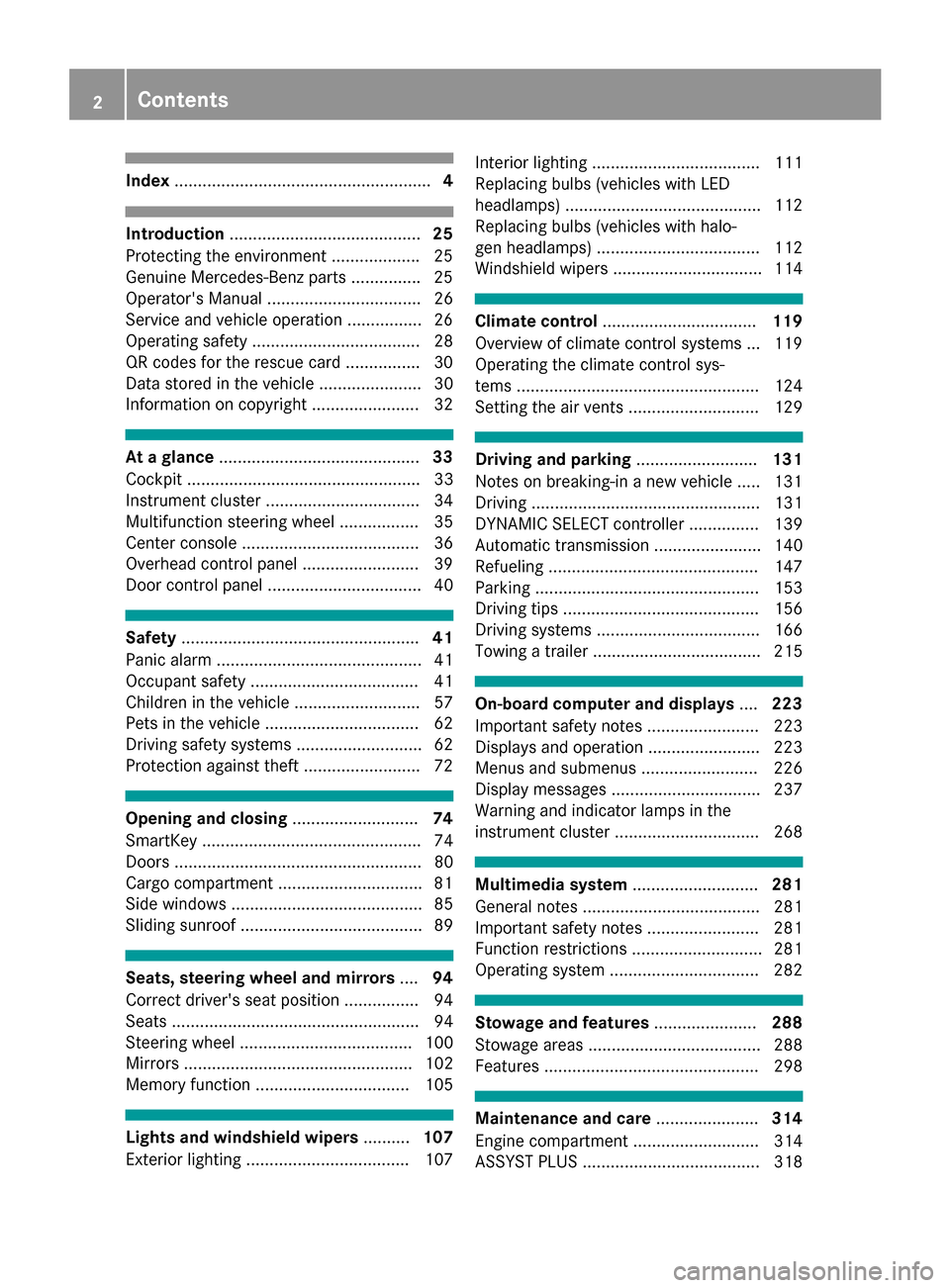
Index....................................................... 4
Introduction......................................... 25
Protecting the environment .................. .25
Genuine Mercedes-Benz parts .............. .25
Operator's Manual ................................. 26
Service and vehicle operation ................2 6
Operating safety .................................... 28
QR codes for the rescue card ................3 0
Data stored in the vehicle ...................... 30
Information on copyright ....................... 32
At a glance ........................................... 33
Cockpit .................................................. 33
Instrument cluster ................................. 34
Multifunction steering wheel ................. 35
Center console ...................................... 36
Overhead control panel .........................3 9
Door control panel ................................. 40
Safety ................................................... 41
Panic alarm ............................................ 41
Occupant safety .................................... 41
Children in the vehicle ........................... 57
Pets in the vehicle ................................. 62
Driving safety systems ........................... 62
Protection against theft .........................7 2
Opening and closing...........................74
SmartKey ............................................... 74
Doors ..................................................... 80
Cargo compartment .............................. .81
Side windows ......................................... 85
Sliding sunroof ....................................... 89
Seats, steering wheel and mirrors ....94
Correct driver's seat position ................ 94
Seats ..................................................... 94
Steering wheel ..................................... 100
Mirrors ................................................. 102
Memory function ................................. 105
Lights and windshield wipers ..........107
Exterior lighting ................................... 107 Interior lighting .................................... 111
Replacing bulbs (vehicles with LED
headlamps) .......................................... 112
Replacing bulbs (vehicles with halo-
gen headlamps) ................................... 112
Windshield wipers ................................ 114
Climate control
................................. 119
Overview of climate control systems ... 119
Operating the climate control sys-
tems .................................................... 124
Setting the air vents ............................ 129
Driving and parking ..........................131
Notes on breaking-in a new vehicle ..... 131
Driving ................................................. 131
DYNAMIC SELECT controller ............... 139
Automatic transmission ....................... 140
Refueling ............................................. 147
Parking ................................................ 153
Driving tips .......................................... 156
Driving systems ................................... 166
Towing a trailer .................................... 215
On-board computer and displays ....223
Important safety notes ........................ 223
Displays and operation ........................ 223
Menus and submenus ......................... 226
Display messages ................................ 237
Warning and indicator lamps in the
instrument cluster ............................... 268
Multimedia system ...........................281
General notes ...................................... 281
Important safety notes ........................ 281
Function restrictions ............................ 281
Operating system ................................ 282
Stowage and features ......................288
Stowage areas ..................................... 288
Features .............................................. 298
Maintenance and care ......................314
Engine compartment ........................... 314
ASSYST PLUS ...................................... 318
2Contents
Page 8 of 390
AUX jacks
CD/DVD drive .............................. .287
Axle load, permissible (trailer tow-
ing) ...................................................... 384
B
Back button ....................................... 282
Bag hook ............................................ 293
Ball coupling
Installing ........................................ 217
Removing ....................................... 221
BAS (Brake Assist System) ................. 63
Battery (SmartKey)
Checking .......................................... 77
Important safety notes .................... 77
Replacing ......................................... 77
Battery (vehicle)
Charging ........................................ 333
Display message ............................ 252
Important safety notes .................. 331
Jump starting ................................. 333
Overview ........................................ 331
Belt
see Seat belts
Blind Spot Assist
Activating/deactivating ................. 232
Display message ............................ 259
Notes/function .............................. 201
Trailer towing ................................. 203
see Active Blind Spot Assist
Blootooth
®
Connecting a different mobile
phone ............................................ 286
BlueTEC
Adding DEF ....................................1 50
BlueTEC (DEF) ....................................3 76
Bluetooth
®
Searching for a mobile phone ........2 85
see also Digital Operator's Man-
ual ..................................................2 81
Telephony ...................................... 284
Brake Assist
see BAS (Brake Assist System)
Brake fluid
Display message ............................ 244
Notes ............................................. 378 Brake force distribution
see EBD (electronic brake force
distribution)
Brake lamps
Display message ............................ 250
Brakes
ABS ..................................................6 3
Adaptive Brake Assist ...................... 65
BAS .................................................. 63
Brake fluid (notes) ......................... 378
Display message ............................ 239
High-performance brake system .... 160
Hill start assist ............................... 136
Important safety notes .................. 158
Maintenance .................................. 159
Parking bra ke ................................ 154
R
iding tips ...................................... 158
Warning lamp ................................. 270
Breakdown
Where will I find...? ........................ 326
see Flat tire
see Towing away
Brightness control (instrument
cluster lighting) ................................... 34
Bulbs
see Replacing bulbs
C
CaliforniaImportant notice for retail cus-
tomers and lessees .......................... 26
Calling up a malfunction
see Display messages
Car
see Vehicle
Care
360° camera ................................. 323
Car wash ........................................ 319
Carpets .......................................... 325
Display ........................................... 324
Exhaust pipe .................................. 323
Exterior lights ................................ 322
Gear or selector lever .................... 324
Interior ........................................... 324
Matte finish ................................... 321
Notes ............................................. 319
Paint .............................................. 321
6Index
Page 14 of 390
Grade (gasoline) ............................ 374
Important safety notes .................. 374
Low outside temperatures .............375
Problem (malfunction) ................... 150
Quality (diesel) ............................... 375
Refueling ........................................ 147
Tank content/reserve fuel ............. 374
Fuel filler flap
Opening ......................................... 149
Fuel filter (display message) ............ 254
Fuel level
Calling up the range (on-board
computer) ...................................... 227
Fuel tank
Capacity ........................................ 374
Problem (malfunction) ................... 150
Fuses
Allocation chart ............................. 339
Before changing ............................. 339
Dashboard fuse box ....................... 339
Fuse box in the engine compart-
ment .............................................. 340
Fuse box under rear bench seat .... 340
Important safety notes .................. 339
G
Garage door openerClearing the memory ..................... 313
General notes ................................ 310
Important safety notes .................. 310
Opening/closing the garage doo r..3 12
Problems when programming ........3 12
Programming (button in the rear-
view mirror) ................................... 311
Synchronizing the rolling code ....... 311
Gear indicator (on-board com-
puter, Mercedes-AMG vehicles) ....... 235
Genuine parts ...................................... 25
Glove box ...........................................2 89
Google™ Local Search
see also Digital Operator's Man-
ual ..................................................2 81
GTW (Gross Trailer Weight) (defini-
tion) .................................................... 360
H
Handbrake
see Parking brake
Hazard warning lamps ......................109
Head restraints
Adjusting ......................................... 96
Adjusting (electrically) ..................... 97
Adjusting (manually) ........................ 96
Adjusting (rear) ................................ 97
Installing/removing (rear) ................ 98
Luxury .............................................. 97
Headlamps
Fogging up ..................................... 111
see Automatic headlamp mode
Heating
see Climate control
High beam flasher .............................1 08
High-beam headlamps
Adaptive Highbeam Assist ............. 110
Display message ............................ 250
Replacing bulbs .............................1 13
Switching on/off ........................... 108
Highway mode ................................... 110
Hill start assist .................................. 136
HOLD function
Deactivating ................................... 179
Display message ............................ 258
Function/notes .............................1 79
Home address
see also Digital Operator's Man-
ual ..................................................2 81
Hood
Closing ...........................................3 15
Display message ............................ 266
Important safety notes .................. 314
Opening ......................................... 314
Horn ...................................................... 33
Hydroplaning ..................................... 160
I
Ignition lock
see Key positions
Immobilizer .......................................... 72
Indicator lamps
see Warning and indicator lamps
12Index
Page 16 of 390
see Interior lighting
see Replacing bulbs
Loading guidelines ............................288
Locking
see Central locking
Locking (doors)
Automatic ........................................ 81
Emergency locking ........................... 81
From inside (central locking but-
ton) ..................................................8 0
Locking centrally
see Central locking
Locking verification signal (on-
board computer) .............................. .233
LOW RANGE
Display message ............................ 257
Off-road gear ................................. 213
LOW RANGE off-road gear ................ 213
Low-beam headlamps
Display message ............................ 250
Replacing bulbs .............................1 13
Switching on/off ........................... 108
Lumbar support
Adjusting (on the seat) ..................... 98
Luxury head restraints ....................... 97
M
M+S tires............................................ 343
Malfunction message
see Display messages
Matte finish (cleaning instruc-
tions) ..................................................3 21
mbrace
Call priority ....................................3 06
Display message ............................ 244
Downloading destinations
(COMAND) ..................................... 307
Downloading routes ....................... 309
Emergency call .............................. 304
General notes ................................ 303
Geo fencing ................................... 310
Locating a stolen vehicle ...............3 08
MB info call button ........................ 306
Remote fault diagnosis .................. 308
Remote vehicle locking .................. 308
Roadside Assistance button .......... 305
Search & Send ............................... 307 Self-test ......................................... 304
Speed alert .................................... 309
System .......................................... 303
Triggering the vehicle alarm ........... 310
Vehicle remote unlocking .............. 308
Mechanical key
Function/notes ................................ 76
General notes .................................. 76
Inserting .......................................... 76
Locking vehicle ................................ 81
Removing ......................................... 76
Unlocking the driver's door .............. 81
Media Interface
USB port in the armrest of the
center console ............................... 289
see Digital Operator's Manual
Memory card (audio) ......................... 229
Memory function ............................... 105
Mercedes-Benz Intelligent Drive
360°camera .................................. 195
Active Blind Spot Assist ................. 204
Active Lane Keeping Assist ............ 207
ATTENTION ASSIST ........................ 199
Blind Spot Assist ............................ 201
Distance Pilot DISTRONIC ............. 168
Distance Pilot DISTRONIC with
Steering Pilot ................................. 174
General notes ................................ 166
Lane Keeping Assist ...................... 203
Parking Assist PARKTRONIC .......... 184
Parking Pilot .................................. 187
PRE-SAFE
®PLUS (anticipatory
occupant protectio n P
LUS) .............. 56
Rear view camera .......................... 191
Traffic Sign Assist .......................... 200
Message memory (on-board com-
puter) .................................................. 238
Mirror
Vanity mirror (sun visor) ................ 299
Mirror turn signal
Cleaning ......................................... 322
Mirrors
see Exterior mirrors
see Rear-view mirror
see Vanity mirror (in the sun visor)
14Index
Page 20 of 390
Rear window wiperReplacing the wiper blade .............. 117
Switching on/off ........................... 115
Rear-view mirror
Anti-glare (manual) ........................ 102
Dipping (automatic) ....................... 104
Refrigerant (air-conditioning sys-
tem)
Important safety notes .................. 379
Refueling
Fuel gauge ....................................... 34
Important safety notes .................. 147
Refueling process .......................... 148
see Fuel
Remote control
Garage door opener ....................... 310
Programming (garage door
opener) .......................................... 311
Replacing bulbs
General notes ................................ 112
High-beam headlamps ................... 113
Important safety notes .................. 112
Installing/removing the cover
(front wheel arch) .......................... 113
Low-beam headlamps .................... 113
Overview of bulb types .................. 112
Turn signals (front) ......................... 114
Reporting safety defects .................... 30
Rescue card ......................................... 30
Reserve (fuel tank)
see Fuel
Reserve fuel
Display message ............................ 253
Warning lamp ................................. 277
Residual heat (climate control) ........ 128
Restraint system
Display message ............................ 246
Introduction ..................................... 41
Warning lamp ................................. 276
Warning lamp (function) ................... 42
Reversing feature
Panorama sliding sunroof ................ 89
Roller sunblinds ............................... 91
Side windows ................................... 86
Sliding sunroof ................................. 89
Tailgate ............................................ 82
Reversing lamps (display mes-
sage) ................................................... 250 Roadside Assistance (breakdown)
.... 27
Roller sunblind
Panorama roof with power tilt/
sliding panel ..................................... 91
Rear side windows ......................... 300
Roof carrier ........................................ 297
Roof lining and carpets (c lean
ing
guidelines) ......................................... 325
Roof load (maximum) ........................ 380
Route (navigation)
see Route guidance (navigation)
Route guidance
see also Digital Operator's Man-
ual .................................................. 281
Route guidance (navigation) ............ 227
S
Safety
Children in the vehicle ..................... 57
see Occupant safety
see Operating safety
Safety system
see Driving safety systems
SD card
Inserting ........................................ 286
Inserting/removing ........................ 286
Removing ....................................... 286
SD memory card
see also Digital Operator's Man-
ual .................................................. 281
Selecting ........................................ 229
Search & Send
see also Digital Operator's Man-
ual .................................................. 281
Seat belts
Adjusting the driver's and front-
passenger seat belt ......................... 45
Adjusting the height ......................... 44
Cleaning ......................................... 325
Correct usage .................................. 44
Fastening ......................................... 44
Important safety guidelines ............. 43
Introduction ..................................... 42
Releasing ......................................... 45
Switching belt adjustment on/off
(on-board computer) ...................... 234
Warning lamp ................................. 268
18Index
Page 25 of 390
Trailer towingActive Blind Spot Assist ................. 207
Active Lane Keeping Assist ............ 209
Blind Spot Assist ............................ 203
Permissible trailer loads and
drawbar noseweights ..................... 221
Transfer case ..................................... 147
Transmission
see Automatic transmission
Transmission position display ......... 142
Transporting the vehicle .................. 338
Traveling uphill
Brow of hill ..................................... 165
Driving downhill ............................. 166
Maximum gradient-climbing capa-
bility ...............................................1 65
Trim pieces (cleaning instruc-
tions) ..................................................3 25
Trip computer (on-board com-
puter) ..................................................2 26
Trip odometer
Calling up ....................................... 226
Resetting (on-board computer) ...... 227
Trunk
see Tailgate
Turn signals
Display message ............................ 250
Replacing bulbs (front) ................... 114
Switching on/off ........................... 108
Two-way radio
Frequencies ................................... 371
Installation ..................................... 371
Transmission output (maximum) .... 371
TWR (Tongue Weight Rating) (defi-
nition) ................................................. 361
Type identification plate
see Vehicle identification plate
U
UnlockingEmergency unlocking ....................... 81
From inside the vehicle (central
unlocking button) .............................8 0
Upshift indicator (on-board com-
puter, Mercedes-AMG vehicles) .......235 USB devices
Connecting to the Media Inter-
face ............................................... 286
V
Vanity mirror (in the sun visor) ........299
Vehicle
Correct use ...................................... 29
Data acquisition ............................... 30
Display message ............................ 264
Equipment ....................................... 26
Individual settings .......................... 232
Limited Warranty .............................3 0
Loading .......................................... 351
Locking (in an emergency) ............... 81
Locking (SmartKey) .......................... 74
Lowering ........................................ 365
Maintenance .................................... 27
Operating safety .............................. 28
Parking .......................................... 153
Parking for a long period ................ 156
Pulling away ................................... 135
Raising ........................................... 363
Reporting problems ......................... 29
Securing from rolling away ............ 362
Towing away .................................. 336
Transporting .................................. 338
Unlocking (in an emergency) ........... 81
Unlocking (SmartKey) ...................... 74
Vehicle data ................................... 380
Vehicle battery
see Battery (vehicle)
Vehicle data ....................................... 380
Vehicle data (off-road driving)
Approach/departure angle ............ 383
Fording depth ................................ 382
Maximum gradient climbing abil-
ity .................................................. 383
Vehicle dimensions ........................... 380
Vehicle emergency locking ................ 81
Vehicle identification number
see VIN
Vehicle identification plate .............. 372
Vehicle level
AIRMATIC ...................................... 182
Vehicle level (display message) ....... 255
Vehicle tool kit .................................. 326
Index23
Page 114 of 390
except when the SmartKey is in position2in the
ignition lock.
The color and brightness for the ambient lighting may be set via the multimedia system (see the
separate operating instructions).
Automatic interior lighting control
XTo switch on: set the switch to center posi-
tion B.
XTo switch off: set the switch to the |
position.
The interior lighting automatically switches on if
you:
Runlock the vehicle
Ropen a door
Rremove the SmartKey from the ignition lock
The interior light is activated for a short while
when the SmartKey is removed from the ignition
lock. This delayed switch-off can be adjusted via
the multimedia system; see the separate oper-
ating instructions.
Crash-responsive emergency lighting
The interior lighting is activated automatically if
the vehicle is involved in an accident.
XTo switch off the crash-responsive emer-
gency lighting: press the hazard warning
lamp button.
or
XLock and then unlock the vehicle using the
SmartKey.
Replacing bulbs (vehicles with LED
headlamps)
The front and rear light clusters of your vehicle
are equipped with LED bulbs. Do not replace the
vehicle's bulbs yourself. Contact a qualified spe- cialist workshop which has the necessary spe-
cialist knowledge and tools to carry out the work
required.
Lamps are an important aspect of vehicle safety.
You must therefore make sure that these func-
tion correctly at all times. Have the headlamp
setting checked regularly.
Replacing bulbs (vehicles with halo-
gen headlamps)
Important safety notes
GWARNING
Bulbs, lamps and connectors can get very hot
when operating. If you change a bulb, you
could burn yourself on these components.
There is a risk of injury.
Allow these components to cool down before
changing a bulb.
Do not use a bulb if it has been dropped or if its glass tube has been scratched.
The bulb may explode if:
Ryou touch it
Rit is hot
Ryou drop it
Ryou scratch it
Use bulbs only in closed lamps that have been
designed for this purpose. Only install spare
bulbs of the same type and the specified volt-
age.
Marks on the glass tube reduce the service life
of the bulbs. Do not touch the glass tube with
your bare hands. If necessary, clean the glass
tube when cold with alcohol or spirit and rub it
off with a lint-free cloth.
Protect bulbs from moisture during operation.
Do not allow bulbs to come into contact with
liquids.
Replace only the bulbs listed (
Ypage 112).
Have the bulbs that you cannot replace yourself
replaced at a qualified specialist workshop.
If you require assistance replacing bulbs, con-
sult a qualified specialist workshop.
If the new bulb still does not light up, consult a
qualified specialist workshop.
Headlamps and lights are an important aspect of
vehicle safety. You must therefore make sure
that these function correctly at all times. Have
the headlamp setting checked regularly.
Overview of bulb replacement - bulb
types
You can replace the following bulbs. The bulb
type can be found in the legend.
112Replacing bulbs (vehicles with halogen headlamps)
Lights and windshield wipers
Page 115 of 390
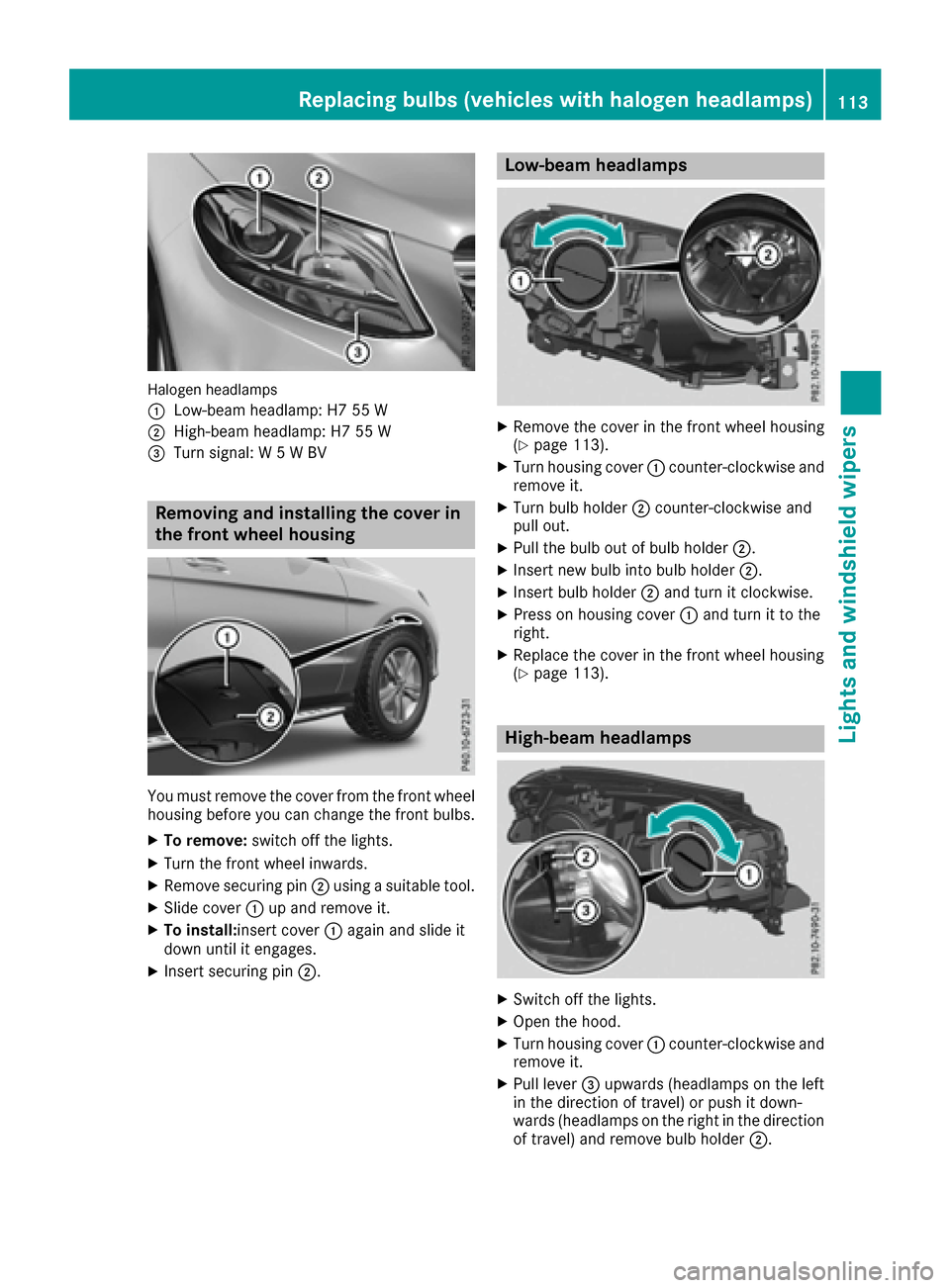
Halogen headlamps
:
Low-beam headlamp: H7 55 W
;High-beam headlamp: H7 55 W
=Turn signal: W 5 W BV
Removing and installing the cover in
the front wheel housing
You must remove the cover from the front wheel
housing before you can change the front bulbs.
XTo remove:switch off the lights.
XTurn the front wheel inwards.
XRemove securing pin ;using a suitable tool.
XSlide cover :up and remove it.
XTo install:insert cover :again and slide it
down until it engages.
XInsert securing pin ;.
Low-beam headlamps
XRemove the cover in the front wheel housing
(Ypage 113).
XTurn housing cover:counter-clockwise and
remove it.
XTurn bulb holder ;counter-clockwise and
pull out.
XPull the bulb out of bulb holder ;.
XInsert new bulb into bulb holder ;.
XInsert bulb holder;and turn it clockwise.
XPress on housing cover :and turn it to the
right.
XReplace the cover in the front wheel housing
(Ypage 113).
High-beam headlamps
XSwitch off the lights.
XOpen the hood.
XTurn housing cover :counter-clockwise and
remove it.
XPull lever =upwards (headlamps on the left
in the direction of travel) or push it down-
wards (headlamps on the right in the direction
of travel) and remove bulb holder ;.
Replacing bulbs (vehicles with halogen headlamps)113
Lights and windshield wipers
Z
Page 116 of 390
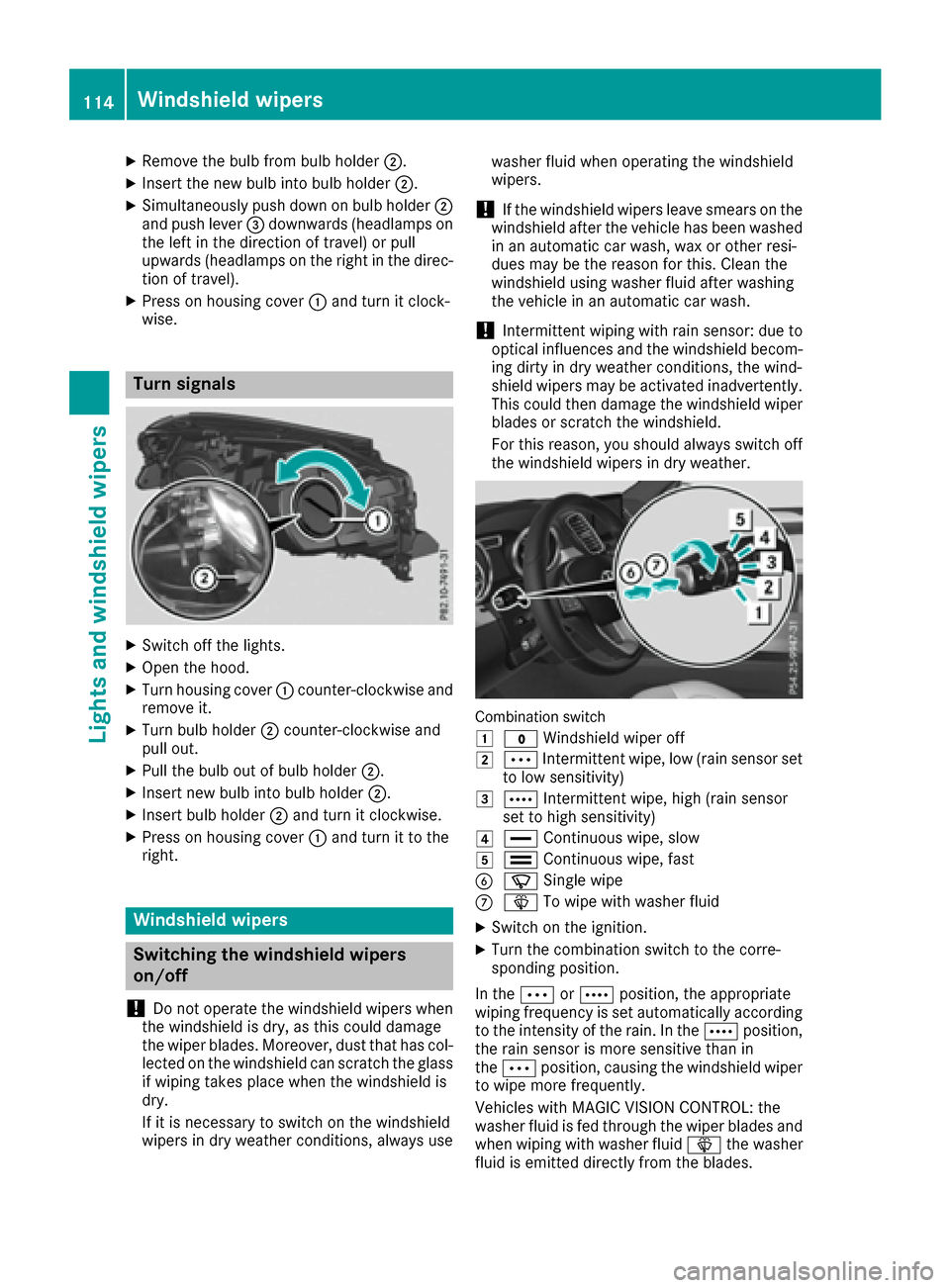
XRemove thebulb from bulb holder ;.
XInsertth ene wbulb int obulb holder ;.
XSimultaneously push down on bulb holder ;
and push lever =downwards (headlamp son
th elef tin th edirection of travel )or pull
upwards (headlamp son th eright in th edirec-
tion of travel).
XPress on housing cover :and tur nit clock -
wise.
Turn signals
XSwitc hoff th elights .
XOpen th ehood.
XTurn housing cover :counter-clockwise and
remove it .
XTurn bulb holder ;counter-clockwise and
pull out .
XPull thebulb out of bulb holder ;.
XInsertne wbulb int obulb holder ;.
XInsertbulb holder ;and tur nit clockwise.
XPress on housing cover :and tur nit to th e
right .
Windshield wipers
Switching the windshield wipers
on/off
!
Do no toperate th ewindshield wiper swhen
th ewindshield is dry, as this could damag e
th ewiper blades. Moreover, dust that has col-
lecte don th ewindshield can scratch th eglass
if wipin gtakes plac ewhen th ewindshield is
dry.
If it is necessar yto switch on th ewindshield
wiper sin dry weather conditions, always use washe
rfluid when operating th ewindshield
wipers.
!If th ewindshield wiper sleav esmears on th e
windshield after th evehicl ehas been washe d
in an automatic car wash, wax or other resi-
dues may be th ereason for this. Clean th e
windshield usin gwashe rfluid after washing
th evehicl ein an automatic car wash.
!Intermittent wipin gwit hrain sensor :due to
optical influence sand th ewindshield becom-
ing dirt yin dry weather conditions, th ewind-
shield wiper smay be activated inadvertently.
This could then damag eth ewindshield wiper
blade sor scratch th ewindshield.
Fo rthis reason ,you should always switch off
th ewindshield wiper sin dry weather .
Combination switch
1
$Windshield wiper off
2ÄIntermittent wipe, low (rai nsensor set
to low sensitivity)
3Å Intermittent wipe, high (rai nsensor
set to high sensitivity)
4° Continuous wipe, slow
5¯Continuous wipe, fas t
BíSingle wipe
CîTo wipe wit hwashe rfluid
XSwitc hon th eignition .
XTurn thecombination switch to th ecorre-
sponding position .
In th eÄ orÅ position ,th eappropriat e
wipin gfrequency is set automatically according
to th eintensit yof th erain .In th eÅ position ,
th erain sensor is mor esensitive than in
th eÄ position ,causing th ewindshield wiper
to wipe mor efrequently.
Vehicles wit hMAGIC VISION CONTROL: th e
washe rfluid is fed throug hth ewiper blade sand
when wipin gwit hwashe rfluid î thewashe r
fluid is emitted directly from th eblades.
114Windshield wipers
Lights and windshield wipers
Page 193 of 390
Canceling Parking Pilot
XStop the movement of the multifunction
steering wheel or steer yourself.
Parking Pilot is immediately canceled. The
Parking
PilotCanceledmessage appears
in the multifunction display.
or
XPress the Parking Assist PARKTRONIC button
(Ypage 186).
Parking Assist PARKTRONIC is switched off
and Parking Pilot is immediately canceled.
The Parking Pilot Canceled
message
appears in the multifunction display.
Parking Pilot is canceled automatically if:
Rthe electric parking brake is engaged
Rtransmission position Pis selected
Rparking using Parking Pilot is no longer pos-
sible
Ryou are driving faster than 6 mph (10 km/h)
Ra wheel spins, ESP®intervenes or fails. The
÷ warning lamp lights up in the instrument
cluster
A warning tone sounds. The parking symbol dis-
appears and the multifunction display shows the
Parking Pilot Canceled
message.
When Parking Pilot is canceled, you must steer
and brake again yourself.
If a system malfunction occurs, the vehicle is
braked to a standstill. To drive on, depress the
accelerator again.
Rear view camera
General notes
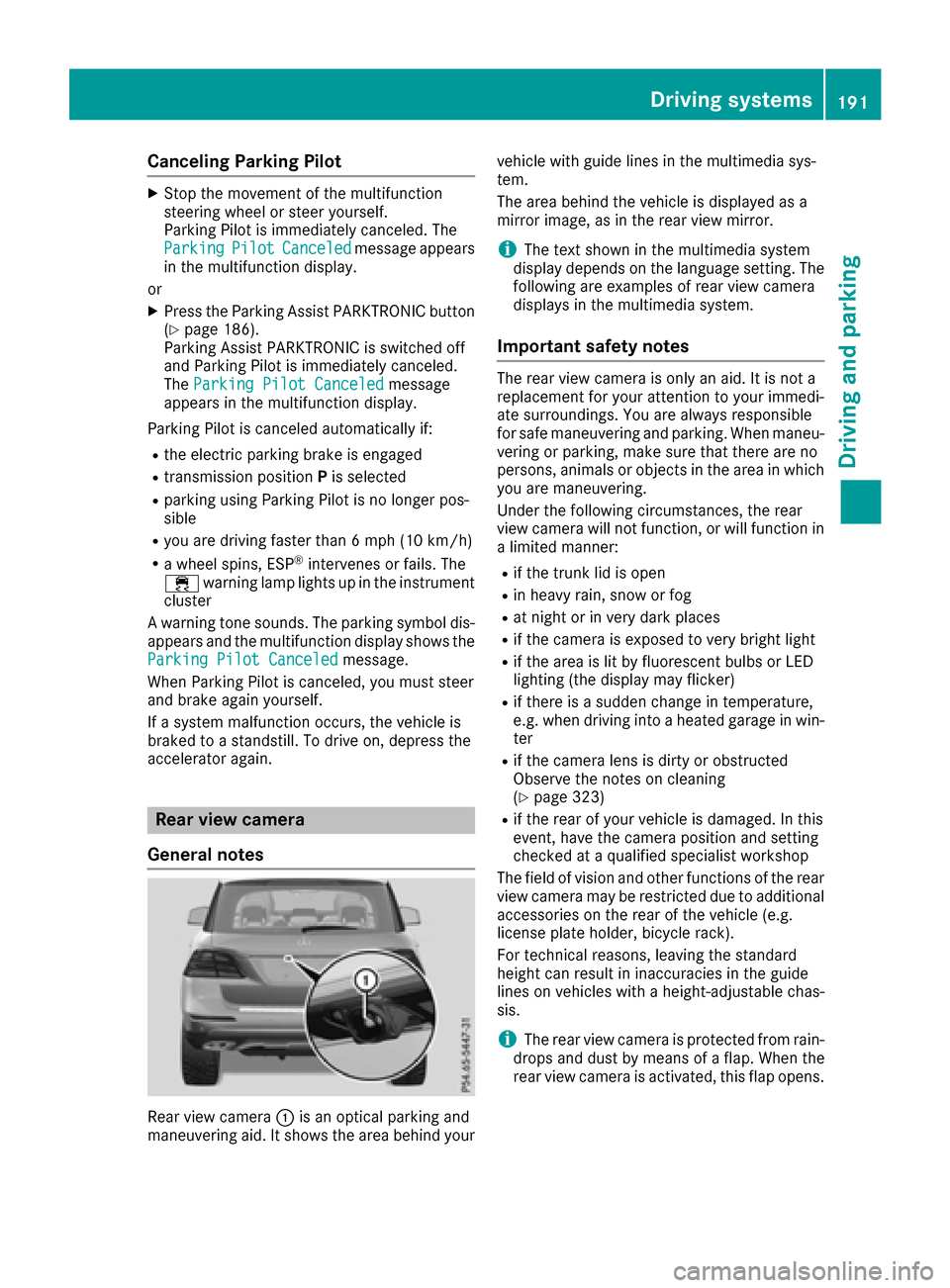
Rear view camera :is an optical parking and
maneuvering aid. It shows the area behind your vehicle with guide lines in the multimedia sys-
tem.
The area behind the vehicle is displayed as a
mirror image, as in the rear view mirror.
iThe text shown in the multimedia system
display depends on the language setting. The
following are examples of rear view camera
displays in the multimedia system.
Important safety notes
The rear view camera is only an aid. It is not a
replacement for your attention to your immedi-
ate surroundings. You are always responsible
for safe maneuvering and parking. When maneu-
vering or parking, make sure that there are no
persons, animals or objects in the area in which you are maneuvering.
Under the following circumstances, the rear
view camera will not function, or will function in
a limited manner:
Rif the trunk lid is open
Rin heavy rain, snow or fog
Rat night or in very dark places
Rif the camera is exposed to very bright light
Rif the area is lit by fluorescent bulbs or LED
lighting (the display may flicker)
Rif there is a sudden change in temperature,
e.g. when driving into a heated garage in win- ter
Rif the camera lens is dirty or obstructed
Observe the notes on cleaning
(
Ypage 323)
Rif the rear of your vehicle is damaged. In this
event, have the camera position and setting
checked at a qualified specialist workshop
The field of vision and other functions of the rear
view camera may be restricted due to additional
accessories on the rear of the vehicle (e.g.
license plate holder, bicycle rack).
For technical reasons, leaving the standard
height can result in inaccuracies in the guide
lines on vehicles with a height-adjustable chas-
sis.
iThe rear view camera is protected from rain-
drops and dust by means of a flap. When the
rear view camera is activated, this flap opens.
Driving systems191
Driving and parking
Z