radio MERCEDES-BENZ GLE SUV 2018 Owner's Manual
[x] Cancel search | Manufacturer: MERCEDES-BENZ, Model Year: 2018, Model line: GLE SUV, Model: MERCEDES-BENZ GLE SUV 2018Pages: 398, PDF Size: 6.64 MB
Page 13 of 398
Emissions controlService and warranty information .... 28
Engine
Check Engine warning lamp .......... .283
Display message ............................ 256
ECO start/stop function ................ 139
Engine number ............................... 383
Irregular running ............................ 141
Jump-starting ................................. 342
Starting (important safety notes) ... 136
Starting problems .......................... 141
Starting the engine with the
SmartKey ....................................... 137
Starting via smartphone ................ 137
Starting with KEYLESS-GO ............. 137
Switching off .................................. 157
Tow-starting (vehicle) ..................... 348
Engine electronics
Problem (malfunction) ................... 141
Engine jump starting
see Jump starting (engine)
Engine oil
Adding ...........................................3 23
Additives ........................................ 388
Checking the oil level ..................... 322
Checking the oil level using the
dipstick .......................................... 323
Display message ............................ 258
Filling capacity ............................... 387
Notes about oil grades ................... 387
Notes on oil level/consumption .... 322
Temperature (on-board computer,
Mercedes-AMG vehicles) ...............2 40
Engine switch-off
see ECO start/stop function
Entering an address
see also Digital Operator's Man-
ual ..................................................2 87
ESP
®(Electronic Stability Pro-
gram)
AMG menu (on-board computer) ... 241
Characteristics ................................. 70
Deactivating/activating ................... 71
Display message ............................ 244
Function/notes ................................ 70
General notes .................................. 70
Important safety information ........... 70
Warning lamp ................................. 279 ETS/4ETS (Electronic Traction Sys-
tem)
...................................................... 70
Exhaust check ................................... 160
Exhaust pipe (
cleaning instruc-
tions) ..................................................3 30
Exterior lighting
see Lights
Exterior mirrors
Adjusting ....................................... 105
Dipping (automatic) ....................... 107
Folding in when locking (on-board
computer) ...................................... 240
Folding in/out (automatically) ....... 106
Folding in/out (electrically) ........... 106
Out of position (troubleshooting) ... 107
Setting ........................................... 106
Storing settings (memory func-
tion) ............................................... 108
Storing the parking position .......... 107
Eyeglasses compartment ................. 297
F
Favorites
Overview ........................................ 289
Filler cap
see Refueling
Flat tire
MOExtended tires .......................... 336
Preparing the vehicle ..................... 335
TIREFIT kit ...................................... 337
see Emergency spare wheel
Floormats ........................................... 319
Fog lamps (extended range) ............. 113
Folding the rear bench seat for-
wards/back ....................................... 298
Fording
Off-road ......................................... 164
On flooded roads ........................... 163
Frequencies
Mobile phone ................................. 381
Two-way radio ................................ 381
Fuel
Additives ........................................ 385
Consumption statistics .................. 231
Displaying the current consump-
tion ................................................ 232
Displaying the range ...................... 232
Index11
Page 19 of 398
Function/notes ............................. 187
Important safety notes .................. 187
Problems (malfunctions) ................ 190
Sensor range .................................188
Towing a trailer .............................. 187
Warning display ............................. 189
Parking assistance
see Driving system
Parking brake
Applying automatically ................... 158
Applying or releasing manually ...... 158
Display message ............................ 246
Electric parking brake .................... 157
Emergency braking ........................ 159
General notes ................................ 157
Releasing automatically ................. 158
Warning lamp ................................. 282
Parking lamps
Switching on/off ........................... 111
Parking Pilot
Canceling ....................................... 194
Detecting parking spaces .............. 191
Display Message ............................ 264
Exiting a parking space .................. 193
Function/notes ............................. 190
Important safety notes .................. 190
Parking .......................................... 192
PASSENGER AIR BAG
Display message ............................ 253
Indicator lamps ................................ 45
Problem (malfunction) ................... 253
Pets in the vehicle ............................... 65
Phone book
see also Digital Operator's Man-
ual .................................................. 287
Plastic trim (cleaning instruc-
tions) .................................................. 331
Power locks ......................................... 84
Power washers .................................. 327
Power windows
see Side windows
PRE-SAFE
®(anticipatory occupant
protection)
Display message ............................ 250
Operation ......................................... 58 PRE-SAFE
®PLUS (anticipatory
occupant protection PLUS)
Display message ............................ 250
Operation ......................................... 59
Protection against theft
ATA (Anti-Theft Alarm system) ......... 75
Immobilizer ...................................... 75
Protection of the environment
General notes .................................. 27
Pulling away
Automatic transmission ................. 138
General note
s ................................ 138
Hill start assist ............................... 139
Trailer ............................................ 138
Q
QR code
Mercedes-Benz Guide App ................. 1
Rescue card ..................................... 32
Qualified specialist workshop ........... 31
R
RACE TIMER (on-board computer,
Mercedes-AMG vehicles).................. 241
Radiator cover ................................... 322
Radio
Selecting a station ......................... 234
Radio mode
see also Digital Operator's Man-
ual .................................................. 287
Radio-controlled devices (instal-
ling) ..................................................... 320
Radio-wave reception/transmis-
sion in the vehicle
Declaration of conformity ................ 30
Reading lamp ..................................... 114
Rear bench seat
Folding forwards/back .................. 299
Rear compartment
Setting the air vents ...................... 133
Setting the temperature ................ 128
Rear fog lamp
Display message ............................ 255
Switching on/off ........................... 111
Rear Seat Entertainment System
AUX jacks ...................................... 294
Index17
Page 23 of 398
TailgateDisplay message ............................ 271
Emergency unlocking ....................... 88
Important safety notes .................... 84
Limiting the opening angle ............... 88
Opening dimensions ...................... 390
Opening/closing (automatically
from inside) ...................................... 87
Opening/closing (automatically
from outside) ................................... 86
Opening/closing (from outside) ....... 85
Power closing .................................. 84
Tank
see Fuel tank
Tank content
Fuel gauge ....................................... 37
Technical data
Capacities ...................................... 383
Information .................................... 381
Tires/wheels ................................. 376
Trailer loads ................................... 394
Vehicle data ................................... 390
Telephone
Accepting a call (multifunction
steering wheel) .............................. 235
Authorizing a mobile phone (con-
necting) ......................................... 291
Authorizing a mobile phone via the
device manager (connecting) ......... 292
Connecting a mobile phone
(device manager) ........................... 292
Connecting a mobile phone (gen-
eral information) ............................ 291
Display message ............................ 272
Menu (on-board computer) ............ 235
Number from the phone book ........ 235
Redialing ........................................ 235
Rejecting/ending a call ................. 235
see also Digital Operator's Man-
ual .................................................. 287
Temperature
Coolant (display in the instrument
cluster) .......................................... 229
Coolant (on-board computer,
Mercedes-AMG vehicles) ............... 240
Engine oil (on-board computer,
Mercedes-AMG vehicles) ............... 240
Outside temperature ...................... 228 Setting (climate control) ................ 128
Transmission oil (on-board com-
puter, Mercedes-AMG vehicles) ..... 240
Through-loading feature ................... 298
Timing (
RACETIMER) ......................... 241
Tire pressure
Calling up (on-board computer) ..... 358
Checking manually ........................ 357
Display message ............................ 268
Maximum ....................................... 357
Not reached (TIREFIT) .................... 338
Notes ............................................. 356
Reached (TIREFIT) .......................... 339
Recommended ............................... 354
Tire pressure loss warning system
General notes ................................ 357
Important safety notes .................. 358
Restarting ...................................... 358
Tire pressure monitor
Checking the tire pressure elec-
tronically ........................................ 360
Function/notes ............................. 358
General notes ................................ 358
Important safety notes .................. 359
Radio type approval for the tire
pressure monitor ........................... 361
Restarting ...................................... 361
Warning lamp ................................. 286
Warning message .......................... 360
Tire pressure table ............................ 355
TIREFIT kit
Important safety notes .................. 337
Storage location ............................ 335
Tire pressure not reached .............. 338
Tire pressure reached .................... 339
Using ............................................. 337
Tires
Aspect ratio (definition) ................. 370
Average weight of the vehicle
occupants (definition) .................... 369
Bar (definition) ............................... 369
Changing a wheel .......................... 371
Characteristics .............................. 369
Checking ........................................ 351
Curb weight (definition) ................. 370
Definition of terms ......................... 369
Direction of rotation ...................... 372
Display message ............................ 268
Index21
Page 25 of 398
Transporting the vehicle ................347
With both axles on the ground ....... 346
Towing eye ......................................... 335
Traffic reports
see also Digital Operator's Man-
ual ..................................................2 87
Traffic Sign Assist
Activating/deactivating the warn-
ing function ....................................2 36
Display message ............................ 263
Function/notes .............................2 03
Important safety notes .................. 204
Instrument cluster display ............. 204
Trailer coupling
see Towing a trailer
Trailer loads and drawbar nose-
weights ............................................... 224
Trailer towing
Active Blind Spot Assist ................. 210
Active Lane Keeping Assist ............ 213
Blind Spot Assist ............................ 206
Permissible trailer loads and
drawbar noseweights ..................... 224
Transfer case ..................................... 150
Transmission
see Automatic transmission
Transmission position display ......... 145
Transporting the vehicle .................. 347
Traveling uphill
Brow of hill ..................................... 169
Driving downhill .............................1 69
Maximum gradient-climbing capa-
bility ............................................... 168
Trim pieces (cleaning instruc-
tions) ..................................................3 32
Trip computer (on-board com-
puter) ..................................................2 31
Trip odometer
Calling up ....................................... 231
Resetting (on-board computer) ...... 232
Trunk
see Tailgate
Turn signals
Display message ............................ 255
Replacing bulbs (front) ................... 117
Switching on/off ........................... 111 Two-way radio
Frequencies ................................... 381
Installation ..................................... 381
Transmission output (maximum) .... 381
TWR (Tongue Weight Rating) (defi-
nition) ................................................. 371
Type identification plate
see Vehicl e i
dentification plate
U
Unlocking
Emergency unlocking ....................... 84
From inside the vehicle (central
unlocking button) ............................. 83
Upshift indicator (on-board com-
puter, Mercedes-AMG vehicles) ....... 240
USB devices
Connecting to the Media Inter-
face ............................................... 294
V
Vanity mirror (in the sun visor) ........ 306
Vehicle
Correct use ...................................... 31
Data acquisition ............................... 32
Display message ............................ 270
Equipment ....................................... 28
Individual settings .......................... 238
Limited Warranty ............................. 32
Loading .......................................... 361
Locking (in an emergency) ............... 84
Locking (SmartKey) .......................... 77
Lowering ........................................ 375
Maintenance .................................... 29
Operating safety .............................. 30
Parking .......................................... 156
Parking for a long period ................ 159
Pulling away ................................... 138
Raising ........................................... 373
Reporting problems ......................... 31
Securing from rolling away ............ 372
Towing away .................................. 345
Transporting .................................. 347
Unlocking (in an emergency) ........... 84
Unlocking (SmartKey) ...................... 77
Vehicle data ................................... 390
Index23
Page 80 of 398
If activated in the multimedia system, the loca-
tor lighting also lights up in the dark (see the
Digital Operator's Manual).
XTo open the tailgate automatically from
outside the vehicle:press and hold theF
button until the tailgate opens.
Vehicles with KEYLESS-GO:
XTo close the tailgate automatically from
outside the vehicle: if the SmartKey is loca-
ted in the immediate vicinity of the vehicle,
press the Fbutton on the SmartKey.
When the tailgate closes you can then release
the button.
KEYLESS-GO
General notes
Bear in mind that the engine can be started by
any of the vehicle occupants if there is a KEY-
LESS-GO key in the vehicle (
Ypage 137).
Locking/unlocking centrally
You can start, lock or unlock the vehicle using
KEYLESS-GO. To do this, you only need carry the
SmartKey with you. You can combine the func-
tions of KEYLESS-GO with those of a conven-
tional SmartKey. Unlock the vehicle by using
KEYLESS-GO, for instance, and lock it using the
& button on the SmartKey.
The driver's door and the door at which the han-
dle is used, must both be closed. The SmartKey
must be outside the vehicle. When locking or
unlocking with KEYLESS-GO, the distance
between the SmartKey and the corresponding
door handle must not be greater than 3 ft (1 m).
KEYLESS-GO checks whether a valid SmartKey
is in the vehicle by periodically establishing a
radio connection between the vehicle and the
SmartKey. This happens:
Rwhen starting the engine
Rwhile driving
Rwhen the external door handles are touched
Rduring convenience closing
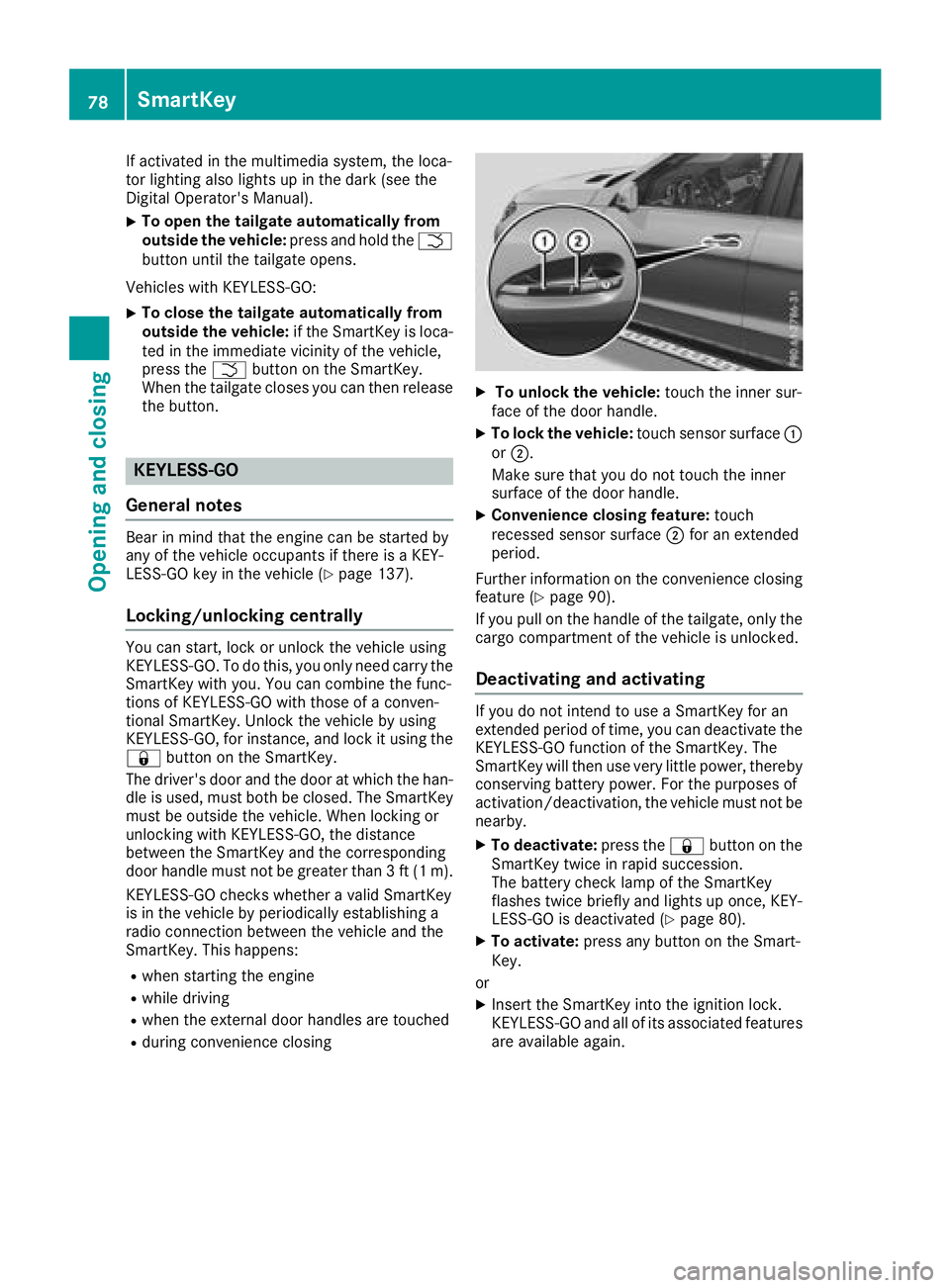
XTo unlock the vehicle: touch the inner sur-
face of the door handle.
XTo lock the vehicle: touch sensor surface :
or ;.
Make sure that you do not touch the inner
surface of the door handle.
XConvenience closing feature: touch
recessed sensor surface ;for an extended
period.
Further information on the convenience closing
feature (
Ypage 90).
If you pull on the handle of the tailgate, only the cargo compartment of the vehicle is unlocked.
Deactivating and activating
If you do not intend to use a SmartKey for an
extended period of time, you can deactivate the
KEYLESS-GO function of the SmartKey. The
SmartKey will then use very little power, thereby
conserving battery power. For the purposes of
activation/deactivation, the vehicle must not be
nearby.
XTo deactivate: press the&button on the
SmartKey twice in rapid succession.
The battery check lamp of the SmartKey
flashes twice briefly and lights up once, KEY-
LESS-GO is deactivated (
Ypage 80).
XTo activate: press any button on the Smart-
Key.
or
XInsert the SmartKey into the ignition lock.
KEYLESS-GO and all of its associated features
are available again.
78SmartKey
Opening and closing
Page 84 of 398
ProblemPossible causes/consequences andMSolutions
There is interference from a powerful source of radio waves.
XUnlock (Ypage 84) or lock (Ypage 84) the vehicle using the
mechanical key.
KEYLESS-GO is malfunctioning.
XLock/unlock the vehicle using the remote control function of the
SmartKey.
XHave the vehicle and SmartKey checked at a qualified specialist
workshop.
If the vehicle can also not be locked/unlocked using the remote con-
trol function:
XUnlock (Ypage 84) or lock (Ypage 84) the vehicle using the
mechanical key.
XHave the vehicle and SmartKey checked at a qualified specialist
workshop.
The engine cannot be
started using the Smart-
Key.The on-board voltage is too low.
XSwitch off non-essential consumers, e.g. seat heating or interior
lighting, and try to start the engine again.
If this does not work:
XCheck the starter battery and charge it if necessary (Ypage 342).
or
XJump-start the vehicle (Ypage 342).
or
XConsult a qualified specialist workshop.
The engine cannot be
started using the Start/
Stop button. The Smart-
Key is in the vehicle.The vehicle is locked.
XUnlock the vehicle and try to start the vehicle again.
The SmartKey battery is discharged or nearly discharged.
XCheck the SmartKey battery (Ypage 80) and replace it if necessary
(Ypage 80).
If this does not work:
XStart your vehicle with the SmartKey in the ignition lock.
There is interference from a powerful source of radio waves.
XStart your vehicle with the SmartKey in the ignition lock.
You have lost a Smart-
Key.XHave the SmartKey deactivated at a qualified specialist workshop.
XReport the loss immediately to the vehicle insurers.
XIf necessary, have the locks changed as well.
You have lost the
mechanical key.XReport the loss immediately to the vehicle insurers.
XIf necessary, have the locks changed as well.
82SmartKey
Opening and closing
Page 137 of 398
!Do not warm up the engine while stationary.
Pull away immediately. Avoid high engine
speeds and full throttle until the engine has
reached its operating temperature.
In vehicles with automatic transmission,
engage positions P and R only when the vehi-
cle is stationary.
Where possible, avoid spinning the drive
wheels when pulling away on slippery roads.
You could otherwise damage the drive train.
!Mercedes-AMG vehicles: at low engine oil
temperatures below 68 ‡ (+20 †), the max-
imum engine speed is restricted in order to
protect the engine. To protect the engine and
maintain smooth engine operation, avoid driv-
ing at full throttle when the engine is cold.
Plug-in hybrid: be sure to read the separate
Operator's Manual. Otherwise, you may not rec-
ognize dangers.
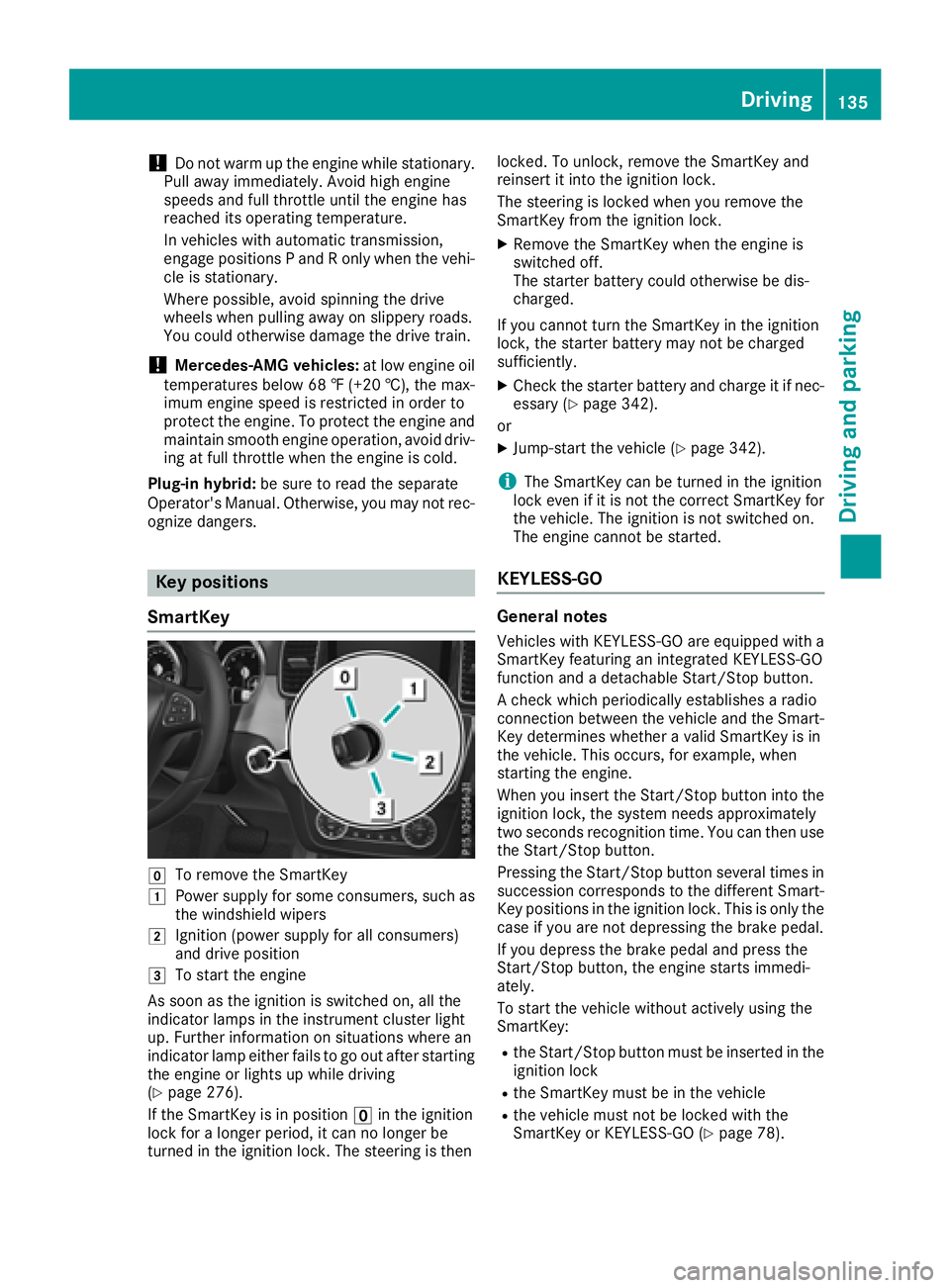
Key positions
SmartKey
gTo remove the SmartKey
1Power supply for some consumers, such as
the windshield wipers
2Ignition (power supply for all consumers)
and drive position
3To start the engine
As soon as the ignition is switched on, all the
indicator lamps in the instrument cluster light
up. Further information on situations where an
indicator lamp either fails to go out after starting
the engine or lights up while driving
(
Ypage 276).
If the SmartKey is in position uin the ignition
lock for a longer period, it can no longer be
turned in the ignition lock. The steering is then locked. To unlock, remove the SmartKey and
reinsert it into the ignition lock.
The steering is locked when you remove the
SmartKey from the ignition lock.
XRemove the SmartKey when the engine is
switched off.
The starter battery could otherwise be dis-
charged.
If you cannot turn the SmartKey in the ignition
lock, the starter battery may not be charged
sufficiently.
XCheck the starter battery and charge it if nec-
essary (Ypage 342).
or
XJump-start the vehicle (Ypage 342).
iThe SmartKey can be turned in the ignition
lock even if it is not the correct SmartKey for
the vehicle. The ignition is not switched on.
The engine cannot be started.
KEYLESS-GO
General notes
Vehicles with KEYLESS-GO are equipped with a
SmartKey featuring an integrated KEYLESS-GO
function and a detachable Start/Stop button.
A check which periodically establishes a radio
connection between the vehicle and the Smart-
Key determines whether a valid SmartKey is in
the vehicle. This occurs, for example, when
starting the engine.
When you insert the Start/Stop button into the
ignition lock, the system needs approximately
two seconds recognition time. You can then use
the Start/Stop button.
Pressing the Start/Stop button several times in
succession corresponds to the different Smart-
Key positions in the ignition lock. This is only the
case if you are not depressing the brake pedal.
If you depress the brake pedal and press the
Start/Stop button, the engine starts immedi-
ately.
To start the vehicle without actively using the
SmartKey:
Rthe Start/Stop button must be inserted in the
ignition lock
Rthe SmartKey must be in the vehicle
Rthe vehicle must not be locked with the
SmartKey or KEYLESS-GO (Ypage 78).
Driving135
Driving and parking
Z
Page 192 of 398
Problems with Parking Assist PARKTRONIC
ProblemPossible causes/consequences andMSolutions
Only the red segments in
the Parking Assist
PARKTRONIC warning
displays are lit. You also
hear a warning tone for
approximately two sec-
onds.
Parking Assist
PARKTRONIC is deacti-
vated after approx-
imately five seconds,
and the indicator lamp in
the Parking Assist
PARKTRONIC button
lights up.Parking Assist PARKTRONIC has malfunctioned and has been deacti-
vated.
XIf problems persist, have Parking Assist PARKTRONIC checked at a
qualified specialist workshop.
Only the red segments in
the Parking Assist
PARKTRONIC warning
displays are lit. Parking
Assist PARKTRONIC is
deactivated after
approximately five sec-
onds.The Parking Assist PARKTRONIC sensors are dirty or there is inter-
ference.
XClean the Parking Assist PARKTRONIC sensors (Ypage 330).
XSwitch the ignition back on.
The problem may be caused by an external source of radio or ultra-
sound waves.
XCheck to see if Parking Assist PARKTRONIC works at a different
location.
Parking Pilot
General notes
Parking Pilot is an electronic parking aid with
ultrasound. It measures the road on both sides
of the vehicle. A parking symbol indicates a suit-
able parking space. Active steering intervention
and brake application can assist you during
parking. Parking Assist PARKTRONIC is also
available (
Ypage 187).
Important safety notes
Parking Pilot is only an aid. It is not a replace-
ment for your attention to your immediate sur-
roundings. You are always responsible for safe
maneuvering, parking and exiting a parking
space. Make sure that no persons, animals or
objects are in the path of your vehicle.
When Parking Assist PARKTRONIC is deactiva-
ted, Parking Pilot is also unavailable.
GWARNING
While parking or pulling out of a parking
space, the vehicle swings out and can drive
onto areas of the oncoming lane. This could
result in a collision with another road user.
There is a risk of an accident.
Pay attention to other road users. Stop the
vehicle if necessary or cancel the Parking Pilot
parking procedure.
!If they cannot be avoided, drive over obsta-
cles such as curbs slowly and at an obtuse
angle. Otherwise, you may damage the
wheels or tires.
Parking Pilot may show parking spaces which
are not suitable for parking, e.g.:
Rwhere parking or stopping is prohibited
Rin front of driveways or entrances and exits
Ron unsuitable surfaces
190Driving systems
Driving and parking
Page 236 of 398
Audio menu
Selecting a radio station
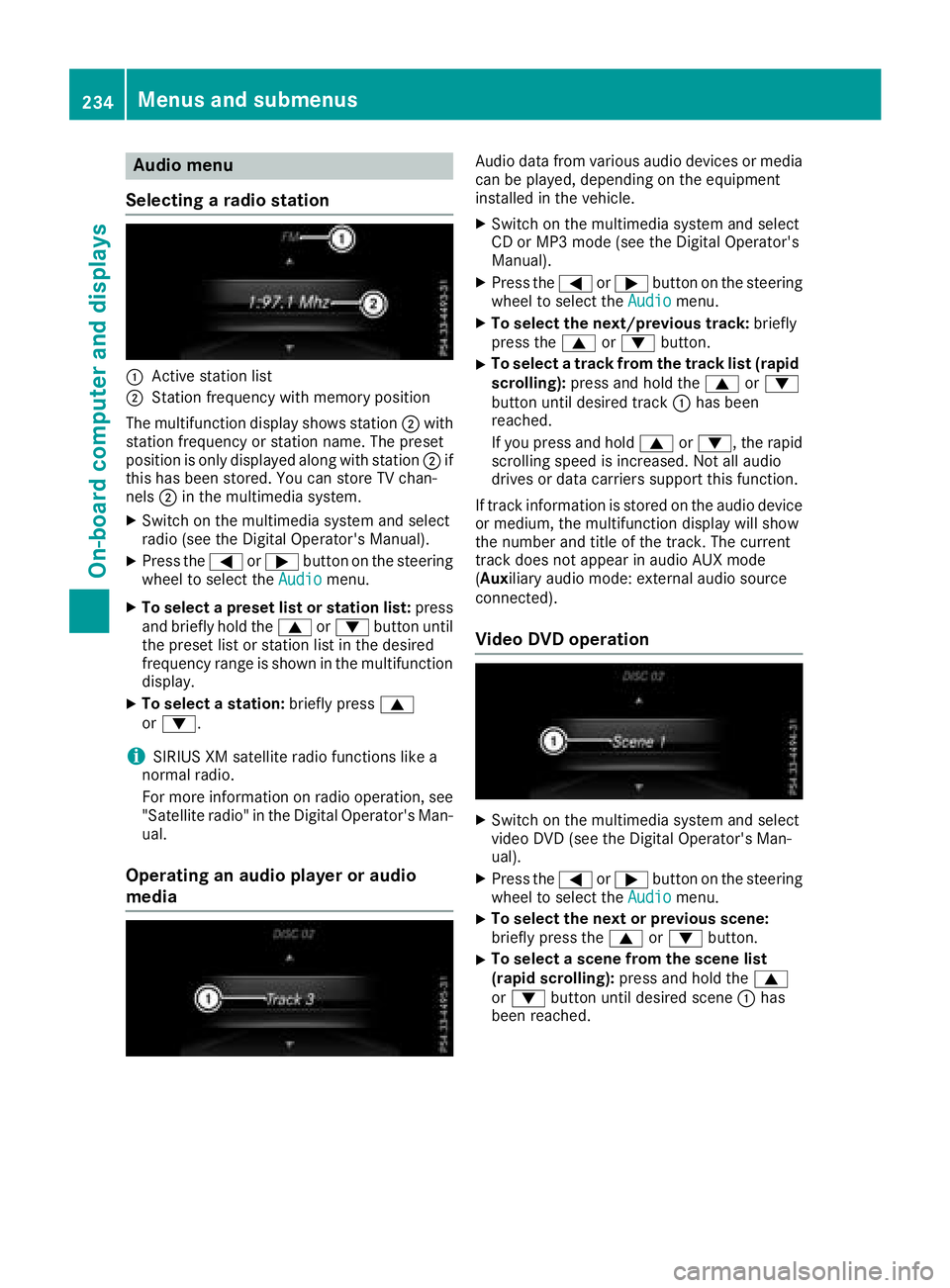
:Active station list
;Station frequency wit hmemory position
The multifunction display shows station ;with
station frequency or station name. The preset
position is only displayed alon gwit hstation ;if
this has been stored. You can store TV chan-
nels ;in th emultimedia system.
XSwitc hon th emultimedia system and select
radi o(see th eDigital Operator' sManual).
XPress th e= or; buttonon th esteering
whee lto select th eAudiomenu.
XTo select apreset list or station list :press
and briefl yhold th e9 or: buttonuntil
th epreset list or station list in th edesired
frequency range is shown in th emultifunction
display.
XTo select astation: brieflypress 9
or :.
iSIRIUS XM satellit eradi ofunction slik e a
normal radio.
Fo rmor einformation on radi ooperation ,see
"Satellit eradio" in th eDigital Operator' sMan -
ual.
Operating an audio player oraudio
media
Audio dat afrom various audio device sor media
can be played ,depending on th eequipmen t
installed in th evehicle.
XSwitc hon th emultimedia system and select
CD or MP3 mod e(see th eDigital Operator' s
Manual).
XPress th e= or; buttonon th esteering
whee lto select th eAudiomenu.
XTo select th enext/previou strack :briefl y
press th e9 or: button.
XTo select atrack from th etrack list (rapid
scrolling): press and hold th e9 or:
butto nuntil desired track :has been
reached.
If you press and hold 9or:, therapi d
scrollin gspee dis increased. Not all audio
drives or dat acarriers support this function .
If track information is store don th eaudio device
or medium, th emultifunction display will sho w
th enumber and titl eof th etrack .The curren t
track does no tappear in audio AU Xmod e
( Aux iliaryaudio mode: external audio source
connected).
Video DVD operation
XSwitc hon th emultimedia system and select
video DV D(see th eDigital Operator' sMan -
ual).
XPress th e= or; buttonon th esteering
whee lto select th eAudiomenu.
XTo select th enext or previou sscene:
briefl ypress th e9 or: button.
XTo select ascene from th escene list
(rapid scrolling): press and hold the9
or : buttonuntil desired scen e: has
been reached.
234Menus and submenus
On-board computer and displays
Page 289 of 398
General notes
The multimedia system section in this Opera-
tor's Manual describes the basic principles for
operation. More information can be found in theDigital Operator's Manual.
Important safety notes
GWARNING
If you operate information systems and com-
munication equipment integrated in the vehi-
cle when driving, you may be distracted from
the traffic situation. You could also lose con-
trol of the vehicle. There is a risk of an acci-
dent.
Only operate this equipment when the traffic
situation permits. If you are not sure that this
is possible, park the vehicle paying attention
to traffic conditions and operate the equip-
ment when the vehicle is stationary.
You must observe the legal requirements for the
country in which you are currently driving when
operating the multimedia system.
The multimedia system calculates the route to
the destination without taking the following into
account, for example:
Rtraffic lights
Rstop and yield signs
Rparking or stopping restrictions
Rroad narrowing
Rother road and traffic rules and regulations
The multimedia system may give incorrect nav-
igation recommendations if the actual street/
traffic situation does not correspond with the
digital map's data.
For example:
Ra diverted route
Rthe road layout or the direction of a one-way
street has been changed
For this reason, you must always observe road
and traffic rules and regulations during your
journey. Road and traffic rules and regulations
always have priority over multimedia system
driving recommendations. Navigation announcements are intended to
direct you while driving without diverting your
attention from the road and driving.
Please always use this feature instead of con-
sulting the map display for directions. Looking
at the icons or map display can distract you from
traffic conditions and driving, and increase the
risk of an accident.
This equipment complies with FCC radiation
exposure limits set forth for uncontrolled equip-
ment and meets the FCC radio frequency (RF)
Exposure Guidelines in Supplement C to OET65.
This equipment has very low levels of RF energy
that is deemed to comply without maximum
permissive exposure evaluation (MPE). How-
ever, it is
recommended to insta
ll it at a distance
of at least 8 inches (approx. 20 cm) between the
radiation source and a person's body (not
including limbs such as hands, wrists, feet and
legs).
GWARNING
Modifications to electronic components, their software as well as wiring can impair their
function and/or the function of other net-
worked components. In particular, systems
relevant to safety could also be affected. As a
result, these may no longer function as inten-
ded and/or jeopardize the operating safety of
the vehicle. There is an increased risk of an
accident and injury.
Never tamper with the wiring as well as elec-
tronic components or their software. You
should have all work to electrical and elec-
tronic equipment carried out at a qualified
specialist workshop.
Function restrictions
For safety reasons, some functions are restric-
ted or unavailable while the vehicle is in motion.
You will notice this, for example, because either
you will not be able to select certain menu items
or a message will appear to this effect.
Function restrictions287
Multimedia system
Z