towing MERCEDES-BENZ GLE SUV 2019 Repair Manual
[x] Cancel search | Manufacturer: MERCEDES-BENZ, Model Year: 2019, Model line: GLE SUV, Model: MERCEDES-BENZ GLE SUV 2019Pages: 681, PDF Size: 11.7 MB
Page 567 of 681
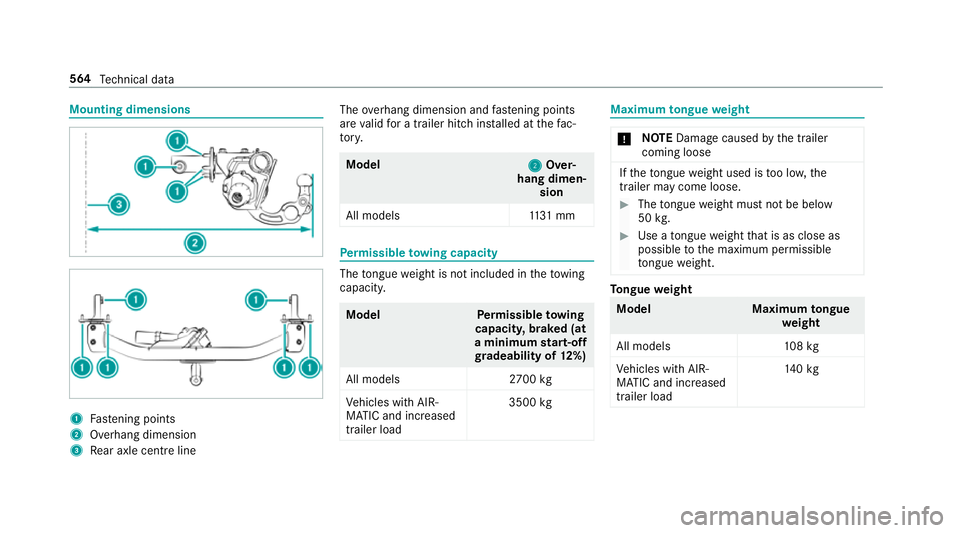
Mounting dimensions
1
Fastening points
2 Overhang dimension
3 Rear axle centre line The
overhang dimension and fastening points
are valid for a trailer hitch ins talled at thefa c‐
to ry. Model
2 2Over‐
hang dimen‐ sion
All model s1 131 mm Pe
rm issible towing capacity The
tongue weight is not included in theto wing
capacity. Model
Perm issible towing
capacit y,braked (at
a minimum start-off
gr adeability of 12%)
All models 2700 kg
Ve hicles with AIR‐
MATIC and increased
trailer load 3500
kg Maximum
tongue weight *
NO
TEDama gecaused bythe trailer
coming loose If
th eto ngue weight used is too lo w,the
trailer may come loose. #
The tongue weight must not be below
50 kg. #
Use a tongue weight that is as close as
possible tothe maximum permissible
to ngue weight. To
ngue weight Model
Maximumtongue
we ight
All models 108kg
Ve hicles with AIR‐
MATIC and increased
trailer load 14
0kg 564
Tech nical da ta
Page 582 of 681
Display messages
Possible causes/consequences and M
MSolutions
Mercedes me connect
Services limited See Own-
er's Manual *S
ervice limited.
At least one of the main functions of the Mercedes me connect sy stem is malfunctioning. #
Obser vethe no tes on the diagnostics connection (→ page27). #
Consult a qualified specialist workshop.
G Inoperative *A
t least one main function of the Mercedes me connect sy stem or of the SOS emer gency call sy stem is malfunc‐
tioning. #
Consult a qualified specialist workshop. Driving sy
stems Display messages
Possible causes/consequences and M MSolutions
Active Blind Spot Assist
not available when towing
a trailer See Owner's Man-
ual *W
hen you es tablish the electrical connection tothe trailer, Active Blind Spot Assi stis una vailable. #
Press the left-hand Touch Control and ackn owledge the display message.
*Y ou are driving toofast forth e selected vehicle le vel. #
In order toadjust theve hicle le vel,yo u must not drive at speeds greater than 80 km/h. #
In order toadjust theve hicle le vel during trailer operation, you must not drive at speeds greater than 30 km/h. Display messages and
warning/indicator lamps 57 9
Page 587 of 681
Display messages
Possible causes/consequences and M
MSolutions
Blind Spot Assist not availa-
ble when towing a trailer
See Owner's Manual #
Press the left-hand Touch Control and ackn owledge the display message.
Á Stop vehicle Vehicle too
low *Y
ou ha vepulled away despite theve hicle le vel being too lo w. #
Pull over and stop theve hicle, paying attention toroad and traf fic conditions.
The vehicle is raised tothe selected vehicle le vel. #
Wait until the display message disappears before pulling away. #
Do not drive fasterthan 80 km/h and consult a qualified specialist workshop immediatel y.
* NO
TEThe tyres of the front axle or the front wings could be damaged bylarge steering mo vements #
Avoid large steering mo vements while driving and lis tenfo r scraping sounds. #
Ifyo u hear sc raping sounds, pull over and stop theve hicle safely, paying attention toroad and traf fic con‐
ditions, and set a higher vehicle le vel if possible. #
Set a higher vehicle le vel (→ page 250).
Depending on the malfunction, theve hicle is raised.
 Lowering *T
hevehicle le vel may be lo weredfo rth efo llowing reasons:
R you ha veselected a dif fere nt drive program.
R you ha veexc eeded a critical speed.
R you ha vechanged theve hicle le velby pressing a button. 584
Display messages and warning/indicator lamps
Page 642 of 681
Deale
rship
see Qualified speciali stwo rkshop
Declaration of conformity Electromagnetic compatibility ............... 26
Jack .......................................................26
TIREFIT kit ............................................. 27
Wi reless vehicle components ................26
Decorative foil (cleaning instructions) .. 497
Deleting e-mails see In Car Of fice
De NO x agent
see AdBlue ®
Designs Menu (on-boa rdcompu ter) .................. 302
Dest ination .............................................. 405
Editing intermediate destinations ........ 395
Editing the pr evious destinations ........ 405
Ex tern al .............................................. .406
Quic k-access todestination informa‐
tion ...................................................... 402
Saving (cur rent vehicle position) ......... 405
Saving as global favo urite .................... 405 Destination ent
ry.................................... 383
Entering 3 wordaddresses .................. 389
En tering a POI or address .................... 383
Entering an intermedia tedestination .. 395
Ente ring geo-coordinates .................... 388
No tes .................................................. 383
Selecting a contact ............................. 388
Selecting a POI .................................... 386
Selecting from favo urites .................... 390
Selecting from the map ....................... 389
Selecting pr evious destinations .......... .386
De tecting inat tentiveness
see ATTENTION ASSIST
Diagnostics connection ............................27
Diesel Low outside temp eratures ...................5 54
No tes ................................................... 554
Digital Owner's Manual ............................20
Digital speedome ter ............................... 306
Digital TV
see TV
Digital Vehicle Keyst icker
Locking theve hicle ................................ 82 St
arting theve hicle ............................. 17 9
Unlocking theve hicle ............................82
Dinghy towing
see Tow- bar sy stem
DIRECT SELECT le ver............................... 19 3
Engaging drive position ........................ 194
Engaging neutral .................................. 194
Engaging pa rkposition ........................ 194
Engaging pa rkposition automatically .. 194
Engaging reve rsege ar ........................ .194
Fu nction .............................................. 19 3
Display Care .................................................... .501
Display (MBUX multimedia sy stem)
Home screen ...................................... .334
Operating ............................................ 337
Display (multimedia sy stem)
Settings .............................................. .366
Display (on-board comp uter)
Displ ays on the multifunction display .. 304
Display content Displaying ............................................ 303 Index
639
Page 643 of 681
Display message
.................................... .566
Calling up (on-boa rdcompu ter) ........... 566
No tes .................................................. 566
Display messages ¯ - - - km/h ................................... 588
ç - - - km/h ................................... 587
È - - - km/h ................................... 589
#12 V battery See Owner's Man‐
ual ....................................................... 597
Ac tive Blind Spot Assi stcur rently
una vailable See Owner's Manual .........581
Ac tive Blind Spot Assi stinope rative .... 585
Ac tive Blind Spot Assi stnot available
when towing a trailer See Owner's
Manual ................................................ 579
Ac tive Brake Assi stFunctions cur‐
re ntly limited See Owner's Manual ......578
Ac tive Brake Assi stFunctions limited
See Owner's Manual ............................578
Ac tive Dis tance Assi stavailable
again .................................................. .588 Ac
tive Dis tance Assi stcur rently
una vailable See Owner's Manual .........587
Ac tive Dis tance Assi stinope rative ...... 588
Ac tive Lane Keeping Assist cur rently
una vailable See Owner's Manual .........582
Ac tive Lane Keeping Assist inopera‐
tive ...................................................... 583
bAc tive Light Sy stem inoperative ...61 4
Ac tive Parking Assist and
PA RKTRONIC inoperati veSee Own‐
er's Manual ......................................... 580
Ac tive Steering Assist cur rently
una vailable See Owner's Manual .........581
Ac tive Steering Assist inoperative .......580
Ad aptive Highbeam Assist Plus Cam‐
era view restricted See Owner's
Manual ................................................. 61 6
Ad aptive Highbeam Assist Plus cur‐
re ntly una vailable See Owner's Man‐
ual ........................................................ 61 5Ad
aptive Highbeam Assist Plus inop‐
erative .................................................. 61 5
¯ AdBlue sy stem fault Engine
st art not possible ................................ 599
¯Ad Blue system fault Perf.
re duced in XXX miles See Owner's
Manual ................................................ 599
¯ AdBlue sy stem fault See Own‐
er's Manual ........................................ .598
4Ad d 1 litre engine oil when next
re fuelling ............................................. 597
Anti-theft ala rmsystem Malfunction ....613
App lybrake todeselect Park (P)
position ...............................................6 08
Apply brake toselect R ........................ 607
ÀAT TENTION ASSIST inoperative ... 585
ÀAT TENTION ASSIS T:Take a
break! .................................................. 581
bAu tomatic driving lights inoper‐
ative ..................................................... 61 5640
Index
Page 649 of 681
Engine number
........................................ 550
Engine oil .................................................. 491
Ad ditives .............................................5 56
Che cking the oil le vel using the on-
board computer ................................... 490
Filling capacity .................................... 557
MB-Fr eigabe or MB-Appr oval .............. .557
Quality ................................................. 557
To pping up ...........................................4 91
Entering characters
Fu nction/no tes ................................... 358
On theto uchpad ................................ .359
Setting theke yboard .......................... .366
Using theto uchsc reen (media dis‐
play) ....................................................3 62
Entering/exiting le vel
Setting ................................................. 253
EQ Boo st
Operating saf ety .................................... 24
ERA-GLONASS test mode
St arting/ending .................................. 454
ESC (Elect ronic Stability Control)
see ESP ®
(Electronic Stability Prog ram) ESP
®
Crosswind Assist ................................. 220
Tr ailer stabilisation .............................. 220
ESP ®
(Elect ronic Stability Prog ram) ....... 216
Ac tivating/deactivating ...................... .220
Fu nction/no tes .................................... 216
EU general operating permit number ....550
Exhaust pipes (Care) ............................... 499
Exterior lighting Care .................................................... 499
Ex terior lighting
see Lights F
Fa tigue de tection
see ATTENTION ASSIST
Fa ult message
see Displ aymessa ge
Favo urites
Ad ding .................................................3 52
Ad ding a destination ...........................3 90
Calling up ............................................ 352
Deleting ............................................... 353 Home .................................................
.390
Moving ................................................ 352
Overview .............................................. 351
Re naming ............................................ 352
Wo rk .................................................... 390
Fi ll le vel
Ad Blue ®
............................................... 305
Fi lling station sear ch
St arting automatic sear ch................... 397
Switching au tomatic sear chon/off ..... 397
Fire extinguisher ..................................... 505
Fi rs t-aid kit (soft sided) .......................... 504
Flacon Inse rting/ removing ............................. 16 9
Flat towing
see Tow- bar sy stem
Flat tyre ....................................................5 05
MOExtended tyres ............................... 506
No tes .................................................. 505
TIREFIT kit ...........................................5 08
Wheel change ...................................... 539
Floor mats ................................................ 14 5
Fo g light (extended range) ......................1 51646
Index
Page 661 of 681
St
oring the position of the passenger
outside mir ror using reve rsege ar ........ 16 3
Pa rking up ................................................ 213
Pa rtition net
At tach ing ............................................ .133
Re moving/fitting ................................. 13 2
PA SSENGER AIR BAGstatus display
see Automatic front passenger front
airbag shutoff
Pe rfume
see Fragrance sy stem
Pe rfume vial
see Fragrance sy stem
Pe rm issible axle load .............................. 550
Pe rm issible gross mass .......................... 550
Pe rm itted towing me thods .................... .517
Pe ts in the vehicle .................................... .76
Phone book see Contacts
PIN pr otection
Swit ching on/off ................................ .373
Plastic trim (Care) ................................... 501 POI
Quick access ....................................... 402
Selecting ............................................. 386
POI symbols Selecting ..............................................4 15
Po we r closing function
Door ...................................................... 85
Po we r supp ly
Switching on (S tart/S top button) ........ 178
Po we r windo ws
see Side windo ws
PRE-SAFE ®
(anticipatory occupant
pr otection) ................................................ .47
Fu nction ................................................ 47
PRE-SAFE ®
Sound ................................. 47
Re versing measures .............................. 47
PRE-SAFE ®
Impulse Side ........................... 48
Ac tivation .............................................. 34
Fu nction ................................................ 48
PRE-SAFE ®
PLUS (anticipatory occu‐
pant pr otection plus) ................................ 47
Fu nction ................................................ 47
Re versing measures .............................. 47Pr
eve ntative occupant pr otection sys‐
tem
see PRE-SAFE ®
(anticipatory occu‐
pant pr otection)
Pr ev ious destinations
Selecting ............................................ .386
Profile Creating a new profile ......................... 346
Maximum number of profiles .............. 344
No tes .................................................. 344
Overview ............................................. 344
Selecting a profile ...............................3 46
Selecting profile options ..................... 346
Showing the profile selection when
entering ............................................... 347
Synchronising ...................................... 347
Profile see User profile
Prog ramme in form ation
TV channel .......................................... 479
Prog rams
see DYNA MIC SELECT
Pr otection of the environment
No tes ..................................................... 22 658
Index