boot MERCEDES-BENZ GLE SUV 2019 Owners Manual
[x] Cancel search | Manufacturer: MERCEDES-BENZ, Model Year: 2019, Model line: GLE SUV, Model: MERCEDES-BENZ GLE SUV 2019Pages: 681, PDF Size: 11.7 MB
Page 66 of 681
Fi
tting the ISOFIX or i‑Size child restra int
sy stem on there ar seat &
WARNING Risk of inju ryifth ere ar
ben chseat/rear seat and seat backrest
are not engaged
If th ere ar ben chseat/rear seat and seat
backrest are not engaged they could fold for‐
wa rds, e.g. when braking suddenly or in the
ev ent of an accident.
R Ifth is is the case, theve hicle occupant
wo uld be forc ed into the seat belt bythe
re ar ben chseat/rear seat or bythe seat
backrest. The seat belt cann otprotect as
intended and could result in additional
injur y.
R Objects or loads in the boot/load com‐
partment cann otbe restra ined bythe
seat backrest. #
Make sure that the seat backrest and
th ere ar ben chseat/rear seat are
engaged before everytrip. If
th e seat backrest is not engaged and loc ked,
th is will be shown on the multifunction display
on the instrument clus ter. &
WARNING Risk of inju ryor death if the
permissible gross mass of thech ild and
ch ild restra int sy stem toget her is excee‐
ded
Fo r ISOFIX or i‑Size child restra int sy stems in
which thech ild is secured using the seat belt
integrated in thech ild restra int sy stem, the
permissible gross mass of thech ild and child
re stra int sy stem is 33 kg.
If th ech ild and thech ild restra int sy stem
to ge ther we igh more than 33 kg,th e ISOFIX
or i‑Size child restra int sy stem with integra‐
te d seat belt does not of fer suf ficient pr otec‐
tion. Too much load may be placed on the
ISOFIX or i‑Size child restra int sy stems and
th ech ild may not be restra ined cor rectly in
th eev ent of an accident, forex ample. #
Ifth ech ild and thech ild restra int sys‐
te m toget her weigh more than 33 kg,
only use an ISOFIX or i‑Size child re
stra int sy stem with which thech ild is
secured with theve hicle seat belt. #
Also secure thech ild restra int sy stem
with theTo pTe ther belt, if available. Alw
ays comply with the information about the
mass of thech ild restra int sy stem:
R inthe manufacturer's ins tallation and operat‐
ing instructions forth ech ild restra int sy stem
used
R on a label on thech ild restra int sy stem, if
present
Re gular lych eck that the permissible gross mass
of thech ild and child restra int sy stem is still
complied with.
When fitting a child restra int sy stem, obser ve
th efo llowing:
O Alw
ays obser vethe cor rect use and the suit‐
ability of the seats for attaching a child
re stra int sy stem.
ISOFIX child seat securing sy stem
(→ page 58) Occupant saf
ety63
Page 73 of 681
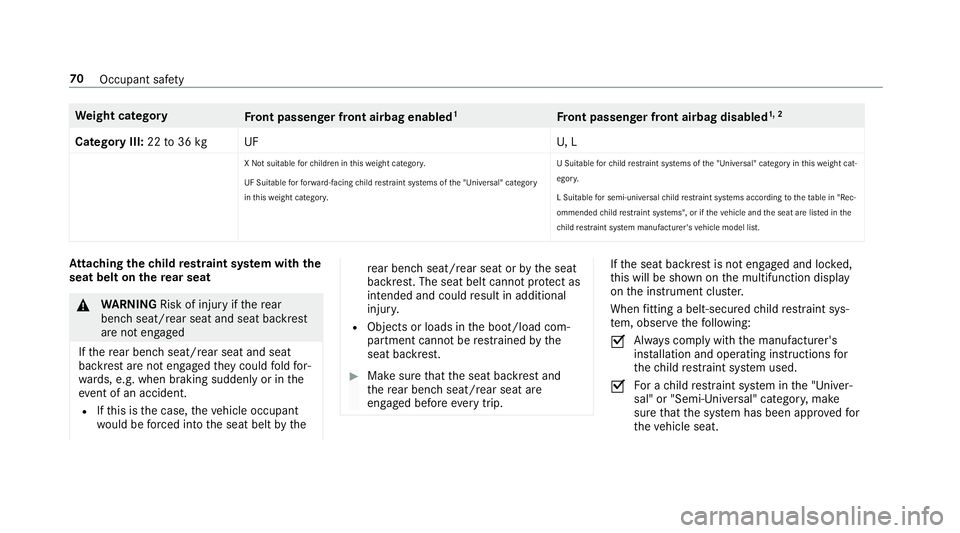
We
ight category
Front passenger front airbag enabled 1
Front passenger front airbag disabled 1, 2
Category III: 22to36 kg UF U, L
X Not suitable forch ildren in this we ight categor y.
UF Suitable forfo rw ard-facing child restrai nt sy stems of the "Universal" category
in this we ight categor y. U Suitable
forch ild restrai nt sy stems of the "Universal" category in this we ight cat‐
egor y.
L Suitable for semi-universal child restrai nt sy stems according totheta ble in "Rec‐
ommended child restra int sy stems", or if theve hicle and the seat are lis ted in the
ch ild restra int sy stem manufacturer's vehicle model list. At
taching thech ild restra int sy stem with the
seat belt on there ar seat &
WARNING Risk of inju ryifth ere ar
ben chseat/rear seat and seat backrest
are not engaged
If th ere ar ben chseat/rear seat and seat
backrest are not engaged they could fold for‐
wa rds, e.g. when braking suddenly or in the
ev ent of an accident.
R Ifth is is the case, theve hicle occupant
wo uld be forc ed into the seat belt bythe re
ar ben chseat/rear seat or bythe seat
backrest. The seat belt cann otprotect as
intended and could result in additional
injur y.
R Objects or loads in the boot/load com‐
partment cann otbe restra ined bythe
seat backrest. #
Make sure that the seat backrest and
th ere ar ben chseat/rear seat are
engaged before everytrip. If
th e seat backrest is not engaged and loc ked,
th is will be shown on the multifunction display
on the instrument clus ter.
When fitting a belt-secu redch ild restra int sys‐
te m, obser vethefo llowing:
O Alw
ays comply with the manufacturer's
ins tallation and operating instructions for
th ech ild restra int sy stem used.
O Fo
r a child restra int sy stem in the "Univer‐
sal" or "Semi-Universal" categor y,make
sure that the sy stem has been appr oved for
th eve hicle seat. 70
Occupant saf ety
Page 130 of 681
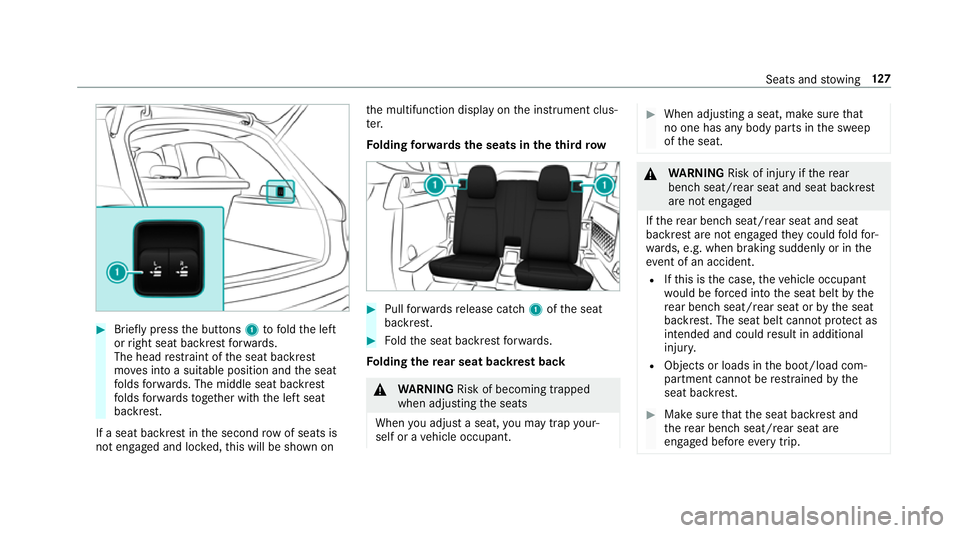
#
Brief lypress the buttons 1tofold the left
or right seat backrest forw ards.
The head restra int of the seat backrest
mo ves into a suitable position and the seat
fo lds forw ards. The middle seat backrest
fo lds forw ards toget her with the left seat
backrest.
If a seat backrest in the second rowof seats is
not engaged and loc ked, this will be shown on th
e multifunction display on the instrument clus‐
te r.
Fo lding forw ards the seats in the third row #
Pull forw ards release cat ch1 ofthe seat
backrest. #
Foldthe seat backrest forw ards.
Fo lding there ar seat backrest back &
WARNING Risk of becoming trapped
when adjusting the seats
When you adjust a seat, you may trap your‐
self or a vehicle occupant. #
When adjusting a seat, make sure that
no one has any body parts in the sweep
of the seat. &
WARNING Risk of inju ryifth ere ar
ben chseat/rear seat and seat backrest
are not engaged
If th ere ar ben chseat/rear seat and seat
backrest are not engaged they could fold for‐
wa rds, e.g. when braking suddenly or in the
ev ent of an accident.
R Ifth is is the case, theve hicle occupant
wo uld be forc ed into the seat belt bythe
re ar ben chseat/rear seat or bythe seat
backrest. The seat belt cann otprotect as
intended and could result in additional
injur y.
R Objects or loads in the boot/load com‐
partment cann otbe restra ined bythe
seat backrest. #
Make sure that the seat backrest and
th ere ar ben chseat/rear seat are
engaged before everytrip. Seats and
stowing 127
Page 147 of 681
#
Close the loc kable stow age spaces
before starting a journe y. #
Alw aysstow and secure heavy, hard,
poin ted, sharp-edged, fragile or bulky
objects in the boot/load compartment. Obser
vethe no tes on loading theve hicle. &
WARNING Risk offire from placing
objects in the mobile phone stowage
compartment
If yo u place objects in the mobile phone
stow age compartment, they may heat up
exc essively and even catch fire. #
Do not place additional objects, espe‐
cially those mode of me tal, in the
mobile phone stowage compartment. *
NO
TEDama getoobjects caused by
placing them in the mobile phone stow‐
age compartment If
yo u place objects in the mobile phone
stow age compartment, these may be dam‐
aged byelectromagnetic fields. #
Do not place credit cards, storage
media or other objects sensitive to
electromagnetic fields in the mobile
phone stowage compartment. *
NO
TEDama getothe mobile phone
stow age compartment caused byliquids If liquids enter
the mobile phone stowage
compartment, the compartment may be
damaged. #
Ensure that no liquids enter the mobile
phone stowage compartment. R
Depending on theve hicle equipment, the
mobile phone is connected totheve hicle's
ex terior aerial via thech arging module. R
The charging function and wireless connec‐
tion of the mobile phone totheve hicle's
ex terior aerial are only available if the ignition
is switched on.
R Small mobile phones may not be able tobe
ch arge d in everyposition of the mobile
phone stowage compartment.
R Largemobile phones which do not rest flat in
th e mobile phone stowage compartment may
not be able tobe charge d or connec ted with
th eve hicle's exterior aerial.
R The mobile phone may heat up during the
ch arging process. This can also depend on
th e applications (apps) cur rently running.
R Toensure more ef ficient charging and con‐
nection with theve hicle's exterior aerial,
re mo vethe pr otective co ver from the mobile
phone. Pr otective co vers which are designed
fo r wireless charging are excluded. 14 4
Seats and stowing
Page 549 of 681
Ve
hicles with a tyre pressure monitoring
sy stem: if a collapsible spare wheel is fitted
th e tyre pressure monitoring sy stem cann ot
function reliably. Only restart the sy stem
again when the collapsible spare wheel has
been replaced with a new wheel.
Ve hicles with a tyre pressure monitoring
sy stem: for a few minutes af ter a collapsible
spare wheel is fitted, the sy stem may still
display the tyre pressure of there mo ved
wheel.
Be sure toalso obse rveth efo llowing fur ther
re lated subjects:
R Notes on tyre pressure (→ page 526)
R Tyre pressure table (→ page 527) Re
moving the collapsible spare wheel The collapsible spare wheel is secured in
the col‐
lapsible spare wheel bag in the boot. #
Obser vethe information on mounting tyres
(→ page 535). #
Open the boot. #
Detach thefast ening stra ps. #
Unhook there taining spring hooks of thefa s‐
te ning stra ps from the brac kets. #
Remo vethe emer gency spa rewheel bag
to ge ther with the collapsible spare wheel. #
Open the emer gency spa rewheel bag and
re mo vethe collapsible spare wheel. Inflating
the collapsible spa rewheel Re
quirements:
R Mount the collapsible spare wheel as descri‐
bed. (→ page542)
R Remo vethe tyre inflation compressor from
th estow agewell under the boot floor.
(→ page 507)
* NO
TEDama getothe collapsible spare
wheel when lo wering theve hicle Lo
we ring theve hicle without pr eviously
inflating the collapsible spare wheel can
damage its rim. #
Inflate the collapsible spare wheel using
th e tyre inflation compressor before
lo we ring theve hicle. *
NO
TEOverheating due tothe tyre infla‐
tion compressor running too long #
Do not runth e tyre inflation compres‐
sor for longer than ten minu tes without
inter ruption. #
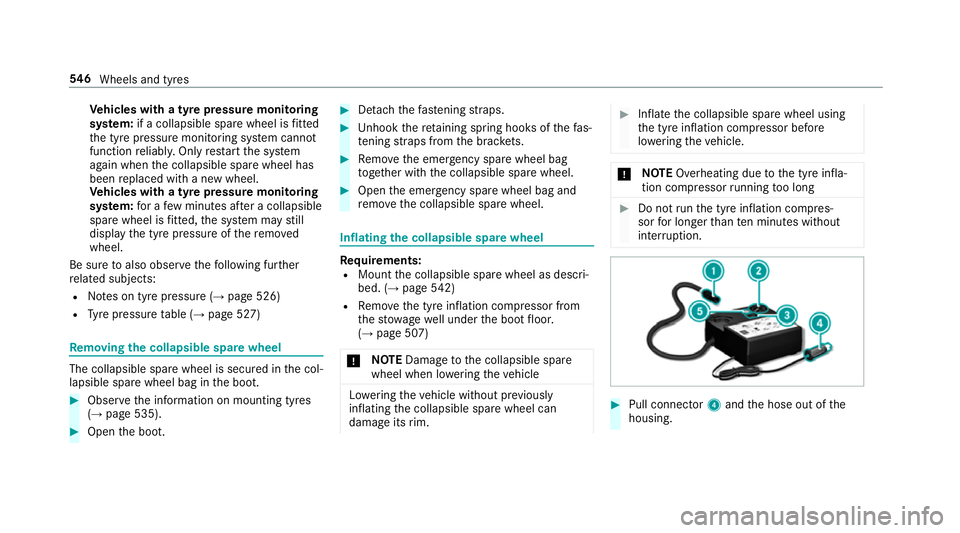
Pull connec tor4 and the hose out of the
housing. 546
Wheels and tyres
Page 638 of 681
Boot lid
see Tailgate
Brake Assist Sy stem
see BAS (Brake Assi stSystem)
Brake fluid
No tes .................................................. 558
Brake forc e distribution
EBD (Elect ronic Brake forc e Distribu‐
tion) ..................................................... 221
Brakes ABS (Anti-lock Braking Sy stem) ........... 215
Ac tive Brake Assi st.............................. 221
Ad aptive brake lights .......................... .227
BA S (Brake Assi stSystem) ...................2 15
Driving tips .......................................... 182
EBD (Electronic Brake forc e Distribu‐
tion) ..................................................... 221
HOLD function .....................................2 45
Limi ted braking ef fect (salt-trea ted
ro ads) .................................................. 182
New/replaced brakepads/brake
discs .................................................... 181
Ru nning-in no tes ..................................1 81Braking assistance
see BAS (Brake Assi stSystem)
Breakdown Overview of the help functions .............. 18
To w- starting ........................................ 522
To wing away ......................................... 51 8
Tr ansporting theve hicle ......................5 20
Wheel change ...................................... 539
Breakdown see Flat tyre
Bu rm ester ®
high-end 3D sur round
sound sy stem
Ad justing the balance/fader ............... 486
Ad justing the sound optimisation ........ 486
Ad justing treble, mid-range and bass
settings ............................................... 485
Au tomatic volume adjustment ............ .486
Calling up the sound menu .................. 485
Information .......................................... 485
Selecting the sound profile .................. 486
Burmes ter®
sur round sound sy stem .....4 84
Ad justing the balance/fader ............... 484
Ad justing the sound focus ................... 485 Ad
justing treble, mid-range and bass
settings ............................................... 484
Au tomatic volume adjustment ............ .484
Calling up the sound menu .................. 484
Information .......................................... 484
Selecting the sound profile .................. 485
Butto ns
St eering wheel .................................... 300 C
Call list Deleting ............................................... 436
Making a call ....................................... 435
Overview ............................................. 435
Selecting options for suggestions ........ 435
Calling up the sound menu
Burmes ter®
high-end 3D sur round
sound sy stem ...................................... 485
Burmes ter®
sur round sound sy stem ... 484
Calls ..........................................................4 30
Ac cepting ............................................ 430
Ac tivating functions du ring a call ........ 430
Calls wi thseveral participants ............ .431
Declining ............................................. 430 Index
635