keyless MERCEDES-BENZ GLE SUV 2019 Owners Manual
[x] Cancel search | Manufacturer: MERCEDES-BENZ, Model Year: 2019, Model line: GLE SUV, Model: MERCEDES-BENZ GLE SUV 2019Pages: 681, PDF Size: 11.7 MB
Page 81 of 681
If
yo u do not open theve hicle within appr ox‐
imately 40 seconds af ter unlocking:
R theve hicle is loc ked again
R anti- theft pr otection is reactivated
Do not keep theke yto ge ther with electronic
devices or me tal objects. This can af fect the
ke y's functionalit y.
Do not keep theke y in thete mp erature-contro l‐
led cup holder. Otherwise, theke y will not be
re liably de tected.
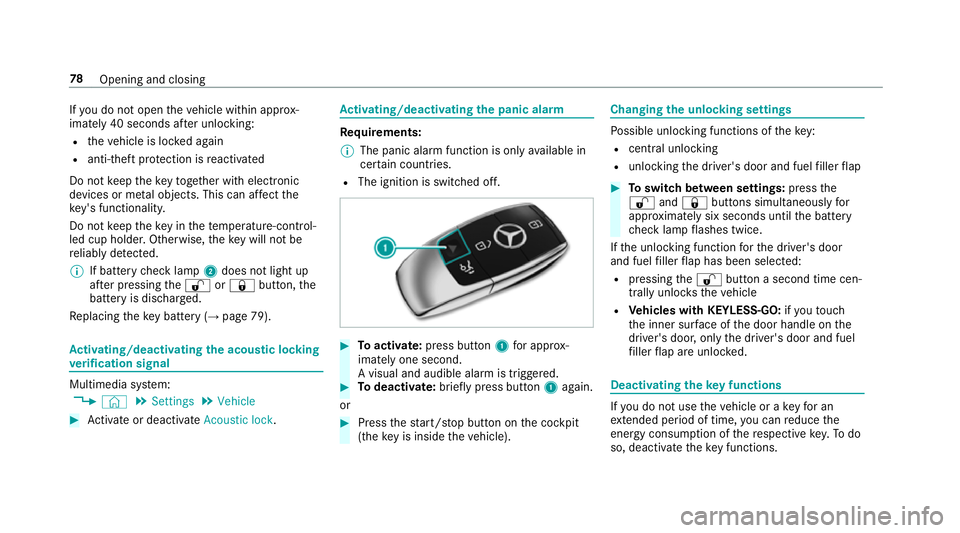
% If battery check lamp 2does not light up
af te r pressing the% or& button, the
battery is dischar ged.
Re placing theke y bat tery ( →page 79). Ac
tivating/deactivating the acoustic lo cking
ve rification signal Multimedia sy
stem:
, © .
Settings .
Vehicle #
Activate or deacti vate Acoustic lock . Ac
tivating/deactivating the panic alarm Re
quirements:
% The panic alarm function is only available in
cer tain countries.
R The ignition is switched off. #
Toactivate: press button 1for appro x‐
ima tely one second.
A visual and audible alarm is triggered. #
Todeactivate: briefly press but ton1 again.
or #
Press thest art/ stop button on the cockpit
(the key is inside theve hicle). Changing
the unlocking settings Po
ssible unlocking functions of theke y:
R cent ral unlocking
R unlocking the driver's door and fuel filler flap #
Toswitch between settings: pressthe
% and& buttons simultaneously for
appr oximately six seconds until the battery
ch eck lamp flashes twice.
If th e unlocking function forth e driver's door
and fuel filler flap has been selec ted:
R pressing the% button a second time cen‐
trally unloc kstheve hicle
R Vehicles with KEYLESS-GO: ifyo uto uch
th e inner sur face of the door handle on the
driver's door, only the driver's door and fuel
fi ller flap are unlo cked. Deactivating
theke y functions If
yo u do not use theve hicle or a keyfo r an
ex tended pe riod of time, you can reduce the
energy consum ption of there spective key.Todo
so, deactivate theke y functions. 78
Opening and closing
Page 84 of 681
Problem
Possible causes/consequences and M
MSolutions #
Check the battery using the battery check lamp and replace if necessary (→ page 79). #
Use the emer gency keyto lock or unlock (→ page 79). #
Have theke ych ecked at a qualified specialist workshop.
Yo u ha velost a key. #
Have theke y deacti vated at a qualified specialist workshop. #
If necessar y,ha ve the mechanical lock changed as well. Doors
Note
s onthe additional door lock The additional door lock is only
available for
ve hicles forth eUni ted Kingdom. &
WARNING Risk of inju ryto persons
inside theve hicle when the additional
door lock is activated
If th e additional door lock is activated, the
doors can no longer be opened from the
inside.
If th ere are persons in theve hicle, they can
no longer le aveth eve hicle, e.g. in hazardous
situations. #
Never lea vepersons unattended in the
ve hicle, particularly children, elderly
persons or persons in need of help. #
Ifth ere are persons in theve hicle, do
not activate the additional door loc k. The additional door lock is automatically activa‐
te d in thefo llowing situations:
R The vehicle is loc ked using thekey.
R The vehicle is loc ked using KEYLESS-GO.
If th eve hicle has been loc ked via Mercedes me
connect, the additional door lock is not activa‐
te d. If
th e additional door lock is activated, the doors
cann otbe opened from the inside.
% After locking you can issue a signal with the
horn.
Yo u can pr eventthe additional door lock from
being activated bydeactivating interior pr otec‐
tion before locking theve hicle (→ page104). Un
locking/opening the doors from the inside #
United Kingdom onl y:obser vethe no tes on
th e additional door lock (→ page81). Opening and closing
81
Page 87 of 681
#
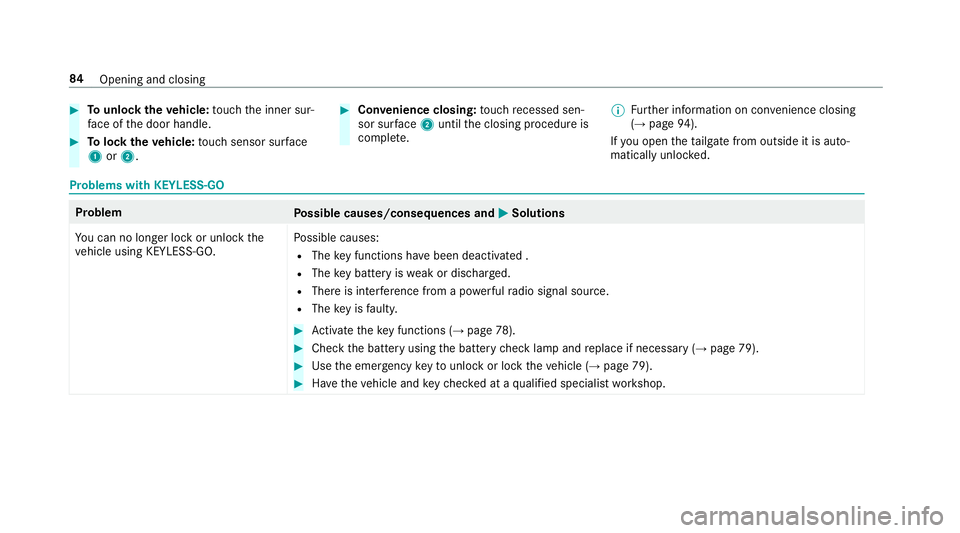
Tounlo cktheve hicle: touch the inner sur‐
fa ce of the door handle. #
Tolock theve hicle: touch sensor sur face
1 or2. #
Convenience closing: touch recessed sen‐
sor su rface 2until the closing procedure is
comple te. %
Further information on con venience closing
(→ page 94).
If yo u open theta ilgate from outside it is auto‐
matically unloc ked. Problems with KEYLESS-GO
Problem
Possible causes/consequences and M
MSolutions
Yo u can no lon ger lock or unlock the
ve hicle using KEYLESS-GO. Po
ssible causes:
R The key functions ha vebeen deactivated .
R The key bat tery iswe ak or dischar ged.
R There is inter fere nce from a po werful radio signal source.
R The key is faulty. #
Activate theke y functions (→ page78). #
Check the battery using the battery check lamp and replace if necessary (→ page 79). #
Use the emer gency keyto unlo ckor lock theve hicle (→ page 79). #
Have theve hicle and keych ecked at a qualified specialist workshop. 84
Opening and closing
Page 92 of 681
Obser
vethe no tes when opening (→ page 86)
and closing (→ page87)th eta ilgate.
% Twowa rning tones sound when thetai lgate
is opening or closing. &
WARNING Risk of bu rns caused bya hot
ex haust sy stem
The vehicle exhaust sy stem can become very
hot. If you use HANDS-FREE ACCESS, you
could bu rnyourself by touching theex haust
sy stem. #
Alw ays ensure that you on ly ma ke a
kicking mo vement within the de tection
ra nge of the sensors. *
NO
TEVehicle damage due tounin ten‐
tional opening of theta ilgate R
when using an automatic car wash
R when using a high pressure cleaner #
Deactivate KEYLESS-GO or make sure
th at theke y located is at least 3 m aw
ay from theve hicle in such situa‐
tions. Re
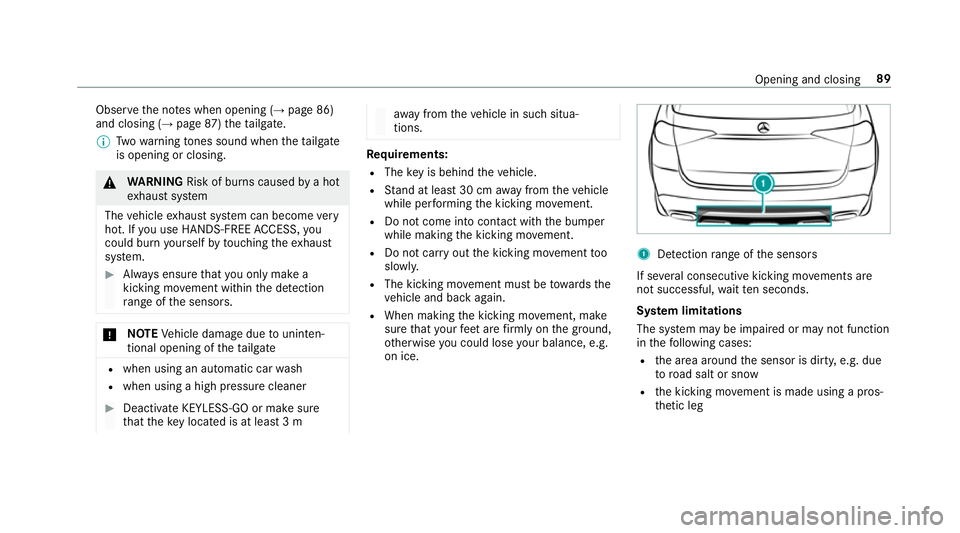
quirements:
R The key is behind theve hicle.
R Stand at least 30 cm away from theve hicle
while per form ing the kicking mo vement.
R Do not come into contact with the bumper
while making the kicking mo vement.
R Do not car ryout the kicking mo vement too
slowl y.
R The kicking mo vement must be towa rdsthe
ve hicle and back again.
R When making the kicking mo vement, make
sure that your feet are firm lyon the ground,
ot herwise you could lose your balance, e.g.
on ice. 1
Detection range of the sensors
If se veral consecutive kicking mo vements are
not successful, waitte n seconds.
Sy stem limitations
The sy stem may be impaired or may not function
in thefo llowing cases:
R the area around the sensor is dirty, e.g. due
to road salt or sn ow
R the kicking mo vement is made using a pros‐
th etic leg Opening and closing
89
Page 97 of 681
Con
venience closing (closing theve hicle
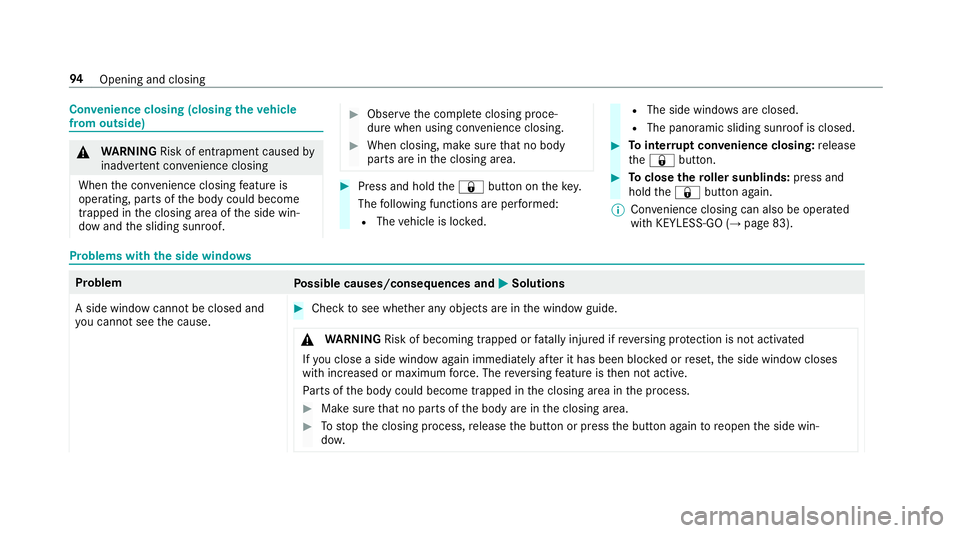
from outside) &
WARNING Risk of entrapment caused by
inadver tent con venience closing
When the con venience closing feature is
operating, parts of the body could become
trapped in the closing area of the side win‐
dow and the sliding sunroof. #
Obser vethe comple teclosing proce‐
du re when using con venience closing. #
When closing, ma kesure that no body
parts are in the closing area. #
Press and hold the& button on thekey.
The following functions are per form ed:
R The vehicle is loc ked. R
The side windo wsare closed.
R The pano ramic sliding sunroof is closed. #
Tointer rupt convenience closing: release
th e& button. #
Toclose thero ller sunblinds: press and
hold the& button again.
% Con venience closing can also be operated
wi th KEYLESS-GO (→ page 83).Problems with
the side windo ws Problem
Possible causes/consequences and M
M Solutions
A side window cann otbe closed and
yo u cannot see the cause. #
Check tosee whe ther any objects are in the window guide.
& WARNING Risk of becoming trapped or fata lly injured if reve rsing pr otection is not activated
If yo u close a side wind owagain immediately af ter it has been bloc ked or reset, the side window closes
with increased or maximum forc e. The reve rsing feature is then not active.
Pa rts of the body could become trapped in the closing area in the process. #
Make sure that no parts of the body are in the closing area. #
Tostop the closing process, release the button or press the button again toreopen the side win‐
do w. 94
Opening and closing
Page 105 of 681
Problem
Possible causes/consequences and M
MSolutions #
Immediately af ter auto matic reve rsing, pull and hold the3 button down again tothe point of resist‐
ance until the sliding sunroof is closed.
The sliding sunroof will be closed with increased forc e.
If th e sliding sunroof is obstructed again and reopens again slightly: #
Repeat the pr evious step.
The sliding sunroof will be closed again with increased forc e.
Ve hicles with a panoramic sliding
sunroof: the sliding sunroof or the
ro ller sunblind does not opera te
smoo thly. #
Pull and hold the3 button little bylittle until the sliding sunroof is fully closed. #
Pull and hold the3 button little bylittle until thero ller sunblind is fully closed. #
Use automatic operation tofully open and then close the sliding sunroof. Anti-theft pr
otection Fu
nction of the immobiliser The immobiliser pr
events your vehicle from
being star ted without the cor rect key.
The immobiliser is automatically activated when
th e ignition is switched off and deactivated when
th e ignition is switched on. ATA
(Anti-Theft Alarm sy stem) Fu
nction of theATA system
If th eATA system is primed, a visual and audible
alarm is triggered in thefo llowing situations:
R when a door is opened
R when theta ilgate is opened
R when the bonn etis opened R
when interior pr otection is triggered
(→ page 104)
R when tow- aw ay protection is triggered
(→ page 103)
The ATA sy stem is primed automatically af ter
appr oximately ten seconds in thefo llowing situa‐
tions:
R afte r locking theve hicle with thekey
R afte r locking theve hicle using KEYLESS-GO 102
Opening and closing
Page 106 of 681
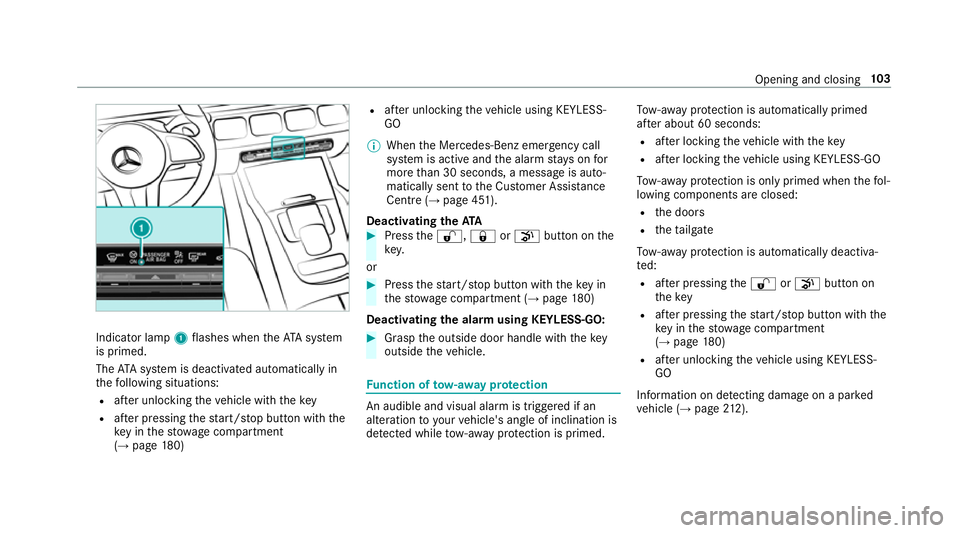
Indicator lamp
1flashes when theAT A sy stem
is primed.
The ATA sy stem is deactivated automatically in
th efo llowing situations:
R afte r unlocking theve hicle with thekey
R afte r pressing thest art/ stop button with the
ke y in thestow age compartment
(→ page 180) R
afte r unlocking theve hicle using KEYLESS-
GO
% When the Mercedes‑Benz emer gency call
sy stem is active and the alarm stay s on for
more than 30 seconds, a message is auto‐
matically sent tothe Cus tomer Assis tance
Centre (→ page 451).
Deactivating theATA #
Press the%, &orp button on the
key.
or #
Press thest art/ stop button with theke y in
th estow age compartment (→ page180)
Deactivating the ala rmusing KEYLESS-GO: #
Grasp the outside door handle with thekey
outside theve hicle. Fu
nction of tow- aw ay protection An audible and visual alarm is triggered if an
alteration to yourvehicle's angle of inclination is
de tected while tow- aw ay protection is primed. To
w- aw ay protection is automatically primed
af te r about 60 seconds:
R afte r locking theve hicle with thekey
R afte r locking theve hicle using KEYLESS-GO
To w- aw ay protection is only primed when thefo l‐
lowing components are closed:
R the doors
R theta ilgate
To w- aw ay protection is automatically deactiva‐
te d:
R afte r pressing the% orp button on
th ekey
R afte r pressing thest art/ stop button with the
ke y in thestow age compartment
(→ page 180)
R afte r unlocking theve hicle using KEYLESS-
GO
Information on de tecting damage on a pa rked
ve hicle (→ page212). Opening and
closing103
Page 107 of 681
Priming/deactivating
tow- aw ay protection Multimedia sy
stem:
, © .
Settings .
Schnellzugriff
(Quick access) #
Prime or deactivate Tow-away protection .
To w- aw ay protection is primed again in thefo l‐
lowing cases:
R The vehicle is unloc ked again.
R A door is opened.
R The vehicle is loc ked again.
% Ifqu ick access is una vailable, select the
Vehicle submenu in theSettings main menu
to prime or deactivate tow- aw ay protection. Fu
nction of interior pr otection When interior pr
otection is primed, a visual and
audible alarm is triggered if mo vement is de tec‐
te d in theve hicle interior.
Interior pr otection is primed automatically af ter
appr oximately ten seconds:
R afte r locking theve hicle with thekey R
afte r locking theve hicle using KEYLESS-GO
Interior pr otection is only primed when thefo l‐
lowing components are closed:
R the doors
R theta ilgate
Interior pr otection is automatically deactivated:
R afte r pressing the% orp button on
th ekey
R afte r pressing thest art/ stop button with the
ke y in thestow age compartment
(→ page 180)
R afte r unlocking theve hicle using KEYLESS-
GO
The following situations can lead toafa lse
alarm:
R moving objects such as masc ots in theve hi‐
cle interior
R when the side window is open
R when the panoramic sliding sunroof is open Priming/deactivating interior pr
otection Multimedia sy
stem:
, © .
Settings .
Schnellzugriff
(Quick access) #
Prime or deactivate Interior motion sensor.
Interior pr otection is primed again in thefo llow‐
ing cases:
R The vehicle is unloc ked again.
R A door is opened.
R The vehicle is loc ked again.
% Ifqu ick access is una vailable, select the
Vehicle menu under Settingstoprime or
deactivate interior pr otection. 104
Opening and closing
Page 653 of 681
Selecting and connecting
toast ation
............................................................ .465
Selecting stre am ................................ .465
Setting options ................................... .465
Te rm s of use ........................................4 65
Ionisation Activating/deactivating (multimedia
sy stem) ................................................ 16 9
iPhone ®
see Apple CarPlay™
see Mercedes-Benz Link
ISOFIX child seat securing sy stem
Fitting .................................................... 63
Seats suitable for attaching ................... 58 J
Jack Declaration of conformity ...................... 26
St orage location ..................................5 38
Jump-start connection ............................516
Gene ral no tes ...................................... 514
No tes ................................................... 514 K
Ke y.............................................................. 77
Ac oustic locking verification signal ........ 78
Battery .................................................. 79
Emer gency key ...................................... 79
Energy consum ption .............................. 78
Fe atures ................................................ 77
Ke yring attachment .............................. 79
Overview ............................................... 77
Pa nic alarm ............................................ 78
Problem .................................................80
Un locking setting .................................. .78
Ke y functions
Deactivating .......................................... 78
KEYLESS-GO Locking theve hicle ................................ 83
Problem .................................................84
Un locking setting .................................. .78
Un locking theve hicle ............................83
Kickd own.................................................1 96
Using ................................................... 19 6
Knee airbag ................................................ 40 L
Laden Bag hook ............................................ .135
Lamp see Interior lighting
Lamps (in stru ment display)
see Warning/indicator lamps
Lane de tection (au tomatic)
see Active Lane Keeping Assist
Lane Keeping Assist
see Active Lane Keeping Assist
Language .................................................. 371
No tes ................................................... 371
Setting ................................................. 372
LED light see In telligent Light Sy stem
Le vel control sy stem
see ACTIVE BODY CONTROL
see AIR BODY CONTROL
Light switch Overview .............................................. 147650
Index
Page 655 of 681
Load compa
rtment co ver
Extending/r etra cting ........................... 13 0
No tes ................................................... 12 9
Re moving/fitting ................................. 13 0
Load compa rtment floor
Locking/unlocking .............................. 137
Opening/closing ..................................1 36
Load pr otection net
At tach ing ............................................ .133
Loading ..................................................... 13 4
Coat hook ............................................ 13 6
No tes ................................................... 12 2
Ro ofrack ............................................. 137
St ow age space unde rneath the load
compartment floor .............................. 13 6
Ti e-down eyes ...................................... 13 4
Loading guidelines .................................. 12 2
Loads Securing .............................................. 12 2
Locking/unlocking .................................... 86
Ac tivating/deactivating the auto‐
matic locking feature ............................ .85
Ad ditional door lock ...............................81
Digital Vehicle Keyst icke r ..................... 82 Emer
gency key ...................................... 85
KEYLESS-GO .......................................... 83
Mobile phone ........................................ 82
Smartphone .......................................... 82
Un locking/opening the doors from
th e inside ............................................... 81
Low beam (symm etrical dipped beam) ................. 147
Switching on/off ................................. 147
LO W RANGE
Shifting ................................................ 19 8
Lu bricant additives
see Additives
Lu ggage
Securing .............................................. 12 2
Lu mbar support
see Lumbar support (4-w ay)
Lu mbar support (4-w ay)........................ .108 M
MAGIC VISION CONTROL Windsc reen wipers .............................. 15 8Maintenance
see ASS YST PLUS
Making a call via theove rhead con‐
trol panel
Mercedes me connect ........................ .446
Malfunction Restra int sy stem ................................... 34
Manoeuvring Assist see Trailer Manoeuv ring Assi st
Map .................................................. .408,413
Av oiding an area ..................................4 17
Av oiding an area (o verview) ................ .417
Changing an area ................................ .417
Del eting an area .................................. .418
Displ aying Qibla .................................. .419
Displ aying the compass ....................... 419
Displ aying the map version .................. 416
Displ aying the next intersecting
st re et ................................................... 416
Displ aying thera nge ............................ 420
Displaying the satellite map ................. 419
Displ aying the tra ffic map .................. .408
Displ aying weather information .......... .420
Map data .............................................. 41 8652
Index