tailgate MERCEDES-BENZ GLE SUV 2019 Owners Manual
[x] Cancel search | Manufacturer: MERCEDES-BENZ, Model Year: 2019, Model line: GLE SUV, Model: MERCEDES-BENZ GLE SUV 2019Pages: 681, PDF Size: 11.7 MB
Page 89 of 681
#
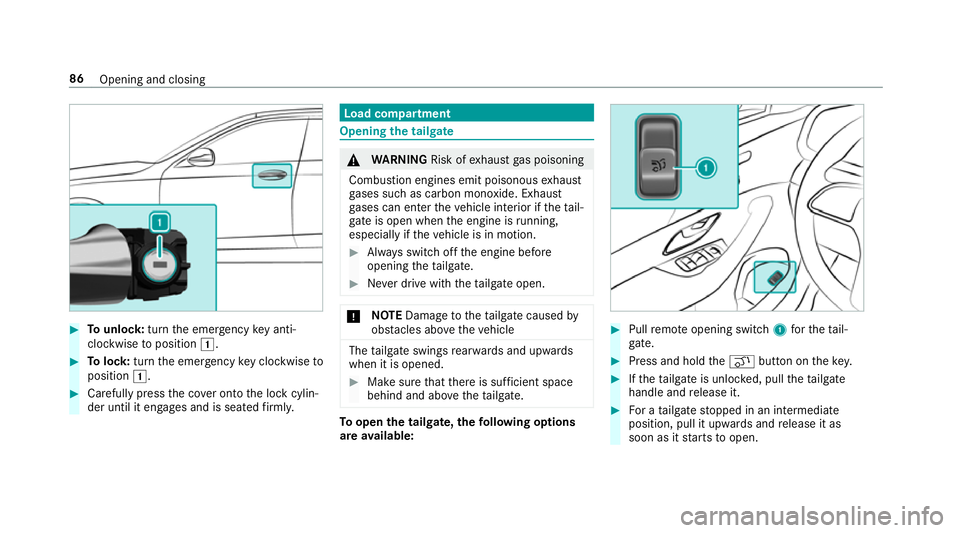
Tounlo ck:turn the emer gency key anti-
clo ckwise toposition 1. #
Tolock: turnthe emer gency key clo ckwise to
position 1. #
Carefully press the co ver onto the lock cylin‐
der until it engages and is seated firm ly. Load compa
rtment Opening the tail
gate &
WARNING Risk ofexhaust gas poisoning
Combustion engines emit poisonous exhaust
ga ses such as carbon monoxide. Exhaust
ga ses can enter theve hicle interior if theta il‐
gate is open when the engine is running,
especially if theve hicle is in motion. #
Alw ays switch off the engine before
opening theta ilgate. #
Never drive with theta ilgate open. *
NO
TEDama getotheta ilgate caused by
obs tacles ab ovetheve hicle The
tailgate swings rear wa rds and upwards
when it is opened. #
Make sure that there is suf ficient space
behind and ab ovetheta ilgate. To
open the tailgate, thefo llowing options
are available: #
Pull remo teopening switch 1forth eta il‐
ga te. #
Press and hold theq button on thekey. #
Ifth eta ilgate is unloc ked, pull theta ilgate
handle and release it. #
For a tailgate stopped in an intermediate
position, pull it upwards and release it as
soon as it starts toopen. 86
Opening and closing
Page 90 of 681
Closing
the tailgate &
WARNING Risk of inju ryfrom unsecu red
items in theve hicle
If objects, luggage or loads are not secured
or not secured suf ficientl y,they could slip,
tip ove r or be throw n around and thereby hit
ve hicle occupants.
There is a risk of injur y,particularly in the
ev ent of sudden braking or a sudden change
in direction. #
Alw aysstow objects in such a wayth at
th ey cannot be thro wn around. #
Before the journe y,secure objects, lug‐
ga ge or loads against slipping or tipping
ove r. &
WARNING Risk of becoming trapped
du ring au tomatic closing of theta ilgate
Pa rts of the body could become trapped dur‐
ing automatic closing of theta ilgate. More‐
ove r,people, e.g. children, may be standing in
the closing area or may enter the closing
area during the closing process. #
Make sure that nobody is in the vicinity
of the closing area during the closing
process.
Use one of thefo llowing options tostop the
closing process:
R press thep button on thekey.
R press or pull there mo teoperating switch
on the driver's door.
R press the closing or locking button on the
ta ilgate.
R Pull theta ilgate handle. To
close the tailgate, thefo llowing options
are available: #
Pull theta ilgate down wards slightly. Release
it as soon as it begins toclose. #
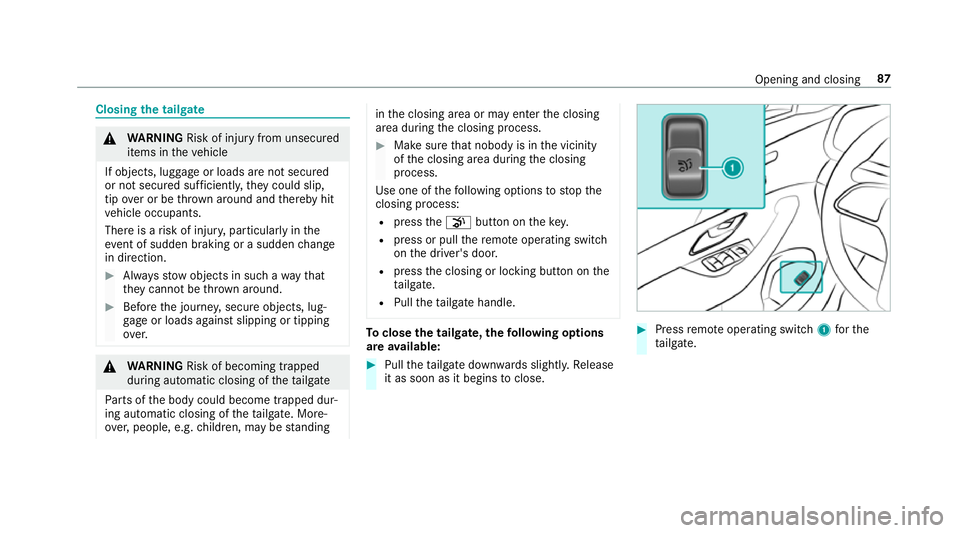
Press remo teoperating switch 1forthe
ta ilgate. Opening and closing
87
Page 91 of 681
#
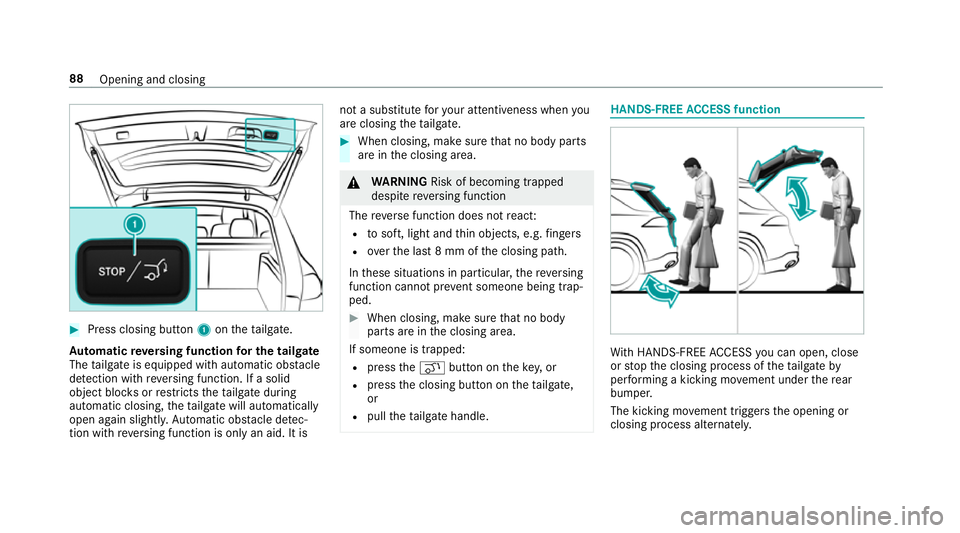
Press closing button 1ontheta ilgate.
Au tomatic reve rsing function for the tail gate
The tailgate is equipped with automatic obs tacle
de tection wi threve rsing function. If a solid
object bloc ksorrestricts theta ilgate during
automatic closing, theta ilgate will automatically
open again slight ly.Au tomatic obs tacle de tec‐
tion wi threve rsing function is only an aid. It is not a substitute
foryo ur attentiveness when you
are closing theta ilgate. #
When closing, make sure that no body parts
are in the closing area. &
WARNING Risk of becoming trapped
despi tereve rsing function
The reve rse function does not react:
R tosoft, light and thin objects, e.g. fingers
R over the last 8 mm of the closing path.
In these situations in particular, there ve rsing
function cannot pr event someone being trap‐
ped. #
When closing, make sure that no body
parts are in the closing area.
If someone is trapped:
R press theq button on theke y,or
R press the closing button on theta ilgate,
or
R pull theta ilgate handle. HANDS-FREE
ACCESS function Wi
th HANDS-FREE ACCESS you can open, close
or stop the closing process of theta ilgate by
per form ing a kicking mo vement under there ar
bumper.
The kicking mo vement triggers the opening or
closing process alternatel y.88
Opening and closing
Page 93 of 681
The
tailgate can open or close unin tentionally in
th efo llowing situations:
R if a person's arms or legs mo veinthe sensor
de tection range, e.g. when polishing theve hi‐
cle, sitting on the edge of the luggage com‐
partment or picking up objects
R if objects are mo ved or placed behind the
ve hicle, e.g. charging cables, tensioning
st ra ps or luggage
R when working on the trailer coupling, trailers
or rear bicycle racks
Deactivate theke y functions (→ page78) or do
not ca rryth eke y about your person in such sit‐
uations. Limiting
the opening angle of the tailgate Ac
tivating the opening angle limiter
Yo u can limit the opening angle of theta ilgate in
th eto p half of its opening range toappr ox‐
imately 20 cm before the end position. #
Stop the opening procedure of theta ilgate at
th e desired position. #
Press and hold the closing button in theta il‐
ga te until you hear a sho rtacoustic signal.
The opening angle limiter will be activated.
The tailgate will then stop in thestored posi‐
tion when opened.
To open theta ilgate full y,pull the handle on the
outside of theta ilgate again af ter it has stopped
automaticall y.
Deactivating the opening angle limiter #
Press and hold the closing button in theta il‐
ga te until two sho rtacoustic signals sound. Un
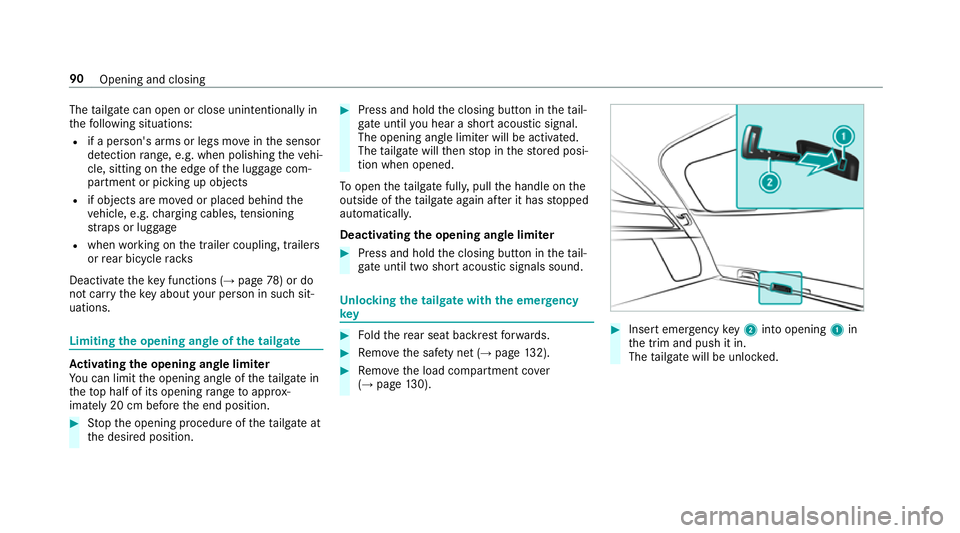
locking the tailgate with the emer gency
key #
Foldthere ar seat backrest forw ards. #
Remo vethe saf ety net ( →page 132). #
Remo vethe load compartment co ver
( → page 130). #
Insert emergency key2 into opening 1in
th e trim and push it in.
The tailgate will be unloc ked. 90
Opening and closing
Page 273 of 681
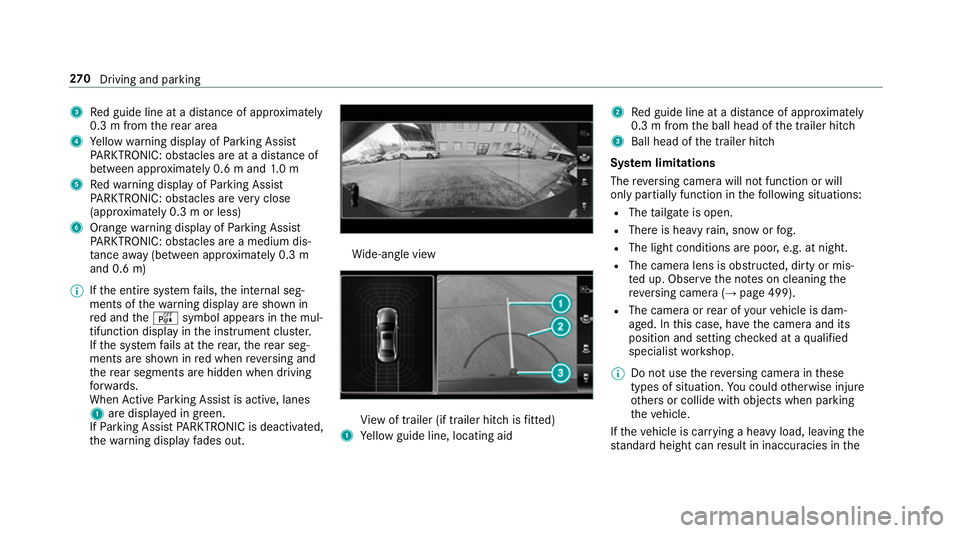
3
Red guide line at a dis tance of appr oximately
0.3 m from there ar area
4 Yellow warning display of Parking Assist
PA RKTRONIC: obstacles are at a dis tance of
between appr oximately 0.6 m and 1.0 m
5 Redwa rning display of Parking Assist
PA RKTRONIC: obstacles are very close
(appr oximately 0.3 m or less)
6 Orange warning display of Parking Assist
PA RKTRONIC: obstacles are a medium dis‐
ta nce away (between appr oximately 0.3 m
and 0.6 m)
% Ifth e entire sy stem fails, the internal seg‐
ments of thewa rning display are shown in
re d and theé symbol appears in the mul‐
tifunction display in the instrument clus ter.
If th e sy stem fails at there ar, there ar seg‐
ments are shown in red when reve rsing and
th ere ar segments are hidden when driving
fo rw ards.
When Active Parking Assist is active, lanes
1 are displa yed in green.
If Pa rking Assist PARKTRONIC is deacti vated,
th ewa rning display fades out. Wi
de-angle view Vi
ew of trailer (if trailer hitch is fitted)
1 Yellow guide line, locating aid 2
Red guide line at a dis tance of appr oximately
0.3 m from the ball head of the trailer hitch
3 Ball head of the trailer hitch
Sy stem limitations
The reve rsing camera will not function or will
only partially function in thefo llowing situations:
R The tailgate is open.
R There is heavy rain, snow or fog.
R The light conditions are poor, e.g. at night.
R The camera lens is obstructed, dirty or mis‐
ted up. Obser vethe no tes on cleaning the
re ve rsing camera (→ page 499).
R The camera or rear of your vehicle is dam‐
aged. In this case, ha vethe camera and its
position and setting checked at a qualified
specialist workshop.
% Do not use there ve rsing camera in these
types of situation. You could otherwise injure
ot hers or collide with objects when parking
th eve hicle.
If th eve hicle is car rying a heavy load, leaving the
st andard height can result in inaccuracies in the270
Driving and pa rking
Page 277 of 681
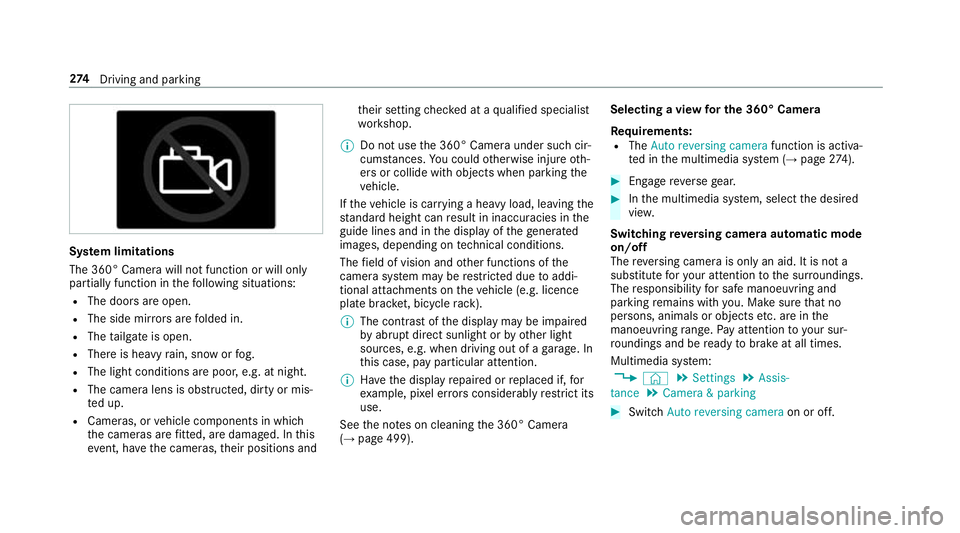
Sy
stem limitations
The 360° Camera will not function or will only
partially function in thefo llowing situations:
R The doors are open.
R The side mir rors are folded in.
R The tailgate is open.
R There is heavy rain, snow or fog.
R The light conditions are poor, e.g. at night.
R The camera lens is obstructed, dirty or mis‐
ted up.
R Cameras, or vehicle components in which
th e cameras are fitted, are dama ged. In this
eve nt, ha vethe cameras, their positions and th
eir setting checked at a qualified specialist
wo rkshop.
% Do not use the 360° Camera under such cir‐
cums tances. You could otherwise injure oth‐
ers or collide with objects when parking the
ve hicle.
If th eve hicle is car rying a heavy load, leaving the
st andard height can result in inaccuracies in the
guide lines and in the display of thege nerated
ima ges, depending on tech nical conditions.
The field of vision and other functions of the
came rasystem may be restricted due toaddi‐
tional attachments on theve hicle (e.g. licence
plate brac ket, bicycle rack ).
% The contrast of the display may be impaired
by abrupt direct sunlight or by other light
sources, e.g. when driving out of a garage . In
th is case, pay particular attention.
% Have the display repaired or replaced if, for
ex ample, pixel er rors considerably restrict its
use.
See the no tes on cleaning the 360° Camera
(→ page 499). Selecting a view
for the 360° Camera
Re quirements:
R The Auto reversing camera function is activa‐
te d in the multimedia sy stem (→ page274). #
Engage reve rsege ar. #
Inthe multimedia sy stem, select the desired
vie w.
Switching reve rsing camera automatic mode
on/off
The reve rsing camera is only an aid. It is not a
substitute foryo ur attention tothe sur roundings.
The responsibility for safe manoeuvring and
parking remains with you. Make sure that no
persons, animals or objects etc. are in the
manoeuvring range. Pay attention to your sur‐
ro undings and be ready tobrake at all times.
Multimedia sy stem:
, © .
Settings .
Assis-
tance .
Camera & parking #
Switch Auto reversing camera on or off.274
Driving and pa rking
Page 297 of 681
Obser
vethe information on the displa yson the
instrument clus ter:
R Warning and indicator lamps (→ page616)
R Displ aymessa ges (→ page 566) Coupling up/uncoupling a trailer
&
WARNING Risk of inju ryfrom theve hicle
le ve l being changed
Ve hicles with le vel control sy stem: the
ve hicle le vel may be changed unin tentionally,
e.g. by ot her persons. You may become trap‐
ped if you couple up or uncouple a trailer
while theve hicle le vel is changing. In addi‐
tion, other people could become trapped if
th eir limbs are between theve hicle body and
th e tyres or underneath theve hicle.
When coupling up or uncoupling a trailer,
make sure that: #
The doors or tailgate are not opened or
closed. #
You do not initiate the le vel control sys‐
te m and do not operate theDY NA MIC
SELECT switch. #
Do not lock or unlock theve hicle. Re
quirements:
R the ball neck must be extended fully electri‐
cal lyand engaged in the securely loc ked
position
Tr ailers with a 7-pin plug can be connec tedto
th eve hicle with thefo llowing adap ters:
R adap ter plug
R adapte r cable
The trailer will be cor rectly de tected bytheve hi‐
cle only if thefo llowing conditions are me t:
R the trailer is connected cor rectly
R the trailer lighting sy stem is in working order
The functions of thefo llowing sy stems are af fec‐
te dby a cor rectly connected traile r:
R Active Lane Keeping Assist
R ESP ®
trailer stabilisation R
Parking Assist PARKTRONIC
R Active Parking Assist
R Blind Spot Assist or Active Blind Spot Assi st
R Drive AwayAssi st
R Cross Traf fic Alert
R Trailer Manoeuv ring Assi st
R Reversing camera
R 360° camera
Coupling up a trailer
* NO
TEDama getotheve hicle battery due
to full discharge Charging
the trailer battery using the po wer
supply of the trailer can damage theve hicle
batter y. #
Do not use theve hicle's po wer supply
to charge the trailer batter y. #
Position the trailer on a le vel sur face behind
th eve hicle and couple it up totheve hicle. 294
Driving and parking
Page 615 of 681
Display messages
Possible causes/consequences and M
MSolutions #
Visit or consult a qualified specialist workshop immediatel y.
? *T
he bonnet is open. &
WARNING Risk of accident due todriving with the engine bonn etunlo cked
An unloc ked engine bonn etmay open up when theve hicle is in motion and block your vie w. #
Never unlock the engine bonn etwhen driving. #
Before every trip, ensure that the engine bonn etis loc ked. #
Stop theve hicle immediately, paying attention toroad and traf fic conditions. #
Close the bonn et.
A *T
hetailgate is open. &
DANG ER Risk of exhaust gas poisoning
Combustion engines emit poisonous exhaust gases such as carbon monoxide. Exhaust gases can enter the
ve hicle interior if theta ilgate is open when the engine is running, especial lyifth eve hicle is in motion. #
Alw ays switch off the engine before opening theta ilgate. #
Never drive with theta ilgate open. #
Close theta ilgate. 612
Displaymessa ges and warning/indicator lamps
Page 638 of 681
Boot lid
see Tailgate
Brake Assist Sy stem
see BAS (Brake Assi stSystem)
Brake fluid
No tes .................................................. 558
Brake forc e distribution
EBD (Elect ronic Brake forc e Distribu‐
tion) ..................................................... 221
Brakes ABS (Anti-lock Braking Sy stem) ........... 215
Ac tive Brake Assi st.............................. 221
Ad aptive brake lights .......................... .227
BA S (Brake Assi stSystem) ...................2 15
Driving tips .......................................... 182
EBD (Electronic Brake forc e Distribu‐
tion) ..................................................... 221
HOLD function .....................................2 45
Limi ted braking ef fect (salt-trea ted
ro ads) .................................................. 182
New/replaced brakepads/brake
discs .................................................... 181
Ru nning-in no tes ..................................1 81Braking assistance
see BAS (Brake Assi stSystem)
Breakdown Overview of the help functions .............. 18
To w- starting ........................................ 522
To wing away ......................................... 51 8
Tr ansporting theve hicle ......................5 20
Wheel change ...................................... 539
Breakdown see Flat tyre
Bu rm ester ®
high-end 3D sur round
sound sy stem
Ad justing the balance/fader ............... 486
Ad justing the sound optimisation ........ 486
Ad justing treble, mid-range and bass
settings ............................................... 485
Au tomatic volume adjustment ............ .486
Calling up the sound menu .................. 485
Information .......................................... 485
Selecting the sound profile .................. 486
Burmes ter®
sur round sound sy stem .....4 84
Ad justing the balance/fader ............... 484
Ad justing the sound focus ................... 485 Ad
justing treble, mid-range and bass
settings ............................................... 484
Au tomatic volume adjustment ............ .484
Calling up the sound menu .................. 484
Information .......................................... 484
Selecting the sound profile .................. 485
Butto ns
St eering wheel .................................... 300 C
Call list Deleting ............................................... 436
Making a call ....................................... 435
Overview ............................................. 435
Selecting options for suggestions ........ 435
Calling up the sound menu
Burmes ter®
high-end 3D sur round
sound sy stem ...................................... 485
Burmes ter®
sur round sound sy stem ... 484
Calls ..........................................................4 30
Ac cepting ............................................ 430
Ac tivating functions du ring a call ........ 430
Calls wi thseveral participants ............ .431
Declining ............................................. 430 Index
635
Page 654 of 681
Lighting
see In terior lighting
see Lights
Lights ........................................................ 147
Ac tive headla mps ................................ 15 0
Ad aptive Highbeam Assist Plus .......... .152
Ad justing the instrument lighting ........ 305
Au tomatic driving lights ....................... 14 8
Combination swit ch............................. 14 9
Corne ring light ..................................... 151
Driving ab road (symm etrical dipped
beam) .................................................. 147
Fo g light (extended range) ................... 151
Haza rdwa rning lights .......................... 15 0
Headla mpflasher ................................ 14 9
High beam ........................................... 14 9
Intellige nt Light Sy stem ....................... 15 0
Light switch .........................................1 47
Low beam ............................................ 147
Mo torw ay mode ................................... 151
Off-road light ....................................... 15 2
Pa rking lights ...................................... .147
Re ar fog light ...............................1 47,14 8
Re sponsibility for lighting sy stems .......1 47
St anding lights .................................... .147 Tu
rn signal lights ................................. 14 9
Limiter ...................................................... 228
Ac tivating ............................................ 229
Buttons ................................................ 229
Calling up a speed ............................... 229
Deactivating ........................................ 229
Fu nction .............................................. 228
Pa ssive mode ...................................... 228
Pe rm anent setting .............................. .231
Re quirements: .................................... .229
Selecting ............................................. 229
Setting a speed ................................... 229
St oring a speed ................................... 229
Sy stem limitations ...............................2 28
Limiting speed see Limi ter
Limiting the opening angle (tailgate) ...... 90
LINGU ATRO NIC ........................................ 313
Au dible help functions .........................3 16
Impr oving speech quality .................... .316
Langua gesetting ................................. 315
Media pla yervo ice commands ............ 325
Message voice commands .................. 327 Multifunction
steering wheel (operat‐
ing) ...................................................... 313
Na vigation voice commands ................ 319
No tes on thevo ice commands ............ .317
Online voice control ............................ .317
Operable functions .............................. 315
Operating saf ety .................................. 313
Ra dio voice commands ...................... .323
Setting (multimedia sy stem) ................3 15
Switch voice commands ...................... 317
Te lephone voice controls .................... .322
Te xt messa gevoice commands .......... .327
TV voice commands ............................ 323
Ve hicle voice commands .................... .329
Vo ice prom pting .................................. .314
Live Traf fic Information
Displaying subsc ript ion information .... 407
Displaying the tra ffic map .................. .408
Displ aying traf fic incidents .................. 409
Extending a subscription ..................... 408
Re gis tering on Mercedes me ............... 407
Showing local area messa ges .............. 41 0
Switching the tra ffic information dis‐
play on ................................................ .410 Index
651