wheel MERCEDES-BENZ GLE SUV 2019 Owners Manual
[x] Cancel search | Manufacturer: MERCEDES-BENZ, Model Year: 2019, Model line: GLE SUV, Model: MERCEDES-BENZ GLE SUV 2019Pages: 681, PDF Size: 11.7 MB
Page 5 of 681
Symbols
........................................................ 5At
agl ance .................................................... 6
Cockpit overview ............................................ 6
Overview of warning and indicator lamps .... .10
Overview of theove rhead control panel .......12
Door control panel and seat adjustment ....... 14
Control settings in there ar compartment .... .16
Emergencies and breakdowns ...................... 18Digital Owner's Manual
.............................20
Calling up the Digital Owner's Manual ..........20 Genera
l notes............................................. 22
Pr otection of the environment ......................22
Ta ke -ba ckof end-of-life vehicles ...................22
Mercedes-Benz Genuine Parts ......................23
Owner's Manual ............................................ 24
Operating saf ety .......................................... .24
Declaration of Conformity ............................ 26
Diagno stics connection ................................ 27
Qualified specialist workshop ....................... 28
Ve hicle registration ....................................... 28 Cor
rect use of theve hicle ............................29
Information on the REA CHregulation ........... 29
Implied warranty .......................................... .29
QR code forre scue card ...............................29
Data storage .................................................30
Copyright ...................................................... 32 Occupant saf
ety......................................... 33
Re stra int sy stem ...........................................33
Seat belts ..................................................... 35
Airbags ......................................................... 40
PRE-SAFE ®
sy stem ....................................... 47
Safely transporting children in theve hi‐
cle ................................................................48
No tes on pets in theve hicle .......................... 76 Opening and closing
.................................. 77
Ke y .............................................................. .77
Doo rs............................................................ 81
Load compartment ....................................... 86
Ro ller sunblinds ............................................ 91
Side windo ws................................................ 91
Sliding sunroof ............................................. 96
Anti-theft pr otection ................................... 102 Seats and
stowing ................................... 105
No tes on the cor rect driver's seat posi‐
tion ............................................................. 105
Seats .......................................................... 106
St eering wheel ............................................ 11 8
Easy entry and exitfeature ........................ .120
Operating the memory function .................. 121
St ow age areas ............................................ 12 2
Cup holders ................................................ 13 8
Ashtr ayand cigar ette lighter ...................... .140
Soc kets ....................................................... 141
Wi reless charging of the mobile phone
and connection with theex terior aerial ...... 14 3
Fitting/removing thefloor mats ................. 14 5 Light and sight
......................................... 147
Exterior lighting ........................................... 147
Interior lighting ........................................... 154
Wi ndsc reen wipers and windscreen
wa sher sy stem ............................................ 15 6
Mir rors ........................................................ 16 0
Operating the sun visors ............................. 16 3
Infrared reflective windscreen function ...... 16 42
Contents
Page 6 of 681
Climate control
........................................ 16 5
Overview of climate contro l systems ..........1 65
Operating the climate control sy stem ......... 167 Driving and pa
rking .................................. 17 8
Driving ........................................................ 178
DY NA MIC SELECT switch ............................1 90
Au tomatic transmission .............................. 19 3
Tr ans fer case .............................................. 197
Fu nction of the 4MATIC .............................. 19 9
Re fuelling .................................................... 19 9
Pa rking ...................................................... .205
Driving and driving saf ety sy stems .............. 214
Tr ailer hit ch................................................. 291
Bicycle rack ................................................ 296
Ve hicle towing instructions ........................ .298 Instrument Display and on-board
comp uter.................................................. 299
Instrument display overview ...................... .299
Overview of the buttons on thesteering
wheel ..........................................................3 00
Operating the on-board computer .............. 300 Ad
justing the design of the instrument
display ........................................................ 302
Showing display conte nt onthe instru‐
ment clus ter ............................................... 303
Overview of displa yson the multifunc‐
tion display .................................................3 04
Ad justing the instrument lighting ............... 305
Menus and submenus ................................ 305
Head-up Display .......................................... 312 LINGU
ATRO NIC ......................................... 313
No tes on operating saf ety .......................... .313
Operation ....................................................3 13
Using LINGU ATRO NIC ef fectively ................ 316
Essential voice commands .......................... 317 MBUX multimedia sy
stem ...................... 332
Overview and operation .............................. 332
Sy stem settings .......................................... 366
Fit & Healt hy............................................... 376
Na vigation ................................................... 381
Te lephone .................................................. .423
Online and Internet functions ..................... 456
Media ........................................................ .465 Ra
dio .......................................................... 472
TV ............................................................... 475
Sound ......................................................... 483 Main
tenance and care ............................. 487
ASS YST PLUS service inter val display ........ 487
Engine compartment .................................. 488
Cleaning and care ...................................... .494 Breakdown assistance
............................503
Emergency .................................................. 503
Flat tyre ...................................................... 505
Battery (vehicle) .......................................... 512
To w- starting or towing away ........................ 517
Electrical fuses ........................................... 522 Wheels and tyres
..................................... 525
No tes on noise or unusual handling char‐
acteristics .................................................. .525
No tes on regularly inspecting wheels and
tyres ........................................................... 525
No tes on snow chains ................................ 525
Ty re pressure .............................................. 526 Contents
3
Page 7 of 681
Wheel
change ............................................ .535
Emergency spa rewheel .............................. 544
Collapsible spare wheel .............................. 545Te
ch nical data .......................................... 548
No tes on tech nical da ta.............................. 548
On-board electronics ..................................5 48
Ve hicle identification plate, VIN and
engine number ...........................................5 50
Operating fluids .......................................... 552
Ve hicle data ................................................ 560
Tr ailer hit ch................................................ 563 Displ
aymessages and warning/indi‐
cator lamps .............................................. 566
Display messages ...................................... .566
Wa rning and indicator lamps ...................... .616 Index
......................................................... 6304
Contents
Page 10 of 681
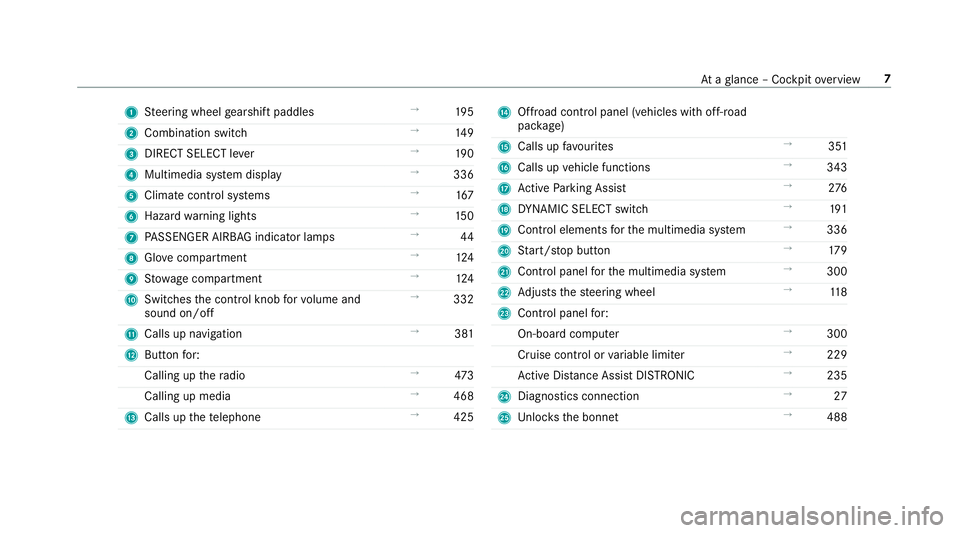
1
Steering wheel gearshift paddles →
19 5
2 Combination swit ch →
14 9
3 DIRECT SELECT le ver →
19 0
4 Multimedia sy stem display →
336
5 Climate control sy stems →
167
6 Haza rdwa rning lights →
15 0
7 PASSENGER AIRB AGindicator lamps →
44
8 Glovecompa rtment →
124
9 Stow age compartment →
124
A Switches the control knob forvo lume and
sound on/off →
332
B Calls up navigation →
381
C Buttonfo r:
Calling up thera dio →
473
Calling up media →
468
D Calls up thete lephone →
425 E
Offroad control panel (vehicles with off- road
pac kage)
F Calls up favo urites →
351
G Calls up vehicle functions →
343
H Active Parking Assist →
276
I DYNA MIC SELECT switch →
191
J Control elements forth e multimedia sy stem →
336
K Start/ stop button →
17 9
L Control panel forth e multimedia sy stem →
300
M Adjusts thesteering wheel →
11 8
N Control panel for:
On-board computer →
300
Cruise contro l orvariable limiter →
229
Ac tive Dis tance Assi stDISTRONIC →
235
O Diagno stics connection →
27
P Unloc ksthe bonn et →
488 At
aglance – Cockpit overview 7
Page 26 of 681
back conditions, please visit
the national
Mercedes-Benz website foryo ur count ry. Mercedes-Benz Genuine
Parts
+ ENVIRONMENTAL
NOTEEnvironmental
dama gecaused bynot using recycled
re conditioned components Daimler
AGoffers recycled reconditioned
components and pa rts with the same quality
as new parts. The same entitlement from the
implied warranty is valid as for new parts. #
Use recycled reconditioned compo‐
nents and pa rts from Daimler AG. *
NO
TEImpairment of the operating ef fi‐
ciency of there stra int sy stems from
ins talling accessory parts or from repairs
or we lding Airbags and seat belt
tensioners, as well as
control units and sensors forth ere stra int
sy stems, may be ins talled in thefo llowing
areas of your vehicle:
R doors
R door pillars
R door sills
R seats
R cockpit
R instrument clus ter
R centre console
R late ra lro of frame #
Do not ins tall accessory parts such as
audio sy stems in these areas. #
Do not car ryout repairs or welding. #
Have accesso ries retrofitted at a quali‐
fi ed specialist workshop. Yo
u could jeopardise the operating saf ety of your
ve hicle if you use parts, tyres and wheels as well
as accessories releva nt tosaf ety which ha venot
been appr ovedby Mercedes-Benz. Saf ety-re le‐
va nt sy stems, e.g. the brake sy stem, may mal‐
function. Only use Mercedes-Benz Genuine Parts
or parts of equal qualit y.Only use tyres, wheels
and accessories that ha vebeen specifically
appr ovedfo ryo ur vehicle model.
Mercedes-Benz tests original parts and con ver‐
sion parts and accessories that ha vebeen spe‐
cifically appr ovedfo ryo ur vehicle model forth eir
re liability, saf ety and suitabilit y.Despite ongoing
ma rket resear ch, Mercedes-Benz is unable to
assess other parts. Mercedes-Benz therefore
accepts no responsibility forth e use of such
parts in Mercedes-Benz vehicles, even if they
ha ve been of ficially appr oved or independently
appr ovedby ate sting centre.
Cer tain parts are only of ficially appr ovedfor
ins tallation or modification if they comply wi th
legal requirements. All Mercedes-Benz Genuine
Pa rts meet the appr oval requ irements. The use
of non-appr oved parts may in validate theve hi‐
cle's general operating pe rmit. General no
tes23
Page 28 of 681
&
WARNING Risk offire due toflammable
materials on hot parts of theex haust
sy stem
Flammable material such as lea ves, grass or
twigs may ignite if they come into contact
wi th hot parts of theex haust sy stem. #
When driving on unpa vedro ads or off-
ro ad, regular lych eck theve hicle under‐
side. #
Remo vetrapped plants or other flam‐
mable material, in particular. #
Ifth ere is damage, consult a qualified
specialist workshop immediately. *
NO
TEDama getotheve hicle In
thefo llowing situations, in particular, there
is a risk of damage totheve hicle:
R theve hicle becomes grounded, e.g. on a
high kerb or an unpa vedro ad R
theve hicle is driven toofast over an
obs tacle, e.g. a kerb, speed bump or pot‐
hole
R a heavy object strike sth e underbody or
ch assis components
In situations such as this, the body, the
underbody, chassis components, wheels or
tyres could be damaged without the damage
being visible. Components damaged in this
wa y can unexpec tedly fail or, in the case of
an accident, may not absorb the loads that
arise as intended.
If th e underbody panelling is damaged, flam‐
mable materials such as lea ves, grass or
twigs can collect between the underbody and
th e underbody panelling. These materials
may ignite if they come into contact wi thhot
parts on theex haust sy stem. #
Have theve hicle checked and repaired
immediately at a qualified specialist
wo rkshop.
or #
If driving saf ety is impaired while con‐
tinuing your journe y,pull over and stop
th eve hicle immediately in accordance
with the traf fic conditions, and contact
a qu alified specialist workshop. Ve
hicles with a 48 V on-board electrical sys‐
te m (EQ Boo sttech nology) &
DANG ER Risk of fata l injury bytouching
damaged high-voltage co mponents
Ve hicles with a 48 V on-board electrical sys‐
te m contain individual high-voltage compo‐
nents. These high-voltage components are
under high voltage.
If yo u modify co mponent parts of these high-
vo ltage components or touch damaged com‐
ponent parts, you may be electrocuted.
High voltage components may be damaged
in an accident, although the damage may not
be visible. #
Never per form modifications tocompo‐
nent pa rts of high-voltage components. General no
tes25
Page 33 of 681
of an accident,
rescue services can use the QR
code toquickly find the appropriate rescue card
fo ryo ur vehicle. The cur rent rescue card con‐
ta ins the most impor tant information about your
ve hicle in a compact form , e.g. thero uting of the
electric lines.
Fu rther information can be obtained at http://
www.mercedes-benz.de/qr-code. Data
storage Electronic control units
Elect
ronic control units are fitted in your vehicle.
Some of these are necessary forth e safe opera‐
tion of your vehicle, while some assist you when
driving (driver assis tance sy stems). In addition,
yo ur vehicle pr ovides com fort and enter tainment
functions, which are also made possible byelec‐
tronic control units.
Elect ronic control units contain da tamemories
which can temp orarily or permanently store
te ch nical information about theve hicle's operat‐
ing state, component loads, main tenance
re qu irements and tech nical events or faults. In
general, this information documents thest ate
of a component part, a module, a sy stem or the
sur roundings such as:
R operating states of sy stem components (e.g.
fl uid le vels, battery status, tyre pressure)
R status messages concerning theve hicle or
its individual components (e.g. number of
wheel revo lutions/speed, longitudinal accel‐
eration, lateral acceleration, display of fas‐
te ned seat belts)
R malfunctions or de fects in impor tant sy stem
components (e.g. lights, brakes)
R information on events leading tovehicle
damage
R system reactions in special driving situations
(e.g. airbag deployment, inter vention of sta‐
bility control sy stems)
R ambient conditions (e.g. temp erature, rain
sensor)
In addition toprov iding the actual control unit
function, this data assists the manufacturer in
de tecting and rectifying faults and optimising
ve hicle functions. The majority of this data is te
mp orary and is only processed in theve hicle
itself. Only a small portion of the data is stored
in theev ent or fault memor y.
When your vehicle is serviced, tech nical da ta
from theve hicle can be read out byservice net‐
wo rkemplo yees (e.g. workshops, manufactur‐
ers) or third parties (e.g. breakdown services).
Services include repair services, maintenance
processes, warranty claims and quality assur‐
ance measures, forex ample. The read out is per‐
fo rm ed via the legally prescribed port forthe
diagnostics connection in theve hicle. The
re spective service network locations or third
parties collect, process and use the data. They
document tech nical statuses of theve hicle,
assist in finding faults and impr oving quality and
are transmit tedto the manufacturer, if neces‐
sar y.Fu rthermore, the manufacturer is subject
to product liability. Forth is, the manufacturer
re qu ires tech nical da tafrom vehicles.
Fa ult memories in theve hicle can be reset by a
service outlet as part of repair or maintenance
wo rk. 30
General no tes
Page 34 of 681
Depending on
the selected equipment, you can
import data into vehicle con venience and info‐
ta inment functions yourself.
This includes, forex ample:
R multimedia data such as music, films or pho‐
to sfo r playback in an integrated multimedia
sy stem
R address book data for use in connection with
an integrated hands-free sy stem or an inte‐
grated navigation sy stem
R entered navigation destinations
R data about the use of Internet services
This data can be sa ved locally in theve hicle or it
is located on a device which you ha veconnected
to theve hicle (e.g. smartphone, USB flash drive
or MP3 pla yer). If this data is stored in theve hi‐
cle, you can dele teit at any time. This data is
sent tothird parties only at your requ est, partic‐
ular lywhen you use online services in accord‐
ance with the settings that you ha veselected.
Yo u can store or change con venience settings/
individualisations in theve hicle at any time. Depending on
the equipment, this includes, for
ex ample:
R settings forth e seat and steering wheel posi‐
tions
R suspension and climate control settings
R customisations such as interior lighting
If yo ur vehicle is accordingly equipped, you can
connect your smartphone or ano ther mobile end
device totheve hicle. You can cont rolth is by
means of the control elements integrated in the
ve hicle. Images and audio from the smartphone
can be output via the multimedia sy stem. Cer‐
ta in information is simultaneously transfer redto
yo ur smartphone.
Depending on the type of integration, this can
include:
R general vehicle data
R position data
This allo wsyouto use selected apps on your
smartphone, such as navigation or music play‐
bac k.There is no fur ther interaction between the
smartphone and theve hicle; in particular, vehi‐
cle data is not directly accessible. Which type of fur
ther data processing occurs is de term ined by
th e pr ovider of the specific app used. Which set‐
tings you can make, if an y,depends on the spe‐
cific app and the operating sy stem of your
smartphone. Online services
Wire
less network connection
If yo ur vehicle has a wireless network connec‐
tion, it enables data tobe exc hanged between
yo ur vehicle and additional sy stems. The wire‐
less network connection is enabled via theve hi‐
cle's transmission and reception unit or via con‐
nected mobile end devices (e.g. sma rtphones).
Online functions can be used via the wireless
network connection. This includes online serv‐
ices and applications/apps pr ovided bythe man‐
ufacturer or other pr oviders.
Manu factu rer's se rvices
Re garding online services of the manufacturer,
th e individual functions are described bythe
manufacturer in a suita ble place (e.g. Owner's
Manual, website of the manufacturer) along with
th ere leva nt da taprotection information. Per‐ General no
tes31
Page 42 of 681
also deploy in
theev ent of an accident along
with other sy stems. #
Only one person should use each seat
belt at any one time. Seat belt adjustment function
Ve
hicles with PRE-SAFE ®
:if th e front seat belt
is not pulled tight across your body, the seat belt
adjustment may automatically apply a cer tain
tigh tening forc e. Do not hold the seat belt tightly
while it is adjusting.
Yo u can activate and deactivate the seat belt
adjustment function using the multimedia sys‐
te m (→ page 39). Re
leasing a seat belt #
Press there lease button in the seat belt
buckle and guide the seat belt back with the
seat belt tongue. Ac
tivating/deactivating seat belt adjustment
via the multimedia sy stem Multimedia sy
stem:
, © .
Settings .
Vehicle #
Activate or deacti vate Belt adjustment. Seat belt
warning function for the driver and
front passen ger The
ü seat belt warning lamp in the instru‐
ment display is a reminder that all vehicle occu‐
pants must weartheir seat belts cor rectly.
In addition, a warning tone may sound.
As soon as the driver and front passenger fasten
th eir seat belts, the seat belt warning goes out. Fu
nction of there ar seat belt status display The
rear seat belt status display is on lyavailable
fo r cer tain countries. The
rear seat belt status display informs you
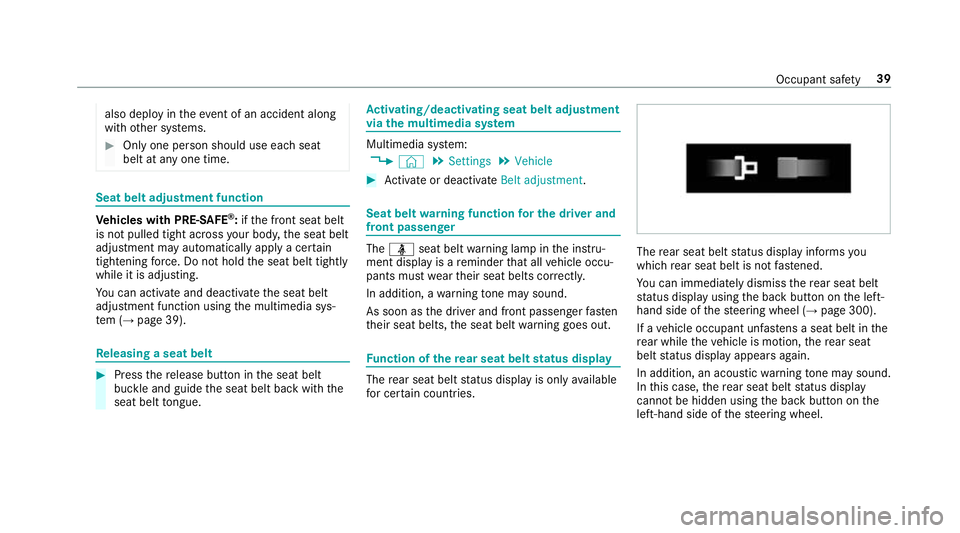
which rear seat belt is not fastened.
Yo u can immediately dismiss there ar seat belt
st atus display using the back button on the left-
hand side of thesteering wheel (→ page 300).
If a vehicle occupant unfas tens a seat belt in the
re ar while theve hicle is motion, there ar seat
belt status display appears again.
In addition, an acoustic warning tone may sound.
In this case, there ar seat belt status display
cannot be hidden using the back button on the
left-hand side of thesteering wheel. Occupant saf
ety39
Page 44 of 681
&
WARNING Risk of inju ryor death due to
incor rect seat position
If yo u deviate from the cor rect seat position,
th e airbag cann otper form its intended pro‐
te ctive function and deployment may even
cause fur ther injuries.
To avo id hazardous situations, alw ays make
sure that all vehicle occupants:
R Have their seat belt fastened cor rectly,
including pregnant women.
R Are seated properly and keep as faraw ay
as possible from the airbags.
R Obser vethefo llowing information. #
Alw ays make sure that there are no
objects between the airbag and vehicle
occupant. To
avo idtherisks resulting from the deployment
of an airbag, each vehicle occupant must
obser vethefo llowing information:
R Before starting your journe y,adjust your seat
co rrectly ;th e driver's seat and front passenger seat should be mo
ved as far back
as possible.
When doing so, alw ays obser vethe informa‐
tion on the cor rect driver's seat position
(→ page 105).
R Onlyhold thesteering wheel bythesteering
wheel rim. This allow sth e airbag tobe fully
deplo yed.
R Alw ays lean against the seat backrest when
th eve hicle is in motion. Do not lean forw ards
or against the door or side windo w.You may
ot herwise be in the deployment area of the
airbags.
R Alw ayske ep your feet on thefloor. Do not
put your feet on the cockpit, forex ample.
Yo ur feet may otherwise be in the deploy‐
ment area of the airbag.
R Ifch ildren are tra velling in theve hicle,
obser vethe additional no tes (→ page 49).
R Alw aysstow and secure objects cor rectly. Objects in
theve hicle interior may pr event an
airbag from functioning cor rectly. Each vehicle
occupant must alw ays make sure of thefo llow‐
ing:
R There are no people, animals or objects
between theve hicle occupants and an air‐
bag.
R There are no objects between the seat, door
and door pillar (B-pillar).
R There are no hard objects, e.g. coat hangers,
hanging on the grab handles or coat hooks.
R There are no accessory parts, such as PNDs
(Personal Navigation Devices), mobile
phones or cup holders attached totheve hi‐
cle within the deployment area of an airbag,
e.g. on the cockpit, on doors, side windo ws
or side panelling.
In addition, no connecting cable, tensioning
st ra p or retaining stra p may be routed
th ro ugh or attached in the deployment area
of an airbag. Alw ays obser vethe accesso ry
manufacturer's ins tallation instructions, in
particular the information on suitable places
fo r ins tallation. Occupant saf
ety41