dashboard MERCEDES-BENZ GLE SUV 2021 Owners Manual
[x] Cancel search | Manufacturer: MERCEDES-BENZ, Model Year: 2021, Model line: GLE SUV, Model: MERCEDES-BENZ GLE SUV 2021Pages: 545, PDF Size: 9.37 MB
Page 430 of 545
Display messages
Possible causes/consequences and 0050 0050Solutions
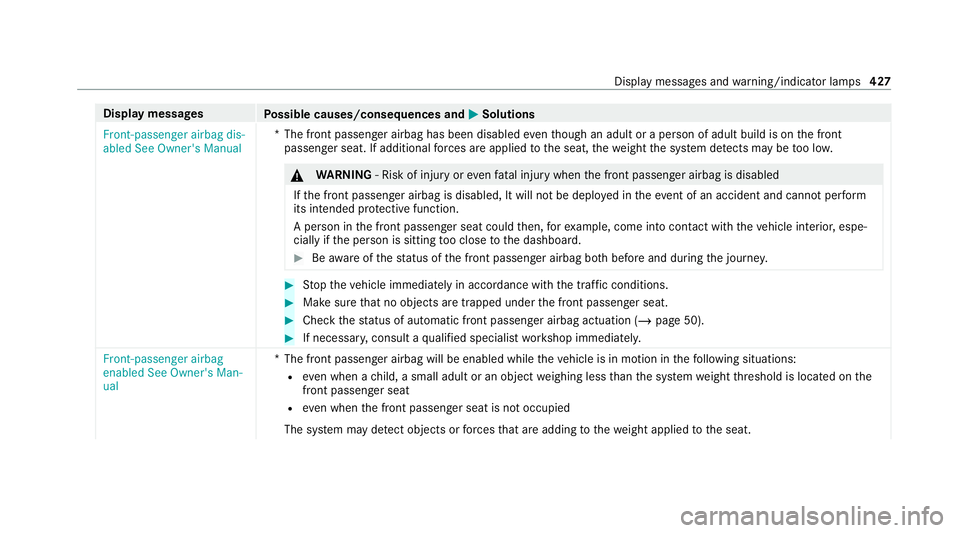
Front-passenger airbag dis-
abled See Owner's Manual *T
he front passenger airbag has been disabled eventh ough an adult or a person of adult build is on the front
passenger seat. If additional forc es are applied tothe seat, thewe ight the sy stem de tects may be too lo w. &
WARNING ‑ Risk of inju ryor eve nfa ta l injury when the front passenger airbag is disabled
If th e front passenger airbag is disabled, It will not be deplo yed in theeve nt of an accident and cannot pe rform
its intended pr otective function.
A person in the front passenger seat could then, forex ample, come into con tact with th eve hicle interior, espe‐
cially if the person is sitting too close tothe dashboard. #
Beaware of thest atus of the front passenger airbag bo thbefore and during the journe y. #
Stop theve hicle immediately in accordance with the traf fic conditions. #
Makesure that no objects are trapped under the front passenger seat. #
Check thest atus of automatic front passenger airbag actuation (/ page 50).#
If necessar y,consult a qualified specialist workshop immediatel y.
Front-passenger airbag
enabled See Owner's Man-
ual *T
he front passenger airbag will be enabled while theve hicle is in motion in thefo llowing situations:
R even when a child, a small adult or an object weighing less than the sy stem weight thre shold is located on the
front passenger seat
R even when the front passenger seat is not occupied
The sy stem may de tect objects or forc es that are adding tothewe ight applied tothe seat. Display messages and
warning/indicator lamps 427
Page 512 of 545
Cup holder
Swit ching the cooling/heating func‐
tion on/off............................................1 35D
Dashboard see Cockpit
Dashcam Notes..................................................... 319
Selecting a USB device......................... 320
St arting/s topping video recording........ 320
Data acquisition Vehicle.................................................... 35
Data pr otection rights
Data storage............................................ 38
Data storage
Data pr otection rights............................. 38
Electro nic control units........................... 35
Online service s........................................ 37
Ve hicle.................................................... 35
Deactivating the alarm (A TA )...................... 99
Deale rship
see Qualified speciali stwo rkshop Declaration of conformity
Electromagnetic compatibility.................26
Jack......................................................... 30
Specific absor ption rate.......................... 26
TIREFIT kit............................................... 31
Wi reless vehicle components.................. 26
Decorative foil (cleaning instructions) .... 360
DeNOx agent see AdBlue ®
De stination entry
En tering a POI or address...................... 315
De tecting inat tentiveness
see ATTENTION ASSIST
Diagnostics connection ..............................31
Diesel Low outside temp eratures..................... 413
No tes..................................................... 413
Digital Owner's Manual .............................. 20
Dinghy towing
see Tow- bar sy stem
DIRECT SELECT le ver
Engageing reve rsege ar........................ .193
Engaging drive position.......................... 194Engaging neutral....................................
19 3
Engaging pa rkposition automatically.... 19 3
Fu nction................................................ 19 2
Selecting pa rkposition.......................... 19 3
Display (care) ............................................ .363
Display (MBUX multimedia sy stem)
Home screen........................................ .300
Operating.............................................. 301
Display (on-board comp uter)
Displ ays on the multifunction displa y.... 296
Displ aymessage
Calling up (on-board compu ter)............. 425
No tes....................................................4 25
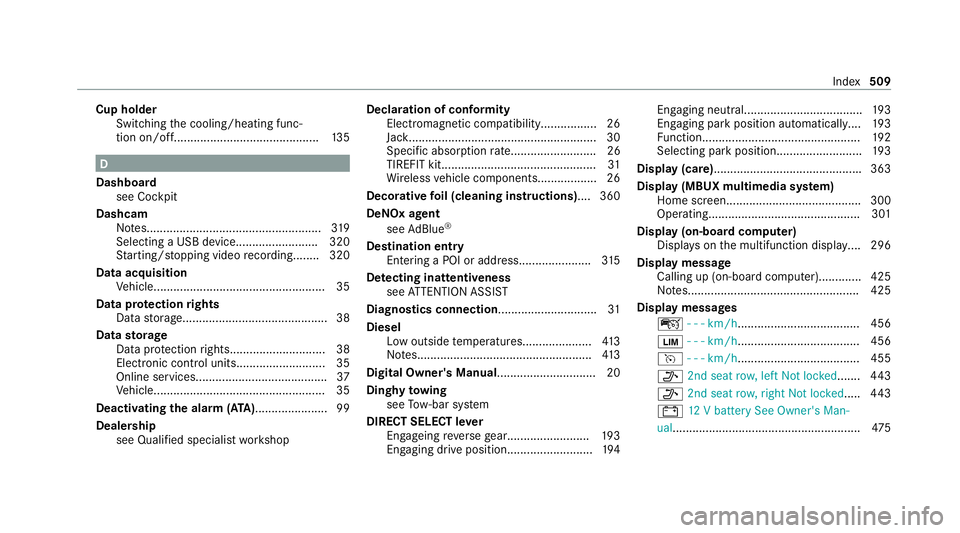
Display messages ç - - - km/h ..................................... 456
00CB - - - km/h ..................................... 456
h - - - km/h ..................................... 455
006F 2nd seat row, left Not locked ....... 443
006F 2nd seat row, right Not locked ..... 443
003D 12V battery See Owner's Man‐
ual......................................................... 475 Index
509
Page 521 of 545
Fu
nction seat (rear)
see Seat (rear)
Fu ses
Before replacing a fuse.......................... 384
Fu se assignment diagram..................... 384
Fu se box in the engine compartmen t.... 385
Fu se box in the front passenger foot‐
we ll....................................................... 386
Fu se box in the load compartment........ 386
Fu se box on the dashboard................... 386
No tes....................................................3 84G
Garage door opener Clearing the memory.............................2 08
Programming buttons............................ 206
Re solving problems...............................2 07
Synchronising thero lling code..............2 07
Garage door opene rs
Opening/closing the door.....................2 08
Gearshift recommendation..................... .195
Gene ral operating permit number (EU)... 408
Genuine parts............................................. .23Glide mode.................................................
19 6
Glo vebox
Air vent.................................................. 171 H
Handbrake see Electric parking brake
Handling characteristics (unusual)........ .387
HANDS-FREE ACCESS .................................. 87
Hazard warning lights.............................. .144
Head restra int
Fr ont (adjusting mechanically)..............1 08
Fr ont (luxury head restra int)................. .109
Re ar (adjusting).................................... .109
Re ar (fitting/removing)......................... .110
Re ar (luxury head restra int ).................... 111
Head-up display Adjusting display elements (on-board
compu ter).............................................. 297
Ad justing the brightness (on-board
computer).............................................. 297
Fu nction................................................ 296
Menu (on-board compu ter).................... 297 Operating
the memory function.............1 19
Setting the position (on-board com‐
puter)....................................................2 97
Switching on/of f................................... 298
Headlamp flashing.................................... 14 3
Headlamps see Automatic driving lights
Heating see Climate control
Help call see Mercedes-Benz emergency call sy stem
High beam Activating/deactivating......................... 14 3
Ad aptive Highbeam Assist Plus............ .148
High beam see Adaptive Highbeam Assist
HIGH RANGE Shifting.................................................. 197
High-pressure cleaner (care)................... 359
Hill Start Assist......................................... .219
HOLD function Function/no tes...................................... 218
Switching on/of f................................... 218518
Index