direct select MERCEDES-BENZ GLE SUV 2021 Owners Manual
[x] Cancel search | Manufacturer: MERCEDES-BENZ, Model Year: 2021, Model line: GLE SUV, Model: MERCEDES-BENZ GLE SUV 2021Pages: 545, PDF Size: 9.37 MB
Page 10 of 545
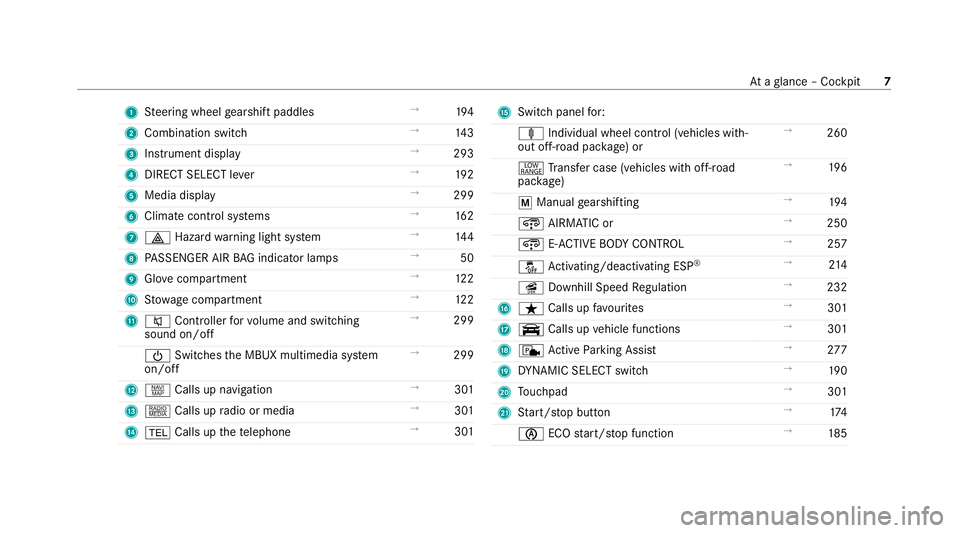
1
Steering wheel gearshift paddles →
194
2 Combination swit ch →
14 3
3 Instrument display →
293
4 DIRECT SELECT le ver →
19 2
5 Media display →
299
6 Climate contro l systems →
16 2
7 002F Hazardwa rning light sy stem →
14 4
8 PASSENGER AIR BAG indicator lamps →
50
9 Glovecompa rtment →
12 2
A Stow age compartment →
12 2
B 0063 Controller forvo lume and switching
sound on/off →
299
00D0 Switches the MBUX multimedia sy stem
on/off →
299
C z Calls up navigation →
301
D | Calls up radio or media →
301
E 002B Calls up thete lephone →
301 F
Swit chpanel for:
ä Individual wheel control (vehicles with‐
out off-road pac kage ) or →
260
002E Trans fer case (vehicles with off-road
pac kage) →
19 6
0063 Manual gearshifting →
194
¿ AIRMATIC or →
250
¿ E-AC TIVE BODY CONTROL →
257
00BB Activating/deactivating ESP ®
→
214
î Downhill Speed Regulation →
232
G ß Calls up favo urites →
301
H y Calls up vehicle functions →
301
I c Active Parking Assist →
277
J DYNA MIC SELECT switch →
19 0
K Touchpad →
301
L Start/ stop button →
174
00D6 ECOstart/ stop function →
185 At
aglance – Cockpit 7
Page 23 of 545
Calling up
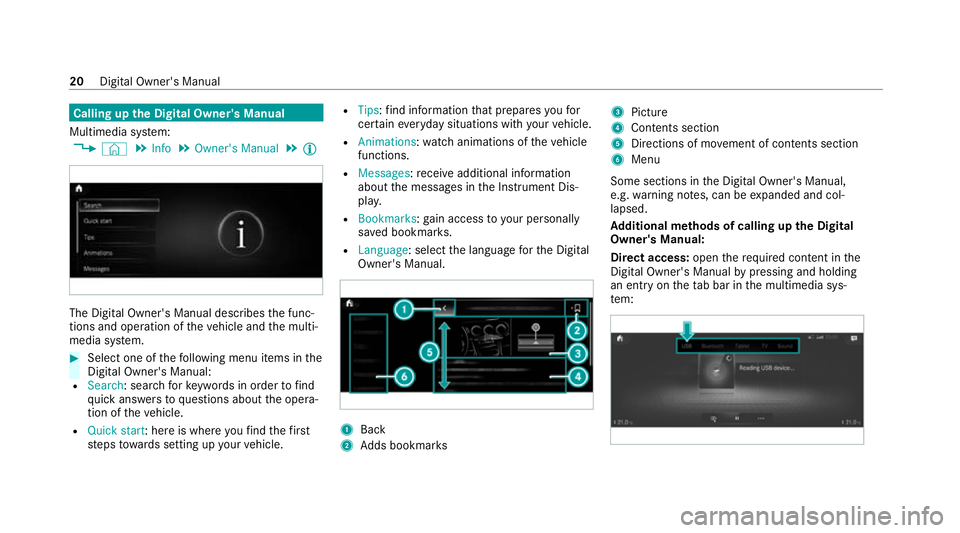
the Digital Owner's Manual
Multimedia sy stem:
4 © 5
Info 5
Owner's Manual 5
Õ The Digital Owner's Manual describes
the func‐
tions and operation of theve hicle and the multi‐
media sy stem. #
Select one of thefo llowing menu items in the
Digital Owner's Manual:
R Search: sea rchfo rke ywords in order tofind
qu ick answers toquestions about the opera‐
tion of theve hicle.
R Quick start: here is where youfind thefirst
st eps towa rds setting up your vehicle. R
Tips: find information that prepares youfor
cer tain eve ryday situations with your vehicle.
R Animations: watch animations of theve hicle
functions.
R Messages: recei veadditional information
about the messages in the Instrument Dis‐
pla y.
R Bookmarks: gain access to your personally
sa ve d bookmar ks.
R Language: select the language forth e Digital
Owner's Manual. 1
Back
2 Adds bookmar ks 3
Picture
4 Contents section
5 Directions of mo vement of contents section
6 Menu
Some sections in the Digital Owner's Manual,
e.g. warning no tes, can be expanded and col‐
lapsed.
Ad ditional methods of calling up the Digital
Owner's Manual:
Di rect access: openthere qu ired conte nt inthe
Digital Owner's Manual bypressing and holding
an ent ryon theta b bar in the multimedia sys‐
te m: 20
Digital Owner's Manual
Page 40 of 545
data can also be used
toexamine the cus tom‐
er's warranty and guarantee claims.
Fa ult memories in theve hicle can be reset by a
service outlet or at your requ est as part of repair
or maintenance work.
Con venience and inf otainment functions
Yo u can store con venience settings and individ‐
ual settings in theve hicle and change or reset
th em at any time.
Depending on theve hicle equipment, this
includes thefo llowing settings, forex ample:
R seat and steering wheel positions
R suspension and climate control settings
R individual settings, such as interior lighting
Depending on the selected equipment, you can
import data into vehicle inf otainment functions
yo urself.
Depending on theve hicle equipment, this
includes thefo llowing data, forex ample:
R multimedia data, such as music, films or pho‐
to sfo r playback in an integrated multimedia
sy stem R
address book data for use in connection with
an integrated hands-free sy stem or an inte‐
grated navigation sy stem
R entered navigation destinations
R data about the use of Internet services
These data for con venience and inf otainment
functions may be sa ved locally in theve hicle or
th ey may be located on a device which you ha ve
connected totheve hicle, such as a smartphone,
USB flash drive or MP3 pla yer.If yo u ha ve
entered these data yourself, you can dele tethem
at any time.
This data is transmit ted from theve hicle tothird
parties only at your requ est. This applies, in par‐
ticular, when you use online services in accord‐
ance with the settings that you ha veselected.
Smartphone integ ration (e.g. Android Autoor
Apple CarPlay ®
)
If yo ur vehicle is accordingly equipped, you can
connect your smartphone or ano ther mobile end
device totheve hicle. You can then control them
by means of the control elements integrated in
th eve hicle. Images and audio from the smart‐ phone can be output via
the multimedia sy stem.
Cer tain information is simultaneously transfer‐
re dto yo ur smartphone. Depending on the type
and integration, this includes position data, day/
night mode and other general vehicle statuses.
Fo r more information please consult the Owner's
Manual of theve hicle/inf otainment sy stem.
This integration allo wsthe use of selected
smartphone apps, such as navigation or music
pla yer apps. There is no fur ther interaction
between the smartphone and theve hicle; in par‐
ticular, vehicle data is not directly accessible.
The type of additional data processing is de ter‐
mined bythe pr ovider of the app being used.
Which settings you can make, if an y,depends on
th e specific app and the operating sy stem of
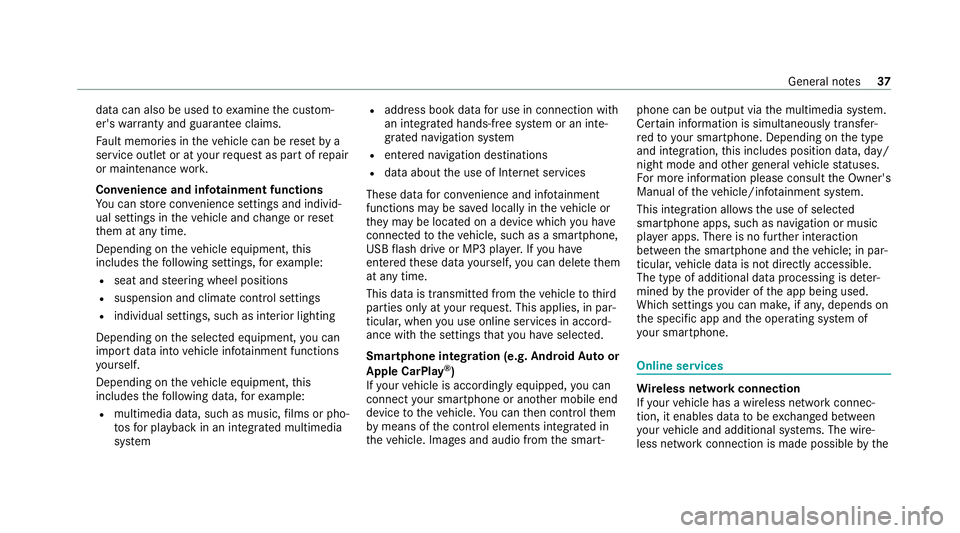
yo ur smartphone. Online services
Wi
reless network connection
If yo ur vehicle has a wireless network connec‐
tion, it enables data tobe exc hanged between
yo ur vehicle and additional sy stems. The wire‐
less network connection is made possible bythe Gene
ral no tes 37
Page 114 of 545
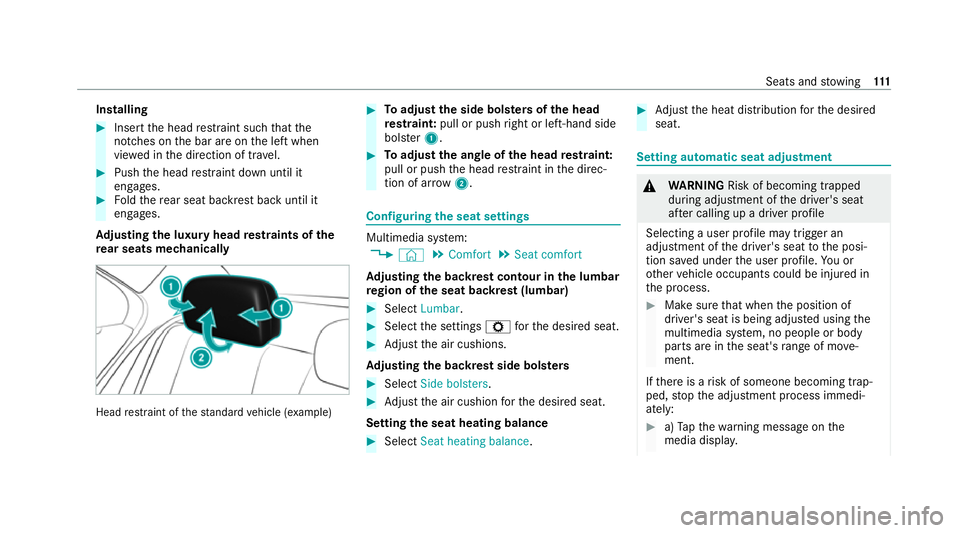
Installing
#
Insert the head restra int such that the
notches on the bar are on the left when
vie we d in the direction of tra vel. #
Push the head restra int down until it
engages. #
Foldthere ar seat backrest back until it
engages.
Ad justing the luxury head restra ints of the
re ar seats mechanically Head
restra int of thest andard vehicle (e xamp le) #
Toadjust the side bols ters of the head
re stra int: pull or push right or left-hand side
bols ter1. #
Toadjust the angle of the head restra int:
pull or push the head restra int in the direc‐
tion of ar row2. Configuring
the seat settings Multimedia sy
stem:
4 © 5
Comfort 5
Seat comfort
Ad justing the backrest contour in the lumbar
re gion of the seat backrest (lumbar) #
Select Lumbar . #
Select the settings Zforth e desired seat. #
Adjust the air cushions.
Ad justing the backrest side bols ters #
Select Side bolsters . #
Adjust the air cushion forth e desired seat.
Setting the seat heating balance #
Select Seat heating balance. #
Adjust the heat distribution forth e desired
seat. Setting automatic seat adjustment
&
WARNING Risk of becoming trapped
du ring adjustment of the driver's seat
af te r calling up a driver profile
Selecting a user profile may trigger an
adju stment of the driver's seat tothe posi‐
tion sa ved under the user profile. You or
ot her vehicle occupants could be injured in
th e process. #
Make sure that when the position of
driver's seat is being adjus ted using the
multimedia sy stem, no people or body
parts are in the seat's range of mo ve‐
ment.
If th ere is a risk of someone becoming trap‐
ped, stop the adjustment process immedi‐
ately: #
a)Tapth ewa rning message on the
media displa y. Seats and
stowing 111
Page 115 of 545
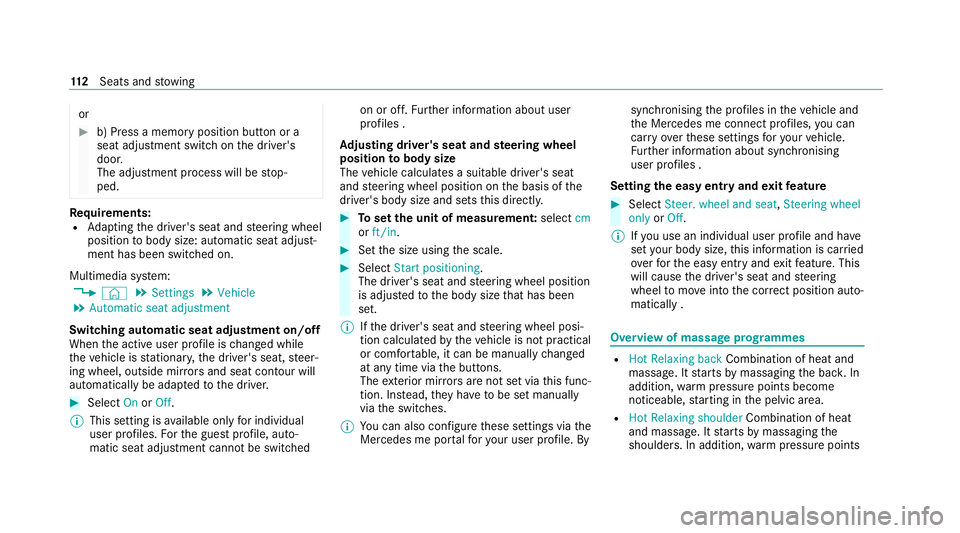
or
#
b) Press a memory position button or a
seat adjustment switch on the driver's
door.
The adjustment process will be stop‐
ped. Re
quirements:
R Adapting the driver's seat and steering wheel
position tobody size: automatic seat adjust‐
ment has been switched on.
Multimedia sy stem:
4 © 5
Settings 5
Vehicle
5 Automatic seat adjustment
Switching automatic seat adjustment on/off
When the active user profile is changed while
th eve hicle is stationar y,the driver's seat, steer‐
ing wheel, outside mir rors and seat con tour will
automatically be adap tedto the driver. #
Select OnorOff.
% This setting is available on lyfor individual
user profiles. Forth e guest profile, auto‐
matic seat adjustment cannot be switchedon or off.
Further information about user
profiles .
Ad justing driver's seat and steering wheel
position tobody size
The vehicle calculates a suitable driver's seat
and steering wheel position on the basis of the
driver's body size and sets this directly. #
Toset the unit of measurement: selectcm
or ft/in. #
Set the size using the scale. #
Select Start positioning.
The driver's seat and steering wheel position
is adjus tedto the body size that has been
set.
% Ifth e driver's seat and steering wheel posi‐
tion calculated bytheve hicle is not practical
or comfor table, it can be manually changed
at any time via the buttons.
The exterior mir rors are not set via this func‐
tion. Ins tead, they have tobe set manually
via the switches.
% You can also configure these settings via the
Mercedes me por talfo ryo ur user profile. By syn
chro nising the profiles in theve hicle and
th e Mercedes me connect profiles, you can
car ryove rth ese settings foryo ur vehicle.
Fu rther information about synchronising
user profiles .
Setting the easy entry and exitfeature #
Select Steer. wheel and seat, Steering wheel
only orOff.
% Ifyo u use an individual user profile and ha ve
set your body size, this information is car ried
ove rfo rth e easy entry andexitfeature. This
will cause the driver's seat and steering
wheel tomo veinto the cor rect position auto‐
matically . Overview of massage prog
rammes R
Hot Relaxing back Combination of heat and
massa ge. It starts bymassaging the bac k.In
addition, warm pressure points become
noticeable, starting in the pelvic area.
R Hot Relaxing shoulder Combination of heat
and massage. It starts bymassaging the
shoulders . In addition, warm pressure points 11 2
Seats and stowing
Page 162 of 545
In
thefo llowing situations, the front-passen ger
outside mir ror will swivel down wards in the
direction of there ar wheel on the front passeng‐
er's side:
R the parking position is stored (/ page159)
R The fron t-passenger mi rror is selected
R Reversege ar is engaged.
The front-passenger outside mir ror will mo ve
back toits original position in thefo llowing sit‐
uations:
R You shift the transmission toano ther trans‐
mission position
R You are tr avelling at speeds greater than
15 km/h
R You press the button forth e outside mir ror
on the driver's side St
oring and calling up the pa rking position of
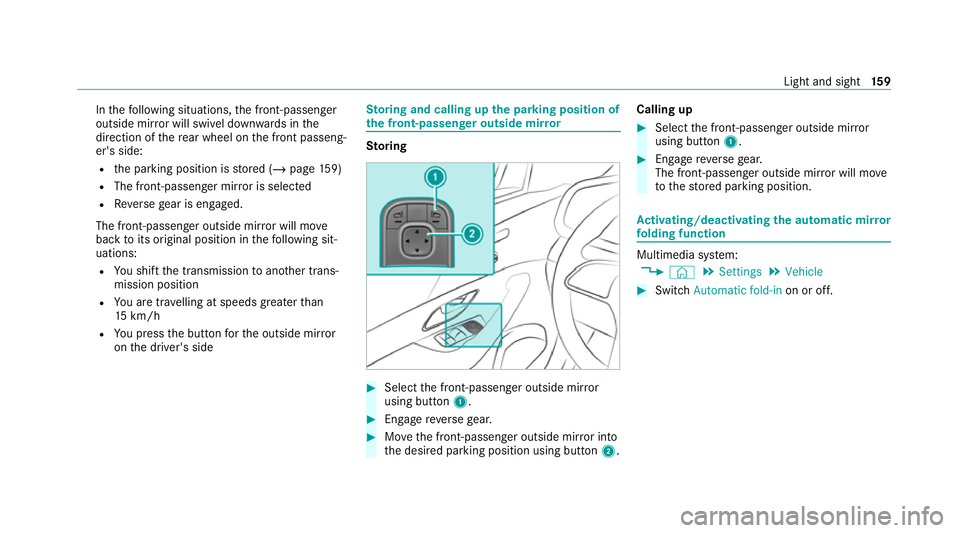
th e front-passenger outside mir ror Sto
ring #
Select the front-passen ger outside mir ror
using but ton1. #
Engage reve rsege ar. #
Movethe front-passen ger outside mir ror into
th e desired parking position using button 2.Calling up #
Select the front-passen ger outside mir ror
using but ton1. #
Engage reve rsege ar.
The front-passenger outside mir ror will mo ve
to thestored parking position. Ac
tivating/deactivating the automatic mir ror
fo lding function Multimedia sy
stem:
4 © 5
Settings 5
Vehicle #
Switch Automatic fold-in on or off. Light and sight
15 9
Page 195 of 545
The
following information is displa yed:
R theve hicle inclination in longitudinal
direction in percent (%)
R the lateral inclination of theve hicle in
degrees (°)
R the cur rently achi eved score forth e ongo‐
ing trip
R a tip forth e upcoming driving manoeuvre #
Tosto p the displ ay:select End trip .
An evaluation of the trip is displa yed. It
sho ws th e achie ved score and a message, for
ex ample Great job!. Au
tomatic transmission DIRECT SELECT le
verFu
nction of the DIRECT SELECT le ver&
WARNING Risk of accident due toincor‐
re ct gearshifting
If th e engine speed is higher than the idle
speed and you en gage the transmission posi‐ tion
005Bor005E, theve hicle may accelerate
sharply. #
Ifyo u en gage the transmission position
005B or005E when theve hicle is at a
st andstill, alw ays depress the brake
pedal firm lyand do not accelerate at
th e same time. &
WARNING Risk of accident and inju ry
due toleaving children unat tended in the
ve hicle
If ch ildren are left unat tended in theve hicle,
th ey could, in part icular:
R open doors, thereby endangering other
persons or road users.
R get out and be stru ck byoncoming traf‐
fi c.
R ope rate ve hicle equipment and become
trapped, forex ample. In addition,
thech ildren could also set the
ve hicle in motion by,fo rex ample:
R releasing the parking brake.
R changing the transmission position.
R starting theve hicle. #
Never lea vechildren unat tended in the
ve hicle. #
When leaving theve hicle, alw aysta ke
th eke y with you and lock theve hicle. #
Keep theve hicle key out of there ach of
ch ildren. Use
the DIRECT SELECT le verto switch the
transmission position. The cur rent transmission
position is displ ayed in the multifunction displa y.19 2
Driving and pa rking
Page 196 of 545
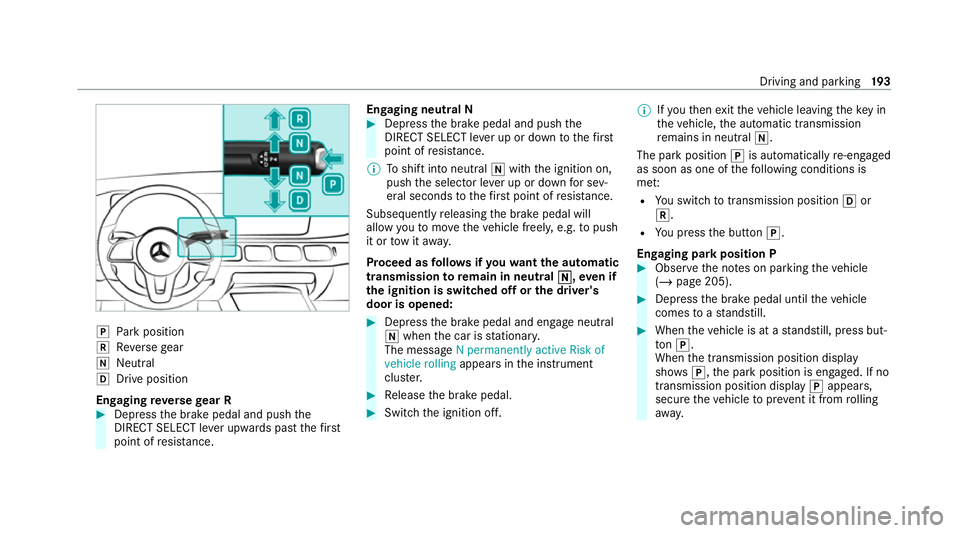
005D
Park position
005E Reversege ar
005C Neut ral
005B Drive position
En gaging reve rsege ar R #
Depress the brake pedal and push the
DIRECT SELECT le ver upwards past thefirst
point of resis tance. En
gaging neutral N #
Depress the brake pedal and push the
DIRECT SELECT le ver up or down tothefirst
point of resis tance.
% Toshift into neutral 005Cwith the ignition on,
push the selector le ver up or down for sev‐
eral seconds tothefirs t point of resis tance.
Subsequently releasing the brake pedal will
allow youto mo vetheve hicle freel y,e.g. topush
it or tow it away.
Proceed as follo ws ifyo uwa ntthe automatic
transmission toremain in neutral 005C 005C,even if
th e ignition is switched off or the driver's
door is opened: #
Dep ress the brake pedal and engage neutral
005C when the car is stationar y.
The message N permanently active Risk of
vehicle rolling appears inthe instrument
clus ter. #
Release the brake pedal. #
Switch the ignition off. %
Ifyo uth en exitth eve hicle leaving theke y in
th eve hicle, the automatic transmission
re mains in neutral 005C.
The park position 005Dis auto matical lyre-engaged
as soon as one of thefo llowing conditions is
me t:
R You swit chtotransmission position 005Bor
005E.
R You press the button 005D.
Engaging park position P #
Obser vethe no tes on parking theve hicle
(/ page 205). #
Depress the brake pedal until theve hicle
comes toast andstill. #
When theve hicle is at a standstill, press but‐
to n005D.
When the transmission position display
sho ws005D,th e park position is engaged. If no
transmission position display 005Dappears,
secure theve hicle topreve nt it from rolling
aw ay. Driving and pa
rking 19 3
Page 197 of 545
%
Depending on the situation, it may take a
short time until 005Dis engaged. Therefore,
alw ays pay attention tothe transmission
position displa y.
Pa rk position 005Dis engaged automatically if one
of thefo llowing conditions is me t:
R You swit choff the ignition when theve hicle
is stationary and the transmission position is
005B or005E.
R You open the driver's door when theve hicle
is at a standstill or when driving at a very low
speed and the transmission position is 005Bor
005E.
R You swit choff the engine and bring theve hi‐
cle toast andstill when theve hicle is rolling
and the transmission position is 005Bor005E.
R You swit choff the engine, bring theve hicle
to ast andstill and open the driver's door
when theve hicle is stationary or when the
ve hicle is rolling and the transmission posi‐
tion is 005C.
R Enga ging park position 005Dautomatically is
re qu ired bytheve hicle. %
Tomanoeuvre with an open driver's door,
open the driver's door while at a standstill
and engage transmission position 005Bor005E
again.
Engaging drive position D #
Depress the brake pedal and push the
DIRECT SELECT le ver down past thefirst
point of resis tance.
When the automatic transmission is in transmis‐
sion position 005B, it shiftsthege ars automati‐
call y.This depends, among other things, on the
fo llowing factors:
R The selected drive program
R The position of the accelera tor pedal
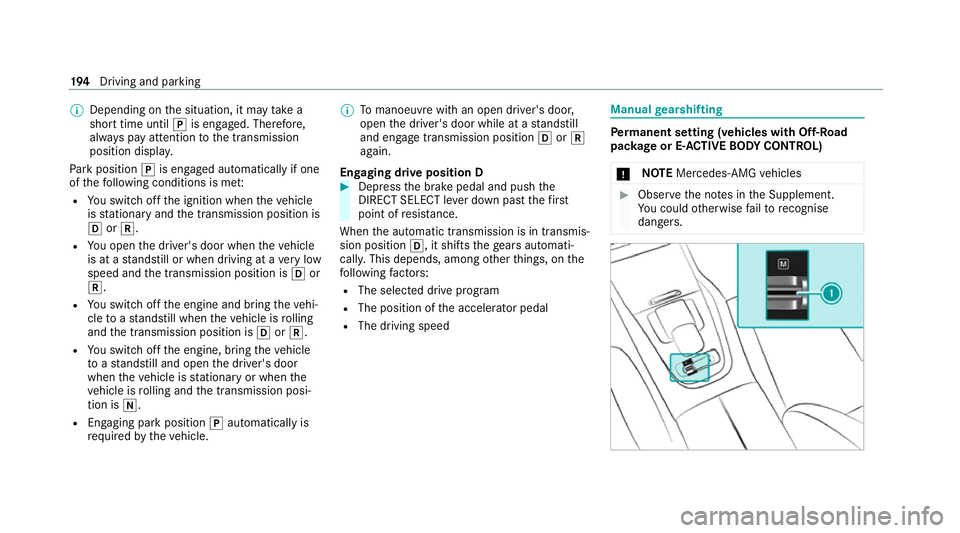
R The driving speed Manual
gearshifting Pe
rm anent setting (vehicles with Off-Road
pac kage or E-ACTIVE BODY CONT ROL)
* NO
TEMercedes-AMG vehicles #
Obser vethe no tes in the Supplement.
Yo u could otherwise failto recognise
dangers. 194
Driving and pa rking
Page 218 of 545
The Elect
ronic Stability Program (ESP ®
) can
monitor and impr ovedriving stability and trac‐
tion in thefo llowing situations within ph ysical
limits:
R When pulling away on wet or slippe rycar ria‐
ge wa ys.
R When braking.
If th eve hicle deviates from the direction desired
by the driver, ESP ®
can stabilise theve hicle by
inter vening in thefo llowing ways:
R One or more wheels are braked.
R The engine output is adap ted according to
th e situation.
ESP ®
is deactivated if the00BB ESP®
OFF warn‐
ing lamp lights up continuously in the instrument
clus ter:
R Driving stability will no lon ger be impr oved.
R The drive wheels could spin.
R ETS/4ETS traction control is still active.
% When ESP ®
is deactivated, you are still assis‐
te dby ESP ®
when braking. If
th e00E5 ESP®
wa rning lamp flashes in the
instrument clus ter,one or se veral wheels has
re ached its grip limit:
R Adapt your driving style to suit the cur rent
ro ad and weather conditions.
R Do not deactivate ESP ®
.
R Onlydepress the accelera tor pedal as far as
is necessary when pulling away.
It can be advantageous todeactivate ESP ®
in the
fo llowing situations toimpr ovetraction:
R When using snow chains.
R In deep snow.
R On sand or gr avel.
% Spinning the wheels results in a cutting
action, which enhances traction.
If th e00E5 ESP®
wa rning lamp lights up continu‐
ousl y,ESP ®
is not available due toa malfunction.
Obse rveth efo llowing information:
R Indicator and warning lamps (/ page 487)
R Display messages (/ page 425) ETS/4ETS (Electronic
Traction Sy stem)
ETS/4ETS traction control is pa rtof ESP ®
and
makes it possible topull away and accelerate on
a slippe rycar riag ewa y.
If yo u select theF orG drive prog ram, a
special ETS sy stem specifically suited tooff-road
te rrain is automatically activated.
ETS/4ETS can improvetheve hicle's traction by
inter vening in thefo llowing ways:
R The drive wheels are braked individually if
they spin.
R More drive torque is transferred tothe wheel
or wheels with traction.
Influence of drive prog rams on ESP ®
The drive programs enable ESP ®
to adapt todif‐
fe re nt we ather and road conditions as well as
th e driver's prefer red driving style. Depending on
th e selected drive prog ram, the appropriate
ESP ®
mode will be activated. You can select the
drive programs using theDY NA MIC SELECT
switch (/ page190). Driving and parking
215