change time MERCEDES-BENZ GLK-Class 2012 X204 Comand Manual
[x] Cancel search | Manufacturer: MERCEDES-BENZ, Model Year: 2012, Model line: GLK-Class, Model: MERCEDES-BENZ GLK-Class 2012 X204Pages: 182, PDF Size: 4.89 MB
Page 109 of 182
X
Sel ect the characte rsof the entry youare
sea rchi ngfor one byone andpressW to
confi rm.
Whe nthe selection isclear, COMAND
switches automatically tothe selection list.
X To complete thesearch: switchfromthe
phone bookwiththecharacter bartothe
selection list(Ypage 107).
The lastlistentr yis automatically
highlighted.
With number keypad Altern
atively, youcan also enter digits using
the number keypad(directentry)
(Y page 28).
Dele ting character s X
To delete anindividual character:select
the 2 symbol byturning cVdthe
COMAND controller andpress Wbriefly.
or
X Briefly pressthe2 button
Each timeacharacter isdeleted, theentr y
most closely resembling theremaining
characters isshown atthe top ofthe list.
X To delete anentry: selectthe2
symbol byturning cVdtheCOMAND
cont roller andpress Wuntil theentr yis
deleted.
or
X Press andhold the2 button untilthe
entire entryis deleted.
Changing thelanguage ofthe character
bar X
Select B.
X The language isswitched. Changing
thecharacter setofthe
character bar X
Select pandpress Wtoconfirm .
The character setchanges eachtimeyou
make thisselection.
Selec tinganentry directly fromthelist You
canswitch tothe listatany time during
character entry.
X Slide VZtheCOMAND controller
repeatedly orpress andhold Wuntil the
character bardisappe ars.
or
X Select ¬andpress Wtoconfirm .
X To selec tanentry :turn cVd the
COMAND controller untilthedesired entry
is highlighted andpress Wtocon firm.
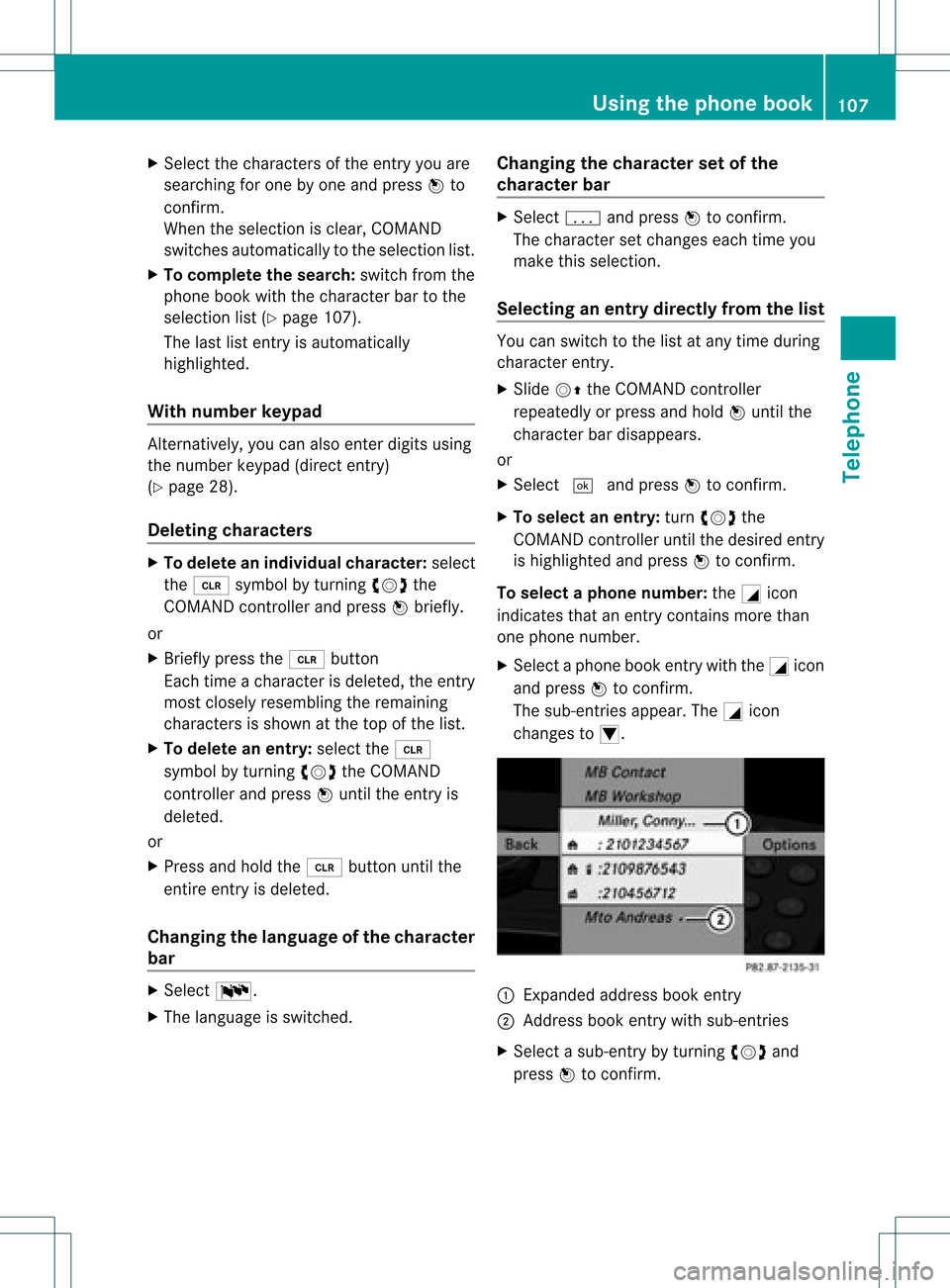
To select aphone number: theGicon
indi cates thatanentry contains morethan
one phone numbe r.
X Select aphone bookentry withtheGicon
and press Wtoconfirm.
The sub-entries appear. TheGicon
changes toI. :
Expanded address book entry
; Address bookentry withsub-entries
X Select asub -entry byturning cVdand
press Wtoconfirm. Usi
ngthe phone book
107Tele phone Z
Page 128 of 182
all
main tenan cework must becar ried outby
qualifi edafters ales tech nic ians . G
WAR
NING
On lywhen theveh icle isstatio naryshoul d
you:
R load adisc
R eject adisc
Ther eis arisk ofbein gdist ractedfrom the
road andtraff iccon dition sif th is is don ewhile
th eveh icle isin mot ion. Inser
ting/ej ectin gCDs/DVDs
Not es If
th eCD/ DVDh asaprin tedside, this must
fac eupwards whentheCD/ DVDisinserted.
If neither sideisprinted, theside tobe play ed
should facedownwards. CDs/DVDswith
copy protect ionmay notbeable tobe play ed
by the system.
i Ifamedium contains other filesin
addition tomusic files,theloadi ngtime
before thefirst track starts toplay may be
longer.
Inse rting discs intotheDVD changer :
Disc slot
; Load/eject button8
The DVD changer hasafixed magazine with
six trays. X
To insert aCD/DVD intoth ema gaz ine
tr ay :pre ssthe8 load/ejec tb utt on.
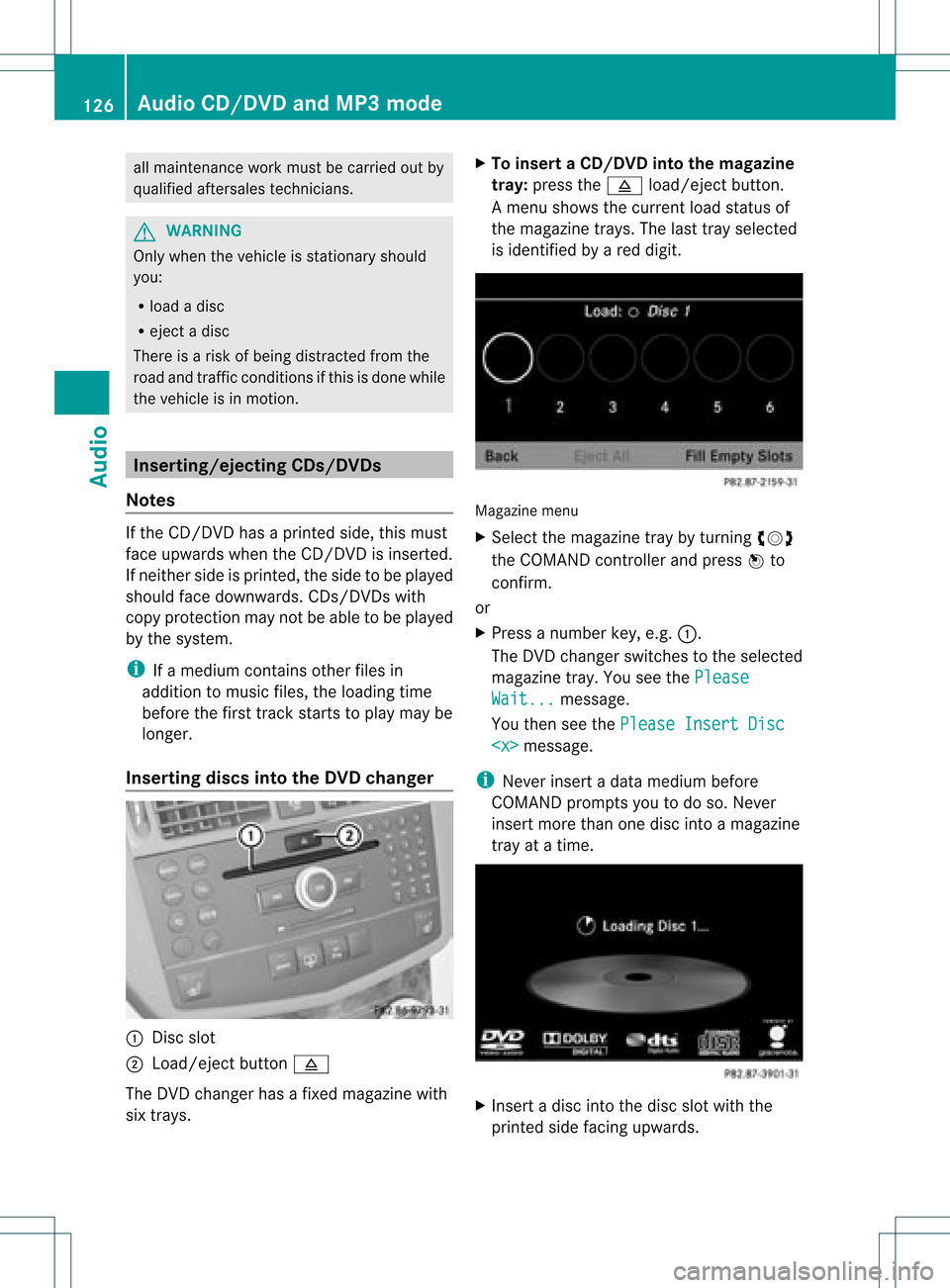
Am enu shows thecurren tload status of
the magazine trays.Thelasttray selected
is identified byared digit. Magazine
menu
X Select themagazine traybyturnin gcVd
the COMAND controller andpress Wto
conf irm.
or
X Press anumber key,e.g.:.
The DVD changer switches tothe selected
magazine tray.YouseethePlease Wait... message.
You then seethePlease InsertDisc
i Never insertadata medium before
COMAND promptsyoutodo so. Never
insert morethanonedisc intoamagazine
tray atatime. X
Insert adisc intothedisc slotwith the
printed sidefacing upwards. 126
Audio
CD/DVD andMP3 modeAudio
Page 129 of 182
The
DVD changer loadsthedisc intothe
selected magazine tray.Themessage
Loading Disc
i Itmay take some timeforthe disc tobe
loaded, depending onthe type ofdisc. Ifno
disc isinsert edfor approximately 20
seconds, thedisplay returnstothe
magazine menu.
The DVD changer playsthedisc if:
R ithas been insert edcorrec tly.
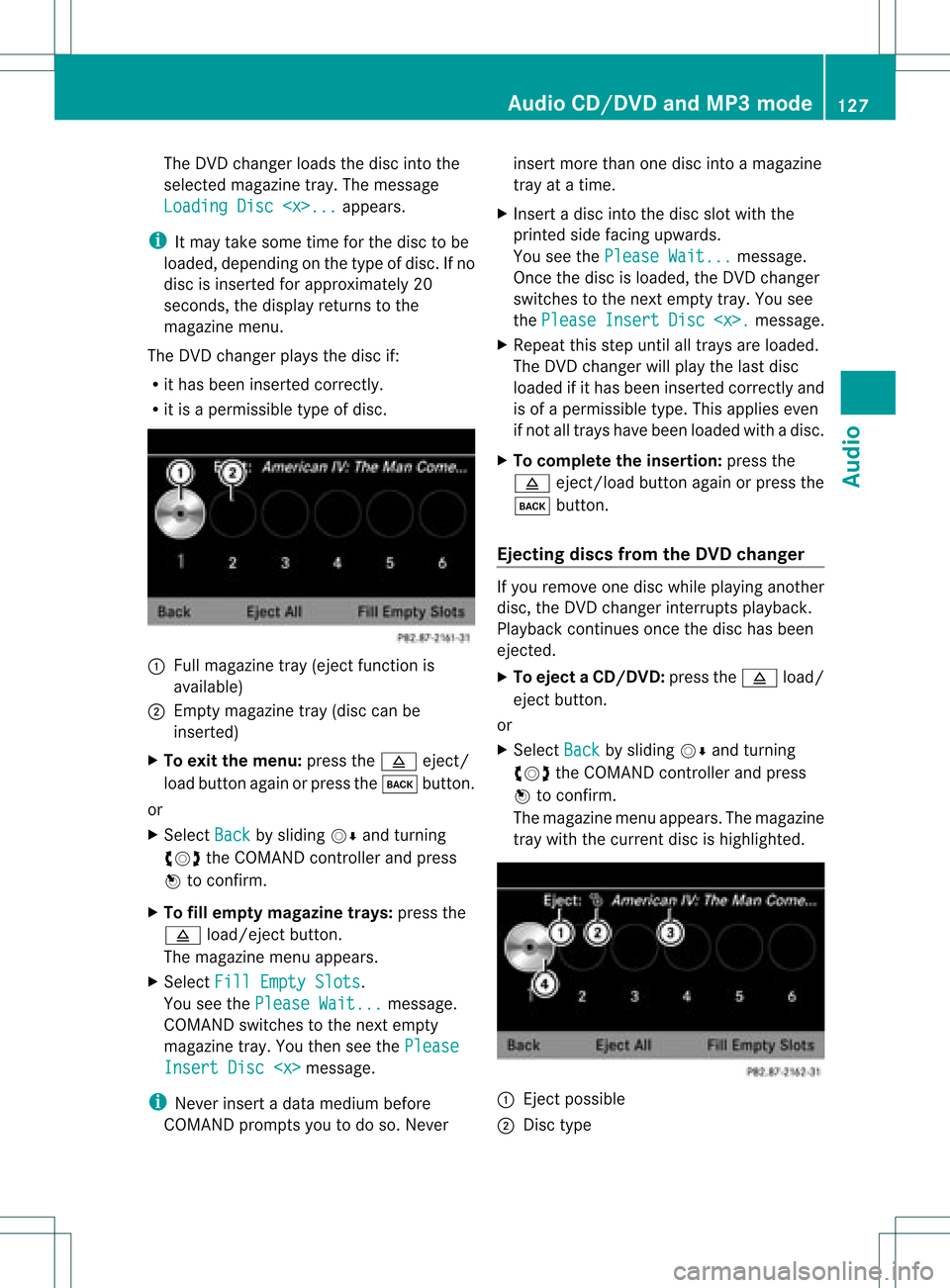
R itis apermissible typeofdisc. :
Full magazine tray(eject functionis
availa ble)
; Empt ymagazine tray(disc canbe
insert ed)
X To exit themenu: pressthe8 eject/
load button againorpress thek button .
or
X Select Back by
sliding VÆandturnin g
cVd theCOMAND controller andpress
W toconf irm.
X To fill empt ymagaz inetrays: press the
8 load/eject button.
The magazine menuappears.
X Select FillEmpty Slots .
You seethePlease Wait... message.
COMAND switchestothe next empty
magazine tray.Youthen seethePlease Insert
Disc
i Never insertadata medium before
COMAND promptsyoutodo so. Never insert
morethanonedisc intoamagazine
tray atatime.
X Insert adisc intothedisc slotwith the
printed sidefacing upwards.
You seethePlease Wait... message.
Once thedisc isloaded, theDVD changer
switches tothe next empty tray.Yousee
the Please Insert Disc
X Repeat thisstep until alltrays areloaded.
The DVD changer willplay thelast disc
loaded ifit has been insert edcorrec tlyand
is of apermissible type.Thisapplies even
if not alltrays havebeen loaded withadisc.
X To complete theinsertion: pressthe
8 eject/load button againorpress the
k button .
Ejecting discsfromtheDVD changer If
you remove onedisc while playinganother
disc, theDVD changer interruptsplayb ack.
Playba ckcont inues oncethedisc hasbeen
eject ed.
X To eject aCD/DVD: pressthe8 load/
ej ec tbut ton.
or
X Se lec tBac k by
slid ing VÆ andturning
cVd theCOMA NDcontrol ler and press
W toconfirm .
The mag azine men uappea rs.T he magazine
tray with thecurrent discishighlighted. :
Ejec tpossible
; Disc type Audio
CD/DVD andMP3 mode
127Audio Z
Page 152 of 182
COMAN
Dfea tures
Thes eOper atingIn st ruc tions desc ribeall
st andar dand optionalequipm enta vail able
for you rCOMAND systematthe time of
purcha se.Cou ntry-specifi cdeviation sare
possible. Pleasenotethat your COMAND
system maynotbeequipped withallthe
features described. General
information Autom
aticpictu reshut off
The video picture isonly shown ifthe select or
lever isin the Pposition .
If the select orlever ofthe tran smission is
changed fromposition P,the In order not
to
distrac tyou from thetraffic situati
on, the picture is faded out
while
thevehicle isinmotion. message
appears
As soon asthe select orlever ofthe
tran smission isreturn edtoposition P,the
video image isshown. Basic
settings Pictur
esettings
Adju sting thebright ness,contra stor
color X
Press Wthe COMAND controller toshow
the menu.
X Select DVD-V by
sliding VÆandturning
cVd theCOMAND controller andpress
W tocon firm.
Am enu appears.
X Select Brightn ess ,
Contras t or
Color by
turn ingcVd theCOMAND controller and
press Wtocon firm. Changing
thepictu reform at X
Press Wthe COMAND controller toshow
the menu.
X Select DVD-V by
sliding VÆandturning
cVd theCOMAND controller andpress
W tocon firm.
Am enu appears.
X Select 16:9Optimiz ed ,
4:3 or
Widescr een and
press Wtocon firm.
The dotinfron tof the entryindicat esthe
curren tlyselect edformat .
X Select asett ingbyturn ingcVd the
COMAND controller andpress Wto
con firm. Video
DVDmode Safet
ynotes G
WARN
ING
COMAND isclassified asaClass 1laser
prod uct.You must notopen thecasing. Ifyou
open thecasing, orifthe casing isfaulty or
damaged, thereisarisk ofexposure to
invisible laserradiation. Thismay damage
your eyes, orthose ofothers.
COMAND doesnotcont ainany parts thatcan
be serviced bythe user. Forsafety reasons,
all mainten ancework must becarried outby
quali fiedaftersales technicians. G
WARNING
Only when thevehicle isstation aryshould
you:
R load adisc
R eject adisc
There isarisk ofbeing distract edfrom the
road andtraffic conditionsifthis isdone while
the vehicle isin motion . 150
Video
DVDmodeVideo
Page 153 of 182
Note
sabo utdis cs
Pl ay ba ck pro blems mayoccu rwhen playing
copied discs.Therearealarge variety of
discs, DVDauthoring software,writing
software andwriters available.This variety
means thatthere isno guarantee thatthe
system willbeable toplay discs thatyouhave
copied yourself.
! Donot affix stick ersorlabel sto the discs,
as they could peeloffand damage
COMAND. Stickers cancause thedisc to
bend, which canresult inread errors and
disc recognit ionproblems.
! COMAND isdesigned toaccommodate
discs which comply withtheEN60908
standard. Youcantherefore onlyusediscs
with amaximum thickness of1.3 mm.
If you insert thickerdiscs, e.g.those that
cont aindata onboth sides (DVD onone
side andaudiodata onthe other), they
cannot beeject edand candamage
COMAND.
Use round discswithadiameter of12 cm.
Do not use discs withadiameter of8cm,
even withanadapter. DVD
playback conditions
If video DVDsdon otconf orm tothe NTSC or
PAL TVstandards, theymaycreate picture,
sound orother problems duringplayback.
COMAND canplay back video DVDs
produced according tothe following
standards:
R region code1orregion code0(no reg ion
cod e)
i Ifyo uins ert avid eo DVD with adi ffe rent
reg ionc ode, youwillsee amessage tothis
effect .
R PAL orNTSC standard
You willgenerally findtherelevant details
either onthe DVD itself oron the DVD case. i
COMAND isset toregion code1at the
factor y.This settingcan bechanged atan
authorized Mercedes-B enzCenter. Thiswill
allow youtoplay video DVDswith a
different regioncode,provided thatthey
are produced inaccordanc ewith thePAL
or NTSC standard. Theregion codecanbe
changed uptofive times. Function
restrictions
Dependin gon the DVD ,it is possible that
cert ainfunct ionsoractions willbe
temporarily blockedormay notfunct ionatall.
As soon asyou trytoactivate thesefunctions
or actions ,you willsee theKsymbol inthe
display . Inserting
andremoving DVDs
X Proceed asdescribed inthe "Insert ingand
eject ingCDs andDVD s"section
(Y page 126). Activating
videoDVDmode
Option 1 X
Insert avideo DVD.
COMAND loadsthemedium insertedand
start sto play it.
X To display thepictur e:press thee
button .
Option 2 X
Press theefunct ionbutton .
COMAND switchestothe previous disc
operating mode.
If video DVDmode wasthelast mode
selected, itwill now beactive. Video
DVDmode
151Video Z
Page 175 of 182
?
Track time
A Shows themenu Showing/hiding
themenu
X To show: pressthe9button onthe
remote control.
or
X Select Menu while
thenavigation menuis
shown andpress the9button toconf irm.
X To hide: press the9 button ,select
Full screen and
press the9button to
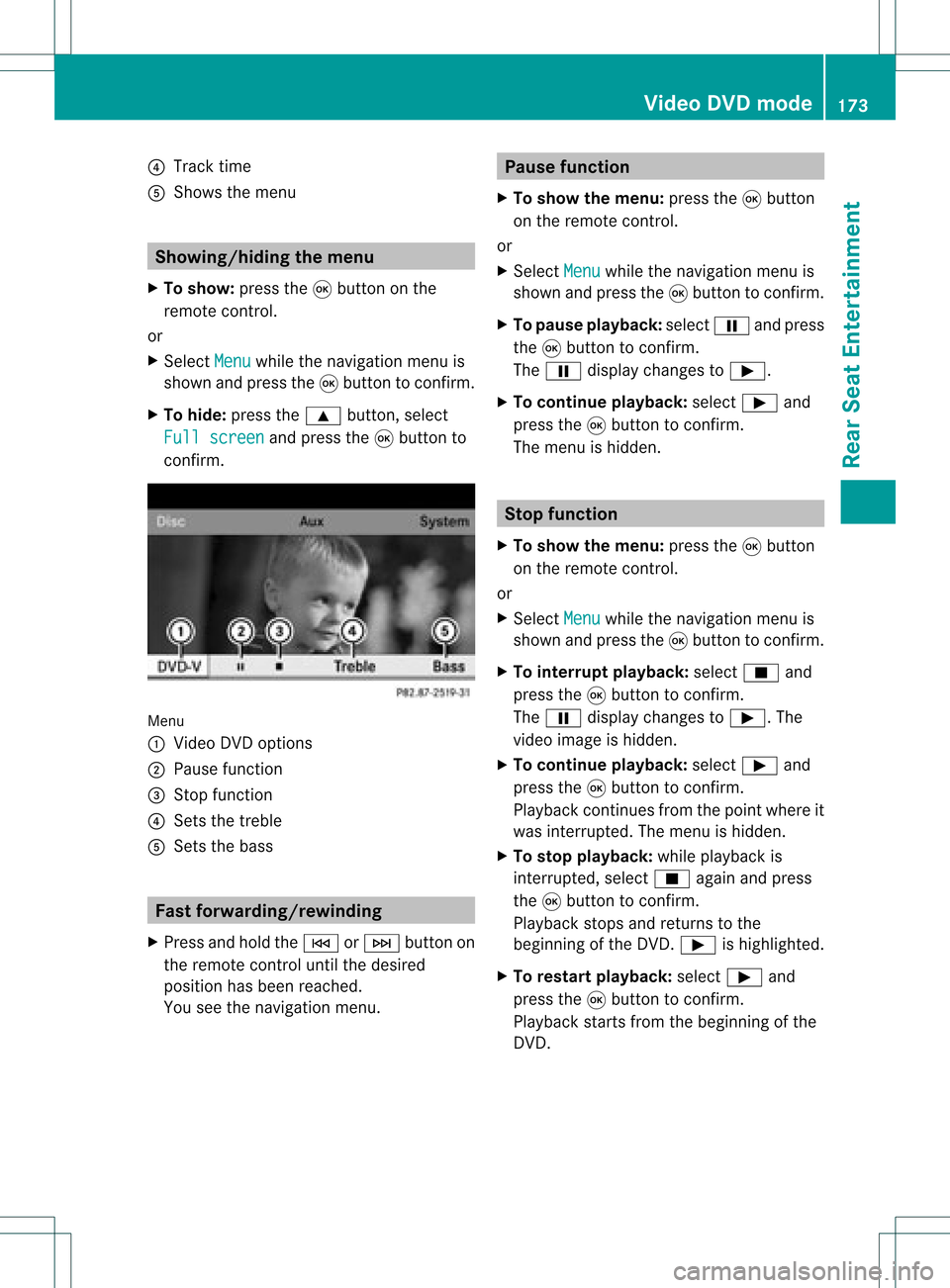
conf irm. Menu
: Video DVDoptions
; Pause function
= Stop funct ion
? Sets thetreble
A Sets thebass Fast
forwar ding/rewinding
X Press andhold theE orF button on
the remote controluntil thedesired
position hasbeen reached.
You seethenavigation menu. Pause
function
X To show themenu: pressthe9button
on the remote control.
or
X Select Menu while
thenavigation menuis
shown andpress the9button toconf irm.
X To pause playback: selectËandpress
the 9button toconf irm.
The Ë display changes toÌ.
X To continue playback: selectÌand
press the9button toconf irm.
The menu ishidden. Stop
function
X To show themenu: pressthe9button
on the remote control.
or
X Select Menu while
thenavigation menuis
shown andpress the9button toconf irm.
X To interr uptplayback: selectÉand
press the9button toconf irm.
The Ë display changes toÌ.T he
video image ishidden.
X To continue playback: selectÌand
press the9button toconfirm .
Play back continues fromthepoint where it
was interrupted. Themenu ishidden.
X To stop playback: whileplayback is
interrupted, selectÉagain andpress
the 9button toconfirm .
Play back stops andreturns tothe
beginning ofthe DVD .Ì ishighlighted.
X To restar tplayback: selectÌand
press the9button toconfirm .
Play back starts fromthebeginning ofthe
DVD . Video
DVDmode
173RearSeatEnterta inment Z