radio MERCEDES-BENZ GLK-Class 2012 X204 Comand Manual
[x] Cancel search | Manufacturer: MERCEDES-BENZ, Model Year: 2012, Model line: GLK-Class, Model: MERCEDES-BENZ GLK-Class 2012 X204Pages: 182, PDF Size: 4.89 MB
Page 21 of 182
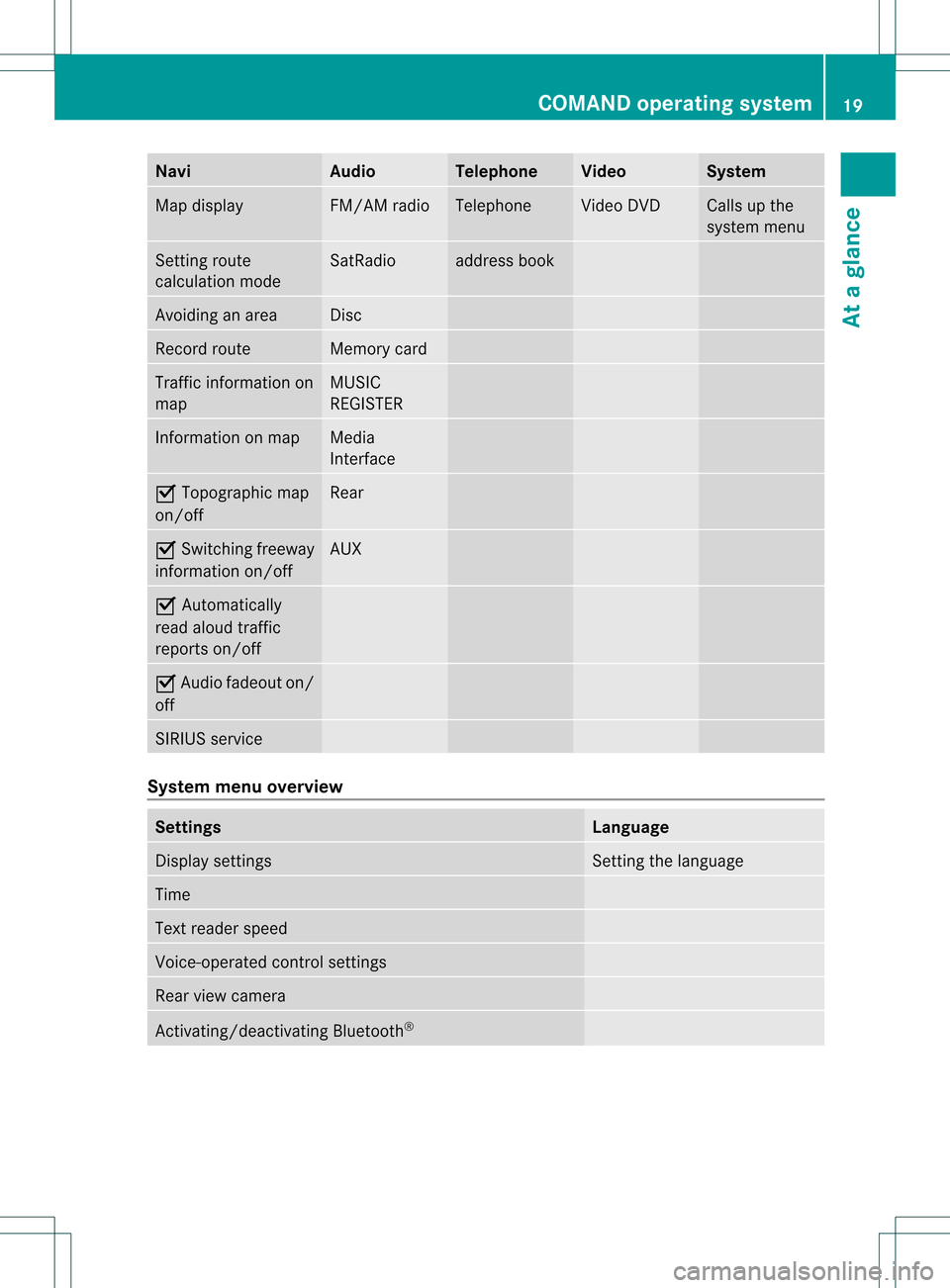
Navi Au
dio Tel
eph one Vide
o Sys
tem Ma
pdisp lay FM/AM
radio Te
leph one Vi
de oDVD Ca
lls up the
sy ste mm enu Set
tingroute
calculation mode SatRadio address
book Avoidin
gan area Disc
Record
route Memory
card Traffic
information on
map MUSIC
REGISTE R Inf
ormat iononmap Media
Int erface O
Topographic map
on/ off Rear
O
Switc hingfreeway
infor mation on/off AUX
O
Autom atically
read aloud traffic
report son/ off O
Audio fadeout on/
off SIRIUS
service System
menuoverview Sett
ings Language
Display
settings Set
tingthe language Time
Text
reader speed Voice-
operated control settings Rear
viewcamera Ac
tivat ing/deac tivatingBluetoot h® COMAND
operatingsystem
19Ataglance
Page 24 of 182

X
To callup stan dard display s:rep eated ly
pre ssthe % button untilthe odome ter
and thetrip mete rappear inthe display.
or
X Press andhold the% buttonuntil the
odomet erand thetrip meter appear inthe
display.
X To confirm yourselection: pressthe
a button.
X To confirm themessage: pressthe
a or% button. Menus
andsubm enus
The number ofmenus depends onthe vehicle
equipment . Menu Functions
andsubm enus Navigation Navigation
systemdisplays Audio Select
ingastat ion
Operatin gthe DVD chang er,
memor ycard, MUSIC
REGISTE R,Media Interface
Operatin gvideo DVD Telephone Ac
cept ing/ rejec tingacall
Making /ending acall
Select ingaphone bookentry
Redialing Na
vigat ionsystem menu
Rout eguida nceinactive The
display showstheroad onwhich the
vehicle iscurren tlytrav eling, provided the
digital mapcontains it.
Rout eguida nceactive The
display shows:
R the distan cetothe destin ation
R the distan cetothe nextchange ofdirection R
current street
R the travel direction arrow
If achange ofdirection isimminent ,the
displa yshows:
R the road youwillbeturning onto
R the distance tothe next change ofdirection
and adistance graphic
R aright orleft-t urnarrow
Lane recommen dationsarealso shown inthe
displa y,provided thedigital mapcontains the
necessary data.During achange ofdirection,
the number oflanes mayincrease. Lane
recommen dationsareshown inthe displa yas
a line with anarrow. Audio
menu
Adjust ingthe volume X
Press theW orX button.
Setting thestat ion/c hannel X
Switch onCOMAND (Ypage 31).
X Switch onFM / AM Radio (Y
page 118)or
SatRadio (Y
page 122).
X In the multifunction display,select the
audi omenu withthe= or; button.
X To selec tthe nex t/previo usstation /
chann elfrom thememory: brieflypress
the : or9 button.
X To selectthe nex t/previo usstation /
chann el:press andhold the: or
9 button.
Operating theDVD chang er/memo ry
card/MUS ICREGI STER/Me dia
Inte rface X
Switch onCOMAND (Ypag e31).
X Switch onDisc ,
Memory Card (Y
pag e129), MUSIC 22
Multifunc
tionsteering wheelAtaglan ce
Page 27 of 182
Callin
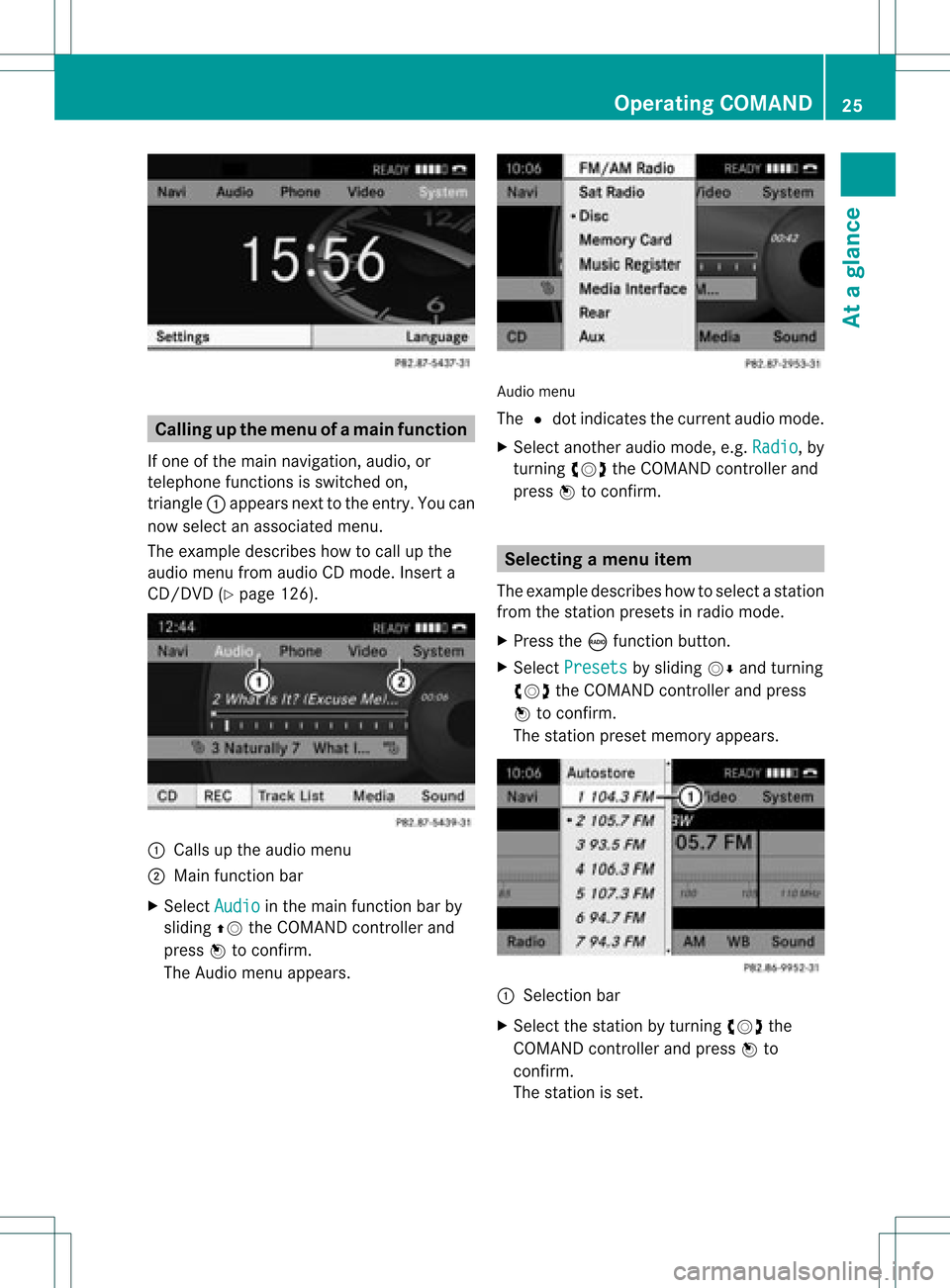
gup themen uofam ainfunc tion
If one ofthe mainnavigat ion,audio, or
te lepho nefun ction sis swit ched on,
tr iang le: appear sne xtto theen try. You can
no wselec tana ssociated menu.
The example describes howtocall upthe
audi omenu fromaudioCD mode. Inserta
CD/DVD (Ypage 126). :
Callsup the audi omenu
; Main function bar
X Select Audio in
the main function barby
sliding ZVtheCOMAND controller and
press Wtoconfirm.
The Audio menuappears. Audio
menu
The #dot indicates thecurrent audiomode.
X Select another audiomode, e.g.Radio ,
by
turning cVdtheCOMAND controller and
press Wtoconfirm. Selec
tingamenu item
The exam pledesc ribes howtoselec tastation
from thestation presets inradio mode.
X Press theófunction button.
X Select Presets by
sliding VÆandturning
cVd theCOMAND controller andpress
W toconfirm.
The station presetmemory appears. :
Selection bar
X Select thestation byturning cVdthe
COMAND controller andpress Wto
confirm.
The station isset. Operat
ingCOMAND
25Ataglanc e Z
Page 28 of 182
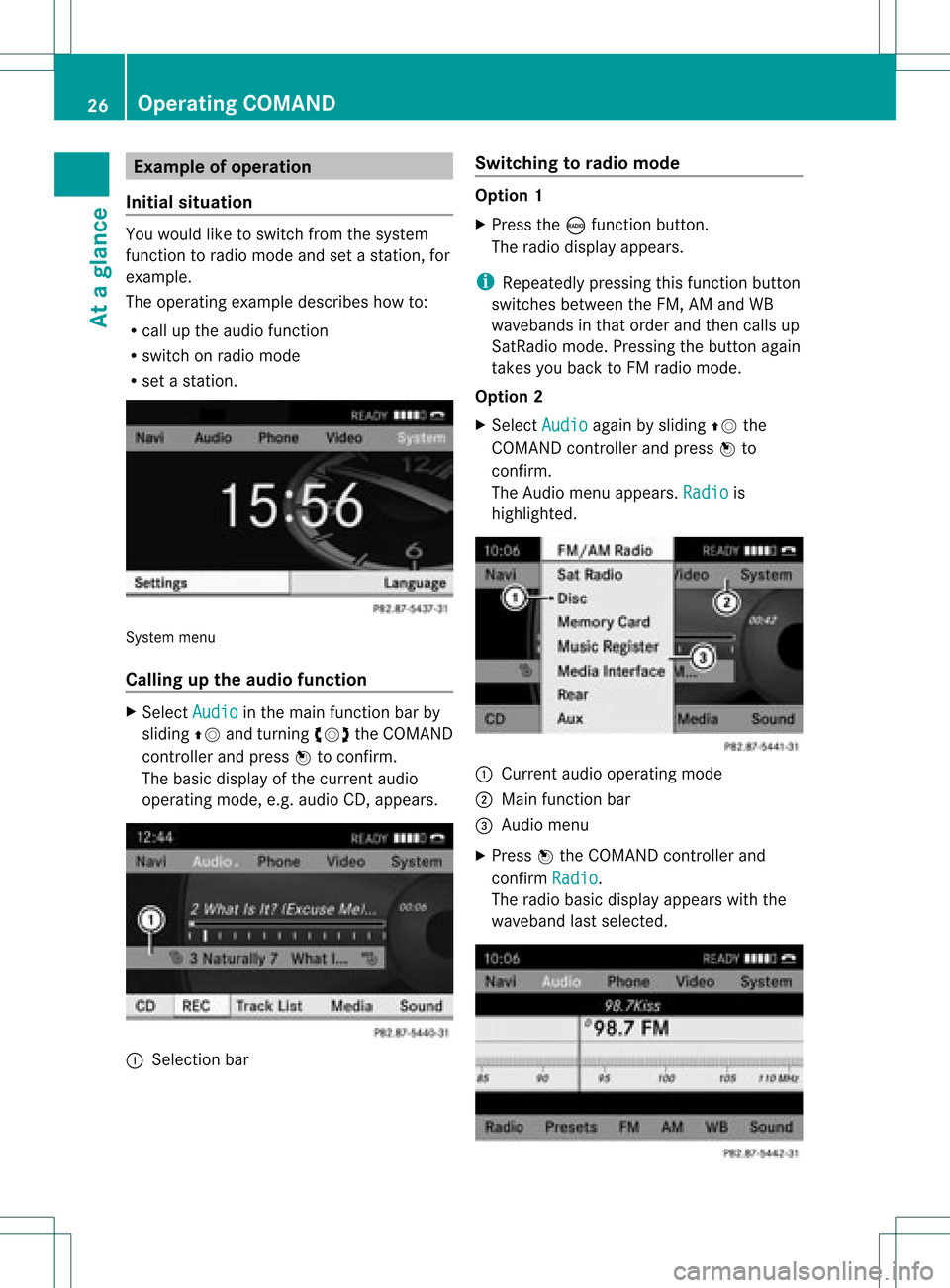
Exam
pleofoper ation
Init ialsituation You
would liketoswit chfrom thesyst em
fun ction toradio mode andsetast atio n,for
exam ple.
The oper atingexam pledesc ribeshow to:
R call uptheaudio function
R swit chon radio mode
R set ast atio n. Sys
tem men u
Callin gup theau dio functi on X
Sel ect Audio in
themain function bar by
slidin gZV andturnin gcVd theCOMA ND
con troller andpres sW tocon firm.
The basic display ofthecur ren taudio
oper ating mod e,e.g. audio CD,appear s. :
Selec tion bar Swit
chingto radio mod e Op
tion1
X Pre sstheó function button.
The radio displayappear s.
i Repeat edlypressin gth is fun ction button
swit ches bet ween theFM ,AM and WB
waveb andsin that ord erand then call sup
Sat Radio mode.Pre ssin gth ebut tona gain
takes youback toFM radio mode.
Option 2
X Select Audio again
bysliding ZVthe
COMAND controller andpress Wto
conf irm.
The Audio menuappears. Radio is
highlighted. :
Current audiooperating mode
; Main functionbar
= Audio menu
X Press Wthe COMAND controller and
conf irmRadio .
The radio basic display appears withthe
waveband lastselected. 26
Opera
tingCOMANDAtaglance
Page 34 of 182
Adj
usting thevolu mefornav igation
ann ounc ements Dur
ing anav igat ionann oun cemen t:
X Turn qtheco ntrol knob.
or
X Pre sstheW orX buttonon the
mult ifunction steer ing whee l.
Adj usting thevolu meforphone calls You
canadjust thevol ume forhan ds-free
mod eduri ngate leph onecall .
X Turn theq control knob.
or
X Pre sstheW orX buttonon the
mult ifunction steer ing whee l. Adj
usting thesoun dsettings
Callin gup thesound menu You
canmak evari ous soun dset tings for the
diff eren taudio andvide osour ces.This mean s
th at itis poss ibletoset mor ebass forradio
mod eth an for audio CDmod e,for example .
You cancalluptheres pec tive soun dmen u
fr om themen uof thedesi redmod e.
The example describeshow tocall upthe
soun dmen uin radio mode.
X Pre sstheó function button.
The radio displayappear s.You willhear the
last stati on played onthelast waveb and. X
Se lec tSou nd by
slidi ngVÆ andturnin g
cVd theCOMA NDcontrol ler and press
W toconfirm .
You cannowset thetreble andbass orthe
balan ceand fade rfor radio mode.
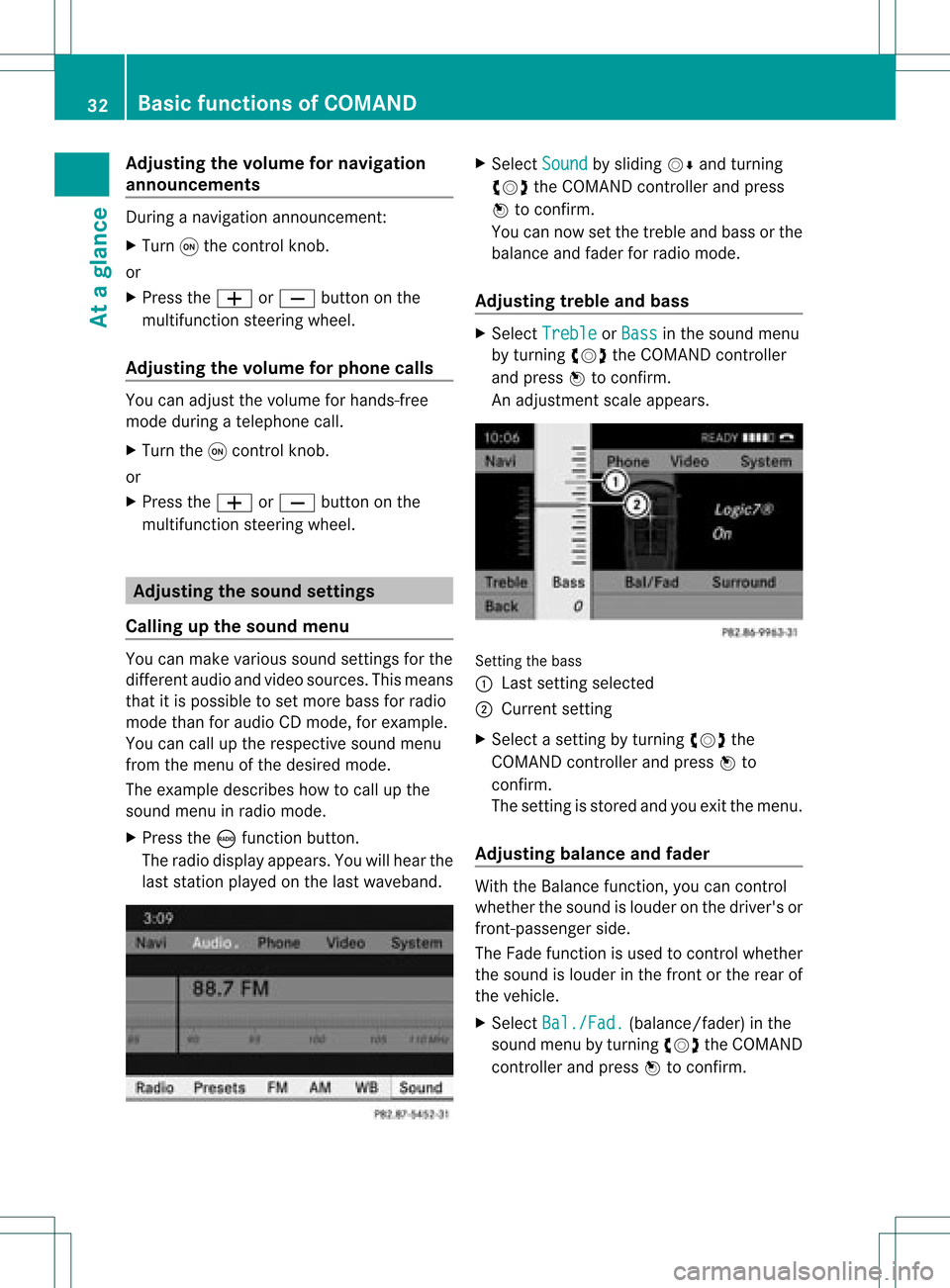
Adjust ingtreble andbass X
Select Treble or
Bass in
the sound menu
by turnin gcVd theCOMAND controller
and press Wtoconf irm.
An adjustmen tscal eap pea rs. Setting
thebass
: Lastsett ing select ed
; Current setting
X Select asett ingbyturn ingcVd the
COMAND controller andpress Wto
con firm.
The settingisstor edand youexit themenu.
Adju sting balance andfader With
theBalance function,you can control
whether thesound islouder onthe driver's or
fron t-passenger side.
The Fade function isused tocon trol whether
the sound islouder inthe fron torthe rear of
the vehicle.
X Select Bal./Fad. (bala
nce/ fader) inthe
sound menubyturning cVdtheCOMAND
cont roller andpress Wtoconfirm . 32
Basic
functions ofCOMANDAt aglance
Page 35 of 182
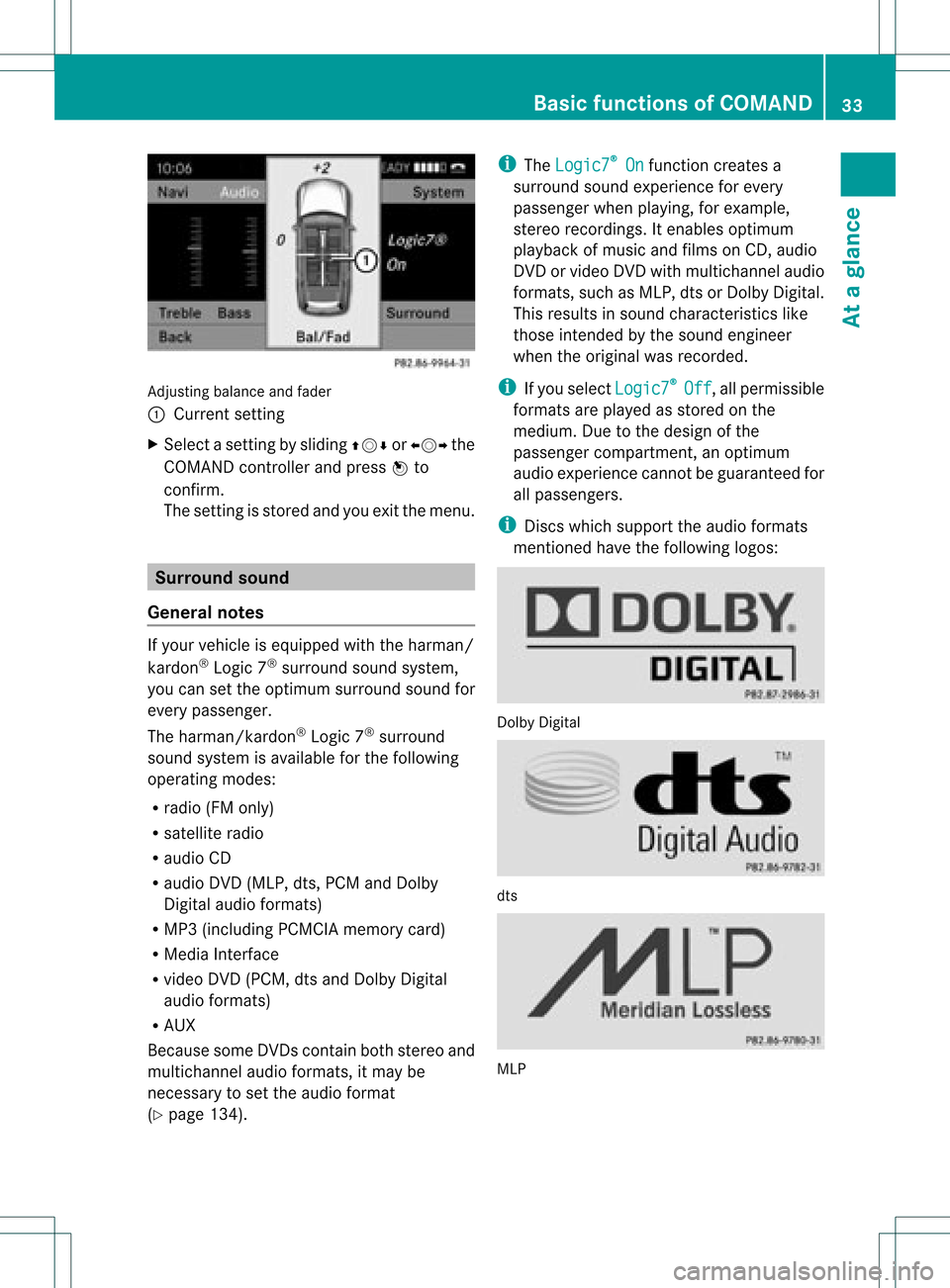
Adju
sting balance and fader
: Current setting
X Sel ect asetti ngbyslid ing ZVÆ orXVY the
CO MAND controller and pressW to
confi rm.
The setti ngisstore dand youexi tthe menu. Surr
ound sound
General notes If
your vehicle isequipp edwith theharman/
kardon ®
Logic 7®
surround soundsystem,
you can setthe optimum surround soundfor
every passenger.
The harman/kardon ®
Logic 7®
surround
sound system isavaila bleforthe following
operating modes:
R radio (FMonly)
R satellite radio
R audi oCD
R audi oDVD (MLP, dts,PCM andDolby
Digital audioformats)
R MP3 (including PCMCIAmemorycard)
R Media Interface
R video DVD(PCM, dtsand Dolby Digital
audi oformats)
R AUX
Because someDVDscont ainboth stereo and
multichannel audioformats, itmay be
necessary toset the audi oformat
(Y page 134). i
The Logic7 ®
On funct
ioncreates a
surround soundexperience forevery
passenger whenplaying, forexample,
stereo recordings. Itenables optimum
play back ofmusic andfilms onCD, audio
DVD orvideo DVDwithmultichannel audio
formats, suchasMLP, dtsorDolby Digital.
This results insound characterist icslike
those intendedbythe sound engineer
when theoriginal wasrecorded.
i Ifyou select Logic7 ®
Off ,
all permissible
formats areplay edasstored onthe
medium. Duetothe design ofthe
passenger compartmen t,an optimum
audi oexperience cannotbeguaranteed for
all passengers.
i Discs which support theaudi oformats
ment ioned havethefollowing logos: Dolby
Digital dts
MLP Basic
functions ofCOMAND
33Ataglance Z
Page 36 of 182
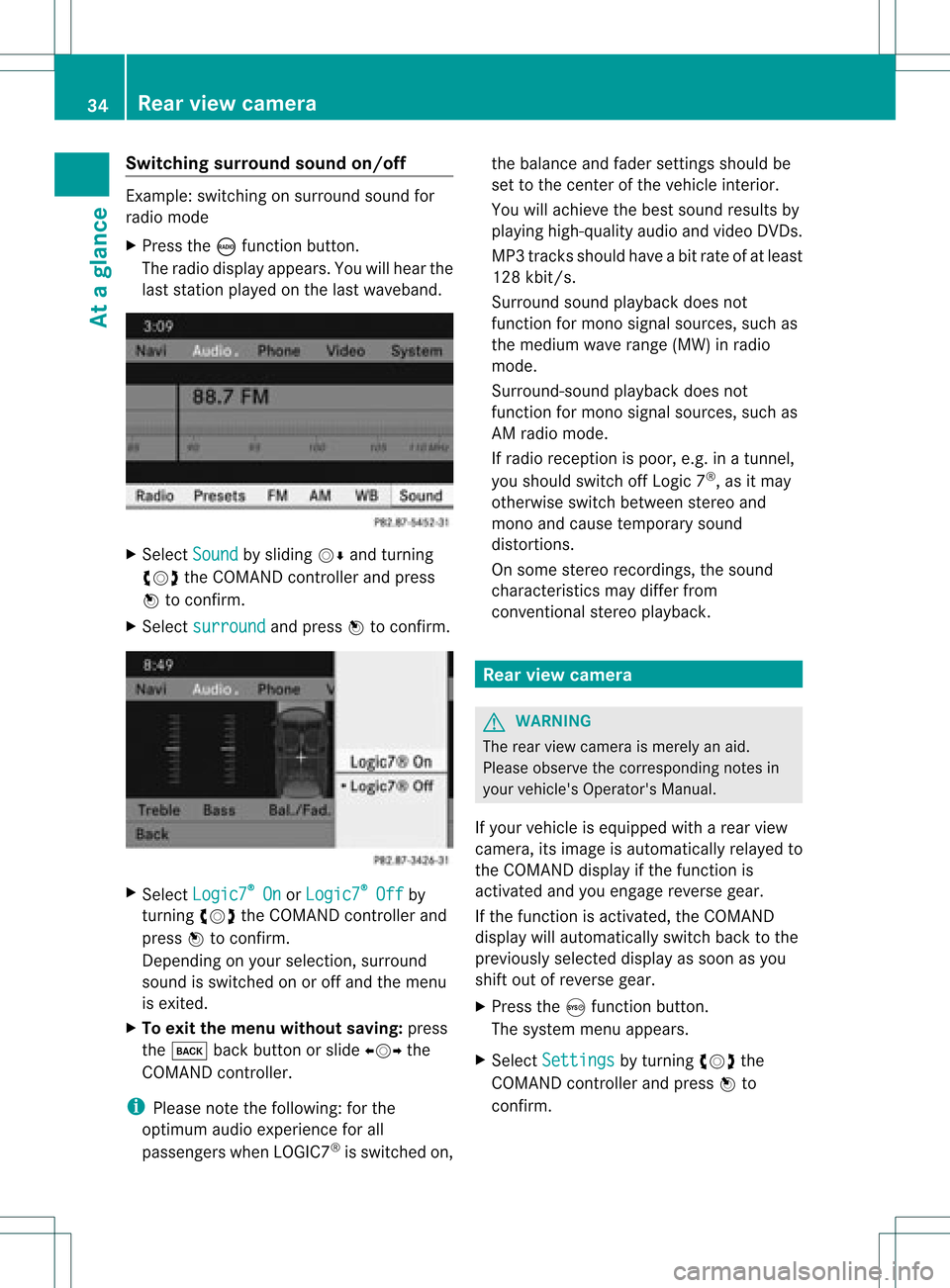
Switching
surround sound on/off Example:
switching onsurround soundfor
radio mode
X Press theófunct ionbutton.
The radio display appears. Youwillhear the
last station playedon the last waveband. X
Select Sound by
sliding VÆandturnin g
cVd theCOMAND controller andpress
W toconf irm.
X Select surround and
press Wtoconf irm. X
Select Logic7 ®
On or
Logic7 ®
Off by
turnin gcVd theCOMAND controller and
press Wtoconf irm.
Depending onyour selection, surround
sound isswitched onoroff and themenu
is exited.
X To exit themenu without saving:press
the k backbutton orslide XVY the
COMAND controller.
i Please notethefollowing: forthe
optimum audioexperience forall
passengers whenLOGIC7 ®
is switched on,the
bala nce and fader settingsshould be
set tothe cent erofthe vehicle interior.
You willachieve thebest sound results by
play inghigh-quali tyaudi oand video DVDs.
MP3 track sshould haveabitrat eof at least
128 kbit/s.
Surr ound soundplayback doesnot
func tion formon osign alsourc es,such as
the medium waverange(MW) inradio
mode.
Surr ound- soundplayback doesnot
func tion formon osign alsourc es,such as
AM radio mode.
If radio receptio nispoor, e.g.inatunnel,
you should switchoffLogic 7®
,as itmay
otherwise switchbetween stereoand
mono andcause temporary sound
distortions.
On some stereo recordings, thesound
characteristics maydiffer from
conven tionalstereo playback. Rear
view camera G
WARNING
The rear view camera ismerely anaid.
Please observe thecorresponding notesin
your vehicle's Operator's Manual.
If your vehicle isequip pedwith arear view
camera, itsimage isautomaticall yrelay edto
the COMAND displayif the function is
activated andyouengage reverse gear.
If the function isactivated, theCOMAND
displa ywill automaticall yswitch backtothe
previousl yselected displayas soon asyou
shift outofreverse gear.
X Press theSfunction button.
The system menuappears.
X Select Settings by
turning cVdthe
COMAND controller andpress Wto
confirm. 34
Rear
view cameraAtaglanc e
Page 42 of 182
Time
Off by
turning cVdtheCOMAND
cont roller andpress Wtoconfirm.
The #dot indicates thecurrent setting. Text
reader settings Setting
theread-a loudspeed
X Press theSbutton.
X Select Settings by
turning cVdthe
COMAND controller andpress Wto
confirm.
X Select TextReader Speed and
press W
to confirm.
Al ist appears. The#dot indic ates the
curr entsetting.
X Selec ta set tingby turnin gcVd the
COMA NDcontroller andpress Wto
con firm . Voice
ControlSyst emsett ings Activa
ting/d eactivating thehelp
window
In additio ntothe audib leinstr uctions, the
help window willshow youother inform ation
during voicecontroloperation andthe
individuali zationprocess.
X Press theSbutton .
X Select Settings by
turnin gcVd the
COMAND controller andpress Wto
conf irm.
X Select Voice Control and
press Wto
conf irm.
X Select HelpWindow and
press Wto
conf irm.
You have switched thehelp window on
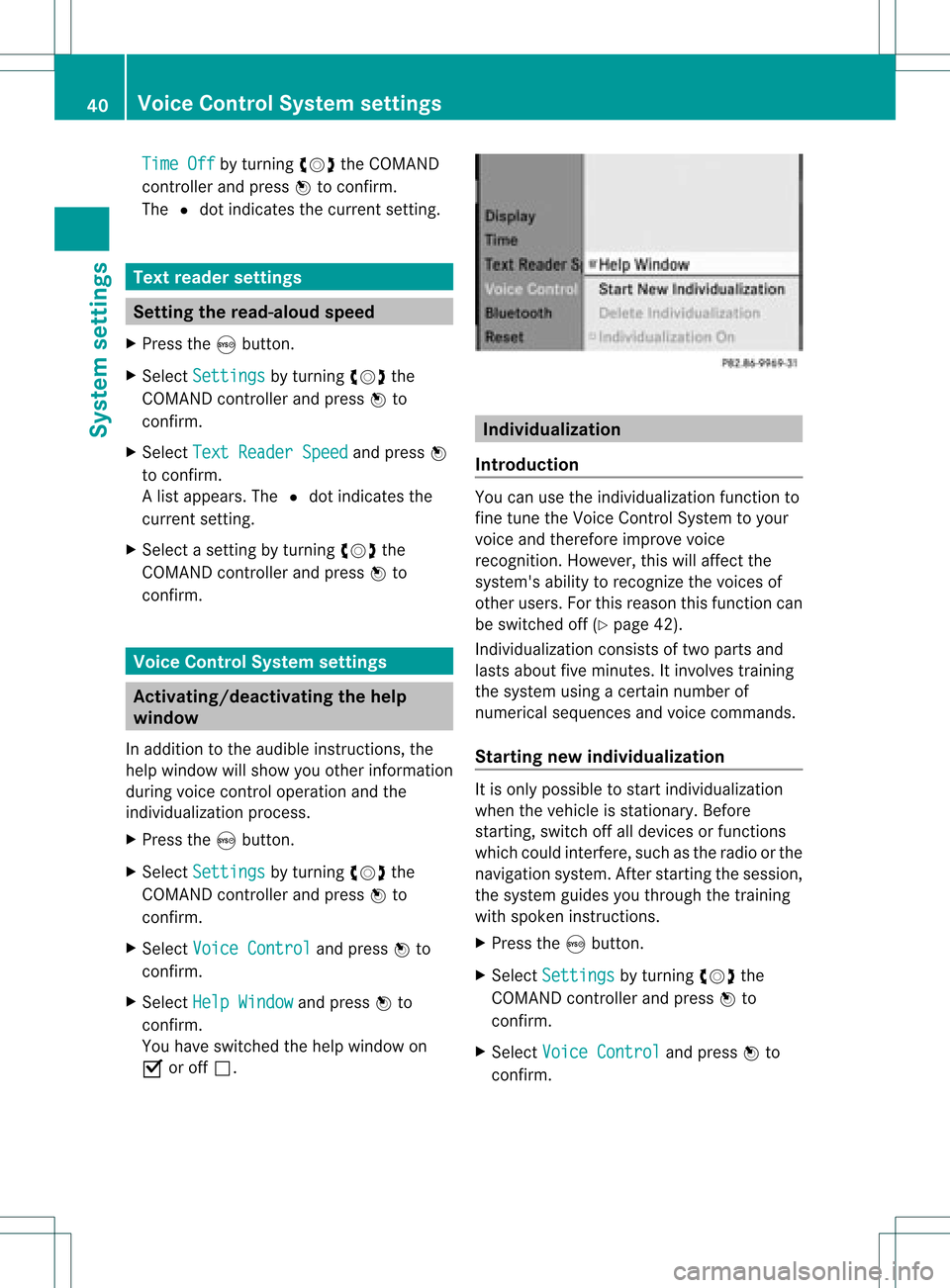
O oroff ª. Individualiza
tion
Introdu ction You
canusetheindividuali zationfunctionto
fine tune theVoice Control System toyour
voice andtherefor eimprove voice
recogn ition.However, thiswillaffect the
system's abilitytorecogn izethe voices of
other users. Forthis reason thisfunct ioncan
be switched off(Ypage 42).
<001E000E0004000900160009000400150001000C0009001C000100140009000F
000EV consistsof two parts and
lasts about fiveminutes. Itinvolves training
the system usingacert ainnumber of
numerical sequences andvoice comman ds.
Star ting new individualiza tion It
is only possible tostart individuali zation
when thevehicle isstation ary.Before
start ing,switch offalldevices orfunct ions
which couldinterfere,such asthe radio orthe
navigation system.Afterstart ingthe session,
the system guidesyouthrough thetrainin g
with spoken instructions.
X Press theSbutton .
X Select Settings by
turnin gcVd the
COMAND controller andpress Wto
conf irm.
X Select Voice Control and
press Wto
conf irm. 40
Voice
Control System settingsSystem settings
Page 76 of 182
ann
oun cem ent:"Please follow thearr ow on
th edispl ay".Astheveh icle appro achesthe
dest ination,th eAre aof destination rea
ched mes
sage appear s.
Rou teguid ance from anoff-road
locat iontoad esti nation If
th eveh icle posit ioniswith inthearea
cov ered bythedigit almap, butthemap does
no tcon tain anyinform ationabout that
locat ion,th eveh icle isin an off-road locat ion.
COMA NDisalso able toguide youtoa
dest inationeven from anoff-road locat ion.
At thest art oftherout eguidan ce,you willsee
th eOff Mapped Road mes
sage, anarro w
and thedist anceto thed estin ation. Thearrow
shows thecompass headingtothe actual
destin ation.
The route ishighlighted blue,startingfrom
the last recogn izedstreet the vehicle wason
before itleft themap.
As soon asthe vehicle isback onaroad
kn own tothe system, routeguidance
con tinues inthe usual way.
Rout eguida ncefrom anoff-m ap
location toad esti nation If
th eveh icle posit ionisouts idethearea
cov ered bythedigit almap, then theveh icle
is in an off-map locat ion.COMAND isalso
able toguide youtoadestination evenfrom
an off-map location.
At the start ofthe route guidance,youwillsee
the Off Mapped Road message,
anarrow
and thedistance tothe destination. Thearrow
shows thecompass headingtothe road left
last.
The route ishighlig htedbluefrom thenearest
road known tothe system.
As soon asthe vehicle isback onaroad
known tothe system, routeguidance
cont inues inthe usua lway . Off-road
duringrouteguidance Due
toroadworks, forexample, theremaybe
differences betweenthedata onthe digital
map andtheactual course ofthe road.
In such cases, thesystem willtemporarily be
unable tolocate thevehicle position onthe
digital mapandthus considers thevehicle to
be inan off-road position.
In the displa y,you willsee theOff Mapped Road message,
anarrow andthedistance to
the destination. Thearrow shows the
compass headingtothe last road youwere
driving on.
As soon asthe system canassign thevehicle
position tothe map again,route guidance
cont inues inthe usua lway . Tra
ffic reports Condition
s
To receive real-time trafficreports via
satellite radio,yourequire:
R optionally available satellite radio
equi pment
R asubscription toSIRIUS XMSatellite Radio
Traffic Message Service
Further information onsatellite radiois
avail able inthe "Satellite radio"section
(Y page 121).
COMAND canreceive trafficreports via
satellite radioandtake these intoaccount for
route guidanceinthe navigation system.
Received trafficreports aredispla yedinthe
map either astext oras icons. Real-time
traffic report son the map
COMAND canshow certain trafficincidents
on the map. Traffic reports areshown onthe
map atscales of0.05 mito20 mi. 74
Tr
affic report sNavigat ion
Page 95 of 182
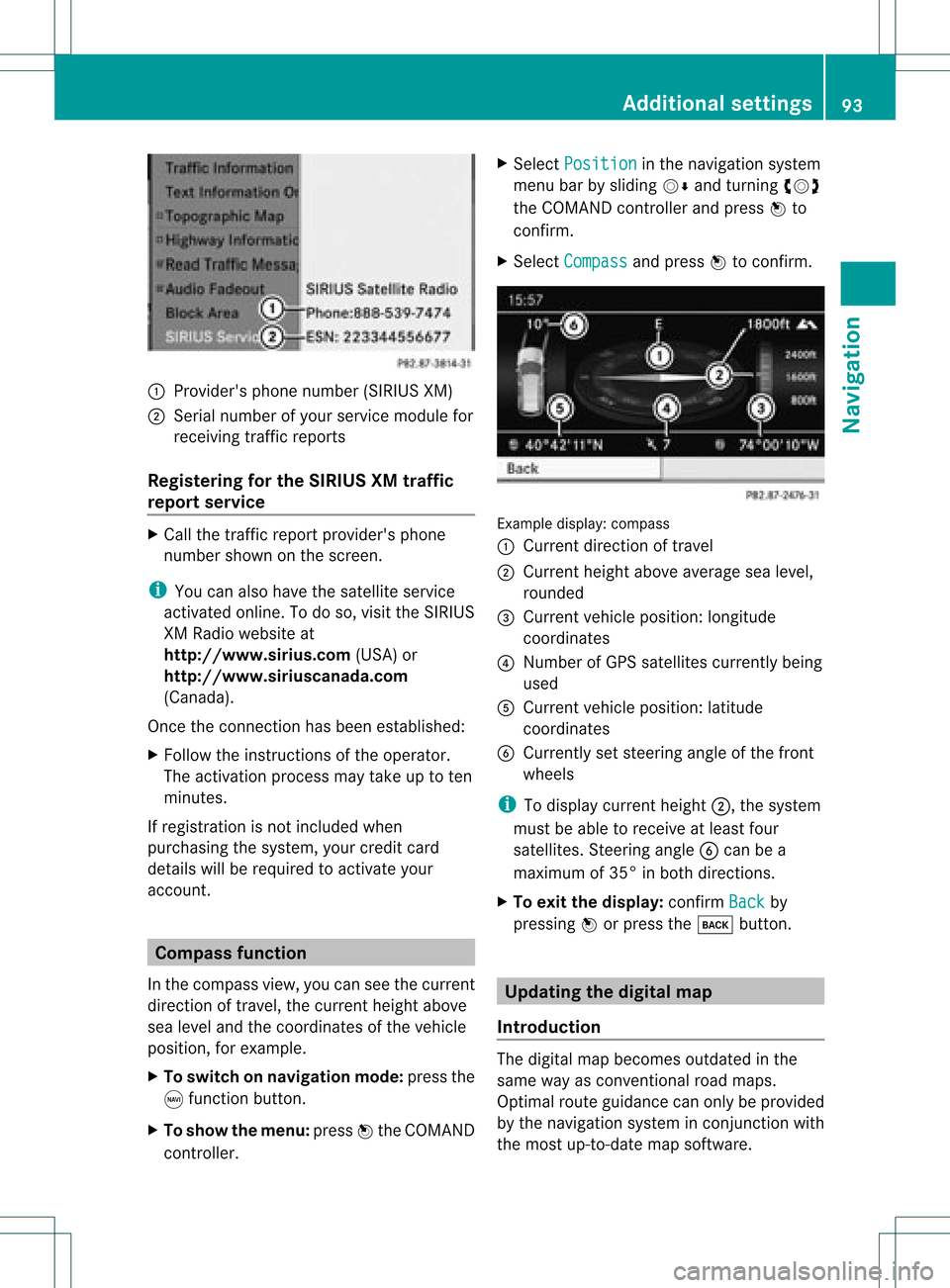
1
Provider's phonenumber (SIRIUSXM)
2 Serial number ofyour service module for
receivin gtraff icreport s
Registering forthe SIRIUS XMtraffic
repor tserv ice X
Call thetraff icrepo rtprov ider' sphon e
num bershown onthesc reen .
i You canalso have thesat ellit eser vice
act ivat edonline .Todo so, visit theSIRIUS
XM Radio website at
htt <0010002C00210021001700170017002000130009001200090015001300200003
000F000DB (USA)or
htt <0010002C00210021001700170017002000130009001200090015001300030001
000E000100040001B .com
(Canada) .
Once theconn ection hasbeen established:
X Follow theinstr uctions ofthe operator.
The activation processmaytake uptoten
minutes.
If registrat ionisnot included when
purchasing thesystem, yourcredit card
details willberequired toactivate your
account . Compass
function
In the compass view,youcan seethecurrent
direction oftravel, thecurrent heightabove
sea level andthecoordinat esofthe vehicle
position, forexample.
X To switch onnavigation mode:pressthe
g funct ionbutton .
X To show themenu: pressWthe COMAND
cont roller. X
Select Position in
the navigation system
menu barbysliding VÆandturnin gcVd
the COMAND controller andpress Wto
conf irm.
X Select Compass and
press Wtoconf irm. Example
display:compass
: Current direction oftravel
; Current heightaboveaverage sealevel,
rounded
= Current vehicleposition: longitude
coordinat es
? Number ofGPS satellites currentlybeing
used
A Current vehicleposition: latitude
coordinat es
B Currently setsteerin gangle ofthe front
wheels
i Todisplay current height;,thesystem
must beable toreceive atleast four
satellites. Steeringangle Bcan bea
maximum of35° inboth direction s.
X To exit thedisplay: confirmBack by
pressing Worpress thek button . Upda
tingthedigital map
Introdu ction The
digital mapbecomes outdatedinthe
same wayasconv ention alroad maps.
Optimal routeguidance canonly beprovided
by the navigation systeminconj unct ionwith
the most up-to- datemapsoftware. Additional
settings
93Navigation Z