wheel MERCEDES-BENZ GLK-Class 2012 X204 Comand Manual
[x] Cancel search | Manufacturer: MERCEDES-BENZ, Model Year: 2012, Model line: GLK-Class, Model: MERCEDES-BENZ GLK-Class 2012 X204Pages: 182, PDF Size: 4.89 MB
Page 107 of 182
Connect
ingacall toan entry inac all list
or inthe COM AND phone book X
Open acall lista nd select anentry
(Y page 109) .
or
X Ca llup the COMAND phone book and
sel ect anentry (Ypage 106) .
X To conn ectac all:press Wthe COM AND
controll eror the Kbutton. Func
tionsavail able during acall
Ove rview Tel
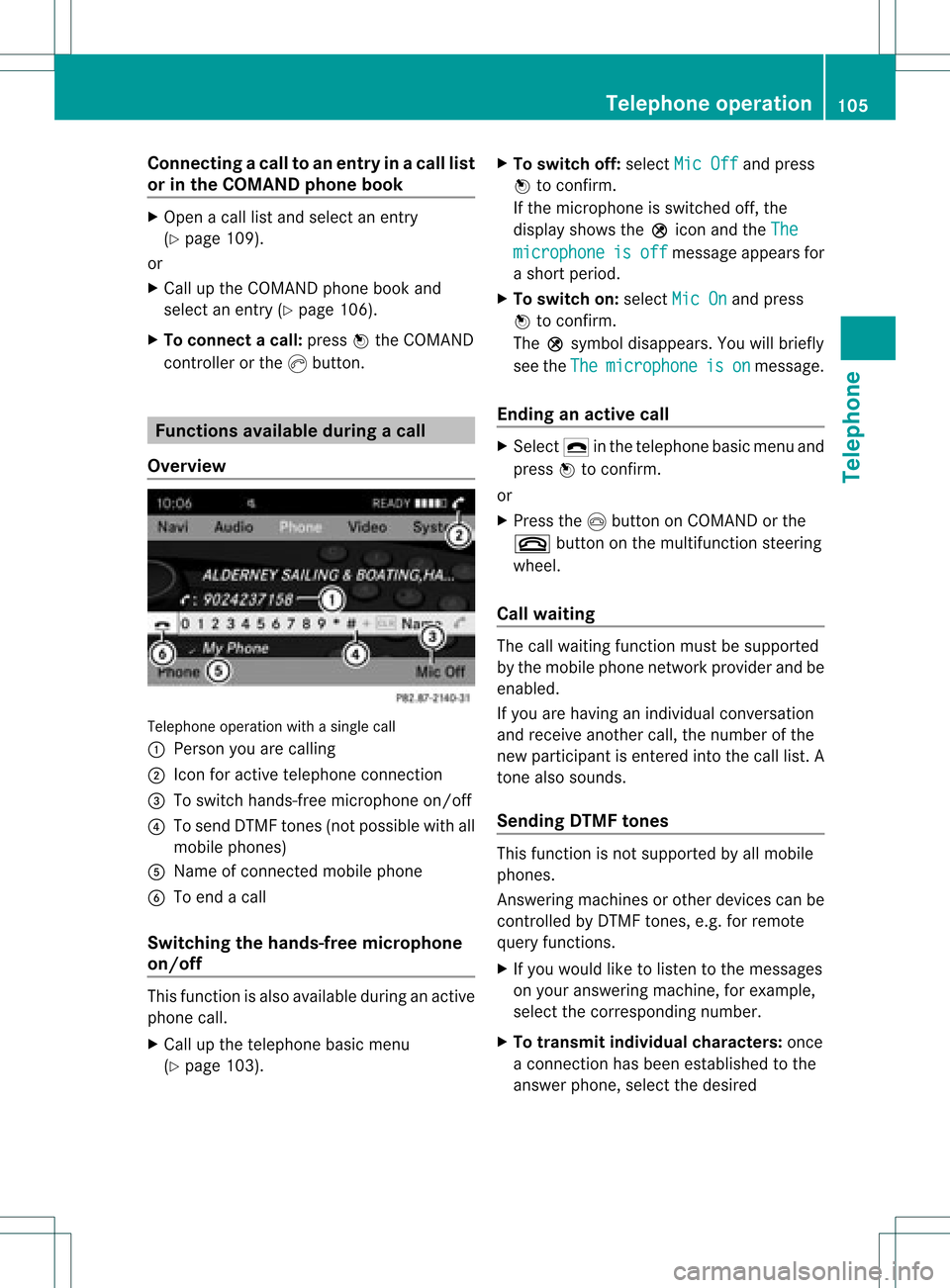
epho neoper ationwithasing lecall
: Perso nyou are calling
; Icon foractive telephone connection
= Toswitch hands-fr eemicrophon eon/of f
? Tosend DTMF tones(not possible withall
mobile phones)
A Name ofconn ected mobile phone
B Toend acall
Switching thehands- freemicroph one
on/off This
funct ionisalso availa bleduring anactive
phone call.
X Call upthe telephone basicmenu
(Y page 103). X
To switch off:select MicOff and
press
W toconf irm.
If the microphon eis switched off,the
display showstheQicon andtheThe microphone is off message
appearsfor
a short period.
X To switch on:select MicOn and
press
W toconf irm.
The Qsymbol disappea rs.You willbriefly
see theThe microphone is on message.
Ending anactive call X
Select ¢inthe telephone basicmenu and
press Wtoconf irm.
or
X Press theIbutton onCOMAND orthe
~ button onthe multifunct ionsteerin g
wheel.
Call waiting The
callwaiting functionmust besupported
by the mobile phonenetwork provider andbe
enabled.
If you arehaving anindividual conversation
and receive another call,thenumber ofthe
new participant isenter edinto thecall list. A
ton ealso sounds.
Sending DTMFtones This
funct ionisnot supported byallmobile
phones.
Ans wering machines orother devices canbe
cont rolled byDTMF tones, e.g. forremote
query functions.
X Ifyou would liketolisten tothe messages
on your answering machine,forexample,
select thecorrespon dingnumber.
X To transmit individual characters: once
a conn ection hasbeen established tothe
answer phone,selectthedesired Telephone
operation
105Telephone Z
Page 124 of 182
Reg
isteri ngsate llite radio
X Swi tch onsatell ite rad iomod e
(Y page 122).
The satell ite rad iomai nm enu appears
showing theweather channel.You cann ot
select anyother stations.
X Select SatRadio in
the lower menu bar
and press Wtocon firm.
X Select Service and
press Wtocon firm.
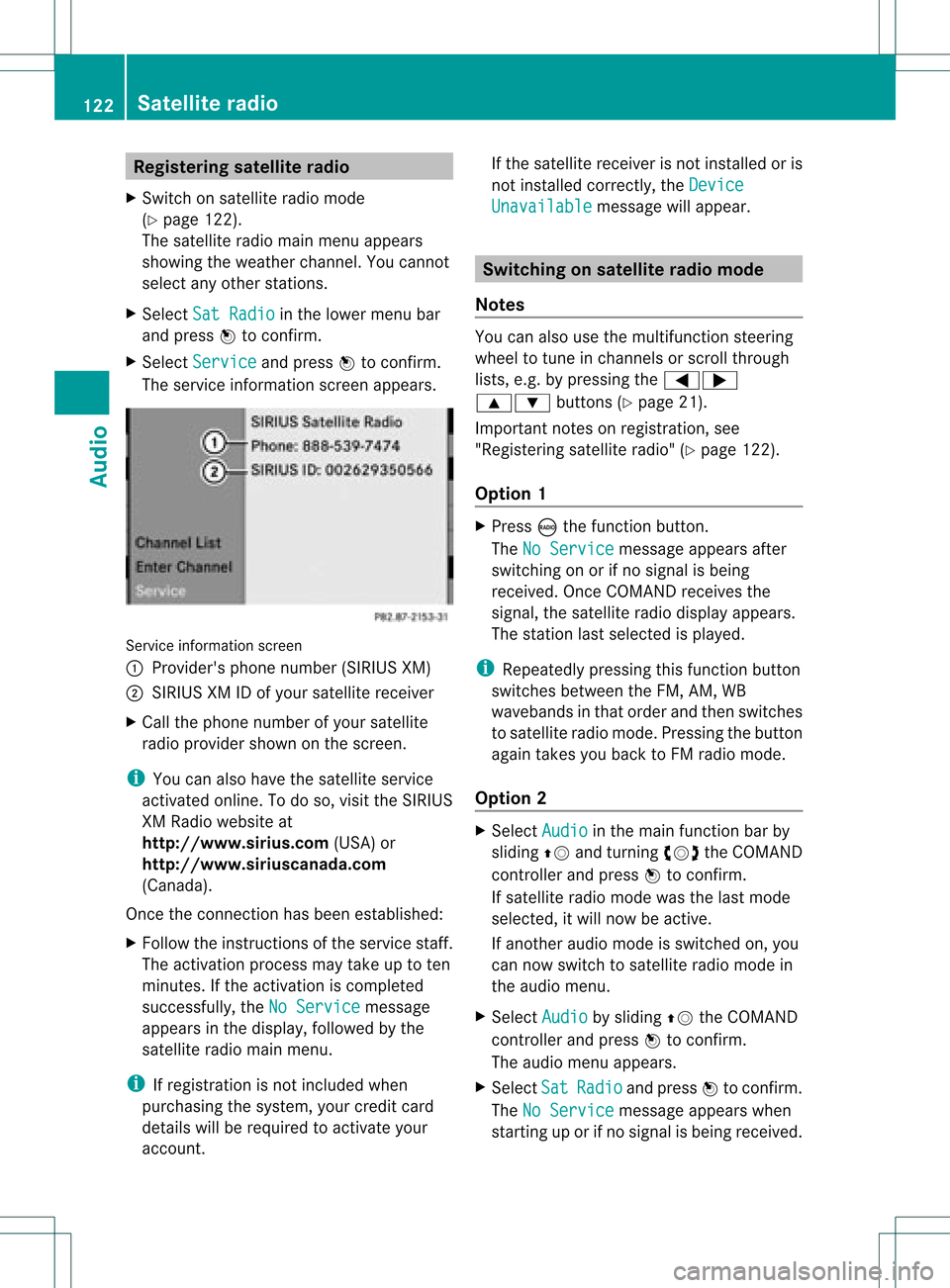
The servic einfor mation screenappears. Serv
iceinfor mation screen
1 Provider's phonenumber (SIRIUSXM)
2 SIRIUS XMIDofyour satellite receiver
X Call thephone number ofyour satellite
radio provider shownonthe screen .
i You canalso have thesatellite service
activat edonline. Todo so, visit theSIRIUS
XM Radio website at
htt p://ww w.siriu s.com(USA)or
htt p://ww w.siriu scanada .com
(Canada).
Onc ethe connection hasbeen established:
X Follow theinstruct ions ofthe servic estaff .
The activat ionprocess maytake uptoten
minut es.Ifthe activat ioniscomplet ed
success fully,theNoService message
appears inthe display, followed bythe
satellite radiomainmenu.
i Ifregistr ationisnot included when
purchasing thesystem, yourcredit card
details willberequired toactivat eyour
accoun t. If
the satellite receiver isnot installed oris
not installed correctly,the Device Unavail
able message
willappear. Switching
onsatellit erad iomode
Notes You
canalso usethemultifunc tionsteer ing
wheel totune inchann elsorscroll through
lists, e.g.bypressing the=;
9: buttons(Y page 21).
Import antnoteson registr ation,see
"Registering satelliteradio"(Y page 122).
Opt ion 1 X
Press óthe func tion button .
The NoService message
appearsafter
switch ingonorifno signal isbeing
received. OnceCOMAND receivesthe
signal, thesatellite radiodisplay appears.
The stationlast select edisplayed.
i Repeatedly pressingthisfunc tion button
switch esbetween theFM, AM, WB
wavebands inthat order andthen switch es
to satellite radiomode. Pressin gthe button
again takes youback toFM radio mode.
Opt ion 2 X
Select Audio in
the main function barby
sliding ZVandturningcVd theCOMAND
con troller andpress Wtocon firm.
If satellite radiomode wasthelast mode
select ed,itwill now beactive .
If anoth eraudio mode isswitch edon, you
can now switch tosatellite radiomode in
the audio menu.
X Select Audio by
sliding ZVtheCOMAND
con troller andpress Wtocon firm.
The audio menu appears.
X Select Sat Radio and
press Wtocon firm.
The NoService message
appearswhen
start inguporifno signal isbeing received. 122
Sat
ellite radioAudio
Page 162 of 182
Remo
tecontrol
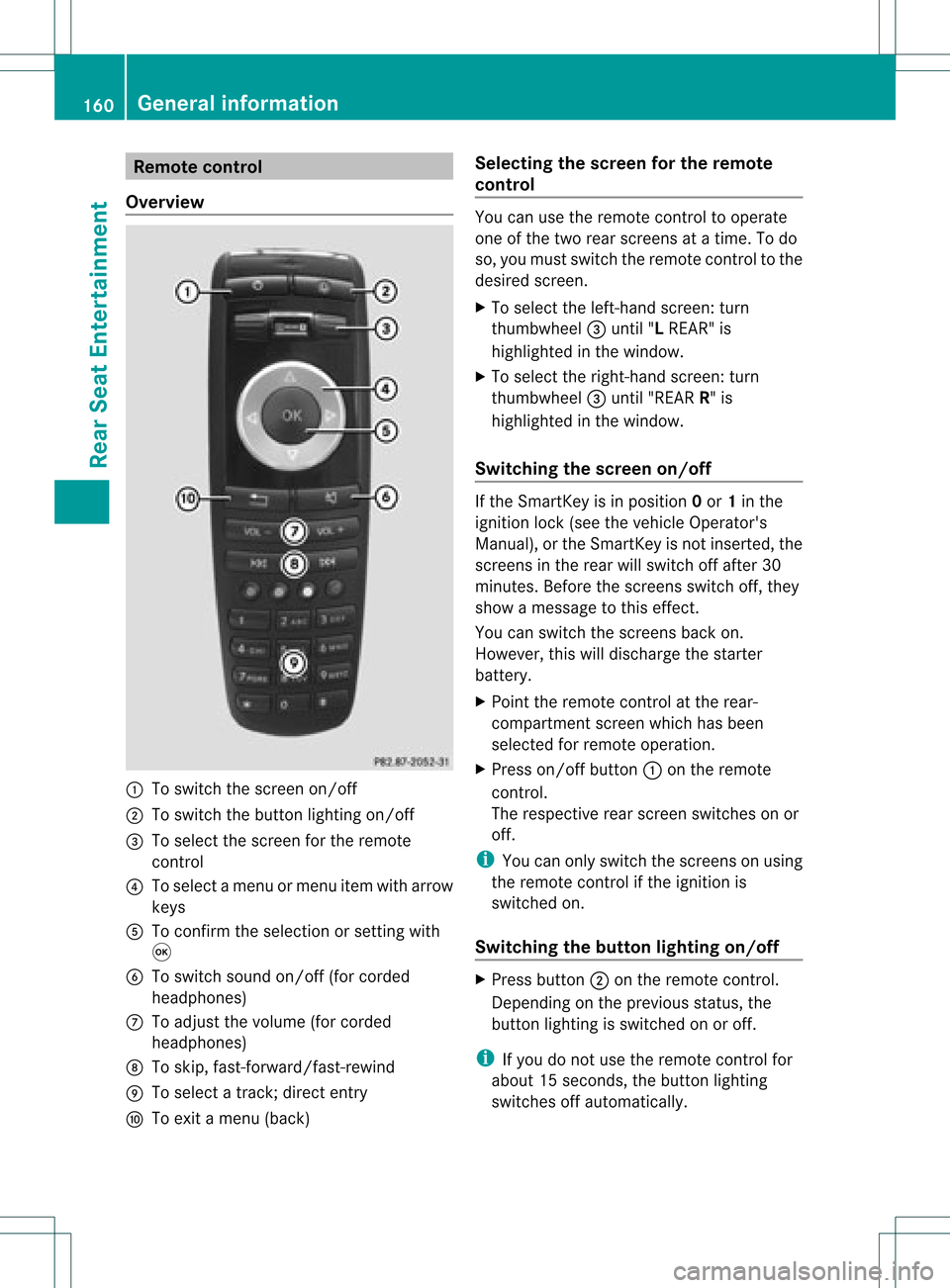
Ove rview :
Toswitch thescre enon/off
; Toswitch thebutton lighti ngon/off
= Toselect the scre enfor the remo te
control
? Toselect amenu ormenu itemwith arr ow
key s
A Toconfi rmthe selectio nor setti ngwith
9
B Toswitch soundon/off (forcorded
headphones)
C Toadjust thevolume (forcorded
headphones)
D Toskip, fast-forward/fast -rewind
E Toselect atrack ;direct entry
F Toexit amenu (back) Selecting
thescreen forthe remot e
control You
canusetheremote controltooperate
one ofthe two rear screen sat atime. Todo
so, you must switch theremote controltothe
desired screen.
X To select theleft- hand screen :turn
thumbwheel =until "LREAR" is
highlighted inthe window.
X To select theright- hand screen :turn
th umbwh eel=until"REA RR" is
high light edinthewin dow.
Swit chingth escr een on/of f If
th eSm artKey isin posi tion 0or 1in the
ign ition lock(see thevehicle Operator's
Manual ),or the SmartKey isnot inserted, the
screens inthe rear willswitch offafter 30
minutes. Beforethescreens switchoff,they
show amessage tothis effect.
You canswitch thescreens backon.
However, thiswilldischarge thestarter
battery.
X Point theremote controlatthe rear-
compartment screenwhichhasbeen
selected forremote operation.
X Press on/off button:onthe remote
cont rol.
The respective rearscreen switches onor
off.
i You canonly switch thescreens onusing
the remote controlifthe ignition is
switched on.
Switching thebutton lighting on/off X
Press button ;onthe remote control.
Depending onthe previous status,the
button lighting isswitched onoroff.
i Ifyou donot use theremote controlfor
abou t15s econ ds,the button lighting
switch esoff automatic ally. 160
General
informationRear SeatEntert ainment