Update MERCEDES-BENZ GLK-Class 2015 X204 Comand Manual
[x] Cancel search | Manufacturer: MERCEDES-BENZ, Model Year: 2015, Model line: GLK-Class, Model: MERCEDES-BENZ GLK-Class 2015 X204Pages: 270, PDF Size: 5.82 MB
Page 27 of 270
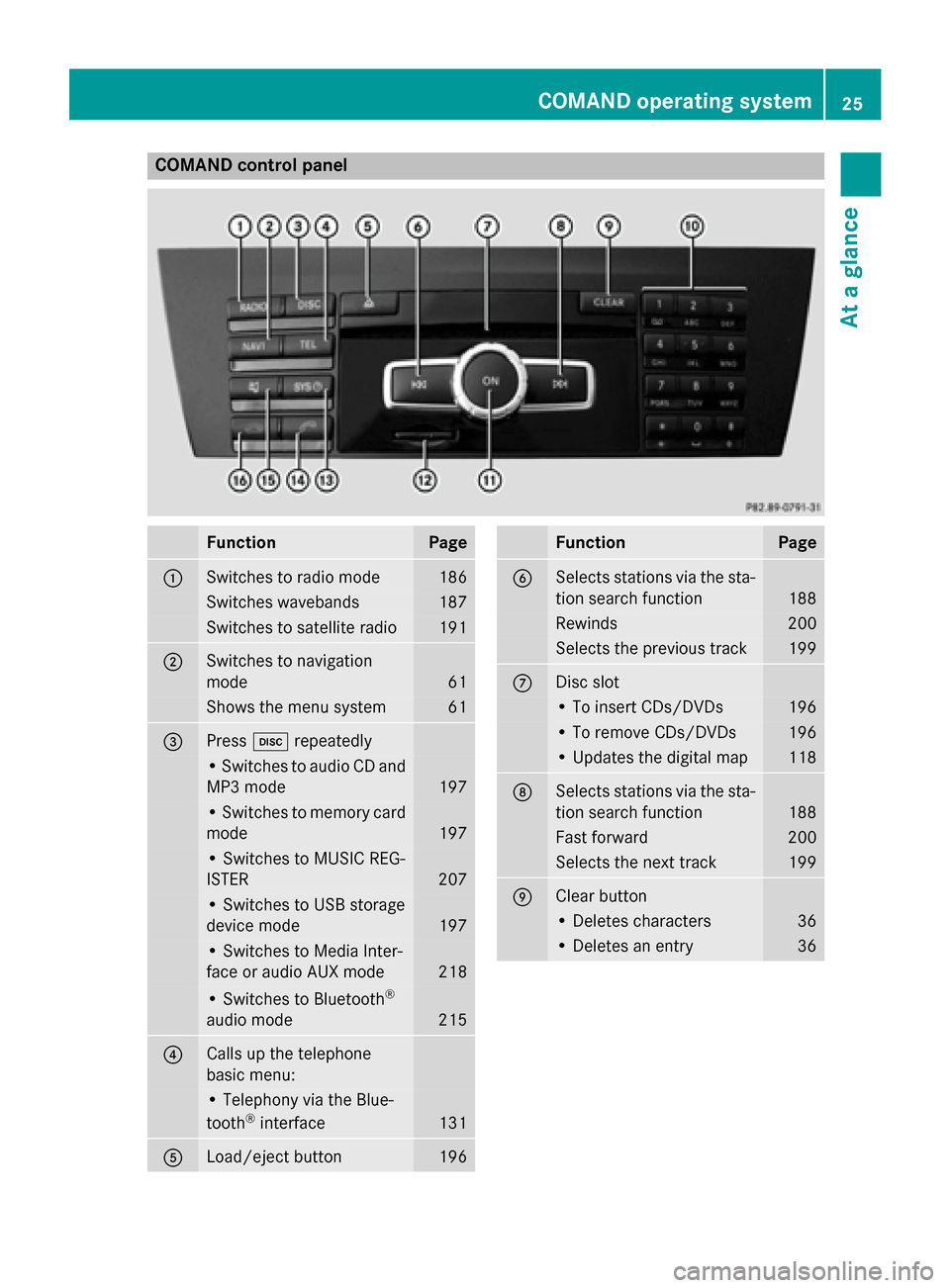
COMAND control panel
Function Page
0043
Switches to radio mode 186
Switches wavebands 187
Switches to satellite radio 191
0044
Switches to navigation
mode 61
Shows the menu system 61
0087
Press
003Arepeatedly • Switches to audio CD and
MP3 mode 197
• Switches to memory card
mode 197
• Switches to MUSIC REG-
ISTER
207
• Switches to USB storage
device mode
197
• Switches to Media Inter-
face or audio AUX mode
218
• Switches to Bluetooth
®
audio mode 215
0085
Calls up the telephone
basic menu: • Telephony via the Blue-
tooth ®
interface 131
0083
Load/eject button 196 Function Page
0084
Selects stations via the sta-
tion search function 188
Rewinds 200
Selects the previous track 199
006B
Disc slot
• To insert CDs/DVDs 196
• To remove CDs/DVDs 196
• Updates the digital map 118
006C
Selects stations via the sta-
tion search function 188
Fast forward 200
Selects the next track 199
006D
Clear button
• Deletes characters 36
• Deletes an entry 36COMAND operating system
25At a glance
Page 105 of 270

Recalculating the route dynamically
The route types
Dynamic Route
Dynamic Route and
Dynamic
Dynamic Route
RouteOnly
OnlyAfter
After Request
Request take
all relevant traffic messages into account
when calculating a route (Y page 62).
If you have selected Dynamic Route Dynamic Routeas the
route type, COMAND guides you to your des-
tination along the updated route.
If you have selected Dynamic Route Only Dynamic Route Only
After Request
After Request as the route type, a prompt
will appear first.
You can now decide whether to:
R accept the route suggested by COMAND
R continue your original route
X To accept the suggested route: press0098
the COMAND controller.
X To continue along the original route:
select Reject
Reject by turning 00790052007Athe
COMAND controller and press 0098to con-
firm. Destination memory
Home address (My Address)
Entering the home address via address
entry X
Proceed as described under “Adopting an
address book entry as a home address”
(Y page 103). Confirm My Address My Addressby
pressing 0098.
X To enter the home address for the first
time: confirm New Entry
New Entry by pressing 0098.X
To change the home address: select
Change Change in the menu showing the home
address by turning 00790052007Athe COMAND con-
troller and press 0098to confirm.
X Confirm New Entry New Entry by pressing 0098.
X In both cases, enter the home address as a
destination, e.g. as a city, street and house number (Y page 64). Then, save the home
address (Y page 69).
Adopting an address book entry as a
home address X
To switch to navigation mode: press the
00BE button.
X To show the menu: press0098the COMAND
controller.
X Select Destination
Destination in the navigation sys-
tem menu bar by turning 00790052007Athe
COMAND controller and press 0098to con-
firm.
X Select From Memory From Memory and press0098to con-
firm.
You will see the destination memory list
either with the character bar (option 1) or
as a selection list (option 2).
Option 1: destination memory list with
character bar X
Slide 00520097the COMAND controller repeat-
edly until the destination memory list
appears as a selection list.
Option 2: destination memory list as
selection list Destination memory
103Navigation Z
Page 120 of 270
Country-specific information
You can call up information on the traffic con-
ditions in the country you are currently driving
in via the COMAND Internet and online func-
tion.
The availability of information is country-
dependent. Information can include maxi-
mum speeds, driving with low-beam head-
lamps or legal alcohol limits, for example.
X To switch to navigation mode: press the
00BE button.
X To show the menu: press0098the COMAND
controller.
X Select Position Position in the navigation system
menu bar by sliding 00520064and turning 00790052007A
the COMAND controller and press 0098to
confirm.
X Select Country Information
Country Information and press
0098 to confirm.
When the connection has been made, the
available country information appears.
X To return to navigation: press the0038
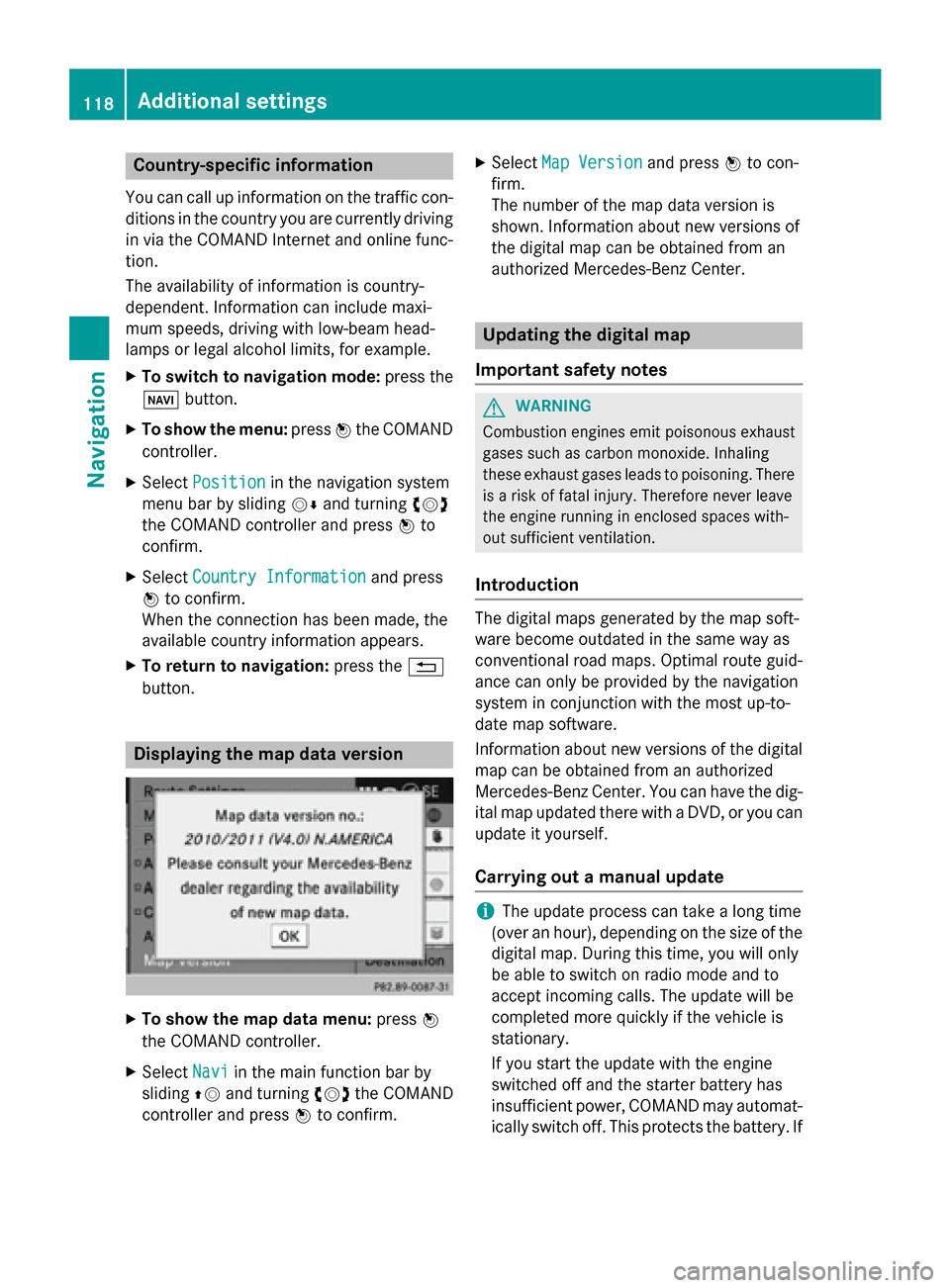
button. Displaying the map data version
X
To show the map data menu: press0098
the COMAND controller.
X Select Navi
Navi in the main function bar by
sliding 00970052and turning 00790052007Athe COMAND
controller and press 0098to confirm. X
Select Map Version Map Version and press0098to con-
firm.
The number of the map data version is
shown. Information about new versions of
the digital map can be obtained from an
authorized Mercedes-Benz Center. Updating the digital map
Important safety notes G
WARNING
Combustion engines emit poisonous exhaust
gases such as carbon monoxide. Inhaling
these exhaust gases leads to poisoning. There is a risk of fatal injury. Therefore never leave
the engine running in enclosed spaces with-
out sufficient ventilation.
Introduction The digital maps generated by the map soft-
ware become outdated in the same way as
conventional road maps. Optimal route guid-
ance can only be provided by the navigation
system in conjunction with the most up-to-
date map software.
Information about new versions of the digital
map can be obtained from an authorized
Mercedes-Benz Center. You can have the dig-
ital map updated there with a DVD, or you can update it yourself.
Carrying out a manual update i
The update process can take a long time
(over an hour), depending on the size of the digital map. During this time, you will only
be able to switch on radio mode and to
accept incoming calls. The update will be
completed more quickly if the vehicle is
stationary.
If you start the update with the engine
switched off and the starter battery has
insufficient power, COMAND may automat-
ically switch off. This protects the battery. If 118
Additional settingsNavigation
Page 121 of 270

this occurs, restart the update with the
engine running.
X Insert the DVD (Y page 196).
COMAND checks whether the digital map
on the DVD is compatible with the naviga-
tion system and system software.
A prompt then appears asking if you want
to install the database. Versions of the
database currently installed and the data-
base that is to be installed are displayed.
X Select Yes YesorNo
No and press 0098to confirm.
After selecting Yes
Yes, an activation code
must be entered when installing a database
for the first time. You will receive the acti-
vation code when you buy the navigation
DVD.
If you select No No, the process will be can-
celed.
X Enter the activation code.
After entering the activation code cor-
rectly, COMAND starts updating the digital
map. Once the update is finished, you will
see a message.
X To confirm the message: press0098the
COMAND controller.
X Take the DVD out of the slot.
While the update is running, you will see a
message to this effect and a progress bar.
The navigation system is not operational
until the update is complete.
i You cannot eject the DVD during the
update. If you switch off COMAND during
the update, the update is interrupted. It
then continues from where it was interrup-
ted when the system is restarted.
COMAND may prompt you to change the DVD during the update.
X Press the 0062load/eject button.
X Take the DVD out of the slot.
X Insert the requested DVD.
Once the update has been successfully
completed, you will see a message to this
effect. X
To confirm the message: press0098the
COMAND controller.
X Take the DVD out of the slot.
The update is complete.
If the update is not successfully completed, you will see a message that the map updateis not possible.
X To confirm the message: press0098the
COMAND controller.
X Take the DVD out of the slot. Additional settings
119Navigation Z
Page 123 of 270
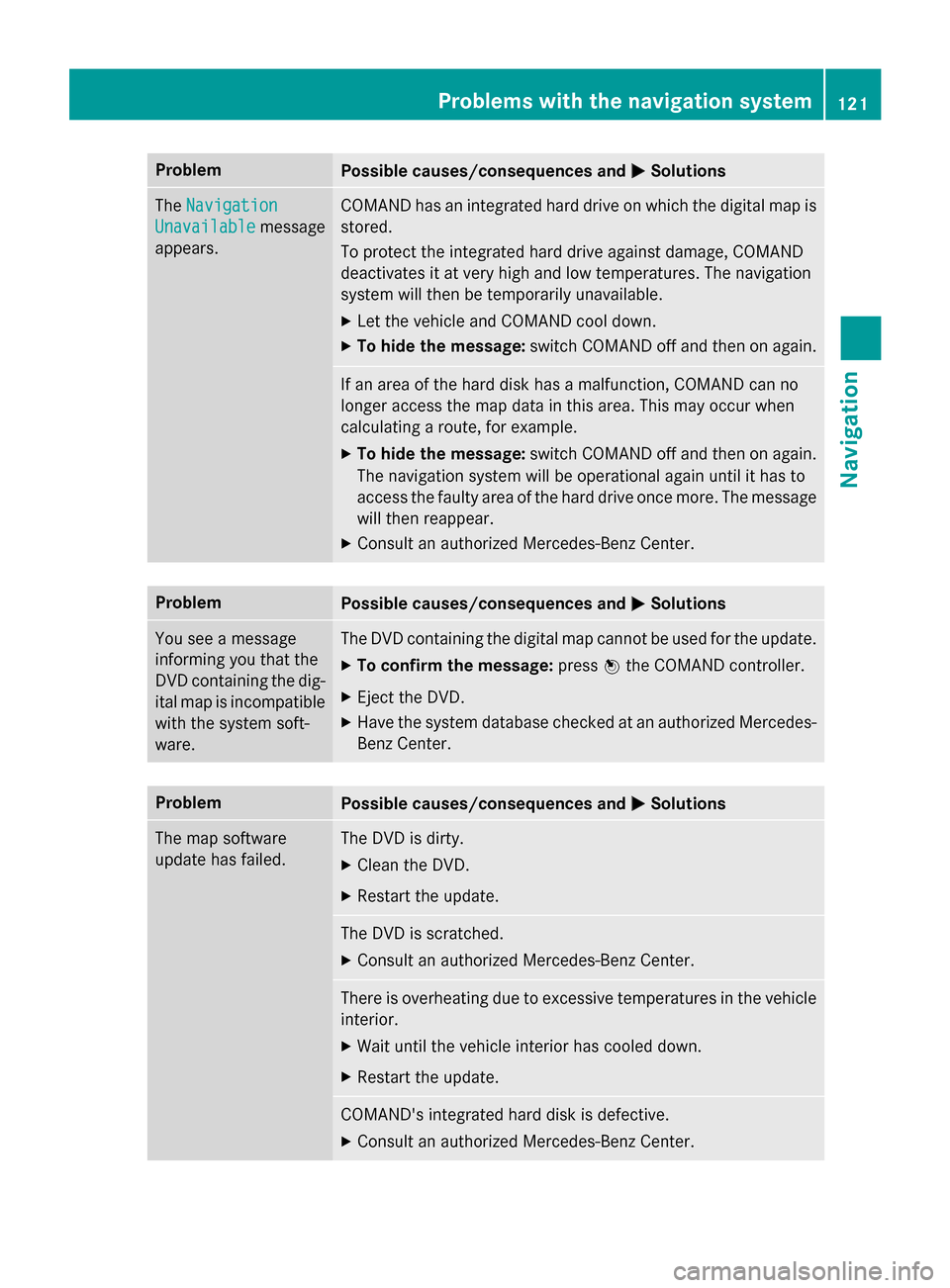
Problem
Possible causes/consequences and
0050
0050Solutions The
Navigation
Navigation
Unavailable
Unavailable message
appears. COMAND has an integrated hard drive on which the digital map is
stored.
To protect the integrated hard drive against damage, COMAND
deactivates it at very high and low temperatures. The navigation
system will then be temporarily unavailable.
X Let the vehicle and COMAND cool down.
X To hide the message: switch COMAND off and then on again. If an area of the hard disk has a malfunction, COMAND can no
longer access the map data in this area. This may occur when
calculating a route, for example.
X To hide the message: switch COMAND off and then on again.
The navigation system will be operational again until it has to
access the faulty area of the hard drive once more. The message
will then reappear.
X Consult an authorized Mercedes-Benz Center. Problem
Possible causes/consequences and
0050 0050Solutions You see a message
informing you that the
DVD containing the dig-
ital map is incompatible
with the system soft-
ware. The DVD containing the digital map cannot be used for the update.
X To confirm the message: press0098the COMAND controller.
X Eject the DVD.
X Have the system database checked at an authorized Mercedes-
Benz Center. Problem
Possible causes/consequences and
0050 0050Solutions The map software
update has failed. The DVD is dirty.
X Clean the DVD.
X Restart the update. The DVD is scratched.
X Consult an authorized Mercedes-Benz Center. There is overheating due to excessive temperatures in the vehicle
interior.
X Wait until the vehicle interior has cooled down.
X Restart the update. COMAND's integrated hard disk is defective.
X Consult an authorized Mercedes-Benz Center. Problems with the navigation system
121Navigation Z
Page 124 of 270

Problem
Possible causes/consequences and
0050
0050Solutions COMAND asks for an
activation code during
the map update. The digital map is secured with an activation code.
X Consult an authorized Mercedes-Benz Center. 122
Problems with the navigation systemNavigation
Page 130 of 270
list. In this case, start a new search to
update the Bluetooth ®
telephone list.
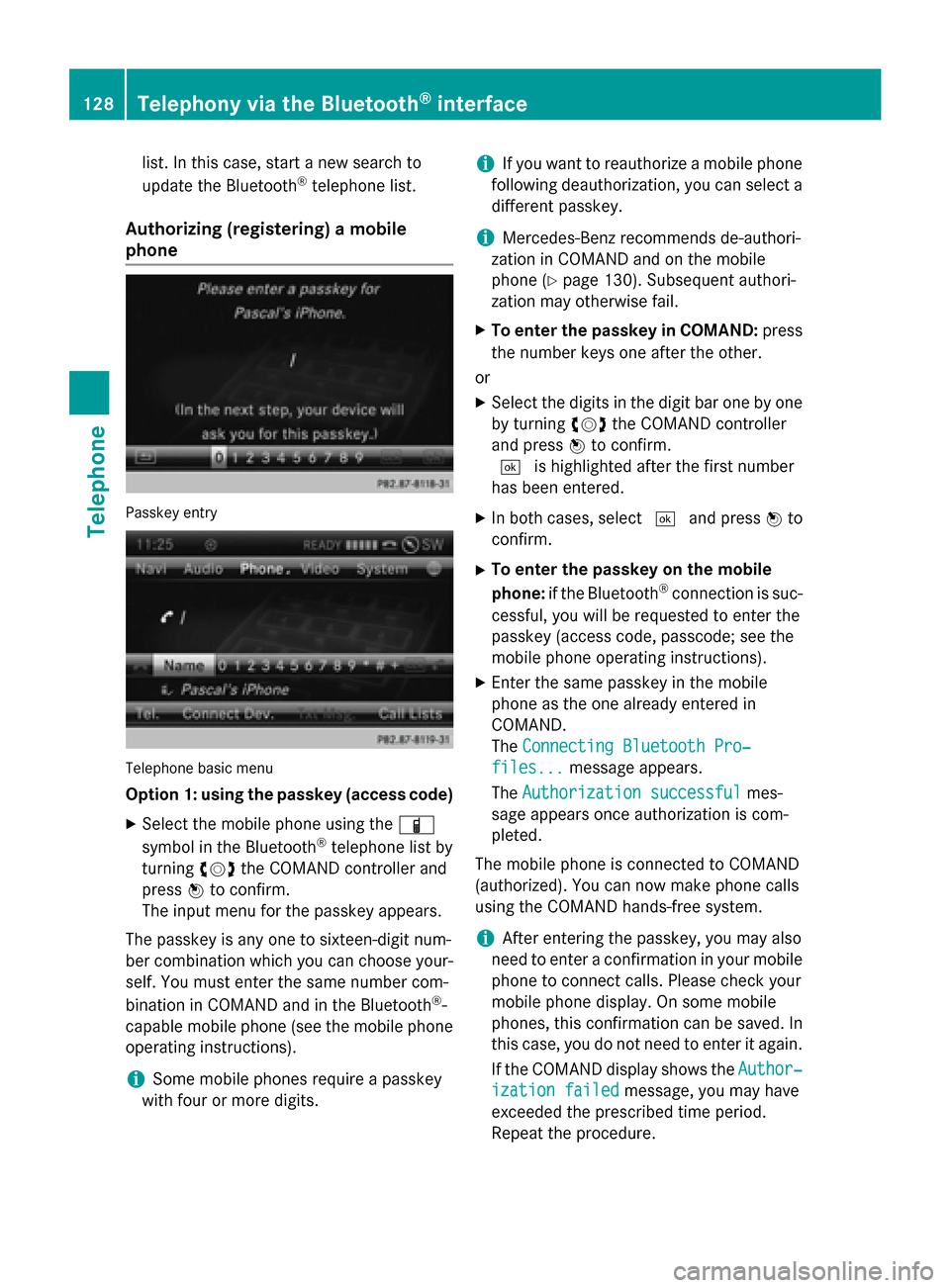
Authorizing (registering) a mobile
phone Passkey entry
Telephone basic menu
Option 1: using the passkey (access code)
X Select the mobile phone using the 00D3
symbol in the Bluetooth ®
telephone list by
turning 00790052007Athe COMAND controller and
press 0098to confirm.
The input menu for the passkey appears.
The passkey is any one to sixteen-digit num-
ber combination which you can choose your- self. You must enter the same number com-
bination in COMAND and in the Bluetooth ®
-
capable mobile phone (see the mobile phone
operating instructions).
i Some mobile phones require a passkey
with four or more digits. i
If you want to reauthorize a mobile phone
following deauthorization, you can select a different passkey.
i Mercedes-Benz recommends de-authori-
zation in COMAND and on the mobile
phone (Y page 130). Subsequent authori-
zation may otherwise fail.
X To enter the passkey in COMAND: press
the number keys one after the other.
or X Select the digits in the digit bar one by one
by turning 00790052007Athe COMAND controller
and press 0098to confirm.
0054 is highlighted after the first number
has been entered.
X In both cases, select 0054and press 0098to
confirm.
X To enter the passkey on the mobile
phone: if the Bluetooth ®
connection is suc-
cessful, you will be requested to enter the
passkey (access code, passcode; see the
mobile phone operating instructions).
X Enter the same passkey in the mobile
phone as the one already entered in
COMAND.
The Connecting Bluetooth Pro‐ Connecting Bluetooth Pro‐
files...
files... message appears.
The Authorization successful
Authorization successful mes-
sage appears once authorization is com-
pleted.
The mobile phone is connected to COMAND
(authorized). You can now make phone calls
using the COMAND hands-free system.
i After entering the passkey, you may also
need to enter a confirmation in your mobile
phone to connect calls. Please check your
mobile phone display. On some mobile
phones, this confirmation can be saved. In
this case, you do not need to enter it again.
If the COMAND display shows the Author‐ Author‐
ization failed
ization failed message, you may have
exceeded the prescribed time period.
Repeat the procedure. 128
Telephony via the Bluetooth ®
interfaceTelephone
Page 144 of 270

i
Save
Save
is shown in gray if the selected list
entry has already been saved.
X Select Add Phone No.
Add Phone No. and press0098to
confirm.
X Select a category for the number, e.g. Home
Home,
and press 0098to confirm.
X Select a category for the phone, e.g.
Mobile
Mobile, and press 0098to confirm.
X Select Save
Save.
The search menu for address book entries
appears.
X Search for the desired entry (Y page 137).
X Press 0098when you have finished searching.
COMAND stores the data if there are fewer
than five numbers assigned to the entry you
are searching for in the selected number
category.
You will see a message to this effect.
If five numbers are stored for the entry you are searching for, a prompt will appear ask- ing whether you wish to overwrite one of
the existing numbers.
X Select Yes
Yes orNo No and press 0098to confirm.
If you select Yes Yes, a selection list with the
five existing numbers is displayed.
If you select No
No, the process will be can-
celed.
X Select the number to be overwritten in the
list by turning 00790052007Athe COMAND controller
and press 0098to confirm.
COMAND overwrites the selected number
with the new data. Deleting call lists
If you are using a Bluetooth ®
phone that does
not support the PBAP Bluetooth ®
profile, the
call lists are generated and managed by
COMAND. You can delete these call lists in
COMAND.
If you download call lists from a Bluetooth ®
phone that supports the PBAP Bluetooth ®
profile, you cannot delete them from
COMAND. X
Select Call Lists
Call Lists in the telephone basic
menu by turning 00790052007Athe COMAND con-
troller and press 0098to confirm.
X Select Delete Call Lists Delete Call Lists and press0098
to confirm.
A prompt appears asking whether you wish to delete all call lists.
X Select Yes YesorNo
No and press 0098to confirm.
If you select Yes
Yes, the call lists are deleted.
If you select No
No, the process will be can-
celed.
i If you delete these call lists from the
mobile phone (see the separate mobile
phone operating instructions), COMAND
updates the call list display the next time it connects. Using the speed dial list
Storing an entry
You can assign ten speed dial presets (0 – 9) to the speed dial list. There are two options
available for this purpose.
Option 1:
X Search for a phone book entry in the phone
book (Y page 137).
X If an entry has several phone numbers,
select the desired number by turning 00790052007A
the COMAND controller.
X Select the list symbol to the right of the
entry by sliding 00520096the COMAND control-
ler and press 0098to confirm.
A menu appears.
X Select Speed Dial Speed Dial by turning00790052007Athe
COMAND controller and press 0098to con-
firm.
A menu appears. 142
Using the speed dial listTelephone
Page 197 of 270
Displaying information
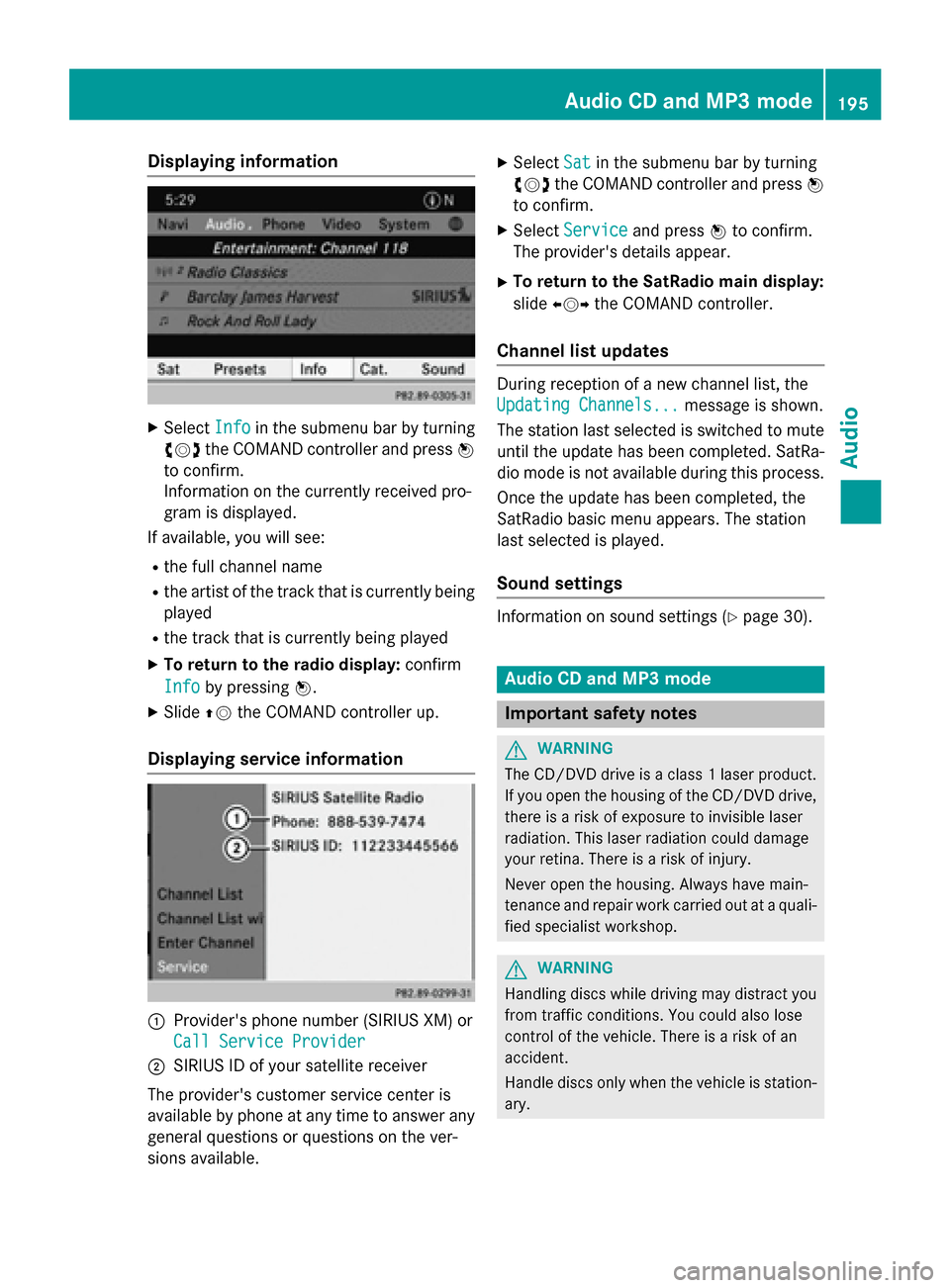
X
Select Info
Info in the submenu bar by turning
00790052007A the COMAND controller and press 0098
to confirm.
Information on the currently received pro-
gram is displayed.
If available, you will see:
R the full channel name
R the artist of the track that is currently being
played
R the track that is currently being played
X To return to the radio display: confirm
Info
Info by pressing 0098.
X Slide 00970052the COMAND controller up.
Displaying service information 0043
Provider's phone number (SIRIUS XM) or
Call Service Provider
Call Service Provider
0044 SIRIUS ID of your satellite receiver
The provider's customer service center is
available by phone at any time to answer any
general questions or questions on the ver-
sions available. X
Select Sat
Sat in the submenu bar by turning
00790052007A the COMAND controller and press 0098
to confirm.
X Select Service Service and press 0098to confirm.
The provider's details appear.
X To return to the SatRadio main display:
slide 009500520096 the COMAND controller.
Channel list updates During reception of a new channel list, the
Updating Channels... Updating Channels...
message is shown.
The station last selected is switched to mute until the update has been completed. SatRa-
dio mode is not available during this process.
Once the update has been completed, the
SatRadio basic menu appears. The station
last selected is played.
Sound settings Information on sound settings (Y
page 30). Audio CD and MP3 mode
Important safety notes
G
WARNING
The CD/DVD drive is a class 1 laser product. If you open the housing of the CD/DVD drive,
there is a risk of exposure to invisible laser
radiation. This laser radiation could damage
your retina. There is a risk of injury.
Never open the housing. Always have main-
tenance and repair work carried out at a quali- fied specialist workshop. G
WARNING
Handling discs while driving may distract you from traffic conditions. You could also lose
control of the vehicle. There is a risk of an
accident.
Handle discs only when the vehicle is station-
ary. Audio CD and MP3
mode
195Audio Z
Page 203 of 270
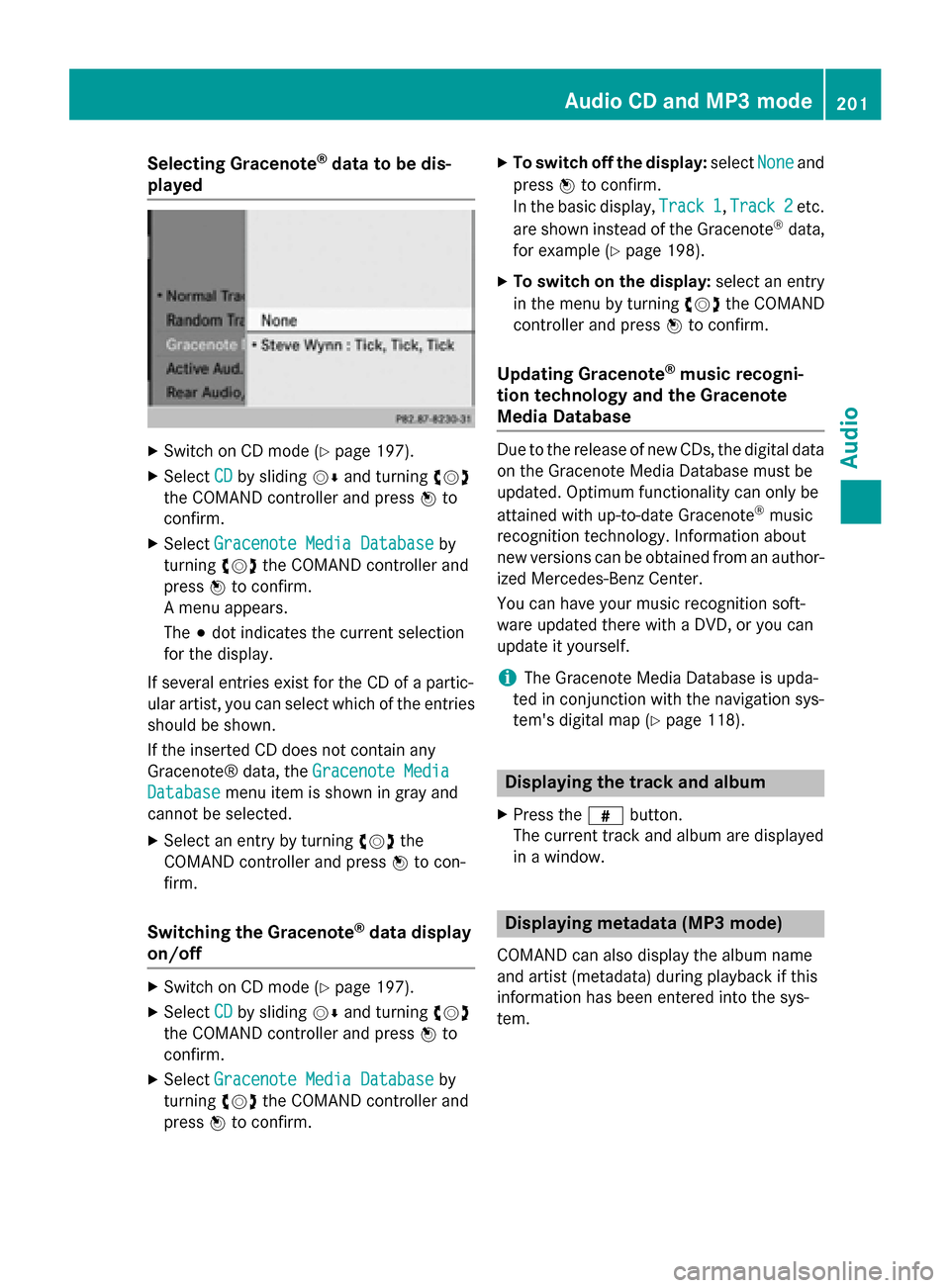
Selecting Gracenote
®
data to be dis-
played X
Switch on CD mode (Y page 197).
X Select CD
CDby sliding 00520064and turning 00790052007A
the COMAND controller and press 0098to
confirm.
X Select Gracenote Media Database
Gracenote Media Database by
turning 00790052007Athe COMAND controller and
press 0098to confirm.
A menu appears.
The 003Bdot indicates the current selection
for the display.
If several entries exist for the CD of a partic-
ular artist, you can select which of the entries
should be shown.
If the inserted CD does not contain any
Gracenote® data, the Gracenote Media
Gracenote Media
Database
Database menu item is shown in gray and
cannot be selected.
X Select an entry by turning 00790052007Athe
COMAND controller and press 0098to con-
firm.
Switching the Gracenote ®
data display
on/off X
Switch on CD mode (Y page 197).
X Select CD CDby sliding 00520064and turning 00790052007A
the COMAND controller and press 0098to
confirm.
X Select Gracenote Media Database
Gracenote Media Database by
turning 00790052007Athe COMAND controller and
press 0098to confirm. X
To switch off the display: selectNone Noneand
press 0098to confirm.
In the basic display, Track 1 Track 1,Track 2
Track 2etc.
are shown instead of the Gracenote ®
data,
for example (Y page 198).
X To switch on the display: select an entry
in the menu by turning 00790052007Athe COMAND
controller and press 0098to confirm.
Updating Gracenote ®
music recogni-
tion technology and the Gracenote
Media Database Due to the release of new CDs, the digital data
on the Gracenote Media Database must be
updated. Optimum functionality can only be
attained with up-to-date Gracenote ®
music
recognition technology. Information about
new versions can be obtained from an author-
ized Mercedes-Benz Center.
You can have your music recognition soft-
ware updated there with a DVD, or you can
update it yourself.
i The Gracenote Media Database is upda-
ted in conjunction with the navigation sys-
tem's digital map (Y page 118). Displaying the track and album
X Press the 0090button.
The current track and album are displayed
in a window. Displaying metadata (MP3 mode)
COMAND can also display the album name
and artist (metadata) during playback if this
information has been entered into the sys-
tem. Audio CD and MP3 mode
201Audio Z