sensor MERCEDES-BENZ GLK-Class 2015 X204 Service Manual
[x] Cancel search | Manufacturer: MERCEDES-BENZ, Model Year: 2015, Model line: GLK-Class, Model: MERCEDES-BENZ GLK-Class 2015 X204Pages: 386, PDF Size: 7.16 MB
Page 253 of 386
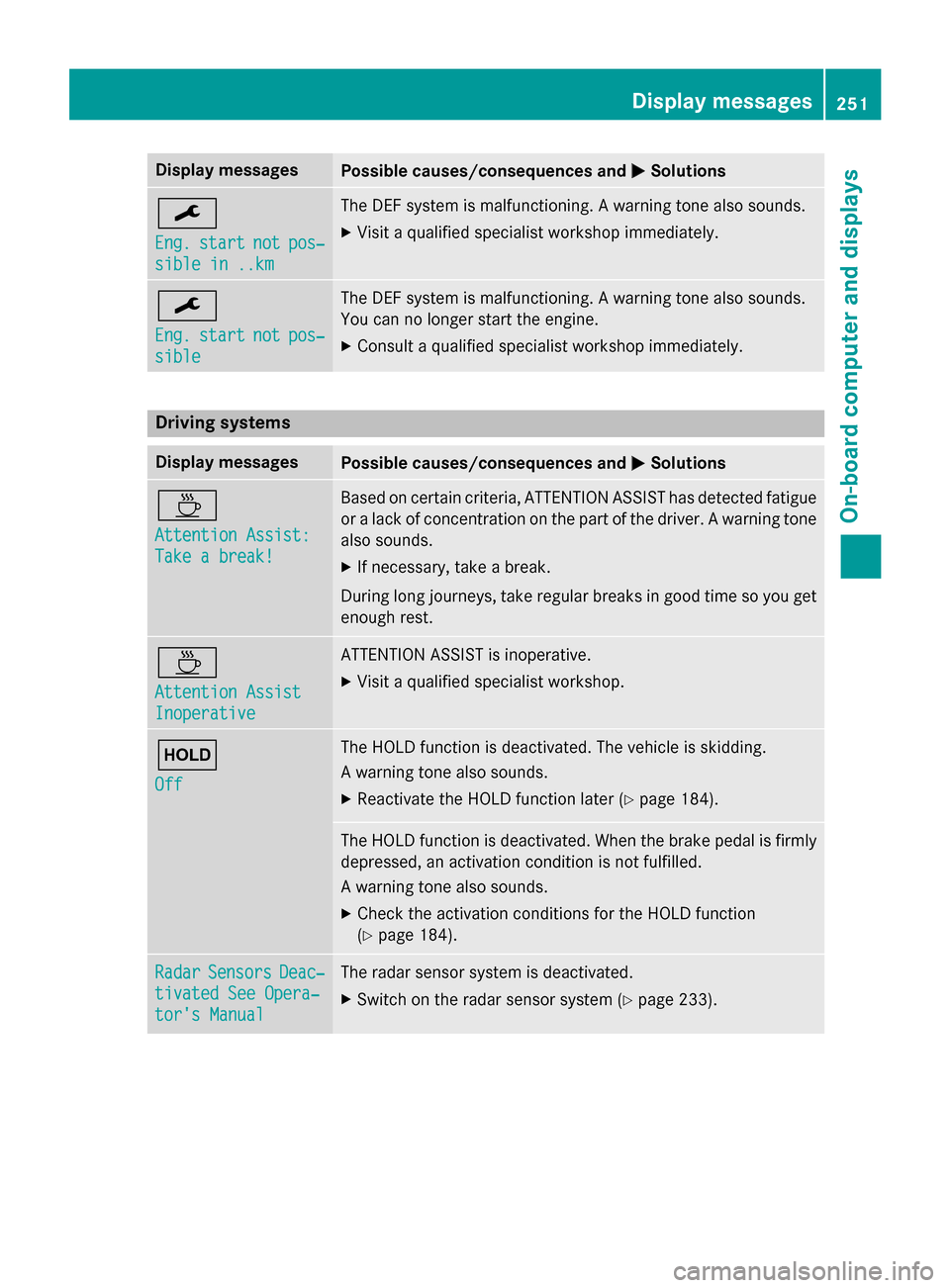
Display messages
Possible causes/consequences and
0050
0050Solutions 0099
Eng. Eng.
start
start not
notpos‐
pos‐
sible in ..km
sible in ..km The DEF system is malfunctioning. A warning tone also sounds.
X Visit a qualified specialist workshop immediately. 0099
Eng. Eng.
start
start not
notpos‐
pos‐
sible
sible The DEF system is malfunctioning. A warning tone also sounds.
You can no longer start the engine.
X Consult a qualified specialist workshop immediately. Driving systems
Display messages
Possible causes/consequences and
0050 0050Solutions 00AD
Attention Assist: Attention Assist:
Take a break! Take a break! Based on certain criteria, ATTENTION ASSIST has detected fatigue
or a lack of concentration on the part of the driver. A warning tone also sounds.
X If necessary, take a break.
During long journeys, take regular breaks in good time so you get enough rest. 00AD
Attention Assist Attention Assist
Inoperative Inoperative ATTENTION ASSIST is inoperative.
X Visit a qualified specialist workshop. 00D9
Off Off The HOLD function is deactivated. The vehicle is skidding.
A warning tone also sounds.
X Reactivate the HOLD function later (Y page 184). The HOLD function is deactivated. When the brake pedal is firmly
depressed, an activation condition is not fulfilled.
A warning tone also sounds.
X Check the activation conditions for the HOLD function
(Y page 184). Radar Radar
Sensors
Sensors Deac‐
Deac‐
tivated See Opera‐
tivated See Opera‐
tor's Manual tor's Manual The radar sensor system is deactivated.
X Switch on the radar sensor system (Y page 233). Display
messages
251On-board computer and displays Z
Page 255 of 386
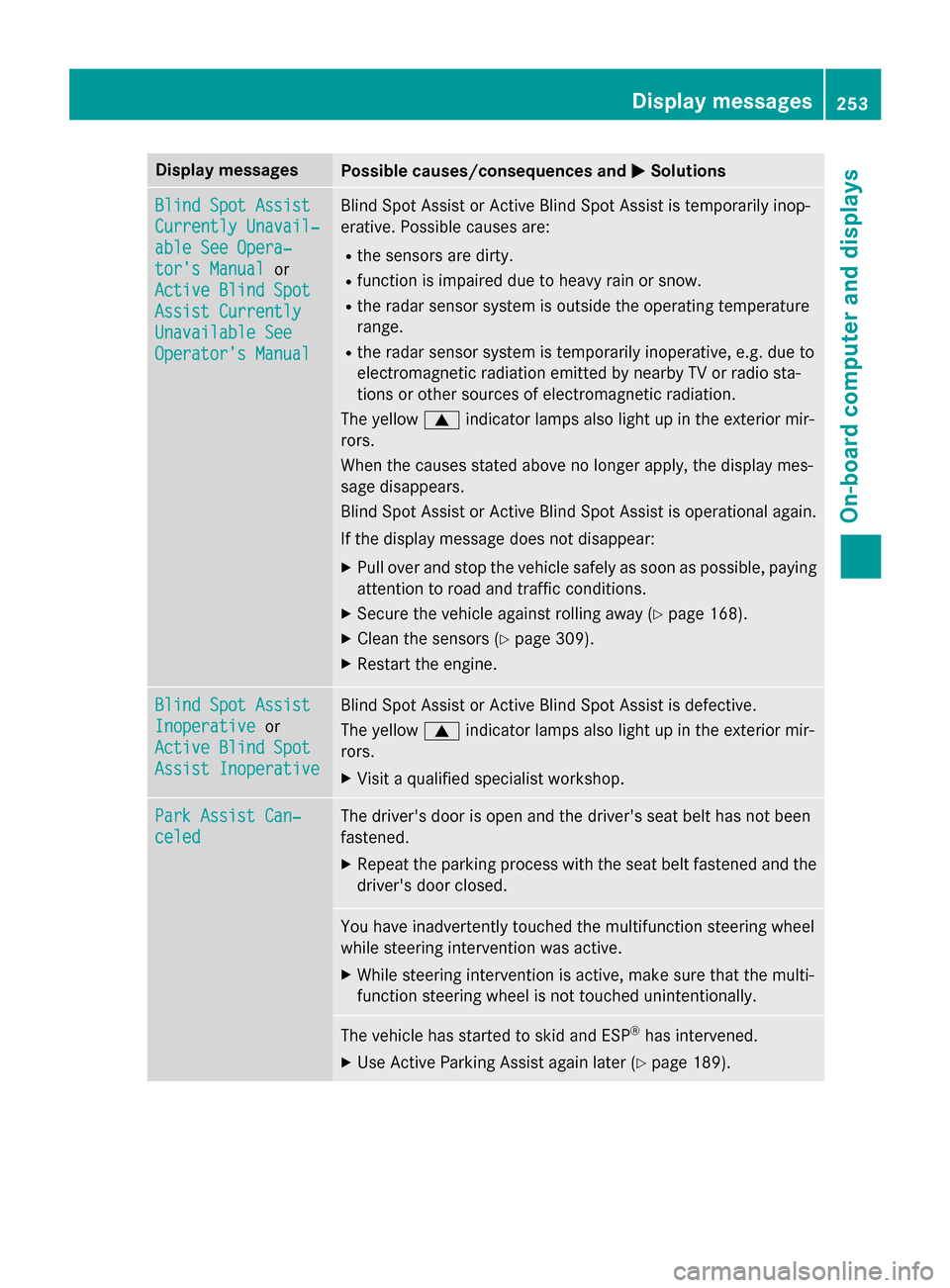
Display messages
Possible causes/consequences and
0050
0050Solutions Blind Spot Assist
Blind Spot Assist
Currently Unavail‐ Currently Unavail‐
able See Opera‐ able See Opera‐
tor's Manual tor's Manual
or
Active Blind Spot
Active Blind Spot
Assist Currently Assist Currently
Unavailable See Unavailable See
Operator's Manual Operator's Manual Blind Spot Assist or Active Blind Spot Assist is temporarily inop-
erative. Possible causes are:
R the sensors are dirty.
R function is impaired due to heavy rain or snow.
R the radar sensor system is outside the operating temperature
range.
R the radar sensor system is temporarily inoperative, e.g. due to
electromagnetic radiation emitted by nearby TV or radio sta-
tions or other sources of electromagnetic radiation.
The yellow 0063indicator lamps also light up in the exterior mir-
rors.
When the causes stated above no longer apply, the display mes-
sage disappears.
Blind Spot Assist or Active Blind Spot Assist is operational again.
If the display message does not disappear:
X Pull over and stop the vehicle safely as soon as possible, paying
attention to road and traffic conditions.
X Secure the vehicle against rolling away (Y page 168).
X Clean the sensors (Y page 309).
X Restart the engine. Blind Spot Assist Blind Spot Assist
Inoperative Inoperative
or
Active Blind Spot
Active Blind Spot
Assist Inoperative Assist Inoperative Blind Spot Assist or Active Blind Spot Assist is defective.
The yellow
0063indicator lamps also light up in the exterior mir-
rors.
X Visit a qualified specialist workshop. Park Assist Can‐ Park Assist Can‐
celed celed The driver's door is open and the driver's seat belt has not been
fastened.
X Repeat the parking process with the seat belt fastened and the
driver's door closed. You have inadvertently touched the multifunction steering wheel
while steering intervention was active.
X While steering intervention is active, make sure that the multi-
function steering wheel is not touched unintentionally. The vehicle has started to skid and ESP
®
has intervened.
X Use Active Parking Assist again later (Y page 189). Display
messages
253On-board computer and displays Z
Page 256 of 386
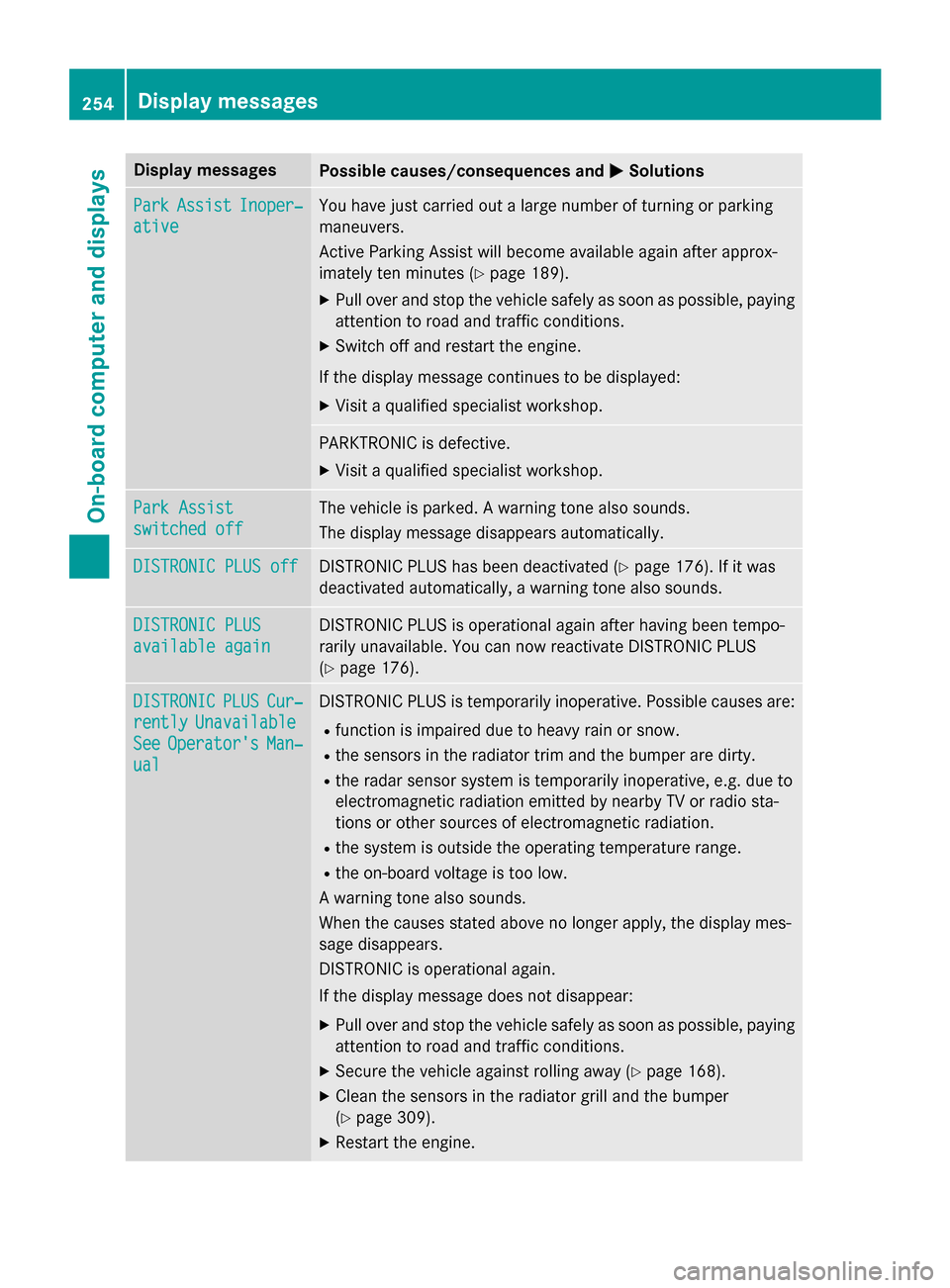
Display messages
Possible causes/consequences and
0050
0050Solutions Park
Park
Assist
Assist Inoper‐
Inoper‐
ative
ative You have just carried out a large number of turning or parking
maneuvers.
Active Parking Assist will become available again after approx-
imately ten minutes (Y
page 189).
X Pull over and stop the vehicle safely as soon as possible, paying
attention to road and traffic conditions.
X Switch off and restart the engine.
If the display message continues to be displayed: X Visit a qualified specialist workshop. PARKTRONIC is defective.
X Visit a qualified specialist workshop. Park Assist Park Assist
switched off switched off The vehicle is parked. A warning tone also sounds.
The display message disappears automatically.
DISTRONIC PLUS off DISTRONIC PLUS off DISTRONIC PLUS has been deactivated (Y
page 176). If it was
deactivated automatically, a warning tone also sounds. DISTRONIC PLUS
DISTRONIC PLUS
available again available again DISTRONIC PLUS is operational again after having been tempo-
rarily unavailable. You can now reactivate DISTRONIC PLUS
(Y
page 176). DISTRONIC DISTRONIC
PLUS
PLUSCur‐
Cur‐
rently
rently Unavailable
Unavailable
See
See Operator's
Operator's Man‐
Man‐
ual
ual DISTRONIC PLUS is temporarily inoperative. Possible causes are:
R function is impaired due to heavy rain or snow.
R the sensors in the radiator trim and the bumper are dirty.
R the radar sensor system is temporarily inoperative, e.g. due to
electromagnetic radiation emitted by nearby TV or radio sta-
tions or other sources of electromagnetic radiation.
R the system is outside the operating temperature range.
R the on-board voltage is too low.
A warning tone also sounds.
When the causes stated above no longer apply, the display mes-
sage disappears.
DISTRONIC is operational again.
If the display message does not disappear:
X Pull over and stop the vehicle safely as soon as possible, paying
attention to road and traffic conditions.
X Secure the vehicle against rolling away (Y page 168).
X Clean the sensors in the radiator grill and the bumper
(Y page 309).
X Restart the engine. 254
Display
messagesOn-board computer and displays
Page 259 of 386
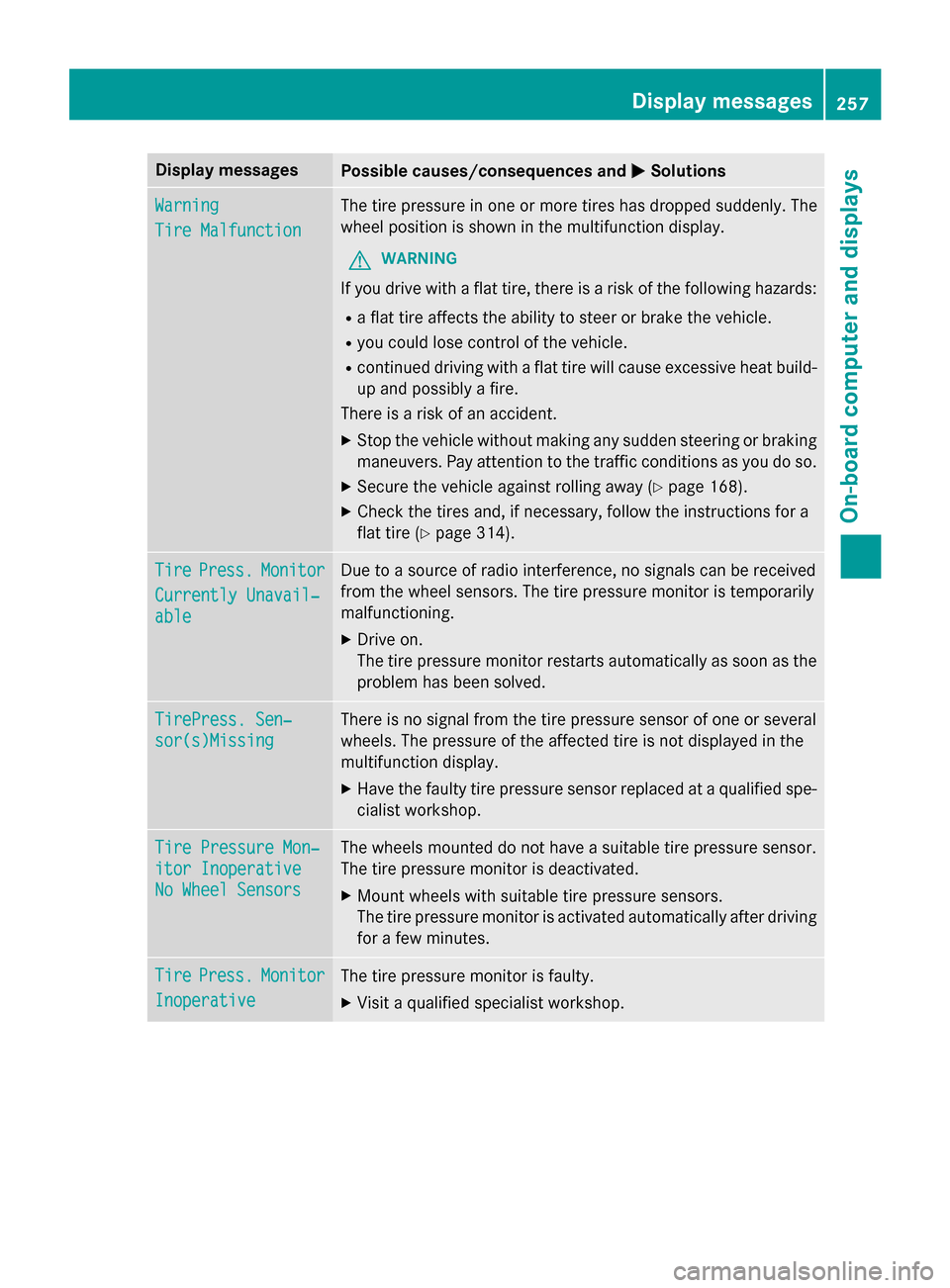
Display messages
Possible causes/consequences and
0050
0050Solutions Warning
Warning
Tire Malfunction Tire Malfunction The tire pressure in one or more tires has dropped suddenly. The
wheel position is shown in the multifunction display.
G WARNING
If you drive with a flat tire, there is a risk of the following hazards: R a flat tire affects the ability to steer or brake the vehicle.
R you could lose control of the vehicle.
R continued driving with a flat tire will cause excessive heat build-
up and possibly a fire.
There is a risk of an accident.
X Stop the vehicle without making any sudden steering or braking
maneuvers. Pay attention to the traffic conditions as you do so.
X Secure the vehicle against rolling away (Y page 168).
X Check the tires and, if necessary, follow the instructions for a
flat tire (Y page 314). Tire Tire
Press.
Press. Monitor
Monitor
Currently Unavail‐
Currently Unavail‐
able able Due to a source of radio interference, no signals can be received
from the wheel sensors. The tire pressure monitor is temporarily
malfunctioning.
X Drive on.
The tire pressure monitor restarts automatically as soon as the
problem has been solved. TirePress. Sen‐ TirePress. Sen‐
sor(s)Missing sor(s)Missing There is no signal from the tire pressure sensor of one or several
wheels. The pressure of the affected tire is not displayed in the
multifunction display.
X Have the faulty tire pressure sensor replaced at a qualified spe-
cialist workshop. Tire Pressure Mon‐ Tire Pressure Mon‐
itor Inoperative itor Inoperative
No Wheel Sensors No Wheel Sensors The wheels mounted do not have a suitable tire pressure sensor.
The tire pressure monitor is deactivated.
X Mount wheels with suitable tire pressure sensors.
The tire pressure monitor is activated automatically after driving
for a few minutes. Tire Tire
Press.
Press. Monitor
Monitor
Inoperative
Inoperative The tire pressure monitor is faulty.
X Visit a qualified specialist workshop. Display
messages
257On-board computer and displays Z
Page 270 of 386
Problem
Possible causes/consequences and
0050
0050Solutions 00AC
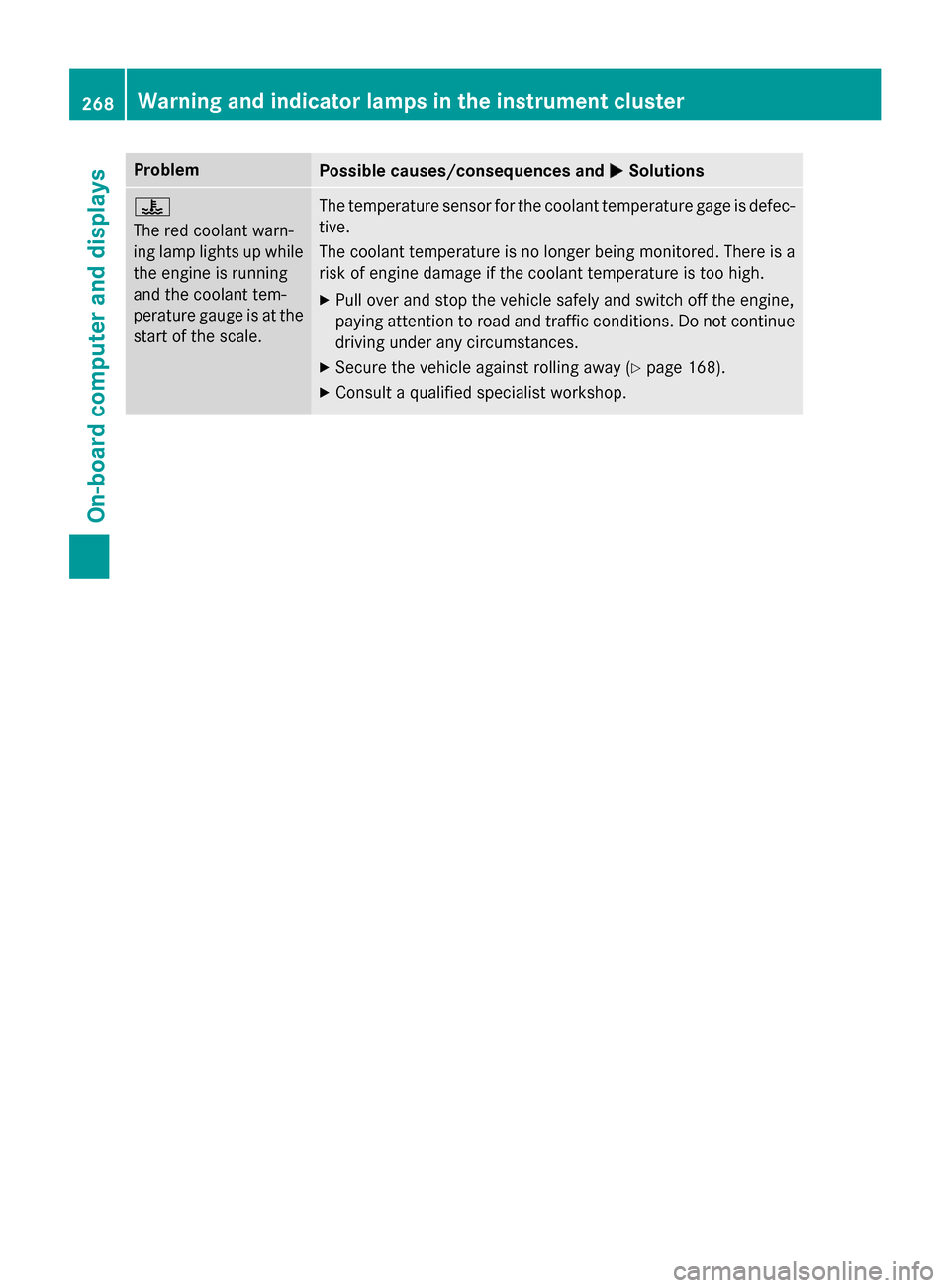
The red coolant warn-
ing lamp lights up while
the engine is running
and the coolant tem-
perature gauge is at the start of the scale. The temperature sensor for the coolant temperature gage is defec-
tive.
The coolant temperature is no longer being monitored. There is a risk of engine damage if the coolant temperature is too high.
X Pull over and stop the vehicle safely and switch off the engine,
paying attention to road and traffic conditions. Do not continue
driving under any circumstances.
X Secure the vehicle against rolling away (Y page 168).
X Consult a qualified specialist workshop. 268
Warning and indicator lamps in the instrument clusterOn-board computer and displays
Page 311 of 386
X
Fold the windshield wiper arms away from
the windshield.
X Carefully clean the wiper blades with a
damp cloth.
X Fold the windshield wiper arms back again
before switching on the ignition.
Cleaning the exterior lighting !
Only use cleaning agents or cleaning
cloths which are suitable for plastic light
lenses. Unsuitable cleaning agents or
cleaning cloths could scratch or damage
the plastic light lenses.
X Clean the plastic lenses of the exterior
lighting using a wet sponge and a mild
cleaning agent, e.g. Mercedes-Benz car
shampoo. Or clean the exterior lighting
with cleaning cloths.
Cleaning the mirror turn signals !
Only use cleaning agents or cleaning
cloths that are suitable for plastic lenses.
Unsuitable cleaning agents or cleaning
cloths could scratch or damage the plastic lenses of the mirror turn signals.
X Clean the plastic lenses of the mirror turn
signals using a wet sponge and a mild
cleaning agent, e.g. Mercedes-Benz car
shampoo. Cleaning cloths may be used as
well.
Cleaning the sensors !
If you clean the sensors with a power
washer, make sure that you keep a dis-
tance of at least 11.8 in (30 cm) between
the vehicle and the power washer nozzle.
Information about the correct distance is
available from the equipment manufac-
turer. X
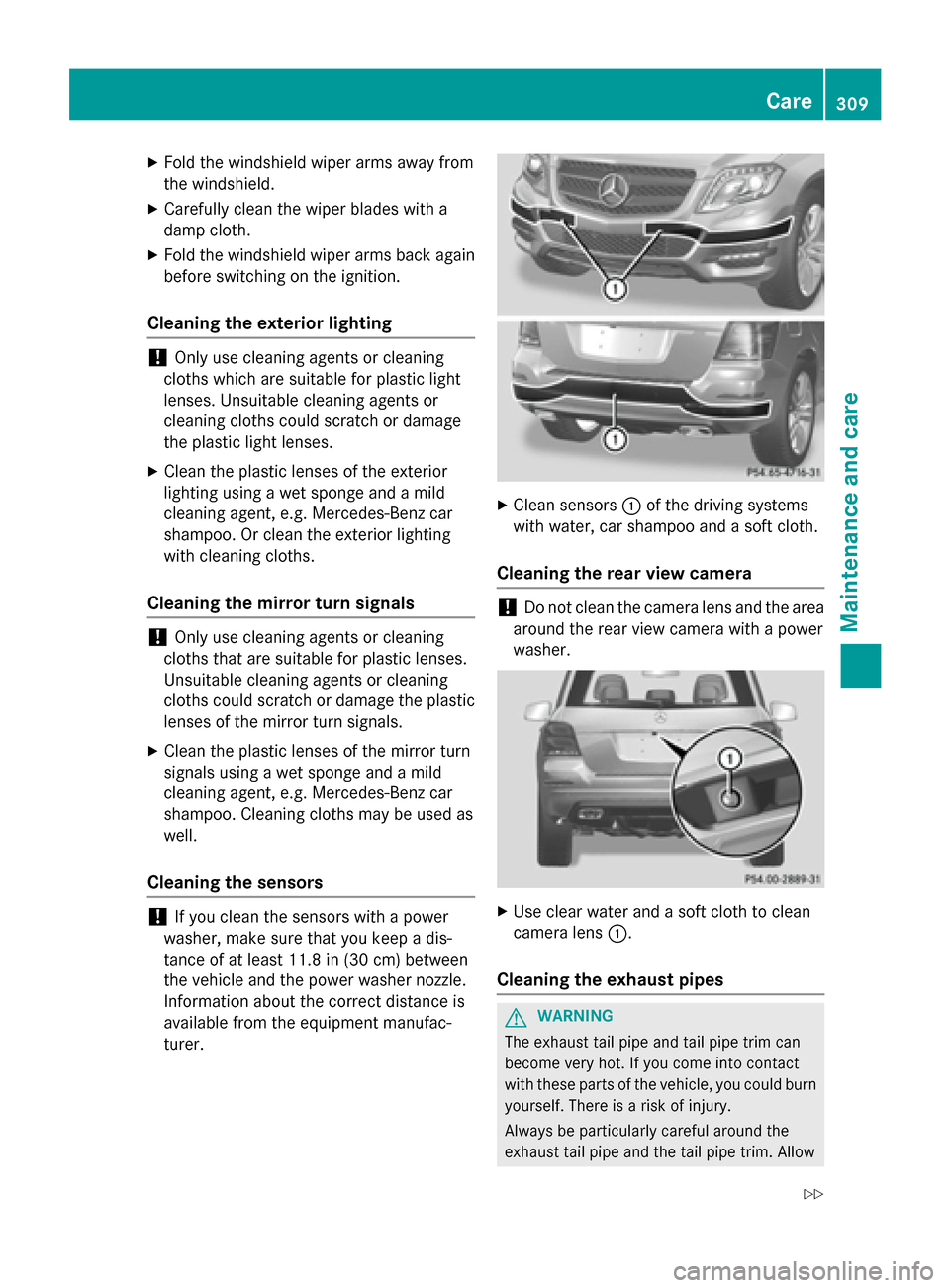
Clean sensors 0043of the driving systems
with water, car shampoo and a soft cloth.
Cleaning the rear view camera !
Do not clean the camera lens and the area
around the rear view camera with a power
washer. X
Use clear water and a soft cloth to clean
camera lens 0043.
Cleaning the exhaust pipes G
WARNING
The exhaust tail pipe and tail pipe trim can
become very hot. If you come into contact
with these parts of the vehicle, you could burn
yourself. There is a risk of injury.
Always be particularly careful around the
exhaust tail pipe and the tail pipe trim. Allow Care
309Maintenance and care
Z
Page 341 of 386
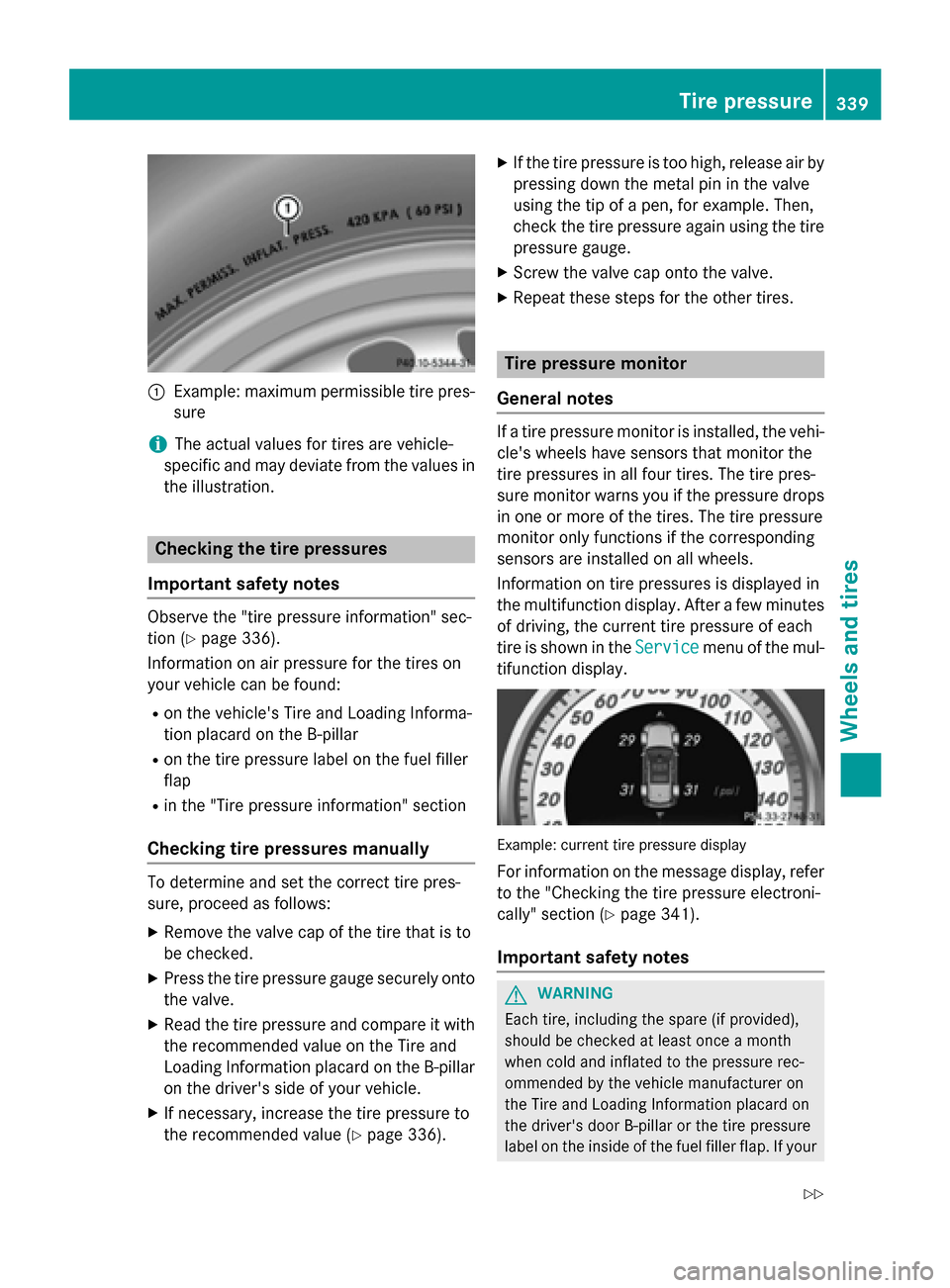
0043
Example: maximum permissible tire pres-
sure
i The actual values for tires are vehicle-
specific and may deviate from the values in
the illustration. Checking the tire pressures
Important safety notes Observe the "tire pressure information" sec-
tion (Y page 336).
Information on air pressure for the tires on
your vehicle can be found:
R on the vehicle's Tire and Loading Informa-
tion placard on the B-pillar
R on the tire pressure label on the fuel filler
flap
R in the "Tire pressure information" section
Checking tire pressures manually To determine and set the correct tire pres-
sure, proceed as follows:
X Remove the valve cap of the tire that is to
be checked.
X Press the tire pressure gauge securely onto
the valve.
X Read the tire pressure and compare it with
the recommended value on the Tire and
Loading Information placard on the B-pillar
on the driver's side of your vehicle.
X If necessary, increase the tire pressure to
the recommended value (Y page 336).X
If the tire pressure is too high, release air by
pressing down the metal pin in the valve
using the tip of a pen, for example. Then,
check the tire pressure again using the tire
pressure gauge.
X Screw the valve cap onto the valve.
X Repeat these steps for the other tires. Tire pressure monitor
General notes If a tire pressure monitor is installed, the vehi-
cle's wheels have sensors that monitor the
tire pressures in all four tires. The tire pres-
sure monitor warns you if the pressure drops
in one or more of the tires. The tire pressure
monitor only functions if the corresponding
sensors are installed on all wheels.
Information on tire pressures is displayed in
the multifunction display. After a few minutes of driving, the current tire pressure of each
tire is shown in the Service
Service menu of the mul-
tifunction display. Example: current tire pressure display
For information on the message display, refer to the "Checking the tire pressure electroni-
cally" section (Y page 341).
Important safety notes G
WARNING
Each tire, including the spare (if provided),
should be checked at least once a month
when cold and inflated to the pressure rec-
ommended by the vehicle manufacturer on
the Tire and Loading Information placard on
the driver's door B-pillar or the tire pressure
label on the inside of the fuel filler flap. If your Tire pressure
339Wheels and tires
Z
Page 343 of 386
If the tire pressure monitor is malfunctioning,
it may take more than ten minutes for the tire
pressure warning lamp to inform you of the
malfunction by flashing for approximately one
minute and then remaining lit. When the mal- function has been rectified, the tire pressure
warning lamp goes out after a few minutes of driving.
The tire pressure values indicated by the on-
board computer may differ from those meas-
ured at a gas station with a pressure gauge.
The tire pressures shown by the on-board
computer refer to those measured at sea
level. At high altitudes, the tire pressure val-
ues indicated by a pressure gauge are higher
than those shown by the on-board computer. In this case, do not reduce the tire pressures.
The operation of the tire pressure monitor can
be affected by interference from radio trans-
mitting equipment (e.g. radio headphones,
two-way radios) that may be being operated
in or near the vehicle.
Checking the tire pressure electroni-
cally X
Make sure that the SmartKey is in position
2 in the ignition lock (Y page 149).
X Press the 0059or0065 button on the steer-
ing wheel to select the Service Servicemenu.
X Press the 0063or0064 button to select
Tire Pressure
Tire Pressure.
X Press the 0076button.
The current tire pressure of each tire is
shown in the multifunction display.
If the vehicle has been parked for over
20 minutes, the Tire
Tire pressures
pressures will
willbe
be
displayed after driving a few
displayed after driving a few
minutes minutes message appears.
After a teach-in process, the tire pressure
monitor automatically detects new wheels or
new sensors. As long as a clear allocation of
the tire pressure value to the individual
wheels is not possible, the Tire Pressure Tire Pressure
Monitor Active
Monitor Active display message is shown
instead of the tire pressure display. The tire
pressures are already being monitored. i
If a spare wheel/emergency spare wheel
is mounted, the system may continue to
show the tire pressure of the wheel that has been removed for a few minutes. If this
occurs, note that the value displayed for
the position where the spare tire is moun-
ted is not the same as the spare wheel/
emergency spare wheel's current tire pres- sure.
Tire pressure monitor warning mes-
sages If the tire pressure monitor detects a pressure
loss in one or more tires, a warning message
is shown in the multifunction display and the yellow tire pressure monitor warning lamp
comes on.
R If the Correct Tire Pressure Correct Tire Pressure message
appears in the multifunction display, the
tire pressure in at least one tire is too low
and must be corrected at the next oppor-
tunity.
R If the Check Check Tires
Tiresmessage appears in the
multifunction display, the tire pressure in
one or more tires has dropped significantly and the tires must be checked.
R If the Warning Tire Malfunction Warning Tire Malfunction
appears in the multifunction display, the
tire pressure in one or more tires has drop- ped suddenly and the tires must be
checked.
Observe the instructions and safety notes in
the display messages in the "Tires" section
(Y page 256).
i If the wheel positions on the vehicle are
rotated, the tire pressures may be dis-
played for the wrong positions for a short
time. This is rectified after a few minutes of driving, and the tire pressures are displayedfor the correct positions.
Restarting the tire pressure monitor When you restart the tire pressure monitor, all
existing warning messages are deleted and
the warning lamps go out. The monitor uses Tire pressure
341Wheels and tires Z
Page 362 of 386
X
Turn the jack back to its initial position and
store it together with the rest of the tire-
change tool kit in the cargo compartment.
X Transport the faulty wheel in the cargo
compartment.
X Check the tire pressure of the newly moun-
ted wheel and adjust it if necessary.
Observe the recommended tire pressure
(Y page 336).
For further information on stowing the col-
lapsible spare wheel, see (Y page 367).
i When you are driving with the emergency
spare wheel mounted, the tire pressure
monitor cannot function reliably. Only
restart the tire pressure monitor when the
defective wheel has been replaced with a
new wheel. All wheels mounted must be
equipped with functioning sensors. Wheel and tire combinations
General notes
! For safety reasons, Mercedes-Benz rec-
ommends that you only use tires and
wheels which have been approved by
Mercedes-Benz specifically for your vehi-
cle.
These tires have been specially adapted for use with the control systems, such as ABS
or ESP ®
, and are marked as follows:
R MO = Mercedes-Benz Original
R MOE = Mercedes-Benz Original Extended
(tires featuring run-flat characteristics)
R MO1 = Mercedes-Benz Original (only cer-
tain AMG tires)
Mercedes-Benz Original Extended tires
may only be used on wheels that have been
specifically approved by Mercedes-Benz.
Only use tires, wheels or accessories tes-
ted and approved by Mercedes-Benz. Cer-
tain characteristics, e.g. handling, vehicle
noise emissions or fuel consumption, may
otherwise be adversely affected. In addi-
tion, when driving with a load, tire dimen- sion variations could cause the tires to
come into contact with the bodywork and
axle components. This could result in dam-
age to the tires or the vehicle.
Mercedes-Benz accepts no liability for
damage resulting from the use of tires,
wheels or accessories other than those tes-
ted and approved.
Information on tires, wheels and approved
combinations can be obtained from any
qualified specialist workshop.
Overview of abbreviations used in the follow- ing tire tables:
R BA: both axles
R FA: front axle
R RA: rear axle
The recommended pressures for various
operating conditions can be found:
R on the Tire and Loading Information placard
with the recommended tire pressures on
the B-pillar on the driver's side
R in the tire pressure table on the inside of the
fuel filler flap
Observe the notes on recommended tire
pressures under various operating conditions (Y page 336).
Check tire pressures regularly, and only when the tires are cold. Comply with the mainte-
nance recommendations of the tire manufac-
turer in the vehicle document wallet.
Notes on the vehicle equipment – always
equip the vehicle with:
R tires of the same size on a given axle (left/
right)
R the same type of tires at a given time (sum-
mer tires, winter tires, MOExtended tires)
Exception: it is permissible to install a dif-
ferent type or make in the event of a flat
tire. Observe the "MOExtended tires (tires
with run-flat characteristics" section
(Y page 315).
Vehicles equipped with MOExtended tires are
not equipped with a TIREFIT kit at the factory.
It is therefore recommended that you addi- 360
Wheel and tire combinationsWheels and tires
Page 381 of 386
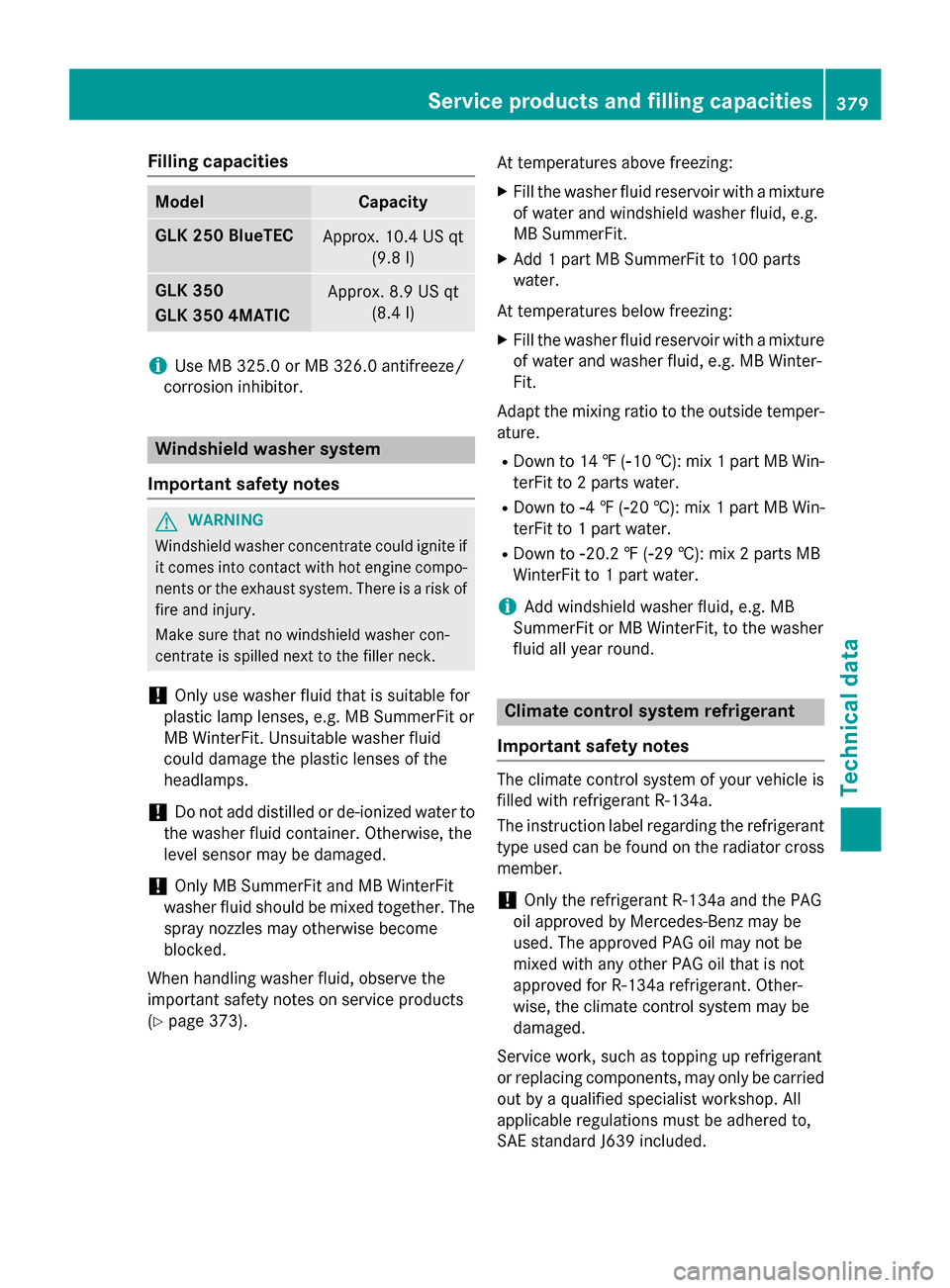
Filling capacities
Model Capacity
GLK 250 BlueTEC
Approx. 10.4 US qt
(9.8l) GLK 350
GLK 350 4MATIC
Approx. 8.9 US qt
(8.4l) i
Use MB 325.0 or MB 326.0 antifreeze/
corrosion inhibitor. Windshield washer system
Important safety notes G
WARNING
Windshield washer concentrate could ignite if it comes into contact with hot engine compo-
nents or the exhaust system. There is a risk of
fire and injury.
Make sure that no windshield washer con-
centrate is spilled next to the filler neck.
! Only use washer fluid that is suitable for
plastic lamp lenses, e.g. MB SummerFit or
MB WinterFit. Unsuitable washer fluid
could damage the plastic lenses of the
headlamps.
! Do not add distilled or de-ionized water to
the washer fluid container. Otherwise, the
level sensor may be damaged.
! Only MB SummerFit and MB WinterFit
washer fluid should be mixed together. The spray nozzles may otherwise become
blocked.
When handling washer fluid, observe the
important safety notes on service products
(Y page 373). At temperatures above freezing:
X Fill the washer fluid reservoir with a mixture
of water and windshield washer fluid, e.g.
MB SummerFit.
X Add 1 part MB SummerFit to 100 parts
water.
At temperatures below freezing:
X Fill the washer fluid reservoir with a mixture
of water and washer fluid, e.g. MB Winter-
Fit.
Adapt the mixing ratio to the outside temper-
ature.
R Down to 14 ‡ (00F810 †): mix 1 part MB Win-
terFit to 2 parts water.
R Down to 00F84‡( 00F820 †): mix 1 part MB Win-
terFit to 1 part water.
R Down to 00F820.2 ‡ (00F829 †): mix 2 parts MB
WinterFit to 1 part water.
i Add windshield washer fluid, e.g. MB
SummerFit or MB WinterFit, to the washer
fluid all year round. Climate control system refrigerant
Important safety notes The climate control system of your vehicle is
filled with refrigerant R‑134a.
The instruction label regarding the refrigerant
type used can be found on the radiator cross
member.
! Only the refrigerant R‑134a and the PAG
oil approved by Mercedes-Benz may be
used. The approved PAG oil may not be
mixed with any other PAG oil that is not
approved for R-134a refrigerant. Other-
wise, the climate control system may be
damaged.
Service work, such as topping up refrigerant
or replacing components, may only be carried out by a qualified specialist workshop. All
applicable regulations must be adhered to,
SAE standard J639 included. Service products and filling capacities
379Technical data Z