light MERCEDES-BENZ GLK-CLASS SUV 2013 Owners Manual
[x] Cancel search | Manufacturer: MERCEDES-BENZ, Model Year: 2013, Model line: GLK-CLASS SUV, Model: MERCEDES-BENZ GLK-CLASS SUV 2013Pages: 380, PDF Size: 19.54 MB
Page 219 of 380
Outside temperature display
You should pay special attention to road
conditions when temperatures are around
freezing point.
The outside temperature display is in the
multifunction display ( Y page 218).
Changes in the outside temperature are
displayed after a short delay. Speedometer with segments
The segments in the speedometer indicate
which speed range is available.
R Cruise control activated ( Y page 169):
The segments light up from the stored
speed to the maximum speed.
R DISTRONIC PLUS activated (Y page 171):
One or two segments in the set speed
range light up.
R DISTRONIC PLUS detects a vehicle
in front:
The segments between the speed of the
vehicle in front and the stored speed light
up. Operating the on-board computer
Overview The on-board computer is activated as soon
as you turn the
SmartKey
to position 1 in the
ignition lock.
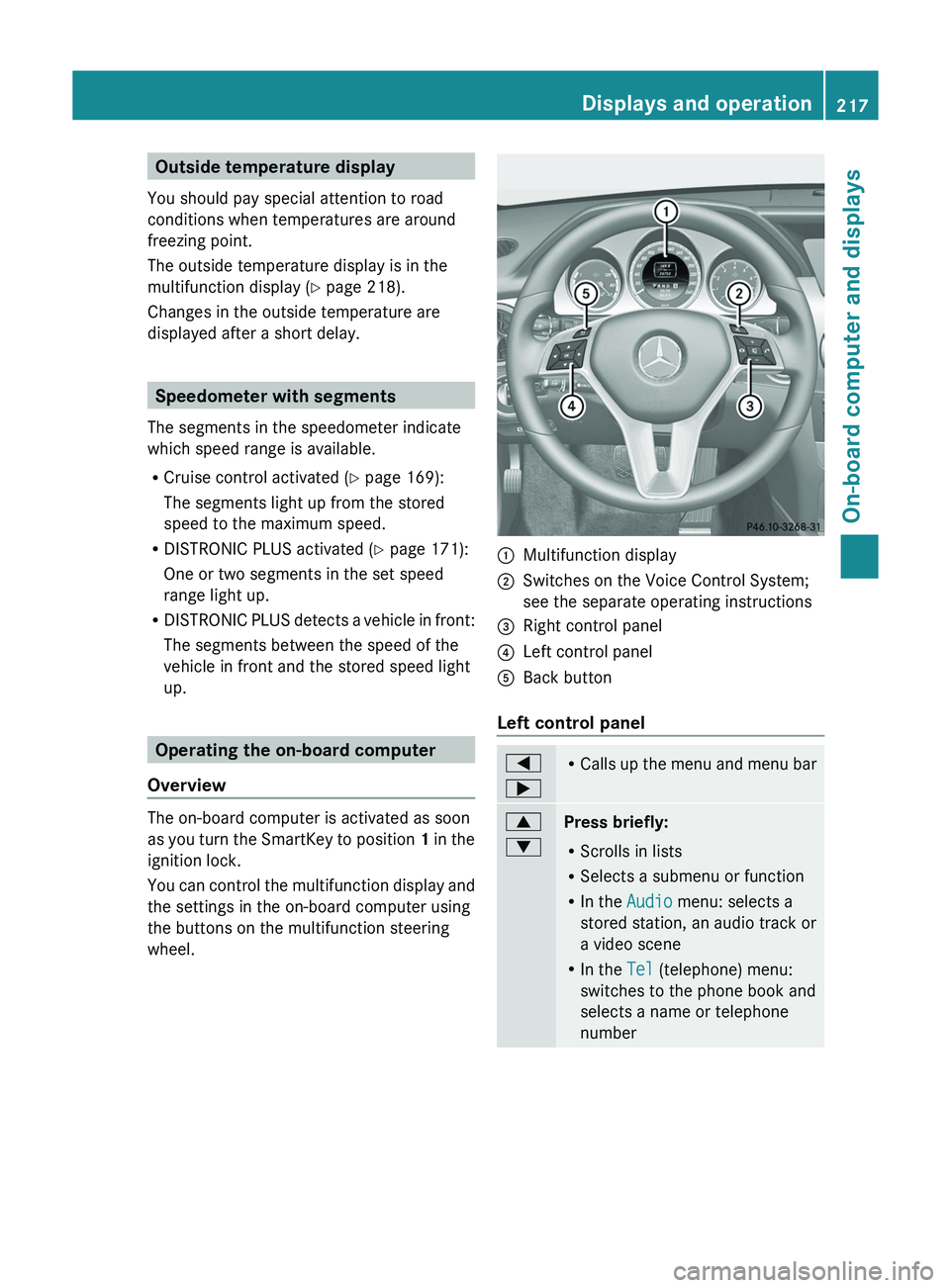
You can control the multifunction display and
the settings in the on-board computer using
the buttons on the multifunction steering
wheel. 0043
Multifunction display
0044 Switches on the Voice Control System;
see the separate operating instructions
0087 Right control panel
0085 Left control panel
0083 Back button
Left control panel 0059
0065 R
Calls up the menu and
menu bar 0063
0064
Press briefly:
R
Scrolls in lists
R Selects a submenu or function
R In the Audio menu: selects a
stored station, an audio track or
a video scene
R In the Tel (telephone) menu:
switches to the phone book and
selects a name or telephone
number Displays and operation
217
On-board computer and displays Z
Page 221 of 380
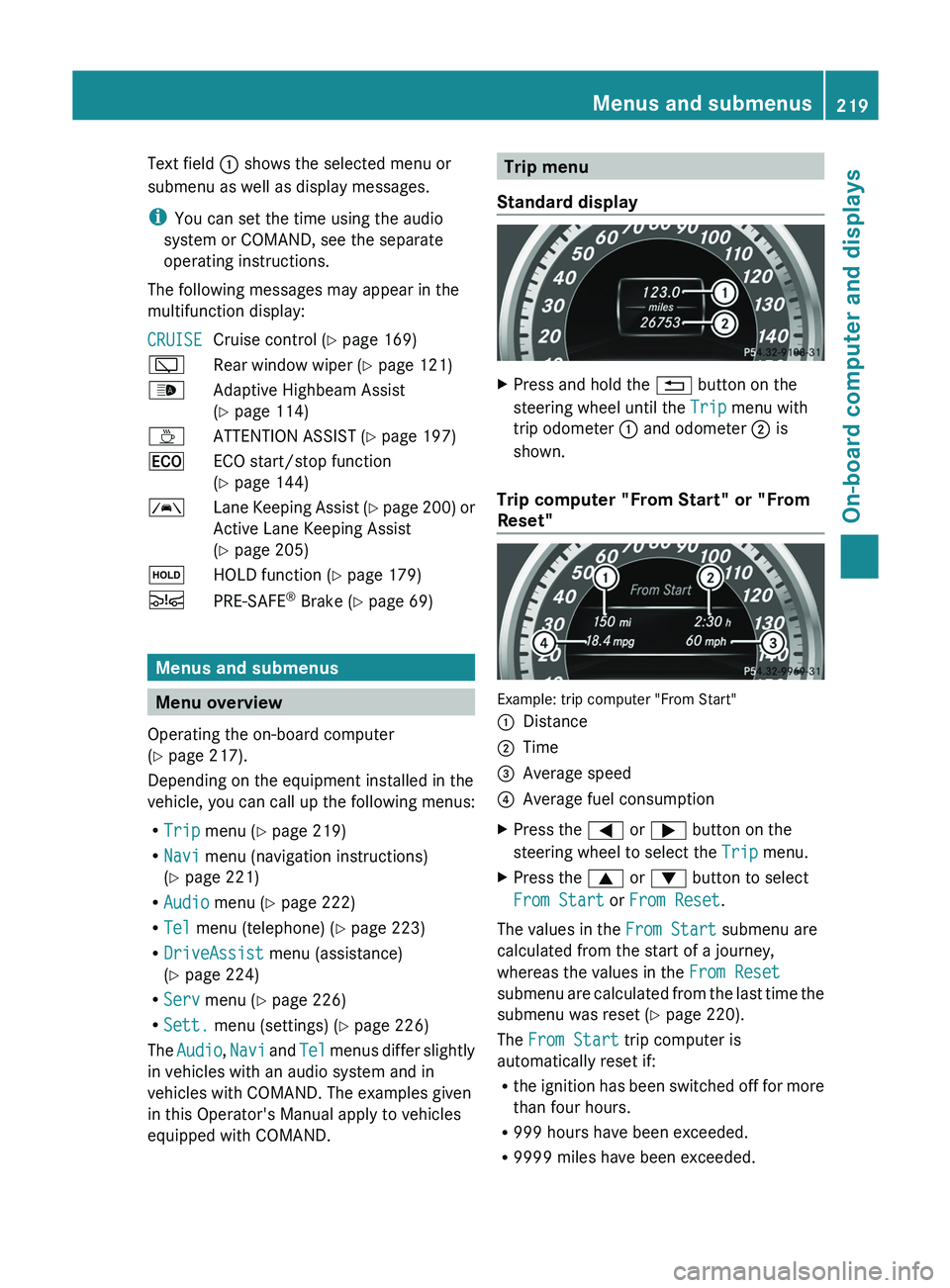
Text field 0043 shows the selected menu or
submenu as well as display messages.
i
You can set the time using the audio
system or COMAND, see the separate
operating instructions.
The following messages may appear in the
multifunction display:
CRUISE Cruise control (
Y page 169)
00C5 Rear window wiper ( Y page 121)
00CE Adaptive Highbeam Assist
(Y page 114)
00AD ATTENTION ASSIST (Y page 197)
00A7 ECO start/stop function
(Y page 144)
00B0 Lane Keeping Assist (Y page 200) or
Active Lane Keeping Assist
( Y
page 205)
00D9 HOLD function ( Y page 179)
00C7 PRE-SAFE ®
Brake (Y page 69) Menus and submenus
Menu overview
Operating the on-board computer
(Y page 217).
Depending on the equipment installed in the
vehicle, you can call up the following menus:
R Trip menu (Y page 219)
R Navi menu (navigation instructions)
(Y page 221)
R Audio menu (Y page 222)
R Tel menu (telephone) ( Y page 223)
R DriveAssist menu (assistance)
(Y page 224)
R Serv menu (Y page 226)
R Sett. menu (settings) (Y page 226)
The Audio, Navi and
Tel menus differ
slightly
in vehicles with an audio system and in
vehicles with COMAND. The examples given
in this Operator's Manual apply to vehicles
equipped with COMAND. Trip menu
Standard display X
Press and hold the 0038 button on the
steering wheel until the Trip menu with
trip odometer 0043 and odometer 0044 is
shown.
Trip computer "From Start" or "From
Reset" Example: trip computer "From Start"
0043
Distance
0044 Time
0087 Average speed
0085 Average fuel consumption
X Press the 0059 or 0065 button on the
steering wheel to select the Trip menu.
X Press the 0063 or 0064 button to select
From Start or From Reset.
The values in the From Start submenu are
calculated from the start of a journey,
whereas the values in the From Reset
submenu are calculated from
the
last time the
submenu was reset ( Y page 220).
The From Start trip computer is
automatically reset if:
R the ignition has been switched off for more
than four hours.
R 999 hours have been exceeded.
R 9999 miles have been exceeded. Menus and submenus
219
On-board computer and displays Z
Page 228 of 380
When Lane Keeping Assist or Active Lane
Keeping Assist is activated,
the 00B0
symbol
appears in the multifunction display when the
ignition is on.
For further information about Lane Keeping
Assist, see (Y page 200).
For further information about Active Lane
Keeping Assist, see ( Y page 205).Maintenance menu
In the
Serv. menu, you have the following
options:
R Calling up display messages
(Y page 231)
R Restarting the tire pressure loss warning
system (Canada only) ( Y page 335)
R Checking the tire pressure electronically
(USA only) ( Y page 336)
R Calling up the service due date
(Y
page 298) Settings menu
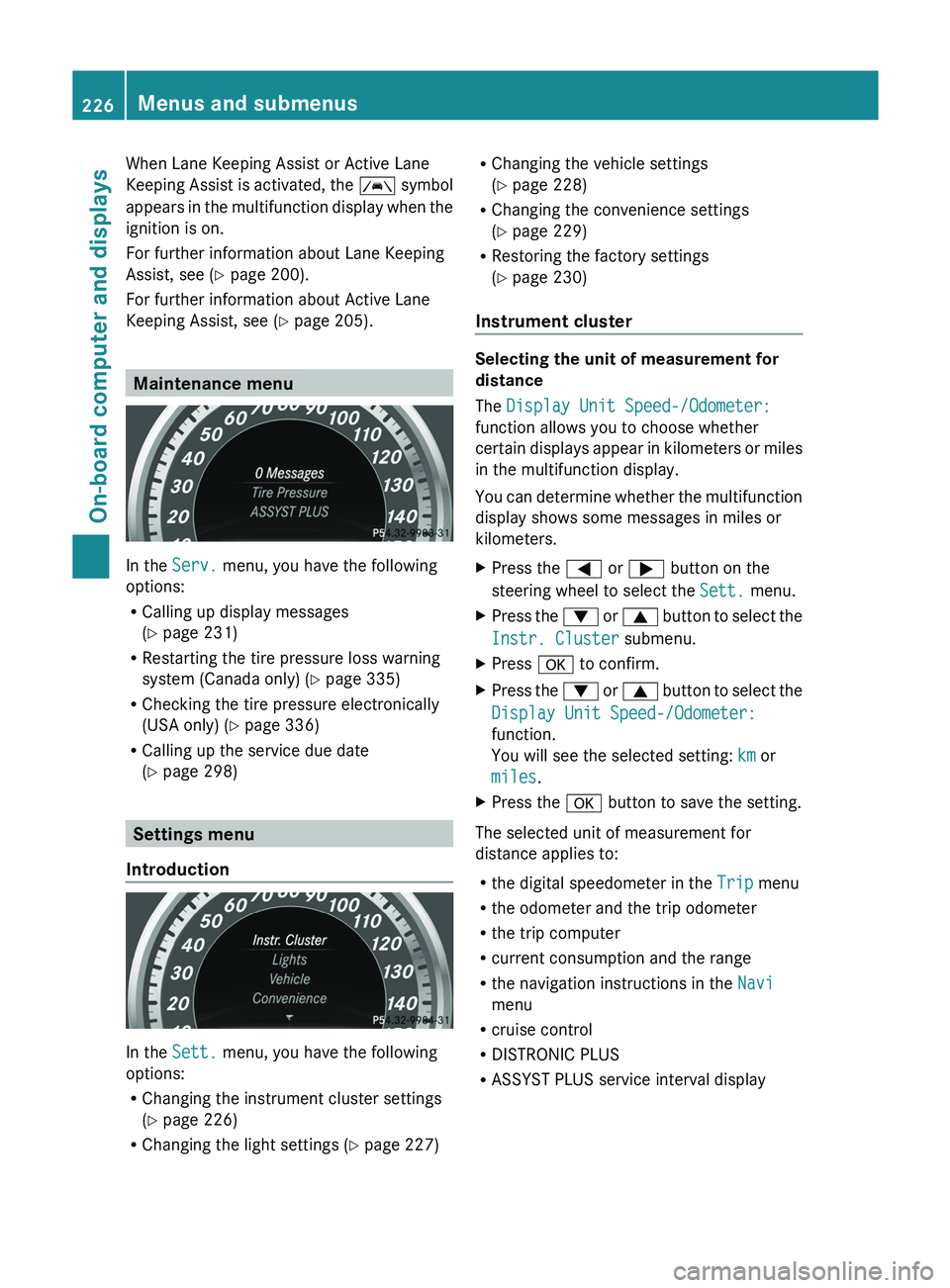
Introduction In the
Sett. menu, you have the following
options:
R Changing the instrument cluster settings
(Y page 226)
R Changing the light settings (Y page 227) R
Changing the vehicle settings
(Y page 228)
R Changing the convenience settings
(Y page 229)
R Restoring the factory settings
(Y page 230)
Instrument cluster Selecting the unit of measurement for
distance
The Display Unit Speed-/Odometer:
function allows you to choose whether
certain displays appear in
kilometers
or miles
in the multifunction display.
You can determine whether the multifunction
display shows some messages in miles or
kilometers.
X Press the 0059 or 0065 button on the
steering wheel to select the Sett. menu.
X Press the 0064 or 0063 button to
select the
Instr. Cluster submenu.
X Press 0076 to confirm.
X Press the 0064
or 0063
button to
select the
Display Unit Speed-/Odometer:
function.
You will see the selected setting: km or
miles.
X Press the 0076 button to save the setting.
The selected unit of measurement for
distance applies to:
R the digital speedometer in the Trip menu
R the odometer and the trip odometer
R the trip computer
R current consumption and the range
R the navigation instructions in the Navi
menu
R cruise control
R DISTRONIC PLUS
R ASSYST PLUS service interval display226
Menus and submenus
On-board computer and displays
Page 229 of 380
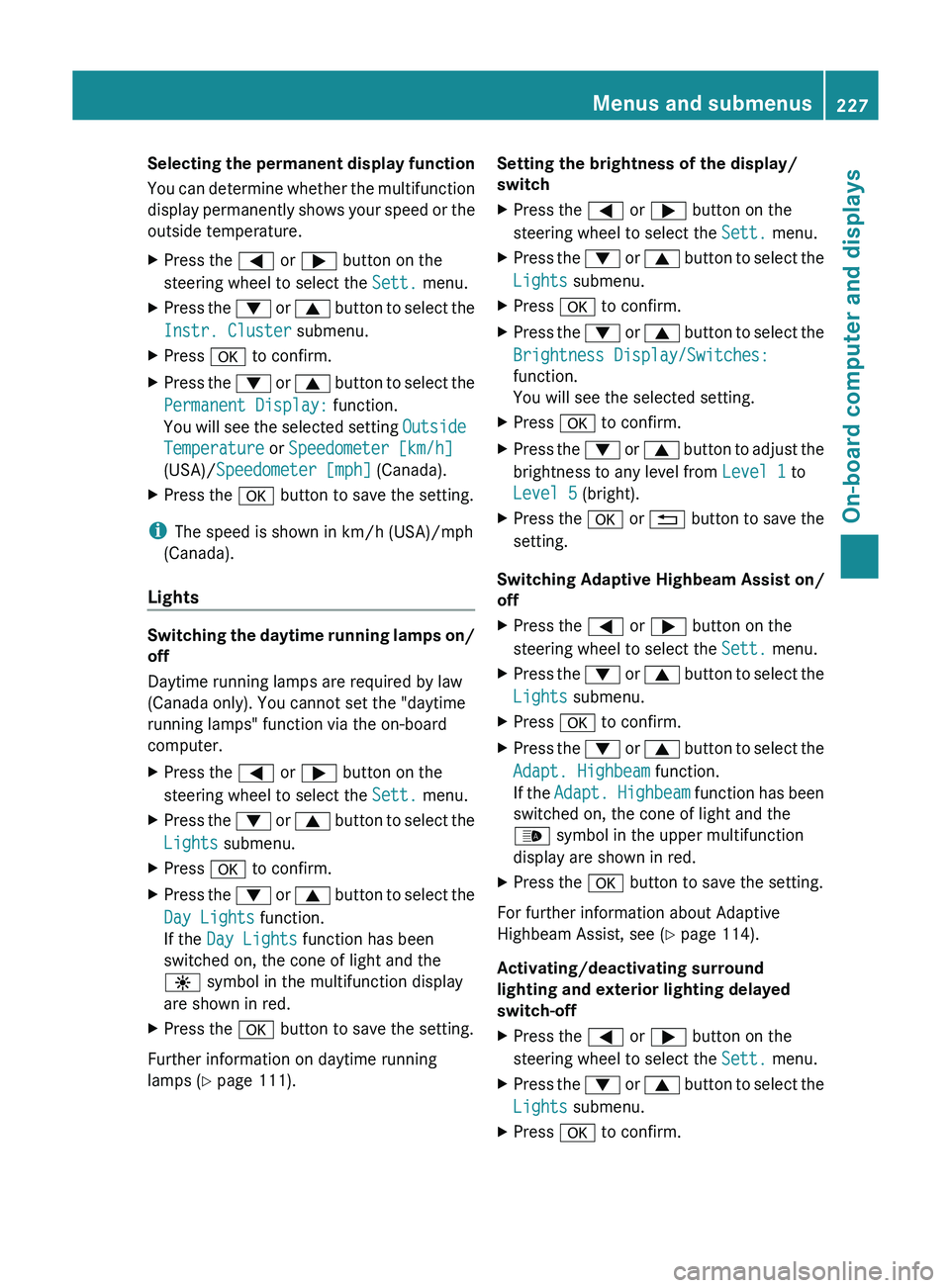
Selecting the permanent display function
You can determine whether
the
multifunction
display permanently shows your speed or the
outside temperature.
X Press the 0059 or 0065 button on the
steering wheel to select the Sett. menu.
X Press the 0064 or 0063 button to
select the
Instr. Cluster submenu.
X Press 0076 to confirm.
X Press the 0064 or 0063 button to
select the
Permanent Display: function.
You will see the selected setting Outside
Temperature or Speedometer [km/h]
(USA)/ Speedometer [mph] (Canada).
X Press the 0076 button to save the setting.
i The speed is shown in km/h (USA)/mph
(Canada).
Lights Switching the daytime running lamps on/
off
Daytime running lamps are required by law
(Canada only). You cannot set the "daytime
running lamps" function via the on-board
computer.
X
Press the 0059 or 0065 button on the
steering wheel to select the Sett. menu.
X Press the 0064 or 0063 button to
select the
Lights submenu.
X Press 0076 to confirm.
X Press the 0064
or 0063
button to
select the
Day Lights function.
If the Day Lights function has been
switched on, the cone of light and the
0086 symbol in the multifunction display
are shown in red.
X Press the 0076 button to save the setting.
Further information on daytime running
lamps ( Y page 111). Setting the brightness of the display/
switch
X
Press the 0059 or 0065 button on the
steering wheel to select the Sett. menu.
X Press the 0064 or 0063 button to
select the
Lights submenu.
X Press 0076 to confirm.
X Press the 0064 or 0063 button to
select the
Brightness Display/Switches:
function.
You will see the selected setting.
X Press 0076 to confirm.
X Press the 0064
or 0063 button to
adjust the
brightness to any level from Level 1 to
Level 5 (bright).
X Press the 0076 or 0038 button to save the
setting.
Switching Adaptive Highbeam Assist on/
off
X Press the
0059 or 0065 button on the
steering wheel to select the Sett. menu.
X Press the 0064 or 0063 button to
select the
Lights submenu.
X Press 0076 to confirm.
X Press the 0064
or 0063
button to
select the
Adapt. Highbeam function.
If the Adapt. Highbeam function has been
switched on, the cone of light and the
00CE symbol in the upper multifunction
display are shown in red.
X Press the 0076 button to save the setting.
For further information about Adaptive
Highbeam Assist, see ( Y page 114).
Activating/deactivating surround
lighting and exterior lighting delayed
switch-off
X Press the 0059 or 0065 button on the
steering wheel to select the Sett. menu.
X Press the 0064
or 0063 button to
select the
Lights submenu.
X Press 0076 to confirm. Menus and submenus
227
On-board computer and displays Z
Page 230 of 380
X
Press the 0064 or 0063 button to select the
Surround Lighting function.
When the Surround Lighting function is
activated, the light cone and the area
around the vehicle are displayed in red in
the multifunction display.
X Press the 0076 button to save the setting.
Deactivating delayed switch-off of the
exterior lighting temporarily:
X Before leaving the vehicle, turn the
SmartKey to position 0 in
the ignition lock.
X Turn the SmartKey to position 2 in the
ignition lock.
The exterior lighting delayed switch-off is
deactivated.
Delayed switch-off of the exterior lighting is
reactivated the next time you start the
engine.
If you have activated the Surround
Lighting function and the
light
switch is set
to 0058, the following functions are activated
when it is dark:
R surround lighting: the exterior lighting
remains lit for 40 seconds after unlocking
with the key. If you start the engine, the
surround lighting is switched off and
automatic headlamp mode is activated
(Y page 111).
R exterior lighting delayed switch-off: the
exterior lighting remains lit for
60 seconds after the engine is switched off.
If you close all the doors and the tailgate,
the exterior lighting goes off after
5 seconds.
i Depending on your vehicle's equipment,
when the surround lighting and delayed
switch-off exterior lighting are on, the
following light up:
R Parking lamps
R Front fog lamps
R Low-beam headlamps
R Daytime running lamps
R Side marker lamps
R Surround lighting in the exterior mirrors Activating/deactivating the interior
lighting delayed switch-off
If you activate the Light. Delay function,
the interior lighting remains on for
20
seconds after
you remove
the key from the
ignition lock.
X Press the 0059 or 0065 button on the
steering wheel to select the Sett. menu.
X Press the 0064 or 0063 button to
select the
Lights submenu.
X Press 0076 to confirm.
X Press the 0064
or 0063
button to
select the
Light. Delay function.
When the Light. Delay function is
activated, the vehicle interior is displayed
in red in the multifunction display.
X Press the 0076 button to save the setting.
Vehicle Activating/deactivating the automatic
door locking mechanism
X
Press the 0059 or 0065 button on the
steering wheel to select the Sett. menu.
X Press the 0064 or 0063 button to
select the
Vehicle submenu.
X Press 0076 to confirm.
X Press the 0064 or 0063 button to
select the
Auto. Door Locks function.
When the Auto. Door Locks function is
activated, the vehicle doors are displayed
in red in the multifunction display.
X Press the 0076 button to save the setting.
If you activate the Auto. Door Locks
function, the vehicle is centrally
locked above
a speed of around 9 mph (15 km/h).
For further information on the automatic
locking feature, see ( Y page 80).
Activating/deactivating the acoustic
locking verification signal
If you switch on the Acoustic Lock function,
an acoustic signal sounds when you lock the
vehicle. 228
Menus and submenus
On-board computer and displays
Page 231 of 380
X
Press the 0059 or 0065 button on the
steering wheel to select the Sett. menu.
X Press the 0064 or 0063 button to select the
Vehicle submenu.
X Press 0076 to confirm.
X Press the 0064 or 0063 button to
select the
Acoustic Lock function.
If the Acoustic Lock function is activated,
the 0037 symbol in the multifunction
display lights up red.
X Press the 0076 button to save the setting.
Activating/deactivating the radar sensor
system
X Press the 0059 or 0065 button on the
steering wheel to select the Sett. menu.
X Press the 0064 or 0063 button to
select the
Vehicle submenu.
X Press 0076 to confirm.
X Press the 0063 or 0064 button to select
Radar Sensor (See Oper. Manual):.
You will see the selected setting: Enabled
or Disabled.
X Press the 0076 button to save the setting.
The following systems are switched off when
the radar sensor system is deactivated:
R DISTRONIC PLUS (Y page 171)
R BAS PLUS (Y page 65)
R PRE-SAFE ®
Brake ( Y
page 69)
R Blind Spot Assist (Y page 198) or Active
Blind Spot Assist (Y page 202)
Convenience Activating/deactivating the EASY-
ENTRY/EXIT feature
G
WARNING
When the EASY-ENTRY/EXIT feature adjusts
the steering wheel and the driver's seat, you
and other vehicle occupants – particularly
children – could become trapped. There is a
risk of injury. While the EASY-ENTRY/EXIT feature is
making adjustments, make sure that no one
has any body parts in the sweep of the seat
and the steering wheel.
If somebody becomes trapped:
R
press one of the memory function position
buttons, or
R move the switch for steering wheel
adjustment in the opposite direction
to that
in which the steering wheel is moving.
The adjustment process is stopped.
X Press the 0059 or 0065 button on the
steering wheel to select the Sett. menu.
X Press the 0064
or 0063
button to
select the
Convenience submenu.
X Press 0076 to confirm.
X Press the 0064 or 0063 button to
select the
Easy Entry/Exit function.
If the Easy Entry/Exit function is
activated, the vehicle steering wheel is
displayed in red in the multifunction
display.
X Press the 0076 button to save the setting.
Further information on the EASY-ENTRY/EXIT
feature ( Y page 102).
Switching the belt adjustment on/off
X Press the 0059 or 0065 button on the
steering wheel to select the Sett. menu.
X Press the 0064 or 0063 button to
select the
Convenience submenu.
X Press 0076 to confirm.
X Press the 0064 or 0063 button to
select the
Belt Adjustment function.
When the Belt Adjustment function is
activated, the vehicle seat belt is displayed
in red in the multifunction display.
X Press the 0076 button to save the setting.
For further information on belt adjustment,
see ( Y page 56). Menus and submenus
229
On-board computer and displays Z
Page 232 of 380
Switching the fold-in mirrors when
locking feature on/off
This function is only
available
on vehicles with
the memory function ( Y page 106).
This function is only available in Canada.
When you activate the Auto. Mirror
Folding function, the exterior mirrors are
folded in when the vehicle is locked. If you
unlock the vehicle and then open a door, the
exterior mirrors fold out again.
X Press the 0059 or 0065 button on the
steering wheel to select the Sett. menu.
X Press the 0064 or
0063
button
to
select the
Convenience submenu.
X Press 0076 to confirm.
X Press the 0064
or 0063
button to
select the
Auto. Mirror Folding function.
If the Auto. Mirror Folding function is
activated, the vehicle's exterior mirror is
displayed in red in the multifunction
display.
X Press the 0076 button to save the setting.
If you have switched the Auto. Mirror
Folding function on and you
fold the exterior
mirrors in using the button on the door
(Y page 104), they will not fold out
automatically. The exterior mirrors can then
only be folded out using the button on the
door.
Restoring the factory settings X
Press the 0059 or 0065 button on the
steering wheel to select the Sett. menu.
X Press the 0064 or 0063 button to
select the
Factory Setting submenu.
X Press 0076 to confirm.
The Reset All Settings? message
appears. X
Press the 0064 or 0063 button to select
No or Yes.
X Press the 0076 button to confirm the
selection.
If you have selected Yes,
the multifunction
display shows a confirmation message.
For safety reasons, the Day Lights function
in the Lights submenu is only reset if the
vehicle is stationary. 230
Menus and submenus
On-board computer and displays
Page 234 of 380
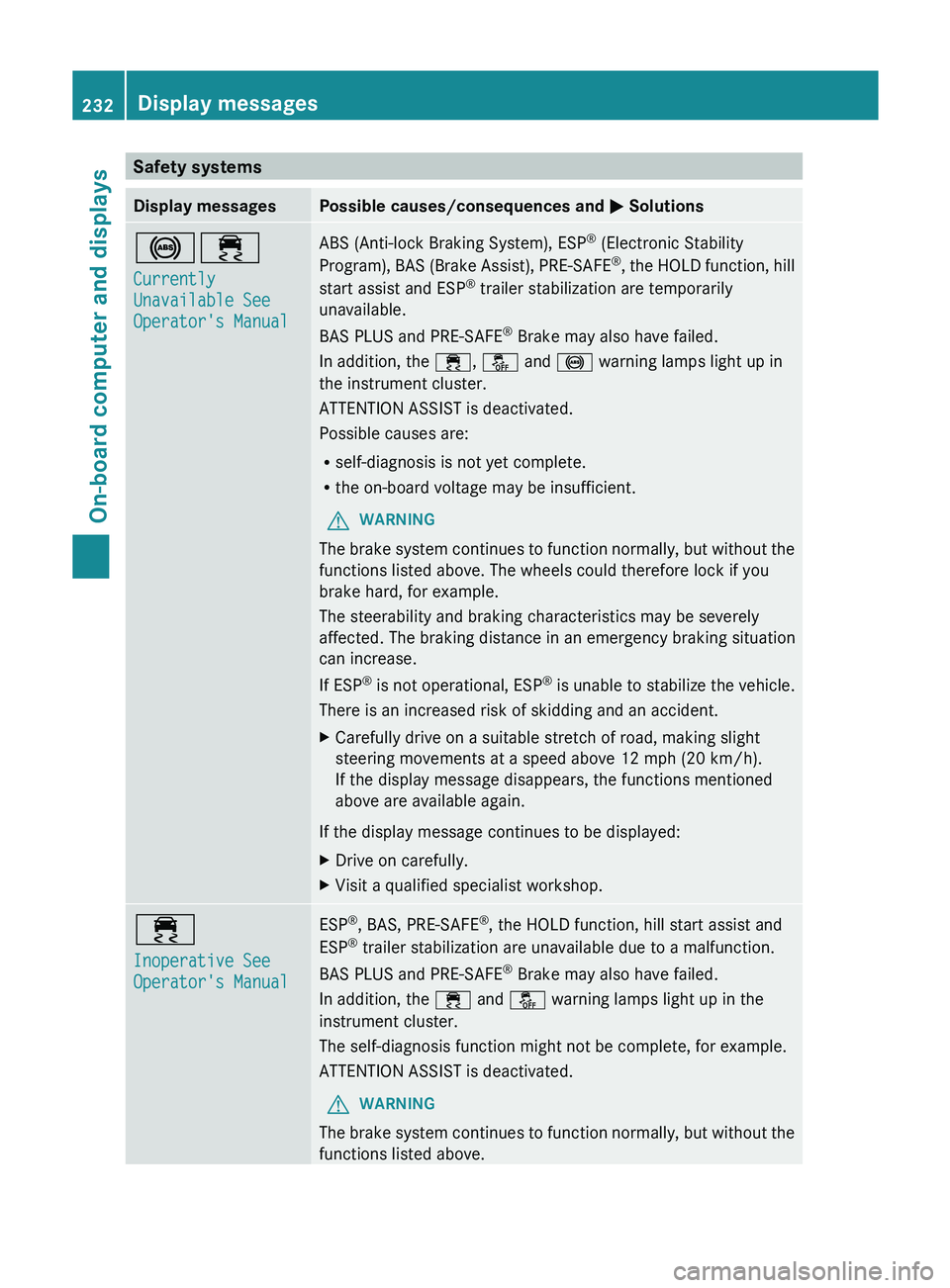
Safety systems
Display messages Possible causes/consequences and
0050 Solutions002500E5
Currently
Unavailable See
Operator's Manual ABS (Anti-lock Braking System), ESP
®
(Electronic Stability
Program), BAS (Brake Assist), PRE-SAFE®
,
the HOLD function, hill
start assist and ESP ®
trailer stabilization are temporarily
unavailable.
BAS PLUS and PRE-SAFE ®
Brake may also have failed.
In addition, the 00E5, 00BB and 0025 warning lamps light up in
the instrument cluster.
ATTENTION ASSIST is deactivated.
Possible causes are:
R self-diagnosis is not yet complete.
R the on-board voltage may be insufficient.
G WARNING
The brake system continues to function normally, but without the
functions listed above. The wheels could therefore lock if you
brake hard, for example.
The steerability and braking characteristics may be severely
affected. The braking distance in an emergency braking situation
can increase.
If ESP ®
is not operational, ESP®
is unable to stabilize the vehicle.
There is an increased risk of skidding and an accident.
X Carefully drive on a suitable stretch of road, making slight
steering movements at a speed above 12 mph (20 km/h).
If the display message disappears, the functions mentioned
above are available again.
If the display message continues to be displayed:
X Drive on carefully.
X Visit a qualified specialist workshop. 00E5
Inoperative See
Operator's Manual ESP
®
, BAS, PRE-SAFE ®
, the HOLD function, hill start assist and
ESP ®
trailer stabilization are unavailable due to a malfunction.
BAS PLUS and PRE-SAFE ®
Brake may also have failed.
In addition, the 00E5 and 00BB warning lamps light up in the
instrument cluster.
The self-diagnosis function might not be complete, for example.
ATTENTION ASSIST is deactivated.
G WARNING
The brake system continues to function normally, but without the
functions listed above. 232
Display messages
On-board computer and displays
Page 235 of 380
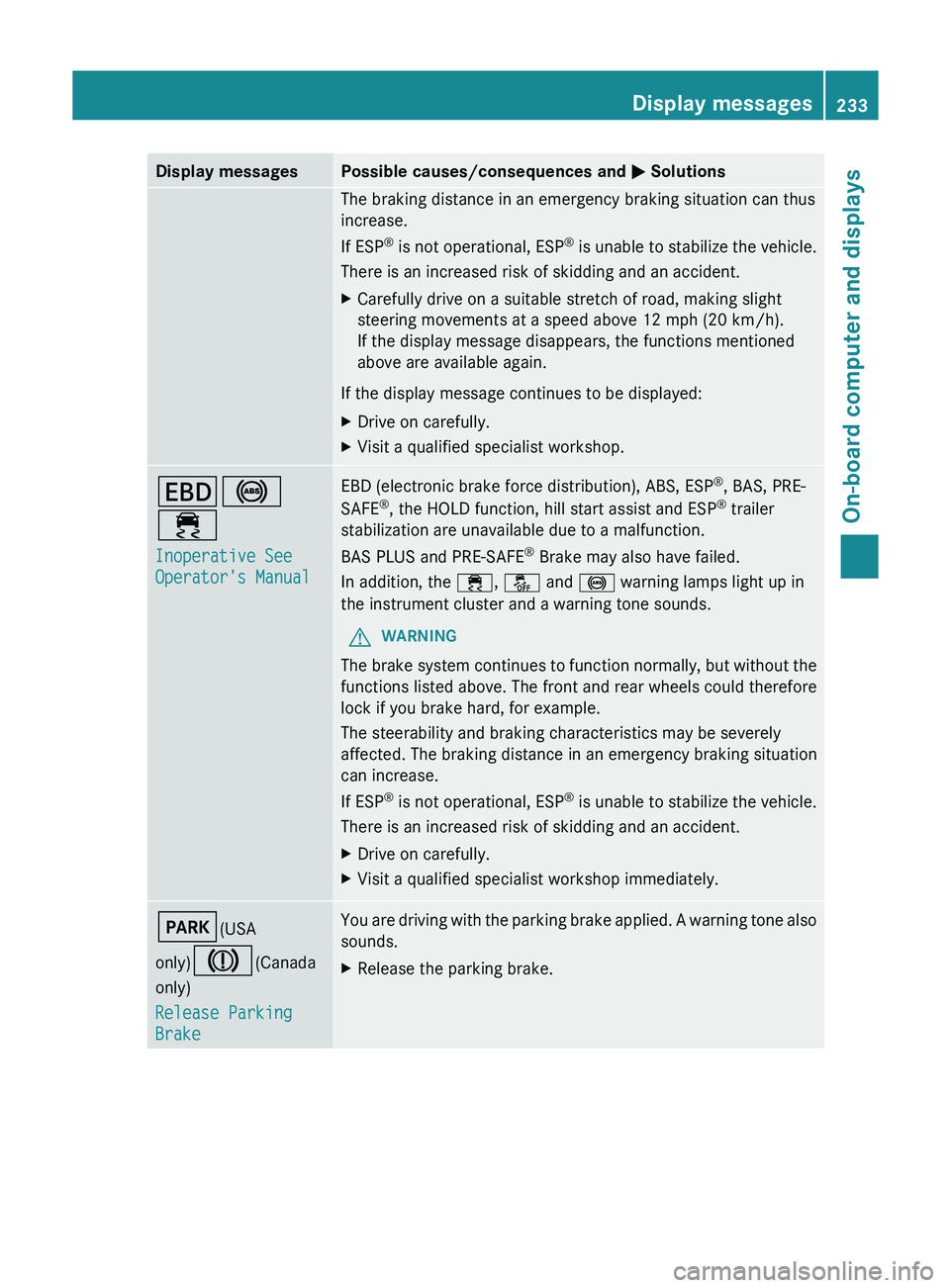
Display messages Possible causes/consequences and
0050 SolutionsThe braking distance in an emergency braking situation can thus
increase.
If ESP
®
is not
operational, ESP®
is unable to stabilize the vehicle.
There is an increased risk of skidding and an accident.
X Carefully drive on a suitable stretch of road, making slight
steering movements at a speed above 12 mph (20 km/h).
If the display message disappears, the functions mentioned
above are available again.
If the display message continues to be displayed:
X Drive on carefully.
X Visit a qualified specialist workshop. 007A0025
00E5
Inoperative See
Operator's Manual EBD (electronic brake force distribution), ABS, ESP
®
, BAS, PRE-
SAFE ®
, the HOLD function, hill start assist and ESP ®
trailer
stabilization are unavailable due to a malfunction.
BAS PLUS and PRE-SAFE ®
Brake may also have failed.
In addition, the 00E5, 00BB and 0025 warning lamps light up in
the instrument cluster and a warning tone sounds.
G WARNING
The brake system continues to function normally, but without the
functions listed above. The front and rear wheels could therefore
lock if you brake hard, for example.
The steerability and braking characteristics may be severely
affected. The braking distance in an emergency braking situation
can increase.
If ESP ®
is not operational, ESP®
is unable to stabilize the vehicle.
There is an increased risk of skidding and an accident.
X Drive on carefully.
X Visit a qualified specialist workshop immediately. 0049(USA
only)004D(Canada
only)
Release Parking
Brake You are driving with the parking brake applied. A warning tone also
sounds.
X
Release the parking brake. Display messages
233
On-board computer and displays Z
Page 236 of 380
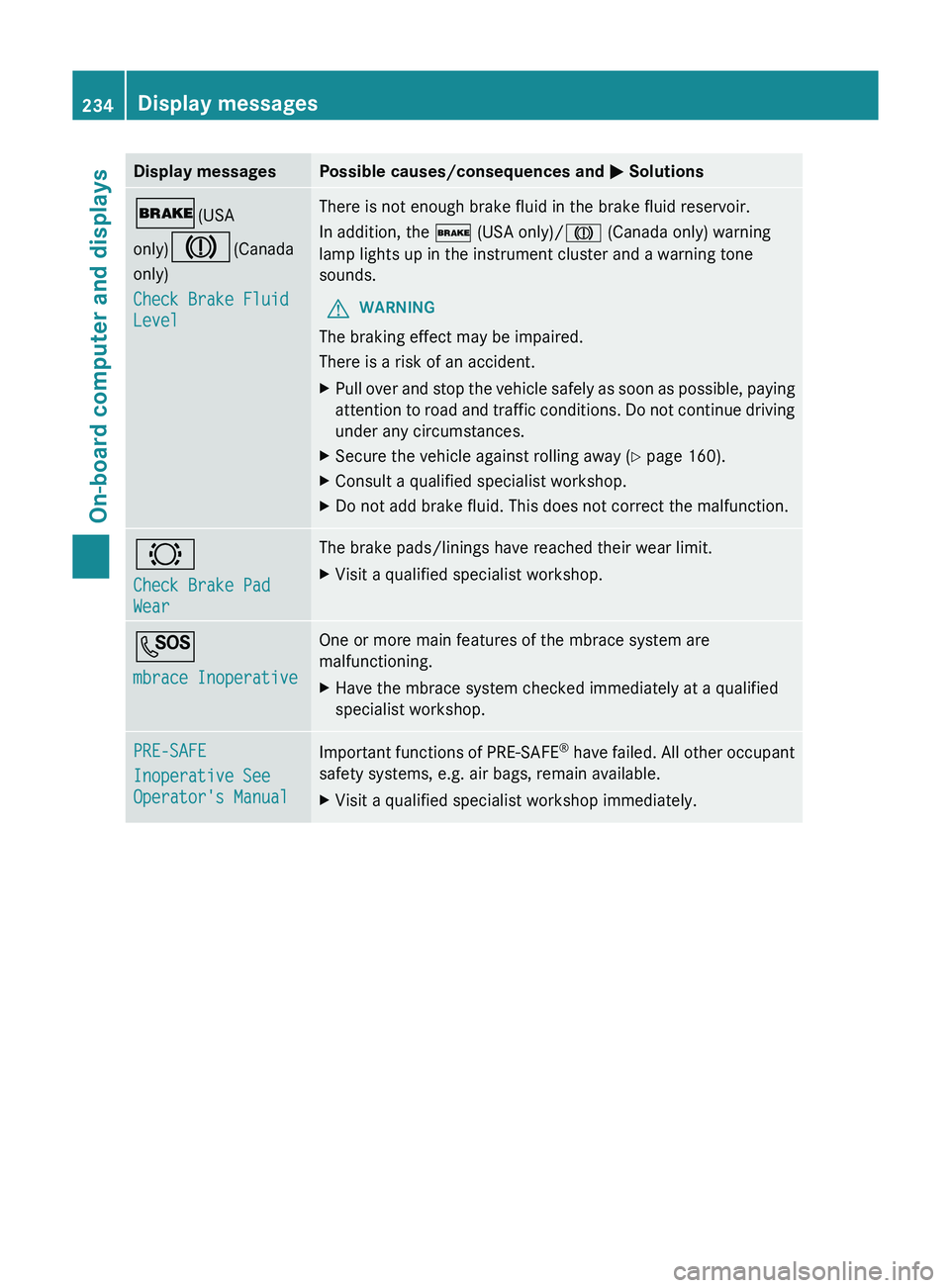
Display messages Possible causes/consequences and
0050 Solutions0027(USA
only)004D(Canada
only)
Check Brake Fluid
Level There is not enough brake fluid in the brake fluid reservoir.
In addition, the 0027 (USA only)/004D (Canada only) warning
lamp lights up in the instrument cluster and a warning tone
sounds.
G WARNING
The braking effect may be impaired.
There is a risk of an accident.
X Pull over and stop the vehicle safely as soon as possible, paying
attention to road and traffic
conditions. Do not continue driving
under any circumstances.
X Secure the vehicle against rolling away ( Y page 160).
X Consult a qualified specialist workshop.
X Do not add brake fluid. This does not correct the malfunction. 0026
Check Brake Pad
Wear The brake pads/linings have reached their wear limit.
X
Visit a qualified specialist workshop. 0053
mbrace Inoperative One or more main features of the mbrace system are
malfunctioning.
X
Have the mbrace system checked immediately at a qualified
specialist workshop. PRE-SAFE
Inoperative See
Operator's Manual
Important functions of PRE-SAFE
®
have failed. All other
occupant
safety systems, e.g. air bags, remain available.
X Visit a qualified specialist workshop immediately.234
Display messages
On-board computer and displays