check engine MERCEDES-BENZ GLK-CLASS SUV 2013 Owner's Guide
[x] Cancel search | Manufacturer: MERCEDES-BENZ, Model Year: 2013, Model line: GLK-CLASS SUV, Model: MERCEDES-BENZ GLK-CLASS SUV 2013Pages: 380, PDF Size: 19.54 MB
Page 170 of 380
Driving on sand
Observe the following rules when driving on
sand:
R
select a shift range appropriate to the
terrain.
R drive quickly to overcome the rolling
resistance. Otherwise the vehicle's wheels
could become stuck in loose ground.
R drive in the tracks of other vehicles if
possible. Make sure that:
-the tire ruts are not too deep.
- the sand is sufficiently firm.
- the ground clearance of the vehicle is
sufficient.
Tire ruts and gravel roads Observe the following rules when driving
along
ruts
in off-road
terrain
or on roads with
loose gravel:
! Check that the ruts are not too deep and
that your vehicle has sufficient clearance.
Otherwise, your vehicle could be damaged
or bottom out and get stuck.
Crossing obstacles !
Obstacles could damage the floor of the
vehicle or components of the chassis. Ask
passengers for guidance when driving
over
large obstacles. The passenger should
always keep a safe distance from the
vehicle when doing so in order to avoid
injury as a result of unexpected vehicle
movements. After driving off-road or over
obstacles, check the vehicle for possible
damage, especially to the underbody and
the components of the chassis.
Observe the following rules when driving over
tree stumps, large stones and other
obstacles:
R avoid high engine speeds.
R select shift range 1. R
drive very slowly.
R try to drive straight over the center of
obstacles: front wheel first, then rear
wheel. Traveling uphill
Approach/departure angle G
WARNING
If you drive on a steep incline at an angle or
turn when driving on an incline, the vehicle
could slip sideways, tip and rollover. There is
a risk of an accident.
Always drive on a steep incline in the line of
fall (straight up or down) and do not turn the
vehicle.
R Observe the rules on off-road driving.
R Do not drive at an
angle on slopes, inclines
or gradients, but instead follow the direct
line of fall. The maximum gradient-climbing
capability of your vehicle is 100%, which
corresponds to an approach/departure
angle of 45°. Note that the climbing ability
of your vehicle depends on the terrain
conditions.
R Before tackling steep downhill gradients,
select shift range 1.
R Drive slowly.
R Avoid high engine speeds. Drive at
appropriate engine speeds (maximum
3000 rpm).
R When driving down an incline, make use of
the engine's braking effect. Observe the
engine speed; do not overrev the engine.
R Check the brakes after prolonged off-road
driving.
i Hill start assist will aid you when pulling
away on a hill.
For more information, see "Hill start assist"
(Y page 144).
Do not switch to transmission position N
when driving off-road. If you try to brake the
vehicle using the service brake, you could 168
Driving tips
Driving and parking
Page 171 of 380
lose control of the vehicle. If the gradient is
too steep for your
vehicle,
drive back down in
reverse gear.
Maximum gradient-climbing capability i
If the load on the front axle is reduced
when pulling away on a steep uphill slope,
the front wheels have a tendency to spin.
4ETS recognizes this and brakes the
wheels accordingly. The rear wheel torque
is increased, making it easier to drive off.
Hilltops When driving up an uphill gradient, slightly
reduce pressure on the accelerator
immediately before reaching the brow of the
hill.
Make
use of
the
vehicle's own impetus to
travel over the brow.
This style of driving prevents:
R the vehicle from lifting off the ground on the
brow of a hill
R the vehicle from traveling too quickly down
the other side
Driving downhill R
Drive slowly.
R Do not drive at an angle down steep
inclines. Steer into the line
of fall and drive
with the front wheels aligned straight.
Otherwise, the vehicle could slip sideways,
tip and rollover.
R Before tackling steep downhill gradients,
select shift range 1.
R Activate DSR. If this is not sufficient, brake
gently. When doing so, make sure that the
vehicle is facing in the direction of the line
of fall.
R Check that the brakes are working normally
after a long downhill stretch. Driving systems
Cruise Control
Important safety notes Cruise control maintains a constant road
speed for you. It
brakes
automatically in order
to avoid exceeding the set speed. On long and
steep downhill gradients, especially if the
vehicle is laden or towing a trailer, you must
select shift range 1, 2 or 3 in good time. By
doing so, you will make use of the braking
effect of the engine. This relieves the load on
the brake system and prevents the brakes
from overheating and wearing too quickly.
Use cruise control only if road and traffic
conditions make it appropriate to maintain a
steady speed for a prolonged period. You can
store any road speed above 20 mph
(30 km/h).
If you fail to adapt your driving style, cruise
control can neither reduce the risk of an
accident nor override the laws of physics.
Cruise control cannot take into account the
road, traffic and weather conditions. Cruise
control is only an aid. You are responsible for
the distance to the vehicle in front, for vehicle
speed, for braking in good time and for
staying in your lane.
Do not use cruise control:
R in road and traffic conditions which do not
allow you to maintain a constant speed e.g.
in heavy traffic or on winding roads
R on slippery road surfaces. Braking or
accelerating could cause the drive wheels
to lose traction and the vehicle could then
skid
R when there is poor visibility, e.g. due to fog,
heavy rain or snow
If there is a change of drivers, advise the new
driver of the speed stored.
i Cruise control should not be activated
when driving off-road. Driving systems
169
Driving and parking Z
Page 202 of 380
Indicator and warning display
Blind Spot Assist is
not
active at speeds below
approximately 20 mph (30 km/h). Vehicles in
the monitoring range are then not indicated. 0043
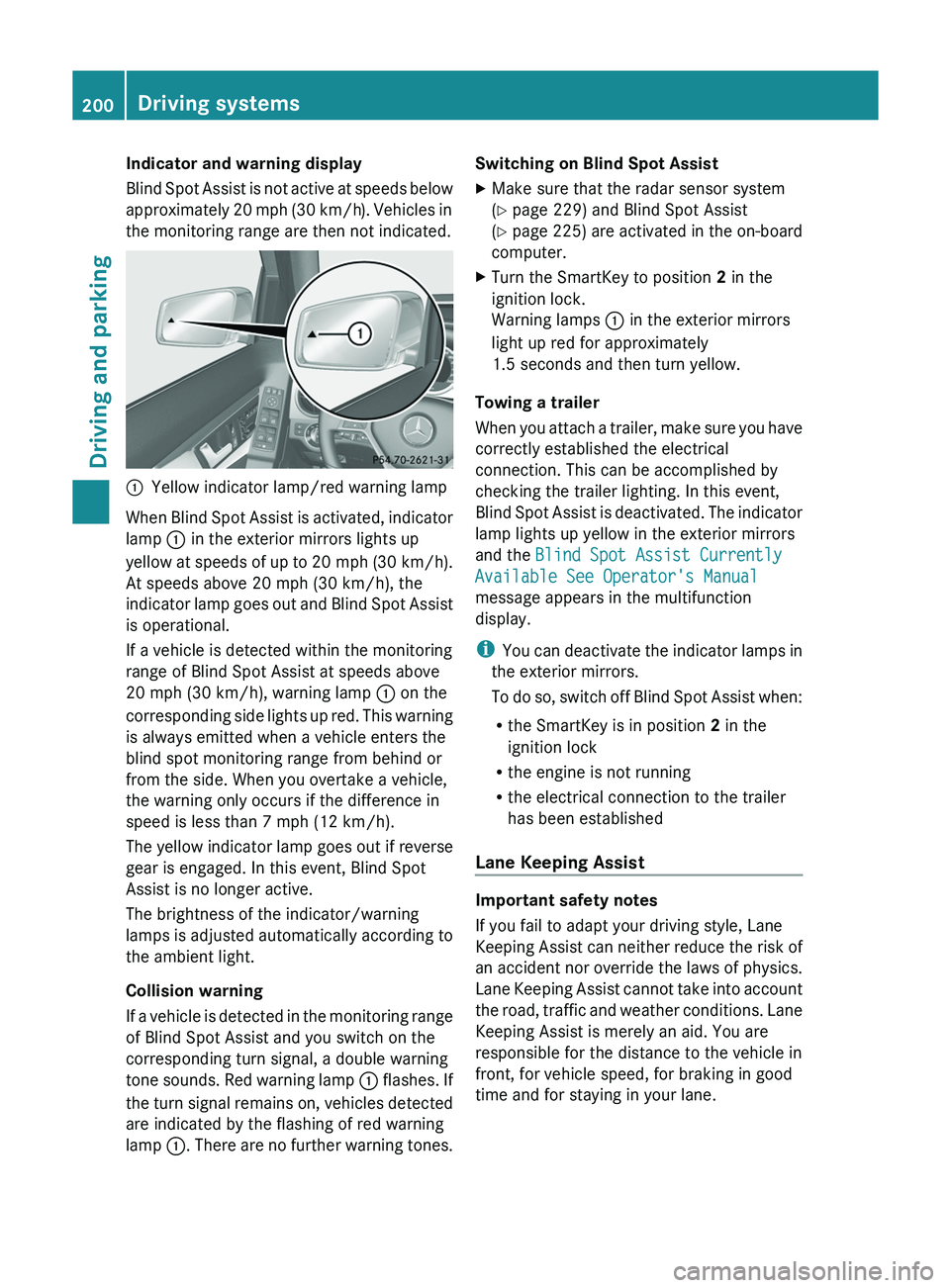
Yellow indicator lamp/red warning lamp
When Blind Spot Assist is activated, indicator
lamp 0043 in the exterior mirrors lights up
yellow at speeds of up
to 20 mph (30 km/h).
At speeds above 20 mph (30 km/h), the
indicator lamp goes out and Blind Spot Assist
is operational.
If a vehicle is detected within the monitoring
range of Blind Spot Assist at speeds above
20 mph (30 km/h), warning lamp 0043 on the
corresponding side lights up red. This warning
is always emitted when a vehicle enters the
blind spot monitoring range from behind or
from the side. When you overtake a vehicle,
the warning only occurs if the difference in
speed is less than 7 mph (12 km/h).
The yellow indicator lamp goes out if reverse
gear is engaged. In this event, Blind Spot
Assist is no longer active.
The brightness of the indicator/warning
lamps is adjusted automatically according to
the ambient light.
Collision warning
If a vehicle is detected in the monitoring range
of Blind Spot Assist and you switch on the
corresponding turn signal, a double warning
tone sounds. Red warning lamp 0043 flashes. If
the turn signal remains on, vehicles detected
are indicated by the flashing of red warning
lamp 0043. There are no further warning tones. Switching on Blind Spot Assist
X
Make sure that the radar sensor system
(Y page 229) and Blind Spot Assist
(Y page 225) are activated
in
the on-board
computer.
X Turn the SmartKey to position 2 in the
ignition lock.
Warning lamps 0043 in the exterior mirrors
light up red for approximately
1.5 seconds and then turn yellow.
Towing a trailer
When you attach a trailer,
make sure you have
correctly established the electrical
connection. This can be accomplished by
checking the trailer lighting. In this event,
Blind Spot Assist is deactivated. The indicator
lamp lights up yellow in the exterior mirrors
and the Blind Spot Assist Currently
Available See Operator's Manual
message appears in the multifunction
display.
i You can deactivate the indicator lamps in
the exterior mirrors.
To do so, switch off Blind Spot Assist when:
R the SmartKey is in position 2 in the
ignition lock
R the engine is not running
R the electrical connection to the trailer
has been established
Lane Keeping Assist Important safety notes
If you fail to adapt your driving style, Lane
Keeping Assist can neither
reduce
the risk of
an accident nor override the laws of physics.
Lane Keeping Assist cannot take into account
the road, traffic and weather conditions. Lane
Keeping Assist is merely an aid. You are
responsible for the distance to the vehicle in
front, for vehicle speed, for braking in good
time and for staying in your lane. 200
Driving systems
Driving and parking
Page 218 of 380

Useful information
i This Operator's Manual describes all
models and all standard and optional
equipment of your vehicle available at the
time of publication of the Operator's
Manual. Country-specific differences are
possible. Please note that your
vehicle may
not be equipped with all features
described. This also applies to safety-
related systems and functions.
i Read the information on qualified
specialist workshops: ( Y page 27).Important safety notes
G
WARNING
If you operate information systems and
communication equipment integrated in the
vehicle while driving, you will be distracted
from traffic conditions. You could also lose
control of the vehicle. There is a risk of an
accident.
Only operate the equipment when the traffic
situation permits. If you are
not sure that this
is possible, park the vehicle paying attention
to traffic conditions and operate the
equipment when the vehicle is stationary. G
WARNING
If the instrument cluster has failed or
malfunctioned, you may not recognize
function restrictions in systems relevant to
safety. The operating safety of your vehicle
may be impaired. There is a risk of an
accident.
Drive on carefully. Have the vehicle checked
at a qualified specialist workshop
immediately.
You must observe the legal requirements for
the country in which you
are currently driving
when operating the on-board computer.
The on-board computer only shows messages
or warnings from certain systems in the multifunction display. You should therefore
make sure your vehicle is operating safely at
all times. Otherwise, a vehicle that is not
operating safely may cause an accident.
For an overview, see the instrument panel
illustration (
Y page 31). Displays and operation
Coolant temperature display
G
WARNING
Opening the hood when the engine is
overheated or when there is a fire in the
engine compartment could expose you
to hot
gases or other service products. There is a
risk of injury.
Let an overheated engine cool down before
opening the hood. If there is a fire in the
engine compartment, keep the hood closed
and contact the fire department.
The coolant temperature gauge is in the
instrument cluster on the left-hand side.
Under normal operating conditions and with
the specified coolant level, the coolant
temperature may rise to 248 ‡ (120 †).
! A display message is shown if the coolant
temperature is too high.
If the coolant temperature is over
248 ‡(120 †), do not continue driving. The
engine will otherwise be damaged. Tachometer
The red band in the
tachometer indicates the
engine's overrevving range.
! Do not drive in the overrevving range, as
this could damage the engine.
The fuel supply is interrupted to protect the
engine when the red band is reached. 216
Displays and operation
On-board computer and displays
Page 245 of 380
Display messages Possible causes/consequences and
0050 SolutionsAdaptive Highbeam
Assist Inoperative Adaptive Highbeam Assist is faulty.
X
Visit a qualified specialist workshop. Adaptive Highbeam
Assist Currently
Unavailable See
Operator's Manual Adaptive Highbeam Assist is deactivated and temporarily
inoperative. Possible causes are:
R
the windshield in the camera's field of vision is dirty.
R visibility is impaired due to heavy rain, snow or fog.
X Clean the windshield.
If the system detects that the camera is fully operational again,
the Adaptive Highbeam Assist Now Available message is
displayed.
Adaptive Highbeam Assist is operational again. Engine
Display messages Possible causes/consequences and
0050 Solutions00BD
Check Coolant
Level See
Operator's Manual The coolant level is too low.
!
Avoid making long journeys with
too little coolant in the engine
cooling system. The engine will otherwise be damaged.
X Add coolant, observing the warning notes before doing so
(Y page 302).
X If coolant needs to be added more often than usual, have the
engine coolant system checked at a qualified specialist
workshop. 00AC The fan motor is faulty.
X
At coolant temperatures below 248 ‡ (120 †) drive to the
nearest qualified specialist workshop.
X Avoid subjecting the engine to heavy loads, e.g. driving in
mountainous terrain, and stop-and-go traffic. Display messages
243
On-board computer and displays Z
Page 247 of 380
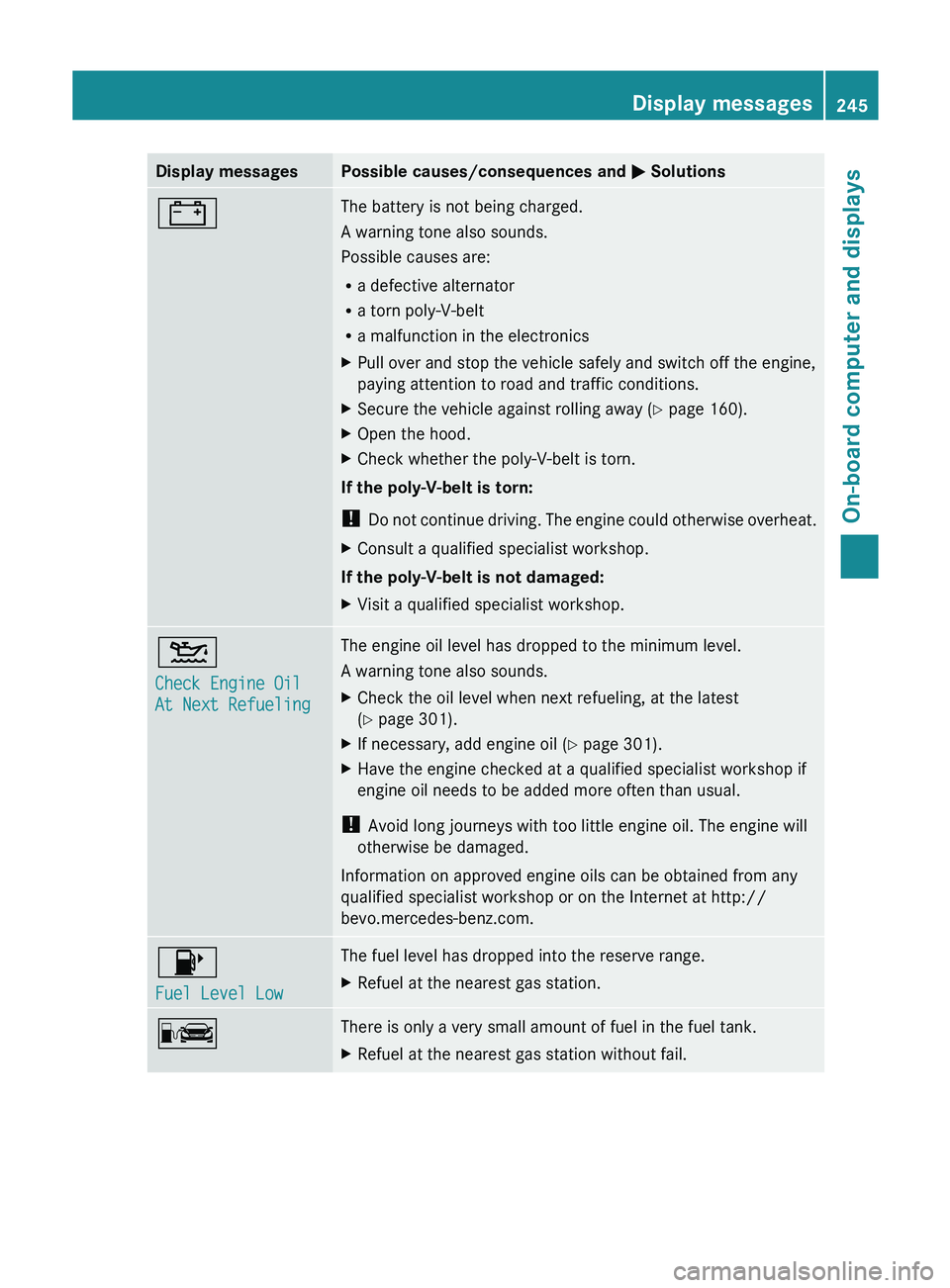
Display messages Possible causes/consequences and
0050 Solutions003D The battery is not being charged.
A warning tone also sounds.
Possible causes are:
R
a defective alternator
R a torn poly-V-belt
R a malfunction in the electronics
X Pull over and stop the vehicle safely and switch off the engine,
paying attention to road and traffic conditions.
X Secure the vehicle against rolling away ( Y page 160).
X Open the hood.
X Check whether the poly-V-belt is torn.
If the poly-V-belt is torn:
! Do not continue driving. The
engine could otherwise overheat.
X Consult a qualified specialist workshop.
If the poly-V-belt is not damaged:
X Visit a qualified specialist workshop. 00B2
Check Engine Oil
At Next Refueling The engine oil level has dropped to the minimum level.
A warning tone also sounds.
X
Check the oil level when next refueling, at the latest
(Y page 301).
X If necessary, add engine oil ( Y page 301).
X Have the engine checked at a qualified specialist workshop if
engine oil needs to be added more often than usual.
! Avoid long journeys with too little engine oil. The engine will
otherwise be damaged.
Information on approved engine oils can be obtained from any
qualified specialist workshop or on the Internet at http://
bevo.mercedes-benz.com. 00B6
Fuel Level Low The fuel level has dropped into the reserve range.
X
Refuel at the nearest gas station. 00A8 There is only a very small amount of fuel in the fuel tank.
X
Refuel at the nearest gas station without fail. Display messages
245
On-board computer and displays Z
Page 248 of 380
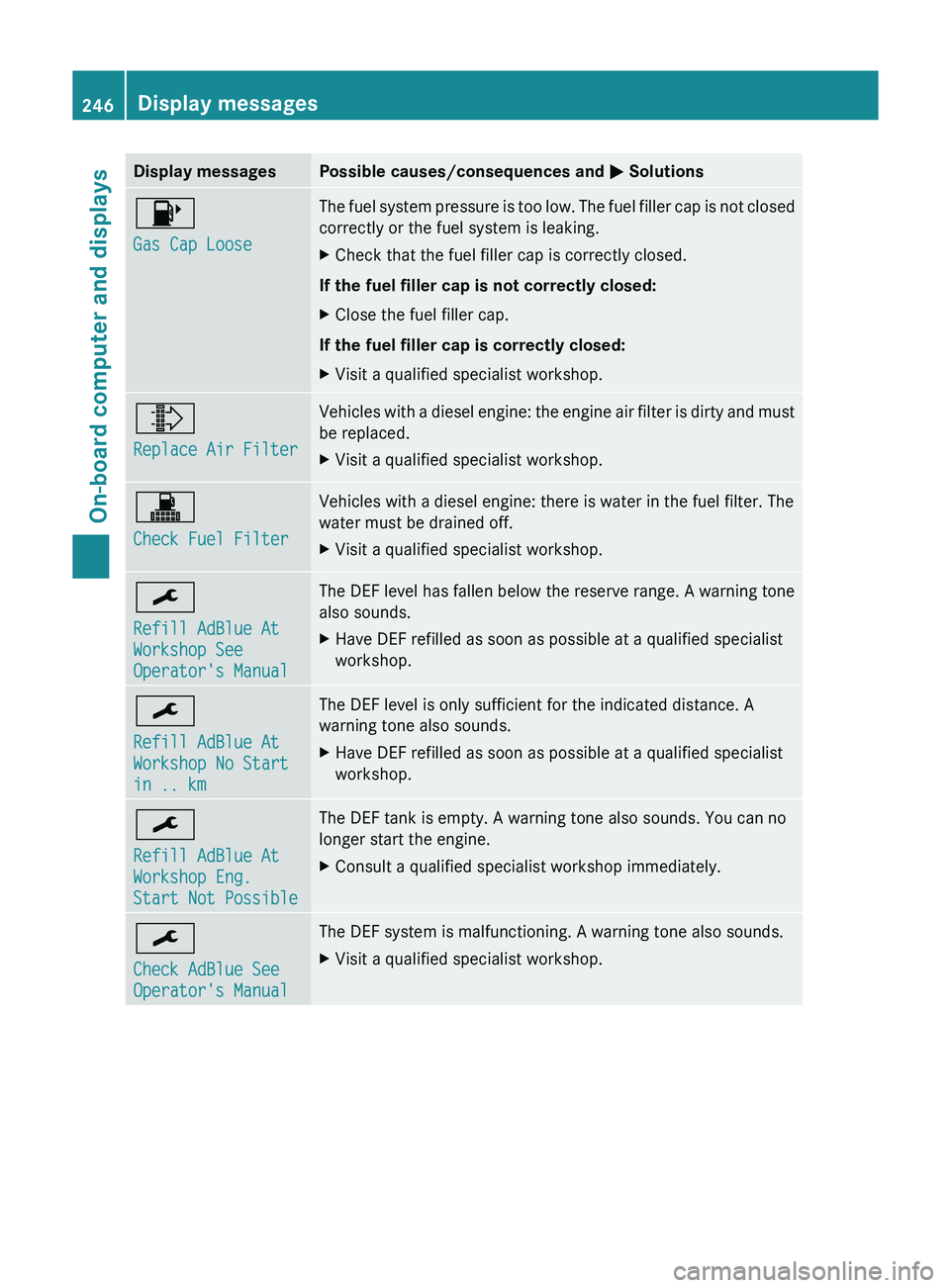
Display messages Possible causes/consequences and
0050 Solutions00B6
Gas Cap Loose The fuel system pressure is too low. The fuel filler cap is not closed
correctly or the fuel system is leaking.
X
Check that the fuel filler cap is correctly closed.
If the fuel filler cap is not correctly closed:
X Close the fuel filler cap.
If the fuel filler cap is correctly closed:
X Visit a qualified specialist workshop. 009E
Replace Air Filter Vehicles with a diesel engine: the engine air filter is dirty and must
be replaced.
X
Visit a qualified specialist workshop. 003A
Check Fuel Filter Vehicles with a diesel engine: there is water in the fuel filter. The
water must be drained off.
X
Visit a qualified specialist workshop. 0099
Refill AdBlue At
Workshop See
Operator's Manual The DEF level has fallen below the reserve range. A warning tone
also sounds.
X
Have DEF refilled as soon as possible at a qualified specialist
workshop. 0099
Refill AdBlue At
Workshop No Start
in .. km The DEF level is only sufficient for the indicated distance. A
warning tone also sounds.
X
Have DEF refilled as soon as possible at a qualified specialist
workshop. 0099
Refill AdBlue At
Workshop Eng.
Start Not Possible The DEF tank is empty. A warning tone also sounds. You can no
longer start the engine.
X
Consult a qualified specialist workshop immediately. 0099
Check AdBlue See
Operator's Manual The DEF system is malfunctioning. A warning tone also sounds.
X
Visit a qualified specialist workshop.246
Display messagesOn-board computer and displays
Page 249 of 380
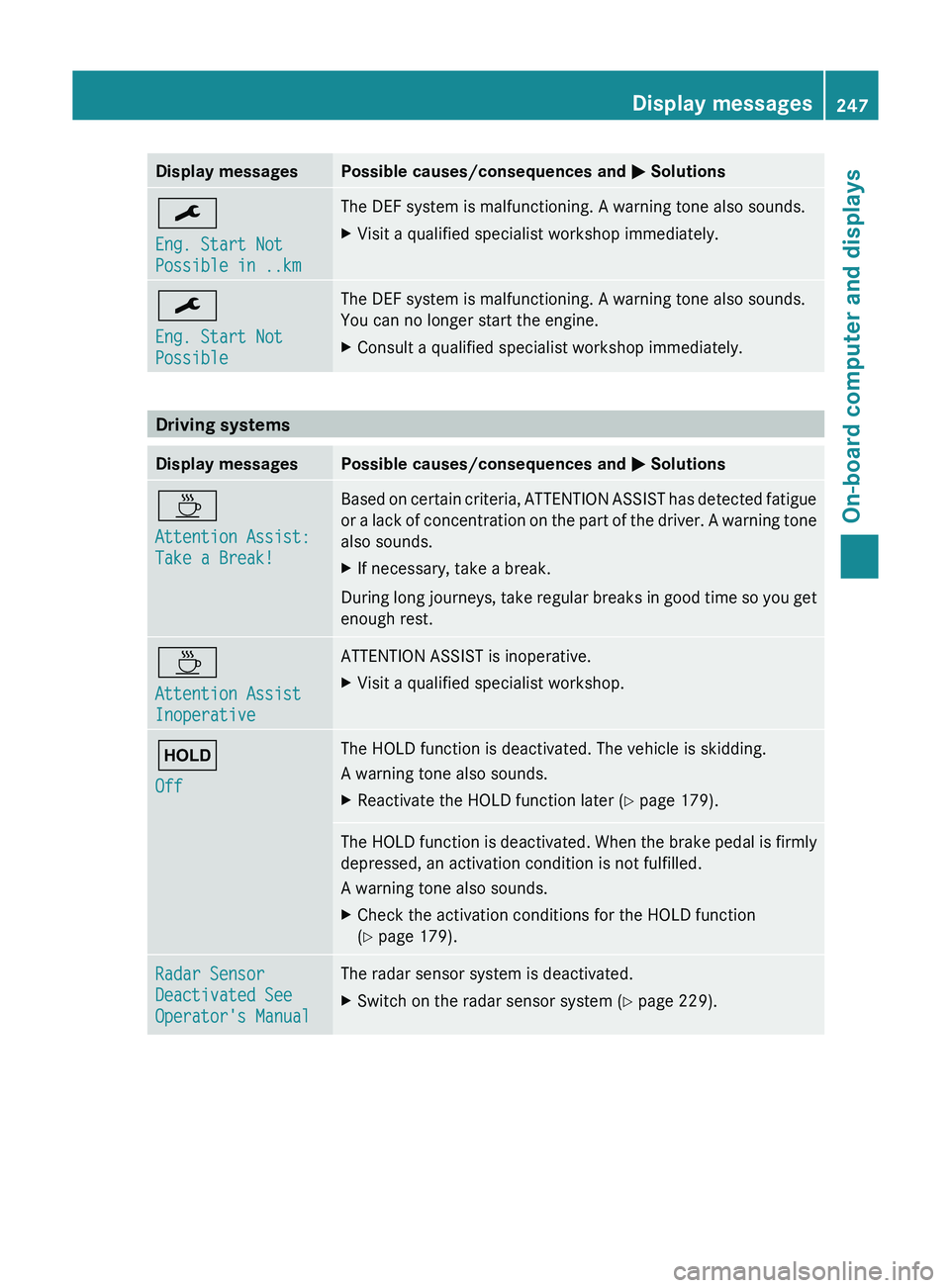
Display messages Possible causes/consequences and
0050 Solutions0099
Eng. Start Not
Possible in ..km The DEF system is malfunctioning. A warning tone also sounds.
X
Visit a qualified specialist workshop immediately. 0099
Eng. Start Not
Possible The DEF system is malfunctioning. A warning tone also sounds.
You can no longer start the engine.
X
Consult a qualified specialist workshop immediately. Driving systems
Display messages Possible causes/consequences and
0050 Solutions00AD
Attention Assist:
Take a Break! Based on certain criteria, ATTENTION ASSIST has detected fatigue
or a lack of
concentration
on the part of the driver. A warning tone
also sounds.
X If necessary, take a break.
During long journeys, take regular breaks in good time so you get
enough rest. 00AD
Attention Assist
Inoperative ATTENTION ASSIST is inoperative.
X
Visit a qualified specialist workshop. 00D9
Off The HOLD function is deactivated. The vehicle is skidding.
A warning tone also sounds.
X
Reactivate the HOLD function later (Y page 179). The HOLD function is deactivated. When the brake pedal is firmly
depressed, an activation condition is not fulfilled.
A warning tone also sounds.
X
Check the activation conditions for the HOLD function
(Y page 179). Radar Sensor
Deactivated See
Operator's Manual The radar sensor system is deactivated.
X
Switch on the radar sensor system (Y page 229). Display messages
247On-board computer and displays Z
Page 264 of 380
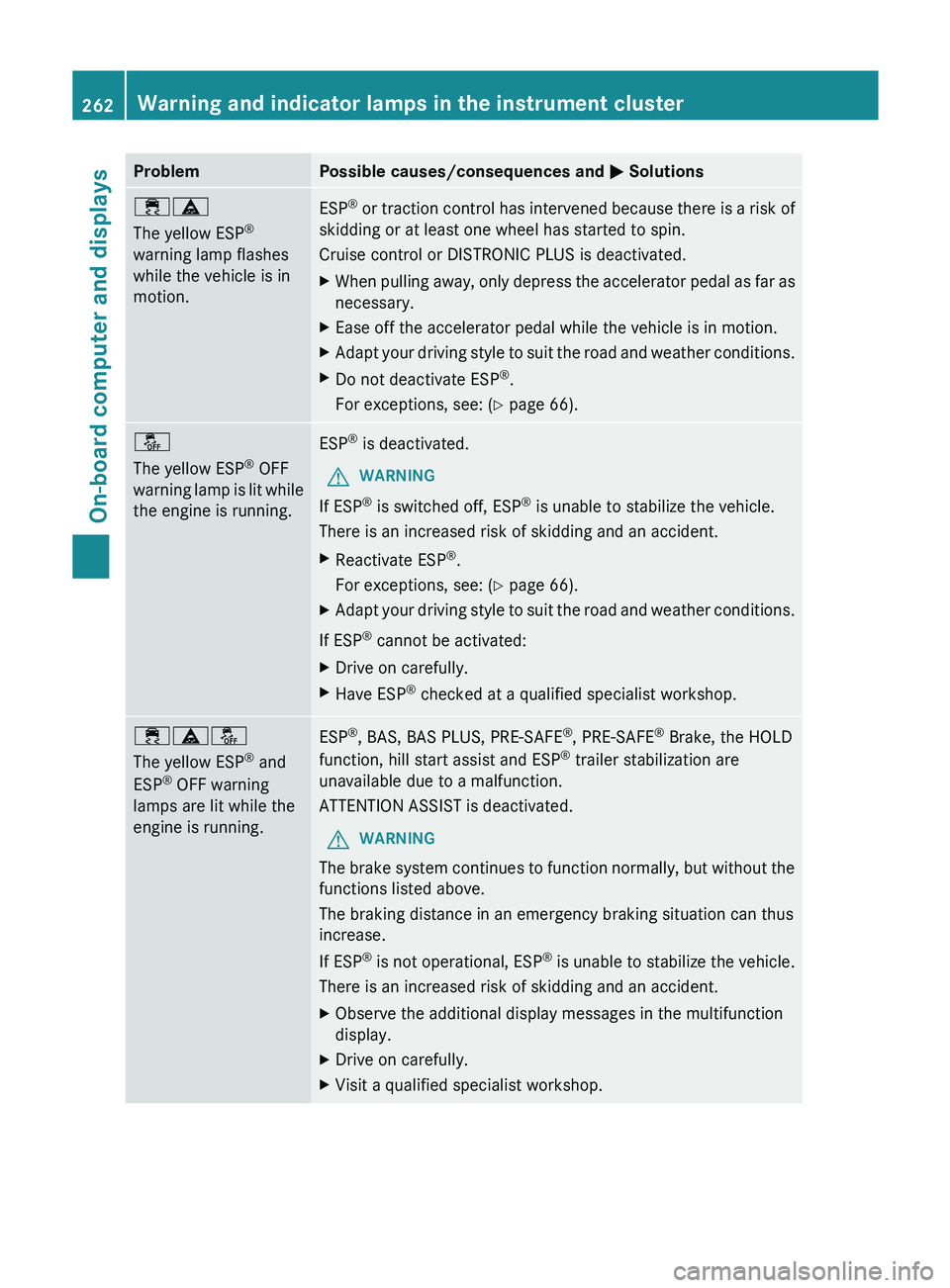
Problem Possible causes/consequences and
0050 Solutions00E500BA
The yellow ESP
®
warning lamp flashes
while the vehicle is in
motion. ESP
®
or traction control has intervened because there is a risk of
skidding or at least one wheel has started to spin.
Cruise control or DISTRONIC PLUS is deactivated.
X When pulling away, only
depress the accelerator pedal as far as
necessary.
X Ease off the accelerator pedal while the vehicle is in motion.
X Adapt your driving style to suit the road and weather conditions.
X Do not deactivate ESP ®
.
For exceptions, see: ( Y page 66).00BB
The yellow ESP
®
OFF
warning lamp is lit while
the engine is running. ESP
®
is deactivated.
G WARNING
If ESP ®
is switched off, ESP ®
is unable to stabilize the vehicle.
There is an increased risk of skidding and an accident.
X Reactivate ESP ®
.
For exceptions, see: ( Y page 66).
X Adapt your driving style to suit the road and weather conditions.
If ESP ®
cannot be activated:
X Drive on carefully.
X Have ESP ®
checked at a qualified specialist workshop. 00E500BA00BB
The yellow ESP
®
and
ESP ®
OFF warning
lamps are lit while the
engine is running. ESP
®
, BAS, BAS PLUS, PRE-SAFE ®
, PRE-SAFE ®
Brake, the HOLD
function, hill start assist and ESP ®
trailer stabilization are
unavailable due to a malfunction.
ATTENTION ASSIST is deactivated.
G WARNING
The brake system continues to function normally, but without the
functions listed above.
The braking distance in an emergency braking situation can thus
increase.
If ESP ®
is not operational, ESP®
is unable to stabilize the vehicle.
There is an increased risk of skidding and an accident.
X Observe the additional display messages in the multifunction
display.
X Drive on carefully.
X Visit a qualified specialist workshop.262
Warning and indicator lamps in the instrument cluster
On-board computer and displays
Page 265 of 380
Problem Possible causes/consequences and
0050 Solutions00E500BB
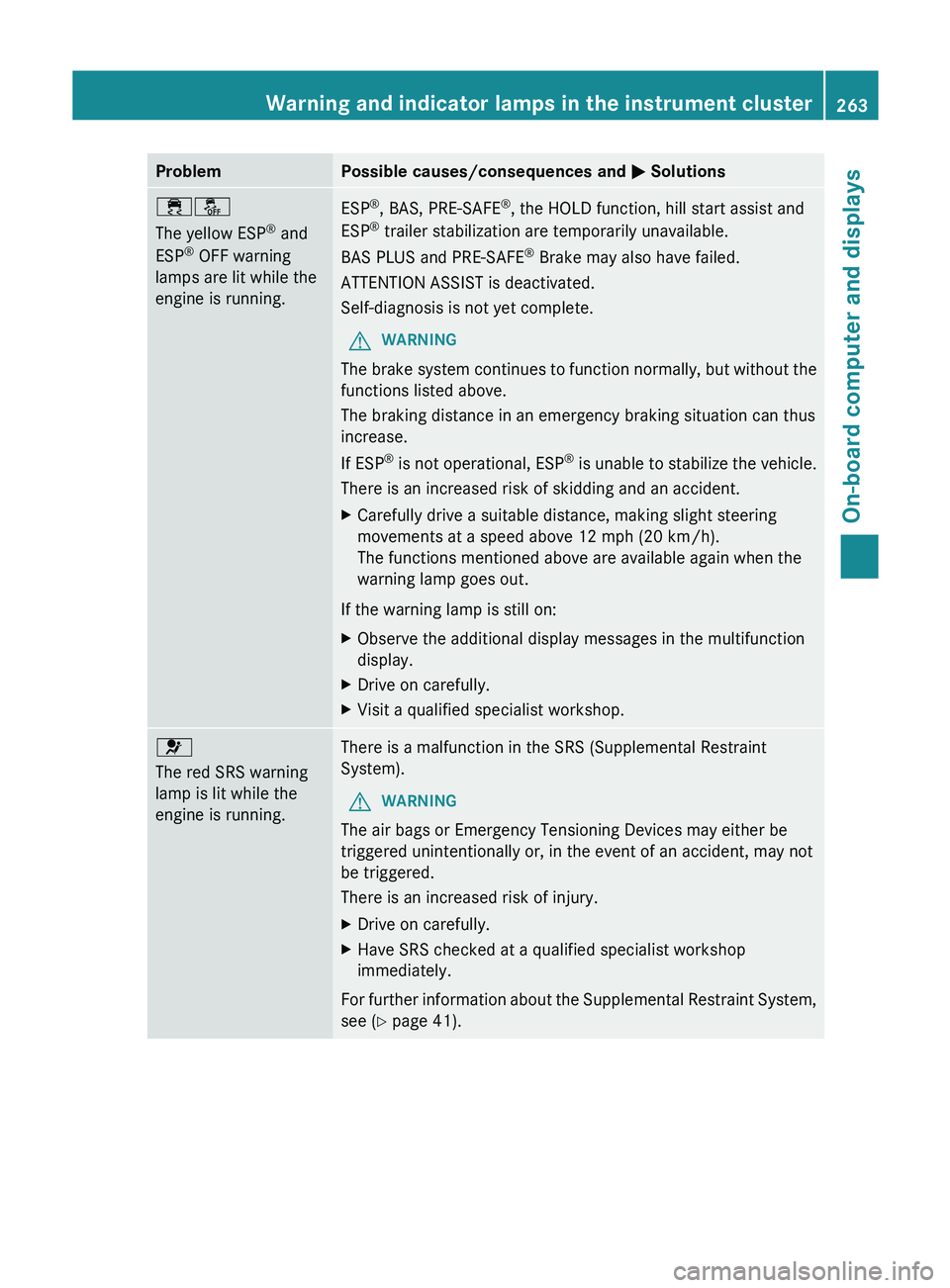
The yellow ESP
®
and
ESP ®
OFF warning
lamps are lit while the
engine is running. ESP
®
, BAS, PRE-SAFE ®
, the HOLD function, hill start assist and
ESP ®
trailer stabilization are temporarily unavailable.
BAS PLUS and PRE-SAFE ®
Brake may also have failed.
ATTENTION ASSIST is deactivated.
Self-diagnosis is not yet complete.
G WARNING
The brake system continues to function normally, but without the
functions listed above.
The braking distance in an emergency braking situation can thus
increase.
If ESP ®
is not operational, ESP®
is unable to stabilize the vehicle.
There is an increased risk of skidding and an accident.
X Carefully drive a suitable distance, making slight steering
movements at a speed above 12 mph (20 km/h).
The functions mentioned above are available again when the
warning lamp goes out.
If the warning lamp is still on:
X Observe the additional display messages in the multifunction
display.
X Drive on carefully.
X Visit a qualified specialist workshop. 0075
The red SRS warning
lamp is lit while the
engine is running.
There is a malfunction in the SRS (Supplemental Restraint
System).
G WARNING
The air bags or Emergency Tensioning Devices may either be
triggered unintentionally or, in the event of an accident, may not
be triggered.
There is an increased risk of injury.
X Drive on carefully.
X Have SRS checked at a qualified specialist workshop
immediately.
For further information about the Supplemental Restraint System,
see ( Y page 41). Warning and indicator lamps in the instrument cluster
263
On-board computer and displays Z