display MERCEDES-BENZ GLK-CLASS SUV 2013 Workshop Manual
[x] Cancel search | Manufacturer: MERCEDES-BENZ, Model Year: 2013, Model line: GLK-CLASS SUV, Model: MERCEDES-BENZ GLK-CLASS SUV 2013Pages: 380, PDF Size: 19.54 MB
Page 169 of 380
i
For more information on driving with
snow chains, see ( Y page 331).
The outside temperature indicator is not
designed to serve as an ice-warning device
and is therefore unsuitable for that purpose.
Changes in the outside temperature are
displayed after a short delay.
Indicated temperatures just above the
freezing point do not guarantee
that the road
surface is free of ice. The road may still be icy,
especially in wooded areas or on bridges. The
vehicle could skid if you fail to adapt your
driving style. Always adapt your driving style
and drive at a speed to suit the prevailing
weather conditions.
You should pay special attention to road
conditions when temperatures are around
freezing point. Off-road driving
Important safety notes G
WARNING
If you drive on a steep incline at an angle or
turn when driving on an incline, the vehicle
could slip sideways, tip and rollover. There is
a risk of an accident.
Always drive on a steep incline in the line of
fall (straight up or down) and do not turn the
vehicle.
When driving off-road, sand, mud and water,
possibly mixed with oil, for
example, could get
into the brakes. This could result in a reduced
braking effect or in total brake failure and also
in increased wear and tear. The braking
characteristics change depending on the
material ingressing the brakes. Clean the
brakes after driving off-road. If you detect a
reduced braking effect or grinding noises,
have the brake system checked in a qualified
specialist workshop as soon as possible.
Adapt your driving style to the different
braking characteristics. Driving off-road increases the likelihood of
damage
to the vehicle, which,
in turn, can lead
to failure of the mechanical assembly or
systems. Adapt your driving style to suit the
terrain conditions. Drive carefully. Have
damage to the vehicle rectified immediately
at a qualified specialist workshop.
Do not switch to transmission position N
when driving off-road. If you try to brake the
vehicle using the service brake, you could
lose control of the vehicle. If the gradient is
too steep for your vehicle, drive back down in
reverse gear.
General notes H
Environmental note
Protection of the environment is of primary
importance. Treat nature with respect.
Observe all prohibiting signs.
Read this section carefully before
driving your
vehicle off-road. Practice by driving over more
gentle off-road terrain first.
Familiarize yourself with the characteristics
of your vehicle and the gear shift operation
before driving through difficult terrain.
Checklist before driving off-road !
If the engine oil warning lamp lights up
while the vehicle is in motion, stop the
vehicle in a
safe place
as soon as possible.
Check the engine oil level. The engine oil
warning lamp warning must not be ignored.
Continuing the journey while the symbol is
displayed could lead to engine damage.
Checklist after driving off-road Driving over rough terrain places greater
demands on your vehicle than driving on
normal roads. After driving off-road, check
the vehicle. This allows
you
to detect damage
promptly and reduce the risk of an accident
to yourself and other road users. Driving tips
167
Driving and parking Z
Page 172 of 380
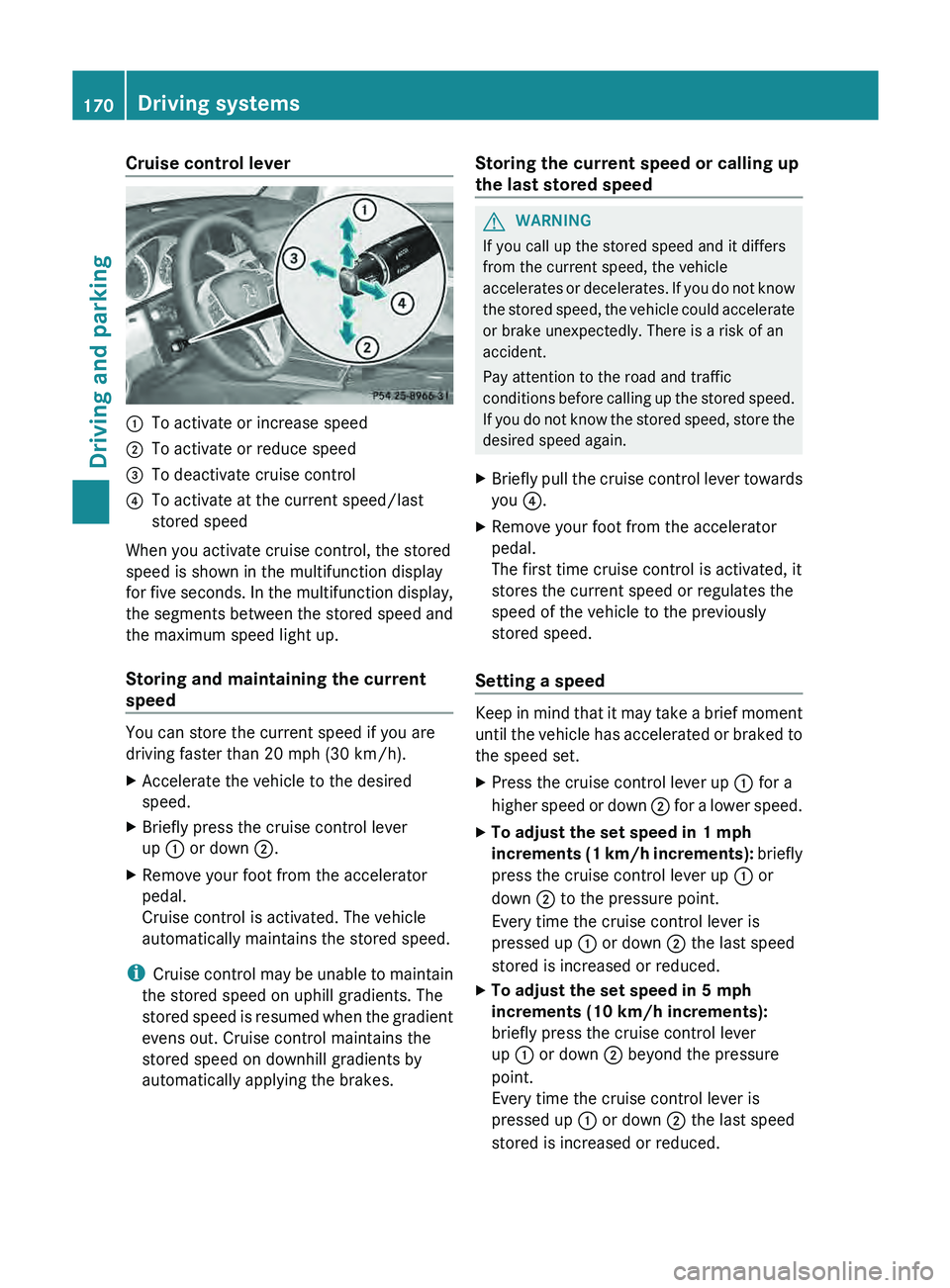
Cruise control lever
0043
To activate or increase speed
0044 To activate or reduce speed
0087 To deactivate cruise control
0085 To activate at the current speed/last
stored speed
When you activate cruise control, the stored
speed is shown in the multifunction display
for five seconds. In
the
multifunction display,
the segments between the stored speed and
the maximum speed light up.
Storing and maintaining the current
speed You can store the current speed if you are
driving faster than 20 mph (30 km/h).
X
Accelerate the vehicle to the desired
speed.
X Briefly press the cruise control lever
up 0043 or down 0044 .
X Remove your foot from the accelerator
pedal.
Cruise control is activated. The vehicle
automatically maintains the stored speed.
i Cruise control may
be unable
to maintain
the stored speed on uphill gradients. The
stored speed is resumed when the gradient
evens out. Cruise control maintains the
stored speed on downhill gradients by
automatically applying the brakes. Storing the current speed or calling up
the last stored speed G
WARNING
If you call up the stored speed and it differs
from the current speed, the vehicle
accelerates or decelerates. If you
do not know
the stored speed, the vehicle could accelerate
or brake unexpectedly. There is a risk of an
accident.
Pay attention to the road and traffic
conditions before calling up the stored speed.
If you do not know the stored speed, store the
desired speed again.
X Briefly pull the cruise control lever towards
you 0085.
X Remove your foot from the accelerator
pedal.
The first time cruise control is activated, it
stores the current speed or regulates the
speed of the vehicle to the previously
stored speed.
Setting a speed Keep in mind that it may take a brief moment
until the vehicle has
accelerated
or braked to
the speed set.
X Press the cruise control lever up 0043 for a
higher speed or down 0044
for a lower speed.
X To adjust the set speed in 1 mph
increments (1 km/h increments):
briefly
press the cruise control lever up 0043
or
down 0044 to the pressure point.
Every time the cruise control lever is
pressed up 0043 or down 0044 the last speed
stored is increased or reduced.
X To adjust the set speed in 5 mph
increments (10 km/h increments):
briefly press the cruise control lever
up 0043 or down 0044 beyond the pressure
point.
Every time the cruise control lever is
pressed up 0043 or down 0044 the last speed
stored is increased or reduced. 170
Driving systems
Driving and parking
Page 173 of 380
i
Cruise control is not deactivated if you
depress the accelerator pedal. For
example, if you accelerate briefly to
overtake, cruise control adjusts the
vehicle's speed to the last speed stored
after you have finished overtaking.
Deactivating cruise control There are several ways to deactivate cruise
control:
X
Briefly press the cruise control lever
forwards 0087.
or
X Brake.
Cruise control is automatically deactivated if:
R you depress the parking brake.
R you are driving at less than 20 mph
(30 km/h ).
R ESP ®
intervenes or you deactivate ESP ®
.
R you shift the transmission to position N
while driving.
If cruise control is deactivated, you will hear
a warning tone. You will see the Cruise
Control Off message in the multifunction
display for approximately five seconds.
i When you switch off the engine, the last
speed stored is cleared. DISTRONIC PLUS
Important safety notes DISTRONIC PLUS regulates the speed and
automatically helps you maintain the
distance to the vehicle detected in front.
DISTRONIC PLUS brakes automatically so
that the set speed is not exceeded.
On long and steep downhill gradients,
especially if the vehicle is laden, you must
select shift range 1, 2 or 3 in good time. By
doing so, you will make use of the braking
effect of the engine.
This
relieves the load on
the brake system and prevents the brakes
from overheating and wearing too quickly. If DISTRONIC PLUS detects a slower-moving
vehicle in front, your
vehicle
is braked in order
to maintain the preset distance to the vehicle
in front. G
WARNING
DISTRONIC PLUS does not react to:
R people or animals
R stationary obstacles on the road, e.g.
stopped or parked vehicles
R oncoming and crossing traffic
As a result, DISTRONIC PLUS
may neither give
warnings nor intervene in such situations.
There is a risk of an accident.
Always pay careful attention to the traffic
situation and be ready to brake. G
WARNING
DISTRONIC PLUS cannot always clearly
identify other road users and complex traffic
situations.
In such cases, DISTRONIC PLUS may:
R give an unnecessary warning and then
brake the vehicle
R neither give a warning nor intervene
R accelerate unexpectedly
There is a risk of an accident.
Continue to drive carefully and be ready to
brake, in particular when warned to do so by
DISTRONIC PLUS. G
WARNING
DISTRONIC PLUS brakes your vehicle with up
to 40% of the maximum braking force. If this
braking force is insufficient, DISTRONIC
PLUS
warns you visually and audibly. There is a risk
of an accident.
In such cases, apply the brakes yourself and
try to take evasive action. Driving systems
171
Driving and parking Z
Page 175 of 380
i
Canada only: This device complies with
RSS-210 of Industry Canada. Operation is
subject to the following two conditions:
1. This device may not cause harmful
interference, and
2. this device must accept
any interference
received, including interference that may
cause undesired operation of the device.
Removal, tampering, or altering of the
device will void any warranties, and is not
permitted. Do not tamper with, alter, or use
in any non-approved way.
Any unauthorized modification to this
device could void the user's authority to
operate the equipment.
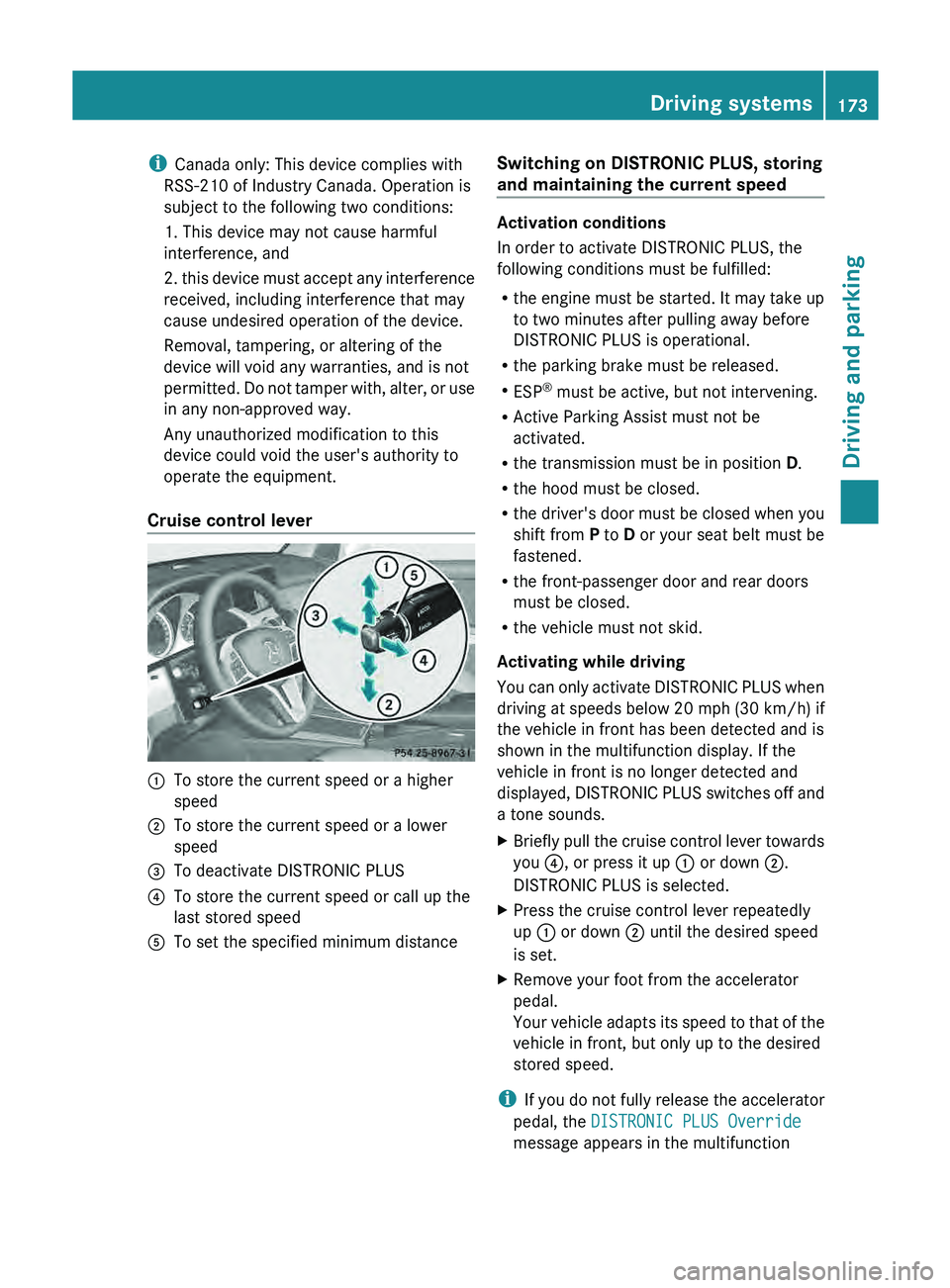
Cruise control lever 0043
To store the current speed or a higher
speed
0044 To store the current speed or a lower
speed
0087 To deactivate DISTRONIC PLUS
0085 To store the current speed or call up the
last stored speed
0083 To set the specified minimum distance Switching on DISTRONIC PLUS, storing
and maintaining the current speed Activation conditions
In order to activate DISTRONIC PLUS, the
following conditions must be fulfilled:
R
the engine must be started.
It may take up
to two minutes after pulling away before
DISTRONIC PLUS is operational.
R the parking brake must be released.
R ESP ®
must be active, but not intervening.
R Active Parking Assist must not be
activated.
R the transmission must be in position D.
R the hood must be closed.
R the driver's door must be closed when you
shift from P to D or your seat belt must be
fastened.
R the front-passenger door and rear doors
must be closed.
R the vehicle must not skid.
Activating while driving
You can only activate DISTRONIC PLUS when
driving at speeds below 20 mph (30 km/h) if
the vehicle in front has been detected and is
shown in the multifunction display. If the
vehicle in front is no longer detected and
displayed, DISTRONIC PLUS switches off and
a tone sounds.
X Briefly pull the cruise control lever towards
you 0085, or press it up 0043 or down 0044.
DISTRONIC PLUS is selected.
X Press the cruise control lever repeatedly
up 0043 or down 0044 until the desired speed
is set.
X Remove your foot from the accelerator
pedal.
Your vehicle adapts its
speed
to that of the
vehicle in front, but only up to the desired
stored speed.
i If you do not fully
release the accelerator
pedal, the DISTRONIC PLUS Override
message appears in the multifunction Driving systems
173
Driving and parking Z
Page 176 of 380
display. The set distance to a slower-
moving vehicle in front will then not be
maintained. You will be
driving
at the speed
you determine by the position of the
accelerator pedal.
Activating when driving towards a
stationary vehicle
If the vehicle in front of you is stationary, you
can only activate DISTRONIC PLUS once your
vehicle is stationary as well.
X Briefly pull the cruise control lever towards
you 0085, or press it up 0043 or down 0044.
DISTRONIC PLUS is selected.
i DISTRONIC PLUS
can only
be
activated at
under 20 mph (30 km/h) if a vehicle in front
has been detected. Therefore, the
DISTRONIC PLUS distance display in the
instrument cluster should be activated
(Y page 224).
X Press the cruise control lever repeatedly
up 0043 or down 0044 until the desired speed
is set.
i You can use the cruise
control lever to set
the stored speed and the control on the
cruise control lever to set the specified
minimum distance (Y page 175).
Pulling away
X If the vehicle in front pulls away: remove
your foot from the brake pedal.
X Briefly pull the cruise
control lever towards
you 0085.
or
X Accelerate briefly.
Your vehicle pulls away and adapts its
speed to that of the vehicle in front.
Driving
If there is no vehicle in front, DISTRONIC
PLUS operates in the same way as cruise
control.
If DISTRONIC PLUS detects that the vehicle
in front has slowed down, it brakes your vehicle. In this way, the distance you have
selected is maintained.
If DISTRONIC PLUS detects that the vehicle
in front is driving faster, it accelerates your
vehicle, but only up to the speed you have
stored.
Changing lanes
If you change to
the
passing lane, DISTRONIC
PLUS supports you when:
R you are driving faster than 40 mph
(60 km/h)
R DISTRONIC PLUS is maintaining the
distance to a vehicle in front
R you switch on the appropriate turn signal
R DISTRONIC PLUS does not detect a danger
of collision
If these conditions are fulfilled, your vehicle
is accelerated. Acceleration will be
interrupted if changing lanes takes too long
or if the distance between your vehicle and
the vehicle in front becomes too small.
i When changing lanes, DISTRONIC PLUS
monitors the left lane on left-hand drive
vehicles and the right lane on right-hand
drive vehicles.
Stopping G
WARNING
When leaving the vehicle, even if it is braked
only by DISTRONIC PLUS, it
could roll away if:
R there is a malfunction in the system or in
the voltage supply.
R DISTRONIC PLUS has been deactivated
with the cruise control lever, e.g. by a
vehicle occupant or from outside the
vehicle.
R the electrical system in the engine
compartment, the battery or the fuses have
been tampered with.
R the battery is disconnected.
R the accelerator pedal has been depressed,
e.g. by a vehicle occupant.
There is a risk of an accident. 174
Driving systems
Driving and parking
Page 177 of 380
If you wish to exit the vehicle, always turn off
DISTRONIC PLUS and secure the vehicle
against rolling away.
Deactivating DISTRONIC PLUS
(Y page 177).
If DISTRONIC PLUS detects that the vehicle
in front is stopping, it
brakes your vehicle until
it is stationary.
Once your vehicle is stationary, it remains
stationary and you do not need to depress the
brake.
i Depending on the specified minimum
distance, your vehicle will come to a
standstill at a sufficient distance behind the
vehicle in front. The specified minimum
distance is set using the control on the
cruise control lever.
When DISTRONIC PLUS is activated, the
transmission is shifted automatically to
position P if:
R the driver's door is open and the driver's
seat belt is unfastened.
R the engine is switched off, unless it is
automatically switched off by the ECO
start/stop function.
R the hood is opened.
R a system malfunction occurs.
R the power supply is not sufficient.
Setting a speed X
Press the cruise control lever up 0043 for a
higher speed or down 0044
for a lower speed.
X To adjust the set speed in 1 mph
increments (1 km/h increments):
briefly
press the cruise control lever up 0043
or
down 0044 to the pressure point.
Every time the cruise control lever is
pressed up 0043 or down 0044 the last speed
stored is increased or reduced.
X To adjust the set speed in 5 mph
increments (10 km/h increments):
briefly press the cruise control lever up
0043 or down 0044 beyond the pressure
point.
Every time the cruise control lever is
pressed up 0043 or down 0044, the last speed
stored is increased or reduced.
i DISTRONIC PLUS is not
deactivated
if you
depress the accelerator pedal. If you
accelerate to overtake, DISTRONIC PLUS
adjusts the vehicle's speed to the last
speed stored after you have finished
overtaking.
Storing the current speed or calling up
a stored speed X
Briefly pull the cruise control lever towards
you 0085.
X Remove your foot from the accelerator
pedal.
DISTRONIC PLUS is activated. The first
time it is activated, the current speed is
stored. Otherwise, it sets the
vehicle cruise
speed to the previously stored value.
Setting the specified minimum distance You can set the specified minimum distance
for
DISTRONIC PLUS
by varying
the time span
between one and two seconds. With this
function, you can set the minimum distance
that DISTRONIC PLUS keeps to the vehicle in
front, dependent on vehicle speed. You can
see this distance in the multifunction display
(Y page 176).
i Make sure that you maintain a sufficient
distance to the vehicle in front and comply
with the minimum distance as required by
law. Adjust the distance to the vehicle in
front if necessary. Driving systems
175
Driving and parking Z
Page 178 of 380
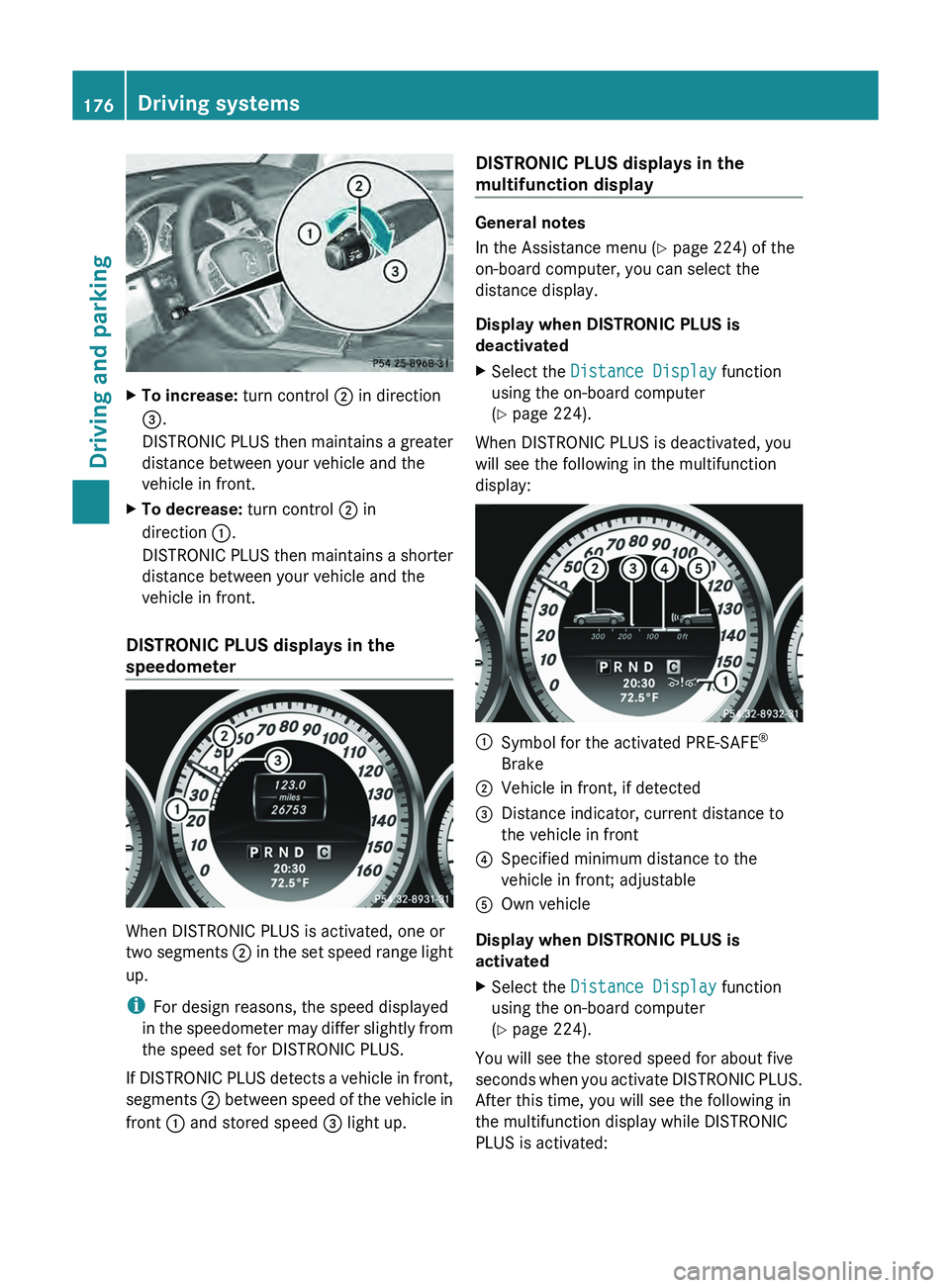
X
To increase: turn control 0044 in direction
0087.
DISTRONIC PLUS then maintains
a
greater
distance between your vehicle and the
vehicle in front.
X To decrease: turn control 0044 in
direction 0043.
DISTRONIC PLUS then maintains
a
shorter
distance between your vehicle and the
vehicle in front.
DISTRONIC PLUS displays in the
speedometer When DISTRONIC PLUS is activated, one or
two segments
0044 in the
set speed range light
up.
i For design reasons, the speed displayed
in the speedometer may differ slightly from
the speed set for DISTRONIC PLUS.
If DISTRONIC PLUS detects a vehicle in front,
segments 0044 between speed of the vehicle in
front 0043 and stored speed 0087 light up.DISTRONIC PLUS displays in the
multifunction display General notes
In the Assistance menu (Y page 224) of the
on-board computer, you can select the
distance display.
Display when DISTRONIC PLUS is
deactivated
X
Select the Distance Display function
using the on-board computer
(
Y page 224).
When DISTRONIC PLUS is deactivated, you
will see the following in the multifunction
display: 0043
Symbol for the activated PRE-SAFE ®
Brake
0044 Vehicle in front, if detected
0087 Distance indicator, current distance to
the vehicle in front
0085 Specified minimum distance to the
vehicle in front; adjustable
0083 Own vehicle
Display when DISTRONIC PLUS is
activated
X Select the Distance Display function
using the on-board computer
(Y page 224).
You will see the stored speed for about five
seconds when you activate DISTRONIC
PLUS.
After this time, you will see the following in
the multifunction display while DISTRONIC
PLUS is activated: 176
Driving systems
Driving and parking
Page 179 of 380
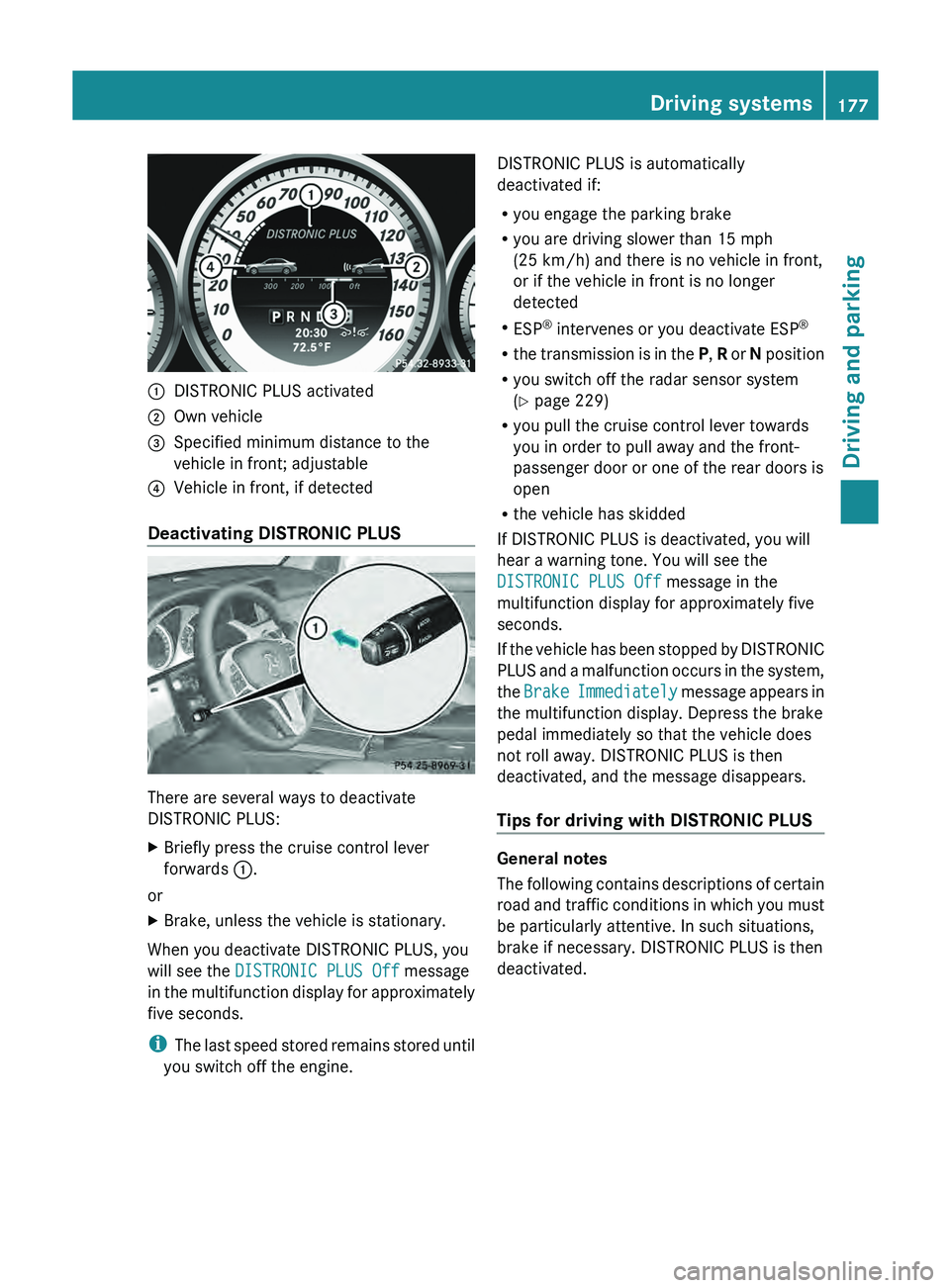
0043
DISTRONIC PLUS activated
0044 Own vehicle
0087 Specified minimum distance to the
vehicle in front; adjustable
0085 Vehicle in front, if detected
Deactivating DISTRONIC PLUS There are several ways to deactivate
DISTRONIC PLUS:
X
Briefly press the cruise control lever
forwards 0043.
or
X Brake, unless the vehicle is stationary.
When you deactivate DISTRONIC PLUS, you
will see the DISTRONIC PLUS Off message
in the multifunction display for
approximately
five seconds.
i The last speed stored remains stored until
you switch off the engine. DISTRONIC PLUS is automatically
deactivated if:
R
you engage the parking brake
R you are driving slower than 15 mph
(25 km/h) and there is no vehicle in front,
or if the vehicle in front is no longer
detected
R ESP ®
intervenes or you deactivate ESP ®
R the transmission is in
the P, R or N position
R you switch off the radar sensor system
(Y page 229)
R you pull the cruise control lever towards
you in order to pull away and the front-
passenger door or one of the rear doors is
open
R the vehicle has skidded
If DISTRONIC PLUS is deactivated, you will
hear a warning tone. You will see the
DISTRONIC PLUS Off message in the
multifunction display for approximately five
seconds.
If the vehicle has been stopped by DISTRONIC
PLUS and a malfunction occurs in the system,
the Brake Immediately message appears in
the multifunction display. Depress the brake
pedal immediately so that the vehicle does
not roll away. DISTRONIC PLUS is then
deactivated, and the message disappears.
Tips for driving with DISTRONIC PLUS General notes
The following contains descriptions
of
certain
road and traffic conditions in which you must
be particularly attentive. In such situations,
brake if necessary. DISTRONIC PLUS is then
deactivated. Driving systems
177
Driving and parking Z
Page 182 of 380
Activating the HOLD function
X
Make sure that the activation conditions
are met.
X Depress the brake pedal.
X Quickly depress the brake pedal further
until 00D9 appears in the multifunction
display.
The HOLD function is activated. You can
release the brake pedal.
i If depressing the brake pedal the first
time does not activate the HOLD function,
wait briefly and then try again.
Deactivating the HOLD function The HOLD function is deactivated
automatically if:
R
you accelerate and the transmission is in
position D or R
R the transmission is in position P.
R you depress the brake pedal again with a
certain amount of pressure until 00D9
disappears from the multifunction display
R you activate DISTRONIC PLUS
When the HOLD function is activated, the
automatic transmission is shifted
automatically to position P if:
R the driver's door is open and the driver's
seat belt is unfastened.
R the engine is switched off, unless it is
automatically switched off by the ECO
start/stop function.
R the hood is opened.
R a system malfunction occurs.
R the power supply is not sufficient.
The horn will also sound
at regular intervals if
the HOLD function is activated and you:
R switch the engine off, open the driver's
door and remove your seat belt
R open the hood
The sounding of the horn alerts you to the fact
that the vehicle has been parked while the
HOLD function is still activated. If you attempt to lock the vehicle, the tone becomes louder.
The vehicle is not locked until the HOLD
function is deactivated.
i
If the engine has been switched off, it
cannot be started again until the HOLD
function has been deactivated.
If there is a malfunction in the system or
power supply while the HOLD function is
activated, the Brake Immediately message
is shown in the multifunction display.
Immediately depress the brake firmly until
the warning message in the multifunction
display goes out.
You can
also shift the transmission to position
P. This deactivates the HOLD function. PARKTRONIC
Important safety notes PARKTRONIC is an electronic parking aid with
ultrasonic sensors. It indicates visually and
audibly the distance between your vehicle
and an object.
PARKTRONIC is only an aid. It is not a
replacement for your attention to your
immediate surroundings. You are always
responsible for safe maneuvering, parking
and exiting a parking space. When
maneuvering, parking or pulling out of a
parking space, make sure that there are no
persons, animals or objects in the area in
which you are maneuvering.
!
When parking, pay particular attention
to
objects above or below the sensors, such
as flower pots or trailer drawbars.
PARKTRONIC does not detect such objects
when they are in the immediate vicinity of
the vehicle. You could damage the vehicle
or the objects.
The sensors may not detect snow and other
objects that absorb ultrasonic waves.
Ultrasonic sources such as an automatic
car wash, the compressed-air brakes on a 180
Driving systems
Driving and parking
Page 183 of 380
truck or a pneumatic drill could cause
PARKTRONIC to malfunction.
PARKTRONIC may not function
correctly
on
uneven terrain.
PARKTRONIC is activated automatically when
you:
R switch on the ignition
R shift the transmission to position D, R or N
R release the parking brake
PARKTRONIC is deactivated at speeds above
11 mph (18 km/h). It is reactivated at lower
speeds.
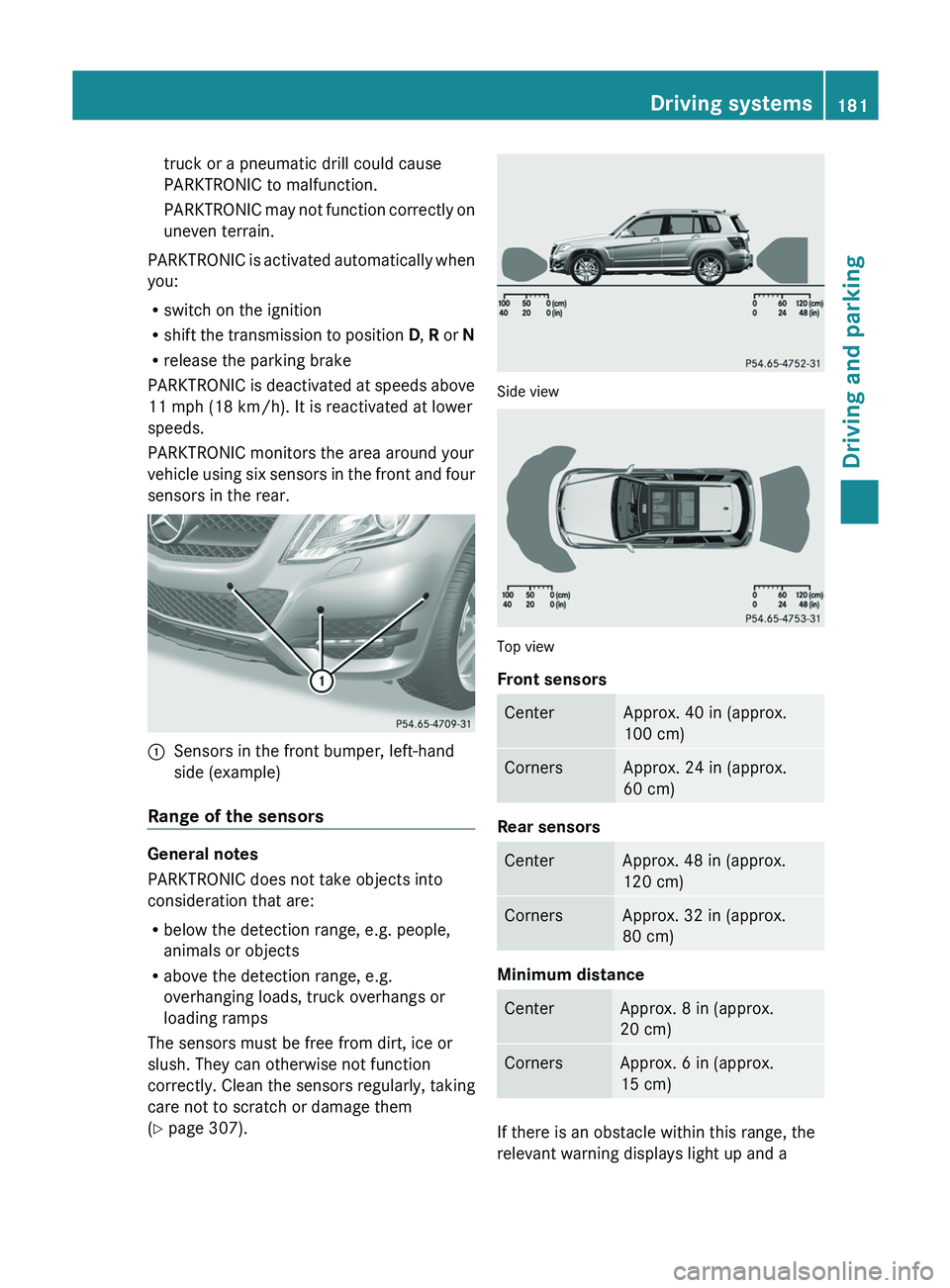
PARKTRONIC monitors the area around your
vehicle using six sensors in the front and four
sensors in the rear. 0043
Sensors in the front bumper, left-hand
side (example)
Range of the sensors General notes
PARKTRONIC does not take objects into
consideration that are:
R
below the detection range, e.g. people,
animals or objects
R above the detection range, e.g.
overhanging loads, truck overhangs or
loading ramps
The sensors must be free from dirt, ice or
slush. They can otherwise not function
correctly. Clean the sensors regularly,
taking
care not to scratch or damage them
(Y page 307). Side view
Top view
Front sensors
Center Approx. 40 in (approx.
100 cm)
Corners Approx. 24 in (approx.
60 cm)
Rear sensors
Center Approx. 48 in (approx.
120 cm)
Corners Approx. 32 in (approx.
80 cm)
Minimum distance
Center Approx. 8 in (approx.
20 cm)
Corners Approx. 6 in (approx.
15 cm)
If there is an obstacle within this range, the
relevant warning displays light up and a Driving systems
181
Driving and parking Z