display MERCEDES-BENZ GLK-CLASS SUV 2014 Owner's Manual
[x] Cancel search | Manufacturer: MERCEDES-BENZ, Model Year: 2014, Model line: GLK-CLASS SUV, Model: MERCEDES-BENZ GLK-CLASS SUV 2014Pages: 384, PDF Size: 48.23 MB
Page 37 of 384
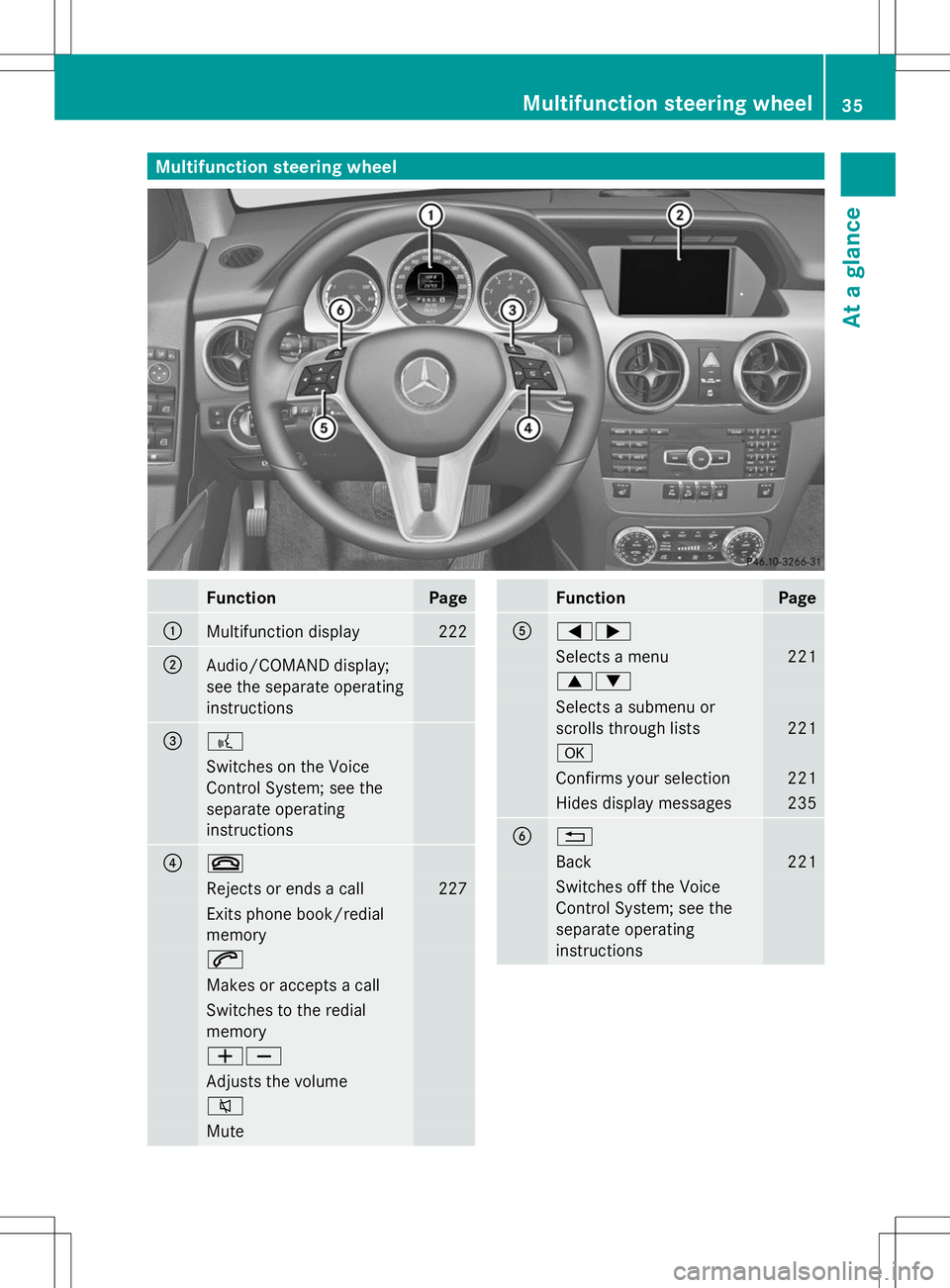
Multifunction steering wheel
Function Page
:
Multifunction display 222
;
Audio/COMAND display;
see the separate operating
instructions =
?
Switches on the Voice
Control System; see the
separate operating
instructions ?
~
Rejects or ends a call 227
Exits phone book/redial
memory
6
Makes or accepts a call
Switches to the redial
memory
WX
Adjusts the volume
8
Mute Function Page
A
=;
Selects a menu 221
9:
Selects a submenu or
scrolls through lists
221
a
Confirms your selection 221
Hides display messages 235
B
%
Back 221
Switches off the Voice
Control System; see the
separate operating
instructionsMultifunction steering wheel
35At a glance
Page 51 of 384
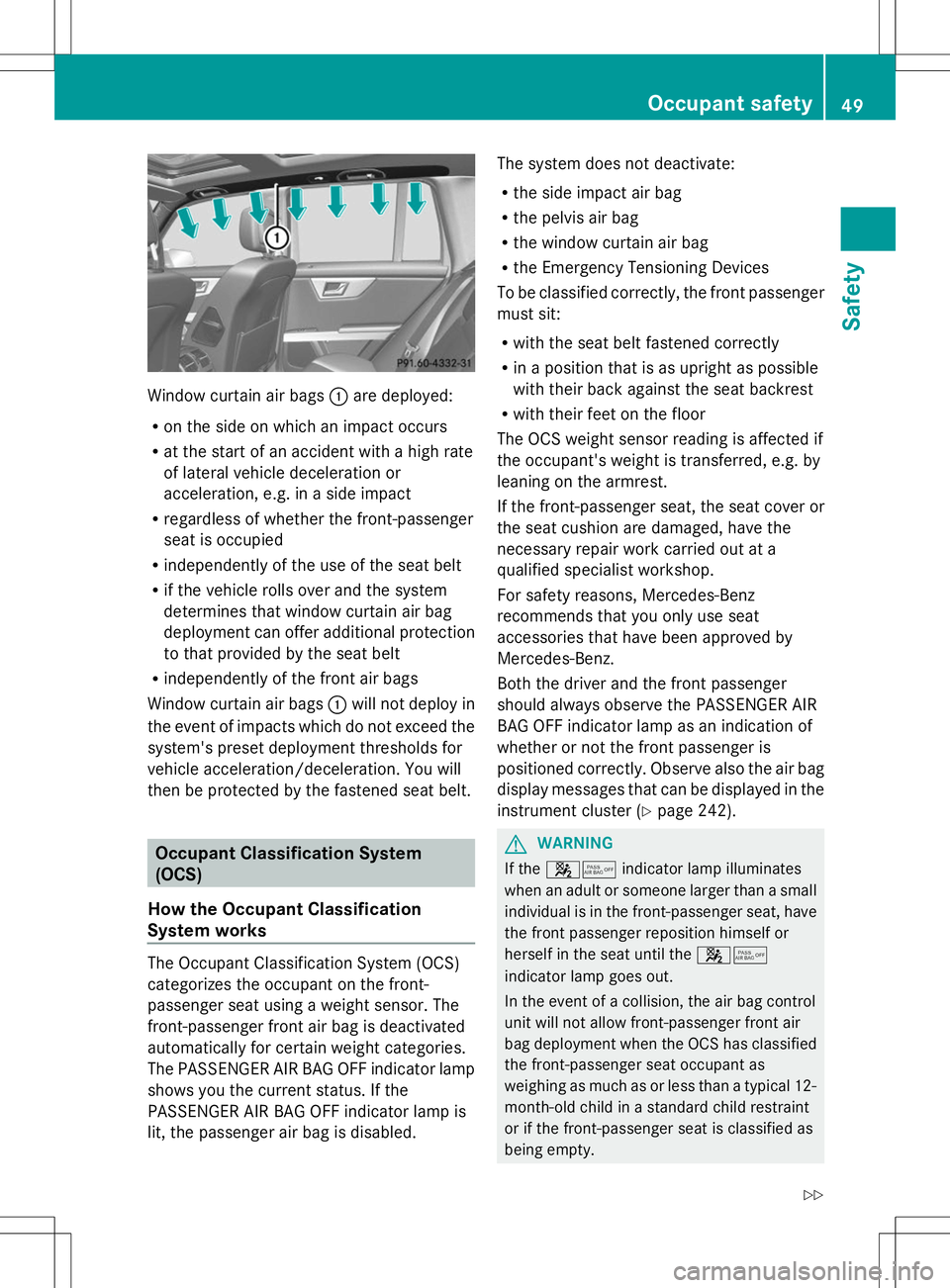
Window curtain air bags
:are deployed:
R on the side on which an impact occurs
R at the start of an accident with a high rate
of lateral vehicle deceleration or
acceleration, e.g. in a side impact
R regardless of whether the front-passenger
seat is occupied
R independently of the use of the seat belt
R if the vehicle rolls over and the system
determines that window curtain air bag
deployment can offer additional protection
to that provided by the seat belt
R independently of the front air bags
Window curtain air bags :will not deploy in
the event of impacts which do not exceed the
system's preset deployment thresholds for
vehicle acceleration/deceleration. You will
then be protected by the fastened seat belt. Occupant Classification System
(OCS)
How the Occupant Classification
System works The Occupant Classification System (OCS)
categorizes the occupant on the front-
passenger seat using a weight sensor. The
front-passenger front air bag is deactivated
automatically for certain weight categories.
The PASSENGER AIR BAG OFF indicator lamp
shows you the current status. If the
PASSENGER AIR BAG OFF indicator lamp is
lit, the passenger air bag is disabled. The system does not deactivate:
R
the side impact air bag
R the pelvis air bag
R the window curtain air bag
R the Emergency Tensioning Devices
To be classified correctly, the front passenger
must sit:
R with the seat belt fastened correctly
R in a position that is as upright as possible
with their back against the seat backrest
R with their feet on the floor
The OCS weight sensor reading is affected if
the occupant's weight is transferred, e.g. by
leaning on the armrest.
If the front-passenger seat, the seat cover or
the seat cushion are damaged, have the
necessary repair work carried out at a
qualified specialist workshop.
For safety reasons, Mercedes-Benz
recommends that you only use seat
accessories that have been approved by
Mercedes-Benz.
Both the driver and the front passenger
should always observe the PASSENGER AIR
BAG OFF indicator lamp as an indication of
whether or not the front passenger is
positioned correctly. Observe also the air bag
display messages that can be displayed in the
instrument cluster (Y page 242). G
WARNING
If the 45 indicator lamp illuminates
when an adult or someone larger than a small
individual is in the front-passenger seat, have
the front passenger reposition himself or
herself in the seat until the 45
indicator lamp goes out.
In the event of a collision, the air bag control
unit will not allow front-passenger front air
bag deployment when the OCS has classified
the front-passenger seat occupant as
weighing as much as or less than a typical 12-
month-old child in a standard child restraint
or if the front-passenger seat is classified as
being empty. Occupant safety
49Safety
Z
Page 55 of 384
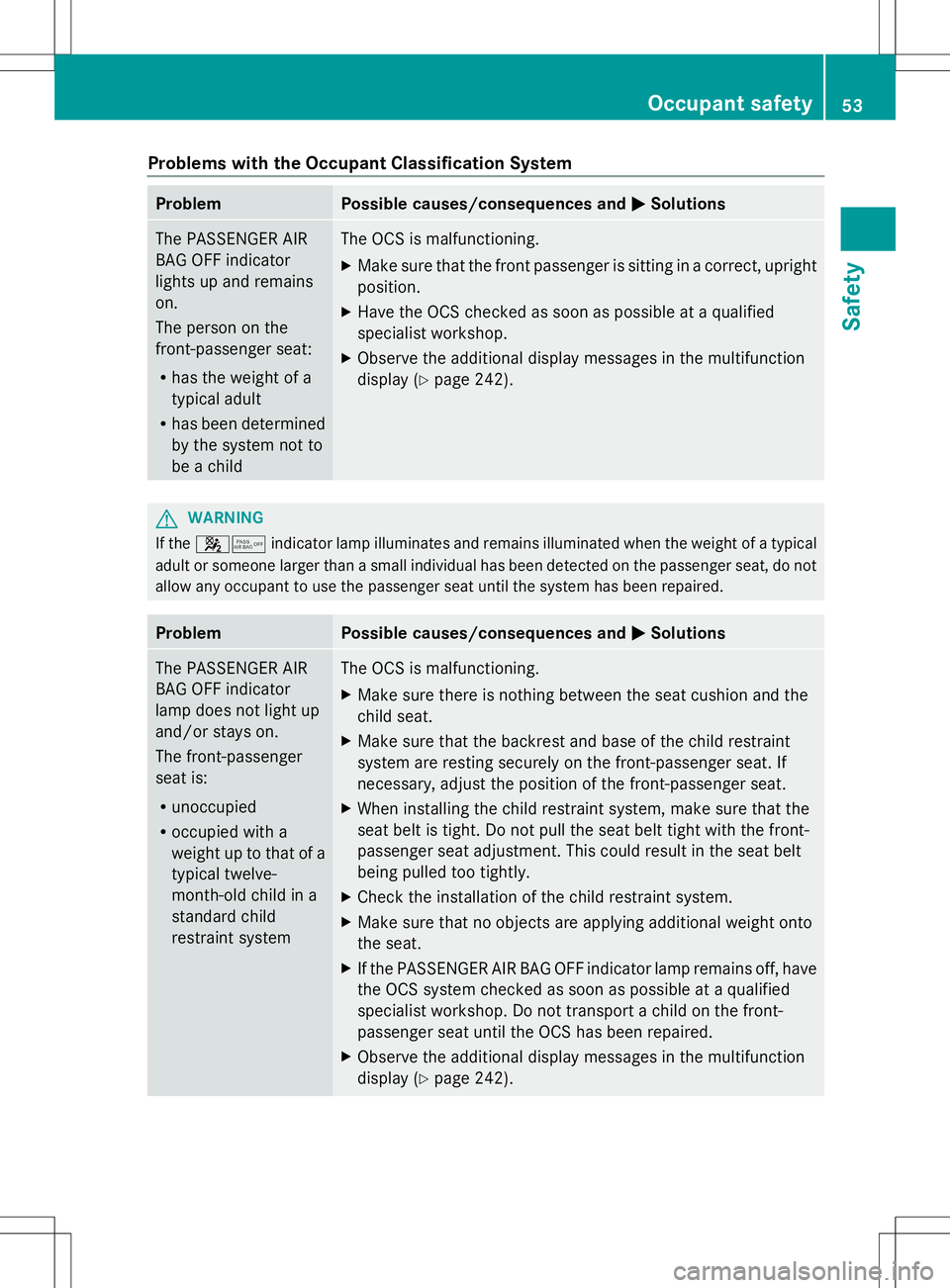
Problems with the Occupant Classification System
Problem Possible causes/consequences and
M
MSolutions The PASSENGER AIR
BAG OFF indicator
lights up and remains
on.
The person on the
front-passenger seat:
R
has the weight of a
typical adult
R has been determined
by the system not to
be a child The OCS is malfunctioning.
X
Make sure that the front passenger is sitting in a correct, upright
position.
X Have the OCS checked as soon as possible at a qualified
specialist workshop.
X Observe the additional display messages in the multifunction
display (Y page 242). G
WARNING
If the 45 indicator lamp illuminates and remains illuminated when the weight of a typical
adult or someone larger than a small individual has been detected on the passenger seat, do not
allow any occupant to use the passenger seat until the system has been repaired. Problem Possible causes/consequences and
M MSolutions The PASSENGER AIR
BAG OFF indicator
lamp does not light up
and/or stays on.
The front-passenger
seat is:
R
unoccupied
R occupied with a
weight up to that of a
typical twelve-
month-old child in a
standard child
restraint system The OCS is malfunctioning.
X
Make sure there is nothing between the seat cushion and the
child seat.
X Make sure that the backrest and base of the child restraint
system are resting securely on the front-passenger seat. If
necessary, adjust the position of the front-passenger seat.
X When installing the child restraint system, make sure that the
seat belt is tight. Do not pull the seat belt tight with the front-
passenger seat adjustment. This could result in the seat belt
being pulled too tightly.
X Check the installation of the child restraint system.
X Make sure that no objects are applying additional weight onto
the seat.
X If the PASSENGER AIR BAG OFF indicator lamp remains off, have
the OCS system checked as soon as possible at a qualified
specialist workshop. Do not transport a child on the front-
passenger seat until the OCS has been repaired.
X Observe the additional display messages in the multifunction
display (Y page 242). Occupant safety
53Safety Z
Page 70 of 384
on the ABS warning lamp (Y
page 263) and
display messages which may be shown in the
instrument cluster (Y page 236).
ABS works from a speed of about 5 mph
(8 km/h), regardless of road-surface
conditions. ABS works on slippery surfaces,
even if you only brake gently.
Braking X
If ABS intervenes: continue to depress the
brake pedal vigorously until the braking
situation is over.
X To make a full brake application:
depress the brake pedal with full force.
If ABS intervenes when braking, you will feel
a pulsing in the brake pedal.
The pulsating brake pedal can be an
indication of hazardous road conditions, and
functions as a reminder to take extra care
while driving. BAS (Brake Assist System)
General information BAS operates in emergency braking
situations. If you depress the brake pedal
quickly, BAS automatically boosts the braking
force, thus shortening the stopping distance.
Important safety notes i
Observe the "Important safety notes"
section (Y page 67). G
WARNING
If BAS is malfunctioning, the braking distance
in an emergency braking situation is
increased. There is a risk of an accident.
In an emergency braking situation, depress
the brake pedal with full force. ABS prevents
the wheels from locking. Braking X
Keep the brake pedal firmly depressed until
the emergency braking situation is over.
ABS prevents the wheels from locking.
The brakes will function as usual once you
release the brake pedal. BAS is deactivated. BAS PLUS (Brake Assist System
PLUS)
General information i
Observe the "Important safety notes"
section (Y page 67).
BAS PLUS is only available in vehicles
equipped with DISTRONIC PLUS.
For BAS PLUS to assist you, the radar sensor
system must be operational.
With the help of the radar sensor system, BAS
PLUS can detect obstacles that are in the
path of your vehicle for an extended period of
time.
If the radar sensor system is malfunctioning,
BAS PLUS will not be available. The brake
system is still available with complete brake
boosting effect and BAS.
BAS PLUS can help you to minimize the risk
of a collision with a vehicle or reduce the
effects of such a collision. If BAS PLUS
detects a danger of collision, you are assisted
when braking.
Important safety notes G
WARNING
BAS PLUS cannot always clearly identify
objects and complex traffic situations.
In such cases, BAS PLUS may:
R intervene unnecessarily
R not intervene
There is a risk of an accident.
Always pay careful attention to the traffic
situation and be ready to brake. Terminate the
intervention in a non-critical driving situation. 68
Driving safety systemsSafety
Page 72 of 384
ETS/4ETS (Electronic Traction System)
i
Observe the "Important safety notes"
section (Y page 67).
ETS/4ETS traction control is part of ESP ®
.
Traction control brakes the drive wheels
individually if they spin. This enables you to
pull away and accelerate on slippery surfaces,
for example if the road surface is slippery on
one side. In addition, more drive torque is
transferred to the wheel or wheels with
traction.
Traction control remains active, even if you
deactivate ESP ®
.
Important safety notes i
Observe the "Important safety notes"
section (Y page 67). G
WARNING
If ESP ®
is malfunctioning, ESP ®
is unable to
stabilize the vehicle. Additionally, further
driving safety systems are deactivated. This
increases the risk of skidding and an accident.
Drive on carefully. Have ESP ®
checked at a
qualified specialist workshop.
! When testing the electric parking brake
on a braking dynamometer, switch off the
ignition. Application of the brakes by
ESP ®
may otherwise destroy the brake
system.
Vehicles without 4MATIC: observe the notes
on ESP ®
(Y page 324) when towing the
vehicle with a raised rear axle.
! Vehicles with 4MATIC: function or
performance tests may only be carried out
on a 2-axle dynamometer. Before you
operate the vehicle on such a
dynamometer, please consult a qualified
workshop. You could otherwise damage
the drive train or the brake system.
ESP ®
is deactivated if the åwarning lamp
in the instrument cluster lights up
continuously when the engine is running. If the
÷ warning lamp and the å
warning lamp are lit continuously, ESP ®
is not
available due to a malfunction.
Observe the information on warning lamps
(Y page 265) and display messages which
may be shown in the instrument cluster
(Y page 236).
i Only use wheels with the recommended
tire sizes. Only then will ESP ®
function
properly.
Characteristics of ESP General information
If the
÷ ESP warning lamp goes out before
beginning the journey, ESP ®
is automatically
active.
If ESP ®
intervenes, the ÷ESP®
warning
lamp flashes in the instrument cluster.
If ESP ®
intervenes:
X Do not deactivate ESP ®
under any
circumstances.
X Only depress the accelerator pedal as far
as necessary when pulling away.
X Adapt your driving style to suit the
prevailing road and weather conditions.
ECO start/stop function
The ECO start/stop function switches the
engine off automatically when the vehicle
stops moving. The engine starts
automatically when the driver wants to pull
away again. ESP ®
remains in its previously
selected status. Example:if ESP®
was
deactivated before the engine was switched
off, ESP ®
remains deactivated when the
engine is switched on again.
Deactivating/activating ESP ® Important safety notes
i Observe the "Important safety notes"
section (Y page 67). 70
Driving safety systemsSafety
Page 74 of 384
EBD (electronic brake force
distribution)
General information EBD monitors and controls the brake
pressure on the rear wheels to improve
driving stability while braking.
Important safety notes i
Observe the "Important safety notes"
section (Y page 67). G
WARNING
If EBD has malfunctioned, the rear wheels can
still lock, e.g. under full braking. This
increases the risk of skidding and an accident.
You should therefore adapt your driving style
to the different handling characteristics. Have
the brake system checked at a qualified
specialist workshop.
Observe information regarding indicator and
warning lamps ( Ypage 263) as well as
display messages (Y page 237).PRE-SAFE
®
Brake
General information i
Observe the "Important safety notes"
section (Y page 67).
PRE-SAFE ®
Brake is only available in vehicles
with DISTRONIC PLUS.
For PRE-SAFE ®
Brake to assist you when
driving, the radar sensor system must be
operational.
With the help of the radar sensor system,
PRE-SAFE ®
Brake can detect obstacles that
are in front of your vehicle for an extended
period of time.
PRE-SAFE ®
Brake can help you to minimize
the risk of a collision with a vehicle ahead, and
reduce the effects of such a collision. If PRE-
SAFE ®
Brake has detected a risk of collision,
you will be warned visually and acoustically as well as by automatic braking. PRE-SAFE
®
Brake cannot prevent a collision without your
intervention.
Important safety notes G
WARNING
PRE-SAFE ®
Brake will initially brake your
vehicle by a partial application of the brakes
if a danger of collision is detected. There may
be a collision unless you also brake.
Automatic emergency braking cannot prevent
a collision. There is a risk of an accident.
Always apply the brakes yourself and try to
take evasive action. G
WARNING
PRE-SAFE ®
Brake cannot always clearly
identify objects and complex traffic
conditions.
In these cases, PRE-SAFE ®
Brake may:
R give an unnecessary warning and then
brake the vehicle
R not give a warning or intervene
There is a risk of an accident.
Always pay particular attention to the traffic
situation and be ready to brake, especially if
PRE-SAFE ®
Brake warns you. Terminate the
intervention in a non-critical driving situation.
In order to maintain the appropriate distance
to the vehicle in front and thus prevent a
collision, you must apply the brakes yourself. G
WARNING
PRE-SAFE ®
Brake does not react:
R to people or animals
R to oncoming vehicles
R to crossing traffic
R when cornering
As a result, PRE-SAFE ®
Brake may neither
give warnings nor intervene in all critical
situations. There is a risk of an accident.
Always pay careful attention to the traffic
situation and be ready to brake. 72
Driving safety systemsSafety
Page 75 of 384
In the event of snowfall or heavy rain, the
recognition can be impaired.
Recognition by the radar sensor system is
also impaired in the event of:
R dirt on the sensors or anything else
covering the sensors
R interference by other radar sources
R there are strong radar reflections, for
example in parking garages
R a narrow vehicle traveling in front, e.g. a
motorbike
R a vehicle traveling in front on a different line
relative to the center of your vehicle
Following damage to the front end of the
vehicle, have the configuration and operation
of the radar sensors checked at a qualified
specialist workshop. This also applies to
collisions at low speeds where there is no
visible damage to the front of the vehicle.
Function X
To activate/deactivate: activate or
deactivate PRE-SAFE ®
Brake in the on-
board computer (Y page 229).
If the PRE-SAFE ®
Brake is not activated, the
æ symbol appears in the multifunction
display.
Starting at a speed of around 4 mph
(7 km/h), this function warns you if you
rapidly approach a vehicle in front. An
intermittent warning tone will then sound and
the · distance warning lamp will light up
in the instrument cluster.
X Brake immediately to defuse the situation.
or
X Take evasive action provided it is safe to do
so.
PRE-SAFE ®
Brake can also brake the vehicle
automatically under the following conditions:
R the driver and front-passenger have their
seat belts fastened and
R the vehicle speed is between
approximately 4 mph (7 km/h) and
124 mph (200 km/h)
At speeds of up to approximately 40 mph
(70 km/h) PRE-SAFE ®
Brake can also detect
stationary objects. Examples of stationary
objects are stopped or parked vehicles.
i If there is an increased risk of collision,
preventive passenger protection measures
(PRE-SAFE ®
) are activated.
If the risk of collision with the vehicle in front
remains and you do not brake, take evasive
action or accelerate significantly, the vehicle
may perform automatic emergency braking,
up to the point of full brake application.
Automatic emergency braking is not
performed until immediately prior to an
imminent accident.
You can prevent the intervention of the PRE-
SAFE ®
Brake at any time by:
R depressing the accelerator pedal further.
R activating kickdown.
R releasing the brake pedal.
The braking action of PRE-SAFE ®
Brake is
ended automatically if:
R you maneuver to avoid the obstacle.
R there is no longer any danger of a rear-end
collision.
R there is no longer an obstacle detected in
front of your vehicle. Theft deterrent locking system
Immobilizer
The immobilizer prevents your vehicle from
being started without the correct SmartKey.
When leaving the vehicle, always take the
SmartKey with you and lock the vehicle. The
engine can be started by anyone with a valid
SmartKey that is left inside the vehicle. Theft deterrent locking system
73Safety Z
Page 100 of 384
Useful information
i This Operator's Manual describes all
models and all standard and optional
equipment of your vehicle available at the
time of publication of the Operator's
Manual. Country-specific differences are
possible. Please note that your vehicle may
not be equipped with all features
described. This also applies to safety-
related systems and functions.
i Read the information on qualified
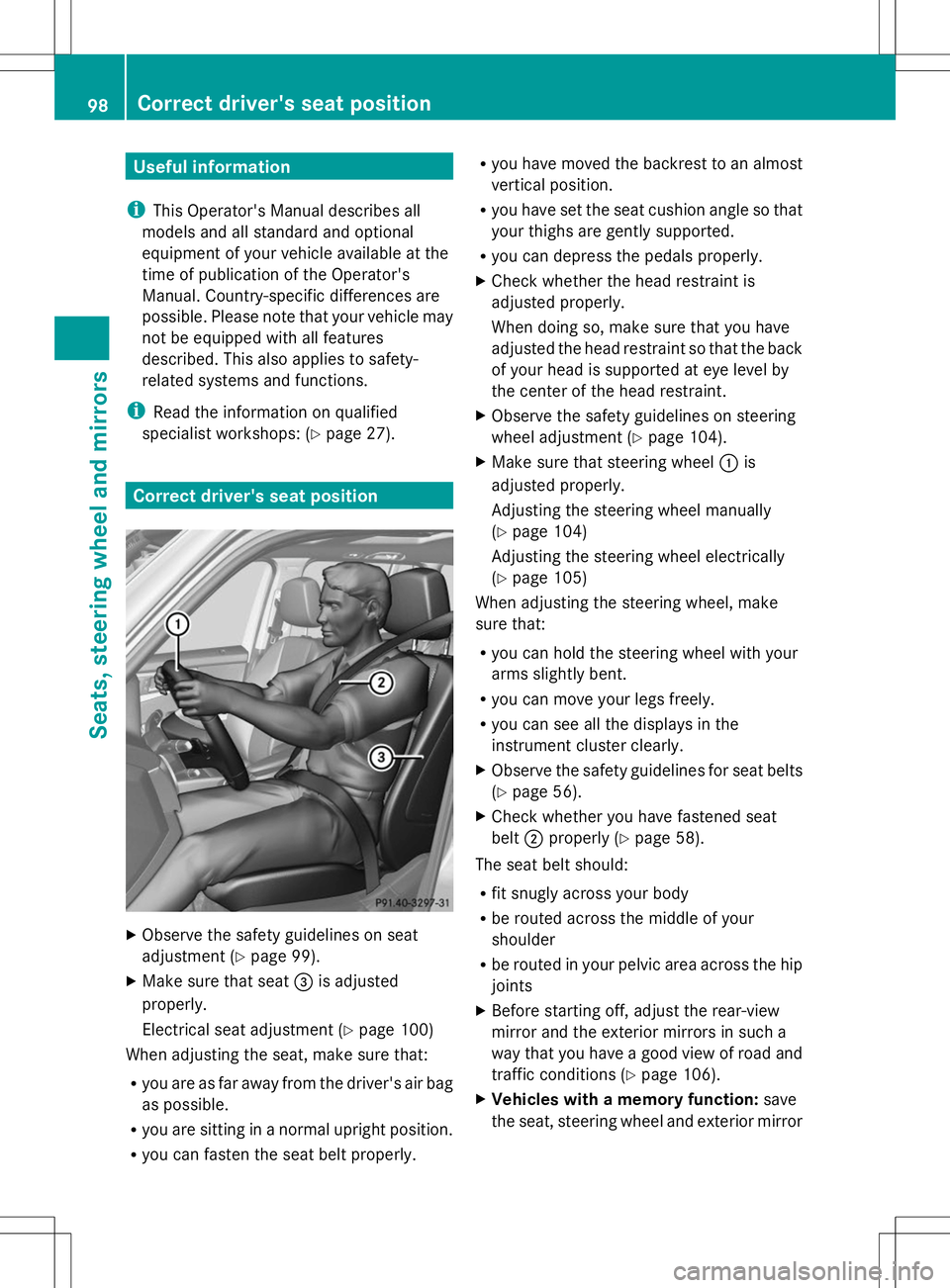
specialist workshops: (Y page 27).Correct driver's seat position
X
Observe the safety guidelines on seat
adjustment (Y page 99).
X Make sure that seat =is adjusted
properly.
Electrical seat adjustment (Y page 100)
When adjusting the seat, make sure that:
R you are as far away from the driver's air bag
as possible.
R you are sitting in a normal upright position.
R you can fasten the seat belt properly. R
you have moved the backrest to an almost
vertical position.
R you have set the seat cushion angle so that
your thighs are gently supported.
R you can depress the pedals properly.
X Check whether the head restraint is
adjusted properly.
When doing so, make sure that you have
adjusted the head restraint so that the back
of your head is supported at eye level by
the center of the head restraint.
X Observe the safety guidelines on steering
wheel adjustment (Y page 104).
X Make sure that steering wheel :is
adjusted properly.
Adjusting the steering wheel manually
(Y page 104)
Adjusting the steering wheel electrically
(Y page 105)
When adjusting the steering wheel, make
sure that:
R you can hold the steering wheel with your
arms slightly bent.
R you can move your legs freely.
R you can see all the displays in the
instrument cluster clearly.
X Observe the safety guidelines for seat belts
(Y page 56).
X Check whether you have fastened seat
belt ;properly (Y page 58).
The seat belt should:
R fit snugly across your body
R be routed across the middle of your
shoulder
R be routed in your pelvic area across the hip
joints
X Before starting off, adjust the rear-view
mirror and the exterior mirrors in such a
way that you have a good view of road and
traffic conditions (Y page 106).
X Vehicles with a memory function: save
the seat, steering wheel and exterior mirror 98
Correct driver's seat positionSeats, steering wheel and mirrors
Page 119 of 384
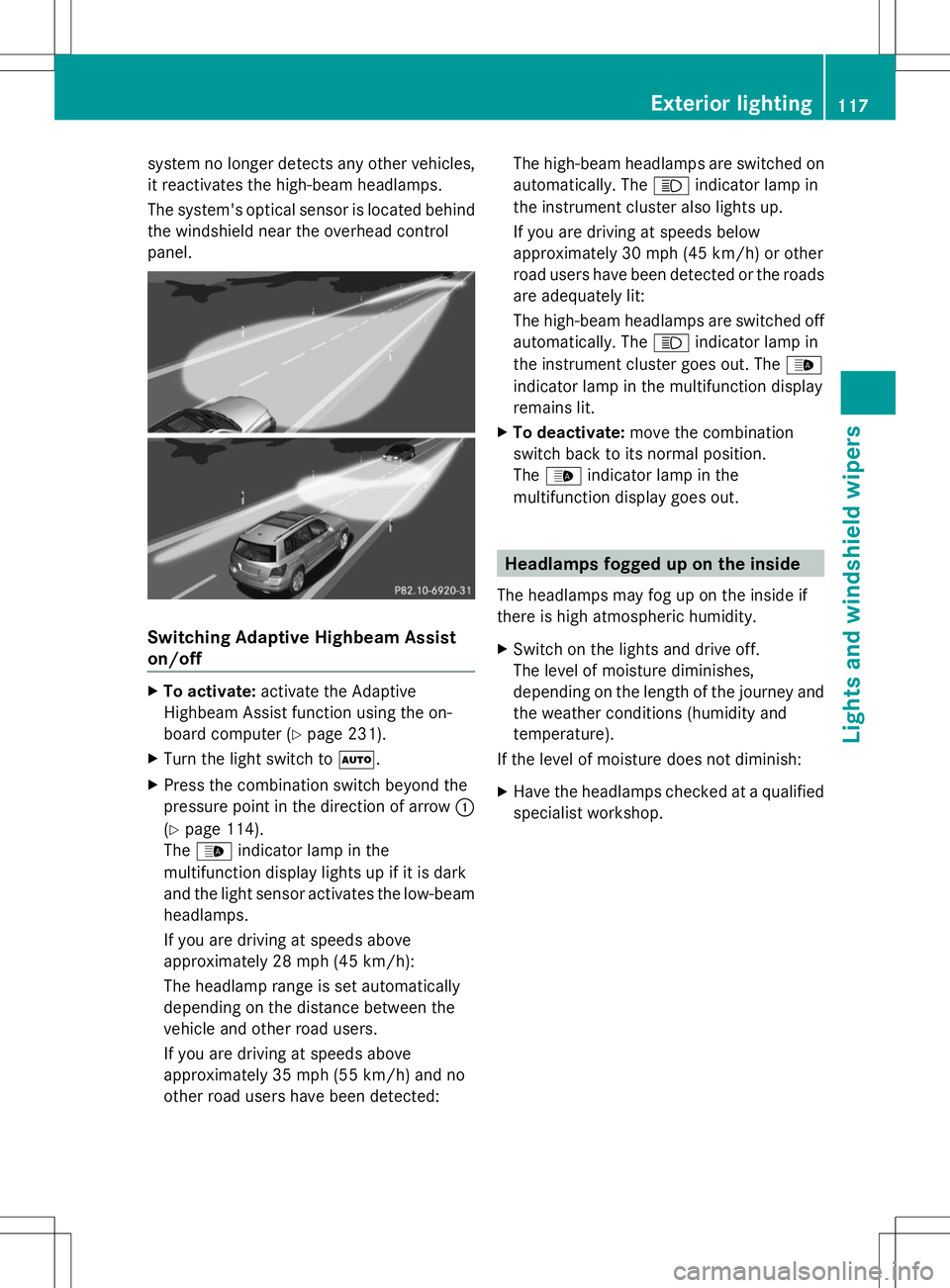
system no longer detects any other vehicles,
it reactivates the high-beam headlamps.
The system's optical sensor is located behind
the windshield near the overhead control
panel. Switching Adaptive Highbeam Assist
on/off X
To activate: activate the Adaptive
Highbeam Assist function using the on-
board computer (Y page 231).
X Turn the light switch to Ã.
X Press the combination switch beyond the
pressure point in the direction of arrow :
(Y page 114).
The _ indicator lamp in the
multifunction display lights up if it is dark
and the light sensor activates the low-beam
headlamps.
If you are driving at speeds above
approximately 28 mph (45 km/h):
The headlamp range is set automatically
depending on the distance between the
vehicle and other road users.
If you are driving at speeds above
approximately 35 mph (55 km/h) and no
other road users have been detected: The high-beam headlamps are switched on
automatically. The
Kindicator lamp in
the instrument cluster also lights up.
If you are driving at speeds below
approximately 30 mph (45 km/h) or other
road users have been detected or the roads
are adequately lit:
The high-beam headlamps are switched off
automatically. The Kindicator lamp in
the instrument cluster goes out. The _
indicator lamp in the multifunction display
remains lit.
X To deactivate: move the combination
switch back to its normal position.
The _ indicator lamp in the
multifunction display goes out. Headlamps fogged up on the inside
The headlamps may fog up on the inside if
there is high atmospheric humidity.
X Switch on the lights and drive off.
The level of moisture diminishes,
depending on the length of the journey and
the weather conditions (humidity and
temperature).
If the level of moisture does not diminish:
X Have the headlamps checked at a qualified
specialist workshop. Exterior lighting
117Lights and windshield wipers Z
Page 134 of 384
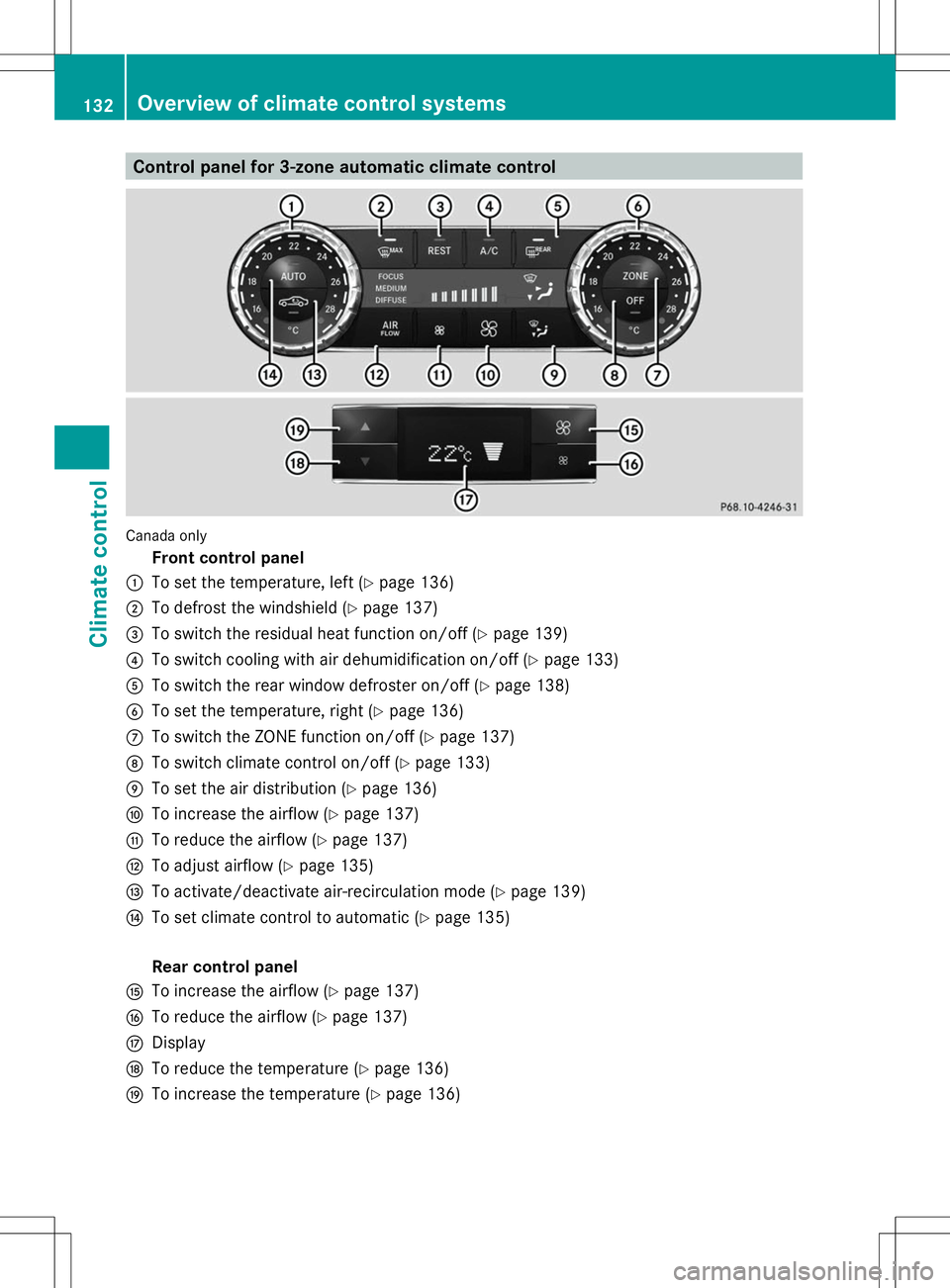
Control panel for 3-zone automatic climate control
Canada only
Front control panel
: To set the temperature, left (Y page 136)
; To defrost the windshield (Y page 137)
= To switch the residual heat function on/off (Y page 139)
? To switch cooling with air dehumidification on/off (Y page 133)
A To switch the rear window defroster on/off (Y page 138)
B To set the temperature, right (Y page 136)
C To switch the ZONE function on/off (Y page 137)
D To switch climate control on/off (Y page 133)
E To set the air distribution (Y page 136)
F To increase the airflow (Y page 137)
G To reduce the airflow (Y page 137)
H To adjust airflow (Y page 135)
I To activate/deactivate air-recirculation mode (Y page 139)
J To set climate control to automatic (Y page 135)
Rear control panel
K To increase the airflow (Y page 137)
L To reduce the airflow (Y page 137)
M Display
N To reduce the temperature (Y page 136)
O To increase the temperature (Y page 136)132
Overview of climate control systemsClimate control