start stop button MERCEDES-BENZ GLK-CLASS SUV 2015 Owner's Manual
[x] Cancel search | Manufacturer: MERCEDES-BENZ, Model Year: 2015, Model line: GLK-CLASS SUV, Model: MERCEDES-BENZ GLK-CLASS SUV 2015Pages: 386, PDF Size: 26 MB
Page 170 of 386
Parking
Important safety notes
GWARNING
Flammable material such as leaves, grass or
twigs may ignite if they come into contact withhot parts of the exhaust system or exhaust
gas flow. There is a risk of fire.
Park the vehicle so that no flammable mate-
rials come into contact with parts of the vehi- cle which are hot. Take particular care not to
park on dry grassland or harvested grain
fields.
GWARNING
If you switch off the ignition while driving,
safety-relevant functions are only available
with limitations, or not at all. This could affect, for example, the power steering and the brake
boosting effect. You will require considerably
more effort to steer and brake. There is a risk
of an accident.
Do not switch off the ignition while driving.
GWARNING
If you leave children unsupervised in the vehi- cle, they could set it in motion by, for example:
R release the parking brake.
R shift the automatic transmission out of the
parking position P.
R start the engine.
In addition, they may operate vehicle equip-
ment and become trapped. There is a risk of
an accident and injury.
When leaving the vehicle, always take the
SmartKey with you and lock the vehicle. Never
leave children unsupervised in the vehicle.
! Always secure the vehicle correctly
against rolling away. Otherwise, the vehicle
or its drivetrain could be damaged. To ensure that the vehicle is secured against
rolling away unintentionally:
R the parking brake must be applied.
R the transmission must be in position P and
the SmartKey must be removed from the
ignition lock.
R the front wheels must be turned towards
the curb on steep uphill or downhill gradi-
ents.
Switching off the engine
Important safety notes
GWARNING
The automatic transmission switches to neu-
tral position N when you switch off the engine.
The vehicle may roll away. There is a risk of an
accident.
After switching off the engine, always switch
to parking position P. Prevent the parked vehi-
cle from rolling away by applying the parking
brake.
Vehicles with automatic transmission
X Apply the parking brake firmly.
X Shift the transmission to position P.
Using the SmartKey
X Turn the SmartKey to position 0 in the igni-
tion lock and remove it.
The immobilizer is activated.
iThe SmartKey can only be removed if the
transmission is in position P.
Using KEYLESS-GO X Press the Start/Stop button ( Y page 149).
The engine stops and all the indicator
lamps in the instrument cluster go out.
iWhen the driver's door is closed, this cor-
responds to key position 1. When the driv-
er's door is open, this corresponds to key
position 0: "Key removed".
168Parking
Driving and parking
Page 171 of 386
iIn the event of an emergency, the engine
can be turned off while the vehicle is in
motion by pressing and holding the Start/
Stop button for three seconds.
Parking brake
GWARNING
If you must brake the vehicle with the parking brake, the braking distance is considerably
longer and the wheels could lock. There is an
increased danger of skidding and accidents.
Only use the parking brake to brake the vehi-
cle when the service brake is faulty. Do not
apply the parking brake too firmly. If the
wheels lock, release the parking brake until
the wheels begin turning again.
GWARNING
If you leave children unsupervised in the vehi- cle, they could set it in motion by, for example:
R release the parking brake.
R shift the automatic transmission out of the
parking position P.
R start the engine.
In addition, they may operate vehicle equip-
ment and become trapped. There is a risk of
an accident and injury.
When leaving the vehicle, always take the
SmartKey with you and lock the vehicle. Never
leave children unsupervised in the vehicle.
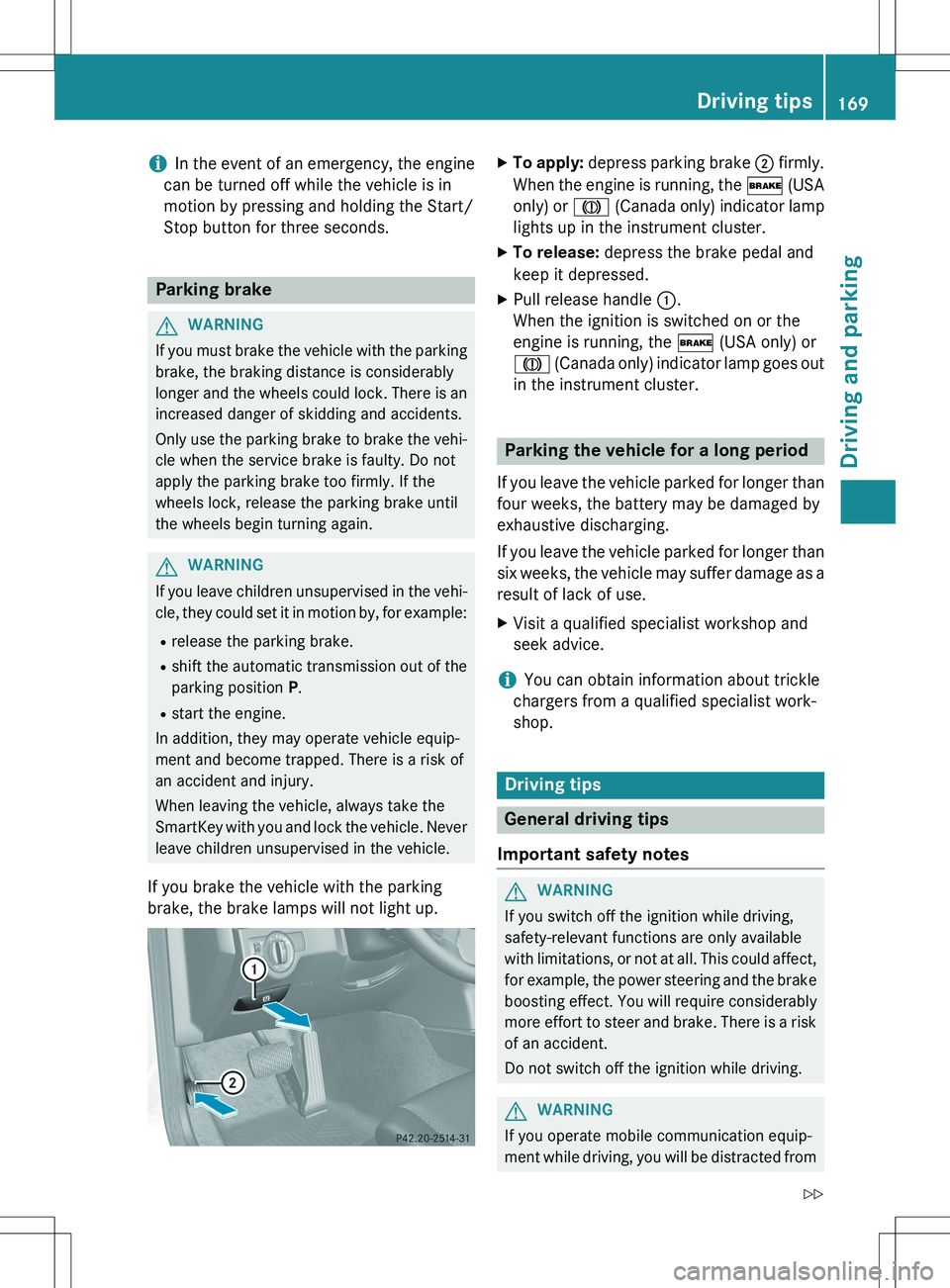
If you brake the vehicle with the parking
brake, the brake lamps will not light up.
X To apply: depress parking brake ; firmly.
When the engine is running, the $ (USA
only) or J (Canada only) indicator lamp
lights up in the instrument cluster.
X To release: depress the brake pedal and
keep it depressed.
X Pull release handle :.
When the ignition is switched on or the
engine is running, the $ (USA only) or
J (Canada only) indicator lamp goes out
in the instrument cluster.
Parking the vehicle for a long period
If you leave the vehicle parked for longer than
four weeks, the battery may be damaged by
exhaustive discharging.
If you leave the vehicle parked for longer than six weeks, the vehicle may suffer damage as a
result of lack of use. X Visit a qualified specialist workshop and
seek advice.
iYou can obtain information about trickle
chargers from a qualified specialist work-
shop.
Driving tips
General driving tips
Important safety notes
GWARNING
If you switch off the ignition while driving,
safety-relevant functions are only available
with limitations, or not at all. This could affect, for example, the power steering and the brake
boosting effect. You will require considerably
more effort to steer and brake. There is a risk
of an accident.
Do not switch off the ignition while driving.
GWARNING
If you operate mobile communication equip-
ment while driving, you will be distracted from
Driving tips169
Driving and parking
Z
Page 193 of 386

When a parking space has been detected, anarrow towards the right or the left also
appears. By default, Active Parking Assist
only displays parking spaces on the front-
passenger side. Parking spaces on the driv-
er's side are displayed as soon as the turn
signal on the driver's side is activated. When
parking on the driver's side, this must remain
switched on until you acknowledge the use of Active Parking Assist by pressing the a
button on the multifunction steering wheel.
A parking space is displayed while you are
driving past it, and until you are approx-
imately 50 ft (15 m) away from it.
Parking
GWARNING
Active Parking Assist merely aids you by inter- vening actively in the steering. If you do not
brake there is a risk of an accident.
Always apply the brakes yourself when
maneuvering and parking.
X Stop the vehicle when the parking space
symbol shows the desired parking space in
the instrument cluster.
X Shift the transmission to position R.
The
Start Park Assist? Yes: OK No:
% message appears in the multifunction
display.
X To cancel the procedure: press the %
button on the multifunction steering wheel or pull away.
or
X To park using Active Parking Assist:
press the a button on the multifunction
steering wheel.
The
Park Assist Active Accelerate
and Brake Observe Surroundings mes-
sage appears in the multifunction display.
X Let go of the multifunction steering wheel.
X Back up the vehicle, being ready to brake at
all times. When backing up, drive at a speed below approximately 6 mph (10 km/h). Otherwise Active Parking Assist will be can-
celed.
iIn tight parking spaces, you will achieve
the best parking results by backing up as
far as possible. When doing so, also
observe the PARKTRONIC messages.
X Stop as soon as PARKTRONIC sounds the
continuous warning tone, if not before.
Maneuvering may be required in tight park-
ing spaces.
The
Park Assist Active Select D
Observe Surroundings message appears in
the multifunction display. X Shift the transmission to position D while
the vehicle is stationary.
Active Parking Assist immediately steers in
the other direction.
The
Park Assist Active Accelerate
and Brake Observe Surroundings mes-
sage appears in the multifunction display.
iYou will achieve the best results by wait-
ing for the steering procedure to complete before pulling away.
X Drive forwards and be ready to brake at all
times.
X Stop as soon as PARKTRONIC sounds the
continuous warning tone, if not before.
The
Park Assist Active Select R
Observe Surroundings message appears in
the multifunction display. X Further transmission shifts may be neces-
sary.
As soon as the parking procedure is com-
plete, the
Park Assist Disabled message
appears and a warning tone sounds. Active
Parking Assist no longer supports you with
steering interventions. When Active Parking
Assist is finished, you must steer again your-
self. PARKTRONIC is still available.
X Maneuver if necessary.
X Always observe the warning messages dis-
played by PARKTRONIC ( Y page 187).
Driving systems191
Driving and parking
Z
Page 194 of 386
Parking tips:R The way your vehicle is positioned in the
parking space after parking is dependent
on various factors. These include the posi-
tion and shape of the vehicles parked in
front and behind it and the conditions of the
location. It may be the case that Active
Parking Assist guides you too far into a
parking space, or not far enough into it. In
some cases, it may also lead you across or
onto the curb. If necessary, you should can- cel the parking procedure with Active Park-
ing Assist.
R You can also select preselect transmission
position D. The vehicle redirects and does
not drive as far into the parking space.
Should a gear be changed too early, the
parking procedure will be canceled. A sen-
sible parking position can no longer be ach- ieved from this position.
Exiting a parking space
In order that Active Parking Assist can sup-
port you when you exit the parking space:
R the border of the parking space must be
high enough at the front and the rear. A
curb is too small, for example.
R the border of the parking space must not be
too wide, as the position of the vehicle must
not exceed an angle of 45° to the starting
position as it is maneuvering into the park-
ing space.
R a maneuvering distance of at least 3.3 ft
(1.0 m) must be available.
X Start the engine.
X Release the parking brake.
X Switch on the turn signal on the side facing
the street.
X Shift the transmission to position D or R.
The
Start Park Assist? Yes: OK No:
% message appears in the multifunction
display. X
To cancel the procedure: press the %
button on the multifunction steering wheel or pull away.
or
X To exit a parking space using Active
Parking Assist: press the a button on
the multifunction steering wheel.
The
Park Assist Active Accelerate
and Brake Observe Surroundings mes-
sage appears in the multifunction display.
X Let go of the multifunction steering wheel.
X Reverse the vehicle or drive forwards, being
ready to brake at all times. Do not exceed a maximum speed of approximately 6 mph
(10 km/h) when exiting a parking space.
Otherwise Active Parking Assist will be can- celed.
X Stop when PARKTRONIC sounds the con-
tinuous warning tone, if not before.
X Shift the transmission to position D or R as
required while the vehicle is stationary.
Active Parking Assist immediately steers in
the other direction. The
Park Assist
Active Accelerate and Brake
Observe Surroundings message appears
in the multifunction display.
iYou will achieve the best results by wait-
ing for the steering procedure to complete before pulling away.
If you back up after activation, the steeringwheel is moved to the straight-ahead posi-
tion.
X Drive forwards or back up the vehicle, being
ready to brake at all times.
X Stop as soon as PARKTRONIC sounds the
continuous warning tone, if not before.
X Drive forwards and back up as prompted by
the PARKTRONIC warning displays, several
times if necessary.
Once you have exited the parking space com- pletely, the steering wheel is moved to the
straight-ahead position. You hear a tone and
the
Park Assist Finished message
appears in the multifunction display. You will
192Driving systems
Driving and parking
Page 224 of 386
Left control panel
= ;RCalls up the menu and menu bar
9 :Press briefly:
R Scrolls in lists
R Selects a submenu or function
R In the
Audio menu: selects a
stored station, an audio track or
a video scene
R In the
Tel (telephone) menu:
switches to the phone book and
selects a name or telephone
number
9 :Press and hold:
R In the
Audio menu: selects the
previous/next station or selects
an audio track or a video scene
using rapid scrolling
R In the
Tel (Telephone) menu:
starts rapid scrolling of the
phone book if it is open
aR Confirms a selection/display
message
R In the
Tel (Telephone) menu:
switches to the telephone book
and starts dialing the selected
number
R In the
Audio menu: stops the
station search function at the
desired station
Right control panel
~R Rejects or ends a call
R Exits phone book/redial mem-
ory
6RMakes or accepts a call
R Switches to the redial memory
W XRAdjusts the volume
8RMute
Back button
%Press briefly:
R Back
R Switches off the Voice Control
System (see the separate oper-
ating instructions)
R Hides display messages/calls
up the last
Trip menu function
used
R Exits the telephone book/redial
memory
%Press and hold:
R Calls up the standard display in
the
Trip menu
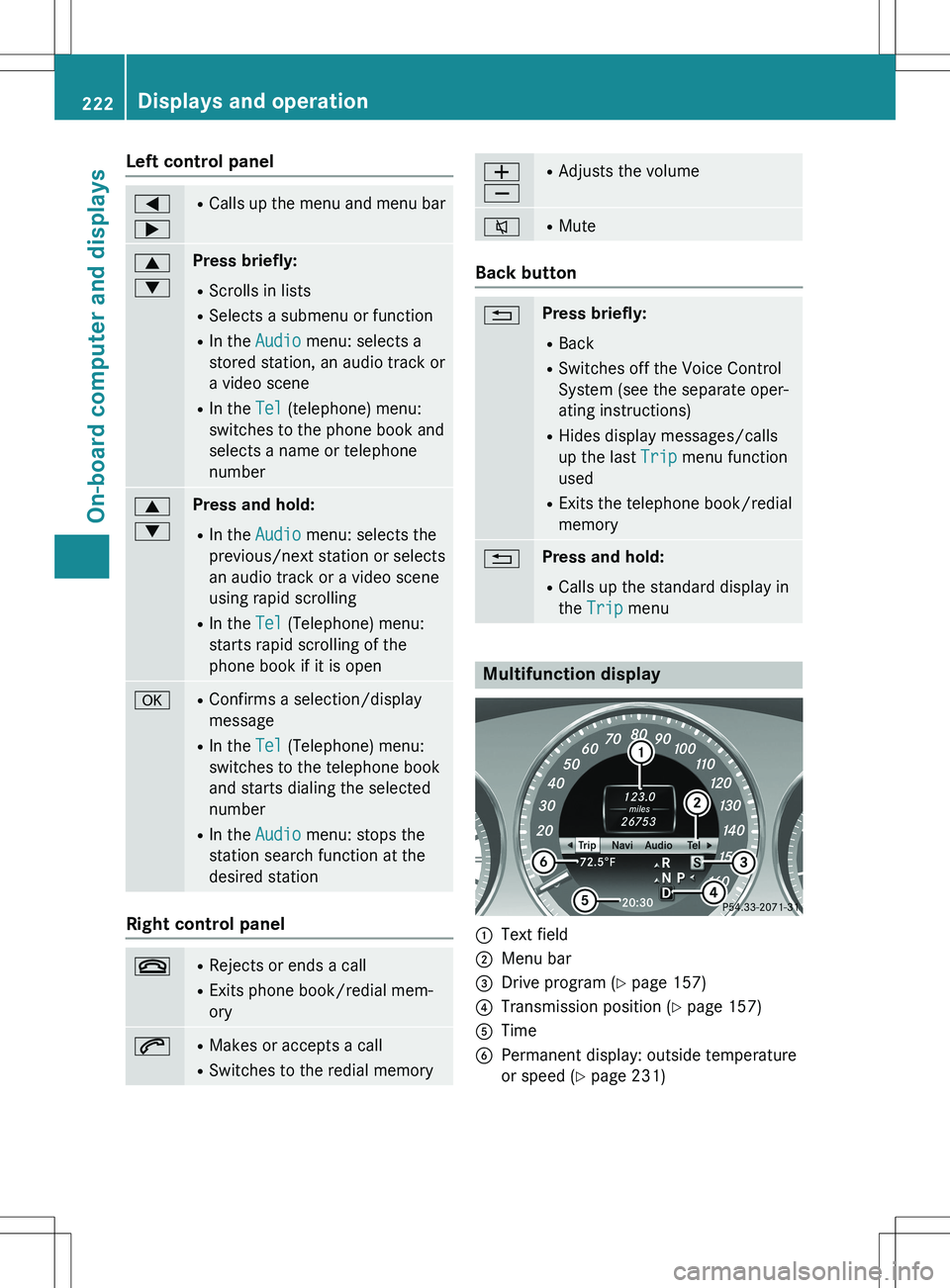
Multifunction display
:Text field
;Menu bar
=Drive program ( Y page 157)
?Transmission position ( Y page 157)
ATime
BPermanent display: outside temperature
or speed ( Y page 231)
222Displays and operation
On-board computer and displays
Page 225 of 386
XTo display menu bar ;: press the =
or ; button on the steering wheel.
Menu bar ; disappears after a few sec-
onds.
Text field : shows the selected menu or
submenu as well as display messages.
iYou can set the time using the Audio sys-
tem or COMAND (see the separate operat-
ing instructions).
The following messages may appear in the
multifunction display: Z Gearshift recommendation when
shifting manually ( Y page 160)
X j Y
Active Parking Assist ( Y page 189)
CRUISECruise control ( Y page 175)
¤ ECO start/stop function
(Y page 152)
ë HOLD function ( Y page 184)
Menus and submenus
Menu overview
Operating the on-board computer
(Y page 221).
Depending on the equipment installed in the
vehicle, you can call up the following menus:
R
Trip menu ( Y page 223)
R
Navi menu (navigation instructions)
( Y page 225)
R
Audio menu ( Y page 226)
R
Tel menu (telephone) ( Y page 227)
R
DriveAssist menu (assistance)
( Y page 228)
R
Serv. menu ( Y page 230)
R
Sett. menu (settings) ( Y page 230)
The
Audio, Navi and Tel menus differ slightly
in vehicles with an audio system and in vehi-
cles with COMAND. The examples given in
this Operator's Manual apply to vehicles
equipped with COMAND.
Trip menu
Standard display
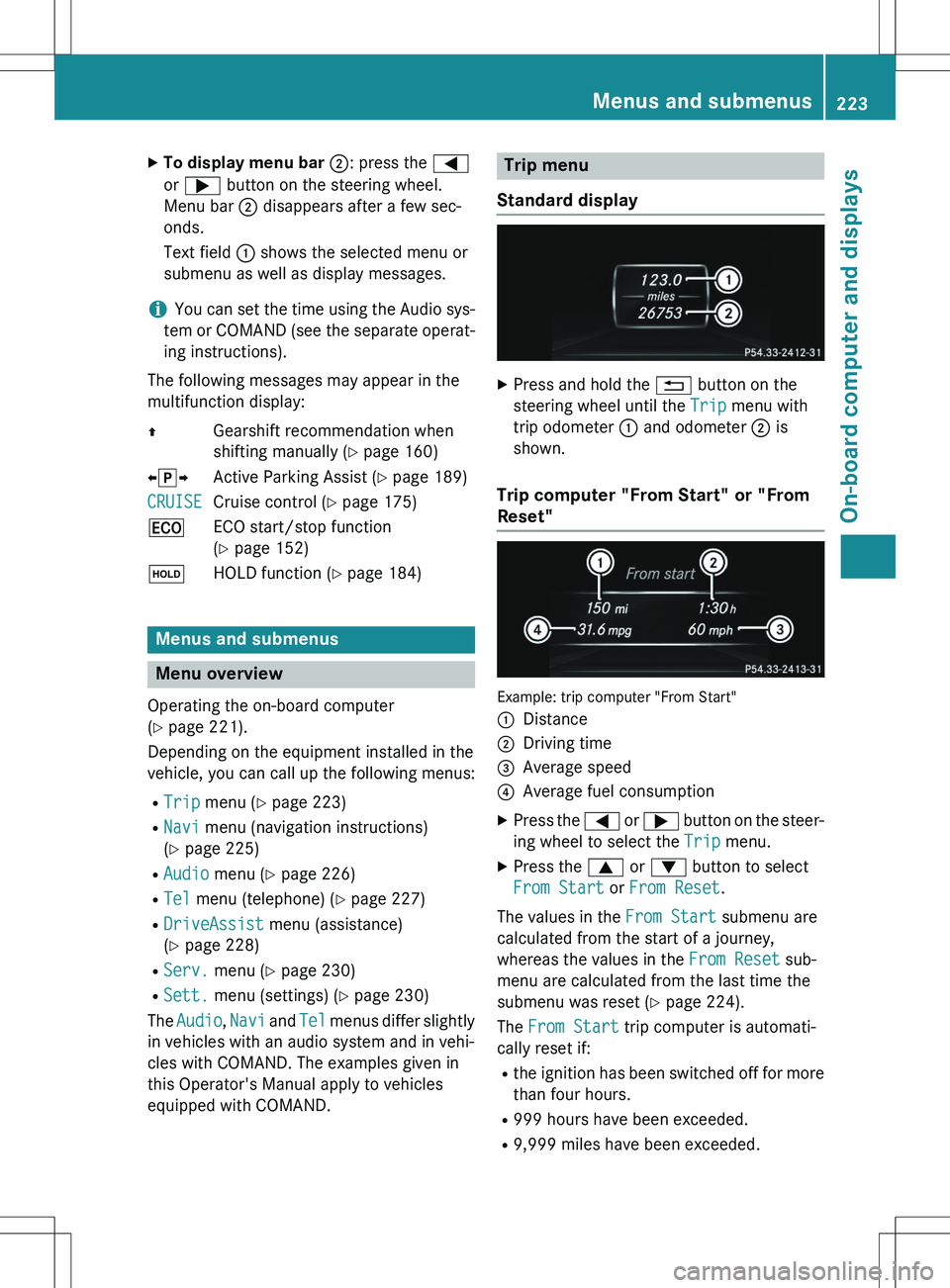
X Press and hold the % button on the
steering wheel until the
Trip menu with
trip odometer : and odometer ; is
shown.
Trip computer "From Start" or "From
Reset"
Example: trip computer "From Start" :
Distance
;Driving time
=Average speed
?Average fuel consumption
X Press the = or ; button on the steer-
ing wheel to select the
Trip menu.
X Press the 9 or : button to select
From Start or From Reset.
The values in the
From Start submenu are
calculated from the start of a journey,
whereas the values in the
From Reset sub-
menu are calculated from the last time the
submenu was reset ( Y page 224).
The
From Start trip computer is automati-
cally reset if:
R the ignition has been switched off for more
than four hours.
R 999 hours have been exceeded.
R 9,999 miles have been exceeded.
Menus and submenus223
On-board computer and displays
Z
Page 230 of 386
You can accept a call even if you are not in the
Tel menu.
Rejecting or ending a call
XPress the ~ button on the steering
wheel.
You can end or reject a call even if you are not
in the
Tel menu.
Dialing an entry from the phone book
X Press the = or ; button on the steer-
ing wheel to select the
Tel menu.
X Press the 9, : or a button to
switch to the phone book.
X Authorize access to the phone book on the
phone.
X Press the 9 or : button to select the
desired name.
or
X To begin rapid scrolling: press and hold
the 9 or : button for longer than
one second.
Rapid scrolling stops when you release the
button or reach the end of the list.
X If only one telephone number is stored
for a name: press the 6 or a button
to start dialing.
or
X If there is more than one number for a
particular name: press the 6 or a
button to display the numbers.
X Press the 9 or : button to select the
number you want to dial.
X Press the 6 or a button to start dial-
ing.
or X To exit the telephone book: press the
~ or % button.
Redialing
The on-board computer saves the last names
or numbers dialed in the redial memory. X
Press the = or ; button on the steer-
ing wheel to select the
Tel menu.
X Press the 6 button to switch to the
redial memory.
X Press the 9 or : button to select the
desired name or number.
X Press the 6 or a button to start dial-
ing.
or X If you do not want to make a call: press
the ~ or % button.
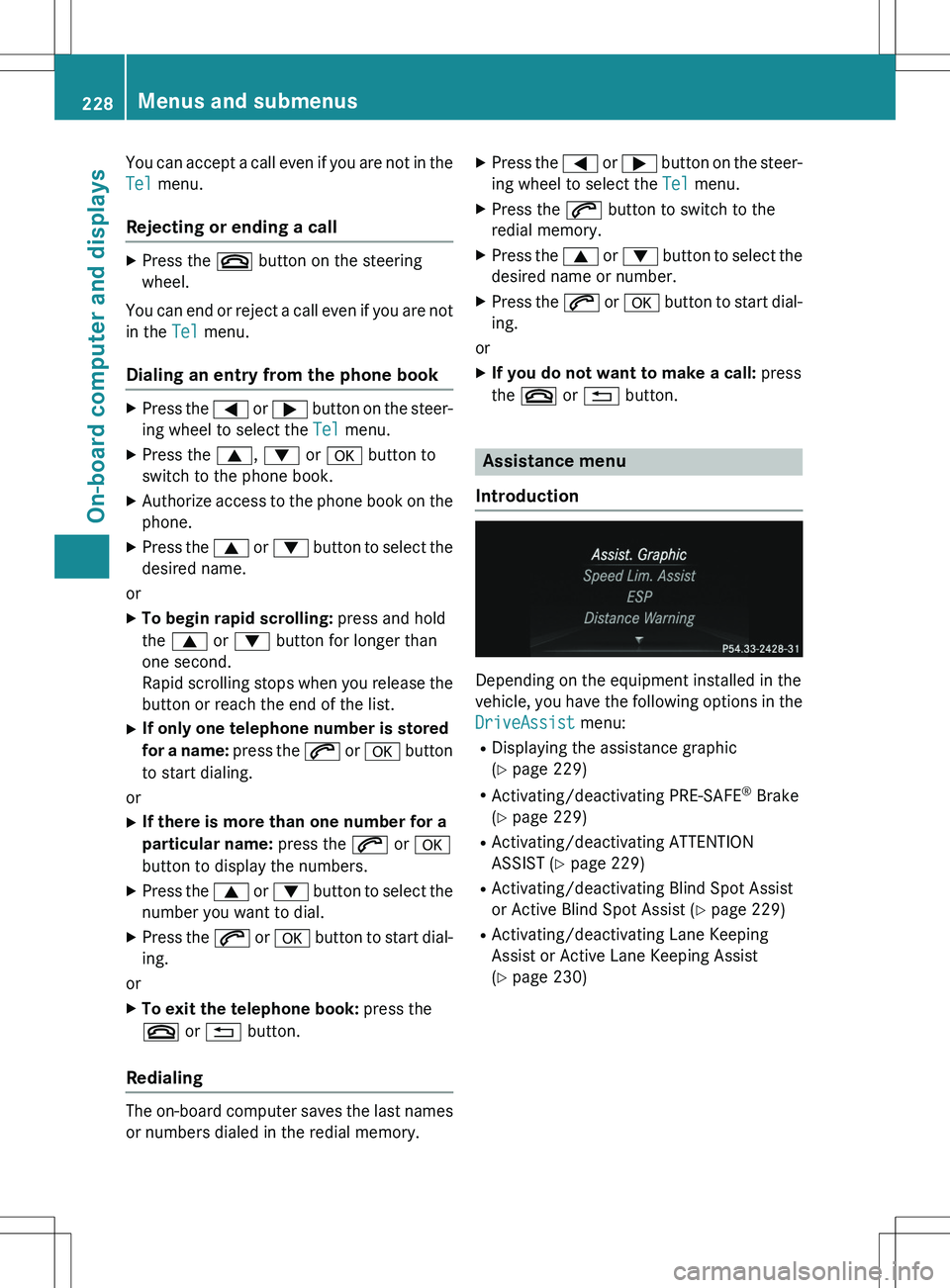
Assistance menu
Introduction
Depending on the equipment installed in the
vehicle, you have the following options in the
DriveAssist menu:
R Displaying the assistance graphic
(Y page 229)
R Activating/deactivating PRE-SAFE ®
Brake
( Y page 229)
R Activating/deactivating ATTENTION
ASSIST ( Y page 229)
R Activating/deactivating Blind Spot Assist
or Active Blind Spot Assist ( Y page 229)
R Activating/deactivating Lane Keeping
Assist or Active Lane Keeping Assist
(Y page 230)
228Menus and submenus
On-board computer and displays
Page 259 of 386
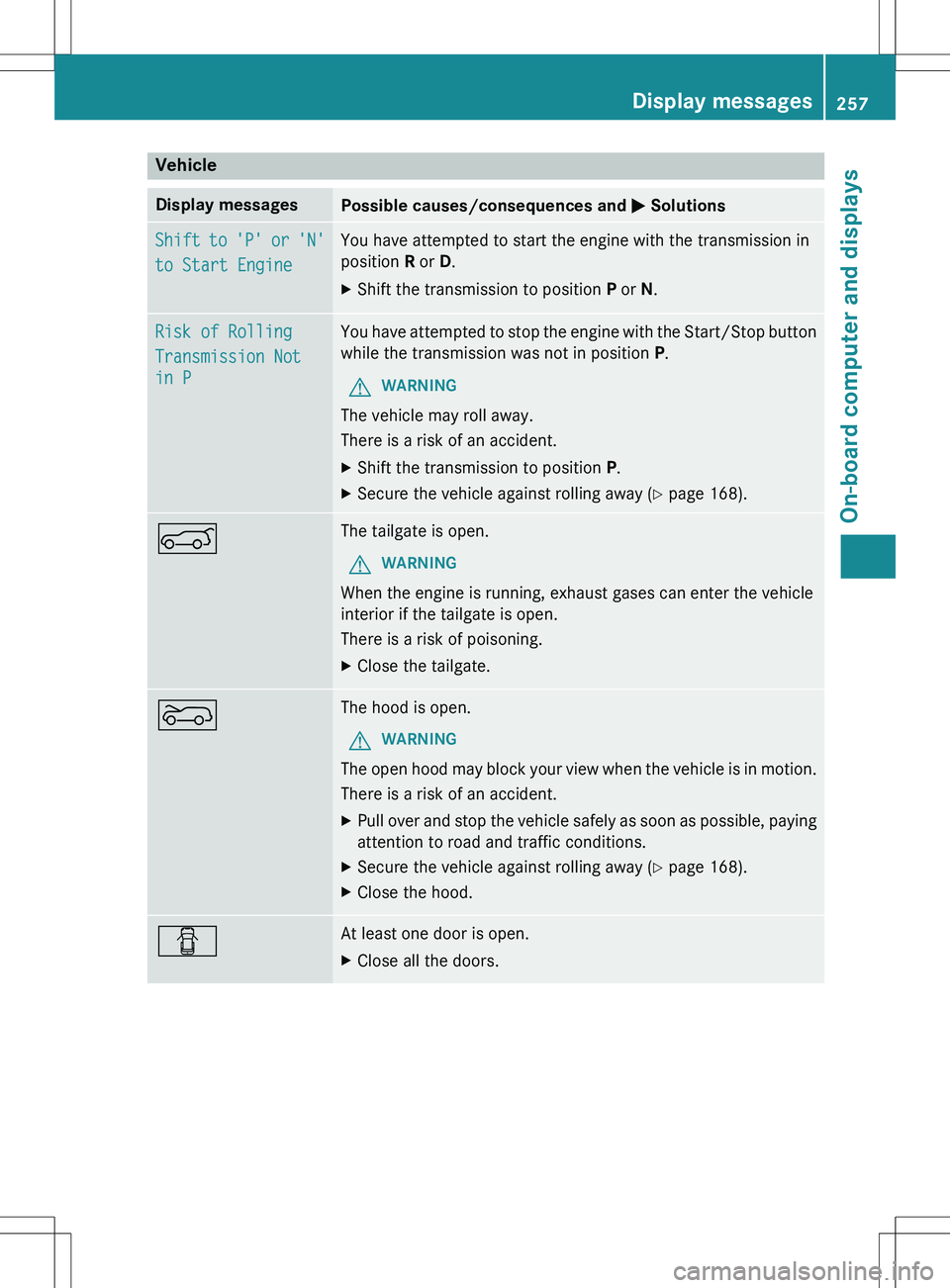
Vehicle
Display messagesPossible causes/consequences and M Solutions
Shift to 'P' or 'N'
to Start Engine
You have attempted to start the engine with the transmission in
position R or D.
X Shift the transmission to position P or N.
Risk of Rolling
Transmission Not
in P
You have attempted to stop the engine with the Start/Sto p button
while the transmission was not in position P.
GWARNING
The vehicle may roll away.
There is a risk of an accident.
X Shift the transmission to position P.
X Secure the vehicle against rolling away ( Y page 168).
AThe tailgate is open.
GWARNING
When the engine is running, exhaust gases can enter the vehicle
interior if the tailgate is open.
There is a risk of poisoning.
X Close the tailgate.
?The hood is open.
GWARNING
The open hood may block your view when the vehicle is in motion.
There is a risk of an accident.
X Pull over and stop the vehicle safely as soon as possible, p aying
attention to road and traffic conditions.
X Secure the vehicle against rolling away ( Y page 168).
X Close the hood.
CAt least one door is open.
X Close all the doors.
Display messages257
On-board computer and displays
Z
Page 305 of 386
XReplace cap : on the filler neck and turn
clockwise.
Ensure that the cap locks into place
securely.
X Check the oil level again with the oil dip-
stick ( Y page 301).
Further information on engine oil
( Y page 377).
Checking and adding other service
products
Checking coolant level
GWARNING
Certain components in the engine compart-
ment, such as the engine, radiator and parts
of the exhaust system, can become very hot.
Working in the engine compartment poses a
risk of injury.
Where possible, let the engine cool down and touch only the components described in the
following.
GWARNING
The engine cooling system is pressurized, par-ticularly when the engine is warm. When
opening the cap, you could be scalded by hotcoolant spraying out. There is a risk of injury.
Let the engine cool down before opening the
cap. Wear eye and hand protection when
opening the cap. Open the cap slowly half a
turn to allow pressure to escape.
Only check the coolant level when the vehicle
is on a level surface and the engine has cooled down.
X Turn the SmartKey to position 2 in the igni-
tion lock ( Y page 149).
On vehicles with KEYLESS-GO, press the
Start/Stop button twice ( Y page 149).
X Check the coolant temperature display in
the instrument cluster.
The coolant temperature must be below
158 ‡ (70 †).
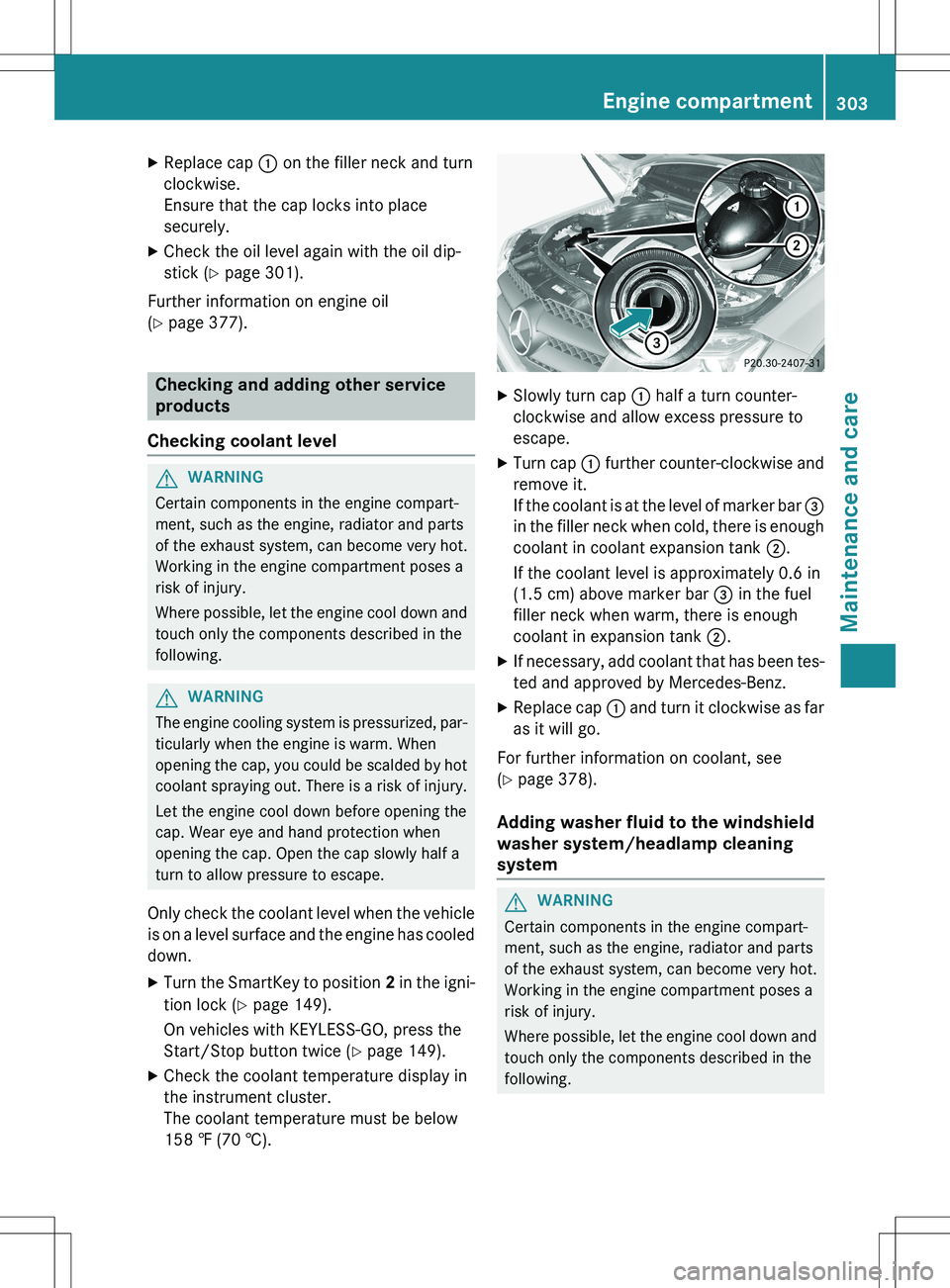
XSlowly turn cap : half a turn counter-
clockwise and allow excess pressure to
escape.
X Turn cap : further counter-clockwise and
remove it.
If the coolant is at the level of marker bar =
in the filler neck when cold, there is enough coolant in coolant expansion tank ;.
If the coolant level is approximately 0.6 in
(1.5 cm) above marker bar = in the fuel
filler neck when warm, there is enough
coolant in expansion tank ;.
X If necessary, add coolant that has been tes-
ted and approved by Mercedes-Benz.
X Replace cap : and turn it clockwise as far
as it will go.
For further information on coolant, see
( Y page 378).
Adding washer fluid to the windshield
washer system/headlamp cleaning
system
GWARNING
Certain components in the engine compart-
ment, such as the engine, radiator and parts
of the exhaust system, can become very hot.
Working in the engine compartment poses a
risk of injury.
Where possible, let the engine cool down and
touch only the components described in the
following.
Engine compartment303
Maintenance and care
Z
Page 317 of 386
XVehicles without KEYLESS-GO: remove
the SmartKey from the ignition lock.
X Vehicles with KEYLESS-GO: open the
driver's door.
The on-board electronics have status 0,
which is the same as the SmartKey having
been removed.
X Vehicles with KEYLESS-GO: remove the
Start/Stop button from the ignition lock
( Y page 149).
X All occupants must get out of the vehicle.
Make sure that they are not endangered as
they do so.
X Make sure that no one is near the danger
area while a wheel is being changed. Any-
one who is not directly assisting in the
wheel change should, for example, stand
behind the barrier.
X Get out of the vehicle. Pay attention to traf-
fic conditions when doing so.
X Close the driver's door.
iVehicles equipped with MOExtended tires
are not equipped with a TIREFIT kit at the
factory. It is therefore recommended that
you additionally equip your vehicle with a
TIREFIT kit if you mount tires that do not
feature run-flat properties, e.g. winter tires.
A TIREFIT kit may be obtained from a quali-
fied specialist workshop.
MOExtended tires (tires with run-flat
properties)
General notes
With MOExtended tires (tires with run flat
characteristics), you can continue to drive
your vehicle even if there is a total loss of
pressure in one or more tires. The affected
tire must not show any clearly visible damage.
You can recognize MOExtended tires by the
MOExtended marking which appears on the
sidewall of the tire. You will find this marking next to the tire size designation, the load-
bearing capacity and the speed index
( Y page 349). MOExtended tires may only be used in con-
junction with an active tire pressure monitor.
If a pressure loss warning message
appears in the multifunction display:
R observe the instructions in the display mes-
sages ( Y page 255).
R check the tire for damage.
R if driving on, observe the following notes.
The driving distance possible in run-flat mode is approximately 50 miles (80 km) when the
vehicle is partially laden and approximately
18 miles (30 km) when the vehicle is fully
laden.
In addition to the vehicle load, the driving dis-tance possible depends upon:
R vehicle speed
R road condition
R outside temperature
The driving distance possible in run-flat mode may be reduced by extreme driving condi-
tions/maneuvers, or it can be increased
through a moderate style of driving.
The driving distance possible in run-flat modeis counted from the moment the tire pressure
loss warning appears in the multifunction dis-
play.
You must not exceed a maximum speed of
50 mph (80 km/h).
iWhen replacing one or all tires, please
observe the following specifications for
your vehicle's tires:
R size
R type and
R the "MOExtended" mark
If a tire has gone flat and cannot be
replaced with a MOExtended tire, a stand-
ard tire may be used as a temporary meas- ure. Make sure that you use the proper size
and type (summer or winter tire).
iVehicles equipped with MOExtended tires
are not equipped with a TIREFIT kit at the
factory. It is therefore recommended that
you additionally equip your vehicle with a
Flat tire315
Roadside Assistance