mirror MERCEDES-BENZ GLK-CLASS SUV 2015 Service Manual
[x] Cancel search | Manufacturer: MERCEDES-BENZ, Model Year: 2015, Model line: GLK-CLASS SUV, Model: MERCEDES-BENZ GLK-CLASS SUV 2015Pages: 386, PDF Size: 26 MB
Page 235 of 386
XPress a to confirm.
X Press the : or 9 button to select the
Acoustic Lock function.
If the
Acoustic Lock function is activated,
the & symbol in the multifunction dis-
play lights up orange.
X Press the a button to save the setting.
Activating/deactivating the radar sensor
system
X Press the = or ; button on the steer-
ing wheel to select the
Sett. menu.
X Press the : or 9 button to select the
Vehicle submenu.
X Press a to confirm.
X Press the 9 or : button to select
Radar Sensor (See Oper. Manual):.
You will see the selected setting:
Enabled
or Disabled.
X Press the a button to save the setting.
The following systems are switched off when
the radar sensor system is deactivated:
R DISTRONIC PLUS ( Y page 176)
R BAS PLUS ( Y page 69)
R PRE-SAFE ®
Brake ( Y page 73)
R Blind Spot Assist ( Y page 203)
R Active Blind Spot Assist ( Y page 207)
Convenience
Activating/deactivating the EASY-
ENTRY/EXIT feature
GWARNING
When the EASY-ENTRY/EXIT feature adjusts
the steering wheel, you and other vehicle
occupants – particularly children – could
become trapped. There is a risk of injury.
While the EASY-ENTRY/EXIT feature is mak-
ing adjustments, make sure that no one has
any body parts in the sweep of the steering
wheel.
If somebody becomes trapped:
R press one of the memory function position
buttons, or
R move the switch for steering wheel adjust-
ment in the opposite direction to that in
which the steering wheel is moving.
The adjustment process is stopped.
X Press the = or ; button on the steer-
ing wheel to select the
Sett. menu.
X Press the : or 9 button to select the
Convenience submenu.
X Press a to confirm.
X Press the : or 9 button to select the
Easy Entry/Exit function.
If the
Easy Entry/Exit function is activa-
ted, the vehicle steering wheel is displayed in orange in the multifunction display.
X Press the a button to save the setting.
Further information on the EASY-ENTRY/EXIT
feature ( Y page 108).
Switching the belt adjustment on/off X Press the = or ; button on the steer-
ing wheel to select the
Sett. menu.
X Press the : or 9 button to select the
Convenience submenu.
X Press a to confirm.
X Press the : or 9 button to select the
Belt Adjustment function.
When the
Belt Adjustment function is
activated, the vehicle seat belt is displayed in orange in the multifunction display.
X Press the a button to save the setting.
For further information on belt adjustment,
see ( Y page 59).
Switching the fold-in mirrors when lock-
ing feature on/off
This function is only available in Canada.
This function is only available when the vehi-
cle is equipped with the electrical fold-in func-
tion.
When you switch on the
Auto. Mirror
Folding function, the exterior mirrors are
Menus and submenus233
On-board computer and displays
Z
Page 236 of 386
folded in when the vehicle is locked. If you
unlock the vehicle and then open the driver'sor front-passenger door, the exterior mirrors
fold out again.
X Press the = or ; button on the steer-
ing wheel to select the
Sett. menu.
X Press the : or 9 button to select the
Convenience submenu.
X Press a to confirm.
X Press the : or 9 button to select the
Auto. Mirror Folding function.
If the
Auto. Mirror Folding function is
switched on, the vehicle's exterior mirror is
displayed in orange in the multifunction
display.
X Press the a button to save the setting.
If you have switched the
Auto. Mirror
Folding function on and you fold the exterior
mirrors in using the button on the door
( Y page 110), they will not fold out automat-
ically. The exterior mirrors can then only be
folded out using the button on the door.
Restoring the factory settings
X Press the = or ; button on the steer-
ing wheel to select the
Sett. menu.
X Press the : or 9 button to select the
Factory Setting submenu.
X Press a to confirm.
The
Reset All Settings? message
appears.
X Press the : or 9 button to select
No
or Yes.
X Press the a button to confirm the selec-
tion.
If you have selected
Yes, the multifunction
display shows a confirmation message.
For safety reasons, the
Day Lights function
in the
Lights submenu is only reset if the
vehicle is stationary.
234Menus and submenus
On-board computer and displays
Page 285 of 386
XSwing the rear seat armrest cover back
down, if necessary.
X To close: raise the rear seat armrest cover.
Swing cup holder ; back until it engages.
Sun visors
Overview
GWARNING
If the mirror cover of the vanity mirror is folded up when the vehicle is in motion, you could be
blinded by incident light. There is a risk of an
accident.
Always keep the mirror cover folded down
while driving.
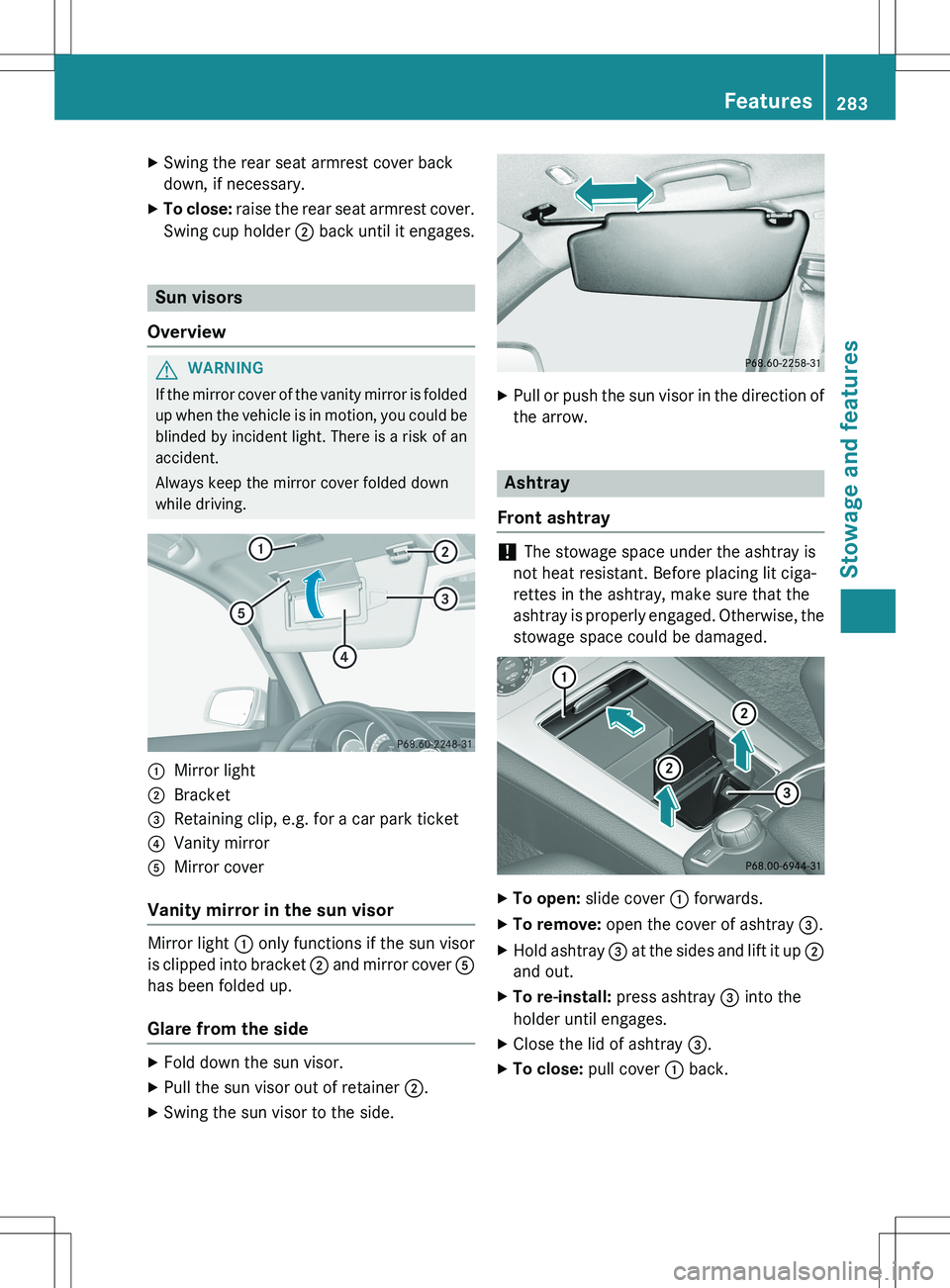
:Mirror light
;Bracket
=Retaining clip, e.g. for a car park ticket
?Vanity mirror
AMirror cover
Vanity mirror in the sun visor
Mirror light : only functions if the sun visor
is clipped into bracket ; and mirror cover A
has been folded up.
Glare from the side
X Fold down the sun visor.
X Pull the sun visor out of retainer ;.
X Swing the sun visor to the side.
XPull or push the sun visor in the direction of
the arrow.
Ashtray
Front ashtray
! The stowage space under the ashtray is
not heat resistant. Before placing lit ciga-
rettes in the ashtray, make sure that the
ashtray is properly engaged. Otherwise, the
stowage space could be damaged.
X To open: slide cover : forwards.
X To remove: open the cover of ashtray =.
X Hold ashtray = at the sides and lift it up ;
and out.
X To re-install: press ashtray = into the
holder until engages.
X Close the lid of ashtray =.
X To close: pull cover : back.
Features283
Stowage and features
Z
Page 297 of 386
Triggering the vehicle alarm
With this function, you can trigger the vehi-
cle's panic alarm via text message. An alarm
sounds and the exterior lighting flashes.
Depending on the setting, the panic alarm
lasts five or ten seconds. Afterwards, the
alarm switches off.
Garage door opener
General notes
The HomeLink ®
garage door opener integra-
ted in the rear-view mirror allows you to oper-
ate up to three different door and gate sys-
tems.
Use the integrated garage door opener only
on garage doors that:
R have safety stop and reverse features and
R meet current U.S. federal safety standards
Once programed, the integrated garage door opener in the rear-view mirror will assume the
function of the garage door system's remote
control. Please also read the operating
instructions for the garage door system.
When programming a garage door opener,
park the vehicle outside the garage. Do not
run the engine while programming.
Certain garage door drives are incompatible
with the integrated garage door opener. If you
have difficulty programing the integrated
garage door opener, contact an authorized
Mercedes-Benz Center.
Alternatively, you can call the following tele-
phone assistance services:
R USA: Mercedes-Benz Customer Assistance
Center at 1-800-FOR-MERCedes
R Canada: Customer Service at
1-800-387-0100
R HomeLink ®
hotline 1-800-355-3515 (free
of charge)
More information on HomeLink ®
and/or
compatible products is also available online
at http://www.homelink.com. Notes on the declaration of conformity
(
Y page 26).
USA: FCC ID: CB2HMIHL4
Canada: IC: 279B-HMIHL4
Important safety notes
GWARNING
When you operate or program the garage door with the integrated garage door opener, per-
sons in the range of movement of the garage
door can become trapped or struck by the
garage door. There is a risk of injury.
When using the integrated garage door
opener, always make sure that nobody is
within the range of movement of the garage
door.
GWARNING
Combustion engines emit poisonous exhaust
gases such as carbon monoxide. Inhaling
these exhaust gases leads to poisoning. There is a risk of fatal injury. Therefore never leave
the engine running in enclosed spaces with-
out sufficient ventilation.
Programming
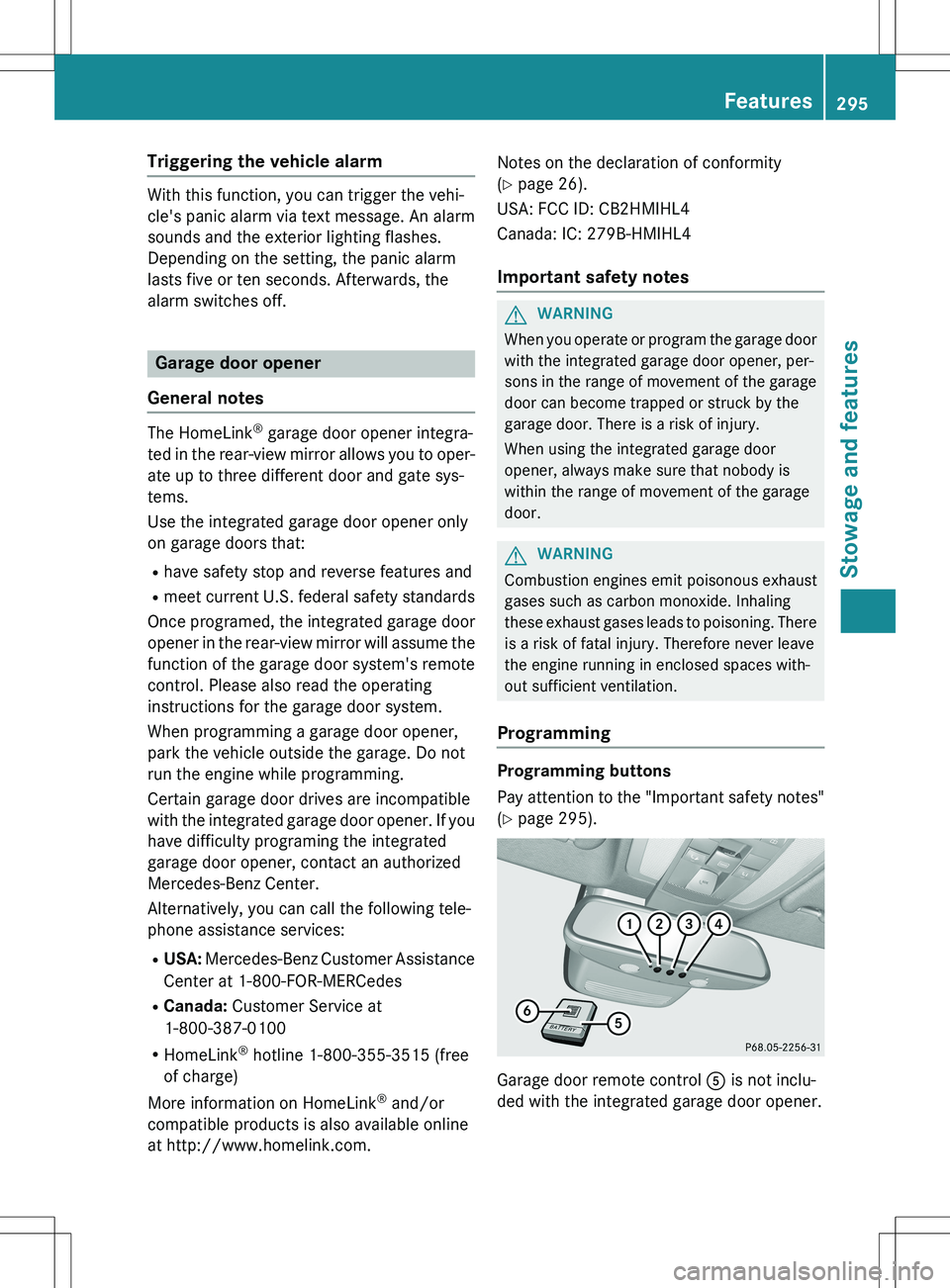
Programming buttons
Pay attention to the "Important safety notes"
( Y page 295).
Garage door remote control A is not inclu-
ded with the integrated garage door opener.
Features295
Stowage and features
Z
Page 298 of 386
XTurn the SmartKey to position 2 in the igni-
tion lock ( Y page 149).
X Select one of buttons ; to ? to use to
control the garage door drive.
X To start programming mode: press and
hold one of buttons ; to ? on the inte-
grated garage door opener.
The garage door opener is now in program- ming mode. After a short time, indicator
lamp : lights up yellow.
Indicator lamp : lights up yellow as soon
as button ;, = or ? is programmed for
the first time. If the selected button has
already been programmed, indicator
lamp : will only light up yellow after ten
seconds have elapsed.
X Release button ;, = or ?. Indicator
lamp : flashes yellow.
X To program the remote control: point
garage door remote control A towards
buttons ; to ? on the rear-view mirror at
a distance of 2 to 8 inches (5 to 20 cm).
X Press and hold button B on remote control
A until indicator lamp : lights up green.
When indicator lamp : lights up green:
programming is finished.
When indicator lamp : flashes green: pro-
gramming was successful. The next step is
to synchronize the rolling code
( Y page 296).
X Release button B on remote control A for
the garage door drive system.
If indicator lamp : lights up red: repeat the
programing procedure for the correspond-
ing button on the rear-view mirror. When
doing so, vary the distance between remote control A and the rear-view mirror.
The required distance between remote
control A and the integrated garage door
opener depends on the garage door drive
system. Several attempts might be neces-
sary. You should test every position for at
least 25 seconds before trying another
position. Synchronizing the rolling code
Pay attention to the "Important safety notes"
( Y page 295).
If the garage door system uses a rolling code, you will also have to synchronize the garage
door system with the integrated garage door
opener in the rear-view mirror. To do this you
will need to use the programming button on
the door drive control panel. The program-
ming button may be positioned at different
locations depending on the manufacturer. It
is usually located on the door drive unit on the
garage ceiling.
Familiarize yourself with the garage door
drive operating instructions, e.g. under "Pro-
gramming of additional remote controls",
before carrying out the following steps.
Your vehicle must be within reach of the
garage door or gate opener drive. Make sure
that neither your vehicle nor any persons/
objects are present within the sweep of the
door or gate.
X Turn the SmartKey to position 2 in the igni-
tion lock ( Y page 149).
X Get out of the vehicle.
X Press the programming button on the door
drive unit.
Usually, you now have 30 seconds to ini-
tiate the next step.
X Get into the vehicle.
X Press previously programmed button ;,
= or ? on the integrated garage door
opener until the door closes.
The rolling code synchronization is then
complete.
Notes on programming the remote con-
trol
Canadian radio frequency laws require a
"break" (or interruption) of the transmission
signals after broadcasting for a few seconds. Therefore, these signals may not last long
enough for the integrated garage door
opener. The signal is not recognized during
programming. Comparable with Canadian
296Features
Stowage and features
Page 299 of 386
law, some U.S. garage door openers also fea-ture a "break".
Proceed as follows:
R if you live in Canada
R if you have difficulties programming the
garage door opener (regardless of where
you live) when using the programming
steps
X Press and hold one of buttons ; to ? on
the integrated garage door opener.
After a short time, indicator lamp : lights
up yellow.
X Release the button.
Indicator lamp : flashes yellow.
X Press button B of garage door remote
control A for two seconds, then release it
for two seconds.
X Press button B again for two seconds.
X Repeat this sequence on button B of
remote control A until indicator lamp :
lights up green.
When indicator lamp : lights up green:
programming is finished.
When indicator lamp : flashes green: pro-
gramming was successful. The next step is to synchronize the rolling code.
X Release button B of remote control A of
the garage door drive.
If indicator lamp : lights up red: repeat the
programming process for the correspond-
ing button on the rear-view mirror. When
doing so, vary the distance between remote
control A and the rear-view mirror.
The required distance between remote
control A and the integrated garage door
opener depends on the garage door drive
system. Several attempts might be neces-
sary. You should test every position for at
least 25 seconds before trying another
position. Problems when programming
If you are experiencing problems programing
the integrated garage door opener on the
rear-view mirror, take note of the following
instructions:
R Check the transmitter frequency used by
garage door drive remote control A and
whether it is supported. The transmitter
frequency can usually be found on the back
of the garage door drive remote control.
The integrated garage door opener is com- patible with devices that have units which
operate in the frequency range of 280 to
433 MHz.
R Replace the batteries in garage door
remote control A. This increases the like-
lihood that garage door remote control A
will transmit a strong and precise signal to
the integrated garage door opener.
R When programming, hold remote controlA at varying distances and angles from the
button which you are programming. Try var-
ious angles at a distance between 2and
12 inches (5to 30 cm) or at the same angle
but at varying distances.
R If another remote control is available for the
same garage door drive, repeat the same
programming steps with this remote con-
trol. Before performing these steps, make
sure that new batteries have been installed in garage door drive remote control A.
R Note that some remote controls only trans-
mit for a limited amount of time (the indi-
cator lamp on the remote control goes out).
Press button B on remote control A again
before transmission ends.
R Align the antenna cable of the garage door
opener unit. This can improve signal recep-tion/transmission.
Opening/closing the garage door
After it has been programmed, the integrated
garage door opener performs the function of
the garage door system remote control.
Features297
Stowage and features
Z
Page 300 of 386
Please also read the operating instructions
for the garage door system.
X Turn the SmartKey to position 2 in the igni-
tion lock ( Y page 149).
X Press button ;, = or ? which you have
programmed to operate the garage door.
Garage door system with a fixed code: indi-
cator lamp : lights up green.
Garage door system with a rolling code:
indicator lamp : flashes green.
The transmitter will transmit a signal as
long as the button is pressed. The trans-
mission is halted after a maximum of ten
seconds and indicator lamp : lights up
yellow.
X Press button ;, = or ? again if neces-
sary.
Clearing the memory
Make sure that you clear the memory of the
integrated garage door opener before selling
the vehicle.
X Turn the SmartKey to position 2 in the igni-
tion lock ( Y page 149).
X Press and hold buttons ; and ?.
The indicator lamp initially lights up yellow
and then green.
X Release buttons ; and ?.
The memory of the integrated garage door
opener in the rear-view mirror is cleared.
Floormat on the driver's side
GWARNING
Objects in the driver's footwell can restrict the pedal travel or obstruct a depressed pedal.
The operating and road safety of the vehicle is
jeopardized. There is a risk of an accident.
Make sure that all objects in the vehicle are
stowed correctly, and that they cannot enter
the driver's footwell. Install the floormats
securely and as specified in order to ensure
sufficient clearance for the pedals. Do not use
loose floormats and do not place floormats on top of one another.
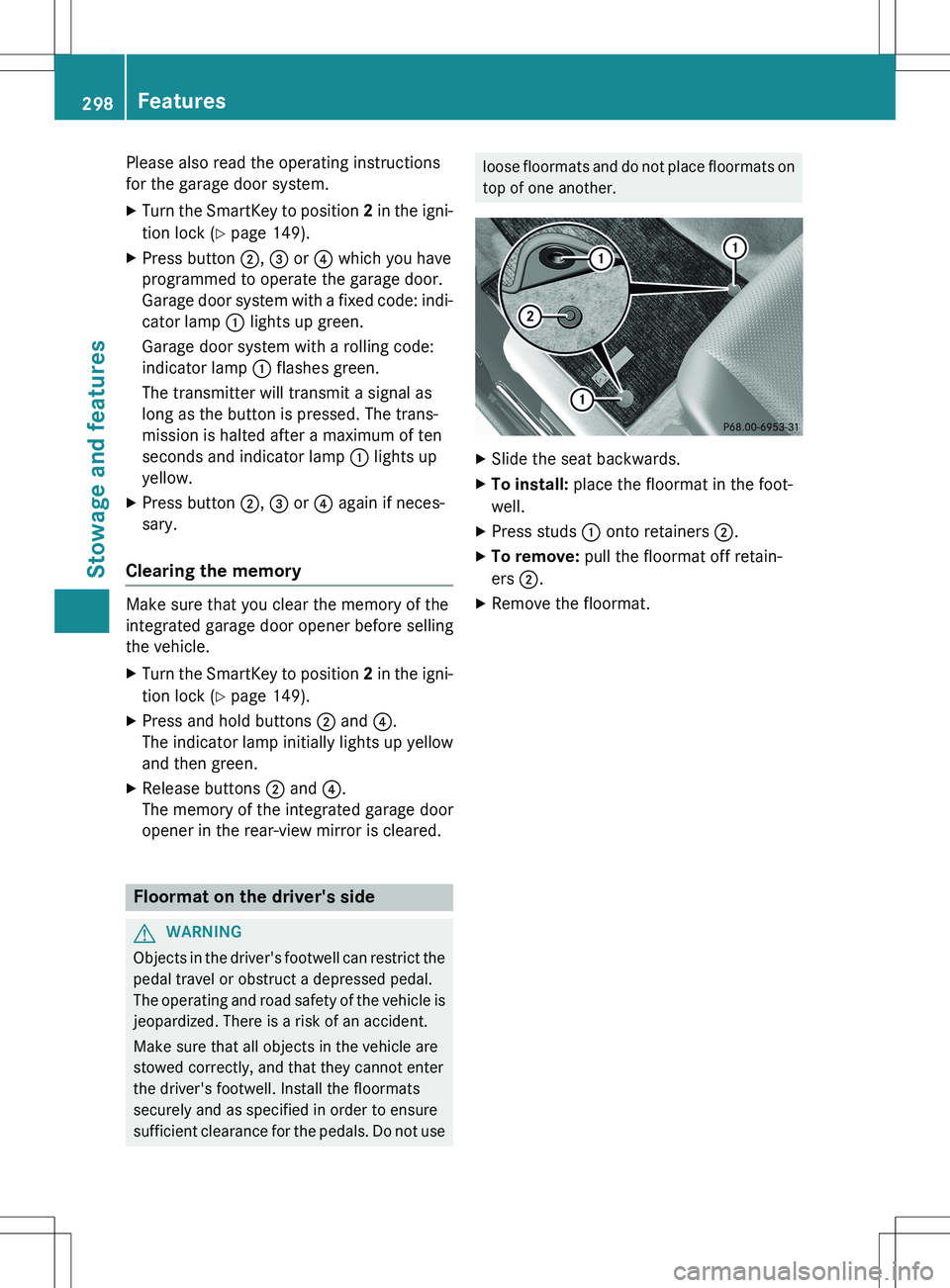
X Slide the seat backwards.
X To install: place the floormat in the foot-
well.
X Press studs : onto retainers ;.
X To remove: pull the floormat off retain-
ers ;.
X Remove the floormat.
298Features
Stowage and features
Page 311 of 386
! Do not clean wiper blades too often and
do not rub them too hard. Otherwise, the
graphite coating could be damaged. This
could cause wiper noise.
! Hold the wiper arm securely when folding
back. The windshield could be damaged if
the wiper arm smacks against it suddenly.
X Fold the windshield wiper arms away from
the windshield.
X Carefully clean the wiper blades with a
damp cloth.
X Fold the windshield wiper arms back again
before switching on the ignition.
Cleaning the exterior lighting
! Only use cleaning agents or cleaning
cloths which are suitable for plastic light
lenses. Unsuitable cleaning agents or
cleaning cloths could scratch or damage
the plastic light lenses.
X Clean the plastic lenses of the exterior
lighting using a wet sponge and a mild
cleaning agent, e.g. Mercedes-Benz car
shampoo. Or clean the exterior lighting
with cleaning cloths.
Cleaning the mirror turn signals
! Only use cleaning agents or cleaning
cloths that are suitable for plastic lenses.
Unsuitable cleaning agents or cleaning
cloths could scratch or damage the plastic lenses of the mirror turn signals.
X Clean the plastic lenses of the mirror turn
signals using a wet sponge and a mild
cleaning agent, e.g. Mercedes-Benz car
shampoo. Cleaning cloths may be used as
well.
Cleaning the sensors
! If you clean the sensors with a power
washer, make sure that you keep a dis-
tance of at least 11.8 in (30 cm) between
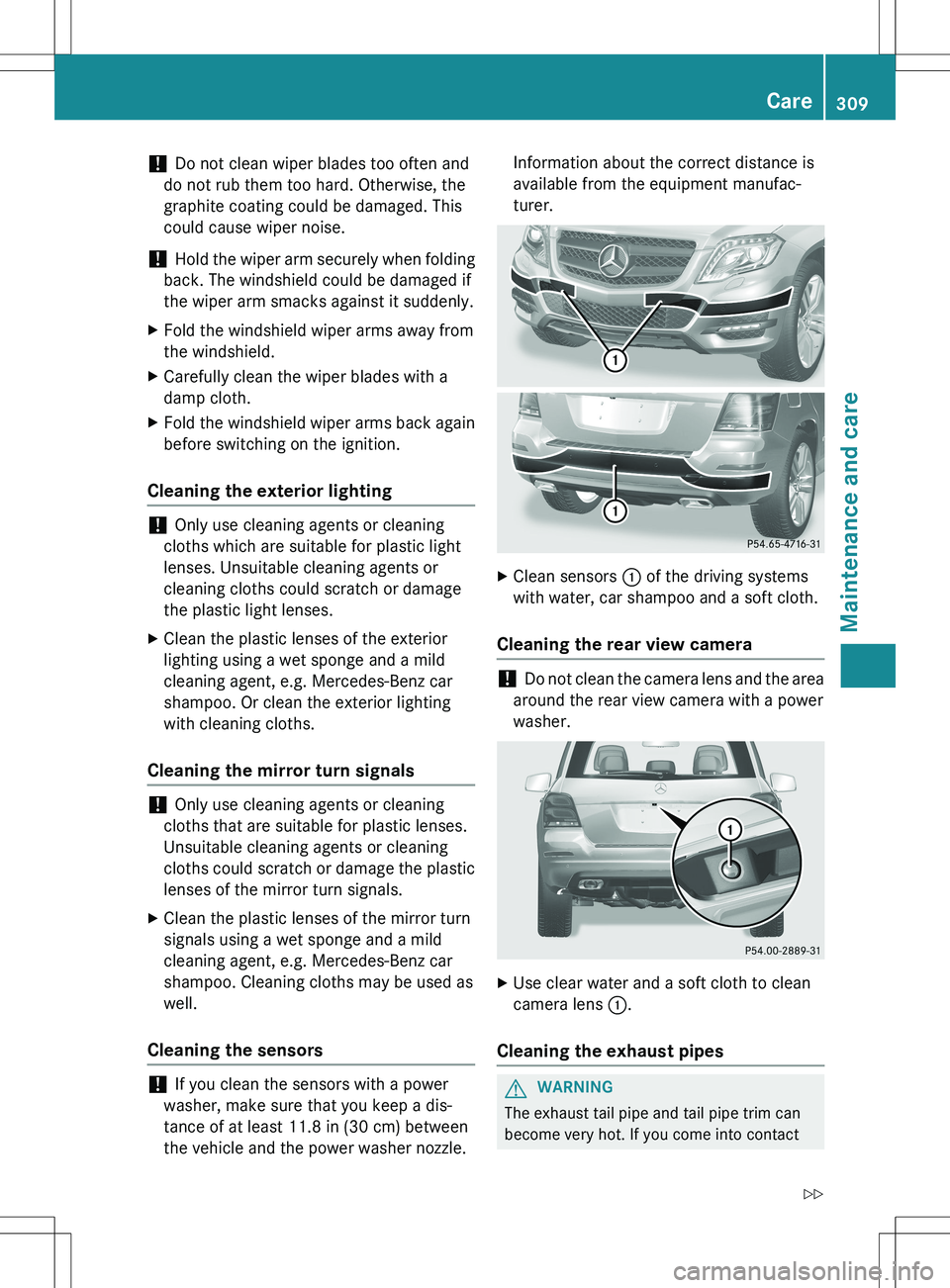
the vehicle and the power washer nozzle. Information about the correct distance is
available from the equipment manufac-
turer.
X
Clean sensors : of the driving systems
with water, car shampoo and a soft cloth.
Cleaning the rear view camera
! Do not clean the camera lens and the area
around the rear view camera with a power
washer.
X Use clear water and a soft cloth to clean
camera lens :.
Cleaning the exhaust pipes
GWARNING
The exhaust tail pipe and tail pipe trim can
become very hot. If you come into contact
Care309
Maintenance and care
Z
Page 323 of 386

Otherwise, the vehicle's electronic sys-
tem may be damaged.
R the transmission is locked in position P
after disconnecting the battery. The vehi-
cle is secured against rolling away. You
can then no longer move the vehicle.
The battery and the cover of the positive
terminal clamp must be installed securely
during operation.
Comply with safety precautions and take pro-
tective measures when handling batteries.
Risk of explosion.
Fire, open flames and smoking are
prohibited when handling the bat-
tery. Avoid creating sparks.
Battery acid is caustic. Avoid con-
tact with skin, eyes or clothing.
Wear suitable protective clothing,
especially gloves, apron and face-
guard.
Rinse any acid spills immediately
with clear water. Contact a physi-
cian if necessary.
Wear eye protection.
Keep children away.
Observe this Operator's Manual.
In order for the battery to achieve the maxi-
mum possible service life, it must always be
sufficiently charged.
Have the battery condition of charge checked
more frequently if you use the vehicle mainly for short trips or if you leave it standing idle
for a lengthy period. Consult a qualified spe- cialist workshop if you wish to leave your
vehicle parked for a long period of time.
Like other batteries, the vehicle battery may
discharge over time if you do not use the
vehicle. In this case, have the battery discon-
nected at a qualified specialist workshop. You can also charge the battery with a charger
recommended by Mercedes-Benz. Contact a
qualified specialist workshop for further infor-
mation.
iRemove the SmartKey if you park the
vehicle and do not require any electrical
consumers. The vehicle will then use very
little energy, thus conserving battery
power.
iIf the power supply has been interrupted,
e.g. if you reconnect the battery, you will
have to:
R set the clock; see the separate operating
instructions.
On vehicles with COMAND and a naviga- tion system, the clock is set automati-
cally.
R reset the panorama roof with power tilt/
sliding panel. ( Y page 97)
R reset the function for folding the exterior
mirrors in/out automatically by folding
the mirrors out once ( Y page 110) 12
.
Charging the battery
GWARNING
During charging and jump-starting, explosive
gases can escape from the battery. There is a
risk of an explosion.
Particularly avoid fire, open flames, creating
sparks and smoking. Ensure there is sufficient
ventilation while charging and jump-starting.
Do not lean over a battery.
GWARNING
Battery acid is caustic. There is a risk of injury.
12 This function is only available in vehicles for Canada.
Battery (vehicle)321
Roadside Assistance
Z
Page 382 of 386
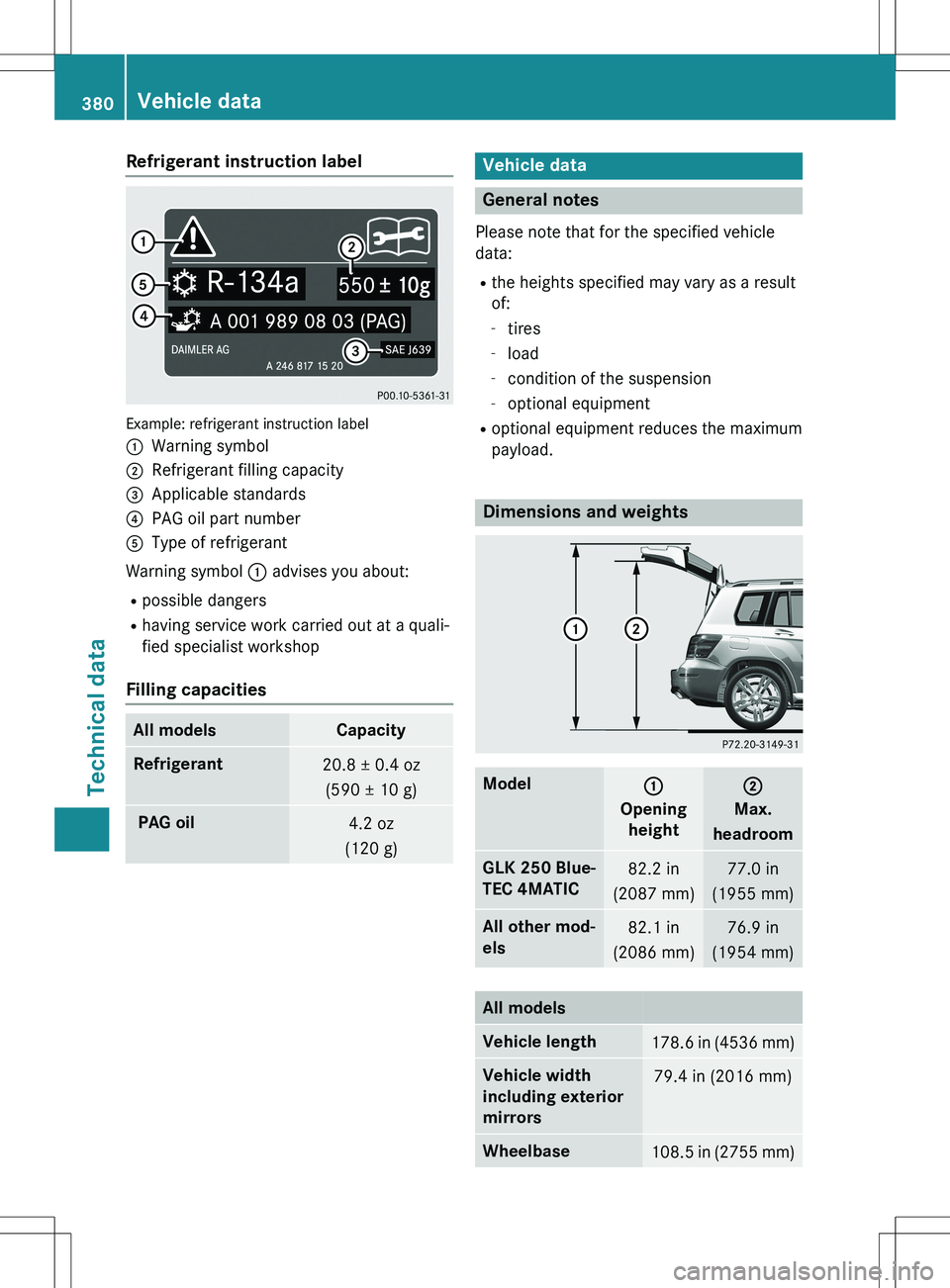
Refrigerant instruction label
Example: refrigerant instruction label :
Warning symbol
;Refrigerant filling capacity
=Applicable standards
?PAG oil part number
AType of refrigerant
Warning symbol : advises you about:
R possible dangers
R having service work carried out at a quali-
fied specialist workshop
Filling capacities
All modelsCapacity
Refrigerant20.8 ± 0.4 oz
(590 ± 10 g)
PAG oil4.2 oz
(120 g)
Vehicle data
General notes
Please note that for the specified vehicle
data:
R the heights specified may vary as a result
of:
- tires
- load
- condition of the suspension
- optional equipment
R optional equipment reduces the maximum
payload.
Dimensions and weights
Model:
Opening
height
;
Max.
headroom
GLK 250 Blue-
TEC 4MATIC82.2 in
(2087 mm)77.0 in
(1955 mm)
All other mod-
els82.1 in
(2086 mm)76.9 in
(1954 mm)
All models
Vehicle length178.6 in (4536 mm)
Vehicle width
including exterior
mirrors79.4 in (2016 mm)
Wheelbase108.5 in (2755 mm)
380Vehicle data
Technical data