reset MERCEDES-BENZ GLK-CLASS SUV 2015 Owners Manual
[x] Cancel search | Manufacturer: MERCEDES-BENZ, Model Year: 2015, Model line: GLK-CLASS SUV, Model: MERCEDES-BENZ GLK-CLASS SUV 2015Pages: 386, PDF Size: 26 MB
Page 7 of 386
Resetting the service interval dis-
play ................................................ 305
Service message ............................ 304
Special service requirements ......... 305
ATA (Anti-Theft Alarm system)
Activating/deactivating ................... 75
Function ........................................... 75
Switching off the alarm .................... 75
ATTENTION ASSIST
Activating/deactivating ................. 229
Display message ............................ 250
Function/notes ............................. 202
Audio menu (on-board com-
puter) .................................................. 2 26
Audio system
see separate operating instructions
Authorized Mercedes-Benz Center
see Qualified specialist workshop
Authorized workshop
see Qualified specialist workshop
AUTO lights
Display message ............................ 246
see Lights
Automatic car wash (care) ............... 306
Automatic engine start (ECO start/
stop function) .................................... 153
Automatic engine switch-off (ECO
start/stop function) .......................... 153
Automatic headlamp mode .............. 116
Automatic transmission
Accelerator pedal position ............. 159
Automatic drive program ............... 160
Changing gear ............................... 159
DIRECT SELECT lever ..................... 156
Display message ............................ 257
Driving tips .................................... 159
Emergency running mode .............. 162
Engaging drive position .................. 158
Engaging neutral ............................ 157
Engaging park position automati-
cally .............................................. . 157
Engaging reverse gear ................... 157
Engaging the park position ............ 157
Kickdown ....................................... 159
Manual drive program .................... 160
Overview ........................................ 156
Problem (malfunction) ................... 162 Program selector button ................ 159
Pulling away ................................... 152
Starting the engine ........................ 151
Steering wheel paddle shifters ...... 160
Trailer towing ................................. 159
Transmission position display ........ 157
Transmission positions .................. 158
Automatic transmission emer-
gency mode ....................................... 162
B
Backup lamp
Changing bulbs .............................. 125
Display message ............................ 245
Bag hook ............................................ 278
Ball coupling
Installing ........................................ 21 4
Removing ....................................... 217
Storing ........................................... 2 17
BAS (Brake Assist System) ................. 69
BAS PLUS (Brake Assist System
PLUS) ................................................... . 69
Battery (SmartKey)
Checking .......................................... 81
Important safety notes .................... 81
Replacing ......................................... 8 1
Battery (vehicle)
Charging ........................................ 321
Display message ............................ 248
Important safety notes .................. 319
Jump starting ................................. 323
Belt
see Seat belts
Belt force limiter
Activation ......................................... 60
Function ........................................... 60
Blind Spot Assist
Activating/deactivating ................. 229
Display message ............................ 252
Notes/function .............................. 203
Trailer towing ................................. 205
see Active Blind Spot Assist
BlueTEC (DEF) .................................... 376
BlueTEC ®
Adding DEF .................................... 165
Brake Assist
see BAS (Brake Assist System)
Index5
Page 15 of 386
Remote fault diagnosis .................. 293
Remote vehicle locking .................. 292
Roadside Assistance button .......... 289
Search & Send ............................... 292
Self-test ......................................... 288
Speed alert .................................... 294
System .......................................... 288
Triggering the vehicle alarm ........... 295
Vehicle remote unlocking .............. 292
Mechanical key
Function/notes ................................ 80
Locking vehicle ................................ 86
Unlocking the driver's door .............. 86
Media Interface
see Separate operating instructions
Memory card (audio) ......................... 226
Memory function ............................... 112
Message memory (on-board com-
puter) .................................................. 2 35
Messages
see Display messages
Mirrors
see Exterior mirrors
see Rear-view mirror
see Vanity mirror (in the sun visor)
Mobile phone
Menu (on-board computer) ............ 227
Modifying the programming
(SmartKey) ........................................... 80
MOExtended tires .............................. 315
Mounting wheels
Lowering the vehicle ...................... 359
Mounting a new wheel ................... 358
Preparing the vehicle ..................... 356
Raising the vehicle ......................... 357
Removing a wheel .......................... 358
Securing the vehicle against roll-
ing away ........................................ 356
MP3
Operation ....................................... 226
see separate operating instructions
Multifunction display
Function/notes ............................. 222
Permanent display ......................... 231
Multifunction steering wheel
Operating the on-board computer .. 221
Overview .......................................... 35N
Navigation
Menu (on-board computer) ............ 225
see separate operating instructions
NECK-PRO head restraints
Operation ......................................... 54
Resetting triggered .......................... 55
NECK-PRO luxury head restraints
Operation ......................................... 54
Resetting when triggered ................. 55
Notes on breaking-in a new vehi-
cle ................................................... .... 148
O
Occupant Classification System
(OCS)
Faults .............................................. . 53
Operation ......................................... 49
System self-test ............................... 52
Occupant safety
Air bags ........................................... 44
Children in the vehicle ..................... 61
Occupant Classification System
(OCS) ............................................... 49
Pets in the vehicle ........................... 67
PRE-SAFE ®
(anticipatory occu-
pant protection) ............................... 54
SRS (Supplemental Restraint Sys- tem) ............................................... .. 43
System overview .............................. 42
OCS
Faults ............................................. .. 53
Operation ......................................... 49
System self-test ............................... 52
Odometer ........................................... 223
Off-road system
4MATIC .......................................... 185
Oil
see Engine oil
On-board computer
Assistance menu ........................... 228
Audio menu ................................... 226
Convenience submenu .................. 233
Display messages .......................... 235
Displaying a service message ........ 305
Factory settings submenu ............. 234
Index13
Page 16 of 386
Important safety notes .................. 220
Instrument cluster submenu .......... 230
Lighting submenu .......................... 231
Menu overview .............................. 223
Message memory .......................... 235
Navigation menu ............................ 225
Operation ....................................... 221
Service menu ................................. 230
Settings menu ............................... 230
Standard display ............................ 223
Telephone menu ............................ 227
Trip menu ...................................... 223
Vehicle submenu ........................... 232
Video DVD operation ..................... 227
Opening and closing the side trim
panels ................................................. 12 5
Operating safety
Declaration of conformity ................ 26
Important safety notes .................... 25
Operating system
see On-board computer
Operator's Manual
Vehicle equipment ........................... 23
Outside temperature display ........... 221
Overhead control panel ...................... 38
Override feature
Rear side windows ........................... 67
P
Paint code number ............................ 372
Paintwork (cleaning instructions) ... 307
Panic alarm .......................................... 42
Panorama roof with power tilt/
sliding panel
Important safety notes .................... 95
Opening/closing .............................. 96
Opening/closing the roller sun-
blind .............................................. ... 97
Problem (malfunction) ..................... 97
Resetting ......................................... 97
Parking ............................................... 168
Important safety notes .................. 168
Parking brake ................................ 169
Position of exterior mirror, front-
passenger side ............................... 111
Rear view camera .......................... 193
see PARKTRONIC Parking aid
Active Parking Assist ..................... 189
see Exterior mirrors
see PARKTRONIC
Parking assistance
see PARKTRONIC
Parking brake
Display message ............................ 237
Notes/function .............................. 169
Parking lamps
Changing bulbs .............................. 124
Switching on/off ........................... 118
PARKTRONIC
Deactivating/activating ................. 188
Driving system ............................... 186
Function/notes ............................. 186
Important safety notes .................. 186
Problem (malfunction) ................... 189
Range of the sensors ..................... 186
Trailer towing ................................. 188
Warning display ............................. 187
PASSENGER AIR BAG
Display message ............................ 242
PASSENGER AIR BAG OFF
Problem (malfunction) ..................... 53
PASSENGER AIR BAG OFF indicator
lamp ................................................... ... 49
PASSENGER AIRBAG
Problems (malfunction) .................. 242
Pets in the vehicle ............................... 67
Plastic trim (cleaning instruc-
tions) .................................................. 3 10
Power washers .................................. 306
Power windows
see Side windows
PRE-SAFE ®
(anticipatory occupant
protection)
Display message ............................ 238
Operation ......................................... 54
PRE-SAFE ®
Brake
Activating/deactivating ................. 229
Display message ............................ 239
Function/notes ................................ 73
Warning lamp ................................. 270
Program selector button .................. 159
Protection against theft
ATA (Anti-Theft Alarm system) ......... 75
14Index
Page 18 of 386
Safety systemsee Driving safety systems
Seat belts
Adjusting the driver's and front-
passenger seat belt ......................... 59
Adjusting the height ......................... 59
Belt force limiters ............................ 60
center rear-compartment seat ......... 59
Cleaning ......................................... 31 2
Correct usage .................................. 57
Emergency Tensioning Devices ........ 60
Fastening ......................................... 58
Important safety guidelines ............. 56
Releasing ......................................... 59
Safety guidelines ............................. 43
Switching belt adjustment on/off
(on-board computer) ...................... 233
Warning lamp ................................. 260
Warning lamp (function) ................... 60
Seats
Adjusting (electrically) ................... 101
Adjusting lumbar support .............. 104
Adjusting the 4-way lumbar sup-
port ............................................... . 104
Adjusting the head restraint .......... 102
Cleaning the cover ......................... 311
Correct driver's seat position ........ 100
Folding the backrest (rear com-
partment) forwards/back .............. 276
Folding the rear bench seat for-
wards/back ................................... 276
Important safety notes .................. 101
Seat heating problem .................... 106
Storing settings (memory func-
tion) .............................................. . 112
Switching seat heating on/off ....... 105
Sensors (cleaning instructions) ....... 309
Service menu (on-board com-
puter) .................................................. 2 30
Service products
Brake fluid ..................................... 377
Coolant (engine) ............................ 378
DEF special additives ..................... 376
Engine oil ....................................... 377
Fuel ............................................... . 373
Important safety notes .................. 373
Refrigerant (air-conditioning sys-
tem) ............................................... 379Washer fluid ................................... 379
Setting the air distribution ............... 140
Setting the airflow ............................ 141
Settings
Factory (on-board computer) ......... 234
On-board computer ....................... 230
Side impact air bag ............................. 47
Side marker lamp (display mes-
sage) ................................................... 245
Side windows
Cleaning ......................................... 30 8
Convenience closing feature ............ 93
Convenience opening feature .......... 93
Important safety information ........... 91
Opening/closing .............................. 92
Problem (malfunction) ..................... 94
Resetting ......................................... 94
Sliding sunroof
see Panorama roof with power
tilt/sliding panel
SmartKey
Changing the battery ....................... 81
Changing the programming ............. 80
Checking the battery ....................... 81
Convenience closing feature ............ 93
Convenience opening feature .......... 93
Display message ............................ 258
Door central locking/unlocking ....... 78
Important safety notes .................... 78
Loss ................................................. 83
Mechanical key ................................ 80
Positions (ignition lock) ................. 149
Problem (malfunction) ..................... 83
Starting the engine ........................ 151
Snow chains ...................................... 335
Sockets
Center console .............................. 285
General notes ................................ 284
Rear compartment ......................... 285
Special seat belt retractor .................. 64
Specialist workshop ............................ 27
Speed, controlling
see Cruise control
Speedometer
Digital ............................................ 224
In the Instrument cluster ................. 33
Segments ...................................... 221
16Index
Page 21 of 386
TIN (Tire Identification Number)
(definition) ..................................... 354
Tire bead (definition) ...................... 354
Tire pressure (definition) ................ 354
Tire pressures (recommended) ...... 352
Tire size (data) ............................... 360
Tire size designation, load-bearing capacity, speed rating .................... 349
Tire tread ....................................... 333
Tire tread (definition) ..................... 354
Total load limit (definition) ............. 355
Traction ......................................... 34 7
Traction (definition) ....................... 354
Tread wear ..................................... 347
TWR (permissible trailer drawbar
noseweight) (definition) ................. 354
Uniform Tire Quality Grading
Standards ...................................... 347
Uniform Tire Quality Grading
Standards (definition) .................... 352
Wear indicator (definition) ............. 355
Wheel and tire combination ........... 362
Wheel rim (definition) .................... 352
see Flat tire
Top Tether ............................................ 65
Tow-starting
Emergency engine starting ............ 328
Important safety notes .................. 325
Towing a trailer
Active Parking Assist ..................... 193
Cleaning the trailer tow hitch ......... 310
Coupling up a trailer ...................... 214
Decoupling a trailer ....................... 216
Driving tips .................................... 212
Important safety notes .................. 212
Installing the ball coupling ............. 214
Lights display message .................. 243
Mounting dimensions .................... 381
Power supply ................................. 217
Removing the ball coupling ............ 217
Storing the ball coupling ................ 217
Trailer loads ................................... 381
Towing away
Important safety guidelines ........... 325
Installing the towing eye ................ 326
Removing the towing eye ............... 326
With both axles on the ground ....... 327
With the rear axle raised ................ 327 Trailer coupling
see Towing a trailer
Trailer loads and drawbar nose-
weights ............................................... 216
Trailer towing
Active Blind Spot Assist ................. 209
Active Lane Keeping Assist .... 206, 212
Blind Spot Assist ............................ 205
PARKTRONIC ................................. 188
Permissible trailer loads and
drawbar noseweights ..................... 216
Transfer case ..................................... 162
Transmission
see Automatic transmission
Transmission position display ......... 157
Transmission position display
(DIRECT SELECT lever) ...................... 157
Transporting the vehicle .................. 327
Trim pieces (cleaning instruc-
tions) .................................................. 3 11
Trip computer (on-board com-
puter) .................................................. 2 23
Trip odometer
Calling up ....................................... 223
Resetting (on-board computer) ...... 224
Turn signals
Changing bulbs (front) ................... 124
Display message ............................ 244
Switching on/off ........................... 118
TWR (Tongue Weight Rating) (defi-
nition) ................................................. 35 4
Type identification plate
see Vehicle identification plate
U
UnlockingEmergency unlocking ....................... 86
From inside the vehicle (central
unlocking button) ............................. 85
V
Vanity mirror (in the sun visor) ........ 283
Vehicle
Correct use ...................................... 27
Data acquisition ............................... 28
Display message ............................ 257
Index19
Page 29 of 386
the driver's footwell. Install the floormats
securely and as specified in order to ensure
sufficient clearance for the pedals. Do not useloose floormats and do not place floormats ontop of one another.
! If the engine is switched off and equip-
ment on the diagnostics connection is
used, the starter battery may discharge.
Connecting equipment to the diagnostics
connection can lead to emissions monitoring information being reset, for example. This
may lead to the vehicle failing to meet the
requirements of the next emissions test dur-
ing the main inspection.
Qualified specialist workshop
An authorized Mercedes-Benz Center is a
qualified specialist workshop. It has the nec-
essary specialist knowledge, tools and quali-
fications to correctly carry out the work
required on your vehicle. This is especially the
case for work relevant to safety.
Observe the notes in the Maintenance Book-
let.
Always have the following work carried out at an authorized Mercedes-Benz Center:
R work relevant to safety
R service and maintenance work
R repair work
R alterations, installation work and modifica-
tions
R work on electronic components
Correct use
If you remove any warning stickers, you or
others could fail to recognize certain dangers.
Leave warning stickers in position.
Observe the following information when driv- ing your vehicle: R the safety notes in this manual
R the vehicle technical data R
traffic rules and regulations
R laws and safety standards pertaining to
motor vehicles
Problems with your vehicle
If you should experience a problem with your
vehicle, particularly one that you believe may affect its safe operation, we urge you to con-
tact an authorized Mercedes-Benz Center
immediately to have the problem diagnosed
and rectified. If the problem is not resolved to
your satisfaction, please discuss the problem
again with a Mercedes-Benz Center or con-
tact us at one of the following addresses.
In the USA
Customer Assistance Center
Mercedes-Benz USA, LLC
One Mercedes Drive
Montvale, NJ 07645-0350
In Canada
Customer Relations Department
Mercedes-Benz Canada, Inc.
98 Vanderhoof Avenue
Toronto, Ontario M4G 4C9
Reporting safety defects
USA only:
The following text is published as required of manufacturers under Title 49, Code of U.S.
Federal Regulations, Part 575 pursuant to the
"National Traffic and Motor Vehicle Safety Act of 1966".
If you believe that your vehicle has a defect
which could cause a crash or could cause
injury or death, you should immediately
inform the National Highway Traffic Safety
Administration (NHTSA) in addition to notify-
ing Mercedes-Benz USA, LLC.
If NHTSA receives similar complaints, it may
open an investigation, and if it finds that a
safety defect exists in a group of vehicles, it
may order a recall and remedy campaign.
Introduction27
Z
Page 50 of 386
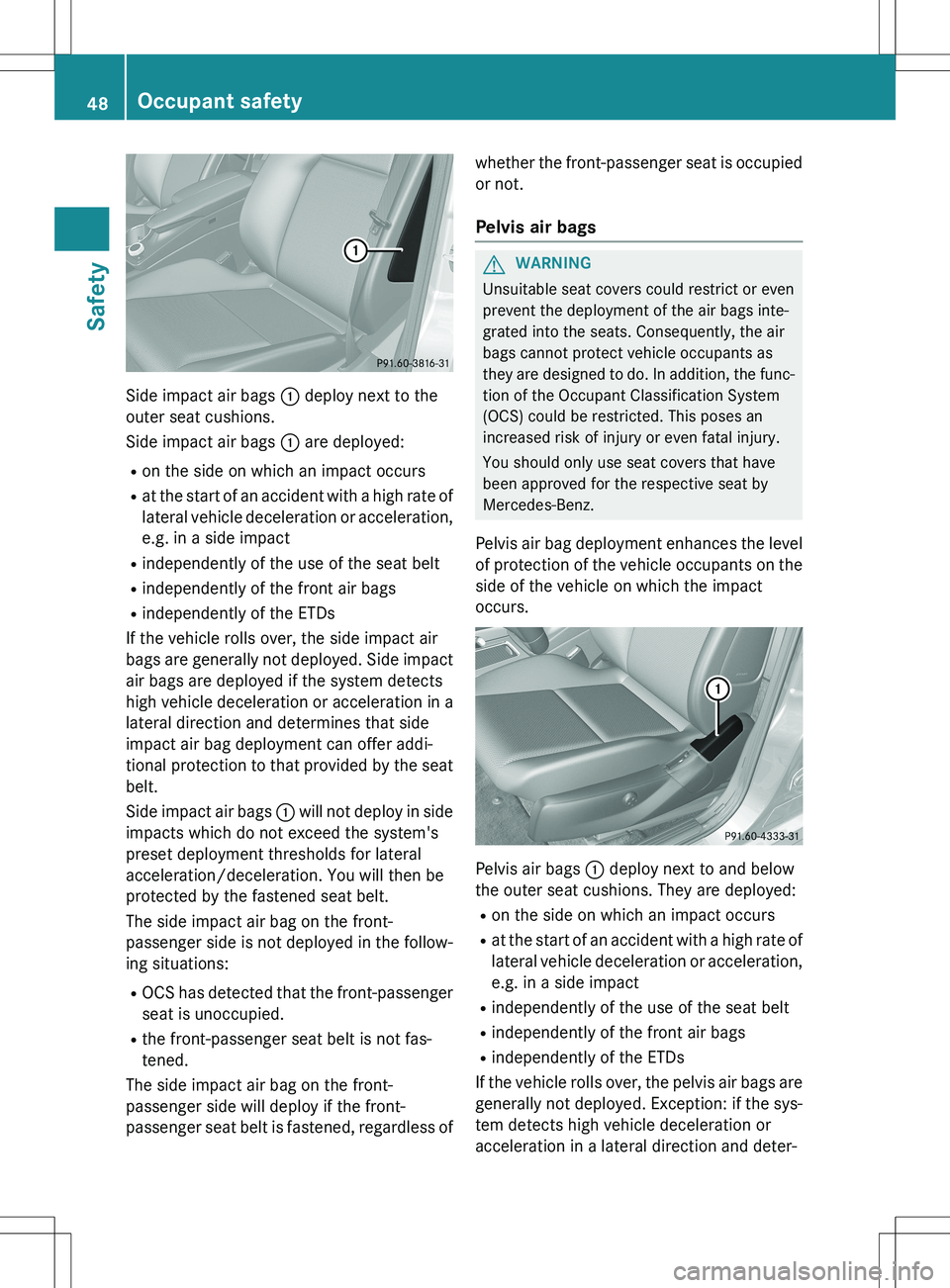
Side impact air bags : deploy next to the
outer seat cushions.
Side impact air bags : are deployed:
R on the side on which an impact occurs
R at the start of an accident with a high rate of
lateral vehicle deceleration or acceleration,
e.g. in a side impact
R independently of the use of the seat belt
R independently of the front air bags
R independently of the ETDs
If the vehicle rolls over, the side impact air
bags are generally not deployed. Side impact air bags are deployed if the system detects
high vehicle deceleration or acceleration in a
lateral direction and determines that side
impact air bag deployment can offer addi-
tional protection to that provided by the seat belt.
Side impact air bags : will not deploy in side
impacts which do not exceed the system's
preset deployment thresholds for lateral
acceleration/deceleration. You will then be
protected by the fastened seat belt.
The side impact air bag on the front-
passenger side is not deployed in the follow-
ing situations:
R OCS has detected that the front-passenger
seat is unoccupied.
R the front-passenger seat belt is not fas-
tened.
The side impact air bag on the front-
passenger side will deploy if the front-
passenger seat belt is fastened, regardless of whether the front-passenger seat is occupied
or not.
Pelvis air bags
GWARNING
Unsuitable seat covers could restrict or even
prevent the deployment of the air bags inte-
grated into the seats. Consequently, the air
bags cannot protect vehicle occupants as
they are designed to do. In addition, the func-
tion of the Occupant Classification System
(OCS) could be restricted. This poses an
increased risk of injury or even fatal injury.
You should only use seat covers that have
been approved for the respective seat by
Mercedes-Benz.
Pelvis air bag deployment enhances the level of protection of the vehicle occupants on the
side of the vehicle on which the impact
occurs.
Pelvis air bags : deploy next to and below
the outer seat cushions. They are deployed:
R on the side on which an impact occurs
R at the start of an accident with a high rate of
lateral vehicle deceleration or acceleration,
e.g. in a side impact
R independently of the use of the seat belt
R independently of the front air bags
R independently of the ETDs
If the vehicle rolls over, the pelvis air bags are
generally not deployed. Exception: if the sys- tem detects high vehicle deceleration or
acceleration in a lateral direction and deter-
48Occupant safety
Safety
Page 51 of 386
mines that deployment can offer additional
protection to that provided by the seat belt.
Pelvis air bags : will not deploy in side
impacts which do not exceed the system's
preset deployment thresholds for lateral
acceleration/deceleration. You will then be
protected by the fastened seat belt.
The pelvis air bag on the front-passenger side is not deployed in the following situations:
R OCS has detected that the front-passenger
seat is unoccupied.
R the front-passenger seat belt is not fas-
tened.
The pelvis air bag on the front-passenger side will deploy if the front-passenger seat belt is
fastened, regardless of whether the front-
passenger seat is occupied or not.
Window curtain air bags
The window curtain air bags enhance the levelof protection for the head, but not chest or
arms, of the vehicle occupants on the side ofthe vehicle on which the impact occurs.
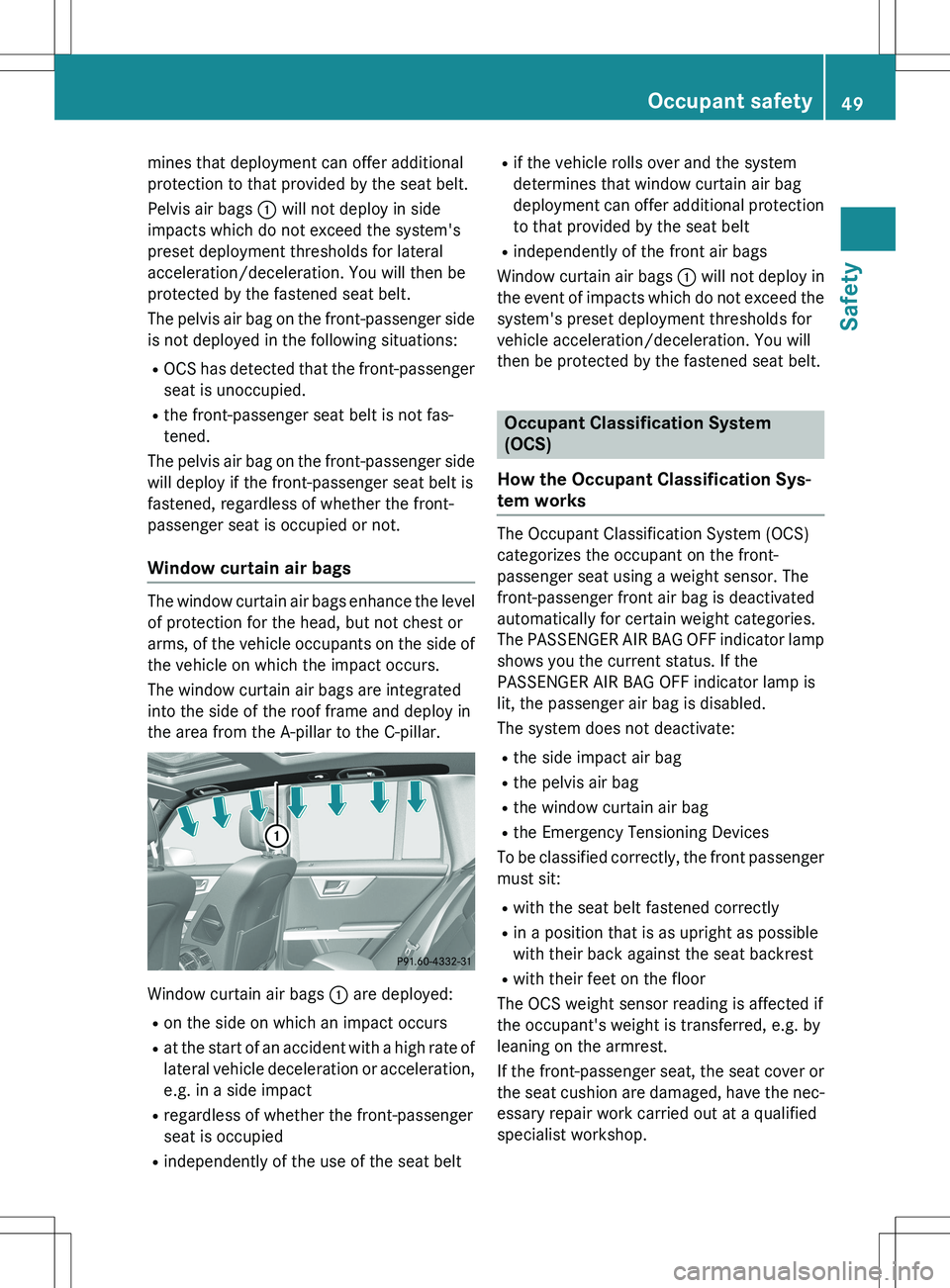
The window curtain air bags are integrated
into the side of the roof frame and deploy in
the area from the A-pillar to the C-pillar.
Window curtain air bags : are deployed:
R on the side on which an impact occurs
R at the start of an accident with a high rate of
lateral vehicle deceleration or acceleration,
e.g. in a side impact
R regardless of whether the front-passenger
seat is occupied
R independently of the use of the seat belt R
if the vehicle rolls over and the system
determines that window curtain air bag
deployment can offer additional protection
to that provided by the seat belt
R independently of the front air bags
Window curtain air bags : will not deploy in
the event of impacts which do not exceed the system's preset deployment thresholds for
vehicle acceleration/deceleration. You will
then be protected by the fastened seat belt.
Occupant Classification System
(OCS)
How the Occupant Classification Sys-
tem works
The Occupant Classification System (OCS)
categorizes the occupant on the front-
passenger seat using a weight sensor. The
front-passenger front air bag is deactivated
automatically for certain weight categories.
The PASSENGER AIR BAG OFF indicator lamp
shows you the current status. If the
PASSENGER AIR BAG OFF indicator lamp is
lit, the passenger air bag is disabled.
The system does not deactivate:
R the side impact air bag
R the pelvis air bag
R the window curtain air bag
R the Emergency Tensioning Devices
To be classified correctly, the front passenger
must sit:
R with the seat belt fastened correctly
R in a position that is as upright as possible
with their back against the seat backrest
R with their feet on the floor
The OCS weight sensor reading is affected if
the occupant's weight is transferred, e.g. by
leaning on the armrest.
If the front-passenger seat, the seat cover or the seat cushion are damaged, have the nec- essary repair work carried out at a qualified
specialist workshop.
Occupant safety49
Safety
Z
Page 52 of 386
For safety reasons, Mercedes-Benz recom-
mends that you only use seat accessories
that have been approved by Mercedes-Benz.
Both the driver and the front passenger
should always observe the PASSENGER AIR
BAG OFF indicator lamp as an indication of
whether or not the front passenger is posi-
tioned correctly. Observe also the air bag dis-play messages that can be displayed in the
instrument cluster ( Y page 242).
GWARNING
If the 45 indicator lamp illuminates
when an adult or someone larger than a small individual is in the front-passenger seat, have the front passenger reposition himself or her-
self in the seat until the 45 indicator
lamp goes out.
In the event of a collision, the air bag control
unit will not allow front-passenger front air
bag deployment when the OCS has classified
the front-passenger seat occupant as weigh-
ing as much as or less than a typical 12-
month-old child in a standard child restraint or if the front-passenger seat is classified as
being empty.
When the OCS senses that the front-
passenger seat occupant is classified as
being up to or less than the weight of a typical
12-month-old child in a standard child
restraint, the 45 indicator lamp will
illuminate when the engine is started and
remain illuminated, indicating that the front-
passenger front air bag is deactivated.
When the OCS senses that the front-
passenger seat is classified as being empty,
the 45 indicator lamp will illuminate
when the engine is started and remain illumi-
nated, indicating that the front-passenger
front air bag is deactivated.
When the OCS senses that the front-
passenger seat occupant is classified as
being heavier than the weight of a typical 12-
month-old child seated in a standard child
restraint or as being a small individual (such
as a young teenager or a small adult), the45 indicator lamp will illuminate for
approximately 6 seconds when the engine is
started and then, depending on occupant
weight sensor readings from the front-
passenger seat, remain illuminated or go out.
With the 45 indicator lamp illumina-
ted, the front-passenger front air bag is deac-
tivated. With the 45 indicator lamp
out, the front-passenger front air bag is acti-
vated.
When the OCS senses that the front-
passenger seat occupant is classified as an
adult or someone larger than a small individ-
ual, the 45 indicator lamp will illumi-
nate for approximately 6 seconds when the
engine is started and then go out, indicating
that the front-passenger front air bag is acti-
vated.
If the 45 indicator lamp is illuminated,
the front-passenger front air bag is deactiva-
ted and will not be deployed.
If the 45 indicator lamp is not illumi-
nated, the front-passenger front air bag is
activated and will be deployed:
R in the event of certain frontal impacts
R if impact exceeds a preset deployment
threshold
R independently of the side impact air bags
If the front-passenger front air bag is
deployed, the rate of inflation will be influ-
enced by: R the rate of relevant vehicle deceleration as
assessed by the air bag control unit
R the front passenger's weight category as
identified by OCS
GWARNING
According to accident statistics, children are
safer when properly restrained on the rear
seats than on the front-passenger seat. Thus,
we strongly recommend that children be
placed in the rear seats whenever possible.
Regardless of seating position, children 12
years old and under must be seated and prop- erly secured in an appropriate infant restraint,
50Occupant safety
Safety
Page 57 of 386
If you do so, the head restraints cannot fulfill
their intended protective function in the eventof an accident. In addition, objects attached
to the head restraints could endanger other
vehicle occupants. There is an increased risk
of injury.
Do not attach any objects to the head
restraints and do not use head restraint cov-
ers.
NECK-PRO head restraints/NECK-PRO luxury
head restraints increase protection of the
driver's and front-passenger's head and
neck. In the event of a rear collision of a cer-
tain severity, the NECK-PRO head restraints/
NECK-PRO luxury head restraints on the driv- er's and front-passenger seats are moved for-wards and upwards. This provides better
head support.
If the NECK-PRO head restraints/NECK-PRO
luxury head restraints have been triggered in
an accident, reset the NECK-PRO head
restraints/NECK-PRO luxury head restraints
on the driver's seat and the front-passenger
seat ( Y page 55). Otherwise, the additional
protection will not be available in the event of
another rear-end collision. You can see that a
NECK-PRO head restraint/NECK-PRO luxury
head restraint has been triggered if it is tilted forward and can no longer be adjusted.
Mercedes-Benz recommends that you have
the NECK-PRO head restraints/NECK-PRO
luxury head restraints checked at a qualified
specialist workshop after a rear-end collision.
Resetting a triggered NECK-PRO head
restraint/NECK-PRO luxury head
restraint
Important safety notes
Mercedes-Benz recommends that you have
the functionality of the NECK-PRO head
restraints/NECK-PRO luxury head restraints
checked at a qualified specialist workshop
after a rear-end collision.
NECK-PRO head restraints
iResetting the NECK-PRO head restraints
requires a lot of strength. If you have diffi-
culty resetting the NECK-PRO head
restraints, have this work carried out at a
qualified specialist workshop.
Do not insert your finger between the uphols- tery of the head restraint and the seat. Pay
particular attention while resetting the NECK-
PRO head restraints.
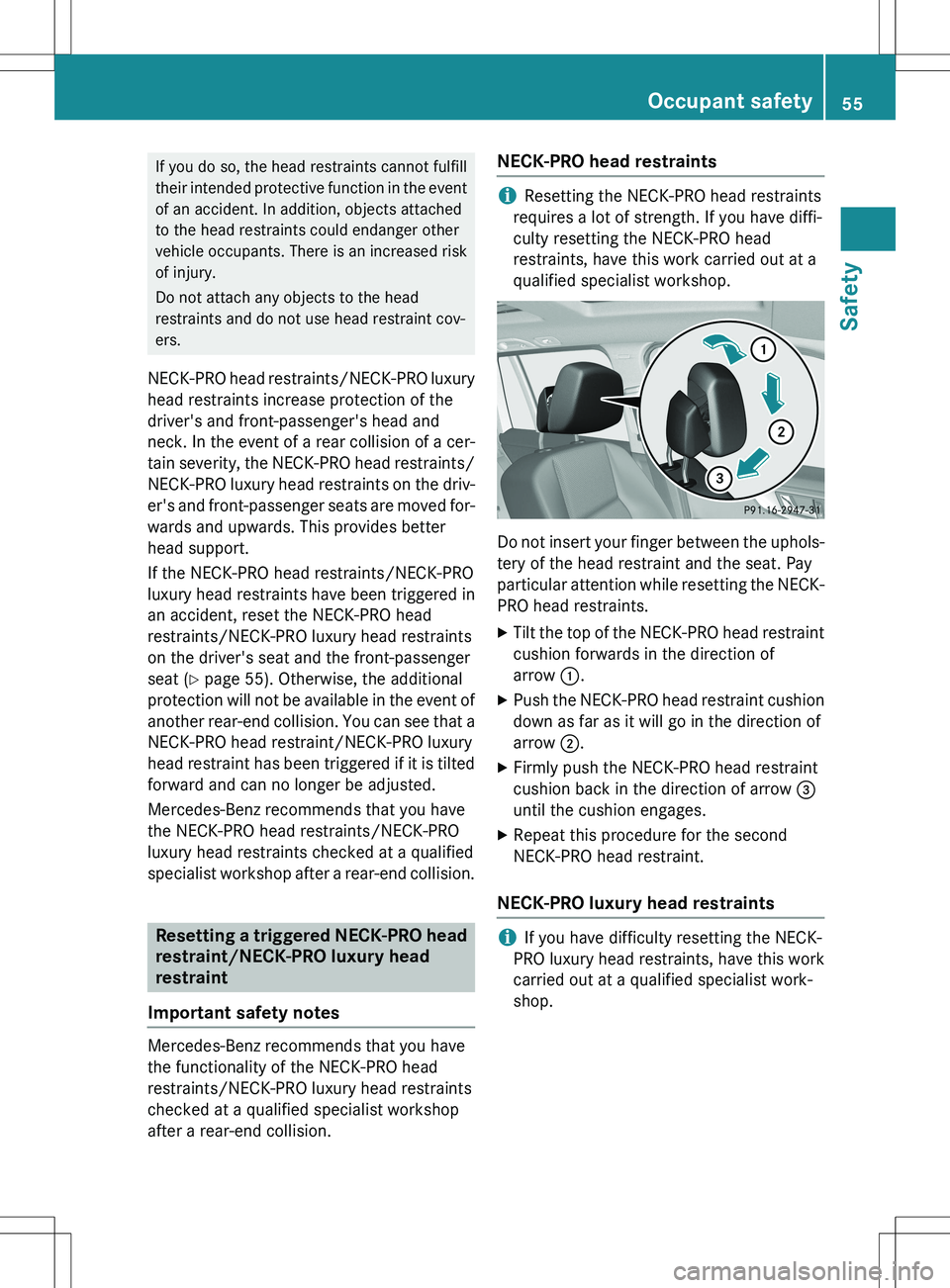
X Tilt the top of the NECK-PRO head restraint
cushion forwards in the direction of
arrow :.
X Push the NECK-PRO head restraint cushion
down as far as it will go in the direction of
arrow ;.
X Firmly push the NECK-PRO head restraint
cushion back in the direction of arrow =
until the cushion engages.
X Repeat this procedure for the second
NECK-PRO head restraint.
NECK-PRO luxury head restraints
iIf you have difficulty resetting the NECK-
PRO luxury head restraints, have this work
carried out at a qualified specialist work-
shop.
Occupant safety55
Safety
Z