engine MERCEDES-BENZ GLK SUV 2008 Owner's Manual
[x] Cancel search | Manufacturer: MERCEDES-BENZ, Model Year: 2008, Model line: GLK SUV, Model: MERCEDES-BENZ GLK SUV 2008Pages: 261, PDF Size: 8.67 MB
Page 78 of 261
!
Switch off the side lamps and parking
lamp when you leave the vehicle. This pre-
vents the battery from discharging.
Dipped-beam headlamps X
Turn the ignition key to position 2in the
ignition lock or start the engine.
X To switch on: turn the light switch to
L.
The side lamp indicator lamp next to the
light switch and the Lindicator lamp in
the instrument cluster light up.
Daytime driving lights On vehicles with a luxury multi-function steer-
ing wheel*, you can activate or deactivate the
daytime driving light function using the on-
board computer (Y page 102).
X To switch on: turn the light switch to
$ orc.
Engine start: the dipped-beam headlamps
are switched on.
Automatic headlamp mode G
Risk of accident
If the light switch is set to the cposition,
the light will not come on automatically in
foggy conditions. This could endanger you
and others. Therefore, turn the light switch to
L in the dark or in fog.
The automatic headlamp feature is only an
aid. The driver is responsible for the vehicle's
lighting at all times. G
Risk of accident
When it is dark or foggy, turn the light switch
from c toL in good time. Otherwise,
the headlamps could switch off temporarily
and you could cause an accident.
X To switch on: turn the light switch to
c.
Key in position 1in the ignition lock: the
side lamp is switched on or off automati- cally depending on the brightness of the
ambient light.
Engine start: depending on the ambient
light conditions, the side lamp and the
dipped-beam headlamps are switched on
or off automatically.
When the dipped-beam headlamps are
switched on, the indicator lamp next to the
light switch and the Lindicator lamp in
the instrument cluster light up.
Foglamps G
Risk of accident
If you suspect that driving conditions will be
foggy, turn the light switch to Lbefore you
start your journey. Otherwise, your vehicle
may not be visible and you could endanger
yourself and others.
X Turn the key to position 2in the ignition
lock.
X To switch on: turn the light switch to
L orT. If the light switch is set to
c, you cannot switch on the foglamp.
X Pull the light switch out to the first detent.
The N green indicator lamp next to the
light switch lights up.
X To switch off: press the light switch in as
far as it will go.
The N green indicator lamp next to the
light switch goes out.
Rear foglamp X
Turn the key to position 2in the ignition
lock.
X To switch on: turn the light switch to
L orT. When the light switch is set
to c you cannot switch on the rear fog-
lamp. Lights
75Controls
* optional
X204_AKB; 1; 5, en-GB
wobuchh,
Version: 2.11.4 2008-10-15T13:20:56+02:00 - Seite 75 ZDateiname: 6515_0671_02_buchblock.pdf; preflight
Page 79 of 261
X
Pull the light switch out to the second stop.
Yellow indicator lamp Rnext to the light
switch lights up.
X To switch off: press the light switch in as
far as it will go.
The R yellow indicator lamp next to the
light switch goes out. Combination switch (turn signals,
main-beam headlamps and headlamp
flasher) Turn signal lamp
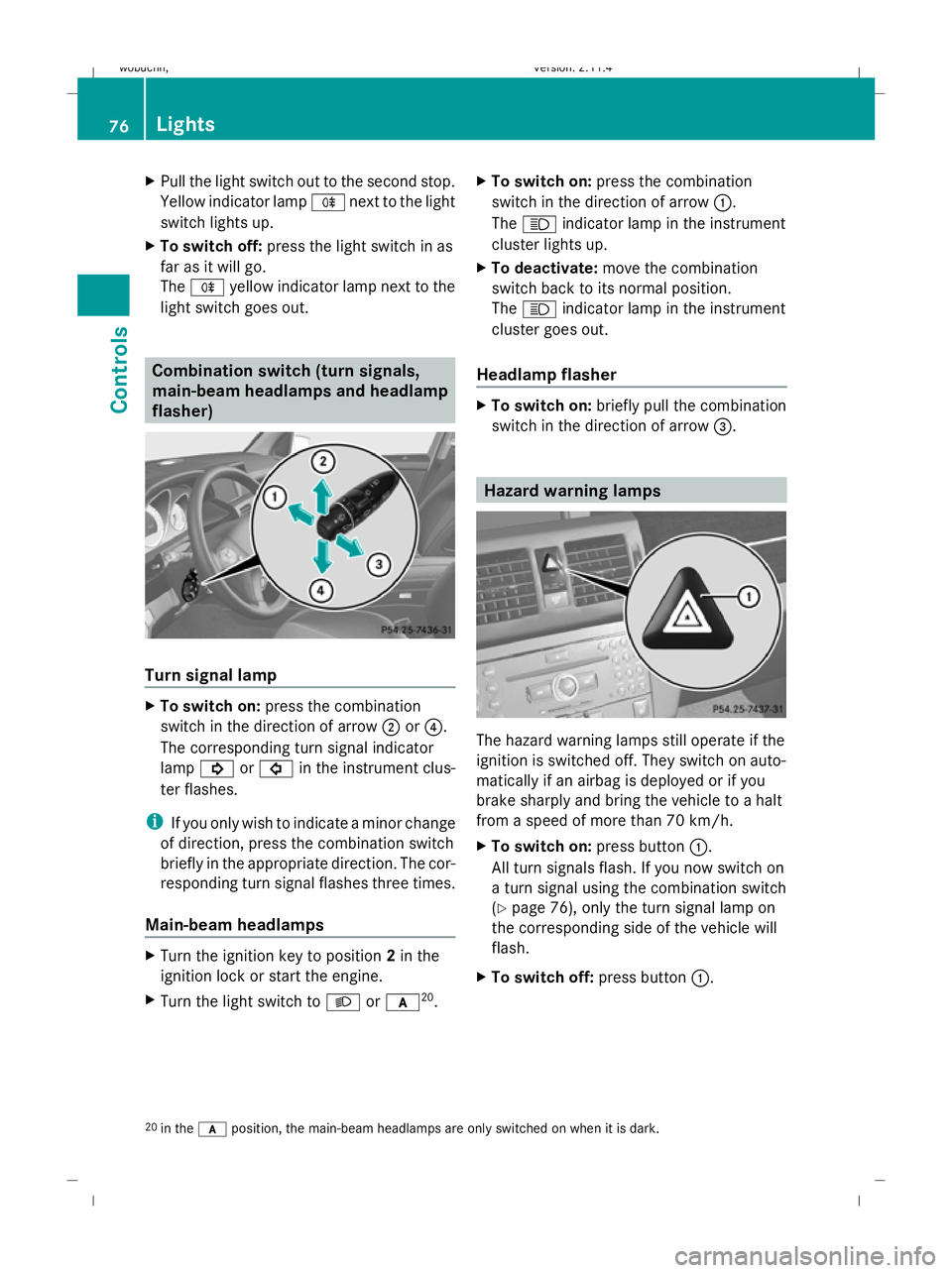
X
To switch on: press the combination
switch in the direction of arrow ;or?.
The corresponding turn signal indicator
lamp ! or# in the instrument clus-
ter flashes.
i If you only wish to indicate a minor change
of direction, press the combination switch
briefly in the appropriate direction. The cor-
responding turn signal flashes three times.
Main-beam headlamps X
Turn the ignition key to position 2in the
ignition lock or start the engine.
X Turn the light switch to Lorc 20
. X
To switch on: press the combination
switch in the direction of arrow :.
The K indicator lamp in the instrument
cluster lights up.
X To deactivate: move the combination
switch back to its normal position.
The K indicator lamp in the instrument
cluster goes out.
Headlamp flasher X
To switch on: briefly pull the combination
switch in the direction of arrow =. Hazard warning lamps
The hazard warning lamps still operate if the
ignition is switched off. They switch on auto-
matically if an airbag is deployed or if you
brake sharply and bring the vehicle to a halt
from a speed of more than 70 km/h.
X
To switch on: press button:.
All turn signals flash. If you now switch on
a turn signal using the combination switch
(Y page 76), only the turn signal lamp on
the corresponding side of the vehicle will
flash.
X To switch off: press button:.
20 in the cposition, the main-beam headlamps are only switched on when it is dark. 76 LightsControls
X204_AKB; 1; 5, en-GB
wobuchh,
Version: 2.11.4 2008-10-15T13:20:56+02:00 - Seite 76Dateiname: 6515_0671_02_buchblock.pdf; preflight
Page 80 of 261
Adjusting the headlamp range (halo-
gen headlamps)
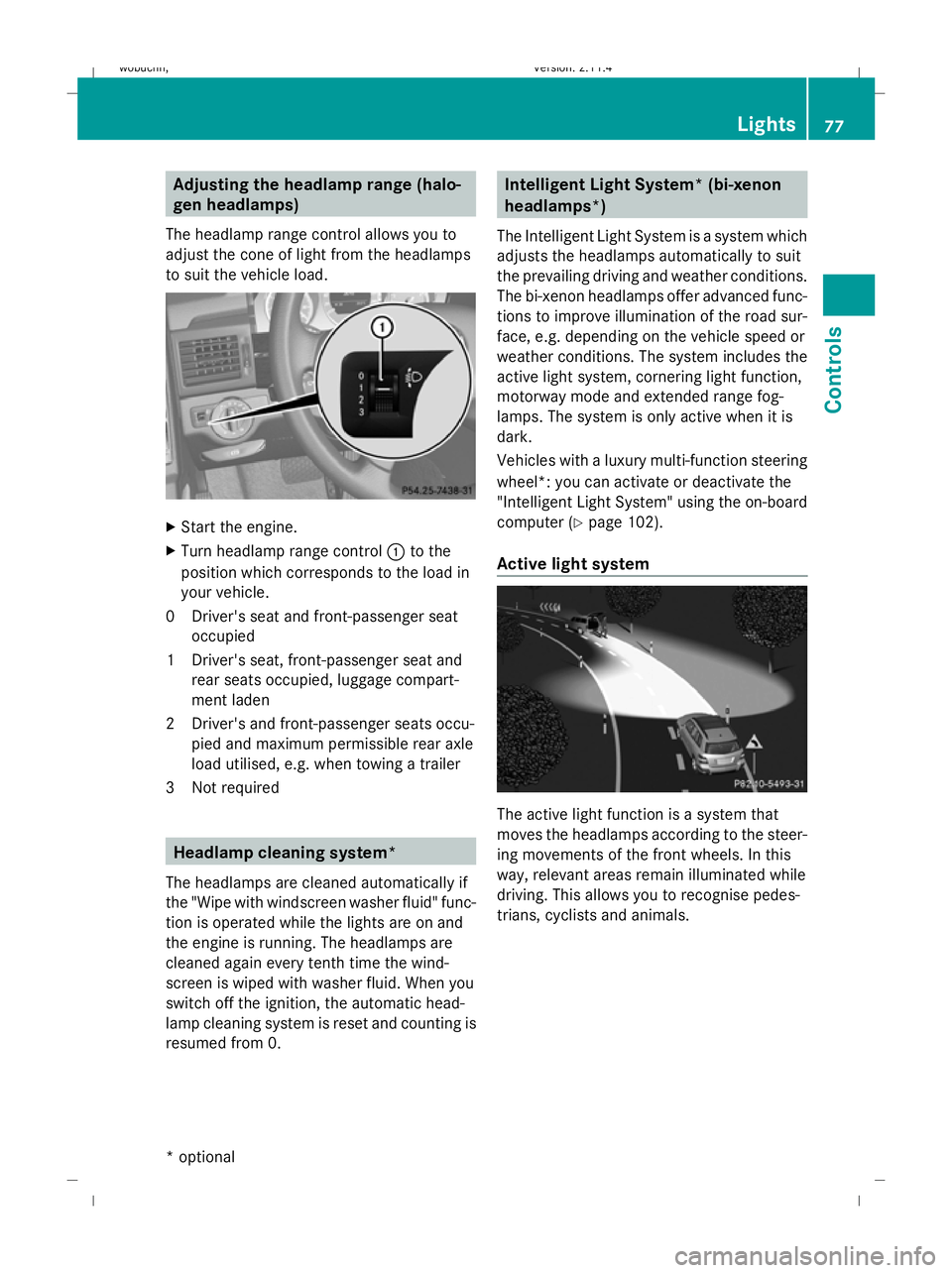
The headlamp range control allows you to
adjust the cone of light from the headlamps
to suit the vehicle load. X
Start the engine.
X Turn headlamp range control :to the
position which corresponds to the load in
your vehicle.
0D river's seat and front-passenger seat
occupied
1D river's seat, front-passenger seat and
rear seats occupied, luggage compart-
ment laden
2D river's and front-passenger seats occu-
pied and maximum permissible rear axle
load utilised, e.g. when towing a trailer
3N ot required Headlamp cleaning system*
The headlamps are cleaned automatically if
the "Wipe with windscreen washer fluid" func-
tion is operated while the lights are on and
the engine is running. The headlamps are
cleaned again every tenth time the wind-
screen is wiped with washer fluid. When you
switch off the ignition, the automatic head-
lamp cleaning system is reset and counting is
resumed from 0. Intelligent Light System* (bi-xenon
headlamps*)
The Intelligent Light System is a system which
adjusts the headlamps automatically to suit
the prevailing driving and weather conditions.
The bi-xenon headlamps offer advanced func-
tions to improve illumination of the road sur-
face, e.g. depending on the vehicle speed or
weather conditions. The system includes the
active light system, cornering light function,
motorway mode and extended range fog-
lamps. The system is only active when it is
dark.
Vehicles with a luxury multi-function steering
wheel*: you can activate or deactivate the
"Intelligent Light System" using the on-board
computer (Y page 102).
Active light system The active light function is a system that
moves the headlamps according to the steer-
ing movements of the front wheels. In this
way, relevant areas remain illuminated while
driving. This allows you to recognise pedes-
trians, cyclists and animals. Lights
77Controls
* optional
X204_AKB; 1; 5, en-GB
wobuchh,
Version: 2.11.4 2008-10-15T13:20:56+02:00 - Seite 77 ZDateiname: 6515_0671_02_buchblock.pdf; preflight
Page 84 of 261
G
Risk of injury
Do not leave children unsupervised in the
vehicle, even if they are secured in a child
restraint system. The children could:
R be seriously or even fatally injured on parts
of the vehicle
R be seriously or even fatally injured by pro-
longed exposure to extremely high or
extremely low temperatures
If children open a door, they could:
R seriously or even fatally injure other people
R get out of the vehicle, thereby injuring
themselves or be seriously or even fatally
injured by a passing vehicle
Activate the child-proof locks/override fea-
ture if children are travelling in the vehicle.
They could otherwise open doors or side win-
dows while the vehicle is in motion and
thereby injure themselves or others.
i Related topics:
R convenience opening from the outside
(Y page 82) or from the inside
(Y page 126)
R convenience closing from the outside
(Y page 82) or from the inside
(Y page 126)
R disabling the controls in the rear com-
partment (override feature) (Y page 50)
R automatic closing of the side windows
(PRE-SAFE ®
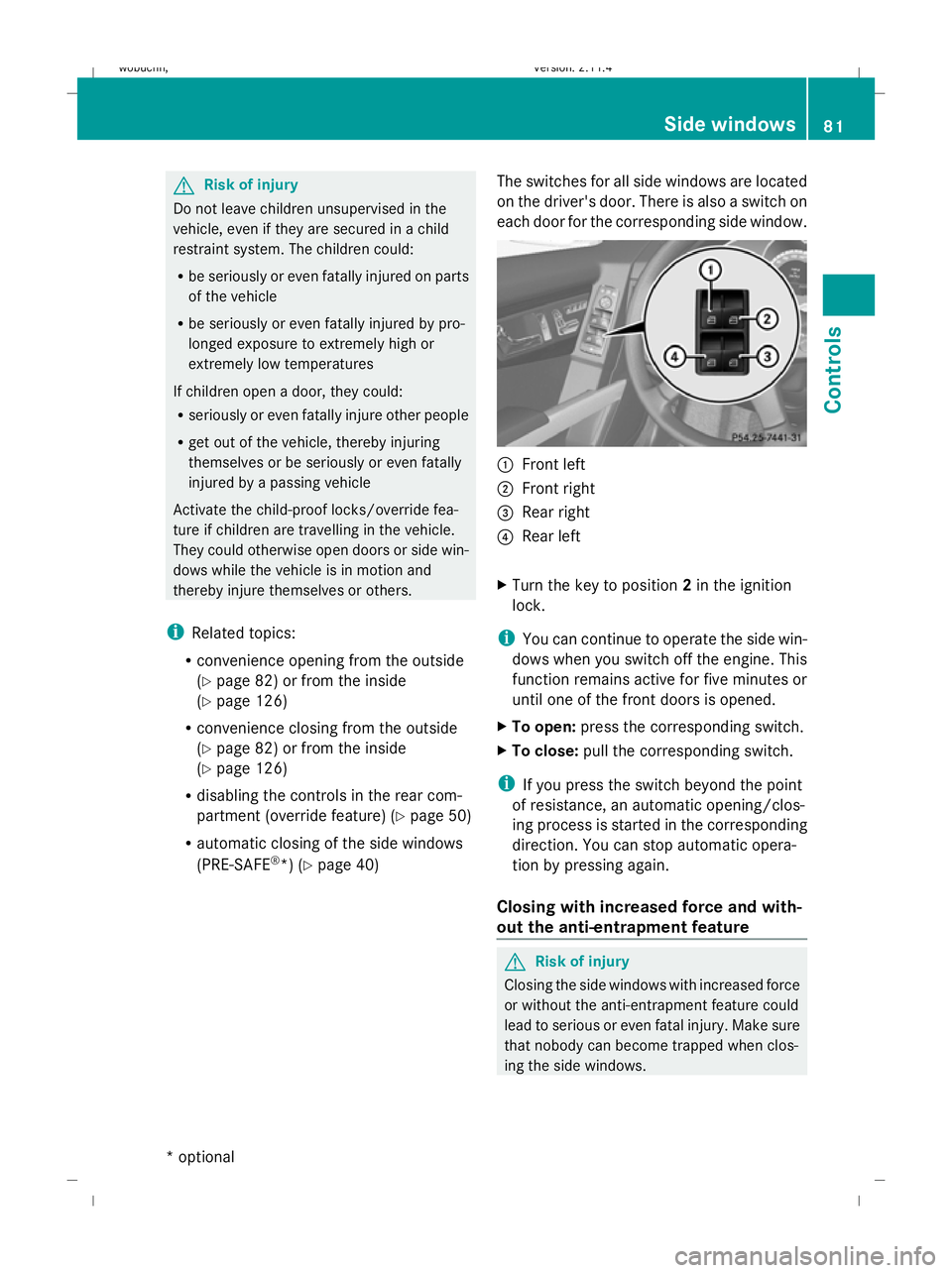
*) (Y page 40) The switches for all side windows are located
on the driver's door. There is also a switch on
each door for the corresponding side window. :
Front left
; Front right
= Rear right
? Rear left
X Turn the key to position 2in the ignition
lock.
i You can continue to operate the side win-
dows when you switch off the engine. This
function remains active for five minutes or
until one of the front doors is opened.
X To open: press the corresponding switch.
X To close: pull the corresponding switch.
i If you press the switch beyond the point
of resistance, an automatic opening/clos-
ing process is started in the corresponding
direction. You can stop automatic opera-
tion by pressing again.
Closing with increased force and with-
out the anti-entrapment feature G
Risk of injury
Closing the side windows with increased force
or without the anti-entrapment feature could
lead to serious or even fatal injury. Make sure
that nobody can become trapped when clos-
ing the side windows. Side windows
81Controls
* optional
X204_AKB; 1; 5, en-GB
wobuchh,
Version: 2.11.4
2008-10-15T13:20:56+02:00 - Seite 81 ZDateiname: 6515_0671_02_buchblock.pdf; preflight
Page 86 of 261
X
Press and hold the &button until the
side windows and the panorama sliding
sunroof* are fully closed.
X Make sure that all the side windows and the
panorama sliding sunroof* are closed.
On vehicles with a panorama sliding sun-
roof*:
X Press and hold the &button again until
the roller sunblinds* of the panorama slid-
ing sunroof* close. Driving and parking
Starting the engine
G
Risk of accident
Do not put any objects in the driver's footwell.
If you use a floormat or carpet in the driver's
footwell, make sure that they are correctly
secured and that there is sufficient clearance
for the pedals.
Do not place several floormats on top of one
another.
Otherwise, the objects or floormats could get
between the pedals in the event of sudden
braking or acceleration. You may then no lon-
ger be able to brake, change gear or acceler-
ate as intended. This may result in an accident
and injury. G
Risk of poisoning
Never leave the engine running in enclosed
spaces. The exhaust gases contain carbon
monoxide. Inhaling exhaust fumes consti-
tutes a health hazard and could lead to loss
of consciousness or even death.
! Do not depress the accelerator pedal
when starting the engine. Automatic transmission X
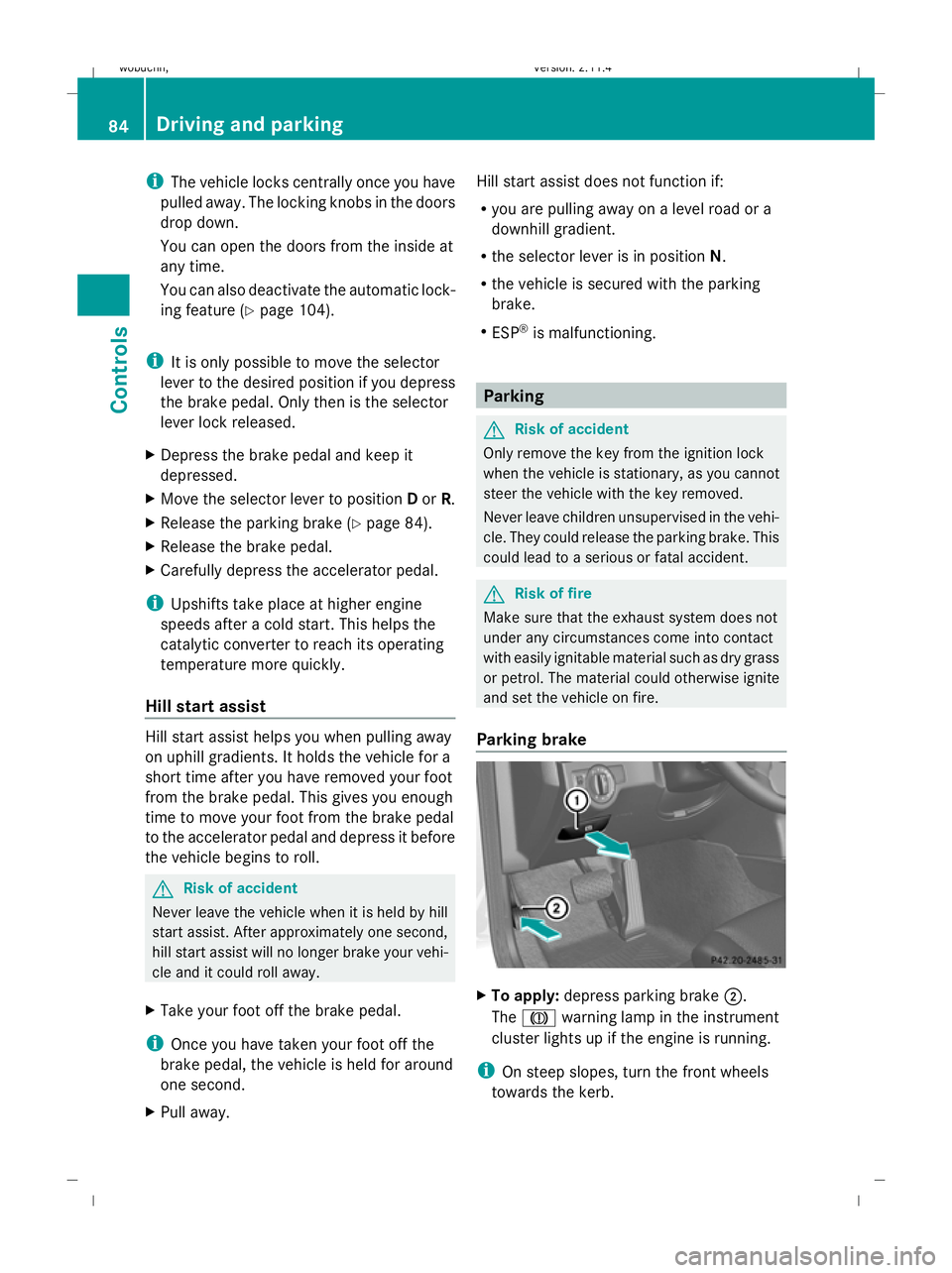
Before starting, make sure Pis selected.
i The engine can also be started when the
selector lever is in position N.
Starting the engine X
To start a petrol engine: turn the key to
position 3in the ignition lock (Y page 61)
and release it as soon as the engine is run-
ning.
X To start a diesel engine: turn the key to
position 2in the ignition lock (Y page 61).
The % preglow indicator lamp in the
instrument cluster lights up.
X When the %preglow indicator lamp
goes out, turn the key to position 3and
release it as soon as the engine is running.
i You can start the engine without preglow
if the engine is warm. Pulling away
! Warm up the engine quickly. Do not use
the engine's full performance until it has
reached operating temperature.
Only shift into reverse gear when the vehi-
cle is stationary.
Where possible, avoid spinning the drive
wheels when pulling away on slippery
roads. Otherwise, you could damage the
drive train. Driving and parking
83Controls
* optional
X204_AKB; 1; 5, en-GB
wobuchh,
Version: 2.11.4 2008-10-15T13:20:56+02:00 - Seite 83 ZDateiname: 6515_0671_02_buchblock.pdf; preflight
Page 87 of 261
i
The vehicle locks centrally once you have
pulled away. The locking knobs in the doors
drop down.
You can open the doors from the inside at
any time.
You can also deactivate the automatic lock-
ing feature (Y page 104).
i It is only possible to move the selector
lever to the desired position if you depress
the brake pedal. Only then is the selector
lever lock released.
X Depress the brake pedal and keep it
depressed.
X Move the selector lever to position Dor R.
X Release the parking brake (Y page 84).
X Release the brake pedal.
X Carefully depress the accelerator pedal.
i Upshifts take place at higher engine
speeds after a cold start. This helps the
catalytic converter to reach its operating
temperature more quickly.
Hill start assist Hill start assist helps you when pulling away
on uphill gradients. It holds the vehicle for a
short time after you have removed your foot
from the brake pedal. This gives you enough
time to move your foot from the brake pedal
to the accelerator pedal and depress it before
the vehicle begins to roll. G
Risk of accident
Never leave the vehicle when it is held by hill
start assist. After approximately one second,
hill start assist will no longer brake your vehi-
cle and it could roll away.
X Take your foot off the brake pedal.
i Once you have taken your foot off the
brake pedal, the vehicle is held for around
one second.
X Pull away. Hill start assist does not function if:
R
you are pulling away on a level road or a
downhill gradient.
R the selector lever is in position N.
R the vehicle is secured with the parking
brake.
R ESP ®
is malfunctioning. Parking
G
Risk of accident
Only remove the key from the ignition lock
when the vehicle is stationary, as you cannot
steer the vehicle with the key removed.
Never leave children unsupervised in the vehi-
cle. They could release the parking brake. This
could lead to a serious or fatal accident. G
Risk of fire
Make sure that the exhaust system does not
under any circumstances come into contact
with easily ignitable material such as dry grass
or petrol. The material could otherwise ignite
and set the vehicle on fire.
Parking brake X
To apply: depress parking brake ;.
The J warning lamp in the instrument
cluster lights up if the engine is running.
i On steep slopes, turn the front wheels
towards the kerb. 84 Driving and parkingControls
X204_AKB; 1; 5, en-GB
wobuchh,
Version: 2.11.4 2008-10-15T13:20:56+02:00 - Seite 84Dateiname: 6515_0671_02_buchblock.pdf; preflight
Page 88 of 261
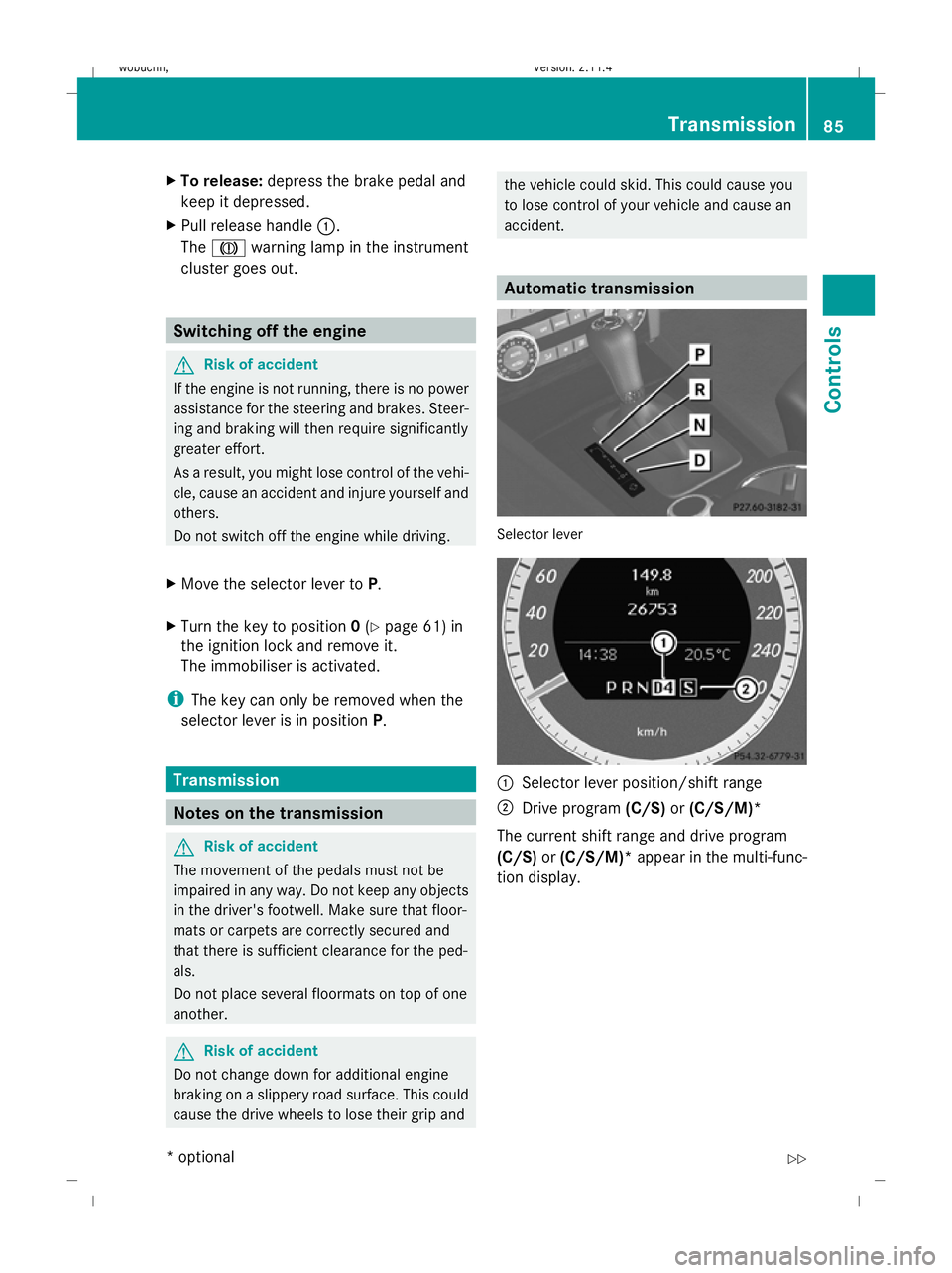
X
To release: depress the brake pedal and
keep it depressed.
X Pull release handle :.
The J warning lamp in the instrument
cluster goes out. Switching off the engine
G
Risk of accident
If the engine is not running, there is no power
assistance for the steering and brakes. Steer-
ing and braking will then require significantly
greater effort.
As a result, you might lose control of the vehi-
cle, cause an accident and injure yourself and
others.
Do not switch off the engine while driving.
X Move the selector lever to P.
X Turn the key to position 0(Y page 61) in
the ignition lock and remove it.
The immobiliser is activated.
i The key can only be removed when the
selector lever is in position P.Transmission
Notes on the transmission
G
Risk of accident
The movement of the pedals must not be
impaired in any way. Do not keep any objects
in the driver's footwell. Make sure that floor-
mats or carpets are correctly secured and
that there is sufficient clearance for the ped-
als.
Do not place several floormats on top of one
another. G
Risk of accident
Do not change down for additional engine
braking on a slippery road surface. This could
cause the drive wheels to lose their grip and the vehicle could skid. This could cause you
to lose control of your vehicle and cause an
accident.
Automatic transmission
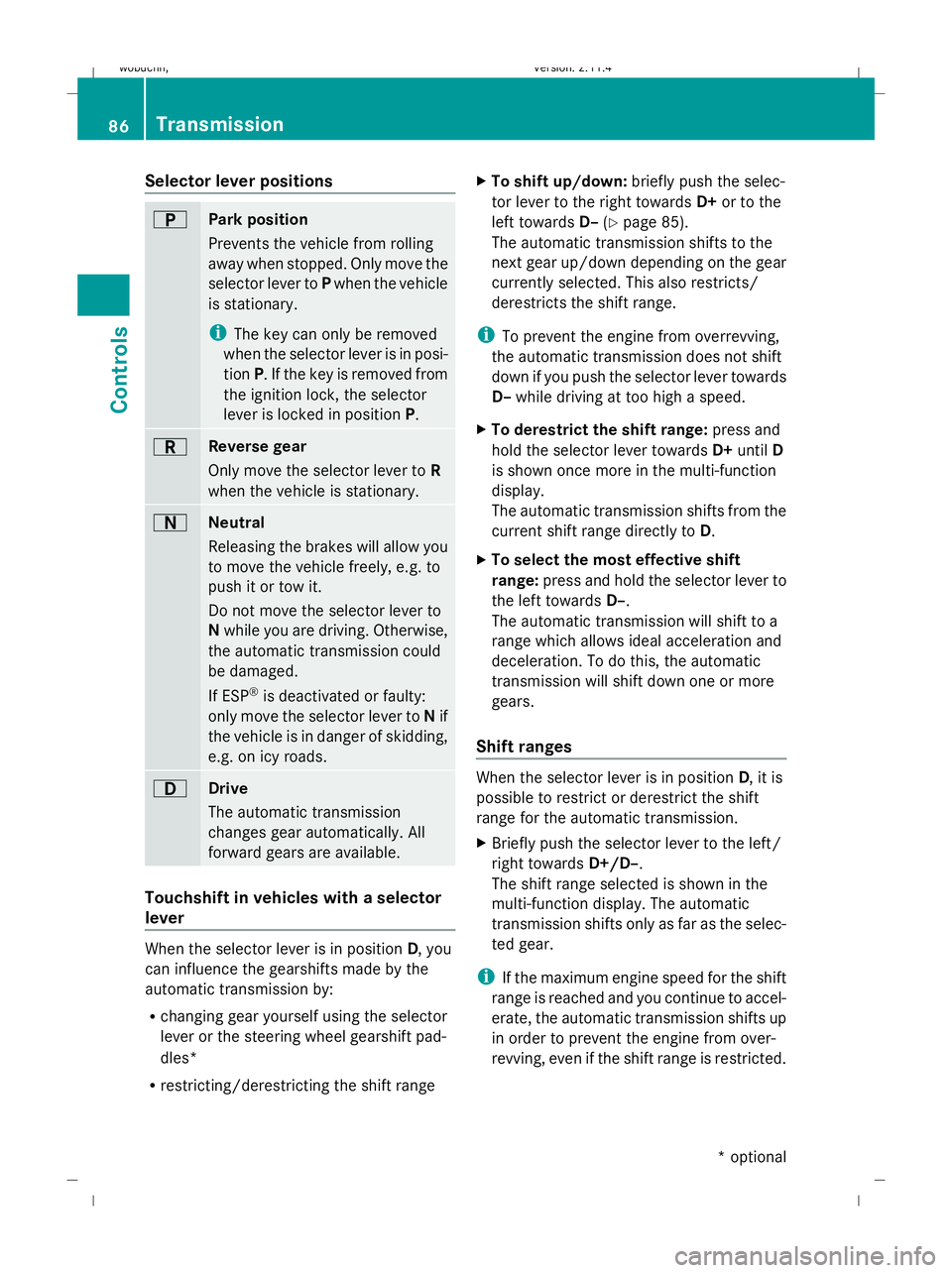
Selector lever
:
Selector lever position/shift range
; Drive program (C/S)or(C/S/M)*
The current shift range and drive program
(C/S) or(C/S/M)* appear in the multi-func-
tion display. Transmission
85Controls
* optional
X204_AKB; 1; 5, en-GB
wobuchh
,V ersion: 2.11.4
2008-10-15T13:20:56+02:00 - Seite 85 ZDateiname: 6515_0671_02_buchblock.pdf; preflight
Page 89 of 261
Selector lever positions
B
Park position
Prevents the vehicle from rolling
away when stopped. Only move the
selector lever to
Pwhen the vehicle
is stationary.
i The key can only be removed
when the selector lever is in posi-
tion P. If the key is removed from
the ignition lock, the selector
lever is locked in position P.C
Reverse gear
Only move the selector lever to
R
when the vehicle is stationary. A
Neutral
Releasing the brakes will allow you
to move the vehicle freely, e.g. to
push it or tow it.
Do not move the selector lever to
N while you are driving. Otherwise,
the automatic transmission could
be damaged.
If ESP ®
is deactivated or faulty:
only move the selector lever to Nif
the vehicle is in danger of skidding,
e.g. on icy roads. 7
Drive
The automatic transmission
changes gear automatically. All
forward gears are available.
Touchshift in vehicles with a selector
lever When the selector lever is in position
D, you
can influence the gearshifts made by the
automatic transmission by:
R changing gear yourself using the selector
lever or the steering wheel gearshift pad-
dles*
R restricting/derestricting the shift range X
To shift up/down: briefly push the selec-
tor lever to the right towards D+or to the
left towards D–(Ypage 85).
The automatic transmission shifts to the
next gear up/down depending on the gear
currently selected. This also restricts/
derestricts the shift range.
i To prevent the engine from overrevving,
the automatic transmission does not shift
down if you push the selector lever towards
D– while driving at too high a speed.
X To derestrict the shift range: press and
hold the selector lever towards D+until D
is shown once more in the multi-function
display.
The automatic transmission shifts from the
current shift range directly to D.
X To select the most effective shift
range: press and hold the selector lever to
the left towards D–.
The automatic transmission will shift to a
range which allows ideal acceleration and
deceleration. To do this, the automatic
transmission will shift down one or more
gears.
Shift ranges When the selector lever is in position
D, it is
possible to restrict or derestrict the shift
range for the automatic transmission.
X Briefly push the selector lever to the left/
right towards D+/D–.
The shift range selected is shown in the
multi-function display. The automatic
transmission shifts only as far as the selec-
ted gear.
i If the maximum engine speed for the shift
range is reached and you continue to accel-
erate, the automatic transmission shifts up
in order to prevent the engine from over-
revving, even if the shift range is restricted. 86 TransmissionControls
* optional
X204_AKB; 1; 5, en-GB
wobuchh,
Version: 2.11.4 2008-10-15T13:20:56+02:00 - Seite 86Dateiname: 6515_0671_02_buchblock.pdf; preflight
Page 90 of 261
Driving situation: gear indicator
=
The braking effect of the engine can
be used in this position.
5
To use the braking effect of the
engine on downhill gradients and
for driving:
R
on steep mountain roads
R in mountainous terrain
R in arduous conditions 4
To use the braking effect of the
engine on extremely steep downhill
gradients and long downhill
stretches
i
On vehicles with steering wheel gearshift
paddles*, you can restrict or derestrict the
shift range in the same way as with Touch-
shift (Y page 86).
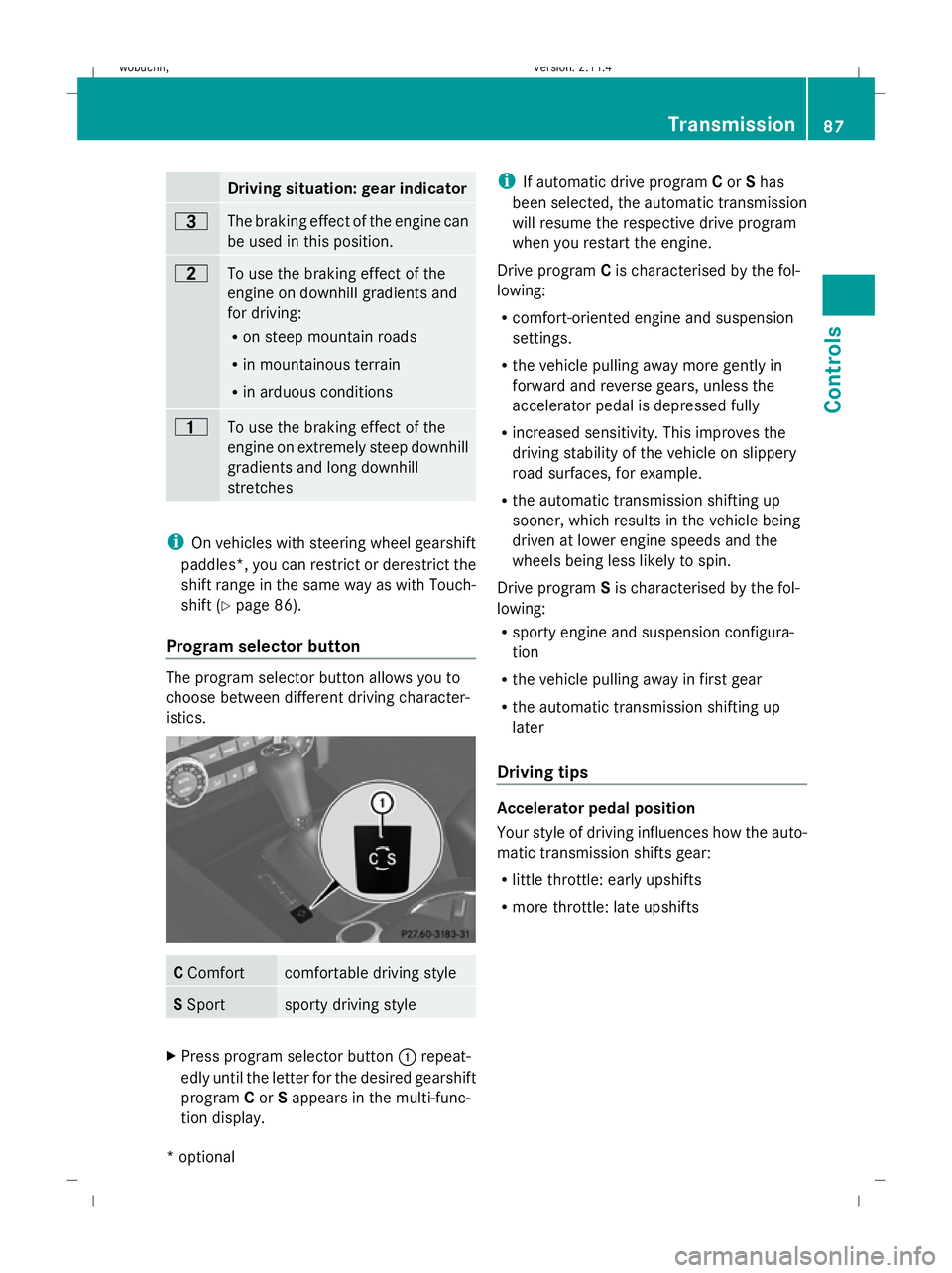
Program selector button The program selector button allows you to
choose between different driving character-
istics.
C
Comfort comfortable driving style
S
Sport sporty driving style
X
Press program selector button :repeat-
edly until the letter for the desired gearshift
program Cor Sappears in the multi-func-
tion display. i
If automatic drive program Cor Shas
been selected, the automatic transmission
will resume the respective drive program
when you restart the engine.
Drive program Cis characterised by the fol-
lowing:
R comfort-oriented engine and suspension
settings.
R the vehicle pulling away more gently in
forward and reverse gears, unless the
accelerator pedal is depressed fully
R increased sensitivity. This improves the
driving stability of the vehicle on slippery
road surfaces, for example.
R the automatic transmission shifting up
sooner, which results in the vehicle being
driven at lower engine speeds and the
wheels being less likely to spin.
Drive program Sis characterised by the fol-
lowing:
R sporty engine and suspension configura-
tion
R the vehicle pulling away in first gear
R the automatic transmission shifting up
later
Driving tips Accelerator pedal position
Your style of driving influences how the auto-
matic transmission shifts gear:
R little throttle: early upshifts
R more throttle: late upshifts Transmission
87Controls
* optional
X204_AKB; 1; 5, en-GB
wobuchh,
Version: 2.11.4 2008-10-15T13:20:56+02:00 - Seite 87 ZDateiname: 6515_0671_02_buchblock.pdf; preflight
Page 91 of 261
Kickdown
Use kickdown for maximum acceleration.
X Depress the accelerator pedal beyond the
pressure point.
The transmission shifts to a lower gear
depending on the engine speed.
X Ease off the accelerator pedal once the
desired speed is reached.
The automatic transmission shifts back up.
Trailer towing
X When driving up gradients, keep to the mid-
dle of the engine speed range.
X Shift down to shift range 3or 2depending
on the gradient, even if cruise con-
trol*( Ypage 86)is activated. Steering wheel gearshift paddles*
and manual gearshift program* G
Risk of accident
Do not change down for additional engine
braking on a slippery road surface. This could
cause the drive wheels to lose their grip and
the vehicle could skid.
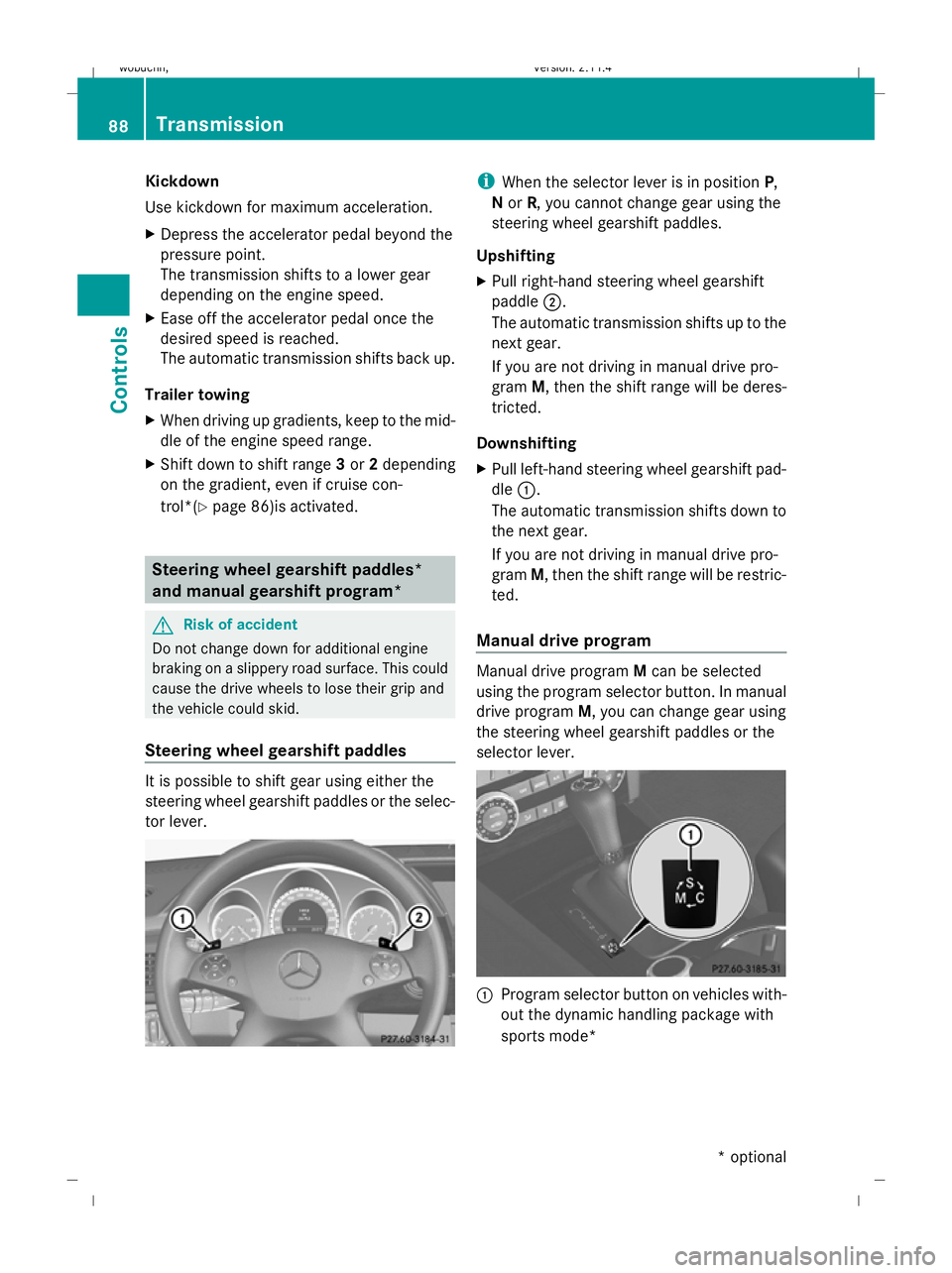
Steering wheel gearshift paddles It is possible to shift gear using either the
steering wheel gearshift paddles or the selec-
tor lever. i
When the selector lever is in position P,
N or R, you cannot change gear using the
steering wheel gearshift paddles.
Upshifting
X Pull right-hand steering wheel gearshift
paddle ;.
The automatic transmission shifts up to the
next gear.
If you are not driving in manual drive pro-
gram M, then the shift range will be deres-
tricted.
Downshifting
X Pull left-hand steering wheel gearshift pad-
dle :.
The automatic transmission shifts down to
the next gear.
If you are not driving in manual drive pro-
gram M, then the shift range will be restric-
ted.
Manual drive program Manual drive program
Mcan be selected
using the program selector button. In manual
drive program M, you can change gear using
the steering wheel gearshift paddles or the
selector lever. :
Program selector button on vehicles with-
out the dynamic handling package with
sports mode* 88 TransmissionCont
rols
* optional
X204_AKB; 1; 5, en-GB
wobuchh,
Version: 2.11.4 2008-10-15T13:20:56+02:00 - Seite 88Dateiname: 6515_0671_02_buchblock.pdf; preflight