ad blue MERCEDES-BENZ GLK SUV 2012 Owners Manual
[x] Cancel search | Manufacturer: MERCEDES-BENZ, Model Year: 2012, Model line: GLK SUV, Model: MERCEDES-BENZ GLK SUV 2012Pages: 381, PDF Size: 12.68 MB
Page 7 of 381
1, 2, 3 ...
12-button multifunction steering
wheel Operating the on-board computer .228
Overview .......................................... 36
12 V socket
see Socket
4-button multifunction steering
wheel
Operating the on-board computer .225
Overview .......................................... 35
4ETS
see ETS/4ETS (Electronic Trac-
tion System)
4MATIC (permanent four-wheel
drive) .................................................. 213A
ABS (Anti-lock Braking System) Display message (12-button mul-
tifunction steering wheel) ..............252
Display message (4-button multi-
function steering wheel) ................247
Function/notes ................................ 65
Important safety notes ....................65
Warning lamp ................................. 286
Activating/deactivating air-recir-
culation mode .................................... 135
Activating/deactivating cooling
with air dehumidification .................131
Active Blind Spot Assist Function/notes ............................. 207
Switching on/off (on-board com-
puter, 12-button multifunction
steering wheel) .............................. 237
Towing a trailer .............................. 210
Active Driving Assistance package .207
Active Lane Keeping Assist Display message (12-button mul-
tifunction steering wheel) ..............273
Function/notes ............................. 210
Switching on/off (on-board com-
puter, 12-button multifunction
steering wheel) .............................. 238
Towing a trailer ......................207, 213
Active light function .........................114Active Park Assist
Display message ............................ 273
Active Parking Assist
Important safety notes ..................192
Towing a trailer .............................. 196
Active Service System
see ASSYST PLUS
Adaptive brake lamps .........................67
Adaptive Highbeam Assist Display message (12-button mul-
tifunction steering wheel) ..............263
Function/notes ............................. 116
Adaptive Main-beam Assist
Switching on/off (on-board com-
puter) ............................................. 240
AdBlue ®
Display message (12-button mul-
tifunction steering wheel) ..............269
Display message (4-button multi-
function steering wheel) ................266
Filling capacity ............................... 369
Notes ............................................. 368
Service indicator ............................ 313
AdBlue ®
service indicator ................313
Additional speedometer ...................239
Additives (engine oil) ........................370
Adjusting the headlamp range .........112
Airbags Front airbag (driver, front
passenger) ....................................... 46
Important safety guidelines .............44
Kneebag .......................................... .46
Pelvis airbag .................................... 47
Sidebag ............................................ 47
Triggering ......................................... 43
Windowba g...................................... 48
Air-conditioning system
see Climate control
Air filter
Display message (12-button mul-
tifunction steering wheel) ..............268
Display message (4-button multi-
function steering wheel) ................265
Air pressure
see Tyre pressure 4
Index
Page 9 of 381
Auxiliary heating
Activating/deactivating .................137
Activating/deactivating (on the
centre console) .............................. 137
Display message (12-button mul-
tifunction steering wheel) ..............280
Important safety notes ..................137
Problem (display message) ............141
Remote control .............................. 138
Setting (on-board computer, 12-
button multifunction steering
wheel) ............................................ 242
Setting the departure time ............. 139
Auxiliary ventilation
Activating/deactivating .................137
Activating/deactivating (on the
centre console) .............................. 137
Problem (display message) ............141
Remote control .............................. 138B
Bag hook ............................................ 300
Ball coupling Fitting ............................................ 217
Removing ....................................... 220
Storing ........................................... 220
BAS (Brake Assist System) .................66
BAS PLUS (Brake Assist System
PLUS) .................................................... 66
Battery (key) Checking .......................................... 79
Important safety notes ....................79
Replacing ......................................... 79
Battery (vehicle)
Charging ........................................ 339
Display message (12-button mul-
tifunction steering wheel) ..............268
Display message (4-button multi-
function steering wheel) ................265
Important safety notes ..................337
Jump starting ................................. 341
Belt
see Seat belt
Belt force limiters (activation) ...........43
Belt tensioner Activation ......................................... 43
Function .......................................... .53Blinds
see Roller sunblind
Blind Spot Assist
Activating/deactivating .................237
Notes/function .............................. 203
Trailer towing ................................. 205
see Active Blind Spot Assist
BlueTEC (AdBlue ®
) ............................. 368
Bonnet Closing .......................................... .315
Display message (12-button mul-
tifunction steering wheel) ..............280
Display message (4-button multi-
function steering wheel) ................278
Opening ......................................... 313
Brake Assist System
see BAS (Brake Assist System)
Brake fluid
Display message (12-button mul-
tifunction steering wheel) ..............254
Display message (4-button multi-
function steering wheel) ................249
Notes ............................................. 371
Brake lamp
Display message (12-button mul-
tifunction steering wheel) ..............261
Display message (4-button multi-
function steering wheel) ................258
Brake lamps
Adaptive .......................................... .67
Brakes
ABS .................................................. 65
BAS .................................................. 66
BAS PLUS ........................................ 66
Brake fluid (notes) .........................371
Display message (12-button mul-
tifunction steering wheel) ..............252
Display message (4-button multi-
function steering wheel) ................247
Driving tips .................................... 167
Important safety notes ..................167
Parking brake ........................ 165, 168
Warning lamp ................................. 286
Breakdown
see Flat tyre
see Towing away/tow-starting 6
Index
Page 22 of 381
Roller sunblind
Opening/closing .............................. 93
Panorama sliding sunroo f................ 93
Roof carrier ........................................ 304
Roof lining and carpets (cleaning
instructions) ...................................... 323
Roof load (maximum) ........................372
Route (navigation) see Route guidance (navigation)
Route guidance (navigation) ............232 S
Safety Children in the vehicle .....................54
Child restraint systems ....................54
Safety net
Attaching ....................................... 302
Important safety information .........301
Safety system
see Driving safety system
Seat
Folding the backrest (rear com-
partment) forwards/back ..............299
Seat belt
Activating/deactivating seat-belt
adjustment (12-button multifunc-
tion steering wheel) .......................243
Adjusting the driver's and front-
passenger seat belt .........................51
Adjusting the height ......................... 52
Belt force limiter .............................. 53
Belt tensioner .................................. 53
Centre rear-compartment sea t........ 52
Cleaning ......................................... 323
Display message (12-button mul-
tifunction steering wheel) ..............255
Display message (4-button multi-
function steering wheel) ................249
Fastening ......................................... 51
Important safety guidelines .............50
Rear seat belt status indicator .........53
Releasing ......................................... 52
Warning lamp ................................. 284
Warning lamp (function) ................... 52 Seats
Adjusting (electrically) .....................98
Adjusting (manually and electri-
cally) ................................................ 98
Adjusting lumbar support ..............100
Adjusting the 4-way lumbar sup-
port ................................................ 100
Adjusting the head restraint ............98
Cleaning the cover .........................323
Correct driver's seat position ........... 96
Folding the rear bench seat for-
wards/back ................................... 298
Important safety notes ....................97
Seat heating problem ....................101
Seat ventilation problem ................101
Storing settings (memory func-
tion) ............................................... 106
Switching seat heating on/off .......100
Switching the seat ventilation on/
off .................................................. 101
Sensors (cleaning instructions) .......321
Service see ASSYST PLUS
Service Centre
see Qualified specialist workshop
Service menu (12-button multi-
function steering wheel) ..................238
Service products
AdBlue ®
special additive s.............. 368
Brake fluid ..................................... 371
Coolant (engine) ............................ 371
Engine oil ....................................... 369
Fuel ................................................ 365
Important safety notes ..................365
Washer fluid .................................. .372
Settings
Factory (12-button multifunction
steering wheel) .............................. 244
On-board computer (12-button
multifunction steering wheel) ........238
Setting the air distribution ...............133
Setting the airflow ............................134
Shifting to neutral (manual trans-
mission) ............................................. 154
Short journeys (diesel particle fil-
ter) ...................................................... 167
Sidebag ................................................ 47 Index
19
Page 104 of 381
The system automatically switches down
from level 3to level 2after approximately
eight minutes.
The system automatically switches down
from level 2to level 1after approximately ten
minutes.
The system automatically switches off
approximately 20 minutes after it is set to
level 1.
X Make sure that the key is in position 1or
2 in the ignition lock.
X To switch on: press button:repeatedly
until the desired heating level is set.
X To switch off: press button:repeatedly
until all the indicator lamps go out.
Problems with the seat heating The seat heating has switched off prema-
turely or cannot be switched on. The vehicle's
electrical system voltage is too low because
too many electrical consumers are switched
on.
X Switch off electrical consumers that you do
not need, such as the rear window heating
or interior lighting. Switching the seat ventilation on/off
Switching on/off The three blue indicator lamps in the buttons
indicate the ventilation level you have selec-
ted.
i If the battery voltage is too low, the seat
ventilation may switch off. X
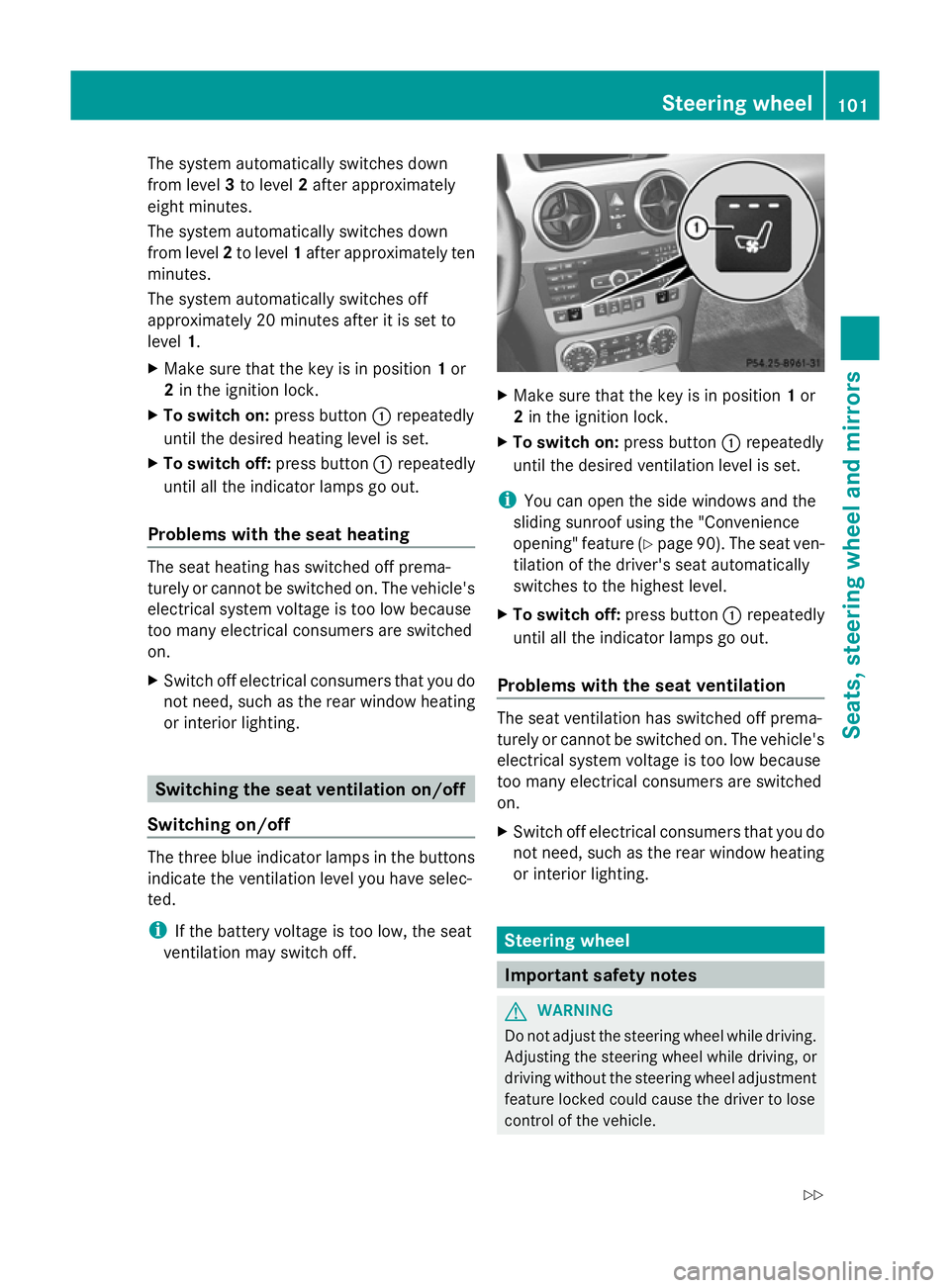
Make sure that the key is in position 1or
2 in the ignition lock.
X To switch on: press button:repeatedly
until the desired ventilation level is set.
i You can open the side windows and the
sliding sunroof using the "Convenience
opening" feature (Y page 90). The seat ven-
tilation of the driver's seat automatically
switches to the highest level.
X To switch off: press button:repeatedly
until all the indicator lamps go out.
Problems with the seat ventilation The seat ventilation has switched off prema-
turely or cannot be switched on. The vehicle's
electrical system voltage is too low because
too many electrical consumers are switched
on.
X
Switch off electrical consumers that you do
not need, such as the rear window heating
or interior lighting. Steering wheel
Important safety notes
G
WARNING
Do not adjust the steering wheel while driving.
Adjusting the steering wheel while driving, or
driving without the steering wheel adjustment
feature locked could cause the driver to lose
control of the vehicle. Steering wheel
101Seats, steering wheel and mirrors
Z
Page 141 of 381
The colours of the indicator lamps on the but-
ton have the following meanings:
Blue Auxiliary ventilation switched on
Red Auxiliary heating switched on
Yellow Departure time preselected (Ypage 242)
Switching on the auxiliary heating/venti-
lation
X Press button :.
The red or blue indicator lamp in but-
ton :lights up.
Switching off the auxiliary heating/venti-
lation
X Press button :.
The red or blue indicator lamp in but-
ton :goes out.
Switching the auxiliary heating/venti-
lation on/off using the remote control Your vehicle comes with one remote control.
You may use two additional remote controls
for your vehicle. For more information, please
contact a qualified specialist workshop.
The remote control has a maximum range of
approximately 300 metres. This range is
reduced by:
R
sources of radio interference
R solid objects between the remote control
and the vehicle
R the remote control being in an unfavoura-
ble position in relation to the vehicle
R transmitting from an enclosed space
i The optimum range can be achieved if you
hold the remote control vertically, pointing
upwards when you press one of the but-
tons.
i A battery symbol appears in the display
when the battery in the remote control is
low. Replace the remote control battery
(Y page 140). Auxiliary heating remote control
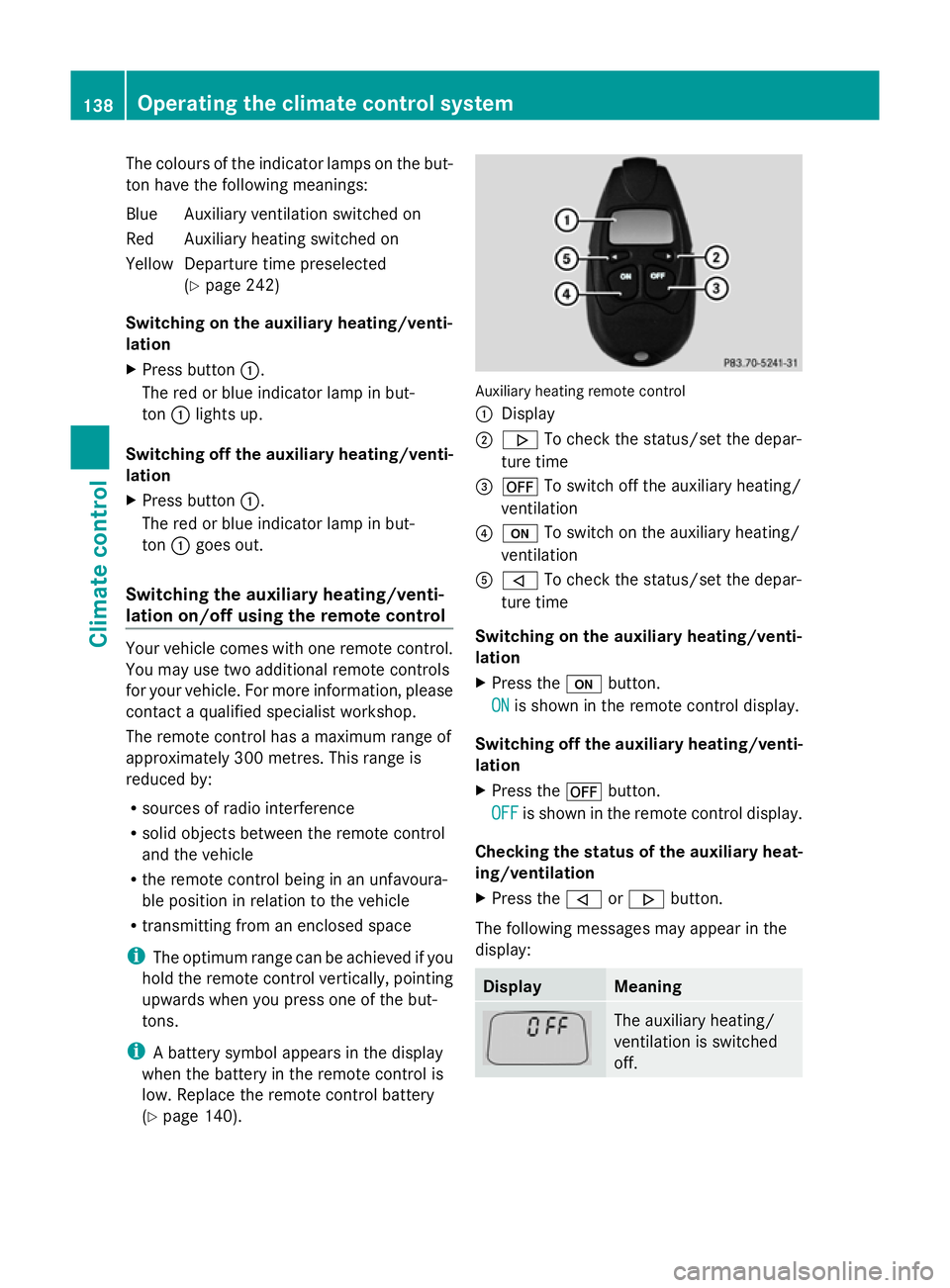
:
Display
; . To check the status/set the depar-
ture time
= ^ To switch off the auxiliary heating/
ventilation
? u To switch on the auxiliary heating/
ventilation
A , To check the status/set the depar-
ture time
Switching on the auxiliary heating/venti-
lation
X Press the ubutton.
ON
ON is shown in the remote control display.
Switching off the auxiliary heating/venti-
lation
X Press the ^button.
OFF OFF is shown in the remote control display.
Checking the status of the auxiliary heat-
ing/ventilation
X Press the ,or. button.
The following messages may appear in the
display: Display Meaning
The auxiliary heating/
ventilation is switched
off.138
Operating the climate control systemClimate control
Page 237 of 381
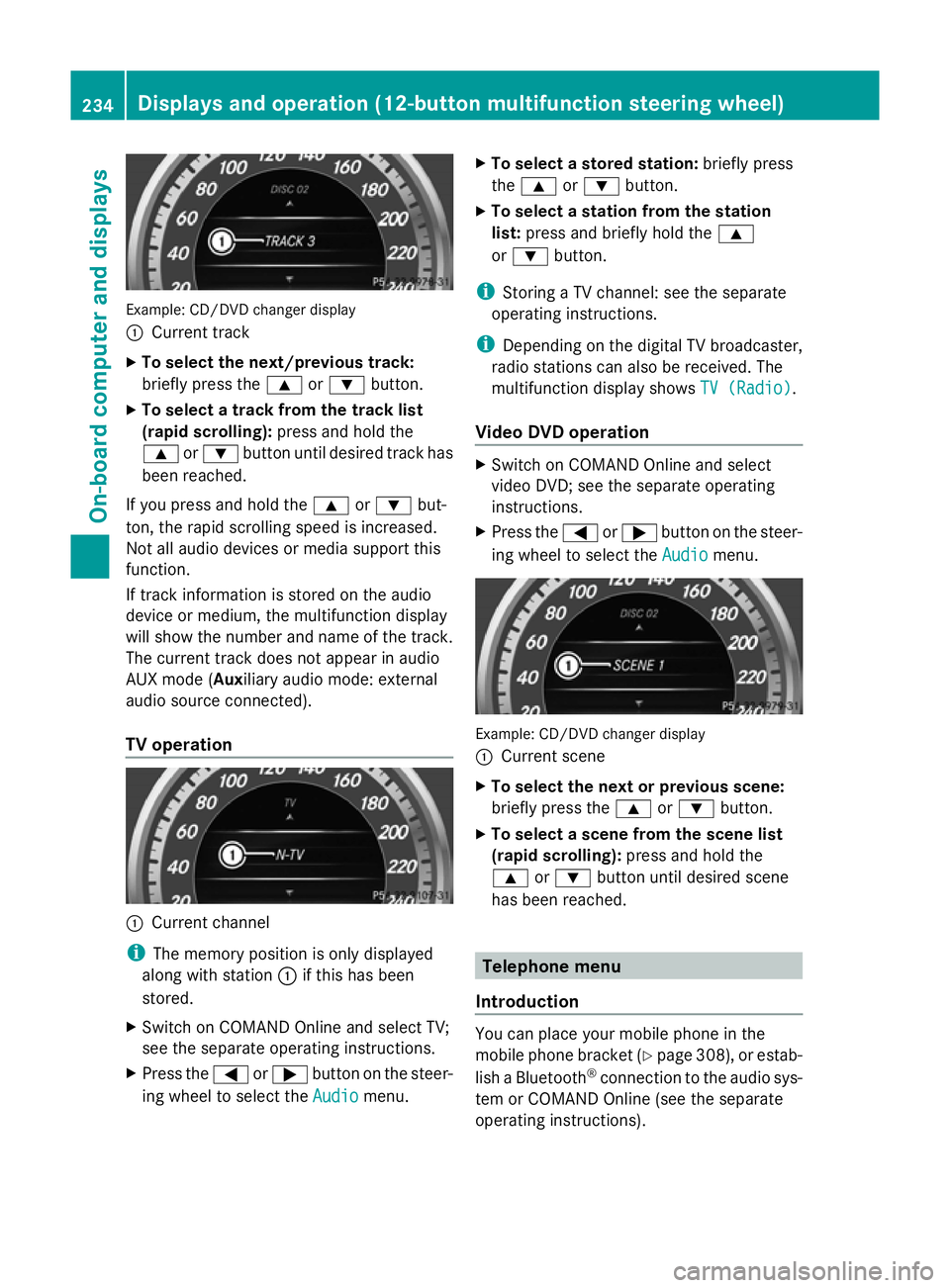
Example: CD/DVD changer display
:
Current track
X To select the next/previous track:
briefly press the 9or: button.
X To select a track from the track list
(rapid scrolling): press and hold the
9 or: button until desired track has
been reached.
If you press and hold the 9or: but-
ton, the rapid scrolling speed is increased.
Not all audio devices or media support this
function.
If track information is stored on the audio
device or medium, the multifunction display
will show the number and name of the track.
The current track does not appear in audio
AUX mode (Auxiliary audio mode: external
audio source connected).
TV operation :
Current channel
i The memory position is only displayed
along with station :if this has been
stored.
X Switch on COMAND Online and select TV;
see the separate operating instructions.
X Press the =or; button on the steer-
ing wheel to select the Audio
Audio menu. X
To select a stored station: briefly press
the 9 or: button.
X To select a station from the station
list: press and briefly hold the 9
or : button.
i Storing a TV channel: see the separate
operating instructions.
i Depending on the digital TV broadcaster,
radio stations can also be received. The
multifunction display shows TV (Radio) TV (Radio).
Video DVD operation X
Switch on COMAND Online and select
video DVD; see the separate operating
instructions.
X Press the =or; button on the steer-
ing wheel to select the Audio Audiomenu. Example: CD/DVD changer display
:
Current scene
X To select the next or previous scene:
briefly press the 9or: button.
X To select a scene from the scene list
(rapid scrolling): press and hold the
9 or: button until desired scene
has been reached. Telephone menu
Introduction You can place your mobile phone in the
mobile phone bracket (Y
page 308), or estab-
lish a Bluetooth ®
connection to the audio sys-
tem or COMAND Online (see the separate
operating instructions). 234
Displays and operation (12-button multifunction steering wheel)On-board computer and displays
Page 238 of 381
i
You can obtain further information about
suitable mobile phones and connecting
mobile phones via Bluetooth ®
:
R from any Mercedes Benz Service Centre
R on the Internet at: http://
www.mercedes-benz.com/connect G
WARNING
Observe the legal requirements of the country
in which you are currently driving regarding
the use of mobile phones in the vehicle.
If it is permitted to use mobile phones while
the vehicle is in motion, you should only use
them when the road and traffic conditions
allow. Otherwise, you may be distracted from
the traffic conditions, cause an accident and
injure yourself and others.
X Switch on the mobile phone and audio sys-
tem or COMAND Online; see the separate
operating instructions.
X Press the =or; button on the steer-
ing wheel to select the Tel
Tel menu.
You will see one of the following display mes-
sages in the multifunction display:
R Please Please enter
enterPIN
PIN: the mobile phone has
been placed in the mobile phone bracket
and the PIN has not been entered.
When you enter your PIN via the mobile
phone, LINGUATRONIC, the audio system
or COMAND Online, the mobile phone
searches for a network.
R Telephone Telephone ready
readyor the name of the net-
work provider: the mobile phone has found
a network and is ready to receive.
R Telephone No service Telephone No service : there is no net-
work available or the mobile phone is
searching for a network.
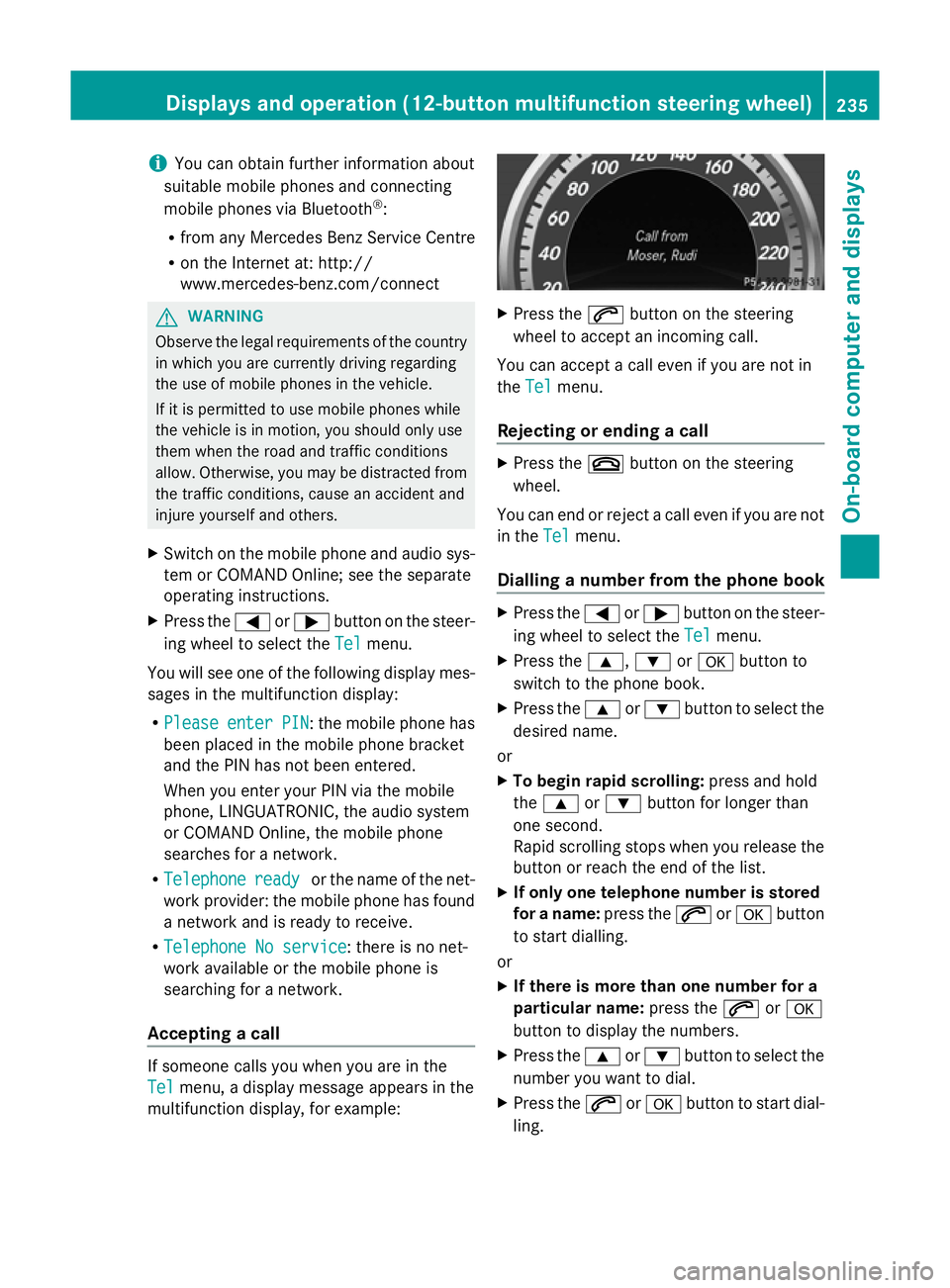
Accepting a call If someone calls you when you are in the
Tel Tel
menu, a display message appears in the
multifunction display, for example: X
Press the 6button on the steering
wheel to accept an incoming call.
You can accept a call even if you are not in
the Tel Tel menu.
Rejecting or ending a call X
Press the ~button on the steering
wheel.
You can end or reject a call even if you are not
in the Tel Telmenu.
Dialling a number from the phone book X
Press the =or; button on the steer-
ing wheel to select the Tel
Telmenu.
X Press the 9,:ora button to
switch to the phone book.
X Press the 9or: button to select the
desired name.
or
X To begin rapid scrolling: press and hold
the 9 or: button for longer than
one second.
Rapid scrolling stops when you release the
button or reach the end of the list.
X If only one telephone number is stored
for a name: press the6ora button
to start dialling.
or
X If there is more than one number for a
particular name: press the6ora
button to display the numbers.
X Press the 9or: button to select the
number you want to dial.
X Press the 6ora button to start dial-
ling. Displays and operation (12-button multifunction steering wheel)
235On-board computer and displays Z
Page 269 of 381
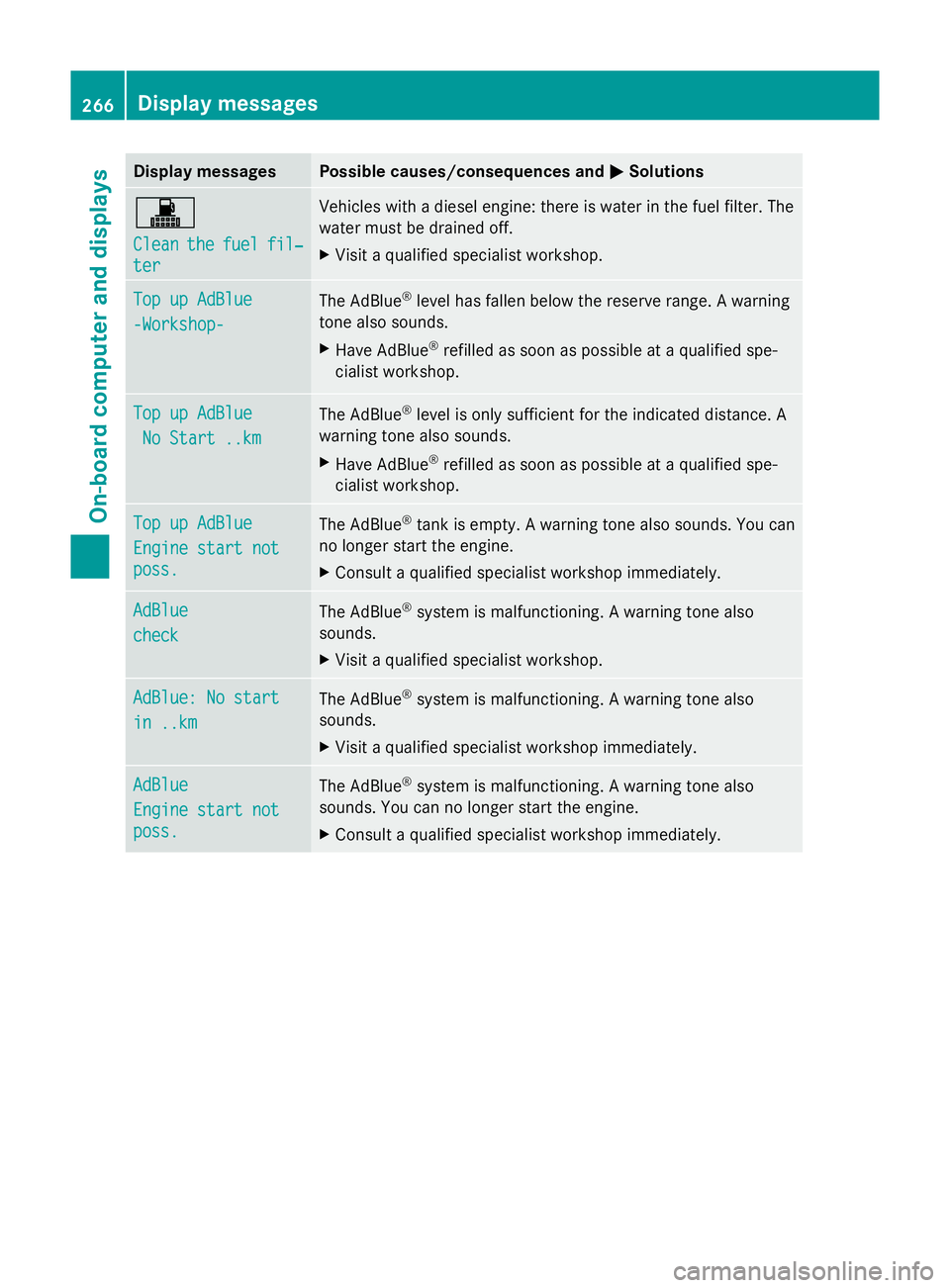
Display messages Possible causes/consequences and
M
MSolutions !
Clean Clean
the
thefuel
fuel fil‐
fil‐
ter
ter Vehicles with a diesel engine: there is water in the fuel filter. The
water must be drained off.
X
Visit a qualified specialist workshop. Top up AdBlue Top up AdBlue
-Workshop- -Workshop-
The AdBlue
®
level has fallen below the reserve range. A warning
tone also sounds.
X Have AdBlue ®
refilled as soon as possible at a qualified spe-
cialist workshop. Top up AdBlue Top up AdBlue
No Start ..km
No Start ..km The AdBlue
®
level is only sufficient for the indicated distance. A
warning tone also sounds.
X Have AdBlue ®
refilled as soon as possible at a qualified spe-
cialist workshop. Top up AdBlue Top up AdBlue
Engine start not Engine start not
poss. poss.
The AdBlue
®
tank is empty. A warning tone also sounds. You can
no longer start the engine.
X Consult a qualified specialist workshop immediately. AdBlue
AdBlue
check check
The AdBlue
®
system is malfunctioning. A warning tone also
sounds.
X Visit a qualified specialist workshop. AdBlue: No start AdBlue: No start
in ..km in ..km
The AdBlue
®
system is malfunctioning. A warning tone also
sounds.
X Visit a qualified specialist workshop immediately. AdBlue AdBlue
Engine start not Engine start not
poss. poss.
The AdBlue
®
system is malfunctioning. A warning tone also
sounds. You can no longer start the engine.
X Consult a qualified specialist workshop immediately. 266
Display
messagesOn-board computer and displays
Page 272 of 381
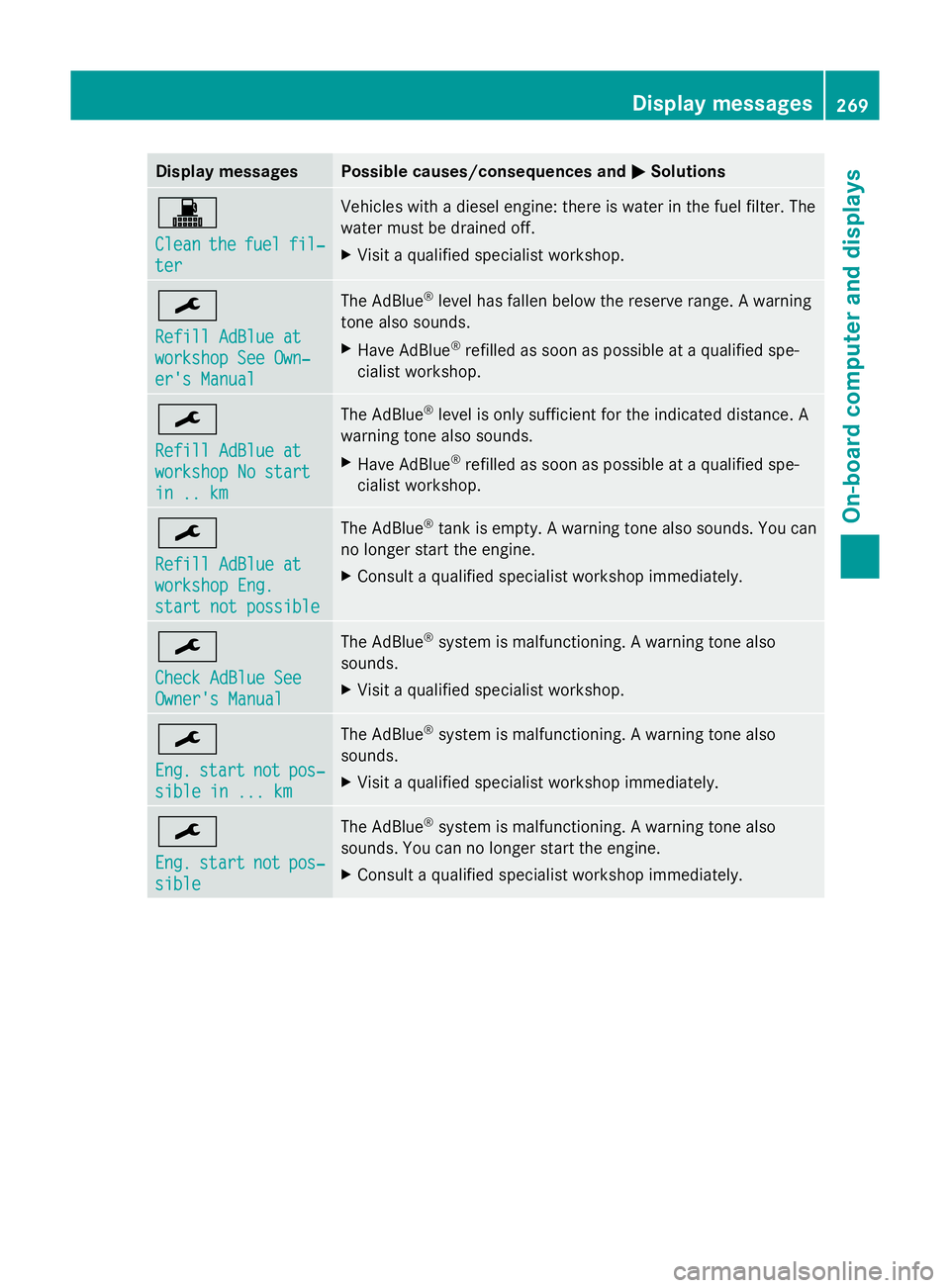
Display messages Possible causes/consequences and
M
MSolutions !
Clean Clean
the
thefuel
fuel fil‐
fil‐
ter
ter Vehicles with a diesel engine: there is water in the fuel filter. The
water must be drained off.
X
Visit a qualified specialist workshop. ¯
Refill AdBlue at Refill AdBlue at
workshop See Own‐ workshop See Own‐
er's Manual er's Manual The AdBlue
®
level has fallen below the reserve range. A warning
tone also sounds.
X Have AdBlue ®
refilled as soon as possible at a qualified spe-
cialist workshop. ¯
Refill AdBlue at Refill AdBlue at
workshop No start workshop No start
in .. km in .. km The AdBlue
®
level is only sufficient for the indicated distance. A
warning tone also sounds.
X Have AdBlue ®
refilled as soon as possible at a qualified spe-
cialist workshop. ¯
Refill AdBlue at Refill AdBlue at
workshop Eng. workshop Eng.
start not possible start not possible The AdBlue
®
tank is empty. A warning tone also sounds. You can
no longer start the engine.
X Consult a qualified specialist workshop immediately. ¯
Check AdBlue See Check AdBlue See
Owner's Manual Owner's Manual The AdBlue
®
system is malfunctioning. A warning tone also
sounds.
X Visit a qualified specialist workshop. ¯
Eng. Eng.
start
start not
notpos‐
pos‐
sible in ... km
sible in ... km The AdBlue
®
system is malfunctioning. A warning tone also
sounds.
X Visit a qualified specialist workshop immediately. ¯
Eng. Eng.
start
start not
notpos‐
pos‐
sible
sible The AdBlue
®
system is malfunctioning. A warning tone also
sounds. You can no longer start the engine.
X Consult a qualified specialist workshop immediately. Display
messages
269On-board computer and displays Z
Page 312 of 381
fere with the vehicle's electronics and thereby
jeopardise the operating safety of the vehicle
and your safety. Therefore, you must only use
this equipment if it is correctly connected to
a separate reflection-free exterior aerial. G
WARNING
Excessive levels of electromagnetic radiation
may cause damage to your health and the
health of others. Using an exterior aerial takes
into account current scientific discussions
relating to the possible health risk posed by
electromagnetic fields.
Mercedes-Benz recommends the use of an
approved exterior aerial. This ensures:
R optimal mobile phone reception quality in
the vehicle
R mutual influences between the vehicle
electronics and mobile phones are mini-
mised
An exterior aerial has the following advan-
tages:
R it conducts the electromagnetic fields gen-
erated by a wireless device to the exterior.
R the field strength in the vehicle interior is
lower than in a vehicle that does not have
an exterior aerial.
i There are various mobile phone brackets
that may be fitted in your vehicle; in some
cases, these are country-specific.
i You can connect a Bluetooth ®
-capable
mobile phone with Audio 20 or COMAND
Online via the Bluetooth ®
interface. This
also applies if your vehicle is equipped with
convenience telephony.
More information on suitable mobile phones,
mobile phone brackets and on connecting
Bluetooth ®
-capable mobile phones with
Audio 20 or COMAND Online can be obtained:
R at your Mercedes-Benz Service Centre
R on the Internet at http://www.mercedes-
benz.com/connect i
The functions and services available when
you use the phone depend on your mobile
phone model and service provider.
Using a mobile phone If the mobile phone is inserted in the mobile
phone bracket, you can speak to the person
you are calling using the hands-free system.
X
Open the telephone compartment
(Y page 297).
X Place the mobile phone bracket into the
pre-installed fitting (see the separate
installation instructions for the mobile
phone fitting).
X Insert the mobile phone into the mobile
phone bracket (see the separate installa-
tion instructions for the mobile phone fit-
ting).
i On some mobile phone brackets, you first
have to connect the mobile phone via Blue-
tooth ®
to the mobile phone bracket (see
the separate operating instructions for the
mobile phone bracket).
If this is the case, the mobile phone does
not have to be inserted into the bracket for
you to be able to use the telephone func-
tions. However, the charging function and
aerial function are not available.
Operating the mobile phone You can operate the telephone using the
6
and~ buttons on the luxury multi-
function steering wheel. You can operate
other mobile phone functions via the on-
board computer (Y page 234).
When you remove the key from the ignition
lock, the mobile phone stays switched on.
However, you can no longer use the hands-
free system.
If you have an active call and would like to
take the key out of the ignition lock, first
remove the mobile phone from the bracket. Features
309Stowing and features Z