manual transmission MERCEDES-BENZ GLK SUV 2012 Owners Manual
[x] Cancel search | Manufacturer: MERCEDES-BENZ, Model Year: 2012, Model line: GLK SUV, Model: MERCEDES-BENZ GLK SUV 2012Pages: 381, PDF Size: 12.68 MB
Page 8 of 381
Air vents
Glove compartment .......................142
Important safety notes ..................141
Rear ............................................... 143
Setting ........................................... 141
Setting the centre air vents ...........142
Setting the side air vents ...............142
Alarm system
see ATA (Anti-Theft Alarm system)
Anti-glare film .................................... 310
Anti-lock Braking System see ABS (Anti-lock Braking System)
Anti-Theft Alarm system
see ATA (Anti-Theft Alarm system)
Approach/departure angle ..............172
Aquaplaning ....................................... 168
Ashtray ............................................... 306
ASSYST PLUS Displaying a service message ........312
Hiding a service message ..............312
Notes ............................................. 312
Resetting the service interval dis-
pla y................................................ 312
Service message ............................ 312
Special service requirements ......... 313
ATA (Anti-Theft Alarm system)
Activating/deactivating ...................72
Function .......................................... .72
Interior motion sensor .....................73
Switching off the alarm ....................72
Tow-away protection ........................ 72
ATTENTION ASSIST
Activating/deactivating .................237
Display message (12-button mul-
tifunction steering wheel) ..............271
Function/notes ............................. 201
Audio DVD (12-button multifunc-
tion steering wheel) ..........................233
Audio menu (on-board computer,
12-button multifunction steering
wheel) ................................................ .233
Audio menu (on-board computer) ....233
Authorised workshop see Qualified specialist workshop AUTO lights
Display message (12-button mul-
tifunction steering wheel) ..............263
Display message (4-button multi-
function steering wheel) ................260
see Lights
Automatic engine start (ECO start/
stop function) .................................... 152
Automatic engine switch-off (ECO
start/stop function) ..........................151
Automatic headlamp mode ..............111
Automatic transmission Accelerator pedal position .............157
Automatic drive program ...............159
Changing gea r............................... 157
DIRECT SELECT lever .....................155
Display message (4-button multi-
function steering wheel) ................278
Drive position (ECO start/stop
function) ........................................ 157
Driving tips .................................... 157
Emergency running mode ..............161
Engaging drive position .................. 157
Engaging neutral ............................ 157
Engaging park position automati-
call y............................................... 156
Engaging reverse gear ...................156
Engaging the park position ............156
Kickdown ....................................... 158
Manual drive program ....................160
Neutral (ECO start/stop function) .156
Problem (fault) ............................... 161
Program selector button ................158
Pulling away ................................... 149
Shift ranges ................................... 159
Starting the engine ........................148
Steering wheel gearshift paddle s... 159
Trailer towing ................................. 158
Transmission position displa y........ 156
Transmission positions ..................157
Automatic transmission emer-
gency running mode .........................161
Automatic transmissions Display message (12-button mul-
tifunction steering wheel) ..............279 Index
5
Page 13 of 381
Important safety notes
....................82
Opening (from the inside) ................83
Downhill Speed Regulation
see DSR (Downhill Speed Regulation)
Drive program
Automatic ...................................... 159
Display ........................................... 156
Display (DIRECT SELECT lever) ......156
Manual .......................................... .160
Driver's door
see Door
Drive system
Active Blind Spot Assist .................207
Driving abroad
Service24h .................................... 313
Symmetrical dipped bea m............. 110
Driving in mountainous terrain
Approach/departure angl e............ 172
Driving off-road
see Off-road driving
Driving safety system
BAS PLUS (Brake Assist System
PLUS) .............................................. .66
Electronic Brake-force Distribu-
tion .................................................. 69
ESP ®
(Electronic Stability Pro-
gram) ............................................... 67
ETS/4ETS (Electronic Traction
System) ........................................... 68
Important safety guidelines .............65
Driving safety systems
ABS (Anti-lock Braking System) .......65
Adaptive brake lamps ......................67
BAS (Brake Assist System) ..............66
Overview .......................................... 65
PRE-SAFE ®
Brake ............................ .69
Driving system
Active Lane Keeping Assis t............ 210
Active Parking Assist .....................192
Display message (12-button mul-
tifunction steering wheel) ..............271
Display message (4-button multi-
function steering wheel) ................270
Driving systems
Active Driving Assistance pack-
age ................................................. 207
ATTENTION ASSIST ........................201Blind Spot Assist ............................ 203
Cruise control
................................ 173
Distronic Plus ................................ 178
HOLD function ............................... 186
Lane Keeping Assist ......................205
Lane package ................................ 203
PARKTRONIC ................................. 188
Reversing camera ..........................196
Speed Limit Assist .........................202
SPEEDTRONIC ............................... 176
Driving tips
Aquaplaning ................................... 168
Automatic transmission .................157
Brakes ........................................... 167
DISTRONIC PLUS ........................... 185
Downhill gradient ........................... 167
Driving abroad ............................... 110
Driving in winter ............................ .169
Driving on flooded roads ................168
Driving on sand .............................. 172
Driving on wet roads ......................168
Driving over obstacles ...................172
General .......................................... 165
Icy road surfaces ........................... 170
Limited braking efficiency on sal-
ted roads ....................................... 168
New brake pads/linings ................168
Off-road driving .............................. 170
Off-road fording ............................. 169
Running-in tips ............................... 146
Snow chains .................................. 353
Symmetrical dipped bea m............. 110
Towing a trailer .............................. 215
Travelling uphill .............................. 172
Tyre ruts ........................................ 172
Wet road surface ........................... 167
DSR (Downhill Speed Regulation)
Display message (12-button mul-
tifunction steering wheel) ..............271
Function/notes ............................. 21310
Index
Page 18 of 381
Switching the daytime driving
lights on/off (12-button multi-
function steering wheel)
................239
Switching the daytime driving
lights on/off (4-button multifunc-
tion steering wheel) .......................227
Switching the daytime driving
lights on/off (switch) .....................111
Switching the surround lighting
on/off (12-button multifunction
steering wheel) .............................. 240
Turn signals ................................... 113
see Changing bulbs
see Interior lighting
Light sensor
Display message (12-button mul-
tifunction steering wheel) ..............263
Display message (4-button multi-
function steering wheel) ................260
LIM indicator lamp
Cruise control ................................ 174
DISTRONIC PLUS ........................... 179
Variable SPEEDTRONIC .................176
Limiting the speed
see SPEEDTRONIC
Loading guidelines ............................296
Locking see Central locking
Locking (doors)
Automatic ........................................ 83
Emergency locking ........................... 84
From inside (central locking but-
ton) .................................................. 83
Locking centrally
see Central locking
Locking verification signal (on-
board computer) ............................... 242
Luggage compartment cover ...........300
Luggage compartment enlarge-
ment ................................................... 298
Luggage compartment floor opening/closing ............................ 303
stowage well, unde r....................... 303
Lumbar support
Adjusting ....................................... 100
Adjusting the 4-way lumbar sup-
port ................................................ 100 M
M+S tyres ........................................... 352
Main beam Display message (4-button multi-
function steering wheel) ................259
Main-beam headlamps
Changing bulbs .............................. 120
Display message (12-button mul-
tifunction steering wheel) ..............262
Switching Adaptive Highbeam
Assist on/off ................................. 116
Switching on/off ........................... 113
Manual transmission
Engaging reverse gear ...................155
Gear leve r...................................... 154
Pulling away ................................... 149
Shifting to neutral ..................154, 155
Shift recommendatio n................... 155
Matt finish (cleaning instructions) ..319
Memory card (audio) .........................233
Memory function ............................... 106
Mercedes-Benz Service Centre see Qualified specialist workshop
Message memory
12-button multifunction steering
wheel ............................................. 246
4-button multifunction steering
wheel ............................................. 245
Messages
see Display messages
Mirror
see Vanity mirror (in sun visor)
Mirrors
see Exterior mirrors
see Rear-view mirror
Mobile phone
Frequencies ................................... 363
Installation ..................................... 363
Menu (on-board computer) ............234
Notes/placing in the bracket ......... 308
Transmission output (maximum) .... 363
Mobile telephone
Pre-installed bracket ......................310
Modifying the programming (key) .....78
Motorway mode ................................ 115 Index
15
Page 21 of 381
Function/notes ................................ 69
Warning lamp ................................ .294
Program selector button ..................158
Protection of the environment General notes .................................. 25
Pulling away
Automatic transmission .................149
Manual transmission ..................... .149 Q
Qualified specialist workshop ...........27 R
Radar sensor system Activating/deactivating .................242
Country overview ........................... 375
Display message (12-button mul-
tifunction steering wheel) ..............272
Radiator cover ................................... 315
Radio Selecting a station (12-button
multifunction steering wheel) ........233
see separate operating instructions
Rain closing feature (panorama
sliding sunroof) ................................... 92
Range (fuel) Displaying (12-button multifunc-
tion steering wheel) .......................231
Displaying (4-button multifunc-
tion steering wheel) .......................226
Reading lamp ..................................... 117
Rear compartment Setting the airflow .........................134
Setting the air vents ......................143
Rear-compartment seat belt sta-
tus indicator ........................................ 53
Rear foglamp Display message (12-button mul-
tifunction steering wheel) ..............262
Display message (4-button multi-
function steering wheel) ................259
Switching on/off ........................... 112
Rear-view mirror
Anti-dazzle mode (automatic) ........105
Dipping (manual )........................... 103Rear window heating
Problem (fault) ............................... 135
Switching on/off ........................... 135
Rear window wiper
Replacing the wiper blade .............. 124
Switching on/off ........................... 123
Refuelling
Fuel gauge ....................................... 31
Important safety notes ..................161
Refuelling proces s......................... 162
see Fuel
Remote control
Auxiliary heating/ventilation .......... 138
Changing the batteries (auxiliary
heating) ......................................... 140
Replacing the battery (auxiliary
heating remote control) .................... 140
Reserve (fuel tank) see Fuel
Reserve fuel
Display message (12-button mul-
tifunction steering wheel) ..............268
Display message (4-button multi-
function steering wheel) ................265
Warning lamp ................................. 292
Residual heat (climate control) ........136
Restraint system see SRS (Supplemental Restraint
System)
Rev counter
12-button multifunction steering
wheel ............................................. 227
4-button multifunction steering
wheel ............................................. 225
Reverse gear
Engaging (manual transmission) ....155
Reversing camera
Cleaning instructions .....................321
Function/notes ............................. 196
Switching on/off ........................... 197
Reversing lamp
Changing bulbs .............................. 121
Display message (12-button mul-
tifunction steering wheel) ..............262
Display message (4-button multi-
function steering wheel) ................259
Roller blind
see Roller sunblind 18
Index
Page 25 of 381
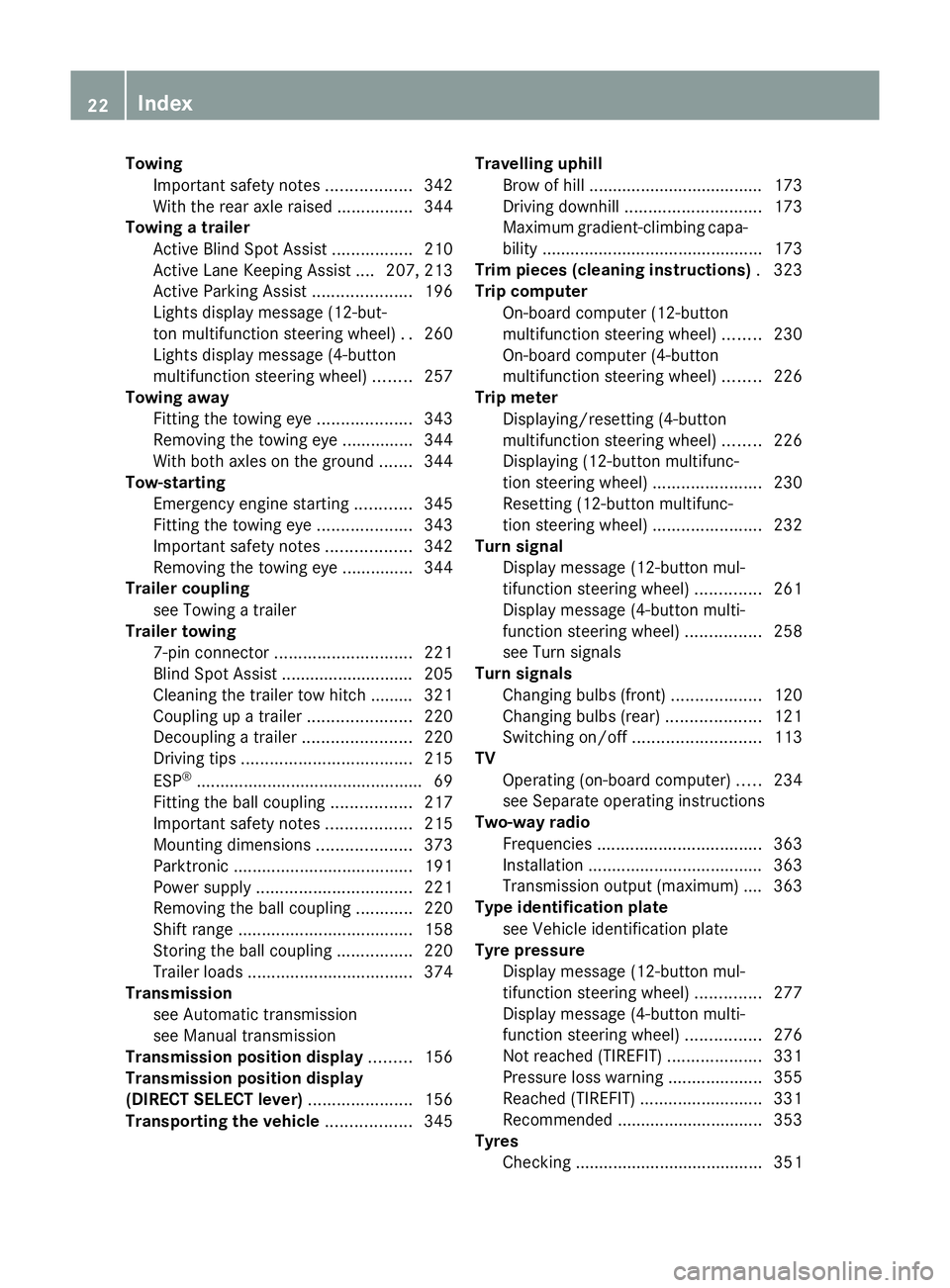
Towing
Important safety notes ..................342
With the rear axle raised ................344
Towing a trailer
Active Blind Spot Assist .................210
Active Lane Keeping Assist .... 207, 213
Active Parking Assist .....................196
Lights display message (12-but-
ton multifunction steering wheel) ..260
Lights display message (4-button
multifunction steering wheel) ........257
Towing away
Fitting the towing eye ....................343
Removing the towing eye ...............344
With both axles on the ground .......344
Tow-starting
Emergency engine starting ............345
Fitting the towing eye ....................343
Important safety notes ..................342
Removing the towing eye ...............344
Trailer coupling
see Towing a trailer
Trailer towing
7-pin connector ............................. 221
Blind Spot Assist ............................ 205
Cleaning the trailer tow hitch ......... 321
Coupling up a trailer ......................220
Decoupling a trailer .......................220
Driving tips .................................... 215
ESP ®
................................................ 69
Fitting the ball coupling .................217
Important safety notes ..................215
Mounting dimensions ....................373
Parktroni c...................................... 191
Power supply ................................. 221
Removing the ball coupling ............220
Shift range ..................................... 158
Storing the ball coupling ................220
Trailer loads ................................... 374
Transmission
see Automatic transmission
see Manual transmission
Transmission position display .........156
Transmission position display
(DIRECT SELECT lever) ......................156
Transporting the vehicle ..................345Travelling uphill
Brow of hill ..................................... 173
Driving downhill ............................. 173
Maximum gradient-climbing capa-
bility .............................................. .173
Trim pieces (cleaning instructions) .323
Trip computer On-board computer (12-button
multifunction steering wheel) ........230
On-board computer (4-button
multifunction steering wheel) ........226
Trip meter
Displaying/resetting (4-button
multifunction steering wheel) ........226
Displaying (12-button multifunc-
tion steering wheel) .......................230
Resetting (12-button multifunc-
tion steering wheel) .......................232
Turn signal
Display message (12-button mul-
tifunction steering wheel) ..............261
Display message (4-button multi-
function steering wheel) ................258
see Turn signals
Turn signals
Changing bulbs (front) ...................120
Changing bulbs (rear) ....................121
Switching on/off ........................... 113
TV
Operating (on-board computer) .....234
see Separate operating instructions
Two-way radio
Frequencies ................................... 363
Installation ..................................... 363
Transmission output (maximum) .... 363
Type identification plate
see Vehicle identification plate
Tyre pressure
Display message (12-button mul-
tifunction steering wheel) ..............277
Display message (4-button multi-
function steering wheel) ................276
Not reached (TIREFIT) ....................331
Pressure loss warning ....................355
Reached (TIREFIT) ..........................331
Recommended ............................... 353
Tyres
Checking ........................................ 351 22
Index
Page 28 of 381
Protection of the environment
General notes
H
Environmental note
Daimler's declared policy is one of compre-
hensive environmental protection.
The objectives are for the natural resources
which form the basis of our existence on this
planet to be used sparingly and in a manner
which takes the requirements of both nature
and humanity into account.
You too can help to protect the environment
by operating your vehicle in an environmen-
tally-responsible manner.
Fuel consumption and the rate of engine,
transmission, brake and tyre wear depend on
the following factors:
R operating conditions of your vehicle
R your personal driving style
You can influence both factors. You should
bear the following in mind:
Operating conditions:
R avoid short trips as these increase fuel con-
sumption.
R make sure that the tyre pressures are
always correct.
R do not carry any unnecessary weight.
R keep an eye on the vehicle's fuel consump-
tion.
R remove roof racks once you no longer need
them.
R a regularly serviced vehicle will contribute
to environmental protection. You should
therefore adhere to the service intervals.
R always have service work carried out at a
qualified specialist workshop.
Personal driving style:
R do not depress the accelerator pedal when
starting the engine.
R do not warm up the engine with the vehicle
stationary.
R drive carefully and maintain a safe distance
from the vehicle in front. R
avoid frequent, sudden acceleration.
R change gear in good time and use each gear
only up to Ôof its maximum engine speed.
R switch off the engine in stationary traffic. Returning an end-of-life vehicle
Mercedes-Benz will take back your
Mercedes-Benz to dispose of it in an environ-
mentally responsible manner, in accordance
the European Union (EU) End of Life Vehicles
Directive.
The End of Life Vehicles Directive applies to
vehicles with a gross vehicle weight of up to
3.5 t, in accordance with national regulations.
For several years, Mercedes-Benz has been
meeting all the legal requirements for a
design which allows for recycling and re-use.
There is a network of return points and dis-
assembly plants which can recycle your vehi-
cle in an environmentally-responsible man-
ner. The methods employed in vehicle and
parts recycling are constantly being devel-
oped and improved. This means that your
Mercedes-Benz will also continue to meet
even the increased recycling quotas in the
future in good time. You can obtain further
information from your national Mercedes-
Benz homepage or your national hotline num-
ber. Vehicle equipment
This Owner's Manual describes all models
and all standard and optional equipment
available for your vehicle at the time of pub-
lication of the Owner's Manual. Country-spe-
cific deviations are possible. Note that your
vehicle may not be fitted with all features
described. This is also the case for systems
and functions relevant to safety. Therefore,
the equipment on your vehicle may differ from
that in the descriptions and illustrations. Introduction
25 Z
Page 33 of 381
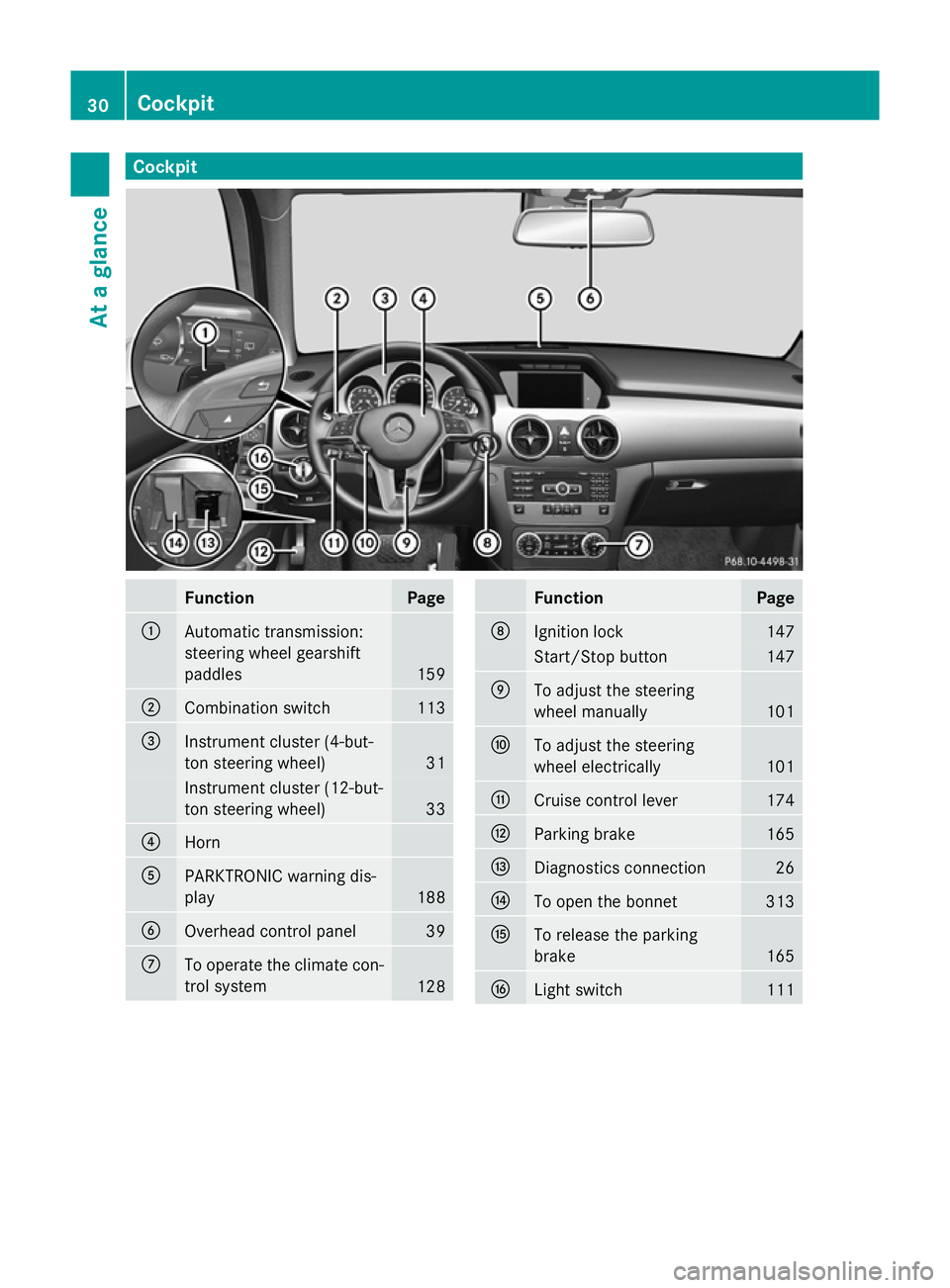
Cockpit
Function Page
:
Automatic transmission:
steering wheel gearshift
paddles
159
;
Combination switch 113
=
Instrument cluster (4-but-
ton steering wheel)
31
Instrument cluster (12-but-
ton steering wheel) 33
?
Horn
A
PARKTRONIC warning dis-
play
188
B
Overhead control panel 39
C
To operate the climate con-
trol system
128 Function Page
D
Ignition lock 147
Start/Stop button 147
E
To adjust the steering
wheel manually
101
F
To adjust the steering
wheel electrically
101
G
Cruise control lever 174
H
Parking brake 165
I
Diagnostics connection 26
J
To open the bonnet 313
K
To release the parking
brake
165
L
Light switch 11130
CockpitAt a glance
Page 34 of 381
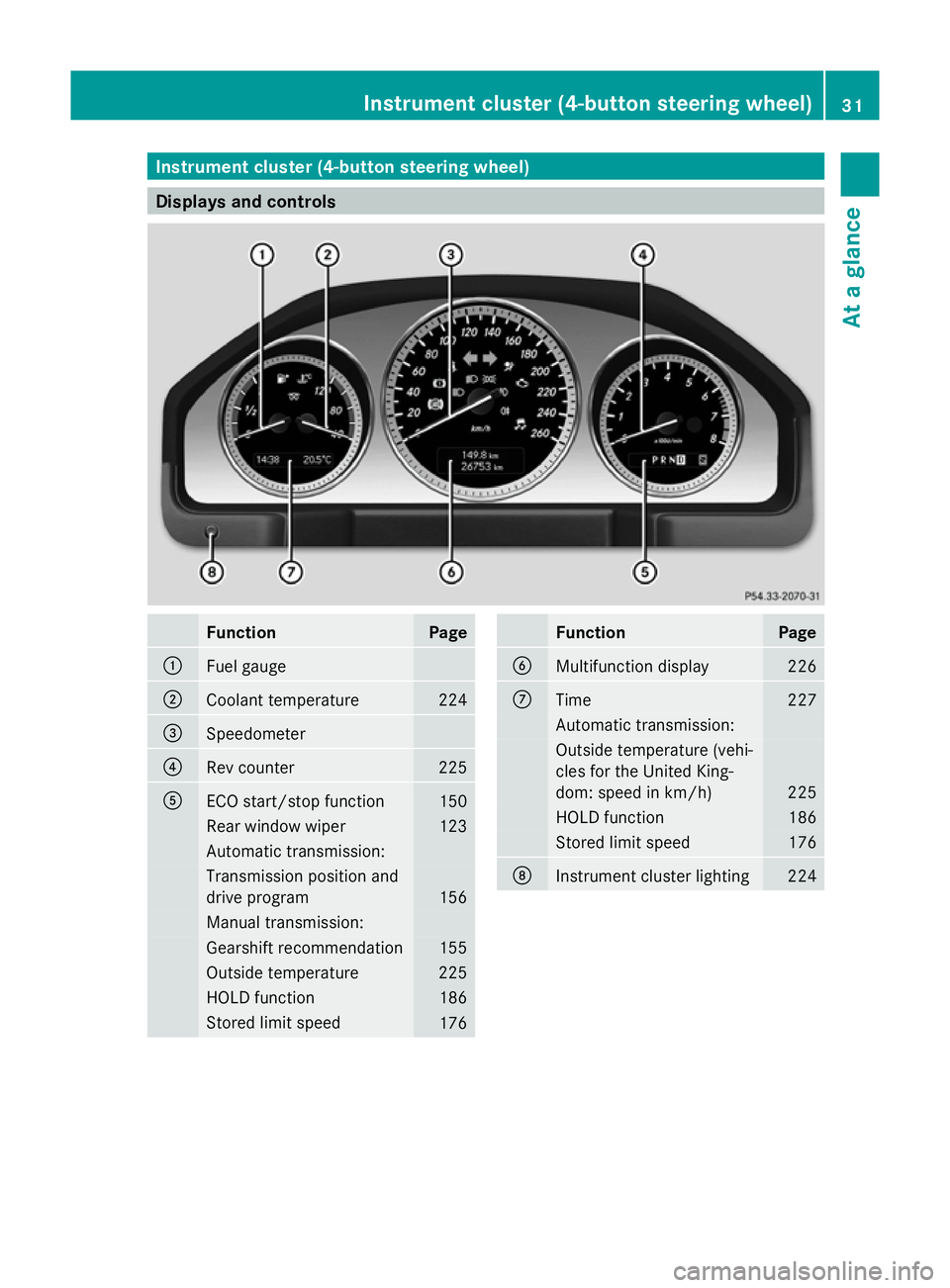
Instrument cluster (4-button steering wheel)
Displays and controls
Function Page
:
Fuel gauge
;
Coolant temperature 224
=
Speedometer
?
Rev counter 225
A
ECO start/stop function 150
Rear window wiper 123
Automatic transmission:
Transmission position and
drive program
156
Manual transmission:
Gearshift recommendation 155
Outside temperature 225
HOLD function 186
Stored limit speed
176 Function Page
B
Multifunction display 226
C
Time 227
Automatic transmission:
Outside temperature (vehi-
cles for the United King-
dom: speed in km/h) 225
HOLD function 186
Stored limit speed 176
D
Instrument cluster lighting 224Instrument cluster (4-button steering wheel)
31At a glance
Page 148 of 381
Useful information
............................146
Running-in notes ............................... 146
Driving ............................................... 146
Manual transmission ........................154
Automatic transmission ...................155
Refuelling ........................................... 161
Parking ............................................... 164
Driving tips ........................................ 165
Driving systems ................................ 173
Off-road driving systems ..................213
Towing a trailer ................................. 215 145Driving and parking
Page 149 of 381
Useful information
i This Owner's Manual describes all mod-
els, series and optional equipment for your
vehicle that were available at the time of
going to press. National variations are pos-
sible. Note that your vehicle may not be
equipped with all of the functions descri-
bed. This is also the case for systems and
functions relevant to safety.
i Read the information on qualified special-
ist workshops: (Y page 27). Running-in notes
Important safety notes
New brake pads/brake pads and discs that
have been replaced only achieve optimum
braking effect after several hundred kilome-
tres of driving. Compensate for the reduced
braking effect by applying greater force to the
brake pedal. The first 1,500 km
If you treat the engine with sufficient care
from the very start, you will be rewarded with
excellent performance for the remainder of
the engine's life.
R Drive at varying vehicle speeds and engine
speeds for the first 1,500 km.
R Avoid overstraining the vehicle during this
period, e.g. driving at full throttle.
R Change gear in good time, before the rev
counter needle is Ôof the way to the red
area of the rev counter.
R Do not shift down a gear manually in order
to brake. Vehicles with automatic transmission:
R Try to avoid depressing the accelerator
pedal beyond the point of resistance (kick-
down).
R The shift ranges 3,2or 1should only be
engaged when driving slowly, e.g. when
driving in mountainous terrain.
After 1,500 km, you may gradually accelerate
the vehicle to full road and engine speeds.
i You should also observe these notes on
running in if the engine or parts of the drive
train on your vehicle have been replaced. Driving
Important safety notes
G
WARNING
Objects in the driver's footwell can restrict the
pedal travel or obstruct a depressed pedal.
The operating and road safety of the vehicle
is jeopardised. There is a risk of an accident.
Make sure that all objects in the vehicle are
stowed correctly, and that they cannot enter
the driver's footwell. Fit the floormats
securely and as specified in order to ensure
sufficient clearance for the pedals. Do not use
loose floormats. G
WARNING
Unsuitable footwear can hinder correct usage
of the pedals, e.g.:
R shoes with thick soles
R shoes with high heels
R slippers
There is a risk of an accident.
Wear suitable footwear to ensure correct
usage of the pedals. G
WARNING
If you switch off the ignition while driving,
safety-relevant functions are only available
with limitations, or not at all. This could affect,
for example, the power steering and the brake 146
DrivingDriving and parking