cruise control MERCEDES-BENZ GLK350 4MATIC 2010 X204 Owner's Manual
[x] Cancel search | Manufacturer: MERCEDES-BENZ, Model Year: 2010, Model line: GLK350 4MATIC, Model: MERCEDES-BENZ GLK350 4MATIC 2010 X204Pages: 344, PDF Size: 8.45 MB
Page 8 of 344
Locking/unlocking from inside ........71
SmartKey ......................................... 66
Central locking/unlocking switch ..... 71
Certification label .............................. 328
Children in the vehicle
Air bags ........................................... 37
BabySmart™ air bag deactivation
system ............................................. 45
Child safety locks (rear doors) .........58
Child seat anchors – LATCH-type
(ISOFIX) ........................................... 57
Indicator lamp, front passenger
front air bag off (Canada only) .........45
Indicator lamp, front passenger
front air bag off (USA only) ..............42
Infant and child restraint systems .... 54
ISOFIX (Child seat anchors –
LATCH-type) ..................................... 57
OCS (Occupant Classification
System) ........................................... 42
Override switch ................................ 58
Safety notes ..................................... 53
Tether anchorage points ..................56
Top tether ........................................ 56
Child safety
see Children in the vehicle
Child seat anchors – LATCH-type
(ISOFIX) see Children in the vehicle
Chrome-plated exhaust tip,
cleaning .............................................. 257
Cigarette lighter ................................ 197
Clear button ....................................... 130
Climate control system .................... 177
Air conditioning ............................. 179
Air conditioning refrigerant ............336
Air distribution ............................... 181
Air recirculation mode ...................183
Air volume ..................................... 182
Automatic mode ............................ 179
Deactivating system ......................179
Front defroster .............................. 182
Maximum cooling MAX COOL ........182
Temperature .................................. 180
Clock ............................................ 29, 121
Coat hooks ......................................... 189
Cockpit ................................................. 27
Cold tire inflation pressure .............. 239Collapsible tire (spare wheel) .......... 333
Collapsible wheel chock ................... 261
COMAND system see separate COMAND system
operating instructions
Combination gauge ............................. 28
Combination switch ............................ 90
Compass ............................................ 199
Control system .................................. 110
Multifunction display .....................112
Multifunction steering wheel .........110
Resetting to factory settings ..........119
Control system menus ...................... 113
Audio ............................................. 115
Navi ............................................... 115
Service ........................................... 118
Settings ......................................... 119
Telephone ...................................... 117
Trip ................................................ 113
Control system submenus
Convenience .................................. 124
Instrument cluster .........................120
Lighting .......................................... 122
Time/Date ..................................... 121
Vehicle ........................................... 123
Convenience submenu
Easy-entry/exit feature .................. 124
Fold-in function for exterior rear
view mirrors ................................... 124
Coolant
Anticorrosion/antifreeze ...............338
Capacities ...................................... 334
Checking level ............................... 216
Messages in the multifunction
display ........................................... 279
Temperature gauge ........................ 109
Warning lamp ................................. 295
Coolant temperature gauge ............... 28
Corner-illuminating lamps .................. 91
Replacing bulbs ............................. 304
Cruise control .................................... 168
Activating ....................................... 169
Canceling ....................................... 169
Changing the set speed .................170
Last stored speed ..........................170
Lever .............................................. 169
Messages in the multifunction
display ........................................... 2676IndexX204_AKB; 3; 23, en-USd2ureepe,Version: 2.11.8.12009-07-16T19:16:58+02:00 - Seite 6
Page 9 of 344
Resume function ............................ 170
Setting current speed ....................169
Cup holders ........................................ 195
Curb weight ....................................... 239
Customer Assistance Center (CAC) ... 22
Customer Relations Department ....... 22
D
Dashboard see Instrument cluster
Data recording ..................................... 23
Date, Setting ...................................... 121
Daytime running lamp mode .............. 88
Switching on or off ......................... 122
Deep water
see Standing water
Defogging (windshield) ..................... 182
Defroster
Front (Climate control system) ......182
Rear window .................................. 184
Delayed shut-off
Exterior lamps ................................ 122
Interior lighting .............................. 123
Department of Transportation
see DOT
Difficulties
While driving .................................. 101
With starting .................................... 99
Dimensions (vehicle)
see Vehicle specification
Direction of rotation (tires) .............. 231
Displays
Maintenance service indicator .......250
Messages in the multifunction
display ........................................... 262
Multifunction display .....................112
Symbol messages ..........................270
Text messages ............................... 264
Trip computer ................................ 113
Vehicle status message memory ...118
Vehicle system settings .................119
Door control panel .............................. 33
Door handles ........................................ 33
Doors
Child safety locks ............................ 58
Locking/unlocking (KEYLESS-GO) ...67
Locking/unlocking (SmartKey) ........66
Messages in the multifunction
display ........................................... 277
Opening from inside ......................... 70
Remote door lock (Tele Aid) ........... 205
Remote door unlock (Tele Aid) .......204
Unlocking (Mechanical key) ...........299
DOT (Department of
Transportation) .................................. 239
Drinking and driving ......................... 243
Driving
Abroad ........................................... 249
Hydroplaning ................................. 246
Instructions ............................. 98, 243
In winter ........................................ 243
Problems ....................................... 101
Safety systems ................................ 59
Systems ......................................... 168
Through standing water .................246
Driving and parking
Safety notes ..................................... 98
Driving off .................................. 100, 245
Driving safety systems ....................... 59
BAS .................................................. 60
EBP .................................................. 60
ESP ®
................................................ 61
ETS/4-ETS ....................................... 62
Driving systems
All-wheel drive (4MATIC) ................ 171
Cruise control ................................ 168
Hill-start assist system ..................171
Parktronic system ..........................172
Rear view camera .......................... 174
Driving tips, automatic
transmission ...................................... 105
E
Easy-entry/exit feature .............. 83, 124
EBP (Electronic Brake
Proportioning) ...................................... 60
Electrical system
Improper work on or
modifications ................................... 22
Power outlets ................................. 197
Electrical system (Technical data)
see Vehicle specification
Electronic Stability Program
see ESP ®
Index7X204_AKB; 3; 23, en-USd2ureepe,Version: 2.11.8.12009-07-16T19:16:58+02:00 - Seite 7
Page 14 of 344
Exterior rear view mirror parking
position ............................................ 85
Exterior rear view mirrors ................84
Interior rear view mirror ...................84
Memory function .............................. 86
Power-folding exterior rear view
mirrors ............................................. 85
Vanity mirror .................................. 196
MON (Motor Octane Number) .......... 337
Motor Octane Number see MON
MP3 mode .......................................... 146
Multifunction display ........................ 112
Symbol messages ..........................270
Text messages ............................... 264
Vehicle status messages ...............262
Multifunction display messages
ABS ....................................... 271, 272
Active headlamps .......................... 283
Advanced TPMS ............................. 268
Air bags ......................................... 264
Alternator ...................................... 281
Battery ........................................... 281
Brake fluid ..................................... 273
Brake pads ..................................... 270
Cargo compartment ....................... 277
Child seat ...................................... 267
Coolant .......................................... 279
Corner-illuminating lamps ..............286
Cruise control ................................ 267
Doors ............................................. 277
EBP ................................................ 272
Engine oil ....................................... 282
ESP ®
............................. 271, 272, 274
Fog lamps .............................. 283, 285
Front passenger front air bag ........264
Gas cap .......................................... 282
High-beam lamps ........................... 284
Hood .............................................. 277
License plate lamps .......................285
Light sensor ................................... 285
Low-beam lamps ............................ 285
Parking brake ................................ 272
Parking lamps ................................ 284
Power steering ............................... 279
Reserve fuel ................................... 282
Reverse lamp ................................. 283
Side marker lamps .........................284SmartKey ....................................... 277
SmartKey with KEYLESS-GO ..........277
SRS ................................................ 275
Tailgate .......................................... 277
Tail lamps ...................................... 286
Tele Aid .......................................... 275
Tire inflation pressure ............268, 288
Tire pressure monitor ....................268
Tires ...................................... 268, 288
Trailer brake lamps ........................286
Trailer tail lamps ............................ 286
Trailer turn signal lamps ................287
Turn signals ................................... 287
Multifunction steering wheel
Adjustment ...................................... 82
Buttons .......................................... 110
Cleaning ......................................... 256
Easy-entry/exit feature ...........83, 124
Memory function .............................. 86
Overview .......................................... 29
N
Navigation system see Separate operating instructions
Navi menu .......................................... 115
NECK-PRO active front head
restraints ............................................. 51
Resetting ....................................... 301
Nets, parcel ....................................... 188
Normal occupant weight .................. 240
Number, vehicle identification
(VIN) ................................................... 329
O
Occupant Classification System see OCS (Occupant Classification
System)
Occupant distribution ....................... 240
Occupant safety
Air bags ........................................... 37
BabySmart™ .................................... 45
Children and air bags .......................37
Children in the vehicle .....................53
Child seat anchors – LATCH-type
(ISOFIX) ........................................... 57
Fastening the seat belts ................... 49
12IndexX204_AKB; 3; 23, en-USd2ureepe,Version: 2.11.8.12009-07-16T19:16:58+02:00 - Seite 12
Page 17 of 344
Self-test
BabySmart™ .................................... 46
OCS (Occupant Classification
System) ........................................... 45
Tele Aid .......................................... 201
Service
see Maintenance
Service, parts .................................... 328
Service and warranty information ..... 19
Service intervals see Maintenance System, Service
indicator message
Service life (tires) .............................. 232
Service menu ..................................... 118
Settings
Factory setting (KEYLESS-GO) .........69
Factory setting (SmartKey) ..............67
Memory function .............................. 86
Menu ............................................. 119
Selective setting (KEYLESS-GO) .......69
Selective setting (SmartKey) ............67
Side impact air bags ........................... 40
Side marker lamps
Cleaning lenses ............................. 254
Messages in the multifunction
display ........................................... 284
Replacing bulbs ............................. 304
Sidewall (tires) .................................. 241
SmartKey see Key, SmartKey
SmartKey with KEYLESS-GO
see Key, SmartKey
Snow chains ...................................... 242
Snow tires see Winter tires
Spare wheel ....................................... 331
Mounting ....................................... 312
Storage location ............................ 262
Speedometer ....................................... 28
Speed settings
Cruise control ................................ 169
Resume function ............................ 170
Sport Utility Vehicle
see SUV SRS (Supplemental Restraint System)
Indicator lamp ......................... 36, 293
Messages in the multifunction
display ........................................... 275
Standing water, driving through ...... 246
Starter switch positions
KEYLESS-GO .................................... 76
SmartKey ......................................... 76
Starting difficulties (engine) .............. 99
Starting the engine ............................. 98
Steering column see Multifunction steering wheel,
Adjustment
Steering wheel
see Multifunction steering wheel
Stolen Vehicle Recovery Services ... 205
Storage compartments ..................... 192
Storing tires ....................................... 233
Stranded vehicle ............................... 324
Sun visors .................................. 195, 196
SUV (Sport Utility Vehicle) ................. 21
T
Tachometer .................................. 28, 109
Overspeed range ........................... 109
Tailgate
Closing ............................................. 71
Messages in the multifunction
display ........................................... 277
Opening ........................................... 71
Power tailgate .................................. 72
Unlocking manually .......................300
Tail lamps ........................................... 305
Cleaning lenses ............................. 254
Messages in the multifunction
display ........................................... 286
Replacing bulbs ............................. 305
Tar stains ........................................... 252
Technical data
Air conditioning refrigerant ....335, 336
Brake fluid ............................. 334, 336
Capacities fuels, coolants,
lubricants etc. ................................ 334
Coolant .................................. 334, 337
Engine oil additives ........................336
Engine oils ............................. 334, 335
Fuel requirements .......................... 337
Index15X204_AKB; 3; 23, en-USd2ureepe,Version: 2.11.8.12009-07-16T19:16:58+02:00 - Seite 15
Page 29 of 344
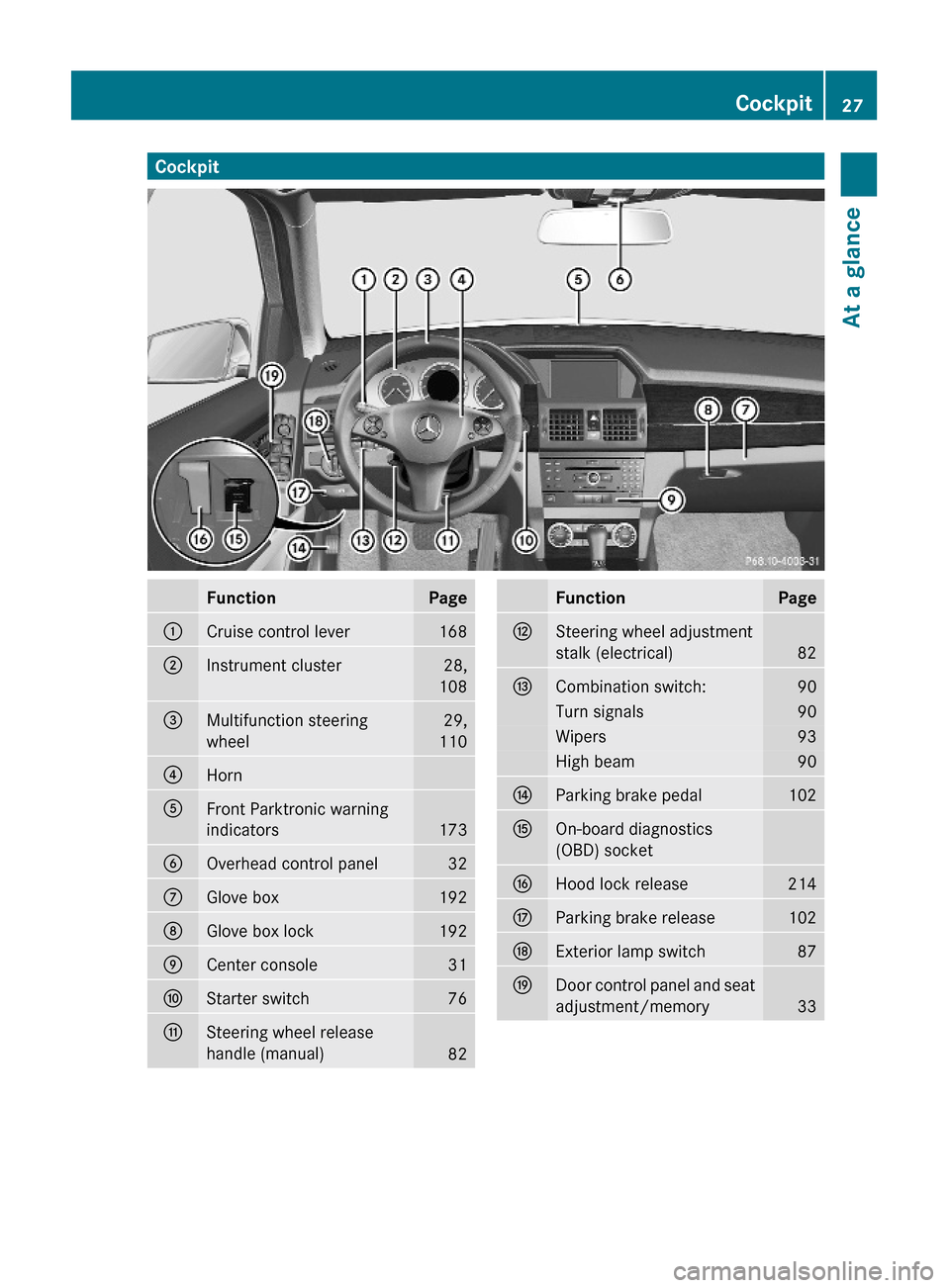
CockpitFunctionPage:Cruise control lever168;Instrument cluster28,
108
=Multifunction steering
wheel
29,
110
?Horn AFront Parktronic warning
indicators173
BOverhead control panel32CGlove box192DGlove box lock192ECenter console31FStarter switch76GSteering wheel release
handle (manual)82
FunctionPageHSteering wheel adjustment
stalk (electrical)82
ICombination switch:90Turn signals90Wipers93High beam90JParking brake pedal102KOn-board diagnostics
(OBD) socket
LHood lock release214MParking brake release102NExterior lamp switch87ODoor control panel and seat
adjustment/memory33
Cockpit27At a glanceX204_AKB; 3; 23, en-USd2ureepe,Version: 2.11.8.12009-07-16T19:16:58+02:00 - Seite 27Z
Page 64 of 344
as specified in the “Technical data” section
of this Operator’s Manual.
iThe cruise control switches off
automatically when the ESP® engages.
Electronic Traction System
(ETS/4-ETS)
GObserve Safety notes, see page 60.
The ETS (Electronic Traction System) and
4-ETS (four-wheel Electronic Traction
System, vehicles with 4MATIC only) are
components of the ESP®. The ETS/4-ETS
improves the vehicle’s ability to utilize
available traction, especially under slippery
road conditions by applying the brakes to a
spinning wheel. Vehicles with 4MATIC also
transfer more power to the wheel(s) with
traction.
When you switch off the ESP®, the
ETS/4-ETS is still enabled.
Switching off the ESP®
GWarning!
The ESP® should not be switched off during
normal driving other than in the
circumstances described below. Disabling
the system will reduce vehicle stability in
driving maneuvers.
Do not switch off the ESP® when a spare
wheel is mounted.
To improve the vehicle’s traction, switch off
the ESP®. This allows the drive wheels to spin
and thus cut into surfaces for better grip, for
example
Rwhen driving with snow chains
Rin deep snow
Rin sand or gravel
GWarning!
Switch on the ESP® immediately if the
aforementioned circumstances do not apply
anymore. Otherwise the ESP® will not
stabilize the vehicle when it is starting to skid
or a wheel is spinning.
When you switch off the ESP®,
Rthe ESP® does not stabilize the vehicle
Rthe engine output is not limited, which
allows the drive wheels to spin and thus cut
into surfaces for better grip
Rthe ETS/4-ETS will still apply the brakes to
a spinning wheel
Rthe ESP® continues to operate when you
are braking
Rthe cruise control cannot be activated
Rthe cruise control switches off if activated
iWhen the ESP® is switched off and one or
more drive wheels are spinning, the ESP®
warning lamp d in the instrument
cluster flashes. However, the ESP® will
then not stabilize the vehicle.
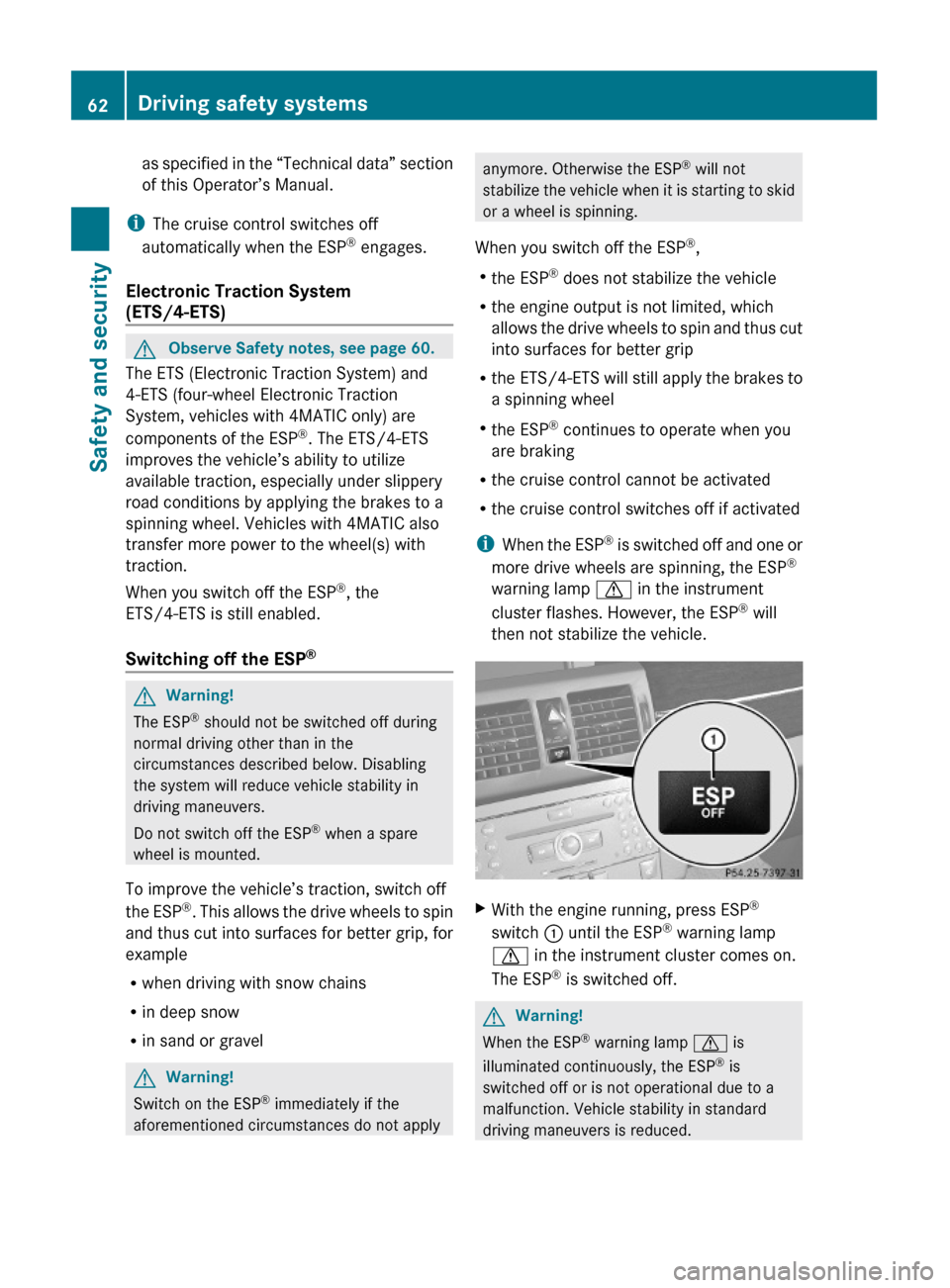
XWith the engine running, press ESP®
switch : until the ESP® warning lamp
d in the instrument cluster comes on.
The ESP® is switched off.
GWarning!
When the ESP® warning lamp d is
illuminated continuously, the ESP® is
switched off or is not operational due to a
malfunction. Vehicle stability in standard
driving maneuvers is reduced.
62Driving safety systemsSafety and security
X204_AKB; 3; 23, en-USd2ureepe,Version: 2.11.8.12009-07-16T19:16:58+02:00 - Seite 62
Page 122 of 344
XPress button : or 9 to select a
submenu.
Scroll down with button :, scroll up with
button 9.
With the selection marker on the desired
submenu, use the button a to access the
individual functions within that submenu.
Once within the submenu, you can use button
9 to move to the next function or
button : to move to the previous function
within that submenu.
The following lists show what settings can be
changed within the various menus. Detailed
instructions on making individual settings can
be found on the following pages.
Instrument cluster submenu
RSelecting speedometer display mode
(Y page 120)
RPermanent display (speed display or
outside temperature) (Y page 121)
Time/Date submenu
RSetting the time (Y page 121)
RSetting the date (Y page 121)
Lights submenu
RSwitching daytime running lamp mode on
or off (USA only) (Y page 122)
RSwitching locator lighting on or off
(Y page 122)
RSwitching interior lighting delayed shut-off
on or off (Y page 123)
Vehicle submenu
RSwitching automatic central locking on or
off (Y page 124)
Convenience submenu
RActivating easy-entry/exit feature
(Y page 124)
RSwitching fold-in function for exterior rear
view mirrors on or off (Y page 124)
Instrument cluster submenu
Access the Instr. Cluster submenu via
the Settings menu. Use the Instr.
Cluster submenu to change the instrument
cluster display settings.
The following functions are available:
RSelecting speedometer display mode
(Y page 120)
RPermanent display (speed display or
outside temperature) (Y page 121)
Selecting speedometer display mode
XPress = or ; to select the
Settings menu.
XPress button : or 9 to select the
Instr. Cluster submenu.
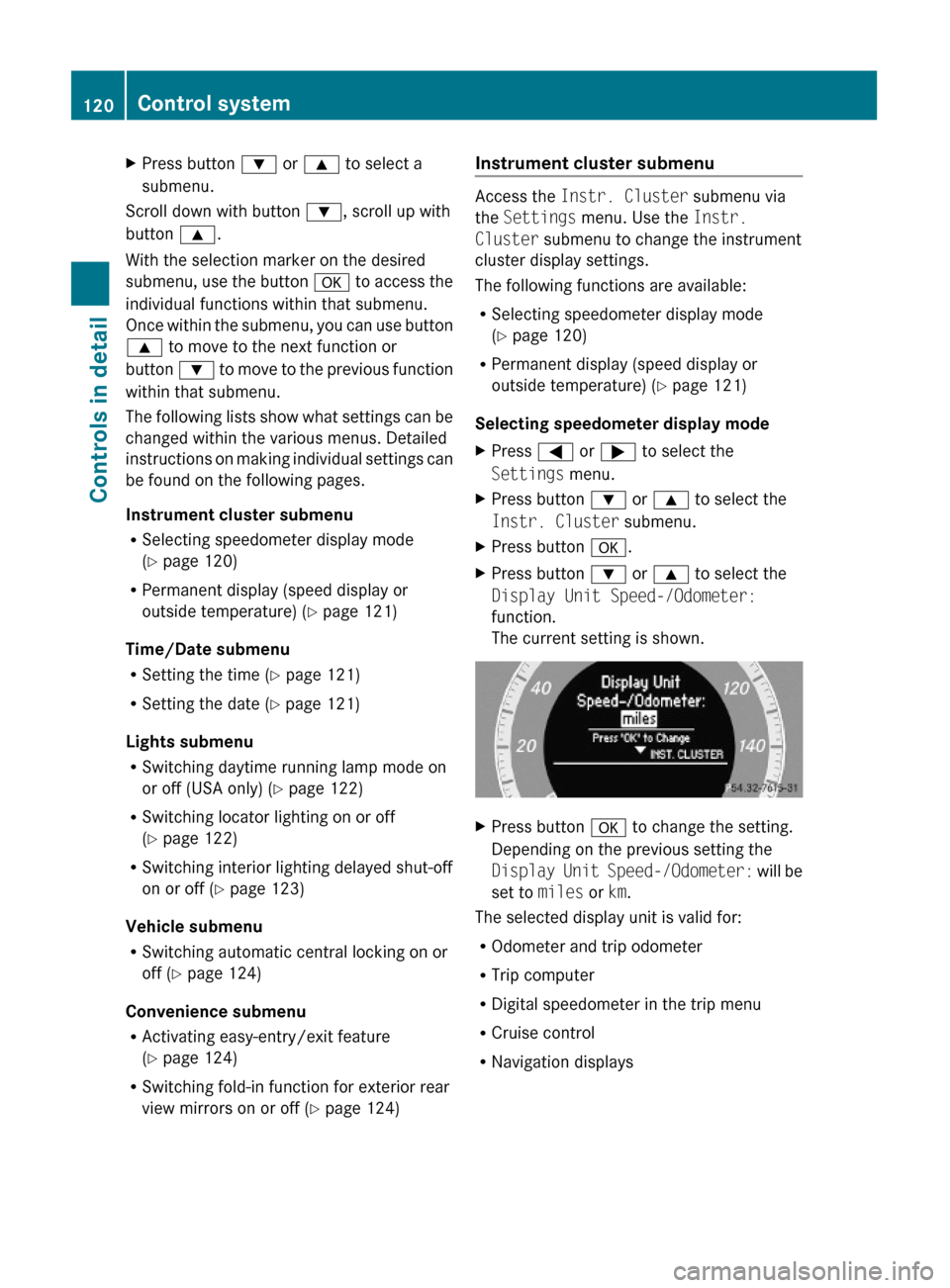
XPress button a.XPress button : or 9 to select the
Display Unit Speed-/Odometer:
function.
The current setting is shown.
XPress button a to change the setting.
Depending on the previous setting the
Display Unit Speed-/Odometer: will be
set to miles or km.
The selected display unit is valid for:
ROdometer and trip odometer
RTrip computer
RDigital speedometer in the trip menu
RCruise control
RNavigation displays
120Control systemControls in detail
X204_AKB; 3; 23, en-USd2ureepe,Version: 2.11.8.12009-07-16T19:16:58+02:00 - Seite 120
Page 170 of 344
Sending DTMF tones
iThis function is not possible with all
mobile phones.
Answering machines or other devices can be
controlled via DTMF tones, e.g. for remote
query functions.
XTransmitting individual characters:
During a call select the required
characters.
or
XPress the corresponding button on the
audio control unit.
Every selected character is transmitted
immediately.
XTransmitting a phone number of a
phone book entry as a sequence of
characters: Select Name.
XSelect the desired phone book entry.
The entry is transmitted immediately as a
sequence of characters.
XSwitching back to call display: Select
Back.
Driving systems
Introduction
This section describes the following driving
systems of your vehicle:
RCruise control
RHill-start assist system
RAll-wheel drive (4MATIC)
RParktronic system
RRear view camera
The driving safety systems ABS, Adaptive
Brake, BAS, EBP and ESP® are described in
the “Safety and security” section
(Y page 59).
Cruise control
The cruise control maintains the speed you
set for your vehicle automatically.
The use of the cruise control is recommended
for driving at a constant speed for extended
periods of time.
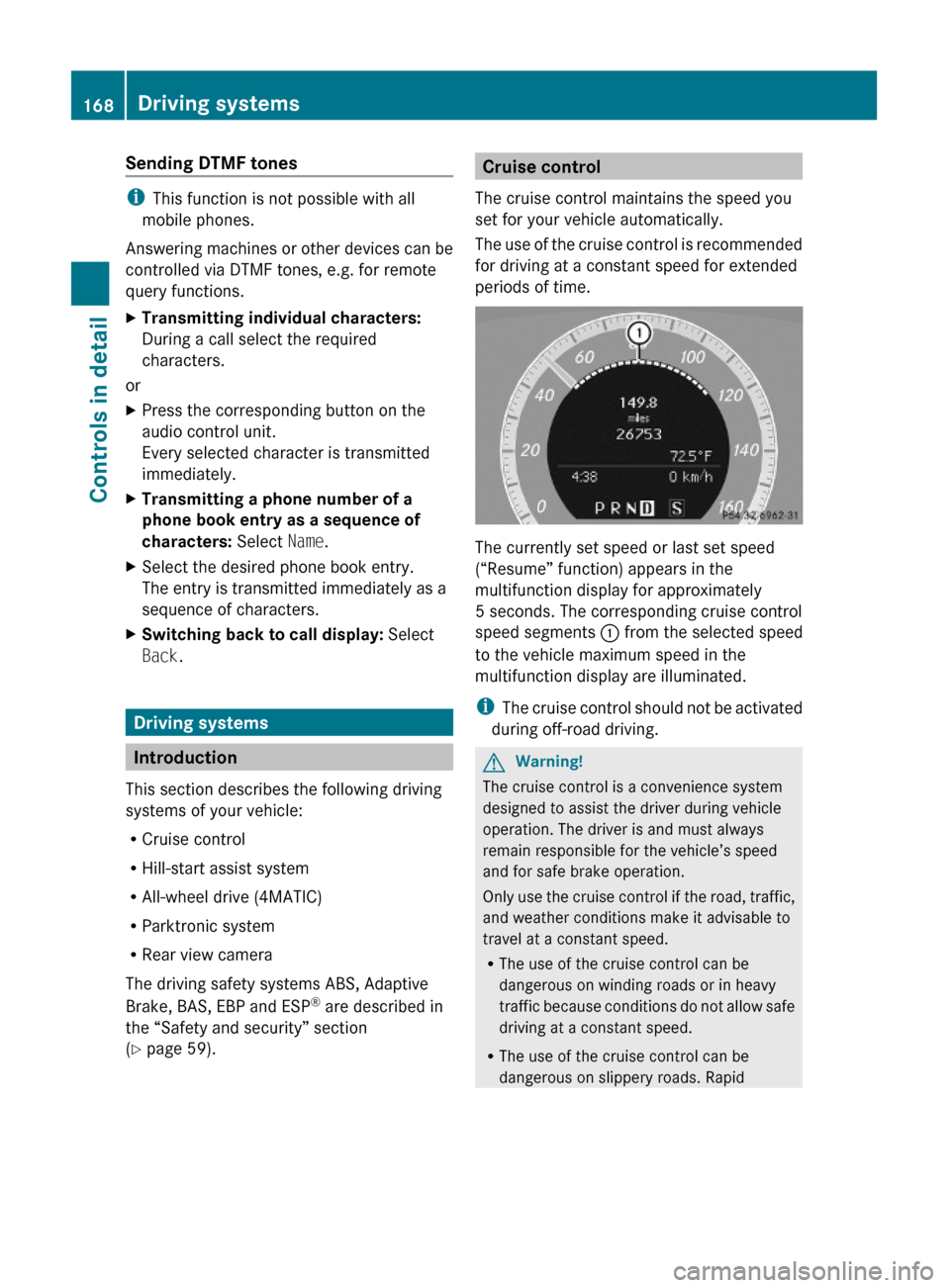
The currently set speed or last set speed
(“Resume” function) appears in the
multifunction display for approximately
5 seconds. The corresponding cruise control
speed segments : from the selected speed
to the vehicle maximum speed in the
multifunction display are illuminated.
iThe cruise control should not be activated
during off-road driving.
GWarning!
The cruise control is a convenience system
designed to assist the driver during vehicle
operation. The driver is and must always
remain responsible for the vehicle’s speed
and for safe brake operation.
Only use the cruise control if the road, traffic,
and weather conditions make it advisable to
travel at a constant speed.
RThe use of the cruise control can be
dangerous on winding roads or in heavy
traffic because conditions do not allow safe
driving at a constant speed.
RThe use of the cruise control can be
dangerous on slippery roads. Rapid
168Driving systemsControls in detail
X204_AKB; 3; 23, en-USd2ureepe,Version: 2.11.8.12009-07-16T19:16:58+02:00 - Seite 168
Page 171 of 344

changes in tire traction can result in wheel
spin and loss of control.
RDeactivate the cruise control when driving
in fog.
The “Resume” function should only be
operated if the driver is fully aware of the
previously set speed and wishes to resume
this particular preset speed.
GWarning!
The cruise control brakes automatically so
that the set speed is not exceeded.
:Setting current or higher speed ;Setting current or lower speed=Canceling the cruise control?Activating the cruise control or resuming
to last set speed
Activating cruise control
You can activate the cruise control at a
vehicle speed above 20 mph (30 km/h).
You cannot activate the cruise control
Rwhen you brake
Rwhen you have engaged the parking brake
Rwhen the automatic transmission is in park
position P, reverse gear R, or neutral
position N
Rthe ESP® is switched off or has switched off
due to a malfunction
The vehicle speed displayed in the
speedometer can briefly vary from the speed
setting for the cruise control system.
Setting current speed XAccelerate or decelerate to the desired
speed.
XBriefly lift the cruise control lever in
direction of arrow : or press in direction
of arrow ;.
XRemove your foot from the accelerator
pedal.
iOn uphill grades, the cruise control may
not be able to maintain the set speed. Once
the grade eases, the set speed will be
resumed.
On downhill grades, the cruise control
maintains the set speed by braking with the
vehicle’s brake system. In addition, on
longer downhill grades the automatic
transmission will downshift automatically.
Canceling cruise control
XDepress the brake pedal.
or
XBriefly push the cruise control lever in
direction of arrow =.
The last set speed is stored for later use.
The last stored speed is deleted from memory
when the engine is turned off.
The cruise control switches off automatically
when you depress the brake pedal or you
engage the parking brake. In this case, the
cruise control speed segments in the
multifunction display will go out.
The cruise control also switches off
automatically when
Rthe vehicle speed falls below 20 mph
(30 km/h)
Rthe ESP® is in operation
Rthe ESP® is switched off with the ESP®
switch
Rthe ESP® has switched off due to a
malfunction
Ryou shift the automatic transmission into
neutral position N while driving
Driving systems169Controls in detailX204_AKB; 3; 23, en-USd2ureepe,Version: 2.11.8.12009-07-16T19:16:58+02:00 - Seite 169Z
Page 172 of 344
The cruise control speed segments in the
multifunction display goes out and an
acoustic warning will sound. Observe
additional messages in the multifunction
display that may appear.
Depressing the accelerator pedal does not
deactivate the cruise control. After a brief
acceleration (e.g. for passing), the cruise
control will resume the last set speed.
Changing the set speed GWarning!
Keep in mind that it may take a brief moment
until the vehicle has made the necessary
adjustments.
Increase or decrease the set vehicle speed to
a value that the prevailing road conditions and
legal speed limits permit. Otherwise, sudden
and unexpected acceleration or deceleration
of the vehicle could cause an accident and/
or serious injury to you and others.
You can increase or decrease the set speed
in 1 mph (Canada: 1 km/h) increments or in
5 mph (Canada: 10 km/h) increments.
When you use the cruise control lever to
decelerate, the brake system will brake the
vehicle automatically if the engine’s braking
power does not brake the vehicle sufficiently.
Adjustment in 1 mph (Canada:
1 km/h) increments
i The set speed value is increased or
decreased in 1 mph (Canada: 1 km/h)
increments each time you lift or press the
cruise control lever up or down to the
resistance point.
XIncreasing: Briefly lift the cruise control
lever up to the resistance point in direction
of arrow :.XDecreasing: Briefly press the cruise
control lever down to the resistance point
in direction of arrow ;.XRelease the cruise control lever.
The new speed is set and the vehicle will
accelerate or decelerate.
Adjustment in 5 mph (Canada:
10 km/h) increments
i The set speed value is increased or
decreased in 5 mph (Canada: 10 km/h)
increments each time you lift or press the
cruise control lever up or down past the
resistance point.
XIncreasing: Briefly lift the cruise control
lever up past the resistance point in
direction of arrow :.XDecreasing: Briefly press the cruise
control lever down past the resistance
point in direction of arrow ;.XRelease the cruise control lever.
The new speed is set and the vehicle will
accelerate or decelerate. Keep in mind that
it may take a brief moment until the vehicle
has reached the set speed.
Setting stored speed (Resume
function)
GWarning!
The set speed stored in memory should only
be set again if prevailing road conditions and
legal speed limits permit. Possible
acceleration or deceleration differences
arising from returning to the preset speed
could cause an accident and/or serious injury
to you and others.
170Driving systemsControls in detail
X204_AKB; 3; 23, en-USd2ureepe,Version: 2.11.8.12009-07-16T19:16:58+02:00 - Seite 170