Eco start MERCEDES-BENZ GLS 2017 Owner's Manual
[x] Cancel search | Manufacturer: MERCEDES-BENZ, Model Year: 2017, Model line: GLS, Model: MERCEDES-BENZ GLS 2017Pages: 390, PDF Size: 11.93 MB
Page 92 of 390
G WARNING
If children operate the sliding sunroof they
could become trapped, particularly if they are
left unsupervised. There is a risk of injury.
When leaving the vehicle, always take the
SmartKey with you and lock the vehicle. Never
leave children unsupervised in the vehicle.
! Only open the sliding sunroof if it is free of
snow and ice. Otherwise, malfunctions may
occur.
Do not allow anything to protrude from the
sliding sunroof. Otherwise, the seals could be
damaged.
! The weather can change abruptly. It could
start to rain or snow. Make sure that the slid-
ing sunroof is closed when you leave the vehi-
cle. The vehicle electronics can be damaged if
water enters the vehicle interior.
Resonance noises can occur in addition to the
usual airflow noises when the sliding sunroof is
open. They are caused by minor pressure fluc-
tuations in the vehicle interior. Change the posi-
tion of the sliding sunroof or open a side win-
dow. The noise will be reduced or eliminated.
Sliding sunroof reversing feature Your vehicle may be equipped with a sliding
sunroof or a panorama roof with power tilt/slid-
ing panel. In the following section, the term
"sliding sunroof" refers to both sliding sunroof
variants.
The sliding sunroof is equipped with an auto-
matic reversing feature. If a solid object blocks
or restricts the sliding sunroof during the closing
process, the sliding sunroof opens again auto-
matically. However, the automatic reversing
feature is only an aid and does not relieve you of
the responsibility of paying attention when clos-
ing the sliding sunroof.
G WARNING
The reversing feature does not react: R
to soft, light and thin objects, e.g. small fin-
gers R
over the last 1/6 in (4 mm) of the closing
movement R
during resetting R
when closing the sliding sunroof again man-
ually immediately after automatic reversing
This means that the reversing feature cannot
prevent someone being trapped in these sit-
uations. There is a risk of injury.
Make sure that no body parts are in close
proximity during the closing procedure.
If somebody becomes trapped: R
release the switch immediately, or R
press the switch in any direction during the
automatic closing process
The closing process is stopped.
Operating the sliding sunroof
Opening and closing
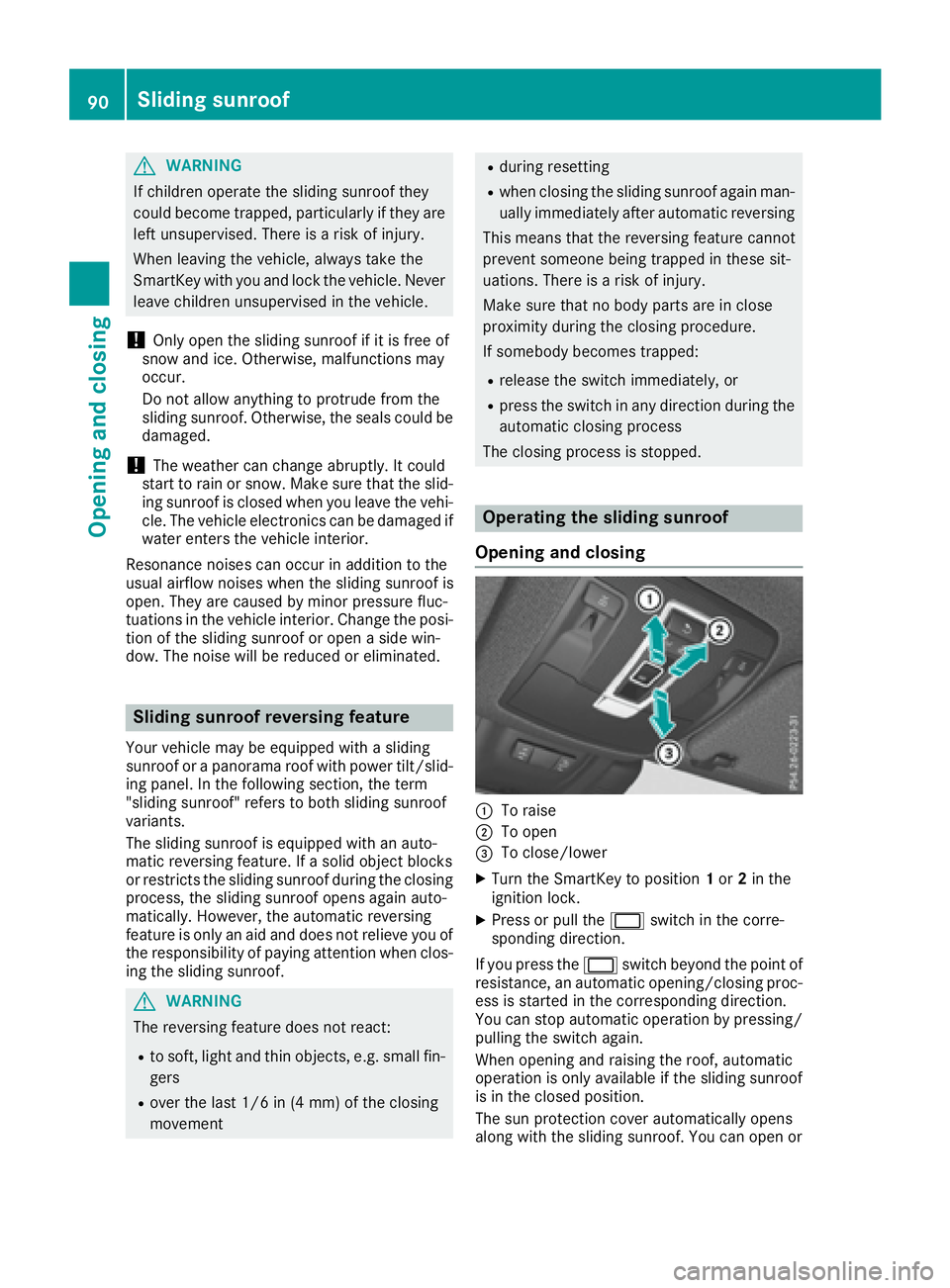
C
To raise D
To open
Page 97 of 390
G WARNING
You could lose control of your vehicle if you do
the following while driving: R
adjust the driver's seat, head restraint,
steering wheel or mirrors R
fasten the seat belt
There is a risk of an accident.
Adjust the driver's seat, head restraint, steer-
ing wheel and mirror and fasten your seat belt
before starting the engine.
G WARNING
If you adjust the seat height carelessly, you or
other vehicle occupants could be trapped and
thereby injured. Children in particular could
accidentally press the electrical seat adjust-
ment buttons and become trapped. There is a
risk of injury.
While moving the seats, make sure that your
hands or other body parts do not get under the
lever assembly of the seat adjustment sys-
tem.
G WARNING
If the head restraints are not installed or not
adjusted correctly, they cannot provide pro-
tection as intended. There is an increased risk
of injury in the head and neck area, e.g. in the
event of an accident or when braking.
Always drive with the head restraints instal-
led. Before driving off, make sure for every
vehicle occupant that the center of the head
restraint supports the back of the head at
about eye level.
G WARNING
The seat belt does not offer the intended level
of protection if you have not moved the back-
rest to an almost vertical position. When brak-
ing or in the event of an accident, you could
slide underneath the seat belt and sustain
abdomen or neck injuries, for example. This
poses an increased risk of injury or even fatal
injury. Adjust the seat properly before beginning
your journey. Always ensure that the backrest
is in an almost vertical position and that the
shoulder section of your seat belt is routed
across the center of your shoulder.
! To avoid damage to the seats and the seat
heating, observe the following information: R
keep liquids from spilling on the seats. If
liquid is spilled on the seats, dry them as
soon as possible. R
if the seat covers are damp or wet, do not
switch on the seat heating. The seat heat-
ing should also not be used to dry the seats. R
clean the seat covers as recommended;
see "Interior care". R
do not transport heavy loads on the seats.
Do not place sharp objects on the seat
cushions, e.g. knives, nails or tools. The
seats should only be occupied by passen-
gers, if possible. R
when the seat heating is in operation, do
not cover the seats with insulating materi-
als, e.g. blankets, coats, bags, seat covers,
child seats or booster seats.
! Make sure that there are no objects in the
footwell under or behind the seats when mov-
ing the seats back. There is a risk that the
seats and/or the objects could be damaged.
i It is not possible to remove the head
restraints from the front seats. The rear-com-
partment head restraints, however, can be
removed ( Y
page 98).
For more information, contact a qualified spe-
cialist workshop.
i Further related subjects: R
Cargo compartment enlargement (folding
down the rear bench seat) ( Y
page 297)Seats 95
Seats, steering wheel and mirrors Z
Page 125 of 390
Overview of climate control systems
General notes Observe the settings recommended on the fol-
lowing pages. The windows could otherwise fog
up.
To prevent the windows from fogging up: R
switch off climate control only briefly R
switch on air-recirculation mode only briefly R
switch on the cooling with air dehumidifica-
tion function R
switch on the defrost windshield function
briefly, if required
Climate control regulates the temperature and
the humidity in the vehicle interior and filters
undesirable substances out of the air.
The residual heat function can only be activated
or deactivated with the ignition switched off
( Y
page 133).
i Ventilate the vehicle for a brief period during
warm weather, e.g. using the convenience
opening feature ( Y
page 87).
This will speed up the cooling process and the
desired interior temperature will be reached
more quickly. If you start the engine using your smartphone,
the last selected climate control setting is reac-
tivated ( Y
page 140).
i The integrated filter filters out most parti-
cles of dust and soot and completely filters
out pollen. It also reduces gaseous pollutants
and odors. A clogged filter reduces the
amount of air supplied to the vehicle interior.
For this reason, you should always observe
the interval for replacing the filter, which is
specified in the Maintenance Booklet. As it
depends on environmental conditions, e.g.
heavy air pollution, the interval may be
shorter than stated in the Maintenance Book-
let.
i Vehicles with AIR-BALANCE package: in
addition to ionization, the vehicle has an air
filter with anti-allergenic properties that con-
tribute to improved air filtration.
i It is possible that under certain circumstan-
ces the residual heat function may be activa-
ted automatically an hour after the SmartKey
has been removed in order to dry the auto-
matic climate control. The vehicle is then ven-
tilated for 30 minutes.
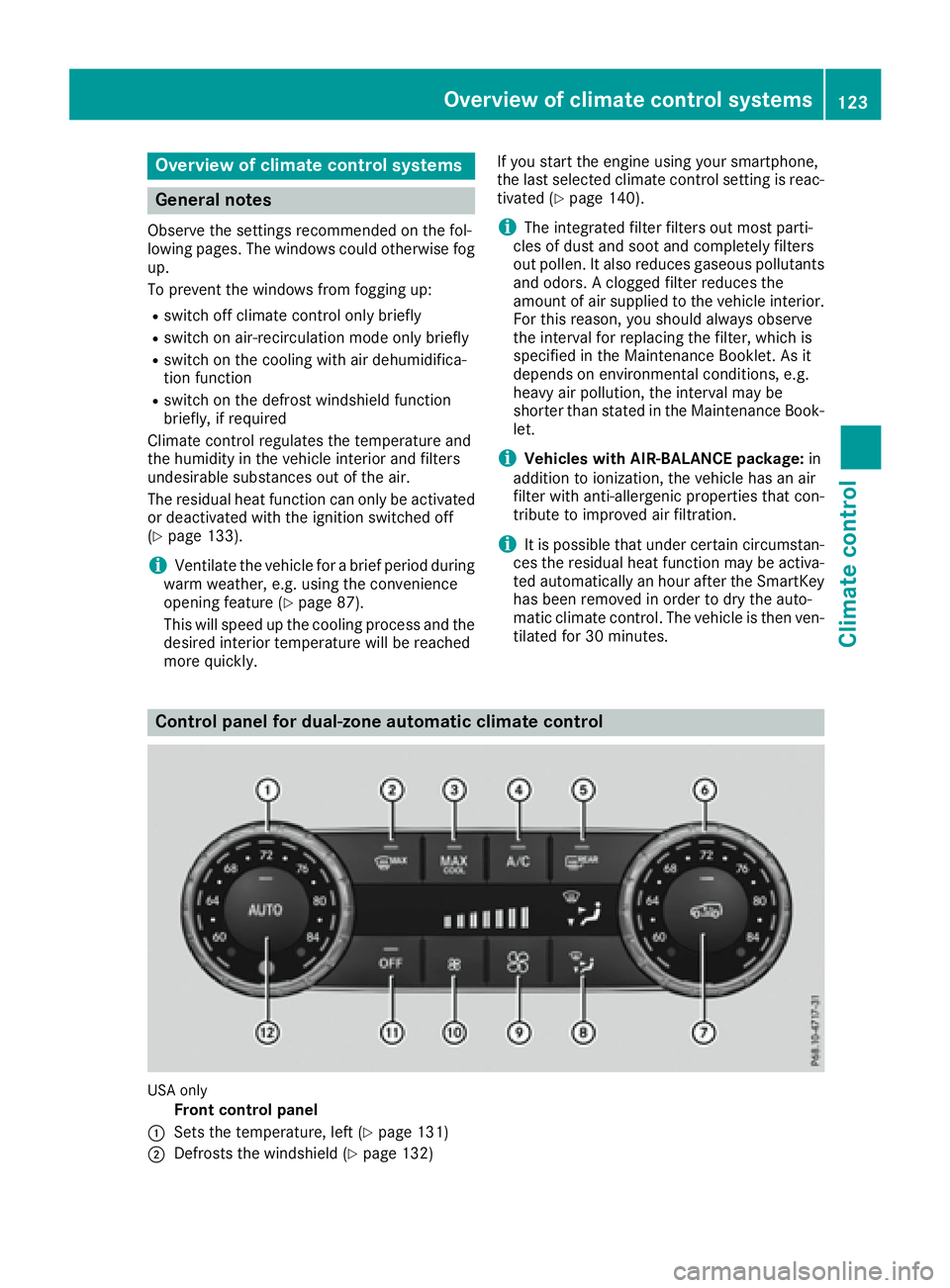
Control panel for dual-zone automatic climate control
USA only
Front control panel
C
Sets the temperature, left ( Y
page 131)
D
Defrosts the windshield ( Y
page 132)Overview of climate control systems 123
Climate control
Page 140 of 390
! Do not warm up the engine with the vehicle
stationary. Drive off immediately. Avoid high
engine speeds and driving at full throttle until
the engine has reached its operating temper-
ature.
Only shift the automatic transmission to the
desired drive position when the vehicle is sta-
tionary.
Where possible, avoid spinning the drive
wheels when pulling away on slippery roads.
You could otherwise damage the drive train.
! Mercedes-AMG vehicles: at low engine oil
temperatures below 68 ‡ (+20 †), the max-
imum engine speed is restricted in order to
protect the engine. To protect the engine and
maintain smooth engine operation, avoid driv-
ing at full throttle when the engine is cold.
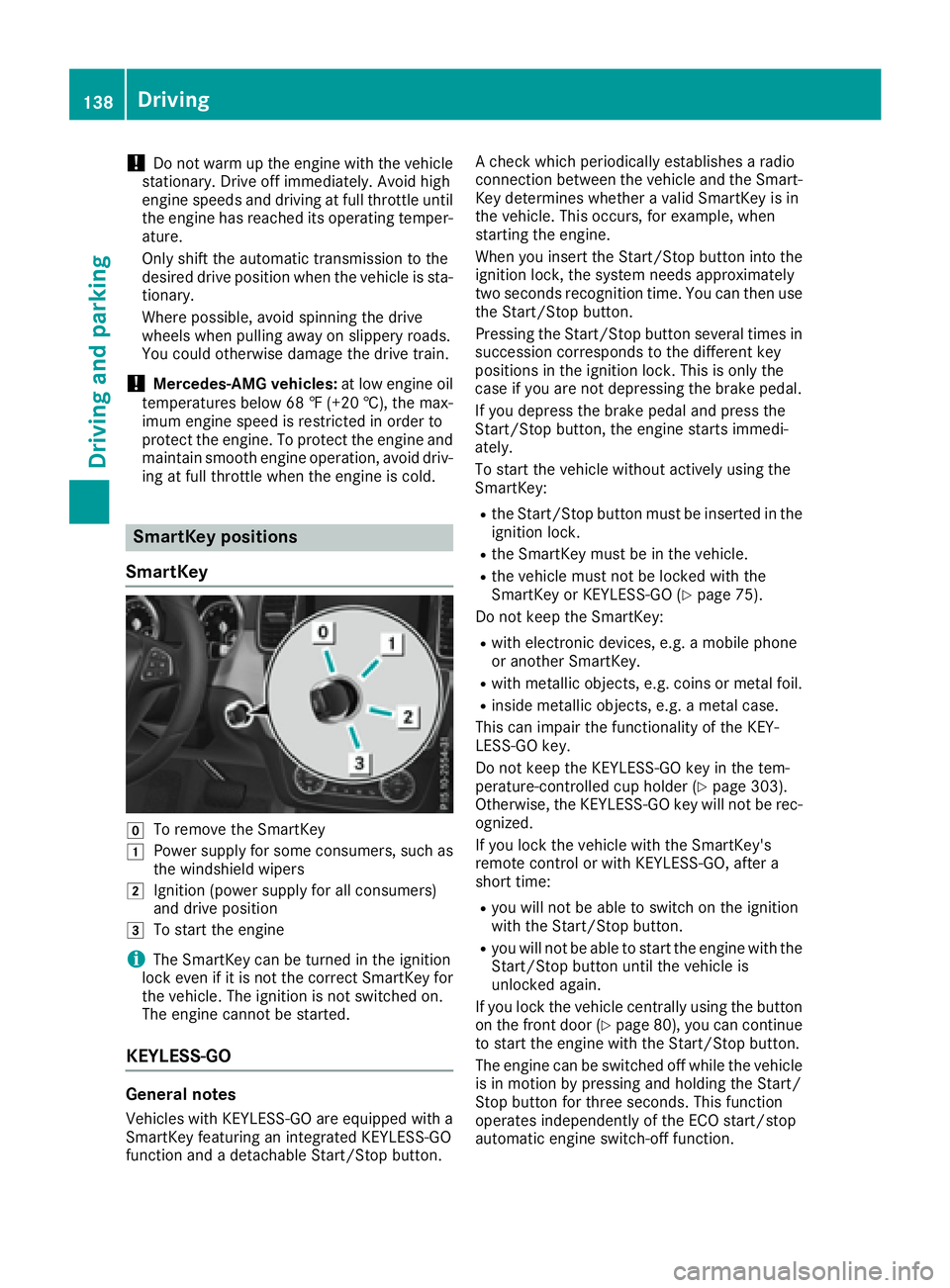
SmartKey positions
SmartKey
Z
To remove the SmartKeyG
Power supply for some consumers, such as
the windshield wipersH
Ignition (power supply for all consumers)
and drive position
I
To start the engine
i The SmartKey can be turned in the ignition
lock even if it is not the correct SmartKey for
the vehicle. The ignition is not switched on.
The engine cannot be started.
KEYLESS-GO
General notes
Vehicles with KEYLESS-GO are equipped with a
SmartKey featuring an integrated KEYLESS-GO
function and a detachable Start/Stop button. A check which periodically establishes a radio
connection between the vehicle and the Smart-
Key determines whether a valid SmartKey is in
the vehicle. This occurs, for example, when
starting the engine.
When you insert the Start/Stop button into the
ignition lock, the system needs approximately
two seconds recognition time. You can then use
the Start/Stop button.
Pressing the Start/Stop button several times in
succession corresponds to the different key
positions in the ignition lock. This is only the
case if you are not depressing the brake pedal.
If you depress the brake pedal and press the
Start/Stop button, the engine starts immedi-
ately.
To start the vehicle without actively using the
SmartKey: R
the Start/Stop button must be inserted in the
ignition lock. R
the SmartKey must be in the vehicle. R
the vehicle must not be locked with the
SmartKey or KEYLESS-GO ( Y
page 75).
Do not keep the SmartKey: R
with electronic devices, e.g. a mobile phone
or another SmartKey. R
with metallic objects, e.g. coins or metal foil. R
inside metallic objects, e.g. a metal case.
This can impair the functionality of the KEY-
LESS-GO key.
Do not keep the KEYLESS-GO key in the tem-
perature-controlled cup holder ( Y
page 303).
Otherwise, the KEYLESS-GO key will not be rec-
ognized.
If you lock the vehicle with the SmartKey's
remote control or with KEYLESS-GO, after a
short time: R
you will not be able to switch on the ignition
with the Start/Stop button. R
you will not be able to start the engine with the
Start/Stop button until the vehicle is
unlocked again.
If you lock the vehicle centrally using the button
on the front door ( Y
page 80), you can continue
to start the engine with the Start/Stop button.
The engine can be switched off while the vehicle
is in motion by pressing and holding the Start/
Stop button for three seconds. This function
operates independently of the ECO start/stop
automatic engine switch-off function.138
Driving
Driving and parking
Page 142 of 390
ignite if in contact with the exhaust system or
parts of the engine that heat up. There is a risk
of fire.
Carry out regular checks to make sure that
there are no flammable foreign materials in
the engine compartment or in the exhaust
system.
General notes Vehicles with a gasoline engine: the catalytic
converter is preheated for up to 30 seconds
after a cold start. The sound of the engine may
change during this time.
Automatic transmission X
Shift the transmission to position P
( Y
page 146).
The transmission position display in the mul-
tifunction display shows P ( Y
page 148).
i You can start the engine in transmission
position P and N .
Starting procedure with the SmartKey X
To start a diesel engine : turn the SmartKey
to position 2 in the ignition lock ( Y
page 138).
The \( preglow indicator lamp in the instru-
ment cluster lights up. X
Turn the SmartKey to position 3 in the ignition
lock and release it as soon as the engine is
running ( Y
page 138).
i Vehicles with a diesel engine: you can
start the engine without preglow if the engine
is warm.
Using KEYLESS-GO to start the engine The Start/Stop button can be used to start the
vehicle without inserting the SmartKey into the
ignition lock. The Start/Stop button must be
inserted in the ignition lock and the SmartKey
must be in the vehicle. This mode for starting the
engine operates independently of the ECO
start/stop automatic engine start function. X
Depress the brake pedal and keep it
depressed. X
Press the Start/Stop button once
( Y
page 138).
Vehicles with a gasoline engine: the engine
starts.
Vehicles with a diesel engine: preglow is
activated and the engine starts.
Starting procedure via smartphone Observe the important safety notes on starting
the engine ( Y
page 139).
You can also start your engine via your smart-
phone from outside the vehicle. In this case, the
previously selected climate control setting is
activated. In this way you can cool or heat the
interior of the vehicle before starting the jour-
ney.
Only start the engine via your smartphone if it is
safe to start and run the engine where your vehi-
cle is parked.
Observe the legal stipulations in the area where
your vehicle is parked. Engine start via smart-
phone may be limited to certain countries or
regions.
You can execute a maximum of two consecutive
starting attempts via your smartphone. If you
insert the SmartKey into the ignition lock, you
can carry out two more starting attempts.
Once you have started the engine, you can
switch the engine off via your smartphone at any
time.
You can only start the engine via your smart-
phone if: R
the SmartKey is in the ignition lock R
park position P is selected R
the accelerator pedal is not depressed R
the anti-theft alarm system is not activated R
the panic alarm is not activated R
the hazard warning lamps are switched off R
the hood is closed. R
the doors are closed and locked R
the windows and sliding sunroof are closed
Also make sure that: R
the fuel tank is sufficiently filled R
the starter battery is sufficiently charged140
Driving
Driving and parking
Page 144 of 390
leave the vehicle when it is held by hill start
assist.
Hill start assist is not active if: R
you are pulling away on a level road or on a
downhill gradient. R
the transmission is in position N .R
the electric parking brake is applied. R
ESP ®
is malfunctioning.
ECO start/stop function
Introduction The ECO start/stop function switches the
engine off automatically if the vehicle is stopped
under certain conditions.
The engine starts automatically when the driver
wants to pull away again. The ECO start/stop
function thereby helps you to reduce the fuel
consumption and emissions of your vehicle.
Important safety notes
G WARNING
If the engine is switched off automatically and
you exit the vehicle, the engine is restarted
automatically. The vehicle may begin moving.
There is a risk of accident and injury.
If you wish to exit the vehicle, always turn off
the ignition and secure the vehicle against
rolling away.
General notes
C
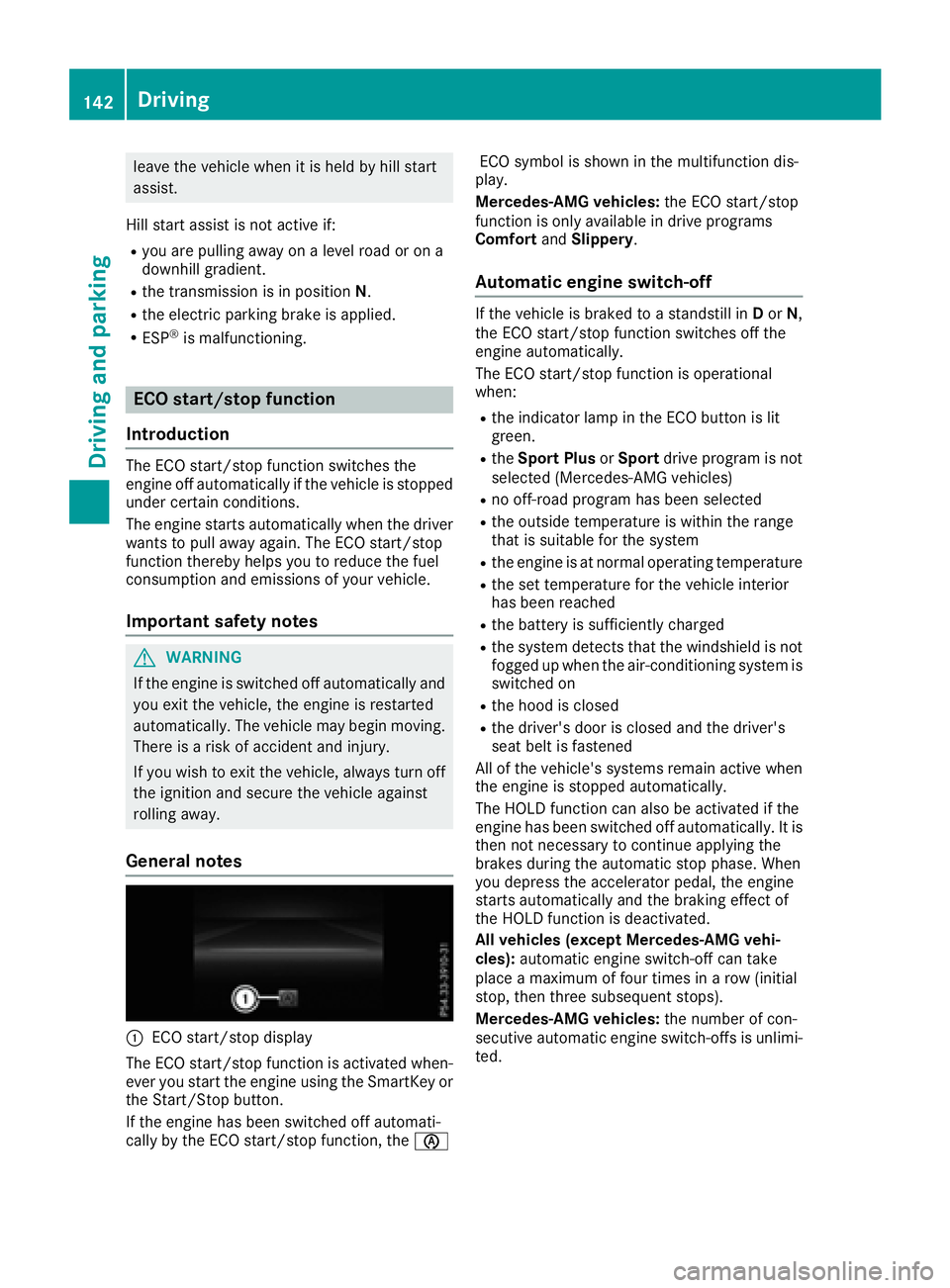
ECO start/stop display
The ECO start/stop function is activated when-
ever you start the engine using the SmartKey or
the Start/Stop button.
If the engine has been switched off automati-
cally by the ECO start/stop function, the
Page 145 of 390
Aut oma tic engine startThe engin e start s automatically if:R
you switch off th e ECO start/sto p function by
pressing th e ECO butto nR
in transmission position D or N th e brak e
pedal is release d and th e HOLD function is no t
active R
you depress th e accelerato r pedalR
you engage revers e gear RR
you mov e th e transmission out of position PR
you switch to th e Sport Plu s or Sport drive
program (Mercedes-AM G vehicles)R
you activat e manual gearshifting (Mercedes-
AM G vehicles)R
you switch to th e Offroa d drive program
(vehicles without Off-Road Engineering pack-
age) R
you switch to th e Offroa d or Offroa d Plu s
drive program (vehicles wit h Off-Road Engi-
neering package) R
you unfasten your seat belt or open th e driv-
er' s doorR
th e vehicl e start s to rol lR
th e brak e system require s thisR
th e temperature in th e vehicl e interior devi-
ate s from th e set rangeR
th e system detects moisture on th e wind-
shield when th e air-conditioning system is
switched on R
th e battery's condition of charge is to o low
Shifting th e transmission to position P does no t
start th e engine. Deactivating or activating the ECO
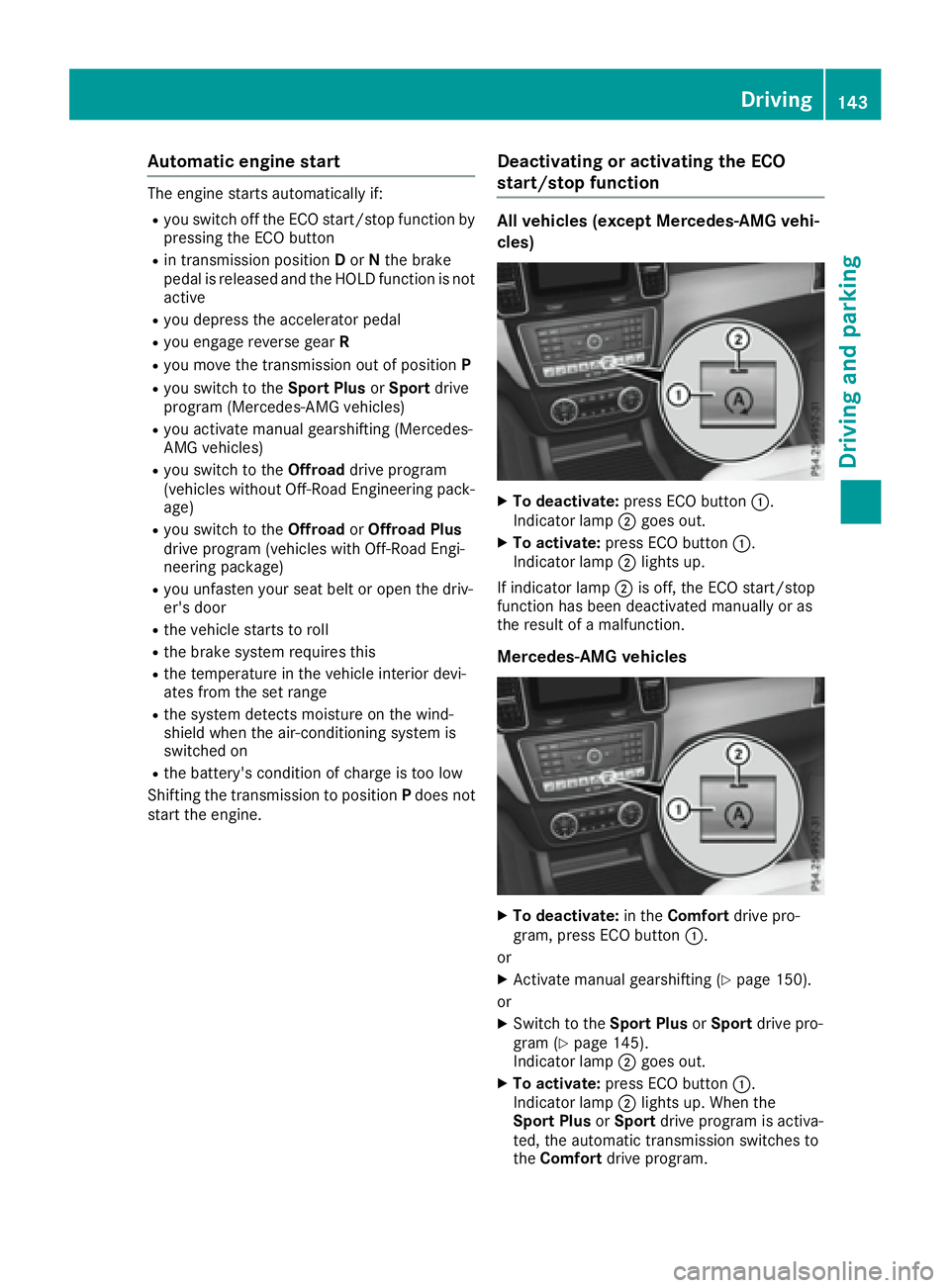
start/stop function All vehicles (excep t Mercedes-AM G veh i-
cles) X
To deactivate: press ECO butto n C .
Indicato r lamp D goe s out .X
To activate: press ECO butto n C .
Indicato r lamp D lights up.
If indicator lamp D is off , th e ECO start/sto p
function has been deactivated manually or as
th e result of a malfunction .
Mercedes-AM G veh icles
X
To deactivate: in th e Comfor t drive pro -
gram , press ECO butto n C .
or X
Activat e manual gearshifting ( Y
page 150).
or X
Switc h to th e Sport Plu s or Sport drive pro -
gram ( Y
page 145).
Indicato r lamp D goes out .X
To activate: press ECO butto n C .
Indicato r lamp D lights up. When th e
Sport Plu s or Sport drive program is activa-
ted, th e automatic transmission switches to
th e Comfor t drive program .Driving 143
Driving and parking Z
Page 146 of 390
If indicator lamp D is off, the ECO start/stop
function has been deactivated manually or as
the result of a malfunction.
Problems with the engine Problem
Possible causes/consequences and P Solutions
The engine does not
start. The starter motor
can be heard. R
There is a malfunction in the engine electronics. R
There is a malfunction in the fuel supply.
Before attempting to start the engine again: X
Turn the SmartKey back to position 0 in the ignition lock.
or X
Press the Start/Stop button repeatedly until all indicator lamps in
the instrument cluster go out. X
Try to start the engine again ( Y
page 139). Avoid excessively long
and frequent attempts to start the engine as these will drain the
battery.
If the engine does not start after several attempts: X
Consult a qualified specialist workshop.
The engine does not
start. You cannot hear
the starter motor. The on-board voltage is too low because the battery is too weak or
discharged. X
Jump-start the vehicle ( Y
page 338).
If the engine does not start despite attempts to jump-start it: X
Consult a qualified specialist workshop.
The starter motor was exposed to a thermal load that was too high. X
Allow the starter motor to cool down for approximately two minutes. X
Try to start the engine again.
If the engine still does not start: X
Consult a qualified specialist workshop.144
Driving
Driving and parking
Page 147 of 390
Problem
Possible causes/consequences and P Solutions
Vehicles with a gasoline
engine:
The engine is not running
smoothly and is misfir-
ing. There is a malfunction in the engine electronics or in a mechanical
component of the engine management system. X
Only depress the accelerator pedal slightly.
Otherwise, non-combusted fuel may get into the catalytic converter
and damage it. X
Have the cause rectified immediately at a qualified specialist work-
shop.
The coolant temperature
gage shows a value
above 248 ‡ (120 †). The coolant level is too low. The coolant is too hot and the engine is no
longer being cooled sufficiently. X
Stop as soon as possible and allow the engine and the coolant to
cool down. X
Check the coolant level ( Y
page 322). Observe the warning notes
as you do so and add coolant if necessary.
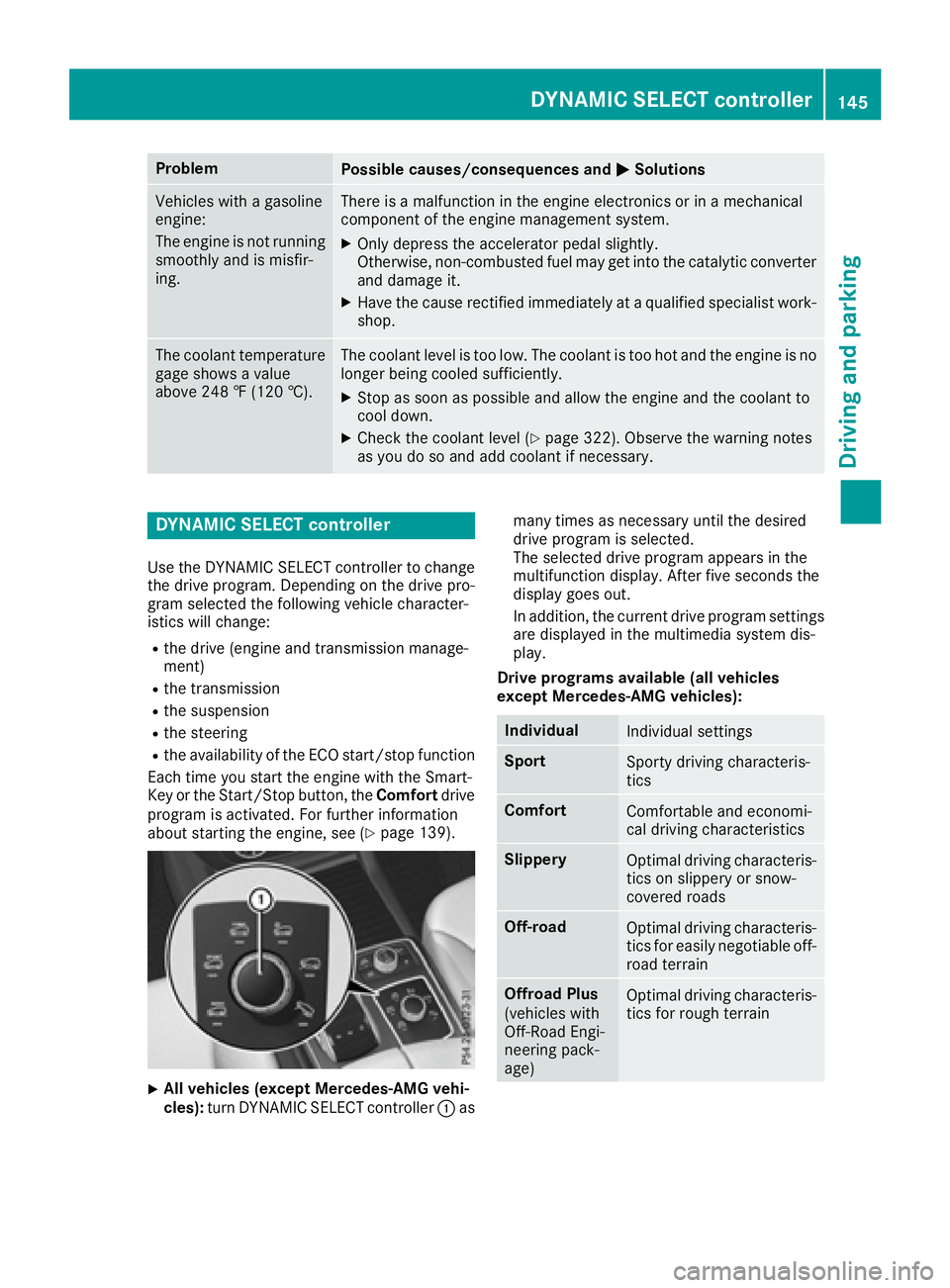
DYNAMIC SELECT controller Use the DYNAMIC SELECT controller to change
the drive program. Depending on the drive pro-
gram selected the following vehicle character-
istics will change: R
the drive (engine and transmission manage-
ment) R
the transmission R
the suspension R
the steering R
the availability of the ECO start/stop function
Each time you start the engine with the Smart-
Key or the Start/Stop button, the Comfort drive
program is activated. For further information
about starting the engine, see ( Y
page 139).
X
All vehicles (except Mercedes-AMG vehi-
cles): turn DYNAMIC SELECT controller C as many times as necessary until the desired
drive program is selected.
The selected drive program appears in the
multifunction display. After five seconds the
display goes out.
In addition, the current drive program settings
are displayed in the multimedia system dis-
play.
Drive programs available (all vehicles
except Mercedes-AMG vehicles):
Individual
Individual settings
Sport
Sporty driving characteris-
tics
Comfort
Comfortable and economi-
cal driving characteristics
Slippery
Optimal driving characteris-
tics on slippery or snow-
covered roads
Off-road
Optimal driving characteris-
tics for easily negotiable off-
road terrain
Offroad Plus
(vehicles with
Off-Road Engi-
neering pack-
age) Optimal driving characteris-
tics for rough terrainDYNAMIC SELECT controller 145
Driving and parking Z
Page 152 of 390
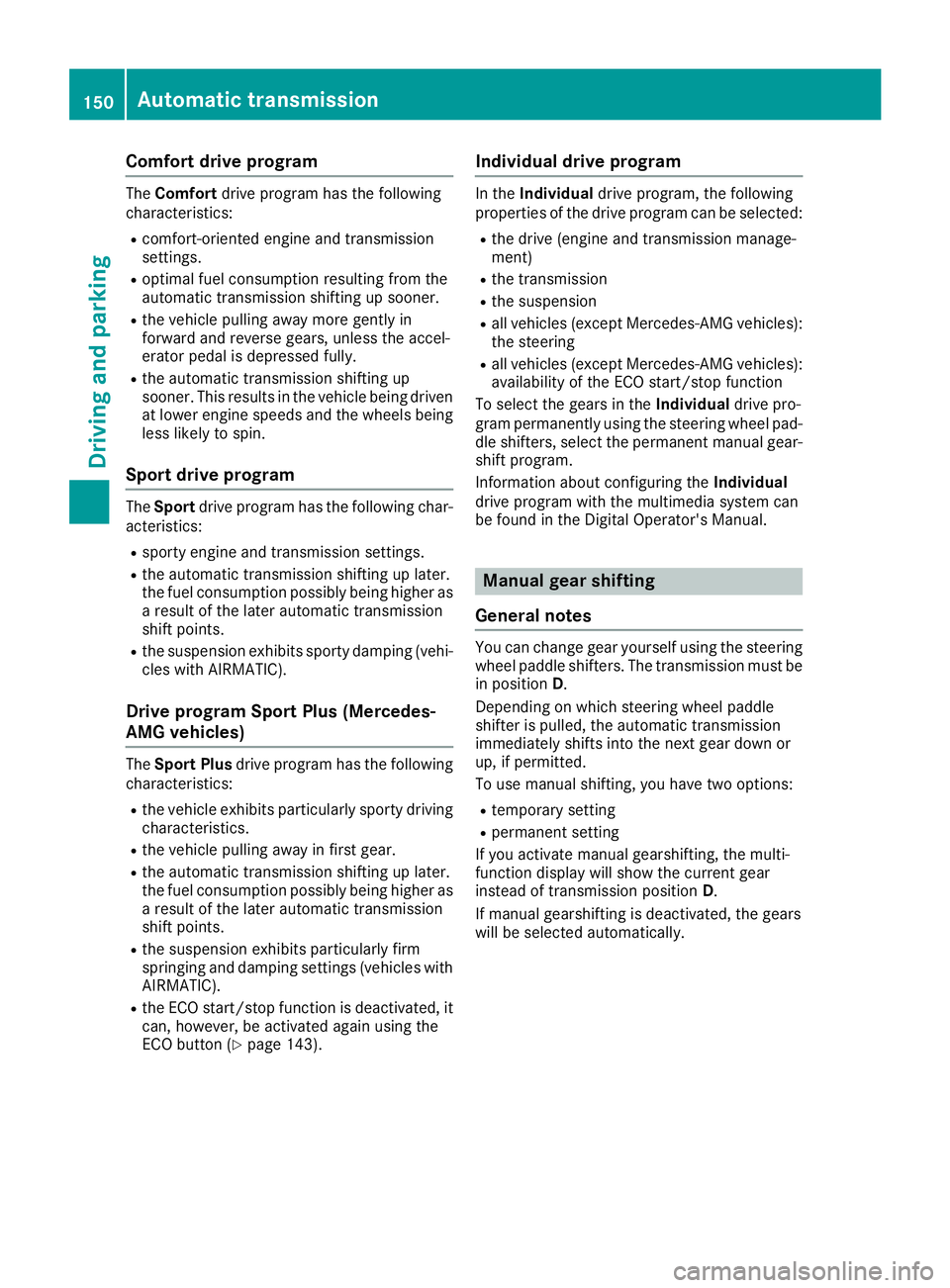
Comfort drive program The Comfort drive program has the following
characteristics: R
comfort-oriented engine and transmission
settings. R
optimal fuel consumption resulting from the
automatic transmission shifting up sooner. R
the vehicle pulling away more gently in
forward and reverse gears, unless the accel-
erator pedal is depressed fully. R
the automatic transmission shifting up
sooner. This results in the vehicle being driven
at lower engine speeds and the wheels being
less likely to spin.
Sport drive program The Sport drive program has the following char-
acteristics: R
sporty engine and transmission settings. R
the automatic transmission shifting up later.
the fuel consumption possibly being higher as
a result of the later automatic transmission
shift points. R
the suspension exhibits sporty damping (vehi-
cles with AIRMATIC).
Drive program Sport Plus (Mercedes-
AMG vehicles) The Sport Plus drive program has the following
characteristics: R
the vehicle exhibits particularly sporty driving
characteristics. R
the vehicle pulling away in first gear. R
the automatic transmission shifting up later.
the fuel consumption possibly being higher as
a result of the later automatic transmission
shift points. R
the suspension exhibits particularly firm
springing and damping settings (vehicles with
AIRMATIC). R
the ECO start/stop function is deactivated, it
can, however, be activated again using the
ECO button ( Y
page 143). Individual drive program In the Individual drive program, the following
properties of the drive program can be selected: R
the drive (engine and transmission manage-
ment) R
the transmission R
the suspension R
all vehicles (except Mercedes-AMG vehicles):
the steering R
all vehicles (except Mercedes-AMG vehicles):
availability of the ECO start/stop function
To select the gears in the Individual drive pro-
gram permanently using the steering wheel pad-
dle shifters, select the permanent manual gear-
shift program.
Information about configuring the Individual
drive program with the multimedia system can
be found in the Digital Operator's Manual.
Manual gear shifting
General notes You can change gear yourself using the steering
wheel paddle shifters. The transmission must be
in position D .
Depending on which steering wheel paddle
shifter is pulled, the automatic transmission
immediately shifts into the next gear down or
up, if permitted.
To use manual shifting, you have two options: R
temporary setting R
permanent setting
If you activate manual gearshifting, the multi-
function display will show the current gear
instead of transmission position D .
If manual gearshifting is deactivated, the gears
will be selected automatically.150
Automatic transmission
Driving and parking