belt MERCEDES-BENZ GLS 2017 Service Manual
[x] Cancel search | Manufacturer: MERCEDES-BENZ, Model Year: 2017, Model line: GLS, Model: MERCEDES-BENZ GLS 2017Pages: 390, PDF Size: 11.93 MB
Page 188 of 390
When the HOLD function is activated, the trans-
mission is shifted automatically to position P if:R
the driver's door is open and the driver's seat
belt is unfastened. R
the engine is switched off, unless it is auto-
matically switched off by the ECO start/stop
function.
The electric parking brake secures the vehicle
automatically if the HOLD function is activated
when the vehicle is stationary and: R
a system malfunction occurs. R
the power supply is not sufficient.
On steep uphill or downhill inclines or if there is
a malfunction, the transmission may also be
automatically shifted into position P .
AIRMATIC package
General notes AIRMATIC is an air suspension system with var-
iable damping for improved driving comfort.
Level control ensures the best possible suspen-
sion and constant ground clearance, even with a
laden vehicle. When you drive fast, the vehicle is
lowered automatically to improve driving safety
and to reduce fuel consumption. There is also
the option to manually adjust the vehicle level.
AIRMATIC consists of: R
level settings R
level control and R
ADS or ADS PLUS (Adaptive Damping Sys-
tem)
All vehicles (except Mercedes-AMG vehi-
cles): your vehicle may also be equipped with
the ACTIVE CURVE SYSTEM ( Y
page 187).
Mercedes-AMG vehicles: your vehicle is equip-
ped with the ACTIVE CURVE SYSTEM
( Y
page 187).
Observe the notes on driving with a trailer
( Y
page 222).
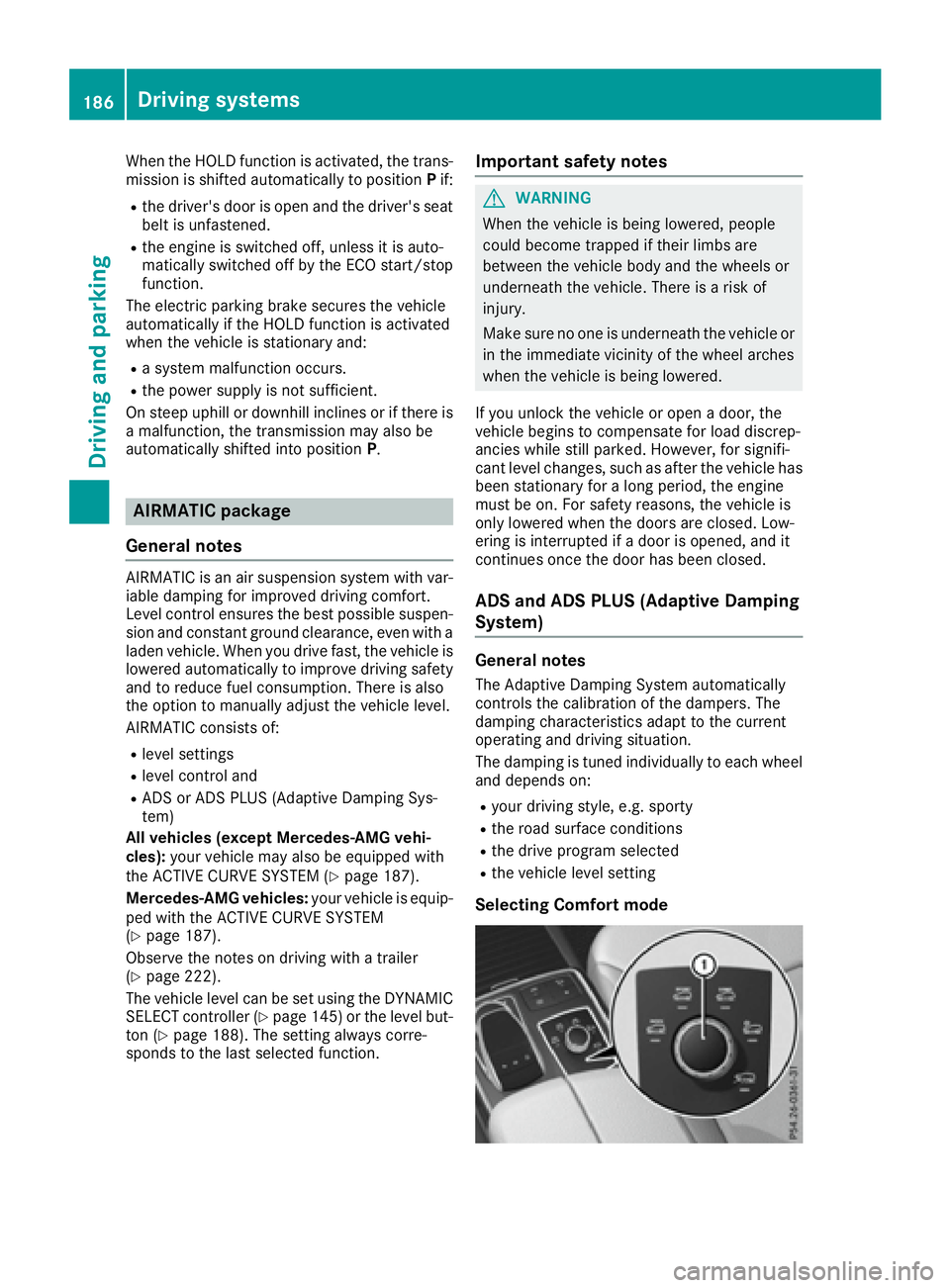
The vehicle level can be set using the DYNAMIC
SELECT controller ( Y
page 145) or the level but-
ton ( Y
page 188). The setting always corre-
sponds to the last selected function. Important safety notes
G WARNING
When the vehicle is being lowered, people
could become trapped if their limbs are
between the vehicle body and the wheels or
underneath the vehicle. There is a risk of
injury.
Make sure no one is underneath the vehicle or
in the immediate vicinity of the wheel arches
when the vehicle is being lowered.
If you unlock the vehicle or open a door, the
vehicle begins to compensate for load discrep-
ancies while still parked. However, for signifi-
cant level changes, such as after the vehicle has
been stationary for a long period, the engine
must be on. For safety reasons, the vehicle is
only lowered when the doors are closed. Low-
ering is interrupted if a door is opened, and it
continues once the door has been closed.
ADS and ADS PLUS (Adaptive Damping
System)
General notes The Adaptive Damping System automatically
controls the calibration of the dampers. The
damping characteristics adapt to the current
operating and driving situation.
The damping is tuned individually to each wheel
and depends on: R
your driving style, e.g. sporty R
the road surface conditions R
the drive program selected R
the vehicle level setting
Selecting Comfort mode186
Driving systems
Driving and parking
Page 190 of 390
Mercedes-AMG vehicles: if you have selected
the Sport Plus drive program:R
the roll angle is reduced even more signifi-
cantly R
the driving is designed for maximum dyna-
mism
Vehicle level Important safety notes
G WARNING
When the vehicle is being lowered, people
could become trapped if their limbs are
between the vehicle body and the wheels or
underneath the vehicle. There is a risk of
injury.
Make sure no one is underneath the vehicle or
in the immediate vicinity of the wheel arches
when the vehicle is being lowered.
G WARNING
When you drive with the vehicle raised, the
driving characteristics could be impaired by
the vehicle's raised center of gravity. The vehi-
cle could rollover more easily, for example on
a bend. There is a risk of an accident.
Always select as low a vehicle level as possi-
ble and adjust your driving style.
G WARNING
When you drive with the chassis lowered or
raised, the vehicle's braking and driving char-
acteristics can be significantly impaired. You
could also exceed the permissible vehicle
height if the chassis is raised. There is a risk of
an accident.
Adjust the vehicle level before pulling away.
G WARNING
Due to the high center of gravity, the vehicle
may start to skid and roll over in the event of
an abrupt steering maneuver and/or when
the vehicle's speed is not adapted to the road
conditions. There is a risk of an accident. Always adapt your speed and driving style to
the vehicle's driving characteristics and to the
prevailing road and weather conditions.
! When driving on extremely rough terrain,
select a high vehicle level in good time. Make
sure there is always sufficient ground clear-
ance. You will otherwise damage the vehicle. R
Utility vehicles have a significantly higher roll-
over rate than other types of vehicles.
Failure to operate this vehicle safely may
result in an accident, rollover of the vehicle,
and severe or fatal injury. R
In a rollover crash, an unbelted person is sig-
nificantly more likely to die than a person
wearing a seat belt.
You and all vehicle occupants should always
wear your seat belts.
General notes Only select raised level if this is appropriate for
the road conditions. Otherwise, fuel consump-
tion may increase and handling may be affected.
Make changes to the vehicle level while the
vehicle is in motion. This enables the vehicle to
adjust to the new level as quickly as possible.
The vehicle level may change visibly if you park
the vehicle and the outside temperature
changes. If the temperature drops, the vehicle
level is lower; with an increase in temperature,
the vehicle level rises.
If you unlock the vehicle or open a door, the
vehicle begins to compensate for load discrep-
ancies while still parked. However, for signifi-
cant level changes, such as after the vehicle has
been stationary for a long period, the engine
must be on. For safety reasons, the vehicle is
only lowered when the doors are closed. Low-
ering is interrupted if a door is opened, and it
continues once the door has been closed.
Vehicles with no trailer coupled: below a
speed of 37 mph (60 km/h), you can choose
between the normal and raised vehicle level.
Sel ect the normal vehicle level for normal road
surfaces and the raised vehicle level for driving
with snow chains or on particularly poor road
surfaces. Your selection remains stored even if
you remove the SmartKey from the ignition lock.
If you try to select raised level at a speed above
37 mph (60 km/h), the Drive More Slowly
message appears in the multifunction display.188
Driving systems
Driving and parking
Page 207 of 390
Exiting 360° camera display mode The 360° camera display is stopped: R
when you select transmission position P , orR
when you are driving at moderate speeds
The previous display appears in the multimedia
system. You can also switch the display by
selecting the 9 symbol in the display and
pressing the controller to confirm.
ATTENTION ASSIST
General notes ATTENTION ASSIST helps you during long,
monotonous journeys, such as on highways. It is
active in the 37 mph (60 km/h) to 125 mph
(200 km/h) range. If ATTENTION ASSIST
detects typical indicators of fatigue or increas-
ing lapses in concentration on the part of the
driver, it suggests taking a break.
Important safety notes ATTENTION ASSIST is only an aid to the driver. It
might not always recognize fatigue or increasing
inattentiveness in time or fail to recognize them
at all. The system is not a substitute for a well-
rested and attentive driver.
The functionality of ATTENTION ASSIST is
restricted and warnings may be delayed or not
occur at all: R
if the length of the journey is less than approx-
imately 30 minutes R
if the road condition is poor, e.g. if the surface
is uneven or if there are potholes R
if there is a strong side wind R
if you have adopted a sporty driving style with
high cornering speeds or high rates of accel-
eration R
if you are predominantly driving slower than
37 mph (60 km/ h) or faster than 125 mph
(200 km/ h)R
if you are driving with the Steering Pilot of
Distance Pilot DISTRONIC activated R
if the time has been set incorrectly R
in active driving situations, such as when you
change lanes or change your speed The attention level evaluation is deleted and
restarts when the journey is continued, if: R
you switch off the engine R
you take off your seat belt and open the driv-
er's door, e.g. for a change of drivers or to
take a break
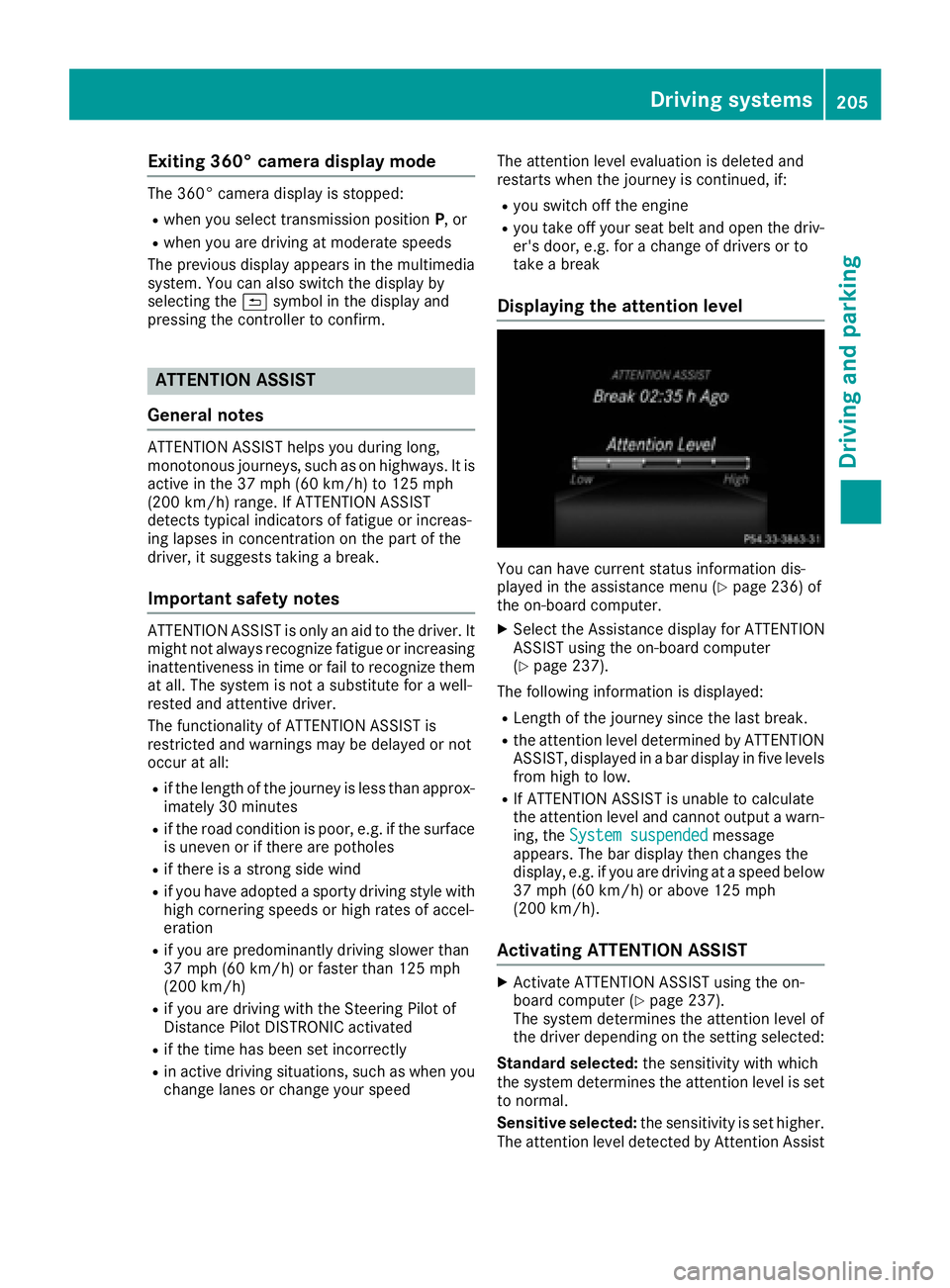
Displaying the attention level
You can have current status information dis-
played in the assistance menu ( Y
page 236) of
the on-board computer. X
Select the Assistance display for ATTENTION
ASSIST using the on-board computer
( Y
page 237).
The following information is displayed: R
Length of the journey since the last break. R
the attention level determined by ATTENTION
ASSIST, displayed in a bar display in five levels
from high to low. R
If ATTENTION ASSIST is unable to calculate
the attention level and cannot output a warn-
ing, the System suspended message
appears. The bar display then changes the
display, e.g. if you are driving at a speed below
37 mph (60 km/h) or above 125 mph
(200 km/h).
Activating ATTENTION ASSIST X
Activate ATTENTION ASSIST using the on-
board computer ( Y
page 237).
The system determines the attention level of
the driver depending on the setting selected:
Standard selected: the sensitivity with which
the system determines the attention level is set
to normal.
Sensitive selected: the sensitivity is set higher.
The attention level detected by Attention AssistDriving systems 205
Driving and parking Z
Page 242 of 390
Convenience submenu Activating/deactivating the EASY-
ENTRY/EXIT feature
G WARNING
When the EASY-ENTRY/EXIT feature adjusts
the steering wheel, you and other vehicle
occupants – particularly children – could
become trapped. There is a risk of injury.
While the EASY-ENTRY/EXIT feature is mak-
ing adjustments, make sure that no one has
any body parts in the sweep of the steering
wheel.
If somebody becomes trapped: R
press one of the memory function position
buttons, or R
move the switch for steering wheel adjust-
ment in the opposite direction to that in
which the steering wheel is moving.
The adjustment process is stopped. X
Press the Y or e button on the steering
wheel to select the Sett. menu.X
Press the d or c button to select the
Convenience submenu.X
Press v to confirm.X
Using d or c , select the Easy Entry/
Exit function.
If the Easy Entry/Exit function is activated,
the vehicle steering wheel is displayed in
orange in the multifunction display. X
Press the v button to save the setting.
Further information on the EASY-ENTRY/EXIT
feature ( Y
page 106).
Switching the seat belt adjustment on/off X
Press the Y or e button on the steering
wheel to select the Settings menu.X
Press the d or c button to select the
Convenience submenu.X
Press v to confirm.X
Press the d or c button to select the
Belt Adjustment function.
If the Belt Adjustment function is activated,
the vehicle seat belt is shown in orange in the
multifunction display. X
Press the v button to save the setting. For further information on belt adjustment, see
( Y
page 45).
Switching the fold-in mirrors when lock-
ing feature on/off This function is only available when the vehicle is
equipped with the electrical fold-in function.
When you activate the Auto. Mirror Folding
function, the exterior mirrors are folded in when
the vehicle is locked. The exterior mirrors fold
out automatically again as soon as you unlock
the vehicle. X
Press the Y or e button on the steering
wheel to select the Sett. menu.X
Press the d or c button to select the
Convenience submenu. X
Press v to confirm. X
Press the d or c button to select the
Auto. Mirror Folding function.
If the Auto. Mirror Folding function is
switched on, the multifunction display shows
the exterior mirror in orange. X
Press the v button to save the setting.
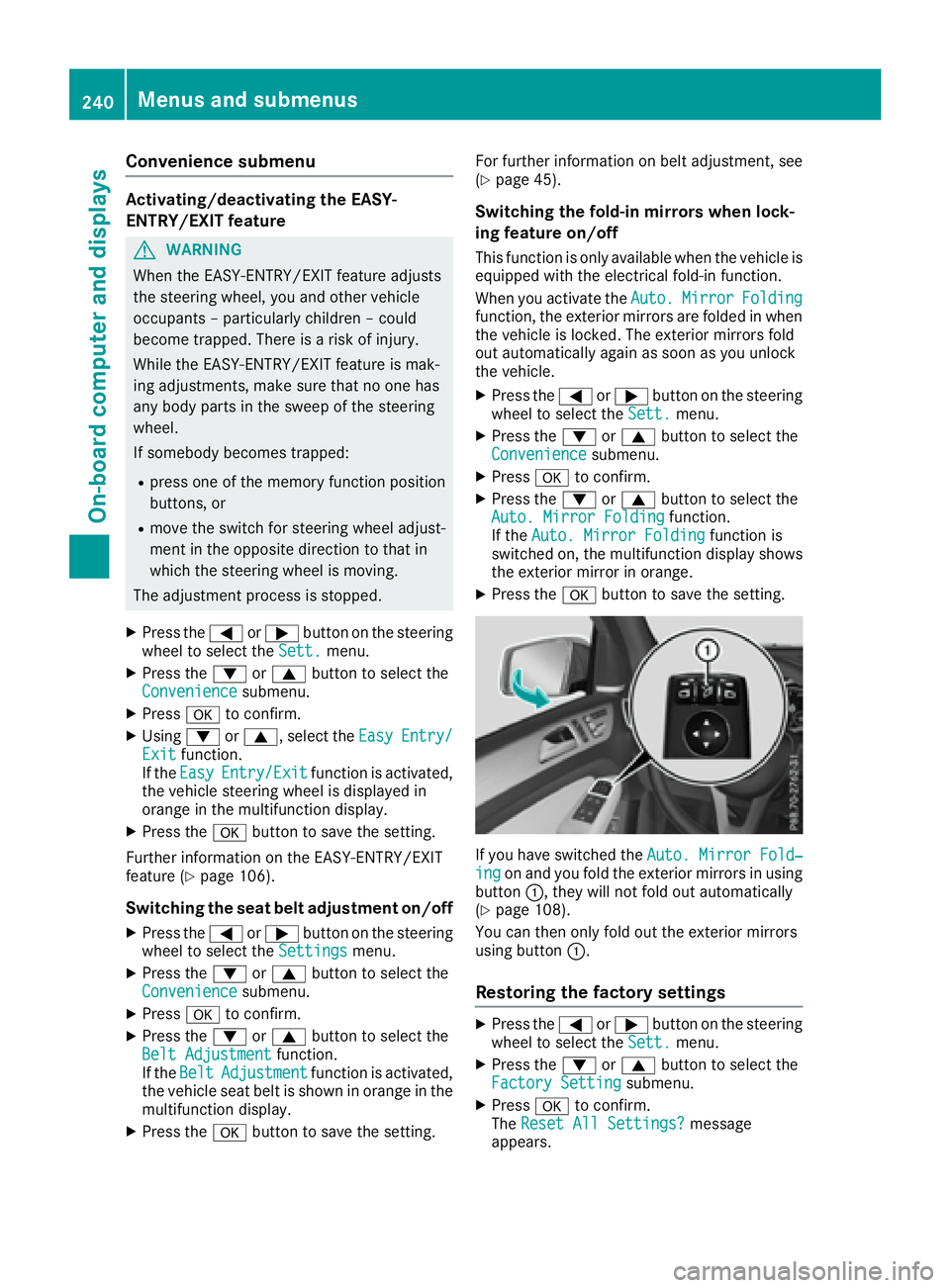
If you have switched the Auto. Mirror Fold‐
ing on and you fold the exterior mirrors in using
button C , they will not fold out automatically
( Y
page 108).
You can then only fold out the exterior mirrors
using button C .
Restoring the factory settings X
Press the Y or e button on the steering
wheel to select the Sett. menu.X
Press the d or c button to select the
Factory Setting submenu.X
Press v to confirm.
The Reset All Settings? message
appears.240
Menus and submenus
On-board computer and displays
Page 277 of 390
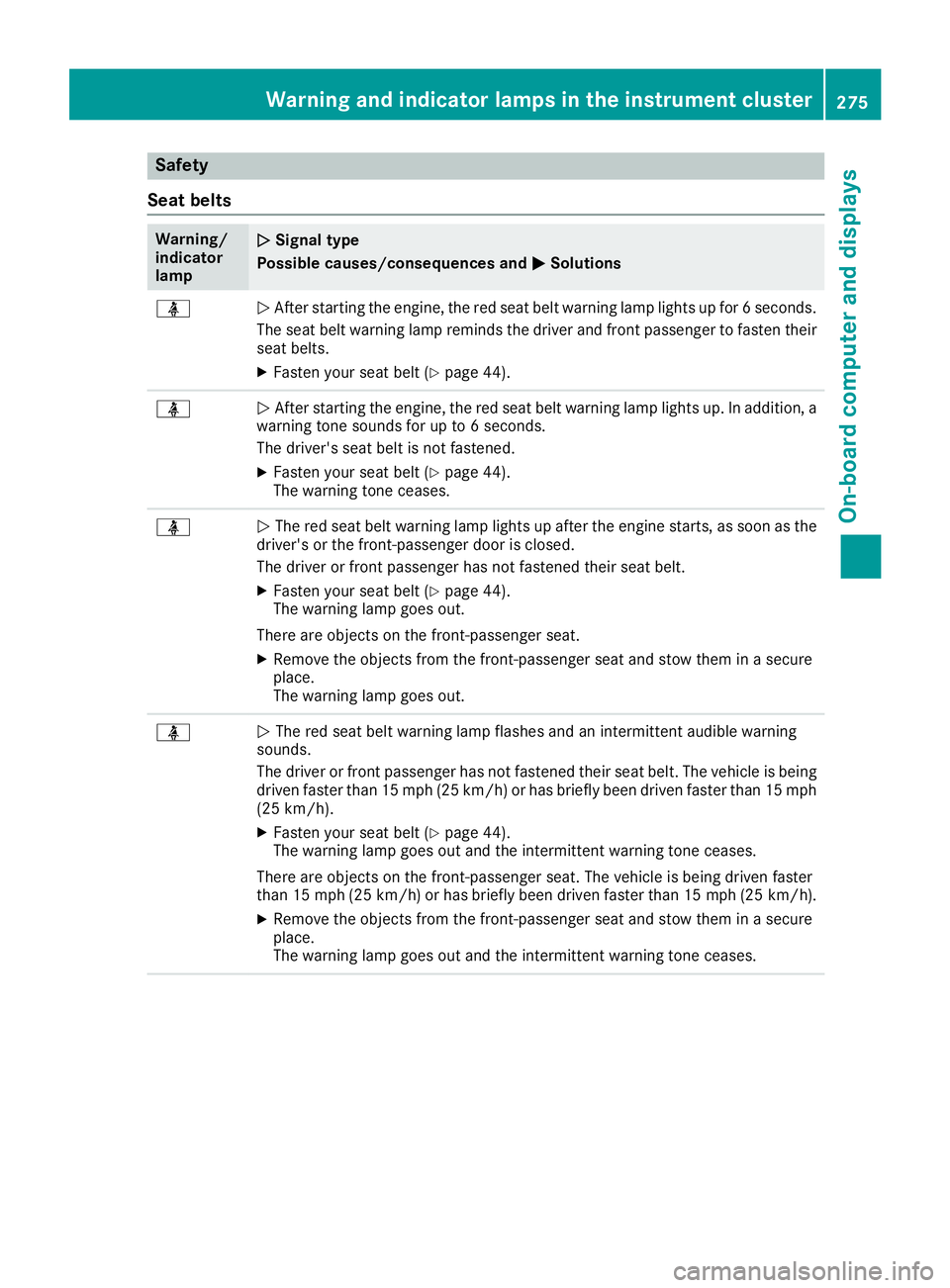
Safety
Seat belts Warning/
indicator
lamp Q Signal type
Possible causes/consequences and P Solutions
Page 300 of 390
seat/rear seat or by the seat backrest. The
seat belt can no longer offer the intended
level of protection and could even cause
injuries. R
Objects or loads in the trunk/cargo com-
partment cannot be restrained by the seat
backrest.
There is an increased risk of injury.
Before every trip, make sure that the seat
backrests and the rear bench seat/rear seat
are engaged.
Make sure that the seat backrest and the seat
cushion are correctly engaged in position. To do
so, pull firmly on the seat backrest.
! Release and fold the seat cushion upwards
before folding the rear bench seat forward.
Otherwise, the backrests may be damaged.
When the backrest is folded forwards, the
front seats cannot be moved to their rearmost
position. Otherwise, the front seats and the
rear bench seat could be damaged.
! The backrest is heavy. Therefore, take care
when folding it down. Make sure that the head
restraints are pushed all the way in so that the
backrests and seat cushions are not dam-
aged.
Observe the loading guidelines ( Y
page 294).
The left-hand and right-hand backrests in the
second row of seats can be folded forwards
separately to increase the cargo compartment
capacity.
On vehicles with a third row of seats, you must
fold down the third row of seats beforehand
( Y
page 99) to obtain maximum cargo compart-
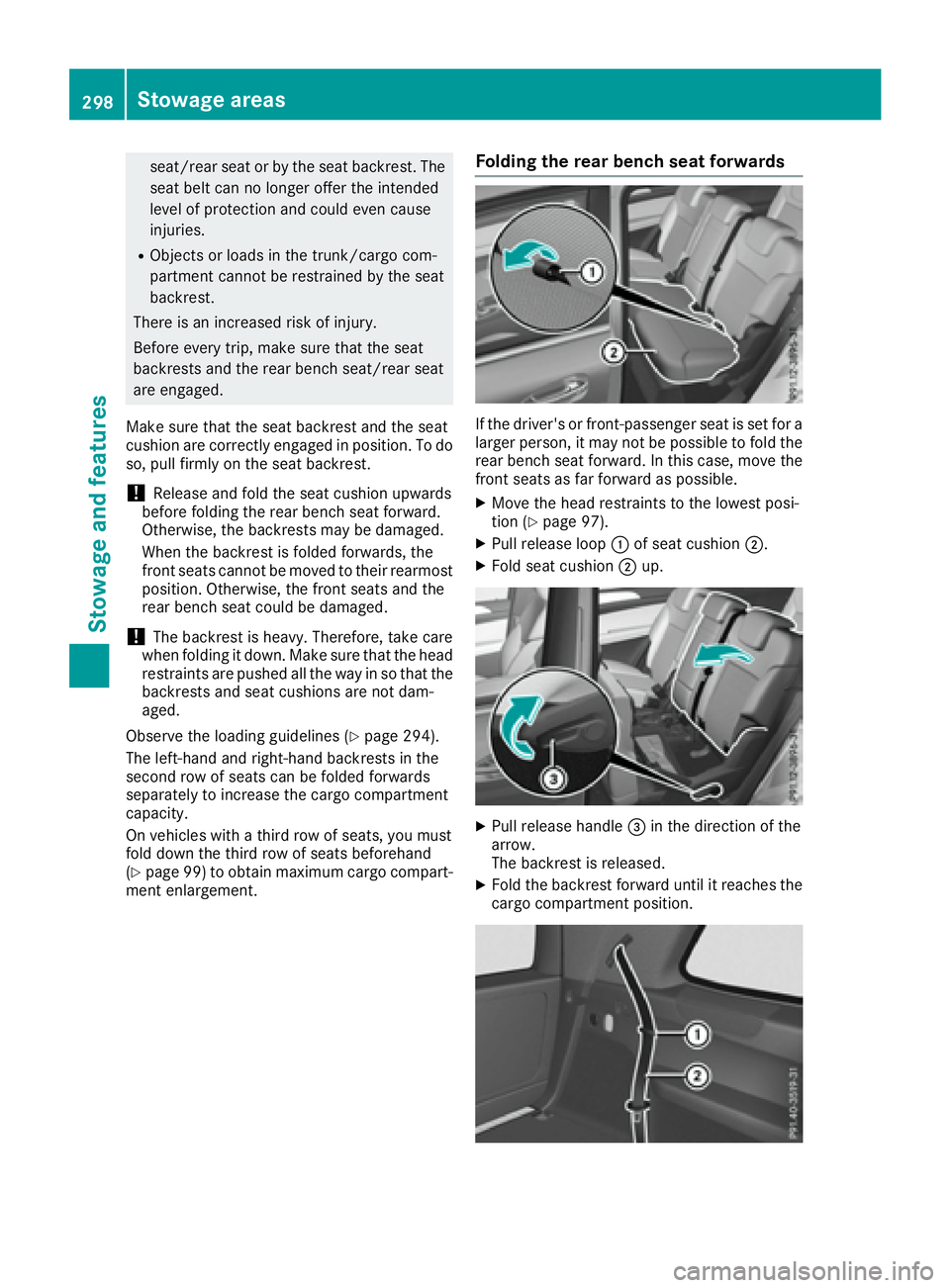
ment enlargement. Folding the rear bench seat forwards
If the driver's or front-passenger seat is set for a
larger person, it may not be possible to fold the
rear bench seat forward. In this case, move the
front seats as far forward as possible. X
Move the head restraints to the lowest posi-
tion ( Y
page 97). X
Pull release loop C of seat cushion D .X
Fold seat cushion D up.
X
Pull release handle
Page 301 of 390
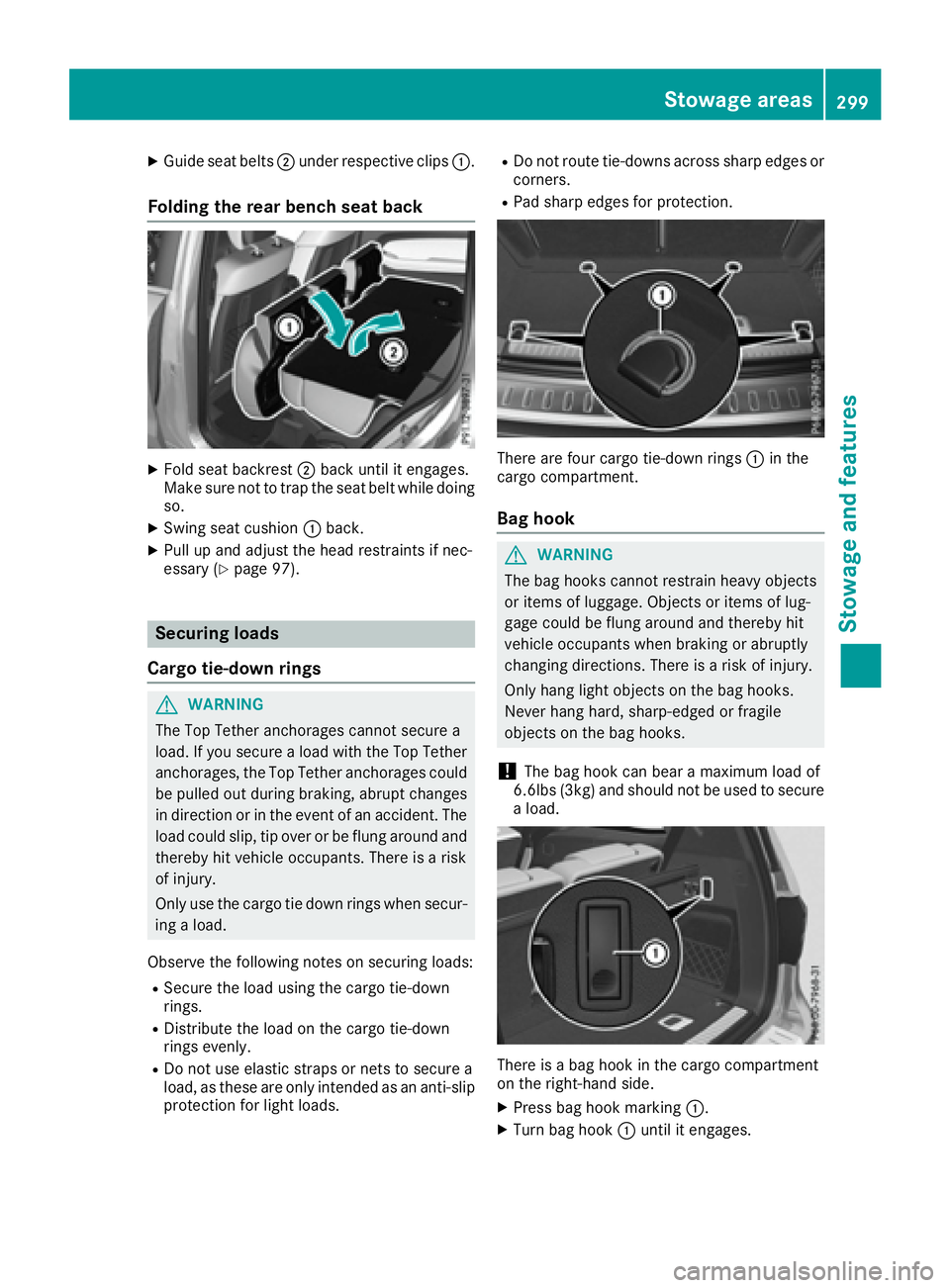
X
Guide seat belts D under respective clips C .
Folding the rear bench seat back X
Fold seat backrest D back until it engages.
Make sure not to trap the seat belt while doing
so. X
Swing seat cushion C back.X
Pull up and adjust the head restraints if nec-
essary ( Y
page 97).
Securing loads
Cargo tie-down rings
G WARNING
The Top Tether anchorages cannot secure a
load. If you secure a load with the Top Tether
anchorages, the Top Tether anchorages could
be pulled out during braking, abrupt changes
in direction or in the event of an accident. The
load could slip, tip over or be flung around and
thereby hit vehicle occupants. There is a risk
of injury.
Only use the cargo tie down rings when secur-
ing a load.
Observe the following notes on securing loads: R
Secure the load using the cargo tie-down
rings. R
Distribute the load on the cargo tie-down
rings evenly. R
Do not use elastic straps or nets to secure a
load, as these are only intended as an anti-slip
protection for light loads. R
Do not route tie-downs across sharp edges or
corners. R
Pad sharp edges for protection.
There are four cargo tie-down rings C in the
cargo compartment.
Bag hook
G WARNING
The bag hooks cannot restrain heavy objects
or items of luggage. Objects or items of lug-
gage could be flung around and thereby hit
vehicle occupants when braking or abruptly
changing directions. There is a risk of injury.
Only hang light objects on the bag hooks.
Never hang hard, sharp-edged or fragile
objects on the bag hooks.
! The bag hook can bear a maximum load of
6.6lbs (3kg) and should not be used to secure
a load.
There is a bag hook in the cargo compartment
on the right-hand side. X
Press bag hook marking C .X
Turn bag hook C until it engages.Stowage areas 299
Stowage and features Z
Page 332 of 390
Cleaning genuine wood and trim ele-
ments
! Do not use solvent-based cleaning agents
such as tar remover, wheel cleaners, polishes
or waxes. There is otherwise a risk of damag-
ing the surface.
! Do not use chrome polish on trim pieces.
The trim pieces have a chrome look but are
mostly made of anodized aluminum and can
lose their shine if chrome polish is used. Use
a damp, lint-free cloth instead when cleaning
the trim pieces.
If the chrome-plated trim pieces are very
dirty, you can use a chrome polish. If you are
unsure as to whether the trim pieces are
chrome-plated or not, consult an authorized
Mercedes-Benz Center. X
Wipe the wooden trim and trim pieces with a
damp, lint-free cloth, e.g. a microfiber cloth. X
Heavy soiling: use car care and cleaning
products recommended and approved by
Mercedes-Benz.
Cleaning the seat covers
General notes
! Do not use a microfiber cloth to clean covers
made out of real leather, artificial leather or
DINAMICA. If used often, these can damage
the cover.
i Note that regular care is essential to ensure
that the appearance and comfort of the cov-
ers is retained over time.
Genuine leather seat covers
! To retain the natural appearance of the
leather, observe the following cleaning
instructions: R
Clean genuine leather covers carefully with
a damp cloth and then wipe the covers
down with a dry cloth. R
Make sure that the leather does not
become soaked. It may otherwise become
rough and cracked. R
Only use leather care agents that have
been tested and approved by Mercedes-
Benz. You can obtain these from a qualified
specialist workshop.
Leather is a natural product. It exhibits natural surface characteristics, for
example: R
differences in the texture R
marks caused by growth and injury R
slight nuances of color
These are characteristics of leather and not
material defects.
Seat covers of other materials
! Observe the following when cleaning: R
clean artificial leather covers with a cloth
moistened with a solution containing 1%
detergent (e.g. dish washing liquid). R
clean cloth covers with a microfiber cloth
moistened with a solution containing 1 %
detergent (e.g. dish washing liquid). Rub
carefully and always wipe entire seat sec-
tions to avoid leaving visible lines. Leave
the seat to dry afterwards. Cleaning results
depend on the type of dirt and how long it
has been there. R
clean DINAMICA covers with a damp cloth.
Make sure that you wipe entire seat sec-
tions to avoid leaving visible lines.
Cleaning the seat belts
G WARNING
Seat belts can become severely weakened if
bleached or dyed. This could cause the seat
belts to tear or fail, for instance, in the event of
an accident. This poses an increased risk of
injury or fatal injury.
Never bleach or dye the seat belts.
! Do not clean the seat belts using chemical
cleaning agents. Do not dry the seat belts by
heating at temperatures above 176 ‡( 80 †)
or in direct sunlight. X
Use clean, lukewarm water and soap solution.
Cleaning the headliner and carpets X
Headliner: if it is very dirty, use a soft brush or
dry shampoo. X
Carpets: use the carpet and textile cleaning
agents recommended and approved by
Mercedes-Benz.330
Care
Maintenance and care
Page 342 of 390
R
If the battery is fully discharged, leave the battery that is being used to jump-start connected for
a few minutes before attempting to start. This charges the battery slightly. R
Make sure that the two vehicles do not touch.
Make sure that: R
The jumper cables are not damaged. R
Bare parts of the terminal clamp do not come into contact with other metal parts while the jumper
cables are connected to the battery. R
The jumper cables cannot come into contact with parts which can move when the engine is
running, such as the V-belt pulley or the fan. X
Secure the vehicle by applying the electric parking brake. X
Shift the transmission to position P .X
Make sure that the ignition is switched off. All indicator lamps in the instrument cluster must be
off. When using the SmartKey, turn the SmartKey to position 0 in the ignition lock and remove it
( Y
page 138).X
Switch off all electrical consumers, e.g. rear window defroster, lighting, etc. X
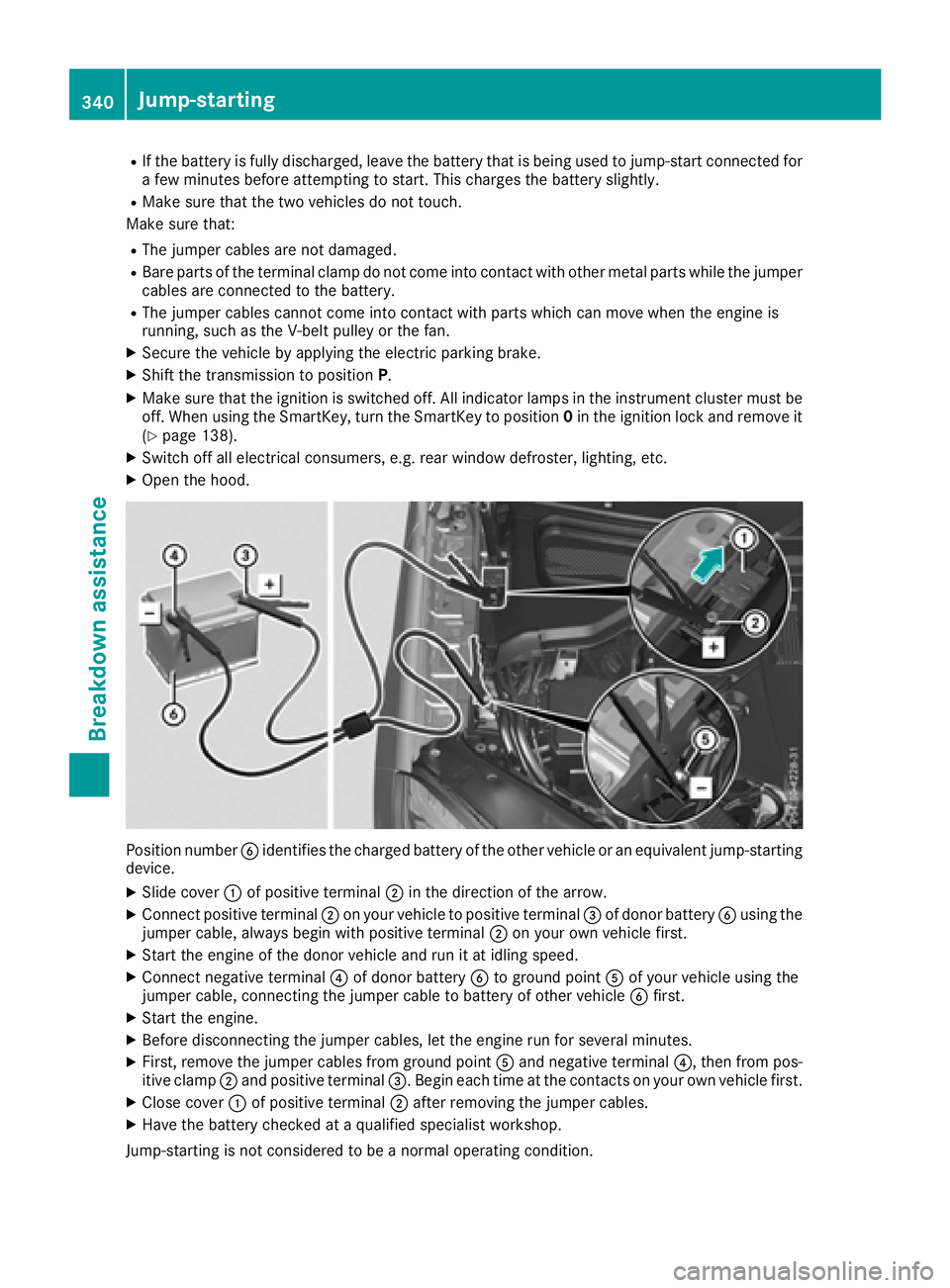
Open the hood.
Position number