dimensions MERCEDES-BENZ GLS 2018 Owners Manual
[x] Cancel search | Manufacturer: MERCEDES-BENZ, Model Year: 2018, Model line: GLS, Model: MERCEDES-BENZ GLS 2018Pages: 398, PDF Size: 5.73 MB
Page 23 of 398
SUV
(Sport Utility Vehicle) ....................... 30
Switching air-recirculation mode
on/off ................................................ .1 35
Switching on media mode
Via the device list .......................... 298
T Tachometer ........................................ 233
Tailgate
Display message ............................ 276
Emergency unlocking ....................... 88
Important safety notes .................... 84
Limiting the opening angle ............... 88
Opening dimensions ...................... 392
Opening/closing (automatically
from inside) ...................................... 87
Opening/closing (automatically
from outside) ................................... 86
Opening/closing (from outside) ....... 85
Power closing .................................. 84
Tank
see Fuel tank
Tank content
Fuel gauge ....................................... 37
Technical data
Capacities ...................................... 386
Information .................................... 384
Tires/wheels ................................. 379
Trailer loads ................................... 395
Vehicle data ................................... 392
Telephone
Accepting a call (multifunction
steering wheel) .............................. 240
Authorizing a mobile phone (con-
necting) ......................................... 296
Authorizing a mobile phone via the
device manager (connecting) ......... 297
Connecting a mobile phone
(device manager) ........................... 297
Connecting a mobile phone (gen-
eral information) ............................ 296
Display message ............................ 277
Menu (on-board computer) ............ 240
Number from the phone book ........ 240
Redialing ........................................ 240
Rejecting/ending a call ................. 240 see also Digital Operator's Man-
ual .................................................. 292
Temperature
Coolant (display in the instrument
cluster) .......................................... 234
Coolant (on-board computer,
Mercedes-AMG vehicles) ............... 245
Engine oil (on-board computer,
Mercedes-AMG vehicles) ............... 245
Outside temperature ...................... 233
Setting (climate control) ................ 132
Transmission oil (on-board com-
puter, Mercedes-AMG vehicles) ..... 245
Through-loading feature ................... 303
Timing (RACETIMER) ......................... 246
Tire pre ssure
C alling up (on-board computer) ..... 361
Checking manually ........................ 360
Display message ............................ 273
Maximum ....................................... 360
Not reached (TIREFIT) .................... 342
Notes ............................................. 359
Reached (TIREFIT) .......................... 343
Recommended ............................... 357
Tire pressure loss warning system
General notes ................................ 360
Important safety notes .................. 361
Restarting ...................................... 361
Tire pressure monitor
Checking the tire pressure elec-
tronically ........................................ 363
Function/notes ............................. 361
General notes ................................ 361
Important safety notes .................. 362
Radio type approval for the tire
pressure monitor ........................... 364
Restarting ...................................... 364
Warning lamp ................................. 291
Warning message .......................... 363
Tire pressure table ............................ 358
TIREFIT kit
Important safety notes .................. 341
Storage location ............................ 339
Tire pressure not reached .............. 342
Tire pressure reached .................... 343
Using ............................................. 341
Tires
Aspect ratio (definition) ................. 373 Index 21
Page 25 of 398
Mounting dimensions .................... 395
Parking Assist PARKTRONIC ......... .1 92
Power supply ................................. 230
Pulling away with a trailer .............. 143
Removing the ball coupling ............ 229
Trailer loads ................................... 395
Towing away
Important safety guidelines ........... 349
Installing the towing eye ................ 350
Notes for 4MATIC vehicles ............ 351
Removing the towing eye .............. .3 50
Transporting the vehicle ................ 351
With both axles on the ground ....... 350
Towing eye ......................................... 339
Traffic reports
see also Digital Operator's Man-
ual ................................................. .2 92
Traffic Sign Assist
Activating/deactivating the warn-
ing function ................................... .2 41
Display message ............................ 268
Function/notes ............................ .2 08
Important safety notes .................. 209
Instrument cluster display ............. 209
Trailer coupling
see Towing a trailer
Trailer loads and drawbar nose-
weights ............................................... 229
Trailer towing
Active Blind Spot Assist ................. 215
Active Lane Keeping Assist ............ 218
Blind Spot Assist ............................ 211
Permissible trailer loads and
drawbar noseweights ..................... 229
Transfer case ..................................... 155
Transmission
see Automatic transmission
Transmission position display ......... 149
Transporting the vehicle .................. 351
Traveling uphill
Brow of hill ..................................... 174
Driving downhill ............................ .1 74
Maximum gradient-climbing capa-
bility ............................................... 173
Trim pieces (cleaning instruc-
tions) ................................................. .3 36 Trip computer (on-board com-
puter) ................................................. .2 36
Trip odometer
Calling up ................................... .... 236
R es
etting (on-board computer) ...... 237
Trunk
see Tailgate
Turn signals
Display message ............................ 260
Replacing bulbs (front) ................... 122
Switching on/off ........................... 116
Two-way radio
Frequencies ................................... 384
Installation ..................................... 384
Transmission output (maximum) .... 384
TWR (Tongue Weight Rating) (defi-
nition) ................................................. 374
Type identification plate
see Vehicle identification plate
U Unlocking
Emergency unlocking ....................... 84
From inside the vehicle (central
unlocking button) ............................. 83
Upshift indicator (on-board com-
puter, Mercedes-AMG vehicles) ....... 245
USB devices
Connecting to the Media Inter-
face ............................................... 299
V
Vanity mirror (in the sun visor) ........ 310
Vehicle
Correct use ...................................... 31
Data acquisition ............................... 32
Display message ............................ 275
Equipment ....................................... 28
Individual settings .......................... 243
Limited Warranty ............................. 32
Loading .......................................... 364
Locking (in an emergency) ............... 84
Locking (SmartKey) .......................... 77
Lowering ........................................ 378
Maintenance .................................... 29
Operating safety .............................. 30 Index 23
Page 26 of 398
Parking .......................................... 161
Parking for a long period ............... .1 64
Pulling away ................................... 143
Raising .......................................... .3 76
Reporting problems ......................... 31
Securing from rolling away ............ 375
Towing away .................................. 349
Transporting .................................. 351
Unlocking (in an emergency) ........... 84
Unlocking (SmartKey) ..................... .7 7
Vehicle data ................................... 392
Vehicle battery
see Battery (vehicle)
Vehicle data ....................................... 392
Vehicle data (off-road driving)
Approach/departure angle ............ 394
Fording depth ................................ 393
Maximum gradient climbing abil-
ity .................................................. 394
Vehicle dimensions ........................... 392
Vehicle emergency locking ................ 84
Vehicle identification number
see VIN
Vehicle identification plate .............. 385
Vehicle level
AIRMATIC ...................................... 190
Vehicle level (display message) ....... 265
Vehicle tool kit .................................. 339
Video
Operating the DVD ........................ .2 39
see also Digital Operator's Man-
ual ................................................. .2 92
VIN ...................................................... 385
Seat ............................................... 386
Type plate ...................................... 385
W
Warning and indicator lamps
ABS ................................................ 282
Brakes .......................................... .2 81
Coolant .......................................... 288
Distance Pilot DISTRONIC ............. 290
Distance warning ........................... 290
Engine diagnostics ......................... 288
ESP ®
.............................................. 284
ESP ®
OFF ....................................... 285
Fuel tank ........................................ 288 Overview .......................................... 37
Parking brake ................................ 287
PASSENGER AIR BAG ...................... 45
Reserve fuel ................................... 288
Restraint system ............................ 287
Seat belt ........................................ 280
Tire pressure monitor .................... 291
Warranty .............................................. 28
Washer fluid
Display message ............................ 278
Weather display (COMAND)
see also Digital Operator's Man-
ual .................................................. 292
Wheel and tire combinations
Tires ............................................... 379
Wheel bolt tightening torque ........... 378
Wheel chock ...................................... 375
Wheels
Changing a wheel .......................... 374
Checking ........................................ 354
Cleaning ......................................... 333
Emergency spare wheel ................. 380
Important safety notes .................. 354
Information on driving .................... 354
Interchanging/changing ................ 374
Mounting a new wheel ................... 377
Mounting a wheel .......................... 375
Overview ........................................ 354
Removing a wheel .......................... 377
Snow chains .................................. 356
Storing ........................................... 375
Tightening torque ........................... 378
Wheel size/tire size ....................... 379
Window curtain air bag
Display message ............................ 257
Operation ......................................... 51
Windows
see Side windows
Windshield
Defrosting ...................................... 133
Infrared reflective .......................... 324
Windshield washer fluid
see Windshield washer system
Windshield washer system
Adding washer fluid ....................... 329
Important safety notes .................. 391
Windshield wipers
Problem (malfunction) ................... 12424
Index
Page 87 of 398
G WARNING
If objects, luggage or loads are not secured or
not secured sufficiently, they could slip, tip
over or be flung around and thereby hit vehicle
occupants. There is a risk of injury, particu-
larly in the event of sudden braking or a sud-
den change in direction.
Always store objects so that they cannot be
flung around. Secure objects, luggage or
loads against slipping or tipping before the
journey.
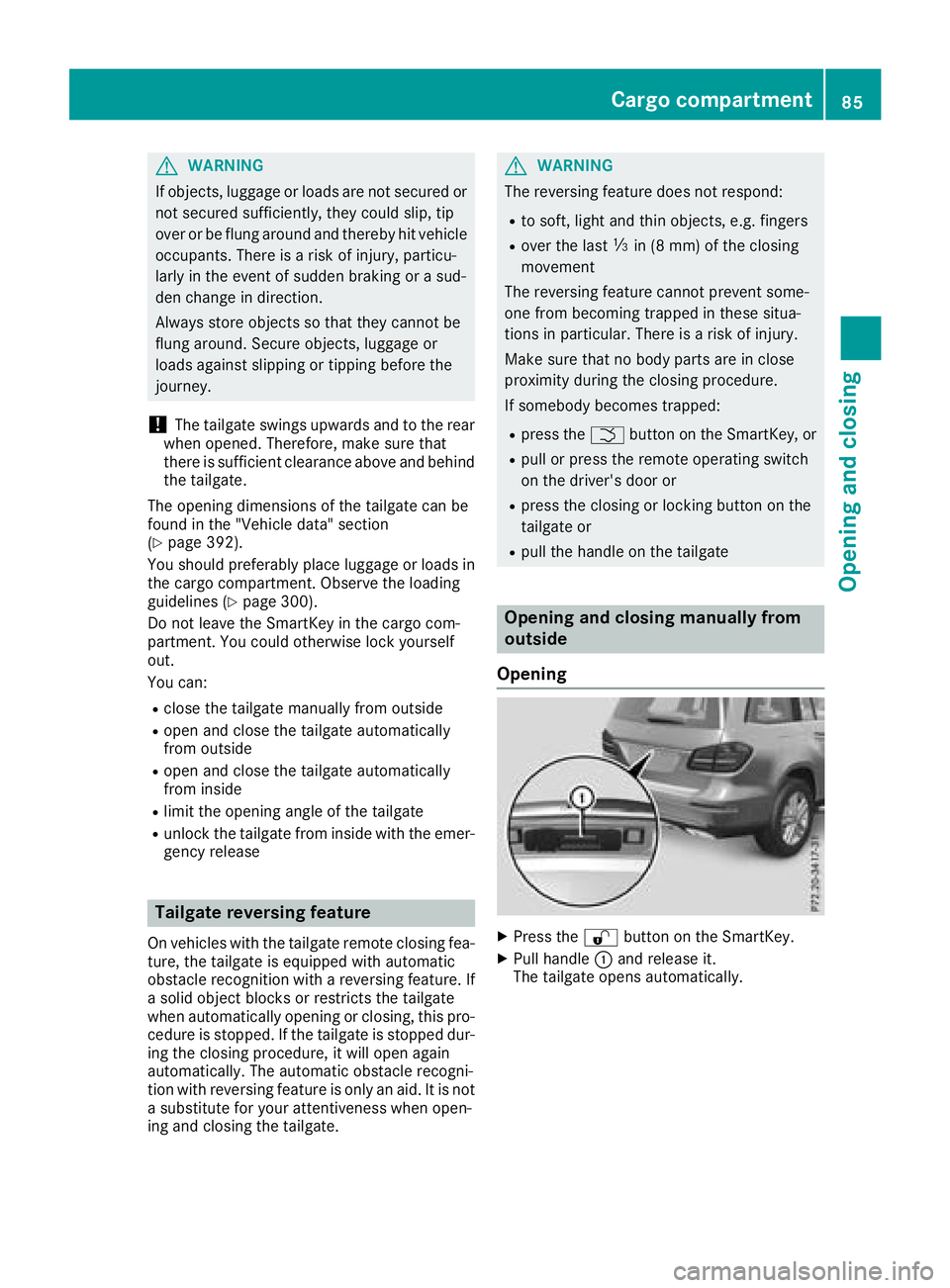
! The tailgate swings upwards and to the rear
when opened. Therefore, make sure that
there is sufficient clearance above and behind
the tailgate.
The opening dimensions of the tailgate can be
found in the "Vehicle data" section
( Y
page 392).
You should preferably place luggage or loads in
the cargo compartment. Observe the loading
guidelines ( Y
page 300).
Do not leave the SmartKey in the cargo com-
partment. You could otherwise lock yourself
out.
You can: R
close the tailgate manually from outside R
open and close the tailgate automatically
from outside R
open and close the tailgate automatically
from inside R
limit the opening angle of the tailgate R
unlock the tailgate from inside with the emer-
gency release
Tailgate reversing feature On vehicles with the tailgate remote closing fea-
ture, the tailgate is equipped with automatic
obstacle recognition with a reversing feature. If
a solid object blocks or restricts the tailgate
when automatically opening or closing, this pro-
cedure is stopped. If the tailgate is stopped dur-
ing the closing procedure, it will open again
automatically. The automatic obstacle recogni-
tion with reversing feature is only an aid. It is not
a substitute for your attentiveness when open-
ing and closing the tailgate. G WARNING
The reversing feature does not respond: R
to soft, light and thin objects, e.g. fingers R
over the last
Page 88 of 398
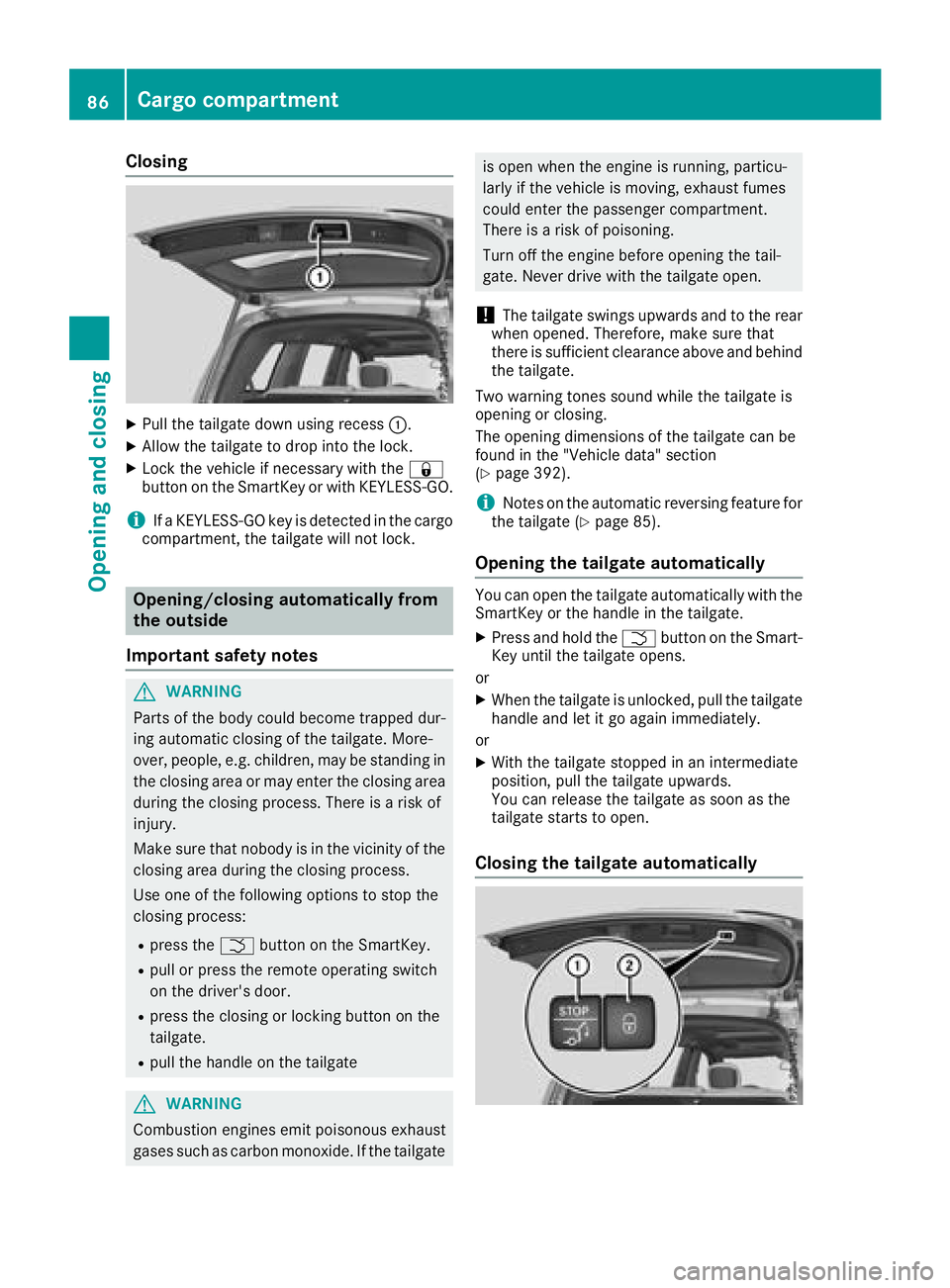
Closing X
Pull the tailgate down using recess C .X
Allow the tailgate to drop into the lock. X
Lock the vehicle if necessary with the 7
button on the SmartKey or with KEYLESS-GO.
i If a KEYLESS-GO key is detected in the cargo
compartment, the tailgate will not lock.
Opening/closing automatically from
the outside
Important safety notes
G WARNING
Parts of the body could become trapped dur-
ing automatic closing of the tailgate. More-
over, people, e.g. children, may be standing in
the closing area or may enter the closing area
during the closing process. There is a risk of
injury.
Make sure that nobody is in the vicinity of the
closing area during the closing process.
Use one of the following options to stop the
closing process: R
press the T button on the SmartKey.R
pull or press the remote operating switch
on the driver's door. R
press the closing or locking button on the
tailgate. R
pull the handle on the tailgate
G WARNING
Combustion engines emit poisonous exhaust
gases such as carbon monoxide. If the tailgate is open when the engine is running, particu-
larly if the vehicle is moving, exhaust fumes
could enter the passenger compartment.
There is a risk of poisoning.
Turn off the engine before opening the tail-
gate. Never drive with the tailgate open.
! The tailgate swings upwards and to the rear
when opened. Therefore, make sure that
there is sufficient clearance above and behind
the tailgate.
Two warning tones sound while the tailgate is
opening or closing.
The opening dimensions of the tailgate can be
found in the "Vehicle data" section
( Y
page 392).
i Notes on the automatic reversing feature for
the tailgate ( Y
page 85).
Opening the tailgate automatically You can open the tailgate automatically with the
SmartKey or the handle in the tailgate. X
Press and hold the T button on the Smart-
Key until the tailgate opens.
or X
When the tailgate is unlocked, pull the tailgate
handle and let it go again immediately.
or X
With the tailgate stopped in an intermediate
position, pull the tailgate upwards.
You can release the tailgate as soon as the
tailgate starts to open.
Closing the tailgate automatically86
Cargo compartment
Opening and closing
Page 89 of 398
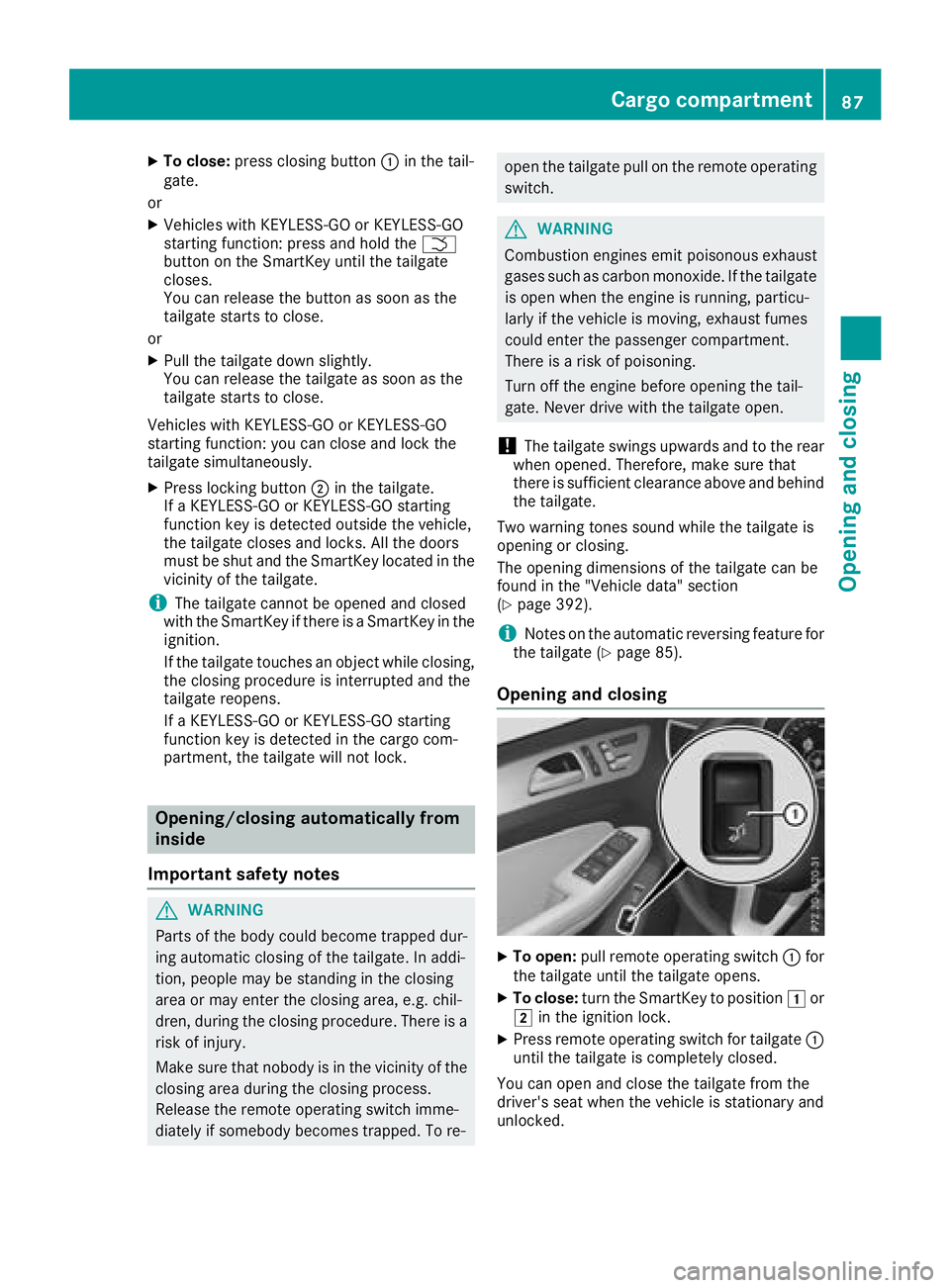
X
To close: press closing button C in the tail-
gate.
or X
Vehicles with KEYLESS-GO or KEYLESS-GO
starting function: press and hold the T
button on the SmartKey until the tailgate
closes.
You can release the button as soon as the
tailgate starts to close.
or X
Pull the tailgate down slightly.
You can release the tailgate as soon as the
tailgate starts to close.
Vehicles with KEYLESS-GO or KEYLESS-GO
starting function: you can close and lock the
tailgate simultaneously. X
Press locking button D in the tailgate.
If a KEYLESS-GO or KEYLESS-GO starting
function key is detected outside the vehicle,
the tailgate closes and locks. All the doors
must be shut and the SmartKey located in the
vicinity of the tailgate.
i The tailgate cannot be opened and closed
with the SmartKey if there is a SmartKey in the
ignition.
If the tailgate touches an object while closing,
the closing procedure is interrupted and the
tailgate reopens.
If a KEYLESS-GO or KEYLESS-GO starting
function key is detected in the cargo com-
partment, the tailgate will not lock.
Opening/closing automatically from
inside
Important safety notes
G WARNING
Parts of the body could become trapped dur-
ing automatic closing of the tailgate. In addi-
tion, people may be standing in the closing
area or may enter the closing area, e.g. chil-
dren, during the closing procedure. There is a
risk of injury.
Make sure that nobody is in the vicinity of the
closing area during the closing process.
Release the remote operating switch imme-
diately if somebody becomes trapped. To re- open the tailgate pull on the remote operating
switch.
G WARNING
Combustion engines emit poisonous exhaust
gases such as carbon monoxide. If the tailgate
is open when the engine is running, particu-
larly if the vehicle is moving, exhaust fumes
could enter the passenger compartment.
There is a risk of poisoning.
Turn off the engine before opening the tail-
gate. Never drive with the tailgate open.
! The tailgate swings upwards and to the rear
when opened. Therefore, make sure that
there is sufficient clearance above and behind
the tailgate.
Two warning tones sound while the tailgate is
opening or closing.
The opening dimensions of the tailgate can be
found in the "Vehicle data" section
( Y
page 392).
i Notes on the automatic reversing feature for
the tailgate ( Y
page 85).
Opening and closing
X
To open: pull remote operating switch C for
the tailgate until the tailgate opens. X
To close: turn the SmartKey to position G or
H in the ignition lock. X
Press remote operating switch for tailgate C
until the tailgate is completely closed.
You can open and close the tailgate from the
driver's seat when the vehicle is stationary and
unlocked.Cargo compartment 87
Opening and closing Z
Page 90 of 398
Limiting the opening angle of the tail-
gate
General notes
! Make sure there is sufficient clearance to
open the tailgate fully when setting the open-
ing angle. The tailgate could otherwise be
damaged. Ideally, set the opening angle out-
side.
Activating You can limit the opening angle of the tailgate.
This is possible in the top half of its opening
range, up to approximately 4 in (10 cm) before
the stop. X
To open the tailgate: pull the handle on the
tailgate. X
To stop the opening procedure at the
desired position: press the closing button in
the tailgate or pull the handle on the outside
of the tailgate again. X
To save the position: press and hold the
closing button in the tailgate until two short
tones sound.
The opening angle limiter is activated. The
tailgate will now stop in the stored position
when opening.
Deactivating X
Press and hold the closing button in the tail-
gate until you hear a short tone.
Tailgate emergency release
General notes
! The tailgate swings upwards and to the rear
when opened. Therefore, make sure that
there is sufficient clearance above and behind
the tailgate.
The opening dimensions of the tailgate can be
found in the "Vehicle data" section
( Y
page 392).
If the tailgate can no longer be unlocked: R
using the SmartKey, or R
using the remote operating switch in the door
control panel:
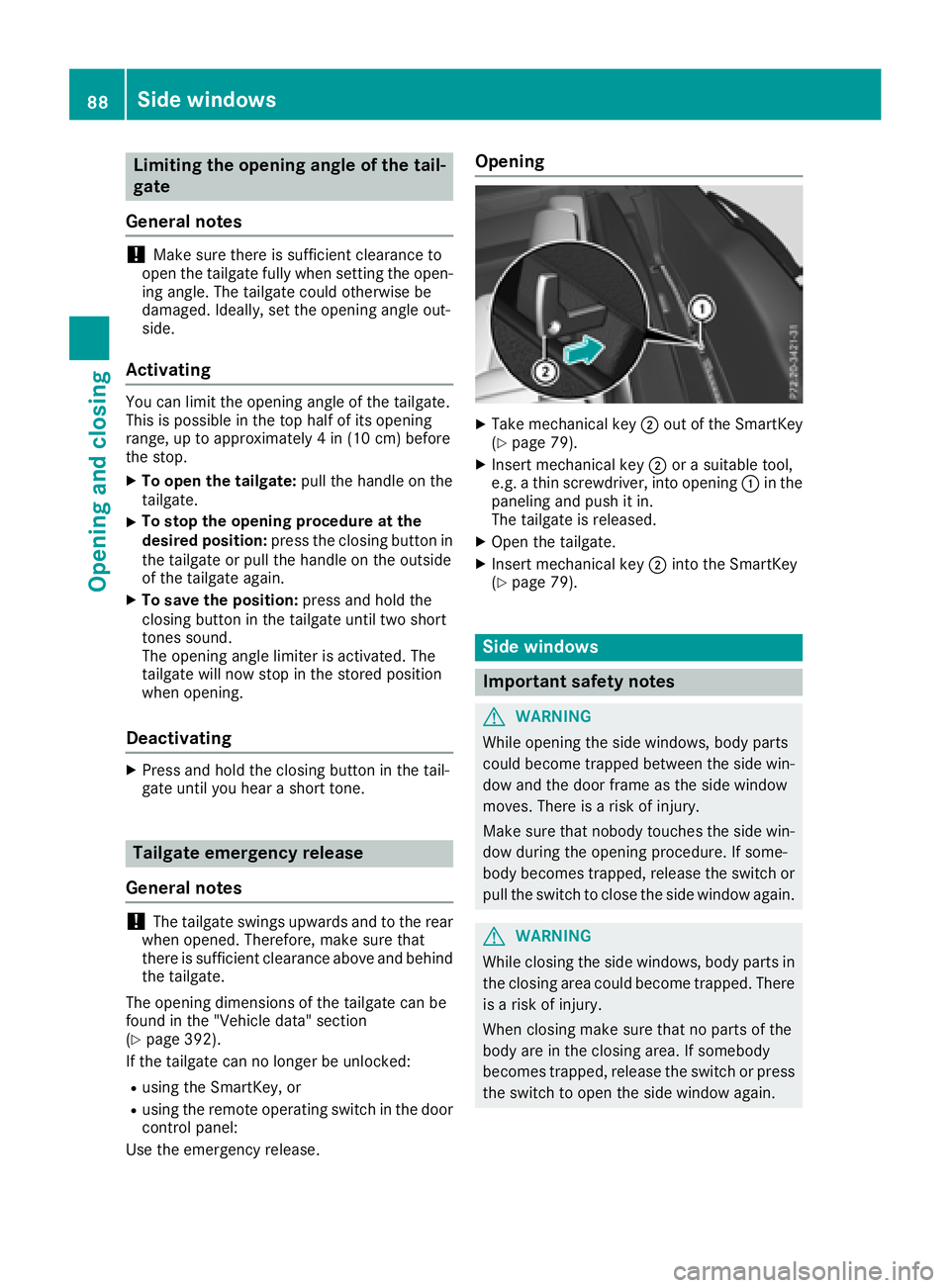
Use the emergency release. Opening X
Take mechanical key D out of the SmartKey
( Y
page 79). X
Insert mechanical key D or a suitable tool,
e.g. a thin screwdriver, into opening C in the
paneling and push it in.
The tailgate is released. X
Open the tailgate. X
Insert mechanical key D into the SmartKey
( Y
page 79).
Side windows
Important safety notes
G WARNING
While opening the side windows, body parts
could become trapped between the side win-
dow and the door frame as the side window
moves. There is a risk of injury.
Make sure that nobody touches the side win-
dow during the opening procedure. If some-
body becomes trapped, release the switch or
pull the switch to close the side window again.
G WARNING
While closing the side windows, body parts in
the closing area could become trapped. There
is a risk of injury.
When closing make sure that no parts of the
body are in the closing area. If somebody
becomes trapped, release the switch or press
the switch to open the side window again.88
Side windows
Opening and closing
Page 226 of 398
m
Level controln
Compass with angle scale
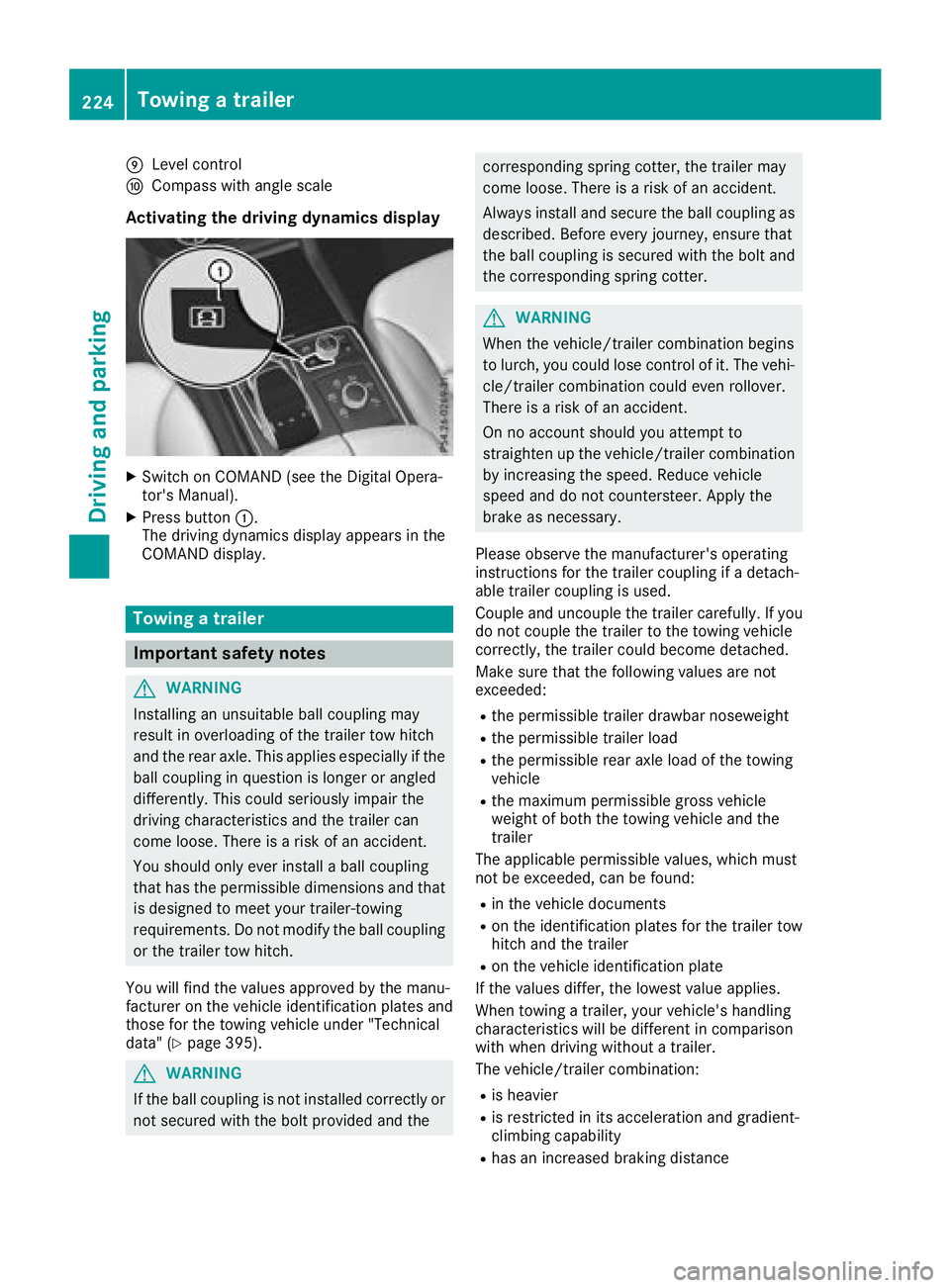
Activating the driving dynamics display X
Switch on COMAND (see the Digital Opera-
tor's Manual). X
Press button C .
The driving dynamics display appears in the
COMAND display.
Towing a trailer
Important safety notes
G WARNING
Installing an unsuitable ball coupling may
result in overloading of the trailer tow hitch
and the rear axle. This applies especially if the
ball coupling in question is longer or angled
differently. This could seriously impair the
driving characteristics and the trailer can
come loose. There is a risk of an accident.
You should only ever install a ball coupling
that has the permissible dimensions and that
is designed to meet your trailer-towing
requirements. Do not modify the ball coupling
or the trailer tow hitch.
You will find the values approved by the manu-
facturer on the vehicle identification plates and
those for the towing vehicle under "Technical
data" ( Y
page 395).
G WARNING
If the ball coupling is not installed correctly or
not secured with the bolt provided and the corresponding spring cotter, the trailer may
come loose. There is a risk of an accident.
Always install and secure the ball coupling as
described. Before every journey, ensure that
the ball coupling is secured with the bolt and
the corresponding spring cotter.
G WARNING
When the vehicle/trailer combination begins
to lurch, you could lose control of it. The vehi-
cle/trailer combination could even rollover.
There is a risk of an accident.
On no account should you attempt to
straighten up the vehicle/trailer combination
by increasing the speed. Reduce vehicle
speed and do not countersteer. Apply the
brake as necessary.
Please observe the manufacturer's operating
instructions for the trailer coupling if a detach-
able trailer coupling is used.
Couple and uncouple the trailer carefully. If you
do not couple the trailer to the towing vehicle
correctly, the trailer could become detached.
Make sure that the following values are not
exceeded: R
the permissible trailer drawbar noseweight R
the permissible trailer load R
the permissible rear axle load of the towing
vehicle R
the maximum permissible gross vehicle
weight of both the towing vehicle and the
trailer
The applicable permissible values, which must
not be exceeded, can be found: R
in the vehicle documents R
on the identification plates for the trailer tow
hitch and the trailer R
on the vehicle identification plate
If the values differ, the lowest value applies.
When towing a trailer, your vehicle's handling
characteristics will be different in comparison
with when driving without a trailer.
The vehicle/trailer combination: R
is heavier R
is restricted in its acceleration and gradient-
climbing capability R
has an increased braking distance224
Towing a trailer
Driving and parking
Page 227 of 398
R
is affected more by strong crosswinds R
demands more sensitive steering R
has a larger turning circle
This could impair the handling characteristics.
When towing a trailer, always adjust your speed
to the current road and weather conditions. Do
not exceed the maximum permissible speed for
your vehicle/trailer combination.
Notes on towing a trailer
General notes
! If you have a trailer tow hitch retrofitted,
changes to the cooling system and drive train
may be necessary, depending on the vehicle
type.
If you have a trailer tow hitch retrofitted,
observe the anchorage points on the chassis
frame. R
Do not exceed the legally prescribed maxi-
mum speed for vehicle/trailer combinations
in the relevant country.
This lowers the risk of an accident. R
Only install an approved trailer coupling on
your vehicle.
More information on availability and installa-
tion can be obtained at any qualified special-
ist workshop. R
The bumpers of your vehicle are not suitable
for installing detachable trailer couplings. R
Do not install hired trailer couplings or other
detachable trailer couplings on the bumpers
of your vehicle. R
If you no longer need the ball coupling,
remove it from the ball coupling recess. This
will reduce the risk of damage to the ball cou-
pling.
When towing a trailer, set the tire pressure on
the rear axle of the towing vehicle for the max-
imum load. You will find the values in the tire
pressure table in the fuel filler flap of the vehicle
( Y
page 372).
Please note that when towing a trailer, the fol-
lowing driving systems have limited availability
or are not available at all: R
Parking Assist PARKTRONIC ( Y
page 192)R
Blind Spot Assist ( Y
page 209)R
Active Lane Keeping Assist ( Y
page 215) On vehicles without level control, the height of
the ball coupling will alter according to the load
placed on the vehicle. If necessary, use a trailer
with a height-adjustable drawbar.
You will find installing dimensions and loads
under "Technical data" ( Y
page 395).
Driving tips Also observe the notes on pulling away with a
trailer ( Y
page 143).
The maximum permissible speed for vehicle/
trailer combinations depends on the type of
trailer. Before beginning the journey, check the
trailer's documents to see what the maximum
permissible speed is for your trailer. Observe the
legally permissible maximum speed in the rele-
vant country.
For certain Mercedes-Benz vehicles, the maxi-
mum permissible rear axle load is increased
when towing a trailer. See "Technical data" to
find out whether this applies to your vehicle
( Y
page 395). If you utilize any of the added
maximum rear axle load when towing a trailer,
the vehicle/trailer combination may not exceed
a maximum speed of 60 mph (100 km/h) for
reasons concerning the operating permit. This
also applies in countries in which the maximum
permissible speed for car/trailer combinations
is greater than 60 mph (100 km/h).
When towing a trailer, your vehicle's handling
characteristics will be different in comparison
with when driving without a trailer.
Use the left-hand steering wheel paddle shifter
to shift into a lower gear in good time on long
and steep downhill gradients.
This also applies if you have activated cruise
control or Distance Pilot DISTRONIC.
This will use the braking effect of the engine, so
that less braking will be required to maintain the
speed. This relieves the load on the brake sys-
tem and prevents the brakes from overheating
and wearing too quickly. If you need additional
braking, depress the brake pedal repeatedly
rather than continuously.
Driving tips
If the trailer swings from side to side: X
Do not accelerate. X
Do not counter-steer. X
Brake if necessary.Towing a trailer 225
Driving and parking Z
Page 231 of 398
Decoupling a trailer
G WARNING
If you uncoupl e a trailer wit h th e overrun
brake engaged, you could trap your han d
between th e vehicle and th e trailer drawbar .
There is a ris k of injury.
Do no t uncoupl e a trailer if th e overrun brake
is engaged.
G WARNING
Vehicles wit h level control:
The vehicle is lowered as soo n as you discon-
nect th e trailer cable. Thi s could result in your
limbs or those of other people that are
between th e vehicle bod y and tires or under-
neat h th e vehicle bein g trapped. There is a
ris k of injury.
Mak e sur e that nobod y is in th e immediate
vicinit y of th e whee l housings or under th e
vehicle when you disconnec t th e trailer cable.
! Do no t disconnec t a trailer wit h an engage d
overrun brake . Otherwise , your vehicle could
be damaged by th e reboundin g of th e overrun
brake .X
Shift th e transmissio n to position P .X
Apply th e vehicle' s electric parking brake .X
Start th e engine.X
Clos e th e doors and tailgate.X
Apply th e trailer's parking brake .X
Detach th e trailer cable and decoupl e th e
trailer .X
Switc h of f th e engine.
Permissible trailer loads an d drawbar
loads
Weight specifications
Maximum allowable gross mass
The gross vehicle weight of th e trailer is calcu-
lated by addin g th e weight of th e trailer to th e
weight of th e load and equipmen t on th e trailer .
You will fin d installin g dimensions and load s
under "Technical data" ( Y
page 395). Permissible noseweigh tYou will fin d installin g dimensions and load s
under "Technical data" ( Y
page 395).
Loading a trailer R
Whe n loadin g th e trailer , mak e sur e that nei-
ther th e permissible gross weight of th e trailer
no r th e gross vehicle weight are exceeded.
The permissible gross vehicle weight is indi-
cated on th e identification plat e located on
th e B-pilla r on th e driver's sid e of th e vehicle.
You can fin d th e maximum permissible values
on th e typ e plates of your vehicle and th e
trailer . Whe n calculatin g how muc h weight
th e vehicle and trailer may carry, pay atten-
tion to th e respective lowest values. R
The trailer drawbar load on th e ball couplin g
mus t be adde d to th e rea r axl e load to avoid
exceedin g th e permissible gross axl e weight .
The permissible gross vehicle weight is indi-
cated on th e identification plat e located on
th e B-pilla r on th e driver's sid e of th e vehicle.
i Mercedes-Ben z recommends a trailer load
wher e th e trailer drawbar noseweigh t
accounts fo r 8 % to 15 % of th e trailer's per -
missible gross weight .
i The weight of additional accessories , pas-
sengers, and cargo reduce s th e permissible
trailer load and drawbar load fo r your vehicle.
Checking th e vehicle an d trailer weigh tR
To chec k that th e weight s of th e towin g vehi-
cl e and th e trailer compl y wit h th e maximum
permissible values, hav e th e vehicle/trailer
combination (includin g th e driver , passen -
gers, and cargo wit h a full y lade n trailer )
weighed on a calibrated weighbridge .R
Chec k th e gross axl e weight ratin g of th e fron t
and rea r axles, th e gross weight of th e trailer
and th e trailer drawbar noseweight.
Removin g th e ball coupling X
Remov e th e sprin g cotter.X
Remov e th e bolt from th e ball couplin g
recess . X
Remov e th e ball couplin g from th e ball cou-
plin g recess .Towing a trailer 229
Driving and parking Z