service MERCEDES-BENZ GLS 2019 Owner's Manual
[x] Cancel search | Manufacturer: MERCEDES-BENZ, Model Year: 2019, Model line: GLS, Model: MERCEDES-BENZ GLS 2019Pages: 398, PDF Size: 7.3 MB
Page 169 of 398
twigs can gather between the underbody and
the underbody paneling. If these materials
come in contact with hot parts of the exhaust
system, they can catch fire.
In such situations, have the vehicle checked
and repaired immediately at a qualified spe-
cialist workshop. If on continuing your jour-
ney you notice that driving safety is impaired, pull over and stop the vehicle immediately,
paying attention to road and traffic condi-
tions. In such cases, consult a qualified spe-
cialist workshop.
When driving off-road, substances such as sand,
mud and water or water mixed with oil may get
into the brakes. This could result in a reduced
braking effect or in total brake failure and also in increased wear and tear. The braking charac-
teristics change depending on the material
entering the brakes. Clean the brakes after driv-
ing off-road. If you detect a reduced braking
effect or grinding noises, have the brake system
checked in a qualified specialist workshop as
soon as possible. Adapt your driving style to the different braking characteristics.
Driving off-road increases the likelihood of dam-age to the vehicle, which, in turn, can lead to
failure of the mechanical assembly or systems.
Adapt your driving style to suit the terrain con-
ditions. Drive carefully. Have damage to the
vehicle rectified immediately at a qualified spe-
cialist workshop.
Do not shift into transmission position 005Cwhen
driving off-road. You could lose control of the
vehicle if you attempt to brake the vehicle using
the service brake. If the gradient is too steep for your vehicle, drive back down in reverse gear.
General notes H
Environmental note
Protection of the environment is of primary
importance. Treat nature with respect.
Observe all prohibiting signs.
Read this section carefully before driving your
vehicle off-road. Practice by driving over more
gentle off-road terrain first.
Familiarize yourself with the characteristics of
your vehicle and the gear shift operation before driving through difficult terrain. The following driving systems are specially
adapted to off-road driving:
R The Off-road drive program (vehicles without
Off-Road Engineering package)
(Y page 216)
R Off-road andOff-road Plus drive programs
(vehicles with Off-Road Engineering package) (Y page 217)
R LOW RANGE off-road gear (vehicles with the
Off-Road Engineering package)
(Y page 218)
R Differential lock (vehicles with the Off-Road
Engineering package) (Y page 218)
R Off-road ABS (Y page 67)
R Off-road 4ETS (Y page 70)
R Off-road ESP ®
(Y page 71)
R AIRMATIC package (vehicle level)
(Y page 185)
R DSR (Downhill Speed Regulation)
(Y page 215)
Observe the following notes:
R Stop the vehicle before starting to drive along
an off-road route. If necessary, select the off-
road program (Y page 217) or shift to the
LOW RANGE off-road gear (Y page 218).
R Select a vehicle level that is suitable for the
terrain. To avoid damaging the vehicle, make
sure there is always sufficient ground clear-
ance.
R Check that items of luggage and loads are
stowed safely and are well secured
(Y page 300).
R Always keep the engine running and in gear
when driving on a downhill gradient. Activate
DSR (Y page 215).
R Always keep the engine running and in gear
when driving down an incline.
R Adapt your speed to the terrain. The rougher,
steeper or more ruts on the terrain, the slower
your speed should be.
R Do not jump with the vehicle as this will inter-
rupt the vehicle's propulsion.
R Drive with extreme care on unfamiliar off-road
routes where visibility is poor. For safety rea- sons, get out of the vehicle first and survey
the off-road route.
R Look out for obstacles, such as rocks, holes,
tree stumps and furrows. Driving
tips
167Driving an d parking Z
Page 172 of 398
could slip sideways, tip and rollover. There is a
risk of an accident.
Always drive on a steep incline in the line of
fall (straight up or down) and do not turn the
vehicle.
R Observe the rules on off-road driving.
R Do not drive at an angle on slopes, inclines or
gradients, but instead follow the direct line of
fall.
R When driving down an incline, make use of the
engine's braking effect. Observe the engine
speed; do not overrev the engine.
R Select the Offroaddrive program (vehicles
without Off-road Engineering Package)
(Y page 216).
R Select the Offroaddrive program (vehicles
with Off-road Engineering Package)
(Y page 217).
R Before driving on extreme uphill and downhill
gradients, select the LOW RANGE offroad
gear (vehicles with Off-road Engineering
Package) (Y page 218).
R Drive slowly.
R Avoid high engine speeds. Drive at appropri-
ate engine speeds (maximum 3,000 rpm).
R Use the left-hand steering wheel paddle
shifter to shift into a lower gear in good time
on long and steep downhill gradients.
R Check the brakes after prolonged off-road
driving.
Hill start assist will aid you when pulling away on
a hill. For further information about hill start
assist, see (Y page 143).
Do not shift into transmission position 005Cwhen
driving off-road. You could lose control of the
vehicle if you attempt to brake the vehicle using
the service brake. If the gradient is too steep for
your vehicle, drive back down in reverse gear.
Always observe the approach/departure angle
values (Y page 391).
Maximum gradient-climbing capability Always observe the maximum gradient climbing
ability values (Y page 392). Hilltops When driving up an uphill gradient, slightly
reduce pressure on the accelerator immediately
before reaching the brow of the hill. Make use of the vehicle's own impetus to travel over the
brow.
This style of driving prevents:
R the vehicle from lifting off the ground on the
brow of a hill
R the vehicle from traveling too quickly down
the other side
Driving downhill R
Drive slowly.
R Do not drive at an angle down steep inclines.
Steer into the line of fall and drive with the
front wheels aligned straight. Otherwise, the
vehicle could slip sideways, tip and rollover.
R Shift to a lower gear using the left-hand pad-
dle shifter before tackling steep downhill gra-
dients.
R Activate DSR. If this is not sufficient, brake
gently. When doing so, make sure that the
vehicle is facing in the direction of the line of
fall.
R Check that the brakes are working normally
after a long downhill stretch.
i The special off-road ABS setting enables a
precise, brief and repeated locking of the
front wheels. This causes them to dig into
loose earth. Be aware that the front wheels
easily skid across the ground surface if com-
pletely braked and therefore lose their ability
to steer. Driving systems
Intelligent Drive
Mercedes-Benz Intelligent Drive stands for inno- vative driver assistance and safety systems
which enhance comfort and support the driver in
critical situations. With these intelligent co-ordi- nated systems Mercedes-Benz has set a mile-
stone on the path towards autonomous driving.
Mercedes-Benz Intelligent Drive embraces all
elements of active and passive safety in one well thought out system – for the safety of the vehi-
cle occupants and that of other road users. 170
Driving systemsDriving and parking
Page 178 of 398
between your vehicle and the vehicle in front
becomes too small.
i When you change lanes, Active Distance
Assist DISTRONIC monitors the right lane (in
left-side traffic) or the left lane (in right-side
traffic).
Stopping G
WARNING
If you leave the driver's seat when the vehicle is only being braked by Active Distance Assist
DISTRONIC, it could roll away:
R if there is a malfunction in the system or in
the voltage supply
R if Active Distance Assist DISTRONIC is
deactivated using the cruise control lever,
for example by a vehicle occupant or from
outside the vehicle
R if the electrical system in the engine com-
partment, the battery or the fuses are tam-
pered with
R if the battery is disconnected
R if the vehicle is accelerated, e.g. by a vehi-
cle occupant
There is a risk of an accident.
Always deactivate Active Distance Assist
DISTRONIC and secure the vehicle against
rolling away before you leave it.
If Active Distance Assist DISTRONIC detects
that the vehicle in front is stopping, it brakes
your vehicle until it is stationary.
Once your vehicle is stationary, it remains sta-
tionary and you do not need to depress the
brake.
After a time, the electric parking brake secures
the vehicle and relieves the service brake.
Depending on the specified minimum distance,
your vehicle will come to a standstill at a suffi-
cient distance behind the vehicle in front. The
specified minimum distance is set using the
control on the cruise control lever. When Active Distance Assist DISTRONIC is acti-
vated and the vehicle is at a standstill, the trans-
mission will be shifted automatically to position
005D if:
R the driver's door is open and the driver's seat
belt is unfastened.
R the engine is switched off, unless it is auto-
matically switched off by the ECO start/stop
function.
When Active Distance Assist DISTRONIC is acti-
vated and the vehicle is at a standstill, the elec- tric parking brake will secure the vehicle auto-
matically if:
R a system malfunction occurs
R the power supply is not sufficient
On steep uphill or downhill inclines or if there is
a malfunction, the transmission may also be
automatically shifted into position 005D.
Setting a speed Keep in mind that it may take a brief moment
until the vehicle has accelerated or braked to
the speed set.
X Press the cruise control lever up 0043for a
higher speed or down 0083for a lower speed
X To adjust the set speed in 1 mph incre-
ments (1 km/h increments):
briefly press
the cruise control lever up 0043or down 0044to
the pressure point.
Every time the cruise control lever is pressed
up 0043 or down 0044the last speed stored is
increased or reduced.
X To adjust the set speed in 5 mph incre-
ments
(10 km/h increments): briefly press
the cruise control lever up 0043or down 0044
beyond the pressure point.
Every time the cruise control lever is pressed
up 0043 or down 0044, the last speed stored is
increased or reduced.
i If you accelerate to overtake, Active Dis-
tance Assist DISTRONIC adjusts the vehicle's
speed to the last speed stored after you have
finished overtaking. 176
Driving systemsDriving and parking
Page 186 of 398
i
Do not use the HOLD function when driving
off-road, on steep uphill or downhill gradients or on slippery or loose surfaces. The HOLD
function cannot hold the vehicle on such sur- faces.
Important safety notes G
WARNING
If the vehicle is only braked using the HOLD
function, the vehicle may roll away in the fol-
lowing situations when you leave the vehicle:
R if there is a malfunction in the system or in
the voltage supply
R if the HOLD function is deactivated by
depressing the accelerator pedal or brake
pedal, e.g. by a vehicle occupant
There is a risk of an accident.
Always deactivate the HOLD function and
secure the vehicle against rolling away before
you leave it.
! When Active Distance Assist DISTRONIC or
the HOLD function is activated, the vehicle
brakes automatically in certain situations.
To avoid damage to the vehicle, deactivate
Active Distance Assist DISTRONIC and the
HOLD function in the following or similar sit-
uations:
R when towing the vehicle
R in the car wash
Deactivate the HOLD function (Y page 184).
Activation conditions You can activate the HOLD function if:
R the vehicle is stationary
R the engine is running or if it has been auto-
matically switched off by the ECO start/stop
function
R the driver's door is closed or your seat belt is
fastened
R the electric parking brake is released
R the transmission is in position 005B,005Eor005C
R Active Distance Assist DISTRONIC is deacti-
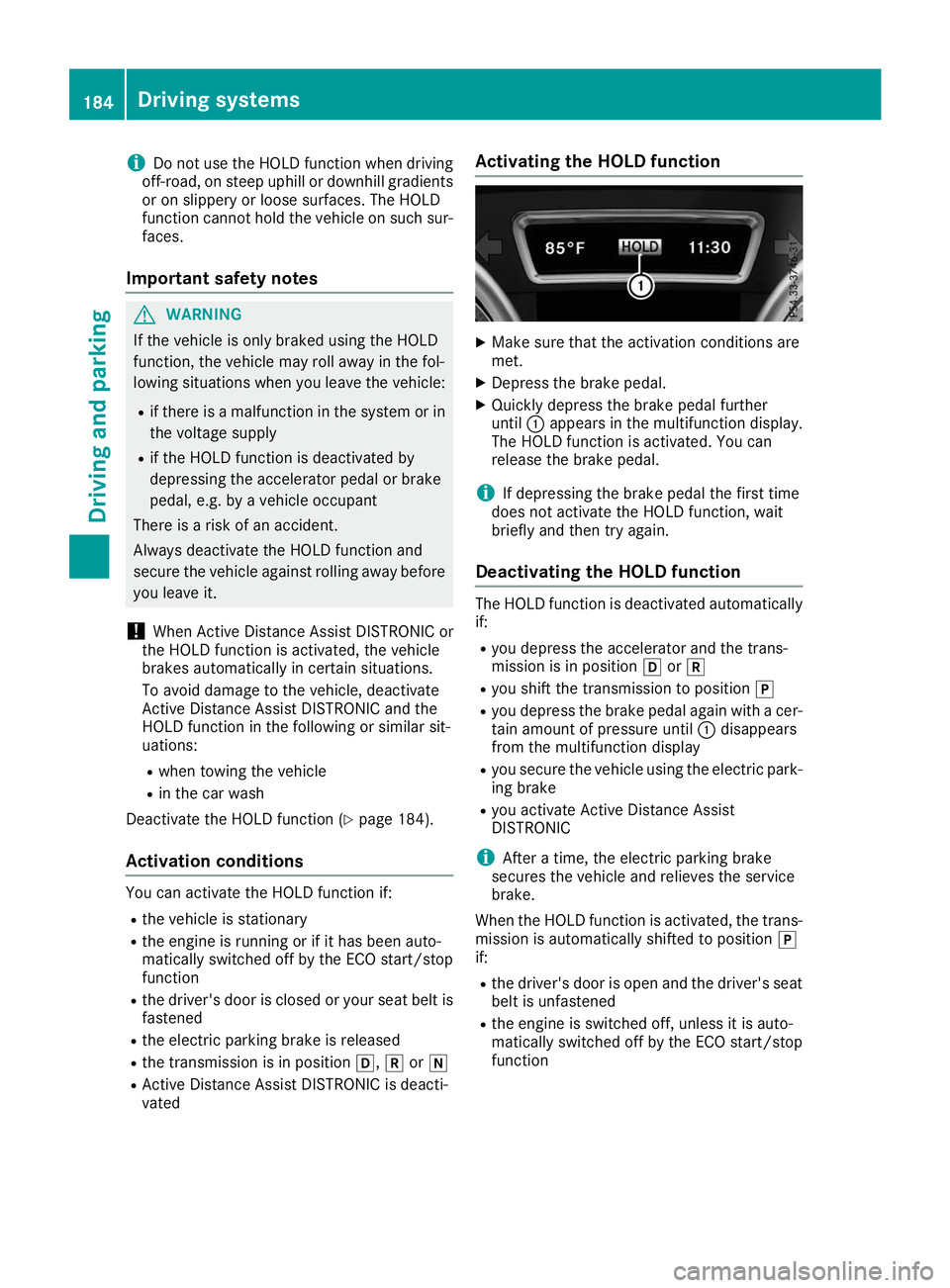
vated Activating the HOLD function X
Make sure that the activation conditions are
met.
X Depress the brake pedal.
X Quickly depress the brake pedal further
until 0043appears in the multifunction display.
The HOLD function is activated. You can
release the brake pedal.
i If depressing the brake pedal the first time
does not activate the HOLD function, wait
briefly and then try again.
Deactivating the HOLD function The HOLD function is deactivated automatically
if:
R you depress the accelerator and the trans-
mission is in position 005Bor005E
R you shift the transmission to position 005D
R you depress the brake pedal again with a cer-
tain amount of pressure until 0043disappears
from the multifunction display
R you secure the vehicle using the electric park-
ing brake
R you activate Active Distance Assist
DISTRONIC
i After a time, the electric parking brake
secures the vehicle and relieves the service
brake.
When the HOLD function is activated, the trans-
mission is automatically shifted to position 005D
if:
R the driver's door is open and the driver's seat
belt is unfastened
R the engine is switched off, unless it is auto-
matically switched off by the ECO start/stop
function 184
Driving systemsDriving an
d parking
Page 208 of 398
On long journeys, take regular breaks in good
time to allow yourself to rest. If you do not take a break, you will be warned again after
15 minutes at the earliest. This will only happen
if ATTENTION ASSIST still detects typical indi-
cators of fatigue or increasing lapses in concen- tration.
Vehicles with COMAND: if a warning is issued
in the multifunction display, a service station
search is performed in COMAND. You can select a service station and navigation to this service
station will then begin. This function can be acti-
vated and deactivated in COMAND. Traffic Sign Assist
General notes Traffic Sign Assist displays the maximum speed
permitted to the driver in the instrument cluster.
The data stored in the navigation system and
general traffic regulations are used to determine
the current speed limit.
As Traffic Sign Assist is a map-based system,
traffic signs put up temporarily (e.g. near road-
works) are not detected.
If a traffic sign that is relevant to your vehicle is passed, the display of the speed limits is upda-
ted.
Traffic signs with a restriction indicated by an
additional sign (e.g. in wet conditions) are also
shown.
The traffic signs are only displayed with the
restrictions if:
R The regulation must be observed with the
restriction, or
R Traffic Sign Assist is unable to determine
whether the restriction applies
If Traffic Sign Assist is unable to determine a
maximum permitted speed from any of the avail- able sources, no speed limit is displayed in the
instrument cluster either. Traffic Sign Assist is not available in all coun-
tries. In this case, symbol
0043is shown in the
assistance graphic display (Y page 238).
Important safety notes Traffic Sign Assist is only an aid and is not always
able to correctly display speed limits. Traffic
signs always have priority over the Traffic Sign
Assist display.
The system may be either functionally impaired
or temporarily unavailable if the information in
the digital street map of the navigation system is incorrect or out of date.
Instrument cluster display Displaying the assistance graphic
X Call up the assistance graphics display func-
tion using the on-board computer
(Y page 238).
X Select the Traffic Sign Assist display.
Detected traffic signs are displayed in the
instrument cluster.
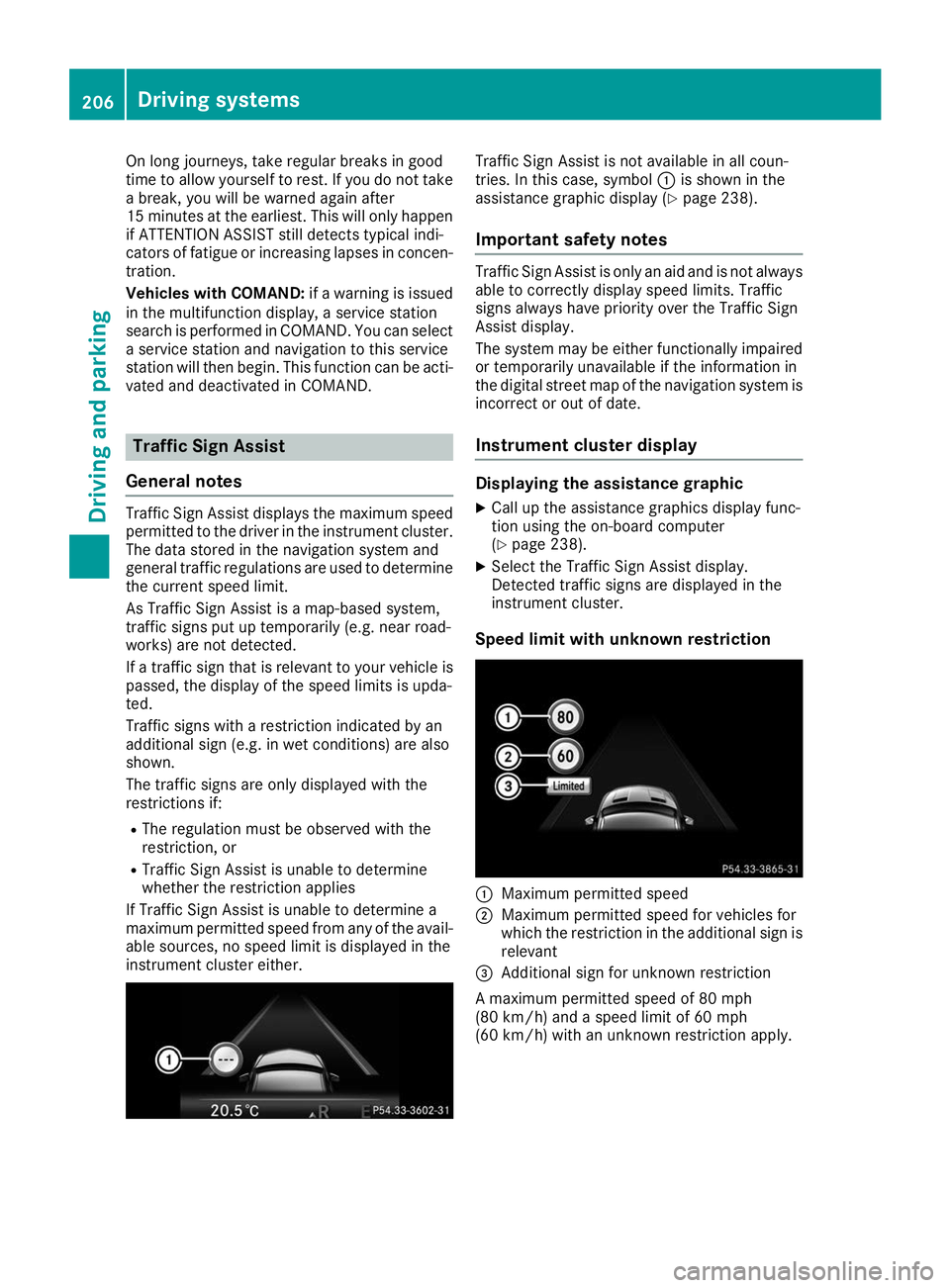
Speed limit with unknown restriction 0043
Maximum permitted speed
0044 Maximum permitted speed for vehicles for
which the restriction in the additional sign is
relevant
0087 Additional sign for unknown restriction
A maximum permitted speed of 80 mph
(80 km/h) and a speed limit of 60 mph
(60 km/h) with an unknown restriction apply. 206
Driving systemsDriving and parking
Page 233 of 398
There is a short delay before a change in outside
temperature appears in the multifunction dis-
play. Coolant temperature gauge
G
WARNING
Opening the hood when the engine is over-
heated or when there is a fire in the engine
compartment could expose you to hot gases
or other service products. There is a risk of
injury.
Let an overheated engine cool down before
opening the hood. If there is a fire in the
engine compartment, keep the hood closed
and contact the fire department.
! If the coolant temperature is too high, a dis-
play message is shown.
If the coolant temperature display is in the
area marked in red, do not continue driving.
Otherwise, the engine will be damaged.
The coolant temperature gauge is in the instru-
ment cluster on the right-hand side (Y page 37).
Under normal operating conditions and with the specified coolant level, the coolant temperature gauge may rise to the red marking. Operating the on-board computer
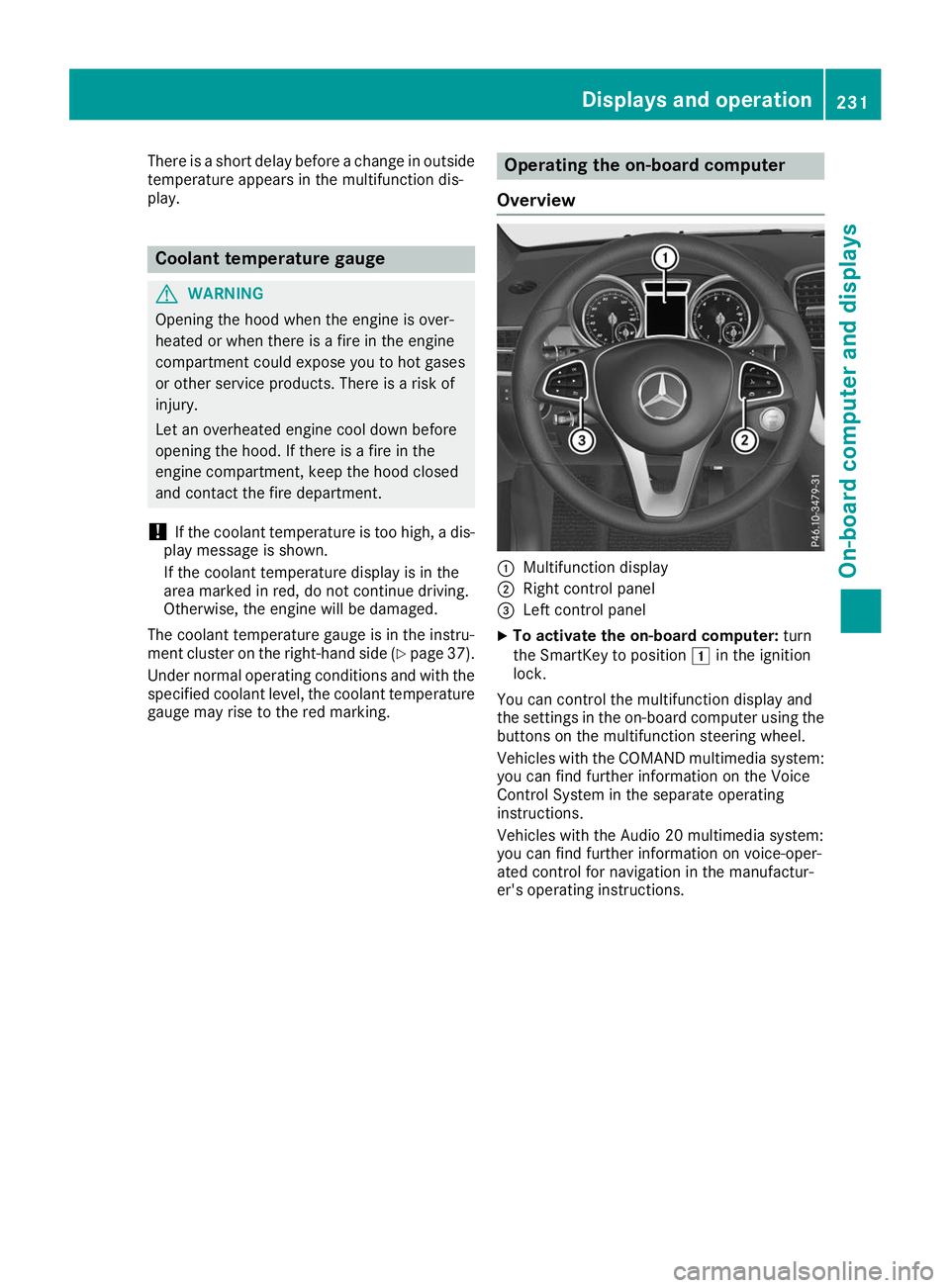
Overview 0043
Multifunction display
0044 Right control panel
0087 Left control panel
X To activate the on-board computer: turn
the SmartKey to position 0047in the ignition
lock.
You can control the multifunction display and
the settings in the on-board computer using the buttons on the multifunction steering wheel.
Vehicles with the COMAND multimedia system: you can find further information on the Voice
Control System in the separate operating
instructions.
Vehicles with the Audio 20 multimedia system:
you can find further information on voice-oper-
ated control for navigation in the manufactur-
er's operating instructions. Displays and operation
231On-board computer and displays Z
Page 239 of 398
Telephone menu
Introduction G
WARNING
If you operate information systems and com-
munication equipment integrated in the vehi- cle when driving, you may be distracted from
the traffic situation. You could also lose con-
trol of the vehicle. There is a risk of an acci-
dent.
Only operate this equipment when the traffic
situation permits. If you are not sure that this
is possible, park the vehicle paying attention
to traffic conditions and operate the equip-
ment when the vehicle is stationary.
When telephoning, you must observe the legal
requirements for the country in which you are
currently driving.
X Switch on the mobile phone (see the manu-
facturer’s operating instructions).
X Switch on the multimedia system (see the
Digital Operator's Manual)
X Establish a Bluetooth ®
connection to the mul-
timedia system (see the Digital Operator's
Manual).
X Press the 0059or0065 button on the steering
wheel to select the Tel Telmenu.
You will see one of the following display mes-
sages in the multifunction display:
R Phone READY Phone READY or the name of the network
provider: the mobile phone has found a net-
work and is ready to receive.
R Phone No Service
Phone No Service: there is no network
available or the mobile phone is searching for
a network.
Accepting a call If someone calls you when you are in the
Tel
Tel
menu, a display message appears in the multi-
function display.
You can accept a call at any time regardless of
the menu selected.
X Press the 0061button on the steering wheel
to accept an incoming call. Rejecting or ending a call You can end or reject a call even if you are not in
the Tel Tel menu.
X Press the 0076button on the steering wheel
to reject or end a call.
Selecting an entry from the phone book X
Press the 0059or0065 button on the steering
wheel to select the Tel
Telmenu.
X Press the 0063,0064or0076 button to
switch to the phone book.
X Authorize access to the phone book on the
phone.
X Press the 0063or0064 button to select the
desired name.
or
X To start rapid scrolling: press and hold the
0063 or0064 button for longer than one sec-
ond.
Rapid scrolling stops when you release the
button or reach the end of the list.
X If only one telephone number is stored for
a name: press the 0061or0076 button to
start dialing.
or X If there is more than one number for a
particular name:
press the0061or0076
button to display the numbers.
X Press the 0063or0064 button to select the
number you want to dial.
X Press the 0061or0076 button to start dialing.
or
X To exit the telephone book: press the0076
or 0038 button.
Redialing The on-board computer saves the last names or
numbers dialed in the redial memory.
X Press the 0059or0065 button on the steering
wheel to select the Tel Telmenu.
X Press the 0061button to switch to the redial
memory.
X Press the 0063or0064 button to select the
desired name or number. Menus and submenus
237On-board computer and displays Z
Page 241 of 398
Further information about Active Distance
Assist DISTRONIC with Active Steering Assist
(Y page 179).
Activating/deactivating Active Brake
Assist You can use these functions to activate/deac-
tivate Active Brake Assist or, on vehicles with
the Driving Assistance package, to activate or
deactivate Active Brake Assist with cross-traffic
function.
X Press the 0059or0065 button on the steering
wheel to select the DriveAssist DriveAssistmenu.
X Press the 0063or0064 button to select
Brake Assist
Brake Assist.
X Press 0076to confirm.
The current selection appears.
X To activate/deactivate: press the0076but-
ton again.
When Active Brake Assist or Active Brake
Assist with cross-traffic function is deactiva-
ted, the 00D4symbol appears in the multi-
function display in the assistance graphic dis-
play.
Further information on Active Brake Assist
(Y page 67 )and Active Brake Assist with cross-
traffic function (Y page 72).
Activating/deactivating ATTENTION
ASSIST X
Press the 0059or0065 button on the steering
wheel to select the DriveAssist
DriveAssist menu.
X Press the 0063or0064 button to select
Attention Assist Attention Assist .
X Press the 0076button.
The current selection appears.
X Press 0076to confirm.
X Press the 0064or0063 button to set Off
Off,
Standard
Standard orSensitive
Sensitive .
X Press the 0076button to save the setting.
When ATTENTION ASSIST is deactivated, the
00D7 symbol appears in the multifunction dis-
play in the assistance graphics display.
For further information about ATTENTION
ASSIST, see (Y page 204). Activating/deactivating Blind Spot
Assist X
Press the 0059or0065 button on the steering
wheel to select the DriveAssist DriveAssistmenu.
X Press the 0063or0064 button to select
Blind Spot Assist
Blind Spot Assist .
X Confirm by pressing 0076on the steering
wheel.
The current selection appears.
X To activate/deactivate: press the0076but-
ton again.
For further information about Blind Spot Assist, see (Y page 207).
For further information about Active Blind Spot
Assist, see (Y page 210).
Activating/deactivating Lane Keeping
Assist X
Press the 0059or0065 button on the steering
wheel to select the DriveAssist DriveAssistmenu.
X Press the 0063or0064 button to select
Lane Keeping Assist
Lane Keeping Assist .
X Press 0076to confirm.
The current selection appears.
X Press 0076to confirm.
X Press the 0064or0063 button to set Off
Off,
Standard
Standard orAdaptive
Adaptive.
When Lane Keeping Assist or Active Lane
Keeping Assist is activated, the multifunction display shows the lane markings as bright
lines in the assistance graphic.
X Press the 0076button to save the setting.
For further information about Lane Keeping
Assist, see (Y page 208).
For further information about Active Lane Keep- ing Assist, see (Y page 212). Service menu
Depending on the equipment installed in the
vehicle, you have the following options in the
Serv. Serv. menu:
R calling up display messages in message mem-
ory (Y page 245)
R restarting the tire pressure loss warning sys-
tem (Y page 359) or checking the tire pres-
sure electronically (Y page 361)
R calling up the service due date (Y page 325). Menus and submenus
239On-board computer and displays Z
Page 242 of 398
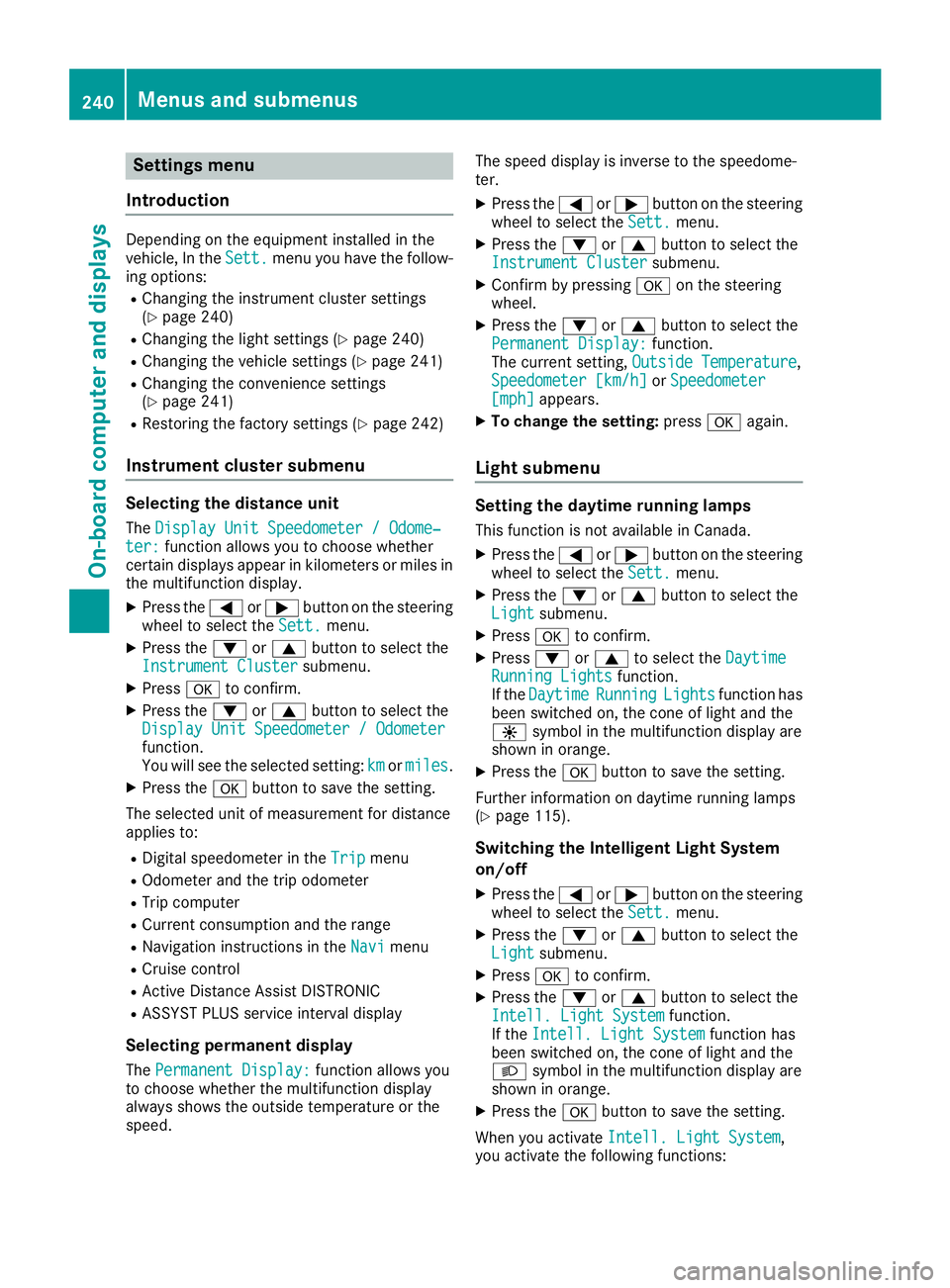
Settings menu
Introduction Depending on the equipment installed in the
vehicle, In the
Sett. Sett.menu you have the follow-
ing options:
R Changing the instrument cluster settings
(Y page 240)
R Changing the light settings (Y page 240)
R Changing the vehicle settings (Y page 241)
R Changing the convenience settings
(Y page 241)
R Restoring the factory settings (Y page 242)
Instrument cluster submenu Selecting the distance unit
The Display Unit Speedometer / Odome‐ Display Unit Speedometer / Odome‐
ter:
ter: function allows you to choose whether
certain displays appear in kilometers or miles in
the multifunction display.
X Press the 0059or0065 button on the steering
wheel to select the Sett.
Sett. menu.
X Press the 0064or0063 button to select the
Instrument Cluster
Instrument Cluster submenu.
X Press 0076to confirm.
X Press the 0064or0063 button to select the
Display Unit Speedometer / Odometer
Display Unit Speedometer / Odometer
function.
You will see the selected setting: km kmormiles
miles.
X Press the 0076button to save the setting.
The selected unit of measurement for distance
applies to:
R Digital speedometer in the Trip
Trip menu
R Odometer and the trip odometer
R Trip computer
R Current consumption and the range
R Navigation instructions in the Navi
Navimenu
R Cruise control
R Active Distance Assist DISTRONIC
R ASSYST PLUS service interval display
Selecting permanent display
The Permanent Display:
Permanent Display: function allows you
to choose whether the multifunction display
always shows the outside temperature or the
speed. The speed display is inverse to the speedome-
ter.
X Press the 0059or0065 button on the steering
wheel to select the Sett. Sett.menu.
X Press the 0064or0063 button to select the
Instrument Cluster
Instrument Cluster submenu.
X Confirm by pressing 0076on the steering
wheel.
X Press the 0064or0063 button to select the
Permanent Display:
Permanent Display: function.
The current setting, Outside Temperature
Outside Temperature,
Speedometer [km/h]
Speedometer [km/h] orSpeedometer
Speedometer
[mph]
[mph] appears.
X To change the setting: press0076again.
Light submenu Setting the daytime running lamps
This function is not available in Canada.
X Press the 0059or0065 button on the steering
wheel to select the Sett.
Sett.menu.
X Press the 0064or0063 button to select the
Light
Light submenu.
X Press 0076to confirm.
X Press 0064or0063 to select the Daytime
Daytime
Running Lights
Running Lights function.
If the Daytime
Daytime Running
RunningLights
Lightsfunction has
been switched on, the cone of light and the
0086 symbol in the multifunction display are
shown in orange.
X Press the 0076button to save the setting.
Further information on daytime running lamps
(Y page 115).
Switching the Intelligent Light System
on/off
X Press the 0059or0065 button on the steering
wheel to select the Sett.
Sett. menu.
X Press the 0064or0063 button to select the
Light Light submenu.
X Press 0076to confirm.
X Press the 0064or0063 button to select the
Intell. Light System
Intell. Light System function.
If the Intell. Light System
Intell. Light System function has
been switched on, the cone of light and the
0058 symbol in the multifunction display are
shown in orange.
X Press the 0076button to save the setting.
When you activate Intell. Light System Intell. Light System,
you activate the following functions: 240
Menus and submenusOn-board computer and displays
Page 255 of 398
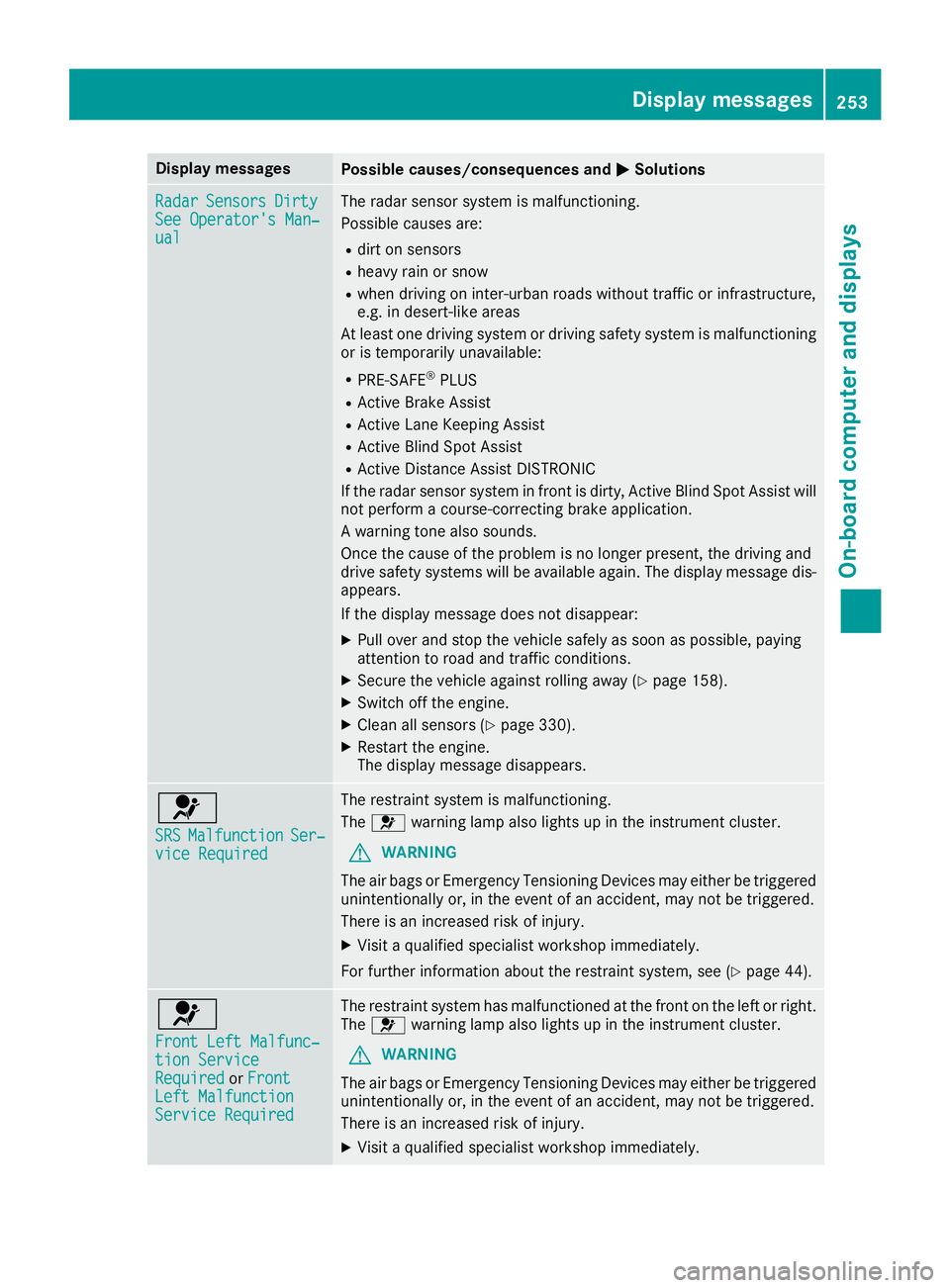
Display messages
Possible causes/consequences and
0050
0050Solutions Radar
Radar
Sensors
Sensors Dirty
Dirty
See Operator's Man‐
See Operator's Man‐
ual ual The radar sensor system is malfunctioning.
Possible causes are:
R dirt on sensors
R heavy rain or snow
R when driving on inter-urban roads without traffic or infrastructure,
e.g. in desert-like areas
At least one driving system or driving safety system is malfunctioning
or is temporarily unavailable:
R PRE-SAFE ®
PLUS
R Active Brake Assist
R Active Lane Keeping Assist
R Active Blind Spot Assist
R Active Distance Assist DISTRONIC
If the radar sensor system in front is dirty, Active Blind Spot Assist will
not perform a course-correcting brake application.
A warning tone also sounds.
Once the cause of the problem is no longer present, the driving and
drive safety systems will be available again. The display message dis-
appears.
If the display message does not disappear:
X Pull over and stop the vehicle safely as soon as possible, paying
attention to road and traffic conditions.
X Secure the vehicle against rolling away (Y page 158).
X Switch off the engine.
X Clean all sensors (Y page 330).
X Restart the engine.
The display message disappears. 0075
SRS SRS
Malfunction Malfunction Ser‐
Ser‐
vice Required
vice Required The restraint system is malfunctioning.
The
0075 warning lamp also lights up in the instrument cluster.
G WARNING
The air bags or Emergency Tensioning Devices may either be triggered unintentionally or, in the event of an accident, may not be triggered.
There is an increased risk of injury.
X Visit a qualified specialist workshop immediately.
For further information about the restraint system, see (Y page 44).0075
Front Left Malfunc‐ Front Left Malfunc‐
tion Service tion Service
Required Required
orFront
Front
Left Malfunction
Left Malfunction
Service Required Service Required The restraint system has malfunctioned at the front on the left or right.
The 0075 warning lamp also lights up in the instrument cluster.
G WARNING
The air bags or Emergency Tensioning Devices may either be triggered unintentionally or, in the event of an accident, may not be triggered.
There is an increased risk of injury.
X Visit a qualified specialist workshop immediately. Display
messages
253On-board computer and displays Z