light MERCEDES-BENZ GLS 2020 Owners Manual
[x] Cancel search | Manufacturer: MERCEDES-BENZ, Model Year: 2020, Model line: GLS, Model: MERCEDES-BENZ GLS 2020Pages: 682, PDF Size: 23.3 MB
Page 337 of 682
%
Ifth eve hicle iseq uipped withth eMBUX in-
car assis tant, select edfunc tions ofthemul‐
timedia system can beoper ated con tact-fr ee
as wellas turnin gth ere adin glight onoroff
(/ page34 2).
Nu mer ous application, online services, services
and appsar eav ailable foryo u. Youcan call
th ese upusing thehome screen orusing buttons
5 and 6next to theto uc hpad.
Yo ucan convenient lycall upand add favo rite s
usin gth eß rock er switc hon thesteer ing
wheel orusing theß buttonnext to the
to uc hpad. Quick-acc ess inthehome screen and
in theapplications servetoselect functions
mor equ ickl y.
If yo uuse thelear nfunc tion ofthemultimedia
sy stem, youwill recei vesugg estions during oper‐
ation ofthemos tpr obable navig ation destina‐
tion s,media sources, radio statio nsand con‐
ta cts. Theconf iguratio nof thesugg estion sta ke s
place inyour profile. Youcan comp ileyour pro‐
fi le from various vehicle settin gsand settin gsof
th emultimedia system. Youcan creat eth emes
fo rva rious driving situations inthehome screen as
wellas using theß rock er switc hor the
ß button.
The Notificati ons Center coll ects incom ingnotifi‐
cati ons, e.g.abou tan available softwareupdat e.
De pen dingon thetype ofnotification itof fers
va rious actions. Youcan calluptheNo tification s
Cent eron thehome screen and intheapplica‐
tion menus.
Wi th theglobal searchintheve hicle youcan
sear chon-boar dacr oss man ycat egor iesaswell
as onlin ein theInt erne t.Yo ucan usetheglobal
sear chinthehome screen and intheno tifica‐
tion s.
Pr otection agains tth eft
This devic eis eq uipped withte ch nica lpr ov ision s
to protect itag ains tth eft. Fu rther information on
pr otect ion agains tth eftcan beobt ained from an
aut hor ized Mercedes- BenzCenter. No
teson themed iadisp lay Obser
vetheno teson car ing forth eint erior
(/ page492). Au
tomatic temp eratur e-cont rolled switc h-
of ffe atur e:ifth ete mp eratur eis toohigh, the
br ightn essisinitiall yre duced automatic ally.The
media displayma yth en switc hof fcom pletely for
a while.
% Ifyo uar ewe aring polar izedsun glasses ,it
ma ybe difficul tto read themultimedia sys‐
te m disp lay. MBUX
multimedia system 335
Page 344 of 682
beams
canescape inan uncon trolled man‐
ner .
Laser radiation candamag eyo ur retina . #
Donotop en thehousing. #
Alw aysha ve maint enance workand
re pair scar ried out byaqu alif ied spe‐
cialis two rkshop. This
product complies withth ere qu iremen tsof
th eFD A21 CFR 1040. 10 and 1040. 11with
exc eption oftheva riatio nsacc ordin gto theFD A
Laser Notice No.50from 24.Ju ne 200 7. &
WARNIN GRisk ofdist ra ction from infor‐
mati onsystems andcomm unication s
eq uipment
If yo uoper ateinf ormat ionand comm unic a‐
tio neq uipme ntintegratedin theve hicle when
driving, youwill bedistract ed from the
tr af fic situ ation. Thiscou ldalso cau seyouto
lose control of theve hicle. #
Onlyoper ateth is eq uipmen twhen the
tr af fic situ ation per mits. #
Ifyo ucan notbe sur eof this, stop the
ve hicle whilstpa ying attention toroad
and traffic condi tions andoperate the
eq uipment withth eve hicle statio nary. Yo
umus tobse rveth eleg alrequ iremen tsforth e
cou ntryin whi chyouar ecur rentl ydr ivi ng when
op erati ng themultimedia system.
Ov ervie wof theMB UX Interior Assis tant
If th eve hicle iseq uipped withth eMBUX Interior
Assis tant, select edfunc tions ofthemultimedia
sy stem can beoper ated con tact-fr ee.Inaddi‐ tion,
there adin glight orsear chlight canbe
switc hedonoroffcon tact-fr ee.
The MBUX Interior Assi stant can differe ntia te
be tween driver and front passeng erinteraction s.
The MBUX Interior Assis tant recogni zescertain
hand positions(poses) . 34
2
MBUX multimedia system
Page 345 of 682
The
MBUX Inte rior Assis tantsupportsthefo llo wing interactions : Int
eraction area Interaction Description
In front ofthemedia display/abo vetheto uc h‐
pad Pr
ox imit yto thecon trol element TheMBUX Interior Assis tant recogni zestheappr oachof the
hand towa rdsa cont rolelemen t.
Depe ndingon theactiv eapplication, thedispla ywill be
adjus tedin themedia display.Some functionsdiffer ent iate
be tween driver and front passeng er.
No specif ichand position isrequ ired.
Abo vethecent ercon sole Defined poses With def ined poses afunc tion istrigg ered dependin gon the
applic ationact ive.
Belo wtheinside rear vie wmir rorB rief up and down movements With brief vertical upand down movements belowtheinside
re ar vie wmir rorth ere adin glight forth edr iver or thefront
passeng erisswitc hedonand off.
Fr ont passeng erseat Stretching outth ehand abovethe
fr ont passeng ersea t By
stre tching outth ehand abovethefront passeng erseat
th esear chlight isswitc hedon.Ifth ehand iswit hdr awnfrom
th is area, thesear chlight isswitc hedoffag ain. Oper
ating funct ionsbyprox imit yof thehan d
to theto uc hscr eenand touc hpad
Re quirement s: R
One ofthefo llo wing applicat ionsappear sin
th emedia display: -
Seat settings withdispla ysforth edr iver
and front passeng erseat, e.g.Seat Com-
fort
- Home screen MBUX
multimedia system 34
3
Page 346 of 682
-
Radio menu ormedia menu
- Map inthena vig ation
- ActivePa rking Assist
R Recogni tionoccu rsas thehand approaches
to appr oximat ely4 in (10 cm) from theto uc h‐
pad ortheto uc hsc reen.
Seat adjustm ents bythedr iver or front
pa sseng er
In theseat settings menu, theMBUX Interior
Assis tant detects prox imit yto various cont rol
element sof themultimedia system. Inaddition,
th eMBUX Interior Assis tant detects from which
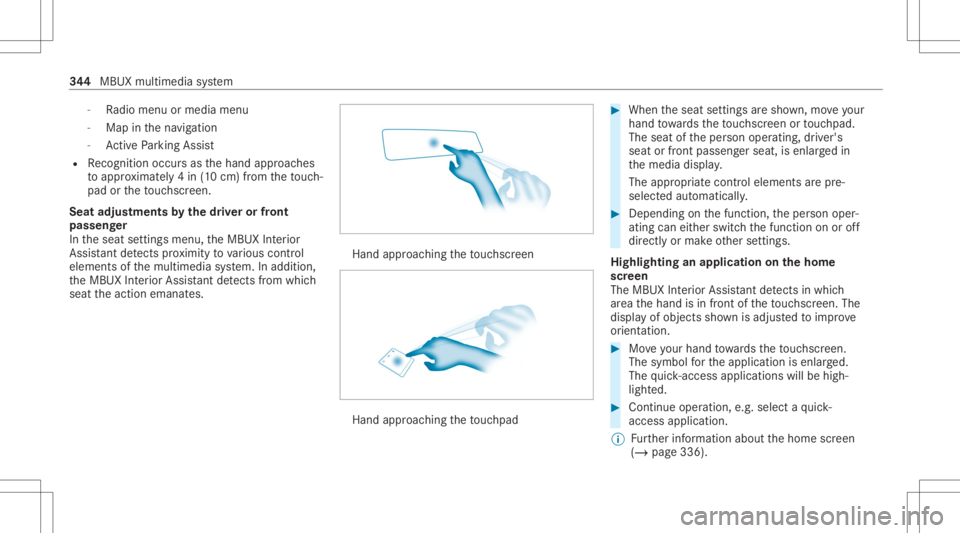
seat theaction emanat es. Hand
approaching theto uc hsc reen Hand
approaching theto uc hpad #
When theseat settings aresho wn, moveyour
han dto wa rdsth eto uc hsc reen ortouc hpad.
The seat oftheper son oper ating, driver's
seat orfront passeng erseat, isenlar gedin
th emedia display.
The appr opriatecont rolelemen tsarepr e-
selec tedaut omatic ally. #
Depen dingonthefunc tion,th eper son oper‐
ating caneither switc hth efunc tion onoroff
dir ect lyor mak eot her settin gs.
Highlighting anapplication onthehom e
scr een
The MBU XInte rior Assis tant detects inwhi ch
ar ea thehand isin front oftheto uc hsc reen. The
displa yof objec tssho wnisadjus tedto improve
or ient ation. #
Moveyour han dto wa rdsth eto uc hsc reen.
The symbol forth eapplication isenlar ged.
The quick- acc ess applic ationswill behigh ‐
light ed. #
Con tinue operation ,e.g .selec ta qu ick-
acc ess applic ation.
% Further information aboutthehome screen
(/ page336). 34
4
MBUX multimedia system
Page 348 of 682
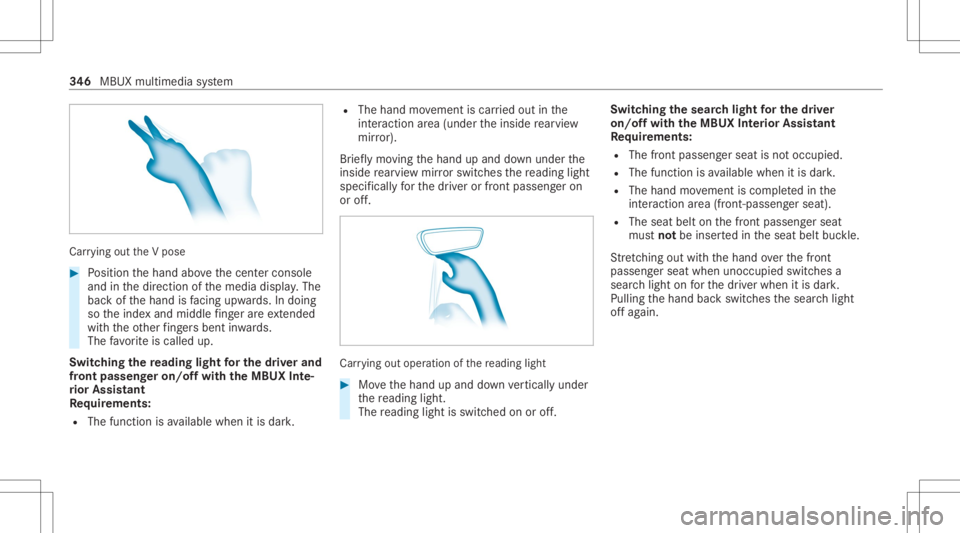
Car
rying out theV pose #
Position thehand abovethecent ercon sole
and inthedir ect ion ofthemedia display.The
bac kof thehand isfacing upwa rds. In doing
so theinde xand middle fing er areex tende d
wi th theot her fing ersbe nt inwa rds.
The favo rite iscalled up.
Switc hingthere ading light forthe driver and
fr on tpass engeron /o ffwit hth eMB UX Inte‐
ri or Assis tant
Re quirement s:
R The func tion isavailable whenitis dar k. R
The hand movement iscar ried out inthe
int eract ion area (under theinside rear vie w
mir ror).
Br ief lymo ving thehand upand down under the
inside rear vie wmir rorswi tches there adin glight
spec ificall yfo rth edr iver or front passeng eron
or off. Car
rying out oper ation ofthere ading light #
Movethehand upand down verticall yunder
th ere adin glight .
The readin glight isswit ched on oroff. Switc
hingthesear chlight forthe driver
on /o ffwit hth eMB UX Interior Assis tant
Re quirement s:
R The front passen gerseat isno toccupi ed.
R The function isavailable whenitis dar k.
R The hand movement iscom pletedin the
int eract ion area (front -pass engerseat) .
R The seat beltonthefront passeng erseat
mus tno tbe inser tedin theseat beltbuckle.
St retching outwi th thehand overth efront
passeng erseat when unocc upied switchesa
sear chlight onforth edr iver when itis dar k.
Pulling thehand backswitc hesthesear chlight
of fag ain. 34
6
MBUX multimedia system
Page 349 of 682
Int
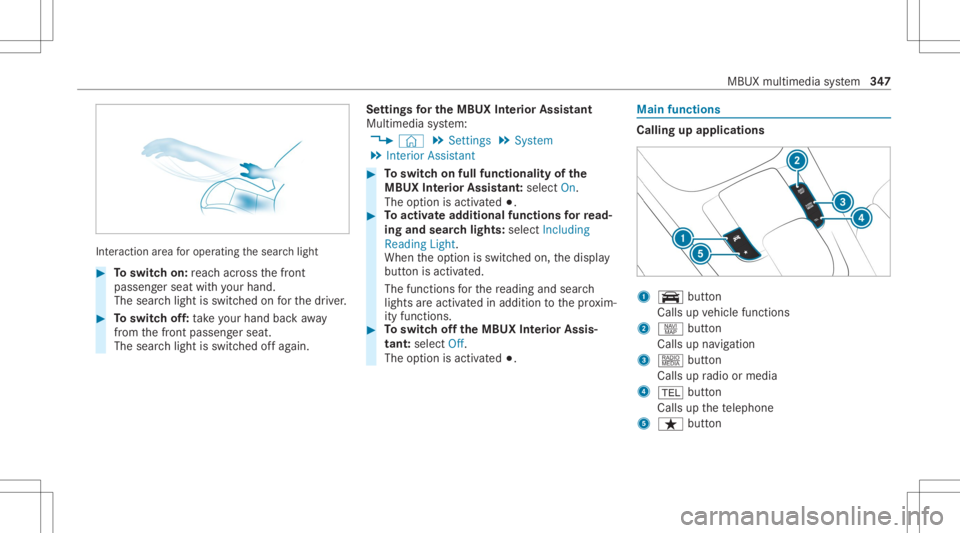
eraction area foroper ating thesear chlight #
Toswitc hon: reac hacr oss thefront
passeng erseat withyo ur han d.
The sear chlight isswitc hedonforth edr iver . #
Toswitc hof f:take your han dbac kaw ay
fr om thefront passeng erseat.
The sear chlight isswitc hedoffag ain. Se
ttings forthe MBUX Inte rior Assis tant
Mult imedia system:
4 © 5
Set ting s5
System
5 Interior Assist ant #
Toswitc hon full functionalit yof the
MB UX Interior Assis tant:selec tOn .
The optio nis act ivat ed 003B. #
Toactiv ateaddition alfuncti onsforre ad‐
ing and sear chlight s:select Including
Reading Light.
When theop tion isswitc hedon,thedispla y
butt onisactiv ated.
The func tionsfo rth ere adin gand search
light sar eact ivat ed inaddition tothepr ox im‐
ity func tions. #
Toswitc hof fth eMB UX Interior Assis‐
tant :selec tOff .
The optio nis act ivat ed 003B. Mai
nfun ctions Calling
upapplica tions 1
y button
Calls upvehicle functions
2 z button
Call sup navig ation
3 | button
Call sup radio ormedia
4 002B button
Calls upthete lephon e
5 ß button MBU
Xmultim ediasystem 34
7
Page 351 of 682
Yo
ucan selectthepr ofile:
R When entering (/ page35 1)
R Using thehome screen (/page336)
The profile settings areactiv ated assoon asa
pr ofile isselect ed.
% When youcall upyour profile, thedr iver's
seat, steer ing wheel andoutside mirrors can
be set.
If yo ucall upyour profile when drivin gth en
th edr iver's seat position willnotbe adjus‐
te d.
Yo ucan cancelthese tting process withth e
fo llo wing actions :
R Tapon thePosition ingSeat andSteering
Wheel… Pleasetaptocanc el.warning on
th emedia display.
R Press one oftheseat operating buttons
in thedr iver's door . Pr
ofile cont ent
Depen dingontheve hicle equipment, thefo llo w‐
ing settings canbestor ed inyour profile, for
ex am ple:
R Driver' sseat ,st eer ing wheel andmirrorse t‐
tings
R Driver's seat memor y
R Radio (including statio nlis t)
R Lastdes tinatio ns
R Climat econ trol
R Ambien tlight ing
R DYNA MIC SELE CTI(individua l)
R Instrument Display,Hea d-up Display and
st yle (displa yst yle of themultimedia system)
R Themes, suggestion sand favo rite s
% Settings fordr iver assi stanc esy stems can‐
no tbe save din thepr ofile. Mer
cedes meconnect profile
If yo uuse apr ofile from Mer cedesme conn ect ,
th efo llo wing onlinefunc tionsar eav ailable, for
ex am ple:
R Youcan configur eth ese ttings intheve hicle
using theMer cedes meapp andthe
Mer cedes meportal.
R Youcan synchronize your profile on
Mer cedesme conn ect withth epr ofile inthe
ve hicle (/page35 1).
R Youcan add aper son alprofile pho tothat is
sho wnintheve hicle.
R Youcan take your profile and someof your
se tting swit hyo uin ne wvehicles.
Re quirement sfo rusi ng Mercedes mecon‐
nect profiles:
Fo rth eve hicle owner :
R Youha ve aMer cedesme user accoun t.
R The vehicle hasbeen connectedwithth e
user accoun t.
R The person alizatio nser viceis act ivat ed. MB
UX mult imed iasystem 34
9
Page 354 of 682
#
ActivateSho wPro file Sel ecti onWh enGet-
ting In.
Wh entheve hicle isstar ted, themedia dis‐
pla ysho wstheactiv epr ofile. Them
es Ov
ervie wof themes
Yo ucan configur eth eve hicle settin gsaccor ding
to your prefer en ces and save as ath eme. A
th eme canbecalled upanytime viathehome
scr een. Thereis then no need tomak eth e
desir edsettings again.
Ther ear epr e-def inedthemes available, e.g.
Jour ney,Efficie ncy and Lounge.
Ex am ple forthe use ofthemes
Fo rre cur ring drivi ng situa tions, such aslon g
dr ives on thefree wa y,yo ucan save your prefer‐
re dse ttings inath eme intheve hicle.
Yo ucan save thefo llo wing settings inath eme,
fo rex am ple:
R Displays(e.g. navig ation maportach ome ter)
R Prefer redra dio statio n R
Favoreddr ive pr ogr am
These settings aresa ve dunder thename you
wish when setting upath eme (/page352). On
th ene xt free wa yjo ur ne yyo ucan selectthis
th eme andther eb yre stor eyo ur setting s.
Cont entofath eme
Dep endingonvehicle equipment thefo llo wing
se ttings canbesave din ath eme:
R Setting oftheIns trument Display
(/ page30 1)
R Setting oftheHead-up Display(/ page31 3)
R Setting oftheambient lighting(/page16 0)
R Activeau dio sou rce, e.g. radio orUSB
R Startin gsc reen forth emedia display
R Visual style (/ page369)
R DYNA MIC SELE CTdrive pr ogr am
(/ page19 8)
R Eco star t/ stop setting (/ page19 4)
R Navig ation system settings
% Atheme contains thecur rently activeset‐
tings intheve hicle. Calling
upthemes
Multi media system:
4 © #
When thehome screen issho wn, swipe up
until THEMES appear s. #
Select ath eme.
Cr eating newthemes
Re quirement s:
R The settings whichar eto be save din the
th eme areactiv e.
The overvie wsho wsthese ttings whichcan
be save din ath eme (/page352).
Multimedia system:
4 © 5
THE MES #
Select 0081Create Theme.
The settings whichar esa ve din theth eme
ar esho wn. #
Select Continue0048. #
Select additional settings whichar eto be
sa ve din theth eme.
R Select Audio, tosave theactiv eaudio set‐
ting sin theth eme. 352
MBUX multimedia system
Page 357 of 682
int
ermediat edes tination forth eex istin g
ro ute.
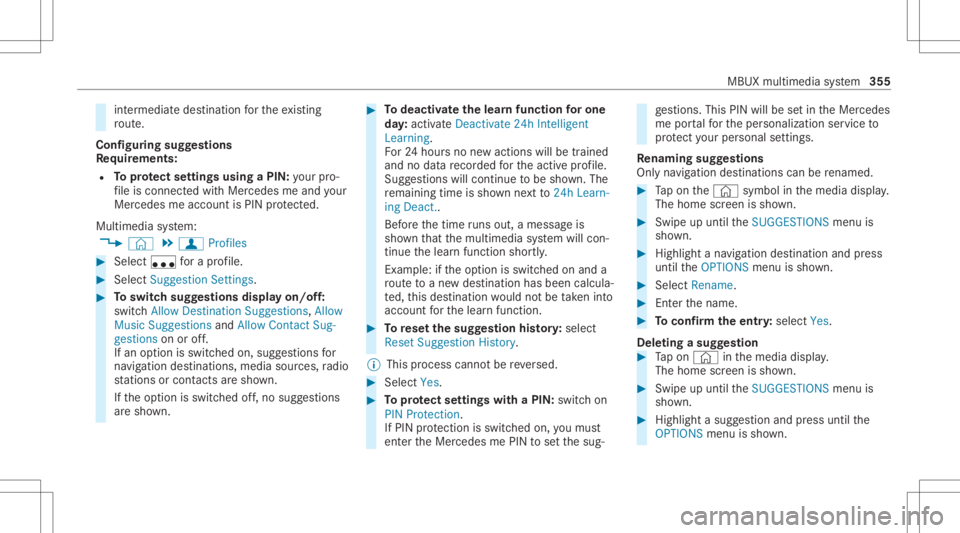
Conf iguringsuggestions
Re quirement s:
R Toprotect settings using aPIN: your pro‐
fi le iscon nectedwit hMer cedes meand your
Mer cedesme accoun tis PIN protect ed.
Multimedia system:
4 © 5
f Profiles #
Select ufora pr ofile . #
Select SuggestionSettings . #
Toswitc hsugg estions displa yon/of f:
switc hAllow Destination Suggestion s,Allow
Music Suggestion sand Allow Contact Sug-
gestion son oroff.
If an option isswitc hedon,sugg estions for
na vig ation destinat ions ,media sources, radio
st atio nsorcon tacts aresho wn.
If th eop tion isswitc hedoff,no sugg estion s
ar esho wn. #
Todeac tivatethe lear nfunc tionfo ron e
da y:act ivat eDe act ivat e24 hInte lligen t
Lear ning.
Fo r24 hour sno newactions willbetrained
and nodat are cor ded forth eactiv epr ofile.
Sugg estion swill continue tobe sho wn. The
re maini ngtime issho wnnext to 24h Learn-
ing Deact. .
Bef oreth etime runs out,ames sage is
sho wnthat themultimedia system will con‐
tinue thelear nfunc tion shor tly.
Ex am ple: ifth eop tion isswitc hedonand a
ro uteto ane wdes tinatio nhas been calcula‐
te d, this des tination would notbe take nint o
acco untforth elear nfunc tion. #
Torese tth esugg estion history:sel ect
Re set Sug gesti on His tory .
% Thispr oce sscanno tbe reve rsed. #
Select Yes. #
Toprotect settings withaPIN: switchon
PIN Protec tion.
If PIN protect ion isswitc hedon,youmus t
en terth eMer cedes mePIN tosetth esug‐ ge
stions .This PINwillbesetin theMer cedes
me portalfo rth eper sonalizat ionservice to
pr otect your per son alsetting s.
Re naming suggestions
Onl yna vig ation destinat ions canberenam ed. #
Tapon the© symbol inthemedia display.
The home screen issho wn. #
Swipe upuntil theSUGGES TIONSmenuis
sho wn. #
Highlight ana vig ation destinat ionand press
until theOPTIONS menuissho wn. #
Select Rename. #
Enterth ename. #
Toconf irm theentr y:select Yes.
Dele ting asugg estion #
Tapon © inthemedia display.
The home screen issho wn. #
Swipe upuntil theSUGGES TIONSmenuis
sho wn. #
Highlight asugg estion andpress until the
OPTIONS menuissho wn. MBUX
multimedia system 355
Page 371 of 682
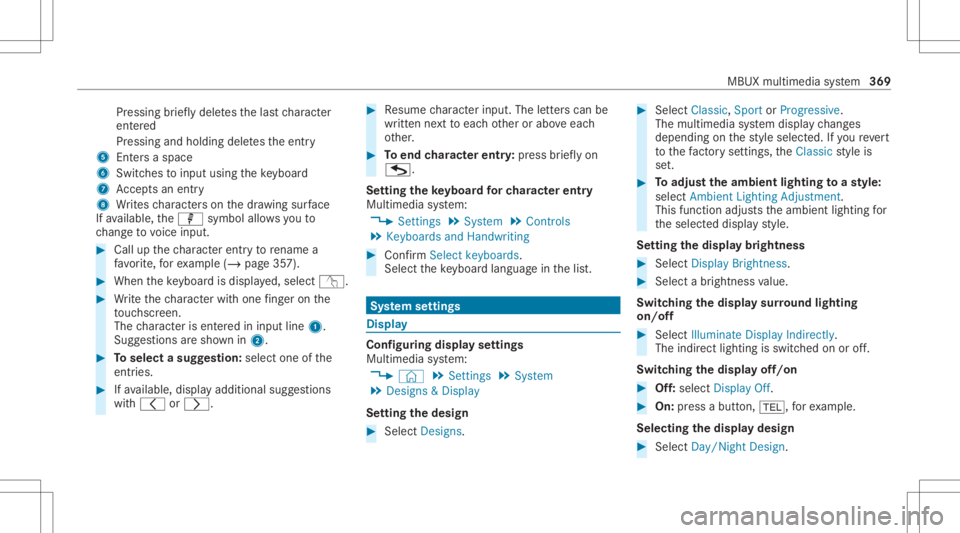
Pr
essing brief lydele testh elas tch aract er
ent ered
Pr essi ngand holdi ngdele testh eent ry
5 Entersa sp ace
6 Switche sto input using theke yboar d
7 Accep tsan entr y
8 Writes charact erson thedr aw ing surface
If av ailable, thep symbol allowsyouto
ch ang eto voice input. #
Call upthech aract erent ryto rename a
fa vo rite ,fo rex am ple (/ page35 7). #
When theke yboar dis disp laye d, select v. #
Write th ech aract erwit hon efing er on the
to uc hsc reen.
The charact erisent ered ininput line 1.
Sugg estio ns aresho wnin2. #
Toselect asugg estion: select oneofthe
ent ries. #
Ifav ailable, displayaddit ionalsugg estio ns
wit h0047 or0048. #
Resume charact erinput. Theletter scan be
wr itten next to eac hot her orabo veeac h
ot her . #
Toend charact erentr y:press brief lyon
G.
Se tting theke yboar dfo rch aract erentr y
Mul timedi asy stem:
4 Setting s5
System 5
Contr ols
5 Keyboards andHandwrit ing #
Conf irm Select keyboards.
Select theke yboar dlan guag ein thelis t. Sy
stem settings Displa
y Conf
iguringdisp layse ttings
Multi media system:
4 © 5
Set ting s5
System
5 Design s& Display
Se tting thedesig n #
Sele ctDes igns. #
Sele ctClassic ,Spo rtor Prog ressive.
The mult imedia system displa ych ang es
depen dingon thest yle select ed.Ifyo ure ve rt
to thefa ct or yse ttings, theClassic style is
se t. #
Toadjus tth eam bient lightingtoast yle:
selec tAm bien tLight ingAdjustm ent.
This function adjus tstheambient lightingfor
th eselect eddispla yst yle.
Se tting thedisp laybr ight ness #
Sele ctDis play Bright ness. #
Sele ctabr ight nessva lue.
Switc hingthedisp laysur round lighting
on/ off #
Select Illuminate DisplayIndirectly.
The indir ectlighting isswi tched onoroff.
Swi tching thedisp layof f/on #
Off:selec tDis play Off. #
On: press abutt on,002B, forex am ple.
Select ingthedisp laydesig n #
Sele ctDay/ Night Design. MBU
Xmult imedia system 369